Six months into a project, finance asks a simple question: “How much did the new mobile app cost us last quarter?” You open Cost Management, and the answer is a mess — the app’s resources are scattered across the same subscription as three other workloads, dev and prod share a bill, and a contractor’s experiments are mixed in too. You can filter by tags, but only the resources tagged correctly, which is about half. The reason this is hard is that the subscription — the single most important container in Azure for billing and access — was never set up to draw a clean line around that app. Subscriptions are where the bill is cut, where access is scoped, and where many limits are counted, and a boundary in the wrong place hurts for years.
An Azure subscription is a logical container that ties three things together: an agreement (how you pay Microsoft), a billing scope (the line on the invoice), and a boundary for resources, access and policy. Every resource you create — a VM, a storage account, a database — lives in exactly one subscription, inside a resource group. The subscription is also where a large set of quotas and limits are counted (vCPUs, VNets, resource groups). Picking how many subscriptions you have and where their edges fall is one of the first real architecture decisions on Azure, and people who skip it spend the next year fighting cost reports and access sprawl.
This article gives you the mental model and the decision framework: what a subscription is and is not, how it sits between your Microsoft Entra tenant above and your resource groups below, the main offer types and which one you actually have, exactly which boundaries a subscription draws (billing, RBAC, policy, quota, region — and which it does not), and the decision that trips up most teams: when to create a new subscription versus a new resource group. We keep it concrete with az CLI and Bicep, a worked scenario, and a free-tier lab.
What problem this solves
Without a deliberate subscription strategy, three predictable pains show up. First, billing is unattributable: you cannot answer “what did team X / project Y / environment Z cost” cleanly, because the only hard line Azure draws around cost for free is the subscription, and you put everything in one — so you fall back to tags, which are best-effort and always partially missing. Second, access is too coarse or too sprawling: granting access at the subscription level hands someone every resource in it, so to give a contractor access to one app you either over-grant (risky) or hand-craft dozens of resource-group role assignments (toil). Third, you hit limits you did not know existed: a subscription has caps — regional vCPU quotas, a ceiling on resource groups, public IPs — and a busy shared subscription quietly runs into them, blocking deployments with errors that look like outages but are really quota walls.
The subscription is the lever that fixes all three at once, if you place it correctly. A subscription per environment (dev / test / prod) gives a clean per-environment bill and lets you apply stricter policy to prod without touching dev. A subscription per business unit gives finance a real chargeback line without relying on tags. Spreading workloads across subscriptions also spreads them across separate quota pools, so one noisy team cannot exhaust the vCPU quota another team’s deployment needs.
Who hits this: everyone past the first toy deployment. A solo developer with one app rarely needs more than one subscription. But the moment you have more than one environment, team, or cost owner, or a workload that needs harder isolation (regulated data, a production blast-radius you want contained), the subscription boundary becomes the tool you reach for. Getting the model right early is cheap; re-homing live resources across subscriptions later is a migration, with downtime risk and re-pointed automation.
The field in one frame — every job a subscription does, and what getting it wrong costs:
| What the subscription is | What it gives you | What it costs you to get it wrong |
|---|---|---|
| A billing scope | A clean, free line on the invoice per subscription | Untraceable spend; tag-based reports that are always partial |
| An access boundary | One place to grant/deny access to everything inside | Over-granting at the top, or RBAC sprawl at the bottom |
| A policy boundary | Apply rules (allowed regions, required tags) to all resources inside | Inconsistent guardrails; prod and dev under the same loose rules |
| A quota/limit boundary | A separate pool of vCPUs, VNets, IPs, etc. | One workload starves another; deploys fail on quota |
| A unit you can hand off | Transfer billing or move it under a management group | Tangled ownership; cannot delegate cleanly |
Learning objectives
By the end of this article you can:
- Explain what an Azure subscription is and how it differs from a Microsoft Entra tenant, a management group, and a resource group.
- Identify which offer type you have — Free, Pay-As-You-Go, EA, MCA, CSP, or a sponsorship/Visual Studio benefit — and what each implies for billing and support.
- Name exactly which boundaries a subscription draws — billing, RBAC, policy, quota, and the soft region/networking edges — and which it does not draw.
- Apply a clear decision rule for when to create a new subscription versus a new resource group, using cost ownership, access isolation, policy and quota as the deciding factors.
- Read the subscription → management group → tenant hierarchy and see where governance (policy, RBAC, budgets) is best applied.
- Create, rename and view a subscription using the portal and
azCLI, and understand the Bicep deployment scope it implies. - Set a budget and cost alert at subscription scope so spend never surprises you again.
Prerequisites & where this fits
You need an Azure account you can sign into — even a free Azure account is enough for the lab. Be comfortable opening the Azure portal and ideally running az in Azure Cloud Shell. No prior governance knowledge is assumed; this article is the governance starting point.
This sits near the top of the Azure mental model, just below identity. The full ladder — from the account you log in with down to a single VM — is laid out in Azure resource hierarchy explained; this piece zooms into one rung, the subscription. Above it sit the Microsoft Entra tenant (identity) and optional management groups (grouping many subscriptions); below it sit resource groups and the resources. Natural next steps are Azure Policy for governance at scale and the multi-subscription blueprint in the Azure enterprise-scale landing zone.
A quick map of who owns and decides what at each rung:
| Rung | What it is | Typical owner | Decisions made here |
|---|---|---|---|
| Entra tenant | Identity boundary (users, groups, apps) | Identity / IT admin | Who exists; sign-in; Conditional Access |
| Management group | A folder grouping subscriptions | Platform / cloud team | Org-wide policy and RBAC inheritance |
| Subscription | Billing + access + quota container | Platform + cost owner | The boundary lines this article is about |
| Resource group | A folder for related resources | App / project team | Lifecycle grouping; deploy/delete together |
| Resource | A VM, DB, storage account, etc. | App team | The actual workload |
Core concepts
Four mental models make every later decision obvious. Read them once and the rest slots into place.
A subscription is a billing scope first. Think of it as “a line on the invoice plus everything billed to it.” Microsoft cuts cost at the subscription, and Cost Management slices spend by subscription for free, with no tagging discipline. Everything else a subscription does (access, policy, quota) rides on top of that billing container. So the first question when deciding where a boundary goes is almost always a money question: “whose budget pays for this, and do they need to see it separately?”
A subscription lives inside a tenant, not the other way around. Your Microsoft Entra tenant (formerly Azure AD) is your identity boundary — the directory of users, groups and apps. A tenant can contain many subscriptions; a subscription trusts exactly one tenant for authentication at a time. This is the most common newcomer confusion: the tenant is who you are, the subscription is what you pay for and deploy into. You can move a subscription to another tenant, but deliberately, not casually.
A subscription contains resource groups, which contain resources. Every resource lives in exactly one resource group, and every resource group in exactly one subscription. A resource group is a lightweight folder for things with a shared lifecycle (deployed and deleted together). It is not a free billing boundary and does not give a separate quota pool. So “subscription vs resource group” is really “do I need a new billing/quota/policy boundary (subscription), or just a new lifecycle folder (resource group)?”
A subscription is a quota and policy boundary. Many Azure limits are counted per subscription per region — vCPU cores, VNets, public IPs, resource groups. Two subscriptions are two separate quota pools. Likewise, Azure Policy and RBAC assignments at subscription scope cascade down to every resource group and resource inside. That makes the subscription the natural place to enforce “only these regions,” “every resource must have an owner tag,” or “give this team Reader.” Where you draw the subscription line is where many guardrails and limits land.
The four containers side by side
People conflate the four containers constantly; this table is the antidote:
| Container | What it bounds | How many can nest | Billing line? | Quota pool? | Policy/RBAC scope? |
|---|---|---|---|---|---|
| Entra tenant | Identity (users, groups, apps) | Top of the tree | No (identity, not billing) | No | RBAC root via root MG |
| Management group | A group of subscriptions | Up to 6 levels deep | No (rolls up children) | No | Yes — inherited downward |
| Subscription | Billing + access + quota | Sits under one MG | Yes | Yes | Yes — cascades down |
| Resource group | Lifecycle of related resources | Sits under one subscription | No (use tags/filters) | No | Yes — cascades to its resources |
Subscription offer types — which one do you actually have?
“Subscription” is one word for several different offers, each a different agreement with Microsoft that determines how you pay, what support you get, and whether sponsorship credits or pre-committed discounts apply. You usually inherit your offer from how your organisation signed up, so the practical skill is recognising which one you are on. The major types:
| Offer type | Who it is for | How you pay | Key trait | Where you manage billing |
|---|---|---|---|---|
| Free account | New individuals trying Azure | Credit, then capped | ~₹15,800 / $200 credit (30 days) + 12 months of free-tier services + always-free tiers | Account portal |
| Pay-As-You-Go (PAYG) | Individuals, small teams | Monthly card/invoice, per-use | No commitment; full price; easy to start | Account / Cost Management |
| Microsoft Customer Agreement (MCA) | Orgs buying direct or via Microsoft | Invoice, per-use, negotiated | The modern default for direct & many partner deals; rich billing hierarchy | Cost Management + Billing |
| Enterprise Agreement (EA) | Large enterprises | Annual commitment / monetary commitment | Volume discounts; Enterprise portal; departments | EA portal (and Cost Management) |
| CSP (Cloud Solution Provider) | Customers buying via a partner | Through the partner’s invoice | A reseller owns the billing relationship | Partner-managed |
| Sponsorship / Azure Sponsorship | Grant / program recipients | Sponsored credit | Time- and amount-limited credit | Sponsorship portal |
| Visual Studio (MSDN) subscriber | Developers with VS subscriptions | Monthly dev credit | Dev/test only, not for production | Account portal |
| Dev/Test offers (EA/PAYG) | Non-production workloads | Discounted dev/test rates | Lower rates; no SLA; non-prod only | Cost Management |
A few things that trip people up here:
- Free does not mean “free forever, unlimited.” The free account gives a one-time 30-day credit, 12 months of certain services free, and an always-free tier. After the credit you are stopped (if the spending cap is on) or rolled to Pay-As-You-Go. The Azure free account, credits, budgets and spending caps article covers what stays free and how the cap behaves.
- EA vs MCA is a billing-platform difference, not a technical one. Your VMs run identically; what changes is the agreement, the billing hierarchy, and which portal cuts the invoice. Newer relationships are typically MCA.
- CSP means a partner owns the bill. You may not see a Microsoft invoice at all — the partner bills you and some self-service billing actions are restricted — but you keep full technical control of the resources.
- Sponsorship and VS credits are not production-grade. No production SLA commitment; they are for evaluation, learning, or dev/test, not a customer-facing system.
The billing-hierarchy shapes differ by offer, which matters for sub-invoices or departmental rollups:
| Offer | Billing hierarchy (top → bottom) | Natural unit for chargeback |
|---|---|---|
| MCA | Billing account → Billing profile → Invoice section → Subscription | Invoice section or subscription |
| EA | Enrollment → Department → Account → Subscription | Department or account |
| PAYG | Billing account → Subscription | Subscription |
| CSP | Partner tenant → Customer → Subscription | Per-customer (partner-side) |
You rarely choose your offer per project — procurement sets it. What you do choose is how many subscriptions to create within that offer and where to draw their boundaries, which is the rest of this article.
The boundaries a subscription draws (and the ones it doesn’t)
This is the heart of the topic. A subscription is valuable precisely because of the lines it draws. Knowing which lines are hard (platform-enforced) versus soft (a convention or changeable default) tells you what the boundary actually buys you.
Billing boundary — hard
The subscription is a real, free billing line: Cost Management views, filters, budgets and alerts per subscription with zero tagging effort. This is the strongest reason to split — if two things need separate bills or budgets, separate subscriptions are the clean answer. You can still slice by resource group and tags within a subscription, but those are best-effort; the subscription line is guaranteed.
# See month-to-date cost for the current subscription
az consumption usage list --query "[].{resource:instanceName, cost:pretaxCost, currency:currency}" -o table
Access (RBAC) boundary — hard, and it cascades
A role assignment at subscription scope applies to every resource group and resource inside: Contributor lets someone manage everything in it, Reader see everything. Powerful and dangerous — the easy way to give a team “their” subscription, and the easy way to over-grant if the subscription holds more than that team should touch. The cascade is the point: set access once at the right scope and it flows down.
# Grant a user Reader over an ENTIRE subscription (cascades to all RGs/resources)
az role assignment create \
  --assignee user@contoso.com \
  --role "Reader" \
  --scope "/subscriptions/<SUBSCRIPTION_ID>"
Policy boundary — hard, and it cascades
Azure Policy assigned at subscription scope evaluates every resource inside — this is where you enforce “allowed locations = India regions only,” “require an owner tag,” or “deny public IPs.” Because policy cascades, putting prod in its own subscription lets you apply strict policy to prod without constraining dev. (Apply org-wide policy higher up, at a management group, so every subscription inherits it.)
# Restrict allowed regions for the whole subscription (built-in policy)
az policy assignment create \
  --name "allowed-locations" \
  --scope "/subscriptions/<SUBSCRIPTION_ID>" \
  --policy "e56962a6-4747-49cd-b67b-bf8b01975c4c" \
  --params '{ "listOfAllowedLocations": { "value": ["centralindia","southindia"] } }'
Quota / limit boundary — hard
Many limits are counted per subscription, often per region, so two subscriptions are two separate quota pools — splitting workloads spreads them across separate ceilings and prevents one starving another. The defaults that bite first:
| Limit (per subscription) | Typical default | Notes |
|---|---|---|
| Resource groups | 980 | Generous, but finite |
| VMs per region | high (thousands) | Bounded by vCPU quota, not VM count |
| vCPUs per region (per family) | starts low (e.g. 10–20 per family) | The quota you hit first; raise via support |
| Virtual networks per region | ~1,000 | Per subscription per region |
| Public IP addresses (Standard) | ~1,000 | Counts toward subscription totals |
| Storage accounts per region | ~250 | Per subscription per region |
| Role assignments | ~4,000 | Per subscription — RBAC sprawl hits this |
These are defaults; many are raisable via support, but some (like role assignments) are firmer and a real reason to split.
Region — soft (a subscription is global)
A subscription is not tied to a region. You can deploy in any region your policy and quota allow, from one subscription — there is no “US subscription” vs “India subscription” at the platform level. (You may choose to split by geography for data-residency or quota, but that is your convention, not a platform boundary.)
Network — soft (a subscription does not isolate the network)
Two workloads in two subscriptions are not automatically isolated on the network: VNets in different subscriptions can be peered and talk; VNets in the same subscription are isolated unless you peer them. Network isolation is drawn by VNets, subnets and NSGs, not by the subscription — a frequent misconception covered in Azure virtual network, subnets and NSGs.
The full hard-versus-soft picture:
| Boundary | Hard or soft? | What it means in practice |
|---|---|---|
| Billing | Hard | Free, guaranteed cost line per subscription |
| Access (RBAC) | Hard | Assignments cascade to all resources inside |
| Policy | Hard | Policy cascades to all resources inside |
| Quota / limits | Hard | Separate pool of vCPUs, VNets, IPs, RGs |
| Identity (tenant trust) | Hard-ish | One tenant per subscription; changeable deliberately |
| Region | Soft | A subscription is global; pick region per resource |
| Network isolation | Soft | Drawn by VNet/NSG, not by the subscription |
| Resource lifecycle | Soft | That is the resource group’s job, not the subscription’s |
When to create a new subscription vs a new resource group
This is the decision people get wrong most often, and it is simple once you anchor on the boundaries above. A resource group is a lifecycle folder (things that deploy and delete together); a subscription is a billing/access/quota/policy boundary. So the question is never “is this a different app?” — it is “do I need a different boundary?”
The decision rule in one table — if any “new subscription” trigger is true, lean subscription; otherwise a resource group is enough:
| If you need… | Use a new… | Why |
|---|---|---|
| A separate bill / budget someone owns | Subscription | Only the subscription gives a free, hard cost line |
| A separate quota pool (vCPUs, IPs) | Subscription | Quotas are per subscription; RGs share the pool |
| Stricter policy for one environment (e.g. prod) | Subscription | Policy cascades cleanly per subscription |
| Hard access isolation between teams | Subscription | One team = one subscription = clean blast radius |
| A different tenant / org to own it | Subscription | Tenant trust is set at the subscription |
| Just to group related resources to deploy/delete together | Resource group | Lifecycle grouping is the RG’s whole job |
| To separate cost visibility within one owner’s budget | Resource group + tags | Filter cost by RG/tag; no new boundary needed |
| To keep dev experiments tidy under your own budget | Resource group | Same owner, same quota, just organisation |
The common patterns teams settle on:
| Pattern | Subscriptions you create | Best when |
|---|---|---|
| Single subscription | 1 (everything) | Solo dev, one app, one owner, learning |
| Per environment | dev / test / prod | You want prod isolated for policy + blast radius |
| Per business unit / product | one per team or product | Finance needs per-team chargeback |
| Per environment × per unit | e.g. 2 units × 3 envs = 6 | Larger orgs; landing-zone style |
| Hub + spokes | a shared “platform” sub + per-workload subs | Centralised networking/identity, isolated workloads |
A rule of thumb that ages well: start with as few subscriptions as cleanly separate your money and your prod blast radius, and split further only when a real boundary need appears. Over-splitting early adds management overhead (more budgets, policy assignments and RBAC to keep in sync); under-splitting creates the tangled-bill problem we opened with. For most small teams, “prod in its own subscription, everything non-prod in another” is a great starting shape.
What moving resources between subscriptions costs you
You can move many resources between subscriptions, but treat it as a migration, not a drag-and-drop. The caveats:
| Aspect | Reality when moving across subscriptions |
|---|---|
| Supported? | Many resource types yes, some no (check the move-support matrix) |
| Downtime | The resource is locked during the move; some types need recreate |
| Dependencies | Linked resources often must move together (e.g. NIC + VM + disks) |
| Automation | IDs change → pipelines, RBAC, and references must be re-pointed |
| Effort | Plan it; do not rely on it as your “we’ll fix the boundary later” |
The lesson: pick the boundary deliberately up front — far cheaper than re-homing live workloads.
Architecture at a glance
Picture the hierarchy as a path from identity down to a running resource, with the subscription as the pivotal middle layer. At the top sits your Microsoft Entra tenant — the identity boundary that says who can sign in. Beneath it, management groups form an optional folder tree (up to six levels deep) where you apply org-wide Azure Policy and RBAC that every subscription below inherits. Each subscription hangs under one management group and draws the hard lines this article is about: the billing scope (the invoice line), the quota pool (vCPUs, VNets, IPs), and the scope at which budgets, cost alerts and most guardrails land. Inside a subscription, resource groups are lifecycle folders holding the real resources — VMs, storage accounts, databases.
Follow the flow left to right: a tenant admin is granted a role; that assignment, placed at a management group or subscription, cascades downward to every resource group and resource in scope. In parallel, Cost Management reads usage upward from the resources, aggregates it at the subscription billing line, and rolls it up the management-group tree, while budgets and alerts sit at the subscription to catch overspend before the invoice does. The two production-shaping decisions live entirely here: where you put the billing line (whose budget, what chargeback) and where you put the prod blast radius (one subscription per environment). Get those two right and everything below is just tidy organisation.
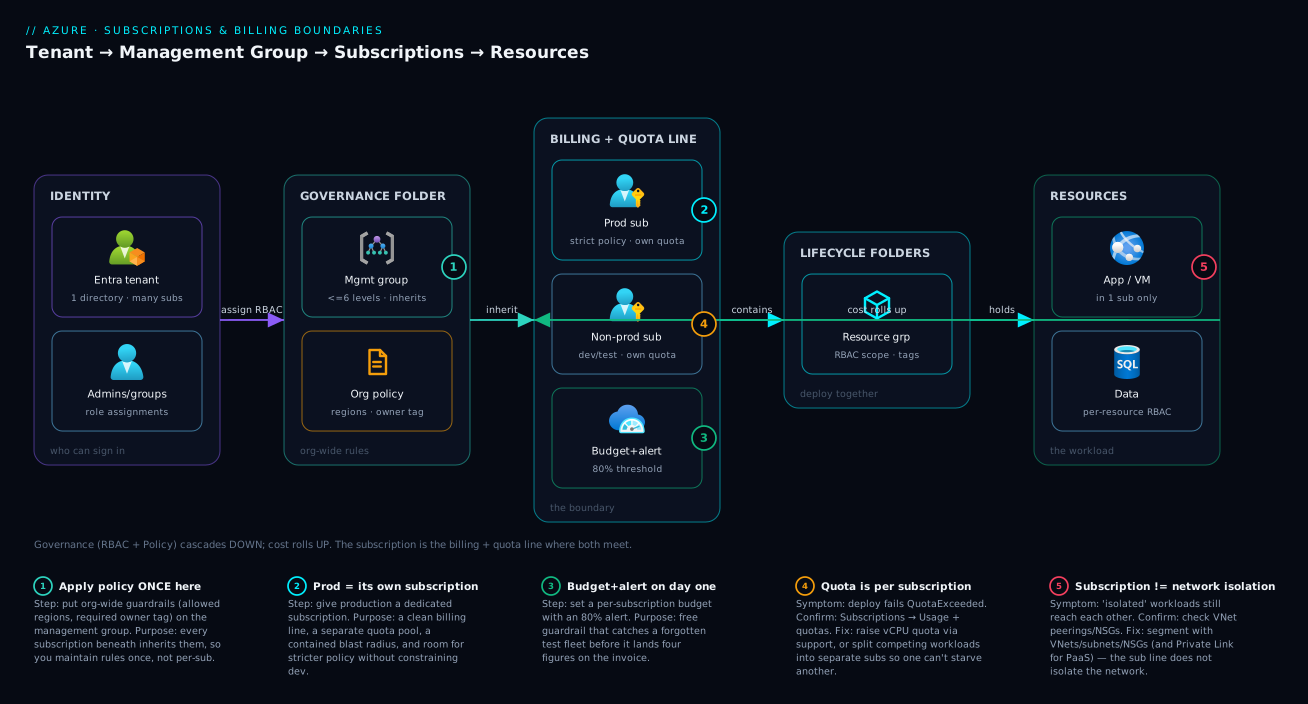
The diagram makes the asymmetry visible: governance flows down (policy and RBAC from management group → subscription → resource group → resource) while cost flows up (resource usage → subscription invoice line → management-group rollup). The subscription is where both currents meet — exactly why it is the boundary you reason about first.
Real-world scenario
Meridian Retail is a mid-sized e-commerce company on Azure under a Microsoft Customer Agreement (MCA). They started, like most teams, with a single subscription meridian-prod holding everything: the customer-facing storefront, internal admin tools, a data-analytics sandbox, and a contractor’s proof-of-concept for a loyalty app. For eighteen months it worked — until it didn’t, in three ways at once.
The billing pain. Finance moved to chargeback: each business unit had to own its spend. With one subscription the only lever was tags, and an audit showed 40% of resources untagged or mistagged — the “what did analytics spend?” report was guesswork and the analytics lead disputed every cross-charge. The access pain. The loyalty contractor needed access; granting Contributor on meridian-prod would have handed an external party the keys to the live storefront, so an engineer hand-built fourteen resource-group-scoped role assignments that drifted out of sync within a month. The quota pain. A load test in the analytics sandbox consumed the subscription’s regional vCPU quota for the VM family the storefront also used; a routine storefront scale-out then failed at 11pm with QuotaExceeded — an apparent outage that was really a shared-ceiling collision.
The platform team fixed all three with a subscription split, not a tagging crusade. They created four subscriptions under the same MCA billing profile: meridian-storefront-prod, meridian-internal-prod, meridian-analytics, and meridian-sandbox. Each became its own billing line (per-unit chargeback for free) and its own quota pool (the load test could never again starve the storefront). The contractor got Contributor on meridian-sandbox only — one clean assignment, blast radius of exactly one subscription. The four subscriptions sat under a meridian management group with two inherited org-wide policies — allowed regions = Central/South India and require an owner tag; storefront-prod alone added stricter policy (deny public IPs).
The migration took a planned weekend: storefront and internal resources stayed put (rename plus moving one resource group), while the stateless analytics and sandbox were rebuilt fresh via Bicep rather than moved. Six weeks later the same finance question was a two-click Cost Management filter on one subscription. The lesson: the subscription boundary is a money and blast-radius decision, and it is far cheaper to draw early than to redraw around a live storefront.
Advantages and disadvantages
Splitting into more subscriptions is a trade-off, not a free win. The two-column view:
| Advantages of more subscriptions | Disadvantages of more subscriptions |
|---|---|
| Clean, free per-subscription billing line | More billing scopes/budgets to manage |
| Separate quota pools (no cross-starvation) | Resources can’t trivially share a quota headroom |
| Tight access isolation (smaller blast radius) | More RBAC assignments to provision per team |
| Per-environment policy (strict prod, loose dev) | Policy must be applied/maintained per scope (use MGs) |
| Easier ownership handoff / chargeback | Cross-subscription networking needs explicit peering |
| Failure/incident blast radius is contained | Inventory and reporting span more containers |
When each side matters: the advantages dominate the moment you have multiple cost owners, a production blast radius you want contained, or workloads competing for quota. The disadvantages dominate when you are small — a solo developer or single team with one budget gains little from splitting and pays the management tax for nothing. The honest middle path: split where money and prod risk demand it, push shared governance up to a management group, and resist splitting purely for “tidiness” (that is what resource groups and tags are for).
Hands-on lab
This lab is read-mostly and free — it inspects your subscription, sets cost guardrails, and tries one governance action. Run it in Azure Cloud Shell (Bash); nothing here provisions billable resources.
Step 1 — See your current subscription and tenant.
az account show --query "{name:name, subscriptionId:id, tenantId:tenantId, state:state, offer:authorizationSource}" -o table
Expected: one row with your subscription name, its GUID, the tenant GUID, and state = Enabled.
Step 2 — List every subscription you can access.
az account list --query "[].{name:name, id:id, isDefault:isDefault, state:state}" -o table
Step 3 — Switch the active subscription (all later az commands target it):
az account set --subscription "<SUBSCRIPTION_NAME_OR_ID>"
az account show --query name -o tsv   # confirm the switch
Step 4 — Rename a subscription (cosmetic, safe — a clear name beats a GUID):
az account subscription rename --id "<SUBSCRIPTION_ID>" --name "kv-lab-sandbox"
# If the extension is unavailable, rename in the portal: Subscriptions → (your sub) → Rename
Step 5 — See month-to-date cost before you budget for it:
az consumption usage list \
  --query "[].{resource:instanceName, meter:meterDetails.meterName, cost:pretaxCost}" -o table
Step 6 — Create a budget with an alert — the most useful guardrail there is. It emails you when spend crosses a threshold; set a small amount so you can see it work:
az consumption budget create \
  --budget-name "kv-lab-monthly" \
  --amount 10 \
  --category Cost \
  --time-grain Monthly \
  --start-date 2026-06-01 \
  --end-date 2027-06-01 \
  --notifications '{ "actual_GT_80": { "enabled": true, "operator": "GreaterThan", "threshold": 80, "contactEmails": ["you@example.com"] } }'
The same budget as Bicep, deployed at subscription scope (note targetScope):
targetScope = 'subscription'

resource budget 'Microsoft.Consumption/budgets@2023-11-01' = {
  name: 'kv-lab-monthly'
  properties: {
    category: 'Cost'
    amount: 10
    timeGrain: 'Monthly'
    timePeriod: { startDate: '2026-06-01', endDate: '2027-06-01' }
    notifications: {
      actualGreaterThan80: {
        enabled: true
        operator: 'GreaterThan'
        threshold: 80
        contactEmails: [ 'you@example.com' ]
      }
    }
  }
}
az deployment sub create --location centralindia --template-file budget.bicep
Step 7 — Try a subscription-scoped policy (allowed regions) — governance you can feel; it blocks resource creation outside the listed regions:
az policy assignment create \
  --name "kv-lab-allowed-locations" \
  --display-name "Lab: allowed locations" \
  --scope "/subscriptions/$(az account show --query id -o tsv)" \
  --policy "e56962a6-4747-49cd-b67b-bf8b01975c4c" \
  --params '{ "listOfAllowedLocations": { "value": ["centralindia","southindia"] } }'
Step 8 — Teardown. Remove the lab artefacts:
az policy assignment delete --name "kv-lab-allowed-locations" \
  --scope "/subscriptions/$(az account show --query id -o tsv)"
az consumption budget delete --budget-name "kv-lab-monthly"
You created no billable resources, so there is nothing else to delete — and you now have a budget+alert habit and have seen policy cascade from the subscription.
Common mistakes & troubleshooting
The failure modes here are rarely dramatic — mostly slow-burning confusions and quota walls. The most common, with how to spot and fix each:
| # | Symptom | Root cause | How to confirm | Fix |
|---|---|---|---|---|
| 1 | “I can’t see my resources after logging in” | Wrong subscription active (you have several) | az account show shows a different sub |
az account set --subscription <right one> |
| 2 | Deploy fails with QuotaExceeded / OperationNotAllowed |
Hit a per-subscription regional vCPU quota | Portal → Subscriptions → Usage + quotas | Raise quota via support, or deploy to another sub/region |
| 3 | Cost report can’t isolate a team’s spend | Everything in one subscription, tags incomplete | Cost Management by RG shows mixed owners | Split that workload into its own subscription |
| 4 | Granting one app’s access exposes everything | Role assigned at subscription scope, not RG/resource | az role assignment list --scope /subscriptions/<id> |
Re-scope to the resource group or resource |
| 5 | “Where did my free credit go / app stopped” | Free credit expired or spending cap hit | Account portal shows credit/cap status | Upgrade to PAYG; understand the cap |
| 6 | Policy you set isn’t applying to a resource | Applied at the wrong scope (different sub/RG) | Policy → Compliance shows scope | Re-assign at the correct subscription/MG scope |
| 7 | Two “isolated” workloads can still reach each other | VNets peered, or same VNet — subscription ≠ network isolation | Check VNet peerings / NSGs | Use VNet/NSG segmentation, not just separate subs |
| 8 | Can’t change billing / see invoices | CSP-managed subscription; partner owns billing | Offer type shows CSP | Contact the partner for billing actions |
| 9 | “Subscription disabled” — everything is down | Past-due payment, cap reached, or manually disabled | az account show → state: Disabled |
Resolve billing; re-enable in account/billing portal |
| 10 | Moved a resource and automation broke | Resource ID changed on cross-subscription move | Pipelines/RBAC reference the old ID | Re-point references; prefer redeploy for stateless |
| 11 | Can’t create more resource groups | Hit the per-subscription RG cap (980) | Count RGs: `az group list -o tsv | wc -l` |
| 12 | New subscription can’t authenticate expected users | Subscription trusts a different tenant | az account show --query tenantId |
Confirm/transfer to the intended tenant |
The meta-pattern: most “subscription problems” are really boundary-placement problems (the line is in the wrong place) or which-context-am-I-in problems (wrong active subscription) — both cheap to diagnose with az account show and the Usage + quotas blade.
Best practices
- Decide the boundary by money and prod blast radius first. Separate budgets or a production failure you want contained → separate subscriptions. Everything else can usually be a resource group.
- Start minimal, split on real need. A solo dev or single team rarely needs more than one or two subscriptions. Add one when a concrete boundary need (cost owner, quota, strict policy, isolation) appears — not for tidiness.
- Put prod in its own subscription. Clean blast radius, and stricter policy on prod without constraining dev/test.
- Push shared governance up to a management group. Apply org-wide policy and RBAC once at an MG so every subscription inherits it, instead of maintaining the same rules N times.
- Name subscriptions for humans.
contoso-payments-prodbeats a GUID in every cost report, alert and access review. - Set a budget and cost alert on every subscription, day one. The alert is free and catches runaway resources before the invoice.
- Adopt a landing-zone pattern as you grow. Don’t invent your own sprawl; the enterprise-scale landing zone gives a proven multi-subscription shape.
- Tag within subscriptions for finer cost cuts — the subscription is the free hard line; tags add per-cost-center granularity inside it, but never rely on tags where a real boundary is needed.
- Don’t over-split. Every subscription is more budgets, policy assignments and RBAC to keep in sync. The management tax is real.
- Know your offer type. EA vs MCA vs CSP changes how you manage billing and what self-service actions you have.
Security notes
The subscription is a primary access boundary, so treat its highest-privilege roles with care. Owner at subscription scope is god-mode over everything inside, including granting others access — keep subscription Owners tiny in number and prefer Contributor (manage resources, not access) for day-to-day work. Grant the least scope that works: if someone needs one app, assign at the resource group or resource, never at the subscription. Use Microsoft Entra ID groups for assignments rather than naming individuals, so joiners and leavers are handled by group membership.
Because access cascades, a subscription is exactly where you want a strict, audited set of role assignments and Azure Policy guardrails. Use management groups to enforce non-negotiable org-wide controls a subscription owner cannot turn off. Remember the soft boundaries: a subscription does not isolate the network — peered or shared VNets still connect, so segmentation is a job for VNets/NSGs and (for PaaS) Private Link and Private DNS. And the tenant is the identity boundary: keeping subscriptions in the right tenant, and protecting tenant admins with Conditional Access and MFA, is upstream of everything a subscription secures.
Cost & sizing
A subscription itself is free — you are billed only for the resources inside, so more subscriptions does not, by itself, cost more. “Sizing” here means choosing how many subscriptions and where the lines fall so your bill is legible and quotas don’t collide. The drivers:
| Cost/sizing factor | What it means | Guidance |
|---|---|---|
| Number of subscriptions | No direct charge per subscription | Split for boundaries, not cost; each is free |
| Budgets & alerts | Free to set, save money by catching overspend | Put one on every subscription, day one |
| Quota headroom | More subs = more separate quota pools | Split competing workloads so deploys don’t fail |
| Reservations / savings plans | Discounts can apply at sub or shared scope | Scope them to match your subscription split |
| Free account credit | One-time, time-limited | Watch the cap; see the free-account guide |
| Management overhead | Human cost of more scopes | Real but non-billable; offset with MGs + automation |
Rough figures (always confirm in the pricing calculator for your region/offer): the free account gives a one-time credit around ₹15,800 / $200 for 30 days plus 12 months of selected services free; Pay-As-You-Go is full list price with no commitment; EA/MCA unlock negotiated and commitment-based savings. The cheapest cost-control habit on any offer is a per-subscription budget with an 80% alert — it costs nothing and routinely prevents four-figure overruns from a forgotten test fleet. For deeper cost engineering across many subscriptions, see Azure FinOps and cost management at scale.
Interview & exam questions
These map to AZ-900 (Azure Fundamentals) and the governance portions of AZ-104 (Administrator).
-
What is an Azure subscription? A logical container tying an agreement (how you pay), a billing scope (a line on the invoice), and a boundary for resources, access, policy and quota. Every resource lives in exactly one. (AZ-900)
-
Subscription vs Microsoft Entra tenant? A tenant is the identity boundary (users, groups, apps); a subscription is the billing and deployment boundary. One tenant contains many subscriptions; each subscription trusts one tenant for sign-in. (AZ-900)
-
Subscription vs resource group — when each? Subscription when you need a new billing line, quota pool, strict policy, or hard access isolation. Resource group to group resources with a shared lifecycle within a subscription. (AZ-104)
-
Name three boundaries a subscription draws. Billing (a free cost line), access (RBAC cascades down), policy (Azure Policy cascades down), and quota (separate vCPU/VNet/IP pools). (AZ-900)
-
Name a boundary it does not draw. Region (a subscription is global) and network isolation (peered/shared VNets connect across subscriptions; isolation is a VNet/NSG job). (AZ-104)
-
What is a management group and why use one? A folder grouping subscriptions so Azure Policy and RBAC apply once and every child inherits. Up to six levels deep under the root. (AZ-900)
-
EA vs MCA vs CSP? Different commercial agreements/billing platforms, not technical differences. EA = enterprise enrollment with departments; MCA = the modern direct/partner agreement with billing profiles; CSP = a partner owns the billing relationship. (AZ-900)
-
Free credit expired and the app stopped — why, and what now? The one-time credit ran out (or the spending cap hit), so the platform stopped billable resources. Upgrade to Pay-As-You-Go to continue. (AZ-900)
-
A deployment fails with
QuotaExceeded— what is happening? You hit a per-subscription, per-region quota (often vCPUs for a VM family). Confirm in Usage + quotas; raise it via support, or deploy to another subscription/region. (AZ-104) -
Where do you apply a company-wide “allowed regions” policy? At a management group, so every subscription inherits it. At a single subscription only if you want it limited there. (AZ-104)
-
Give a contractor access to one app only — how? Assign a role (e.g. Contributor) at the resource group or resource scope, not the subscription, to keep the blast radius minimal. (AZ-104)
-
Why put production in its own subscription? To contain its blast radius, apply stricter policy and tighter access without constraining dev/test, and get a clean prod cost line. (AZ-900)
Quick check
- True or false: a subscription is tied to a single Azure region.
- Which container gives you a free, guaranteed line on the invoice — a resource group or a subscription?
- You want org-wide policy that every subscription inherits. Where do you apply it?
- You need a separate budget and a separate quota pool for a workload. New subscription or new resource group?
- Does putting two workloads in two subscriptions isolate them on the network by default?
Answers
- False. A subscription is global — you choose the region per resource. (Splitting by geography is a convention, not a platform boundary.)
- A subscription. Only the subscription guarantees a free, hard billing line; RG-level attribution relies on correct organisation/tags.
- At a management group — policy there cascades to every subscription beneath it, so you maintain it once.
- A new subscription. Separate budget and separate quota are both hard subscription boundaries; a resource group provides neither.
- No. Network isolation is drawn by VNets, subnets and NSGs; VNets in different subscriptions can be peered.
Glossary
- Azure subscription — A container linking an agreement, a billing scope, and a boundary for resources, access, policy and quota. Every resource lives in exactly one.
- Microsoft Entra tenant — The identity boundary (users, groups, apps), formerly Azure AD. One tenant holds many subscriptions; each subscription trusts one tenant.
- Management group — A folder grouping subscriptions so policy and RBAC apply once and are inherited. Up to six levels deep below the root.
- Resource group — A lifecycle folder for related resources within one subscription. Not a free billing line, not a separate quota pool.
- Offer type — The commercial agreement behind a subscription (Free, PAYG, EA, MCA, CSP, sponsorship, Visual Studio).
- Enterprise Agreement (EA) — Commitment-based enterprise agreement; enrollment → department → account → subscription.
- Microsoft Customer Agreement (MCA) — The modern direct/partner agreement; billing account → profile → invoice section → subscription.
- CSP (Cloud Solution Provider) — A partner owns the billing relationship and resells Azure; customer self-service billing is limited.
- RBAC — Azure’s permission model; a role assignment at subscription scope cascades to every resource inside.
- Azure Policy — Governance service that evaluates/enforces rules (allowed regions, required tags); cascades from its assigned scope.
- Quota / limit — A ceiling counted per subscription (often per region) — vCPUs, VNets, IPs, resource groups.
- Budget — A Cost Management object (typically subscription-scoped) that tracks spend and fires threshold alerts.
- Billing scope — The level at which Microsoft cuts cost; the subscription is the fundamental, free one.
- Spending cap — A free-account control that stops billable resources when the credit is exhausted.
- Blast radius — The resources affected by a failure or granted permission; a subscription contains it.
Next steps
- The full ladder this fits into — Azure resource hierarchy explained.
- Set up your money safely — Azure free account, credits, budgets and spending caps.
- Govern across many subscriptions — Azure Policy for governance at scale.
- A proven multi-subscription blueprint — Azure enterprise-scale landing zone.
- Engineer cost across the estate — Azure FinOps and cost management at scale.