Quick take: every Azure object lives at exactly one place in a five-level hierarchy — Entra tenant → management group → subscription → resource group → resource — and every governance lever you care about (who can touch it, what policy constrains it, which budget it bills to, when it gets deleted) attaches at one of those levels and inherits downward. Get the hierarchy right and your bill explains itself, your access is least-privilege by construction, and one policy at the top secures everything. Get it wrong and you have a forgotten subscription burning money for six months, a role assignment nobody can find, and a “delete this environment” that takes out production.
Picture a startup where the engineering lead spun up one subscription for dev, a second for staging, and a third for production — each under a different personal email, none under a shared tenant. The product worked, so nobody looked. Eighteen months later the company has grown, and now: nobody knows which subscription holds the production database; the budget alerts (the two that exist) fire to an inbox that left the company; a forgotten dev subscription has billed ₹40,000/month for a GPU VM somebody started for a demo and never stopped; and when finance asks “what does the payments team actually spend,” the honest answer is we’d have to read every resource one by one. None of this is a code problem. It is a resource-hierarchy problem, and Azure gives you a precise, opinionated structure to prevent every line of it.
This article is the complete map. Not the marketing version (“organize your resources!”) but the engineer’s version: at which exact scope does an RBAC role assignment, an Azure Policy, a resource lock, a quota, a tag, a budget actually bind — and what does “inherits down” mean in practice when a deny-policy at a management group silently blocks a deployment three levels below it? You will learn what each of the five levels is for, the real limits at each (how many subscriptions, how many resource groups, how many resources, how deep the management-group tree goes), the exact az and Bicep to inspect and change each scope, and the dozen ways scope design goes wrong in production — over-broad roles that cascade, subscription quotas that starve a workload, a re-parented subscription that breaks policy inheritance, an RG that mixes lifecycles so a cleanup deletes the wrong thing, and a stray lock that fails every delete with a cryptic 409.
Because this is a reference you will return to while designing a landing zone or untangling someone else’s estate, the levels, the levers, the limits and the mistakes are all laid out as scannable tables. Read the prose once to build the mental model; then keep the tables open. By the end you will be able to look at any Azure estate and immediately see where governance attaches, where the money splits, where access leaks, and where a single misplaced scope is one incident waiting to happen.
What problem this solves
Without a deliberate hierarchy, Azure degrades into a flat bag of resources — hundreds of VMs, databases, storage accounts and web apps with no consistent ownership path, no consistent cost attribution, and no consistent way to apply a rule to “everything.” Three concrete pains follow, and every growing estate hits all three.
You cannot govern consistently. “Encrypt every storage account,” “block public IPs in production,” “only deploy to Central India and South India” — these are one-line Azure Policy statements if there is a scope to attach them to that covers everything you mean by “production.” In a flat estate there is no such scope, so governance becomes a per-resource checklist that drifts the moment someone deploys at 2 a.m.
You cannot attribute cost cleanly. Finance asks “what does each business unit spend.” If business units map to subscriptions (or to tag values), the answer is a built-in Cost Management view. If they don’t, you are reconstructing spend from resource names and guesswork — and the forgotten-subscription problem above is the failure mode: nobody owns it, so nobody turns it off.
You cannot delegate access safely. You want the payments team to self-serve their own resources without being able to touch the identity team’s. That is an RBAC scope problem: grant Contributor at their resource group or subscription, not at the tenant. In a flat estate the lazy fix is to grant broad access “to get unblocked,” and now everyone is effectively an owner of everything.
Who hits this: literally every team past their first month. It bites hardest on fast-growing startups (subscriptions sprawl before anyone designs them), enterprises consolidating acquisitions (each acquired company arrives as its own tenant/subscriptions), and any team doing FinOps or a security audit (both are impossible without a hierarchy that splits cost and scopes access). The fix is never “tag harder” alone — it is to put the five levels deliberately, attach each governance lever at the right scope, and let inheritance do the rest.
To frame the whole field before the deep dive, here is each level, the single thing it primarily exists to bound, and the most common single mistake at that level:
| Level | Exists primarily to bound… | Inherits down? | Most common single mistake |
|---|---|---|---|
| Entra tenant | Identity + the billing root for the org | n/a (the root) | Spreading resources across multiple tenants by accident |
| Management group | Governance (Policy + RBAC) at scale | Yes — to all subs below | Granting Owner here “to get unblocked” |
| Subscription | Billing + quota/limits boundary | Yes — to all RGs below | One sub for everything → quota + blast-radius pain |
| Resource group | Lifecycle (deploy/scale/delete together) + region tag | Yes — to resources in it | A “junk drawer” RG mixing unrelated lifecycles |
| Resource | One service instance (VM, DB, web app…) | Leaf (some have child resources) | Orphaned resources nobody can attribute or own |
Learning objectives
By the end of this article you can:
- Name all five levels of the Azure hierarchy in order and state the one boundary each primarily exists to enforce (identity, governance, billing/quota, lifecycle, instance).
- Explain exactly what “inherits downward” means for RBAC, Azure Policy, tags, locks and budgets — and predict what a grant or policy at a given scope actually affects.
- Decide when to draw a boundary with a new management group, a new subscription, or just a new resource group — and justify it against the real limits at each level.
- Inspect any scope with the exact
azcommands (az account management-group,az account,az group,az resource,az role assignment list --include-inherited) and express the same structure in Bicep/Terraform. - Diagnose the classic hierarchy failures: a role that cascades too far, a subscription quota ceiling, a re-parented subscription that breaks policy, a lifecycle-mixing RG, and a lock/deny-assignment that blocks an operation.
- Apply a production naming and tagging convention that makes every resource discoverable and every cost attributable.
- Map the hierarchy to the Cloud Adoption Framework landing-zone design and to the AZ-900 / AZ-104 / AZ-305 exam objectives that test it.
Prerequisites & where this fits
You should know what an Azure resource is (a VM, a storage account, a web app — a single service instance you create and pay for) and have run a few az commands in Cloud Shell. You should know that Microsoft Entra ID (formerly Azure AD) is the identity service that holds your users and groups, and that RBAC (Role-Based Access Control) grants identities roles (Reader, Contributor, Owner, plus hundreds of built-ins) at a scope. No prior knowledge of management groups or Azure Policy is assumed — that is what this builds.
This is a foundations article: it sits underneath almost everything else. Governance at scale (Azure Policy: governance at scale) attaches its policies to the scopes defined here. The enterprise reference architecture (Enterprise-scale landing zone) is essentially a prescribed management-group-and-subscription hierarchy. Cost work (FinOps and Cost Management at scale) reads the billing boundaries defined here. And when you place a storage account, a virtual network or a Key Vault, you are choosing a subscription and resource group from this hierarchy whether you think about it or not. Regional placement — which is a resource property, not a hierarchy level — is covered in Azure regions and availability zones explained.
A quick map of who owns and decides what at each level, so responsibilities are clear before the detail:
| Level | Typically owned by | Decides | Changes how often |
|---|---|---|---|
| Tenant | Identity / platform team | Which directory; cross-tenant trust | Almost never |
| Management group | Cloud platform / CCoE | Org structure, root policies, guardrails | Rarely (quarterly+) |
| Subscription | Platform + workload lead | Billing split, quota, blast radius | Occasionally (per program) |
| Resource group | Workload / app team | Lifecycle grouping, region, app RBAC | Often (per project) |
| Resource | App / dev team | The actual service config | Constantly |
Core concepts
Five mental models make every later decision obvious.
The hierarchy is a containment tree, and scope is “this node and everything under it.” Every governance lever — a role assignment, a policy, a lock, a budget — is applied at a scope, where a scope is one node in the tree. The lever then affects that node and every descendant. Grant Reader at a subscription and the identity can read every resource group and resource in it. Assign a “deny public IP” policy at a management group and every subscription, RG and resource beneath it is constrained. This single rule — attach at a node, affects the subtree — is the whole game. “Least privilege” in Azure literally means “attach the grant at the smallest subtree that still does the job.”
Each level bounds a different thing, and that is why all five exist. The tenant bounds identity (one Entra directory) and is the root of the billing relationship. Management groups bound governance — they exist so you can apply Policy and RBAC to many subscriptions at once. Subscriptions bound billing and quota — they are where the invoice splits and where most limits (vCPU counts, public IPs, resource-group count) are enforced. Resource groups bound lifecycle — things you deploy, scale and delete together, and they carry a region for their own metadata. Resources are the leaves: the actual service instances. Putting a boundary at the wrong level is the root of most estate pain — e.g. using a subscription where you needed only a resource group (billing sprawl) or a resource group where you needed a subscription (quota contention).
Inheritance is additive for access, constraining for policy, and “most-restrictive-wins” has nuances. RBAC is additive: a grant at any ancestor scope adds permissions; you almost never “lose” access by inheritance — the rare exception is a deny assignment (used by managed apps and Blueprints) which subtracts. Azure Policy is constraining: a Deny effect anywhere up the tree blocks the action regardless of permissions, and an Audit/Modify effect tags or fixes resources. So a user can have Owner and still be unable to create a public IP because a policy three levels up denies it — permission and policy are different axes. Understanding that you can be allowed by RBAC and blocked by Policy at the same time prevents hours of “but I’m an admin, why is it failing?”
Subscriptions are the real workhorse boundary. They are simultaneously the billing unit (one invoice section), the quota unit (limits apply here — see the limits table), a common RBAC boundary (give a team Contributor on a sub), the Policy assignment target most policies actually land on, and the deployment boundary for subscription-scoped deployments. When you are unsure whether two workloads should be “together,” the question is usually “should they share a bill, a quota pool and a blast radius?” — i.e. should they share a subscription.
Resource groups are about lifecycle, not category. The temptation is to organize RGs by type (“all the databases here, all the web apps there”). Resist it. An RG should hold resources that share a lifecycle — created, scaled and deleted together — because deleting a resource group deletes everything in it. A 3-tier app (web app + database + Key Vault + VNet for one environment) belongs in one RG named rg-<app>-<env>-<region>; when you decommission that environment you delete the RG and nothing leaks. An RG that mixes prod and dev, or two unrelated apps, turns a routine cleanup into an outage.
The vocabulary in one table
Before the deep sections, pin down every moving part. The glossary at the end repeats these for lookup; this is the mental model side by side:
| Term | One-line definition | Where it lives | Why it matters |
|---|---|---|---|
| Tenant (Entra directory) | The org’s single identity + billing root | Top of everything | One identity plane; cross-tenant is the exception |
| Management group (MG) | Container for subs (and other MGs) for governance | Between tenant and subs | One policy/role grant covers many subs |
| Tenant Root Group | The auto-created MG at the very top | Just under the tenant | Policies here hit everything; guard it |
| Subscription | Billing + quota + common RBAC/Policy boundary | Under an MG | Where the bill and the limits live |
| Resource group (RG) | Lifecycle container for resources | Under a subscription | Deleted together; one region tag |
| Resource | A single service instance | In an RG | The thing you actually run and pay for |
| Resource provider | The service namespace (e.g. Microsoft.Web) |
Registered per subscription | Must be registered before you can deploy that type |
| Scope | A node you attach a lever to | Any of the above | Lever affects that node + all descendants |
| RBAC role assignment | identity + role + scope | At any scope | Adds permissions down the subtree |
| Azure Policy assignment | a policy/initiative + scope | At any scope | Constrains (deny/audit/modify) the subtree |
| Resource lock | CanNotDelete / ReadOnly marker | RG or resource (or sub) | Blocks delete/write; inherits down |
| Tag | key=value metadata | Resource / RG / sub | Cost grouping; can inherit via policy |
| Management group ID | The MG’s resource ID (/providers/Microsoft.Management/...) |
Identifies the MG scope | Used as --scope for grants/policies |
Level 1 — The Entra tenant and the billing root
The tenant is a single Microsoft Entra ID directory — your organization’s identity boundary. Every user, group, service principal and managed identity lives in exactly one home tenant, and every subscription trusts exactly one tenant for authentication. The tenant is also the top of the billing relationship: a billing account (EA, MCA or pay-as-you-go) is associated with the tenant and is where subscriptions are provisioned and invoiced. You rarely design the tenant — most orgs have exactly one and should keep it that way — but you must understand what crosses tenant boundaries (almost nothing, easily) and what does not.
The defining property: identity does not silently span tenants. A user from tenant A cannot be granted a role in tenant B’s subscription unless they are invited as a B2B guest into tenant B. This is a feature (isolation) and a trap (an acquired company’s resources are in their tenant until you migrate or invite). The most common accidental mess is resources scattered across two or three tenants because different people signed up at different times — exactly the startup story in the intro.
The tenant-level facts that actually affect your hierarchy decisions:
| Property | Detail | Why it matters to the hierarchy |
|---|---|---|
| Directories per org | Usually one; multiple is possible but heavy | Multi-tenant = duplicated identity, painful RBAC across the line |
| Subscriptions per tenant | Many (thousands; soft-capped) | The tenant is not the scaling limit — subscriptions are |
| Billing account | EA / MCA / PAYG, associated to the tenant | Determines how you create subs and split invoices |
| Cross-tenant access | Via Entra B2B guests / cross-tenant sync | The only way an outside identity gets in |
| Moving a subscription between tenants | Supported, but breaks all RBAC in that sub | A migration, not a casual move — re-grant everything |
| Tenant Root Group | One per tenant, auto-created | The root of the management-group tree (Level 2) |
Inspect what tenant you are in and which subscriptions it holds:
# Who am I and which tenant am I signed into?
az account show --query "{tenantId:tenantId, subscription:name, user:user.name}" -o table

# Every subscription this identity can see, and which tenant each trusts
az account list --query "[].{name:name, subscriptionId:id, tenantId:tenantId, state:state}" -o table
There is no Bicep “for the tenant” itself — you operate within a tenant — but tenant-scoped deployments (creating management groups, assigning tenant-root policies) target the tenant scope:
// A tenant-scoped deployment (targetScope) — used to create management groups
targetScope = 'tenant'

resource platformMg 'Microsoft.Management/managementGroups@2023-04-01' = {
  name: 'mg-platform'
  properties: { displayName: 'Platform' }
}
Level 2 — Management groups: governance at scale
A management group is a container that holds subscriptions and other management groups, forming a tree above your subscriptions. Its entire reason to exist is governance reuse: instead of assigning the same policy or role to twenty subscriptions one by one, you assign it once at a management group and every subscription beneath it inherits it. The tree is rooted at the auto-created Tenant Root Group, and you build your org structure underneath it.
The canonical structure (and the one the Enterprise-scale landing zone prescribes) separates Platform (shared services: identity, connectivity, management) from Landing Zones (the actual workloads, often split Corp vs Online), plus a Sandbox for experiments and a Decommissioned group for subs on their way out. The shape mirrors how you govern — strict policies on landing zones, relaxed ones on sandbox.
The hard facts you must design around:
| Management-group fact | Value / behaviour | Design implication |
|---|---|---|
| Tree depth | Up to 6 levels below the root (root + 6) | Don’t model your whole org chart; keep it shallow |
| Management groups per tenant | Up to 10,000 | Effectively unlimited for structure |
| Children per management group | Up to 10,000 (subs + child MGs) | Wide is fine; deep is the constraint |
| A subscription’s parent | Exactly one MG at a time | Re-parenting = re-evaluating inheritance |
| Tenant Root Group | Auto-created; can’t be moved or deleted | Policies here hit everything — use sparingly |
| Default placement | New subs land in the Tenant Root Group | Move them to the right MG immediately |
| RBAC at an MG | Inherited by all subs/RGs/resources below | Owner here is the most dangerous grant in Azure |
| Policy at an MG | Inherited and evaluated on every child deployment | One deny here can block a deployment 4 levels down |
Create the structure and move a subscription into it:
# Create the platform management group under the tenant root
az account management-group create --name mg-platform --display-name "Platform"

# Create a landing-zones group, then a child for online workloads
az account management-group create --name mg-landingzones --display-name "Landing Zones"
az account management-group create --name mg-online \
  --parent mg-landingzones --display-name "Online (external-facing)"

# Move an existing subscription under the online MG
az account management-group subscription add \
  --name mg-online --subscription "<subscription-id>"
Inspect the tree and what is inherited at a scope — this is the command that ends “who can touch this?” arguments:
# Show the management-group hierarchy (children expanded)
az account management-group show --name mg-landingzones --expand --recurse -o json

# Every role assignment effective at a subscription, INCLUDING inherited-from-MG grants
az role assignment list --scope "/subscriptions/<sub-id>" --include-inherited \
  --query "[].{principal:principalName, role:roleDefinitionName, scope:scope}" -o table
The structural choices that matter, and the trade-off of each:
| Design choice | Option A | Option B | When to pick which |
|---|---|---|---|
| Split axis | By environment (Prod/Non-prod) | By business unit | Environment if governance differs by env; BU if autonomy/billing differs by team |
| Depth | Shallow (2–3 levels) | Deep (5–6 levels) | Shallow almost always; depth only for genuine multi-level delegation |
| Policy placement | At the Tenant Root Group | At a child MG | Root only for org-wide non-negotiables (encryption); child for the rest |
| Sandbox | Separate MG with relaxed policy | No sandbox (use a sub) | Separate MG once you have many experimenters |
| Platform vs workload | Separate Platform MG | Mixed | Always separate — shared services govern differently |
What inherits, and how it composes
The single most misunderstood thing is how multiple inherited levers combine. RBAC and Policy compose differently, and so do locks and tags:
| Lever | At an MG it… | Composition rule | Net effect example |
|---|---|---|---|
| RBAC role assignment | Grants permissions to the subtree | Additive (union of all scopes) | Reader at MG + Contributor at RG = Contributor in that RG |
| Deny assignment | Subtracts specific actions | Overrides allow | Managed-app deny blocks even an Owner from changing its resources |
Azure Policy Deny |
Blocks non-compliant create/update | Most restrictive wins | One Deny at the root stops the action everywhere below |
Azure Policy Audit |
Flags non-compliance, allows it | Accumulates findings | Multiple audits all report; none block |
Azure Policy Modify/DeployIfNotExists |
Mutates/adds resources to comply | Applies on create/update + remediation | Auto-tag or auto-deploy a diagnostic setting |
| Resource lock | Blocks delete/write | Inherits down; most restrictive wins | CanNotDelete at sub protects every RG/resource under it |
| Tag (via Policy) | Can require/inherit tags | Policy-driven, not automatic | Inherit costCenter from RG to resources |
Level 3 — Subscriptions: the billing and quota boundary
A subscription is the most load-bearing boundary in the entire hierarchy. It is, all at once: the billing unit (one section of your invoice, one place a budget attaches), the quota/limit unit (vCPU counts, public IPs, the resource-group cap and hundreds of other limits are enforced per subscription), a natural RBAC boundary (give a whole team Contributor here), a common Azure Policy target, the deployment scope for subscription-level Bicep, and a blast-radius boundary (a runaway script, a compromised credential, or a “delete everything” mistake is contained to the sub it ran in). When two workloads should be isolated for any of those reasons, they want separate subscriptions.
The decision “one subscription or many” is the core hierarchy decision most teams get wrong in both directions — too few (everything in one, so quota and blast radius are shared by unrelated things) or too many (a subscription per tiny project, multiplying billing and access overhead). The right unit is usually per environment per business capability: payments-prod, payments-nonprod, platform-connectivity, and so on.
The subscription-level limits you will actually bump into (these are the defaults; many are raisable by a support request — that is the point of the table, to know which are soft):
| Limit (per subscription) | Default / typical | Soft (raisable)? | Symptom when you hit it |
|---|---|---|---|
| Resource groups | ~980 | Yes | ResourceGroupQuotaExceeded on create |
| Resources per resource group | ~800 per type (varies) | Sometimes | Deployment fails on the Nth resource |
| Regional vCPU (per VM family) | e.g. 10–20 on a new sub | Yes | QuotaExceeded / OperationNotAllowed on VM create |
| Public IP addresses (Standard) | ~1,000 | Yes | Cannot allocate a new public IP |
| Storage accounts per region | ~250 | Yes | StorageAccountAlreadyExists-adjacent quota error |
| Role assignments per subscription | 4,000 | Partly | New grants fail; consolidate via groups |
| Azure Policy assignments per scope | ~200 | No | Cannot add another assignment at that scope |
| Resource-group deployments retained | 800 history entries | n/a | Old deployments auto-pruned |
| Tags per resource/RG/sub | 50 | No | 51st tag rejected |
| Length of a tag value | 256 chars | No | Long values truncated/rejected |
Create and inspect subscriptions (creation requires the right billing-account role; most engineers only inspect):
# List subscriptions and their state (Enabled / Disabled / Warned / PastDue)
az account list --query "[].{name:name, id:id, state:state, isDefault:isDefault}" -o table

# Check regional vCPU usage vs limit BEFORE a big VM rollout
az vm list-usage --location centralindia \
  --query "[?contains(name.value,'standardDSv5Family')].{name:localName, used:currentValue, limit:limit}" -o table

# Check network usage (public IPs, NSGs, load balancers) against limits
az network list-usages --location centralindia -o table
Set the working subscription before any deployment — a huge source of “I created it in the wrong place” mistakes:
# Pin every subsequent command to a specific subscription
az account set --subscription "payments-prod"
A subscription-scoped Bicep deployment (note targetScope) — this is how you create resource groups and assign subscription-level policy as code:
targetScope = 'subscription'

@description('Region for the resource group metadata')
param location string = 'centralindia'

resource appRg 'Microsoft.Resources/resourceGroups@2024-03-01' = {
  name: 'rg-payments-prod-cin'
  location: location
  tags: {
    env: 'prod'
    costCenter: 'CC-PAY-01'
    owner: 'payments-team'
  }
}
When to draw the line at a subscription versus keeping it within one — the decision table:
| If the two workloads… | Then… | Because |
|---|---|---|
| Belong to different teams/business units | Separate subscriptions | Clean billing split + delegated RBAC + isolation |
| Are prod vs non-prod of the same app | Separate subscriptions (recommended) | Different policy, different blast radius, clean cost |
| Are two microservices of one app, same env | Same subscription, separate RGs | Shared bill/quota is fine; lifecycle differs per RG |
| Need separate quota pools (heavy vCPU) | Separate subscriptions | One won’t starve the other’s quota |
| Have different compliance/sovereignty needs | Separate subscriptions (or MGs) | Policy and isolation differ fundamentally |
| Are throwaway experiments | A shared Sandbox subscription | Don’t multiply prod-grade subs for demos |
The states a subscription can be in, and what each means operationally:
| State | Meaning | Effect on resources | How you got here |
|---|---|---|---|
Enabled |
Active and billable | Fully operational | Normal |
Warned |
Billing issue / about to disable | Still running, grace period | Payment failure / EA expiry |
PastDue |
Payment overdue | Running but at risk | Unpaid invoice |
Disabled |
Turned off | Resources stopped/inaccessible; data retained briefly | Cancelled or unpaid past grace |
Deleted |
Removed after retention | Gone | Permanent after the disabled window |
Level 4 — Resource groups: the lifecycle container
A resource group is a logical container for resources that share a lifecycle. The two rules that define it: (1) every resource belongs to exactly one resource group, and (2) deleting the resource group deletes every resource in it. Those two facts drive every good and bad decision about RGs. The good decision: put things that are deployed, scaled and torn down together in one RG, so decommissioning is a single clean delete. The bad decision: organize by type or dump unrelated things together, so that one day a delete takes out something it shouldn’t.
A resource group also has its own region — but this is metadata about where the group’s definition is stored, not a constraint on where its resources live. A resource group in Central India can absolutely hold a storage account in West Europe (though for latency, governance and clarity you usually keep them aligned). The RG region matters mainly for the availability of the group’s metadata during a regional outage and for some region-pinned deployment behaviours.
The resource-group facts and limits:
| Resource-group property | Value / behaviour | Practical consequence |
|---|---|---|
| Resources per RG | ~800 per resource type (varies by type) | Very large estates split across more RGs |
| An RG’s region | Set at create; stores the group’s metadata | Pick the region you mostly operate in |
| Resources can live in other regions | Yes | RG region ≠ resource region |
| Deleting an RG | Deletes all contained resources | The blast radius of one az group delete |
| Moving a resource between RGs | Supported for most types, with caveats | Some types can’t move; some need downtime |
| Nesting | RGs cannot be nested | Hierarchy depth comes from MGs, not RGs |
| RBAC at the RG | Inherited by all resources in it | The right scope for app-team Contributor |
| Locks at the RG | Inherited by all resources in it | Protect a whole environment from deletion |
| Deployment history | Last 800 deployments retained | Auditable; old entries pruned |
The everyday RG commands:
# Create a resource group (region is the metadata region)
az group create --name rg-payments-prod-cin --location centralindia \
  --tags env=prod costCenter=CC-PAY-01 owner=payments-team

# List every resource in an RG with its actual location (spot cross-region drift)
az resource list --resource-group rg-payments-prod-cin \
  --query "[].{name:name, type:type, location:location}" -o table

# Delete the whole environment in one shot (this is why lifecycle grouping matters)
az group delete --name rg-payments-dev-cin --yes --no-wait
A resource-group-scoped Bicep file (the default targetScope) deploying two resources that share a lifecycle:
// targetScope defaults to 'resourceGroup'
param location string = resourceGroup().location

resource plan 'Microsoft.Web/serverfarms@2023-12-01' = {
  name: 'plan-payments-prod'
  location: location
  sku: { name: 'P1v3' }
  tags: { env: 'prod', costCenter: 'CC-PAY-01' }
}

resource site 'Microsoft.Web/sites@2023-12-01' = {
  name: 'app-payments-prod'
  location: location
  properties: { serverFarmId: plan.id }
  tags: { env: 'prod', costCenter: 'CC-PAY-01' }
}
The grouping decision as a table — same lifecycle goes together, different lifecycles go apart:
| Resources | Same RG or split? | Reason |
|---|---|---|
| Web app + its plan + its DB + its Key Vault (one env) | Same RG | Deployed/scaled/deleted as one unit |
| Prod and dev of the same app | Split (and split subscriptions) | Never let a dev cleanup touch prod |
| Two unrelated apps | Split | Independent lifecycles; independent owners |
| A shared hub VNet used by many apps | Its own RG (often its own sub) | Outlives any single app; different owner |
| A throwaway spike | Its own RG, delete when done | Clean teardown in one command |
| Long-lived data (storage) + short-lived compute | Often split | So tearing down compute can’t delete data |
Common resource-group anti-patterns and the fix for each:
| Anti-pattern | Why it hurts | Fix |
|---|---|---|
| The “junk drawer” RG (everything in one) | No lifecycle meaning; risky deletes | One RG per app per env |
| RG organized by resource type | Deletes span unrelated apps | Organize by lifecycle, not type |
| Prod + dev in the same RG | A dev teardown can delete prod | Split RGs and subscriptions |
| No naming convention | Resources unfindable | rg-<app>-<env>-<region> |
| Untagged RGs | No cost attribution | Tag env, owner, costCenter at create |
| Data and compute together with no lock | An accidental delete loses data | Split, and lock the data RG |
Level 5 — Resources and resource providers
A resource is a single manageable instance of an Azure service: a virtual machine, a storage account, a SQL database, an App Service web app, a Key Vault, a public IP. It is the leaf of the hierarchy and the thing you actually pay for. Every resource has a globally unique resource ID that encodes its entire path through the hierarchy — and reading a resource ID is the fastest way to know exactly where something lives.
A resource ID looks like this:
/subscriptions/<sub-id>/resourceGroups/<rg-name>/providers/<provider-namespace>/<type>/<name>
Concretely:
/subscriptions/1111-.../resourceGroups/rg-payments-prod-cin/providers/Microsoft.Web/sites/app-payments-prod
You can read the whole hierarchy off that one string: which subscription, which resource group, which resource provider (Microsoft.Web), which type (sites), which name. Every az --ids command and every Bicep cross-reference uses this ID.
The other thing every resource depends on is its resource provider — the service namespace (Microsoft.Compute, Microsoft.Storage, Microsoft.Web, Microsoft.Network…) that must be registered in the subscription before you can create that resource type. A freshly created subscription has many providers unregistered; the first deployment of a new type can fail with MissingSubscriptionRegistration until you register it.
The resource-level facts:
| Resource fact | Detail | Why it matters |
|---|---|---|
| Belongs to | Exactly one RG (and thus one sub, one MG, one tenant) | Single, unambiguous ownership path |
| Region | A real property (where it physically runs) | Drives latency, residency, AZ availability |
| Resource ID | Encodes the full hierarchy path | The canonical handle for everything |
| Resource provider | Must be registered in the sub | MissingSubscriptionRegistration if not |
| Child (nested) resources | Some types have them (e.g. subnets in a VNet) | Sub-/-paths under the parent ID |
| Moving between RGs/subs | Supported for many types, with caveats | Some types can’t move; check first |
| Tags | Up to 50 key=value pairs | Cost grouping, automation, ownership |
| Locks | CanNotDelete / ReadOnly | Protect individual critical resources |
Working with resources by ID and provider:
# Get a resource's full ID (the canonical handle)
az webapp show -n app-payments-prod -g rg-payments-prod-cin --query id -o tsv

# See which resource providers are registered (or not) in this subscription
az provider list --query "[?registrationState=='NotRegistered'].namespace" -o table

# Register a provider before first use of its resource types
az provider register --namespace Microsoft.Web

# Act on any resource directly by its ID
az resource show --ids "/subscriptions/<sub>/resourceGroups/<rg>/providers/Microsoft.Web/sites/app-payments-prod"
Resource-move caveats — the ones that catch people:
| Move type | Supported? | Caveat |
|---|---|---|
| Resource → another RG (same sub) | Most types | Some (e.g. certain networking/Backup items) can’t move |
| Resource → another subscription | Many types | Often needs both subs in the same tenant; some need recreation |
| RG → another subscription | Yes (move all resources) | All resources must support the move; brief management-plane lock |
| Across regions | No (move ≠ region change) | Region change = redeploy/replicate, not a move |
| Subscription → another MG | Yes | Re-evaluates inherited Policy/RBAC (a hierarchy event) |
| Subscription → another tenant | Yes | Breaks all RBAC in the sub; re-grant everything |
The governance levers and where each attaches
This is the table to memorize. Every governance feature in Azure attaches at one or more of the five scopes and behaves a specific way under inheritance. Knowing the scope of each lever is what lets you place it correctly the first time.
| Governance lever | Can attach at | Inheritance behaviour | Primary use |
|---|---|---|---|
| RBAC role assignment | MG, sub, RG, resource | Additive down the subtree | Grant least-privilege access |
| Deny assignment | (system-applied) MG→resource | Subtracts; overrides allow | Managed-app / Blueprint protection |
| Azure Policy / initiative | MG, sub, RG | Constrains (deny/audit/modify) down | Guardrails, compliance, auto-remediation |
| Resource lock | sub, RG, resource | Most-restrictive inherits down | Prevent accidental delete/write |
| Budget (Cost Management) | MG, sub, RG | Scopes the spend tracked + alerts | Cost alerting and accountability |
| Tag | sub, RG, resource | Not automatic; inherit via Policy | Cost grouping, automation metadata |
| Quota / limits | sub (mostly) | Enforced at the sub | Capacity ceilings (vCPU, IPs, RGs) |
| Billing | sub (rolls up to tenant) | Aggregated up | Invoicing and chargeback |
| Diagnostic settings | resource (deploy via Policy at MG) | Per-resource; mass-applied via DINE | Centralized logs/metrics |
| Activity log | sub (and resource) | Per-sub control-plane log | Audit “who did what” |
The same levers, viewed as “to do X, attach Y at scope Z”:
| Goal | Lever | Attach at | Command family |
|---|---|---|---|
| Give a team self-service on their app | RBAC Contributor |
Their RG (or sub) | az role assignment create |
| Block public IPs across all prod | Azure Policy Deny |
Prod management group | az policy assignment create |
| Stop anyone deleting the data RG | Resource lock CanNotDelete |
The data RG | az lock create |
| Alert when payments spend > ₹X | Budget | Payments subscription | az consumption budget create |
| Tag everything with a cost center | Policy Modify (inherit tag) |
Subscription / MG | az policy assignment create |
| Raise the vCPU ceiling | Quota request | The subscription | Support request / Quotas blade |
| Centralize all resource logs | DeployIfNotExists policy | Management group | az policy assignment create |
The built-in roles you will actually assign, and the right scope for each — over-using Owner/Contributor is the single most common access mistake:
| Built-in role | Grants | Right scope for it | Don’t grant it at… |
|---|---|---|---|
| Owner | Full access incl. granting access | Tiny platform team, MG/sub | An RG “to unblock” a dev |
| Contributor | Manage everything except access grants | App team, their RG/sub | The management group, broadly |
| Reader | View only | Auditors, dashboards, broad scopes | (safe almost anywhere) |
| User Access Administrator | Manage RBAC assignments only | Identity team, controlled | Anywhere casual — it’s privilege escalation |
| Resource Policy Contributor | Author/assign Azure Policy | Governance team, MG | Workload teams |
| Cost Management Reader | View cost data | Finance, FinOps | (read-only; broad is fine) |
| Key Vault Secrets User | Read secret values (data plane) | An app’s managed identity, the vault | A whole subscription |
| Storage Blob Data Contributor | Read/write blob data | An app identity, the account | Broad management scopes |
| Network Contributor | Manage networking resources | Network team, the network RG | Unrelated app RGs |
| Monitoring Contributor | Manage monitoring + diagnostics | Platform/observability team | Workload RGs broadly |
The --scope string for each level (the exact value you pass to --scope on az role assignment and az policy assignment) — getting this wrong is why grants “land in the wrong place”:
| Scope level | --scope string format |
Example |
|---|---|---|
| Management group | /providers/Microsoft.Management/managementGroups/<mg-name> |
/providers/Microsoft.Management/managementGroups/mg-online |
| Subscription | /subscriptions/<sub-id> |
/subscriptions/1111-2222-3333 |
| Resource group | /subscriptions/<sub-id>/resourceGroups/<rg> |
/subscriptions/1111…/resourceGroups/rg-payments-prod-cin |
| Resource | /subscriptions/<sub-id>/resourceGroups/<rg>/providers/<ns>/<type>/<name> |
…/providers/Microsoft.Web/sites/app-payments-prod |
Worked examples of the most common grants and guards:
# Least-privilege: Contributor for a team, scoped to THEIR resource group only
az role assignment create \
  --assignee "payments-engineers@contoso.com" \
  --role "Contributor" \
  --scope "/subscriptions/<sub>/resourceGroups/rg-payments-prod-cin"

# Protect a data resource group from deletion (inherits to every resource in it)
az lock create --name no-delete-data --lock-type CanNotDelete \
  --resource-group rg-payments-data-cin

# A budget on the subscription with an 80% alert
az consumption budget create --budget-name payments-monthly \
  --amount 200000 --category Cost --time-grain Monthly \
  --scope "/subscriptions/<sub>"
Naming and tagging: the discipline that makes it findable
The hierarchy gives you structure; naming and tagging give you findability and attribution. Without a convention, even a well-structured estate becomes unsearchable. Adopt a deterministic naming pattern and a small set of mandatory tags enforced by Policy.
A workable naming convention (Cloud Adoption Framework style) — <type>-<workload>-<env>-<region>[-<instance>]:
| Scope | Pattern | Example |
|---|---|---|
| Management group | mg-<function> |
mg-platform, mg-online |
| Subscription | <workload>-<env> |
payments-prod, platform-connectivity |
| Resource group | rg-<workload>-<env>-<region> |
rg-payments-prod-cin |
| Web app | app-<workload>-<env> |
app-payments-prod |
| Storage account | st<workload><env><uniq> (no dashes, ≤24, lower) |
stpaymentsprod7f3 |
| Key Vault | kv-<workload>-<env> |
kv-payments-prod |
| Virtual network | vnet-<workload>-<env>-<region> |
vnet-payments-prod-cin |
| SQL server | sql-<workload>-<env> |
sql-payments-prod |
The region abbreviations you’ll reuse:
| Region | Abbrev | Region | Abbrev |
|---|---|---|---|
| Central India | cin |
South India | sin |
| West India | win |
East US | eus |
| West Europe | weu |
North Europe | neu |
| Southeast Asia | sea |
Australia East | aue |
The mandatory tag set every resource should carry, and what each is for:
| Tag | Example value | Purpose | Enforce via |
|---|---|---|---|
env |
prod / nonprod / dev |
Environment separation, cost split | Policy (required-tag) |
owner |
payments-team |
Who to call; accountability | Policy (required-tag) |
costCenter |
CC-PAY-01 |
Chargeback to finance | Policy (required + inherit) |
dataClass |
confidential |
Security/compliance handling | Policy (allowed-values) |
app |
checkout |
Group resources of one app | Policy (required-tag) |
expiry |
2026-12-31 |
Auto-cleanup of temporary resources | Policy + automation |
Naming-rule gotchas that bite at deploy time (these are resource-name constraints, not style choices):
| Resource | Hard rule | Failure if violated |
|---|---|---|
| Storage account | 3–24 chars, lowercase letters+digits only, globally unique | StorageAccountAlreadyTaken / invalid-name |
| Key Vault | 3–24 chars, alphanumeric + dashes, globally unique | Name-conflict / validation error |
| Web app / Function | Globally unique (becomes <name>.azurewebsites.net) |
Hostname already in use |
| Resource group | ≤90 chars, alphanumeric + ._-(), unique per sub |
Duplicate-name in subscription |
| SQL server | Globally unique (<name>.database.windows.net) |
DNS-name conflict |
| Tag key | ≤512 chars; value ≤256; 50 max | 51st tag / over-length rejected |
Architecture at a glance
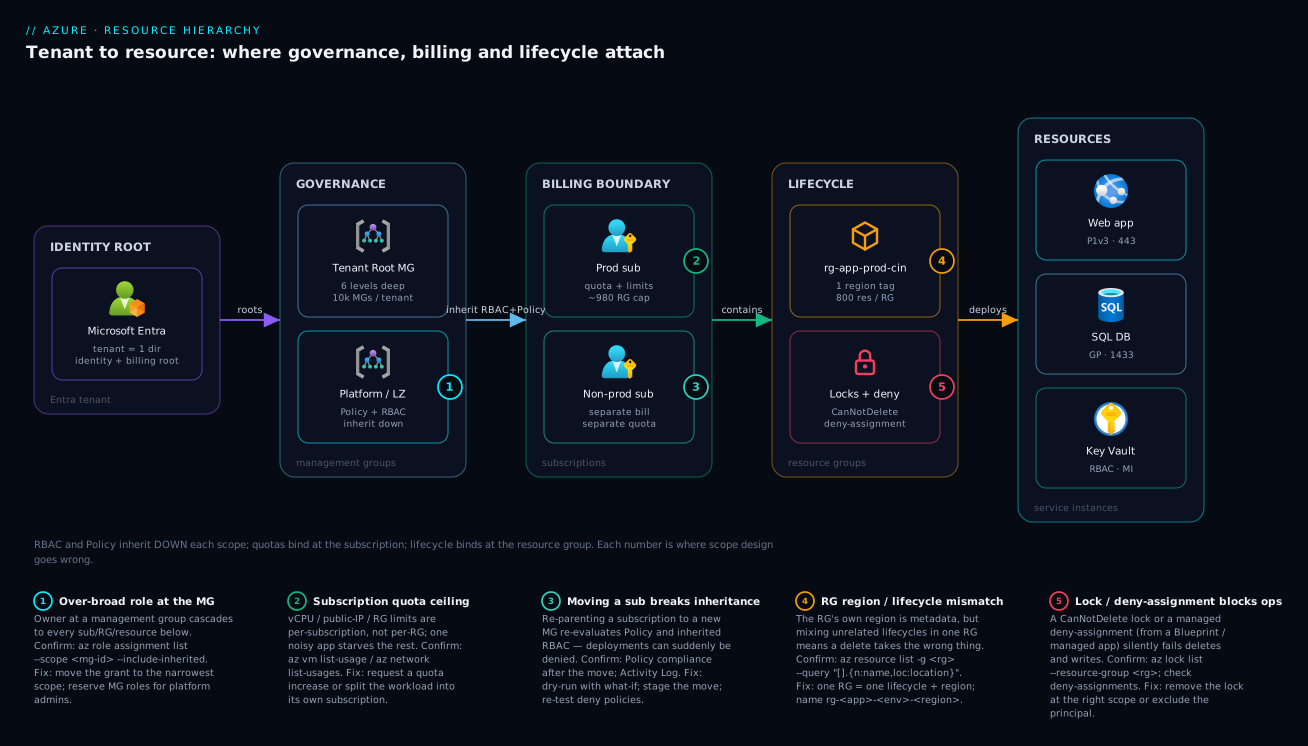
The diagram traces governance, billing and lifecycle the way they actually attach, left to right. At the far left sits the Microsoft Entra tenant — the single identity directory and the root of billing; nothing is created outside it, and identities don’t silently cross its boundary. Flowing right, the management-group layer (the Tenant Root Group and a Platform/Landing-Zone child) is where RBAC and Azure Policy attach once and inherit down to everything beneath — which is exactly why an Owner grant or a Deny policy placed here is so powerful and so dangerous. Next, the subscription layer is the billing-and-quota boundary: Prod and Non-prod subscriptions each carry their own invoice section and their own quota pools (the ~980-resource-group cap, the per-family vCPU ceilings), so one noisy workload can’t starve another. Then the resource-group layer binds lifecycle: rg-app-prod-cin holds one app, in one region, deleted as a unit — and the lock/deny-assignment node next to it is where a CanNotDelete lock protects the whole environment. Finally the resource layer is the leaves: the web app on 443, the SQL database on 1433, the Key Vault wired to a managed identity — each with a resource ID that encodes the entire path you just walked.
Read the numbered badges as the five places this design goes wrong: ① an over-broad role at the management group that cascades to everything; ② a subscription quota ceiling that one workload exhausts for all; ③ re-parenting a subscription to a new management group, which silently re-evaluates Policy and can start denying deployments; ④ a resource group that mixes regions or lifecycles, so a cleanup deletes the wrong thing; and ⑤ a stray lock or managed deny-assignment that fails writes and deletes with a confusing 409. The legend maps each number to the exact command that confirms it and the fix. The whole method is in the left-to-right flow: identity roots everything, governance inherits down, billing and quota bound the middle, lifecycle bounds the container, and the resource is where it all lands.
Real-world scenario
Nimbus Logistics is a 200-person freight-tech company in Bengaluru. They started exactly the way the intro warns: three subscriptions under three personal Microsoft accounts — nimbus-dev (the CTO’s), nimbus-staging (a contractor’s, long gone), and nimbus-prod (the lead engineer’s). For two years it worked, because the estate was small. Then three things happened in one quarter: they raised a Series B (so finance now wanted real cost reporting per team), they signed an enterprise customer with a security questionnaire (so they needed to prove encryption and access controls), and the contractor’s nimbus-staging subscription got suspended for non-payment — taking the entire staging environment offline mid-sprint, because the card on file was the contractor’s expired personal card.
The audit was sobering. The three subscriptions trusted two different Entra tenants (the staging one was orphaned in a tenant nobody could administer). nimbus-prod was a single subscription with one resource group holding 140 resources — prod web apps, the prod database, and a handful of dev resources someone created “just to test in prod.” There were 60+ role assignments, most of them Owner granted directly to individual users “to unblock them,” and not a single Azure Policy. Cost was one undifferentiated number. When finance asked “what does the routing team spend,” the answer required reading resource names by hand.
The platform team (newly hired, two people) rebuilt the hierarchy over six weeks without moving a single running resource the hard way — they used subscription and resource moves where safe, and recreated only what couldn’t move. They consolidated everything under one Entra tenant, invited the few external identities as B2B guests, and built a management-group tree: a Platform MG for shared connectivity and identity, and a Landing Zones MG split into Prod and Non-prod. They created clean subscriptions — routing-prod, routing-nonprod, billing-prod, billing-nonprod, platform-connectivity — and moved workloads into per-app, per-env resource groups named rg-routing-prod-cin and so on. They split the prod database into its own resource group and put a CanNotDelete lock on it.
Then the governance, attached at the right scopes: a single “require encryption” and “allowed regions = Central India, South India” policy at the Landing Zones MG (covering every workload sub at once); a “deny public IP in prod” policy at the Prod MG; mandatory-tag policies (env, owner, costCenter) at the tenant root in Audit first, then Deny once compliance hit 100%. RBAC was rebuilt as groups, not individuals: routing-engineers got Contributor scoped to the routing RGs, and Owner was reserved for the two platform admins at the MG level.
The payoff was immediate and measurable. Finance opened Cost Management, filtered by subscription, and had per-team spend with zero manual work — and the analysis surfaced a forgotten ₹38,000/month GPU VM in the old dev sub that was deleted the same day. The security questionnaire was answered with policy-compliance screenshots instead of prose promises. The staging-outage class of failure was gone, because billing now ran on the company’s Microsoft Customer Agreement, not a contractor’s card. And the rule on the whiteboard afterward: “Structure first, resources second. The hierarchy is the org chart your bill and your blast radius both obey.”
The before/after, because the contrast is the lesson:
| Dimension | Before (flat, accidental) | After (deliberate hierarchy) |
|---|---|---|
| Tenants | 2 (one orphaned) | 1 |
| Top structure | None | Platform + Landing Zones (Prod / Non-prod) MGs |
| Subscriptions | 3, personal accounts | 5, per-app per-env, on the MCA |
| Resource groups | 1 giant RG in prod | One per app per env; data RG split + locked |
| RBAC | 60+ direct Owner grants |
Group-based, least-privilege, scoped to RGs |
| Policy | None | Encryption + allowed-regions + deny-public-IP + required-tags |
| Cost reporting | Manual, by resource name | Built-in, per subscription/tag |
| A forgotten VM | Billed for months | Surfaced and killed day one |
Advantages and disadvantages
The hierarchy is structure, and structure is a trade: it buys consistency, attribution and safe delegation at the cost of up-front design and some rigidity. Weigh it honestly.
| Advantages (why the hierarchy helps) | Disadvantages (where it bites) |
|---|---|
| One policy/role at a management group governs every subscription below it — governance scales | Inheritance is powerful in both directions: one over-broad grant at the top exposes everything |
| Subscriptions split the bill cleanly, so chargeback and FinOps are built-in, not reconstructed | Re-parenting a subscription re-evaluates Policy/RBAC and can break deployments mid-flight |
| Least privilege is structural: scope a grant to the smallest subtree that does the job | Designing scopes up front takes thought; “we’ll fix it later” rarely happens cleanly |
| Resource groups make decommissioning a single, clean delete | That same single delete is dangerous if the RG mixes lifecycles |
| Quotas are per-subscription, so one workload’s limits don’t constrain another’s | Hitting a subscription quota under load is invisible until it fails (raise it proactively) |
| Tags + naming make a large estate searchable and automatable | Tags don’t inherit automatically; you must enforce them with Policy |
| Locks protect critical resources/RGs from accidental deletion | A forgotten lock fails legitimate operations with a cryptic 409 |
| Moving a workload to a new scope is supported (subs/RGs move) | Some resource types can’t move; cross-tenant moves break all RBAC |
The structure is right for every estate past a handful of resources — there is no real argument for staying flat. It bites hardest on teams that bolt it on late (migrating a flat estate is harder than designing one) and on teams that treat the powerful levers (MG-level Owner, root-level Deny) casually. Every disadvantage is manageable — but only if you know it exists, which is the point of placing each lever deliberately rather than by reflex.
Hands-on lab
Build a miniature but real hierarchy, attach a least-privilege grant and a deny-policy, observe inheritance, then tear it all down with one command. Free-tier-friendly (we create no billable resources beyond a single B1 plan you delete at the end). Run in Cloud Shell (Bash).
Step 1 — Inspect where you are.
az account show --query "{tenant:tenantId, sub:name, subId:id}" -o table
Expected: your tenant ID and the current subscription. Note the subscription ID — you’ll reuse it as SUB.
SUB=$(az account show --query id -o tsv)
LOC=centralindia
Step 2 — Create a tiny management-group tree.
az account management-group create --name mg-lab-root --display-name "Lab Root"
az account management-group create --name mg-lab-prod \
  --parent mg-lab-root --display-name "Lab Prod"
az account management-group show --name mg-lab-root --expand --recurse \
  --query "{name:displayName, children:children[].displayName}" -o json
Expected: mg-lab-root with mg-lab-prod as a child.
Step 3 — Move your subscription under the prod MG (so it inherits anything you attach there).
az account management-group subscription add --name mg-lab-prod --subscription "$SUB"
Step 4 — Create a lifecycle resource group and one resource.
az group create -n rg-lab-prod-cin -l $LOC --tags env=prod owner=lab costCenter=CC-LAB-01
az appservice plan create -n plan-lab -g rg-lab-prod-cin --sku B1 --is-linux -o table
Expected: an RG, then a B1 plan row.
Step 5 — Attach a least-privilege grant at the RG and confirm it’s scoped, not global.
# Grant yourself Reader at JUST the RG (you already have more via inheritance — this shows scope)
ME=$(az ad signed-in-user show --query id -o tsv)
az role assignment create --assignee "$ME" --role "Reader" \
  --scope "/subscriptions/$SUB/resourceGroups/rg-lab-prod-cin"

# See ALL effective assignments at the RG, including those inherited from the MG/sub
az role assignment list --scope "/subscriptions/$SUB/resourceGroups/rg-lab-prod-cin" \
  --include-inherited --query "[].{role:roleDefinitionName, scope:scope}" -o table
Expected: you’ll see the Reader you just made at the RG scope and broader roles whose scope is the subscription or management group — that column proving inheritance is the whole lesson.
Step 6 — Attach a policy at the MG and watch it cover the subscription.
# Assign a built-in audit policy (allowed locations) at the prod MG
az policy assignment create --name lab-allowed-locations \
  --display-name "Lab: allowed locations" \
  --scope "/providers/Microsoft.Management/managementGroups/mg-lab-prod" \
  --policy "e56962a6-4747-49cd-b67b-bf8b01975c4c" \
  --params '{ "listOfAllowedLocations": { "value": ["centralindia","southindia"] } }'

# Confirm the assignment is visible from the subscription (it inherited down)
az policy assignment list --scope "/subscriptions/$SUB" \
  --query "[?name=='lab-allowed-locations'].{name:name, scope:scope}" -o table
Expected: the assignment shows up when you query the subscription scope, with its scope pointing at the management group — inheritance confirmed.
Step 7 — Teardown (one delete handles the resources; then unwind the structure).
az group delete -n rg-lab-prod-cin --yes --no-wait            # deletes the plan with it
az policy assignment delete --name lab-allowed-locations \
  --scope "/providers/Microsoft.Management/managementGroups/mg-lab-prod"
az account management-group subscription remove --name mg-lab-prod --subscription "$SUB"
az account management-group delete --name mg-lab-prod
az account management-group delete --name mg-lab-root
Note the order: you must empty a management group (remove subs and child MGs) before deleting it. Deleting the resource group removed the plan in a single call — exactly why lifecycle grouping matters.
Common mistakes & troubleshooting
The hierarchy fails in a small set of recognizable ways. Each has a symptom, a root cause, an exact confirmation step, and a fix. This is the playbook — scan for your symptom.
| # | Symptom | Root cause | Confirm (exact command / portal path) | Fix |
|---|---|---|---|---|
| 1 | “I’m Owner but can’t create a public IP” | Azure Policy Deny at an ancestor scope |
az policy state list --filter "complianceState eq 'NonCompliant'"; Policy → Compliance |
Adjust/scope the policy, or request an exemption |
| 2 | A grant gives access to far more than intended | Role assigned at MG/sub instead of RG | az role assignment list --scope <id> --include-inherited |
Re-create the grant at the narrowest scope; delete the broad one |
| 3 | ResourceGroupQuotaExceeded on create |
Hit the ~980 RG-per-subscription cap | az group list --query "length(@)" |
Consolidate RGs or request a quota increase |
| 4 | QuotaExceeded deploying VMs |
Regional vCPU quota for that family | az vm list-usage -l <region> |
Raise the quota (Quotas blade) or pick another family/region |
| 5 | Deleting a resource fails with 409 | A CanNotDelete lock (often inherited) |
az lock list --resource-group <rg> and at sub scope |
Remove the lock at the scope that owns it |
| 6 | Deployments suddenly denied after a reorg | Subscription re-parented under a stricter MG | Activity Log; az policy assignment list --scope <sub> |
Reconcile policies; move back or add exemption; re-test |
| 7 | MissingSubscriptionRegistration |
Resource provider not registered in the sub | az provider show -n Microsoft.X --query registrationState |
az provider register --namespace Microsoft.X |
| 8 | Can’t see a subscription you “own” | It trusts a different tenant / no guest invite | az account list --query "[].tenantId" |
Switch tenant (az login --tenant) or get a B2B invite |
| 9 | Tags missing on new resources | Tags don’t inherit automatically | az resource show --ids <id> --query tags |
Apply an inherit-tag Modify policy + remediate |
| 10 | A delete took out more than expected | Resource group mixed unrelated lifecycles | az resource list -g <rg> (review what’s in it) |
Re-architect into one-lifecycle RGs; restore from backup |
| 11 | New subscription “missing” from views | It landed in the Tenant Root Group | az account management-group show --name <root> --recurse |
Move it under the correct MG immediately |
| 12 | Role change “not taking effect” | RBAC cache / replication / wrong scope | Re-check --include-inherited; wait/replicate |
Confirm scope; allow propagation; sign out/in |
The inspection commands, one per level — the cheat-sheet for “what’s actually here and who can touch it”:
| To inspect… | Command | Answers |
|---|---|---|
| The tenant/sub you’re in | az account show |
Current tenant + subscription context |
| All visible subscriptions | az account list -o table |
Which subs and which tenant each trusts |
| The management-group tree | az account management-group show --name <mg> --recurse |
Structure + which subs sit where |
| Effective access at a scope | az role assignment list --scope <id> --include-inherited |
Direct and inherited grants (the scope column) |
| Policies hitting a scope | az policy assignment list --scope <id> |
What constrains this subtree |
| Compliance state | az policy state list --filter "complianceState eq 'NonCompliant'" |
What’s currently violating policy |
| Locks on an RG | az lock list --resource-group <rg> |
What’s blocking deletes/writes |
| Quota headroom | az vm list-usage -l <region> / az network list-usages -l <region> |
Used vs limit before a rollout |
| Provider registration | az provider show -n <ns> --query registrationState |
Whether a resource type can be created |
| Everything in an RG | az resource list -g <rg> -o table |
Contents + each resource’s real region |
The three distinctions that waste the most time, called out:
| Distinction | The trap | How to tell them apart |
|---|---|---|
| Blocked by RBAC vs blocked by Policy | “I’m an admin, why is it failing?” | RBAC error = AuthorizationFailed; Policy error names a policy/assignment and RequestDisallowedByPolicy |
Lock vs Policy Deny |
Both stop an operation | A lock surfaces as a 409 with “scope locked”; a policy names the assignment that denied it |
| Inherited vs direct assignment | “Where did this access come from?” | --include-inherited shows the scope column — a sub/MG scope means it’s inherited, not on the RG |
The most common create-time errors and what they really mean:
| Error code / message | Real cause | First fix |
|---|---|---|
AuthorizationFailed |
RBAC: you lack the action at that scope | Get a scoped role; check --include-inherited |
RequestDisallowedByPolicy |
An Azure Policy Deny blocked it |
Read the named assignment; fix params or exempt |
ScopeLocked / 409 on delete |
A resource lock (often inherited) | az lock delete at the owning scope |
MissingSubscriptionRegistration |
Provider not registered | az provider register --namespace <ns> |
ResourceGroupQuotaExceeded |
~980 RGs in the sub | Consolidate or raise quota |
QuotaExceeded / OperationNotAllowed |
Regional vCPU/IP/etc. limit | Raise quota or change region/SKU |
InvalidResourceName |
Name breaks the type’s rules | Fix length/charset/uniqueness |
SubscriptionNotFound |
Wrong tenant context | az login --tenant <id>; az account set |
Best practices
- Start with the management-group tree, not with resources. Decide your Platform vs Landing-Zone split (and Prod vs Non-prod) before you place workloads. Mirror the enterprise-scale landing zone reference unless you have a strong reason not to.
- One subscription per business capability per environment.
payments-prod,payments-nonprod— not one giant sub, and not a sub per micro-project. The unit is “shared bill + shared quota + shared blast radius.” - One resource group per app per environment, named
rg-<app>-<env>-<region>. RGs group lifecycle, never resource type. Split long-lived data into its own (locked) RG. - Attach each governance lever at the highest scope that’s still correct, and each access grant at the lowest. Policy goes up (cover everything you mean); RBAC goes down (least privilege).
- Assign RBAC to Entra groups, never to individuals. A leaver shouldn’t require auditing 60 direct grants. Reserve
Ownerfor a tiny platform team at the MG level. - Make tags mandatory via Policy (
env,owner,costCenter) and roll out inAuditbeforeDenyso you don’t block legitimate deploys on day one. - Lock the resources you can’t afford to lose (
CanNotDeleteon prod data RGs) — and document the locks so they don’t become mystery 409s. - Set budgets at the subscription level with alerts, and review Cost Management by subscription/tag monthly. The forgotten-VM class of waste dies here.
- Register providers and check quotas proactively, before a launch — don’t discover a vCPU ceiling under flash-sale load.
- Treat the hierarchy as code. Define management groups, subscriptions-to-MG placement, policies and role assignments in Bicep/Terraform and review changes; click-ops drift is how estates rot.
- Move new subscriptions out of the Tenant Root Group immediately. The default placement is a holding pen, not a home.
- Document the org’s scope map — which MG/sub/RG each team owns and what’s attached where — so the structure survives the people who built it.
Security notes
The hierarchy is a security control surface; placing scopes well is half of cloud security.
- Least privilege is structural, not aspirational. The smallest scope that does the job is the right scope. A team that only needs their app gets
Contributoron their RG — neverOwnerat the subscription, and certainly never at a management group. - Guard the management-group scopes ferociously. An
OwnerorUser Access Administratorat the Tenant Root Group or a high MG can grant themselves anything everywhere. Keep MG-level roles to a named handful, use PIM (Privileged Identity Management) for just-in-time elevation, and alert on any new MG-scope role assignment. - Use Azure Policy as a preventive control, not just detective.
Denyeffects (no public IPs in prod, enforced encryption, allowed regions) stop misconfigurations before they exist, applied once at the right MG. Audit-only tells you after the fact. - Separate environments by subscription for blast-radius containment. A compromised credential or a runaway pipeline is bounded by the subscription it operates in; prod and non-prod in separate subs means a non-prod incident can’t reach prod data.
- Watch deny assignments and locks as part of incident response. A managed-app or Blueprint deny assignment can stop even an Owner — know they exist so a “permission” incident isn’t misdiagnosed.
- Identity stays in one tenant. Cross-tenant access is via explicit B2B invitation; never solve an access problem by scattering resources into another tenant.
- Log at the subscription scope and centralize it. Activity logs are per-subscription; ship them to a central Log Analytics workspace (mass-applied via a DeployIfNotExists policy at the MG) so “who did what, where” is answerable across the estate. See Azure Monitor and Application Insights.
Cost & sizing
The hierarchy itself is free — management groups, subscriptions, resource groups, tags, locks, RBAC and Azure Policy cost nothing. What the hierarchy does is make the resource bill legible and controllable. The cost story is therefore about attribution and governance, not the structure’s own price.
| Item | Cost | Note |
|---|---|---|
| Management groups | Free | Up to 10,000; no charge |
| Subscriptions | Free to create | You pay for resources in them, not the sub |
| Resource groups | Free | Pure containers |
| Tags / locks / RBAC | Free | Metadata and control plane |
| Azure Policy | Free for built-in/custom policy evaluation | Some remediation tasks deploy billable resources |
| Cost Management + budgets | Free for Azure usage | Alerts and analysis included |
| Microsoft Defender for Cloud (optional) | Per-resource/hour | Security posture, not the hierarchy itself |
What the hierarchy buys you on the bill, and the rough saving lever:
| Hierarchy practice | Cost lever | Typical impact |
|---|---|---|
| Per-subscription/per-tag cost split | Attribution + accountability | Forgotten/idle resources surface and get killed |
| Budgets with alerts at the sub | Early warning | Catch a runaway before month-end, not after |
| Allowed-SKU / allowed-region Policy | Prevent expensive mistakes | No accidental GPU VM or premium-tier sprawl |
| Separate non-prod subscription | Right-sizing + schedules | Auto-shutdown dev compute off-hours |
| Naming + tags | Find idle resources | Reclaim orphaned disks/IPs/snapshots |
A note on sizing the structure (not the resources): keep the management-group tree shallow (2–4 levels is plenty for most orgs), prefer more subscriptions over packing unrelated workloads together (subscriptions are free and give you clean quota/billing separation), and prefer more, smaller resource groups over giant ones (cleaner lifecycle, smaller blast radius). The only thing you “pay” for an over-elaborate hierarchy is operational complexity — so model the org’s real governance and billing needs, not an aspirational org chart.
Interview & exam questions
Q1. Name the five levels of the Azure hierarchy, top to bottom. Microsoft Entra tenant → management group → subscription → resource group → resource. The tenant is the identity/billing root; management groups exist for governance reuse; subscriptions are the billing/quota boundary; resource groups bound lifecycle; resources are the service instances. (AZ-900, AZ-104)
Q2. What does “inheritance” mean for RBAC versus Azure Policy?
RBAC is additive: a role at any ancestor scope grants permissions to the whole subtree, and grants from multiple scopes union together (the exception is a deny assignment, which subtracts). Azure Policy is constraining: a Deny anywhere up the tree blocks the action regardless of permissions. You can be allowed by RBAC and blocked by Policy simultaneously. (AZ-104, AZ-500)
Q3. When do you create a new subscription versus a new resource group? New subscription when workloads need separate billing, separate quota pools, separate blast radius, or different compliance — typically per business capability per environment. New resource group when resources share a lifecycle (deployed/scaled/deleted together) but can live happily on the same bill and quota. (AZ-305)
Q4. What primarily gets bounded at the subscription level? Billing (one invoice section), quotas/limits (vCPU, public IPs, the ~980 resource-group cap), and it’s a common boundary for RBAC and Policy. It’s the main “blast radius” unit too. (AZ-900, AZ-104)
Q5. Why should a resource group group by lifecycle, not by resource type? Because deleting a resource group deletes everything in it. Grouping by lifecycle means decommissioning an environment is one clean delete; grouping by type means a delete spans unrelated apps and a cleanup can take out something it shouldn’t. (AZ-104)
Q6. A user has Owner on a subscription but can’t create a storage account with a public endpoint. Why?
An Azure Policy with a Deny effect (e.g. “deny public network access on storage”) is assigned at the subscription or an ancestor management group. RBAC permission and Policy constraint are different axes; the policy wins. Confirm via Policy → Compliance and the RequestDisallowedByPolicy error naming the assignment. (AZ-500)
Q7. What’s the maximum depth of the management-group tree, and why keep it shallow? Up to 6 levels below the Tenant Root Group. Keep it shallow because depth adds inheritance complexity and rarely maps to real governance needs — most orgs need 2–4 levels (Platform vs Landing Zones, then Prod vs Non-prod). (AZ-305)
Q8. What happens to RBAC when you move a subscription to a different tenant? All role assignments in the subscription are broken — RBAC is tied to the tenant’s directory. You must re-grant everything in the new tenant. (Moving a subscription between management groups in the same tenant, by contrast, only re-evaluates inherited Policy/RBAC.) (AZ-104)
Q9. What is a resource provider and when does it bite you?
The service namespace (Microsoft.Web, Microsoft.Compute…) that must be registered in a subscription before you can create that resource type. A new subscription has many unregistered; the first deployment of a new type fails with MissingSubscriptionRegistration until you az provider register. (AZ-104)
Q10. How do you give a team self-service on their own resources without over-granting?
Assign their Entra group the Contributor role scoped to their resource group (or subscription) — never Owner, and never at a management group. Use --include-inherited to verify nothing broader already grants them more. (AZ-500)
Q11. What does a CanNotDelete lock do, and how does it interact with the hierarchy?
It blocks delete operations on the locked scope and inherits down to all child resources; a lock at a resource group protects every resource in it. The most-restrictive lock wins. It surfaces as a 409 ScopeLocked on delete attempts. (AZ-104)
Q12. How does the hierarchy enable FinOps? Subscriptions split the invoice and tags add a second cost dimension, so Cost Management gives per-team/per-app spend with no manual reconstruction. Budgets attach at the subscription (or MG/RG) with alerts. See FinOps and Cost Management at scale. (AZ-305)
Quick check
- Put these in order from top to bottom: resource group, tenant, resource, management group, subscription.
- You grant
Readerat a subscription. Can that identity read a resource in a resource group inside that subscription? Why? - Where is the per-region vCPU quota enforced — at the management group, subscription, or resource group?
- You delete a resource group containing a web app, its plan, and its database. What happens to those three resources?
- A deployment fails with
RequestDisallowedByPolicy. Is this an RBAC problem or a Policy problem, and where do you look?
Answers
- tenant → management group → subscription → resource group → resource. Identity/billing root, then governance, then billing/quota, then lifecycle, then the instance.
- Yes. RBAC is additive and inherits down the subtree: a
Readerat the subscription scope grants read on every resource group and resource beneath it (unless a deny assignment subtracts it). - The subscription. Most quotas/limits — vCPU per family, public IPs, the ~980 resource-group cap — are enforced per subscription, not per RG or MG.
- All three are deleted. Deleting a resource group deletes every resource it contains — which is exactly why an RG should hold one lifecycle.
- A Policy problem.
RequestDisallowedByPolicymeans an Azure PolicyDenyblocked it (RBAC failures sayAuthorizationFailed). Look in Policy → Compliance for the named assignment and fix its parameters or add an exemption.
Glossary
- Tenant (Microsoft Entra directory): The organization’s single identity boundary and the root of the billing relationship; every subscription trusts exactly one tenant.
- Management group: A container for subscriptions and other management groups, used to apply RBAC and Azure Policy to many subscriptions at once; up to 6 levels deep.
- Tenant Root Group: The auto-created management group at the very top of the tree; anything assigned here affects the entire tenant.
- Subscription: The billing and quota/limits boundary, and a common boundary for RBAC, Policy, deployment and blast radius.
- Resource group: A logical container for resources that share a lifecycle (deployed, scaled and deleted together) and carries its own metadata region.
- Resource: A single instance of an Azure service (VM, storage account, web app, database, Key Vault) — the leaf of the hierarchy.
- Resource provider: The service namespace (e.g.
Microsoft.Web) that must be registered in a subscription before that resource type can be created. - Resource ID: The globally unique path that encodes a resource’s full location:
/subscriptions/…/resourceGroups/…/providers/…/<name>. - Scope: A node in the hierarchy at which a governance lever is attached; the lever affects that node and all descendants.
- RBAC (Role-Based Access Control): Grants an identity a role at a scope; permissions are additive down the subtree.
- Azure Policy: Rules attached at a scope that constrain resources via effects like
Deny,Audit,ModifyandDeployIfNotExists; constraining and most-restrictive-wins. - Deny assignment: A system-applied subtraction of specific actions (from managed apps/Blueprints) that overrides even an
Ownergrant. - Resource lock: A
CanNotDeleteorReadOnlymarker that blocks operations and inherits down the subtree. - Tag: A
key=valuemetadata pair (max 50 per resource) used for cost grouping, ownership and automation; does not inherit automatically. - Landing zone: A pre-governed subscription/management-group structure (per the Cloud Adoption Framework) into which workloads are deployed.
Next steps
- Azure Policy: governance at scale — the deny/audit/modify rules you attach to the scopes you just learned.
- Enterprise-scale landing zone — the prescribed management-group-and-subscription hierarchy, end to end.
- FinOps and Cost Management at scale — turning the billing boundaries here into per-team accountability.
- Azure Key Vault: secrets, keys and certificates — a resource whose RBAC scope decisions matter the most.
- Azure regions and availability zones explained — the regional placement that lives at the resource level, complementing this hierarchy.