Every modern app eventually has to answer two questions: who is this user and is this caller allowed to touch that API. On Microsoft Entra ID (formerly Azure AD) the answer is a small family of standard protocols — OAuth2 for authorization and OpenID Connect (OIDC) for sign-in — and the most common mistake is reaching for the wrong flow: a browser secret in a single-page app, a daemon that pops a login screen no human will see, a mobile app handed a client secret anyone can extract from the binary. Each is a real flow used in the wrong place, and each is a security incident waiting to happen.
This article is the mental-model layer. You will not memorise every parameter of /authorize and /token; you will learn the shape of each flow, the one job it does, and a decision table that takes you from “I am building a ___” to “use the ___ flow.” We cover the five flows you meet on Entra ID — Authorization Code, Authorization Code with PKCE, Client Credentials, Device Code, and On-Behalf-Of — plus the two legacy flows (Implicit and Resource Owner Password Credentials) you should recognise only to refuse, registering the apps with both az CLI and Bicep.
By the end you will know the difference between an ID token and an access token (people conflate these constantly, and it causes real bugs), why PKCE replaced the old browser secret, what a scope versus an app role is, and how to read the common token errors (AADSTS65001, AADSTS70011, AADSTS700016, AADSTS50011) well enough to fix them without a support ticket. The goal: never again guess which flow to use, or be surprised by a redirect-URI or consent error at 5pm on launch day.
What problem this solves
In the bad old days every app did its own login — a username/password form, a session cookie, a users table of hashed passwords, a bespoke “is this allowed” check — which leaks credentials across every app, can’t do MFA or Conditional Access, and re-implements security-critical code everywhere. OAuth2 and OIDC exist so your app never sees the user’s password and never stores credentials for the services it calls: the user authenticates once against Entra ID, your app receives signed tokens, the API trusts them, and passwords, MFA, and risk evaluation all stay inside Entra ID where a dedicated team hardens them.
The pain when you get the flow wrong is concrete. A mobile app that embeds a client secret ships it to every attacker who downloads the app. A background job on an interactive flow simply cannot run — no human types a password at 3am, so the nightly sync silently never starts. An API that accepts an ID token where it should require an access token authorises calls it should reject. None of these are exotic; they are the mistakes teams make on their first Entra ID integration, every time. Anyone building on Entra ID hits them — web app, SPA, mobile, daemon, API-calling-API, or keyboardless device — and each maps to exactly one flow, a five-minute decision up front that saves a five-day rewrite.
Learning objectives
By the end you can:
- Explain in one sentence each what OAuth2 and OpenID Connect are, and how they relate (OIDC is a thin identity layer on top of OAuth2).
- Tell an ID token from an access token from a refresh token, and say which is for your app versus an API.
- Name the right flow for any app type — web app, SPA, mobile/desktop, daemon, API-calling-API, input-constrained device — using a decision table.
- Describe Authorization Code and explain why PKCE replaced the browser client secret for public clients.
- Distinguish a delegated permission (scope) from an application permission / app role, and a confidential client from a public client.
- Register an app for each flow with
az ad app createand with a BicepMicrosoft.Graphresource, setting redirect URIs, secrets, and API permissions correctly. - Read the common Entra ID sign-in errors (
AADSTS65001,70011,700016,50011,7000215) and apply the right fix.
Prerequisites & where this fits
You should be comfortable with HTTP redirects (a browser follows 302s), know roughly what a JWT (a base64url-encoded, signed blob of claims) is, and have an Entra ID tenant you can register apps in (a free Microsoft 365 developer tenant works). You do not need cryptography or the OAuth2 RFCs — that is the point of this layer.
This is the foundational concept article in the Identity track, upstream of the deep-dives. Once you know which flow you need, Building a Secure OIDC Confidential Client in Entra ID takes the Authorization Code path to production depth, and Mastering Entra ID Tokens: App Roles, Group Claims, and the OAuth2 On-Behalf-Of Flow for APIs goes deep on token contents and the API-to-API case. When your app calls Azure resources rather than custom APIs, Managed Identities Deep Dive beats a client secret. It assumes the Azure resource hierarchy only insofar as an app registration lives in a tenant.
A quick map of who owns what during an integration, so you call the right person when something 403s:
| Layer | What lives here | Who usually owns it | What it can break |
|---|---|---|---|
| Entra ID tenant | Users, app registrations, consent, Conditional Access | Identity / security team | Consent prompts, blocked sign-ins, MFA |
| App registration | Redirect URIs, secrets, API permissions, app roles | App owner + identity | Redirect mismatch, expired secret, missing scope |
| Your client app | Which flow, MSAL config, token caching | App / dev team | Wrong flow, token misuse, no token refresh |
| The protected API | Token validation (audience, scope, signature) | API owner | Accepting wrong token, rejecting valid ones |
| Microsoft Graph / downstream | The resource you actually want to call | Microsoft / resource owner | Insufficient permission, admin-consent-required |
Core concepts
Five mental models make every flow obvious.
OAuth2 is about authorization; OIDC is about authentication. OAuth2 answers “is this app allowed to access that resource on someone’s behalf” — it issues an access token the app presents to an API, saying nothing about who the user is. OpenID Connect is a thin layer on top of OAuth2 that adds sign-in, issuing an ID token that tells your app who just logged in. Need only to call an API? Pure OAuth2. Need the user’s identity? OIDC. Most web apps use both — OIDC to sign the user in, OAuth2 to get tokens for the APIs they call.
There are three token types, and they are not interchangeable. An ID token is for your app — it proves a user signed in (claims like name and oid). An access token is for an API — sent in the Authorization: Bearer header for the API to validate. A refresh token silently gets new access tokens when the short-lived one expires. The rule: ID token = “who logged in”, access token = “what I’m allowed to call” — sending an ID token to an API is the most common token bug.
Confidential clients can keep a secret; public clients cannot. A confidential client runs where the user never sees the bytes (web server, daemon), so it can hold a client secret or certificate. A public client runs on the user’s device (SPA, mobile, desktop), where any shipped secret can be extracted, so it uses PKCE instead. Misclassifying a SPA as confidential is the root cause of the “secret leaked in the browser” class of incidents.
The flow is just how your app gets the token. Every flow is a choreography between your app, the browser, and Entra ID’s two endpoints — /authorize (sign-in and consent) and /token (exchange a code for tokens). Flows differ in whether a human is present, whether a browser is involved, and whether the app can hold a secret. You almost never implement it by hand: MSAL (Microsoft Authentication Library) does it in every language; your job is to pick the flow and configure the registration.
Permissions come in two shapes. A delegated permission (a scope, e.g. User.Read) means the app acts as the signed-in user. An application permission (an app role, e.g. User.Read.All) means the app acts as itself, no user — used by daemons, and almost always needs admin consent. Delegated permissions ride on user-present flows; application permissions ride on Client Credentials. Mixing them up is a top-three support question.
OAuth2 vs OIDC: the one distinction that fixes half the bugs
People use “OAuth” and “login” interchangeably, then wonder why their API accepts a token it shouldn’t. OAuth2 is delegated authorization — a user (or app) grants your app permission to call a resource, and Entra ID issues an access token scoped to it. OIDC adds federated authentication — sign this user in and tell me who they are, answered with an ID token. They share the same /authorize and /token endpoints; the difference is what you ask for and what you get back.
The practical tell is the scopes you request. Ask for openid profile (the OIDC scopes) and you get an ID token — sign-in. Ask for an API scope like https://graph.microsoft.com/User.Read and you get an access token. Most web apps request both at once. The comparison that ends the confusion:
| Aspect | OAuth2 | OpenID Connect (OIDC) |
|---|---|---|
| Question it answers | “Can this app call that API?” | “Who is this user?” |
| What it issues | Access token (+ refresh token) | ID token (+ access/refresh) |
| Token audience | The API you’ll call | Your app (the client) |
| Trigger scopes | API scopes (.../User.Read) |
openid, profile, email |
| Built for | Authorization / API access | Sign-in / single sign-on |
| Validated by | The protected API | Your app (the relying party) |
| Without it you’d | Re-implement API auth per service | Build your own password login |
A second distinction trips people — the ID token is for your own app, the access token is for the API; backwards, you either reject valid users or accept calls you should refuse:
| If you have a… | Send it to… | Validate it in… | Common misuse |
|---|---|---|---|
| ID token | Nowhere (it’s for you) | Your app | Sending it to an API as a bearer token |
| Access token | The API, as Bearer |
The API | Reading user claims from it in your app |
| Refresh token | Only Entra ID /token |
Never validate; store securely | Treating it as a session token |
The Authorization Code flow (the workhorse)
For a server-side web app that signs users in, the Authorization Code flow is almost always right — it keeps tokens off the browser and lets a confidential client use its secret. The choreography:
- The user clicks “Sign in.” Your app redirects the browser to
/authorizewith yourclient_id,redirect_uri,scopes, andresponse_type=code. - Entra ID authenticates the user (password, MFA, Conditional Access — all on its side), shows consent the first time, then redirects back to your
redirect_uriwith a short-lived, one-time authorization code. - Your app’s back end calls
/tokenserver to server, presenting the code plus its client secret, and receives the ID token, access token, and refresh token — the browser never sees these. - Your app establishes a session and uses the access token to call APIs; the refresh token silently renews it.
The crucial property is step 3: the code is exchanged on the back channel, so even though it travelled through the browser, the tokens never do and the secret never leaves your server — which is why this flow suits confidential clients. The parameters that matter:
| Parameter | Endpoint | Purpose | Gotcha |
|---|---|---|---|
client_id |
/authorize & /token |
Identifies your app registration | Wrong/typo → AADSTS700016 (app not found) |
redirect_uri |
/authorize & /token |
Where the code is returned | Must exactly match a registered URI or AADSTS50011 |
scope |
/authorize |
What you’re asking for | Include offline_access to get a refresh token |
response_type=code |
/authorize |
Selects the code flow | token/id_token here = legacy Implicit; avoid |
code |
/token |
The one-time code to redeem | Single-use, short-lived (minutes) |
client_secret |
/token |
Proves the confidential client | Never put this in a browser/SPA/mobile app |
You almost never write this by hand — in ASP.NET Core it is AddMicrosoftIdentityWebApp, in Node MSAL Node, in Python msal.
PKCE: why the browser secret had to go
A single-page or mobile app runs on the user’s device, so it is a public client — it cannot keep a secret, because anyone can open dev-tools or decompile the app. The original OAuth2 answer, the Implicit flow, returned the access token in the browser URL fragment — leaking tokens into history, referer headers, and logs, with no safe way to deliver a refresh token, and is now discouraged for all new apps.
The modern answer is Authorization Code with PKCE (Proof Key for Code Exchange, “pixy”), which lets a public client use the same robust code flow without a secret, by proving at redemption that it is the app that started the flow:
- Before redirecting, the app generates a random secret — the code verifier — and a SHA-256 hash of it, the code challenge.
- It sends the code challenge (the hash) to
/authorize; Entra ID remembers it alongside the code it issues. - At
/tokenthe app sends the original code verifier (plaintext); Entra ID hashes it and checks it matches the challenge.
Only the app that generated the verifier can produce it, so an attacker who steals the code from the browser cannot redeem it — and no static secret is shipped anywhere. PKCE is now recommended for every Authorization Code flow, even confidential clients. The comparison that closes the case:
| Property | Implicit (legacy) | Auth Code + PKCE (modern) |
|---|---|---|
| Where the token lands | Browser URL fragment (leaky) | Redeemed at /token, off the URL |
| Static client secret | None (but token exposed) | None — uses dynamic verifier |
| Refresh tokens | Not safely deliverable | Yes (with offline_access) |
| Protects a stolen code | N/A (no code) | Yes — code is useless without verifier |
| Entra ID stance | Discouraged for new apps | Recommended default |
| Use for | Nothing new | SPAs, mobile, desktop, and more |
You do not implement PKCE by hand — MSAL.js (SPAs) and MSAL (mobile/desktop) generate the verifier and challenge automatically. You only register the app as the correct platform type (SPA or public client) and request offline_access for silent refresh.
Client Credentials: when there is no user
Some workloads have no human in the loop — a nightly sync, a webhook processor, a service reading all users from Graph on a schedule. No browser, no password prompt, nobody to act “on behalf of.” These use the Client Credentials flow: the app authenticates as itself with its own credential (a secret or, better, a certificate or federated credential) directly at /token, receiving an access token tied to its application permissions (app roles), not to any user.
The defining traits: confidential-client only; application permissions that almost always require admin consent; and a token with no user claims — no name, no oid, because no user signed in. The classic failure is confusing the permission shapes: a daemon granted the delegated User.Read gets “insufficient privileges” because there is no user to delegate from; it needs the application User.Read.All.
| Trait | Client Credentials | A user flow (Auth Code) |
|---|---|---|
| User present? | No | Yes |
| Client type | Confidential only | Confidential or public |
| Credential | Secret / cert / federated credential | Secret (confidential) or PKCE (public) |
| Permission shape | Application (app role) | Delegated (scope) |
| Consent | Admin consent, once | User (or admin) consent |
| Token has user claims? | No | Yes (name, oid, …) |
| Scope value requested | https://graph.microsoft.com/.default |
Specific scopes (User.Read) |
When the workload runs inside Azure (VM, App Service, Function, AKS pod), prefer a managed identity over a client secret — Azure manages the credential, with nothing to leak or rotate — and for CI/CD or cross-cloud, a federated credential. The full treatment is in Managed Identities Deep Dive; the rule of thumb is use a stored secret only when nothing better fits.
Device Code and On-Behalf-Of: the two you’ll meet next
Two more flows round out the set. The Device Code flow is for input-constrained devices — a smart TV, an IoT box, a headless CLI — where typing a username, password, and MFA code is impractical. The device shows a short code and a URL (https://microsoft.com/devicelogin); the user opens it on a phone or laptop, enters the code, and signs in there while the device polls /token. The az CLI uses this with az login --use-device-code. It is a public-client flow, right only when a normal browser flow isn’t available.
The On-Behalf-Of (OBO) flow solves a different problem: an API that must call another API as the original user. A user calls your middle-tier API with an access token; that API needs to call Graph as that same user, not as itself. OBO exchanges the incoming user token for a new downstream token, preserving the user’s identity through the chain — the standard pattern for API-to-API delegation (see Mastering Entra ID Tokens: App Roles, Group Claims, and the OAuth2 On-Behalf-Of Flow for APIs). The two legacy flows to recognise only to avoid are Implicit (superseded by PKCE) and ROPC (the app collects the user’s actual password, defeating OAuth2 and unable to do MFA/Conditional Access).
The master decision table
The table to bookmark — find your app type on the left, use the flow on the right:
| You are building… | Client type | Use this flow | Why |
|---|---|---|---|
| Server-rendered web app (sign-in) | Confidential | Auth Code (+PKCE) | Has a server; tokens stay off the browser |
| Single-page app (React/Angular/Vue) | Public | Auth Code + PKCE | No secret possible; PKCE protects the code |
| Mobile / desktop app | Public | Auth Code + PKCE | Same as SPA; MSAL handles PKCE |
| Daemon / background job / cron | Confidential | Client Credentials | No user present; acts as itself |
| Web API calling another API as the user | Confidential | On-Behalf-Of | Preserves the user’s identity downstream |
| CLI / TV / IoT (no keyboard) | Public | Device Code | User signs in on a second device |
| Anything new in the browser | — | Never Implicit | Leaks tokens; PKCE replaces it |
| Anything that wants the raw password | — | Never ROPC | Defeats OAuth2; no MFA/Conditional Access |
Reading the table the other way: Auth Code (+PKCE) and On-Behalf-Of are delegated, user-present, and issue refresh tokens; Client Credentials is app-only with no refresh token (re-auth is cheap); Device Code is the public-client fallback when no browser is available; and Implicit and ROPC are the two to avoid. Prefer a managed identity or federated credential over a stored secret for any Client Credentials workload.
Architecture at a glance
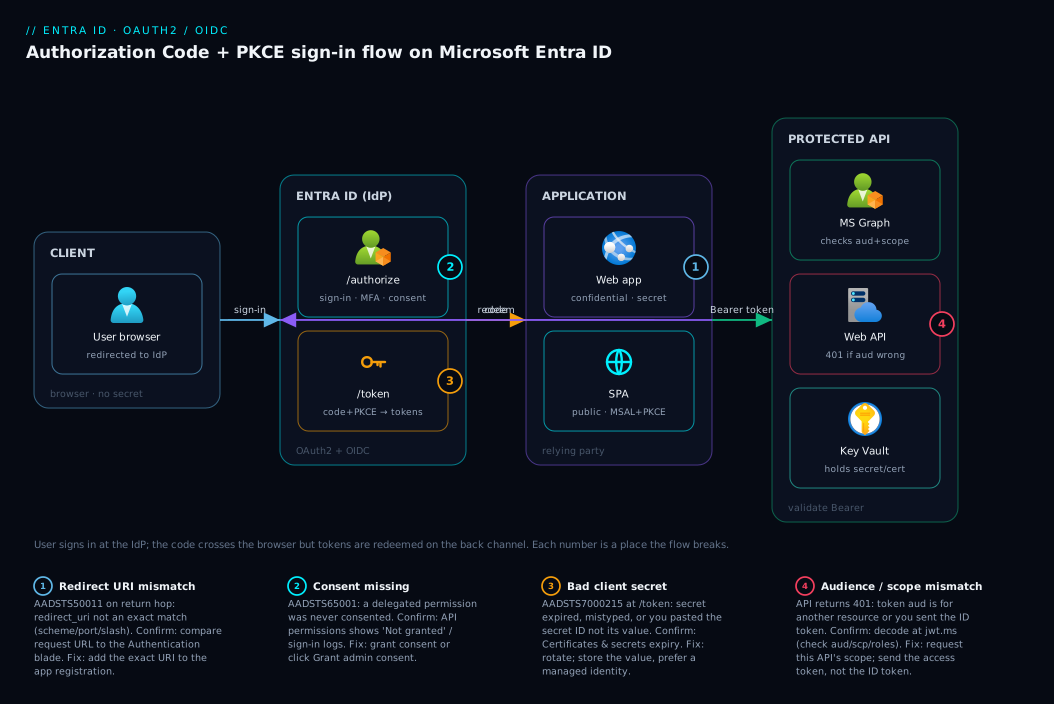
Walk the diagram left to right. The user’s browser (the only place a human and a password meet) is redirected to Entra ID, which authenticates the user, shows consent once, and returns a short-lived authorization code to your redirect URI — harmless on its own. The decisive hop is the back channel: your web app server (a confidential client) calls /token server to server with its client secret (or, for a public SPA, the PKCE verifier) and receives the ID token (who logged in) and an access token, which the app presents as a Bearer credential to the protected API — Graph or your own Web API — that validates signature, audience, and scope before serving the call. The four numbered badges mark where the path breaks; the legend narrates each as symptom, confirm, and fix.
Real-world scenario
Northwind Retail runs an online store as three apps in one Entra ID tenant: a customer-facing React storefront (SPA), an ASP.NET Core admin portal for staff, and a nightly inventory-sync job writing supplier data into the catalog via an internal Web API. They first shipped by reusing one app registration for all three with one client secret, because “it worked in the demo.” It worked until it didn’t.
The first failure landed on launch day. The storefront had response_type=token (Implicit) and the shared secret baked into the bundle — a junior dev had copied the admin portal’s settings. A security scan flagged the secret in the JavaScript within an hour, with access tokens visible in browser history. The fix was structural: split into three app registrations and register the storefront as a SPA platform using Authorization Code with PKCE through MSAL.js with no secret.
The second failure was the nightly job, which never ran. It had the delegated Catalog.ReadWrite scope and an interactive sign-in — so at 2am, with no human to authenticate, MSAL threw and the sync failed silently for four nights before anyone noticed empty shelves. The team moved it to Client Credentials with the application permission Catalog.ReadWrite.All and admin consent, and replaced the secret with the Function’s managed identity.
The admin portal was the one they got right: a confidential ASP.NET Core app using Authorization Code (PKCE for defence in depth), the client secret in Key Vault, and staff signed in with MFA via Conditional Access. When it later needed to call Graph as the signed-in admin to read group membership — the On-Behalf-Of pattern — adding it was a config change, not a rewrite, because the foundations were correct. The lesson they wrote on the wall: one app registration per app, pick the flow from the table before writing code, and never ship a secret to a browser.
Advantages and disadvantages
Using Entra ID’s standard flows instead of rolling your own auth is almost always right, but be honest about the trade-offs:
| Advantages | Disadvantages |
|---|---|
| Your app never sees the user’s password | A learning curve: flows, tokens, consent |
| MFA, Conditional Access, risk policies come free | More moving parts than a password form |
| Tokens are short-lived and scoped (blast-radius small) | Misconfiguration (wrong flow) has real security cost |
| Standard protocols — MSAL does the hard parts | Redirect-URI / consent errors are confusing first time |
| Single sign-on across all your apps | Token lifetimes and refresh add complexity |
| Centralised audit of every sign-in | Dependent on Entra ID availability |
| Secrets can be eliminated (MI / federated creds) | Secret rotation needed when you do use secrets |
The disadvantages are mostly one-time costs — the learning curve and per-app configuration errors are paid once, and the troubleshooting section preempts them — while the advantages compound forever. The one you cannot wave away is that choosing the wrong flow has a security cost, which is why the decision table is the most important artifact here: the only real decision is which flow, not whether.
Hands-on lab
This lab registers a confidential web app, adds a secret and a Graph permission, fetches an app-only token to inspect it, and tears down — all free. You need the az CLI logged in to a tenant where you can register apps.
1. Register a confidential web app (Authorization Code flow). Create the registration with a web redirect URI:
az ad app create \
  --display-name "kv-demo-webapp" \
  --sign-in-audience AzureADMyOrg \
  --web-redirect-uris "https://localhost:5001/signin-oidc"
# Note the appId (client_id) it prints
APP_ID=$(az ad app list --display-name "kv-demo-webapp" --query "[0].appId" -o tsv)
echo "client_id = $APP_ID"
2. Add a client secret (confidential clients only). Generate a secret and capture it once — you cannot read it again:
az ad app credential reset --id "$APP_ID" --display-name "lab-secret" \
  --years 1 --query "{client_id:appId, secret:password, tenant:tenant}" -o json
# Copy the 'secret' value now; it is shown only this once.
3. Add a delegated Graph permission (User.Read) and consent. User.Read is the well-known e1fe6dd8-ba31-4d61-89e7-88639da4683d; the Graph resource app ID is 00000003-0000-0000-c000-000000000000:
az ad app permission add --id "$APP_ID" \
  --api 00000003-0000-0000-c000-000000000000 \
  --api-permissions e1fe6dd8-ba31-4d61-89e7-88639da4683d=Scope
# Grant consent (User.Read is a low-privilege delegated scope)
az ad app permission grant --id "$APP_ID" \
  --api 00000003-0000-0000-c000-000000000000 \
  --scope "User.Read"
4. Get an app-only token via Client Credentials to see a no-user token. Reset the web app’s secret into a variable, then redeem it directly at /token:
SECRET=$(az ad app credential reset --id "$APP_ID" --query password -o tsv)
TENANT=$(az account show --query tenantId -o tsv)

# Client Credentials grant: the app authenticates AS ITSELF, scope=.default
curl -s -X POST "https://login.microsoftonline.com/$TENANT/oauth2/v2.0/token" \
  -d "client_id=$APP_ID" -d "client_secret=$SECRET" \
  -d "scope=https://graph.microsoft.com/.default" \
  -d "grant_type=client_credentials" | python3 -m json.tool
The response has an access_token and "token_type": "Bearer" but no id_token — because no user signed in. Paste the access_token into the Microsoft-run decoder at https://jwt.ms and note the aud (audience) and the absence of the name/scp a user token would carry.
5. Equivalent Bicep for the web app registration (via the Microsoft.Graph provider, which needs the Graph extension):
extension microsoftGraphV1

resource webApp 'Microsoft.Graph/applications@v1.0' = {
  displayName: 'kv-demo-webapp'
  signInAudience: 'AzureADMyOrg'
  web: {
    redirectUris: [ 'https://localhost:5001/signin-oidc' ]
    implicitGrantSettings: {
      enableIdTokenIssuance: false   // keep Implicit OFF; use Auth Code + PKCE
      enableAccessTokenIssuance: false
    }
  }
  requiredResourceAccess: [
    {
      resourceAppId: '00000003-0000-0000-c000-000000000000' // Microsoft Graph
      resourceAccess: [
        { id: 'e1fe6dd8-ba31-4d61-89e7-88639da4683d', type: 'Scope' } // User.Read (delegated)
      ]
    }
  ]
}
6. Teardown. Remove the registration so nothing lingers:
az ad app delete --id "$APP_ID"
Common mistakes & troubleshooting
The failures every team hits on a first Entra ID integration — symptom → root cause → confirm → fix. The AADSTS codes are real and appear on the sign-in error page and in the Entra admin center → Sign-in logs.
| # | Symptom / error | Root cause | How to confirm | Fix |
|---|---|---|---|---|
| 1 | AADSTS50011 “redirect URI does not match” |
The redirect_uri your app sends isn’t exactly a registered one (scheme, port, trailing slash, http vs https all matter) |
Compare the redirect_uri in the failing request URL to the app registration’s Authentication blade |
Add the exact URI to the registration; match case and trailing slash |
| 2 | AADSTS65001 “user or admin has not consented” |
A requested delegated permission was never consented | Sign-in logs show the failed scope; check API permissions for “Not granted” | Grant consent (az ad app permission grant) or click Grant admin consent |
| 3 | AADSTS70011 “invalid scope” |
Malformed scope string, or requesting a v1 resource on the v2 endpoint | Inspect the scope parameter sent to /authorize |
Use full v2 scope (https://graph.microsoft.com/User.Read) or .default for app-only |
| 4 | AADSTS700016 “application not found in directory” |
Wrong client_id, or app registered in a different tenant |
Verify client_id and the /authorize tenant segment match the registration |
Use the correct client_id and tenant ID//common as appropriate |
| 5 | AADSTS7000215 “invalid client secret provided” |
Secret expired, mistyped, or you pasted the secret ID instead of its value | Check the secret’s expiry on Certificates & secrets; confirm you stored the value | Generate a new secret; store the value (not the ID); rotate before expiry |
| 6 | Daemon gets “insufficient privileges” despite a permission | Granted a delegated scope to an app with no user | API permissions shows it as Delegated, not Application | Add the Application permission and Grant admin consent |
| 7 | API rejects a valid-looking token (401) |
Audience mismatch — token’s aud is for a different resource (e.g. you sent an ID token) |
Decode the token at jwt.ms; check aud and scp/roles |
Request a token for this API’s scope; send the access token, not the ID token |
| 8 | Secret leaked / token in browser | A public client (SPA/mobile) shipped a client secret or used Implicit | Search the JS bundle for the secret; check response_type |
Re-register as SPA/public; switch to Auth Code + PKCE; remove the secret |
| 9 | User prompted to sign in on every request | No refresh token / token cache; offline_access not requested |
Check requested scopes; check MSAL token-cache config | Request offline_access; let MSAL cache and silently refresh |
| 10 | AADSTS50058 / silent sign-in fails |
Silent token request with no existing session | Happens on first load or after cache clears | Fall back to an interactive sign-in when silent acquisition fails |
Two reading rules save the most time. Always decode the token at jwt.ms when an API rejects it — 9 of 10 “my token doesn’t work” issues are a wrong aud or missing scope, visible in two seconds. And read the AADSTS code, not the generic message — it pins the cause where the human-readable text is vague, on the error page and in the sign-in logs:
# List recent failed interactive sign-ins with their AADSTS error code
az rest --method get \
  --url "https://graph.microsoft.com/v1.0/auditLogs/signIns?\$top=20&\$filter=status/errorCode ne 0" \
  --query "value[].{app:appDisplayName, code:status.errorCode, reason:status.failureReason}" -o table
Best practices
- Pick the flow from the decision table before writing code — it is an architectural choice, and retrofitting later is a rewrite, not a tweak.
- One app registration per app. Don’t share a registration across a SPA, web app, and daemon — client types and permissions differ, and a shared secret leaks into the public client.
- Never ship a secret to a public client. SPAs, mobile, and desktop use Auth Code with PKCE and no secret; if you typed
client_secretinto browser/mobile code, re-register as a public/SPA app. Use PKCE on confidential web apps too, as defence in depth. - Prefer secretless credentials. Inside Azure use a managed identity; for CI/CD and cross-cloud a federated credential; reach for a stored secret only when nothing else fits, and then store it in Key Vault.
- Request the least permission, and the right shape — delegated scopes for user flows, application permissions for daemons; don’t ask for
.Read.AllwhenUser.Readwill do. - Validate tokens in your API: signature, issuer, audience, and scope/roles — never trust an unvalidated bearer token, never accept an ID token where an access token is required.
- Rotate secrets and certificates before expiry, and alert ahead of time —
AADSTS7000215on a Monday morning is an avoidable outage. - Use MSAL, never hand-roll the protocol — it caches tokens and refreshes them silently (request
offline_accessto get a refresh token), and hand-built OAuth is where subtle, exploitable bugs live.
Security notes
The flows are the security control, but configuration is where they’re won or lost. Treat the client secret as the crown jewel of a confidential client — never in source control or a browser, ideally replaced by a managed identity or certificate/federated credential so there is no shared secret at all; when you must use one, store it in Key Vault (see Azure Key Vault: Secrets, Keys and Certificates Done Right) and reference it at runtime.
Apply least privilege and remember application permissions are powerful: User.Read.All reads every user with no user context, which is why they require admin consent. Governing consent is its own discipline — attackers use illicit-consent phishing to trick users into granting a malicious app real permissions, so admins should restrict who can consent and review grants (see Governing OAuth Consent and Application Permissions in Entra ID).
Lock the perimeter: register exact redirect URIs (a wildcard or stray localhost is an open-redirect risk), keep Implicit and ROPC disabled, and enforce Conditional Access so even a valid token only flows when device, location, and risk are acceptable — see Designing Conditional Access at Scale. Validate audience and signature on every API request, and prefer short-lived access tokens with refresh — a leaked 60-minute token is a small window, a leaked long-lived one is a breach.
Cost & sizing
The protocols themselves are free. App registrations, the /authorize and /token endpoints, the flows, sign-ins, and token issuance carry no per-transaction charge on the basic Entra ID Free tier — register unlimited apps and authenticate at scale without paying per login. What can cost money are the surrounding capabilities, not the flows:
| Item | Cost driver | Rough figure | Notes |
|---|---|---|---|
| Flows, token issuance & app registrations | — | Free | No per-sign-in, per-token, or per-app charge |
| Entra ID Free (basic SSO, app reg) | — | ₹0 / $0 | Included with Azure / M365 |
| Conditional Access, risk policies | Entra ID P1/P2 licence | ~₹500–800 / ~$6–9 per user/mo | Per-user, only if you need CA / Identity Protection |
| Key Vault (storing client secrets) | Per operation + per cert | ~₹0.25 / ~$0.03 per 10k ops | Tiny; standard tier suffices |
| External ID (customer sign-ins / CIAM) | Monthly active users | First tier free, then per-MAU | Only for customer-facing identity |
| Managed identity (instead of secret) | — | Free | Removes secret-rotation cost entirely |
The only “sizing” question is licensing, per-user not per-flow: Conditional Access and Identity Protection need Entra ID P1/P2 for the users they apply to, and customer-facing External ID is priced per monthly active user. Everything else works on the free tier — and the cheapest and most secure move, a managed identity over a stored secret, also has no licence cost.
Interview & exam questions
These map to SC-900 (Security, Compliance & Identity Fundamentals), AZ-204 (Developing Solutions for Azure), and SC-300 (Identity and Access Administrator).
Q1. What is the difference between OAuth2 and OpenID Connect? OAuth2 is an authorization framework that issues access tokens to call an API on a user’s or its own behalf. OIDC is a thin authentication layer on top that adds sign-in, issuing an ID token telling your app who the user is. Most web apps use both at once.
Q2. ID token vs access token — who consumes each?
The ID token is for your app and proves a user signed in. The access token is for an API, presented as a Bearer credential for the API to validate. Sending an ID token to an API, or treating an access token as proof of identity, is a common bug.
Q3. Why was PKCE introduced, and who needs it? PKCE lets public clients (SPAs, mobile, desktop) use the Authorization Code flow without a client secret, proving at redemption that they started the flow. It replaced the leaky Implicit flow and is now recommended for all code flows.
Q4. When do you use the Client Credentials flow? When there is no user — a daemon or background job calling an API as itself. It is confidential-client only, uses application permissions that usually need admin consent, and the token has no user claims.
Q5. A SPA developer asks for a client secret to put in the React code. What do you say? No — a SPA is a public client and any shipped secret is extractable. Register it as a SPA platform and use Authorization Code with PKCE via MSAL.js, which needs no secret.
Q6. Your nightly job can’t read users despite having a User.Read permission. Why?
User.Read is a delegated scope and a daemon has no signed-in user. It needs the application permission User.Read.All with admin consent, via Client Credentials.
Q7. What does AADSTS50011 mean and how do you fix it?
The redirect_uri doesn’t exactly match a registered URI — scheme, port, and trailing slash all count. Add the exact URI to the app registration’s Authentication blade.
Q8. When would you use the Device Code flow?
On input-constrained devices (smart TV, IoT, headless CLI) where typing credentials is impractical: the device shows a code and URL, the user signs in on a phone, the device polls for tokens. az login --use-device-code uses it.
Q9. What is the On-Behalf-Of flow for? For an API that must call another API as the original user — the middle tier exchanges the incoming user token for a new downstream token, preserving the user’s identity through the chain.
Q10. Why avoid the ROPC (password) flow? Because the app collects the user’s actual password, defeating OAuth2’s promise that your app never sees credentials, and it cannot do MFA or Conditional Access. Use it only for narrow legacy automation, if ever.
Quick check
- You’re building a single-page React app that signs users in and calls Microsoft Graph. Which flow?
- Which token do you send to an API as a
Bearercredential — ID token or access token? - A background job with no user needs to read all users in the tenant. Which flow and which shape of permission?
- PKCE replaced which legacy flow, and what does it let a public client avoid shipping?
- You get
AADSTS65001on sign-in. What’s the cause and the fix?
Answers
- Authorization Code with PKCE. A SPA is a public client; PKCE lets it use the code flow with no secret, and MSAL.js handles it.
- The access token. The ID token is for your own app; it is never sent to an API.
- Client Credentials flow with an application permission (e.g.
User.Read.All) and admin consent — there is no user to delegate from. - PKCE replaced the Implicit flow and lets a public client avoid shipping a static client secret, using a dynamic verifier instead.
- A requested delegated permission was never consented. Grant consent or click Grant admin consent on the API permissions blade.
Glossary
- OAuth2 / OpenID Connect — Authorization (issues access tokens for an API) and the sign-in layer on top of it (issues an ID token describing the user).
- ID token — A signed JWT for your app, proving a user signed in (name,
oid). - Access token — A signed JWT presented to an API as a
Bearercredential; the API validates signature, audience, and scope. - Refresh token — A long-lived credential that silently obtains new access tokens when the short-lived one expires.
- PKCE — Proof Key for Code Exchange; a verifier/challenge pair that lets public clients use the code flow without a secret.
- Confidential vs public client — An app that can safely hold a secret (server-side: web app, daemon) vs one on the user’s device (SPA, mobile) that cannot and uses PKCE.
- Scope (delegated) vs app role (application) — Permission to act as the signed-in user (
User.Read) vs as the app itself (User.Read.All, needs admin consent). AADSTScode — Entra ID’s specific sign-in error code (e.g.AADSTS50011), the fastest way to pin a cause.
Next steps
- Take the confidential client to production depth: Building a Secure OIDC Confidential Client in Entra ID.
- Go deep on what’s inside a token and the API-to-API case: Mastering Entra ID Tokens: App Roles, Group Claims, and the OAuth2 On-Behalf-Of Flow for APIs.
- Replace stored secrets with a secretless credential: Managed Identities Deep Dive.
- Stop illicit-consent attacks and harden app trust: Governing OAuth Consent and Application Permissions in Entra ID.
- Gate every issued token on device, location, and risk: Designing Conditional Access at Scale.