In a nutshell
Ansible needs to know two things before it can do anything: which machines to work on, and how to reach each one. The inventory is where you write both down. At its simplest it is a plain text file listing the servers you manage — think of it as Ansible’s address book.
But a flat list stops being enough the moment you have more than a handful of machines. So the inventory also lets you sort hosts into groups (all your web servers, all your databases), keep notes about each host or group (this one listens on port 2222; all production boxes use that NTP server), and then address them in bulk: “run this on every web server except the one in maintenance.”
A useful mental model is the contacts app on your phone. Each contact is a host. The labels you file people under — Family, Work, Football team — are groups, and a person can be in several at once. The notes you save on a contact (their address, which door to use) are host variables; a note you would apply to everyone in a label is a group variable. And when you tap “message everyone in Work except my manager,” you are using a pattern — which is exactly the selection language Ansible gives you for choosing targets. Learn the address book well and every later Ansible command becomes “do this to those”; get it muddled and you risk doing the right thing to the wrong machine.
This lesson builds that address book from the ground up: the two file formats you can write it in, how to group and nest hosts, where to keep variables so they do not clutter the list, how precedence decides which note wins when two disagree, and the pattern language for pointing a command at exactly the hosts you mean.
Level: Foundational (Junior) · Time: ~40 min · You need: a control node with ansible installed. No managed hosts are required to follow along — the lab uses two local containers, and every inspection command runs entirely on the control node.
Every Ansible command answers two questions: what do I do and where do I do it. Modules and playbooks answer the first; the inventory answers the second. The inventory is the list of machines Ansible can manage, the groups that let you address them in bulk, and the per-host and per-group variables that let one playbook behave correctly across dev, staging, and production without a single if environment == "prod" in the tasks. Get the inventory right and the rest of Ansible falls into place; get it wrong and you will spend your days wondering why a play “ran” but changed nothing, or — far worse — changed something on the wrong box.
This lesson is the exhaustive reference for static inventory: a file (or directory) you write by hand. We will lay the INI and YAML formats side by side, cover host ranges and aliases, the connection variables that tell Ansible how to reach a host, groups and nested child groups, the two groups Ansible always creates for you (all and ungrouped), the host_vars/ and group_vars/ directories and exactly how their precedence resolves, the host-pattern mini-language you use with --limit and as a play’s hosts:, how to point Ansible at several inventories at once and how they merge, and the two commands — ansible-inventory --list and --graph — that let you see what Ansible actually parsed. Everything targets current Ansible (ansible-core 2.17+ / Ansible 10+, 2026) and uses FQCN (namespace.collection.module) throughout. Dynamic inventory — querying the cloud for hosts at runtime — gets a teaser at the end and a full lesson of its own.
Learning objectives
By the end of this lesson you will be able to:
- Write a static inventory in both INI and YAML, and explain when each format is the better choice.
- Define hosts with ranges (
web[01:10]), aliases, and per-host connection variables (ansible_host,ansible_port,ansible_user, and friends). - Build groups, nested child groups (
:children), and reason about the implicitallandungroupedgroups. - Place variables in
host_vars/andgroup_vars/directories and predict which value wins when they conflict. - Target hosts precisely with patterns —
all,*, the union:, intersection:&, exclusion:!, and regex — for--limitand for a play’shosts:. - Combine multiple inventory sources, understand how they merge, and inspect the result with
ansible-inventory --listand--graph.
Prerequisites & where this fits
You should have a working control node with ansible installed and at least one machine you can reach over SSH — the previous lesson, Installing & configuring Ansible, covers that setup, SSH keys, and the ansible.cfg inventory = setting that tells Ansible where your default inventory lives. You should also understand the agentless push architecture and idempotency from the opening lesson, because the inventory is the push targets list. This lesson sits in the Inventory module of the Ansible Zero-to-Hero course — embedded module course-ansible-inventory — and is the foundation for everything that follows: ad-hoc commands, playbooks, and roles all select their targets with the patterns and groups defined here. Its natural sequel for real fleets is the dynamic inventory lesson, where the host list becomes a live query against AWS and Azure rather than a file you maintain.
Core concepts
A few mental models make the whole inventory make sense.
The inventory is a graph, not a list. It looks like a flat list of hostnames, but internally Ansible builds a tree: every host belongs to one or more groups, groups can contain child groups, and at the very top sits a group called all that contains every host. When you ask Ansible to run against a pattern, it walks this graph to compute the set of target hosts.
Inventory and variables are inseparable. The inventory is not just which hosts exist — it is also what is true about them. A host can carry variables (its IP, its SSH user, the version of an app it should run); a group can carry variables that apply to every member. This is how one role configures Nginx differently in webservers than in proxies without any conditional logic in the role itself.
Two groups always exist, for free. all contains every host in the inventory. ungrouped contains every host that is not a member of any group other than all. You never declare these; Ansible creates them. Both can carry variables (in group_vars/all and group_vars/ungrouped), and group_vars/all is the canonical place for fleet-wide defaults.
Connection variables are just variables with reserved names. Telling Ansible to reach a host on port 2222 as user deploy is not special syntax — it is setting the variables ansible_port=2222 and ansible_user=deploy. They live wherever any variable can live: inline on the host line, in host_vars/, in group_vars/. This uniformity is why the precedence rules below matter so much.
Static vs dynamic. A static inventory is a file you maintain by hand (this lesson). A dynamic inventory is generated at runtime by an inventory plugin that queries a source of truth — AWS, Azure, a CMDB. Both produce the same in-memory graph; the difference is only where the data comes from. We focus on static here and signpost dynamic at the end.
INI vs YAML: the two static formats, side by side
Ansible accepts a static inventory in two formats: the terse, line-oriented INI style and the structured YAML style. Both express the same model — hosts, groups, children, variables — and Ansible chooses the parser by content, not by file extension. (.ini, .yml, .yaml, or no extension all work; what matters is that the file parses.) For a directory-based inventory you can even mix files of both formats in the same directory.
Here is the same small inventory written both ways. INI:
# inventory.ini
[webservers]
web1.example.com
web2.example.com

[dbservers]
db1.example.com ansible_user=postgres

[production:children]
webservers
dbservers

[production:vars]
env=prod
YAML (the equivalent):
# inventory.yml
all:
  children:
    webservers:
      hosts:
        web1.example.com:
        web2.example.com:
    dbservers:
      hosts:
        db1.example.com:
          ansible_user: postgres
    production:
      children:
        webservers:
        dbservers:
      vars:
        env: prod
Note the YAML quirks that trip up newcomers: each host is a mapping key with a trailing colon and an empty value (web1.example.com:), not a list item; host variables are a nested mapping under that key; and group membership is expressed by nesting under children: rather than a separate [group:children] stanza. The implicit all at the top is optional in YAML but conventional.
Format comparison
| Aspect | INI | YAML |
|---|---|---|
| Syntax style | Line-oriented, stanza headers in [brackets] |
Indented nested mappings |
| Readability for small inventories | Excellent — very terse | More verbose |
| Readability for deep nesting / many vars | Degrades; :vars stanzas get unwieldy |
Excellent — structure is explicit |
| Host with many variables | One long line, or move to host_vars/ |
Clean nested mapping |
| Variable data types | Everything is a string unless you opt in (see below) | Native YAML types: ints, bools, lists, dicts |
| Lists / dicts as inline host vars | Not possible inline (use host_vars/) |
Native and natural |
| Comments | # or ; |
# only |
| Group of groups (children) | [group:children] stanza |
children: key |
| Group variables | [group:vars] stanza |
vars: key under the group |
| Parser | INI-like (Ansible’s own, not Python configparser) |
Standard YAML |
| Best for | Quick labs, flat fleets, hand-edits | Real projects, rich vars, anything version-controlled long-term |
A practical rule: INI for a throwaway lab or a genuinely flat list; YAML for anything you will live with. YAML’s ability to hold native lists and dicts inline, and its explicit structure, pays off the moment your inventory grows. That said, the strong recommendation regardless of format is to keep the inventory file thin — hosts and group membership only — and push variables out to host_vars/ and group_vars/ directories, which we cover below.
The INI string-vs-type gotcha
In INI, every inline variable is a string by default. http_port=8080 gives you the string "8080", not the integer 8080, and enabled=false gives you the string "false" — which is truthy in a when: test, the classic beginner bug. There are two escapes:
- Set
[group:vars]types via the YAML inventory instead, or move them togroup_vars/(YAML), wherehttp_port: 8080is a real integer. - Force a single INI value’s type with the documented hint:
http_port=8080 # parsed as string; to get a real type you historically used thekey=valuewith a leading marker, but the clean, supported approach in 2026 is simply define typed vars ingroup_vars/host_varsYAML, not inline INI.
This is the single biggest reason teams that start in INI migrate vars to YAML group_vars/.
Hosts: ranges, aliases & connection variables
A “host” in the inventory is an entry Ansible can target. Its name is usually a resolvable DNS name or an IP, but it can also be an alias decoupled from the real address.
Host ranges
Defining web01 through web10 by hand is tedious and error-prone. Inventory supports numeric and alphabetic ranges with [start:end], and you can use several ranges in one pattern (a Cartesian product).
| Pattern | Expands to |
|---|---|
web[01:10].example.com |
web01, web02, … web10 (zero-padded — the padding in 01 is preserved) |
web[1:10].example.com |
web1, web2, … web10 (no padding) |
db-[a:f] |
db-a, db-b, … db-f (alphabetic range) |
web[01:10:2].example.com |
web01, web03, web05, web07, web09 (step of 2) |
node[1:3]-rack[1:2] |
node1-rack1, node1-rack2, node2-rack1, … (two ranges → product) |
In INI you write the range directly as the host line; in YAML the range goes as the mapping key:
[webservers]
web[01:10].example.com
webservers:
  hosts:
    web[01:10].example.com:
The leading-zero rule matters: [01:10] preserves the padding (web01), while [1:10] does not (web1). Match whatever your hostnames actually are.
Aliases and the ansible_host decoupling
An alias is an inventory name that is not the connection address. You give the host a friendly label and then tell Ansible the real address with ansible_host:
[webservers]
web1 ansible_host=192.0.2.11
web2 ansible_host=192.0.2.12 ansible_port=2222
jump ansible_host=bastion.example.com ansible_user=ec2-user
Now web1 is just a name you use in patterns and group_vars; Ansible connects to 192.0.2.11. Aliases are invaluable when DNS is unreliable, when you address hosts by role rather than name, or when several inventory entries point at the same physical box on different ports (a common pattern for testing in containers).
Connection variables — the full set
These reserved variables control how Ansible reaches and operates on a host. They can be set inline, in host_vars/, in group_vars/, or globally in ansible.cfg/extra-vars. The most important ones:
| Variable | What it controls | Typical values / default |
|---|---|---|
ansible_host |
The real network address to connect to (decouples from the inventory name) | DNS name or IP; defaults to the inventory hostname |
ansible_port |
SSH/WinRM port | 22 (SSH) by default |
ansible_user |
Remote login user | defaults to remote_user in ansible.cfg, else the control-node user |
ansible_connection |
Connection plugin | ssh (default), local, winrm, psrp, docker, community.docker.docker |
ansible_ssh_private_key_file |
Path to the private key for this host/group | unset → SSH agent / default key |
ansible_ssh_common_args |
Extra args appended to every ssh/scp/sftp call (e.g. a ProxyJump) |
unset |
ansible_ssh_extra_args |
Extra args for the ssh invocation only | unset |
ansible_password |
SSH password (prefer keys; if set, keep it in Vault) | unset |
ansible_become |
Whether to privilege-escalate by default | false |
ansible_become_method |
Escalation method | sudo (default), su, doas, pbrun, pfexec, runas |
ansible_become_user |
Target user after escalation | root |
ansible_become_password |
Escalation password (keep in Vault) | unset |
ansible_python_interpreter |
Which Python the module code runs under on the target | auto (auto-discovery); set explicitly to silence warnings, e.g. /usr/bin/python3 |
ansible_shell_type |
Shell family on the target | sh (default), csh, fish, powershell |
ansible_winrm_transport |
WinRM auth transport (Windows) | ntlm/kerberos/credssp/basic |
A frequent gotcha: setting ansible_user on a group is the clean way to say “all jump-box hosts log in as ec2-user,” but a per-host ansible_user overrides it (host vars beat group vars — see precedence below). For a bastion/jump-host hop, the idiomatic setting is ansible_ssh_common_args: '-o ProxyJump=bastion' placed on the group of internal hosts.
Groups & nested child groups
A group is a named bag of hosts. You target a group by name, and you attach variables to a group so they apply to every member. A host can belong to many groups simultaneously — web1 can be in webservers, production, and frankfurt at once, inheriting variables from all three.
Declaring groups
INI uses a [groupname] stanza; YAML nests hosts under groupname → hosts:.
[webservers]
web1
web2

[dbservers]
db1
all:
  children:
    webservers:
      hosts:
        web1:
        web2:
    dbservers:
      hosts:
        db1:
Child groups (groups of groups)
A child group is a group nested inside another group; the parent then contains every host of every child, transitively. This is how you build hierarchies like production = (webservers + dbservers), or emea = (frankfurt + dublin). In INI you use a [parent:children] stanza listing the child group names (not hosts); in YAML you nest under children:.
[webservers]
web1
web2

[dbservers]
db1

[production:children]
webservers
dbservers

[emea:children]
production
all:
  children:
    production:
      children:
        webservers:
          hosts:
            web1:
            web2:
        dbservers:
          hosts:
            db1:
    emea:
      children:
        production:
Now production resolves to {web1, web2, db1}, and emea resolves to the same set (because production is its only child). Child-group nesting can go as deep as you like, but cycles are not allowed (a group cannot be its own ancestor). A host that appears in a child is automatically a member of every ancestor, so you can target the broad emea or the narrow dbservers from the very same inventory.
Group reference table
| Concept | INI syntax | YAML syntax | Notes |
|---|---|---|---|
| Define a group | [web] then host lines |
web: → hosts: → host keys |
A host may be in many groups |
| Group of groups (children) | [parent:children] then group names |
parent: → children: → group keys |
Parent gets all descendant hosts |
| Group variables | [web:vars] then key=value |
web: → vars: → key: value |
Apply to every member; lowest of the var sources here |
| Implicit top group | n/a (always present) | all: (conventional to write) |
Contains every host |
| Implicit catch-all | n/a (always present) | ungrouped: |
Hosts in no group but all |
| Empty group (placeholder) | [web] with no hosts |
web: with hosts: {} |
Valid; useful as a --limit target later |
The implicit all and ungrouped groups
Two groups exist in every inventory whether or not you mention them:
all— contains every host. Targetingall(or runningansible all -m ping) hits the entire fleet. Variables ingroup_vars/allare your fleet-wide defaults and apply to every host (at the lowest group precedence). Thehosts: allline at the top of a play is the most common “run everywhere” idiom — handle with care.ungrouped— contains every host that belongs to no group exceptall. If you list a bare host at the top of an INI file before any[group]header, it lands inungrouped. This group is handy as a safety net:ansible ungrouped -m pingfinds hosts you forgot to categorise.
A host that is a member of any real group is not in ungrouped. The two groups are not mutually exclusive with each other in the sense that every host is always in all; ungrouped is the subset of all with no other membership.
host_vars/ and group_vars/ directories
You can cram variables onto the host line and into [group:vars] stanzas, but at any real scale you should not. The maintainable pattern is to keep the inventory file thin and put variables in two specially named directories that Ansible loads automatically: group_vars/ and host_vars/.
How they are discovered
Ansible looks for group_vars/ and host_vars/ directories in two locations, and loads from both:
- Adjacent to the inventory file/directory — e.g. if your inventory is
inventories/prod/hosts, theninventories/prod/group_vars/andinventories/prod/host_vars/. - Adjacent to the playbook —
group_vars/andhost_vars/next to the playbook you run.
Inside each directory, the filename matches the group or host name:
inventories/prod/
├── hosts                    # the inventory file
├── group_vars/
│   ├── all.yml              # applies to every host
│   ├── all/                 # OR a directory; every file inside is merged
│   │   ├── 10-network.yml
│   │   └── 20-ntp.yml
│   ├── webservers.yml       # applies to the webservers group
│   └── production.yml
└── host_vars/
    ├── web1.yml             # applies only to web1
    └── db1/                 # a directory works here too
        └── secrets.yml      # often a Vault-encrypted file
Two important details:
- A name can be either a file (
webservers.yml) or a directory (webservers/). If it is a directory, every file inside is loaded and merged, in lexical (alphabetical) order — hence the10-,20-numeric prefixes people use to control ordering. This split-by-concern layout is the standard way to keep a largealltidy, and it is also where you isolate a Vault-encryptedvault.ymlfrom plaintext. - The file extension may be
.yml,.yaml,.json, or omitted. By default only files without an extension or with.yml/.yaml/.jsonare read; other extensions are ignored unless configured otherwise.
group_vars vs host_vars precedence
When the same variable is defined in more than one of these places, the more specific wins. Within the inventory/vars sources covered by this lesson, the order from lowest to highest is:
| Rank (low → high) | Source | Example |
|---|---|---|
| 1 | group_vars/all |
fleet-wide default |
| 2 | parent group vars | group_vars/production |
| 3 | child group vars | group_vars/webservers (child of production) |
| 4 | host_vars | host_vars/web1 |
| 5 | (later: play vars, task vars, extra-vars -e = highest of all) |
— |
Three rules capture almost everything:
- Host beats group. A variable in
host_vars/web1overrides the same variable in any groupweb1belongs to. The host is the most specific scope. - Child group beats parent group.
group_vars/webserversoverridesgroup_vars/productionwhenwebserversis a child ofproduction. More specific group wins. - Same-level ties break by group depth, then name. If a host is in two unrelated groups at the same depth that both set
x, Ansible resolves the tie by group priority if set (theansible_group_priorityvariable), otherwise by the group’s position in the merge — practically, avoid this by not defining the same var in two sibling groups. When you must, setansible_group_priority(default1; higher wins) on the group that should take precedence.
group_vars/all is special only in that it is the lowest group precedence — the perfect home for defaults you intend to override. Note that the full Ansible variable precedence has ~22 levels (extra-vars at the top, role defaults at the bottom); the table above is the slice that involves inventory. The complete ordering is covered in the variables & precedence lesson.
A worked precedence example
group_vars/all.yml          -> ntp_server: pool.ntp.org
group_vars/production.yml    -> ntp_server: ntp.prod.internal
group_vars/webservers.yml    -> log_level: info
host_vars/web1.yml          -> log_level: debug
With web1 a member of webservers (child of production):
ntp_serveronweb1→ntp.prod.internal(production overrides all).log_levelonweb1→debug(host_vars overrides the webservers group).log_levelonweb2(no host_vars) →info(from the webservers group).
Inventory patterns: targeting hosts precisely
A pattern is how you tell Ansible which hosts to act on. The same mini-language is used in three places: a playbook’s hosts: line, an ad-hoc command (ansible <pattern> -m ...), and the --limit flag (which intersects with whatever the play already selected). Mastering patterns is the difference between confidently running against exactly the right boxes and nervously hoping you did.
The pattern operators
| Pattern | Meaning | Example | Selects |
|---|---|---|---|
all or * |
Every host in the inventory | all |
the whole fleet |
groupname |
All hosts in a group | webservers |
members of webservers |
hostname |
A single host (by inventory name) | web1 |
just web1 |
host:host / g:g |
Union (logical OR) | webservers:dbservers |
members of either group |
g:&g |
Intersection (logical AND) | webservers:&production |
webservers that are also in production |
g:!g |
Exclusion (logical NOT) | webservers:!web1 |
webservers except web1 |
*.example.com |
Glob (wildcard) | *.example.com |
hosts/groups whose name matches the glob |
web* |
Glob prefix | web* |
web1, web2, webservers, … (matches host and group names) |
~regex |
Regular expression (leading ~) |
~web\d+\.example\.com |
hosts matching the regex |
g[0] |
Index into a group | webservers[0] |
the first host of webservers |
g[0:2] |
Slice of a group | webservers[0:2] |
the first three hosts (inclusive range) |
g[-1] |
Last host of a group | webservers[-1] |
the last host |
Patterns compose left to right. A real one might read:
ansible 'webservers:&production:!web5' -m ansible.builtin.ping
…which means “hosts that are in both webservers and production, minus web5.” Order matters and the operators are applied in sequence, so build the union/intersection first and subtract last for predictable results.
Quoting and shell safety
:, &, !, *, ~, [, and ] are all meaningful to your shell. Always single-quote a non-trivial pattern so the shell passes it to Ansible verbatim:
ansible 'webservers:!web1' -m ansible.builtin.ping     # correct
ansible webservers:!web1 -m ansible.builtin.ping       # the shell may mangle ! and :
! in particular triggers history expansion in interactive bash; single quotes (not double) are the safe choice.
--limit: intersect, don’t replace
--limit (or -l) further restricts the hosts a play would otherwise run on — it intersects with the play’s hosts:. A play targeting hosts: production run with --limit web1 touches only web1 and only if web1 is in production. --limit accepts the full pattern language, including unions and exclusions:
ansible-playbook site.yml --limit 'webservers:!web5'
ansible-playbook site.yml --limit @retry_hosts.txt    # @file = one host per line
The @filename form reads a newline-separated host list from a file — exactly the format Ansible writes to playbook.retry after a partial failure, so you can re-run only the hosts that failed.
Patterns find groups too
A subtle but useful fact: a bare name or glob matches both host names and group names. web* matches the host web1 and the group webservers. If you have a host and a group with overlapping names, be deliberate — this is a reason to give groups and hosts visibly different naming conventions.
Multiple inventories & merging
You are not limited to one inventory source. Pass -i multiple times, or point -i at a directory (Ansible reads every file in it), or set a list in ansible.cfg. This is how teams split inventory by environment, by region, or by static-vs-dynamic source.
# Two explicit sources on the command line
ansible-playbook site.yml -i inventories/prod/hosts -i inventories/shared/hosts

# A whole directory (every file parsed and merged)
ansible-playbook site.yml -i inventories/prod/

# In ansible.cfg
# [defaults]
# inventory = inventories/prod/hosts,inventories/shared/hosts
How merging behaves:
- Hosts and groups are unioned. The same host or group appearing in multiple sources is merged into one entity; group memberships from all sources combine.
- A directory is parsed in lexical (alphabetical) order. When two sources set the same variable on the same host/group, the later-parsed source wins. This is why people prefix inventory files with numbers (
01-static,02-aws.yml) to control which source has the final say. - Mixing static and dynamic is fine. A directory can hold a hand-written
01-staticfile and a99-aws.aws_ec2.ymldynamic config; Ansible merges the static hosts with the cloud-discovered ones into a single graph. - Skipped files. In a directory, Ansible ignores files matching the
inventory_ignore_extensionslist (e.g..pyc,.retry,~backups) and any file beginning with a configured ignore pattern — keep editor swap files and READMEs out of an inventory directory or name them so they are ignored.
A common production layout:
inventories/
├── prod/
│   ├── hosts
│   ├── group_vars/
│   └── host_vars/
├── staging/
│   ├── hosts
│   ├── group_vars/
│   └── host_vars/
└── shared/
    └── group_vars/all.yml   # truly global defaults (or keep these per-env)
Each environment is fully self-contained, so -i inventories/prod/ and -i inventories/staging/ can never accidentally share host-specific data — a deliberate guard-rail against running a staging change against production.
Inspecting the inventory: ansible-inventory
You should never guess what Ansible parsed. The ansible-inventory command renders the fully-resolved inventory — every host, group, child relationship, and variable — so you can verify it before you run anything.
| Command | What it shows |
|---|---|
ansible-inventory -i hosts --list |
The entire inventory as JSON: groups, their hosts, children, and all variables (under _meta.hostvars) |
ansible-inventory -i hosts --graph |
An ASCII tree of groups → child groups → hosts — the fastest way to see the hierarchy |
ansible-inventory -i hosts --graph --vars |
The graph annotated with each host’s and group’s variables |
ansible-inventory -i hosts --host web1 |
Just the resolved variables for a single host |
ansible-inventory -i hosts --list --yaml |
The full dump in YAML instead of JSON (easier to read) |
ansible-inventory -i hosts --graph webservers |
Limit the graph to one group’s subtree |
ansible-inventory -i hosts --list --export |
Resolve as it would for export (affects how some plugin vars render) |
A typical --graph looks like:
@all:
  |--@ungrouped:
  |--@production:
  |  |--@dbservers:
  |  |  |--db1
  |  |--@webservers:
  |  |  |--web1
  |  |  |--web2
The leading @ marks a group; bare names are hosts; indentation shows the child relationships. If a host you expected is missing, or appears under ungrouped when you meant it to be in a group, --graph shows you instantly — far faster than discovering it when a play runs against the wrong set.
Static vs dynamic inventory (teaser)
Everything above describes static inventory: files you maintain. The moment your fleet autoscales, a static file becomes a liability — the host you carefully tagged web03 is terminated and replaced with a new private IP, and your next run targets a machine that no longer exists. The answer is dynamic inventory: an inventory plugin (e.g. amazon.aws.aws_ec2, azure.azcollection.azure_rm) that, at the start of every run, queries the cloud control plane and builds the host graph live, shaping cloud tags into groups with keyed_groups and compose. The patterns, groups, group_vars/, and precedence rules you learned here apply identically to a dynamic inventory — only the source of the hosts changes. The full treatment, including caching and secrets, is in the dynamic inventory lesson.
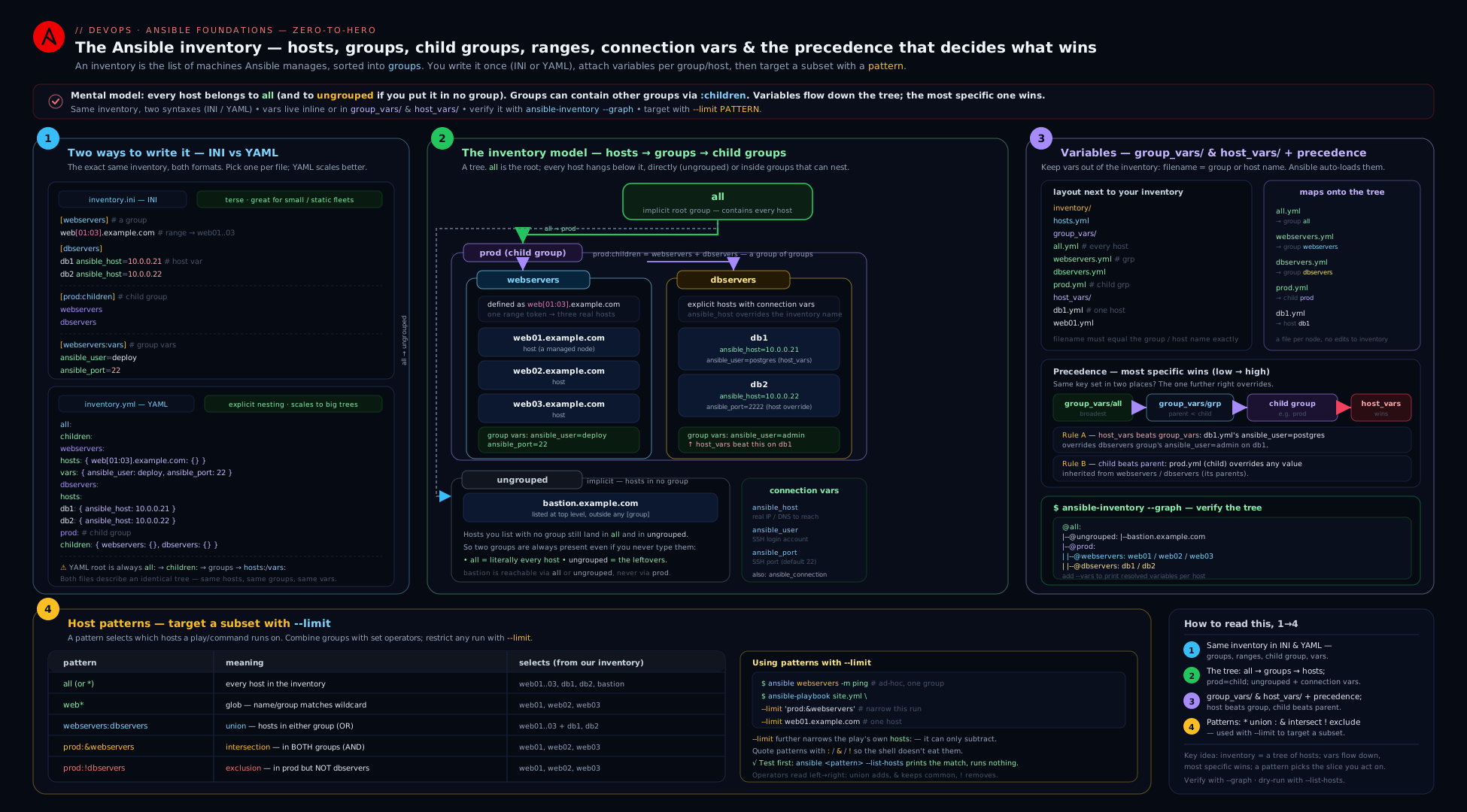
The diagram shows how a flat-looking inventory file becomes a graph: all at the top, real groups and their child-group parents in the middle, host_vars//group_vars/ layering variables by precedence, and pattern operators carving out the exact set of hosts a command will touch.
Going deeper
Everything above is enough to build and run real inventories. This section is for when you want to know why the machinery behaves as it does — the parsing internals, the merge rules, the magic variables, and the behaviour at fleet scale. It is RHCE-plus territory; skim it now and return when something surprises you.
Even a “static” inventory is parsed by a plugin
There is no separate “static inventory engine.” When you pass -i inventory.yml, ansible-core hands the source to its ordered list of inventory plugins, and the first one that accepts it wins. You can see the enabled set (and their order) in config:
ansible-config dump | grep INVENTORY_ENABLED
# INVENTORY_ENABLED(default) = ['host_list', 'script', 'auto', 'yaml', 'ini', 'toml']
host_list handles a comma-separated string (-i web1,web2,), yaml/ini/toml parse files, script runs an executable inventory script, and auto dispatches a plugin-config file (any *.aws_ec2.yml) to the right dynamic plugin. This is why the same --graph, patterns, group_vars/, and precedence rules work identically for static files and cloud plugins — they all feed one InventoryManager that produces the same in-memory graph. If you write a custom inventory plugin, you add its name to enable_plugins under [inventory] in ansible.cfg.
The _meta.hostvars block in --list
Run ansible-inventory --list and you will see a top-level _meta.hostvars mapping alongside the groups. That is a performance contract: by returning every host’s variables once under _meta, a plugin tells Ansible “you never need to call me again per host.” Without it, Ansible would invoke --host <name> once per host — fine for ten hosts, ruinous for ten thousand. Hand-written static files always populate _meta; when you write or debug a dynamic plugin, filling _meta.hostvars is the single biggest performance lever.
How variables actually merge: hash_behaviour
When the same dictionary variable is defined at two precedence levels, what happens to its keys? By default, the whole higher-precedence value replaces the lower one — Ansible does not deep-merge:
ansible-config dump | grep HASH_BEHAV
# DEFAULT_HASH_BEHAVIOUR(default) = replace
So if group_vars/all sets app: {port: 80, tls: false} and host_vars/web1 sets app: {tls: true}, then web1 sees app: {tls: true} — port is gone. Newcomers expect a merge; they get a replace. A global merge mode exists but is strongly discouraged (it makes precedence non-obvious and behaves surprisingly across sources). The modern, local, explicit fix is the combine filter at the point of use: {{ default_app | combine(host_app) }}. Design your variables to be replaced whole and you will never be surprised.
Magic variables: inventory_hostname vs ansible_host
Two names are easy to conflate. inventory_hostname is the host’s label in the inventory (web1, or web01.example.com). ansible_host is the address Ansible connects to. With an alias they differ deliberately. Ansible also injects other read-only “magic” variables you can use in templates and when::
| Magic variable | Holds |
|---|---|
inventory_hostname |
the host’s inventory name (its key) |
inventory_hostname_short |
that name up to the first . |
group_names |
list of groups this host is in |
groups |
dict of every group → its host list (the whole graph) |
hostvars |
dict to read another host’s vars: hostvars['db1'].ansible_host |
ansible_play_hosts |
hosts still active in the current play |
groups and hostvars are what let one host template in another host’s data — e.g. a load-balancer config that iterates {{ groups['webservers'] }} and reads each member’s ansible_host.
Same-depth ties and ansible_group_priority
The precedence table earlier is unambiguous except for one case: a host in two groups at the same depth that both set x. Ansible breaks that tie by, in order: group depth (deeper wins), then ansible_group_priority (default 1, higher wins), then group name (alphabetical, last wins). Because “alphabetical name” is a fragile thing to depend on, set ansible_group_priority explicitly on the group that must win. Note it is itself a group variable, so it only affects how other variables merge, and it only matters among groups at equal depth. The clean design is simpler still: do not define the same variable in two sibling groups.
Runtime groups: group_by and add_host
Groups do not have to come from a file. Two builtin modules build inventory during a play:
- name: Group hosts by their OS family at runtime
  ansible.builtin.group_by:
    key: "os_{{ ansible_facts['os_family'] | lower }}"
  # now os_redhat, os_debian … exist as targetable groups in later plays

- name: Add a just-provisioned host to the run
  ansible.builtin.add_host:
    name: "{{ new_instance_ip }}"
    groups: webservers
    ansible_user: ec2-user
group_by is how you branch on discovered facts without a conditional in every task; add_host is the bridge from a provisioning step (a Terraform output, a cloud-API call) to configuring the box in the same run. Pair add_host with meta: refresh_inventory when new hosts must also be picked up by a dynamic plugin mid-play.
The constructed plugin — static hosts, computed groups
Between hand-written and fully dynamic sits ansible.builtin.constructed: it takes hosts from other sources and builds groups from their existing variables using keyed_groups, groups, and compose — the same Jinja machinery the cloud plugins use. It is the ideal way to practise keyed_groups locally against a static file before pointing it at AWS, and to layer computed groups on top of a hand-maintained inventory.
The directory gotcha that eats inventory files
When -i points at a directory, Ansible parses every file inside — except those whose extension is in inventory_ignore_extensions, whose default is:
ansible-config dump | grep INVENTORY_IGNORE_EXTS
# ('.pyc', '.pyo', '.swp', '.bak', '~', '.rpm', '.md', '.txt', '.rst', '.orig', '.ini', '.cfg', '.retry')
Read that list twice: .ini and .cfg are ignored inside an inventory directory. A hosts.ini dropped into inventories/prod/ is silently skipped, and you will swear your groups vanished. Inside a directory, name inventory files with no extension (hosts) or .yml; keep .ini for files you pass directly (-i hosts.ini). The same mechanism is why READMEs (.md, .txt, .rst) and editor swap files never break a directory inventory.
Scale, forks, and caching
At thousands of hosts the inventory parse is rarely the bottleneck — connection fan-out is. --forks (default 5) caps concurrency; production runs raise it (forks = 50 in ansible.cfg) and pair it with serial: for controlled rolling waves. Dynamic inventory adds a network round-trip per run, so plugins support a cache (cache: true, a cache_plugin such as jsonfile, and a TTL) to reuse the last result. Fact caching (fact_caching) is a separate cache — facts about hosts, not the host list — but both matter as you scale. The knobs are covered in Performance tuning: pipelining, forks & fact caching.
Version & correctness caveats
- FQCN everywhere.
ansible.builtin.ping, notping;community.docker.dockeras a connection, not the baredocker(that short name now resolves via redirection and is a lint failure). Short module names still work today but are a future break. ansible_python_interpreterdefaults toauto; on modern targets leave it, but pin/usr/bin/python3where discovery guesses wrong or prints a warning.- INI typing has not changed — inline INI values are strings, and there is no reliable “make this an int” inline syntax. Typed vars belong in YAML
group_vars/host_vars. meta: refresh_inventoryre-runs the inventory plugins mid-play (after you have provisioned new hosts) without restartingansible-playbook.
Hands-on lab
This lab is free — it runs entirely on your control node plus two local Docker containers as “managed nodes,” so there is nothing to provision in the cloud and ₹0 cost. You will build a static inventory in both formats, add child groups and vars directories, exercise patterns, and inspect the result. Adjust to plain localhost targets if you prefer not to use containers.
Step 0 — a working directory
mkdir -p ~/ansible-inventory-lab && cd ~/ansible-inventory-lab
Step 1 — two throwaway “managed nodes” (optional but realistic)
# Start two lightweight containers we can SSH-less-connect to via the docker connection
docker run -d --name node1 --hostname node1 alpine:3 sleep infinity
docker run -d --name node2 --hostname node2 alpine:3 sleep infinity
We will reach these with ansible_connection=community.docker.docker, which needs no SSH. (If you do not have Docker, skip this and use localhost with ansible_connection=local in Step 2.)
Step 2 — write the YAML inventory
Create inventory.yml:
all:
  vars:
    ansible_connection: community.docker.docker   # talk to the containers via Docker
  children:
    webservers:
      hosts:
        node1:
    dbservers:
      hosts:
        node2:
    production:
      children:
        webservers:
        dbservers:
      vars:
        env: prod
Step 3 — add vars directories
mkdir -p group_vars host_vars
printf 'ntp_server: pool.ntp.org\n' > group_vars/all.yml
printf 'log_level: info\n'          > group_vars/webservers.yml
printf 'log_level: debug\n'         > host_vars/node1.yml
Step 4 — inspect what Ansible parsed
ansible-inventory -i inventory.yml --graph
ansible-inventory -i inventory.yml --host node1
Expected — the graph shows production containing the webservers and dbservers child groups, and --host node1 shows log_level: debug (host_vars beat the webservers group) alongside env: prod and ntp_server: pool.ntp.org:
@all:
  |--@production:
  |  |--@dbservers:
  |  |  |--node2
  |  |--@webservers:
  |  |  |--node1
  |--@ungrouped:
{
    "ansible_connection": "community.docker.docker",
    "env": "prod",
    "log_level": "debug",
    "ntp_server": "pool.ntp.org"
}
Step 5 — exercise patterns
# Whole fleet
ansible all -i inventory.yml -m ansible.builtin.ping

# Just the webservers group
ansible webservers -i inventory.yml -m ansible.builtin.ping

# Union: web + db (everything in production, the long way)
ansible 'webservers:dbservers' -i inventory.yml -m ansible.builtin.ping

# Intersection: webservers that are ALSO in production
ansible 'webservers:&production' -i inventory.yml -m ansible.builtin.ping

# Exclusion: production minus node1
ansible 'production:!node1' -i inventory.yml -m ansible.builtin.ping
Step 6 — prove the limit intersects
# A "play" pattern of production, narrowed to node2 only
ansible production -i inventory.yml --limit node2 -m ansible.builtin.ping
# Narrowing to a host NOT in production selects nothing:
ansible production -i inventory.yml --limit node1 -m ansible.builtin.debug -a "msg=hi"
The second command runs against node1 because node1 is in production (via webservers); change --limit to a non-member and the recap shows zero hosts — proof that --limit intersects rather than replaces.
Validation
ansible-inventory --graphshowsproduction → {webservers→node1, dbservers→node2}.--host node1reportslog_level: debug(precedence proven).- The union pattern reaches both nodes; the intersection reaches only webservers-in-production; the exclusion drops
node1.
Cleanup
docker rm -f node1 node2          # remove the containers
cd ~ && rm -rf ~/ansible-inventory-lab
Cost note
₹0. Everything ran locally in containers (or on localhost). No cloud resources were created, so there is nothing billable to delete beyond the local files and containers removed above.
Practice challenges
These escalate beginner → advanced. Do each in a scratch directory; every solution is runnable with the ansible/ansible-inventory you already have — no managed hosts needed, because parsing and pattern-resolution happen entirely on the control node (--graph, --host, and --list-hosts never connect to anything). Try each one before opening the solution.
Challenge 1 — the same inventory, both formats (beginner)
Write a flat inventory with three hosts in webservers and two in dbservers, first as INI, then as the equivalent YAML. Prove they are identical with ansible-inventory --graph.
<details> <summary>Solution</summary>
# hosts.ini
[webservers]
web1
web2
web3

[dbservers]
db1
db2
# hosts.yml
all:
  children:
    webservers:
      hosts:
        web1:
        web2:
        web3:
    dbservers:
      hosts:
        db1:
        db2:
ansible-inventory -i hosts.ini --graph
ansible-inventory -i hosts.yml --graph   # identical tree
Why: the two formats are just serializations of one model; the resolved graph is format-independent, which is exactly what --graph lets you confirm.
</details>
Challenge 2 — ranges and zero-padding (beginner)
Define web01…web20 with a single host line, and a second group edge holding edge1…edge5 (no padding). Confirm the exact names Ansible generated.
<details> <summary>Solution</summary>
[webservers]
web[01:20]

[edge]
edge[1:5]
ansible-inventory -i hosts.ini --graph
# webservers -> web01 … web20 (padded); edge -> edge1 … edge5 (unpadded)
Why: [01:20] preserves the leading zero across the whole range because the width of the first bound sets the padding; [1:5] has no padding to preserve.
</details>
Challenge 3 — alias + connection variables (intermediate)
Add a host named jump that actually connects to bastion.example.com on port 2222 as user ec2-user. Show jump’s resolved variables, and note the type of ansible_port.
<details> <summary>Solution</summary>
[bastion]
jump ansible_host=bastion.example.com ansible_port=2222 ansible_user=ec2-user
ansible-inventory -i hosts.ini --host jump
Representative output:
{
    "ansible_host": "bastion.example.com",
    "ansible_port": "2222",
    "ansible_user": "ec2-user"
}
Why: the inventory name (jump) is decoupled from the connection address via ansible_host; and ansible_port is the string "2222" — inline INI values are always strings, the same gotcha as enabled=false. Move it to YAML host_vars if you need a real integer.
</details>
Challenge 4 — child groups and the full precedence chain (intermediate)
Build production = (webservers + dbservers). Set ntp_server in group_vars/all, override it in group_vars/production; set log_level: info on webservers and log_level: debug on one host via host_vars. Predict each host’s two values, then verify.
<details> <summary>Solution</summary>
hosts.yml                  -> production = {webservers:{web1,web2}, dbservers:{db1}}
group_vars/all.yml         -> ntp_server: pool.ntp.org
group_vars/production.yml  -> ntp_server: ntp.prod.internal
group_vars/webservers.yml  -> log_level: info
host_vars/web1.yml         -> log_level: debug
ansible-inventory -i hosts.yml --host web1
# ntp_server -> ntp.prod.internal (production beats all)
# log_level  -> debug             (host_vars beats the webservers group)
ansible-inventory -i hosts.yml --host web2
# log_level  -> info              (webservers group; web2 has no host_vars)
ansible-inventory -i hosts.yml --host db1
# ntp_server -> ntp.prod.internal ; log_level unset (db1 is not a webserver)
Why: one exercise walks the whole chain — host_vars > child-group (webservers) > parent-group (production) > group_vars/all — and shows that a var only reaches hosts whose groups define it.
</details>
Challenge 5 — patterns and the --limit intersection, without connecting (advanced)
Using --list-hosts (which resolves patterns but never connects), print the set selected by 'webservers:&production:!web5'. Then show that a playbook hosts: production narrowed with --limit web1 selects web1, but a non-member selects zero.
<details> <summary>Solution</summary>
# Evaluate a pattern with zero connections:
ansible 'webservers:&production:!web5' -i hosts.ini --list-hosts
#   hosts (N):
#     web1
#     web2 …            (webservers that are in production, minus web5)

# A minimal play, then prove --limit intersects (still no connections):
ansible-playbook site.yml -i hosts.ini --limit web1  --list-hosts   # -> web1 (it IS in production)
ansible-playbook site.yml -i hosts.ini --limit web99 --list-hosts   # -> "skipping: no hosts matched"
Why: --list-hosts is the safe way to see what a pattern resolves to before running anything; --limit intersects with the play’s hosts:, so a host outside that set yields an empty run rather than an error.
</details>
Challenge 6 — directory inventory, the .ini trap, and a CI guard (advanced)
Create inventories/prod/ and drop your INI file in as hosts.ini. Observe that -i inventories/prod/ finds no hosts. Fix it, split group_vars/all into a by-concern directory, and write a one-line CI check that fails if production ever loses its child groups.
<details> <summary>Solution</summary>
mkdir -p inventories/prod/group_vars/all
mv hosts.ini inventories/prod/hosts.ini
ansible-inventory -i inventories/prod/ --graph        # empty! .ini is on the ignore list
mv inventories/prod/hosts.ini inventories/prod/hosts  # no extension -> parsed
printf 'ntp_server: pool.ntp.org\n'      > inventories/prod/group_vars/all/10-ntp.yml
printf 'search_domain: prod.internal\n'  > inventories/prod/group_vars/all/20-dns.yml
ansible-inventory -i inventories/prod/ --graph        # groups back; all/ merged in lexical order

# CI guard: fail the build if production loses its children
ansible-inventory -i inventories/prod/ --list | python3 -c \
  "import json,sys; d=json.load(sys.stdin); \
   assert 'webservers' in d.get('production',{}).get('children',[]), 'production lost its children'; \
   print('inventory OK')"
Why: inside a directory inventory, inventory_ignore_extensions skips .ini/.cfg/.retry, so naming the file hosts (no extension) is the fix; splitting group_vars/all into 10-/20- files keeps concerns tidy; and asserting on --list JSON in CI catches a structural regression before a play ever runs against the wrong set.
</details>
Common beginner mistakes
These are misconceptions rather than error messages — the wrong mental model that produces the confusion, and the right one to replace it with.
-
“The inventory file has to be named
hostsorinventory, or end in.ini/.yml.” Not for a single file — Ansible picks the parser by content, so a well-formed file with any name (or none) works when you pass it to-idirectly. The right model: the name only matters inside an inventory directory, whereinventory_ignore_extensionsskips.ini,.cfg,.retry, backups, and docs. In a directory, usehostsor.yml. -
“
ansible_hostis just another way of writing the host’s name.” They are different roles. The inventory name is the label you target in patterns and match ingroup_vars/host_vars;ansible_hostis the address the SSH/connection plugin dials. The right model: the name is an identity,ansible_hostis a phone number — an alias deliberately separates them. -
“Variables belong in the inventory file, next to the hosts.” You can put them there, and for a five-line lab it is fine. But at scale it makes the file unreviewable and mixes “what exists” with “what is true about it.” The right model: keep the inventory thin (hosts + membership) and push variables into
group_vars//host_vars/, where diffs are clean and Vault files isolate secrets. -
“
--limitpicks the hosts to run on.” It only ever narrows a set the play already chose — it is an intersection withhosts:, not a replacement. The right model: if you--limitto a host that is not in the play’shosts:, you get zero hosts, not that host. Widenhosts:or pick a member. -
“
enabled=falsein INI is a boolean, sowhen: enabledis safe.” In INI it is the string"false", and every non-empty string is truthy — so the task runs. The right model: type-sensitive vars live in YAMLgroup_vars/host_varsas real booleans, or you compare explicitly withwhen: enabled | bool. -
“A host in both
webserversandproductiongetsproduction’s value becauseproductionis the bigger group.” Precedence is about specificity, not size. The right model: host beats group; a child group beats its parent;group_vars/allis the lowest precedence (a default), not a trump card. The narrower scope wins. -
“Nesting a group under
children:copies its hosts into the parent.” Nothing is copied. The right model: the graph holds each host once; membership in a parent is by reference and transitive, so editing the child updates every ancestor automatically and a host is never duplicated.
Common mistakes & troubleshooting
| Symptom | Likely cause | Fix |
|---|---|---|
[WARNING]: No inventory was parsed, only implicit localhost is available |
No -i and no inventory set in ansible.cfg, or the path is wrong |
Pass -i path or set inventory = in ansible.cfg; confirm with ansible-inventory --graph |
Host lands in ungrouped unexpectedly |
It was listed before any [group] header (INI), or not nested under a group (YAML) |
Move it under the intended group; verify with --graph |
when: enabled runs even though enabled=false |
INI made it the string "false", which is truthy |
Define the var in group_vars/host_vars YAML as a real boolean, or compare explicitly |
A group_vars/ file is silently ignored |
Filename does not match the group name, wrong extension, or it is beside the wrong root | Name it exactly <group>.yml; place group_vars/ beside the inventory or the playbook |
| An inventory file in a directory is ignored | Its extension (.ini, .cfg, .retry, ~) is on inventory_ignore_extensions |
Name it hosts (no extension) or .yml, or pass the .ini directly with -i hosts.ini |
| Shell error or wrong hosts from a pattern | Unquoted : ! * ~ interpreted by the shell |
Single-quote the whole pattern |
| Two groups set the same var; the “wrong” one wins | Sibling groups at equal depth — tie broken unpredictably | Set ansible_group_priority (higher wins) or stop defining the var in two siblings |
--limit selects nothing |
The limit host is not in the play’s hosts: set (limit intersects) |
Widen the play’s hosts: or pick a host that is actually a member |
Range web[1:10] produced web1 not web01 |
Missing zero-padding in the range | Use web[01:10] to preserve padding |
A random README/.swp in an inventory directory breaks parsing |
Ansible tried to parse a non-inventory file | Keep only inventory files in the directory, or rely on inventory_ignore_extensions |
Best practices
- Keep the inventory file thin. Hosts and group membership in the file; all variables in
group_vars//host_vars/. This separates “what exists” from “what is true about it” and makes diffs reviewable. - One directory per environment (
inventories/prod/,inventories/staging/), each self-contained with its owngroup_vars//host_vars/. It is the single best guard against running a change against the wrong environment. - Prefer YAML for anything long-lived; reserve INI for quick labs. YAML’s native types eliminate the string-vs-bool class of bugs.
- Use
group_vars/allfor defaults, narrow groups to override. Lean on precedence (host > child group > parent group > all) instead of conditionals in tasks. - Name groups by role and by environment/region, and combine with child groups (
production=webservers+dbservers). Give hosts and groups visibly different naming so glob patterns are unambiguous. - Always single-quote patterns in the shell, and verify with
ansible-inventory --graphbefore any run that changes state. - Split big
group_vars/allinto a directory (group_vars/all/10-*.yml) by concern, and isolate Vault-encrypted files (group_vars/all/vault.yml) from plaintext. - Run destructive plays with
--limitfirst against one host to validate, then widen.
Security notes
- Never commit plaintext secrets to inventory.
ansible_password,ansible_become_password, API tokens, and the like belong in Ansible Vault-encrypted files withingroup_vars//host_vars/(e.g.group_vars/all/vault.yml), or in an external secrets manager retrieved at runtime. The Ansible Vault lesson covers this; the cross-cutting principles are in secrets & configuration management fundamentals. - Prefer SSH keys over passwords. Set
ansible_ssh_private_key_file(or rely on the SSH agent) rather thanansible_password. - Be deliberate with
host_key_checking. Disabling it (common in throwaway labs) removes protection against man-in-the-middle on first connect; keep it enabled for production and manageknown_hostsproperly. - Treat the inventory as sensitive. It maps your entire estate — hostnames, IPs, jump hosts, login users. Restrict who can read it, and keep production inventory out of widely-shared repos when it contains real addresses.
- Scope blast radius with patterns. A play with
hosts: allplus a privilegedbecomeis a foot-gun; prefer the narrowest group that does the job and gate wide runs behind--limitand--check. - Audit merged inventory. When mixing static and dynamic sources, run
ansible-inventory --graphin CI so a misnamed cloud filter cannot silently pull extra hosts into a privileged group.
Interview & exam questions
-
What is the difference between the
allandungroupedgroups?allcontains every host in the inventory;ungroupedcontains only hosts that belong to no group other thanall. Both are implicit (Ansible always creates them) and both can carry vars (group_vars/all,group_vars/ungrouped). -
A variable is set in
group_vars/production,group_vars/webservers, andhost_vars/web1.web1is a webserver in production. Which value wins?host_vars/web1. Precedence among these is host_vars > child-group vars (webservers) > parent-group vars (production) >group_vars/all. -
Why might
when: enabledexecute even though you setenabled=falsein an INI inventory? Because INI inline values are strings by default, and the non-empty string"false"is truthy. Define the variable as a real boolean in YAMLgroup_vars/host_vars, or compare explicitly (when: enabled | bool). -
Write a pattern for “all webservers that are also in production, except
web5.”'webservers:&production:!web5'— intersection first, then exclusion, single-quoted to protect:,&, and!from the shell. -
What does
--limitdo, and what is the gotcha? It intersects with the play’shosts:to further restrict the target set — it does not replace it. If you--limitto a host that is not in the play’s selection, zero hosts run. -
Where does Ansible look for
group_vars/andhost_vars/directories? In two places: adjacent to the inventory source and adjacent to the playbook. Filenames must match the group/host name; a name may be a single.ymlfile or a directory whose files are all merged in lexical order. -
How do you express a group of groups, and what does the parent contain? INI:
[parent:children]listing child group names. YAML: achildren:key. The parent transitively contains every host of every descendant group. -
You pass
-i inventories/prod/(a directory) and two files set the same group var. Which wins? The file parsed later in lexical order. Teams prefix files with numbers (01-,99-) to make this deterministic. -
Give the range syntax for
web01–web10versusweb1–web10, and the difference.web[01:10]preserves zero-padding (web01…web10);web[1:10]does not (web1…web10). Match your real hostnames. -
What is an alias, and which variable backs it? An inventory name decoupled from the connection address. You set
ansible_hostto the real IP/DNS name; the alias is used in patterns and var files while Ansible connects toansible_host. -
Two sibling groups at the same depth both set
x. How do you make one win deterministically? Setansible_group_priorityon the preferred group (default1; higher wins). Better: avoid defining the same variable in two siblings. -
Which command shows the resolved hierarchy as a tree, and which dumps everything as JSON?
ansible-inventory --graph(tree, add--varsfor variables);ansible-inventory --list(full JSON;--yamlfor YAML). -
What is
inventory_hostname, and how does it differ fromansible_host?inventory_hostnameis the host’s inventory name (its key, a magic variable);ansible_hostis the address Ansible connects to. They coincide unless you use an alias, where they deliberately differ. -
By default, does defining a dictionary variable at two precedence levels merge or replace its keys? It replaces —
hash_behaviourdefaults toreplace, so the higher-precedence dict wins whole. Use thecombinefilter for an explicit local merge rather than the discouraged globalmergemode.
Quick check
- Name the two groups that exist in every inventory without being declared.
- In INI, is
http_port=8080an integer or a string by default — and why does it matter? - Write the pattern for “everything in
productionexcept the hostdb1.” - A variable conflicts between
group_vars/allandhost_vars/web1. Which applies toweb1? - What is the difference between passing
-itwice and pointing-iat a directory?
Answers
all(every host) andungrouped(hosts in no other group).- A string (
"8080"). It matters because string values bypass numeric comparisons and the string"false"is truthy inwhen:tests — define typed vars in YAMLgroup_vars/host_varsinstead. 'production:!db1'(single-quoted to protect:and!).host_vars/web1wins — host vars are more specific thangroup_vars/all.- Both merge sources, but a directory parses every file inside it in lexical order (later files win on conflicts, and files with ignored extensions like
.iniare skipped), whereas repeated-iflags add the exact sources you name in the order given.
Exercise
Build a two-environment inventory under inventories/ (prod/ and staging/), each with its own hosts file and group_vars/. In each environment define the groups webservers, dbservers, and a child group app = (webservers + dbservers). Set env in group_vars/all per environment (prod / staging), set log_level: info on webservers, and override it to debug on exactly one host via host_vars/. Then:
- Prove with
ansible-inventory -i inventories/prod/ --graph --varsthat the child relationships and variables resolved as intended. - Run an ad-hoc
ansible.builtin.debugagainst'app:&webservers:!<one-host>'in prod and confirm the selected set is what you predicted. - Show that
--limitagainst a host not inappselects zero hosts.
Stretch goal: split group_vars/all into a directory (group_vars/all/10-network.yml, 20-logging.yml) and verify the merged result is unchanged.
Certification mapping
This lesson maps directly to the Red Hat Certified Engineer (RHCE) EX294 objectives that involve inventory and host selection:
- “Understand core components of Ansible” — inventory, hosts, groups, variables.
- “Install and configure an Ansible control node” — including creating a static host inventory file.
- “Manage inventory variables” — host and group variables via
host_vars/andgroup_vars/. - “Run a single task using an ad hoc Ansible command” — selecting targets with patterns.
- “Use both static and dynamic inventories to define groups of hosts” — the static half here; dynamic in its own lesson.
The same concepts underpin Ansible Automation Platform inventory sources and credentials, so the knowledge transfers directly to AAP/AWX, where these static inventories become managed inventory objects.
Glossary
- Inventory — the list of managed hosts, their groups, and their variables; the “where” of every Ansible command.
- Host — a single managed machine entry; identified by its inventory name (which may be an alias).
- Alias — an inventory name decoupled from the real connection address via
ansible_host. - Group — a named set of hosts; carries group variables that apply to all members.
- Child group — a group nested inside another (
:children/children:); the parent contains all descendant hosts. all— the implicit group containing every host.ungrouped— the implicit group of hosts that belong to no group other thanall.group_vars/— directory whose files (named per group) supply group-level variables.host_vars/— directory whose files (named per host) supply host-level variables; higher precedence than group vars.- Connection variables — reserved vars (
ansible_host,ansible_port,ansible_user,ansible_connection, …) that control how Ansible reaches a host. - Pattern — the host-selection mini-language (
all,*,:,:&,:!,~regex) used inhosts:, ad-hoc commands, and--limit. --limit— a flag that intersects with the play’s host selection to narrow it further.--list-hosts— a flag (ansible/ansible-playbook) that prints the hosts a pattern resolves to without connecting — the safe way to preview a target set.- Range —
[start:end]host expansion (web[01:10]), optionally with a step ([01:10:2]). ansible_group_priority— a per-group integer (default 1; higher wins) that breaks variable ties between same-depth groups.- Static inventory — a hand-maintained file or directory (this lesson).
- Dynamic inventory — host data generated at runtime by an inventory plugin querying a live source.
- Inventory plugin — the code that parses an inventory source (
yaml,ini,toml,auto,constructed,amazon.aws.aws_ec2, …); even a static file goes through one. inventory_hostname— magic variable holding a host’s inventory name (contrastansible_host, its address).- Magic variables — read-only variables Ansible injects:
inventory_hostname,group_names,groups,hostvars,ansible_play_hosts. _meta.hostvars— the block in--listoutput that returns all host variables at once, so Ansible need not query per host.hash_behaviour— global setting deciding whether same-named dictionary vars replace (default) or merge.constructed— the inventory plugin that builds groups from existing host variables viakeyed_groups/groups/compose.group_by/add_host— builtin modules that create groups or hosts at runtime during a play.inventory_ignore_extensions— the config list of file extensions Ansible skips inside a directory inventory (includes.ini,.cfg,.retry, backups).- Implicit localhost — the
localhost(connectionlocal) Ansible always provides even when no inventory is parsed. ansible-inventory— the CLI that renders the parsed inventory (--graph,--list,--host).
Next steps
- Next in the course: Ansible ad-hoc commands & modules — put these patterns and groups to work with one-off
ansible <pattern> -m <module>commands andansible-doc. - Came from: Installing & configuring Ansible — the control node and the
ansible.cfginventory =setting that points at the inventory you just learned to build. - Go dynamic: Dynamic inventory & secure secrets for AWS and Azure — replace the static file with a live query against the cloud, reusing every pattern and precedence rule from this lesson.