When something goes wrong in AWS at three in the morning, three questions decide how quickly you recover. What is broken right now? — a metric is in alarm, a queue is backing up, latency has tripled. Who changed something? — somebody, or some automation, touched a resource and the timeline matters. When did the configuration drift away from what it should be? — a security group opened, an S3 bucket lost its encryption, an IAM policy widened. AWS answers those three questions with three different services, and the single most useful mental model in all of AWS observability is to keep them straight: CloudWatch tells you what is happening, CloudTrail tells you who did what, and AWS Config tells you what the configuration is and how it changed over time. Tie them together with EventBridge, which turns any of those signals into automated action, and you have a complete observability and governance loop.
This lesson is deliberately exhaustive. Observability is one of the most heavily examined and most operationally important areas of AWS, and it is also where engineers most often have a fuzzy, incomplete picture — they know CloudWatch shows graphs and CloudTrail shows API calls, but cannot explain a composite alarm, a metric filter, a Config conformance pack, or why CloudWatch Events and EventBridge are the same thing under two names. We go through each service with the same treatment used across this course: what it is · the choices · the default · when to use it · the trade-off · the limits · the cost impact · the gotcha. Every core operation comes with a real aws CLI command so you can reproduce it by hand, and because this is a reference you will return to mid-incident, every concept, limit, option and failure mode is also laid out as a scannable table — read the prose once, then keep the tables open when the pager fires.
By the end you will be able to instrument a workload with metrics, alarms, logs and dashboards; query logs at scale with Logs Insights; record an audit trail of every API call with CloudTrail; track and enforce configuration with AWS Config; wire it all into automated remediation with EventBridge; and add distributed tracing with X-Ray. Enough to ace an SOA-C02 or SAA-C03 question, hold your own in an interview, and run a production account you can actually see into.
What problem this solves
Without an observability strategy you are flying blind. The workload runs, until it does not, and when it does not the only signals you have are a customer complaint and a blank stare at the console. The pain is concrete: you cannot tell whether the latency spike is the database or the app; you cannot prove who deleted the security group that took prod down; you cannot say what the IAM policy looked like before it was widened; and you have no automated way to catch a public S3 bucket the moment it is created instead of in next quarter’s audit. Every one of those is a different question, and reaching for the wrong service — grepping CloudWatch for “who deleted this”, or expecting CloudTrail to show you a resource’s state last Tuesday — burns the hour you do not have.
What breaks without it: incidents run long because nobody can localise the fault; security findings surface weeks late; compliance audits become archaeology; and cost quietly balloons because logs default to never expire and high-cardinality custom metrics multiply unwatched. Who hits this: every team running anything in AWS past a single toy instance, and hardest the teams running multi-account organisations where signal is scattered across Regions and accounts with no single pane of glass.
To frame the whole field before the deep dive, here is the question each service answers, the signal it produces, and the first place you look:
| Question in the incident | Service that answers it | Signal it produces | First place to look | The classic mistake |
|---|---|---|---|---|
| What is broken right now? | CloudWatch | Metrics, alarms, logs, dashboards | Alarms list / dashboard for the Region | Looking in the wrong Region (empty graph) |
| Who did what, and when? | CloudTrail | Every API call: identity, action, IP, result | Event history (90-day, free) | Expecting data-plane reads (off by default) |
| What is the config, and how did it change? | AWS Config | Configuration-item timeline + compliance | Resource timeline / rule compliance | Confusing it with CloudTrail’s events |
| How do I react automatically? | EventBridge | Event match → target (Lambda/SSM/SNS) | Rule pattern + target wiring | Pointing AWS events at a custom bus |
| Where did the time go in one request? | X-Ray | Service map + per-request trace | Trace map for the slow operation | Expecting every request (it samples) |
Learning objectives
By the end of this lesson you can:
- Explain the who / what / when triad and map each question to CloudWatch, CloudTrail and AWS Config.
- Describe CloudWatch metrics end to end — namespaces, dimensions, statistics, standard vs high resolution, custom metrics, and the unified CloudWatch agent.
- Configure CloudWatch alarms — the three states, period/evaluation/datapoints-to-alarm, missing-data treatment, composite alarms, and alarm actions.
- Work with CloudWatch Logs — log groups and streams, retention, metric filters, subscription filters, and querying with Logs Insights.
- Build CloudWatch dashboards and explain widgets, cross-account/cross-Region views.
- Set up CloudTrail correctly — management vs data vs Insights events, multi-Region organisation trails, log-file validation, and the always-on Event history.
- Use AWS Config to record configuration history, evaluate rules, and deploy conformance packs for compliance.
- Use EventBridge rules and buses to automate responses to events, and explain how it relates to “CloudWatch Events”.
- Add basic distributed tracing with AWS X-Ray and know when to reach for it.
Prerequisites & where this fits
You should already be comfortable with the AWS basics — the Management Console and the aws CLI with a configured profile (covered in AWS Console, CLI, CloudShell & SDK First Steps), Regions and IAM roles/policies (see IAM Fundamentals: Users, Roles, Policies & Evaluation), and at least one service you can generate signal from (an EC2 instance, a Lambda function, or an S3 bucket). No prior monitoring experience is assumed; every term is defined. This is the Observability lesson of the AWS Zero-to-Hero course’s Foundation/Intermediate track, and it is the anchor the operational lessons build on: troubleshooting playbooks, frontend SLO monitoring, and structured logging pipelines all reference the metrics, alarms, logs and trails introduced here.
A quick map of where each piece sits and what depends on it, so you can see the shape before the detail:
| Layer | Service(s) | Scope | Depends on | Built on top of it |
|---|---|---|---|---|
| Telemetry collection | CloudWatch metrics + agent | Per-Region | IAM role on the source | Alarms, dashboards, SLOs |
| Log storage & query | CloudWatch Logs + Insights | Per-Region | Log group + retention | Metric filters, subscriptions |
| Audit of API calls | CloudTrail | Multi-Region capable | S3 bucket, optional KMS | Athena/Lake, security alarms |
| Configuration state | AWS Config | Per-Region (global once) | S3 + recorder | Rules, packs, aggregators |
| Event routing | EventBridge | Per-Region (default bus) | Source events | Remediation, fan-out |
| Distributed tracing | X-Ray | Per-Region, sampled | Instrumentation | Application Signals / SLOs |
Core concepts
Before any console blade, fix five mental models. They explain why these services are shaped the way they are.
Observability is signal plus the ability to ask new questions. Monitoring answers questions you decided to ask in advance (an alarm you pre-wired). Observability is being able to ask questions you did not anticipate — slicing logs by a field you did not pre-aggregate, correlating a latency spike with a deploy, tracing one slow request across five services. CloudWatch metrics and alarms are the monitoring half; Logs Insights, CloudTrail and X-Ray are what give you the observability half.
The three pillars: metrics, logs, traces. A metric is a number over time (CPU %, request count, queue depth) — cheap to store, fast to alarm on, but aggregated, so it tells you that something is wrong, not why. A log is a timestamped record of an event (a line of text or JSON) — rich and detailed, the why, but expensive at volume and slower to query. A trace follows a single request as it hops between services, showing where the time went. CloudWatch covers metrics and logs; X-Ray covers traces; all three live under the CloudWatch umbrella in the console today.
The who / what / when triad. Keep these three audit-and-observe questions separate because three different services answer them:
| Question | Service | What it records | Retention default | Real-time? |
|---|---|---|---|---|
| What is happening / happened? | CloudWatch | Metrics, alarms, logs, dashboards — operational health | Metrics 15 mo; logs never-expire | Near real time |
| Who did what, and when? | CloudTrail | Every API call: identity, action, source IP, parameters, result | 90-day history; trails as configured | ~5–15 min to S3 |
| What is the config and how did it change? | AWS Config | Resource configuration snapshots + a timeline of changes + compliance | Until you stop the recorder | Minutes after change |
An interviewer’s favourite trap is “I need to know who deleted this security group” (CloudTrail, not CloudWatch) versus “I need to know what my security group looked like last Tuesday and what changed” (AWS Config, not CloudTrail). CloudTrail tells you the event; Config tells you the state over time.
Everything is regional, with a few global exceptions. CloudWatch metrics, alarms, log groups, Config recorders and EventBridge buses are per-Region — a metric published in ap-south-1 does not appear in us-east-1. CloudTrail can be multi-Region (one trail captures all Regions) and some global services (IAM, CloudFront, Route 53) log only to us-east-1. This regionality is the single most common cause of “my alarm/dashboard is empty” — you are looking in the wrong Region.
Push vs pull, and the agent. AWS services push their own metrics to CloudWatch automatically (EC2 CPU, ELB request count, Lambda invocations) at no charge for the default set. But CloudWatch cannot see inside an EC2 instance — memory and disk usage are not default metrics because the hypervisor cannot see the guest OS. To get those, and to ship the instance’s log files, you install the CloudWatch agent inside the OS. This push model and the agent gap are exam-classic.
The vocabulary in one table
Pin down every moving part before the deep sections; the glossary repeats these for lookup, but this is the mental model side by side:
| Term | One-line definition | Where it lives | Why it matters |
|---|---|---|---|
| Metric | A time-ordered series of numeric data points | CloudWatch (per-Region) | The cheap “that something is wrong” signal |
| Namespace | Container grouping related metrics | Metric identity | AWS/ is reserved; yours is anything |
| Dimension | Name/value pair scoping a metric to a resource | Metric identity | Each combo is a distinct billable metric |
| Alarm | A watcher on a metric with states + actions | CloudWatch | Turns a metric into a page or an action |
| Log group / stream | Container / per-source sequence of log events | CloudWatch Logs | Retention & filters live on the group |
| Metric filter | Pattern that turns matching logs into a metric | On a log group | Alarm on “N errors/min” without parsing |
| Trail | Config that delivers CloudTrail events to S3 | CloudTrail | The durable, queryable audit record |
| Management / data event | Control-plane / data-plane API activity | CloudTrail | Data events are off by default and cost |
| Configuration item (CI) | Point-in-time snapshot of a resource | AWS Config | The unit you are billed per, and queried by |
| Config rule | Desired-state check → COMPLIANT/NON_COMPLIANT | AWS Config | Detects drift; does not fix it |
| Conformance pack | Bundle of Config rules + remediation | AWS Config | Deploy a whole standard at once |
| Event bus / rule | The pipe / the matcher routing events to targets | EventBridge | Turns any signal into automation |
| Segment / trace | One service’s work / one request’s full path | X-Ray | Shows which hop is slow |
CloudWatch metrics, in depth
A metric is the fundamental CloudWatch concept: a time-ordered set of data points, each a number with a timestamp, identified by a namespace and zero or more dimensions.
Namespaces. What: a container that groups related metrics so names do not collide. AWS service metrics use the AWS/<service> convention (AWS/EC2, AWS/Lambda, AWS/ApplicationELB, AWS/RDS, AWS/SQS). Your custom metrics go in any namespace you choose (e.g. MyApp/Checkout). Gotcha: the AWS/ prefix is reserved — you cannot publish into it.
The service namespaces you will reach for most, the dimension that scopes them, and a signal worth alarming on in each:
| Namespace | Service | Key dimension | A metric to watch | Why it matters |
|---|---|---|---|---|
AWS/EC2 |
EC2 instances | InstanceId |
CPUUtilization, StatusCheckFailed |
Health + recover trigger |
AWS/Lambda |
Lambda | FunctionName |
Errors, Throttles, Duration |
Failures + concurrency limits |
AWS/ApplicationELB |
ALB | LoadBalancer |
HTTPCode_Target_5XX_Count, TargetResponseTime |
Backend errors + latency SLO |
AWS/RDS |
RDS / Aurora | DBInstanceIdentifier |
CPUUtilization, FreeableMemory, DatabaseConnections |
DB saturation |
AWS/SQS |
SQS | QueueName |
ApproximateAgeOfOldestMessage |
Backlog / stuck consumer |
AWS/DynamoDB |
DynamoDB | TableName |
ThrottledRequests, ConsumedReadCapacityUnits |
Capacity / hot partition |
AWS/ApiGateway |
API Gateway | ApiName |
5XXError, Latency, Count |
API health |
CWAgent |
CloudWatch agent | InstanceId, path |
mem_used_percent, disk_used_percent |
The memory/disk gap |
Dimensions. What: name/value pairs that scope a metric to a specific resource — e.g. the AWS/EC2 CPUUtilization metric carries an InstanceId dimension so each instance has its own line. Choices: up to 30 dimensions per metric; each unique combination of namespace + name + dimensions is a distinct metric (this is what you are billed for as a custom metric). Gotcha: dimensions are part of the metric’s identity — if you publish CPUUtilization with InstanceId=i-abc and also without any dimension, those are two different metrics, and CloudWatch does not auto-aggregate across dimensions for custom metrics.
Statistics. What: how data points in a period are aggregated for display/alarming. Choices: Average, Sum, Minimum, Maximum, SampleCount, and percentiles (p50, p90, p99, or any pNN.NN) and trimmed means. When: use Average for utilisation, Sum for counts (requests, errors), Maximum for “did it ever spike”, and percentiles for latency SLOs (a p99 latency alarm catches the slow tail an average hides). Gotcha: percentiles need raw samples — they do not work on metrics already pre-aggregated as statistic sets unless you publish the full distribution.
Pick the statistic that matches the question, not out of habit:
| Statistic | What it answers | Best for | Trap if misused |
|---|---|---|---|
Average |
Typical value over the period | CPU/memory utilisation | Hides spikes that page you |
Sum |
Total over the period | Request count, errors, bytes | Meaningless for a gauge like CPU% |
Maximum |
Worst point in the period | “Did it ever breach?” heartbeats | One blip looks like sustained load |
Minimum |
Best point in the period | Free-capacity floors | Rarely what you alarm on |
SampleCount |
How many data points landed | Detecting a metric going silent | Not the value, just the count |
p90 / p99 |
The slow tail latency | Latency SLOs, user experience | Needs raw samples, not stat sets |
Resolution. What: how granular the data points are. Choices: standard resolution = 1-minute granularity (the default for AWS service metrics); high resolution = down to 1-second granularity for custom metrics. When: high resolution for fast-moving signals where a one-minute average smooths over a problem (e.g. a spiky request rate, autoscaling on sub-minute bursts). Cost/trade-off: high-resolution alarms can evaluate at 10-second periods but cost more and high-resolution data points cost more to publish. Gotcha: a high-resolution alarm period below 60 s costs more per alarm.
| Resolution | Granularity | Who uses it | Alarm period floor | Cost note |
|---|---|---|---|---|
| Standard (default) | 1 minute | AWS service metrics, most custom | 60 s | Included for default AWS metrics |
| Detailed monitoring (EC2) | 1 minute (vs 5) | EC2 you want finer | 60 s | Per-instance charge; no new metrics |
| High resolution | 1 second | Spiky custom metrics | 10 s | Higher per-metric + per-alarm cost |
Retention (automatic, free, and you cannot change it). CloudWatch keeps metric data at decreasing granularity and discards it after 15 months:
| Original period | Retained as | For |
|---|---|---|
| < 60 s (high-res) | 1-second data points | 3 hours |
| 60 s (1 min) | 1-minute data points | 15 days |
| 5 min | 5-minute data points | 63 days |
| 1 hour | 1-hour data points | 15 months |
Gotcha: after 15 months metrics are gone — if you need longer retention for capacity planning or compliance, export to S3 (via metric streams) or store a copy yourself.
Custom metrics. What: numbers your own application or scripts push to CloudWatch with PutMetricData. When: business and in-app signals CloudWatch cannot see — orders per minute, cache hit ratio, queue processing lag, memory usage. Cost: billed per custom metric per month (per unique namespace+name+dimensions combination), plus per-API-request charges; this adds up fast if you publish a metric per user or per request — use dimensions thoughtfully. Gotcha: PutMetricData accepts timestamps up to two weeks in the past and up to two hours in the future; outside that the point is rejected.
# Publish a custom metric
aws cloudwatch put-metric-data \
  --namespace "MyApp/Checkout" \
  --metric-name OrdersProcessed \
  --unit Count --value 42 \
  --dimensions Environment=prod,Service=cart
Metric math and search expressions. What: compute new time series from existing ones — errors / requests * 100 for an error rate, SUM across instances, anomaly-detection bands. Search expressions (SEARCH('{AWS/EC2,InstanceId} CPUUtilization', 'Average')) match metrics dynamically so a graph or alarm auto-includes new instances. When: fleet-wide dashboards and ratio alarms. Gotcha: you cannot alarm directly on a raw search expression result unless wrapped appropriately; metric-math alarms are supported.
The CloudWatch agent. What: a single binary (amazon-cloudwatch-agent) you install on EC2 or on-premises servers to collect OS-level metrics CloudWatch cannot see (memory, disk space, disk/network I/O, swap, per-process stats) and to ship log files to CloudWatch Logs. Config: a JSON config file (built interactively with amazon-cloudwatch-agent-config-wizard, often stored in SSM Parameter Store) defines which metrics and logs to collect; it can also collect StatsD and collectd custom metrics. Permissions: the instance needs an IAM role with CloudWatchAgentServerPolicy. Gotcha: the old “CloudWatch Logs agent” and per-instance “detailed monitoring” are different things — detailed monitoring just changes EC2 metrics from 5-minute to 1-minute resolution (for a charge); it does not add memory/disk metrics. Only the agent does that.
What is and is not collected without the agent — the table that ends the “why no memory metric?” question forever:
| Signal | Default (no agent)? | Source | How to get it | Gotcha |
|---|---|---|---|---|
EC2 CPUUtilization |
Yes | Hypervisor | Built-in AWS/EC2 |
5-min unless detailed monitoring |
| EC2 network in/out | Yes | Hypervisor | Built-in AWS/EC2 |
Bytes, not packets-per-app |
| EC2 disk read/write ops | Yes (EBS-level) | Hypervisor | Built-in AWS/EC2 |
Volume I/O, not free space |
| EC2 memory used % | No | Guest OS | CloudWatch agent | Hypervisor can’t see inside |
| EC2 disk free % | No | Guest OS | CloudWatch agent | The one that fills up at 3am |
| EC2 swap / per-process | No | Guest OS | CloudWatch agent | Needs in-OS collection |
| Application log files | No | Guest OS | CloudWatch agent | Or SDK / awslogs driver |
| Lambda invocations/errors | Yes | Service | Built-in AWS/Lambda |
Per-function dimensions |
CloudWatch alarms, in depth
An alarm watches a single metric (or a metric-math expression) and changes state when it breaches a threshold, optionally triggering actions.
The three states. What: OK (within threshold), ALARM (breaching), INSUFFICIENT_DATA (not enough data to decide — e.g. just created, or the metric stopped reporting). Gotcha: INSUFFICIENT_DATA is not failure; how you treat missing data (below) decides whether it becomes ALARM.
| State | Meaning | Common cause | What to wire to it |
|---|---|---|---|
OK |
Within threshold | Healthy | OK action (the all-clear notification) |
ALARM |
Breaching the threshold | The actual problem | SNS page / Auto Scaling / EC2 action |
INSUFFICIENT_DATA |
Not enough data to decide | New alarm, or metric went silent | Treat-missing-data decides next state |
Threshold and comparison. What: the value and operator (GreaterThanThreshold, LessThanOrEqualToThreshold, etc.), or an anomaly-detection band instead of a static number. When: static thresholds for known limits (CPU > 80%); anomaly detection for metrics whose “normal” varies by time of day.
Period, evaluation periods, and datapoints to alarm. What: the period is the length of each data point (e.g. 60 s); evaluation periods is how many recent periods are considered; datapoints to alarm is how many of those must breach. Example: period 60 s, evaluation periods 5, datapoints to alarm 3 → “alarm if 3 of the last 5 minutes breach” — the M-out-of-N pattern that suppresses single-spike flapping. Default: datapoints = evaluation periods (all must breach). Gotcha: setting evaluation periods to 1 makes the alarm twitchy; M-out-of-N is the production-grade choice.
These three knobs cause more bad pages than anything else; here is what each does and how to set it:
| Parameter | What it controls | CLI flag | Typical value | If you get it wrong |
|---|---|---|---|---|
| Period | Length of one data point | --period |
60 s | Too short = noisy; too long = slow |
| Evaluation periods (N) | How many recent periods to weigh | --evaluation-periods |
5 | 1 = twitchy, flaps on a blip |
| Datapoints to alarm (M) | How many of N must breach | --datapoints-to-alarm |
3 | = N means a single good point clears it |
| Comparison operator | Direction of the breach | --comparison-operator |
GreaterThanThreshold |
Wrong direction = never fires |
| Threshold | The breach value | --threshold |
workload-specific | Set from p99 baseline, not a guess |
Missing data treatment. What: what to do when a period has no data. Choices: missing (default — treat as neither breaching nor OK), notBreaching (treat as OK), breaching (treat as ALARM), ignore (keep the current state). When: breaching for “this thing must always report” (a heartbeat); notBreaching to avoid false alarms on metrics that legitimately go quiet. Gotcha: a stopped EC2 instance stops publishing CPUUtilization, so an alarm on it may sit in INSUFFICIENT_DATA forever unless you set the treatment deliberately.
--treat-missing-data |
Missing period is treated as | Use when | Example |
|---|---|---|---|
missing (default) |
Neither breach nor OK | You genuinely do not know | Default; often not what you want |
notBreaching |
OK | Metric legitimately goes quiet | Nightly-idle batch worker |
breaching |
ALARM | The thing must always report | Heartbeat / liveness metric |
ignore |
Keep current state | Avoid flip-flop on gaps | Sparse business metric |
Alarm actions. What: what happens on state change. Choices: publish to an SNS topic (email/SMS/Lambda/chat), trigger EC2 Auto Scaling policies, perform EC2 actions (stop/terminate/reboot/recover), create OpsItems/incidents in Systems Manager. When: SNS for notification and fan-out; Auto Scaling for elastic capacity; EC2 recover for automatic recovery of an impaired instance onto new hardware. Gotcha: you can set different actions for entering ALARM, OK, and INSUFFICIENT_DATA states — wire an OK action so you get the “all clear” too.
| Action type | What it does | State it usually fires on | Limitation |
|---|---|---|---|
| SNS publish | Email/SMS/Lambda/chat fan-out | ALARM and OK | Cost negligible; the default choice |
| EC2 Auto Scaling policy | Add/remove instances | ALARM (scale-out) | Needs an ASG and a scaling policy |
| EC2 action (recover) | Move impaired instance to new HW | ALARM | Only certain instance/EBS configs |
| EC2 action (stop/terminate/reboot) | Lifecycle action | ALARM | Dangerous; scope IAM tightly |
| SSM OpsItem / incident | Open an operational ticket | ALARM | Needs Systems Manager set up |
Composite alarms. What: an alarm whose state is a boolean expression over other alarms — ALARM("HighCPU") AND ALARM("HighLatency"), or (A OR B) AND NOT C. When: to reduce alarm noise — page only when several signals agree (a real outage) rather than on every individual flap, and to model dependencies (“don’t page on the app alarm if the database alarm is already firing”). Limit: composite alarms can suppress child notifications via an actions-suppressor. Gotcha: composite alarms cannot perform EC2 or Auto Scaling actions — only notifications/SNS — because they have no single underlying metric.
# Alarm: CPU > 80% for 3 of the last 5 minutes, notify an SNS topic
aws cloudwatch put-metric-alarm \
  --alarm-name ec2-high-cpu \
  --namespace AWS/EC2 --metric-name CPUUtilization \
  --dimensions Name=InstanceId,Value=i-0123456789abcdef0 \
  --statistic Average --period 60 \
  --evaluation-periods 5 --datapoints-to-alarm 3 \
  --threshold 80 --comparison-operator GreaterThanThreshold \
  --treat-missing-data notBreaching \
  --alarm-actions arn:aws:sns:ap-south-1:111122223333:ops-alerts
A metric alarm and a composite alarm are not interchangeable — know which you need:
| Property | Metric alarm | Composite alarm |
|---|---|---|
| Watches | One metric / metric-math | A boolean expression over other alarms |
| Purpose | Detect one breach | Reduce noise; model dependencies |
| Can do EC2/ASG actions | Yes | No (notifications only) |
| Can suppress children | n/a | Yes (actions-suppressor) |
| Typical use | “CPU > 80% for 3 of 5” | “page only if CPU AND latency breach” |
CloudWatch Logs, in depth
CloudWatch Logs is the managed store for log data — from Lambda, the CloudWatch agent, ECS/EKS, API Gateway, VPC Flow Logs, Route 53, and your own apps.
Log groups and log streams. What: a log group is the top-level container (one per application/component, e.g. /aws/lambda/checkout); a log stream is a sequence of log events from a single source within that group (one stream per Lambda execution environment, per EC2 instance, per container). Gotcha: retention, encryption, metric filters and subscription filters are set on the group, not the stream.
| Concept | Granularity | Set on it | Example |
|---|---|---|---|
| Log group | One per app/component | Retention, KMS, filters | /aws/lambda/checkout |
| Log stream | One per source instance | Nothing configurable | one per Lambda env / EC2 host |
| Log event | One record | — | {"level":"ERROR","status":500} |
Retention. What: how long events are kept before automatic deletion. Choices: 1 day up to 10 years, or Never expire (the default — and a classic cost trap). When: set a deliberate retention on every group; debug logs 7–30 days, audit logs longer. Gotcha: the default Never expire means logs accumulate and you pay storage forever — always set retention explicitly. New log groups created by some services still default to never-expire.
| Log type | Suggested retention | Why | Cost lever |
|---|---|---|---|
| App debug / verbose | 7–14 days | Useful only while fresh | Biggest storage saver |
| Access / request logs | 30–90 days | Trend + incident lookback | Infrequent-Access log class |
| Security / audit | 1–7 years (or longer) | Compliance, forensics | Export to S3 / Glacier |
| Default if you do nothing | Never expire | The trap | Always override it |
Encryption. What: log data is encrypted at rest by default; you can associate a KMS key for customer-managed encryption per log group.
Metric filters. What: a pattern that scans incoming log events and increments a CloudWatch metric when it matches — turning unstructured logs into a number you can alarm on. Example: count occurrences of ERROR or "statusCode": 500, or extract a numeric field (latency) from JSON and publish it. When: alarm on “more than N errors per minute” without parsing logs in real time yourself. Gotcha: metric filters only apply to new events after the filter is created — they do not back-fill existing logs; and the metric only emits data points when matches occur (mind missing-data treatment on the alarm). The classic exam example is the CIS-benchmark metric filters on CloudTrail logs that alarm on root-account usage or unauthorised API calls.
Subscription filters. What: stream matching log events in near real time to a destination — Kinesis Data Streams, Firehose (→ S3/OpenSearch/Redshift), or Lambda. When: central log aggregation, real-time processing, or shipping to a SIEM/OpenSearch. Limit: historically one subscription filter per log group; account-level subscription filters and up to two filters per group are now supported. Gotcha: this is the standard path for the structured-logging pipeline pattern — see Structured Logging Pipeline on AWS: CloudWatch → Firehose → OpenSearch for the Firehose-to-OpenSearch build.
A metric filter and a subscription filter sound alike and do opposite jobs:
| Filter type | Output | Destination | Use it to | Cost driver |
|---|---|---|---|---|
| Metric filter | A CloudWatch metric (a number) | CloudWatch metrics | Alarm on a log pattern | Per metric, near-free |
| Subscription filter | The matching log events themselves | Kinesis / Firehose / Lambda | Ship/aggregate logs elsewhere | Per GB delivered/processed |
Logs Insights. What: an interactive, purpose-built query language to search and analyse log data across log groups without exporting it. Capabilities: fields, filter, parse (extract fields from text), stats (aggregate — count, avg, percentiles), sort, limit, and bin() for time-bucketing; auto-discovers fields in JSON logs. When: ad-hoc investigation — “show me the 20 slowest requests in the last hour”, “count 5xx by path”, “which user-agents hit this endpoint”. Cost: billed by the amount of data scanned per query, so narrow the time range and log groups. Gotcha: it queries, it does not alter; results can be saved and added to dashboards.
| Logs Insights command | What it does | Example |
|---|---|---|
fields |
Select/derive fields to show | fields @timestamp, status, duration |
filter |
Keep matching rows | filter status = 500 |
parse |
Extract fields from text | parse @message "user=*;" as user |
stats |
Aggregate (count/avg/pct) | stats count(*) by bin(5m) |
sort / limit |
Order and cap results | `sort duration desc |
# Logs Insights: top 10 slowest requests from a JSON log
fields @timestamp, @message, duration
| filter status = 500
| sort duration desc
| limit 10
# Count errors per 5-minute bucket
filter @message like /ERROR/
| stats count(*) as errors by bin(5m)
Live Tail and other features. What: Live Tail streams matching log events in real time in the console (great during a deploy); log class offers a cheaper Infrequent Access tier for logs you rarely query; export to S3 for long-term archival; Logs anomaly detection flags unusual patterns automatically.
| Feature | What it gives you | When to reach for it |
|---|---|---|
| Live Tail | Real-time stream in the console | Watching a deploy or a live incident |
| Infrequent Access log class | Cheaper storage, limited features | Logs you rarely query but must keep |
| Export to S3 | Bulk archival to cheap storage | Long-term retention / Athena |
| Logs anomaly detection | Auto-flags unusual log patterns | Catching novel errors you didn’t pre-filter |
| Data Protection | Masks sensitive data (PII) inline | Logs that may contain emails/cards |
| Embedded Metric Format (EMF) | Emit metrics from a structured log line | High-cardinality app metrics without PutMetricData |
CloudWatch dashboards & alarms-at-a-glance
A dashboard is a customisable page of widgets (line/stacked-area/number/gauge/bar graphs, alarm-status widgets, logs-table widgets, text, and custom widgets backed by Lambda).
- What: visualise metrics, alarm states and Logs Insights results on one screen for an on-call view.
- Cross-account / cross-Region: dashboards (and alarms and Logs Insights) can pull from multiple accounts and Regions when you enable CloudWatch cross-account observability with a monitoring account — essential in multi-account organisations so on-call has one pane of glass.
- Cost: the first 3 dashboards (up to 50 metrics) are free; beyond that there is a small monthly charge per dashboard.
- Gotcha: dashboards are global in the console list but each widget targets a specific Region; mixed-Region dashboards must set the Region per widget. Dashboards are not auto-created — define them as code (the dashboard body is JSON; manage via CloudFormation/CDK/Terraform) so they are version-controlled.
| Widget type | Shows | Best for |
|---|---|---|
| Line / stacked-area | Metric trends over time | Latency, request rate, utilisation |
| Number / gauge | A single current value | SLO at-a-glance, error budget |
| Alarm status | State of one or many alarms | On-call “is anything red?” panel |
| Logs table (Insights) | Rows from a saved query | Recent errors inline on the board |
| Text / custom (Lambda) | Markdown / arbitrary render | Runbook links, bespoke visuals |
| Bar / pie | Categorical comparison | Errors by service, cost by tag |
| Explorer | Auto-grouped resource graphs by tag | Fleet view without hand-built widgets |
CloudTrail, in depth — the “who did what”
CloudTrail records API activity in your account — who called which AWS API, when, from where, with what parameters, and whether it succeeded. It is your security and audit backbone, completely separate from CloudWatch’s operational metrics.
Event history (always on, free, 90 days). What: CloudTrail automatically keeps a 90-day, searchable history of management events in every Region with no setup and no charge. When: quick “who deleted this / who changed that” investigations. Limit: 90 days only, management events only, viewable/queryable but not delivered anywhere. Gotcha: for anything beyond 90 days, for data events, or for delivery to S3, you must create a trail.
Trails. What: a configuration that delivers events to an S3 bucket (and optionally CloudWatch Logs and EventBridge) for long-term retention and analysis. Choices: single-Region vs multi-Region (multi-Region is the recommended default — one trail captures all current and future Regions); organisation trail (created in the management account, captures every account in the AWS Organization, member accounts cannot disable it). Gotcha: global-service events (IAM, STS, CloudFront, Route 53) are logged via us-east-1 — if your trail is single-Region elsewhere you will miss them; multi-Region trails capture them correctly.
| Trail choice | What it captures | When to use | Gotcha |
|---|---|---|---|
| Single-Region | One Region’s events | Rarely; isolated test | Misses global-service events |
| Multi-Region | All current + future Regions | The recommended default | Slightly more S3 volume |
| Organisation trail | Every account in the org | Multi-account governance | Members cannot disable it |
| With CloudWatch Logs | Events also to a log group | Metric-filter security alarms | Extra ingestion cost |
| With log-file validation | Hash-chained digest files | Compliance / forensics | Off by default; enable it |
The three event categories:
| Event type | What it captures | Default | Cost note |
|---|---|---|---|
| Management events | Control-plane operations — RunInstances, CreateBucket, AttachRolePolicy, console sign-in, AssumeRole |
Logged by default (first copy of management events to a trail is free) | One free trail copy; additional trails charged per event |
| Data events | High-volume data-plane operations — S3 object GetObject/PutObject, Lambda Invoke, DynamoDB item ops |
Off by default (must opt in, can be very high volume) | Charged per data event delivered |
| Insights events | Detected unusual activity in management or data event volume (e.g. a spike in DeleteBucket or errors) |
Off by default (opt in) | Charged per Insights event analysed |
Gotcha (the exam favourite): “I enabled CloudTrail but I cannot see who read this S3 object.” Reads are data events and are off by default — management events do not include object-level S3/Lambda activity. You must enable S3 data events on the trail (and they cost money at scale, so scope them to the buckets that matter).
Read/write filter. What: you can log only Read, only Write, or All events per category — narrowing to Write cuts noise and cost while keeping the changes that matter for audit.
Log-file integrity validation. What: CloudTrail can produce digest files (hash-chained, signed) so you can prove logs were not tampered with after delivery — aws cloudtrail validate-logs. When: compliance and forensics. Gotcha: you must enable it on the trail; it is not on by default.
Where the logs go and how you query them. Delivered as gzipped JSON to S3 (partition by account/Region/date). Query options: Athena (point-and-click table creation from the console), send to CloudWatch Logs for metric filters/alarms (e.g. alarm on root login), or use CloudTrail Lake — a managed, SQL-queryable event data store with its own retention (up to years) that removes the S3+Athena plumbing. Gotcha: delivery to S3 is near real time but not instant (typically within ~15 minutes) — CloudTrail is for audit, not low-latency alerting; for real-time reaction, route CloudTrail events through EventBridge.
| Query path | What it is | Latency | Best for |
|---|---|---|---|
| Event history | Built-in 90-day console search | Seconds | Quick “who did this” lookups |
| Athena over S3 | SQL on the delivered JSON | Minutes (after ~15 min delivery) | Ad-hoc forensics, joins |
| CloudWatch Logs + metric filter | Trail → log group → alarm | Near real time on the metric | Security alarms (root login) |
| CloudTrail Lake | Managed SQL event store | Minutes | Long retention, no S3 plumbing |
| EventBridge | Trail event → rule → target | Near real time | Automated reaction, not just audit |
# Look up recent console sign-ins from the always-on Event history
aws cloudtrail lookup-events \
  --lookup-attributes AttributeKey=EventName,AttributeValue=ConsoleLogin \
  --max-results 10

# Create a multi-Region trail with log-file validation
aws cloudtrail create-trail \
  --name org-audit-trail \
  --s3-bucket-name my-cloudtrail-logs-111122223333 \
  --is-multi-region-trail --enable-log-file-validation
aws cloudtrail start-logging --name org-audit-trail
AWS Config, in depth — the “what is it, and how did it change”
AWS Config continuously records the configuration of your resources and keeps a timeline of every change, then evaluates that configuration against rules. Where CloudTrail records the event (“someone called AuthorizeSecurityGroupIngress”), Config records the resulting state (“this security group now allows 0.0.0.0/0 on port 22, and here is exactly what it looked like before and after, with the CloudTrail event that caused it”).
The configuration recorder & configuration items. What: the recorder captures, for each supported resource, a configuration item (CI) — a point-in-time snapshot of the resource’s attributes, relationships (this EC2 instance → this ENI → this security group), tags, and a link to the CloudTrail event that triggered the change. Choices: record all supported resource types (recommended) or a selected list; record global resources (IAM) in one Region to avoid duplication. Cost: charged per configuration item recorded and per rule evaluation, so high-churn resources cost more. Gotcha: Config must be turned on per Region and needs an S3 bucket for the configuration snapshots/history and (optionally) an SNS topic for change notifications.
Configuration history & snapshots. What: the full timeline lets you answer “what did this resource look like at 14:00 last Tuesday?” and “show me every change to this bucket policy this month”. Delivered to S3; queryable.
Config rules. What: desired-state checks that mark each resource COMPLIANT or NON_COMPLIANT. Choices: AWS managed rules (hundreds pre-built — s3-bucket-public-read-prohibited, encrypted-volumes, restricted-ssh, iam-password-policy) or custom rules backed by Lambda or Guard (policy-as-code). Trigger types: configuration-change-triggered (evaluate when a resource changes) or periodic (evaluate on a schedule). Gotcha: a rule reports compliance; it does not fix anything by itself.
| Rule trigger | When it evaluates | Best for | Gotcha |
|---|---|---|---|
| Configuration change | The moment a resource changes | Catch drift immediately | Needs the recorder on for that type |
| Periodic | On a fixed schedule (e.g. 24h) | Account-wide posture checks | Up to a period of lag |
| AWS managed rule | Pre-built logic, parameterised | 90% of needs | Know its parameters/limits |
| Custom (Lambda / Guard) | Your code / policy-as-code | Bespoke standards | You own the logic and its bugs |
Remediation. What: attach an SSM Automation document to a rule to auto-remediate non-compliant resources (e.g. re-enable bucket encryption, remove an open ingress rule) — automatic or on-approval. Gotcha: test remediation in non-prod; an over-eager auto-remediation can fight a legitimate change.
Conformance packs. What: a collection of Config rules + remediation packaged as a single deployable unit (a YAML template) — e.g. an operational best-practices for PCI-DSS pack, or your own internal baseline. When: deploy a whole compliance standard at once, and across an entire AWS Organization with one action. Gotcha: a conformance pack creates its own resources and has its own cost (per rule-evaluation); deleting the pack removes its rules.
Aggregators. What: a multi-account, multi-Region view that rolls compliance and configuration data from many accounts into one dashboard — essential at organisation scale.
CloudTrail and Config are constantly confused; this is the line that separates them:
| Dimension | CloudTrail | AWS Config |
|---|---|---|
| Records | The API call (the event) | The resulting state + its history |
| Answers | “Who called what, when, from where?” | “What did it look like, and is it compliant?” |
| Unit | An event record | A configuration item (CI) |
| Evaluates compliance | No | Yes (rules / packs) |
| Can remediate | No (route via EventBridge) | Yes (SSM Automation) |
| Billed per | Event (mgmt free first copy) | CI recorded + rule evaluation |
# Turn on Config (recorder + delivery channel must be set up first), then deploy a managed rule
aws configservice put-config-rule --config-rule '{
  "ConfigRuleName": "s3-bucket-public-read-prohibited",
  "Source": { "Owner": "AWS", "SourceIdentifier": "S3_BUCKET_PUBLIC_READ_PROHIBITED" }
}'

# Check compliance
aws configservice describe-compliance-by-config-rule \
  --config-rule-names s3-bucket-public-read-prohibited
EventBridge, in depth — turning signals into automation
Amazon EventBridge is the serverless event bus that connects AWS service events, your own application events, and SaaS events to targets — the glue that turns observability signals into automated action. It is the evolution of CloudWatch Events: the two are the same underlying service, the APIs are compatible, and the console moved CloudWatch Events under the EventBridge name. If a question mentions “CloudWatch Events”, read it as EventBridge.
Event buses. What: the pipe events flow through. Choices: the default bus (receives events from AWS services automatically), custom buses (for your own application events, isolating domains), and partner/SaaS buses (events from integrated SaaS providers). Gotcha: AWS service events land on the default bus only — you cannot point them at a custom bus directly.
| Bus type | Receives | Use it for | Gotcha |
|---|---|---|---|
| Default bus | AWS service events automatically | Reacting to AWS events | AWS events land here only |
| Custom bus | Your own PutEvents events |
Isolating app domains | You publish to it explicitly |
| Partner/SaaS bus | Integrated SaaS provider events | Zendesk/Datadog/etc. triggers | Requires the partner integration |
Rules and event patterns. What: a rule matches events with an event pattern (JSON matching on fields — source, detail-type, and any nested detail field) and routes matches to up to 5 targets. Example pattern: match every EC2 instance that enters stopped, or every CloudTrail-delivered DeleteBucket, or every Config NON_COMPLIANT finding. Alternative: a scheduled rule (cron/rate expression) for time-based triggers — the serverless replacement for cron. Gotcha: content-based filtering happens before delivery, so you only pay for and process matching events.
Common event patterns you will write, and what each catches — the detail shape is service-specific, so always validate against a real sample:
| Goal | source |
Match in detail / detail-type |
Typical target |
|---|---|---|---|
| EC2 instance stopped | aws.ec2 |
detail.state = stopped |
SNS / Lambda |
| Config resource non-compliant | aws.config |
detail.newEvaluationResult.complianceType = NON_COMPLIANT |
SSM Automation |
CloudTrail DeleteBucket |
aws.s3 (via CloudTrail) |
detail.eventName = DeleteBucket |
SNS alert |
| GuardDuty finding | aws.guardduty |
detail.severity >= 7 |
Lambda / SNS |
| Auto Scaling launch failed | aws.autoscaling |
detail-type = EC2 Instance Launch Unsuccessful |
SNS |
| Scheduled (cron) | — | rate(5 minutes) / cron(...) |
Lambda batch |
Targets. What: where matched events go — Lambda, SNS/SQS, Step Functions, Systems Manager Automation/Run Command, Kinesis/Firehose, ECS tasks, API destinations (any HTTP endpoint), another event bus, and more. Features: input transformer to reshape the event before delivery, dead-letter queues for failed deliveries, and automatic retries. When: the canonical auto-remediation loop — Config flags a non-compliant resource → EventBridge rule matches → Lambda or SSM Automation fixes it → SNS notifies the team.
| Target | What it does with the event | Canonical use |
|---|---|---|
| Lambda | Runs your code | Custom remediation / enrichment |
| SNS / SQS | Notify / queue for later | Fan-out / buffered processing |
| Step Functions | Start a state machine | Multi-step orchestrated response |
| SSM Automation / Run Command | Run a managed runbook | Idempotent infra remediation |
| ECS task | Launch a container task | Batch / heavier processing |
| API destination | POST to any HTTP endpoint | PagerDuty/Slack/3rd-party |
EventBridge Pipes and Scheduler. What: Pipes is point-to-point source→(filter→enrich)→target plumbing (e.g. DynamoDB stream → Lambda enrichment → Step Functions) that replaces glue code; Scheduler is a dedicated, scalable cron/at-scale scheduling service (millions of schedules, one-time or recurring) that goes beyond scheduled rules. Gotcha: for high-volume fan-out and SaaS integration reach for EventBridge; these are covered in depth in EventBridge Event-Driven Architecture: Buses, Schema & Pipes.
# Rule: when any EC2 instance enters "stopped", notify an SNS topic
aws events put-rule --name ec2-stopped \
  --event-pattern '{"source":["aws.ec2"],"detail-type":["EC2 Instance State-change Notification"],"detail":{"state":["stopped"]}}'

aws events put-targets --rule ec2-stopped \
  --targets "Id"="1","Arn"="arn:aws:sns:ap-south-1:111122223333:ops-alerts"
AWS X-Ray, in brief — the “where did the time go”
AWS X-Ray is the distributed tracing service: it follows a single request as it travels through your application — API Gateway → Lambda → DynamoDB → an external HTTP call — and shows a service map and a timeline (trace) of where the latency and errors occurred. Where a metric says “p99 latency is 2 s” and a log says “this request failed”, X-Ray says “the 2 seconds was spent in this DynamoDB call on this code path”.
- Segments and subsegments: a segment is the work done by one service for a request; subsegments break that into downstream calls (a query, an SDK call). A trace is all segments for one request, stitched by a trace ID propagated in headers.
- Instrumentation: enable on Lambda/API Gateway with a checkbox (Active tracing), or use the X-Ray SDK / OpenTelemetry (ADOT) in your code; the X-Ray daemon (or the CloudWatch agent / ADOT collector) buffers and ships segments.
- Sampling: to control cost, X-Ray samples (by default a small fixed number plus a percentage of additional requests) rather than tracing everything; configurable via sampling rules.
- When to use it: microservices and serverless where a request crosses several services and you need to find which hop is slow or erroring. For a single monolith, logs and metrics are usually enough.
- Gotcha: tracing is per-Region and sampled — do not expect every request in the map; raise sampling only with cost in mind. X-Ray is now surfaced under CloudWatch in the console as part of unified observability (CloudWatch Application Signals builds SLOs on top of these traces). The deep build is in AWS X-Ray: Service Map, Segments & ADOT Tracing on EKS.
How the three pillars divide the labour — and why you need all three:
| Pillar | Service | Answers | Strength | Weakness |
|---|---|---|---|---|
| Metrics | CloudWatch metrics | That something is wrong | Cheap, fast to alarm | Aggregated, no detail |
| Logs | CloudWatch Logs | Why it is wrong | Rich detail | Costly at volume, slower |
| Traces | X-Ray | Where the time went | Per-request, cross-service | Sampled, needs instrumentation |
Architecture at a glance
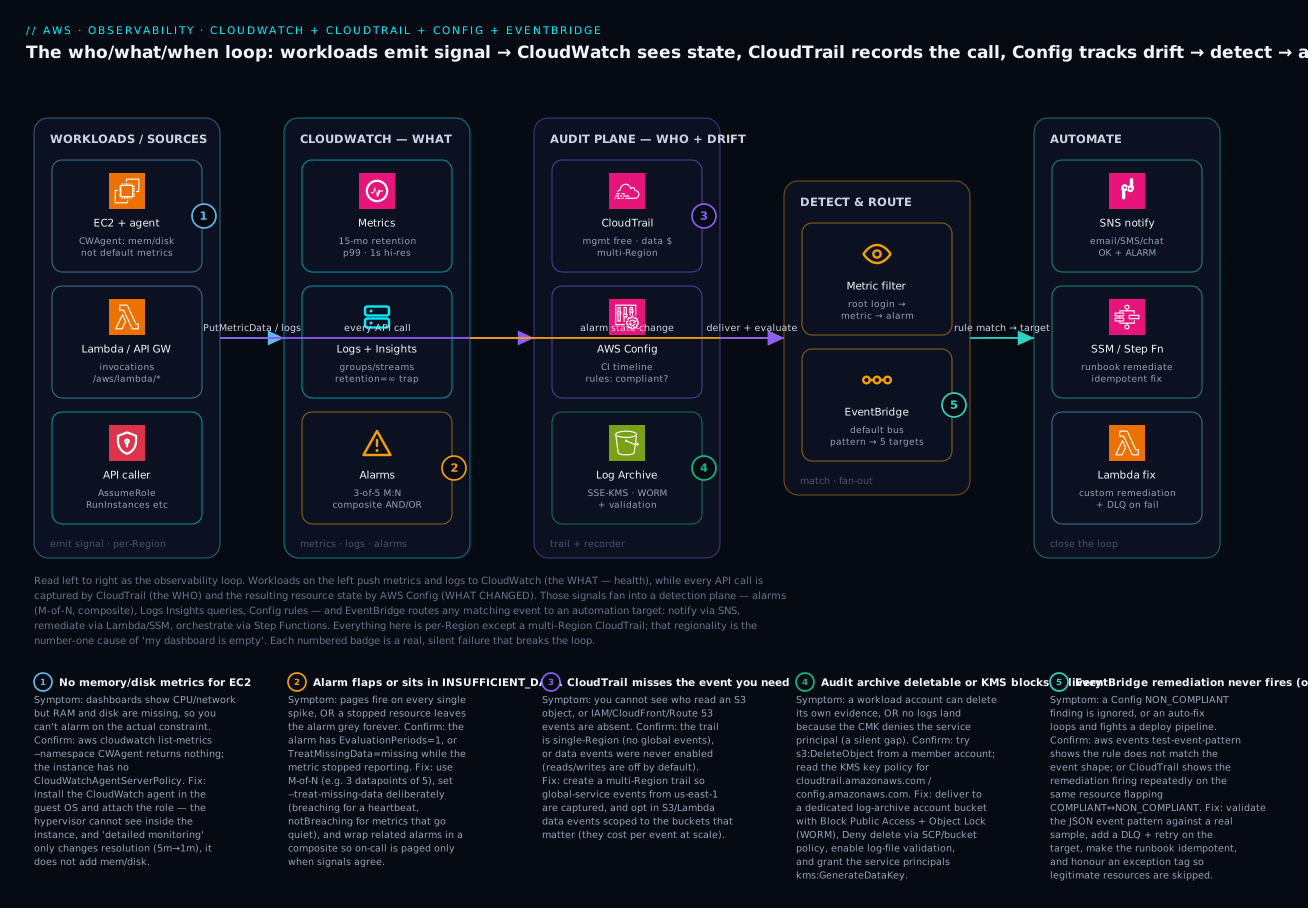
The diagram below ties the services into one loop you can read left to right. On the left, your workloads emit signal: EC2 (with the CloudWatch agent for the memory and disk metrics the hypervisor cannot see), Lambda and API Gateway, and every IAM principal whose API calls become audit records. Those signals fan into the middle: CloudWatch holds the what — metrics (15-month retention, 1-second high resolution, p99 percentiles) and Logs Insights queries, with alarms wired as M-of-N and composite so on-call is paged only when signals agree. In parallel the audit plane captures the who and the drift — CloudTrail records every API call (management free, data events opt-in, multi-Region so global-service events from us-east-1 are not lost) and AWS Config records the resulting resource state and evaluates rules, both shipping to a tamper-proof log-archive bucket with SSE-KMS, Object Lock (WORM) and log-file validation.
From there the loop closes through detection and automation. A metric filter turns a log pattern (a root-account login) into a metric and an alarm; EventBridge matches any event — an alarm state-change, a Config NON_COMPLIANT finding, a CloudTrail DeleteBucket — against a JSON pattern and routes it to up to five targets: SNS to notify (wire the OK action too, not just ALARM), SSM Automation or Step Functions to remediate with an idempotent runbook, or a Lambda for custom fixes with a dead-letter queue on failure. The five numbered badges mark the silent failures that break this loop in production — no memory metric without the agent, an alarm that flaps or sits grey, a CloudTrail that misses the event you need, an archive that is deletable or a KMS key that blocks delivery, and an EventBridge rule that never matches or loops. Keep the picture in mind: CloudWatch is what, CloudTrail is who, Config is the state over time, and EventBridge is how you turn any of those into action.
Real-world scenario
Lumara Retail runs a mid-sized e-commerce platform on AWS across three accounts (prod, staging, security) in ap-south-1, with a small on-call rotation of four engineers. For a year their observability was “good enough” — EC2 default metrics, a handful of alarms, CloudTrail switched on in the console — until a Friday-evening incident exposed every gap at once.
It started as slow checkout. The p99 latency alarm never fired, because the only latency alarm they had used Average, which the slow tail hid. On-call eventually noticed from customer tweets, opened the dashboard, and found it empty — the dashboard had been built in us-east-1 months earlier, but the workload ran in ap-south-1, the classic wrong-Region blank graph. When they finally looked at the right Region, EC2 CPU was fine but the instances were thrashing; there were no memory metrics because the CloudWatch agent had never been installed, so a memory leak in the cart service was invisible. They restarted the fleet, which “fixed” it, and went to bed without a root cause.
Saturday the real damage surfaced. A junior engineer, debugging, had widened a security group to 0.0.0.0/0 on port 6379 to reach Redis directly — and nobody knew, because the team had no Config recorder and no alarm on security-group changes. The exposure sat open for eleven hours. They only found it when the GuardDuty finding fired, and then could not answer the auditor’s first two questions: who opened it (they had CloudTrail Event history, so eventually yes — AuthorizeSecurityGroupIngress by the junior’s role) and what the group looked like before (they had no Config timeline, so no).
The rebuild took a focused week and followed this article. They installed the CloudWatch agent via SSM across the fleet (memory and disk metrics now flow), and rebuilt alarms with p99 statistics, M-of-N evaluation (3 of 5) and deliberate missing-data treatment, grouped under composite alarms so a single flap no longer pages four people at 2am. They created a multi-Region organisation CloudTrail with log-file validation, delivering to an Object-Lock bucket in the security account, and routed it to CloudWatch Logs with metric filters alarming on root login, console-sign-in failures, and security-group changes — the CIS set. They turned on AWS Config in every account with restricted-ssh, s3-bucket-public-read-prohibited and encrypted-volumes, wired an EventBridge rule from Config NON_COMPLIANT to an SSM Automation runbook that closes an open ingress and an SNS notice to the channel. The next time someone widened a security group, Config flagged it in under two minutes, EventBridge fired, the runbook reverted it, and the team got a Slack message — the eleven-hour exposure became a ninety-second self-healing event. The lesson Lumara took away was exactly the triad: they had been treating “monitoring” as one thing, when what, who and what-changed are three different jobs needing three different services tied together by a fourth.
Advantages and disadvantages
The native AWS observability stack is the default for good reasons, and it has real edges. Weigh them before defaulting to a third-party platform:
| Advantages | Disadvantages |
|---|---|
| Zero-setup default metrics for most services | No memory/disk without the agent (the gap that surprises everyone) |
| Tight IAM, KMS and Organizations integration | Per-Region model means easy “empty dashboard” mistakes |
| CloudTrail + Config give audit & compliance out of the box | Costs creep silently (never-expire logs, high-cardinality metrics, data events) |
| EventBridge closes the loop to automated remediation | Logs Insights/dashboards are weaker UX than dedicated APM tools |
| No infrastructure to run; scales with the account | Cross-account/cross-Region needs deliberate monitoring-account setup |
| Pay-per-use with a usable Free Tier | Multi-cloud teams end up running a second tool anyway |
When each side matters: for a single-cloud AWS shop that wants audit, compliance and remediation tied to the platform’s own IAM and Organizations, the native stack is hard to beat and cheap to start. For deep application performance management, rich dashboards, or a multi-cloud estate, teams often pair CloudWatch (for the AWS-native signals, CloudTrail and Config that only AWS can produce) with a third-party APM for the application layer — exporting metrics via metric streams and logs via subscription filters. The mistake is treating it as either/or: even teams on Datadog or Grafana keep CloudTrail, Config and EventBridge, because those are AWS-only capabilities.
Hands-on lab
You will publish a custom metric, create an alarm on it, send the alarm to SNS, create a log group and query it with Logs Insights, and confirm the always-on CloudTrail event history — then clean everything up. Run this in CloudShell (the aws CLI is pre-installed and already authenticated) or any configured terminal. Everything here is Free Tier-friendly: CloudWatch gives 10 custom metrics, 10 alarms, 5 GB of logs and 1 million API requests free per month; CloudTrail’s management-event history is free; the costs at this scale are effectively zero. We delete the chargeable bits at the end.
Step 1 — Set variables.
REGION=ap-south-1
TOPIC=obs-lab-alerts
export AWS_DEFAULT_REGION=$REGION
Step 2 — Create an SNS topic and subscribe your email.
TOPIC_ARN=$(aws sns create-topic --name $TOPIC --query TopicArn --output text)
aws sns subscribe --topic-arn $TOPIC_ARN --protocol email \
  --notification-endpoint you@example.com
# Check your inbox and click "Confirm subscription"
echo "$TOPIC_ARN"
Expected: an ARN like arn:aws:sns:ap-south-1:111122223333:obs-lab-alerts, and a confirmation email.
Step 3 — Publish a custom metric.
aws cloudwatch put-metric-data \
  --namespace "ObsLab" --metric-name QueueDepth \
  --unit Count --value 5
Validation: aws cloudwatch list-metrics --namespace ObsLab should list QueueDepth within a minute or two (custom metrics can take a moment to appear).
Step 4 — Create an alarm that pages on a deep queue.
aws cloudwatch put-metric-alarm \
  --alarm-name obs-lab-queue-deep \
  --namespace ObsLab --metric-name QueueDepth \
  --statistic Maximum --period 60 \
  --evaluation-periods 1 --threshold 10 \
  --comparison-operator GreaterThanThreshold \
  --treat-missing-data notBreaching \
  --alarm-actions "$TOPIC_ARN"
Step 5 — Drive the metric over the threshold and watch it alarm.
aws cloudwatch put-metric-data --namespace ObsLab --metric-name QueueDepth --value 50
# wait a minute, then:
aws cloudwatch describe-alarms --alarm-names obs-lab-queue-deep \
  --query 'MetricAlarms[0].StateValue' --output text
Expected: the state moves to ALARM and you receive an SNS email. Push a low value (--value 1) to see it return to OK.
Step 6 — Create a log group, log an event, and query with Logs Insights.
aws logs create-log-group --log-group-name /obs-lab/app
aws logs put-retention-policy --log-group-name /obs-lab/app --retention-in-days 1
STREAM=run-1
aws logs create-log-stream --log-group-name /obs-lab/app --log-stream-name $STREAM
TS=$(($(date +%s)*1000))
aws logs put-log-events --log-group-name /obs-lab/app --log-stream-name $STREAM \
  --log-events timestamp=$TS,message='{"level":"ERROR","status":500,"path":"/checkout"}'
Now run a Logs Insights query (console: CloudWatch → Logs Insights → select /obs-lab/app), or from the CLI:
QID=$(aws logs start-query --log-group-name /obs-lab/app \
  --start-time $(($(date +%s)-3600)) --end-time $(date +%s) \
  --query-string 'fields @timestamp, status, path | filter status = 500 | sort @timestamp desc' \
  --query queryId --output text)
sleep 5
aws logs get-query-results --query-id "$QID"
Expected: the 500 event comes back with its status and path fields extracted from the JSON.
Step 7 — Confirm the CloudTrail event history (no trail needed).
aws cloudtrail lookup-events \
  --lookup-attributes AttributeKey=EventName,AttributeValue=PutMetricAlarm \
  --max-results 5 --query 'Events[].Username'
Expected: your identity appears as the user who created the alarm in Step 4 — the who did what, free and always on.
Cleanup.
aws cloudwatch delete-alarms --alarm-names obs-lab-queue-deep
aws logs delete-log-group --log-group-name /obs-lab/app
aws sns delete-topic --topic-arn "$TOPIC_ARN"
# custom metrics expire automatically (15 months) and cannot be deleted manually
Cost note. Within Free Tier this lab is effectively free. Outside it: custom metrics are billed per metric/month, alarms per alarm/month, logs per GB ingested and stored (set retention!), Logs Insights per GB scanned, and SNS email is free for the first 1,000 notifications. The single biggest real-world cost trap here is log groups left on “Never expire” — always set a retention policy.
Common mistakes & troubleshooting
Observability problems are mostly self-inflicted configuration gaps. Use this as a symptom → root cause → confirm → fix playbook; the Confirm column is the exact command or console path that proves it before you change anything.
| # | Symptom | Likely root cause | Confirm (command / path) | Fix |
|---|---|---|---|---|
| 1 | Dashboard / alarm / metrics empty | Wrong Region (CloudWatch is regional) | Check console Region selector; echo $AWS_DEFAULT_REGION |
Switch Region; set widget Region per panel |
| 2 | No memory / disk metrics for EC2 | Not default metrics; agent not installed | aws cloudwatch list-metrics --namespace CWAgent is empty |
Install CloudWatch agent + CloudWatchAgentServerPolicy |
| 3 | Alarm stuck in INSUFFICIENT_DATA |
Metric stopped reporting; missing-data = missing |
describe-alarms shows the state; source resource stopped |
Set --treat-missing-data (breaching for heartbeats) |
| 4 | Alarm flaps on single spikes | Evaluation periods = 1 | describe-alarms --query 'MetricAlarms[].EvaluationPeriods' |
Use M-of-N (e.g. 3 of 5 datapoints) |
| 5 | Paged four times for one outage | No composite alarm; every child pages | Multiple correlated alarms all in ALARM | Wrap children in a composite; suppress child actions |
| 6 | CloudTrail shows no S3 object reads | Object access is a data event, off by default | Trail config shows no data event selectors | Enable S3 data events on the trail (mind cost) |
| 7 | Missing IAM / CloudFront / Route 53 events | Global events log via us-east-1; trail single-Region |
describe-trails --query 'trailList[].IsMultiRegionTrail' is false |
Use a multi-Region trail |
| 8 | CloudWatch bill creeping up | High-cardinality custom metrics; never-expire logs; data events | Billing → Cost Explorer by usage type | Cut dimensions; set log retention; scope data events |
| 9 | Config rule says NON_COMPLIANT, nothing fixes it | Config evaluates, does not remediate | Rule shows NON_COMPLIANT, no remediation attached | Attach SSM Automation or wire EventBridge → Lambda |
| 10 | Config rule reports nothing for a resource | Recorder off, or scope excludes the type | describe-configuration-recorder-status recording=false |
Turn recorder on; allSupported + global resources |
| 11 | Metric filter never increments | Filter created after the events; only new events count | No data points on the metric since creation | Re-test with a fresh matching log line |
| 12 | EventBridge rule never fires | Event pattern does not match the real event shape | aws events test-event-pattern --event-pattern ... --event ... |
Fix the JSON pattern against a real sample event |
| 13 | Logs Insights query is slow / costly | Scanning too many groups / too wide a time range | Query stats show GB scanned | Narrow time range and log-group selection |
| 14 | Auto-remediation loops or fights a deploy | Non-idempotent runbook; no exception path | CloudTrail shows the fix firing repeatedly | Make runbook idempotent; honour an exception tag |
Best practices
- Use the triad on purpose. CloudWatch for health, CloudTrail for audit, Config for state/compliance — don’t try to make one do another’s job.
- Set log retention on every log group. Never-expire is the default and the number-one observability cost trap.
- Alarm with M-out-of-N and sensible missing-data treatment. Reduce paging noise; use composite alarms so on-call is paged only when signals agree.
- Wire OK actions, not just ALARM actions. You want the all-clear too.
- Install the CloudWatch agent on every EC2 instance so memory and disk-space metrics exist before you need them at 3am.
- Enable a multi-Region, organisation CloudTrail with log-file validation delivered to a locked-down, separate-account S3 bucket — your tamper-evident audit record.
- Turn on AWS Config across all accounts/Regions with an aggregator and a conformance pack for your baseline; add auto-remediation for the high-value rules.
- Automate remediation through EventBridge — Config/CloudTrail/CloudWatch event → EventBridge rule → Lambda/SSM → SNS.
- Manage dashboards, alarms, trails, rules and conformance packs as code (CloudFormation/CDK/Terraform) so they are reviewed and reproducible — don’t click-ops production observability.
- Publish business metrics and structured (JSON) logs so Logs Insights and metric filters can do real work; extend this to frontend SLOs with CloudWatch RUM, Synthetics & Canaries for Frontend SLO Monitoring.
Security notes
Observability is a security control surface; lock it down accordingly.
| Control | What to do | Why it matters |
|---|---|---|
| Protect the audit trail | Deliver CloudTrail to a dedicated log-archive account bucket with Block Public Access, deletion-restricting bucket policy, Object Lock (WORM), and log-file validation | Stops an attacker (or a mistake) erasing the evidence |
| Use an organisation trail | Create it in the management account so members cannot disable it | Guarantees every account is covered |
| Alarm on security events | Route CloudTrail → CloudWatch Logs, add metric filters + alarms for root login, sign-in failures, IAM/SG/CloudTrail changes (the CIS set) | Turns the audit log into real-time detection |
| Least privilege on dangerous actions | Restrict and alarm on cloudwatch:PutMetricData, logs:DeleteLogGroup, cloudtrail:StopLogging |
These poison metrics, destroy evidence, or blind you |
| Encrypt logs and trails | Associate a KMS CMK with log groups and the trail; control bucket read access | Protects sensitive data at rest; gates who can read |
| Continuous posture | Feed Config + Security Hub findings into EventBridge for automated response | Closes the loop from detection to remediation |
| Real-time reaction path | Consume CloudTrail via EventBridge, not S3 delivery, for anything time-sensitive | S3 delivery is ~15 min — too slow for live response |
For the deeper audit build, see CloudTrail & Config for Audit & Compliance.
Cost & sizing — the levers that move the bill
The observability bill is driven by volume, and a few levers control it. Know the unit you are billed in for each service and where the cost actually concentrates:
| Service | Billed per | The cost trap | The lever |
|---|---|---|---|
| CloudWatch metrics | Custom metric / month + API requests | Per-user / per-request dimensions explode count | Aggregate dimensions; publish fewer |
| Detailed / high-res metrics | Per-metric premium | 1-min / 1-s everywhere | Use only where sub-minute matters |
| CloudWatch Logs | GB ingested + GB stored | Never-expire retention | Set retention; Infrequent-Access class |
| Logs Insights | GB scanned per query | Wide time ranges over all groups | Narrow time + group selection |
| Dashboards | Per dashboard / month (after 3) | Many one-off dashboards | Consolidate; define as code |
| CloudTrail | Per event (mgmt first copy free) | Data events at S3/Lambda scale | Scope data events to key buckets |
| AWS Config | Per CI recorded + per rule eval | High-churn resources, broad recording | Record selectively; tune rule triggers |
| X-Ray | Per trace recorded + scanned | Full-rate tracing | Lower sampling; trace what matters |
Rough INR/USD intuition at small scale: a single account with a dozen custom metrics, ten alarms, a few GB of logs at 14-day retention, a multi-Region management trail, Config on with a handful of managed rules, and modest EventBridge traffic typically lands in the low single-digit USD per month (a few hundred INR) — dominated by Config CIs and any data events you turn on. The pattern: turn on broad recording for security/audit (CloudTrail management events, Config) where it is cheap or required, and be deliberate about the high-volume items (data events, high-cardinality custom metrics, full-rate tracing).
Interview & exam questions
-
What is the difference between CloudTrail and CloudWatch? CloudTrail records API activity — who did what (audit/governance). CloudWatch records operational telemetry — metrics, logs, alarms, dashboards — what is happening with your resources (monitoring). Different jobs. (SAA-C03, SOA-C02)
-
CloudTrail vs AWS Config — when do you use each? CloudTrail records the event (the API call that changed something). Config records the resulting configuration state and its history, and evaluates it against rules. “Who deleted the SG?” → CloudTrail. “What did the SG look like last week and is it compliant?” → Config. (SAA-C03, SCS-C02)
-
Why don’t I see memory or disk-space metrics for my EC2 instance? They are not default metrics — the hypervisor cannot see inside the guest OS. Install the CloudWatch agent to collect them. Detailed monitoring only changes resolution (5 min → 1 min), it does not add memory/disk. (SOA-C02)
-
What is a composite alarm and why use one? An alarm whose state is a boolean expression over other alarms, used to cut alarm noise — page only when multiple signals agree, or suppress dependent alarms. It cannot perform EC2/Auto Scaling actions, only notifications. (SOA-C02)
-
Explain period, evaluation periods, and datapoints to alarm. Period = length of each data point; evaluation periods = how many recent periods to consider; datapoints to alarm = how many of those must breach. Together they give M-out-of-N (e.g. 3 of 5) to suppress single-spike flapping. (SOA-C02)
-
CloudTrail management vs data vs Insights events? Management = control-plane operations (logged by default, one free trail copy). Data = high-volume data-plane operations like S3
GetObject/ LambdaInvoke(off by default, charged). Insights = detected unusual activity in event volume (off by default, charged). (SCS-C02, SOA-C02) -
I enabled CloudTrail but can’t see who read an S3 object — why? Object reads/writes are data events, which are off by default. Enable S3 data events on the trail (they cost money at scale). (SCS-C02)
-
How do you alarm on a pattern in your logs (e.g. “more than 5 errors a minute”)? Create a metric filter on the log group that increments a metric when the pattern matches, then put a CloudWatch alarm on that metric. (Metric filters only apply to new events.) (SOA-C02, DVA-C02)
-
How do you query terabytes of logs ad-hoc without exporting them? CloudWatch Logs Insights — a query language (
fields/filter/parse/stats/sort) billed per GB scanned, so narrow the time range and log groups. (SOA-C02, DVA-C02) -
What is the relationship between EventBridge and CloudWatch Events? They are the same service; EventBridge is the current name and superset (custom buses, SaaS partners, schema registry, Pipes, Scheduler). APIs are compatible. (DVA-C02, SAA-C03)
-
How would you auto-remediate a non-compliant resource? AWS Config rule detects NON_COMPLIANT → attach an SSM Automation remediation, or route the Config event through EventBridge to a Lambda/SSM action, and notify via SNS. (SCS-C02, SOA-C02)
-
You need a tamper-evident, multi-account audit log retained for years — what do you build? A multi-Region organisation CloudTrail with log-file validation, delivered to a dedicated log-archive account S3 bucket with Block Public Access and Object Lock; query with CloudTrail Lake or Athena. (SCS-C02)
Quick check
- Which service answers “who deleted this resource”?
- What does “datapoints to alarm = 3, evaluation periods = 5” mean?
- Are S3 object-level reads captured by CloudTrail by default?
- What is the default retention for a new CloudWatch log group?
- Which service records a timeline of a resource’s configuration and evaluates compliance rules?
Answers
- CloudTrail (the who did what; for the resulting state over time you’d use AWS Config).
- Alarm if 3 of the last 5 evaluation periods breach the threshold (the M-out-of-N pattern that suppresses single spikes).
- No — object-level access is a data event and is off by default; you must enable S3 data events on the trail.
- Never expire — which is why you should always set an explicit retention policy.
- AWS Config.
Glossary
- Metric — a time-ordered series of numeric data points, identified by namespace + dimensions.
- Namespace — a container that groups related metrics (
AWS/EC2,MyApp/Checkout). - Dimension — a name/value pair scoping a metric to a resource; part of the metric’s identity.
- High-resolution metric — a custom metric at 1-second granularity (vs standard 1-minute).
- Alarm — a watcher on a metric/expression with
OK/ALARM/INSUFFICIENT_DATAstates and actions. - Composite alarm — an alarm whose state is a boolean expression over other alarms (for noise reduction).
- M-out-of-N — alarm only when M of the last N evaluation periods breach (suppresses single-spike flapping).
- Metric filter — a pattern that turns matching log events into a CloudWatch metric.
- Subscription filter — streams matching log events in near real time to Kinesis/Firehose/Lambda.
- Logs Insights — CloudWatch’s interactive query language over log data, billed per GB scanned.
- CloudWatch agent — an in-OS binary that collects memory/disk metrics and ships log files.
- CloudTrail trail — a config that delivers API-activity events to S3 (and optionally CloudWatch Logs/EventBridge).
- Management / data / Insights events — control-plane (default) / high-volume data-plane (opt-in) / anomaly (opt-in) CloudTrail event categories.
- Configuration item (CI) — AWS Config’s point-in-time snapshot of a resource’s state and relationships.
- Config rule — a desired-state check marking resources COMPLIANT or NON_COMPLIANT.
- Conformance pack — a deployable bundle of Config rules + remediation for a compliance standard.
- EventBridge — the serverless event bus (formerly CloudWatch Events) routing events to targets.
- Event pattern — the JSON matcher on an EventBridge rule.
- X-Ray segment/trace — the unit of work for one service / the full path of one request across services.
Next steps
- Extend monitoring to the frontend and SLOs — real-user monitoring, canaries and synthetic checks — in CloudWatch RUM, Synthetics & Canaries for Frontend SLO Monitoring.
- Build the central log pipeline — subscription filters to Firehose to OpenSearch — in Structured Logging Pipeline on AWS.
- Go deeper on event-driven automation in EventBridge Event-Driven Architecture: Buses, Schema & Pipes.
- Add distributed tracing with AWS X-Ray: Service Map, Segments & ADOT Tracing on EKS.
- Put it to work under pressure with the AWS Troubleshooting Methodology for EC2, VPC, IAM, S3 & Lambda.