In a nutshell
Imagine every letter leaving your office has to be screened by a security officer, but the officer is not allowed to open, re-address, or repackage the letter — the recipient must receive the exact same sealed envelope. The trick the mailroom uses: it slips your sealed envelope inside a bigger, tracked courier pouch, hands the pouch to the officer, who reads the contents through a window, decides pass or shred, and hands the pouch back. The pouch is unwrapped and your original sealed letter continues on its way. The sender and receiver never know a thing.
Gateway Load Balancer (GWLB) is that mailroom. It lets you drop a fleet of third-party security appliances — firewalls, intrusion-detection/prevention (IDS/IPS), deep-packet-inspection (DPI), data-loss-prevention (DLP) boxes — transparently into the network path, so they inspect traffic without any workload being re-addressed or reconfigured. The “courier pouch” is GENEVE encapsulation (UDP port 6081): GWLB wraps the whole original packet, untouched, and tunnels it to an appliance, which sees the real source and destination and then either returns the packet (allow) or silently drops it (deny). Because it is a load balancer, you scale capacity by adding appliances, not by buying a bigger box, and unhealthy appliances are pulled out automatically.
The catch — and the entire reason this lesson exists — is that GWLB does not route anything on its own. It is a bump in the wire: you must bend VPC route tables to force traffic into the GWLB endpoint on the way out and back through the same endpoint on the way in, or a stateful firewall will drop the half of the connection it never saw. Most broken GWLB deployments are not GWLB bugs; they are asymmetric route tables. Get the steering right and you have centralized, horizontally-scaled, transparent inspection for an entire multi-account estate.
Level: Advanced → Expert · Time: ~35 min
Prerequisites — you’ll move faster if you already understand:
- VPC subnets, route tables, IGW/NAT, and VPC endpoints — see VPC deep dive: subnets, routing, IGW, NAT, endpoints.
- Transit Gateway as a multi-VPC hub — see Transit Gateway multi-account VPC architecture.
- The load-balancer family (ALB/NLB/GWLB) at a high level — see Elastic Load Balancing: ALB, NLB, GWLB deep dive.
- Basic TCP/IP: what a 5-tuple is, what “stateful” means, and why a SYN and its SYN-ACK must reach the same firewall.
After this lesson you’ll be able to:
- Explain why GWLB exists and how GENEVE preserves the original packet, in plain language and in packet detail.
- Stand up a GWLB, a GENEVE/6081 target group, an endpoint service, and per-AZ GWLB endpoints from the CLI.
- Write the ingress, egress, and east-west route tables that force a symmetric hairpin through the appliance fleet.
- Choose flow-stickiness tuple mode and Transit Gateway appliance mode correctly so stateful appliances never see half a flow.
- Health-check, auto-scale, and drain an appliance fleet without cutting live connections.
- Diagnose the classic “half the traffic isn’t inspected / long connections stall” asymmetry, and control the double-processing cost.
- Decide when GWLB is the right tool versus the managed AWS Network Firewall alternative.
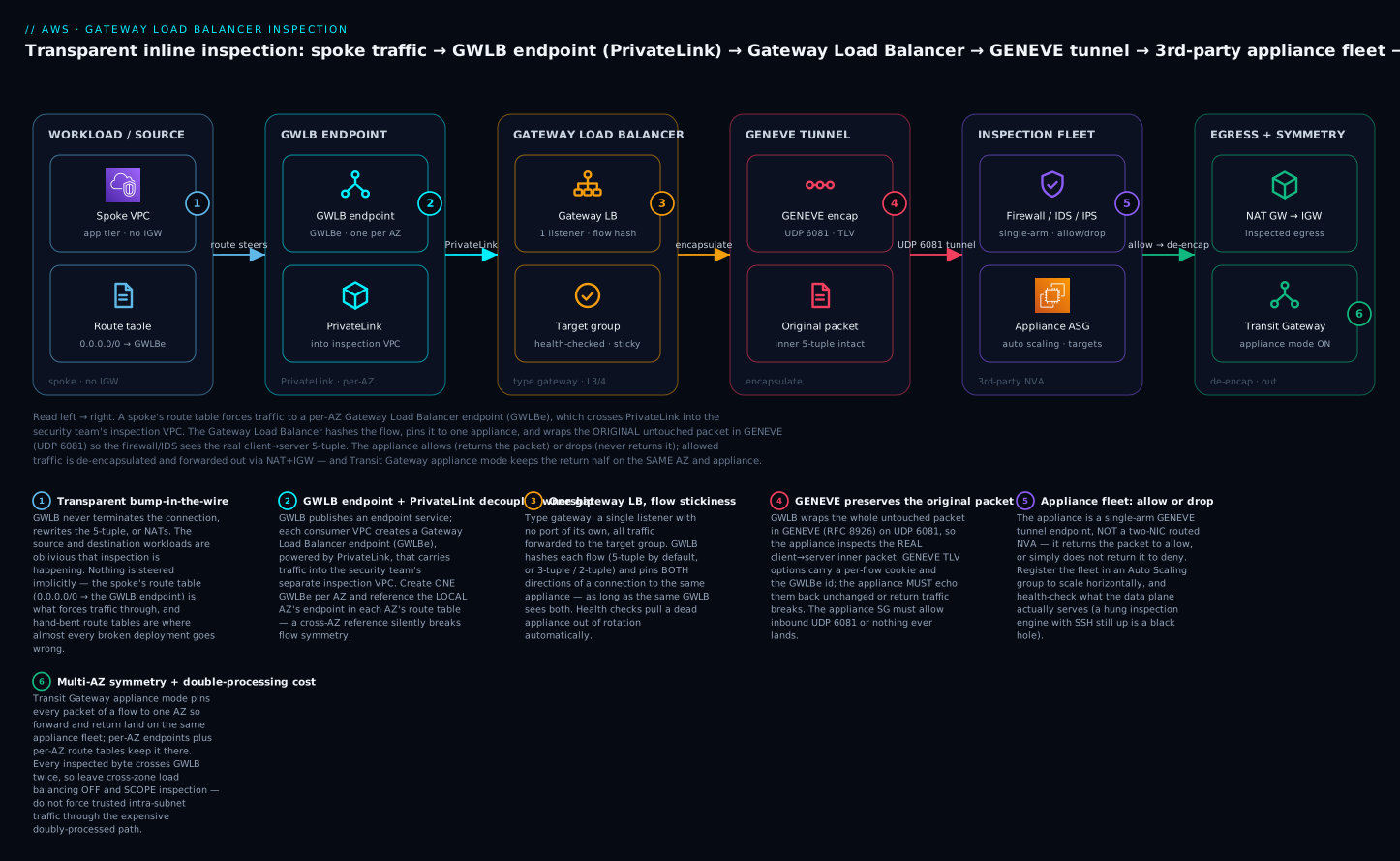
Follow the arrows left to right: a spoke’s route table forces traffic to a per-AZ GWLB endpoint, which crosses PrivateLink into the security team’s inspection VPC, where the Gateway Load Balancer hashes the flow onto one appliance and wraps the original packet in GENEVE (UDP 6081) so the firewall/IDS sees the real client→server 5-tuple, then allows it (returns the packet, de-encapsulated and forwarded out via NAT+IGW) or drops it — while Transit Gateway appliance mode keeps the return half of the flow on the same AZ and appliance.
You have a third-party firewall, IDS, or DLP appliance your security team insists on running, and a fleet of VPCs whose traffic must pass through it. The naive answer is a routed NVA sandwich: give the appliance two NICs, enable IP forwarding, point User Defined Routes at it, and pray that flows stay symmetric as you scale. It works for a pair of boxes. It does not survive horizontal scaling, because you cannot load-balance a transparent L3 appliance with a normal load balancer without rewriting the packet and destroying the very transparency the appliance needs.
Gateway Load Balancer (GWLB) exists precisely to fill that gap. It is a Layer 3/4 load balancer that distributes flows across a fleet of appliances, encapsulates the original, untouched packet in GENEVE, and hands it to the appliance so the appliance sees the real source and destination. The appliance inspects, then returns the packet — still encapsulated — and GWLB de-encapsulates and forwards it on. The source and destination workloads are oblivious. This article builds that pattern end to end: GENEVE mechanics, the GWLB-endpoint topology behind Transit Gateway, the route-table choreography for ingress, egress, and east-west, and the flow-stickiness behavior that keeps both directions of a connection on the same appliance.
1. Why GWLB: bump-in-the-wire without re-architecting endpoints
Three properties make GWLB different from an Application or Network Load Balancer, and all three matter for inline inspection:
-
It preserves the original packet. GWLB does not terminate the connection, rewrite the 5-tuple, or NAT. It wraps the whole original IP packet inside a GENEVE header and tunnels it to the appliance. The appliance sees the real client IP and the real destination IP. That is what “transparent” means, and it is why a security appliance can do real source-based policy and accurate logging.
-
It load-balances at L3/L4 across a horizontal fleet. Appliances register in a target group. GWLB hashes each flow and pins it to one appliance, so you scale capacity by adding appliances, not by buying a bigger box. Health checks pull dead appliances out of rotation automatically.
-
It separates the appliance VPC from the traffic it inspects via a PrivateLink-style endpoint. GWLB publishes a service; consumers create a Gateway Load Balancer endpoint (GWLBE) in their own VPC. Traffic is steered to the GWLBE with route tables, crosses into the appliance VPC over AWS PrivateLink, gets inspected, and comes back. The appliance fleet lives in its own account/VPC, owned by the security team, decoupled from the workload accounts.
GWLB is a bump in the wire. It does not originate or terminate flows and it does not route on its own. You are responsible for bending route tables around the GWLB endpoint. Nothing about traffic steering is implicit — and that is where almost every broken deployment goes wrong.
The combination lets you insert an arbitrary third-party appliance fleet into the path of ingress, egress, and east-west traffic without changing a single source or destination, and scale it horizontally with health-checked failover.
GWLB versus the alternatives: ALB, NLB, routed NVA, and Network Firewall
Beginners often ask “why not just use a load balancer I already know, or a route table, or the managed AWS firewall?” The honest answer is that each of those solves a different problem, and picking the wrong one is the most expensive early mistake. Here is the whole family side by side, judged on the four properties inline inspection actually needs.
| Option | Layer / behavior | Preserves the original packet? | Scales horizontally? | Transparent to endpoints? | Reach for it when… |
|---|---|---|---|---|---|
| Routed NVA sandwich (2-NIC appliance + UDRs) | L3 router in the path | Only if it does not NAT; you manage forwarding by hand | No — you cannot load-balance a transparent L3 box without rewriting packets | Partly (no NAT) | You have exactly one appliance pair and never need to scale |
| ALB (Application Load Balancer) | L7 proxy — terminates & re-originates | No — target sees ALB IP; client IP only via X-Forwarded-For |
Yes (of the ALB) | No | You are routing HTTP(S) to app targets, not inspecting |
| NLB (Network Load Balancer) | L4 — can preserve client IP | No — it is a destination clients connect to, not a tunnel | Yes | Partly | You need high-throughput TCP/UDP ingress to real targets |
| GWLB (Gateway Load Balancer) | L3 gateway + L4 load balancer, GENEVE | Yes — whole packet, byte-for-byte, via GENEVE | Yes — add appliances to a target group | Yes — source & dest oblivious | You must insert a third-party appliance fleet inline |
| AWS Network Firewall | Managed stateful firewall (Suricata-compatible) | N/A — AWS owns the data plane | AWS scales it for you | Yes (route-table steered, like GWLB) | You want no appliances to run and AWS’s rule engine is enough |
Two comparisons matter most.
GWLB vs. the routed NVA sandwich. The classic pre-GWLB design gave an appliance two NICs, turned on IP forwarding, and pointed User-Defined Routes at it. It works for one pair of boxes and dies the moment you want three, because a transparent L3 appliance cannot sit behind a normal load balancer — an ALB/NLB would rewrite the packet and destroy the transparency the appliance depends on. GWLB’s entire reason for existing is to load-balance transparent L3 appliances without rewriting the packet, which it achieves by tunnelling the original packet in GENEVE instead of proxying it.
GWLB vs. AWS Network Firewall. This is the decision most teams actually face. AWS Network Firewall is a fully managed, horizontally-scaled, stateful firewall with a Suricata-compatible rule engine and domain-based filtering — no appliances, no AMIs, no Auto Scaling group, no patching. If its rule engine covers your requirement, it is almost always the lower-operations choice. You reach for GWLB specifically when your security team mandates a particular vendor (Palo Alto, Fortinet, Check Point, and so on) for its threat intelligence, advanced IPS signatures, DLP, or an existing operational contract — capabilities the managed firewall does not replicate. In short: Network Firewall = AWS runs the box; GWLB = you run the vendor’s box, AWS runs the plumbing. Many large estates run both — Network Firewall for cheap domain/egress filtering, GWLB for the deep third-party inspection tier.
2. GENEVE encapsulation: what the appliance actually receives
GWLB speaks GENEVE (Generic Network Virtualization Encapsulation, RFC 8926) on UDP port 6081. This is non-negotiable: the appliance must understand GENEVE, and its security group must allow inbound UDP 6081. Vendor images marketed as “GWLB-compatible” (Palo Alto VM-Series, Fortinet FortiGate, Check Point CloudGuard, Aviatrix, plus open-source stacks) ship a GENEVE handler.
The flow looks like this:
 Original packet:        [ IP: client -> server | TCP | payload ]

 GWLB encapsulates:      [ IP: GWLB -> appliance | UDP 6081 | GENEVE hdr | <original packet> ]
                                                              ^ TLV options
                                                                carry flow cookie + GWLBE id

 Appliance inspects the INNER packet (sees real client -> server),
 then returns the SAME GENEVE-wrapped packet back to GWLB.
Key facts that drive your appliance configuration:
- The outer header is GWLB-to-appliance over UDP 6081. The inner header is the original, byte-for-byte unmodified packet. The appliance applies policy to the inner packet.
- GENEVE carries TLV options that include a per-flow identifier (often called the flow cookie) and the GWLBE identifier. A correctly written appliance integration echoes these options back unchanged on the return packet. GWLB uses them to map the inspected packet back to the correct flow and endpoint. If the appliance strips or rewrites them, return traffic breaks.
- The appliance must operate in a two-arm GENEVE or single-arm mode per its vendor docs. Most modern GWLB integrations are single-arm: one data interface receives the GENEVE tunnel, inspects, and sends the packet back out the same interface. You do not configure two routed NICs the way a classic NVA sandwich does.
- The appliance can allow (return the packet) or drop (do not return it) per flow. Dropping is how the appliance enforces a deny: GWLB simply never gets the packet back and the flow dies.
This is the crucial mental shift from a routed NVA: the appliance is not a router in the path. It is a GENEVE tunnel endpoint that GWLB feeds. It never sees its own forwarding table involved; it sees encapsulated copies of someone else’s traffic.
A packet’s round trip, step by step
Encapsulation is easier to trust once you have walked a single packet all the way through. Picture a spoke instance 10.1.0.20 opening https://example.com (93.184.216.34:443) through a centralized inspection VPC. Here is every hop, and what the addressing looks like at each one.
- Spoke emits the packet. Inner packet is
10.1.0.20:51000 → 93.184.216.34:443(TCP SYN). The spoke has no IGW; its route table default is the Transit Gateway. - Transit Gateway pulls it into the inspection VPC. Appliance mode is on, so the TGW pins this flow (by 5-tuple) to one AZ — say
us-east-1a— for its whole life. - Inspection VPC route table steers it to the local GWLB endpoint. The TGW-attachment subnet’s route
0.0.0.0/0 → vpce-…az1sends the still-unmodified packet at theus-east-1aGWLB endpoint (GWLBe). - GWLBe crosses PrivateLink to the Gateway Load Balancer. No packet rewrite — this is a transparent hand-off into the appliance VPC.
- GWLB hashes the flow and encapsulates. It computes a hash over the 5-tuple, pins the flow to (say) appliance
i-appliance-az1, and wraps the whole inner packet in GENEVE: the outer header becomesGWLB → applianceoverUDP 6081, with TLV options carrying a flow cookie and the GWLBe id. The inner packet is still, byte-for-byte,10.1.0.20:51000 → 93.184.216.34:443. - Appliance inspects the inner packet. The firewall/IDS de-encapsulates conceptually (its GENEVE handler reads the inner packet), applies policy against the real source
10.1.0.20and destination93.184.216.34, and decides. To allow, it returns the same GENEVE-wrapped packet — TLV options echoed back unchanged — out the same single interface. To deny, it simply does not return the packet; the flow dies with no reply. - GWLB de-encapsulates and forwards. For an allowed packet, GWLB strips GENEVE and the original
10.1.0.20 → 93.184.216.34packet re-emerges in the GWLBe subnet, whose route sends0.0.0.0/0 → NAT gateway. - NAT + IGW send it to the internet. The NAT gateway source-NATs to its public IP and the IGW forwards to
93.184.216.34. Only now, at the very edge, is the source address changed — and only because NAT, not GWLB, did it. - The reply comes back and must hairpin the same way.
93.184.216.34:443 → NAT-public-IPreturns through the IGW to the NAT gateway, which un-NATs to…→ 10.1.0.20. The NAT subnet’s route for the spoke CIDR (10.0.0.0/8 → vpce-…az1, the sameus-east-1aendpoint) forces the reply back through the appliance, which — because the forward flow lived oni-appliance-az1and both directions hash identically — lands on that same appliance, matches its session-table entry, and is allowed. Then TGW carries it back to the spoke.
The single most important thing to notice: from step 1 to step 7 the inner packet’s source and destination never change, which is exactly what “transparent” buys you. The only address translation in the whole trip is the ordinary NAT at the edge in step 8 — GWLB itself rewrote nothing. And the reason step 9 works is that every hairpin route (out in step 3, back in step 9) references the same AZ’s endpoint; break that and the reply lands on a different appliance with no session state, and the connection stalls.
3. Topology: GWLB, GWLB endpoints, and the inspection VPC behind Transit Gateway
For anything past a couple of VPCs, the model that scales is a centralized inspection VPC behind a Transit Gateway, with GWLB endpoints doing the steering. Layout, per Availability Zone:
                         Internet
                            |
                          [ IGW ]
                            |
        +------------------ Inspection VPC ------------------+
        |   [ NAT GW subnet ]                                |
        |   [ GWLBE subnet ]  <- Gateway LB endpoint (GWLBE) |
        |   [ Appliance subnet ] <- GWLB targets (firewalls) |   GWLB + target group live here
        |   [ TGW attach subnet ] (appliance-mode attachment)|
        +----------------------------------------------------+
                            |
                  [ Transit Gateway ]  appliance mode ON
                   /          |          \
            Spoke VPC A   Spoke VPC B   Egress VPC
            (no IGW)      (no IGW)      (NAT + IGW)
What lives where:
- GWLB and its target group live in the inspection VPC. Targets are the appliance ENIs (or an Auto Scaling group of appliances).
- GWLB endpoints (GWLBE) are created in whichever VPC needs traffic steered into the appliance fleet. In the centralized model the GWLBEs typically sit in the inspection VPC itself (for egress to the internet) and the TGW pulls spoke traffic in.
- Spoke VPCs have no internet path of their own. Their default route points to the TGW. The TGW route table sends that traffic to the inspection VPC attachment.
- Appliance mode is enabled on the inspection VPC’s TGW attachment. This is the single most important flag for multi-AZ symmetry, covered in detail below.
The decoupling is the point: the security team owns the inspection VPC, the appliance AMIs, the rule sets, and the GWLB. Workload teams own their spokes and never see the appliances. The contract between them is the GWLB endpoint service and the TGW.
4. Build the GWLB, target group, and endpoint service
Create the target group first. For GWLB, the protocol is GENEVE and the port is 6081, and you typically health-check the appliance over TCP or HTTP on a port the appliance only serves when its data plane is alive.
# Target group for the appliance fleet. Protocol GENEVE, port 6081.
aws elbv2 create-target-group \
  --name tg-inspection-appliances \
  --protocol GENEVE --port 6081 \
  --vpc-id vpc-inspection \
  --target-type instance \
  --health-check-protocol TCP \
  --health-check-port 80 \
  --health-check-interval-seconds 10 \
  --healthy-threshold-count 3 \
  --unhealthy-threshold-count 3
Create the Gateway Load Balancer itself (--type gateway) with one subnet per AZ in the appliance subnets, then a listener that forwards to the target group. A GWLB has exactly one listener and it has no port/protocol of its own — all traffic flows through it:
# Gateway Load Balancer, one subnet per AZ.
aws elbv2 create-load-balancer \
  --name gwlb-inspection \
  --type gateway \
  --subnets subnet-appl-az1 subnet-appl-az2

# Listener: GWLB listeners forward all traffic to the target group.
aws elbv2 create-listener \
  --load-balancer-arn arn:aws:elasticloadbalancing:...:loadbalancer/gwy/gwlb-inspection/... \
  --default-actions Type=forward,TargetGroupArn=arn:aws:elasticloadbalancing:...:targetgroup/tg-inspection-appliances/...
Register the appliances and publish the GWLB as an endpoint service so other VPCs can attach to it:
# Register appliance instances into the target group.
aws elbv2 register-targets \
  --target-group-arn arn:aws:elasticloadbalancing:...:targetgroup/tg-inspection-appliances/... \
  --targets Id=i-appliance-az1 Id=i-appliance-az2

# Publish GWLB as a VPC endpoint service (PrivateLink for GWLB).
aws ec2 create-vpc-endpoint-service-configuration \
  --gateway-load-balancer-arns arn:aws:elasticloadbalancing:...:loadbalancer/gwy/gwlb-inspection/... \
  --no-acceptance-required
That last call returns a service name (for example com.amazonaws.vpce.us-east-1.vpce-svc-0abc123def456). Endpoint consumers use that service name to create GWLB endpoints.
Now create a GWLB endpoint in each AZ of the VPC that needs steering. The endpoint type is GatewayLoadBalancer:
# One GWLBE per AZ, in a dedicated GWLBE subnet.
aws ec2 create-vpc-endpoint \
  --vpc-endpoint-type GatewayLoadBalancer \
  --vpc-id vpc-inspection \
  --service-name com.amazonaws.vpce.us-east-1.vpce-svc-0abc123def456 \
  --subnet-ids subnet-gwlbe-az1
Each GWLBE gets a vpc-endpoint-id (for example vpce-0aa11bb22cc33dd44). That endpoint id is what you set as the route target. Critical multi-AZ rule: create one GWLBE per AZ and reference the local AZ’s endpoint in each AZ’s route table. Sending us-east-1a traffic to a us-east-1b endpoint adds a cross-AZ hop and breaks symmetry assumptions.
5. Route-table choreography: ingress, egress, and east-west
This is where deployments live or die. The appliance only inspects traffic that route tables actually push through the GWLB endpoint. There is nothing implicit. Below is the centralized egress pattern (spokes reach the internet through the inspection VPC).
The GWLB endpoint id is referenced in routes via --vpc-endpoint-id.
Spoke VPC default route -> Transit Gateway:
# Spokes have no IGW. Default route goes to the TGW, which pulls
# the traffic into the inspection VPC.
aws ec2 create-route \
  --route-table-id rtb-spoke-a \
  --destination-cidr-block 0.0.0.0/0 \
  --transit-gateway-id tgw-0abc123
Inspection VPC — TGW attachment subnet route table (traffic arriving from spokes): send everything to the local GWLB endpoint so it hits the appliance before egress.
# TGW-attachment subnet (us-east-1a): force inbound spoke traffic
# through the local GWLB endpoint on its way out.
aws ec2 create-route \
  --route-table-id rtb-tgw-attach-az1 \
  --destination-cidr-block 0.0.0.0/0 \
  --vpc-endpoint-id vpce-0aa11bb22cc33dd44
Inspection VPC — GWLBE subnet route table (inspected traffic continuing outbound): after the appliance returns the packet and GWLB de-encapsulates, the packet egresses out of the GWLBE subnet. Point its default route at the NAT gateway.
# GWLBE subnet (us-east-1a): inspected egress traffic -> NAT GW.
aws ec2 create-route \
  --route-table-id rtb-gwlbe-az1 \
  --destination-cidr-block 0.0.0.0/0 \
  --nat-gateway-id nat-0az1
Inspection VPC — NAT subnet route table (return traffic from the internet): the return packet comes back from the NAT gateway and must be steered back through the same GWLB endpoint so the appliance sees both directions. Route the return toward the spoke CIDRs via the GWLB endpoint, and the default toward the IGW.
# NAT subnet (us-east-1a): return traffic to spokes must re-enter
# the appliance via the GWLB endpoint to preserve symmetry.
aws ec2 create-route \
  --route-table-id rtb-nat-az1 \
  --destination-cidr-block 10.0.0.0/8 \
  --vpc-endpoint-id vpce-0aa11bb22cc33dd44

# And the internet-facing default for the NAT subnet.
aws ec2 create-route \
  --route-table-id rtb-nat-az1 \
  --destination-cidr-block 0.0.0.0/0 \
  --gateway-id igw-0abc123
The pattern is a forced hairpin through the GWLB endpoint on the way out and on the way back. For east-west inspection between spokes, the same idea applies at the TGW: spoke-to-spoke traffic routes via the inspection VPC attachment, hits the GWLBE, gets inspected, and returns — you simply do not give the TGW a direct spoke-to-spoke route that bypasses the inspection attachment.
Repeat every route table per AZ, each referencing its own local GWLB endpoint. A single mismatched route that points an AZ at the wrong endpoint, or that lets traffic skip the GWLBE, is the textbook cause of “inspection is deployed but half the traffic isn’t being seen.”
6. Flow stickiness: keeping both directions on the same appliance
Stateful appliances demand that the forward and return packets of a connection hit the same appliance. The appliance that saw the SYN holds the session-table entry; if the SYN-ACK lands on a different appliance, it is out-of-state and gets dropped. GWLB enforces this with flow stickiness based on hashing, and you have to understand the two layers where symmetry can break.
Layer 1 — GWLB flow hashing. GWLB pins a flow to a target using a hash. By default it uses the 5-tuple (source IP, source port, destination IP, destination port, protocol). It can also be configured for 3-tuple (source IP, destination IP, protocol) or 2-tuple (source IP, destination IP). Because GWLB computes the same hash for the forward and the return flow of a given connection, both directions select the same appliance — as long as the same GWLB sees both directions. For protocols where the return 5-tuple is a clean mirror (the typical TCP/UDP case), 5-tuple is correct. For fragmented traffic or protocols where ports are not symmetric, 3-tuple or 2-tuple avoids splitting a logical flow:
# Set flow stickiness to 3-tuple if 5-tuple splits your traffic
# (e.g. heavy fragmentation). 2_tuple, 3_tuple, or 5_tuple.
aws elbv2 modify-target-group-attributes \
  --target-group-arn arn:aws:elasticloadbalancing:...:targetgroup/tg-inspection-appliances/... \
  --attributes Key=target_failover.on_deregistration,Value=rebalance \
               Key=target_failover.on_unhealthy,Value=rebalance
target_failovercontrols what happens to existing flows when a target is deregistered or goes unhealthy:no_rebalance(default) keeps existing flows pinned to the now-gone target until they expire (they break), whilerebalancemoves them to a healthy target. For stateless inspection,rebalancerecovers faster; for stateful appliances without session sync, the moved flow is out-of-state anyway, so weigh it against your appliance behavior. Flow-stickiness tuple mode is a separate setting you choose when you create the target group.
Layer 2 — Transit Gateway appliance mode. In a multi-AZ topology, the TGW independently hashes the forward and return flows and can send them to different AZs. If the forward path enters via the us-east-1a GWLB endpoint and the return enters via us-east-1b, you are on a different appliance fleet entirely and symmetry is gone before GWLB even gets a chance. Appliance mode on the inspection VPC’s TGW attachment fixes this: it makes the TGW pin all packets of a flow (same 5-tuple) to the same AZ for the life of the flow.
# Appliance mode is mandatory for multi-AZ stateful inspection.
# Without it, the TGW splits forward/return across AZs and the
# stateful engine drops out-of-state return packets.
aws ec2 modify-transit-gateway-vpc-attachment \
  --transit-gateway-attachment-id tgw-attach-inspection \
  --options ApplianceModeSupport=enable
The two layers compose: appliance mode keeps a flow in one AZ, and GWLB flow hashing keeps it on one appliance within that AZ. Skip either and you get intermittent, maddening connectivity loss that looks like “random” drops but is actually asymmetric routing.
7. Health checks, horizontal scaling, and graceful draining
GWLB health-checks every registered target. An unhealthy appliance is pulled from the hashing rotation and its share of new flows redistributes across the survivors. As with the routed NVA case, health-check what the data plane actually serves, not just OS liveness — an appliance whose GENEVE/inspection engine has hung while SSH still answers is a black hole.
Scale horizontally by putting the appliances in an Auto Scaling group registered to the target group. New instances register and start taking flows; terminating instances should drain first. GWLB respects target-group deregistration delay (connection draining): in-flight flows on a draining target are allowed to complete, within the delay window, before the target is fully removed.
# Give draining appliances time to finish in-flight flows before
# they are removed from the GWLB rotation.
aws elbv2 modify-target-group-attributes \
  --target-group-arn arn:aws:elasticloadbalancing:...:targetgroup/tg-inspection-appliances/... \
  --attributes Key=deregistration_delay.timeout_seconds,Value=120
A few operational realities:
- New flows go to healthy targets; existing flows on a failed target are not migrated unless
target_failover.on_unhealthy=rebalance. Even then, a stateful appliance without session-state sync treats the rebalanced flow as new and may reset it. Decide this behavior on purpose. - Scale on the right metric. CPU on the appliance, or GWLB
HealthyHostCountand active-flow counts, are better triggers than raw network throughput, which can be bursty. - Pre-warm for known spikes. GWLB scales, but appliance boot + GENEVE handshake + rule load takes minutes. For predictable load (a batch window, a launch), scale out ahead of time.
8. Cross-zone behavior, MTU, and the cost of double processing
Three production realities you must design for.
Cross-zone load balancing. GWLB has cross-zone load balancing disabled by default, and for inline inspection you usually want to keep it that way. With it disabled, a GWLB node in an AZ only sends to targets in the same AZ — which, combined with per-AZ GWLB endpoints and TGW appliance mode, keeps a flow’s data path inside one AZ end to end. Enabling cross-zone spreads flows across AZs’ appliances and incurs cross-AZ data transfer charges on the inspected traffic, which, given GWLB processes traffic twice (in and out), gets expensive fast. Enable it only if you have a specific imbalance to solve and you accept the cost.
MTU and the GENEVE overhead. GENEVE adds roughly 50+ bytes of encapsulation (outer IP + UDP + GENEVE header with options) on top of the original packet. The GWLB-to-appliance path must carry the encapsulated frame. If the original packet is already at the VPC MTU and the appliance/path cannot accommodate the larger encapsulated frame, you get fragmentation or silent drops of full-size packets. Mitigations: ensure the appliance interfaces and the GWLB data path support the larger frame (jumbo frames where available), and verify the appliance’s GENEVE handler does not itself further fragment. Path MTU issues here present as “small packets work, large transfers stall.”
The cost of double processing. Every byte of inspected traffic crosses the GWLB twice — once into the appliance, once back out — and you pay GWLB per-GB processing on it, plus the GWLB endpoint hourly + per-GB, plus the appliance compute, plus any NAT and cross-AZ transfer. This is real money at scale. The architectural lever is scope: do not force traffic you do not need to inspect through the GWLB. Intra-spoke, same-subnet, or trusted backplane traffic can bypass inspection via more specific routes, reserving the expensive inspected path for what actually warrants it.
Going deeper
The sections above get a fleet inspecting traffic. This section is for the engineer who has to run it in production across accounts, keep the bill sane, and answer “what happens when…” at a design review.
The GENEVE return contract, single-arm vs two-arm
The appliance integration is the part vendors get subtly wrong, so it is worth understanding precisely. GWLB sends the appliance a GENEVE packet whose TLV (type-length-value) options encode, at minimum, a flow cookie and the GWLBe identifier GWLB needs to demultiplex the returned packet back onto the right flow and endpoint. The contract is: the appliance must return the packet with those TLV options echoed back byte-for-byte. If it strips them, rewrites them, or returns a re-encapsulated packet with its own options, GWLB cannot map the reply and the flow silently breaks in one direction — the maddening “SYN inspected, SYN-ACK vanishes” symptom.
Two data-plane shapes exist. Single-arm (the modern default): one appliance interface both receives the GENEVE tunnel and sends the inspected packet back out the same interface; there is no routing on the appliance, no IP forwarding, no second NIC. Two-arm: some older or specialized images use separate ingress/egress GENEVE interfaces. Either way the appliance is a tunnel endpoint, never a router in the classic sense — do not enable net.ipv4.ip_forward and hand-craft UDRs the way a routed NVA needs. Getting this wrong is the number-one conceptual error, and it is why the original Pitfalls list leads with it.
One security nuance beginners miss: GENEVE itself does not encrypt. The tunnel between GWLB and the appliance rides the AWS network unencrypted at the GENEVE layer. The inner traffic keeps whatever encryption it already had (a TLS session stays TLS), and if you need the appliance to see inside TLS you are relying on the vendor’s TLS-decryption/man-in-the-middle feature with its own key material — a separate, heavier design decision, not something GENEVE gives you.
Cross-account sharing: the endpoint service is the contract
In a real landing zone the inspection VPC lives in a dedicated security account and the spokes live in many workload accounts. The clean seam is the endpoint service: the security account owns the GWLB and its endpoint-service configuration; workload accounts create GWLB endpoints against that service name. Control who may attach with allowed principals rather than leaving it open:
# Security account: allow specific workload accounts (and/or roles)
# to create GWLB endpoints against the inspection endpoint service.
aws ec2 modify-vpc-endpoint-service-permissions \
  --service-id vpce-svc-0abc123def456 \
  --add-allowed-principals \
      arn:aws:iam::111122223333:root \
      arn:aws:iam::444455556666:root
If you set --acceptance-required on the service instead of --no-acceptance-required, every new endpoint connection waits in pendingAcceptance until the security account runs accept-vpc-endpoint-connections — a deliberate human gate for regulated estates. --no-acceptance-required trades that gate for automation. Neither exposes the appliances themselves; workload accounts only ever see the endpoint service, never the target group or the appliance ENIs.
Codify it in Terraform so per-AZ routes cannot drift
The Enterprise scenario later in this lesson is a copy-paste route bug across AZs. The durable fix is to never write those routes by hand. The aws provider (v5) models every piece; the symmetry-critical resources are the target group protocol, the endpoint type, and appliance mode:
# GWLB + GENEVE target group + gateway listener
resource "aws_lb" "gwlb" {
  name                             = "gwlb-inspection"
  load_balancer_type               = "gateway"
  subnets                          = [for s in aws_subnet.appliance : s.id]
  enable_cross_zone_load_balancing = false # keep flows inside one AZ
}

resource "aws_lb_target_group" "appliances" {
  name        = "tg-inspection-appliances"
  protocol    = "GENEVE"
  port        = 6081
  vpc_id      = aws_vpc.inspection.id
  target_type = "instance"

  health_check {
    protocol = "TCP"
    port     = 80
  }
}

resource "aws_lb_listener" "gwlb" {
  load_balancer_arn = aws_lb.gwlb.arn # gateway listener: no port/protocol
  default_action {
    type             = "forward"
    target_group_arn = aws_lb_target_group.appliances.arn
  }
}

# Publish the endpoint service, then one GWLBe PER AZ
resource "aws_vpc_endpoint_service" "gwlb" {
  acceptance_required        = false
  gateway_load_balancer_arns = [aws_lb.gwlb.arn]
}

resource "aws_vpc_endpoint" "gwlbe" {
  for_each          = toset(var.azs) # one per AZ, no exceptions
  service_name      = aws_vpc_endpoint_service.gwlb.service_name
  vpc_endpoint_type = "GatewayLoadBalancer"
  vpc_id            = aws_vpc.inspection.id
  subnet_ids        = [aws_subnet.gwlbe[each.key].id]
}

# Appliance-mode attachment — mandatory for multi-AZ stateful symmetry
resource "aws_ec2_transit_gateway_vpc_attachment" "inspection" {
  transit_gateway_id     = var.tgw_id
  vpc_id                 = aws_vpc.inspection.id
  subnet_ids             = [for s in aws_subnet.tgw_attach : s.id]
  appliance_mode_support = "enable"
}

# The hairpin route ALWAYS references THIS az's endpoint via for_each
resource "aws_route" "tgw_attach_to_gwlbe" {
  for_each               = aws_vpc_endpoint.gwlbe
  route_table_id         = aws_route_table.tgw_attach[each.key].id
  destination_cidr_block = "0.0.0.0/0"
  vpc_endpoint_id        = each.value.id # local AZ, structurally
}
The for_each over AZs is doing real safety work: because the route resource is keyed by AZ and references each.value.id, it is structurally impossible to point us-east-1a’s route at us-east-1b’s endpoint — the exact bug the Enterprise scenario hit with hand-copied routes.
Quotas, MTU, and hard numbers
- MTU. AWS documents an MTU of 8500 bytes on the GWLB appliance data path, which comfortably carries a standard 1500-byte inner packet plus the ~50+ bytes of GENEVE overhead. The trap is a jumbo (9001-byte) inner packet in the VPC: once encapsulated it exceeds 8500 and is dropped, which surfaces as “small requests work, large transfers stall.” Keep inner traffic that traverses inspection at ≤ 8500 minus GENEVE overhead, or confine jumbo frames to paths that never hit the GWLB.
- Service Quotas. GWLBs per Region, targets per Gateway Load Balancer target group, and GWLB endpoints per VPC are all soft limits governed by Service Quotas — check the live values for your Region and raise them before a big rollout rather than hitting a wall mid-migration. Do not hard-code an assumed number; quotas change.
- Per-flow throughput. GWLB spreads flows across appliances, but a single flow is pinned to one appliance and therefore bounded by that appliance’s capacity. A few elephant flows can hot-spot one target while others idle — design around many flows, and consider a smaller stickiness tuple only when you have measured that a single logical flow must not be split.
Failure modes and blast radius
- No healthy targets. If every target in the group is unhealthy, GWLB has nowhere to send and traffic is dropped — an effective fail-closed posture. That is usually the safe default for a security control (better to block than to leak uninspected), but it means the appliance fleet is now in the critical path for all steered traffic. If your requirement is fail-open (prefer availability over inspection during a total fleet outage), you must engineer it explicitly at the routing layer — e.g. automation that swings the route away from the GWLBe to a direct path — because GWLB will not fail open on its own.
- AZ loss. With per-AZ endpoints and cross-zone disabled, losing an AZ takes out that AZ’s inspection path. Spokes with resources only in surviving AZs are fine; design capacity so a surviving AZ’s appliance fleet can absorb the shifted load.
- Appliance mode is per-attachment. It is set on the inspection VPC’s TGW attachment. Forgetting it on even one relevant attachment reintroduces asymmetry for flows that traverse that attachment — verify it explicitly (there is a
Verifycommand for exactly this below).
Observability that actually tells you something
Watch the GWLB CloudWatch metrics under the AWS/GatewayELB namespace: HealthyHostCount and UnHealthyHostCount (fleet health), ActiveFlowCount and NewFlowCount (load and churn), ProcessedBytes (the thing you pay for), and ConsumedLCUs (the pricing dimension — Gateway LCUs blend new connections, active connections, and processed bytes). Alarm on HealthyHostCount dropping below your quorum and on UnHealthyHostCount rising. Enable VPC Flow Logs on the GWLBe and appliance ENIs so you can prove — after the fact — which flows traversed inspection. And instrument the appliances themselves: the box’s own drop/allow counters are the ground truth for whether policy, not plumbing, dropped a flow.
Enterprise scenario
A SaaS platform team standardized on FortiGate as their mandated inspection appliance and adopted the centralized GWLB model: one inspection VPC, FortiGate fleet in a target group, GWLB endpoints, three spokes behind a Transit Gateway with appliance mode enabled. East-west and egress inspection passed every functional test in a single AZ. They went multi-AZ for resilience and immediately saw intermittent failures on long-lived connections — roughly a third of cross-spoke flows would establish, run for a while, then stall. Short connections looked fine, which sent everyone down the wrong debugging path (TLS? idle timeouts? appliance bug?).
The constraint was real symmetry across both the TGW and GWLB layers, and they had the TGW layer right — appliance mode was on. What they missed was a route-table asymmetry in the inspection VPC. The egress path (spoke -> TGW -> GWLBE-az -> appliance -> NAT) was correct per AZ. But the NAT subnet’s return route for spoke CIDRs had been written to point at the us-east-1a GWLB endpoint for all AZs, copied across route tables during a hurried Terraform refactor. So return traffic that had egressed via the az2 NAT was being shoved back through the az1 endpoint and az1 appliance fleet, while the forward flow lived on az2 — classic asymmetry, but only for flows that happened to hash onto az2 on the way out. The “random one-third” was exactly the flows whose forward AZ did not match the hard-coded return AZ.
The fix was to make the return route in each NAT subnet reference its own AZ’s GWLB endpoint, restoring per-AZ symmetry:
# us-east-1b NAT subnet: return-to-spoke traffic must use the
# LOCAL (az2) GWLB endpoint, not a hard-coded az1 endpoint.
aws ec2 create-route \
  --route-table-id rtb-nat-az2 \
  --destination-cidr-block 10.0.0.0/8 \
  --vpc-endpoint-id vpce-0bb22cc33dd44ee55   # az2 endpoint, not az1
The lesson generalizes: GWLB and TGW appliance mode guarantee symmetry only for the path you route symmetrically. Per-AZ GWLB endpoints mean per-AZ route tables, and every route that hairpins through “the GWLB endpoint” must hairpin through the local one. A copy-paste across AZs is all it takes to split a flow.
Verify
Confirm the data plane before you trust it.
1. Target group is GENEVE/6081 and targets are healthy:
aws elbv2 describe-target-health \
  --target-group-arn arn:aws:elasticloadbalancing:...:targetgroup/tg-inspection-appliances/... \
  --query "TargetHealthDescriptions[].{id:Target.Id, state:TargetHealth.State}"
# expect every target State = healthy
2. The GWLB is type gateway and has its listener:
aws elbv2 describe-load-balancers --names gwlb-inspection \
  --query "LoadBalancers[0].{type:Type, state:State.Code, azs:AvailabilityZones[].ZoneName}"
# expect type=gateway, state=active
3. Appliance mode is enabled on the inspection TGW attachment:
aws ec2 describe-transit-gateway-vpc-attachments \
  --transit-gateway-attachment-ids tgw-attach-inspection \
  --query "TransitGatewayVpcAttachments[0].Options.ApplianceModeSupport"
# expect: "enable"
4. Each AZ’s route tables reference the local GWLB endpoint:
# Confirm the az1 NAT/TGW route tables point at the az1 endpoint id,
# az2 at the az2 endpoint id. Mismatch here = asymmetry.
aws ec2 describe-route-tables \
  --route-table-ids rtb-nat-az1 rtb-nat-az2 \
  --query "RouteTables[].{rt:RouteTableId, routes:Routes[?GatewayId==null].[DestinationCidrBlock,VpcEndpointId]}"
5. Appliance security group allows GENEVE:
# The appliance SG must allow inbound UDP 6081 from the GWLB.
aws ec2 describe-security-groups --group-ids sg-appliance \
  --query "SecurityGroups[0].IpPermissions[?ToPort==\`6081\` && IpProtocol=='udp']"
6. Marked-traffic symmetry test (the real proof):
- From a spoke instance, send identifiable traffic to an external host — for example
curl https://example.com/with a unique user-agent, or a sustainedping/iperf3to a marked destination. - On the appliance, capture the inner packet and confirm it shows the real spoke source IP and the real destination (not a NATed or GWLB address). On a FortiGate/Palo Alto you can use the on-box capture; on a Linux appliance,
tcpdump -ni <data-if> 'udp port 6081'shows the GENEVE outer, and decoding the inner confirms the original 5-tuple. - Confirm the same flow appears on exactly one appliance, and that both the request and the response are seen on that same appliance. Seeing the forward on appliance A and the return on appliance B is the asymmetry failure you are testing for.
- Kill the inspection service on the appliance carrying the flow; confirm GWLB marks it unhealthy within the health-check window and new flows succeed via a survivor.
Pre-Production Checklist
Pitfalls
- Treating the appliance like a routed NVA. It is a GENEVE tunnel endpoint, single-arm, not a two-NIC router. Configuring IP forwarding and UDR-style routing on the appliance is the wrong model.
- Forgetting UDP 6081 on the appliance SG. The fleet registers, health checks may even pass on a separate port, and no GENEVE traffic ever lands. Silent.
- One endpoint, many AZs. Pointing every AZ’s routes at a single GWLB endpoint defeats appliance mode’s per-AZ pinning and forces cross-AZ hops and asymmetry.
- Asymmetric return routing. The most common failure: forward steered through the GWLB, return taking a path that skips it or hits a different AZ’s endpoint. Stateful appliances drop the out-of-state half.
- Enabling cross-zone load balancing “for resilience” without realizing it spreads inspected traffic across AZs and bills you cross-AZ transfer on every doubly-processed byte.
- Inspecting everything. GWLB processes traffic twice; forcing trusted east-west or intra-subnet traffic through it multiplies cost for no security benefit. Scope it.
Practice challenges
Work these in order; each builds on the last. Commands are illustrative (no live AWS is assumed) — the goal is to get the shape right. Placeholders like vpc-inspection, account 111122223333, and vpce-… stand in for your real ids.
Challenge 1 (beginner). Create a target group for the appliance fleet with the correct protocol and port, and a health check that proves the data plane is alive rather than just the OS.
<details> <summary>Solution</summary>
aws elbv2 create-target-group \
  --name tg-inspection-appliances \
  --protocol GENEVE --port 6081 \
  --vpc-id vpc-inspection \
  --target-type instance \
  --health-check-protocol TCP --health-check-port 80 \
  --healthy-threshold-count 3 --unhealthy-threshold-count 3
Why: GWLB target groups are always GENEVE/6081; health-checking a data-plane port (here 80, which the appliance only serves when its inspection engine is up) catches a hung engine that OS-level liveness would miss.
</details>
Challenge 2 (beginner). Create the load balancer itself and attach the single listener that forwards everything to that target group. What must the listener’s port/protocol be?
<details> <summary>Solution</summary>
aws elbv2 create-load-balancer \
  --name gwlb-inspection --type gateway \
  --subnets subnet-appl-az1 subnet-appl-az2

aws elbv2 create-listener \
  --load-balancer-arn arn:aws:elasticloadbalancing:us-east-1:111122223333:loadbalancer/gwy/gwlb-inspection/abc \
  --default-actions Type=forward,TargetGroupArn=arn:aws:elasticloadbalancing:us-east-1:111122223333:targetgroup/tg-inspection-appliances/def
Why: --type gateway is what makes it a GWLB; a gateway listener has no port or protocol of its own — it forwards all traffic to the one target group.
</details>
Challenge 3 (intermediate). Publish the GWLB as an endpoint service, then create GWLB endpoints. How many endpoints do you make for a two-AZ inspection VPC, and why not just one?
<details> <summary>Solution</summary>
aws ec2 create-vpc-endpoint-service-configuration \
  --gateway-load-balancer-arns arn:aws:elasticloadbalancing:us-east-1:111122223333:loadbalancer/gwy/gwlb-inspection/abc \
  --no-acceptance-required
# returns service name com.amazonaws.vpce.us-east-1.vpce-svc-0abc123def456

# ONE GWLBe per AZ, each in that AZ's dedicated GWLBe subnet:
aws ec2 create-vpc-endpoint --vpc-endpoint-type GatewayLoadBalancer \
  --vpc-id vpc-inspection --service-name com.amazonaws.vpce.us-east-1.vpce-svc-0abc123def456 \
  --subnet-ids subnet-gwlbe-az1
aws ec2 create-vpc-endpoint --vpc-endpoint-type GatewayLoadBalancer \
  --vpc-id vpc-inspection --service-name com.amazonaws.vpce.us-east-1.vpce-svc-0abc123def456 \
  --subnet-ids subnet-gwlbe-az2
Why: one GWLBe per AZ lets each AZ’s route tables reference its local endpoint, keeping a flow’s data path inside one AZ; a single shared endpoint forces cross-AZ hops and breaks the symmetry appliance mode is trying to preserve. </details>
Challenge 4 (intermediate–advanced). For AZ1, write the three route-table entries that force an egress hairpin: spoke traffic arriving at the TGW-attach subnet must hit the appliance before egress, inspected traffic must reach the NAT gateway, and return traffic from the internet must re-enter the same appliance.
<details> <summary>Solution</summary>
# TGW-attach subnet (az1): inbound spoke traffic -> local GWLBe first
aws ec2 create-route --route-table-id rtb-tgw-attach-az1 \
  --destination-cidr-block 0.0.0.0/0 --vpc-endpoint-id vpce-0aa11bb22cc33dd44

# GWLBe subnet (az1): inspected egress -> NAT gateway
aws ec2 create-route --route-table-id rtb-gwlbe-az1 \
  --destination-cidr-block 0.0.0.0/0 --nat-gateway-id nat-0az1

# NAT subnet (az1): return-to-spoke -> SAME az1 GWLBe; default -> IGW
aws ec2 create-route --route-table-id rtb-nat-az1 \
  --destination-cidr-block 10.0.0.0/8 --vpc-endpoint-id vpce-0aa11bb22cc33dd44
aws ec2 create-route --route-table-id rtb-nat-az1 \
  --destination-cidr-block 0.0.0.0/0 --gateway-id igw-0abc123
Why: inspection only happens on traffic route tables push through the GWLBe — and the return leg must hairpin through the same-AZ endpoint (10.0.0.0/8 → vpce-…az1) so a stateful appliance sees both halves of the flow.
</details>
Challenge 5 (advanced). Make multi-AZ stateful inspection actually symmetric. Enable the one Transit Gateway setting that pins a flow to a single AZ, and set the target group’s flow-stickiness so fragmented traffic is not split across appliances. Name the two independent layers where symmetry can break.
<details> <summary>Solution</summary>
# Layer 2 fix: TGW appliance mode pins a flow (5-tuple) to one AZ
aws ec2 modify-transit-gateway-vpc-attachment \
  --transit-gateway-attachment-id tgw-attach-inspection \
  --options ApplianceModeSupport=enable

# Layer 1: choose a smaller stickiness tuple at target-group creation
# if 5-tuple splits fragmented flows (values: 2_tuple | 3_tuple | 5_tuple)
aws elbv2 create-target-group \
  --name tg-inspection-appliances --protocol GENEVE --port 6081 \
  --vpc-id vpc-inspection --target-type instance \
  --health-check-protocol TCP --health-check-port 80
# then set flow stickiness / failover attributes as needed:
aws elbv2 modify-target-group-attributes \
  --target-group-arn arn:aws:elasticloadbalancing:us-east-1:111122223333:targetgroup/tg-inspection-appliances/def \
  --attributes Key=target_failover.on_unhealthy,Value=rebalance
Why: the two layers are TGW hashing (fixed by appliance mode, which keeps a flow in one AZ) and GWLB flow hashing (the tuple mode, which keeps a flow on one appliance within that AZ); you need both or return packets land somewhere with no session state. </details>
Challenge 6 (advanced). A third of long-lived cross-spoke flows establish then stall after going multi-AZ; short flows are fine and appliance mode is already enabled. Diagnose it, fix it, and state the one route-table discipline that prevents it — then decide whether this control should fail open or closed.
<details> <summary>Solution</summary>
# Diagnose: compare each AZ's NAT-subnet return route. The az2 table
# is (wrongly) pointing return traffic at the az1 endpoint.
aws ec2 describe-route-tables --route-table-ids rtb-nat-az1 rtb-nat-az2 \
  --query "RouteTables[].{rt:RouteTableId, r:Routes[?VpcEndpointId!=null].[DestinationCidrBlock,VpcEndpointId]}"

# Fix: az2 return route must reference the az2 endpoint, not az1
aws ec2 replace-route --route-table-id rtb-nat-az2 \
  --destination-cidr-block 10.0.0.0/8 --vpc-endpoint-id vpce-0bb22cc33dd44ee55
Why: the “random third” is exactly the flows whose forward AZ (az2) did not match a hard-coded az1 return endpoint — asymmetry. The discipline: every hairpin route references its own AZ’s local endpoint (enforce it with a for_each-keyed Terraform route so it cannot be copy-pasted wrong). On fail posture: with no healthy targets GWLB drops (fail-closed) — the usual security default; choose fail-open only by engineering an explicit route bypass, never by accident.
</details>
Common beginner mistakes
These are mental-model errors — the wrong picture in your head — as opposed to the operational gotchas in the Pitfalls list above. Fix the picture and the gotchas stop happening.
“GWLB is a front door I put in front of my application, like an ALB.” Why it’s wrong: an ALB/NLB is a destination — clients connect to it, and it proxies to targets. GWLB is not a destination at all; nothing connects to it by name. Right model: GWLB is a bump in the wire you route through. Your workloads still talk to each other and to the internet exactly as before; the traffic just gets transparently detoured through the appliance fleet on the way. If you find yourself giving clients a GWLB DNS name, you have the wrong service.
“Once I create the GWLB endpoint, GWLB will send traffic to the appliances automatically.”
Why it’s wrong: GWLB never routes anything on its own initiative — it only sees traffic that a route table explicitly hands to the GWLB endpoint. Right model: you own the steering. Every packet that gets inspected does so because a route (0.0.0.0/0 → GWLBe, or a spoke default to the TGW that lands on the GWLBe) put it there. “I deployed GWLB but nothing is being inspected” almost always means a missing or wrong route, not a broken GWLB.
“The appliance is a router in the path, so I’ll give it two NICs and turn on IP forwarding.” Why it’s wrong: that is the old routed-NVA model GWLB exists to replace. Right model: the appliance is a single-arm GENEVE tunnel endpoint — one data interface that receives encapsulated copies of someone else’s packets, inspects the inner packet, and returns it (allow) or doesn’t (deny). No IP forwarding, no UDRs on the box, no second NIC. It never consults its own routing table for the inspected traffic.
“GENEVE encrypts my traffic on the way to the appliance.” Why it’s wrong: GENEVE is encapsulation, not encryption — it wraps the packet, it does not cipher it. Right model: the GWLB-to-appliance hop is unencrypted at the GENEVE layer (it rides your private AWS network); the inner traffic keeps whatever encryption it already had. If you need the appliance to inspect inside TLS, that is a separate vendor TLS-decryption feature with its own keys — GENEVE does not provide it.
“The target health check is green, so inspection is working.” Why it’s wrong: the health check usually probes a different port (say TCP 80) than the data plane (UDP 6081). The appliance can be healthy on 80 while its security group silently blocks inbound UDP 6081 — so it registers, shows healthy, and receives zero GENEVE traffic. Right model: green health is necessary, not sufficient. Prove inspection with a marked-traffic test — send identifiable traffic and confirm the appliance actually captured the inner 5-tuple, on the same appliance, in both directions.
“More Availability Zones and cross-zone load balancing means more resilience, so I’ll enable everything.” Why it’s wrong: enabling cross-zone spreads a flow’s forward and return across different AZs’ appliances, which — combined with a stateful firewall — creates the very asymmetry you are trying to avoid, and bills you cross-AZ transfer on every doubly-processed byte. Right model: resilience here comes from per-AZ symmetry: one endpoint per AZ, cross-zone off, TGW appliance mode on, so a flow lives its whole life inside one AZ on one appliance. You add AZs for independent fault domains, not by blurring flows across them.
Glossary
- Gateway Load Balancer (GWLB) — an AWS load balancer that transparently distributes network flows across a fleet of inspection appliances, encapsulating the original packet in GENEVE. A Layer 3 gateway combined with a Layer 4 load balancer; it does not terminate, proxy, or NAT.
- Bump in the wire — a device inserted into the traffic path that the endpoints are unaware of. GWLB is one: workloads route through it, they never connect to it.
- NVA (Network Virtual Appliance) — a third-party networking/security box run as a VM/instance: firewall, IDS/IPS, DPI, DLP. GWLB’s job is to put a fleet of these inline and scale it.
- GENEVE (Generic Network Virtualization Encapsulation, RFC 8926) — the tunnelling format GWLB uses to wrap the whole original packet and carry it to an appliance. Encapsulation, not encryption.
- UDP 6081 — the port GENEVE runs on. The appliance’s security group must allow inbound UDP 6081 or no inspected traffic ever arrives.
- TLV options / flow cookie — type-length-value metadata GWLB puts in the GENEVE header (a per-flow cookie and the GWLBe id). The appliance must echo them back unchanged on the return packet, or GWLB can’t map the reply and the flow breaks.
- Single-arm / two-arm — appliance data-plane shapes. Single-arm (the modern default) receives and returns the GENEVE tunnel on one interface; two-arm uses separate in/out interfaces. Neither is a routed NVA — no IP forwarding.
- Target group (GENEVE / 6081) — the pool of appliances GWLB balances across. Always protocol
GENEVE, port6081; carries the health check, flow-stickiness tuple,target_failover, and deregistration-delay settings. - GWLB endpoint (GWLBe) — a VPC endpoint (of type
GatewayLoadBalancer, powered by PrivateLink) that a consumer VPC creates to steer traffic into the appliance fleet. You make one per AZ. - Endpoint service — the published “handle” for the GWLB that consumers attach their GWLBes to. It is the contract between the security account (owns the fleet) and workload accounts (own the spokes).
- PrivateLink — the AWS technology that carries traffic privately from a GWLBe into the appliance VPC without exposing the appliances or crossing the public internet.
- 5-tuple / 3-tuple / 2-tuple — the fields GWLB hashes to pin a flow to an appliance. 5-tuple = src IP, src port, dst IP, dst port, protocol; 3-tuple drops the ports; 2-tuple = src IP + dst IP. Smaller tuples avoid splitting fragmented flows.
- Flow stickiness / flow hashing — GWLB’s guarantee that both directions of a connection land on the same appliance, achieved by hashing the flow’s tuple identically each way.
- Flow symmetry / asymmetric routing — symmetry means forward and return packets take the same path and hit the same stateful appliance; asymmetry (the classic failure) sends the return to a different AZ/appliance that has no session state, and it gets dropped.
- Transit Gateway (TGW) — the regional hub that connects many VPCs. In centralized inspection, spokes route to the TGW, which pulls traffic into the inspection VPC.
- Appliance mode — a per-attachment TGW setting that pins every packet of a flow to a single AZ, so the TGW does not split forward/return across AZs. Mandatory for multi-AZ stateful inspection.
- Cross-zone load balancing — a setting that lets a GWLB node send to targets in other AZs. Disabled by default for GWLB and usually kept off, because enabling it spreads flows across AZs (breaking per-AZ symmetry) and adds cross-AZ transfer cost.
- Hairpin — forcing traffic to detour out through the GWLBe and back in through the same GWLBe, so the appliance sees both directions. Every ingress/egress/east-west inspection is a hairpin.
- Deregistration delay (connection draining) — the window a target being removed is allowed to finish in-flight flows before it is fully pulled, so scaling or patching does not cut live connections.
- target_failover — target-group attribute deciding what happens to existing flows when a target dies or is deregistered:
no_rebalance(default, flows stay pinned and break) vsrebalance(flows move to a healthy target). - Fail-closed / fail-open — with no healthy targets GWLB drops traffic (fail-closed, the usual security default). Fail-open (prefer availability, skip inspection during a total outage) is not automatic — you must engineer an explicit route bypass.
- Inspection VPC / spoke VPC — the inspection VPC (owned by security) holds the GWLB and appliance fleet; spoke VPCs (owned by workload teams) have no internet path of their own and route through the TGW into inspection.
- MTU (in GENEVE context) — the largest frame the appliance path carries. AWS documents 8500 bytes for the GWLB appliance path; a jumbo (9001) inner packet plus GENEVE overhead exceeds it and is dropped (“large transfers stall”).
- Gateway LCU /
ConsumedLCUs— the GWLB pricing/scale unit, blending new connections, active connections, and processed bytes. Remember every inspected byte crosses GWLB twice. - AWS Network Firewall — the managed, AWS-run alternative to a GWLB appliance fleet: a Suricata-compatible stateful firewall with no boxes to operate. Choose it when its rule engine suffices; choose GWLB when you need a specific vendor appliance.
Next Steps
Codify the entire pattern — GWLB, target group, endpoint service, per-AZ GWLB endpoints, every route table, the TGW attachment with appliance mode — in Terraform or CloudFormation so the symmetry-critical per-AZ routes cannot drift by hand. Alarm on GWLB HealthyHostCount and ActiveFlowCount, and on appliance CPU, so you see a degraded fleet before customers do. Run the marked-traffic symmetry test on a schedule, not just at go-live, because a single route-table refactor can silently re-introduce the asymmetry you fought so hard to eliminate.