In a nutshell
Highly available (HA) means your website stays up even when individual pieces of it fail. Think of a busy hospital. It never depends on a single doctor — if one is off sick, other doctors still see patients. It spreads across more than one wing of the campus — if a burst pipe closes one wing, the other keeps running. And a triage nurse at the entrance only sends you to a doctor who is actually free. A highly available web app on AWS is built on those same three ideas: many identical servers instead of one, spread across separate data-centres, with a smart receptionist in front (the load balancer) that only routes each visitor to a server that is healthy right now.
The opposite — everything on one server — is like a clinic with a single doctor and one door. The day that doctor is out sick, the clinic is simply closed. That is exactly what happened to the platform in the story below, and this lesson is the step-by-step cure.
You will build (on paper) the canonical first HA architecture: a private network (a VPC) stretched across two Availability Zones, a load balancer at the front, a self-healing fleet of servers that grows and shrinks with traffic, and a database with a hot standby in the second data-centre. Almost every serious AWS web app starts from this shape. Learn it once and you will recognise it inside most of the architectures you meet afterwards.
Level: Beginner (Junior) · Time: ~35 min
Before you start, it helps to know: what an EC2 instance is (a virtual server you rent by the hour), what a relational database is, and the basic idea that a network has private and public parts. You do not need to have built any of this before — every term is defined as it appears, and there is a full glossary at the end.
After this lesson you will be able to:
- Draw the two-AZ, three-tier architecture (load balancer → app servers → database) from memory and say what each tier does.
- Explain why one server, one Availability Zone, or one NAT gateway is a single point of failure (SPOF) — and what to do instead.
- Describe how an Application Load Balancer uses health checks to route around a dead server in seconds.
- Explain what Multi-AZ RDS failover does, roughly how long it takes, and why it is not the same as a backup or a read replica.
- Reason about the security-group chain — only the load balancer is public, only it can reach the app tier, only the app tier can reach the database.
- Split the work correctly under the shared responsibility model: what AWS keeps running for you, and what stays your job.
A mid-sized e-learning company runs a Moodle-based course platform for about 60,000 students across a handful of universities, and right now it lives on a single beefy server one of the founders set up three years ago. It works — until it doesn’t. The afternoon before semester exams, ten thousand students log in within the same hour to download study material, the one box runs out of memory, and the whole platform goes dark for forty minutes. Worse, the database password is sitting in a config.php file on that same server, in plain text, and it was once accidentally committed to a Git repo. The new platform lead has a clear mandate: the site must survive losing a server, survive losing a whole data-centre, and stop storing the database password in a file anyone can read. This article is the reference architecture for doing exactly that on AWS — the foundational, “this is how you do it properly the first time” version. It is deliberately not exotic. It is the pattern every team should reach for before anything fancier.
The pressures here are the ones every growing app eventually hits. Availability: a single server is a single point of failure, and “the server died” cannot be the reason 60,000 students miss an exam deadline. Spiky load: traffic is flat most of the term and then spikes 20x the week before exams, so a fixed-size fleet is either wasteful most of the time or too small exactly when it matters. Security: a database password in a config file is a breach waiting to happen, and the team has already been burned by leaking credentials into Git once. And cost: this is a budget-conscious shop, so the design has to be cheap when traffic is low and only spend money when students actually show up. High availability on AWS is the pattern that answers all four at once — by spreading the app across independent failure domains and letting it grow and shrink with demand.
Why not just a bigger server
The tempting shortcut is to buy a bigger box, and it is worth naming why that fails, because someone on the team will suggest it.
One large server still has one power supply, one host, one Availability Zone, and one operating system to patch. When it goes down — and it will, for hardware, for an OS update, for an AWS maintenance event — the entire platform is down with it. Making it bigger (vertical scaling) buys headroom but not resilience; you have spent more money to have the same single point of failure. Two servers behind a round-robin DNS is better but crude: DNS caches, so when one server dies, a chunk of students keep getting sent to the dead one for minutes, and DNS has no idea whether a server is actually healthy.
The real fix is horizontal scaling across Availability Zones with a health-aware load balancer in front. Run several identical app servers, spread them across two physically separate AWS data-centres (AZs), and put a load balancer ahead of them that constantly health-checks each one and only sends traffic to the healthy ones. Now losing a server is a non-event — the load balancer simply stops routing to it — and losing an entire data-centre still leaves you running in the other one. That is what “highly available” actually means: no single failure takes you down.
Architecture overview
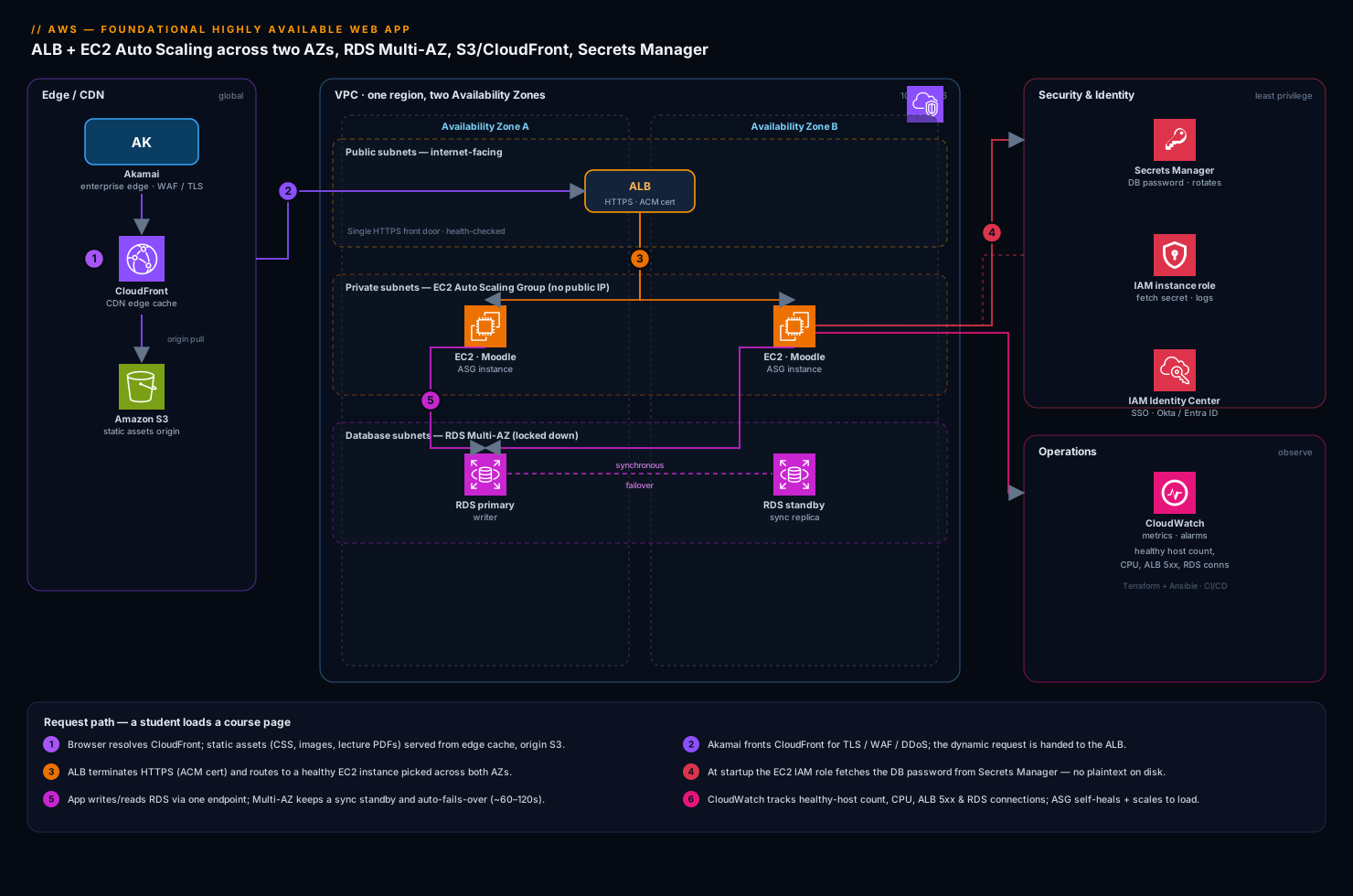
Everything lives inside one VPC (your own private network in AWS) spread across two Availability Zones in a single region. Think of an AZ as an independent data-centre with its own power and cooling; if one catches fire, the other keeps running. The VPC is split into subnets, and the most important early decision is which tiers are public and which are private.
- Public subnets (one per AZ) hold only the Application Load Balancer (ALB). This is the single front door the internet is allowed to reach.
- Private subnets (one per AZ) hold the EC2 application servers. They have no public IP and cannot be reached directly from the internet — only the ALB can talk to them.
- Database subnets (one per AZ) hold RDS, even more locked down — only the app servers can reach it.
This three-tier split (load balancer → app → database, each more private than the last) is the backbone of the whole design.
The request path, following a student loading a course page:
- The student’s browser first resolves CloudFront, AWS’s CDN. Static assets — the Moodle theme CSS, JavaScript, course images, lecture PDFs — are served from CloudFront’s edge cache close to the student, pulling from an S3 bucket as the origin. This means the bulk of the bytes never touch your servers at all. In front of CloudFront, the company runs Akamai as its enterprise edge for global TLS termination, WAF, and bot/DDoS protection — a single security perimeter that fronts this app and the company’s other properties — before traffic is handed to CloudFront and the AWS origin.
- The dynamic request (the actual page logic — “show me my enrolled courses”) goes to the ALB in the public subnets. The ALB terminates HTTPS (its certificate managed by AWS Certificate Manager) and looks at its target group of healthy app servers.
- The ALB forwards the request to one healthy EC2 instance in the private subnet, picked across both AZs. The instance is part of an Auto Scaling Group (ASG) that keeps the fleet at the right size and replaces any instance that fails its health check.
- The Moodle code on that instance needs to read or write data, so it connects to the RDS database. Crucially, it does not read the password from a file. At startup the instance fetches the DB credentials from AWS Secrets Manager, using its IAM instance role — no password is ever stored on disk or in the code.
- RDS runs as Multi-AZ: a primary in one AZ with a synchronous standby in the other. The app only ever talks to a single DNS endpoint; if the primary fails, AWS promotes the standby and re-points that endpoint automatically.
The response flows back the same way: app server → ALB → student. Static bytes came from CloudFront; only the dynamic, personalised part of the page involved your EC2 fleet.
The network foundation: VPC, subnets, IGW, and NAT across two AZs
Before the load balancer or a single server exists, you draw the network. Get this layer right and everything above it inherits the availability; get it wrong and you have hidden single points of failure that no amount of Auto Scaling can fix. This is the part beginners most often skip — so we will go slowly.
The VPC and its subnets
A VPC (Virtual Private Cloud) is your own private slice of the AWS network — an empty, isolated address space you fill with resources. You give it a CIDR block, a range of private IP addresses, typically 10.0.0.0/16 (about 65,000 addresses). Inside it you carve subnets, and here is the rule that makes the whole design highly available: every subnet lives in exactly one Availability Zone. A subnet cannot span two AZs. So to be in two AZs, you create your subnets in pairs — one in each.
For this app we carve six subnets: three tiers × two AZs.
| Tier | AZ | Example CIDR | What lives here | Reachable from internet? |
|---|---|---|---|---|
| Public | az-a | 10.0.0.0/24 |
ALB node, NAT gateway | Yes (inbound 443) |
| Public | az-b | 10.0.1.0/24 |
ALB node, NAT gateway | Yes (inbound 443) |
| Private (app) | az-a | 10.0.10.0/24 |
EC2 app servers | No (outbound only) |
| Private (app) | az-b | 10.0.11.0/24 |
EC2 app servers | No (outbound only) |
| Private (db) | az-a | 10.0.20.0/24 |
RDS primary/standby | No |
| Private (db) | az-b | 10.0.21.0/24 |
RDS primary/standby | No |
“Public” and “private” are not a checkbox on the subnet — they are defined entirely by route tables, which we get to next. A public subnet is simply one whose route table sends internet-bound traffic to an Internet Gateway; a private subnet’s does not.
The Internet Gateway: the one public door
An Internet Gateway (IGW) is a single, horizontally-scaled, already-redundant component you attach to the VPC — one per VPC. It is the only thing that lets traffic flow between the VPC and the public internet. You do not need one per AZ; a single IGW already spans the whole VPC with no throughput cap and no SPOF of its own. A subnet becomes “public” when its route table contains a route 0.0.0.0/0 → igw-xxxx.
Only the public subnets get that route — which is why only the ALB (and the NAT gateways) can reach or be reached from the internet directly. The app and database subnets have no route to the IGW at all, so even a mis-configured server there cannot accidentally expose itself.
NAT gateways: outbound-only internet for private servers, one per AZ
Your private app servers still need to reach out — to download OS security patches, pull an agent, or call an AWS API over its public endpoint — without being reachable in. That is exactly what a NAT (Network Address Translation) gateway does: it lets a private instance start an outbound connection and receive the reply, but nothing on the internet can initiate a connection back. A NAT gateway lives in a public subnet (it needs the IGW route) and carries an Elastic IP.
Here is the critical availability decision, and it is the one the cost table lower down hinted at: run one NAT gateway per AZ, not one shared NAT for the whole VPC. A NAT gateway is redundant within its AZ, but it cannot survive its AZ failing. If you place a single NAT in az-a and route both private subnets through it, then the day az-a has an outage, every server in az-b also loses outbound internet — patches fail, agents go silent, API calls hang. You have quietly re-introduced a cross-AZ single point of failure into a design whose entire purpose was to remove them. So each private subnet routes 0.0.0.0/0 to the NAT gateway in its own AZ:
| Route table | Destination | Sends traffic to |
|---|---|---|
| Public (both AZs) | 0.0.0.0/0 |
Internet Gateway |
| Private az-a | 0.0.0.0/0 |
NAT gateway in az-a |
| Private az-b | 0.0.0.0/0 |
NAT gateway in az-b |
| Database (both AZs) | (no default route) | — (no internet at all) |
The honest tradeoff: NAT gateways are billed per hour plus per GB processed, and two cost roughly twice one. A genuinely budget-constrained team sometimes accepts a single NAT as a known, documented risk — but that is a decision to trade availability for a few rupees, not a default to stumble into. The better cost lever is to remove NAT traffic entirely with VPC endpoints: a free gateway endpoint keeps S3 and DynamoDB traffic on the AWS private network, and interface endpoints do the same for Secrets Manager, CloudWatch, and other APIs — so the servers barely touch the NAT at all. The internals of routing, NAT, and endpoints are covered in the VPC deep dive.
The database subnets deliberately have no default route — not to a NAT, not to the IGW. RDS does not need to browse the internet, so it does not get to. That is defence in depth: even if every other control failed, the data tier has no path to or from the outside world.
The components, and why each one is here
| Tier | AWS service | What it does here | Why it gives you HA |
|---|---|---|---|
| Edge / CDN | Akamai → CloudFront + S3 | Serve and cache static assets close to students | Offloads servers; survives origin blips from cache |
| Front door | Application Load Balancer | Single HTTPS entry; health-checks and routes to app servers | Stops sending traffic to dead instances instantly |
| Compute | EC2 + Auto Scaling Group | Run the Moodle app; grow/shrink with load; self-heal | Spread across 2 AZs; replaces failed instances |
| Database | RDS Multi-AZ | Managed SQL database for courses, users, grades | Synchronous standby in a second AZ; auto-failover |
| Secrets | AWS Secrets Manager | Holds the DB password; rotates it | No plaintext credential on any server |
| Identity (app) | IAM roles | Lets EC2 fetch the secret with no stored keys | Removes long-lived credentials entirely |
| Identity (people) | Okta / Entra ID | SSO for staff into Moodle and the AWS Console | Central control; no shared local logins |
A few of these deserve the why, because they are the choices junior teams most often get wrong.
Why the database is Multi-AZ, not just backed up. A nightly backup protects you from data loss, but restoring it takes time — your platform is down while you do it. Multi-AZ is about availability: RDS keeps a hot standby copy in the second AZ, kept in sync in real time, and if the primary dies it fails over to the standby in typically 60–120 seconds with the same endpoint name. You want both — Multi-AZ for staying up, and automated backups (plus point-in-time recovery) for getting data back if something corrupts it. They solve different problems.
Why Secrets Manager, not a config file or an environment variable. The password in config.php was the bug that started this project. Secrets Manager stores the credential encrypted, hands it out only to identities you authorise via IAM, logs every access in CloudTrail, and can rotate the password automatically on a schedule — when it rotates, it updates both Secrets Manager and RDS together so nothing breaks. The app fetches it at runtime over a private call. There is no file to leak and no password to commit to Git.
Why an Auto Scaling Group, even at minimum size. Even if you never scaled up, an ASG earns its keep: if an instance crashes or fails its health check, the ASG automatically launches a fresh one from your launch template to restore the desired count. Self-healing is free. On top of that, scaling policies let the fleet grow when CPU or request count climbs — which is exactly what the exam-week spike needs.
The load balancer up close: targets, health checks, and graceful draining
The ALB is the “smart receptionist,” but a beginner benefits from seeing what is actually inside it, because three of its settings decide whether a failure is invisible or an outage.
Listeners, target groups, and the health check
An ALB is configured in three layers:
- A listener watches a port and protocol — here, HTTPS on 443 — using a TLS certificate from AWS Certificate Manager (ACM). A common second listener on port 80 does nothing but redirect visitors to 443. The listener has rules (by path or host header) that decide where a request goes.
- A target group is the pool the listener forwards to: your registered app servers (by instance ID or IP), a protocol and port, and — most importantly — a health check.
- The health check is the heartbeat. The ALB repeatedly requests a URL on each target (say
GET /healthz) and marks it healthy or unhealthy based on the response. Traffic only ever goes to healthy targets. This one mechanism is what turns “a server died” into a non-event.
Tuning the health check — the numbers that set your recovery time
The defaults are deliberately conservative. Understanding them lets you decide how fast you want to detect a dead server, and the trade you make for that speed.
| Setting | ALB default | Typical tuned value | What it controls |
|---|---|---|---|
| Health check path | / |
/healthz |
The URL probed; use a dedicated lightweight endpoint |
| Interval | 30 s | 10–15 s | How often each target is probed |
| Timeout | 5 s | 5 s | How long to wait for a response |
| Healthy threshold | 5 | 2–3 | Consecutive passes before a target returns to service |
| Unhealthy threshold | 2 | 2 | Consecutive fails before a target is pulled |
| Success codes | 200 | 200 | Which HTTP codes count as healthy |
The recovery-time maths is simple: a dead target is pulled after roughly unhealthy threshold × interval. With the 30 s default and a threshold of 2, that is up to ~60 seconds of some requests hitting a bad box before it is drained; drop the interval to 10 s and it is ~20 seconds. Tighter checks detect faster — but probe too aggressively and a briefly busy instance can flap (fail a check, get pulled, pass again, get re-added), which is its own kind of instability. Interval 10–15 s with an unhealthy threshold of 2 is a sane starting point.
The single most important health-check decision is what /healthz actually checks. Make it a shallow liveness probe: “is this web server process up and able to render a page?” It is tempting to make it deep — have /healthz also run a query against RDS so it only reports healthy if the database is reachable. Do not. If the database has a brief hiccup, a deep check fails on every instance at once, the ALB marks the entire fleet unhealthy, and you have converted a minor, recoverable DB blip into a total outage with zero servers in rotation. Keep the ALB’s health check shallow; monitor the database’s health separately.
Deregistration delay (connection draining) — leaving without dropping requests
When a target is removed — because it failed a check, because the Auto Scaling Group is scaling in, or because you are deploying new code — you do not want to cut off requests already in flight. Deregistration delay (historically called connection draining) handles this: the ALB immediately stops sending the target new requests, but lets existing ones finish for up to the configured window (default 300 seconds) before fully removing it. Set it a little longer than your slowest normal request — often ~30 seconds for a web app — so scale-in and deploys are graceful and no student sees a broken page mid-click. Too high needlessly slows every scale-in and deployment; too low cuts long requests short.
Cross-zone load balancing and the ALB’s own redundancy
An ALB is not a single box — AWS runs ALB nodes in each enabled subnet/AZ, and Route 53 hands clients the healthy nodes. Cross-zone load balancing (on by default for the ALB, and free) means any ALB node can send a request to any healthy target in either AZ, so load spreads evenly even when one AZ holds more targets than the other. You enable the ALB in both public subnets; that is what makes the front door itself survive an AZ loss. The Elastic Load Balancing deep dive compares ALB vs NLB vs GWLB and the finer routing controls.
Handling the exam-week spike with Auto Scaling
The whole reason a single server failed was the 20x login surge before exams. The ASG turns that from an outage into a non-event. You attach a target-tracking scaling policy that says, in effect, “keep average CPU near 50% — add instances when it climbs, remove them when it drops.” When ten thousand students log in, CPU rises, the ASG launches more instances across both AZs, the ALB starts routing to them as soon as they pass health checks, and the platform absorbs the load. When the rush passes, the ASG scales back down so you stop paying for idle servers.
A minimal scaling policy is just a target and a metric:
{
  "TargetValue": 50.0,
  "PredefinedMetricSpecification": {
    "PredefinedMetricType": "ASGAverageCPUUtilization"
  },
  "EstimatedInstanceWarmup": 120
}
Two settings make this behave well in the real world. Set a sensible minimum (say 2, one per AZ, so you are always redundant) and a maximum that caps spend even under a runaway spike or an attack. And set EstimatedInstanceWarmup so the ASG waits for new instances to actually boot and warm up before judging whether it needs even more — otherwise it over-reacts and launches a stampede. For predictable calendar events like exam week, you can also add a scheduled action to pre-scale the fleet at 7am before the rush, rather than waiting for CPU to prove it is needed.
The Auto Scaling Group in depth: launch template, health checks, and lifecycle
The earlier section showed why an ASG matters and the target-tracking policy that resizes it. Here is how it is actually wired, because a few settings decide whether self-healing works or quietly loops.
The launch template — the blueprint for every new instance
An ASG does not know how to build a server; it stamps out copies from a launch template. (Launch templates supersede the older launch configurations, which are on the path to retirement — always use a launch template for new work.) The template pins everything about an instance so that instance #2 at 2am during the exam rush is byte-identical to instance #1:
resource "aws_launch_template" "moodle" {
  name_prefix   = "moodle-app-"
  image_id      = var.app_ami_id        # a golden AMI baked with Moodle + agents
  instance_type = "t3.large"

  iam_instance_profile { name = aws_iam_instance_profile.app.name }
  vpc_security_group_ids = [aws_security_group.app_sg.id]

  # IMDSv2 required — closes the SSRF hole that has leaked instance credentials in real breaches
  metadata_options {
    http_tokens                 = "required"
    http_put_response_hop_limit = 1
    http_endpoint               = "enabled"
  }

  block_device_mappings {
    device_name = "/dev/xvda"
    ebs {
      volume_type = "gp3"   # gp3 is the current general-purpose default: cheaper, baseline 3,000 IOPS
      volume_size = 30
      encrypted   = true    # encryption at rest — enable EBS encryption-by-default on the account too
    }
  }

  user_data = base64encode(file("${path.module}/user_data.sh"))
}
Three current-default details are worth calling out, because they are exam favourites and real-world guardrails:
- IMDSv2 (
http_tokens = "required"). The Instance Metadata Service is where an instance reads its IAM role credentials. IMDSv2 forces a session-token handshake, which blocks the classic SSRF attack where a tricked app fetches the metadata endpoint and leaks those temporary credentials. Requiring it is now the recommended default posture — set it explicitly. - gp3 EBS. gp3 is the modern general-purpose SSD: it decouples IOPS/throughput from volume size and is cheaper than the old gp2 for the same baseline. Prefer it.
- Encryption at rest.
encrypted = true(plus account-level EBS encryption-by-default) KMS-encrypts the root and data volumes with no performance cost you will notice.
User data vs a golden AMI. user_data is a boot script that runs the first time an instance starts — great for last-mile config, but it makes every launch slower because the box installs software while you are waiting for capacity during a spike. The faster, more repeatable pattern is a golden AMI: bake Moodle, PHP, and the agents into an image ahead of time (with Packer + Ansible), so a new instance boots in about a minute and only user-data-configures the small, environment-specific bits. Under an exam-week surge, that boot-time difference is the difference between absorbing the spike and lagging it.
Health-check type and grace period — so self-healing doesn’t loop
Two ASG settings make the difference between healing correctly and thrashing:
- Health check type:
ELB, not justEC2. By default an ASG only watches the EC2 instance status checks (is the hypervisor/OS alive?). That misses an instance whose OS is fine but whose app is wedged. Set the ASG’s health check type to ELB so it also honours the ALB target-group health — now the ASG replaces an instance the load balancer considers unhealthy, not merely one that has crashed. - Health-check grace period (default 300 s). A freshly launched instance needs time to boot, run user data, and start passing checks. The grace period tells the ASG to ignore health checks for that window after launch. Set it too short and the ASG kills instances mid-boot and relaunches forever — an expensive infinite loop. Match it to your real boot-plus-warm time.
resource "aws_autoscaling_group" "moodle" {
  min_size                  = 2      # one per AZ — always redundant
  desired_capacity          = 2      # baseline
  max_size                  = 10     # caps spend even under attack
  vpc_zone_identifier       = [aws_subnet.app_a.id, aws_subnet.app_b.id]
  target_group_arns         = [aws_lb_target_group.app.arn]
  health_check_type         = "ELB"
  health_check_grace_period = 300

  launch_template {
    id      = aws_launch_template.moodle.id
    version = "$Latest"
  }

  instance_refresh {
    strategy = "Rolling"
    preferences { min_healthy_percentage = 90 }
  }
}
Rolling out changes and finer control
- Instance refresh is how you ship a new AMI or launch-template version: the ASG replaces instances in batches while keeping
min_healthy_percentagein service, so a new build rolls across the fleet without an outage. - Lifecycle hooks let you pause an instance at launch (
Pending:Wait— register with config management, warm a cache) or at termination (Terminating:Wait— finish in-flight work, ship final logs, deregister cleanly) before it proceeds. - Warm pools keep pre-initialised, stopped instances ready so scale-out is near-instant for spiky, boot-heavy apps. Policies, lifecycle, and warm pools are covered in the EC2 Auto Scaling deep dive.
Where does the session live? Stateless servers, sticky sessions, and shared state
Here is the bug that ambushes almost everyone the first time they put more than one server behind a load balancer, and it earns its own section because the fix is a core HA principle.
The problem. A student logs in. The ALB happens to send that request to instance A, which stores the login session in its own local memory. On the next click, the ALB — doing its job of spreading load — sends the student to instance B, which has never heard of them, and they are bounced back to the login screen. Worse: the ASG scales in and terminates instance A, and every session it held vanishes. The more available and elastic you make the fleet, the more this breaks — because it was built on the wrong assumption that a server remembers things.
The mantra: treat servers as cattle, not pets. Any instance can disappear at any moment — that is the whole design. So nothing that must survive an instance going away may live on that instance. State moves to shared, managed services:
| What used to live on the instance | Where it must live for HA | Why |
|---|---|---|
| Login / session data | ElastiCache (Redis/Memcached), DynamoDB, or the DB | Any instance can serve any user; sessions survive scale-in |
| Uploaded files (assignments, images) | Amazon S3, or EFS mounted on all instances | A file uploaded to one box must be visible to all and outlive it |
| The relational data | RDS Multi-AZ | Managed, replicated, backed up — never local |
| The DB password / secrets | Secrets Manager | Fetched at runtime by the IAM role |
Three ways to handle sessions, from crutch to cure:
- Sticky sessions (a crutch). The ALB can pin a user to one instance with a cookie (duration-based
AWSALB, or application-based). It works, but load becomes uneven, and if that one instance is replaced the user is still logged out. Use it only as a stopgap. - Externalise session state (the real fix). Store sessions in a shared store — for Moodle, its Redis/Memcached session handler pointed at ElastiCache. Now every instance is stateless and interchangeable, and scale-in loses nothing.
- Stateless tokens. For APIs, keep no server-side session at all — a signed JWT in a cookie carries the identity. Nothing to lose when an instance dies.
For Moodle specifically, two things must be externalised or the HA story silently fails: sessions (to ElastiCache) and user-uploaded files — Moodle’s moodledata directory — which belong on EFS shared across instances (or in S3), never on local disk. Miss the second and students’ uploaded assignments start returning 404 the moment the instance that held them is recycled.
Security: locking the doors with security groups and IAM
Security in this design is mostly about who is allowed to talk to whom, enforced by security groups — stateful virtual firewalls attached to each tier. The rule of thumb is that each tier only accepts traffic from the tier directly in front of it. You reference security groups as the source, not IP ranges, so the rules keep working as instances come and go.
| Security group | Inbound allowed from | Effect |
|---|---|---|
alb-sg (load balancer) |
0.0.0.0/0 on 443 (via Akamai/CloudFront) | The internet can reach only the ALB, only on HTTPS |
app-sg (EC2 fleet) |
alb-sg on the app port |
Only the ALB can reach app servers; no direct internet |
db-sg (RDS) |
app-sg on 3306/5432 |
Only app servers can reach the database |
This chain means even if an attacker found an app server’s private IP, they could not reach it — nothing but the ALB is allowed in. And the database is doubly protected: it is in a private subnet and only the app tier’s security group can connect.
Two more identity layers complete the picture, and they map to two different audiences:
- IAM roles for the machines. The EC2 instances carry an IAM instance role granting exactly two permissions: read this one secret from Secrets Manager, and write logs/metrics to CloudWatch. No access keys are stored anywhere — the role provides temporary credentials automatically. Least privilege, no long-lived secrets.
- Okta / Entra ID for the people. Staff (instructors, admins) sign in to Moodle through the company’s Okta (or Microsoft Entra ID) single sign-on, so there are no shared local Moodle admin passwords and access is revoked centrally the day someone leaves. The same SSO, federated to AWS IAM Identity Center, governs who can log in to the AWS Console — so engineers get role-based, audited, time-bound access instead of permanent IAM users.
For a security-conscious shop, two more guardrails are worth adding from day one without complicating the core design. Wiz (with Wiz Code scanning the Terraform before it is applied) runs continuous cloud-posture checks and would loudly flag exactly the mistakes that hurt before — an S3 bucket gone public, a security group opened to the world, a secret drifting into plaintext. And CrowdStrike Falcon sensors on the EC2 instances provide runtime threat detection on the servers themselves, feeding alerts to whoever is on call. Neither changes the architecture; they are the safety net that catches human error.
Cost: cheap when quiet, paying only for the spike
This is a budget-conscious team, so the design is built to be inexpensive at rest. The biggest savings come from a few deliberate choices.
| Lever | Mechanism | Effect on the bill |
|---|---|---|
| Auto Scaling to demand | ASG runs ~2 instances off-peak, many at peak | You pay for the spike only while it lasts |
| Right-size + Savings Plans | Buy a Compute Savings Plan for the always-on baseline | ~30–50% off the 2 baseline instances |
| Offload static to CloudFront/S3 | Cache assets at the edge from cheap S3 storage | Fewer/smaller EC2 instances; lower data-transfer cost |
| Single-AZ NAT, or none | Endpoints/careful routing to avoid pricey NAT data | Cuts a sneaky recurring cost |
| RDS sized to load | Start small; Multi-AZ doubles DB cost — accept it for HA | Predictable, and the price of staying up |
The one cost to go in with eyes open about is Multi-AZ RDS roughly doubles the database bill, because you are paying for the standby that sits ready. That is the deliberate price of surviving a data-centre failure, and for a platform that 60,000 students depend on at exam time, it is worth it. Everything else — scaling compute to actual demand, serving static bytes from CloudFront instead of EC2, buying a Savings Plan for the steady baseline — keeps the day-to-day bill low and makes the cost track real usage.
Operations: how the team actually runs this
Building it is half the job; running it is the other half, and the foundational version still needs a real operating model.
Everything as code with Terraform. The entire stack — VPC, subnets, ALB, ASG, RDS, security groups, the S3 bucket and CloudFront distribution — is defined in Terraform, not clicked together in the console. That means the environment is reproducible, reviewable in a pull request, and you can stand up an identical staging copy in minutes. Ansible handles the inside-the-instance configuration (installing Moodle, PHP, and the agents) so a fresh instance from the ASG comes up correctly every time. Defining infrastructure as code is also what lets Wiz Code scan it for misconfigurations before anything is deployed.
A simple CI/CD pipeline. Code changes flow through GitHub Actions (or Jenkins if the team standardises on it): on a merge, the pipeline runs tests, bakes a new application image, and rolls it out to the ASG instances behind the ALB with health checks gating each step, so a bad deploy never takes the whole fleet down at once. Teams that grow into Kubernetes later add Argo CD for GitOps-style continuous delivery, but for a foundational EC2 fleet, a straightforward pipeline that updates the launch template and triggers an instance refresh is exactly right — don’t over-build it.
Monitoring and alerting. CloudWatch collects the basics — CPU, request counts, ALB 5xx errors, RDS connections, healthy host count — and alarms page the on-call engineer when something is wrong. As the team matures, Datadog (or Dynatrace) layers on richer application performance monitoring: distributed tracing of a slow course-page load, dashboards the platform lead watches during exam week, and anomaly detection that surfaces a problem before students notice. Whichever you pick, the metric that matters most is healthy host count behind the ALB — if it drops, you are losing redundancy.
Incidents and change control through ServiceNow. When an alarm fires or a student-affecting outage happens, an incident is raised in ServiceNow so there is a tracked ticket, an owner, and a record — not just a Slack message that scrolls away. Planned changes (a database engine upgrade, a Moodle version bump) go through ServiceNow change management too, which gives the universities the documented, auditable process they expect from a vendor.
A note on virtual appliances: if a university security team mandates a specific third-party firewall or web-application-firewall product, you can run it as a virtual appliance (a vendor’s pre-built EC2 AMI) in the public subnet and route ingress through it. For most foundational builds, AWS’s own ALB plus the Akamai/CloudFront WAF cover this, and adding an appliance introduces its own scaling and HA work — so reach for it only when a compliance requirement actually forces it.
Failure modes, and what each one looks like
Naming the failures before they happen is what separates a design that claims high availability from one that delivers it.
- An app server dies. Its ALB health check fails within seconds, the ALB stops routing to it, and the ASG launches a replacement. Students never notice. This is the everyday case the whole design makes boring.
- An entire Availability Zone fails. The ALB routes all traffic to the healthy AZ, the ASG launches replacement instances there, and RDS fails over to its standby. You run degraded (less spare capacity) but you stay up — which is the entire point of spreading across two AZs. Lesson: keep your minimum instance count high enough that one AZ alone can serve baseline load.
- The RDS primary fails. Multi-AZ promotes the standby and re-points the endpoint in ~60–120 seconds. The app sees a brief blip of failed DB connections; with sensible connection retry in the code, students see a moment’s slowness, not an outage.
- The static-asset origin (S3) has a blip. CloudFront keeps serving cached assets from the edge, so course images and theme files stay up even if the origin is briefly unhappy.
- A traffic flood or attack. Akamai/CloudFront absorbs and filters at the edge, the ALB and ASG scale the app tier, and the ASG maximum caps how far you scale so an attack cannot run up an unlimited bill. The security groups ensure nothing but the ALB is even reachable.
The one failure this single-region design does not survive is an entire AWS region going down. That is a deliberate scope choice: full multi-region active-active is a large step up in cost and complexity, and it is the right next project, not part of the foundational build. What you do have today is solid backups — automated RDS snapshots and point-in-time recovery, plus S3’s built-in durability — so even a regional disaster is recoverable, just not instantly.
Explicit tradeoffs
What this design accepts. It is two-AZ, single-region: it shrugs off a lost server or a lost data-centre, but a regional outage is a recover-from-backups event, not a seamless failover. Multi-AZ RDS doubles the database cost for a standby that mostly sits idle — you are paying an insurance premium. And there is more moving machinery than a single box: a load balancer, an Auto Scaling Group, a managed database, a secrets store, and security groups to reason about. For a junior team, that learning curve is real — but every piece here is a managed AWS service doing the heavy lifting, which is precisely why this is the foundational pattern and not an advanced one.
The alternatives, and when they win. If you genuinely have a tiny, low-stakes internal tool, a single EC2 instance with good backups is cheaper and simpler — just be honest that it has no HA. If your app can be made serverless (Lambda + API Gateway + DynamoDB), you get HA and scaling without managing servers at all, and for new greenfield apps that is often the better starting point — but Moodle is a traditional server-based PHP application, so the EC2 + RDS pattern fits what actually has to run. If you outgrow EC2 fleets and want finer-grained scaling and richer deploys, containers on ECS or EKS (with Argo CD for delivery) are the natural graduation — but moving there before you need it is complexity you will pay for and not use.
Going deeper
Everything so far is the foundational build. This section is for the reader who wants to know how the machinery actually behaves — the internals, edge cases, and cost/scale nuances that separate a diagram that looks highly available from a system that is.
Shared responsibility, tier by tier
“AWS is responsible for the availability” is true but useless until you know which availability. The shared-responsibility line runs through every tier of this app:
| Tier | AWS is responsible for | You are responsible for |
|---|---|---|
| AZ / Region | Physical data-centres, power, cooling, network fabric, AZ isolation | Actually deploying across ≥2 AZs and sizing so one AZ can carry load |
| ALB | The load balancer’s own redundancy and scaling | Listeners, TLS cert, health-check config, security groups |
| EC2 | Hypervisor, host hardware, the AZ | Guest OS patching, the app, the AMI, the IAM role, the instance’s security group |
| RDS | Engine software, failover automation, backup infrastructure | Choosing Multi-AZ, retry logic for the failover blip, parameter/security config |
| Data | Durable, encrypted storage substrate | Your data’s correctness, access policies, and encryption choices |
The trap is assuming a managed service means a hands-off service. RDS automates failover, but you must enable Multi-AZ and write a client that reconnects. EC2 runs the hardware, but the guest OS and its patches are entirely yours.
How Multi-AZ RDS failover actually works
The classic Multi-AZ instance deployment keeps a synchronous standby in a second AZ — every committed write lands on both before the client is acknowledged, so there is no data loss on failover. The standby is not readable; it exists only to take over. (Do not confuse it with a read replica, which is readable but replicates asynchronously and is for scaling reads, not for zero-loss failover.)
Failover is DNS-based: your app connects to a stable endpoint like moodle.abcd.us-east-1.rds.amazonaws.com, and on failure AWS re-points that DNS name from the primary’s address to the now-promoted standby, typically in 60–120 seconds. Two consequences beginners get bitten by:
- Cache your DNS for a short time, not forever. Some runtimes (notably older JVM settings) cache DNS resolutions for the life of the process. If your app caches the old IP, it keeps dialling the dead primary after failover. Set a low client DNS TTL (e.g. Java
networkaddress.cache.ttl=5). - The reconnection storm. At the instant of failover, every worker’s connection breaks and they all reconnect at once, and RDS has a finite
max_connections. A connection pool — or RDS Proxy, which holds a warm pool and smooths failover — prevents a thundering-herd reconnect from becoming a second outage. The deeper mechanics (engines, replicas, backups, Aurora’s shared-storage failover) are in the RDS & Aurora deep dive.
(A newer Multi-AZ DB cluster variant runs two readable standbys and can fail over faster; the classic single-standby deployment above is the foundational default.)
Scaling as a control loop — and the warmup trap
A target-tracking policy is a feedback loop, not a switch: CloudWatch reports average CPU, the ASG adds or removes capacity to steer toward your target (50%), and the loop repeats. Two things keep it stable:
- Instance warmup tells the ASG to exclude just-launched instances from the metric until they have booted and warmed. Too low, and the ASG sees still-cold instances dragging the average up and launches a stampede; too high, and it under-reacts to a real surge.
- Scheduled scaling for known events. Target tracking is reactive — it only adds capacity after CPU rises, which lags a sharp spike by the boot time. For a calendar-driven surge like exam morning, add a scheduled action to pre-scale the floor to (say) 8 instances at 07:00, so capacity is already in place when the students arrive. Predictive scaling can learn the daily/weekly pattern and pre-warm automatically.
Inter-AZ data transfer — the cost nobody plans for
Spreading across AZs is what buys availability, but traffic between AZs is billed (in both directions). Cross-zone load balancing on the ALB is free, but app-to-RDS and NAT traffic that crosses an AZ boundary is not. This is a second reason for a NAT gateway per AZ (each private subnet exits through its own-AZ NAT, avoiding a cross-AZ hop on every outbound byte) and for VPC endpoints (they keep S3/Secrets Manager traffic off the NAT entirely). It rarely dominates the bill, but it is the line item that surprises teams who assumed AZ-spreading was free.
Observability: the signals that tell you HA is intact
Alarm on the signals that mean you are losing redundancy, not just that something is slow:
- HealthyHostCount per target group — if it drops below your per-AZ baseline, you are one failure from an outage. This is the number the platform lead should watch during exam week.
- HTTPCode_ELB_5XX_Count vs HTTPCode_Target_5XX_Count. Target 5xx = your app returned an error. ELB 5xx = the load balancer itself could not get a good response — most commonly 503 = no healthy targets, i.e. the fleet is empty. They point at very different problems; alarm on both.
- TargetResponseTime (latency) and RejectedConnectionCount.
- RDS:
CPUUtilization,DatabaseConnections(approachingmax_connections?),FreeableMemory, and, if you add a read replica,ReplicaLag. - ASG: in-service vs desired capacity — a persistent gap means instances are failing to launch (bad AMI, or a hit quota).
Quotas and limits to raise before the big event
Availability designs fail on quiet limits at the worst possible moment. Check and pre-raise, in each Region:
- On-Demand vCPU limits (per instance family) — a big scale-out can hit the ceiling and simply stop launching.
- Elastic IPs (default 5 per Region) — each NAT gateway consumes one; multi-AZ NAT plus other EIPs adds up.
- Targets per target group, rules per ALB, and RDS instances per Region.
Request increases before exam week; a limit-blocked scale-out at 9am is indistinguishable from an outage to the students hitting it.
Deployments: immutable beats in-place
Two safe rollout patterns sit on top of this stack. Rolling (via ASG instance refresh) replaces instances in batches from a new AMI, keeping a minimum healthy percentage in service. Blue/green stands up a second target group on new instances and shifts the listener’s traffic weight from old to new, giving an instant rollback (shift the weight back) if error rates climb. Both rely on the same principle that makes the whole design work: instances are immutable and disposable, so you replace rather than patch in place — no snowflake servers, no configuration drift, no “works on box 3 only.”
The shape of the win
For the e-learning company, the payoff is concrete: the afternoon before exams, thirty thousand students log in within the hour, the Auto Scaling Group quietly adds instances across both AZs, CloudFront serves the lecture PDFs from the edge, and the platform stays fast — and when one of the app servers crashes at 2am, the on-call engineer sleeps through it because the ASG already replaced it. The database password no longer lives in a file; it is in Secrets Manager, rotating on a schedule, fetched at runtime by an IAM role, and there is nothing left to leak into Git. That is the whole promise of foundational high availability on AWS: not that nothing ever fails, but that when things fail — and they will — your students never find out. Start exactly here. It is the right first architecture, and most of what comes later is just refinement on top of these same bones.
Practice challenges
Work each one on paper (or in a scratch Terraform file) before opening the solution. They escalate from beginner to advanced and reinforce the exact decisions this architecture turns on.
1. Carve the network (beginner)
You have VPC 10.0.0.0/16 and must span two AZs with three tiers (public, private-app, private-db). List the six subnets with sensible non-overlapping /24 CIDRs and say which get a route to the Internet Gateway.
<details> <summary>Solution</summary>
| Subnet | AZ | CIDR | Route to IGW? |
|---|---|---|---|
| public-a | az-a | 10.0.0.0/24 |
Yes |
| public-b | az-b | 10.0.1.0/24 |
Yes |
| app-a | az-a | 10.0.10.0/24 |
No (NAT for outbound) |
| app-b | az-b | 10.0.11.0/24 |
No (NAT for outbound) |
| db-a | az-a | 10.0.20.0/24 |
No (no default route) |
| db-b | az-b | 10.0.21.0/24 |
No (no default route) |
Why: only public subnets route 0.0.0.0/0 to the IGW; that single route-table entry is the entire definition of “public.”
</details>
2. Write the security-group chain (beginner)
Write the inbound rules for alb-sg, app-sg, and db-sg (Moodle on port 8080, MySQL on 3306). Reference security groups, not IP ranges, wherever you can.
<details> <summary>Solution</summary>
alb-sg— inbound443from0.0.0.0/0(the public internet, via the edge). Nothing else.app-sg— inbound8080fromalb-sgonly. No internet, no direct access.db-sg— inbound3306fromapp-sgonly.
Why: referencing the source security group (not a CIDR) means the rule keeps working as Auto Scaling adds and removes instances with ever-changing IPs — the chain is what isolates each tier. </details>
3. Health-check and drain maths (intermediate)
Your target group uses interval 15 s, unhealthy threshold 2, deregistration delay 300 s. Your slowest normal request takes 8 s. (a) Roughly how long until a hung instance stops receiving traffic? (b) What deregistration delay would you set, and why change it?
<details> <summary>Solution</summary>
(a) ≈ unhealthy threshold × interval = 2 × 15 s = ~30 seconds before the ALB pulls the hung target. (b) Lower the deregistration delay to about 30 s (a little above the 8 s worst case). The 300 s default makes every scale-in and deploy wait 5 minutes to drain; ~30 s lets in-flight requests finish while keeping scale-in and rollouts brisk.
Why: detection time is set by the health check; graceful shutdown is set by the deregistration delay — they are two independent dials. </details>
4. Size the Auto Scaling Group (intermediate)
Baseline load needs 2 instances. You require that one AZ alone can serve the baseline if the other fails. Peak (exam week) needs 8. Give min, desired, max, the health-check type, and roughly the grace period.
<details> <summary>Solution</summary>
min = 2, desired = 2, max = 10 (headroom above the peak of 8), health_check_type = "ELB", health_check_grace_period ≈ 300.
Why: min = 2 with one instance per AZ means either AZ can carry the baseline alone; ELB health checks let the ASG replace app-wedged (not just crashed) instances; the grace period stops it from killing instances before they finish booting.
</details>
5. Find the hidden single point of failure (advanced)
To save money, a teammate deployed one NAT gateway in az-a and pointed both private route tables at it. The design “looks” multi-AZ. What breaks, when — and what are the two acceptable fixes?
<details> <summary>Solution</summary>
When az-a fails, instances in az-b are still up and still served by the ALB, but they lose all outbound internet: OS patching, agent check-ins, and any AWS API reached over a public endpoint hang or fail. You re-introduced a cross-AZ SPOF into the network layer. Fix A: run one NAT gateway per AZ, each private subnet routing to its own-AZ NAT. Fix B (cost lever): add VPC endpoints (free gateway endpoint for S3/DynamoDB; interface endpoints for Secrets Manager, CloudWatch) to remove most NAT traffic — and if a single NAT is kept for budget, record it as an accepted, documented risk.
Why: availability is only as strong as the least-redundant component on the whole dependency path — a shared NAT quietly becomes that component. </details>
6. Make the fleet truly stateless (advanced)
After enabling Auto Scaling, users report random logouts, and uploaded assignment files sometimes 404. Both worked fine on the old single server. Diagnose each and give the fix.
<details> <summary>Solution</summary>
- Random logouts: sessions are stored in each instance’s local memory, so when the ALB routes a user to a different instance (or the ASG recycles the one holding their session) the session is gone. Fix: externalise sessions to a shared store — for Moodle, its Redis/Memcached handler pointed at ElastiCache.
- 404 files: uploaded files were written to the instance’s local disk; the instance that held them was scaled in or replaced, taking the files with it. Fix: put Moodle’s
moodledataon EFS mounted by all instances (or store objects in S3).
Why: an Auto Scaling fleet only works if instances are cattle, not pets — anything that must survive an instance going away has to live in a shared, managed service (RDS, ElastiCache, EFS, S3, Secrets Manager). </details>
Common beginner mistakes
These are misconceptions, not symptoms — the wrong mental model, and the right one to replace it with. (Distinct from the failure-mode table above, which is symptom-first.)
- “Multi-AZ RDS gives me more read capacity.” No — the standby is not readable; it only waits to take over. Read scaling comes from a read replica (asynchronous, readable). Multi-AZ is about staying up, not going faster.
- “Two instances in the same AZ is high availability.” Same AZ = same failure domain (one data-centre). If that AZ loses power, both die together. HA requires spreading across ≥2 AZs.
- “A backup means I’m highly available.” A backup recovers your data after a loss, but restoring it takes time during which you are down. Multi-AZ and Auto Scaling keep you up. You need both — they solve different problems.
- “The health check should verify the whole stack, including the database.” A deep, DB-touching health check fails on every instance at once during a brief DB blip, so the ALB drains the entire fleet — turning a small hiccup into a full outage. Keep the ALB check shallow; watch the DB separately.
- “Sticky sessions make my app highly available.” Stickiness only pins a user to one instance; if that instance is replaced (exactly what an ASG does), the user is still logged out. The real fix is stateless instances with externalised session state.
- “One NAT gateway is fine — it saves money.” A single NAT is a cross-AZ SPOF for all outbound traffic. Run one per AZ, or knowingly accept and document the risk — never stumble into it.
- “Auto Scaling instantly handles any spike.” New instances take minutes to boot and warm. Without a sane warmup, scheduled pre-scaling, or a golden AMI, the fleet lags a sharp spike. Pre-scale known events like exam morning.
- “My app can just keep state on the instance.” Instances are disposable by design. Session data, uploaded files, and caches that must survive belong in ElastiCache / EFS / S3 / RDS, never on local disk.
- “Put the app servers in public subnets — it’s simpler.” Only the ALB belongs in public subnets. App and DB instances go in private subnets with no inbound path from the internet; that isolation is half the security design.
Glossary
- Region — a geographic area (e.g.
us-east-1) containing multiple isolated Availability Zones. This design is single-Region. - Availability Zone (AZ) — one or more physically separate data-centres within a Region, with independent power, cooling, and network. Spreading across AZs is the core of HA.
- VPC (Virtual Private Cloud) — your own isolated private network inside AWS, defined by a CIDR block.
- CIDR block — a range of IP addresses in
a.b.c.d/nnotation (e.g.10.0.0.0/16) used to size a VPC or subnet. - Subnet — a slice of a VPC’s addresses that lives in exactly one AZ. Public = has a route to the Internet Gateway; private = does not.
- Route table — the rules that decide where a subnet’s traffic goes; a
0.0.0.0/0route to the IGW is what makes a subnet public. - Internet Gateway (IGW) — the VPC’s single, redundant door to the public internet; one per VPC.
- NAT gateway — lets private instances make outbound internet connections without being reachable inbound; run one per AZ to avoid a cross-AZ SPOF.
- VPC endpoint — a private path from your VPC to an AWS service (S3, Secrets Manager) that avoids the internet and the NAT gateway.
- Application Load Balancer (ALB) — a Layer-7 load balancer that terminates HTTPS and routes requests to healthy targets across AZs.
- Listener — the port/protocol (e.g. HTTPS:443) an ALB accepts on, with rules that route to target groups.
- Target group — the pool of registered targets (instances/IPs) an ALB forwards to, with an attached health check.
- Health check — a periodic probe of each target; only healthy targets receive traffic.
- Deregistration delay (connection draining) — the window an ALB lets in-flight requests finish before fully removing a target (default 300 s).
- Cross-zone load balancing — an ALB node can send to healthy targets in any AZ; on by default for the ALB.
- Auto Scaling Group (ASG) — keeps a fleet at a chosen size, replaces unhealthy instances, and scales in/out with demand.
- Launch template — the versioned blueprint (AMI, instance type, IAM role, user data, security groups, disk, metadata options) the ASG stamps out. Supersedes launch configurations.
- Desired / min / max — the ASG’s target size, floor, and ceiling.
- Target-tracking policy — a scaling policy that adds/removes capacity to hold a metric (e.g. average CPU) near a target value.
- Health-check grace period — the time after launch during which the ASG ignores health checks so an instance can finish booting (default 300 s).
- Health-check type (EC2 vs ELB) —
EC2watches instance status only;ELBalso honours ALB target health, so app-wedged instances get replaced. - Instance refresh — rolling replacement of ASG instances (e.g. to ship a new AMI) keeping a minimum healthy percentage in service.
- Lifecycle hook — a pause at instance launch or termination to run custom steps (warm up, drain, deregister) before proceeding.
- Warm pool — pre-initialised, stopped instances kept ready so scale-out is near-instant.
- AMI (Amazon Machine Image) — the disk image an instance boots from; a golden AMI has your app/agents pre-baked for fast, identical launches.
- User data — a script that runs at first boot to configure a new instance.
- IMDSv2 — the session-token-protected Instance Metadata Service; requiring it blocks the SSRF path that can leak an instance’s IAM credentials.
- gp3 — the current general-purpose SSD EBS volume type; cheaper than gp2 with a baseline 3,000 IOPS independent of size.
- EC2 instance — a virtual server you rent; here, the app tier behind the ALB.
- Security group — a stateful virtual firewall on an instance/ALB/RDS; chaining them (ALB→app→db) isolates the tiers.
- RDS (Relational Database Service) — AWS-managed relational database (MySQL, PostgreSQL, and others).
- Multi-AZ (RDS) — a synchronous standby in a second AZ with automatic failover; provides availability, not read scaling.
- Standby — the non-readable replica RDS fails over to; kept in sync synchronously.
- Read replica — a readable, asynchronously-replicated copy used to scale reads (distinct from a standby).
- Failover — promotion of the standby to primary, done by re-pointing the endpoint’s DNS (~60–120 s).
- Point-in-time recovery — restoring RDS to any second within the backup retention window.
- Secrets Manager — stores and rotates credentials (the DB password), handed out only to authorised IAM identities.
- IAM role / instance profile — an identity an EC2 instance assumes to get temporary credentials — no stored access keys.
- Shared responsibility model — AWS secures the cloud (hardware, AZ, managed-service internals); you secure what you run in it (OS patches, app, config, data, IAM).
- Single point of failure (SPOF) — any one component whose failure takes the whole system down; HA is the practice of removing them.
- Session state / stateless — per-user server-side data (a login session); a stateless server keeps none locally, so any instance can serve any user.
- ElastiCache — managed Redis/Memcached, used here as the shared session store.
- EFS (Elastic File System) — a shared NFS filesystem mountable by all instances, for files that must outlive any one instance.