In a nutshell
Imagine the microsite is a newspaper. S3 is the printing press: it prints one master copy and keeps it locked in a back room. CloudFront is a chain of thousands of corner newsstands, one near almost everybody. The first reader in a city asks for today’s edition, that newsstand runs to the press once, grabs a copy, and keeps it on the rack; every other reader in that city just picks it up off the rack instantly. The press is bothered a handful of times no matter how many people read. When a new edition comes out you either recall every copy from every newsstand (a cache invalidation) or — much smarter — print the new edition under a new name so nobody ever asks for the stale one again (fingerprinting).
That is the whole idea of hosting a static site on S3 + CloudFront: keep the files in one private, locked bucket (S3), and let a global content-delivery network (CloudFront) hand out cached copies from an edge location close to each visitor. The press is never the bottleneck, the locked room is never exposed to the public, every visitor gets HTTPS for free, and the bill tracks how much people actually read rather than how long a server sat switched on.
If you remember one sentence: a private bucket of files, a CDN in front, and file names that change when the content changes. Everything below is the “why” behind those three choices.
Level: Beginner · Time: ~40 min
Before you start, it helps to know: what an S3 bucket and object are; that DNS turns a name like flu.pharmacy.example into an address; and that HTTPS is the padlock that encrypts a page in transit. If any of those are fuzzy, skim the S3 deep dive and the Route 53 DNS lesson first — you do not need them memorized.
After this lesson you will be able to:
- Explain why the production pattern is a private S3 bucket behind CloudFront with Origin Access Control, and why the tempting shortcuts (a web server, the public S3 website endpoint) are the wrong shape.
- Wire up the five moving parts — S3, CloudFront, ACM, Route 53, a deploy step — and say in one sentence what each is for.
- Make CloudFront cache correctly: read a cache key, set TTLs, and choose fingerprinted filenames over invalidations so users never see a stale page.
- Serve a single-page app’s deep links, add security headers and an HTTP→HTTPS redirect, and turn on compression, HTTP/3, and WAF.
- Ship it from CI/CD with
aws s3 sync+ an invalidation — and know when to hand the whole thing to Amplify Hosting instead.
A national pharmacy chain is launching a flu-shot campaign, and the marketing team has built a beautiful single-page microsite — appointment finder, eligibility checker, store locator — as a static React build. The brief from the VP of Digital is simple to say and easy to get wrong: “It needs to survive a TV ad slot.” That means a hundred thousand people typing the URL inside the same two-minute commercial break, on phones, on slow rural connections, all expecting the page in under a second. There is no shopping cart, no login, no server-rendered personalization — it is HTML, CSS, JavaScript, and images. And yet a junior engineer’s first instinct, “just put it on a web server,” is exactly how these launches fall over: one box, one region, one bill that scales with every request, and a security team that will not sign off on a public server exposing a bucket of files. This article is the right way to host that microsite — a private S3 origin behind a CloudFront CDN — explained from first principles, but shaped the way a real platform team ships it.
The pressures here are gentler than a trading floor’s, but they are real. Traffic is spiky and unpredictable — flat for weeks, then a wall of requests the instant the ad airs. The audience is global-ish and mobile — latency is dominated by physical distance to the user, and a server in one AWS region is far from someone on a phone three time zones away. Cost has to track value — a campaign that costs more to host than it earns in appointments is a failed campaign. And security still applies even to “just static files” — a misconfigured public bucket is one of the most common breaches on the internet, and “it’s only marketing HTML” is no defense when the bucket name leaks or someone parks malware in it. The S3-plus-CloudFront pattern answers all four at once, and understanding why each piece is there is the whole point.
Why not the obvious shortcuts
Three tempting shortcuts each fail in a way worth naming, because someone on the project will suggest all three.
“Just run a web server (EC2 + Nginx).” Now you own a server: patching, scaling, an availability zone that can fail, and a fixed capacity that either wastes money at idle or falls over under the ad-break spike. You are paying by the hour for a machine to hand out files that never change. It is the wrong shape for static content.
“Just turn on S3 static website hosting and point DNS at it.” S3 has a built-in website endpoint, and it genuinely serves files. But that endpoint is HTTP only — no HTTPS — which fails every modern security baseline and makes browsers show “Not Secure,” and it forces the bucket to be public, which is the exact misconfiguration that leaks data across the industry. It also has no edge caching, so a user far from the bucket’s region waits on a long round trip. Fine for a throwaway demo; not for a brand’s campaign.
“Put it on a generic shared host.” Cheap, but no global edge, no TLS control, no infrastructure-as-code, and nothing the security team can audit. It does not survive the ad slot and it does not pass review.
The production answer keeps the files in a private S3 bucket — no public access at all — and puts CloudFront, AWS’s content delivery network, in front as the only thing allowed to read them. CloudFront caches copies of the files at hundreds of edge locations physically close to users, terminates HTTPS with a free AWS certificate, and absorbs the spike at the edge so most requests never even reach S3. That is the pattern, and the rest of this article is what each component does and why.
Architecture overview
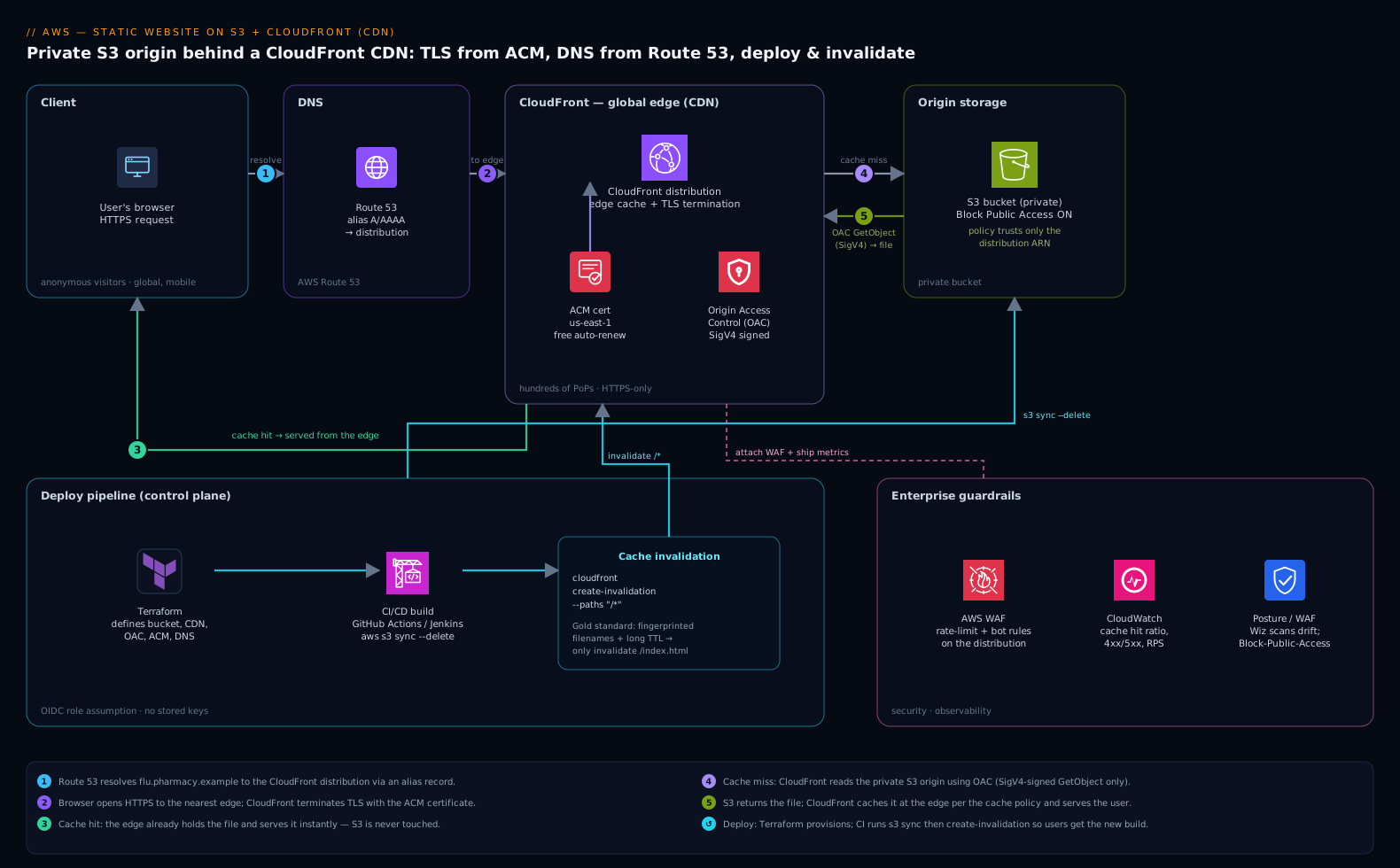
The whole design is a short, one-directional path: a user’s browser asks CloudFront for a page, CloudFront serves it from a nearby edge cache if it has it, and only fetches from the private S3 origin on a cache miss. There is no application server in the request path at all. Walk it in order, because every hop earns its place.
The request flow, following a user:
- A user taps the campaign link. Route 53, AWS’s DNS service, resolves
flu.pharmacy.exampleto the CloudFront distribution (via an alias record — more on why that matters below). DNS is just the phone book here: it points your friendly domain name at CloudFront’s global address. - The browser opens an HTTPS connection to the nearest CloudFront edge location. CloudFront terminates TLS using a certificate issued for free by AWS Certificate Manager (ACM), so the connection is encrypted and the browser shows the padlock. There are hundreds of these edge locations worldwide; the user hits whichever is closest, which is what kills latency.
- CloudFront checks its edge cache. If this edge already has
index.htmlor that hero image (because someone nearby requested it recently), it returns the cached copy immediately — a cache hit — and S3 is never touched. This is how one origin survives a hundred thousand concurrent users: the edge fan-out does the heavy lifting. - On a cache miss, CloudFront fetches the file from the S3 origin. Crucially, it does this using Origin Access Control (OAC) — CloudFront signs the request with AWS SigV4, and the bucket policy allows reads only from this specific CloudFront distribution. The bucket itself stays fully private with S3 Block Public Access on. No human and no other service can read the bucket over the internet; CloudFront is the single authorized reader.
- CloudFront caches the fetched file at that edge per its cache policy (governed by
Cache-Controlheaders and a TTL), then returns it to the user. The next nearby user gets a hit. Files are immutable build artifacts, so they cache hard and long.
That is the entire data path. The control path — how files get into the bucket in the first place, and how the cache is told a new version exists — is the deploy pipeline, and it is where the one genuinely tricky part of static hosting lives.
Component breakdown
| Component | AWS service | Role in the design | Key configuration choice |
|---|---|---|---|
| DNS | Route 53 | Maps the domain to CloudFront | Alias A/AAAA record to the distribution (not a CNAME at the apex) |
| CDN / edge | CloudFront | Global cache, TLS termination, the only origin reader | OAC to S3; HTTPS-only; cache + security-headers policies |
| TLS certificate | AWS Certificate Manager (ACM) | Free, auto-renewing HTTPS cert | Issued in us-east-1 (required for CloudFront); DNS-validated |
| Origin (storage) | S3 (private bucket) | Holds the built static files | Block Public Access ON; bucket policy trusts only the distribution |
| Access control | Origin Access Control (OAC) | Lets only CloudFront read S3 | SigV4 signing; replaces the legacy OAI |
| Deploy | CI/CD (GitHub Actions / Jenkins) | Build, sync to S3, invalidate cache | aws s3 sync + cloudfront create-invalidation |
| Infra as code | Terraform | Defines every resource above, repeatably | One module; OIDC to AWS, no stored keys |
A few of these deserve the why, because they are the parts juniors most often get wrong.
Why the bucket must be private, and OAC is non-negotiable. The single most common AWS security incident on the public internet is a misconfigured S3 bucket left open to the world. The entire point of this architecture is that the bucket is never public: S3 Block Public Access is on at the account and bucket level, and the only principal in the bucket policy is the CloudFront distribution, identified by its ARN. Origin Access Control is the modern mechanism that lets CloudFront sign its origin requests so S3 trusts them — it replaced the older Origin Access Identity (OAI) and supports SSE-KMS-encrypted buckets and all regions. The bucket policy looks like this, and it is the heart of the security model:
{
  "Effect": "Allow",
  "Principal": { "Service": "cloudfront.amazonaws.com" },
  "Action": "s3:GetObject",
  "Resource": "arn:aws:s3:::flu-pharmacy-site/*",
  "Condition": {
    "StringEquals": {
      "AWS:SourceArn": "arn:aws:cloudfront::111122223333:distribution/E1ABCDEF2GHIJ"
    }
  }
}
Read that Condition carefully: only that one distribution may read the bucket, and only GetObject (read), never write or list. There is no "Principal": "*" anywhere — that string is the smell of the breach you are avoiding.
Why the certificate has to live in us-east-1. ACM gives you a free TLS certificate that auto-renews, so you never hand-roll or forget to renew a cert. But CloudFront has a quirk every newcomer trips on: the certificate it uses must be issued in the us-east-1 region, regardless of where your bucket or users are, because CloudFront is a global service rooted there. Issue it anywhere else and CloudFront simply will not see it. Validate it with a DNS record (which Route 53 can add automatically) and renewal is hands-off forever.
Why Route 53 needs an alias, not a CNAME, at the apex. DNS rules forbid a CNAME on a zone apex (pharmacy.example itself, as opposed to www.pharmacy.example). Route 53’s alias record is an AWS-specific record type that points the apex straight at CloudFront with no extra lookup and no monthly query charge — exactly what you want for the bare domain. This is a small detail that blocks many first deployments, so it is worth knowing before you hit it.
How CloudFront actually decides what to cache
The walk-through above said CloudFront “caches the file per its cache policy (governed by Cache-Control and a TTL).” That one sentence hides the most important mechanic in the whole design, and getting it wrong produces the two classic CloudFront bugs: stale pages that won’t update, and a cache that never hits. So slow down and look at how an edge actually thinks — this is the core skill the rest of the lesson builds on.
The cache key: what counts as “the same file”
Every time a request reaches an edge, CloudFront builds a cache key — a string that answers “have I served exactly this before?” If the key matches something on the rack, it is a hit; if not, CloudFront fetches from the origin and files the response under that key. By default the cache key is just the path (/index.html, /assets/app.9f3a2b.js). That is exactly what you want for a static site: one path, one object, cached hard.
The trap is widening the key without meaning to. If you configure the cache to include the query string, then /index.html?utm=tv and /index.html?utm=radio become two different objects — the same HTML fetched and stored twice, halving your hit ratio and doubling origin fetches, all because a marketing tracker appended a parameter. The rule for a static site: keep the cache key as narrow as possible — path only, no query strings, no cookies, no headers — unless a specific file genuinely varies by one of them.
CloudFront splits this into two policies so you can reason about them separately:
| Policy | Question it answers | Static-site setting |
|---|---|---|
| Cache policy | What goes into the cache key, and the min/max/default TTL | CachingOptimized managed policy — path only, compression-aware, sensible TTLs |
| Origin request policy | What CloudFront forwards to the origin (can be more than the key holds) | Usually none — forward nothing extra to a plain S3 origin |
Separating them is the subtlety: you can forward a header to the origin without adding it to the cache key, or the reverse. For a bucket of static files you rarely need either knob — reach for the managed CachingOptimized policy first and only customize when a real requirement appears.
TTLs: three numbers, and who wins
A TTL (time-to-live) is how long an edge may serve a cached copy before it must revalidate with the origin. CloudFront exposes three: Minimum, Maximum, and Default. The precedence trips people up:
- The object’s own
Cache-Control/Expiresheader wins — but it is clamped between Minimum and Maximum TTL. If S3 returnsmax-age=31536000(one year) but the behavior’s Maximum TTL is 24 hours, the edge caches for 24 hours. - If the origin sends no cache header, the Default TTL applies.
The clean mental model: set the truth on the object in S3, and leave the behavior’s min/max wide enough not to fight it.
# Long-lived, content-hashed assets: cache for a year, never revalidate
aws s3 cp ./dist/assets s3://flu-pharmacy-site/assets \
  --recursive \
  --cache-control "public, max-age=31536000, immutable"

# The entry point must always be fresh so it points at the newest asset names
aws s3 cp ./dist/index.html s3://flu-pharmacy-site/index.html \
  --cache-control "no-cache"
no-cache does not mean “don’t cache” — it means “keep it, but revalidate every time before using it.” That is exactly right for index.html: the edge holds a copy, cheaply checks with S3 that it hasn’t changed, and serves instantly when it hasn’t. no-store would mean “never keep it,” which you do not want.
Cache behaviors and path patterns
A cache behavior is a rule that matches a path pattern and applies its own policies. The default behavior (*) catches everything; you add more specific ones above it, and they are evaluated most-specific-first. A static site often needs just one, but a second behavior earns its place the moment paths differ in caching needs:
| Path pattern | Behavior | Why |
|---|---|---|
/assets/* |
Long TTL, compress on, immutable | Hashed build artifacts — cache forever |
* (default, catches index.html) |
Short / no-cache TTL | The pointer that must reflect the newest build |
/api/* (if you add one later) |
Different origin, caching disabled | Dynamic responses must not be cached as if static |
This is also how a “static site” later grows an API without a second distribution: add an origin and a behavior, and the same edge, TLS, and domain serve both.
Three switches to just turn on
Three configuration choices cost nothing and are almost always right:
- Automatic compression. Turn on “Compress objects automatically” and CloudFront gzips or Brotli-compresses text assets (HTML, CSS, JS, SVG, JSON) on the fly when the viewer’s
Accept-Encodingallows and the object is ~1 KB–10 MB. Fewer bytes on the wire, faster first paint, lower transfer cost — for free. - HTTP/3. CloudFront speaks HTTP/3 (QUIC) alongside HTTP/2 and 1.1. Enable it in the distribution’s supported versions; it shaves connection-setup latency on lossy mobile networks — precisely the rural-phone audience in the brief.
- Default root object. Set it to
index.htmlso a request for the bare/returns the homepage instead of an access-denied error. Note the sharp edge: the default root object applies only to the root path —/appointments/will not auto-serve/appointments/index.html. That subfolder-index gap is exactly why single-page-app routing needs the extra handling in the next section.
And the price class decides how far content fans out: PriceClass_All uses every edge worldwide (lowest latency, highest transfer price); PriceClass_200 drops the most expensive regions; PriceClass_100 restricts to North America and Europe. A US-only flu campaign can pick PriceClass_100 and trim cost with no user-visible downside; a global brand leaves it on All. (For the full mechanics, see the CloudFront deep dive.)
The deploy pipeline and the one tricky part: cache invalidation
Static hosting has a single genuine gotcha, and it surprises everyone the first time: the cache is doing its job too well. You push a fixed copy of the homepage, but CloudFront and the user’s browser are still happily serving the old cached version from before your deploy. The marketing team swears the new banner is live; users see yesterday’s. Understanding this is the difference between “it works on my machine” and a reliable launch.
The deploy itself is two steps, run from CI/CD — GitHub Actions for a modern repo, or Jenkins if the org already standardizes its build farm there. Both do the same two things: copy the freshly built files to S3, then tell CloudFront to forget its cached copies.
# 1. Upload the new build to the private origin bucket
aws s3 sync ./dist s3://flu-pharmacy-site --delete

# 2. Tell every edge location to drop its cached copies so users see the new build
aws cloudfront create-invalidation \
  --distribution-id E1ABCDEF2GHIJ \
  --paths "/*"
The s3 sync --delete mirrors your build folder into the bucket (uploading changes, removing files you deleted). The invalidation is the part that matters: it tells all those edge caches “the copies you hold are stale, fetch fresh ones.” Without it, users keep getting the old page until the TTL naturally expires — which could be hours.
There are two professional ways to handle this, and the better one avoids invalidations almost entirely:
| Strategy | How it works | Tradeoff |
|---|---|---|
Invalidate /* every deploy |
Wipe the whole cache after each upload | Simple; but AWS only gives 1,000 free invalidation paths/month, and a brief window of mixed old/new files |
| Fingerprinted filenames + long TTL | Build tools name files app.9f3a2b.js; a new build = a new filename |
The gold standard: assets cache forever and never need invalidating, because a changed file has a new name. Only the tiny, never-cached index.html points to the new names |
The second pattern is what mature front-end builds (Vite, webpack, Next.js static export) do by default: content-hash the filenames so every changed asset gets a brand-new URL. Then you set a long TTL with Cache-Control: public, max-age=31536000, immutable on those hashed assets, and a short or no-cache TTL on index.html only. A deploy becomes “upload, and at most invalidate /index.html” — fast, cheap, and free of the stale-cache trap. This is the single most useful thing a junior can learn about CDNs: don’t fight the cache, name your files so the cache is always correct.
Everything is defined in Terraform so the bucket, distribution, OAC, ACM cert, and Route 53 records come up identically every time and can be torn down cleanly after the campaign. The pipeline authenticates to AWS via OIDC (GitHub Actions assuming an IAM role) so there are no long-lived access keys sitting in a CI secret to leak — the same hard-won discipline every team should keep, even for a “simple” marketing site.
Serving a single-page app: routing, security headers, and the HTTPS redirect
The campaign microsite is a React build — a single-page app (SPA). That one fact adds three requirements the plain “bucket of files” story skips, and all three are configured on CloudFront, not in S3.
Deep links that don’t 404
In a SPA there is really only one HTML file — index.html — and JavaScript paints /appointments, /eligibility, /locator on the client. But when a visitor bookmarks flu.pharmacy.example/appointments and returns tomorrow, the browser asks CloudFront for the object at path /appointments. There is no such object in the bucket. With a private bucket behind OAC, S3 answers 403 Access Denied for a key that doesn’t exist (it won’t even admit whether the key is there), and the visitor sees an ugly error instead of the app.
The fix is a custom error response: tell CloudFront that when the origin returns 403 or 404, it should instead serve /index.html with an HTTP 200. The SPA boots, its router reads the URL, and renders the right view.
// CloudFront custom error responses (illustrative config)
"CustomErrorResponses": [
  { "ErrorCode": 403, "ResponseCode": 200, "ResponsePagePath": "/index.html", "ErrorCachingMinTTL": 10 },
  { "ErrorCode": 404, "ResponseCode": 200, "ResponsePagePath": "/index.html", "ErrorCachingMinTTL": 10 }
]
Map both 403 and 404: with OAC on a private bucket you’ll usually get 403 for a missing key, but a different setup can return 404, and covering both is harmless. Keep ErrorCachingMinTTL short so a genuinely-missing asset isn’t pinned as “found” at the edge. (A more surgical alternative — a CloudFront Function that rewrites extension-less paths — is below.)
Security headers without touching the app
A security review will ask for HSTS, a content-security policy, X-Content-Type-Options: nosniff, and friends. You do not rebuild the site to add them — you attach a response headers policy to the distribution and CloudFront stamps them onto every response. AWS ships a managed SecurityHeadersPolicy, or you define your own:
resource "aws_cloudfront_response_headers_policy" "site" {
  name = "flu-site-security-headers"

  security_headers_config {
    strict_transport_security {
      access_control_max_age_sec = 63072000   # 2 years
      include_subdomains         = true
      preload                    = true
      override                   = true
    }
    content_type_options { override = true }   # X-Content-Type-Options: nosniff
    frame_options {
      frame_option = "DENY"
      override     = true
    }
    referrer_policy {
      referrer_policy = "strict-origin-when-cross-origin"
      override        = true
    }
    content_security_policy {
      content_security_policy = "default-src 'self'; img-src 'self' data:; object-src 'none'"
      override                = true
    }
  }
}
This is strictly better than baking headers into files: it is declarative, lives in Terraform beside the distribution, applies uniformly, and a reviewer can read the whole security posture in one resource.
Forcing HTTPS, and the two ways to run code at the edge
Never let the campaign answer plain HTTP. Set the behavior’s viewer protocol policy to redirect-to-https, and every http:// request gets a 301 to https:// before anything else happens. Combined with the HSTS header above, a returning browser upgrades to HTTPS on its own without even asking.
When you need logic at the edge — a redirect, a header tweak, a URL rewrite — AWS gives you two engines, and picking the wrong one is a common, expensive mistake:
| CloudFront Functions | Lambda@Edge | |
|---|---|---|
| Runs at | Viewer request / response only | All four: viewer + origin request/response |
| Language / runtime | Lightweight JavaScript (cloudfront-js-2.0) |
Node.js or Python |
| Speed & scale | Sub-millisecond, millions of req/s | Milliseconds, replicated to regional edges |
| Network calls / read the body? | No | Yes |
| Cost | Fractions of a cent per million | More per request + duration |
| Use it for | Header rewrites, simple redirects, SPA path rewrite, basic auth | SDK calls, request bodies, origin-phase logic |
For a static site the answer is almost always CloudFront Functions — cheaper, faster, and enough for anything a bucket of files needs. Reach for Lambda@Edge only when you must run at the origin phase or call another AWS service. Here is the whole SPA-routing rewrite as a CloudFront Function, an alternative to the custom-error-response trick:
// CloudFront Function (viewer request): send extension-less paths to the SPA shell
function handler(event) {
  var req = event.request;
  var uri = req.uri;
  // No file extension → it's a client-side route → serve the app shell
  if (!uri.includes('.')) {
    req.uri = '/index.html';
  }
  return req;
}
Sub-millisecond, no cold start, a few cents a month at campaign scale — and the deep-link problem is gone.
CloudFront vs. Akamai: a quick edge primer
CloudFront is one CDN among several, and Akamai is the incumbent giant a junior will hear named in any large enterprise — so it is worth knowing where each fits. A CDN is a CDN: both cache content at edge locations near users, terminate TLS, and offer a Web Application Firewall and DDoS protection. The differences are about ecosystem and reach, not the core idea.
| CloudFront | Akamai | |
|---|---|---|
| Edge footprint | Hundreds of PoPs; very large, AWS-operated | The largest edge network in the world, deepest into last-mile ISPs |
| Best fit | AWS-native apps; tight S3/ACM/Route 53 integration, one bill | Huge global enterprises, demanding media/streaming, ISP-edge reach |
| Pricing model | Pay-as-you-go, integrated into the AWS bill | Enterprise contracts, often committed volume |
| Setup for this site | Native — OAC reads the private S3 origin directly | Possible, but you point Akamai at an S3/CloudFront origin and manage a separate vendor |
For a static site whose files already live in S3, CloudFront is the obvious default: it reads the private origin natively through OAC, shares one bill and one IAM model with the bucket, and is provisioned in the same Terraform. You would reach for Akamai when you are an enterprise already standardized on it for its sheer ISP-edge reach and global media delivery — for instance, the same pharmacy chain might serve its main high-traffic e-commerce property through Akamai under a corporate contract, while this campaign microsite happily rides CloudFront. Knowing both exist, and that they solve the same problem at different scales, is the takeaway; you do not need Akamai to ship this microsite.
Enterprise considerations
Even a “simple” static site, when it carries a national brand, inherits the organization’s guardrails. Here is where the broader tooling fits — and what each piece actually does for this site — so a junior sees how a microsite plugs into a real platform.
Security and posture. The architecture is secure by construction: a private origin, a single authorized reader, HTTPS everywhere, no public surface. Layer the org’s standards on top. Attach AWS WAF to the CloudFront distribution for rate-limiting and bot rules so the ad-break spike of real users is not joined by a scraper flood. A cloud-security-posture tool like Wiz continuously scans the account and would alert the instant anyone disabled Block Public Access or widened the bucket policy — it is the independent backstop that catches the misconfiguration before it becomes a breach, and Wiz Code can scan the Terraform in the pull request to flag a public-bucket setting before it is ever applied. Even though there is no server to defend, the build agents that run the deploy are real machines, so the org’s CrowdStrike Falcon runtime sensor runs on the Jenkins/GitHub runner fleet, feeding detections to the SOC. Human access to the AWS account is gated through the corporate IdP — Okta or Microsoft Entra ID federated to AWS IAM Identity Center — so engineers log in with their SSO identity and conditional-access policies, never a static IAM user. The handful of non-AWS secrets a richer pipeline might need (a third-party analytics token, a CMS webhook key) live in HashiCorp Vault, leased short-lived rather than pasted into CI config.
Identity, kept simple but real. This site has no end-user login — visitors are anonymous, which is correct for a public campaign. The identity that matters is the operators’: SSO through Okta or Entra ID into IAM Identity Center for humans, and OIDC role assumption for the pipeline so there are zero long-lived keys. That is the whole identity story, and its simplicity is a feature.
Cost optimization. This is where the architecture shines, and the numbers are friendly enough that a junior can reason about them. There is no server billed by the hour — you pay for S3 storage (a few cents per GB for a tiny site), CloudFront data transfer out, and request counts. Because CloudFront serves most traffic from the edge cache, the origin fetch count to S3 stays tiny even under the ad-break spike — the cache deflects the load that would otherwise be a bill. Levers that matter here:
| Lever | Mechanism | Effect |
|---|---|---|
| High cache hit ratio | Long TTLs on fingerprinted assets | Most requests never reach S3 — cheaper and faster |
| CloudFront price class | Restrict to the regions your audience is in | Drops transfer cost if traffic is geographically concentrated |
| Compression | Enable Brotli/Gzip at CloudFront | Fewer bytes transferred per request |
| Tear-down in IaC | terraform destroy after the campaign |
Stops all charges cleanly once the flu season ends |
For a campaign microsite, the monthly bill is typically dollars, not hundreds of dollars — the opposite of the always-on EC2 box.
Scalability and reliability. There is almost nothing to scale: CloudFront’s edge network is the scaling layer, designed to absorb exactly the spiky, global load the ad slot creates, and S3 is effectively infinitely durable (eleven nines) and available. The “server” that could fall over does not exist. For availability, S3 and CloudFront are both multi-AZ, AWS-managed, and span regions by design — a single data-center failure is invisible to users. Disaster recovery is correspondingly trivial: the bucket can be cross-region-replicated, and because the entire stack is in Terraform, the true recovery guarantee is that you can rebuild the whole site in another account or region from code and a copy of the build artifacts in minutes. There is no database to restore, no state to lose.
Observability and operations. Turn on CloudFront access logs and CloudWatch metrics to watch the numbers that tell you the launch is healthy: cache hit ratio (the higher, the cheaper and faster), 4xx/5xx error rate, origin latency, and requests per second as the ad airs. In an enterprise already running Datadog or Dynatrace, ship these CloudFront and CloudWatch metrics into the existing dashboard so the campaign sits beside every other property on one pane of glass — the on-call engineer watches the same tool they always do, and an anomaly (a sudden drop in hit ratio, a spike in 5xx) pages them automatically. When something does need human action — a planned cache purge before a content swap, or an incident if error rate climbs — it is raised as a ServiceNow change or incident ticket, so even a marketing microsite follows the same documented operational gate as the rest of the estate. Configuration drift (someone toggling a setting in the console by hand) is caught by Terraform plan in CI and by Wiz posture scanning, so the deployed reality and the code in the repo never quietly diverge.
Governance and change control. Every resource is in version control as Terraform, reviewed in a pull request, and applied by the pipeline — never click-ops in the console. Ansible has no real role on a pure static site (there is no OS or server to configure), which is itself instructive: the serverless shape removes whole categories of config-management work a junior might otherwise expect. The deploy is the only moving part, and it is two idempotent commands behind a reviewed pipeline. If this microsite later needs to embed, say, an interactive eligibility course or training module, that is the point you would reach for a platform like Moodle as a separate hosted application behind its own path — but the static marketing shell stays exactly this simple, and resisting the urge to add a server just in case is the discipline that keeps the bill and the attack surface small.
Explicit tradeoffs
Accept these or pick a different pattern. Static hosting on S3-plus-CloudFront is the right tool only for content that is genuinely static — pre-built HTML, CSS, JS, images, downloads. The moment you need server-side rendering per request, a database read on page load, or user-specific server logic, this pattern alone is not enough, and you add an API (API Gateway + Lambda, or a backend service) behind the same CloudFront, or move to a different architecture. The cache that gives you speed and cheapness is also the thing that bites you: you must think about invalidation and TTLs, and the “stale content after deploy” surprise is real until you adopt fingerprinted filenames. The us-east-1 certificate rule, the apex-alias rule, and the private-bucket-plus-OAC wiring are small pieces of essential knowledge that block first-time deployments — none are hard, but all are non-obvious. And while the architecture is cheap and scalable, it is not zero-effort to set up correctly: getting OAC, Block Public Access, the bucket policy, and the cert region all right is exactly the work that separates a secure deployment from the next public-bucket headline.
The alternatives, and when they win. A managed platform — AWS Amplify Hosting, or third parties like Netlify or Vercel — wraps this exact S3-plus-CDN pattern in a turnkey product with git-push deploys and automatic cache handling; reach for one when a small team wants speed over control and does not need to own the underlying resources. Plain S3 static website hosting (no CloudFront) is acceptable only for an internal, HTTP-only throwaway where TLS and a private origin do not matter — which is almost never, for anything with a brand on it. And if you are already an Akamai enterprise, you might front this S3 origin with Akamai instead of CloudFront to consolidate on one edge vendor. For a campaign microsite that has to be cheap, fast, global, secure, and disposable, though, the architecture in this article is the destination: a private bucket of files, a CDN in front, TLS from ACM, DNS from Route 53, and a two-line deploy.
Going deeper
Everything above ships the microsite. This section is for the reader who owns the pattern in production and needs the internals, the edge cases, and the levers that only matter at scale or under audit.
The legacy S3 website endpoint vs. the modern REST-origin + OAC
The most confusing thing about S3 static hosting is that a bucket exposes two different endpoints, and they behave nothing alike:
| REST / regional endpoint | Website endpoint | |
|---|---|---|
| Hostname | bucket.s3.<region>.amazonaws.com |
bucket.s3-website-<region>.amazonaws.com |
| Protocol to origin | HTTPS | HTTP only |
| Auth | SigV4 — works with OAC, bucket stays private | Anonymous — bucket must be public |
| Index / error documents | No (only DefaultRootObject at /) |
Yes (index.html per “folder”, error doc, redirect rules) |
| Modern pattern uses it? | Yes — this is the origin CloudFront points at | Only as a legacy fallback |
The modern architecture points CloudFront at the REST endpoint with OAC, which is why the bucket can be fully private and the origin-side hop is encrypted. The website endpoint is the old world: it gives you Apache-style index documents and redirect rules, but only over HTTP and only from a public bucket — exactly the exposure this whole design exists to avoid.
There is one narrow case where teams still use the website endpoint: they front it with CloudFront as a custom origin specifically for its redirect rules and automatic per-folder index.html resolution (which the REST endpoint lacks). The price is a public bucket, locked down only by a secret custom header CloudFront sends and the origin checks — a clumsier, weaker substitute for OAC. Prefer OAC on the REST endpoint and solve index-resolution with a CloudFront Function instead; reach for the website endpoint only when its redirect-rule engine is genuinely worth a public bucket.
OAC, SSE-KMS, and why OAI finally retired
Origin Access Control replaced the old Origin Access Identity for concrete reasons, not fashion:
- SSE-KMS support. If the bucket is encrypted with a customer-managed KMS key, OAC signs with SigV4 and can be granted
kms:Decrypt, so CloudFront can read encrypted objects. OAI could not, which forced teams onto weaker SSE-S3. - All regions, all methods. OAC uses SigV4 everywhere, including newer regions that only support SigV4, and handles dynamic requests.
When the bucket uses a KMS key, the key policy must let the distribution decrypt:
{
  "Effect": "Allow",
  "Principal": { "Service": "cloudfront.amazonaws.com" },
  "Action": "kms:Decrypt",
  "Resource": "*",
  "Condition": {
    "StringEquals": {
      "AWS:SourceArn": "arn:aws:cloudfront::111122223333:distribution/E1ABCDEF2GHIJ"
    }
  }
}
Forget this and every object returns AccessDenied even though the bucket policy looks perfect — a classic half-configured-encryption failure.
Invalidations vs. versioned paths, priced out
The core lesson made the case for fingerprinting; here is the arithmetic that settles it. A CloudFront invalidation is free for the first 1,000 paths per month, then $0.005 per path. A wildcard like /* counts as one path, so wiping everything is cheap in dollars — but it is slow (seconds to a minute to propagate to all edges) and it throws away warm cache globally, so the next visitor everywhere pays a cache-miss. Fingerprinted filenames sidestep both: a changed file has a new URL, so old edges keep serving old assets to nobody while new URLs populate naturally — zero invalidation, no global cache-flush. Invalidate only the tiny, always-revalidated index.html, if anything. At ten deploys a day, that is the difference between fighting propagation windows and never thinking about them.
WAF on CloudFront — the scope gotcha
Attaching AWS WAF to CloudFront has a specific shape that catches everyone: the Web ACL must be created with scope CLOUDFRONT, and CLOUDFRONT-scope ACLs live in us-east-1 only (the same global-service reason as the ACM cert).
aws wafv2 create-web-acl \
  --name flu-site-acl \
  --scope CLOUDFRONT \
  --region us-east-1 \
  --default-action Allow={} \
  --visibility-config SampledRequestsEnabled=true,CloudWatchMetricsEnabled=true,MetricName=fluSiteAcl \
  --rules '[{"Name":"rate","Priority":0,"Action":{"Block":{}},"Statement":{"RateBasedStatement":{"Limit":2000,"AggregateKeyType":"IP"}},"VisibilityConfig":{"SampledRequestsEnabled":true,"CloudWatchMetricsEnabled":true,"MetricName":"rate"}}]'
Then associate it by putting the Web ACL ARN into the distribution’s WebACLId — not with aws wafv2 associate-web-acl, which only works for regional resources (ALB, API Gateway, AppSync). Sensible starting rules for a public campaign: the AWSManagedRulesCommonRuleSet and AmazonIpReputationList managed groups, plus the rate-based rule above so a scraper flood during the ad break gets throttled while real users sail through.
Logging: standard vs. real-time
Two logging paths, for two purposes:
- Standard logs (v2). CloudFront delivers detailed access logs to S3, CloudWatch Logs, or Data Firehose. Rich fields (edge location, cache result
Hit/Miss/RefreshHit, bytes, latency), with a few minutes’ delay — perfect for after-the-fact analysis and computing cache-hit ratio in Athena. - Real-time logs. Streamed to Kinesis Data Streams within seconds, sampled at a rate you pick, for live dashboards and anomaly detection during the launch. More expensive; use it only for the window that matters.
The field to watch is x-edge-response-result-type: a healthy static site is overwhelmingly Hit, and a sudden climb in Miss means either a cache-key mistake or a bad deploy.
TLS, HTTP/3, and connection cost
Use a modern security policy (TLSv1.2_2021) so weak ciphers are refused. Serve TLS with SNI (Server Name Indication) — the default and free; the alternative, a dedicated IP certificate, costs roughly $600/month and exists only for ancient clients that don’t send SNI, which you will essentially never need. Enable HTTP/3 for the mobile audience. All of this is distribution-level configuration; none of it touches the bucket.
Origin failover for the paranoid
For a campaign that truly cannot blink, put the build artifacts in two buckets in two regions and configure a CloudFront origin group: a primary and secondary origin with failover status codes (e.g., 500/502/503/504). If the primary region’s S3 has a bad day, CloudFront transparently retries the secondary. It is overkill for most microsites — S3’s eleven-nines durability and regional resilience already cover the realistic risks — but it is the lever when “the ad already aired” makes any downtime unacceptable. The global edge failover lesson takes this further with Route 53 health checks.
Safer config rollouts: staging distributions
Changing a live distribution’s behavior — a new cache policy, a function, a header — is a global change. CloudFront continuous deployment lets you attach a staging distribution and route a slice of traffic to it by weight or by a request header, verify the change on real traffic, then promote it. It is the blue/green story for the CDN layer itself, and the professional way to change a distribution that is currently absorbing a TV-ad spike.
When to skip all of this: Amplify Hosting
Everything above is the control you get from owning the resources. AWS Amplify Hosting is the same S3-plus-CloudFront pattern wrapped as a managed product: connect a git repo, and every push builds, deploys atomically, and serves over CloudFront with a free certificate — plus pull-request preview environments, redirect/rewrite rules (including a one-line SPA fallback), and password protection, none of which you wire by hand. You give up direct control of the underlying distribution and bucket, and you accept Amplify’s build environment. For a small team that wants git-push simplicity over infrastructure ownership, it is the right call; for a platform team that needs the distribution in its own Terraform beside WAF, KMS, and org guardrails, the explicit pattern in this lesson wins. Same architecture underneath — different amount of steering wheel.
Common beginner mistakes
These are misconceptions, not just symptoms — each is a wrong mental model that produces a whole class of bugs.
“I’ll enable S3 static website hosting and put CloudFront in front.” The instinct is that “website hosting” is the feature that serves a site, so of course you turn it on. But that toggles the website endpoint — HTTP-only, public bucket — and pointing CloudFront at it throws away OAC, HTTPS-to-origin, and the private bucket. Right model: CloudFront reads the REST endpoint with OAC; you almost never enable S3 website hosting at all.
“CloudFront needs the bucket to be public to read it.” It feels like CloudFront is “outside” and therefore needs a door left open. The opposite is true: OAC makes CloudFront a signed, authenticated reader, and the bucket policy trusts only that one distribution. Block Public Access stays fully on. If you found yourself unchecking it, stop — you’re building the breach the pattern exists to prevent.
“My cert isn’t showing up in CloudFront.” You requested it in your app’s region (say ap-south-1) and CloudFront’s dropdown is empty. CloudFront is a global service anchored in us-east-1 and only sees certificates issued there. Request the ACM cert in us-east-1 regardless of where your users or bucket live.
“Deploy worked, but users still see the old page.” The cache did its job — that’s not a bug, it’s the whole point of a CDN. The fix isn’t to disable caching; it’s to stop relying on invalidations and adopt fingerprinted filenames with a long TTL, so a changed asset has a new URL and the old one is simply never requested. Invalidate index.html only.
“My SPA’s deep links return an error.” You assume every route is a file. In a single-page app only index.html exists; /appointments is a client-side route with no object behind it, so the origin returns 403/404. Add custom error responses (403/404 → /index.html, 200) or a CloudFront Function rewrite. The default root object won’t save you — it only covers /.
“I’ll just CNAME the apex domain to CloudFront.” DNS forbids a CNAME on a zone apex, so the record won’t validate. Use a Route 53 alias A/AAAA record, which points the bare domain straight at the distribution with no CNAME and no extra query charge.
“OAI is what the old docs showed, so I’ll use it.” OAI still works, but it’s the retired mechanism: no SSE-KMS, weaker regional coverage. Use OAC for anything new — it’s the current recommendation and the only one that reads a KMS-encrypted bucket.
“I put Cache-Control on CloudFront, so the files will cache.” CloudFront’s TTLs are a clamp, not the source of truth — the object’s own header wins, bounded by min/max. Set Cache-Control on the objects in S3 at upload time; leave the behavior’s min/max wide enough not to override you.
Practice challenges
Work them top to bottom — they escalate from “read the pattern” to “own the pattern.” Every solution is illustrative; account IDs and distribution IDs are placeholders.
1. (Beginner) Lock the bucket to one distribution. Write the S3 bucket-policy statement that lets only CloudFront distribution E1ABCDEF2GHIJ (account 111122223333) read objects — nothing else, no writes, no lists.
<details> <summary>Show solution</summary>
{
  "Sid": "AllowCloudFrontReadOnly",
  "Effect": "Allow",
  "Principal": { "Service": "cloudfront.amazonaws.com" },
  "Action": "s3:GetObject",
  "Resource": "arn:aws:s3:::flu-pharmacy-site/*",
  "Condition": {
    "StringEquals": {
      "AWS:SourceArn": "arn:aws:cloudfront::111122223333:distribution/E1ABCDEF2GHIJ"
    }
  }
}
Why: GetObject only (read, never write/list), and the AWS:SourceArn condition scopes trust to exactly one distribution — least privilege at the origin.
</details>
2. (Beginner) The two-line deploy. Push ./dist to the bucket and refresh only the entry point, assuming fingerprinted assets.
<details> <summary>Show solution</summary>
aws s3 sync ./dist s3://flu-pharmacy-site --delete
aws cloudfront create-invalidation \
  --distribution-id E1ABCDEF2GHIJ \
  --paths "/index.html"
Why: Hashed assets get new filenames, so they never need invalidating; only index.html (which points at those names) must be refreshed — cheap and fast.
</details>
3. (Intermediate) Cache the right things for the right time. Upload so /assets/* caches for a year immutably while index.html always revalidates.
<details> <summary>Show solution</summary>
aws s3 cp ./dist/assets s3://flu-pharmacy-site/assets --recursive \
  --cache-control "public, max-age=31536000, immutable"

aws s3 cp ./dist/index.html s3://flu-pharmacy-site/index.html \
  --cache-control "no-cache"
Why: The object’s own Cache-Control is the source of truth (clamped by CloudFront’s min/max TTL); immutable assets cache forever, and no-cache makes index.html revalidate every time so it always points at the newest asset names.
</details>
4. (Intermediate) Fix SPA deep links. A visitor bookmarks /eligibility, for which no object exists. Give the CloudFront config that makes it serve the app instead of an error.
<details> <summary>Show solution</summary>
"CustomErrorResponses": [
  { "ErrorCode": 403, "ResponseCode": 200, "ResponsePagePath": "/index.html", "ErrorCachingMinTTL": 10 },
  { "ErrorCode": 404, "ResponseCode": 200, "ResponsePagePath": "/index.html", "ErrorCachingMinTTL": 10 }
]
Or, equivalently, a CloudFront Function that rewrites extension-less paths to /index.html.
Why: With OAC on a private bucket a missing key returns 403 (404 in other setups); mapping both to /index.html with a 200 lets the SPA’s client-side router render the route.
</details>
5. (Advanced) Add HSTS + nosniff without redeploying the app. Attach security headers to every response through configuration only.
<details> <summary>Show solution</summary>
resource "aws_cloudfront_response_headers_policy" "site" {
  name = "flu-site-security-headers"
  security_headers_config {
    strict_transport_security {
      access_control_max_age_sec = 63072000
      include_subdomains         = true
      preload                    = true
      override                   = true
    }
    content_type_options { override = true }   # X-Content-Type-Options: nosniff
  }
}
Reference the policy’s ID from the distribution’s default cache behavior (response_headers_policy_id).
Why: A response headers policy stamps headers at the edge, so the security posture is declarative and lives in Terraform — no app rebuild, and one resource a reviewer can read. </details>
6. (Advanced) Rate-limit the ad-break spike. Create a WAF Web ACL for CloudFront that blocks any IP exceeding 2,000 requests per 5 minutes, and say how you associate it.
<details> <summary>Show solution</summary>
aws wafv2 create-web-acl \
  --name flu-site-acl \
  --scope CLOUDFRONT \
  --region us-east-1 \
  --default-action Allow={} \
  --visibility-config SampledRequestsEnabled=true,CloudWatchMetricsEnabled=true,MetricName=fluSiteAcl \
  --rules '[{"Name":"rate","Priority":0,"Action":{"Block":{}},"Statement":{"RateBasedStatement":{"Limit":2000,"AggregateKeyType":"IP"}},"VisibilityConfig":{"SampledRequestsEnabled":true,"CloudWatchMetricsEnabled":true,"MetricName":"rate"}}]'
Associate it by setting the returned Web ACL ARN as the distribution’s WebACLId — not with aws wafv2 associate-web-acl (that is only for regional resources).
Why: CloudFront Web ACLs must use scope CLOUDFRONT in us-east-1, and a CLOUDFRONT-scope ACL is attached through the distribution config, not the regional association API.
</details>
The shape of the win
When the flu-shot ad airs and a hundred thousand people hit the link in the same two minutes, the microsite loads in under a second on a phone in a rural pharmacy parking lot, the bill for the whole campaign is a rounding error, the bucket of files was never once exposed to the public internet, and the on-call engineer watches a calm green dashboard because CloudFront’s edge absorbed the entire spike before it ever reached the origin. That outcome is not luck — it is the direct payoff of each deliberate choice: the private S3 origin that keeps the files safe, the OAC that makes CloudFront their only reader, the ACM certificate that gives every visitor HTTPS for free, the Route 53 alias that points the brand domain at the edge, and the fingerprint-and-invalidate deploy that means users always see the new build and never the old. Start here, learn each piece for what it does, and you have the foundation that every richer AWS web architecture is built on top of.
Glossary
- CDN (content delivery network) — a global fleet of caching servers that serve copies of your content from a location near each user. CloudFront is AWS’s CDN.
- Edge location / PoP (point of presence) — one of the hundreds of sites where CloudFront caches content and terminates TLS, close to users.
- Origin — the authoritative source CloudFront fetches from on a cache miss. Here, the private S3 bucket.
- Cache hit / miss — a hit is served from the edge without touching the origin; a miss forces an origin fetch, which is then cached.
- Cache key — the string CloudFront uses to decide whether a request matches something already cached. Narrow (path-only) for static sites.
- TTL (time-to-live) — how long an edge may serve a cached copy before revalidating. CloudFront has Minimum, Maximum, and Default TTLs.
- Cache policy / origin request policy — the cache policy defines the cache key and TTLs; the origin request policy defines what CloudFront forwards to the origin (which can differ from the key).
- Cache behavior — a rule matching a path pattern to a set of policies and settings; the
*default catches everything, more-specific patterns are matched first. - Invalidation — a command telling edges to drop cached copies of given paths. First 1,000 paths/month free, then $0.005/path; a
/*wildcard counts as one path. - Fingerprinting / content hash — build tools name files by their content (
app.9f3a2b.js), so a changed file gets a new URL and never needs invalidating. - OAC (Origin Access Control) — the modern mechanism letting only CloudFront read a private S3 bucket, using SigV4 signing; supports SSE-KMS and all regions. Replaces OAI.
- OAI (Origin Access Identity) — the retired predecessor to OAC; no SSE-KMS support.
- Block Public Access — the S3 account/bucket setting that keeps a bucket private; stays fully ON in this architecture.
- ACM (AWS Certificate Manager) — issues free, auto-renewing TLS certificates. For CloudFront the cert must be in us-east-1.
- SNI (Server Name Indication) — the TLS extension letting many certs share one IP; the default, free way CloudFront serves HTTPS (vs. a costly dedicated-IP cert).
- Route 53 alias — an AWS-specific DNS record that points a domain (including the zone apex) straight at CloudFront, where a CNAME is not allowed.
- Zone apex — the bare domain (
pharmacy.example) with no subdomain; cannot take a CNAME, so it needs an alias. - Viewer protocol policy — the CloudFront setting that can force
http://requests to redirect tohttps://. - Response headers policy — a CloudFront resource that adds/removes HTTP headers (HSTS, CSP,
nosniff, CORS) on responses without changing the origin files. - CloudFront Function — a sub-millisecond JavaScript function running at viewer request/response; ideal for redirects, header tweaks, and SPA path rewrites.
- Lambda@Edge — a Node.js/Python function running at any of the four CloudFront phases; used when you need network calls, request bodies, or origin-phase logic.
- WAF / Web ACL — AWS’s web application firewall; for CloudFront the Web ACL is scope
CLOUDFRONT, created in us-east-1, attached via the distribution. - Price class — how far CloudFront fans your content out (
All,200,100), trading transfer cost against edge reach. - HTTP/3 (QUIC) — the newest HTTP version CloudFront supports; faster connection setup on lossy mobile networks.
- SPA (single-page app) — a site with one HTML shell whose JavaScript renders many routes client-side; needs deep-link handling at the CDN.
- SigV4 — AWS’s request-signing scheme; OAC uses it to prove requests to S3 come from CloudFront.
- Amplify Hosting — a managed AWS product that wraps this same S3 + CloudFront pattern with git-push deploys, PR previews, and automatic cache handling.
- S3 website endpoint vs. REST endpoint — the website endpoint is HTTP-only and needs a public bucket (with index/redirect features); the REST endpoint is HTTPS and works with OAC on a private bucket — the one this architecture uses.
- Standard vs. real-time logs — standard access logs land in S3/CloudWatch/Firehose with a few minutes’ delay; real-time logs stream to Kinesis within seconds for live monitoring.
- Origin group / failover — a primary + secondary origin pair CloudFront fails over between on chosen error codes, for cross-region resilience.
- Staging distribution / continuous deployment — a way to send a slice of live traffic to a staged distribution config (by weight or header) before promoting it — blue/green for the CDN layer.
- SSE-KMS — server-side encryption with a KMS-managed key; readable by CloudFront only when OAC is granted
kms:Decrypton the key.