In a nutshell
If you have ever connected a laptop to the office network from home, you have already used the idea behind this lesson. Hybrid connectivity is how a company’s own data centres, branch offices, and remote staff talk to the workloads it runs inside AWS — privately, reliably, and at a speed the business can depend on. This lesson takes that idea and scales it to an enterprise: dozens or hundreds of VPCs, two data centres, thousands of employees, and an auditor who wants to understand it from a single diagram.
A quick analogy for the three pieces you will meet everywhere:
- A Site-to-Site VPN is like sending your traffic by armoured courier over ordinary public roads. The roads are the internet — already there, free to drive on, up and running within the hour — but you share them with everyone, so speed and arrival time vary. The armour is IPsec encryption.
- Direct Connect is like leasing a private fibre line — your own dedicated lane straight into AWS. No public traffic, steady latency, huge bandwidth. It costs more and takes weeks of physical installation to light up, so most teams run a VPN on day one and add Direct Connect once the volume justifies it.
- A Transit Gateway is the central roundabout (or old telephone switchboard) that every road plugs into once. Instead of building a separate road between every pair of buildings, each building connects to the roundabout and can then reach any other. That single idea is what stops a growing network from collapsing into an unmanageable tangle.
The rest of the lesson assembles these into one governable backbone: a Transit Gateway hub in a dedicated network account, a resilient Direct Connect link with a VPN standing by as automatic backup, a place to inspect traffic, one shared door to the internet, and hybrid DNS so names resolve in both directions. If you are new to the topic, read the plain-English building-block tour first — “How the hybrid links actually work” — then come back to the reference architecture that wires them together.
Level: Advanced · Time: ~65 min
Prerequisites. You will get the most from this if you already understand VPC basics (subnets, route tables, internet and NAT gateways), how a route table picks a next hop, and the idea of BGP as the protocol routers use to advertise which networks they can reach. A working mental model of AWS Organizations and multiple accounts helps, because this architecture lives across several of them. If any of that feels shaky, skim the AWS VPC deep dive first, then return here.
After this lesson you will be able to:
- Explain the difference between a Site-to-Site VPN, Direct Connect, and a Transit Gateway, and say when each is the right tool.
- Describe how a single VPN connection’s two tunnels deliver redundancy, and choose between static routing and BGP for the connection.
- Pick a Direct Connect virtual interface type (private, public, or transit) and design a link that survives a device or a whole-location failure.
- Wire a Transit Gateway hub with segmented route tables, and explain association versus propagation without hesitating.
- Give remote employees access with Client VPN, resolve names across the cloud/on-prem boundary with Route 53 Resolver, and reach services privately with PrivateLink.
- Reason about the bandwidth, latency, encryption, and cost trade-offs well enough to defend your design in an architecture review.
Most cloud networks do not fail on day one. They fail in year two, when the third business unit shows up with its own VPCs, the security team mandates traffic inspection, an acquisition arrives with overlapping CIDRs, and finance discovers that forty-three VPCs each run their own NAT gateways. What started as a handful of peering connections has quietly become a full mesh that no one can reason about, audit, or price.
This article is a reference architecture for hybrid connectivity at scale on AWS — a network foundation that connects on-premises data centers, branch offices, and a growing fleet of VPCs through a single, inspectable, governable core. It is built around four load-bearing services: AWS Transit Gateway as the routing hub, AWS Direct Connect (with Site-to-Site VPN as the failover path) for the on-premises link, AWS Network Firewall for centralized east-west and egress inspection, and a centralized egress VPC so that internet-bound traffic leaves through one priced, logged, controlled door.
The business scenario
Picture a mid-sized financial-services or manufacturing enterprise — call it 600 to 8,000 employees — three to five years into its cloud journey. The first workloads went up as isolated VPCs, connected to the data center with one-off VPN tunnels and stitched together with VPC peering. It worked. Then it grew.
The recurring symptoms look the same across every organisation that hits this wall:
- The peering mesh is unmanageable. VPC peering is non-transitive: if VPC A peers with B, and B peers with C, A still cannot reach C. To connect n VPCs fully you need n(n-1)/2 peering connections — 45 for ten VPCs, 190 for twenty. Each one needs route-table edits on both sides, and the on-prem link must be re-attached to every new VPC by hand.
- There is no place to inspect traffic. Peering and plain VPN give you connectivity but no choke point. The security team cannot put an IDS/IPS or egress filter anywhere, because every VPC talks to every other VPC directly and reaches the internet through its own NAT gateway.
- Egress is sprawled and unpriced. Every VPC runs its own NAT gateways. NAT gateway hourly charges plus per-GB processing, multiplied across dozens of VPCs and Availability Zones, become a five- or six-figure annual line item that nobody can attribute or cap. There is no single egress IP allow-list to hand a SaaS vendor.
- The data-center link is fragile and slow. A single IPsec VPN tunnel over the public internet caps at roughly 1.25 Gbps per tunnel, with internet-variable latency and jitter — unacceptable for chatty database replication, file shares, or a phased data-center exit.
- Audit and acquisitions are painful. When a new business unit or an acquired company arrives — frequently with a
10.0.0.0/16that already collides with three existing VPCs — there is no clean way to onboard them or to prove to auditors how traffic flows.
The mandate that lands on the network team is therefore not “build a VPC.” It is: give us one connectivity backbone that any team can plug into in minutes, that inspects and logs traffic centrally, that has a resilient high-bandwidth path to the data center, that bills egress to one place, and that an auditor can understand in a single diagram. That backbone is what we build here. It scales down to a two-account startup and up to a multi-Region, several-hundred-VPC enterprise without changing shape.
Architecture overview
The architecture is a hub-and-spoke network with AWS Transit Gateway at the center, deployed inside a dedicated Network account in AWS Organizations. Spoke VPCs (owned by application teams in their own accounts) attach to the Transit Gateway; the Transit Gateway also terminates the hybrid links to on-premises and routes selected traffic through inspection and egress VPCs. Transit Gateway route tables — not a single flat routing domain — decide who can talk to whom, which gives you segmentation by design.
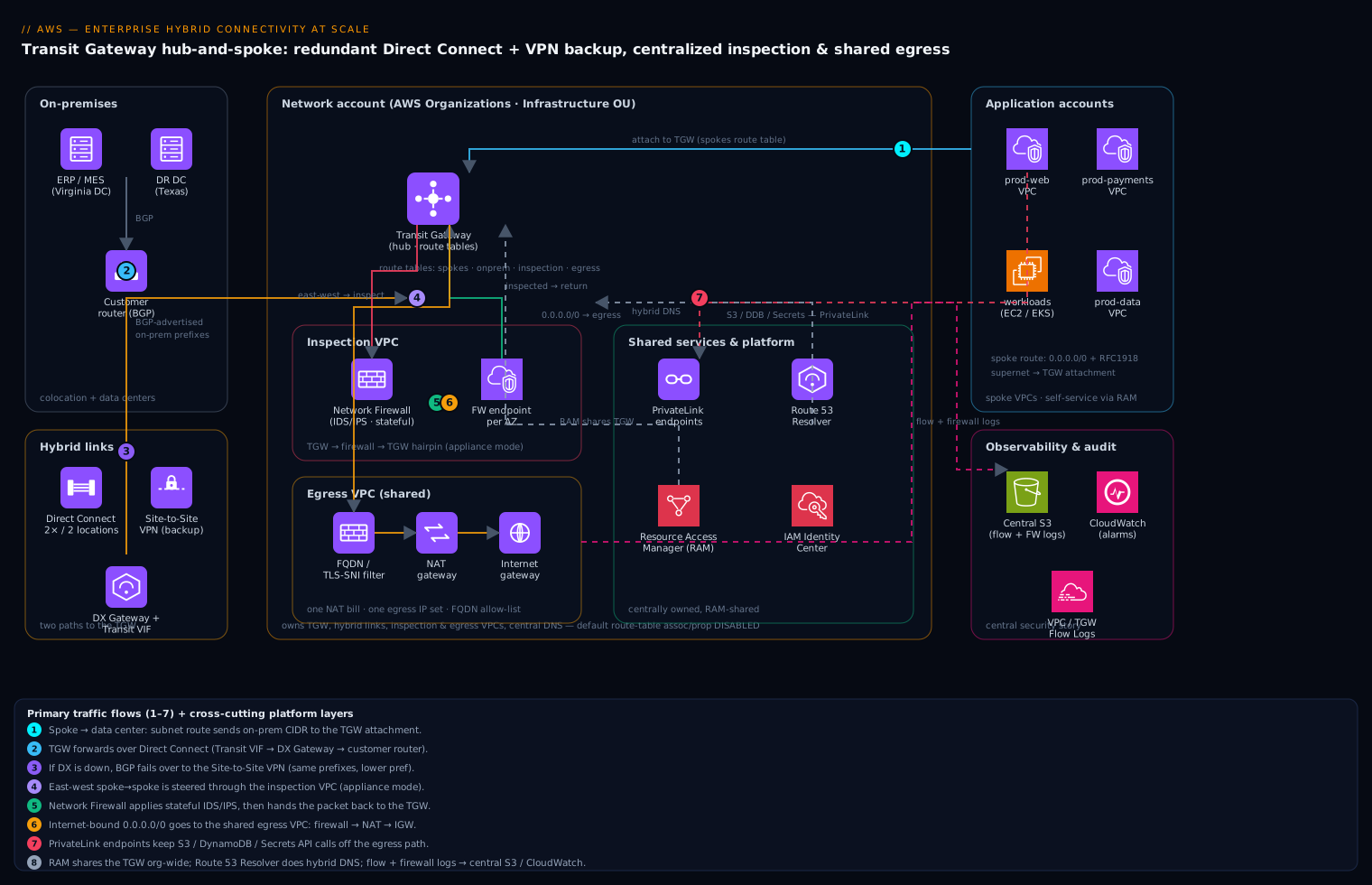
Follow four representative traffic flows end to end.
1. Application VPC to the data center (hybrid, the primary use case). A workload in the prod-payments VPC needs to reach an on-prem Oracle database. Its subnet route table sends the data-center CIDR to a Transit Gateway attachment. The TGW consults the route table associated with that attachment, sees the on-prem prefixes advertised over BGP, and forwards the packet out the Direct Connect path: across a Transit VIF, through a Direct Connect Gateway, to the customer router in a colocation facility, and into the data center. The return path is symmetric. If Direct Connect is down, the same prefixes are still reachable over the Site-to-Site VPN attachment, which BGP keeps as a less-preferred backup — failover is automatic and needs no human.
2. East-west between two application VPCs, inspected. prod-web needs to call an internal API in prod-payments. Instead of letting spokes talk directly, the spoke route tables point all inter-VPC traffic (the RFC 1918 supernet) at the TGW, and the TGW’s spoke route table sends that traffic to an inspection VPC running AWS Network Firewall across all AZs. The firewall applies stateful rules and Suricata-compatible IDS/IPS signatures, then hands the packet back to the TGW, which forwards it to the destination spoke. This is the classic “centralized inspection” pattern: every VPC-to-VPC flow is forced through one firewall using appliance mode on the inspection attachment so that request and response always traverse the same firewall endpoint (essential for stateful inspection).
3. Application VPC to the internet (centralized egress). A workload in any spoke needs to pull a patch from the internet. Its route table sends 0.0.0.0/0 to the TGW. The TGW’s spoke route table sends default-route traffic to a dedicated egress VPC, where the packet first hits Network Firewall (for domain/FQDN allow-listing and TLS-SNI filtering), then a NAT gateway, then the internet gateway. All spokes share this one egress path, so there is one set of egress IPs, one place to filter outbound destinations, and one NAT bill instead of forty-three.
4. Application VPC to AWS services, privately. When a workload calls Amazon S3, DynamoDB, or Secrets Manager, you do not want that traffic on the internet at all. Interface and Gateway VPC endpoints (AWS PrivateLink) — optionally centralized behind a shared-services VPC with Route 53 Resolver — keep AWS-API traffic on the AWS backbone, off the egress path entirely.
Three cross-cutting layers wrap all of this. AWS Resource Access Manager (RAM) shares the Transit Gateway from the Network account to every other account, so application teams create attachments without the network team handing out anything by hand. Route 53 Resolver endpoints and rules provide bidirectional DNS resolution between cloud and on-premises. And flow logs plus firewall logs stream to a central S3 bucket and CloudWatch for the security and audit story. The mental picture: a star, with the TGW as the hub, application VPCs and hybrid links as spokes, and the inspection and egress VPCs as special spokes that every flow is steered through by routing rather than by trust.
Component breakdown
| Component | Role in the architecture | Why it is here | Key configuration choices |
|---|---|---|---|
| Transit Gateway (TGW) | Central regional router connecting all VPCs and hybrid links | Replaces the O(n²) peering mesh with O(n) attachments and transitive routing | Multiple TGW route tables for segmentation; disable default route-table association/propagation; enable appliance mode on the inspection VPC attachment |
| TGW route tables | Per-attachment routing policy (who can reach whom) | Turns one TGW into many isolated routing domains — prod, non-prod, shared, inspection | Separate tables for spokes, on-prem, and inspection; spokes default-route to inspection/egress, never to each other directly |
| Direct Connect + DX Gateway | Private, high-bandwidth link to on-premises | Predictable latency/bandwidth (1–100 Gbps) vs. internet VPN; backbone for DC-exit and replication | Two DX connections in two locations for resilience; Transit VIF to a DX Gateway associated with the TGW; BGP with AS-path prepending for path preference |
| Site-to-Site VPN | Encrypted failover (or low-cost primary) path to on-prem | DX has no inherent encryption and takes weeks to provision; VPN is the day-one and the backup path | Attach to TGW; BGP dynamic routing; advertise same prefixes as DX but less-preferred; enable acceleration if branches are global |
| Network Firewall | Stateful L3–L7 inspection for east-west and egress | One auditable choke point for IDS/IPS, FQDN filtering, and outbound control | Firewall endpoint per AZ; Suricata-compatible rule groups; stateful default-deny on egress; managed threat-signature feeds |
| Inspection VPC | Hosts the firewall endpoints between TGW and traffic | Keeps inspection off the application teams’ plate and centrally owned | Dedicated /24 per AZ for firewall + TGW subnets; routes craft the TGW → firewall → TGW hairpin |
| Egress VPC | Single shared internet-egress point | One NAT bill, one egress IP set, one outbound filter for all VPCs | NAT gateway + IGW per AZ; firewall in front of NAT for FQDN allow-listing; static EIPs for vendor allow-lists |
| VPC endpoints (PrivateLink) | Private reach to AWS service APIs | Keeps S3/DDB/Secrets/etc. traffic off the internet and off the egress path | Gateway endpoints for S3/DynamoDB (free); centralized interface endpoints + Route 53 for the rest |
| Resource Access Manager (RAM) | Shares the TGW across accounts | Self-service attachments without manual hand-offs; enforces the Network-account ownership boundary | Share TGW to the Org or specific OUs; attachments auto-accept within the Org |
| Route 53 Resolver | Hybrid DNS resolution both directions | Cloud must resolve on-prem names and vice versa | Inbound + outbound resolver endpoints; forwarding rules for on-prem zones; shared via RAM |
A few choices deserve emphasis. Appliance mode on the inspection attachment is non-negotiable for stateful firewalls: without it, the TGW may hash the forward and return packets of one flow to firewall endpoints in different AZs, breaking connection state and silently dropping traffic. Disabling the TGW’s default association and propagation is what converts a flat router into a segmented one — every attachment is then explicitly placed in a route table, so “deny by default between business units” becomes the natural posture rather than an afterthought. And keeping the VPN prefixes identical but less-preferred versus Direct Connect (via AS-path prepending on the customer side and BGP local-preference) is what makes sub-minute failover happen with zero operator action.
How the hybrid links actually work
The component table above named the pieces. This section opens each one up, so you know not just what it is but how it behaves when a cable is cut at 3am. Read it as the beginner-to-intermediate on-ramp for everything the reference architecture assumes you already know; the later “Going deeper” section then takes the same building blocks to their advanced edges.
Site-to-Site VPN: two tunnels, IPsec, and BGP
A single AWS Site-to-Site VPN connection is not one tunnel — it is always two. When you create the connection, AWS provisions two independent IPsec tunnels, each terminating on a different VPN endpoint device in a different Availability Zone, and each with its own public endpoint IP, its own pre-shared key, and its own inside /30 link-local address (from 169.254.0.0/16). Your on-premises router — the customer gateway — should be configured to bring up both. This matters more than beginners expect: AWS periodically patches and rotates those endpoints, so any single tunnel will bounce for a minute or two every so often. With both tunnels configured, the other one carries the traffic and nobody notices. Configure only one, and you have signed up for scheduled outages.
Each tunnel is IPsec (IKEv1 or IKEv2 for key exchange; AES/SHA for the data). Encryption is built in and mandatory — a VPN over the public internet is only safe because of it. You can tune Phase 1/Phase 2 algorithms, the IKE version, Dead Peer Detection (DPD) timeout, and the tunnel inside CIDRs, but the AWS defaults are sensible for most.
The bigger design decision is static versus dynamic (BGP) routing:
| Static routing | Dynamic routing (BGP) | |
|---|---|---|
| How AWS learns your on-prem networks | You type each CIDR by hand | Your router advertises them over BGP |
| Failover when a path dies | Manual / limited | Automatic — routes withdraw and re-converge |
| Works with ECMP, CloudHub, TGW multi-path | No | Yes |
| Setup effort | Lowest | A little more (you assign an ASN) |
| Recommended for | A tiny, fixed, single-branch link | Almost everything else |
Prefer BGP. It is what makes failover automatic, and it is a hard requirement for the multi-path and hub features you will want later.
Throughput. Each tunnel is capped at roughly 1.25 Gbps. On a legacy virtual private gateway (VGW), the two tunnels of a connection behave active/standby — only one forwards at a time — so a single connection tops out near 1.25 Gbps. On a Transit Gateway with ECMP enabled and BGP routing, both tunnels run active/active (about 2.5 Gbps per connection), and you can add more VPN connections to the same TGW attachment to bond even more bandwidth. That is one of several reasons the modern pattern terminates VPNs on a Transit Gateway rather than a VGW.
Accelerated Site-to-Site VPN. For branches scattered around the globe, enable acceleration: AWS fronts the tunnel endpoints with AWS Global Accelerator anycast IPs, so a branch in Singapore enters the AWS backbone at the nearest edge location and rides AWS’s private network to the VPN endpoint, instead of taking the jittery public-internet long haul. It measurably cuts latency and packet loss for distant sites. Accelerated VPN is only available on Transit Gateway attachments, not on a VGW.
Here is the shape of a BGP-routed, two-tunnel connection terminated on the hub (illustrative Terraform, placeholder addresses):
# On-prem router identity (private ASN, public IP of the DC router).
resource "aws_customer_gateway" "dc1" {
  bgp_asn    = 65010            # your data-centre autonomous system number
  ip_address = "203.0.113.10"   # public IP of your DC router (placeholder)
  type       = "ipsec.1"
}

resource "aws_vpn_connection" "dc1" {
  customer_gateway_id = aws_customer_gateway.dc1.id
  transit_gateway_id  = aws_ec2_transit_gateway.hub.id
  type                = "ipsec.1"
  static_routes_only  = false   # false = dynamic (BGP); true = static

  # Two tunnels, two AWS endpoints, two inside /30s from 169.254.0.0/16.
  tunnel1_inside_cidr = "169.254.10.0/30"
  tunnel2_inside_cidr = "169.254.10.4/30"
  # Pre-shared keys omitted -> AWS generates them; keep them in Secrets Manager.
}
The enable/disable toggle that makes both tunnels usable at once lives on the Transit Gateway, not the connection:
resource "aws_ec2_transit_gateway" "hub" {
  amazon_side_asn                 = 64512      # private ASN for the AWS side
  vpn_ecmp_support                = "enable"   # active/active across equal-cost tunnels
  default_route_table_association = "disable"  # segmentation (see below)
  default_route_table_propagation = "disable"
}
Direct Connect: dedicated vs hosted, and three kinds of VIF
A Direct Connect (DX) link is a private, physical connection between your network and AWS that never touches the public internet. It comes in two procurement shapes:
- Dedicated connection — a whole physical Ethernet port that is yours: 1, 10, or 100 Gbps (400 Gbps is available at select locations). You order it from AWS, then arrange a cross-connect at a Direct Connect location (a carrier-neutral colo) using the LOA-CFA (Letter of Authorization and Connecting Facility Assignment) AWS gives you.
- Hosted connection — a slice of an AWS Direct Connect Partner’s port. Capacities from 50 Mbps up to 10 Gbps (some partners/locations offer up to 25 Gbps). Faster to obtain because the partner already has the port lit.
On top of a connection you create one or more virtual interfaces (VIFs). The VIF type is the choice beginners most often get wrong:
| VIF type | Connects to | Addressing | Typical use |
|---|---|---|---|
| Private VIF | A single VGW (one VPC), or a Direct Connect Gateway (many VPCs, any Region) | Private (RFC 1918) | Reach VPC workloads privately |
| Public VIF | AWS public service endpoints (S3, DynamoDB, public APIs) in any Region | Public IPs | Private path to public AWS services; also used to carry an IPsec VPN for encryption over DX |
| Transit VIF | One or more Transit Gateways via a Direct Connect Gateway | Private | The hub pattern — one link reaches every VPC behind the TGW |
The Direct Connect Gateway (DXGW) is the piece that turns a single physical link into global reach. It is a global object (not tied to a Region): you associate VGWs or Transit Gateways with it — across Regions and even across accounts — and a private or transit VIF pointed at the DXGW can then reach all of them. One important limit: a DXGW does not provide transitive routing between the VPCs attached to it. If VPC A and VPC B both hang off the same DXGW, A cannot reach B through the DXGW — that is exactly the job the Transit Gateway does, which is why the enterprise pattern uses a transit VIF → DXGW → TGW. AWS SiteLink is a related DX feature that lets two DX locations exchange traffic directly over the AWS backbone (branch-to-branch) without hair-pinning through a Region.
Encryption is the classic DX gotcha. “Private” does not mean “encrypted.” Traffic on a private or transit VIF rides a dedicated path but is not encrypted by AWS. Your options:
- MACsec (IEEE 802.1AE) — line-rate Layer-2 encryption available on dedicated 10 Gbps and 100 Gbps connections at select locations. It encrypts the single physical hop between your router and the AWS Direct Connect device — fast, but it protects that one link, not the whole path end to end.
- Site-to-Site VPN over a public VIF — run IPsec across the DX public path to get encryption (at VPN throughput ceilings).
- Private-IP VPN over Direct Connect — terminate a Site-to-Site VPN on a Transit Gateway over a transit VIF using private addressing: you get IPsec encryption and private IPs on the same DX link.
- TLS at the application layer, always, regardless of the above.
The DX-plus-VPN-as-backup pattern is the reason the reference architecture is resilient. You advertise the same on-prem prefixes over both Direct Connect and the Site-to-Site VPN. For equal routes, AWS prefers Direct Connect automatically, so DX is primary and the VPN sits quietly as a less-preferred path. Lose the DX entirely and BGP re-converges onto the VPN with no operator action. And you never rely on a single DX — design to a resiliency model:
| Model | Layout | Survives | Use for |
|---|---|---|---|
| Development / test | 2 connections at one DX location, separate devices | A device failure | Labs, non-critical links |
| High resilience | 1 connection at each of two DX locations | A whole-location failure | Most production |
| Maximum resilience | 2 connections at each of two locations (4 total), separate devices | Device and location failure | Critical / regulated workloads |
Whichever model you pick, keep the Site-to-Site VPN attached as the always-on last-resort path. The dedicated Direct Connect + Transit Gateway resiliency lesson walks these failure domains in more detail.
The Transit Gateway hub: association vs propagation
Everything meets at the Transit Gateway. It accepts attachments of several kinds — VPC, VPN, a Direct Connect Gateway, another TGW (inter-Region peering), and Connect (GRE, for SD-WAN appliances) — and routes between them using TGW route tables. The one concept that separates people who understand a Transit Gateway from those who merely copied a config is the pair of independent verbs, association and propagation:
- Association answers: “When traffic arrives from this attachment, which single route table do I consult to decide where it goes?” Every attachment is associated with exactly one route table.
- Propagation answers: “Which route table(s) should learn the networks reachable through this attachment?” An attachment can propagate its routes into many tables (dynamically, via BGP for VPN/DX, or via the CIDR for a VPC attachment).
They are orthogonal. An attachment reads one table (its association) but can write its routes into several (its propagations). Once you disable the TGW’s default association and propagation, nothing routes until you place each attachment deliberately — and that deliberate placement is exactly what gives you segmentation (“prod cannot reach non-prod because their route tables never learn each other’s CIDRs”).
A worked steering example for the four-table design the reference architecture uses:
TGW route tables (default association/propagation DISABLED):

  spokes RT      0.0.0.0/0        -> egress-vpc attachment      (central internet)
                 10.0.0.0/8       -> inspection-vpc attachment  (east-west via firewall)
                 192.168.0.0/16   -> (propagated from DX / VPN) (reach on-prem)
  onprem RT      <each spoke CIDR> -> (propagated from spokes)  (on-prem reaches cloud)
  inspection RT  <spoke + on-prem CIDRs> (return paths after inspection)
  egress RT      <spoke CIDRs>     (return paths from the internet)

Associations:  every spoke -> spokes RT ; DX attach + VPN attach -> onprem RT
Propagations:  spokes -> onprem RT ; DX/VPN -> spokes RT + inspection RT
Two more hub facts worth internalising. DX Gateway ↔ TGW association is where you set the allowed prefixes — the list of CIDRs the Transit Gateway advertises out to on-prem over the transit VIF; get that list wrong and on-prem simply will not learn your VPCs. And ECMP on the TGW lets multiple equal-cost paths (several VPN tunnels, or a transit VIF plus tunnels) share load rather than sitting idle. (The reference architecture’s note on appliance mode for the inspection attachment is the third: it keeps both directions of a flow pinned to the same firewall AZ so stateful inspection does not break.)
Remote users and branch meshes: Client VPN and CloudHub
The two links above connect networks. Two more features connect people and small sites:
- AWS Client VPN is a managed, OpenVPN-based remote-access endpoint for individual users — the modern replacement for a self-hosted VPN concentrator. Users connect with the AWS-provided client (or any OpenVPN client). Authentication can be mutual certificate, Active Directory (via AWS Directory Service), or SAML federation through IAM Identity Center or your IdP — and you can combine a certificate with one of the others. Choose split-tunnel (only VPC/on-prem-bound traffic enters the tunnel; everything else goes direct — cheaper and the usual choice) or full-tunnel (all traffic through AWS). Authorization rules decide which networks each user group may reach. Because the endpoint attaches to a VPC that is itself on the Transit Gateway, a remote employee can reach both cloud workloads and the on-prem data centre through the same session.
- AWS VPN CloudHub solves branch-to-branch connectivity cheaply. On a single virtual private gateway you attach many customer gateways — one per branch office — each with its own BGP ASN. The VGW re-advertises every branch’s routes to all the others, so the branches can reach each other over the AWS network even though they have no direct links between them, forming a hub-and-spoke of sites. It works with or without a VPC behind it. A Transit Gateway is the more capable modern successor, but CloudHub remains a tidy fit for a purely branch-interconnect need.
Hybrid DNS: Route 53 Resolver inbound and outbound
Connectivity is not enough — names have to resolve across the boundary too. Every VPC has a built-in Route 53 Resolver at the VPC’s base address +2 (and 169.254.169.253). By default it resolves public DNS and any private hosted zones associated with the VPC — but it cannot answer for your corp.example.com on-prem zone, and your on-prem DNS servers cannot reach that in-VPC resolver at all. Two Resolver endpoints bridge each direction:
- An inbound endpoint places resolver ENIs (with IPs you choose, in two AZs) inside your VPC. Your on-prem DNS servers conditionally forward queries for cloud/private zones to those IPs, so on-prem can resolve Route 53 private-hosted-zone records and PrivateLink endpoint names. Direction: on-prem → cloud.
- An outbound endpoint plus Resolver rules send queries the other way. A
FORWARDrule such as “corp.example.com→ 10.1.0.10, 10.1.0.11” makes the VPC resolver forward those lookups out to your on-prem DNS. Direction: cloud → on-prem.
Share the endpoints and rules across every account with RAM, and each VPC inherits hybrid DNS automatically:
resource "aws_route53_resolver_endpoint" "outbound" {
  direction          = "OUTBOUND"
  security_group_ids = [aws_security_group.resolver.id]
  ip_address { subnet_id = var.subnet_az_a }
  ip_address { subnet_id = var.subnet_az_b }   # two AZs for high availability
}

resource "aws_route53_resolver_rule" "corp" {
  domain_name          = "corp.example.com"
  rule_type            = "FORWARD"
  resolver_endpoint_id = aws_route53_resolver_endpoint.outbound.id
  target_ip { ip = "10.1.0.10" }               # on-prem DNS server (placeholder)
  target_ip { ip = "10.1.0.11" }
}
The sibling Route 53 Resolver hybrid-resolution lesson goes deeper on rule precedence and the Resolver DNS Firewall.
PrivateLink across the hybrid link
The final building block keeps service traffic private. An interface VPC endpoint, powered by AWS PrivateLink, is simply an ENI with a private IP in your subnet that connects privately to an AWS service, a SaaS/partner service, or your own service fronted by a Network Load Balancer. From on-premises, you reach that endpoint’s private IP over the DX or VPN — combine it with the inbound resolver so on-prem resolves the endpoint’s private DNS name, and your data centre can call an AWS API (or a partner’s API) without a single packet touching the internet.
One trap catches almost everyone: Gateway endpoints (for S3 and DynamoDB) are route-table / prefix-list based and only work from inside the VPC. They are not reachable from on-prem over DX or VPN. To reach S3 privately from the data centre, use an S3 interface endpoint (PrivateLink) or a public VIF — not a gateway endpoint. On the provider side, you publish your own service by putting it behind an NLB and creating an endpoint service; consumers (other accounts, other VPCs, or on-prem) then create interface endpoints to it. The PrivateLink provider/consumer lesson covers that flow end to end.
Implementation guidance
Account and ownership model. Stand this up under AWS Organizations with a dedicated Network account inside an Infrastructure OU. The Network account owns the Transit Gateway, Direct Connect, the inspection and egress VPCs, and the central DNS resolver. Application teams own only their spoke VPCs in their own accounts. This is the AWS multi-account (“landing zone”) pattern, and it cleanly separates the blast radius and the bill of the network platform from the workloads riding on it. Enforce it with Service Control Policies that deny application accounts the ability to create internet gateways or their own NAT gateways — that is what forces traffic onto the central egress path rather than merely encouraging it.
Provisioning order (the dependency chain matters):
- Create the TGW in the Network account; set
default_route_table_association = disableanddefault_route_table_propagation = disable. - Build the inspection VPC and egress VPC; deploy Network Firewall with one endpoint per AZ in each.
- Create TGW route tables:
spokes,onprem,inspection,egress. Associate and propagate per the steering rules below. - Share the TGW via RAM to the Organization.
- Application teams create spoke VPCs and TGW attachments (auto-accepted within the Org); their attachments associate to the
spokesroute table. - Provision Direct Connect (lead time is weeks — start early), a DX Gateway, a Transit VIF, and a Site-to-Site VPN as the same-day bring-up and permanent backup.
- Wire Route 53 Resolver inbound/outbound endpoints and forwarding rules; share via RAM.
The routing logic, stated plainly. Spoke subnet route tables send 0.0.0.0/0 to the TGW (for egress) and the on-prem/inter-VPC supernets to the TGW as well. On the TGW side: the spokes route table default-routes (0.0.0.0/0) to the egress VPC attachment and routes the RFC 1918 supernet to the inspection VPC attachment; the inspection and egress route tables propagate the spoke and on-prem routes back so return traffic finds its way home. On-prem prefixes arrive by BGP propagation from the DX and VPN attachments into the onprem table, which is associated with those attachments and shared into the spoke/inspection tables as policy dictates.
Infrastructure as Code. Terraform is the natural fit here because the network spans many accounts and AWS publishes mature modules for exactly this shape:
- Use the community
terraform-aws-modules/transit-gatewaymodule for the TGW, its route tables, and VPC attachments; it exposes the association/propagation toggles directly. - Use
terraform-aws-modules/vpcfor spoke, inspection, and egress VPCs. - Manage Network Firewall with the
aws_networkfirewall_firewall,aws_networkfirewall_firewall_policy, andaws_networkfirewall_rule_groupresources; keep Suricata rules in version-controlled.rulesfiles so security changes go through pull requests. - Drive multi-account deployment with Terraform workspaces or stacks per account and assume-role providers, or wrap it in an AWS-native pipeline. For teams standing up the whole landing zone, AWS Control Tower plus Account Factory for Terraform (AFT) bootstraps the Organization, OUs, and guardrails, and you layer this network module on top.
- Share resources with
aws_ram_resource_shareandaws_ram_principal_associationtargeting the Organization ARN so attachments auto-accept.
Identity and access wiring. Application teams need only ec2:CreateTransitGatewayVpcAttachment against the shared TGW — they never touch the TGW itself, its route tables, the firewall, or egress. Centralize human access through IAM Identity Center with permission sets scoped per OU. For the data-center side, the BGP session and customer-router config live with the network team; document the on-prem ASN, the advertised prefixes, and the BCP 38 anti-spoofing expectations in the runbook so a failover is boring.
Enterprise considerations
Security and Zero Trust. The architecture operationalises Zero Trust at the network layer through segmentation by routing rather than trust by adjacency. Because the TGW’s default association/propagation is off, two spokes cannot reach each other unless a route table explicitly allows it — and even then the traffic is forced through Network Firewall in appliance mode, where stateful rules and IDS/IPS signatures inspect every east-west flow. Egress is default-deny: outbound traffic is dropped unless the destination FQDN is on the allow-list, which neutralises a large class of data-exfiltration and C2 paths. Pair this with security groups and NACLs inside each VPC (micro-segmentation), VPC endpoints to keep AWS-API calls off the internet entirely, and encryption in transit (TLS for apps, IPsec on the VPN, optional MACsec on Direct Connect). The result is defence in depth: identity, network segmentation, inspection, and egress control reinforcing one another.
Cost optimization. The headline saving is centralized egress — collapsing dozens of per-VPC NAT gateways into one shared egress VPC removes a stack of hourly NAT charges and consolidates per-GB processing, often the single biggest line item in a sprawling network. But be honest about the trade-off the TGW introduces: you now pay a per-attachment hourly charge and a per-GB TGW data-processing charge, and inspected/egress traffic can cross the TGW more than once (spoke → TGW → inspection → TGW → destination), so each GB is processed multiple times. The levers: keep latency-sensitive, high-volume same-Region VPC-to-VPC flows on direct VPC peering when they need no inspection (peering has no per-GB charge); use Gateway VPC endpoints for S3/DynamoDB (free, and they keep that traffic off both NAT and TGW); and reserve Direct Connect for the bandwidth that justifies it while right-sizing the port speed. Tag every attachment to attribute TGW and egress cost back to the owning team.
Scalability. A single TGW supports thousands of attachments and roughly 5,000 routes per route table, with up to ~100 Gbps of bandwidth per VPC attachment (using ECMP across multiple VPN tunnels or via DX scaling). For multi-Region, deploy a TGW per Region and connect them with inter-Region TGW peering, advertising a clean CIDR plan so routes summarise. The hub-and-spoke shape means onboarding the fiftieth VPC is the same one-attachment operation as the fifth — linear effort, not quadratic.
Reliability and DR (RTO/RPO). Every layer is multi-AZ: firewall endpoints, NAT gateways, and TGW attachment subnets exist in every AZ in the Region, and the TGW itself is a managed, AZ-redundant service. The hybrid path is the key resilience story: two Direct Connect connections in two separate DX locations survive a facility failure, and the Site-to-Site VPN is a permanently-attached, BGP-preferred-lower backup so a total DX loss fails over to the internet path in well under a minute with no operator action — an effective network RTO measured in seconds. For Regional DR, the same module deployed in a second Region with inter-Region TGW peering gives a warm network fabric; workload RPO is then governed by the data-replication strategy (database replication, S3 Cross-Region Replication) riding over this backbone, not by the network itself. Model the failure cases explicitly in a runbook: single AZ loss, single DX loss, full DX-location loss, and Region loss.
Observability. Turn on VPC Flow Logs on every spoke, inspection, and egress VPC; TGW Flow Logs for hub-level visibility; and Network Firewall alert/flow logs for the inspected-traffic record. Stream all of it to a central S3 bucket (for Athena queries and long retention) and CloudWatch (for live dashboards and alarms). Use Reachability Analyzer and Network Access Analyzer to prove — before an auditor asks — that a given path is open or closed, and CloudWatch Network Monitor or DX/VPN CloudWatch metrics to alarm on BGP session drops and link health.
Governance. Ownership is the policy: the Network account owns the fabric, SCPs prevent application accounts from creating their own IGWs/NAT (closing the bypass), and RAM enforces that attachments are the only self-service action. Codify CIDR allocation centrally (an IPAM such as AWS VPC IP Address Manager prevents the overlapping-10.0.0.0/16 problem before it happens), require firewall-rule changes to go through pull requests, and run AWS Config rules to detect drift such as a rogue NAT gateway or an un-inspected route.
Reference enterprise example
Meridian Components is a fictional but representative automotive-parts manufacturer: 4,200 employees, two data centers (one in Virginia for ERP/MES, one in Texas as DR), eleven plants, and a three-year-old AWS footprint that had grown to 38 VPCs across 14 accounts, connected by 61 peering connections and 9 ad-hoc VPN tunnels. The breaking point was an audit finding: the security team could not demonstrate that traffic between the plant-floor IoT ingestion VPCs and the ERP-integration VPCs was inspected — because it wasn’t — and finance flagged $214,000/year in NAT gateway charges spread across 31 VPCs that nobody could attribute.
Meridian rebuilt on this reference architecture over a quarter:
- Network account + TGW in
us-east-1, with route tablesspokes,onprem,inspection,egress; default association/propagation disabled. - 2 × 10 Gbps Direct Connect connections in two Ashburn DX locations, via a DX Gateway and Transit VIF, replacing the 9 VPN tunnels for the Virginia data center. The Texas DR data center kept an accelerated Site-to-Site VPN, and a VPN to Virginia remained as the DX backup.
- Network Firewall in an inspection VPC (appliance mode), enforcing IDS/IPS on all east-west traffic — including the plant-IoT-to-ERP path the auditors had flagged.
- One egress VPC with FQDN allow-listing; SCPs blocked all 31 application accounts from creating NAT or IGWs. The 31 NAT gateways collapsed to 3 (one per AZ).
- RAM shared the TGW org-wide; teams migrated their VPCs by swapping peering routes for a TGW attachment — about a day of work per VPC, mostly testing.
The numbers after one quarter: NAT/egress spend fell from $214K to roughly $61K/year (≈71% reduction), even after accounting for the new TGW attachment and data-processing charges. The 61 peering connections dropped to zero (everything routes through the hub). A simulated full-DX-location failure failed over to VPN in under 40 seconds with no packet loss visible to the ERP integration. And the audit finding closed: the security team now ships a single architecture diagram plus Reachability Analyzer evidence showing every inter-VPC and egress path traversing the firewall. Onboarding the next plant’s VPC went from “open a peering ticket and edit nine route tables” to a 20-line Terraform attachment merged the same morning.
When to use it
Use this architecture when you have — or can see coming within a year — more than a handful of VPCs, a real on-premises footprint that needs predictable bandwidth, a mandate to inspect and log traffic centrally, or multiple accounts/business units that must be segmented and governed. It is the right foundation for regulated industries (finance, healthcare, manufacturing with OT/IT convergence), for phased data-center exits, and for any enterprise where “who can reach whom” must be auditable.
Be aware of the trade-offs. The TGW adds a per-attachment and per-GB cost, and routing inspected traffic through the hub multiplies data-processing charges — for a tiny two-VPC environment with no inspection or hybrid needs, that overhead is not yet justified. Centralized inspection adds a hop of latency and makes the inspection VPC a critical path (mitigated by per-AZ firewall endpoints and appliance mode, but real). And the architecture demands organisational discipline: it only works if SCPs actually prevent egress bypass and if the Network account is treated as a shared platform with proper change control.
Anti-patterns to avoid. Do not skip appliance mode on the inspection attachment — asymmetric routing will silently break stateful inspection and you will chase phantom drops for days. Do not leave default TGW route-table association/propagation on; that quietly recreates a flat any-to-any network and erases your segmentation. Do not let application teams keep their own NAT gateways “just for now” — the central egress savings and the egress-control story both evaporate the moment one bypass exists. And do not run a single Direct Connect connection and call it redundant; one DX plus one VPN is the minimum, two DX in two locations plus VPN is the standard.
Alternatives and when they fit. For genuinely small or transient environments, VPC peering plus a single Site-to-Site VPN is simpler and cheaper — graduate to this architecture when the mesh or the egress bill starts to hurt. AWS Cloud WAN is the natural next step for large multi-Region estates: it adds a policy-driven global network with centralized segmentation across Regions on top of the same TGW primitives, and is worth adopting when you outgrow managing per-Region TGWs and inter-Region peering by hand. For the firewall layer specifically, AWS Network Firewall is the managed default, but a Gateway Load Balancer fronting third-party NGFW appliances (Palo Alto, Fortinet, Check Point) slots into the exact same inspection-VPC position when you need a specific vendor’s feature set or to match on-prem tooling. The hub-and-spoke skeleton stays the same; you are only swapping the inspection engine.
Going deeper
Everything above is enough to build the architecture. This section is for the engineer who has to make it fast, cheap, and correct under failure — the internals that turn “it works in the demo” into “it survived the audit and the outage.”
BGP path selection, in the order AWS actually applies it
When the same on-prem prefix is reachable over both Direct Connect and VPN, AWS does not choose at random. For traffic leaving AWS toward on-prem, the selection order is:
- Longest prefix match wins first. A more-specific advertisement (say
192.168.10.0/24) always beats a summary (192.168.0.0/16), regardless of anything below. This is the sharpest tool you have — and the easiest way to accidentally black-hole traffic if one path advertises more-specifics than you intended. - For equal-length prefixes, Direct Connect is preferred over VPN by default. This is why the DX-primary/VPN-backup pattern needs no configuration to make DX win.
- Then BGP attributes — AWS’s own local preference, then AS_PATH length. You influence AWS’s choice from your side mainly through AS-path prepending on the VPN (advertise the same prefix with your ASN repeated 2–3 times so the path looks longer and less attractive), and through more-specific advertisements.
For traffic in the other direction — on-prem toward AWS — you control the preference on your own routers with local preference, since local preference is the first tie-breaker in standard BGP and never leaves your autonomous system. Design both directions deliberately, or you will get asymmetric routing (out over DX, back over VPN) that quietly defeats stateful inspection.
One quota to respect: AWS accepts up to 100 prefixes per BGP session over Direct Connect and 100 over each VPN connection. Summarise your on-prem address plan; do not leak a full routing table.
Fast failover: BFD, not the BGP hold timer
Left to defaults, BGP declares a neighbour dead only after the hold timer (~90 seconds) expires — that is up to a minute and a half of black-holed traffic before failover to the VPN even begins. Enable asynchronous BFD (Bidirectional Forwarding Detection) on the Direct Connect BGP session (AWS supports it) and failure is detected in about one second, so the whole DX-to-VPN cutover completes in single-digit seconds. On the VPN side, tune DPD so a dead tunnel is noticed promptly too. Fast detection is the difference between an “RTO measured in seconds” claim you can defend and one you cannot.
MTU, jumbo frames, and MSS clamping
A subtle, high-value detail. A Direct Connect private VIF supports jumbo frames up to 9001 bytes; a transit VIF / TGW attachment supports up to 8500 bytes; but a VPN attachment on a TGW is limited to 1500 bytes. IPsec adds per-packet overhead, so a 1500-byte packet with the “don’t fragment” bit set can be silently dropped on the VPN path. The textbook symptom is “small pings work but large file transfers or TLS handshakes hang.” The fix is TCP MSS clamping — cap the TCP maximum segment size (commonly ~1379 bytes for IPsec) on the tunnel so large segments are never built in the first place. Get this wrong and you will chase a “the network is up but the app is broken” ghost for a day.
Encryption throughput ceilings and MACsec, precisely
IPsec VPN’s ~1.25 Gbps-per-tunnel ceiling is a throughput limit, not just a suggestion — if you need encrypted 10 or 100 Gbps, a stack of VPN tunnels is the wrong tool and MACsec on a dedicated Direct Connect is the right one, because it encrypts at line rate in hardware. The trade-off to state out loud in a review: MACsec secures only the single hop between your router and the AWS Direct Connect endpoint at that location — it is not end-to-end across AWS’s backbone or across Regions. When you need both encryption and private addressing on a high-bandwidth link, the private-IP VPN over Direct Connect (VPN terminated on a TGW over a transit VIF) is the pattern that gives you both, at VPN throughput per tunnel.
The Transit Gateway data-processing bill, worked
The TGW’s convenience has a per-GB price, and inspected traffic pays it more than once. Trace one inspected east-west gigabyte between two spokes:
spoke-A --(1)--> TGW -----> inspection VPC (firewall) -----> TGW --(2)--> spoke-B
That single GB is processed by the TGW twice (in at 1, out again at 2), so at roughly $0.02/GB it costs about $0.04/GB in TGW data processing alone — before the fixed per-attachment-hour charges and any NAT/egress fees on a different flow. The levers, in order of impact: keep high-volume, latency-sensitive, same-Region VPC-to-VPC flows that need no inspection on direct VPC peering (peering has no per-GB charge); use free Gateway endpoints for S3/DynamoDB so that traffic never crosses the TGW or NAT at all; and tag every attachment so the bill is attributable. Multiply $0.04/GB across petabytes of chatty east-west traffic and the peering exception can pay for itself many times over.
Quotas and scale ceilings (verify current values in the console)
| Dimension | Ballpark ceiling | Note |
|---|---|---|
| Routes per Transit Gateway | ~10,000 | Summarise CIDRs; the reference architecture’s “5,000 per table” is a healthy planning target well under the hard limit |
| BGP prefixes accepted, per DX / per VPN | 100 / 100 | Summarise the on-prem plan |
| VPN throughput | ~1.25 Gbps per tunnel | Use TGW + ECMP for active/active and to bond connections |
| VPC attachment bandwidth | up to ~100 Gbps (burst) | Per attachment |
| DX dedicated port speeds | 1 / 10 / 100 Gbps (400 at select sites) | Hosted: 50 Mbps–10 Gbps (25 at select) |
| Resolver rules / endpoints | soft limits | Adjustable via Service Quotas |
Quotas move over time and several are adjustable — treat this as orientation, not gospel, and check Service Quotas before you design to a number.
Cloud WAN vs. Transit Gateway, and other frontiers
The reference architecture already flags AWS Cloud WAN as the next step. The concrete difference: Cloud WAN replaces hand-wired per-Region TGWs and inter-Region peering with a single policy document that expresses segments (e.g. “prod,” “dev,” “shared”) and their allowed communication globally, realised by a core network with an edge in each Region you list. Migrate when you have several Regions and want segmentation expressed as reviewable policy rather than as manually reconciled route tables. Two more edges worth knowing: the TGW supports IPv6 routing and multicast domains (and DX/VPN carry IPv6 on their VIFs/tunnels); and when an acquisition arrives with overlapping CIDRs, your options are to re-IP (clean, costly), deploy a private NAT gateway to translate the overlapping range, or hide it behind a dedicated NAT/inspection VPC — and to adopt VPC IPAM so the overlap never recurs.
Practice challenges
Work these in order — they climb from “read one route table” to “design a failover with two tuning knobs.” Try each before opening the solution.
1. (Beginner) Steer a spoke to central egress. A spoke VPC must reach the internet only through the shared egress VPC, and Service Control Policies forbid it from having its own internet or NAT gateway. Write the single subnet route-table entry that sends its internet traffic toward the hub.
<details> <summary>Solution</summary>
Destination      Target
0.0.0.0/0        tgw-0abc123456789def0   # the Transit Gateway attachment
Why: with no local IGW/NAT, the default route can only point at the Transit Gateway, which then hands 0.0.0.0/0 to the egress VPC — one shared, logged, filtered door instead of a NAT gateway per VPC.
</details>
2. (Beginner) How many tunnels? You created one Site-to-Site VPN connection. How many IPsec tunnels should your on-prem customer gateway be configured to bring up, and why does configuring fewer bite you later?
<details> <summary>Solution</summary>
Both tunnels (2). A single VPN connection always provisions two tunnels to two different AWS endpoints in two AZs.
Why: AWS periodically patches and rotates each endpoint, so any one tunnel will bounce from time to time. With both up, the other carries traffic seamlessly; configure only one and you have signed up for recurring outages. </details>
3. (Intermediate) Static or BGP? A branch office is going live now, but within a year it will be one of five branches that must also reach each other. Choose static or dynamic routing for its VPN, and justify it.
<details> <summary>Solution</summary>
Dynamic routing (BGP).
Why: BGP gives automatic route failover today, and it is a hard requirement for the multi-path (ECMP) and route re-advertisement (CloudHub / Transit Gateway) features the five-branch mesh will need. Static routing cannot scale into that mesh, so choosing it now means re-cutting the branch later. </details>
4. (Intermediate) Which resolver endpoint? On-prem servers must resolve records in a Route 53 private hosted zone that is associated with a VPC. Which Resolver endpoint do you create, and where does the forwarding configuration live?
<details> <summary>Solution</summary>
Create an inbound Resolver endpoint (ENIs with IPs in two AZs inside the VPC). The forwarding lives on the on-prem DNS servers: they conditionally forward the private zone to the inbound endpoint’s IP addresses.
Why: “inbound” is the on-prem → cloud direction. (The mirror image — cloud resolving an on-prem zone — uses an outbound endpoint plus a FORWARD Resolver rule.)
</details>
5. (Advanced) The transfers that hang. Users report that ping and small requests over the VPN succeed, but large file copies and some TLS handshakes stall. Name the cause and the one-line fix.
<details> <summary>Solution</summary>
MTU / MSS. IPsec overhead shrinks the usable packet size; large packets with the “don’t fragment” bit set exceed the ~1500-byte VPN MTU and are silently dropped. Clamp TCP MSS (commonly ~1379 bytes) on the tunnel — or lower the interface MTU.
Why: small packets fit under the tunnel MTU and pass; only full-size segments overflow it, which is exactly why pings work but bulk transfers hang. </details>
6. (Advanced) Seconds-grade DX failover. Design the Direct Connect + VPN failover so a full DX-location outage recovers in seconds, and name the two tuning knobs that make it fast rather than sluggish.
<details> <summary>Solution</summary>
Advertise the same on-prem prefixes over both the DX (primary — AWS prefers DX for equal routes automatically) and the Site-to-Site VPN (backup). The two knobs:
- AS-path prepending on the VPN advertisement, so the VPN is clearly the less-preferred path while DX is healthy.
- BFD on the DX BGP session, so a dead link is detected in ~1 second instead of waiting out the ~90-second BGP hold timer.
Why: identical prefixes + default DX preference make failover automatic; prepending keeps the VPN out of the way until needed; BFD collapses detection time from ~90 s to ~1 s so the cutover finishes in single-digit seconds. </details>
Common beginner mistakes
These are misconceptions, not symptoms — the wrong mental model that leads to a wrong design, and the right model to replace it with. (For symptom → cause → fix operational issues, use the runbook the reference architecture calls for.)
- “VPC peering will scale — I’ll just keep adding connections.” Peering is non-transitive and grows as n(n-1)/2: connect A-B and B-C and A still cannot reach C. Right model: a Transit Gateway hub turns O(n²) connections into O(n) attachments with transitive routing.
- “One VPN tunnel is enough; the second is optional.” AWS rotates the endpoint behind each tunnel, so a single tunnel will drop periodically. Right model: both tunnels are the redundancy — always configure the pair.
- “Direct Connect is private, so it’s encrypted.” Private ≠ encrypted. A private or transit VIF is not encrypted by AWS. Right model: add MACsec (dedicated 10/100 Gbps), a VPN over a public VIF, a private-IP VPN over DX, or at minimum rely on application TLS.
- “Association and propagation are two names for the same toggle.” They are orthogonal. Right model: association = the one route table an attachment reads; propagation = the many tables that learn its routes. Wire them separately.
- “I’ll reach S3 privately from on-prem with a Gateway endpoint.” Gateway endpoints are route-table/prefix-list based and only work inside the VPC. Right model: from on-prem use an S3 interface endpoint (PrivateLink) or a public VIF.
- “Static routes are fine everywhere — they’re simpler.” Static routing gives up automatic failover and cannot do ECMP or CloudHub. Right model: use BGP for anything that must fail over or scale; reserve static for a tiny, fixed, single link.
- “A single Direct Connect is my redundancy.” One connection — or two in the same location — is a single point of failure. Right model: two locations plus a Site-to-Site VPN backup is the baseline; four connections across two locations for critical workloads.
- “Once the Transit Gateway is up it’s basically free.” You pay per attachment-hour and per GB processed, and inspected east-west traffic crosses the TGW twice, so it is billed twice. Right model: budget the per-GB cost and keep un-inspected, high-volume flows on peering.
- “Leaving the TGW’s default route-table association and propagation on is a harmless convenience.” It quietly rebuilds a flat, any-to-any network and erases your segmentation. Right model: disable both defaults and place every attachment deliberately.
Glossary
- Hybrid connectivity — connecting on-premises networks (data centres, branches, remote users) to AWS workloads privately and reliably.
- Site-to-Site VPN — an IPsec-encrypted connection between your network and AWS over the public internet. Always comprises two tunnels for redundancy.
- IPsec / IKE — the protocol suite that encrypts and authenticates VPN traffic; IKE (v1/v2) negotiates the keys.
- Tunnel — one encrypted path of a VPN connection to one AWS endpoint. A connection has two, each with its own endpoint IP, pre-shared key, and inside
/30. - Customer gateway (CGW) — the AWS object that represents your on-prem VPN router (its public IP and BGP ASN).
- Virtual private gateway (VGW) — the older per-VPC VPN/DX termination point; largely superseded by the Transit Gateway for multi-VPC designs.
- BGP — Border Gateway Protocol; how routers advertise which networks they can reach, enabling dynamic routing and automatic failover.
- ASN — Autonomous System Number; a router’s identity in BGP (private range 64512–65534 for the AWS side and typical on-prem use).
- AS-path prepending — repeating your ASN in an advertisement to make a path look longer and therefore less preferred (used to demote the VPN below Direct Connect).
- Local preference — the first BGP tie-breaker; used on your routers to steer on-prem → AWS traffic onto a preferred path.
- ECMP — Equal-Cost Multi-Path; running multiple equal-cost paths (e.g. both VPN tunnels) active/active to share load. A Transit Gateway feature.
- BFD — Bidirectional Forwarding Detection; detects a dead BGP link in ~1 second instead of the ~90-second BGP hold timer, enabling fast failover.
- DPD — Dead Peer Detection; the VPN’s mechanism for noticing an unresponsive tunnel peer.
- Direct Connect (DX) — a private physical link between your network and AWS that bypasses the internet.
- Dedicated / hosted connection — a whole DX port that is yours (1/10/100 Gbps) versus a partner-provided slice of a port (50 Mbps–10 Gbps).
- Virtual interface (VIF) — a logical interface on a DX connection: private (reach a VPC/VGW/DXGW), public (AWS public endpoints), or transit (reach a Transit Gateway via a DX Gateway).
- LOA-CFA — Letter of Authorization and Connecting Facility Assignment; the document that authorises the cross-connect at a DX location.
- Direct Connect Gateway (DXGW) — a global object that associates VGWs/TGWs (across Regions/accounts) so one DX link reaches many of them. Does not provide transitive routing between them.
- SiteLink — a DX feature that sends traffic directly between two DX locations over the AWS backbone without hair-pinning through a Region.
- MACsec — IEEE 802.1AE line-rate Layer-2 encryption on dedicated 10/100 Gbps DX; secures the single hop to the AWS DX device, not end-to-end.
- Transit Gateway (TGW) — the central regional router that connects VPCs and hybrid links with transitive routing and segmented route tables.
- Attachment — a connection into a TGW: a VPC, VPN, DX Gateway, TGW peering, or Connect (GRE) attachment.
- Association — the single TGW route table an attachment consults for its outbound routing decisions.
- Propagation — the (possibly several) TGW route tables into which an attachment’s routes are learned.
- Appliance mode — a TGW attachment setting that pins both directions of a flow to the same AZ appliance, so stateful inspection is not broken by asymmetric routing.
- Client VPN — a managed, OpenVPN-based remote-access endpoint for individual users; authenticates by certificate, Active Directory, or SAML federation, with split- or full-tunnel modes.
- CloudHub — a VGW pattern where multiple branch customer gateways share one gateway and the VGW re-advertises each branch’s routes to the others, meshing branches over AWS.
- Route 53 Resolver — the DNS resolver in every VPC (at VPC base +2); extended for hybrid DNS with inbound/outbound endpoints.
- Inbound / outbound endpoint — resolver ENIs that let on-prem query cloud DNS (inbound) or let the VPC forward queries to on-prem DNS (outbound).
- Resolver rule — a
FORWARDrule that routes queries for a domain (e.g.corp.example.com) to specified on-prem DNS servers via the outbound endpoint. - PrivateLink — the technology behind interface endpoints; provides private, in-account access to AWS services, partner/SaaS services, or your own NLB-fronted service.
- Interface endpoint — an ENI with a private IP that connects (via PrivateLink) to a service; reachable from on-prem over DX/VPN.
- Gateway endpoint — a route-table/prefix-list endpoint for S3 and DynamoDB; works only from inside the VPC (not from on-prem).
- Endpoint service — the provider-side publication of your own service (behind an NLB) so consumers can create interface endpoints to it.
- RAM (Resource Access Manager) — shares resources (the TGW, resolver rules) across accounts so attachments and hybrid DNS are self-service.
- MTU / MSS — maximum transmission unit / TCP maximum segment size; must be tuned (MSS clamping ~1379) on VPN paths to avoid dropping large packets.
- Accelerated Site-to-Site VPN — a VPN whose endpoints are fronted by AWS Global Accelerator so distant branches enter the AWS backbone at the nearest edge; TGW-only.
- Centralized egress — sending all VPCs’ internet-bound traffic through one shared egress VPC (one NAT bill, one egress IP set, one outbound filter).
- Inspection VPC — the VPC that hosts the firewall endpoints the TGW steers east-west and egress traffic through.