In a nutshell
A VPC is a private, empty office building you lease inside AWS’s enormous campus. The building’s address range is yours alone, and nobody else’s floors connect to it. Subnets are the floors, and each floor sits in one specific wing of the campus (an Availability Zone) so that if one wing loses power, the others keep working. Whether a floor has a door to the street is not a property of the floor — it’s decided entirely by the building directory (the route table) that says where to send anyone leaving. A floor is “public” only because the directory lists a route to the street door.
That street door is the Internet Gateway — the one and only public entrance. Some floors need to send mail out (fetch updates, call an API) without ever letting a stranger walk in; that’s the NAT gateway, a mailroom that sends outbound and accepts replies but blocks anyone trying to enter uninvited. And guarding all of it are two kinds of security staff: a security group is a doorman at each office who remembers everyone he waved in, so he automatically lets their replies back out (stateful); a network ACL is a guard at the stairwell who checks every single person in both directions and instantly forgets them (stateless). Get those pieces straight and a VPC stops being intimidating — it’s just floors, a directory, two doors, and two guards.
Level: Beginner · Time: ~38 min
Before this, you should be comfortable with: the idea of an IP address and that networks are split into ranges; what an EC2 instance and a database are at a high level; and AWS Regions vs Availability Zones (a quick refresher lives in Cloud fundamentals: global infrastructure & pricing). You do not need any prior networking design experience — that’s what this lesson builds.
After this lesson you’ll be able to:
- Explain, from memory, why a subnet is “public” or “private” (and why it has nothing to do with the subnet itself).
- Size a VPC and its subnets with correct CIDR math — including why every subnet loses exactly five addresses.
- Trace a packet from the internet to a database and back, naming every hop and every thing that could stop it.
- Choose correctly between a security group and a network ACL, and between a NAT gateway and a VPC endpoint.
- Keep a regulated database unreachable from the internet by two independent mechanisms — routing and firewall.
- Recognise the traps (single-NAT, stateless-NACL, overlapping CIDRs, non-transitive peering) before they page you.
A regional pharmacy chain — 600 stores, an e-commerce arm, and a same-day prescription-delivery service — is moving its order-management app off a rented rack and into AWS. The app is unglamorous and absolutely critical: a web tier that store staff and customers hit, and a PostgreSQL database holding orders, inventory, and patient-linked prescription records. The CISO’s brief is one sentence and it is non-negotiable: the database must never be reachable from the internet, because that database is in scope for HIPAA and a leaked prescription record is a breach notification, a fine, and a front-page story. The platform engineer assigned to this has stood up EC2 instances before but has never designed a network, and the instinct — “just launch the instances and open the ports until it works” — is exactly the instinct that produces the breach.
This article is the mental model that engineer needs before anyone says the words “landing zone” or “Control Tower.” Those are the right destination for an organization running dozens of accounts, but you cannot reason about a multi-account, multi-VPC landing zone if you cannot yet reason about how a single VPC carries a single packet. So we are going to build exactly one VPC for exactly one two-tier app — the pharmacy’s order system — and trace where every packet goes and what is allowed to stop it. Get this right and the landing zone later is just this, repeated and connected, with guardrails on top.
What a VPC actually is
A VPC (Virtual Private Cloud) is your own logically isolated slice of the AWS network — a private IP address space that is yours, invisible to and unroutable from every other customer’s VPC by default. You define it with a CIDR block, which is just the range of private IP addresses the VPC owns. For the pharmacy we’ll use 10.20.0.0/16, which gives roughly 65,000 addresses — far more than this app needs, but a /16 is the conventional choice because it leaves room to grow and to carve into clean subnets.
Two properties of a fresh VPC surprise people coming from a traditional data centre, and both are deliberate:
- Nothing can reach the internet, in either direction, until you explicitly wire it. A brand-new VPC is a sealed room. That is a security default, not a limitation — you add connectivity on purpose, rather than closing holes you forgot were open.
- Everything inside the VPC can talk to everything else by default, because the VPC’s main route table has a
localroute covering the whole CIDR. Isolation within the VPC is something you impose with subnets and firewalls, not something you get for free.
Hold those two facts. Almost every VPC mistake is forgetting one of them.
Subnets: where you actually place things
A VPC is too big to be useful as one undivided space. You slice it into subnets — smaller CIDR ranges, each pinned to a single Availability Zone (AZ). An AZ is a physically separate datacentre within an AWS Region; pinning a subnet to one AZ is what lets you design for the failure of a whole datacentre. A subnet living in two AZs is impossible by definition, and that constraint is the foundation of high availability on AWS.
The single most important distinction in this entire article is public subnet vs private subnet — and the surprising part is that nothing about the subnet itself makes it public or private. A subnet is “public” purely because its route table sends internet-bound traffic to an Internet Gateway. Change that one route and a public subnet becomes private. The label is a description of routing, not a setting you toggle.
For the pharmacy’s two-tier app across two AZs (so a datacentre failure cannot take the app down), the layout is:
| Subnet | CIDR | AZ | Tier | Public? | Holds |
|---|---|---|---|---|---|
public-a |
10.20.0.0/24 |
ap-south-1a |
Ingress | Yes | ALB node, NAT gateway |
public-b |
10.20.1.0/24 |
ap-south-1b |
Ingress | Yes | ALB node, NAT gateway |
app-a |
10.20.10.0/24 |
ap-south-1a |
Web/app | No | EC2 web servers |
app-b |
10.20.11.0/24 |
ap-south-1b |
Web/app | No | EC2 web servers |
data-a |
10.20.20.0/24 |
ap-south-1a |
Database | No | RDS PostgreSQL (primary) |
data-b |
10.20.21.0/24 |
ap-south-1b |
Database | No | RDS PostgreSQL (standby) |
Three tiers, each spanning two AZs, each a /24 (251 usable addresses — AWS reserves five per subnet). The web servers sit in private subnets even though customers reach them, because customers do not reach the EC2 instances directly — they reach a load balancer in the public subnets, which forwards inward. The only things that truly live in public subnets are the load balancer’s nodes and the NAT gateways. The database tier is private and, as we’ll see, has no path to the internet at all — which is the CISO’s one sentence, expressed as routing.
Subnet math: CIDR blocks and the five reserved addresses
The layout above used a /16 VPC and /24 subnets and mentioned in passing that “AWS reserves five per subnet.” Beginners nod at that and move on — and then two months later an Auto Scaling group refuses to launch instances with a cryptic insufficient free addresses error, and nobody knows why. So let’s make the math concrete, because sizing a network is a decision you make once and live with for years.
Reading CIDR notation. A CIDR block like 10.20.0.0/16 is two things glued together: a starting address (10.20.0.0) and a prefix length (/16). The prefix length says how many leading bits are fixed as the network part; the remaining bits are free for hosts. An IPv4 address is 32 bits, so a /16 fixes 16 bits and leaves 16 bits free — that is 2^(32-16) = 2^16 = 65,536 addresses. A /24 fixes 24 bits and leaves 8, so 2^8 = 256 addresses. The smaller the number after the slash, the bigger the block. AWS requires a VPC’s primary block to be between /16 (65,536 addresses) and /28 (16 addresses).
| Prefix | Total addresses | Usable in AWS | Typical use |
|---|---|---|---|
/16 |
65,536 | 65,531 | A whole VPC |
/20 |
4,096 | 4,091 | A large subnet (AWS default-VPC subnets are /20) |
/24 |
256 | 251 | A comfortable tier subnet |
/26 |
64 | 59 | A small subnet |
/28 |
16 | 11 | The smallest AWS allows |
Why “usable” is always five short. In every subnet, AWS reserves the first four addresses and the last one — you can never assign them to an interface. For the app subnet 10.20.10.0/24 they are:
| Address | Reserved for |
|---|---|
10.20.10.0 |
Network address (identifies the subnet itself) |
10.20.10.1 |
The VPC router — the implicit gateway every subnet routes through |
10.20.10.2 |
The Amazon-provided DNS server (always the VPC’s base address +2, per subnet) |
10.20.10.3 |
Reserved by AWS for future use |
10.20.10.255 |
Network broadcast address (AWS doesn’t support broadcast, but reserves it) |
So 256 − 5 = 251 usable addresses — which is exactly the number in the layout table. For a /28 it is 16 − 5 = 11, which is why /28 is the practical floor: anything smaller would have no usable space left. Memorise the .1 (router) and .2 (DNS) — you will see traffic to 10.20.10.2 in flow logs and wonder what it is; it’s your instances doing DNS lookups.
A worked “am I going to run out?” example. Take the app-a subnet, a /24 with 251 usable addresses, and put a production web tier in it:
- An Auto Scaling group that peaks at 60 instances → 60 primary IPs.
- The ALB places 2–8 ENIs per AZ in the subnet and consumes their IPs → say 8.
- A couple of interface VPC endpoints you added later, each an ENI with an IP → 4.
- Headroom AWS wants free during a rolling instance-refresh (it launches new instances before terminating old ones) → another ~30% of the ASG.
That is already 60 + 8 + 4 + ~20 ≈ 92 before you count the second AZ’s mirror, a blue/green deployment doubling the fleet briefly, or an EKS setup where every pod gets its own VPC IP (the AWS VPC CNI hands pods secondary IPs off the node’s ENIs — a single busy node can burn 30+ addresses on its own). On EKS a /24 per subnet is often too small; teams move to /22 or /20, or add a secondary CIDR (covered under Going deeper). Size subnets for the peak plus a refresh buffer, not for today — you can’t grow a subnet after the fact without creating a new one and migrating.
You can watch the ceiling approach without guessing. AvailableIpAddressCount is the number that matters:
# How many free IPs remain in each subnet of a VPC? (representative output)
aws ec2 describe-subnets \
  --filters "Name=vpc-id,Values=vpc-0abc123456789def0" \
  --query 'Subnets[].{Subnet:SubnetId,CIDR:CidrBlock,AZ:AvailabilityZone,Free:AvailableIpAddressCount}' \
  --output table
# ------------------------------------------------------------------------
# |  Subnet                 |  CIDR           |  AZ          |  Free      |
# |  subnet-0aa...  (app-a) |  10.20.10.0/24  |  ap-south-1a |  173       |
# |  subnet-0bb...  (data-a)|  10.20.20.0/24  |  ap-south-1a |  249       |
# ------------------------------------------------------------------------
When Free on a busy app subnet trends toward zero during peak, that is your warning to add capacity before the next scale-out event turns it into a failed deployment.
Architecture overview
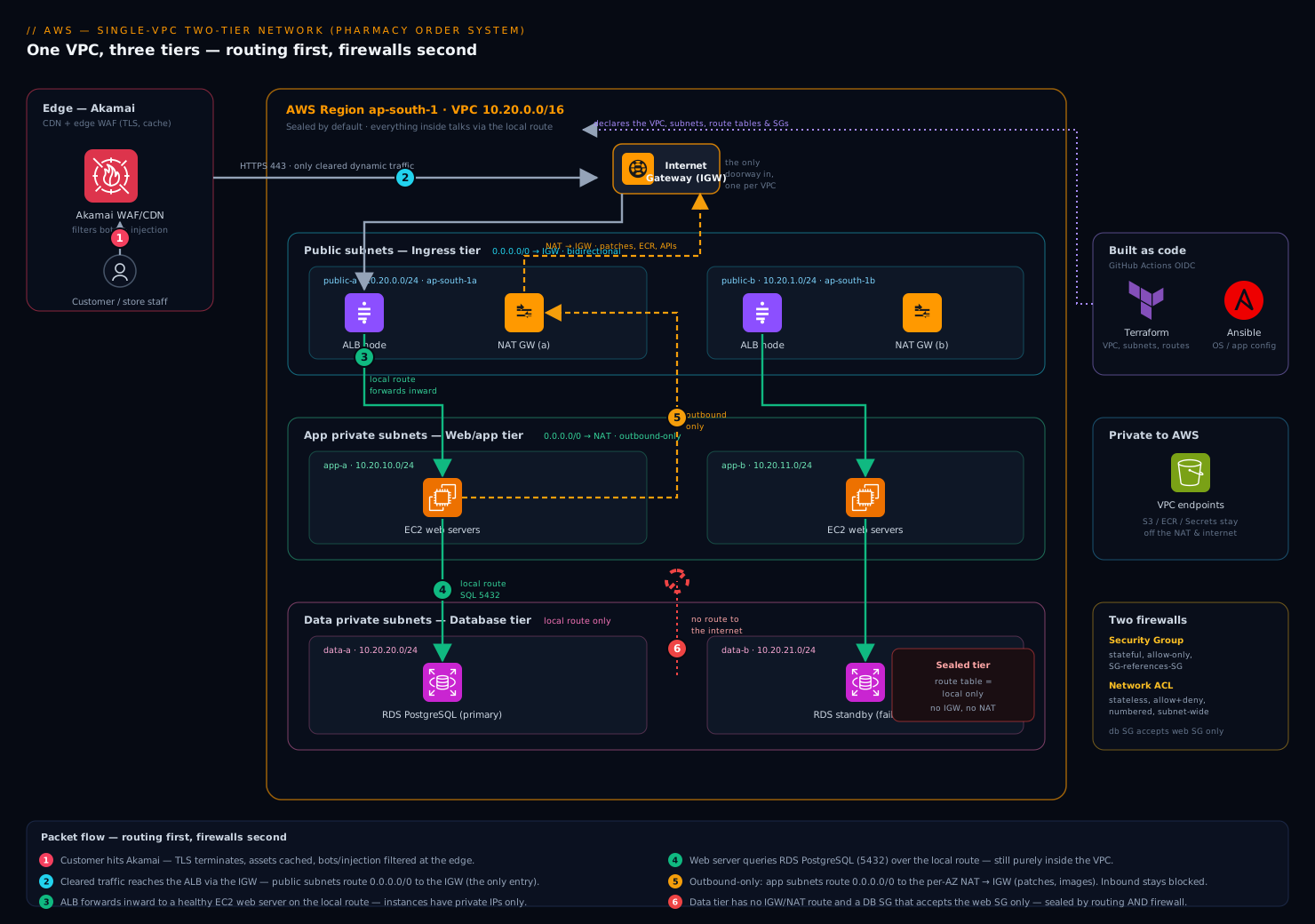
Here is the whole system as a single VPC, and the discipline is to read it as routing first, firewalls second.
The VPC 10.20.0.0/16 is anchored by an Internet Gateway (IGW) — a horizontally-scaled, AWS-managed component attached to the VPC that is the only doorway between the VPC and the public internet. Attaching an IGW does nothing on its own; it becomes meaningful only when a route table points at it. There is exactly one IGW per VPC, and it is the thing the CISO’s database must never have a route to.
Inbound request path (a customer placing an order), following the packet:
- A customer’s browser resolves the app’s hostname. Akamai sits in front as the CDN and edge WAF — it terminates TLS at the edge, caches static product images and assets near the user, and filters bot and injection traffic before anything reaches AWS. Only dynamic, cleared traffic is forwarded to the origin.
- That origin is an Application Load Balancer (ALB) with nodes in
public-aandpublic-b. The ALB has a public-facing presence because its public subnets’ route table sends0.0.0.0/0to the IGW. This is the single internet-facing entry point into the VPC. - The ALB does not run the app — it forwards the request inward to a healthy EC2 web server in
app-aorapp-b. That hop is VPC-internal: it uses the route table’slocalroute, never the IGW. The web servers have only private IPs and are unreachable from the internet directly. - The web server needs order and inventory data, so it opens a connection to RDS PostgreSQL in
data-a(the primary). Again purelylocalrouting inside the VPC. The database answers, the web server renders the response, the ALB returns it to the customer, Akamai delivers it.
Notice what never happened: at no point did a packet from the internet reach the app tier or the data tier directly, and at no point did the database send a packet toward the internet. The internet only ever touched the ALB.
Outbound-only path (a web server needs to reach out, but must stay unreachable):
The web servers occasionally need the internet outbound — to fetch OS security patches, pull a container image, or call a payment API. But they must never be reachable inbound. That asymmetry is exactly what a NAT Gateway provides. A NAT gateway lives in a public subnet; the private app subnets’ route table sends 0.0.0.0/0 to the NAT gateway, which then forwards to the IGW using its own public IP. Return traffic for connections the instance initiated comes back; unsolicited inbound connections cannot — NAT only tracks and returns flows that originated inside. That is “outbound yes, inbound no,” delivered as routing.
The data tier gets no NAT route at all. Its route table contains only the local route. The RDS instance therefore has zero path to or from the internet — patching is handled by the managed service, and that is precisely the property that satisfies HIPAA scope and lets the CISO sign.
Route tables: the rules that decide everything
A route table is an ordered set of rules that answers one question for every packet leaving a subnet: given this destination IP, where do I send it? Each subnet is associated with exactly one route table. AWS uses longest-prefix match — the most specific matching rule wins — so the local route always beats a 0.0.0.0/0 default for in-VPC traffic.
The three tiers differ only in their route tables, and lining them up side by side is the clearest way to see what “public” and “private” really mean:
| Route table | Used by | 10.20.0.0/16 |
0.0.0.0/0 (everything else) |
|---|---|---|---|
| Public | public-a, public-b |
local |
Internet Gateway |
| App (private) | app-a, app-b |
local |
NAT Gateway |
| Data (private) | data-a, data-b |
local |
(no route — sealed) |
Read it top to bottom: the public table reaches the internet bidirectionally via the IGW; the app table reaches the internet outbound-only via the NAT; the data table cannot reach the internet at all. Same VPC, same local route everywhere — the entire security posture of three tiers is expressed in one column of this table. This is why “routing first” is the right way to read any VPC diagram: the route tables are the architecture.
A common cost-and-security upgrade belongs here too. The data and app tiers regularly need AWS services — S3 for backups, Secrets Manager for credentials, ECR for images. Routing that through the NAT gateway works but sends private traffic out to the public AWS endpoints and bills you per gigabyte. A VPC endpoint (a Gateway endpoint for S3/DynamoDB, an Interface endpoint for most others) adds a route or a private DNS entry so that traffic to those services stays inside AWS’s private network — cheaper, and it keeps sensitive backup traffic off any internet path entirely.
Security groups vs NACLs: the two firewalls
Routing decides where a packet can go. Firewalls decide whether it is allowed to. AWS gives you two, at two different layers, and confusing them is the most common stumbling block for someone new to VPCs. You need both, and they behave differently on purpose.
A Security Group (SG) is a firewall attached to an elastic network interface — effectively, to an instance, a load balancer, or an RDS endpoint. It is stateful: if you allow a connection in, the return traffic is automatically allowed out, and vice versa, regardless of your outbound rules. SGs are allow-only — you list what’s permitted; everything else is denied. And the most powerful feature: an SG rule can reference another security group as its source, instead of an IP range. That lets you write “the database accepts connections from whatever is in the web-server security group” — and it keeps working as instances scale up and down and change IPs.
A Network ACL (NACL) is a firewall attached to a subnet, evaluating every packet crossing the subnet boundary. It is stateless: it does not remember outbound flows, so you must explicitly allow the return traffic (typically the ephemeral port range 1024–65535) or replies silently vanish. NACLs have both allow and deny rules, evaluated in numbered order (lowest first, first match wins) — which means a NACL can explicitly block a bad IP, something an SG fundamentally cannot do.
| Property | Security Group | Network ACL |
|---|---|---|
| Attaches to | Instance / ENI (ALB, RDS, EC2) | Subnet |
| State | Stateful — returns auto-allowed | Stateless — must allow returns yourself |
| Rule types | Allow only | Allow and deny |
| Evaluation | All rules, logical OR | Numbered order, first match wins |
| Can reference another SG? | Yes | No — IP ranges only |
| Best used for | Primary, per-resource access control | Coarse subnet-wide guardrails & explicit blocks |
The practical guidance: make security groups your primary control, because referencing SGs by name is precise, self-documenting, and scale-proof. Use NACLs as a coarse second layer — a blanket guardrail at the subnet edge and a place to hard-block a hostile IP — not as your day-to-day access policy.
For the pharmacy’s three-SG design, expressed as Terraform-style intent:
# ALB: open to the world on 443 (Akamai is the real front door upstream)
resource "aws_security_group_rule" "alb_https_in" {
  security_group_id = aws_security_group.alb.id
  type              = "ingress"
  protocol          = "tcp"
  from_port         = 443
  to_port           = 443
  cidr_blocks       = ["0.0.0.0/0"]
}

# Web tier: accept traffic ONLY from the ALB's security group, not from any IP
resource "aws_security_group_rule" "web_from_alb" {
  security_group_id        = aws_security_group.web.id
  type                     = "ingress"
  protocol                 = "tcp"
  from_port                = 8080
  to_port                  = 8080
  source_security_group_id = aws_security_group.alb.id   # SG reference, not a CIDR
}

# Database: accept 5432 ONLY from the web tier's security group. Nothing else, ever.
resource "aws_security_group_rule" "db_from_web" {
  security_group_id        = aws_security_group.db.id
  type                     = "ingress"
  protocol                 = "tcp"
  from_port                = 5432
  to_port                  = 5432
  source_security_group_id = aws_security_group.web.id
}
That database rule is the CISO’s sentence as code: PostgreSQL accepts connections only from the web-tier security group. There is no IP range, no 0.0.0.0/0, no SSH. Combined with the data subnet’s route table that has no internet path, the database is unreachable from the internet by two independent mechanisms — routing and firewall — which is exactly the defence-in-depth a regulated workload needs.
How this gets built and operated
The deployment itself is infrastructure as code with Terraform — the VPC, subnets, route tables, gateways, and security groups are all declared in version-controlled HCL, applied through GitHub Actions authenticating to AWS via OIDC so no long-lived AWS keys sit in the pipeline. Instance-level configuration — installing the web app, hardening the OS — is handled by Ansible. The few real secrets the app needs, like the database password, are never written into Terraform state or an AMI; the web servers fetch them at boot from HashiCorp Vault, which issues short-lived, dynamically-generated database credentials so a leaked credential expires on its own.
Operating the VPC safely brings in the rest of the enterprise toolchain, each playing a specific role:
- Wiz (and Wiz Code) runs continuous cloud-posture scanning and scans the Terraform before it merges — it flags exactly the mistakes this article warns about: a security group opened to
0.0.0.0/0on a database port, a data subnet that accidentally gained a route to the IGW, a public IP on something that should be private. It is the automated reviewer that catches “open the ports until it works” before it reaches production. - CrowdStrike Falcon sensors run on the EC2 instances for runtime threat detection, so even within the private subnets a compromised process is caught and reported to the security team.
- Datadog (the team also evaluates Dynatrace) ingests VPC Flow Logs — a record of every accepted and rejected connection in the VPC — alongside ALB and application metrics, giving one place to see “who is talking to whom” and to prove a rejected connection was the NACL or SG doing its job.
- ServiceNow is the change gate: any modification to a production route table or a database security group goes through a change request, so a network change that could expose the data tier has an approval trail.
- The same patterns extend to other regulated systems the chain runs — for instance the staff-training platform on Moodle sits in its own VPC built identically — and where a third-party security stack ships as virtual appliances (a vendor firewall, an IDS), those run on EC2 in a dedicated inspection subnet with route tables steering traffic through them.
Identity ties it together. Engineers do not get static IAM users — they authenticate through Okta (federated to Microsoft Entra ID where the corporate directory lives) into AWS via SSO, assuming time-boxed roles. So the human who can change the VPC, the CI pipeline that applies it, and the database credential the app uses are all short-lived and traceable, with no permanent key to leak.
Failure modes, scaling, and cost
Failure modes worth naming before they page you:
- The single-NAT trap. A NAT gateway lives in one AZ. If you build one NAT in
public-aand route both app subnets through it, anap-south-1aoutage kills outbound internet for theapp-binstances too — your “multi-AZ” design has a single-AZ dependency hiding in the route table. The fix: one NAT gateway per AZ, each private subnet routing to the NAT in its own AZ. - The stateless-NACL silent drop. Someone tightens a NACL to allow inbound
443but forgets the outbound ephemeral range for return traffic. The connection establishes and then hangs — no error, just a timeout — because replies are being dropped at the subnet edge. This is the classic NACL debugging session; the lesson is that NACLs need return rules in both directions because they are stateless. - CIDR overlap. Two VPCs (or a VPC and the on-prem network) chosen with overlapping CIDRs — both
10.0.0.0/16— can never be peered or connected, and the only fix is to rebuild one. Plan non-overlapping ranges from day one, which is one reason the pharmacy chose10.20.0.0/16deliberately rather than the default.
Scaling. The VPC’s address space is the first ceiling — a /24 subnet’s 251 addresses run out faster than you’d think once an autoscaling web tier and its load-balancer ENIs are consuming them, so size subnets for the peak, not today. The web tier scales horizontally behind the ALB via an Auto Scaling group; the SG-references-SG pattern is what makes that painless, because new instances inherit the right access automatically with no rule edits. RDS scales the read path with read replicas and the write path by instance size; the standby in data-b is for failover, not load. When this single VPC eventually needs to connect to others or to on-prem, that is VPC peering or a Transit Gateway — and the discipline of non-overlapping CIDRs you established here is what makes that possible.
Cost. The line items that surprise teams are all networking, and they are worth knowing on day one:
| Item | What drives the cost | How to control it |
|---|---|---|
| NAT gateway | Hourly charge per gateway plus per-GB processed | Real money at one-per-AZ; route S3/ECR/Secrets via VPC endpoints to bypass it |
| VPC endpoints | Hourly per Interface endpoint; Gateway endpoints are free | Use the free Gateway endpoints for S3/DynamoDB; add Interface endpoints where NAT savings exceed their cost |
| Cross-AZ traffic | Per-GB charge for traffic between AZs | Real but usually worth paying — it is the price of multi-AZ resilience |
| Data transfer out | Per-GB egress to the internet | Akamai caching at the edge cuts origin egress substantially |
The biggest single lever for a small two-tier app is usually VPC endpoints for S3 and the AWS APIs, which both cut the NAT data-processing bill and keep backup and secret traffic off the public path entirely — a cost win and a security win in the same change.
Explicit tradeoffs
This single-VPC design is the right starting point, and you should know its edges. It deliberately uses one VPC for one app — simple to reason about, simple to secure, simple to debug — and that simplicity is the whole point at this stage. The cost is that it does not give you account-level blast-radius isolation: everything here shares one AWS account and one VPC, so a mistake in the app tier is closer to the data tier than it would be across account boundaries. That is the gap a landing zone fills — many accounts, network guardrails enforced from the top, centralized logging and SSO — and it is genuinely the right destination once you run more than a handful of workloads or teams. But adopting it before you understand a single VPC means operating guardrails you cannot reason about, which is its own kind of risk.
One NAT per AZ vs one shared NAT is the most common tradeoff you’ll actually face. One shared NAT is cheaper and fine for dev; one-per-AZ costs more but removes a hidden single-AZ dependency from an otherwise multi-AZ design. For the pharmacy’s production order system, resilience wins and you pay for the second NAT. For its staging environment, you share one and save the money — the same VPC pattern, dialed to the environment.
Security groups vs NACLs is not either/or. Lean on security groups as the precise, primary control because SG-references-SG scales and self-documents; keep NACLs as a thin coarse layer for subnet-wide guardrails and explicit IP blocks. Trying to run fine-grained access policy in stateless, numbered NACLs is how you end up debugging silent timeouts at 2 a.m.
Going deeper
The single-VPC picture above is the whole foundation — but production networks live in the details this section covers. Read these once now; they are the things that turn a working VPC into a correct one, and every one of them shows up in a real incident eventually.
The default VPC — convenient, and quietly wrong for production
Every AWS account is born with a default VPC in every region: a 172.31.0.0/16 VPC with one /20 subnet per Availability Zone, an Internet Gateway already attached, and a main route table that already sends 0.0.0.0/0 to that IGW. Crucially, every default subnet is public, and instances launched there get an auto-assigned public IP unless you say otherwise. That is why a brand-new account can RunInstances and immediately SSH in — the network is pre-wired open.
It is a superb sandbox and a poor production home. Everything is public by default is the exact opposite of the pharmacy’s requirement. Ship real workloads in a VPC you designed, with private subnets and deliberate routing. If someone deletes the default VPC and you want the training wheels back, aws ec2 create-default-vpc recreates it.
DNS inside the VPC: two attributes that break things when off
Two VPC-level attributes control name resolution, and the second one is a classic silent failure:
enableDnsSupport(default true): makes the Amazon-provided DNS resolver — the.2address in your VPC and the link-local169.254.169.253— answer queries. Turn it off and instances can’t resolve anything through AWS’s resolver.enableDnsHostnames(default false for VPCs you create, true for the default VPC): gives instances that have public IPs a public DNS hostname.
The trap: private DNS for interface VPC endpoints, RDS endpoints, and Route 53 private hosted zones only resolves correctly when both attributes are true. A team enables an interface endpoint for Secrets Manager, leaves enableDnsHostnames at its default false, and the app keeps resolving secretsmanager.<region>.amazonaws.com to the public IP — so it silently goes out over the NAT/IGW instead of the private ENI. Two checkboxes, one confusing afternoon.
The resolver at .2 is a facade for Route 53 Resolver. When you need hybrid DNS — resolving on-prem names from AWS or AWS private names from on-prem — you add Resolver inbound/outbound endpoints and forwarding rules rather than running your own DNS servers.
VPC endpoints: Gateway vs Interface (PrivateLink)
The core lesson noted endpoints keep AWS-service traffic off the internet path. There are two mechanically different kinds, and picking wrong costs money or breaks reachability:
| Gateway endpoint | Interface endpoint (PrivateLink) | |
|---|---|---|
| Services | S3 and DynamoDB only | Most AWS services + your own/partner services |
| How it works | Adds a route to a managed prefix list in your route table | Puts an ENI with a private IP in your subnet |
| Price | Free | Per-AZ hourly + per-GB processed |
| Reach | Same-region VPC only — not from peered/VPN/on-prem | Reachable across peering, VPN, Direct Connect |
| DNS | No DNS change (route-based) | Private DNS makes the normal service hostname resolve to the ENI |
Rule of thumb: always use the free Gateway endpoints for S3 and DynamoDB (there’s no reason not to), and add Interface endpoints where the NAT data-processing savings or the “must be reachable from on-prem” requirement justifies the hourly cost. Both take an endpoint policy — an IAM-style resource policy that scopes what the endpoint may reach, e.g. locking an S3 gateway endpoint to only the pharmacy’s backup bucket:
{
  "Version": "2012-10-17",
  "Statement": [{
    "Effect": "Allow",
    "Principal": "*",
    "Action": ["s3:GetObject", "s3:PutObject"],
    "Resource": "arn:aws:s3:::pharmacy-db-backups-123456789012/*"
  }]
}
That policy means even a compromised instance can only talk to that bucket through the endpoint — a data-perimeter control the NAT path can’t give you.
VPC peering vs Transit Gateway — and the non-transitive trap
One VPC eventually needs to reach others. Two tools, and the difference bites beginners hard.
VPC peering is a direct 1:1 link between two VPCs (same or cross-account, same or cross-region). Two facts define it: you must add routes on both sides pointing at the peering connection, and peering is non-transitive. If A is peered to B and B is peered to C, A cannot reach C through B — there is no routing through a peer. To connect n VPCs in a full mesh you need n(n-1)/2 peerings (10 VPCs → 45 connections), each with routes on both ends. And two VPCs with overlapping CIDRs can never be peered — the reason the pharmacy chose 10.20.0.0/16 deliberately rather than the default 10.0.0.0/16 everyone else also picks.
Transit Gateway (TGW) is a regional hub: each VPC attaches once, and TGW route tables decide who can reach whom. It is transitive by design, supports VPN and Direct Connect attachments, and peers across regions. The tradeoff is cost — TGW bills per attachment-hour and per-GB of data processed, a fee plain peering doesn’t have. So: a handful of VPCs that rarely change → peering is cheaper; a growing estate where you’d otherwise manage a mesh of dozens of peerings → TGW’s operational simplicity wins. See Transit Gateway multi-account VPC architecture for the hub design in full.
IPv6, egress-only gateways, and secondary CIDRs
Everything so far was IPv4. Three growth levers are worth knowing before you need them:
- IPv6. You attach an IPv6 CIDR to the VPC (an Amazon-assigned
/56; subnets take a/64). The mental shift: IPv6 addresses are globally unique and publicly routable — there is no NAT for IPv6, because NAT only ever existed to stretch scarce IPv4 space. Security still comes entirely from security groups and NACLs. - Egress-only Internet Gateway (EIGW). To get the NAT gateway’s “outbound yes, inbound no” behaviour for IPv6, you use an EIGW — the IPv6-only analog of a NAT gateway. Private-but-outbound IPv6 subnets route
::/0to the EIGW, exactly as IPv4 private subnets route0.0.0.0/0to the NAT. - Secondary CIDRs. When a VPC runs low on addresses you can add more IPv4 CIDR blocks (default limit five per VPC, raisable via a quota request to as many as ~50). They must not overlap the existing blocks, any peer, or on-prem. The canonical move: add
100.64.0.0/16(RFC 6598 “carrier-grade NAT” space) purely for EKS pods, so the pod-hungry CNI doesn’t drain your real RFC 1918 ranges.
Flow logs: proving who talked to whom
The core lesson mentioned Datadog ingesting VPC Flow Logs. Here’s what they actually are: a record of IP-traffic metadata — not packet contents — captured at the VPC, subnet, or ENI level and delivered to CloudWatch Logs, S3, or Kinesis Data Firehose. The default record has these fields:
version account-id interface-id srcaddr dstaddr srcport dstport protocol packets bytes start end action log-status
2 123456789012 eni-0abc12 10.20.10.34 10.20.20.15 51712 5432 6 12 1620 ... ... ACCEPT OK
2 123456789012 eni-0abc12 203.0.113.9 10.20.10.34 44321 22   6 3  144  ... ... REJECT OK
Read those two lines: the first is a web server (10.20.10.34) reaching the database on 5432 — ACCEPT, the healthy path. The second is someone on the internet probing SSH (22) on the web server — REJECT, a security group or NACL doing its job. That ACCEPT/REJECT column is the single most useful field when debugging connectivity: a REJECT means a firewall blocked it (check SG/NACL); an ACCEPT with the app still not responding means the packet arrived and the problem is higher up (the process, the health check, the app config).
Two caveats: flow logs don’t capture everything — traffic to the Amazon DNS resolver, DHCP, the instance-metadata service (169.254.169.254), and Windows license activation are all excluded — and because NAT rewrites source addresses, use the custom-format pkt-srcaddr/pkt-dstaddr fields when you need the original client behind a NAT gateway rather than the NAT’s IP.
Security groups and NACLs at scale: quotas, state, and ephemeral ports
The two-firewalls model has production-grade edges worth internalising (the SG/NACL deep dive goes further):
- Quotas. A security group holds 60 inbound + 60 outbound rules by default; an ENI can have 5 security groups (raisable to 16); and the product
rules-per-SG × SGs-per-ENImust stay≤ 1000. A NACL holds 20 rules by default (raisable to 40). Each CIDR, SG reference, or prefix-list entry counts as one rule — teams that write a rule per office IP hit the ceiling fast; a managed prefix list collapses many CIDRs into one referenced object. - Connection tracking. “Stateful” means each SG keeps a connection-tracking table. A subtlety that surprises people: an established tracked TCP flow keeps running until it idles out (the default established-connection timeout is long — on the order of days), so tightening a rule does not tear down connections already open. If you need existing sessions cut immediately, you must terminate them at the instance, not just edit the SG.
- Ephemeral ports. The return-traffic port range a NACL must allow depends on the client: Linux uses
32768–60999, Windows Server uses49152–65535, and AWS components like NLB and Lambda use1024–65535. Because you rarely control every client, AWS’s guidance is to allow outbound1024–65535on NACLs — miss it and you get the stateless silent-timeout the core lesson warned about.
Once this VPC is second nature, the natural next step is the VPC deep dive on subnets, routing, IGW, NAT and endpoints, which builds directly on everything here.
The shape of the win
For the pharmacy, the payoff is not “we’re on AWS now.” It is that a customer’s order request travels Akamai → ALB → web tier → database and back in milliseconds, while the prescription database sits in a subnet with no route to the internet and a firewall that accepts connections from exactly one security group — unreachable from the public internet by two independent mechanisms, continuously verified by Wiz, every connection logged in flow logs and watched in Datadog, every change to it gated through ServiceNow. The CISO’s one sentence — “the database must never be reachable from the internet” — is now expressed three times over: in a route table with no IGW path, in a security group with no public source, and in a posture scanner that fails the build if either ever changes. That is what a VPC is for. Master this one, and the landing zone later is this same packet, this same route table, this same security group — just repeated across accounts, with the guardrails you now understand well enough to trust.
Practice challenges
Work these top to bottom — they escalate from CIDR arithmetic to a real cost-and-security redesign. Try each before opening the solution. (No live AWS account needed; these are reasoning and command-writing exercises.)
1. Beginner — count the usable addresses. How many usable IP addresses are in a /27 subnet, and name the five reserved addresses in 10.20.30.0/27.
<details> <summary>Solution</summary>
A /27 has 2^(32-27) = 2^5 = 32 total addresses, minus AWS’s five reserved = 27 usable. In 10.20.30.0/27 the reserved five are: 10.20.30.0 (network), 10.20.30.1 (VPC router), 10.20.30.2 (Amazon DNS), 10.20.30.3 (future use), and 10.20.30.31 (broadcast).
Why: a /27 spans .0–.31; AWS always reserves the first four and the last, so usable = total − 5.
</details>
2. Beginner — public or private? A subnet’s route table has exactly two routes: 10.20.0.0/16 → local and 0.0.0.0/0 → igw-0a1b2c3d. Is it public or private? What one change makes it private?
<details> <summary>Solution</summary>
Public — because it has a default route (0.0.0.0/0) pointing at an Internet Gateway. To make it private, remove that 0.0.0.0/0 → igw route (or repoint it at a NAT gateway for outbound-only). Nothing else about the subnet changes; “public” is purely a property of the route table.
Why: a subnet is public if and only if its route table sends internet-bound traffic to an IGW — the label is routing, not a setting. </details>
3. Intermediate — lock the database to the web tier. Write the AWS CLI command that lets the RDS security group (sg-db) accept PostgreSQL only from the web-tier security group (sg-web) — no IP ranges.
<details> <summary>Solution</summary>
aws ec2 authorize-security-group-ingress \
  --group-id sg-db \
  --protocol tcp --port 5432 \
  --source-group sg-web
This adds one ingress rule: TCP 5432 whose source is the sg-web security group, not a CIDR. As the web tier scales, new instances inherit access automatically.
Why: referencing a security group as the source (instead of an IP) is precise, self-documenting, and survives autoscaling IP churn. </details>
4. Intermediate — spot the single-AZ dependency. A “multi-AZ” design has one NAT gateway in public-a (AZ ap-south-1a), and both app-a and app-b route 0.0.0.0/0 to it. What breaks in an ap-south-1a outage, and what’s the fix?
<details> <summary>Solution</summary>
If ap-south-1a fails, the single NAT gateway goes with it — so app-b (in the healthy ap-south-1b) loses all outbound internet (patching, image pulls, external APIs), even though its own AZ is up. The design has a hidden single-AZ dependency in the route table. Fix: one NAT gateway per AZ, and each private subnet routes 0.0.0.0/0 to the NAT in its own AZ.
Why: highly-available compute across AZs is undermined if every AZ’s egress funnels through one AZ’s NAT. </details>
5. Advanced — the stateless silent drop. A NACL on a private subnet allows inbound TCP 443. Connections establish and then hang with no error. Which rule is missing, and write it (as a NACL entry).
<details> <summary>Solution</summary>
The outbound rule for return traffic is missing. NACLs are stateless, so the reply packets (going back to the client’s ephemeral port) need an explicit outbound allow:
Rule 100 Outbound TCP Port range 1024-65535 Destination 0.0.0.0/0 ALLOW
The connection completes the handshake to :443 inbound but the server’s responses to the client’s ephemeral port are dropped on the way out, so it times out silently.
Why: stateless NACLs don’t auto-allow returns — you must permit the ephemeral port range (AWS recommends 1024–65535) outbound.
</details>
6. Advanced — cut the NAT bill and tighten the perimeter. An app pulls ~2 TB/month of container images from ECR and objects from S3, all routed through the NAT gateway. Propose the change and say which part is free.
<details> <summary>Solution</summary>
Add a Gateway endpoint for S3 (free — a route to the S3 prefix list) and Interface endpoints for ECR (ecr.api and ecr.dkr, plus the S3 gateway endpoint that ECR layer pulls use). That traffic then leaves the NAT path entirely, so you stop paying NAT per-GB data-processing on those ~2 TB, and the traffic stays on AWS’s private network. The S3 gateway endpoint is free; the ECR interface endpoints cost per-AZ-hour + per-GB but far less than NAT processing at that volume.
Why: routing AWS-service traffic through VPC endpoints removes it from the NAT data-processing meter and keeps it off the public path — a cost win and a security win in one change. </details>
Common beginner mistakes
These are misconceptions, not symptoms — the wrong mental model that produces the bugs. Fix the model and the bugs stop happening.
-
“I gave the instance a public IP, so it’s on the internet.” A public IP does nothing without a route. An instance in a subnet whose route table has no
0.0.0.0/0 → IGWentry has a public IP it cannot use — no traffic flows. Right model: internet reachability is a property of the route table, and a public IP is only useful once that route exists. -
“Security groups need an outbound rule to let replies back.” They don’t — security groups are stateful, so the return traffic for any allowed connection is automatically permitted. The mirror-image mistake is treating a NACL as stateful: it is stateless, and forgetting its return rule is the classic silent timeout. Right model: SG = stateful (returns free); NACL = stateless (spell out both directions).
-
“I’ll add a deny rule to the security group.” There is no such thing — security groups are allow-only. To block a specific hostile IP you need a NACL deny rule (or AWS WAF / Network Firewall higher up). Right model: SGs permit; only NACLs (and dedicated firewalls) can explicitly deny.
-
“The NAT gateway is my firewall — it keeps attackers out.” NAT blocks unsolicited inbound only as a side effect of address translation; it is not a security control and has no rules you tune. Right model: NAT provides outbound connectivity; security groups and NACLs provide security. Never lean on NAT as protection.
-
“One NAT gateway is fine — my subnets are multi-AZ.” Multi-AZ compute funnelled through a single-AZ NAT still dies when that one AZ fails. Right model: the egress path needs the same AZ-resilience as the workload — one NAT per AZ.
-
“VPC peering is transitive, so I’ll hub everything through one VPC.” Peering is non-transitive: A↔B and B↔C does not give A↔C, and overlapping CIDRs can’t peer at all. Right model: peering is strictly point-to-point; for a transitive hub you need a Transit Gateway.
-
“I’ll just launch everything in the default VPC.” The default VPC is all-public by design — great for a quick test, wrong for anything regulated. Right model: production runs in a VPC you designed with private subnets and deliberate routing.
-
“I’ll start small with a
/24VPC and grow it later.” You can add secondary CIDRs, but you cannot renumber the primary block or overlap a future peer/on-prem network without a painful rebuild. Right model: pick a roomy, non-overlapping range (a/16) on day one — the cheapest decision you’ll ever make and the most expensive to undo.
Glossary
- VPC (Virtual Private Cloud) — your own logically isolated slice of the AWS network, defined by an IP range and invisible to other customers’ VPCs by default.
- CIDR block — an IP range written as address + prefix length, e.g.
10.20.0.0/16. The prefix length says how many leading bits are fixed as the network part. - Prefix length — the number after the slash. Smaller number = bigger block (
/16is far larger than/24). - Subnet — a slice of a VPC’s CIDR pinned to a single Availability Zone; where you actually place resources.
- Availability Zone (AZ) — a physically separate datacentre within a Region. A subnet lives in exactly one AZ.
- Region — a geographic area (e.g.
ap-south-1) containing multiple AZs. - Public subnet — a subnet whose route table sends
0.0.0.0/0to an Internet Gateway. “Public” is a routing description, not a toggle. - Private subnet — a subnet with no route to an Internet Gateway (outbound may go via a NAT gateway, or nowhere at all).
- Route table — the ordered rules that decide, for a packet leaving a subnet, where its destination IP is sent. Each subnet uses exactly one.
- Local route — the implicit route (the VPC’s own CIDR →
local) that lets everything inside a VPC talk to everything else; it can’t be removed or overridden. - Longest-prefix match — the routing rule that the most specific matching destination wins, so
localalways beats0.0.0.0/0for in-VPC traffic. 0.0.0.0/0— the default route: “everything not matched by a more specific rule.” Where you point it (IGW, NAT, or nothing) defines the subnet.- Internet Gateway (IGW) — the single AWS-managed doorway between a VPC and the public internet; meaningful only when a route table points at it.
- NAT gateway — an AWS-managed device in a public subnet that gives private subnets outbound-only internet access (return traffic yes, unsolicited inbound no). Per-AZ; billed hourly + per-GB.
- Egress-only Internet Gateway (EIGW) — the IPv6 analog of a NAT gateway: outbound-only IPv6 connectivity (there is no NAT for IPv6).
- Elastic Network Interface (ENI) — a virtual network card in a subnet; instances, load balancers, RDS endpoints, and interface endpoints all attach to one and consume its IP.
- Security group (SG) — a stateful, allow-only firewall attached to an ENI; can reference another security group as its source.
- Stateful — remembers connections, so return traffic for an allowed flow is automatically permitted (security groups).
- Network ACL (NACL) — a stateless firewall at the subnet boundary with numbered allow and deny rules, evaluated lowest-number-first.
- Stateless — keeps no connection memory, so return traffic must be explicitly allowed (NACLs).
- Ephemeral ports — the high-numbered source ports clients use for replies (Linux
32768–60999, Windows49152–65535, NLB/Lambda1024–65535); NACLs must allow this range for returns. - VPC endpoint — a private on-ramp to AWS services that keeps traffic off the internet. Gateway type (free, route-based) serves S3/DynamoDB; Interface type (an ENI, priced) serves most services.
- PrivateLink — the technology behind interface endpoints; exposes a service as a private ENI in your VPC.
- Prefix list — a named, reusable set of CIDRs (managed by AWS for services like S3, or by you) referenced in routes and security-group rules.
- VPC peering — a direct, non-transitive 1:1 connection between two VPCs; requires routes on both sides and non-overlapping CIDRs.
- Transitive routing — reaching C through B; peering does not provide it, a Transit Gateway does.
- Transit Gateway (TGW) — a regional hub each VPC attaches to once; transitive, supports VPN/Direct Connect, billed per attachment + per-GB.
- VPC Flow Logs — a record of IP-traffic metadata (not contents) at VPC/subnet/ENI level, with an
ACCEPT/REJECTverdict per flow; delivered to CloudWatch Logs, S3, or Firehose. - Default VPC — the pre-built
172.31.0.0/16VPC every account gets per region, with all-public subnets and an IGW already wired. Convenient, not for production. - Secondary CIDR — an additional IPv4 CIDR block added to a VPC that has run low on addresses; must not overlap existing blocks or peers.
- Amazon-provided DNS — the resolver at the VPC’s base address +2 (and
169.254.169.253); a facade for Route 53 Resolver. enableDnsSupport/enableDnsHostnames— the two VPC attributes controlling resolution and public hostnames; both must betruefor private endpoint/RDS/private-hosted-zone DNS to resolve.- Route 53 Resolver — the service behind the
.2resolver; adds inbound/outbound endpoints and forwarding rules for hybrid (on-prem ↔ AWS) DNS. - IPv6 — optional address family for a VPC (Amazon-assigned
/56, subnets/64); globally routable, so it uses SG/NACL and an egress-only IGW instead of NAT.