In a nutshell
Imagine you could rent a fully-wired telephone switchboard — phone lines, hold music, the routing logic that decides who a caller reaches, the recorder, even a transcriptionist listening to every call — and pay only for the minutes people are actually talking. When the phones go quiet you pay almost nothing; when a thousand calls arrive at once, a thousand more “lines” simply exist. That rented, elastic switchboard is Amazon Connect. It is the serverless version of a call center: you bring the greeting, the questions your callers ask, and the humans who answer the hard ones; AWS runs the telephony, the queues, the recording, and the analytics, and bills you by the minute of conversation.
Everything else in this lesson hangs off that one idea. Because Connect is a managed service, absorbing a seasonal surge is not a hardware project — there is no rack to buy. Because it invokes your own code at each decision point, you can look a caller up in Salesforce mid-call and pop their record onto the agent’s screen. And because it streams a copy of everything it does — who called, what they asked, how they felt — into storage you control, your executives can watch first-contact resolution and sentiment as live numbers instead of a spreadsheet stitched together three weeks later. Elastic capacity, live CRM context, and open analytics: those are the three payoffs, and the whole architecture below exists to deliver them.
If you have ever waited on hold, pressed “2 for billing,” and then had an agent already know your name — you have used a system like this from the outside. This lesson builds it from the inside.
Level: Intermediate · Time: ~35 min
Prerequisites — you’ll move faster if you already know:
- What an AWS Lambda function is and how it gets an IAM execution role — the CRM lookups live here. If Lambda is fuzzy, skim AWS Lambda deep dive first.
- Basic S3, KMS, and VPC concepts — recordings land in encrypted S3, and the Lambdas reach private CRM endpoints from inside a VPC.
- The idea of an identity provider (IdP) and SSO/SAML — agents sign in through Okta, not a local password.
- Optional but relevant: the agent’s virtual desktop is its own build — WorkSpaces VDI for a regulated contact center is the companion piece.
After this lesson you will be able to:
- Name the core Connect building blocks (instance, phone number, flow, queue, routing profile, CCP) and say what each one does.
- Trace a single call through the three paths — contact, agent-experience, analytics — and explain why keeping them separate matters.
- Wire a CRM screen-pop: a Lambda that returns member context and a flow that reads it, with the exact JSONPath and the three response constraints that trip everyone up.
- Reason about the deflection economics that make self-service the point, not a gimmick, and choose real-time versus post-call Contact Lens on cost.
- Sketch the analytics pipeline (CTRs → Kinesis → S3 → Athena), and know when the newer native Connect data lake replaces it.
- Plan the unglamorous production details — service quotas, provisioned concurrency, KMS on PHI, and regional DR — before the season instead of during it.
A national health-insurance payer runs Open Enrollment for six weeks every autumn, and for those six weeks its contact center is the company. Call volume triples overnight, members ask the same forty questions about plan tiers and deductibles, and the legacy on-premises ACD it has limped along on for a decade has exactly the capacity it was sized for in a normal February — no more. Last enrollment season the queue hit a forty-minute hold, abandonment crossed 30%, and the VP of Member Services spent the quarter explaining the CSAT drop to the board. The hardware refresh quote to add seats for a six-week peak was seven figures of telephony gear that would sit idle for ten months. The mandate this year is blunt: “Handle the peak without buying the peak, deflect the routine calls, and put a real number on agent occupancy and member sentiment.” This article is the reference architecture for building that on Amazon Connect — an elastic, pay-per-use cloud contact center with self-service, live CRM context, and analytics a member-services VP and a CFO will both sign.
The pressures in a regulated payer stack the way they always do. Elasticity means absorbing a 3× seasonal surge and an unforecast Monday-morning spike without a capacity project. Compliance means every call recording and transcript is PHI under HIPAA, so storage, access, and retention are not negotiable. Deflection means the routine “what’s my copay” calls should never reach a human, because a member who self-serves in twenty seconds is cheaper and happier than one who waits in a queue. And measurement means the executive team wants agent occupancy, first-contact resolution, and sentiment as live numbers, not a spreadsheet assembled three weeks after the season ends. A cloud-native contact center is the pattern that satisfies all four at once: telephony, IVR, routing, recording, and analytics become managed services you scale on demand and pay for by the minute, instead of a rack you size for a peak you hit six weeks a year.
Why not the obvious shortcuts
The naive fixes each fail predictably, and naming why matters because someone on the project will propose all three.
Adding seats to the on-prem ACD solves nothing structural — you buy hardware for a six-week peak, depreciate it for ten idle months, and still have no path to self-service or modern analytics. A bare SIP trunk to a softphone fleet gives you dial tone but no skills-based routing, no IVR, no recording-with-redaction, and no compliance story — you have rebuilt 1998. A generic CCaaS suite with a closed data model handles calls fine but locks your transcripts and metrics inside a vendor’s walled garden, so the data-lake analytics and the CRM-context screen-pop your executives actually asked for become an integration project the vendor charges you for twice.
Amazon Connect threads the needle. It is a pay-per-use cloud contact center where the telephony, the contact flows (the visual IVR/routing logic), recording, and the Contact Lens analytics are managed, and — critically — it is built to be extended with your own Lambda functions for CRM lookups and your own streaming exports for analytics. You get the elastic managed core and an open data plane, which is exactly the combination a closed suite denies you.
The building blocks — a five-minute mental model
The architecture below name-drops contact flows, queues, and routing profiles as if you already speak the language. If you don’t yet, here is the whole vocabulary in one place. Amazon Connect deliberately mirrors the pieces of a physical call center, so the fastest way in is to map each cloud concept to the analog thing it replaces.
| Old telephony term | Amazon Connect term | What it actually is |
|---|---|---|
| PBX / ACD (the phone system in the closet) | Instance | The whole contact center as one managed resource — one URL, one identity setup, one set of storage. Everything else lives inside it. |
| A phone line / DID | Claimed phone number | A number (toll-free or DID) you claim in the console and point at a flow. Members dial it; you pay per minute of use. |
| The IVR script (“press 1 for claims”) | Contact flow (now just “flow”) | A visual, drag-and-drop diagram of what happens on a call: play a prompt, ask Lex a question, invoke a Lambda, set an attribute, put the caller in a queue. |
| Skill group / hunt group | Queue | A waiting line for contacts that need a human. Contacts sit here until a suitable agent is free. |
| “Which agents can take which calls” | Routing profile | The rulebook attached to each agent: which queues they serve, in what priority, and how many contacts of each channel they can handle at once. |
| Business hours | Hours of operation | When a queue is open. Outside them, the flow can offer a callback or voicemail instead of ringing an empty floor. |
| The physical desk phone + headset | Contact Control Panel (CCP) | The softphone the agent uses in the browser — answer, hold, transfer, hang up. It can be embedded inside your own web app (that’s how the screen-pop happens). |
| Speed-dial buttons | Quick connect | Pre-defined transfer targets (a supervisor, the pharmacy team) an agent can send a caller to in one click. |
Two more ideas complete the picture and are easy to miss:
A “contact” is not just a phone call. Connect is omnichannel — the same instance, flows, and agents handle voice, chat, tasks, and email (email became generally available in 2024). A task is a trackable unit of work — “call this member back about their appeal” — that routes to an agent exactly like a call does. Because chat and tasks don’t tie up an agent full-time the way voice does, one agent can hold several at once; the routing profile’s media concurrency setting is where you say “one voice call or up to three chats.” That single knob is why a cloud contact center gets more out of the same headcount than a phone-only floor ever could.
Contact attributes are the memory of a call. As a contact moves through a flow, Connect carries a bag of key/value pairs alongside it — the caller’s number, the intent Lex detected, the deductible a Lambda fetched. These contact attributes are how information gathered early (the member ID) survives to be used later (the screen-pop, a transfer). Keep this in mind: almost every “how does the agent already know that?” answer in this lesson is “an attribute set earlier in the flow.” You reference them in the flow with a JSONPath such as $.Attributes.memberTier for your own attributes or $.External.deductible for whatever a Lambda just returned — a detail we’ll use for real in the worked example.
With that vocabulary in hand, the three-path architecture reads the way the platform team actually thinks about it.
Architecture overview
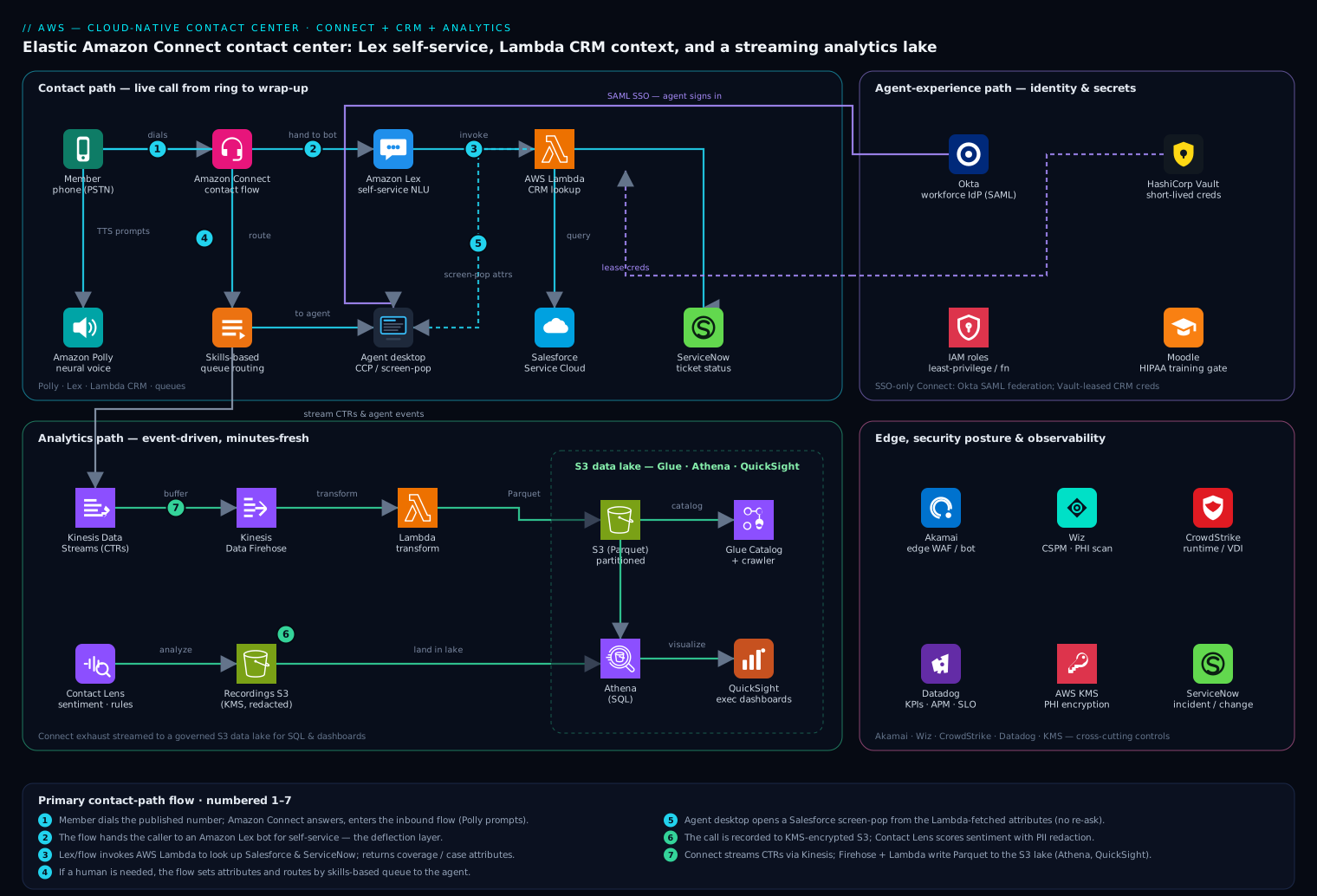
The platform runs three distinct paths that share an instance but live on different schedules: a synchronous contact path that handles a live call from ring to wrap-up, an agent-experience path that authenticates and equips the human, and an event-driven analytics path that turns every completed contact into governed, queryable data. Keeping them separate in your head is the first step to operating this well.
The defining property of the topology is that Amazon Connect is the orchestrator, not a monolith — it owns telephony, the contact flow, queues, and recording, and at every decision point it invokes your code (Lex for understanding, Lambda for data) and streams its exhaust (events, metrics, transcripts) to AWS services you control. That separation is what makes self-service, CRM context, and a data lake additive features rather than vendor change requests.
Contact path, following a member’s call:
- A member dials the published number; Amazon Connect answers on a claimed phone number and enters the inbound contact flow. Amazon Polly speaks prompts in natural neural voices, so there is no recorded-prompt studio to maintain.
- The flow hands the caller to an Amazon Lex bot for natural-language self-service: “I want to check my deductible.” Lex resolves intent and slots (member ID, plan year) and, for the routine questions, answers entirely in the bot — this is the deflection layer that keeps the forty routine questions off the agent queue.
- To answer with real data, the Lex bot — or the flow directly — invokes an AWS Lambda function that performs the CRM lookup: it calls Salesforce (Service Cloud) for the member’s case and coverage record and ServiceNow for any open IT/benefits ticket, then returns the deductible, plan tier, and case status as flow attributes. Lambda is the integration seam where Connect meets your systems of record.
- If the member needs a human, the flow sets a contact attribute (intent, member tier, language) and routes to the correct queue by skills-based routing. A high-tier member or a clinical question lands in a specialized queue; everyone else flows to the general enrollment pool.
- The call connects to an available agent in the Connect Contact Control Panel (CCP), embedded in a custom agent desktop. A screen-pop — driven by the same Lambda-fetched attributes via the Connect Streams API — opens the member’s Salesforce record before the agent says hello, so no one asks “can I get your member ID” a second time.
- The conversation is recorded (with consent capture in the flow) to Amazon S3, and Contact Lens transcribes and analyzes it in real time — sentiment, talk-time, silence, and rule-based alerts (a detected escalation phrase can flag a supervisor live).
Agent-experience path: agents do not get a Connect-local password. They sign in once through Okta as the workforce IdP, which federates via SAML to the Connect instance, so joiners and leavers are provisioned and de-provisioned in Okta and a terminated agent loses contact-center access the instant HR disables their identity. The agent desktop pulls any third-party API tokens it needs (a Salesforce connected-app secret, a ServiceNow integration credential) from HashiCorp Vault rather than baking them into Lambda environment variables, so secrets are short-lived and centrally rotated.
Analytics path, independent and event-driven: Connect streams Contact Trace Records (CTRs) and agent events through Amazon Kinesis Data Streams; Contact Lens output (transcripts, sentiment, categories) and the call recordings land in S3. A Kinesis Data Firehose + Lambda transform writes the records as partitioned Parquet into the data lake (S3 + AWS Glue Data Catalog), where Amazon Athena and QuickSight answer the executive questions — occupancy, FCR, deflection rate, sentiment trend — on data that is at most minutes old. That streaming export, not a nightly batch, is what turns “how are we doing right now” into a live dashboard.
Component breakdown
| Component | Service / tool | Role in the platform | Key configuration choices |
|---|---|---|---|
| Contact center core | Amazon Connect | Telephony, contact flows, queues, routing, recording | Claimed DID + toll-free; skills-based routing; recording to encrypted S3 |
| Self-service NLU | Amazon Lex | Intent/slot resolution, conversational deflection | Bot per domain; confidence threshold to fall back to an agent |
| Text-to-speech | Amazon Polly | Natural neural voice prompts in the flow | Neural voices; SSML for numbers/dates; no recorded-prompt studio |
| CRM / system-of-record glue | AWS Lambda → Salesforce + ServiceNow | Member/coverage lookup, ticket status, screen-pop data | Per-function least-privilege role; VPC egress; secrets from Vault |
| Identity / SSO | Okta | Agent and supervisor SSO into Connect | SAML federation; SCIM provisioning; MFA + conditional access |
| Secrets | HashiCorp Vault | Salesforce/ServiceNow API creds, signing keys | AWS IAM auth method; dynamic short-lived leases; per-function policy |
| Conversation analytics | Contact Lens | Real-time + post-call transcript, sentiment, rules | Real-time on enrollment queues; PII redaction in transcript & audio |
| Streaming | Kinesis Data Streams + Firehose | Export CTRs, agent events, analytics to the lake | Shard sizing to peak TPS; Firehose buffering to Parquet |
| Data lake | S3 + AWS Glue + Athena + QuickSight | Governed store + SQL + executive dashboards | Partition by date/queue; Lake Formation grants; Glue crawler |
| Edge / web | Akamai | TLS, WAF, bot protection for the agent desktop & web chat | WAF on the desktop origin; bot mitigation on chat widget |
| CSPM / posture | Wiz (+ Wiz Code) | Cloud posture, PHI-exposure & attack-path detection; IaC scanning | Agentless scan of S3/Lambda/Connect; Wiz Code gate in the pipeline |
| Runtime security | CrowdStrike Falcon | Runtime protection on agent VDI and Lambda-adjacent compute | Sensor on VDI fleet; detections to the SOC |
| Observability | Datadog | Contact-center KPIs, Lambda traces, synthetics, alerting | Connect metrics via integration; APM on Lambda; SLO monitors |
| ITSM / approvals | ServiceNow | Incident records, change approval for flow/bot changes | Change gate before a flow goes live; auto-ticket on Contact Lens alert |
| CI / IaC | GitHub Actions / Jenkins + Argo CD + Terraform / Ansible | Pipeline build/test; flows-as-code; infra and config | OIDC to AWS (no stored keys); Argo CD syncs desktop app to EKS |
| Agent enablement | Moodle | Onboarding & compliance training for seasonal agents | HIPAA + product courses; completion gate before queue assignment |
A few of these choices deserve the why, because they are the ones teams get wrong.
Why Lex deflection is the economic core, not a gimmick. The cheapest call is the one a human never takes. If Lex resolves “check my deductible” end to end, that contact costs a fraction of an agent-handled minute and the member is done in twenty seconds. The discipline is the confidence threshold: set Lex to fall back to a human the moment intent confidence drops, because a bot that confidently mis-answers a benefits question during enrollment does more reputational damage than a queue. Deflection rate is a headline metric precisely because it moves both cost and CSAT in the same direction.
Why CRM context lives in Lambda, not in the flow. It is tempting to wire small lookups directly into the contact flow. Don’t let real integration logic live there — flows are for routing decisions, and business logic embedded in a flow is untestable and unversionable. Put the Salesforce/ServiceNow calls in Lambda, where they get unit tests, a least-privilege IAM role, VPC egress to reach private CRM endpoints, and Vault-leased credentials. The flow passes an identifier in and reads attributes out; the how stays in code you can test and roll back.
Why stream to a lake instead of using only the built-in reports. Connect’s historical metrics are fine for an operations view, but the executive questions — deflection by intent, sentiment by plan tier, occupancy correlated with hold time — need joins across CTRs, Contact Lens output, and your own member data. Streaming CTRs and analytics into an S3 data lake with Athena gives you that open, joinable surface; the closed-suite alternative is to ask the vendor for a report and wait.
Implementation guidance
Provision with Terraform and treat identity and the network as the first deliverables. Stand up the Connect instance, claim numbers, and define queues and routing profiles as code so the whole contact center is reproducible across a dev and prod instance — flows promoted by export/import in the pipeline, never hand-edited in prod. A minimal Terraform shape for the instance communicates the intent — SSO-only, no Connect-local directory:
resource "aws_connect_instance" "cc" {
  identity_management_type  = "SAML"   # agents come from Okta, not a Connect directory
  inbound_calls_enabled     = true
  outbound_calls_enabled    = true
  contact_lens_enabled      = true
  auto_resolve_best_voices_enabled = true
}

resource "aws_connect_routing_profile" "enrollment" {
  instance_id               = aws_connect_instance.cc.id
  name                      = "open-enrollment"
  default_outbound_queue_id = aws_connect_queue.general.queue_id
  media_concurrencies { channel = "VOICE" concurrency = 1 }
  media_concurrencies { channel = "CHAT"  concurrency = 3 }  # one agent, three chats
}
The pipeline that applies this runs in GitHub Actions (or Jenkins where the payer standardizes on it), authenticating to AWS via OIDC so there is no stored access key to leak — a hard lesson the platform team intends never to repeat. Argo CD syncs the custom agent desktop (the React app embedding the CCP) to the EKS cluster, Ansible configures the agent VDI image, and Wiz Code scans the Terraform and Lambda packages in the pipeline so a public S3 bucket or an over-broad IAM policy is caught before it deploys, not by an auditor afterward.
Identity: kill the local accounts, federate the agents. Set the instance to SAML identity management so the only way an agent reaches the CCP is through Okta — single sign-on, MFA, conditional access, and SCIM provisioning mean a seasonal-hire cohort is onboarded in Okta groups and a terminated agent loses access the instant HR disables the identity. Lambda functions assume least-privilege IAM roles (one per function, only the API actions it needs), run in the VPC to reach private Salesforce/ServiceNow endpoints, and pull third-party credentials from HashiCorp Vault via the AWS IAM auth method as short-lived leases, so no long-lived CRM secret ever sits in a Lambda environment variable.
Contact-flow and bot wiring. Keep flows lean: greet, consent, Lex self-service, Lambda lookup, set attributes, route. Version the Lex bot and the flow exports in git, and promote them through the pipeline with a ServiceNow change approval — a mis-routed flow during enrollment is a production incident, so it gets a documented gate. Carry the member’s identifiers and the Lambda-fetched context as contact attributes so the screen-pop and any downstream transfer inherit full context and no one re-asks for a member ID.
Worked example: wiring the CRM screen-pop end to end
The single most valuable — and most mis-built — piece of this platform is the moment an agent’s screen fills with the caller’s record before they say hello. It looks like magic; it is four small, ordinary pieces wired in the right order. Let’s build it, explaining every step, because the details here are exactly where beginners get a blank screen-pop and a confused agent.
Step 1 — understand the event Connect hands your Lambda. When a flow reaches an Invoke AWS Lambda function block, Connect calls your function synchronously with a fixed JSON shape. You do not design this event; you read it:
{
  "Details": {
    "ContactData": {
      "ContactId": "8f4e...-representative",
      "InstanceARN": "arn:aws:connect:us-east-1:123456789012:instance/1111...",
      "CustomerEndpoint": { "Address": "+15551234567", "Type": "TELEPHONE_NUMBER" },
      "Channel": "VOICE",
      "Attributes": { "memberId": "M-880341", "planYear": "2026" }
    },
    "Parameters": { "lookupSource": "salesforce" }
  },
  "Name": "ContactFlowEvent"
}
Two places carry your data: Attributes are values the flow already set (here, the member ID Lex collected), and Parameters are static key/values you type into the Lambda block itself. Everything the caller “is” arrives in that ContactData.
Step 2 — the Lambda: keep the how in tested code, return a flat string map. The function reaches Salesforce and ServiceNow, but the flow neither knows nor cares how — it passes an identifier in and reads attributes out. Note the return type carefully; it is the number-one gotcha:
import json

def handler(event, context):
    details = event["Details"]
    attrs   = details["ContactData"].get("Attributes", {})
    params  = details.get("Parameters", {})
    member_id = attrs.get("memberId") or params.get("memberId")

    if not member_id:
        # Never raise for "not found" — return a flag the flow can branch on.
        return {"found": "false", "reason": "no_member_id"}

    record = crm_lookup(member_id, source=params.get("lookupSource", "salesforce"))
    if record is None:
        return {"found": "false", "reason": "not_in_crm"}

    # Amazon Connect requires the response to be a SINGLE, FLAT object of STRING
    # values, no nesting, and <= 32 KB. Numbers/booleans must be stringified.
    return {
        "found":       "true",
        "memberName":  record["first_name"],
        "planTier":    str(record["plan_tier"]),
        "deductible":  str(record["deductible_remaining"]),
        "caseStatus":  record.get("open_case_status", "none"),
        "sfRecordId":  record["sf_id"],          # the screen-pop target
    }
Three hard constraints live in that return statement, and violating any one of them fails silently in ways that waste an afternoon:
- Flat map of strings only.
$.Externalcannot represent a nested object or a raw integer. Stringify everything; flatten anything structured. - 32 KB response cap. Return the six fields the agent needs, not the whole Salesforce object.
- 8-second per-invocation timeout, 20-second total flow Lambda budget. A slow CRM call doesn’t just delay the caller — past 8 s Connect abandons the invocation and takes the flow’s error branch. That is why the failure-mode section insists on provisioned concurrency and a graceful fallback.
Notice we return {"found": "false"} instead of throwing on a missing record. A raised exception forces the flow down its error path; a returned flag lets you branch deliberately (“we couldn’t find your record — let me connect you to someone who can help”).
Step 3 — make the function callable from the flow. A Lambda is not invokable by a Connect flow until you explicitly associate it with the instance. This is the step people forget, and the symptom is a flow-design-time error that the function isn’t in the approved list:
aws connect associate-lambda-function \
  --instance-id 1111aaaa-bbbb-cccc-dddd-2222eeee3333 \
  --function-arn arn:aws:lambda:us-east-1:123456789012:function:crm-lookup
The function’s execution role is its own least-privilege role — VPC access to reach the private CRM endpoints (the AWS-managed AWSLambdaVPCAccessExecutionRole grants exactly the ENI permissions, nothing more) and permission to fetch its short-lived CRM credential, with no wildcard secret grants:
{
  "Version": "2012-10-17",
  "Statement": [
    { "Effect": "Allow", "Action": "sts:AssumeRole", "Principal": { "Service": "lambda.amazonaws.com" } }
  ]
}
Step 4 — read the result in the flow, then pop the screen. Immediately after the Lambda block, the flow’s Set contact attributes / Check contact attributes blocks read the returned values with the $.External namespace:
$.External.found— branch to the “not found” apology, or continue.$.External.memberTier(orplanTier) — feed skills-based routing so a Gold member lands in the priority queue.$.External.sfRecordId— the key the desktop uses to open the right Salesforce page.
The actual screen-pop happens in the browser, not the flow. The custom agent desktop embeds the CCP with the amazon-connect-streams library and subscribes to contact events; when a call connects it reads the very attributes the Lambda set and navigates the CRM pane:
connect.contact(function (contact) {
  contact.onConnecting(function () {
    const attrs = contact.getAttributes();          // the $.External values you set in the flow
    const sfId  = attrs.sfRecordId && attrs.sfRecordId.value;
    if (sfId) openSalesforceRecord(sfId);           // pop BEFORE the agent greets the member
  });
});
That is the whole trick: Lambda fetches → flow stores the answer as attributes → Streams reads the attributes on connect → the CRM record is already open. No one asks “can I get your member ID?” twice.
Step 5 — the self-service half, so the agent never sees the easy calls. The routine “what’s my deductible” contact never reaches Steps 3–4 at all. The flow’s Get customer input block hands the caller to an Amazon Lex V2 bot. Lex resolves the intent and its slots, the same Lambda supplies the number, and Polly speaks it back — the contact resolves without an agent. Conceptually the bot is just intents and slots:
Intent: CheckDeductible
  Sample utterances: "what's my deductible", "how much of my deductible is left",
                     "deductible for {PlanYear}"
  Slots: MemberId (AMAZON.AlphaNumeric, required),
         PlanYear (AMAZON.FourDigitNumber, optional)
  Fulfillment: Lambda  ->  reads slots, calls crm_lookup, returns the figure
  Fallback: confidence below threshold -> hand off to an agent queue
The design discipline that matters is the fallback: set the confidence threshold so the bot escalates to a human the moment it is unsure, because a bot that confidently mis-answers a benefits question during enrollment does more damage than a short wait. Deflection is only a win when the deflected answers are right.
Enterprise considerations
Security, compliance & Zero Trust. Every recording and transcript is PHI, so the architecture is built to a HIPAA bar: Connect runs under a signed AWS BAA, recordings and Contact Lens output are encrypted with KMS in S3, and Contact Lens PII redaction masks member identifiers in both transcript text and the audio itself. Access is identity-based and least-privilege end to end — Okta-federated agents, per-function Lambda roles, Lake Formation grants on the analytics tables so an analyst sees de-identified columns unless explicitly entitled. Layer on top: (a) Akamai at the edge for TLS, WAF, and bot mitigation on the agent desktop and the web-chat widget; (b) Wiz running continuous CSPM and PHI-exposure scanning across S3, Lambda, and the Connect data plane, alerting the moment a bucket drifts to public or an IAM policy widens — with Wiz Code shifting that check left into the pipeline; © CrowdStrike Falcon sensors on the agent VDI fleet and Lambda-adjacent compute for runtime threat detection feeding the SOC; (d) a Contact Lens compliance-rule hit or a Falcon detection auto-raises a ServiceNow incident, so security has a ticket, not just a log line.
Cost optimization. Connect bills per-minute and per-feature, so cost moves with volume and with how much you deflect.
| Lever | Mechanism | Typical effect |
|---|---|---|
| Self-service deflection | Resolve routine intents in Lex before an agent | Each deflected contact avoids agent-minute cost entirely |
| Right-sized Contact Lens | Real-time analytics only on enrollment queues; post-call elsewhere | Real-time is priced higher per minute than post-call |
| Lambda efficiency | Tune memory/timeout; cache hot CRM reads | Cuts per-invocation cost on every contact |
| Lifecycle on recordings | S3 lifecycle to Glacier after the retention window | PHI retention met without standard-tier storage forever |
| No idle hardware | Pay-per-use telephony vs. an always-on ACD | The whole point — capacity for six weeks, billed for six weeks |
Meter cost by queue and intent in Datadog so member-services owns its spend and the CFO sees deflection translate directly into dollars.
Scalability. Each tier scales independently and this is the headline win. Amazon Connect absorbs the 3× enrollment surge with no capacity project — it is the managed core that exists so you never size for the peak. Lex and Lambda scale on concurrency automatically; the only knob that needs forethought is Lambda reserved/provisioned concurrency on the CRM-lookup path so a Monday spike doesn’t cold-start every screen-pop. Kinesis scales by shards — size them to peak contacts-per-second so the analytics stream never throttles under load. The agent desktop on EKS scales pods on concurrency. The natural ceilings to plan for are Connect service quotas (concurrent calls, queues, claimed numbers) — raise them before the season, because a quota request mid-peak is the failure that pages you.
Failure modes, and what each one looks like. Name them before they page you.
- A Lambda CRM-lookup timeout or Salesforce 429 — the screen-pop is empty and the agent flies blind, or the flow stalls mid-call. Mitigation: a short Lambda timeout with a graceful fallback branch in the flow (“we couldn’t load your record, the agent will pull it up”), provisioned concurrency to kill cold starts, and a circuit breaker so a CRM outage degrades to manual lookup instead of dropping calls.
- Lex over-confidence — the bot mis-answers a benefits question it should have escalated. Mitigation: a conservative confidence threshold and a fast path to a human, with mis-resolutions mined from Contact Lens transcripts to retrain.
- Kinesis shard throttling at peak — CTRs back up and the live dashboard goes stale exactly when executives are watching. Mitigation: size shards to peak TPS and alarm on iterator age in Datadog.
- Recording / redaction gap — a consent or redaction misconfiguration writes un-redacted PHI to S3. Mitigation: enforce redaction in the flow and the Contact Lens config, and let Wiz independently verify no un-redacted exposure exists.
- Regional outage — see DR below.
Reliability & DR (RTO/RPO). Decide the numbers per tier. Amazon Connect is a regional, highly available managed service; for true regional DR, stand up a second Connect instance in a paired region with flows and queues deployed identically by the same Terraform, and fail telephony over by re-pointing the carrier/DID or a Route 53 / SIP failover — flows-as-code is what makes that warm standby real rather than aspirational. The S3 data lake and recordings replicate cross-region (CRR) as the durable source of truth, giving near-zero RPO on the analytics and compliance data. A pragmatic target for this platform: RTO 30 minutes, RPO near-zero for recordings and analytics, with live-call continuity handled by carrier-level failover. Akamai health checks drive edge failover for the agent desktop and chat.
Observability. Instrument the contact center end to end in Datadog: pull Connect’s real-time and historical metrics via the integration, run APM on the CRM-lookup Lambdas (so a slow Salesforce call shows up as a span, not a mystery), and add synthetics that place a test call and walk the IVR every few minutes so a broken flow is caught by a monitor, not a member. Emit the metrics the business actually cares about — deflection rate, first-contact resolution, agent occupancy, average sentiment, abandonment, and p95 hold time — and wire SLO monitors with alerting so a regression pages on-call. A Contact Lens real-time rule (a detected escalation phrase, a sustained negative-sentiment call) can alert a supervisor live and auto-open a ServiceNow ticket. Seasonal agents only join a queue after completing the HIPAA and product courses in Moodle, so the completion gate is itself an auditable control.
Governance. Treat flows, Lex bots, and Lambda as versioned artifacts — exported, reviewed in git, and promoted through the pipeline with a ServiceNow change gate, never hand-edited in production. Apply IaC policy (via Wiz Code in the pipeline and AWS config rules) to deny a public bucket or an un-encrypted recording store, with Wiz as the independent check that the controls are real. Retain recordings and transcripts for the regulatory window with an S3 lifecycle policy and a documented right-to-be-forgotten path, since member conversations are PHI under the same regime that governs the whole platform.
Explicit tradeoffs
Accept these or do not build it. A cloud-native contact center trades capital telephony gear for a web of managed services and integration code you must own — Lambda functions to test, contact flows to version, a streaming pipeline to keep flowing, and Lex bots whose quality you must measure and retrain. Per-minute billing means your cost is now coupled to volume and to feature choices (real-time Contact Lens is not free), so an un-tuned deployment can surprise the CFO in the other direction. The Okta SAML federation adds an identity hop the simpler single-directory shops won’t need, and the open data lake that gives you those executive dashboards is itself a system to govern, secure, and pay for. None of this is the “plug in a softphone” weekend; it is a platform.
The alternatives, and when they win. If you are a very small or seasonal-only team that just needs overflow capacity for a few weeks, a lighter CCaaS subscription with built-in reports may be enough — graduate to this when CRM context, a data lake, and HIPAA-grade control matter. If your differentiation is a deeply custom agent and routing experience, you may push more logic into your own application tier and use Connect mainly as elastic telephony — more control, more code. And if you are mid-migration off an on-prem ACD, a hybrid period — Connect for new/overflow queues while the legacy system drains — is the pragmatic on-ramp, with this architecture as the destination.
Going deeper
Everything above ships a working contact center. This section is for the reader who has to operate it at scale, defend it in an audit, and answer the “can it also do X?” questions — the internals, the newer services that change the design, and the sharp edges that only show up under load.
What Contact Lens is actually doing under the hood
“Contact Lens transcribes and analyzes the call” hides a two-model pipeline. Amazon Transcribe (specifically its call-analytics mode) turns the audio into a time-stamped, speaker-separated transcript; Amazon Comprehend-style ML then scores sentiment, measures talk-speed, interruptions, and non-talk (silence) time, and matches your category rules. Knowing it is two stages explains its behavior:
- Real-time vs post-call is a genuine architectural choice, not just a price tier. Real-time analytics run the pipeline during the call so a rule can fire live — a detected escalation phrase pings a supervisor while the member is still on the line. Post-call runs the same analysis after wrap-up. Real-time is priced meaningfully higher per minute, so the pattern in the lesson — real-time only on the enrollment queues where a live save matters, post-call everywhere else — is a deliberate cost lever, not stinginess.
- Redaction happens in both modalities. Contact Lens can mask PII in the transcript text and bleep it in the stored audio. For a PHI workload you enable redaction and keep only the redacted copies in the analytics store, with the raw recording (if retained at all) under tighter KMS-scoped access. Redaction is model-based, so treat it as strong-but-not-infallible and pair it with the independent posture scan the lesson describes.
- Category rules are your live business logic. A rule is a condition (a category match, a sentiment threshold sustained for N seconds, a keyword) plus an action (alert, create a task, emit to EventBridge). This is where “auto-open a ServiceNow incident on a compliance-phrase hit” is actually configured.
- Custom vocabulary matters for a payer. Plan names, drug names, and “deductible/coinsurance/EOB” jargon transcribe poorly out of the box; a custom vocabulary lifts accuracy exactly on the terms your analytics depend on. Newer Contact Lens also offers generative post-contact summaries, replacing the agent’s hand-typed wrap-up notes with a model-written summary — useful, but validate it before you trust it in a regulated record.
Customer Profiles vs. the Lambda lookup — and why you may want both
The worked example fetches CRM data with a Lambda on every call. Amazon Connect Customer Profiles offers a different model: it ingests data from Salesforce, ServiceNow, Marketo, Zendesk, S3, and Connect’s own contact history into a unified customer profile, using ML-plus-rules identity resolution to merge “the same person” across systems, and exposes calculated attributes (e.g. “contacts in the last 30 days”). The agent workspace shows the profile natively; a flow can look it up by phone number without any custom code.
So which do you use? The honest answer is often both: Customer Profiles for the stable, unifiable 360° view (who they are, their plan, recent history) that benefits from cross-source identity resolution and needs no Lambda to maintain; a targeted Lambda for the live, transactional read your flow branches on right now (the exact remaining-deductible figure, the status of a case opened an hour ago) where you need a fresh call to the system of record. Reaching for a Lambda when a managed profile lookup would do is a common over-build; reaching for a profile when you need this-second accuracy is a common under-build.
Agent assist: Amazon Q in Connect
Amazon Q in Connect (the generative successor to Amazon Connect Wisdom) is the agent-assist layer. It listens to the live conversation (via the same transcript stream), and surfaces real-time recommendations and generative answers drawn from connected knowledge bases — an S3 bucket of policy docs, Salesforce Knowledge, ServiceNow KB, and others. For seasonal agents who don’t yet know the plan catalog cold, it collapses “put me on hold while I check” into an answer already on screen. It’s a distinct, priced add-on (billed per request/message), and its answer quality is only as good as the knowledge base you connect and curate — garbage in, confident-garbage out.
The analytics plane: the classic pipeline and the newer native lake
The lesson’s analytics path — CTRs and agent events through Kinesis Data Streams, Contact Lens output and recordings to S3, a Firehose + Lambda transform to partitioned Parquet, queried by Athena and QuickSight — is the battle-tested pattern, and you should understand its schema and knobs:
- A Contact Trace Record (CTR) is the structured “receipt” for one contact: timestamps, queue, agent, disconnect reason, and the contact attributes you set. In Athena those attributes are a map you can pivot on —
attributes['intent'],attributes['memberTier']— which is exactly what makes “deflection by intent” and “sentiment by plan tier” answerable. - Kinesis shard sizing is the throttle to respect. Each shard ingests ~1 MB/s or 1,000 records/s. Size to peak contacts-per-second, not average, or CTRs back up and the live dashboard goes stale precisely when executives are watching. On-demand mode removes the manual math by auto-scaling capacity — often the right default for a spiky, six-weeks-a-year workload where you’d otherwise over-provision shards for ten idle months.
- Firehose format conversion writes Parquet using a Glue table schema, so partitioning by
dateandqueuekeeps Athena scans (and their cost) small.
The newer option worth knowing: the Amazon Connect analytics data lake is a managed alternative that delivers unified contact records and Contact Lens data into a Lake Formation-governed lake without you building the Kinesis-to-S3 plumbing at all. For a green-field build it can replace much of the hand-rolled pipeline; the tradeoff is less control over transform and schema than the DIY Firehose path gives you. If you’re standing this up today, evaluate the native lake first and only drop to the custom pipeline where you need bespoke enrichment. Either way the destination — an open, joinable, lakehouse-style store that Athena and QuickSight sit on — is the same, and it’s the thing a closed CCaaS suite will not give you.
The AI stack, precisely
Three services do the talking and listening, and it’s worth being exact about who does what: Amazon Lex (V2) is understanding — intents, slots, confidence, fulfillment Lambda, fallback; Amazon Polly is speaking — neural (and generative/long-form) voices with SSML control over how a claim number or a date is pronounced, which is why there’s no recorded-prompt studio to maintain; Amazon Transcribe is hearing — the speech-to-text under Contact Lens and Q in Connect. Get those three roles straight and the AI portion of any Connect design stops being a blur.
Workforce management: forecasting, capacity, scheduling
The board’s real question — “will we have enough agents on the first Monday?” — has a native answer set inside Connect. Forecasting produces ML-based contact-volume predictions from your history; capacity planning turns a forecast plus target service level into long-range FTE estimates (how many seasonal hires to recruit); scheduling builds the actual agent shift schedules that meet the forecast. For a seasonal payer this closes the loop: the same platform that handles the surge also tells you how many people to hire for it and when to put them on shift, instead of that living in a separate WFM tool and a spreadsheet.
Lambda-in-flow internals, restated as rules
Because it causes the most production surprises, the flow-invocation contract deserves to be a checklist: the function must be in the same region and associated with the instance; invocation is synchronous with an 8-second per-call timeout and a 20-second cumulative Lambda budget across the whole flow; the response must be a flat string map ≤ 32 KB read as $.External.*. Design every CRM-lookup function to answer well inside 8 seconds — cache hot reads, set aggressive client timeouts to the CRM, and always wire the flow’s error branch to a graceful “the agent will pull that up” path rather than a dead end.
Identity, IAM, and the encryption boundary
Two AWS-specific facts anchor the security story. First, Connect uses a service-linked role and per-integration associations (you explicitly associate each Lambda, Lex bot, and storage config), so the blast radius of any one integration is scoped, not ambient. Second, the storage configurations — call recordings, chat transcripts, exported reports, Contact Lens output — are each pointed at an S3 location encrypted with a KMS key you own; controlling that key policy is how you enforce “analysts see de-identified data unless entitled,” reinforced by Lake Formation grants on the lake tables. For a PHI workload the KMS key policy and its rotation are audit artifacts in their own right — the KMS encryption deep dive covers the envelope-encryption and key-policy details this leans on. Agents never hold a Connect-local credential; SAML federation from Okta means deprovisioning is a single action in the IdP.
Scale ceilings to raise before the season, not during it
The failure that pages you at peak is almost never CPU — it is a service quota. Connect caps concurrent active calls, contacts, queues, routing profiles, and claimed numbers per instance; Lambda has account concurrency limits; Kinesis has shard/throughput limits. Every one of these is a support-ticket increase with lead time. The operational rule is blunt: model your peak, list every quota the peak touches, and raise them weeks ahead — a quota request submitted mid-surge is the outage, not the mitigation.
The shape of the win
For the payer’s member-services org, the payoff is not “calls in the cloud.” It is that on the first Monday of Open Enrollment the queue does not melt: routine deductible and copay questions resolve in Lex in twenty seconds and never reach an agent, the calls that do reach a human open with the member’s Salesforce record already on screen, supervisors see sentiment and occupancy live instead of three weeks late, and not a single rack of telephony hardware was bought for a six-week peak. That combination — elastic capacity, real deflection, live CRM context, governed analytics — is what lets a VP of Member Services, a CISO, and a CFO each say yes to the same architecture. Everything upstream, the Okta federation, the Vault-held CRM secrets, the Lambda screen-pop, the Contact Lens redaction, the Kinesis-to-lake pipeline, the Datadog SLOs, exists to make that first Monday boring. Start narrower if you must — a single queue, a few intents — but this is where a regulated, seasonal, at-scale contact center has to land.
Practice challenges
Work these in order — they climb from “name the pieces” to “design the failure path.” Try each before opening the solution; the one-line why is the part worth remembering.
1. (Beginner) Map the pieces. A member dials your toll-free number and hears a greeting, then waits for an agent. Name the four Connect resources involved, in the order they act.
<details> <summary>Solution</summary>
Claimed phone number (the toll-free the member dials) → contact flow (plays the greeting, decides what happens) → queue (the waiting line the flow places them in) → routing profile (decides which agent, via the CCP, can take it). Why: every inbound call walks number → flow → queue → agent, and knowing that chain is how you reason about where a problem lives.
</details>
2. (Beginner) Read a Lambda’s answer in a flow. Your CRM Lambda returns {"found":"true","deductible":"1500"}. In the flow block right after it, what expression reads the deductible, and what expression reads an attribute named memberTier that an earlier block set?
<details> <summary>Solution</summary>
Lambda return value: $.External.deductible. Earlier flow attribute: $.Attributes.memberTier. Why: $.External is the namespace for the most recent Lambda’s response; $.Attributes is your own user-defined attributes — mixing them up is the classic empty-screen-pop bug.
</details>
3. (Intermediate) One agent, one call or three chats. Write the Terraform media_concurrencies blocks on a routing profile so an agent handles one voice call at a time but up to three simultaneous chats.
<details> <summary>Solution</summary>
media_concurrencies { channel = "VOICE" concurrency = 1 }
media_concurrencies { channel = "CHAT"  concurrency = 3 }
Why: voice is full-attention so concurrency is 1, but chat is intermittent — letting one agent hold three chats is how omnichannel gets more throughput from the same headcount.
</details>
4. (Intermediate) Make the Lambda return legal. A teammate’s CRM function returns {"member": {"tier": "Gold", "deductible": 1500}} and the flow can’t read $.External.tier. State the two things wrong and the corrected return.
<details> <summary>Solution</summary>
Two violations: (a) the object is nested — $.External can’t reach member.tier; (b) 1500 is a number, not a string. Corrected: {"tier": "Gold", "deductible": "1500"} — a flat map of string values, kept under 32 KB. Why: Connect’s Lambda-response contract is flat-strings-only-≤32 KB, and it fails quietly, so this is the single most common mid-call integration bug.
</details>
5. (Advanced) Ask the data lake the executive question. Write a representative Athena query against a contact_trace_records table that returns, per intent, the total contacts and the deflection rate (contacts with no agent = self-served), for a date range.
<details> <summary>Solution</summary>
SELECT
  attributes['intent']                                          AS intent,
  COUNT(*)                                                      AS contacts,
  ROUND(100.0 * SUM(CASE WHEN agent.username IS NULL THEN 1 ELSE 0 END)
        / COUNT(*), 1)                                          AS deflection_pct
FROM contact_trace_records
WHERE date_partition BETWEEN DATE '2026-10-01' AND DATE '2026-11-15'
GROUP BY attributes['intent']
ORDER BY contacts DESC;
(Representative — column names follow the CTR schema exposed by your Glue catalog.) Why: deflection-by-intent is the metric that ties self-service directly to cost, and it only exists because you streamed CTRs into a joinable lake instead of relying on the built-in reports.
</details>
6. (Advanced) Design the CRM-outage path. Salesforce starts returning 429s during peak and the lookup Lambda times out. Describe what the flow should do and the two upstream mitigations that keep the call center running.
<details> <summary>Solution</summary>
In the flow: wire the Lambda block’s error branch to a graceful path — continue the call, tell the agent “we couldn’t load the record, please pull it up,” and still route on whatever attributes you have. Upstream mitigations: provisioned concurrency on the lookup Lambda so a spike doesn’t cold-start every screen-pop past the 8-second budget, and a circuit breaker / short client timeout so a CRM outage degrades to manual lookup instead of stalling calls. Why: the goal is graceful degradation — a call center that drops calls because a downstream CRM hiccuped has coupled its availability to a dependency it doesn’t control.
</details>
Common beginner mistakes
These are misconceptions, not just typos — each one is a wrong mental model that leads a beginner somewhere expensive.
- “I’ll put the CRM lookup logic right in the contact flow.” The flow looks like a place for logic, so people build lookups, conditionals, and string-mangling into it. Flows are for routing decisions; real integration logic there is untestable, unversionable, and impossible to unit-test or roll back. Right model: the flow passes an identifier in and reads attributes out — the how lives in a Lambda you can test.
- “My Lambda can return whatever JSON I like.” Connect’s flow invocation demands a flat map of string values, ≤ 32 KB, read as
$.External.*. Nested objects and raw numbers silently don’t resolve. Right model: stringify and flatten every field the flow needs, and drop the rest. - “I deployed the Lambda, so the flow can call it.” Deploying isn’t enough — a Lambda must be associated with the instance (
associate-lambda-function) before a flow can invoke it. Right model: association is an explicit security boundary, one of several per-integration approvals Connect requires. - “Turn on real-time Contact Lens for every queue.” Real-time analytics cost meaningfully more per minute than post-call. Right model: real-time only where a live rule earns its keep (escalation detection on the enrollment queues); post-call everywhere else.
- “Set Lex confidence high so the bot always answers.” A bot tuned to answer no matter what will confidently mis-answer, which during enrollment is worse than a short queue. Right model: a conservative confidence threshold with a fast fallback to a human — deflection only counts when the answers are right.
- “Amazon Connect scales, so I don’t have to plan for the peak.” The managed core scales, but service quotas (concurrent calls, queues, numbers), Lambda concurrency, and Kinesis shards are hard ceilings with lead-time increases. Right model: model the peak, list the quotas it touches, and raise them weeks ahead — a mid-surge quota ticket is the outage.
- “Kinesis shards will handle whatever comes.” Provisioned shards throttle above ~1 MB/s or 1,000 records/s each, and the symptom is a stale dashboard exactly when leadership is watching. Right model: size shards to peak contacts-per-second, or use on-demand mode for a spiky seasonal workload.
- “Agents can just have Connect logins.” Local Connect accounts mean a terminated seasonal agent might keep access until someone remembers to delete them. Right model: SAML federation from the workforce IdP so deprovisioning is one action in Okta and access dies the instant HR disables the identity.
Glossary
- Amazon Connect — AWS’s managed, pay-per-minute cloud contact center: telephony, IVR, routing, recording, and analytics as services you scale on demand.
- Instance — the top-level Connect resource that contains a contact center’s flows, queues, numbers, identity setup, and storage.
- Contact flow (flow) — the visual, drag-and-drop logic that runs on each contact: play prompts, invoke Lex/Lambda, set attributes, route to a queue.
- Queue — a waiting line where contacts sit until a suitable agent is available.
- Routing profile — the per-agent rulebook: which queues they serve, at what priority, and how many contacts of each channel they handle at once (media concurrency).
- Hours of operation — the schedule that says when a queue is open, so out-of-hours calls get a callback or voicemail instead of an empty floor.
- Quick connect — a pre-defined one-click transfer target (a supervisor, another team).
- Contact Control Panel (CCP) — the browser softphone the agent uses; embeddable in a custom desktop via the Streams library, which is how the screen-pop works.
- Agent workspace — Connect’s unified agent UI that combines the CCP with Customer Profiles, Cases, and Q in Connect.
- Contact attribute — a key/value carried alongside a contact through its flow (caller number, detected intent, fetched deductible); referenced as
$.Attributes.*(yours) or$.External.*(a Lambda’s return). - DID — Direct Inward Dial; a regular phone number you claim and point at a flow.
- Contact Trace Record (CTR) — the structured “receipt” for one contact (timestamps, queue, agent, disconnect reason, attributes) streamed out for analytics.
- Contact Lens — Connect’s conversation analytics: transcription (via Transcribe), sentiment, talk/silence metrics, category rules, and PII redaction, real-time or post-call.
- Amazon Lex — the NLU service that resolves a caller’s intent and slots for self-service, with a Lambda for fulfillment and a confidence threshold for fallback.
- Amazon Polly — text-to-speech with neural/generative voices and SSML control; replaces a recorded-prompt studio.
- Amazon Transcribe — the speech-to-text engine under Contact Lens and Q in Connect.
- Customer Profiles — Connect feature that ingests and unifies customer data from Salesforce, ServiceNow, S3, and contact history into one identity-resolved profile with calculated attributes.
- Amazon Q in Connect — generative agent-assist (successor to Connect Wisdom) that surfaces real-time answers from connected knowledge bases.
- Deflection — resolving a contact in self-service (Lex) so it never reaches an agent; the economic core, since a deflected contact avoids agent-minute cost.
- Screen-pop — automatically opening the caller’s CRM record on the agent’s screen before they greet, driven by contact attributes read via the Streams API.
- Omnichannel — one instance/flows/agents handling voice, chat, tasks, and email, with per-channel concurrency.
- Kinesis Data Streams / Firehose — the streaming services that carry CTRs and agent events (Streams) and deliver analytics to S3 as Parquet (Firehose).
- Data lake — the governed S3 + Glue Data Catalog store, queried by Athena (SQL) and QuickSight (dashboards), where executive metrics are joined.
- Lake Formation — fine-grained governance/grants over the lake tables (e.g. de-identified columns unless entitled).
- SAML federation — signing agents in through an external IdP (Okta) instead of Connect-local passwords, so provisioning and deprovisioning live in the IdP.
- KMS — Key Management Service; the customer-managed keys encrypting recordings and transcripts (PHI) in S3.
- PHI / HIPAA / BAA — Protected Health Information; the US health-privacy regime; and the Business Associate Addendum AWS signs to run PHI workloads on Connect.
- Provisioned concurrency — pre-initialized Lambda instances that eliminate cold starts on the latency-critical CRM-lookup path.
- Service quota — a per-account/per-instance limit (concurrent calls, queues, numbers, shards) that must be raised ahead of a known peak.
- Occupancy / FCR / CSAT — agent occupancy (share of logged-in time on contacts), first-contact resolution, and customer satisfaction — the headline contact-center KPIs.