In a nutshell
Imagine an airport. Planes (your workloads) do not just drop onto any patch of ground — they land in a prepared, marked, monitored zone: painted runways, a control tower directing traffic, guardrails along the taxiways, immigration recording everyone who arrives, and a fuel-and-services apron so a plane that lands can actually do something useful. A pilot never has to build the runway first. That prepared place is the landing zone, and on AWS it means the same thing: a pre-built, governed foundation of many AWS accounts where any new workload can “land” and be instantly isolated, guardrailed, logged, and connected — without the team building any of that themselves.
The reason this exists is that one AWS account does not scale. It starts out simple and, a year later, is a single shared blast radius: production and experiments in the same account, one leaked key that unlocks everything, a bill nobody can split by team, and an auditor asking who can touch the payments data. The industry’s answer — Azure calls it a Landing Zone too, Google calls it an organization hierarchy — is the same on every cloud: make the account (or subscription, or project) the unit of isolation, and govern the whole fleet from the top with policy instead of trust. On AWS the tools are AWS Organizations (the account tree and its policies), AWS Control Tower (the machine that builds and maintains the landing zone), IAM Identity Center (one sign-in for humans), and a Transit Gateway hub (one network everyone plugs into).
The mental model in one sentence: workloads flow down the account tree for governance and across the network hub for traffic, while every human enters through one door and every log drains into one vault they cannot delete. Everything else in this lesson is detail on those two arrows.
Level: Beginner-friendly on-ramp → Advanced depth · Time: ~81 min
Before this lesson, it helps to know: what an AWS account, IAM role, and IAM policy are (identity basics); what a VPC, subnet, and route table are (networking basics); and roughly what CloudTrail records. You do not need prior multi-account experience — that is what this lesson builds.
After this lesson you will be able to:
- Explain why many small accounts beat one big account, in terms of blast radius, quotas, and audit scope — and draw the account tree from memory.
- Read a Service Control Policy and predict whether a given API call succeeds, knowing that SCPs cap permissions and never grant them.
- Tell the three guardrail flavors apart — preventive (SCP), detective (Config), proactive (CloudFormation hook) — and know which of the newer policy types (RCPs, Declarative Policies) solves which problem.
- Describe what Control Tower builds for you (Log Archive + Audit accounts, the Security and Sandbox OUs, Account Factory) versus what you add yourself.
- Choose sensibly on the landing-zone spectrum — Control Tower vs. Landing Zone Accelerator vs. a bespoke Terraform foundation — for a given size and compliance posture.
- Wire the four foundations together: OUs + SCPs for governance, IAM Identity Center for people, an org CloudTrail + Config aggregator for evidence, and a Transit Gateway for the network.
A single AWS account feels great on day one. By month eighteen it is a shared blast radius: production and experiments live side by side, a hard-coded IAM key leaks into a public repo, the bill is one undecipherable line item, and your auditor wants to know who can touch the payments data. The multi-account Landing Zone is the answer the rest of the industry converged on — a pre-built, governed “ready to land workloads” foundation where every account is born compliant, isolated, and centrally observable. This article builds that foundation end to end using AWS Organizations, Control Tower, Service Control Policies, Transit Gateway, and IAM Identity Center.
The business scenario
Consider an organization at any of three stages — the pattern is the same, only the scale changes:
- Series-B SaaS (≈80 engineers). One root account hosts staging and production. A misconfigured S3 bucket and an over-permissive
AdministratorAccesskey have already triggered two near-miss incidents. They need separation now, before SOC 2. - Mid-market financial services (≈600 staff). Twelve teams, each spinning up their own accounts through a credit-card signup. No naming standard, no central logging, no way to prove that PCI-scoped workloads are isolated from the rest. Finance cannot attribute spend to a business unit.
- Global enterprise (12,000+ staff, 40+ business units). Dozens of AD groups, three regulatory regimes (EU, US, India data residency), an existing data center that must reach AWS over redundant links, and a mandate that no workload account can ever disable CloudTrail or leave an approved region.
All three share the same root problems: weak isolation (one blast radius), inconsistent guardrails (security depends on whoever built the account), identity sprawl (long-lived IAM users and shared keys), network chaos (a mesh of peering connections that becomes unmanageable past a handful of VPCs), and no cost or audit attribution. The Landing Zone solves all five with one opinionated foundation: many small accounts as the unit of isolation, policy-as-guardrail applied top-down, federated short-lived access, a hub-and-spoke network, and consolidated billing plus immutable logs.
The design goal is “every new account is governed from the first second.” A team should be able to request an account, receive it fully baselined within the hour, deploy into a pre-attached network, and be physically incapable of violating the organization’s non-negotiables.
Architecture overview
The Landing Zone is a tree of AWS accounts governed from a single management (payer) account, wired together by a central network hub and a single sign-on plane.
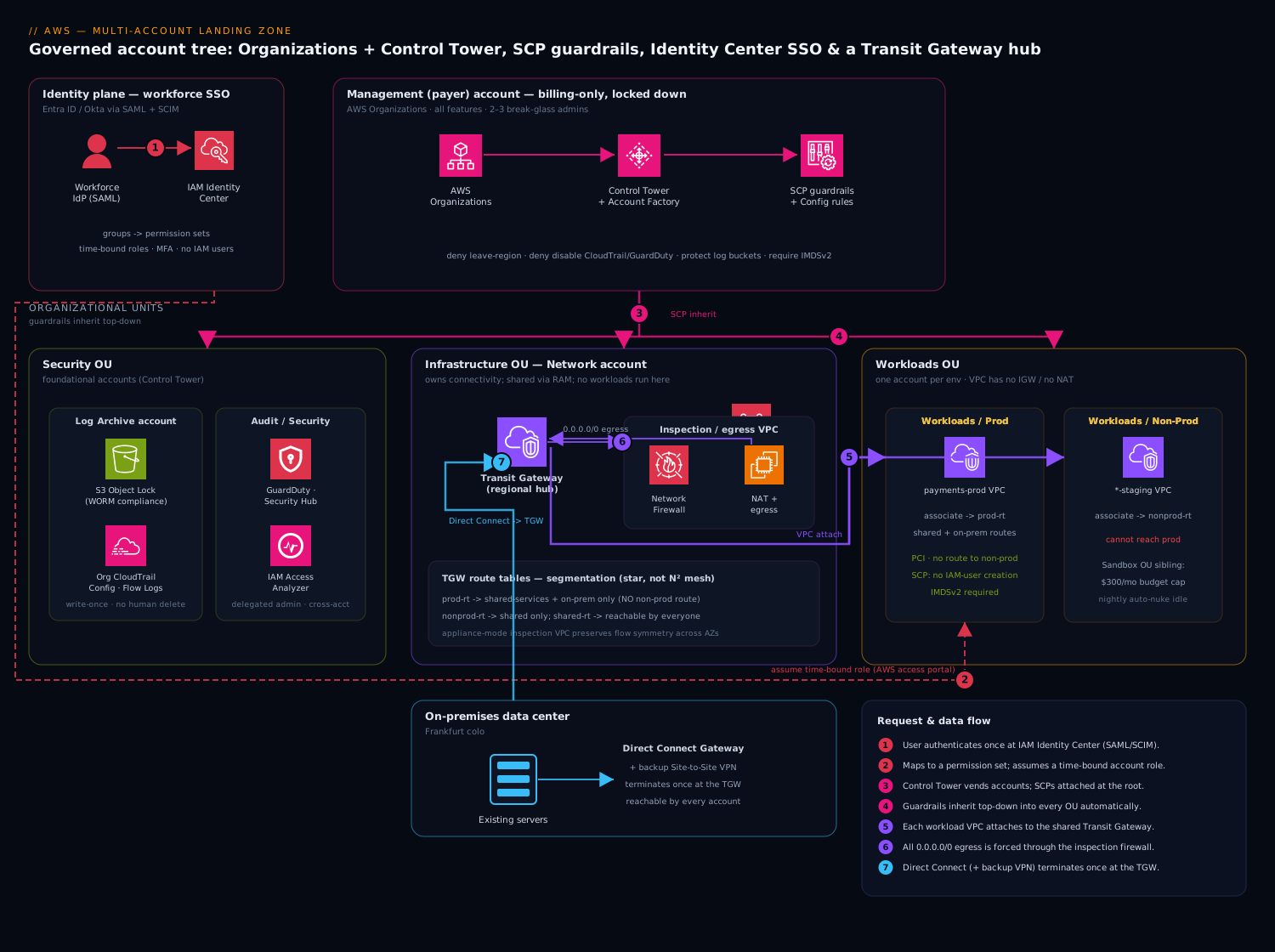
The governance spine (top-down). At the root sits the AWS Organizations management account — billing payer and the only place the org tree is edited. It should run nothing else. AWS Control Tower is enabled here as the orchestration layer; it stands up the org structure, the audit and log-archive accounts, and a library of guardrails (preventive ones implemented as Service Control Policies, detective ones as AWS Config rules). Accounts are grouped into Organizational Units (OUs) — Security, Infrastructure, Workloads/Prod, Workloads/Non-Prod, Sandbox, Suspended — and SCPs attach to OUs so policy is inherited, not copy-pasted per account.
The shared-service accounts. Control Tower creates two foundational accounts in the Security OU: a Log Archive account (the write-once destination for every org CloudTrail event, Config snapshot, and VPC Flow Log, locked down so even admins cannot delete) and an Audit/Security account (cross-account read access for the security team, home of GuardDuty, Security Hub, and IAM Access Analyzer delegated administration). In the Infrastructure OU you add a Network account (owns the Transit Gateway, inspection VPC, and central egress) and a Shared Services account (private DNS, golden AMIs, CI/CD).
The request/identity path. A human authenticates once against IAM Identity Center (the successor to AWS SSO), backed by either the built-in directory or an external IdP (Entra ID, Okta) via SAML/SCIM. Identity Center maps the user’s groups to permission sets and grants time-bound, role-based access into specific accounts — there are no long-lived IAM users for people. The user lands in the AWS access portal, picks Payments-Prod / PowerUser, and assumes a session-scoped role. Every action they take is recorded by the org trail into Log Archive.
The data/network path. Workload VPCs live in their own accounts and carry no internet gateway and no individual NAT. Each VPC attaches to the Transit Gateway in the Network account. East-west traffic between, say, an app VPC and a shared-services VPC is routed through the TGW; north-south (internet-bound) traffic is forced through a centralized inspection/egress VPC where a firewall (AWS Network Firewall or a third-party appliance) and shared NAT gateways live. On-premises connectivity (Direct Connect or redundant Site-to-Site VPN) terminates once at the TGW and is reachable by every account through route-table propagation. TGW route tables segment the network: a “prod” association table that cannot route to “non-prod,” a “shared” table everyone can reach. The result is a star, not a mesh — N attachments instead of N² peering links.
Put together, the request flows down the OU tree for governance and across the Transit Gateway for traffic, with all identity entering through one portal and all logs draining into one immutable account. The remaining sections unpack each piece.
How the governance actually works (the part beginners miss)
Before the component table, spend five minutes on the two mechanisms that make everything else true: why an account is the right boundary, and exactly how a top-down policy decides whether an API call is allowed. Get these two ideas and the rest of the Landing Zone is just applied detail.
Why the account is the unit of isolation
New engineers reach for “one account, many VPCs” because it feels simpler. It is simpler on day one and a liability by year two, because the account — not the VPC, not the tag, not the IAM policy — is AWS’s hardest boundary. Four separate walls all snap to the account line:
| Boundary | Single big account | Account-per-workload |
|---|---|---|
| Blast radius | A leaked key, a bad iam:* grant, or a runaway script can reach everything |
Damage is capped at one account; other accounts share no IAM, no data plane |
| Service quotas | You hit per-account ceilings — VPCs per region, security groups, IAM roles, Lambda concurrency — and they throttle everyone | Each account has its own fresh quota budget; scaling = adding accounts |
| Audit / compliance scope | PCI or HIPAA scope is “the whole account” — the auditor reviews all of it | Scope shrinks to one isolated account; the other 40 are out of scope |
| Cost attribution | One invoice line; you guess who spent what | Consolidated billing splits spend by account → by team, cleanly |
That is the whole argument for many accounts: you are not buying “more AWS,” you are buying more walls, and the walls come for free. The Landing Zone then makes creating a walled account a one-hour, fully-governed, repeatable act instead of a three-day manual chore.
OUs make policy inherit instead of copy-paste
You never attach policy to accounts one by one — that does not scale and drifts immediately. Instead you group accounts into Organizational Units (OUs) and attach policy to the OU. A policy on an OU applies to every account inside it, and to every nested OU below it, automatically and forever. Put a “deny disabling CloudTrail” rule on the root and every account that will ever exist inherits it the moment it is created.
The rule of thumb that separates good trees from bad ones: organize OUs by function and risk, not by team. Workloads/Prod, Workloads/Non-Prod, Security, Infrastructure, Sandbox, Suspended are risk tiers — the guardrails that belong on “prod” are the same whether the team is payments or marketing. If you build one OU per team instead, you end up copy-pasting the same prod SCP into forty places and they slowly diverge. Keep the tree shallow (Organizations allows OUs nested up to five levels below the root, but three is plenty) so inheritance stays easy to reason about.
The one thing to understand about SCPs: they subtract, they never add
A Service Control Policy is the most misunderstood object in the whole design, and the misunderstanding causes real outages. So, plainly: an SCP is a filter on the maximum permissions available in an account. It cannot grant anything. Attaching an SCP that “allows s3:*” gives nobody S3 access — it merely means the SCP is not the thing stopping them; a principal still needs an IAM policy that actually grants s3:*. Think of the SCP as a stencil laid over the account: IAM can only color inside the holes the stencil leaves open.
For an identity-based API call in a member account to succeed, every layer below must permit it — the effective permission is the intersection:
ALLOWED  =  ( no explicit Deny anywhere )
        AND  SCP allows the action        (at the account AND every OU up to the root)
        AND  RCP allows it                 (for resources of RCP-supported services)
        AND  Permission boundary allows it (if one is attached to the principal)
        AND  Identity/resource policy grants it
        AND  Session policy allows it      (if assuming a role with one)
Miss on any line and the call is denied. An explicit Deny on any line wins outright, always — Deny beats Allow at every level of the evaluation.
Worked example — the region lockdown. An engineer in payments-prod has AdministratorAccess via their permission set and runs:
aws ec2 run-instances --region us-east-1 --image-id ami-0abcd1234example \
  --instance-type m7g.large --count 1
Their IAM says allow ec2:RunInstances — so IAM is happy. But the root-attached region-lockdown SCP (the DenyOutsideApprovedRegions policy shown later in this lesson) explicitly denies every action whose aws:RequestedRegion is not eu-west-1/eu-central-1, with a NotAction carve-out for global services. us-east-1 is not on the list, ec2:RunInstances is not a carved-out global action, so the SCP contributes an explicit Deny. Explicit Deny wins. The call fails with an AccessDenied that no amount of IAM tinkering in the account can fix — which is exactly the point. The guardrail is structural, not advisory.
The two facts everyone forgets:
- SCPs apply to the account root user and to every role — including a compromised admin. That is why they are the right tool for non-negotiables. Even someone who has stolen
AdministratorAccessinpayments-prodcannot turn off CloudTrail if an SCP deniescloudtrail:StopLogging. IAM alone could never promise that, because an admin can rewrite IAM. - SCPs do not restrict the management account. Attaching a deny to the root OU does nothing to principals in the payer account, and SCPs never touch AWS service-linked roles. This is the single biggest reason the management account must run nothing and hold only two break-glass humans: it is the one place the guardrails do not reach, so there must be nothing there worth attacking.
Hold those two mechanisms — accounts are walls, SCPs subtract from the top — and the component table below reads as a set of obvious consequences rather than a list to memorize.
Component breakdown
| Component | What it does | Why it’s here | Key configuration choices |
|---|---|---|---|
| Organizations (management account) | Billing payer; root of the account tree; consolidated billing; enables trusted access for org-wide services | Single point to create accounts and attach policy; one invoice | Run nothing else in it; enable all features; restrict access to 2–3 break-glass admins; SCP-deny everything but org administration in the root |
| Control Tower | Orchestrates the Landing Zone: builds OUs, foundational accounts, baseline guardrails, and Account Factory for vending new accounts | Turns weeks of manual setup into a governed, repeatable baseline; keeps drift in check | Enable in your home region; choose the regions to govern; let it create Log Archive + Audit accounts; use Account Factory for Terraform (AFT) for IaC-driven vending |
| Organizational Units (OUs) | Logical grouping of accounts for policy inheritance | SCPs and config attach to OUs, so a new account in Workloads/Prod instantly inherits prod guardrails |
Group by function and risk, not by team; keep the tree shallow (≤ 3 levels); a Sandbox OU with permissive SCPs and tight budgets; a Suspended OU that quarantines compromised accounts |
| Service Control Policies (SCPs) | Org-level guardrails that cap the maximum permissions any principal (even root) in an account can have | Make non-negotiables impossible to violate, regardless of IAM | Default-deny mindset: deny leaving approved regions, deny disabling CloudTrail/GuardDuty/Config, deny root access-key creation, deny deleting the org log buckets, require IMDSv2; remember SCPs don’t grant, they only restrict |
| Log Archive account | Immutable sink for org CloudTrail, Config, VPC Flow Logs, ELB/Route 53 logs | Tamper-evident audit trail isolated from the accounts that produce it | S3 Object Lock (compliance mode) + bucket policy denying delete; no human write access; cross-region replication for the trail |
| Audit / Security account | Delegated admin for GuardDuty, Security Hub, Access Analyzer, Macie; cross-account read roles | Central security operations without logging into workload accounts | Delegate from management, auto-enroll new accounts, aggregate Security Hub findings org-wide |
| Network account | Owns Transit Gateway, inspection VPC, central egress, Direct Connect gateway; shares the TGW via RAM | One team owns connectivity; workload accounts consume, not configure, the network | Share TGW with AWS Resource Access Manager (RAM); segment with TGW route tables; no workloads run here |
| Transit Gateway (TGW) | Regional hub connecting all VPCs, VPNs, and Direct Connect; routes and segments traffic | Replaces the unmanageable N² VPC-peering mesh; central inspection and on-prem reach | Separate route tables per segment (prod/non-prod/shared); appliance-mode for stateful inspection VPCs; TGW peering for multi-region |
| IAM Identity Center | Workforce SSO; maps IdP groups → permission sets → time-bound account roles | Eliminates human IAM users and shared keys; one place to grant/revoke; full audit | Federate to Entra/Okta via SAML + SCIM; permission sets as code; session duration 1–4 h; require MFA; use ABAC with SAML attributes for fine-grained scoping |
| Shared Services account | Central private DNS (Route 53 Resolver / shared hosted zones), golden AMI pipeline, artifact stores, CI/CD | Avoids each team re-inventing DNS, images, and pipelines | Resolver rules shared via RAM; EC2 Image Builder for golden AMIs; reachable over the shared TGW route table |
A note on the two foundational accounts most teams under-appreciate: Log Archive is the single most important account to get right because it is your evidence locker — if an attacker (or a panicked engineer) can delete CloudTrail, you have lost both forensics and compliance. Audit is what lets a small security team operate over hundreds of accounts without ever holding standing credentials in them.
Guardrails and policy types, deep dive
“Guardrail” is Control Tower’s friendly word; underneath sit several distinct AWS policy engines, and knowing which one does what is the difference between a foundation that holds and one that only looks governed. There are two axes to learn: the three enforcement styles of a control, and the five policy families Organizations can attach.
The three enforcement styles: preventive, detective, proactive
Control Tower’s controls library (the modern name for guardrails) groups every control by how it acts. The same intent — “EBS volumes must be encrypted” — can be expressed in all three styles, and mature landing zones layer them:
| Style | Implemented with | When it acts | Failure looks like | Example |
|---|---|---|---|---|
| Preventive | Service Control Policy (and, newer, resource controls) | Before the API call completes | The action is blocked — AccessDenied |
Deny cloudtrail:StopLogging; deny leaving approved regions |
| Detective | AWS Config rule | After the resource exists, continuously | The resource is flagged non-compliant (and can auto-remediate) | Flag any S3 bucket with public read; flag an unencrypted volume |
| Proactive | AWS CloudFormation Hook | Before a resource is provisioned, at deploy time | The CloudFormation stack operation fails the check | Reject a CloudFormation template that declares an unencrypted RDS instance |
The mental model: preventive says “you cannot,” detective says “you did,” proactive says “you were about to.” Preventive controls are your non-negotiables (they cannot be worked around inside the account). Detective controls catch the things you can’t cheaply prevent and give you a compliance dashboard and drift signal. Proactive controls shift the check “left” to deploy time so a bad template never reaches production in the first place. Note the gap each leaves: a preventive SCP can’t express “must be encrypted” for every service, a detective rule only tells you after the mistake, and a proactive hook only fires for resources created through CloudFormation (a click in the console or a Terraform apply sidesteps it). You want all three because each covers the others’ blind spots.
Every managed control also carries a guidance level that decides whether you can turn it off:
- Mandatory — always on, cannot be disabled (e.g., disallow changes to the CloudTrail configuration set up by Control Tower, disallow public read access to the log-archive bucket). These are the spine of the landing zone.
- Strongly recommended — AWS’s best-practice defaults; opt-in but you should enable them broadly.
- Elective — lock down specific higher-risk actions (e.g., disallow S3 bucket deletion) for the OUs that need them.
Managed controls have stable identifiers you reference in code and audits — legacy guardrails read like AWS-GR_ENCRYPTED_VOLUMES, and the newer library uses IDs such as CT.CLOUDTRAIL.PR.1 (a preventive control) or CT.EC2.PR.* (proactive). You apply a control to an OU, and Control Tower enforces it on every account in that OU and reports compliance per-OU on its dashboard.
The five policy families Organizations can attach
Controls are Control Tower’s curated layer. Underneath, AWS Organizations exposes the raw management policies you attach yourself for anything the library doesn’t cover. Beginners meet SCPs and stop; the 2024 additions (RCPs and Declarative Policies) close two long-standing gaps, so learn all of them:
| Policy family | Controls the max permissions of… | Grants? | Canonical use |
|---|---|---|---|
| SCP (Service Control Policy) | Principals (identity side) in member accounts | No — caps only | “No one, not even root, may disable logging / leave the region” |
| RCP (Resource Control Policy) | Resources (resource side) of supported services | No — caps only | Data perimeter: “our S3/STS resources are unreachable by any principal outside our org” |
| Declarative Policy | The configuration of a service, enforced durably | n/a — sets state | “IMDSv2 is required and public EBS-snapshot sharing is off, org-wide, forever” |
| Tag Policy | The shape of tags on resources | n/a | Enforce CostCenter/Environment casing + allowed values for cost + security |
| Backup Policy | Centrally-defined AWS Backup plans | n/a | Push a mandatory backup schedule + vault-lock to every account |
Three of these deserve a closer look because they are new or subtle:
Resource Control Policies (RCPs) — GA at the end of 2024 — are the mirror image of SCPs. An SCP limits what your principals can do; an RCP limits who can touch your resources, regardless of what IAM in the resource’s account allows. At launch RCPs support a focused set — Amazon S3, AWS STS, SQS, Secrets Manager, and KMS — precisely the services that anchor a data perimeter. The classic RCP denies access to your resources by anyone outside your organization:
{
  "Version": "2012-10-17",
  "Statement": [{
    "Sid": "EnforceOrgIdentityPerimeter",
    "Effect": "Deny",
    "Principal": "*",
    "Action": ["s3:*", "sts:AssumeRole"],
    "Resource": "*",
    "Condition": {
      "StringNotEqualsIfExists": { "aws:PrincipalOrgID": "o-exampleorgid" },
      "BoolIfExists": { "aws:PrincipalIsAWSService": "false" }
    }
  }]
}
Attach that at the root and no external account (say, an attacker who tricked someone into a cross-account bucket policy) can read an org S3 bucket, because the RCP subtracts the permission the bucket policy tried to grant. Like SCPs, RCPs never grant, evaluate as part of the same intersection, and do not apply to the management account’s resources — so, again, keep nothing precious there.
Declarative Policies — also GA end-of-2024 — solve a different problem: configuration that stays enforced even as AWS ships new APIs. A normal SCP that blocks ec2:ModifyInstanceMetadataOptions can be bypassed the day AWS adds a new way to change that setting; a declarative policy instead declares the desired end-state for a service and the service itself refuses any request — current or future — that would violate it, returning a clear error and a per-account status report. At launch they target Amazon EC2 and its adjacent surface: require IMDSv2 by default, block public access for EBS snapshots, disable EC2 serial console access, and restrict which AMIs an account may launch (Allowed AMIs). Use declarative policies for “this setting must be true no matter what AWS adds next,” and SCPs for “this action is forbidden.”
Tag policies are the quiet workhorse: they enforce the tagging taxonomy (CostCenter, BusinessUnit, Environment, DataClass) that both the cost story (Cost Explorer, CUR) and the security story (ABAC, attribute-based access) depend on. A landing zone without enforced tags degrades into un-attributable spend within a quarter.
Delegated administration keeps the payer account empty
Every org-wide security service — GuardDuty, Security Hub, AWS Config, IAM Access Analyzer, Macie, Inspector, Detective — supports delegated administration: you register a member account (your Audit account) as that service’s org admin, and it can then enable, configure, and view findings across all accounts without anyone signing into the management account. This is how a small security team operates over hundreds of accounts while honoring the rule that the payer account runs nothing. Organizations can also delegate management of the policies themselves (via a resource-based delegation policy on the organization), so your platform team edits SCPs from a member account through a reviewed pipeline rather than logging into the payer. For a deeper treatment of SCPs, RCPs, and delegated admin, see Organizations, SCP guardrails & delegated admin and Resource Control Policies & Declarative Policies.
Implementation guidance
Bootstrapping order. Enable Organizations in a clean management account → enable Control Tower (it creates the core OUs, Log Archive, and Audit accounts) → layer your own OUs and SCPs → stand up the Network account and Transit Gateway → wire IAM Identity Center → vend the first workload accounts via Account Factory. Do not retrofit Control Tower onto a messy existing org until you’ve mapped existing accounts to target OUs; enrolling an account applies its baseline and can surface drift.
Infrastructure as Code. The reference choice is Account Factory for Terraform (AFT). AFT gives every account three customization layers: a global customization (applied to all accounts — e.g., a standard IAM password policy, default EBS encryption, baseline Config rules), an account-specific customization (e.g., a payments account gets PCI Config conformance packs), and account requests as Terraform code in a pipeline so vending is a pull request, not a console click. A minimal account request looks like:
module "payments_prod" {
  source = "./modules/aft-account-request"

  control_tower_parameters = {
    AccountEmail              = "aws+payments-prod@example.com"
    AccountName               = "payments-prod"
    ManagedOrganizationalUnit = "Workloads/Prod"
    SSOUserEmail              = "cloud-ops@example.com"
    SSOUserFirstName          = "Cloud"
    SSOUserLastName           = "Ops"
  }

  account_tags = {
    "BusinessUnit" = "payments"
    "Environment"  = "prod"
    "DataClass"    = "pci"
    "CostCenter"   = "CC-4407"
  }

  account_customizations_name = "pci-baseline"
}
SCPs themselves are JSON managed via Terraform’s aws_organizations_policy / aws_organizations_policy_attachment. A region-lockdown guardrail (deny everything outside approved regions while allow-listing global services):
{
  "Version": "2012-10-17",
  "Statement": [{
    "Sid": "DenyOutsideApprovedRegions",
    "Effect": "Deny",
    "NotAction": [
      "iam:*", "sts:*", "organizations:*", "route53:*",
      "cloudfront:*", "waf:*", "support:*", "budgets:*"
    ],
    "Resource": "*",
    "Condition": {
      "StringNotEquals": {
        "aws:RequestedRegion": ["eu-west-1", "eu-central-1"]
      }
    }
  }]
}
Pair it with a “protect the foundation” SCP that denies cloudtrail:StopLogging, cloudtrail:DeleteTrail, config:DeleteConfigurationRecorder, guardduty:DeleteDetector, and any s3:DeleteBucket/s3:PutBucketPolicy against the log-archive buckets, plus a deny on iam:CreateAccessKey for the root user pattern. Attach foundation SCPs at the root so even the management-adjacent OUs inherit them; attach environment-specific SCPs (e.g., prod can’t create IAM users at all) at the Workloads/Prod OU.
Networking wiring. In the Network account, create the Transit Gateway (disable default route-table association/propagation so you control segmentation explicitly), then share it via RAM to the whole org. Each workload account attaches its VPC to the shared TGW and adds a default route (0.0.0.0/0) pointing at the TGW for egress. Create three TGW route tables — prod-rt, nonprod-rt, shared-rt. Associate prod VPC attachments to prod-rt and propagate only the shared-services and on-prem routes into it; crucially, do not propagate non-prod routes into prod-rt, which makes prod↔non-prod traffic structurally impossible. Route all 0.0.0.0/0 through an inspection VPC running AWS Network Firewall in appliance mode (so flow symmetry is preserved across AZs), with NAT gateways and the single internet egress behind it. Terminate Direct Connect on a Direct Connect Gateway associated with the TGW; add a backup Site-to-Site VPN for resilience.
Identity wiring. Connect IAM Identity Center to your IdP: SAML for authentication, SCIM for automatic user/group provisioning so joiners/leavers sync without manual steps. Define permission sets as code (managed-policy ARNs plus inline policies plus a session duration). Map IdP groups to (account, permission set) assignments — e.g., the payments-engineers group → payments-prod account with a PaymentsPowerUser permission set that excludes IAM and KMS-key-deletion. For least privilege at scale, use ABAC: pass attributes (department, project) from the IdP as session tags and write permission-set policies that scope resource access by aws:PrincipalTag. Reserve a tightly-watched break-glass path: two physical root credentials for the management account, stored offline, MFA-protected, alerting on any use.
Detective layer. Control Tower turns on a baseline; extend it with org-wide GuardDuty (delegated to the Audit account, auto-enroll new accounts), Security Hub with the AWS Foundational Security Best Practices and CIS standards aggregated org-wide, AWS Config conformance packs per OU, and IAM Access Analyzer at the org level to catch any resource shared outside the org.
The landing-zone spectrum: what actually builds and vends the accounts
“Landing Zone” is an architecture pattern; “Control Tower” is one product that implements it. Beginners conflate the two and then get confused when they meet a shop running a landing zone with no Control Tower at all. There is a spectrum, and picking the right point on it — and the right account-vending mechanism within it — is a real decision.
Build option A → D: managed to bespoke
| Option | What it is | You own | Best for |
|---|---|---|---|
| AWS Control Tower | Managed service; click/enable to stand up and maintain the landing zone, guardrails, and Account Factory | Your OUs, extra SCPs, workloads | The large majority — anyone who wants AWS to keep the baseline current |
| Landing Zone Accelerator on AWS (LZA) | An AWS Solution (open-source, config-file-driven, deployed via CloudFormation/CDK) that layers deep networking + security config, often on top of Control Tower | The config, the pipeline, the upgrades | Highly regulated / complex estates — government, healthcare, GovCloud, air-gapped, strict frameworks |
| Custom Terraform / IaC foundation | You assemble Organizations, SCPs, accounts, network from modules yourself | Everything, including lifecycle | Teams with strong platform engineering that need total control and accept total ownership |
| AWS Landing Zone (ALZ) solution (legacy) | The original 2018 CloudFormation solution | — | Do not start here — it is in long-term support; AWS steers new builds to Control Tower or LZA |
The honest default is Control Tower, and the reason is maintenance, not setup. Anyone can wire an org tree in a weekend; the hard part is keeping guardrails, Config baselines, and the log pipeline correct across hundreds of accounts for years. Control Tower does that upkeep. You drop to LZA when Control Tower’s opinions are too narrow for your compliance regime, and to bespoke Terraform only when you have the platform team to own the upkeep you just gave up.
Within Control Tower: three ways to vend and customize accounts
Once Control Tower is running, you still choose how new accounts are created and baselined. These are not competing products so much as escalating levels of automation:
- Account Factory — the built-in vending machine (a Service Catalog product). A human fills a form (or calls the API) and gets a baselined account in the right OU. Fine for low volume.
- Account Factory Customization (AFC) — attach a blueprint (a CloudFormation template, optionally served from a central hub account) so each vended account is not just baselined but shaped — VPCs, roles, agents — at birth, natively in Control Tower.
- Account Factory for Terraform (AFT) — an AWS-maintained GitOps framework: account requests are Terraform code in a pipeline, and every account gets layered customizations — a global one (applied to all accounts), an account-type one (per OU/persona), and an account-specific one (e.g., a PCI conformance pack for
payments-prod). Vending becomes a reviewed pull request. This is the reference choice for IaC-first teams and the approach the implementation section below uses. - Customizations for Control Tower (CfCT) — the CloudFormation-native sibling of AFT: it deploys custom SCPs and CloudFormation StackSets to accounts/OUs automatically, triggered by the Control Tower account-lifecycle event, via a CodePipeline. Choose CfCT if your shop standardizes on CloudFormation; choose AFT if it standardizes on Terraform.
The mental model: Account Factory decides that an account is created and baselined; AFC / AFT / CfCT decide how much more is layered on automatically, and in which IaC language.
Enrolling what already exists, and keeping it from drifting
Real orgs are rarely greenfield — you usually have a pile of accounts created by credit-card signup. Control Tower can enroll an existing account into a registered OU, which applies the baseline and guardrails to it (the account needs the AWSControlTowerExecution role and to clear a few prerequisites first). Do this deliberately: map every existing account to a target OU on paper before enrolling, because enrollment applies that OU’s full guardrail set immediately.
After that, your enemy is drift — someone editing a Control-Tower-managed SCP by hand, detaching a guardrail, moving an account between OUs outside Control Tower, or altering its IAM roles. Control Tower detects these and surfaces them on its dashboard; you resolve by re-registering the OU or running update/repair, which re-applies the intended state. Separately, the landing zone itself is versioned — AWS periodically ships a new landing-zone version with improved baselines, and you apply it from the console. The discipline that prevents most drift is cultural, not technical: never touch a vended account or a managed policy in the console — change it through AFT/CfCT and let the pipeline reconcile. For the full Control Tower lifecycle — setup, Account Factory, and drift remediation — see Control Tower & the multi-account landing zone.
Enterprise considerations
Security & Zero Trust. The account is the primary trust and blast-radius boundary — a compromise in marketing-nonprod cannot touch payments-prod because they share no IAM, no network route, and no data plane. SCPs enforce non-negotiables that survive even a compromised account admin. Human access is short-lived and federated (no standing keys), MFA-everywhere, and least-privilege via permission sets + ABAC. Network Zero Trust comes from default-deny segmentation at the TGW plus centralized inspection: nothing talks to the internet without passing the firewall, and prod is islanded from non-prod by route-table design rather than by hopeful security-group rules.
Cost optimization. Consolidated billing pools usage across all accounts so volume discounts, Savings Plans, and Reserved Instances apply org-wide and float to wherever they’re needed. Mandatory tags (CostCenter, BusinessUnit, Environment) enforced via SCP and tag policies make AWS Cost Explorer and Cost & Usage Reports attributable per team. Set AWS Budgets with alerts per account (especially hard caps and auto-alerts on the Sandbox OU). Centralizing NAT gateways and egress in the inspection VPC avoids paying for a NAT per workload VPC — a frequently overlooked five-figure annual saving at scale. Watch the trade-off: TGW data-processing and inter-AZ charges are real, so keep chatty services in the same AZ where possible.
Scalability. The model scales by adding accounts, which sidesteps the hard per-account service quotas (IAM roles, security groups, VPCs) that strangle a single-account design. Account Factory vends a fully-baselined account in well under an hour; the TGW supports thousands of attachments per region; OUs and SCPs inherit automatically so governance scales with zero marginal effort per account.
Reliability & DR (RTO/RPO). The Landing Zone itself is resilient: the org structure and SCPs are global control-plane constructs, and Control Tower’s foundational accounts span AZs. For workloads, the account-per-environment pattern makes a clean DR account or DR region straightforward — replicate via cross-region TGW peering and pre-attach the DR VPCs. Typical targets: mission-critical (payments) RTO ≤ 1 h / RPO ≤ 5 min via active-passive multi-region with continuous data replication; standard tier RTO ≤ 4 h / RPO ≤ 1 h via warm standby; dev/test RTO 24 h from IaC redeploy. The Log Archive trail is cross-region replicated so audit survives a regional event. Because everything is IaC (AFT + Terraform), the entire account baseline is reproducible — your real DR plan for the foundation is “re-apply the code.”
Observability. Three planes: (1) audit — the org CloudTrail draining to Log Archive gives a single immutable record of every API call across every account; (2) security posture — Security Hub aggregates GuardDuty/Config/Inspector findings into one Audit-account dashboard; (3) operations — centralize CloudWatch Logs and metrics via cross-account observability (a monitoring account with linked source accounts) so SREs see all workloads in one pane. VPC Flow Logs from every attachment land in Log Archive for network forensics.
Governance. Guardrails come in two flavors — preventive (SCPs that block the action) and detective (Config rules that flag drift and can auto-remediate). Control Tower’s dashboard shows compliance per OU and per guardrail. Tag policies enforce the taxonomy that powers both cost and security. The whole org definition lives in Git: account requests, SCPs, permission sets, and network config are reviewed via pull request, giving you change history and four-eyes approval on the things that matter most.
Going deeper
The sections above are enough to design a landing zone. This one is for operating it: the internals, quotas, and failure modes that bite in year two, when you have 200 accounts and a very specific problem at 2 a.m.
SCP internals: the FullAWSAccess default and the allow-list trap
When you enable all features in Organizations, AWS attaches a managed SCP named FullAWSAccess (Effect: Allow, Action: *) to the root and to every OU and account. Because SCPs are an intersection, that default is what makes the common deny-list model work: your custom SCPs add Deny statements, FullAWSAccess keeps everything else open, and the net effect is “everything except what we explicitly forbid.” The moment you detach FullAWSAccess and attach only a hand-written Allow list, you flip to an allow-list model — now anything you forgot to name is implicitly denied, at every level. Allow-lists are more secure and vastly more brittle: one missing action and a whole account breaks in a way that is maddening to debug because the failing IAM policy looks correct. Most successful orgs stay on the deny-list model and reserve allow-listing for a locked-down OU (e.g., a data-perimeter or regulated OU) where the extra rigor is worth the operational tax.
Quotas that shape SCP design: a single SCP document is capped at 5,120 characters, and you can attach at most 5 SCPs to any one root, OU, or account. Those two limits together force you to be economical — you cannot just keep adding statements. Practical consequences: consolidate related denies into one policy, use NotAction/wildcards to stay terse, push shared denies up the tree (attach once at the root instead of five times at five OUs), and remember every attachment along the path from root to account must all allow the action. OUs nest up to five levels below the root; keep it to two or three so the evaluation path stays short and legible.
The region-deny gotcha: global services live in us-east-1
The region-lockdown SCP is the one most likely to cause a self-inflicted outage, because global and edge services do not behave like regional ones. IAM, AWS Organizations, CloudFront, Route 53, WAF (for CloudFront), AWS Support, and Budgets authenticate through us-east-1, and STS has a global endpoint. If your DenyOutsideApprovedRegions policy does not carve these out in its NotAction, you will lock yourself out of IAM and DNS while believing you only restricted compute. That is exactly why the policy earlier uses NotAction with iam:*, sts:*, organizations:*, route53:*, cloudfront:*, waf:*, support:*, and budgets:* — those are the actions that must remain callable “everywhere.” Two more subtleties: prefer regional STS endpoints so sts:AssumeRole isn’t forced through the global one, and note that opt-in regions (newer regions, disabled by default) must be explicitly enabled at the account level before anything — even an allow — will work there. A region SCP is a scalpel; treat the carve-out list as load-bearing.
Enforcing IMDSv2: SCP condition vs. declarative policy
“Require IMDSv2” (the token-based instance-metadata scheme that defeats the SSRF-to-credential-theft attack class) can be enforced two ways, and they compose well. The preventive SCP denies ec2:RunInstances unless the request sets metadata tokens to required:
{
  "Sid": "DenyIMDSv1Launches",
  "Effect": "Deny",
  "Action": "ec2:RunInstances",
  "Resource": "arn:aws:ec2:*:*:instance/*",
  "Condition": { "StringNotEquals": { "ec2:MetadataHttpTokens": "required" } }
}
That blocks new IMDSv1 launches but says nothing about the account default or future launch paths. The declarative policy for EC2 closes the gap by setting the account-wide IMDS default to v2 and keeping it enforced even as AWS adds new launch APIs — the service itself rejects a non-compliant configuration and reports per-account status. Use the SCP to block the action today and the declarative policy to pin the default durably; together they leave no IMDSv1 path open.
Centralized logging, precisely
Three distinct pipelines drain into the shared accounts, and they are often muddled:
- Organization CloudTrail — created once (from the management account or a CloudTrail delegated-admin account), it captures management events from every account into a single bucket in Log Archive. Member accounts cannot disable it — that’s the point. Management events are free; data events (S3 object-level, Lambda invoke) are billed per event, so scope them deliberately.
- AWS Config aggregator — each account still runs its own Config recorder (you pay per configuration item recorded and per rule evaluation), and an organization aggregator in the Audit account collects all of it into one queryable view for compliance and drift. The aggregator reads; it does not replace per-account recording.
- CloudWatch cross-account observability — for operational telemetry (not audit), designate a monitoring account and link source accounts so SREs see metrics, logs, and traces from every workload in one pane without cross-account role juggling.
Lock the Log Archive bucket with S3 Object Lock in compliance mode plus a bucket policy denying delete, and replicate cross-region. Compliance mode means no one — not the account root, not AWS — can shorten the retention or delete an object before its term expires. That immutability is what turns “we have logs” into “we have evidence.”
IAM Identity Center internals
A permission set is not a role you see directly — when you assign (group → account → permission set), Identity Center provisions an IAM role named AWSReservedSSO_<PermissionSetName>_<random> into that account and keeps it in sync. A permission set bundles AWS-managed policies, customer-managed policies (which must already exist by that name in each target account), an inline policy, and an optional permissions boundary, plus a session duration you can set from 1 to 12 hours. Provisioning is push-based: change the permission set and Identity Center re-deploys the role to every assigned account. The identity source is either the built-in Identity Store, AWS Managed Microsoft AD, or an external IdP (Entra ID, Okta) over SAML 2.0 for sign-in and SCIM for user/group sync — SCIM is what makes a leaver’s access vanish within minutes of HR disabling them upstream. For fine-grained, low-maintenance scoping, ABAC passes IdP attributes as session tags and your policies match on aws:PrincipalTag/<key>, so one permission set serves many teams by attribute rather than one set per team. You can delegate Identity Center administration to a member account, though a few operations still require the management account. The deep mechanics — permission sets, ABAC, and multi-account assignment — are in IAM Identity Center permission sets & ABAC.
Transit Gateway internals and their cost
Two TGW settings are load-bearing. First, disable default route-table association and propagation at creation so attachments don’t silently join a flat any-to-any table — you want to place each attachment in a segment (prod-rt, nonprod-rt, shared-rt) explicitly. Association decides which route table an attachment uses to make forwarding decisions; propagation decides which route tables learn that attachment’s routes. Prod isolation is simply: associate prod to prod-rt, and do not propagate non-prod routes into prod-rt. Second, when traffic is inspected by an appliance across multiple AZs, enable appliance mode on the inspection VPC attachment so both directions of a flow pin to the same AZ appliance — without it, asymmetric routing breaks stateful firewalls. Cross-region is done with TGW peering (routing is non-transitive across peers — you manage the routes), and a single TGW scales to thousands of attachments per region. Cost reality: you pay per attachment-hour and per GB of data processed by the TGW, plus inter-AZ transfer, so a chatty mesh routed through the TGW can quietly cost more than the NAT savings it enabled — keep tightly-coupled services in one AZ and one VPC where you can.
The management account is the one thing SCPs cannot save
Because SCPs and RCPs do not apply to the management (payer) account, it is the single point where the guardrails do not reach — a compromise there is a compromise of the whole org’s control plane (it can create accounts, move OUs, and detach policies). Defense is therefore procedural, not policy-based: run zero workloads in it, grant no standing human access, protect the root user with a hardware MFA device stored offline, and keep exactly two break-glass paths under change control with an alarm that fires on any root sign-in (management-account CloudTrail events still flow to Log Archive). Treat every management-account login as an incident until proven otherwise.
Cost and failure-mode notes
Control Tower itself carries no service charge — you pay for what it turns on: AWS Config (per configuration item + per rule evaluation, across every account and region it governs — frequently the largest line), CloudTrail data events if you enable them, S3 storage for logs, plus the network foundation (TGW, Network Firewall, Direct Connect, cross-region replication). At a few hundred accounts, the Config bill alone justifies scoping recorded resource types deliberately. Failure modes worth pre-planning: a too-aggressive SCP at the root can brick every account at once (test SCPs on a Sandbox OU first, and keep the deny-list model so a mistake fails open rather than closed); drift from console edits silently weakens guardrails (reconcile only through the pipeline); and enrolling a messy legacy account applies a full guardrail set instantly (map it to an OU on paper first). None of these are exotic — they are the ordinary ways a good landing zone degrades if operated by hand instead of by code.
Reference enterprise example
Northwind Pay is a fictional fintech: ~450 employees, processing card payments across the EU, subject to PCI-DSS, growing 60% year over year. They start on a single overloaded AWS account and migrate to a Landing Zone over a quarter.
Target structure. Management account (billing only, two offline root credentials). Security OU holds Log Archive and Audit. Infrastructure OU holds the Network account (TGW in eu-west-1, Direct Connect to their Frankfurt colo plus backup VPN, inspection VPC with AWS Network Firewall) and Shared Services (Route 53 Resolver, golden AMIs, GitLab runners). Workloads/Prod holds payments-prod, ledger-prod, web-prod. Workloads/Non-Prod holds the matching *-staging accounts. A Sandbox OU gives each of their 9 squads a personal account with a permissive SCP but a hard $300/month budget and auto-nuke of idle resources nightly.
Guardrails they set. Root-attached SCPs deny any region except eu-west-1 and eu-central-1 (data residency), deny disabling CloudTrail/GuardDuty/Config, and protect the log buckets. The Workloads/Prod OU adds an SCP forbidding IAM-user creation (humans only enter via Identity Center) and requiring IMDSv2. The payments-prod account gets a PCI Config conformance pack via AFT account-specific customization.
Identity. They federate Entra ID into IAM Identity Center with SCIM. The payments-engineers group maps to payments-prod with a PaymentsPowerUser permission set (1-hour sessions, no IAM/KMS-delete, MFA required). Auditors get a read-only permission set across all prod accounts. When an engineer leaves, Entra removes them and SCIM revokes access within minutes — no orphaned IAM users anywhere.
Network. Each VPC has no IGW; all attach to the shared TGW. The prod-rt route table carries shared-services and on-prem routes but not non-prod routes, so staging literally cannot reach the production ledger. All internet egress flows through the inspection VPC’s firewall (a single audited choke point for PCI). One NAT-gateway cluster serves the whole org instead of nine.
Outcomes after one quarter.
| Metric | Before (single account) | After (Landing Zone) |
|---|---|---|
| Time to provision a governed account | ~3 days, manual, inconsistent | < 45 min via Account Factory, fully baselined |
| Blast radius of a leaked key | Entire company | One account, one environment |
| Production ↔ non-prod isolation | Security-group hope | Structurally impossible (no route, no IAM) |
| Audit trail | Deletable by account admins | Immutable, cross-region, write-once |
| Cost attribution | One opaque invoice | Per squad / per environment via tags |
| NAT gateways | One set per VPC (sprawling) | One centralized egress |
| PCI scope | Whole account | Isolated to payments-prod |
The CISO’s summary: “We went from hoping nobody disabled logging to it being impossible, and our PCI auditor now reviews one isolated account instead of everything we own.”
When to use it
Use a multi-account Landing Zone when you have (or will soon have) multiple teams, more than one environment, compliance obligations (PCI, HIPAA, SOC 2, data residency), or any need to attribute cost and contain blast radius. Past roughly 3–4 accounts or the first compliance audit, this is the default — not an optional nicety. It is the AWS-blessed equivalent of an Azure Landing Zone or a GCP organization hierarchy.
Trade-offs and costs. A Landing Zone adds real overhead: a platform/cloud-foundations team to own it, a learning curve around SCPs and TGW segmentation, and baseline spend (Control Tower itself is free, but the TGW, Network Firewall, Direct Connect, and cross-region replication are not — budget a few thousand dollars a month even before workloads). The governance can feel heavy to a small team that just wants to ship.
Anti-patterns to avoid. Running workloads in the management account (it should be billing-only and locked down). Using SCPs as if they grant permissions — they only cap. Building a full VPC-peering mesh instead of a TGW hub (it doesn’t scale past a handful of VPCs). One giant account per team with everything inside (you lose environment isolation). Long-lived IAM users for humans (use Identity Center). Letting Account Factory drift by editing vended accounts in the console instead of through AFT. An OU tree organized by team instead of by risk/function (you end up duplicating SCPs everywhere).
Alternatives. For a genuinely small shop that will never exceed a couple of teams, plain Organizations + a handful of hand-built accounts + consolidated billing may be enough — you get isolation and one bill without the Control Tower machinery, at the price of doing the baseline yourself. If you need more opinionated, customizable orchestration than Control Tower offers (custom account pipelines, complex multi-account CI/CD), the older AWS Landing Zone solution or a fully bespoke Terraform foundation are options, but you then own all the lifecycle work Control Tower would have handled. For multi-cloud governance the equivalents are Azure Landing Zones and GCP’s Cloud Foundation Fabric — the account/subscription/project tree, policy-as-guardrail, hub-and-spoke, and federated SSO concepts map almost one-to-one.
The Landing Zone is not a product you buy once; it is a foundation you operate. Done well, it becomes invisible — teams ship into a network that already works, with guardrails they never have to think about, and a security team that sleeps better because the dangerous things are simply not possible.
Practice challenges
Work these in order — they climb from “read the model” to “operate it under pressure.” Every solution says why, not just what. No AWS account is required; these are design-and-predict exercises plus real, schema-correct policy you could paste into Terraform.
1. Beginner — Does this SCP grant anything? A teammate attaches an SCP with a single statement {"Effect":"Allow","Action":"s3:*","Resource":"*"} to payments-prod and expects the app role there to gain S3 access. It still gets AccessDenied. Explain what the SCP did and what actually grants the access.
<details><summary>Show solution</summary>
The SCP did nothing to grant access — SCPs only cap the maximum permissions, they never grant. Allowing s3:* in an SCP just means “the SCP is not the thing blocking S3.” The app role still needs an IAM identity policy that grants s3:* (or the specific actions) on the target resource. Fix: attach the S3 permissions to the role’s IAM policy (or its permission set); the SCP can stay as-is or, more usefully, be a Deny for guardrails.
Why: the effective permission is the intersection of SCP ∩ IAM ∩ boundary ∩ RCP — every layer must allow, and the SCP is not a grant layer. </details>
2. Beginner — Predict the region-lockdown outcome. With the root-attached DenyOutsideApprovedRegions SCP (approved regions eu-west-1, eu-central-1; NotAction carves out iam:*, sts:*, route53:*, cloudfront:*, …) in force, which of these succeed? (a) aws ec2 run-instances --region eu-west-1, (b) aws ec2 run-instances --region us-east-1, © aws iam create-role (a global service), (d) aws dynamodb create-table --region us-east-1.
<details><summary>Show solution</summary>
(a) Succeeds — eu-west-1 is approved. (b) Denied — us-east-1 is not approved and ec2 is not carved out. © Succeeds — iam:* is in the NotAction carve-out, so the deny never applies to it (IAM is global / us-east-1-hosted). (d) Denied — us-east-1 isn’t approved and dynamodb isn’t a carved-out global action.
Why: the SCP denies any action whose aws:RequestedRegion isn’t approved except the global services in NotAction — forget the carve-out and you’d lock yourself out of IAM.
</details>
3. Intermediate — Design the OU tree. A 300-person healthcare SaaS has: prod and staging for three products, a shared CI/CD + DNS function, a security team that needs org-wide read, HIPAA-scoped workloads that must be isolated, and ten engineers who each want a play account with a tight budget. Sketch the OU tree and say which SCP goes where (root vs. OU).
<details><summary>Show solution</summary>
Root
├── Security            → Log Archive, Audit           (mandatory foundation guardrails)
├── Infrastructure      → Network, Shared-Services (CI/CD, DNS)
├── Workloads
│   ├── Prod            → prod-a/b/c  + SCP: no IAM users, require IMDSv2
│   │   └── Regulated   → hipaa-prod  + stricter SCP/RCP, PCI/HIPAA Config pack
│   └── Non-Prod        → staging-a/b/c
├── Sandbox             → 10 personal accounts, permissive SCP + hard budget
└── Suspended           → quarantine for compromised accounts
Root-attached SCPs (inherited by all): deny leaving approved regions, deny disabling CloudTrail/Config/GuardDuty, protect the log buckets. Prod-OU SCP: forbid IAM-user creation, require IMDSv2. Regulated-OU: add data-perimeter RCP + tighter denies. Sandbox: permissive SCP but enforced budget + nightly cleanup.
Why: organize by function and risk, not team — the same prod guardrails apply to every product, so they live once on the OU, and the HIPAA tier nests deeper to inherit prod rules plus its own. </details>
4. Intermediate — Match the guardrail style and policy family. For each requirement, name the enforcement style (preventive / detective / proactive) and the AWS policy family (SCP / RCP / Declarative / Config): (i) “No CloudFormation template may create an unencrypted RDS instance.” (ii) “Our S3 buckets must be unreachable by any AWS principal outside our org.” (iii) “IMDSv2 must be the account default, and stay that way as AWS adds features.” (iv) “Alert us whenever any bucket becomes publicly readable.”
<details><summary>Show solution</summary>
(i) Proactive control via a CloudFormation Hook — it fails the stack operation before the resource exists. (ii) Preventive, expressed as a Resource Control Policy (RCP) denying access unless aws:PrincipalOrgID matches — the resource-side data perimeter. (iii) A Declarative Policy on EC2 — it pins the desired configuration durably across future APIs (an SCP could be bypassed by a new action). (iv) Detective, an AWS Config rule (s3-bucket-public-read-prohibited) that flags after the fact and can auto-remediate.
Why: preventive blocks the action, proactive blocks the deploy, detective catches the state; SCP caps principals, RCP caps resource access, declarative pins configuration — pick the tool whose blind spot you can live with. </details>
5. Advanced — Write the “protect the evidence locker” SCP. Produce a schema-correct SCP that makes it impossible for anyone in a member account — including that account’s root user — to stop or delete logging or tamper with the central log-archive buckets. Note where you’d attach it.
<details><summary>Show solution</summary>
{
  "Version": "2012-10-17",
  "Statement": [
    {
      "Sid": "ProtectLoggingServices",
      "Effect": "Deny",
      "Action": [
        "cloudtrail:StopLogging",
        "cloudtrail:DeleteTrail",
        "cloudtrail:UpdateTrail",
        "config:DeleteConfigurationRecorder",
        "config:StopConfigurationRecorder",
        "guardduty:DeleteDetector",
        "guardduty:DisassociateFromMasterAccount"
      ],
      "Resource": "*"
    },
    {
      "Sid": "ProtectLogArchiveBuckets",
      "Effect": "Deny",
      "Action": ["s3:DeleteBucket", "s3:PutBucketPolicy", "s3:DeleteObject", "s3:PutLifecycleConfiguration"],
      "Resource": [
        "arn:aws:s3:::org-log-archive-*",
        "arn:aws:s3:::org-log-archive-*/*"
      ]
    }
  ]
}
Attach at the root so every current and future account inherits it. (Exempt the log-archive account’s own automation with a Condition on aws:PrincipalArn if a pipeline legitimately manages the bucket.)
Why: an explicit Deny in an SCP beats any IAM Allow and applies even to the account root — so a compromised admin literally cannot delete the forensic trail; that guarantee is the whole reason SCPs exist.
</details>
6. Advanced — Diagnose a broken isolation guarantee. After a change window, an SRE reports that staging-web (in Non-Prod) can suddenly reach ledger-prod (in Prod) over the Transit Gateway, which must never happen. IAM is unchanged; there’s no VPC peering. Give the most likely root cause and the fix, and one systemic guard so it can’t recur.
<details><summary>Show solution</summary>
Most likely cause: route propagation drift — someone propagated the non-prod VPC attachment’s routes into prod-rt (or associated a prod attachment to a shared table that also carries non-prod routes). The TGW now has a route from prod toward the non-prod CIDR, so traffic flows. Fix: remove the non-prod route propagation from prod-rt (and re-verify associations), so prod-rt carries only shared-services + on-prem routes. Systemic guard: manage TGW route tables as code and detect drift — never edit route tables in the console; add a Config/Reachability-Analyzer check that asserts prod↔non-prod is unreachable.
Why: prod isolation is a routing property (association + propagation), not an IAM one — it’s structurally enforced only as long as non-prod routes are never propagated into the prod table, which is exactly the kind of thing console edits silently break. </details>
Common beginner mistakes
These are misconceptions, not typos — each one feels right until it fails, and the fix is a corrected mental model rather than a corrected command.
“An SCP grants permissions.” The single most common error. People attach an Allow SCP and expect access to appear. SCPs are a ceiling, never a floor — they can only remove permissions IAM would otherwise allow. Right model: grant with IAM/permission sets, constrain with SCPs. If you detach the default FullAWSAccess and rely on your own allow-list, remember you’ve now made every un-listed action implicitly denied everywhere.
“Guardrails will protect the management account.” They will not. SCPs and RCPs have no effect on principals or resources in the management (payer) account. Beginners run a workload there “just to test” and put the org’s control plane one leaked key away from total compromise. Right model: the payer account runs nothing, holds only two MFA-protected break-glass humans, and is defended procedurally (alarms on root sign-in), not by policy.
“One big account with good tagging is basically the same as many accounts.” Tags and IAM are soft boundaries inside a shared blast radius, shared service quota, and shared audit scope. A single over-broad iam:* or one leaked key crosses them instantly. Right model: the account is AWS’s hard boundary — isolation, quotas, cost, and compliance scope all snap to the account line, so buy walls by adding accounts, not by adding tags.
“Organize OUs by team.” It feels natural and it quietly forces you to copy the same prod guardrails into every team’s OU, where they drift apart. Right model: organize by function and risk (Prod, Non-Prod, Security, Sandbox) so a guardrail is written once on the risk tier and inherited by every team automatically.
“Region lockdown just needs a deny on the bad regions.” Deny everything outside your regions without carving out global services and you lock yourself out of IAM, Route 53, CloudFront, and Support — they authenticate through us-east-1. Right model: a region SCP must NotAction the global services; that carve-out list is load-bearing, not decoration.
“Control Tower and Landing Zone are the same thing.” A Landing Zone is the pattern (governed multi-account foundation); Control Tower is one product that implements and maintains it. You can run a landing zone with LZA, with bespoke Terraform, or (legacy) the old ALZ solution. Right model: choose your point on the spectrum by how much maintenance you want to own — Control Tower does the upkeep, bespoke Terraform makes you do it.
“We’ll just fix the account in the console.” Editing a vended account or a managed SCP by hand creates drift — Control Tower’s view and reality diverge, guardrails silently weaken, and the next pipeline run may fight your change. Right model: change everything through AFT/CfCT/Terraform and let the pipeline reconcile; the console is for reading, not for governing.
“Build a VPC peering mesh — it’s simpler.” It is, for three VPCs. At twenty it’s an N² tangle of routes nobody can reason about, and it can’t do centralized inspection or on-prem sharing cleanly. Right model: a Transit Gateway hub is N attachments, segmented by route table, with one place for egress and Direct Connect — a star, not a mesh.
“Long-lived IAM users are fine for the engineers.” Standing keys leak, never expire on their own, and become orphaned when people leave. Right model: humans enter only through IAM Identity Center — federated, MFA’d, time-bound sessions — and SCIM revokes access minutes after HR disables the user upstream. Reserve IAM users (if ever) for the rare non-federatable machine case, not people.
Glossary
- Landing Zone — a pre-built, governed multi-account AWS foundation where any new workload can “land” already isolated, guardrailed, logged, and connected. The pattern, not a single product.
- AWS Organizations — the service that holds your accounts in a tree and lets you attach org-wide policies. The substrate everything else sits on.
- Management (payer) account — the root account that owns billing and edits the org tree. Runs no workloads; SCPs/RCPs do not restrict it.
- Member account — any account in the org other than the management account. This is where workloads live and where guardrails actually apply.
- Organizational Unit (OU) — a folder of accounts. Policies attached to an OU are inherited by every account (and nested OU) inside it.
- Service Control Policy (SCP) — an org policy that sets the maximum permissions for principals in member accounts. Caps, never grants; affects even the account root.
- Resource Control Policy (RCP) — the resource-side counterpart to an SCP (GA late 2024): the maximum permissions on your resources for supported services (S3, STS, SQS, Secrets Manager, KMS). The tool for a data perimeter.
- Declarative Policy — an org policy (GA late 2024) that pins a service’s configuration to a desired state that stays enforced even as AWS adds new APIs. At launch: Amazon EC2 (IMDSv2 default, allowed AMIs, snapshot public-access block, serial console).
- Tag Policy — an org policy that standardizes tag keys/values, powering cost attribution and ABAC.
FullAWSAccess— the AWS-managed default SCP (Allow *) attached everywhere when all-features is on; its presence is what makes the deny-list model work.- Guardrail / Control — Control Tower’s packaged governance rule. Comes in three enforcement styles below.
- Preventive control — a guardrail that blocks an action before it happens; implemented as an SCP.
- Detective control — a guardrail that flags a non-compliant resource after the fact; implemented as an AWS Config rule.
- Proactive control — a guardrail that fails a deployment before a resource is created; implemented as a CloudFormation Hook (only fires for CloudFormation-created resources).
- AWS Control Tower — the managed service that stands up and maintains a landing zone: the foundational accounts, default OUs, guardrails, and Account Factory.
- Account Factory — Control Tower’s built-in account vending machine; creates a fully-baselined account in the right OU.
- Account Factory for Terraform (AFT) — a GitOps framework where account requests are Terraform and each account gets layered (global / account-type / account-specific) customizations via a pipeline.
- Customizations for Control Tower (CfCT) — the CloudFormation-native sibling of AFT; deploys custom SCPs and StackSets on the account-lifecycle event.
- Landing Zone Accelerator on AWS (LZA) — an open-source AWS Solution for highly regulated estates; config-file-driven, layered on or beside Control Tower.
- Log Archive account — the write-once vault (S3 Object Lock) for org CloudTrail, Config, and flow logs. Your evidence locker; no human delete access.
- Audit / Security account — the delegated-admin home for GuardDuty, Security Hub, Config, and Access Analyzer; operates security org-wide without touching the payer account.
- Network account — owns the Transit Gateway, inspection/egress VPC, and Direct Connect; shares the TGW via RAM. Runs no workloads.
- Shared Services account — central DNS (Route 53 Resolver), golden AMIs, and CI/CD reused by every team.
- IAM Identity Center — workforce SSO (successor to AWS SSO): maps IdP groups to permission sets and grants time-bound account access. Replaces human IAM users.
- Permission set — a reusable bundle of policies + session duration that Identity Center provisions as an IAM role (
AWSReservedSSO_…) into each assigned account. - SAML / SCIM — SAML 2.0 authenticates the sign-in; SCIM auto-syncs users/groups from the IdP so leavers are de-provisioned automatically.
- ABAC (attribute-based access control) — scoping access by attributes (department, project) passed as session tags and matched in policy via
aws:PrincipalTag/*; one permission set serves many teams. - Delegated administration — registering a member account (usually Audit) as the org admin for a service, so the payer account stays empty.
- Transit Gateway (TGW) — the regional network hub that connects all VPCs, VPNs, and Direct Connect, replacing the N² peering mesh with a segmented star.
- Route-table association vs. propagation — association sets which TGW route table an attachment uses; propagation sets which tables learn its routes. Prod isolation = never propagate non-prod routes into the prod table.
- Appliance mode — a TGW attachment setting that pins both directions of a flow to the same-AZ inspection appliance, preserving symmetry for stateful firewalls.
- AWS RAM (Resource Access Manager) — shares resources (like the TGW or Route 53 Resolver rules) across accounts in the org.
- Data perimeter — the guarantee that only your identities can reach your resources from your networks; built largely with RCPs and
aws:PrincipalOrgIDconditions. - Drift — divergence between Control Tower’s intended state and reality caused by console edits; reconcile through the pipeline, never by hand.
- Break-glass — the rarely-used, tightly-audited emergency path (offline MFA root credentials) into the management account, alarmed on any use.
- Consolidated billing — one invoice for the whole org, pooling usage so Savings Plans / Reserved Instances and volume discounts apply across all accounts.