Backups are not a feature you turn on; they are a control plane you operate. The failure mode that ends careers is not “we had no backups” — it is “we had backups, in the same account, encrypted with the same key, deletable by the same blast-radius identity that just got compromised.” Ransomware crews and fat-fingered automation both target the recovery path first, because the recovery path is the one thing standing between them and a paid ransom or a permanent data-loss incident. This guide builds that recovery path as a separate trust boundary: a delegated backup admin that authors policy, compliance-mode Vault Lock vaults that even your root user cannot empty, copies landing in a logically air-gapped account in another Region, and restore tests that prove RTO/RPO instead of asserting them. It assumes AWS Organizations with all features enabled and a multi-account landing zone underneath.
The reason this is hard is that AWS Backup is an orchestrator, not a storage service — it coordinates snapshots that physically live with each source service (EBS, RDS, DynamoDB, S3, EFS, FSx), wrapped in recovery points that a vault references and a KMS key encrypts. Every one of those layers — the policy that schedules the job, the IAM role the job assumes, the vault that holds the recovery point, the key that encrypts it, the lock that makes it immutable, the copy action that fans it cross-Region, the access policy that lets the copy land, the restore role that reads it back — is a place a real program quietly breaks. A green dashboard tells you jobs ran; it does not tell you a copy landed in the isolated account, that the lock actually hardened, or that a restore would succeed. Those are separate facts, each with its own confirming command.
By the end you will stop trusting the dashboard and start proving the recovery path. You will know exactly which two grants delegated administration takes (and why one without the other gives you a blind policy author), why a vault and role must exist before the first job runs, the one flag that separates compliance-mode Vault Lock from governance mode, the kms:CreateGrant condition that is load-bearing for cross-account restore, and how restore testing converts “we believe under four hours” into “measured 2h41m on the last 11 weekly tests.” Because this is a reference you return to mid-incident — or mid-audit — the policy keys, the lock modes, the KMS grants, the per-service restore mechanics, the limits and the failure modes are all laid out as scannable tables. Read the prose once; keep the tables open when the auditor (or the attacker) shows up.
What problem this solves
Per-account backups feel safe and fail catastrophically. The common pattern — every workload account backs itself up to a local vault, lifecycle is correct, dashboards are green — collapses the moment the account itself is the blast radius. A compromised deployment role, a poisoned CI/CD dependency, or a misconfigured trust policy gives an attacker (or a buggy automation) the same backup:DeleteRecoveryPoint and backup:DeleteBackupVault permissions your operators have. The local backups are gone in minutes, encrypted with a key the same identity can schedule for deletion, and there is no second copy anywhere an attacker cannot reach. You discover this not during a drill but during an incident, which is the worst possible time to learn that your recovery path shared a trust boundary with the thing that just got owned.
What breaks without a centralized, air-gapped program: (1) no immutability — recovery points are deletable, so ransomware deletes them; (2) no isolation — copies live in the same account/Region, so one compromise or one regional event takes both primary and backup; (3) no governance — each team configures its own backups, retention drifts, some resources are simply never protected and nobody notices until restore time; (4) no proof — RTO/RPO are slide-deck numbers, not measured facts, so the first real restore is also the first test, and it fails on a KMS grant you forgot. The financial and regulatory exposure is brutal: failing an auditor’s “prove the production copies could not have met the same fate” question can mean a finding, a fine, or a lost certification.
Who hits this: every organization past a handful of accounts. It bites hardest on regulated workloads (finance, healthcare) where a 7-year immutable retention is a legal floor, on teams that grew account-by-account without a landing zone, and on anyone who equates “backup job succeeded” with “I can recover.” The fix is not more backups — it is a recovery path that is a separate trust boundary: a delegated admin authoring policy, immutable vaults, an isolated recovery account in another Region, and restore tests that produce evidence. To frame the whole field before the deep dive, here is every control plane this article builds, the failure it prevents, and the one command that proves it works:
| Control plane | What it is | Failure it prevents | First command to prove it |
|---|---|---|---|
| Delegated backup admin | An account that authors org-wide policy | Operating consoles from the org root; blast-radius concentration | aws organizations list-delegated-administrators --service-principal backup.amazonaws.com |
| Organizations backup policy | Tag-targeted JSON attached to OUs | Per-team drift; unprotected resources | aws organizations describe-effective-policy --policy-type BACKUP_POLICY |
| Compliance-mode Vault Lock | WORM immutability until expiry | Ransomware / root deleting recovery points | aws backup describe-backup-vault --query '{Locked:Locked,LockDate:LockDate}' |
| Cross-account/Region copy | copy_actions into another account/Region |
Account compromise or regional event taking both copies | aws backup list-recovery-points-by-backup-vault --backup-vault-name airgap-recovery-vault |
| Dedicated CMK + key policy | Customer-managed key shareable cross-account | aws/backup key cannot be shared; restore denied |
aws kms describe-key --key-id <id> --query 'KeyMetadata.MultiRegion' |
| Recovery-account SCP | Deny delete/key-deletion verbs | The exact door a compromised role walks through | aws organizations describe-effective-policy --policy-type SERVICE_CONTROL_POLICY |
| Restore testing | Scheduled real StartRestoreJob + validate |
RTO/RPO asserted but never measured | aws backup list-restore-jobs --by-restore-testing-plan-arn <arn> |
| Audit Manager framework | Queryable compliance + evidence export | “Are we compliant?” answered by opinion, not data | aws backup list-frameworks |
Learning objectives
By the end of this article you can:
- Design the three-plane account topology (management / delegated admin / isolated recovery) and explain why collapsing any two is a mistake.
- Enable AWS Backup org integration end to end: trusted access, the
BACKUP_POLICYpolicy type, delegated administrator registration, and the separate cross-account monitoring grant — and explain what breaks if you do one without the other. - Author an Organizations backup policy in JSON with
@@assigninheritance operators, tag-based selection, independent local and copy lifecycles, and acopy_actionsfan-out to another account/Region. - Choose between compliance and governance Vault Lock, set
--changeable-for-days/min/maxretention correctly, and avoid the indefinite-retention foot-gun. - Build the cross-account/cross-Region copy path: destination vault access policy, logically air-gapped vault type, and the
kms:CreateGrantwithGrantIsForAWSResourcecondition that makes cross-account restore actually work. - Stand up restore testing (plan + selection + validation), measure empirical RTO/RPO, and export evidence via Audit Manager for an auditor.
- Match the protection mode (continuous/PITR vs snapshot) to each service’s RPO, and harden the recovery account with SCPs that close the deletion door the typical incident walks through.
- Run a symptom → root cause → confirm → fix playbook for the failure modes that silently break a backup program.
Prerequisites & where this fits
You should already understand the multi-account fundamentals: AWS Organizations with all features enabled, Organizational Units (OUs) as the attachment target for policies, Service Control Policies (SCPs) as the guardrail mechanism, and IAM roles with trust policies and cross-account assumption. You should know how to run the AWS CLI with named profiles (you will switch between the management, delegated-admin, and recovery accounts constantly), read JSON output, and reason about KMS key policies versus IAM policies. Familiarity with at least one source service’s snapshot model (EBS snapshots, RDS automated backups) helps the per-service sections land.
This sits at the top of the Reliability & DR track and assumes the governance layer beneath it. It builds directly on AWS Organizations: SCP Guardrails & Delegated Admin (the delegation and SCP mechanics this whole program rides on) and AWS Control Tower: Guardrails & Multi-Account Foundation (the landing zone that places accounts in OUs). The encryption layer is AWS KMS Deep Dive: Keys, Policies, Envelope Encryption & Rotation, and cross-Region copy specifically wants KMS Multi-Region Keys: Envelope Encryption & Key Policies. It pairs with the strategy-level AWS Backup & Disaster Recovery Strategies and the framing in High Availability vs Disaster Recovery: RTO & RPO. For the threat model that motivates immutability, see Ransomware Resilience: Immutable Backup & Isolated Recovery Environment.
A quick map of which account owns which responsibility, so you run each command from the right place and never operate from the org root by habit:
| Concern | Owning account | Why it lives there | What you must NOT do here |
|---|---|---|---|
| Trusted access, policy type, delegate registration | Management | Only the org root can enable integrations | Run day-to-day backup operations |
| Authoring/attaching backup policies | Delegated admin | Keeps the org root thin; least standing power | Hold the immutable recovery copies |
| Source backup jobs + local vaults | Each workload account | Backups run where the data is | Share a trust boundary with the air-gap copy |
| Immutable cross-Region copies | Isolated recovery | Survives a full workload-account compromise | Grant standing human access |
| KMS key administration | Each vault-owning account | Keys are account- and Region-scoped | Use the aws/backup managed key |
| Restore testing + validation | Recovery account | Exercises the air-gapped copies, not the originals | Skip it and assume the RTO |
| Compliance evidence + drift | Delegated admin | Org-wide aggregation point | Log into each account to check manually |
Core concepts
Six mental models make every later step obvious.
AWS Backup orchestrates; the data lives with the service. A backup plan is a schedule + lifecycle + target vault + selection. When a rule fires, AWS Backup assumes an IAM role in the source account and calls the source service’s snapshot API; the resulting recovery point is a pointer that lives in a backup vault and is encrypted by a KMS key. The vault is a logical container and a permission boundary — it does not “store” bytes the way S3 does; it governs who can read, copy, and delete the recovery points it references. This is why a single over-broad identity that can manage vaults is catastrophic: it controls the pointers to all your recovery data at once.
Three planes, three accounts — do not collapse them. The management account enables the integration and attaches policies to OUs; that is all it does day to day. The delegated backup admin authors policy and monitors jobs org-wide, so you never run backup consoles from the org root. The isolated recovery account receives cross-account copies into an air-gapped vault and is, ideally, in a separate OU with restrictive SCPs and no standing human access. The whole security argument is that the identity which can delete your last copy must not be the identity that just got compromised — and that requires a different account, a different Region, and an immutable lock, all at once.
Delegated administration is two grants, not one. register-delegated-administrator lets the account manage backup policies. You separately enable cross-account monitoring in the AWS Backup console (Settings) so the delegate can see jobs in member accounts. Enable both, or you get a policy author who is blind to execution — a real and common half-configured state.
The vault and role must pre-exist; AWS Backup does not create them. The vault a policy targets and the IAM role a policy references must already exist in every target account and Region before a backup job runs. Bootstrap them with a CloudFormation StackSet (service-managed permissions) targeting the OUs that receive policies, so vault + role land automatically when an account joins the OU. Forget this and describe-effective-policy renders a perfect policy while every job fails with “role/vault not found.”
Immutability is a mode, decided by one flag. Compliance-mode Vault Lock makes recovery points immutable until their lifecycle expires — no IAM principal, not the account root, not AWS, can shorten retention or delete them once the lock hardens. The mode is selected by whether you include --changeable-for-days: include it (with a grace window of ≥3 days) and you get compliance mode; omit it and you get governance mode (removable by sufficiently privileged IAM). The grace window is your only undo — once LockDate passes, the configuration is set in stone.
Restore is its own permission and KMS path. Reading a recovery point back — especially cross-account — requires the restore role to use the destination KMS key, and AWS Backup creates grants on your behalf during restore. The kms:CreateGrant permission with the kms:GrantIsForAWSResource condition is load-bearing; without it the restore fails with a KMS key cannot be accessed error that is maddening to debug because the recovery point is intact and the lock is fine.
The vocabulary in one table
Pin down every moving part before the deep sections. The glossary repeats these for lookup; this is the mental model side by side:
| Concept | One-line definition | Where it lives | Why it matters to recovery |
|---|---|---|---|
| Backup plan | Schedule + lifecycle + vault + selection | Account (or rendered from org policy) | The thing that runs — or silently doesn’t |
| Organizations backup policy | Tag-targeted JSON attached to an OU | Management → OU; authored in delegate | One policy protects whatever a team tags |
| Backup vault | Logical container + permission boundary | Per account/Region | Governs read/copy/delete of recovery points |
| Logically air-gapped (LAG) vault | Isolated vault type for cross-acct share/restore | Recovery account | The copy that survives a full compromise |
| Recovery point | Encrypted pointer to a snapshot | In a vault | The thing you restore (or an attacker deletes) |
| Vault Lock | WORM immutability config | On a vault | Compliance mode = even root can’t delete |
changeable_for_days |
Grace window before lock hardens | Lock config | Your only undo; min 3 days |
copy_actions |
Fan-out copy to another vault | On a rule | Cross-account/Region air-gap mechanism |
| CMK + key policy | Customer-managed key, shareable | Per vault account/Region | aws/backup can’t be shared cross-account |
kms:CreateGrant |
Permits AWS Backup to grant key use | Key policy | Load-bearing for cross-account restore |
| Restore testing plan | Scheduled real restore + teardown | Recovery account | Turns RTO/RPO into measured evidence |
| Audit Manager framework | Controls + evidence export | Delegated admin | “Compliant” becomes queryable + auditable |
| RTO / RPO | Recovery time / recovery point objective | Measured, not asserted | The numbers the business actually buys |
The account topology and where policy lives
Three planes, three accounts. Do not collapse them. The management account stays thin — it enables the integration and attaches policies; day-to-day backup operations live in the delegated admin so you are not running consoles from the org root, and the immutable copies live somewhere neither of those can reach.
| Plane | Account | Responsibility | Standing access |
|---|---|---|---|
| Policy authoring | Delegated backup admin | Owns Organizations backup policies, monitors jobs org-wide | Backup operators (least power) |
| Org control | Management account | Enables trusted access, registers the delegate, attaches policies to OUs | Org admins only; no daily ops |
| Recovery (air-gap) | Isolated recovery account | Receives cross-account copies into an air-gapped vault; separate OU, restrictive SCPs | None (break-glass only) |
# Run in the MANAGEMENT account.
# 1) Trusted access so AWS Backup can act across the org.
aws organizations enable-aws-service-access \
  --service-principal backup.amazonaws.com

# 2) Turn on the BACKUP_POLICY policy type (idempotent if already enabled).
ROOT_ID=$(aws organizations list-roots --query 'Roots[0].Id' --output text)
aws organizations enable-policy-type \
  --root-id "$ROOT_ID" \
  --policy-type BACKUP_POLICY

# 3) Register the backup admin account as delegated administrator.
aws organizations register-delegated-administrator \
  --account-id 222222222222 \
  --service-principal backup.amazonaws.com
The same enablement expressed as Terraform, so the org integration is reviewable in a PR rather than clicked once and forgotten:
resource "aws_organizations_organization" "this" {
  aws_service_access_principals = ["backup.amazonaws.com"]
  enabled_policy_types          = ["BACKUP_POLICY", "SERVICE_CONTROL_POLICY"]
  feature_set                   = "ALL"
}

resource "aws_backup_global_settings" "delegated" {
  global_settings = { "isCrossAccountBackupEnabled" = "true" }
}
Delegated administration in AWS Backup is two grants, not one.
register-delegated-administratorlets the account manage backup policies; you separately enable cross-account monitoring in the AWS Backup console (Settings) so the delegate can see jobs in member accounts. Enable both, or you get a policy author who is blind to execution.
One prerequisite that bites everyone: the vault and the IAM role a policy references must already exist in every target account and Region before a backup job runs — AWS Backup does not create them. Bootstrap them with a CloudFormation StackSet (service-managed permissions) targeting the OUs that receive policies, so vault + role land automatically when an account joins.
The full enablement checklist, in dependency order — each row gates the next, and skipping one produces a specific, confusing symptom:
| # | Step | Account | Command / setting | Symptom if skipped |
|---|---|---|---|---|
| 1 | Org all-features enabled | Management | describe-organization → FeatureSet: ALL |
Policies cannot be enabled at all |
| 2 | Trusted access for Backup | Management | enable-aws-service-access |
Org policies have no effect |
| 3 | BACKUP_POLICY policy type on root |
Management | enable-policy-type |
create-policy --type BACKUP_POLICY errors |
| 4 | Register delegated admin | Management | register-delegated-administrator |
Delegate cannot author org policies |
| 5 | Cross-account backup enabled | Management/delegate | isCrossAccountBackupEnabled=true |
Cross-account copies are rejected |
| 6 | Cross-account monitoring enabled | Delegate (console Settings) | toggle in AWS Backup → Settings | Delegate is blind to member-account jobs |
| 7 | Vault + role StackSet to OUs | Management → OUs | service-managed StackSet | Jobs fail “role/vault not found” |
| 8 | Attach backup policy to prod OU | Delegate / management | attach-policy |
Nothing is protected |
The two cross-account toggles confuse everyone because they sound identical. Keep them straight:
| Setting | What it enables | Where you set it | Without it |
|---|---|---|---|
isCrossAccountBackupEnabled (backup copy) |
Recovery points may be copied across accounts | Global settings (management/delegate) | copy_actions cross-account fails |
| Cross-account monitoring | The delegate can view jobs in member accounts | AWS Backup console → Settings | A blind policy author; jobs invisible org-wide |
Defining backup policies with tag-based selection
An Organizations backup policy is JSON with three required keys per plan — regions, rules, selections — using declarative-policy inheritance operators (@@assign sets a value; child policies merge with or override parents). You target resources by tag, not ARN, so the same policy protects whatever a team launches as long as they tag it. This is the single most important design choice in the whole program: tag-targeting means coverage scales automatically as teams ship, instead of someone remembering to add each new ARN to a selection.
Save the following as tier1-backup-policy.json. It runs daily, writes to the local vault, and fans out a copy to the recovery account in another Region. copy_actions is keyed by the destination vault ARN; $account / $region are placeholders AWS resolves per member account.
{
  "plans": {
    "Tier1_Daily": {
      "regions": { "@@assign": ["ap-south-1", "us-east-1"] },
      "rules": {
        "DailySnapshot": {
          "schedule_expression": { "@@assign": "cron(0 18 ? * * *)" },
          "start_backup_window_minutes": { "@@assign": "60" },
          "complete_backup_window_minutes": { "@@assign": "10080" },
          "target_backup_vault_name": { "@@assign": "central-backup-vault" },
          "lifecycle": {
            "move_to_cold_storage_after_days": { "@@assign": "30" },
            "delete_after_days": { "@@assign": "365" }
          },
          "copy_actions": {
            "arn:aws:backup:us-west-2:444444444444:backup-vault:airgap-recovery-vault": {
              "target_backup_vault_arn": {
                "@@assign": "arn:aws:backup:us-west-2:444444444444:backup-vault:airgap-recovery-vault"
              },
              "lifecycle": {
                "move_to_cold_storage_after_days": { "@@assign": "30" },
                "delete_after_days": { "@@assign": "2555" }
              }
            }
          }
        }
      },
      "selections": {
        "tags": {
          "tier1": {
            "iam_role_arn": { "@@assign": "arn:aws:iam::$account:role/AWSBackupCentralRole" },
            "tag_key": { "@@assign": "backup-tier" },
            "tag_value": { "@@assign": ["tier1"] }
          }
        }
      }
    }
  }
}
Create the policy in the delegated admin account and attach it to the OU that holds your production workloads:
POLICY_ID=$(aws organizations create-policy \
  --name "Tier1-Daily-Backup" \
  --type BACKUP_POLICY \
  --content file://tier1-backup-policy.json \
  --query 'Policy.PolicySummary.Id' --output text)

aws organizations attach-policy \
  --policy-id "$POLICY_ID" \
  --target-id ou-abcd-prodaccts   # the production OU
The same plan expressed as a per-account Terraform resource (useful for accounts outside the org policy, or to model what the org policy renders into):
resource "aws_backup_plan" "tier1" {
  name = "Tier1_Daily"
  rule {
    rule_name         = "DailySnapshot"
    target_vault_name = aws_backup_vault.central.name
    schedule          = "cron(0 18 ? * * *)"
    start_window      = 60
    completion_window = 10080
    lifecycle { cold_storage_after = 30, delete_after = 365 }
    copy_action {
      destination_vault_arn = "arn:aws:backup:us-west-2:444444444444:backup-vault:airgap-recovery-vault"
      lifecycle { cold_storage_after = 30, delete_after = 2555 }
    }
  }
}
Every policy key, end to end
The policy schema is small but unforgiving — a wrong key name silently no-ops, and lifecycle math has hard floors. Here is every field that matters, what it does, and the gotcha:
| Key | Scope | Values / type | Default | Gotcha / limit |
|---|---|---|---|---|
regions |
plan | list of Region IDs | required | Policy only acts in listed Regions |
schedule_expression |
rule | cron(...) UTC |
required | Cron is UTC; ? for day-of-week OR day-of-month |
start_backup_window_minutes |
rule | minutes | 60 (8h for some) | Job is cancelled if it can’t start in the window |
complete_backup_window_minutes |
rule | minutes | derived | Must exceed start window; long backups need headroom |
target_backup_vault_name |
rule | vault name (must pre-exist) | required | Name only; the account is implied (the source acct) |
lifecycle.move_to_cold_storage_after_days |
rule/copy | days | none | Cold storage is min 90-day commit; not all services |
lifecycle.delete_after_days |
rule/copy | days | none | Must be ≥ cold_storage_after + 90 |
enable_continuous_backup |
rule | true/false | false | Enables PITR; hard 35-day retention ceiling |
copy_actions.<vaultArn> |
rule | keyed by dest vault ARN | none | Independent lifecycle from the local rule |
copy_actions.*.target_backup_vault_arn |
copy | full ARN (acct+Region) | required | This is what makes it cross-account/Region |
selections.tags.<name>.tag_key |
selection | string | required | Case-sensitive; must match the resource tag exactly |
selections.tags.<name>.tag_value |
selection | list of strings | required | Any value in the list matches (OR) |
selections.tags.<name>.iam_role_arn |
selection | role ARN with $account |
required | Role must exist in every target account |
The inheritance operators are the part people get wrong when policies stack on nested OUs. What each does:
| Operator | Effect | Use when | Trap |
|---|---|---|---|
@@assign |
Set the value (replace) | Setting a concrete value | A child @@assign overrides the parent’s |
@@append |
Add to a list (merge) | Adding Regions/tags without losing parents | Only valid on list-typed values |
@@remove |
Remove from a merged list | Excluding an inherited value | Order of evaluation matters on deep OU trees |
| (none) child key | Merge child into parent map | Adding a new rule alongside inherited ones | Duplicate rule names collide |
A few rules that keep this correct:
- Cold-storage minimum is a 90-day commitment.
delete_after_daysmust be at leastmove_to_cold_storage_after_days + 90. Above, the copy retains 7 years (2555 days) — set this to your regulatory floor. selectionsis eithertagsorresources, not both at the top level. Use theresourcesblock with aconditionsclause if you need resource-type plus tag logic.- Local-rule and
copy_actionlifecycles are independent — the common pattern is short local retention (fast, cheap restore) and long air-gapped retention (compliance + ransomware survivability).
Schedule-and-window sizing trips up long-running backups; the relationship between the three time fields:
| Field | Meaning | Too small → | Sensible value |
|---|---|---|---|
schedule_expression |
When the job is eligible to start | n/a | Off-peak, UTC (e.g. cron(0 18 ? * * *)) |
start_backup_window_minutes |
Grace to begin before cancel | Job cancelled under contention | 60 (raise to 480 for busy accounts) |
complete_backup_window_minutes |
Total time allowed to finish | Large RDS/EFS jobs killed mid-run | 10080 (7 days) for big datasets |
Vault Lock in compliance mode (WORM immutability)
A vault you can delete is a vault an attacker can delete. Compliance-mode Vault Lock makes recovery points immutable until their lifecycle expires — no IAM principal, not the account root, not AWS, can shorten retention or delete the recovery point once the lock hardens. This is the control that turns “we have backups” into “the backups will still be there after the breach.”
The mode is decided by one flag. Including --changeable-for-days selects compliance mode; omitting it gives you governance mode (removable by sufficiently privileged IAM). The value is the cooling-off grace time: during it you can still adjust or delete the lock to fix mistakes. Minimum is 3 days (72 hours).
# Run in EACH account/Region that owns a vault (member accounts + recovery account).
aws backup put-backup-vault-lock-configuration \
  --backup-vault-name central-backup-vault \
  --changeable-for-days 3 \
  --min-retention-days 30 \
  --max-retention-days 2555
resource "aws_backup_vault_lock_configuration" "central" {
  backup_vault_name   = aws_backup_vault.central.name
  changeable_for_days = 3      # presence => COMPLIANCE mode; omit => governance
  min_retention_days  = 30
  max_retention_days  = 2555
}
Treat the 3-day grace window as your only undo. Once
LockDatepasses, the configuration is set in stone. The classic foot-gun: a recovery point with retention set to “Always” inside a locked compliance vault is then un-deletable forever and bills forever. Never combine indefinite retention with compliance Vault Lock.
Verify the lock actually hardened — Locked: true plus a past LockDate is the only state that matters:
aws backup describe-backup-vault \
  --backup-vault-name central-backup-vault \
  --query '{Locked:Locked, LockDate:LockDate, Min:MinRetentionDays, Max:MaxRetentionDays}'
Apply the same lock to airgap-recovery-vault in the recovery account. That vault is the one that actually has to survive a credential compromise in the workload accounts.
Compliance vs governance, decided correctly
The two modes look similar in the API and are wildly different in consequence. Side by side:
| Dimension | Governance mode | Compliance mode |
|---|---|---|
| Selected by | Omit --changeable-for-days |
Include --changeable-for-days (≥3) |
| Who can delete RPs early | Sufficiently privileged IAM (with backup:* overrides) |
Nobody — not IAM, not root, not AWS |
| Lock removable after hardening | Yes (by privileged IAM) | No — permanent until RP expires |
| Grace window | n/a | 3+ days, then LockDate is final |
| Good for | Operational guardrail, accidental-delete prevention | Ransomware survivability, regulatory WORM |
| Foot-gun | Privileged role can still purge | “Always”-retention RP bills forever |
| Reversal cost | Change the config any time | The entire account must be closed to escape |
The lock-configuration parameters and their bounds:
| Parameter | Meaning | Min | Max | Gotcha |
|---|---|---|---|---|
min_retention_days |
Floor on every RP’s retention | 1 | — | RP retention shorter than this is rejected |
max_retention_days |
Ceiling on every RP’s retention | — | 36500 | RP retention longer than this is rejected; blocks “Always” |
changeable_for_days |
Grace before hardening (compliance) | 3 | 36500 | Presence is what selects compliance mode |
LockDate |
When the lock becomes immutable | — | — | Past LockDate + Locked:true = done |
The lock-state truth table — only one row means “you are actually protected”:
Locked |
LockDate |
Mode | Meaning | Action |
|---|---|---|---|---|
| false | absent | none | No lock at all | Configure a lock |
| false | future | compliance (cooling) | In grace window; still mutable | Wait, or fix now while you still can |
| true | future | compliance (cooling) | Grace running; not yet immutable | Verify config before LockDate |
| true | past | compliance | Immutable — the only safe state | Done; verify periodically |
| true | n/a | governance | Locked but IAM-removable | Acceptable only for non-ransomware use |
Cross-account, cross-Region copy into an air-gapped account
The copy_actions block in the policy already routes copies to 444444444444 in us-west-2. For that copy to land, two backstops must be in place — and when copies silently fail to appear, it is almost always one of these two.
(a) Vault access policy on the destination — a resource policy that permits the source org/account to copy in:
{
  "Version": "2012-10-17",
  "Statement": [
    {
      "Sid": "AllowOrgCopyInto",
      "Effect": "Allow",
      "Principal": "*",
      "Action": "backup:CopyIntoBackupVault",
      "Resource": "*",
      "Condition": {
        "StringEquals": { "aws:PrincipalOrgID": "o-exampleorgid" }
      }
    }
  ]
}
aws backup put-backup-vault-access-policy \
  --backup-vault-name airgap-recovery-vault \
  --policy file://airgap-vault-policy.json   # run in account 444444444444
(b) Logically air-gapped vault, not a standard vault. A logically air-gapped (LAG) vault is a distinct AWS Backup vault type supporting direct sharing for cross-account/cross-Region restore without you hand-rolling key policy on the restore side. Target it on a rule via target_logically_air_gapped_backup_vault_arn. As of 2025 these vaults support customer-managed KMS keys and can receive primary backups directly. Pair that isolation with restrictive SCPs on the recovery OU (deny backup:DeleteRecoveryPoint, backup:DeleteBackupVault, kms:ScheduleKeyDeletion) and no standing human role, and the copy survives even if every workload account is owned.
Standard vault vs logically air-gapped vault
Choosing the wrong vault type for the recovery target is a quiet design error — a standard vault works but forces you to hand-roll restore-side key policy and cross-account sharing. The comparison:
| Dimension | Standard backup vault | Logically air-gapped (LAG) vault |
|---|---|---|
| Primary purpose | Local recovery points | Isolated copy/recovery target |
| Cross-account restore sharing | You hand-roll key policy + RAM | Built-in direct sharing |
| KMS | Your CMK (or aws/backup) |
Customer-managed KMS (as of 2025) |
| Receives primary backups | Yes | Yes (2025+) |
| Vault Lock | Compliance/governance | Compliance/governance |
| Best role | Source-account local vault | The air-gap recovery copy |
| Indexing/search | Standard | Enhanced recovery-point search |
The copy path has multiple independent gates; when a copy does not appear, walk them in this order:
| # | Gate | Check (run where) | Failure symptom |
|---|---|---|---|
| 1 | Cross-account backup enabled | Global settings (mgmt) isCrossAccountBackupEnabled=true |
Copy job rejected immediately |
| 2 | Dest vault access policy | get-backup-vault-access-policy (recovery acct) |
“Access denied” on copy |
| 3 | PrincipalOrgID matches |
Compare org ID in policy vs describe-organization |
Copy denied despite a policy |
| 4 | Recovery SCP not over-broad | describe-effective-policy SCP (recovery acct) |
SCP blocks CopyIntoBackupVault |
| 5 | Dest KMS key usable by Backup | Dest key policy has backup.amazonaws.com use |
Copy fails with KMS error |
| 6 | Destination Region matches ARN | Region in target_backup_vault_arn |
Copy goes nowhere / errors |
The copy lifecycle is independent of the local lifecycle — a deliberate, important asymmetry:
| Tier | Local vault | Air-gap copy | Rationale |
|---|---|---|---|
| Hot (restore speed) | 30 days warm | 30 days warm | Fast operational restores |
| Cold (cost) | move to cold @30d | move to cold @30d | Cut storage cost on aging RPs |
| Long-term (compliance) | delete @365d | delete @2555d (7yr) | Air-gap carries the regulatory floor |
| Mode | governance OK | compliance lock | The copy must survive a compromise |
KMS keys and key policies for cross-account restore
Encrypt the central and recovery vaults with dedicated customer-managed keys — never the AWS-managed aws/backup key, which you cannot share cross-account. The restore side needs to use the key; encode that in the key policy in the recovery account. This section is where most “the backup is fine but the restore fails” incidents are born, so the key policy below is worth reading line by line.
{
  "Version": "2012-10-17",
  "Id": "airgap-backup-key",
  "Statement": [
    {
      "Sid": "KeyAdmins",
      "Effect": "Allow",
      "Principal": { "AWS": "arn:aws:iam::444444444444:role/KeyAdmin" },
      "Action": "kms:*",
      "Resource": "*"
    },
    {
      "Sid": "AllowBackupServiceUse",
      "Effect": "Allow",
      "Principal": { "Service": "backup.amazonaws.com" },
      "Action": ["kms:Decrypt", "kms:GenerateDataKey", "kms:DescribeKey", "kms:CreateGrant"],
      "Resource": "*"
    },
    {
      "Sid": "AllowRestoreRoleDecrypt",
      "Effect": "Allow",
      "Principal": { "AWS": "arn:aws:iam::444444444444:role/RecoveryRestoreRole" },
      "Action": ["kms:Decrypt", "kms:DescribeKey", "kms:CreateGrant"],
      "Resource": "*",
      "Condition": {
        "Bool": { "kms:GrantIsForAWSResource": "true" }
      }
    }
  ]
}
The kms:CreateGrant with the GrantIsForAWSResource condition is load-bearing — AWS Backup creates grants on your behalf during restore, and without it the restore fails with a KMS key cannot be accessed error that is maddening to debug. Copying across Regions, a multi-Region KMS key avoids re-wrapping data keys on every hop.
The KMS actions the recovery path needs, and which principal needs each
Every KMS Action here is required by a specific actor at a specific moment. Map them so you can reason about a deny precisely:
| Action | Who needs it | When | Symptom if missing |
|---|---|---|---|
kms:GenerateDataKey |
backup.amazonaws.com |
Encrypting a new RP/copy | Backup/copy job fails with KMS error |
kms:Decrypt |
Backup service + restore role | Reading an RP back | Restore fails “cannot be accessed” |
kms:DescribeKey |
Backup service + restore role | Resolving key metadata | Job can’t validate the key |
kms:CreateGrant |
Backup service + restore role | Backup grants key use mid-restore | Restore fails — the classic bug |
kms:ReEncrypt* |
Backup service (cross-Region, single-Region key) | Re-wrapping data keys per hop | Cross-Region copy slow/failing |
kms:* (admin) |
KeyAdmin role only |
Key lifecycle/rotation | Cannot manage the key |
Why the GrantIsForAWSResource condition matters and how to scope it safely:
| Aspect | Detail |
|---|---|
| What it does | Restricts CreateGrant to grants AWS services create on your behalf |
| Why it’s needed | AWS Backup creates a transient grant to decrypt during restore |
| Risk without the condition | A broad CreateGrant lets a principal grant key use arbitrarily |
| Risk with the condition | Minimal — only AWS-resource-scoped grants are permitted |
| Confirm a denial | Restore job StatusMessage/AbortReason cites KMS access |
Single-Region vs multi-Region key for cross-Region copy — the choice changes the per-hop cost and the failure surface:
| Factor | Single-Region CMK per Region | Multi-Region key (MRK) |
|---|---|---|
| Cross-Region copy mechanics | Re-encrypt data key on each hop (ReEncrypt*) |
Same key material; no re-wrap |
| Key policy management | Two policies to keep in sync | One logical key, replicated |
| Failure surface | More moving parts per hop | Fewer; simpler restore |
| Cost | Two keys, re-encrypt ops | Replica key per Region |
| When to choose | Strict per-Region key isolation required | Cross-Region copy/restore at scale |
The dedicated CMK vs the managed key — the single non-negotiable rule:
| Key | Shareable cross-account | Custom key policy | Use for vaults? |
|---|---|---|---|
aws/backup (AWS-managed) |
No | No | Never for the recovery program |
| Dedicated CMK (customer-managed) | Yes | Yes | Always — central and air-gap vaults |
Per-service recovery: continuous vs snapshot
Restore mechanics differ by service. Match the protection mode to the workload’s RPO — continuous/PITR for low-RPO transactional data, snapshot for everything else and for long retention.
| Service | PITR / continuous? | Restore granularity | Recovery notes |
|---|---|---|---|
| RDS / Aurora | Yes (continuous) | Any second within 35 days | enable_continuous_backup: true; else snapshot → new instance/cluster |
| DynamoDB | Yes (PITR) | Second-level within 35 days | AWS Backup also does full-table snapshots for longer retention |
| S3 | Yes (continuous) | Point-in-time + item-level | Continuous backup enables object/version-level restore |
| EFS | Snapshot | Full or item-level files | Item-level file restore from recovery points |
| EBS | Snapshot | New volume | Restores as a new volume; EC2/AMI restore blocked if AMI disabled |
| FSx | Snapshot | Full file system | Per-file-system recovery point |
| EC2 (AMI) | Snapshot | New instance | Depends on the underlying AMI being enabled |
| VMware / on-prem | Snapshot | Full VM | Via AWS Backup gateway |
To enable point-in-time recovery in a policy, set it on the rule:
"rules": {
  "ContinuousTier1": {
    "schedule_expression": { "@@assign": "cron(0 */1 ? * * *)" },
    "enable_continuous_backup": { "@@assign": "true" },
    "target_backup_vault_name": { "@@assign": "central-backup-vault" },
    "lifecycle": { "delete_after_days": { "@@assign": "35" } }
  }
}
PITR-enabled (continuous) recovery points have a hard 35-day retention ceiling. They are your low-RPO tier; the daily snapshot rule with long air-gapped retention is your long-term and ransomware tier. Run both rules in the same plan.
One trap worth flagging: EC2/EBS restores fail if the underlying AMI has been disabled — the recovery point is intact and the lock holds, but the resource is not restorable. Block ec2:DisableImage via SCP on production OUs so an attacker cannot soft-brick your restore path without deleting anything.
Matching RPO to the protection mode
The protection mode you pick is your RPO floor — you cannot restore to a point finer than your backups capture. The decision grid:
| If the workload needs… | Use | RPO achieved | Retention ceiling | Cost shape |
|---|---|---|---|---|
| Sub-minute recovery (transactional DB) | Continuous/PITR (RDS, Dynamo, S3) | seconds | 35 days | Higher (continuous capture) |
| Hourly recovery, long retention | Snapshot every hour | ~1 hour | up to 100 yr | Per-snapshot storage |
| Daily, compliance/ransomware | Daily snapshot + air-gap copy | ~24 hours | regulatory floor | Cold storage cheapest |
| Both low-RPO and long retention | Continuous and daily snapshot in one plan | seconds + 24h | 35d + long | Two tiers, two costs |
Per-service restore gotchas that are not obvious until restore time:
| Service | Restore gotcha | Pre-empt it by |
|---|---|---|
| EC2 / EBS | Fails if source AMI is disabled | SCP deny ec2:DisableImage on prod OUs |
| RDS | Restores to a new instance (new endpoint) | Plan DNS/connection-string cutover |
| Aurora | New cluster; param/option groups must exist | Pre-create groups in the recovery account |
| DynamoDB | New table name on restore | Automate rename/swap in the runbook |
| S3 | Item-level restore needs continuous backup on | Enable continuous, not just snapshots |
| EFS | Item-level restore lands in a new directory | Account for the restore path in validation |
| FSx | Restore creates a new file system | Re-point clients post-restore |
Restore testing: prove RTO/RPO, do not assert it
An untested backup is a hypothesis. AWS Backup restore testing runs real StartRestoreJob operations on a schedule, measures completion time, optionally validates integrity, then tears down the restored resource. Build it in the recovery account so you exercise the air-gapped copies — testing the local copies proves nothing about the path that has to survive a compromise.
It is two API calls. First the plan (cadence + which recovery points are eligible):
aws backup create-restore-testing-plan --restore-testing-plan '{
  "RestoreTestingPlanName": "weekly_tier1_dr",
  "ScheduleExpression": "cron(0 7 ? * MON *)",
  "StartWindowHours": 4,
  "RecoveryPointSelection": {
    "Algorithm": "LATEST_WITHIN_WINDOW",
    "RecoveryPointTypes": ["SNAPSHOT"],
    "SelectionWindowDays": 7,
    "IncludeVaults": ["arn:aws:backup:us-west-2:444444444444:backup-vault:airgap-recovery-vault"]
  }
}'
Then a selection per resource type (here, RDS), with a validation window so the resource survives long enough to integrity-check before cleanup:
aws backup create-restore-testing-selection \
  --restore-testing-plan-name weekly_tier1_dr \
  --restore-testing-selection '{
    "RestoreTestingSelectionName": "rds_tier1",
    "ProtectedResourceType": "RDS",
    "IamRoleArn": "arn:aws:iam::444444444444:role/RecoveryRestoreRole",
    "ValidationWindowHours": 4,
    "ProtectedResourceArns": ["*"],
    "ProtectedResourceConditions": {
      "StringEquals": [{ "Key": "aws:ResourceTag/backup-tier", "Value": "tier1" }]
    }
  }'
For integrity beyond “did it boot”, wire an EventBridge rule on the restore-job-completed event to a Lambda that connects to the restored DB / reads canary objects from the restored bucket / checksums an EBS volume, then writes the verdict back:
aws backup put-restore-validation-result \
  --restore-job-id "$RESTORE_JOB_ID" \
  --validation-status SUCCESSFUL \
  --validation-status-message "row-count and checksum match production canary"
The job’s measured duration is your empirical RTO; the gap between recovery-point timestamp and incident is your RPO. Track both in Audit Manager so an auditor sees evidence, not a runbook claiming a number. A validation status, once written, is immutable — compute it correctly.
Restore-testing plan options, end to end
The plan and selection schemas have several fields whose defaults are wrong for a serious DR program. Every option:
| Field | Belongs to | Values | Default | When to change |
|---|---|---|---|---|
ScheduleExpression |
plan | cron(...) UTC |
required | Weekly is the common cadence |
StartWindowHours |
plan | hours | 168 | Bound the test to off-peak |
RecoveryPointSelection.Algorithm |
plan | LATEST_WITHIN_WINDOW / RANDOM_WITHIN_WINDOW |
— | RANDOM exercises older RPs too |
RecoveryPointTypes |
plan | SNAPSHOT / CONTINUOUS |
— | Match the tier you’re proving |
SelectionWindowDays |
plan | days | — | How far back RPs are eligible |
IncludeVaults |
plan | vault ARNs | all | Point at the air-gap vault |
ProtectedResourceType |
selection | RDS / EBS / DynamoDB / EFS / S3 / EC2 | required | One selection per type |
IamRoleArn |
selection | restore role ARN | required | Needs KMS + restore perms |
ValidationWindowHours |
selection | hours | 0 | >0 so the resource survives to validate |
ProtectedResourceConditions |
selection | tag conditions | none | Scope to backup-tier=tier1 |
RestoreMetadataOverrides |
selection | key/value | none | Override subnet/SG/instance class for the test env |
The recovery-point selection algorithm changes what your test actually proves:
| Algorithm | Picks | Proves | Use when |
|---|---|---|---|
LATEST_WITHIN_WINDOW |
Most recent RP in the window | Your freshest copy restores | Default — proves current recoverability |
RANDOM_WITHIN_WINDOW |
A random RP in the window | Older copies also restore | Catch silent corruption in aging RPs |
The validation status values and what each means downstream:
validation-status |
Meaning | Effect on evidence |
|---|---|---|
SUCCESSFUL |
Integrity check passed | Counts as a passing test (immutable) |
FAILED |
Check ran, data wrong | Flags a real recoverability gap |
TIMED_OUT |
Validation didn’t finish in window | Raise ValidationWindowHours |
| (unset) | No validation wired | RTO measured, integrity unproven |
Audit, drift, and evidence export
AWS Backup Audit Manager turns “are we compliant” into a queryable framework. It ships controls you parameterize — minimum retention enforced, resources protected by a plan, resources in a Vault-Lock-protected vault, cross-Region/cross-account copy present, last-recovery-point recency, and restore-time-meets-target (fed by restore testing).
aws backup create-framework \
  --framework-name org_dr_framework \
  --framework-controls '[
    {
      "ControlName": "BACKUP_RECOVERY_POINT_MINIMUM_RETENTION_CHECK",
      "ControlInputParameters": [
        { "ParameterName": "requiredRetentionDays", "ParameterValue": "365" }
      ]
    },
    { "ControlName": "BACKUP_RESOURCES_PROTECTED_BY_BACKUP_VAULT_LOCK" },
    { "ControlName": "BACKUP_RECOVERY_POINT_ENCRYPTED" }
  ]'
Schedule a report plan that drops compliance evidence (CSV/JSON) into S3 on a cadence — the artifact you hand auditors and the drift signal when a resource slips out of policy. For org-wide visibility, aggregate findings in the delegated admin via AWS Config aggregators or Security Hub rather than logging into each account. (See AWS CloudTrail & Config: Audit & Compliance for the wider audit fabric.)
The Audit Manager controls worth enabling
Each control answers a specific auditor question and emits a specific piece of evidence. The set you want:
| Control | Question it answers | Parameter | Evidence emitted |
|---|---|---|---|
BACKUP_RECOVERY_POINT_MINIMUM_RETENTION_CHECK |
Are RPs kept long enough? | requiredRetentionDays |
Per-RP retention compliance |
BACKUP_RESOURCES_PROTECTED_BY_BACKUP_PLAN |
Is everything in scope backed up? | resource type/tags | List of unprotected resources |
BACKUP_RESOURCES_PROTECTED_BY_BACKUP_VAULT_LOCK |
Are RPs in a locked vault? | — | Vault-Lock coverage |
BACKUP_RECOVERY_POINT_ENCRYPTED |
Are RPs encrypted? | — | Encryption status per RP |
BACKUP_RECOVERY_POINT_MANUAL_DELETION_DISABLED |
Can RPs be hand-deleted? | — | Vault access-policy posture |
BACKUP_LAST_RECOVERY_POINT_CREATED |
Is the latest RP recent? | recoveryPointAgeValue/Unit |
Freshness (catches stalled jobs) |
_RESTORE_TIME_FOR_RESOURCES_MEET_TARGET |
Does RTO meet target? | maxRestoreTime |
Measured restore-time compliance |
BACKUP_RESOURCES_PROTECTED_BY_CROSS_REGION |
Is there an off-Region copy? | — | Cross-Region copy presence |
BACKUP_RESOURCES_PROTECTED_BY_CROSS_ACCOUNT |
Is there an off-account copy? | — | Cross-account copy presence |
Where each compliance signal aggregates for org-wide visibility:
| Signal | Source | Aggregate in | How |
|---|---|---|---|
| Backup job success/failure | AWS Backup per account | Delegated admin | Cross-account monitoring |
| Framework control compliance | Audit Manager per account | S3 (report plan) | Scheduled CSV/JSON export |
| Config rule drift | AWS Config per account | Delegated admin | Config aggregator |
| Security findings | Security Hub | Delegated admin / security acct | Hub aggregation |
| API actions (who deleted what) | CloudTrail | Org trail → central S3 | Organization trail |
Architecture at a glance
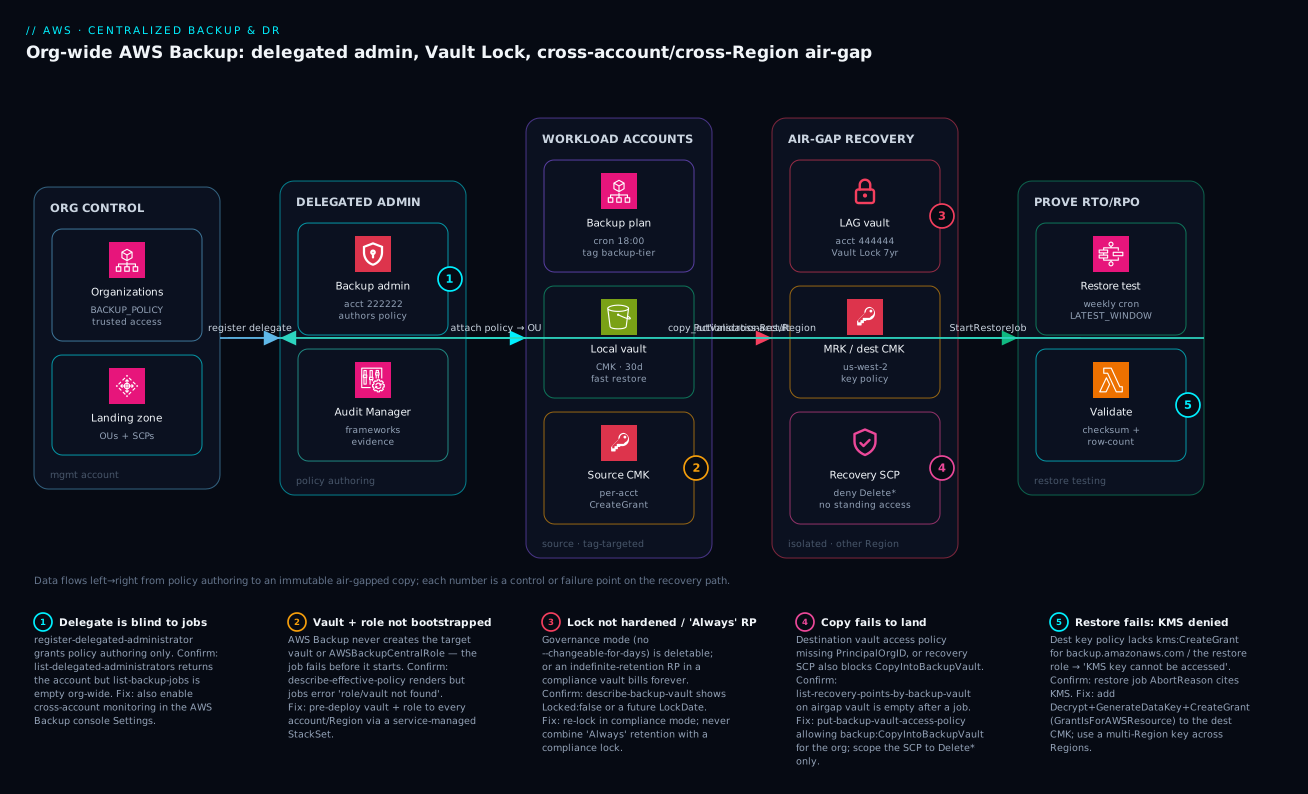
The diagram traces the recovery path the way data actually moves through it, left to right, and drops a number on each control or failure point. Read it as a pipeline. On the far left, the org control plane (the management account) enables AWS Backup trusted access, turns on the BACKUP_POLICY type, and registers the delegate — and ① marks the trap that a registered delegate is still blind to jobs until you separately enable cross-account monitoring. The delegated admin authors the tag-targeted policy and runs Audit Manager, then attaches the policy to the production OU. That policy renders into every workload account, where a daily rule snapshots tagged resources into a local CMK-encrypted vault for fast restores — ② marks the bootstrap gotcha that the vault and AWSBackupCentralRole must already exist or the job fails before it starts.
From the workload accounts, copy_actions fans each recovery point cross-account and cross-Region into the air-gapped recovery account in us-west-2. That is where the program earns its keep: a logically air-gapped vault under a 7-year compliance-mode Vault Lock (③ — the lock must actually harden, and no “Always”-retention recovery point may sit inside it), a destination CMK or multi-Region key, and a recovery-OU SCP that denies the deletion verbs (④ — the copy still has to land, which fails if the destination access policy or that very SCP is wrong). Finally the restore-testing plane, running in the recovery account, fires real StartRestoreJob calls weekly against the air-gapped copies, a Lambda checksums the result, and PutRestoreValidationResult writes immutable evidence back to Audit Manager — ⑤ marks the restore that fails with a KMS-denied error when the destination key policy lacks kms:CreateGrant. Follow the numbers and you have the whole method: author policy centrally, snapshot locally, copy to an immutable air-gap, and prove you can restore.
Real-world scenario
A fintech platform team I worked with — call it Meridian Pay, 140 AWS accounts under a Control Tower landing zone, running card-processing on RDS PostgreSQL and a DynamoDB ledger — ran a clean per-account AWS Backup setup: every workload account backed itself up to a local vault, lifecycle was correct, dashboards were green. RPO was nominally one hour (continuous backup on the ledger), retention met their seven-year card-industry floor, and the quarterly “do we have backups?” checkbox was always ticked. The program had cost them about ₹95,000/month in storage and they considered it solved.
Then a CI/CD pipeline with an over-broad deployment role in their staging account was compromised through a poisoned npm dependency. The attacker enumerated AWS Backup and, because the same role could manage vaults, began deleting recovery points and the vault itself. The local backups in that account were gone in minutes — encrypted with a CMK the same role could also schedule for deletion. Staging was non-production, so the data loss was survivable, but the incident review asked a sharper question than the incident itself: prove the production copies could not have met the same fate. Nobody could. Production used the identical pattern; only luck (and the attacker stopping at staging) separated a bad day from a company-ending one.
The constraint made the fix non-trivial. Compliance forbade standing human or break-glass access to the immutable tier, yet they needed copies that survived a full account compromise and evidence the copies were both immutable and restorable. They could not simply “add a second vault” in the same account — that shared the trust boundary the staging incident had just walked through.
The fix was three changes, not a re-platform. First, every Tier-1 plan got a copy_actions fan-out into a logically air-gapped vault in a separate recovery account (444444444444) in us-west-2, locked in compliance mode with min-retention-days matching their seven-year floor — so even a root-equivalent compromise of a workload account could not shorten or delete those copies. Second, the recovery OU got an SCP denying the deletion verbs outright, closing the exact door the staging incident walked through:
{
  "Version": "2012-10-17",
  "Statement": [{
    "Effect": "Deny",
    "Action": [
      "backup:DeleteRecoveryPoint",
      "backup:DeleteBackupVault",
      "backup:PutBackupVaultAccessPolicy",
      "kms:ScheduleKeyDeletion",
      "kms:DisableKey"
    ],
    "Resource": "*"
  }]
}
Third — the part that satisfied the auditor — a weekly restore-testing plan in the recovery account restored the latest air-gapped RDS and DynamoDB recovery points, a Lambda validated row counts and a ledger checksum against a production canary, and PutRestoreValidationResult recorded an immutable pass with a measured restore duration. The Audit Manager report plan exported that evidence to a locked S3 bucket every Monday.
When the auditor asked the sharp question, the answer was a CSV with timestamps, durations, and validation verdicts — not a slide deck. RTO went from “we believe under four hours” to “measured 2h41m on the last 11 consecutive weekly tests.” The incremental cost was about ₹40,000/month (the air-gap storage and cross-Region copy egress), which the CFO signed in one meeting once it was framed as “the difference between a finding and a clean audit.” The wall-lesson the team adopted: “A green backup dashboard is a claim. A passing restore test in an account you can’t delete from is a fact.”
The transformation as a before/after, because the gap is the lesson:
| Dimension | Before (per-account) | After (centralized air-gap) |
|---|---|---|
| Trust boundary | Backups share the workload account | Separate recovery account + Region |
| Immutability | CMK + RPs deletable by the same role | Compliance Vault Lock, 7-year floor |
| Deletion door | Deploy role could manage vaults | SCP denies Delete*/key-deletion |
| RTO/RPO | “We believe under 4h” | Measured 2h41m over 11 weekly tests |
| Audit answer | A runbook claiming a number | CSV of timestamps, durations, verdicts |
| Cost | ~₹95,000/mo | ~₹135,000/mo (+air-gap copy/egress) |
| Survives account compromise? | No | Yes |
Advantages and disadvantages
Centralizing backup as a separate trust boundary buys survivability and provability at the cost of complexity and cross-account egress. Weigh it honestly:
| Advantages (why this model protects you) | Disadvantages (why it costs you) |
|---|---|
| Recovery path is a separate trust boundary — a compromised workload account can’t reach the immutable copies | Multi-account, multi-Region, multi-key — materially more moving parts to get right |
| Compliance Vault Lock makes copies immutable to everyone, including root and AWS — true ransomware survivability | The “Always”-retention-in-compliance-vault foot-gun bills forever and is unrecoverable short of closing the account |
| Tag-targeted org policy means coverage scales automatically as teams ship | Tag discipline is now load-bearing — an untagged resource is silently unprotected |
| Restore testing converts RTO/RPO from claims into measured, auditable evidence | Cross-Region copy adds egress and storage cost (the air-gap is not free) |
| One delegated admin authors policy org-wide; the management account stays thin | Half-configured delegation (policy without monitoring) is an easy, invisible mistake |
| Audit Manager + report plans hand auditors evidence instead of opinions | KMS key policy across accounts is fiddly; the CreateGrant bug is a common stumble |
| SCPs on the recovery OU close the exact deletion door incidents walk through | Over-broad SCPs can also block the legitimate copy-in path — must be scoped precisely |
The model is right for any organization where a backup failing during an incident is unacceptable — regulated data, ransomware-exposed workloads, anything where “prove you can recover” is a real question. It is overkill for a single throwaway dev account. It bites hardest on teams with weak tagging discipline (coverage gaps), on those who lock a vault in compliance mode without understanding the irreversibility, and on anyone who configures the copy path but never tests the restore — discovering the KMS grant bug during a real disaster instead of a Monday drill.
Hands-on lab
Stand up the core of the program in a single sandbox account — a CMK, a vault, a compliance-mode lock in its grace window, a tag-targeted plan, and an on-demand backup you watch complete. Everything here is free-tier-friendly except a few paise of EBS snapshot storage; we tear it all down at the end. Run in CloudShell (the AWS CLI is pre-authenticated).
Step 1 — Variables and a dedicated KMS key. A dedicated CMK is mandatory for a real program; we make one even in the lab.
REGION=ap-south-1
VAULT=lab-backup-vault
KEY_ID=$(aws kms create-key --description "lab backup CMK" \
  --query KeyMetadata.KeyId --output text)
aws kms create-alias --alias-name alias/lab-backup --target-key-id "$KEY_ID"
echo "Key: $KEY_ID"
Expected: a key ID prints; alias/lab-backup now resolves to it.
Step 2 — Create a backup vault encrypted with that key.
aws backup create-backup-vault --backup-vault-name "$VAULT" \
  --encryption-key-arn "arn:aws:kms:$REGION:$(aws sts get-caller-identity --query Account --output text):key/$KEY_ID"
aws backup describe-backup-vault --backup-vault-name "$VAULT" \
  --query '{Name:BackupVaultName, Locked:Locked, RP:NumberOfRecoveryPoints}'
Expected: Locked: false, RP: 0 — an empty, unlocked vault.
Step 3 — Tag an EBS volume so the plan can select it. Create a tiny 1 GiB volume and tag it backup-tier=tier1.
AZ=${REGION}a
VOL_ID=$(aws ec2 create-volume --availability-zone "$AZ" --size 1 \
  --volume-type gp3 --query VolumeId --output text)
aws ec2 create-tags --resources "$VOL_ID" \
  --tags Key=backup-tier,Value=tier1 Key=Name,Value=lab-backup-target
echo "Volume: $VOL_ID"
Step 4 — Create a backup plan and a tag-based selection.
PLAN_ID=$(aws backup create-backup-plan --backup-plan '{
  "BackupPlanName": "lab_tier1",
  "Rules": [{
    "RuleName": "DailySnapshot",
    "TargetBackupVaultName": "'"$VAULT"'",
    "ScheduleExpression": "cron(0 18 ? * * *)",
    "Lifecycle": { "DeleteAfterDays": 35 }
  }]
}' --query BackupPlanId --output text)

ROLE_ARN="arn:aws:iam::$(aws sts get-caller-identity --query Account --output text):role/service-role/AWSBackupDefaultServiceRole"
aws backup create-backup-selection --backup-plan-id "$PLAN_ID" \
  --backup-selection '{
    "SelectionName": "tier1-by-tag",
    "IamRoleArn": "'"$ROLE_ARN"'",
    "ListOfTags": [{ "ConditionType": "STRINGEQUALS", "ConditionKey": "backup-tier", "ConditionValue": "tier1" }]
  }'
(If AWSBackupDefaultServiceRole does not exist, the AWS Backup console’s first-run creates it, or create it from the AWS managed AWSBackupServiceRolePolicyForBackup policy.)
Step 5 — Take an on-demand backup and watch it complete. Don’t wait for the 18:00 cron — fire one now.
JOB_ID=$(aws backup start-backup-job \
  --backup-vault-name "$VAULT" \
  --resource-arn "arn:aws:ec2:$REGION:$(aws sts get-caller-identity --query Account --output text):volume/$VOL_ID" \
  --iam-role-arn "$ROLE_ARN" \
  --query BackupJobId --output text)
aws backup describe-backup-job --backup-job-id "$JOB_ID" \
  --query '{State:State, Pct:PercentDone}'
# re-run the describe until State = COMPLETED (usually a couple of minutes for 1 GiB)
Expected: State moves CREATED → RUNNING → COMPLETED; a recovery point now exists in the vault.
Step 6 — Lock the vault in compliance mode (grace window) and inspect the state. We use the minimum 3-day grace so you can still unlock before teardown.
aws backup put-backup-vault-lock-configuration --backup-vault-name "$VAULT" \
  --changeable-for-days 3 --min-retention-days 1 --max-retention-days 365
aws backup describe-backup-vault --backup-vault-name "$VAULT" \
  --query '{Locked:Locked, LockDate:LockDate, Min:MinRetentionDays, Max:MaxRetentionDays}'
Expected: Locked: true with a LockDate ~3 days in the future — the cooling-off window. Because it hasn’t hardened, you can still delete the lock in teardown.
Validation checklist. You created a dedicated CMK, an encrypted vault, a tag-targeted plan, a real recovery point, and a compliance-mode lock in its grace window — the full local half of the program in one account. What each step proved:
| Step | What you did | What it proves | Real-world analogue |
|---|---|---|---|
| 1 | Dedicated CMK | The key the program must own (not aws/backup) |
Every prod vault uses a CMK |
| 2 | Encrypted vault | The permission boundary for recovery points | Local vault in each account |
| 3 | Tag the resource | Coverage follows tags, not ARNs | How org policy scales |
| 4 | Plan + tag selection | One plan protects whatever is tagged | The Tier-1 org policy |
| 5 | On-demand backup completes | A recovery point is real, not theoretical | The nightly job |
| 6 | Compliance lock (grace) | Immutability is a mode + a grace window | Vault Lock on prod/air-gap vaults |
Teardown (delete the lock while still in grace, then everything else).
# Delete the lock config — only possible because LockDate is still in the future.
aws backup delete-backup-vault-lock-configuration --backup-vault-name "$VAULT"
# Delete the recovery point, then the plan/selection, vault, volume, and key.
RP_ARN=$(aws backup list-recovery-points-by-backup-vault --backup-vault-name "$VAULT" \
  --query 'RecoveryPoints[0].RecoveryPointArn' --output text)
aws backup delete-recovery-point --backup-vault-name "$VAULT" --recovery-point-arn "$RP_ARN"
aws backup delete-backup-plan --backup-plan-id "$PLAN_ID"
aws backup delete-backup-vault --backup-vault-name "$VAULT"
aws ec2 delete-volume --volume-id "$VOL_ID"
aws kms schedule-key-deletion --key-id "$KEY_ID" --pending-window-in-days 7
Cost note. A 1 GiB EBS snapshot is a fraction of a rupee; the CMK is ~₹85/month prorated (deleted here after a 7-day pending window, the KMS minimum). The whole lab runs to a few rupees. Critical: never run Step 6 with --changeable-for-days omitted in a sandbox you want to delete — a hardened compliance lock makes the vault and its recovery points undeletable until they expire, and the only escape is closing the AWS account.
Common mistakes & troubleshooting
This is the playbook — the part you bookmark, because every one of these silently breaks a backup program and most produce a green dashboard while doing it. First as a scannable table, then the entries that bite hardest expanded with the full confirm-command detail.
| # | Symptom | Root cause | Confirm (exact cmd) | Fix |
|---|---|---|---|---|
| 1 | Policy renders perfectly but every job fails | Vault/role not bootstrapped in the target account/Region | describe-effective-policy OK, but job error “role/vault not found” |
StackSet vault + AWSBackupCentralRole to every OU/Region before policies |
| 2 | Delegate authors policy but sees no jobs org-wide | Cross-account monitoring not enabled (only delegation was) | list-delegated-administrators returns acct, list-backup-jobs empty |
Enable cross-account monitoring in AWS Backup → Settings |
| 3 | Cross-account copies never appear in the recovery vault | Dest vault access policy missing / wrong PrincipalOrgID, or recovery SCP blocks copy-in |
list-recovery-points-by-backup-vault (airgap) empty after a job |
put-backup-vault-access-policy for backup:CopyIntoBackupVault; scope SCP to Delete* only |
| 4 | Restore fails: “KMS key cannot be accessed” | Dest key policy lacks kms:CreateGrant for Backup/restore role |
Restore job StatusMessage/AbortReason cites KMS |
Add Decrypt+GenerateDataKey+CreateGrant (GrantIsForAWSResource) to dest CMK |
| 5 | Vault “looks locked” but is still deletable | Governance mode (no --changeable-for-days) or LockDate still future |
describe-backup-vault → Locked:false or future LockDate |
Re-lock with --changeable-for-days; wait for LockDate to pass |
| 6 | A recovery point bills forever, can’t delete it | “Always”/indefinite retention inside a compliance-locked vault | list-recovery-points shows no CalculatedLifecycle.DeleteAt |
Prevent via max-retention-days; existing one only clears by account closure |
| 7 | Some resources are simply never backed up | They aren’t tagged with the selection tag | describe-effective-policy selection tag vs get-resources by tag |
Enforce tagging (Tag Policy / Config rule); add the tag |
| 8 | Backup job cancelled before it ran | start_backup_window_minutes too small under contention |
Job StatusMessage: “window expired” |
Raise start/complete windows; stagger schedules |
| 9 | Continuous-backup RPs vanish after ~35 days | PITR has a hard 35-day ceiling (working as designed) | RP age ~35d on a CONTINUOUS rule |
Add a daily SNAPSHOT rule with long retention for the long tail |
| 10 | EC2/EBS restore fails though RP is intact | Source AMI was disabled | Restore error references a disabled image | SCP deny ec2:DisableImage on prod OUs; re-enable the AMI |
| 11 | Cross-Region copy slow / intermittently failing | Single-Region key re-wrapping per hop, or missing ReEncrypt* |
Copy job latency/errors; key policy lacks ReEncrypt* |
Use a multi-Region key; or add kms:ReEncrypt* |
| 12 | Audit Manager shows resources non-compliant for “protected” | Resource in scope but no plan covers its tag/type | Framework finding lists the resource ARN | Extend the policy selection; re-tag |
| 13 | create-policy --type BACKUP_POLICY errors |
Policy type not enabled on the org root | list-roots → PolicyTypes lacks BACKUP_POLICY |
enable-policy-type --policy-type BACKUP_POLICY |
| 14 | Restore test “passes” but data is wrong | No validation wired — only boot was checked | Restore job ValidationStatus unset |
Add EventBridge→Lambda + put-restore-validation-result |
The expanded form, with the full reasoning for the entries that bite hardest:
1. The org policy renders perfectly into a member account, yet every backup job fails.
Root cause: The target vault and the IAM role the policy references do not exist in that account/Region — AWS Backup never creates them.
Confirm: aws organizations describe-effective-policy --policy-type BACKUP_POLICY (run in the member) shows a correct policy; aws backup list-backup-jobs --by-state FAILED shows a StatusMessage referencing a missing role or vault.
Fix: Deploy the vault and AWSBackupCentralRole to every target account/Region via a service-managed CloudFormation StackSet targeting the OUs, before attaching any policy. The role needs the AWS managed AWSBackupServiceRolePolicyForBackup (and ...ForRestores where you restore).
2. The delegated admin can author policies but sees no jobs anywhere.
Root cause: Only register-delegated-administrator was done; cross-account monitoring was never enabled. They are two separate grants.
Confirm: aws organizations list-delegated-administrators --service-principal backup.amazonaws.com returns the account, but aws backup list-backup-jobs from the delegate is empty even though members are backing up.
Fix: In the delegate’s AWS Backup console → Settings, enable cross-account monitoring (and ensure isCrossAccountBackupEnabled is true for copies).
3. Cross-account copies never land in the recovery vault.
Root cause: The destination vault access policy is missing or its aws:PrincipalOrgID doesn’t match, or the recovery OU’s SCP is so broad it blocks backup:CopyIntoBackupVault along with the deletion verbs.
Confirm: aws backup list-recovery-points-by-backup-vault --backup-vault-name airgap-recovery-vault (run in 444444444444) is empty after a member job completes; aws backup get-backup-vault-access-policy shows a missing/incorrect policy; aws organizations describe-effective-policy --policy-type SERVICE_CONTROL_POLICY reveals an over-broad deny.
Fix: put-backup-vault-access-policy allowing backup:CopyIntoBackupVault for PrincipalOrgID; scope the recovery SCP to only the Delete*/key-deletion verbs so copy-in still works.
4. Restore fails with “KMS key cannot be accessed” though the recovery point is intact.
Root cause: The destination CMK’s key policy lacks kms:CreateGrant (with the GrantIsForAWSResource condition) for backup.amazonaws.com and/or the restore role — AWS Backup creates a transient grant to decrypt during restore.
Confirm: aws backup describe-restore-job --restore-job-id <id> shows a StatusMessage/AbortReason citing KMS; the recovery point itself lists fine.
Fix: Add kms:Decrypt, kms:GenerateDataKey, kms:DescribeKey, and kms:CreateGrant to the dest key policy for the Backup service and the restore role (the restore-role statement scoped by "kms:GrantIsForAWSResource": "true"). Across Regions, prefer a multi-Region key.
5. The vault “looks locked” but a privileged role can still delete recovery points.
Root cause: It’s in governance mode (you omitted --changeable-for-days), or it’s compliance mode but LockDate is still in the future (the grace window).
Confirm: aws backup describe-backup-vault --query '{Locked:Locked, LockDate:LockDate}' shows Locked:false, or Locked:true with a future LockDate.
Fix: For true immutability, lock with --changeable-for-days 3 (compliance) and wait for LockDate to pass — only then is it un-deletable by anyone.
6. A recovery point bills indefinitely and refuses to delete.
Root cause: It was created with “Always”/indefinite retention and the vault is under a hardened compliance lock, so its retention can never be shortened and it can never be deleted.
Confirm: aws backup list-recovery-points-by-backup-vault shows the RP with no CalculatedLifecycle.DeleteAt; the vault shows Locked:true with a past LockDate.
Fix: Prevent it up front with max-retention-days on the lock (which rejects indefinite-retention RPs). An already-hardened case has no escape short of closing the AWS account — which is exactly why you never combine “Always” with a compliance lock.
7. Some production resources are silently never backed up.
Root cause: They lack the selection tag (backup-tier=tier1), so the tag-targeted policy never selects them. Tag-targeting scales coverage and silently drops the untagged.
Confirm: Compare the policy’s selection tag (from describe-effective-policy) against aws resourcegroupstaggingapi get-resources --tag-filters Key=backup-tier.
Fix: Enforce tagging with an Organizations Tag Policy and an AWS Config rule that flags untagged in-scope resources; backfill the tag.
9. Continuous-backup recovery points disappear after about 35 days.
Root cause: PITR/continuous backup has a hard 35-day retention ceiling — this is by design, not a bug.
Confirm: The vanishing RPs are on a rule with enable_continuous_backup: true; their age clusters at ~35 days.
Fix: Continuous is your low-RPO tier only. Run a daily SNAPSHOT rule (with long, air-gapped retention) in the same plan for the long-term and ransomware tier.
Best practices
- Three accounts, never two. Management enables and attaches; a delegated admin authors and monitors; an isolated recovery account in another Region holds the immutable copies. Collapsing any pair re-creates the blast radius you’re trying to escape.
- Enable both delegation grants.
register-delegated-administratorand cross-account monitoring. A policy author blind to execution is worse than useless — it looks configured. - Bootstrap vaults + roles before policies. StackSet (service-managed) the vault and
AWSBackupCentralRoleinto every OU/Region first, so jobs never fail “role/vault not found” when an account joins. - Target by tag, then enforce the tag. Tag-targeting scales coverage automatically — but pair it with a Tag Policy and a Config rule so an untagged resource can’t slip through unprotected.
- Compliance-mode lock on the air-gap vault, always. Governance mode is an operator guardrail; only compliance mode survives a root-equivalent compromise. Verify
Locked:truewith a pastLockDate. - Never combine “Always” retention with a compliance lock. Set
max-retention-dayson every lock so an indefinite-retention recovery point can’t bill forever with no escape but account closure. - Dedicated CMKs, never
aws/backup. The managed key can’t be shared cross-account, so the restore side can’t use it. Use customer-managed keys and a multi-Region key when copying cross-Region. - Get
kms:CreateGrantright the first time. Add it (withGrantIsForAWSResource) forbackup.amazonaws.comand the restore role — it’s the single most common reason a real restore fails. - SCP the recovery OU to deny deletion, scoped tightly. Deny
backup:DeleteRecoveryPoint,DeleteBackupVault,kms:ScheduleKeyDeletion— but only those, so the legitimateCopyIntoBackupVaultpath still works. - Run two rules per plan: continuous + daily snapshot. Continuous (35-day ceiling) for low RPO; daily snapshot with long air-gapped retention for the long tail and ransomware survivability.
- Test the restore, not just the backup. A scheduled restore-testing plan against the air-gap vault, with a validation Lambda, turns RTO/RPO into measured evidence. An untested backup is a hypothesis.
- Export evidence continuously. Audit Manager framework + report plan to a locked S3 bucket — the artifact for auditors and the drift signal when a resource slips out of policy.
- Block
ec2:DisableImageon prod. An attacker can soft-brick your EC2/EBS restore path by disabling the AMI without deleting anything; close that door with an SCP.
The leading indicators worth alerting on before an incident or audit — not the lagging “job failed”:
| Alert on | Signal / control | Threshold (starting point) | Why it’s leading |
|---|---|---|---|
| Stalled backups | BACKUP_LAST_RECOVERY_POINT_CREATED |
RP age > 26h on a daily rule | Catches a quietly broken job before the next audit |
| Copy not landing | Recovery-point count in air-gap vault | 0 new in 26h | The air-gap is the part that must not silently fail |
| Lock not hardened | describe-backup-vault Locked/LockDate |
Locked:false on a prod/air-gap vault |
An “immutable” vault that isn’t |
| Coverage gap | _PROTECTED_BY_BACKUP_PLAN |
any in-scope resource non-compliant | Unprotected resource discovered before restore time |
| Restore-time regression | _RESTORE_TIME_..._MEET_TARGET |
measured RTO > target | RTO drifting past the SLA the business bought |
| Deletion attempt | CloudTrail DeleteRecoveryPoint/DeleteBackupVault |
any in the recovery account | The SCP should deny it — an attempt is a signal |
Security notes
- The recovery account is a trust boundary, not a folder. It must be a separate AWS account in a separate OU with no standing human access — break-glass only, via a heavily audited role assumed under MFA. The whole point is that the identity which can delete your last copy is not an identity an attacker can reach.
- Compliance-mode Vault Lock is your anti-ransomware control. It makes recovery points immutable to every principal including root and AWS. Governance mode does not survive a privileged compromise; for the air-gap tier, compliance mode is the only acceptable choice.
- Least privilege on the backup and restore roles.
AWSBackupCentralRolegetsAWSBackupServiceRolePolicyForBackup; the restore role gets...ForRestoresplus the scoped KMS actions — notbackup:*orkms:*. The restore role’sCreateGrantmust carry theGrantIsForAWSResourcecondition. - Dedicated CMKs with tightly scoped key policies. Only
KeyAdminholdskms:*; the Backup service and restore role get exactly the actions they need. Cross-Region copy uses a multi-Region key so data keys aren’t re-wrapped through extra principals. - SCP the deletion verbs at the OU. Deny
backup:DeleteRecoveryPoint,DeleteBackupVault,PutBackupVaultAccessPolicy,kms:ScheduleKeyDeletion,kms:DisableKeyon the recovery OU — andec2:DisableImageon production OUs. SCPs bound every principal, including root, which IAM policies do not. - Vault access policy is a second lock, scope it precisely. It permits
backup:CopyIntoBackupVaultfor yourPrincipalOrgIDand nothing else — not a wildcard principal with broad actions. Audit it; an over-permissive resource policy is an exfiltration path. - Audit every action on the recovery path. An organization CloudTrail to a central, locked S3 bucket captures who attempted what against vaults and keys. In the recovery account, any delete attempt is itself an alarm — the SCP denies it, but the attempt is signal.
- Protect the evidence bucket too. The Audit Manager report S3 bucket gets Object Lock (WORM), an SCP-protected key, and bucket-policy isolation — evidence an attacker can rewrite is not evidence.
The security controls and what each defends against — note that “secure” and “recoverable” pull the same direction here:
| Control | Mechanism | Defends against | Also enables |
|---|---|---|---|
| Separate recovery account | Distinct account + OU | Account-scoped compromise reaching backups | Clean blast-radius boundary |
| Compliance Vault Lock | put-backup-vault-lock-configuration |
Ransomware/root deleting recovery points | Regulatory WORM evidence |
| Recovery-OU SCP | Deny Delete*/key-deletion | The exact door incidents walk through | Auditable “cannot be deleted” claim |
| Scoped KMS key policy | CreateGrant + GrantIsForAWSResource |
Arbitrary key-use grants | Working cross-account restore |
| Vault access policy | CopyIntoBackupVault + PrincipalOrgID |
Unauthorised copy-in / exfil | Cross-account copy landing |
| Organization CloudTrail | Org trail → locked S3 | Tampering hiding deletion attempts | Forensic timeline of the recovery path |
ec2:DisableImage SCP |
Deny on prod OUs | Soft-bricking EC2/EBS restore | Guaranteed restorable AMIs |
Cost & sizing
What drives the AWS Backup bill, and how each lever interacts with the architecture:
- Warm vs cold recovery-point storage dominates. Warm storage is billed per GB-month at a rate comparable to the source snapshot; cold storage is dramatically cheaper but carries a 90-day minimum commitment and a small per-restore retrieval cost. The pattern that minimizes cost without hurting RTO: short warm local retention (fast restores), then cold for the long tail, with the long compliance retention living on the cheaper cold tier.
- Cross-Region copy adds inter-Region data-transfer (egress) on every copied byte plus a second copy’s storage in the destination Region. This is the single largest incremental cost of the air-gap — and the one the CFO must understand is buying survivability, not redundancy for its own sake.
- Cross-account copy within a Region has no inter-Region egress, but you still pay for the destination copy’s storage. The air-gap’s Region separation is what costs; the account separation is nearly free.
- KMS adds ~₹85/key/month plus per-request charges; a handful of CMKs (one per vault account/Region, or a multi-Region key) is negligible against storage.
- Restore testing costs a real restore each run — transient compute/storage for the restored resource during the validation window, then it’s torn down. Weekly tests of a few resources are a rounding error against the value of measured RTO.
A rough monthly picture for a mid-size estate (say 8 TB of warm Tier-1 data, 8 TB copied cross-Region, 7-year cold air-gap tail):
| Cost driver | What you pay for | Rough INR / month | What it buys | Watch-out |
|---|---|---|---|---|
| Warm local storage (8 TB) | Fast-restore recovery points | ~₹35,000–55,000 | Low-RTO operational restores | Drops sharply once moved to cold |
| Cold storage (long tail) | Cheap long-retention RPs | ~₹8,000–15,000 | 7-year compliance retention | 90-day min commit; retrieval fee |
| Cross-Region copy egress | Inter-Region transfer of 8 TB | ~₹40,000–60,000 (first copy build) | The air-gap (Region isolation) | Recurs on new data, not re-copied |
| Air-gap destination storage | Second copy in recovery Region | ~₹35,000–55,000 | Survives a regional event + compromise | Doubles storage for Tier-1 |
| KMS keys | A few CMKs / one MRK | ~₹300–800 | Shareable, immutable-friendly encryption | Per-request charges at high volume |
| Restore testing | Transient restored resources | ~₹2,000–5,000 | Measured RTO/RPO evidence | Validation window compute |
Free-tier note: there is no free tier for AWS Backup storage, but the control plane (policies, vaults, locks, Audit Manager frameworks) is free — you pay for stored bytes and copied bytes, not for the program’s machinery. Right-size by tiering aggressively to cold, copying only the tiers that genuinely need the air-gap (your Tier-1, not everything), and letting the daily-snapshot retention — not the continuous tier — carry the long, cheap tail.
Interview & exam questions
1. Why is a per-account backup setup dangerous even when every account backs itself up correctly? Because the backups share a trust boundary with the thing that gets compromised. A single over-broad identity (a deploy role, a poisoned pipeline) that can manage vaults can delete every recovery point and the vault itself — and if the CMK is the same account’s, schedule it for deletion too. The fix is a separate recovery account, in another Region, with compliance-mode immutability and an SCP denying deletion.
2. What are the two distinct grants delegated administration in AWS Backup requires, and what breaks with only one? register-delegated-administrator lets the account author and manage backup policies; separately, cross-account monitoring (AWS Backup console → Settings) lets it see jobs in member accounts. With only the first, you get a policy author who is blind to execution — it looks configured but can’t observe whether anything is actually backing up.
3. A backup policy renders perfectly into a member account but every job fails. Most likely cause? The vault and the IAM role the policy references don’t exist in that account/Region — AWS Backup does not create them. Confirm with describe-effective-policy (policy is fine) versus a failed job’s StatusMessage (“role/vault not found”). Fix by bootstrapping the vault and AWSBackupCentralRole to every target OU/Region via a service-managed StackSet before attaching policies.
4. What single flag selects compliance mode for Vault Lock, and why does it matter? Including --changeable-for-days (with a grace window ≥3 days) selects compliance mode — immutable to every principal including root and AWS once LockDate passes. Omitting it gives governance mode, removable by sufficiently privileged IAM. Only compliance mode survives a root-equivalent compromise; it’s the anti-ransomware control.
5. Describe the “Always-retention in a compliance vault” foot-gun. A recovery point with indefinite (“Always”) retention inside a hardened compliance-locked vault can never have its retention shortened and never be deleted — so it bills forever, with the only escape being closing the AWS account. Prevent it by setting max-retention-days on the lock (which rejects indefinite-retention RPs). Never combine indefinite retention with a compliance lock.
6. Cross-account restore fails with “KMS key cannot be accessed” though the recovery point is intact. What’s missing? The destination CMK’s key policy lacks kms:CreateGrant (with the GrantIsForAWSResource condition) for backup.amazonaws.com and/or the restore role. AWS Backup creates a transient grant to decrypt during restore; without CreateGrant it can’t. Add Decrypt, GenerateDataKey, DescribeKey, and CreateGrant to the dest key policy; across Regions use a multi-Region key.
7. Why must the recovery vault use a dedicated CMK and not the aws/backup managed key? The AWS-managed aws/backup key cannot be shared cross-account, so the restore side in a different account can’t use it — cross-account restore is impossible. A dedicated customer-managed key has a key policy you control, letting you grant the Backup service and the restore role exactly the actions they need.
8. How do you make the cross-account copy actually land in the recovery vault? Two backstops: (a) a vault access policy on the destination allowing backup:CopyIntoBackupVault for your aws:PrincipalOrgID, and (b) ensuring isCrossAccountBackupEnabled is on. A common failure is an over-broad recovery-OU SCP that denies CopyIntoBackupVault along with the deletion verbs — scope the SCP to only Delete*/key-deletion so copy-in still works.
9. What’s the difference between continuous (PITR) and snapshot protection, and how do you use both? Continuous/PITR (RDS, Aurora, DynamoDB, S3) restores to any second within a hard 35-day ceiling — your low-RPO tier. Snapshots restore to discrete points and support long retention — your long-term and ransomware tier. Run both rules in the same plan: continuous for low RPO, daily snapshot with long air-gapped retention for the long tail.
10. How does restore testing turn RTO/RPO from a claim into evidence? It runs real StartRestoreJob operations on a schedule against the air-gapped copies, measures completion time (your empirical RTO), optionally validates integrity via a Lambda, writes an immutable PutRestoreValidationResult, and tears the resource down. Audit Manager aggregates the durations and verdicts so an auditor sees timestamps and measured RTO, not a runbook asserting a number.
11. An EC2/EBS restore fails although the recovery point and lock are fine. What non-obvious cause should you check, and how do you prevent it? The source AMI has been disabled — the recovery point is intact but the resource isn’t restorable. Prevent it by an SCP denying ec2:DisableImage on production OUs, so an attacker can’t soft-brick the restore path without deleting anything; re-enable the AMI to restore.
12. Which SCP closes the exact door a compromised role walks through, and why an SCP rather than IAM? An SCP on the recovery OU denying backup:DeleteRecoveryPoint, backup:DeleteBackupVault, backup:PutBackupVaultAccessPolicy, kms:ScheduleKeyDeletion, and kms:DisableKey. SCPs bound every principal in the account including root, which IAM policies cannot — so even a fully compromised identity can’t delete the copies or schedule the key for deletion.
These map to AWS Certified Security – Specialty (data protection, key management, incident response), AWS Certified Solutions Architect – Professional (multi-account governance, DR, cross-Region/account design), and the resilience pillar of the Well-Architected reviews. A compact cert-mapping for revision:
| Question theme | Primary cert | Objective area |
|---|---|---|
| Air-gap trust boundary, SCP deny | Security Specialty / SA Pro | Account isolation; preventive guardrails |
| Vault Lock compliance vs governance | Security Specialty | Data protection; WORM immutability |
KMS key policy, CreateGrant |
Security Specialty | Key management; cross-account access |
| Delegated admin, Organizations policy | SA Pro | Multi-account governance |
| Continuous vs snapshot, RTO/RPO | SA Pro / Well-Architected | DR design; reliability pillar |
| Restore testing + Audit Manager | Security Specialty / SA Pro | Recovery validation; auditability |
Quick check
- You ran
register-delegated-administratorfor AWS Backup and attached a policy, but the delegate’s console shows no backup jobs from member accounts. What second grant did you miss? - True or false: omitting
--changeable-for-dayswhen locking a vault gives you a stronger, immutable compliance-mode lock. - A cross-account restore fails with “KMS key cannot be accessed” even though the recovery point lists fine. Name the specific KMS permission that’s almost certainly missing.
- Why must you bootstrap the backup vault and IAM role into a target account before attaching an Organizations backup policy to its OU?
- Your continuous-backup recovery points keep disappearing at about 35 days. Is this a bug, and what do you add for long-term retention?
Answers
- Cross-account monitoring (AWS Backup console → Settings). Delegation (
register-delegated-administrator) only grants policy authoring; cross-account monitoring is the separate grant that lets the delegate see member-account jobs. Without it you have a policy author blind to execution. - False. Omitting
--changeable-for-daysgives governance mode, which a sufficiently privileged IAM principal can still remove and use to delete recovery points. Including--changeable-for-days(≥3) selects compliance mode — the immutable one that even root can’t undo onceLockDatepasses. kms:CreateGrant(with thekms:GrantIsForAWSResourcecondition) on the destination CMK’s key policy, forbackup.amazonaws.comand the restore role. AWS Backup creates a transient grant to decrypt during restore; withoutCreateGrantthe restore is denied.- Because AWS Backup does not create the vault or the role — it only references them. If they don’t exist when a job fires, the job fails (“role/vault not found”) even though
describe-effective-policyshows a perfect policy. A service-managed StackSet to the OU lands them before any account starts running jobs. - Not a bug — PITR/continuous backup has a hard 35-day retention ceiling by design. It’s your low-RPO tier; add a daily SNAPSHOT rule (with long, air-gapped retention) in the same plan to carry the long-term and ransomware tail.
Glossary
- AWS Backup — a managed service that orchestrates backups across AWS services; recovery points physically live with each source service, wrapped in a vault and encrypted by a KMS key.
- Backup plan — schedule + lifecycle + target vault + selection; when a rule fires it assumes an IAM role and snapshots the selected resources.
- Organizations backup policy — declarative JSON (with
@@assigninheritance operators) attached to an OU that renders into member accounts; targets resources by tag. - Backup vault — a logical container and permission boundary for recovery points; governs who can read, copy, and delete them (not a byte store like S3).
- Logically air-gapped (LAG) vault — a distinct vault type with built-in cross-account/Region sharing and restore, used for the isolated recovery copy.
- Recovery point (RP) — an encrypted pointer to a snapshot of a protected resource, held in a vault; the unit you restore.
- Vault Lock — a WORM immutability configuration on a vault; compliance mode is immutable to all principals (including root) until RPs expire, governance mode is IAM-removable.
changeable_for_days— the grace window (min 3 days) before a compliance lock hardens; its presence selects compliance mode, and it’s your only undo untilLockDatepasses.copy_actions— a rule block that fans a recovery point to another vault (another account/Region); has a lifecycle independent of the local rule.- Customer-managed key (CMK) — a KMS key with a policy you control; mandatory for cross-account restore because the managed
aws/backupkey can’t be shared. kms:CreateGrant— the key-policy permission that lets AWS Backup create a transient decrypt grant during restore; withGrantIsForAWSResource, it’s load-bearing for cross-account restore.- Multi-Region key (MRK) — a KMS key replicated across Regions with shared material, avoiding data-key re-wrapping on cross-Region copies.
- Delegated administrator — the account registered to author org-wide backup policies; needs the separate cross-account-monitoring grant to also view member jobs.
- Cross-account monitoring — the AWS Backup setting (console → Settings) that lets the delegate observe jobs in member accounts; distinct from delegation.
- Continuous backup / PITR — point-in-time recovery (RDS, Aurora, DynamoDB, S3) restoring to any second within a hard 35-day ceiling; the low-RPO tier.
- Restore testing plan — a scheduled
StartRestoreJob+ optional validation + teardown that measures empirical RTO and proves recoverability. PutRestoreValidationResult— the API that records an immutable integrity verdict for a restore test; the evidence an auditor sees.- Audit Manager (for Backup) — a framework of parameterized controls (retention, Vault-Lock coverage, encryption, restore-time, cross-Region/account copy) that exports compliance evidence to S3.
- Service Control Policy (SCP) — an Organizations guardrail that bounds every principal in an account (including root); used to deny deletion verbs on the recovery OU.
- RTO / RPO — Recovery Time Objective (how fast you recover, measured by restore testing) and Recovery Point Objective (how much data you can lose, set by protection mode).
Next steps
You can now stand up and prove an org-wide, air-gapped backup program. Build outward:
- Foundation: AWS Organizations: SCP Guardrails & Delegated Admin — the delegation and SCP mechanics this entire program rides on.
- Related: AWS Control Tower: Guardrails & Multi-Account Foundation — the landing zone that places accounts in the OUs your policies attach to.
- Related: AWS KMS Deep Dive: Keys, Policies, Envelope Encryption & Rotation and KMS Multi-Region Keys — get the cross-account/Region key policy right so restores never fail.
- Related: Ransomware Resilience: Immutable Backup & Isolated Recovery Environment — the threat model and isolated-recovery patterns behind the air-gap.
- Related: Configure AWS Elastic Disaster Recovery (DRS): Cross-Region Failover — when you need server-level continuous replication and fast failover alongside point-in-time backups.
- Related: Automate Cross-Account RDS & EBS Snapshot Copy with AWS Backup — a focused drill on the copy path for the two most common data services.
- Capstone: AWS Zero to Hero: Well-Architected Landing Zone — where backup, governance, identity, and network come together.