In a nutshell
Imagine you have to empty a large office building by a fixed date — the lease is up, there is a penalty for overrunning, and nobody has a complete list of what is inside. You do not carry desks out one at a time by feel. You run a moving operation: you walk every floor and inventory each room; you decide keep / sell / donate / replace for every item; you pack and label by truck-load so nothing that belongs together gets split; and you unload into a new building you have already cleaned, wired, and put locks on. A cloud migration factory is exactly that moving operation, applied to a data center. The building is your data center, the items are servers and applications, the keep/sell/donate/replace decision is the 7 Rs, a truck-load is a wave, and the new building — cleaned and locked before the first truck arrives — is your landing zone on AWS.
The reason this lesson exists is that the naïve version (“install the agent, click launch”) works for ten servers and falls apart at a thousand. At real scale the unit of work stops being a server and becomes a wave, and the thing you build is not a migration but a production line: discover what you have, decide what to do with each app, move the keepers with near-zero downtime, and land every one of them in a governed account — with a burn-down chart the steering committee can read and an audit trail the regulator will accept. Everything below is that line, station by station, plus the AWS tools that power each station.
Level: Advanced · Time: ~60 min
Prerequisites. You should be comfortable with AWS accounts, VPCs, subnets, security groups, EC2 instances, and IAM roles vs. IAM users. Because every wave lands in a governed multi-account foundation, it helps to have met the multi-account landing zone and how governed accounts are vended with Account Factory for Terraform (AFT). No live AWS account is needed to follow along — the commands and templates here are illustrative.
After this lesson you will be able to:
- Describe the four stations of a migration factory — Discover → Decide → Move → Land — and name the AWS service that powers each.
- Disposition an application against the 7 Rs and pick the right migration engine (MGN, DMS/SCT, Snowball, VMware Cloud on AWS) for it.
- Explain how AWS MGN rehosts a running server with continuous block-level replication, a non-disruptive test launch, and a reversible cutover.
- Design a database move with AWS DMS using the full-load + CDC pattern for near-zero downtime, and know when you also need schema conversion.
- Read organizational readiness with the AWS CAF and sequence a program through MAP’s Assess → Mobilize → Migrate phases (and claim its funding).
- Spot the classic failure modes — ungoverned target, refactor on the critical path, decommissioning the source on cutover day — before they cost you the deadline.
A data-center exit is not a project; it is a production line. Most “lift and shift to AWS” write-ups stop at “install the replication agent and click launch,” which is fine for ten servers and a weekend. It falls apart at the scale where migration actually hurts: 1,200 servers, 300 applications, four years of undocumented dependencies, a hard lease-expiry date, and a steering committee that wants a burn-down chart. At that scale the unit of work is not a server — it is a wave, and the thing you are really building is a migration factory: a repeatable assembly line that ingests a portfolio, dispositions each application against the 7 Rs, replicates the keepers into a pre-governed landing zone, cuts them over on a schedule, and decommissions the source.
This article is a concrete reference architecture for that factory on AWS, built from four load-bearing pieces: AWS Application Discovery Service + Migration Hub as the assessment and tracking plane; the 7 Rs framework as the disposition engine that decides what happens to each app; AWS Application Migration Service (MGN) as the block-level rehost engine for the bulk of servers; and a multi-account landing zone as the governed target every wave lands into. It is designed to move a 40-server SMB in a few sprints and to run a 5,000-server enterprise exit over twelve to eighteen months without the wheels coming off.
The business scenario
Migration is forced, almost never chosen. The trigger is concrete and dated, and it shapes everything downstream. Three stages, one pattern:
- Mid-market SaaS / SMB (≈40–80 servers). A co-location contract renews in nine months at a 30% increase, and the hardware is end-of-support. There is no appetite (or budget) to refresh a rack. They need to be out of the DC before renewal, with the option to modernize later — speed over elegance.
- Mid-market financial services (≈400 servers, ≈120 apps). A board mandate to “go cloud-first” plus a regulator asking why disaster recovery is a second rented cage that has never been tested. They have a mix of Windows and Linux, a couple of databases that cannot tolerate downtime, and a dozen apps nobody will admit to owning. They need a defensible portfolio plan, not a hero project.
- Global enterprise (5,000+ servers, 600+ apps, 50 business units). A signed agreement to vacate two data centers by a fixed date, with a contractual penalty for overrun. Thousands of servers, a tangle of east-west dependencies, three regulatory regimes, and an existing on-prem footprint that must keep talking to AWS throughout the multi-quarter cutover. They need an industrialized factory with throughput targets (servers/wave, waves/month) and a real burn-down.
All three share the same five problems that an architecture — not heroics — has to solve. You don’t know what you have: the CMDB is stale, nobody can list every server, and nobody can draw the dependency map, so you can’t safely group apps into waves. You don’t know what to do with each app: retire the dead ones, replatform the database, rehost the rest — but which is which, and who decides? Moving a running server without breaking it is genuinely hard: you need continuous block-level replication, a non-disruptive test boot, and a sub-hour cutover. The target has to be ready before the first wave lands: an ungoverned account is where migrations go to rot. And you have to prove progress and prove you didn’t regress security — a leadership burn-down on one side, an auditor asking “did anything land with a public S3 bucket or a hard-coded key?” on the other. (This org carries scar tissue from exactly that last failure mode — long-lived credentials committed to source control — so “the factory must not let static keys ride along into AWS” is a hard requirement, not a nicety.)
The design goal is a migration factory: discovery feeds disposition, disposition feeds replication, replication feeds a scheduled cutover, and every server lands in an account that was governed from its first second. A wave should move on rails, not on adrenaline.
Architecture overview
Think of the factory as four stations on a conveyor — Discover → Decide → Move → Land — with AWS Migration Hub as the control tower that tracks every server’s position on the line from a single pane.
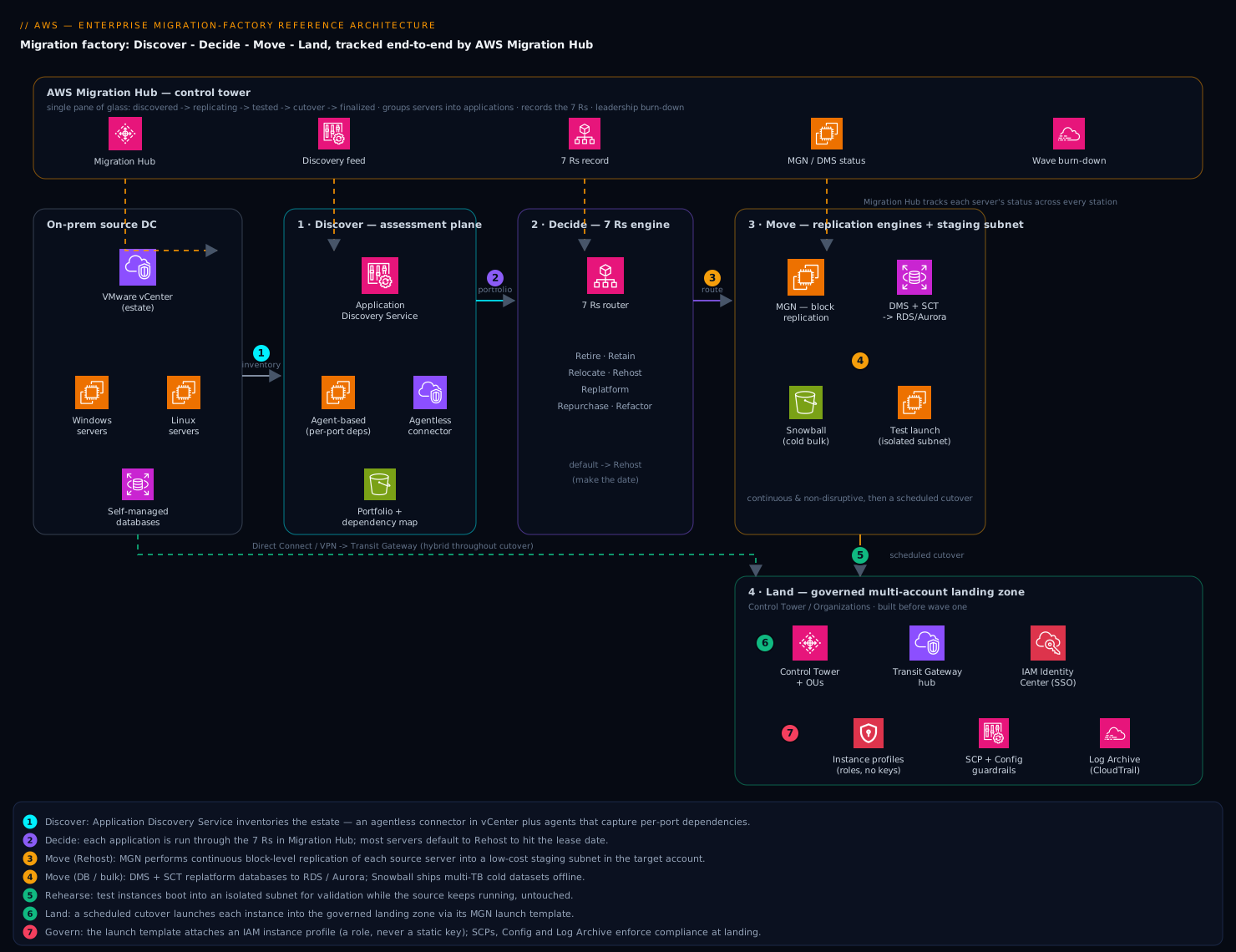
Station 1 — Discover (assessment plane). You cannot wave-plan what you cannot see, so the line starts with AWS Application Discovery Service. It runs in one of two modes, and a real estate uses both. Agentless discovery is a connector OVA deployed into VMware vCenter; it inventories every VM, its specs, and utilization without touching the guests — perfect for a fast, low-friction first pass and for servers you can’t put an agent on. Agent-based discovery installs a small agent on individual hosts (Windows/Linux, virtual or physical) and captures the thing the agentless mode can’t: running processes and inbound/outbound network connections on a per-port basis — the raw material for the dependency map. Discovery data streams into Migration Hub, where it is grouped into applications (logical sets of servers) and explored with Migration Hub network-dependency views (and, for richer graphing and right-sizing, exported into the optional Migration Evaluator TCO model or a third-party tool). The output of this station is a portfolio: every server, its utilization profile, and — critically — what talks to what, which is what lets you draw wave boundaries that don’t sever a live dependency.
Station 2 — Decide (the 7 Rs disposition engine). Each application is run through the 7 Rs to decide its fate: Retire (turn it off — discovery’s utilization data routinely finds 10–20% of servers are zombies), Retain (leave on-prem for now — latency, licensing, or compliance reasons), Relocate (move a whole VMware estate as-is to VMware Cloud on AWS, no server-level change), Rehost (lift-and-shift the VM to EC2 via MGN — the default for the bulk), Replatform (lift-and-reshape: move a self-managed database to Amazon RDS/Aurora via AWS DMS, or a server-hosted app onto Elastic Beanstalk/containers, with minimal code change), Repurchase (drop the app and buy SaaS instead), and Refactor/Re-architect (rewrite cloud-native — reserved for the few apps where the business case justifies it). This decision is recorded against each application in Migration Hub and becomes the routing instruction for the rest of the line. The discipline here is migrate sooner, modernize later: most servers should be Rehost so you make the lease date, with replatform/refactor scheduled as a later optimization rather than a blocker.
Station 3 — Move (replication engines, MGN-led). The disposition routes each app to an engine. The workhorse for Rehost is AWS Application Migration Service (MGN): a lightweight AWS Replication Agent installed on each source server performs continuous, block-level replication of its disks into a low-cost staging area subnet in the target AWS account (cheap staging EBS + a handful of replication servers MGN manages for you). Because replication is continuous and block-level, the source keeps running untouched while the target stays in near-real-time sync. When an app’s servers are ready, you launch test instances into an isolated test subnet — boot the real machine in AWS, validate the app against real data, confirm right-sizing — without disturbing production. You rehearse as many times as needed; only then do you schedule the cutover, which is a brief final-sync-and-launch that converts the staged volumes into a running EC2 instance. Databases dispositioned as Replatform take a parallel track: AWS Database Migration Service (DMS) does continuous logical replication into RDS/Aurora with minimal downtime, and the AWS Schema Conversion Tool (SCT) handles heterogeneous engine changes (e.g., Oracle → PostgreSQL). Huge cold datasets that would never replicate over the link in time ride AWS Snowball offline instead.
Station 4 — Land (the governed landing zone). Every launched instance lands not in a bare account but in a multi-account landing zone stood up before wave one — AWS Control Tower/Organizations with OUs, SCP guardrails (deny leaving approved regions, deny disabling CloudTrail, require IMDSv2), a Transit Gateway hub the migration VPCs attach to, IAM Identity Center for human SSO, and a Log Archive account capturing everything. MGN launch templates place instances into the correct workload account/VPC/subnet with the right security groups and instance profiles (IAM roles), so the migrated server gets AWS permissions via a role — not a baked-in access key. On-premises connectivity (Direct Connect or redundant VPN) terminates once at the Transit Gateway, so half-migrated apps can keep talking across the hybrid boundary throughout the cutover months.
Put together: Discovery agents/connector → Migration Hub portfolio → 7 Rs disposition → MGN/DMS/Snowball replication into staging → test-launch → scheduled cutover into a governed landing-zone account, with Migration Hub tracking each server’s status (replicating → tested → cutover → validated) so leadership sees a live burn-down and operators see exactly what is where.
Component breakdown
| Component | What it does | Why it’s here | Key configuration choices |
|---|---|---|---|
| Application Discovery Service | Inventories servers (specs, utilization) and — agent-based — captures running processes and per-port network connections | You cannot wave-plan or right-size what you haven’t measured; the dependency data is what makes waves safe | Agentless connector in vCenter for the fast broad sweep; agent-based on hosts that need process/connection (dependency) data; let it collect 2–6 weeks to capture month-end/peak utilization, not a quiet Tuesday |
| AWS Migration Hub | Single control tower: groups servers into applications, shows network dependencies, tracks migration status across tools and accounts | One pane for “where is every server on the line”; the source of the leadership burn-down | Pick a home region; group discovery data into applications; use it as the status board MGN/DMS report into; Migration Hub Orchestrator to template repeatable wave runbooks |
| The 7 Rs framework | Per-application disposition: Retire / Retain / Relocate / Rehost / Replatform / Repurchase / Refactor | Routing logic for the whole factory — decides which engine each app goes to and what “done” means | Default to Rehost to hit the date; Retire zombies discovery exposes (free wins); reserve Refactor for apps with a real business case; record the decision per app in Migration Hub |
| AWS Application Migration Service (MGN) | Block-level, continuous server replication into a staging area; non-disruptive test launches; scheduled cutover to EC2 | The rehost workhorse — moves the bulk of servers with near-zero downtime and full pre-cutover rehearsal | Replication Agent on each source; staging subnet with cheap EBS + MGN replication servers; launch templates set target account/subnet/SG/instance profile/right-sized type; test before cutover, every time; post-launch actions (SSM) to install agents/domain-join automatically |
| AWS DMS + Schema Conversion Tool | Continuous logical DB replication into RDS/Aurora; SCT converts heterogeneous schemas/code | The Replatform track for databases — minimal-downtime DB moves and engine modernization | CDC (change data capture) for near-zero downtime; SCT for Oracle/SQL Server → PostgreSQL/Aurora; validate row counts + checksums before cutover |
| AWS Snowball | Offline bulk data transfer (ship the appliance) | Some datasets are too large to replicate over the link inside the schedule | For multi-TB cold data / poor bandwidth; pairs with online replication for the delta |
| Landing zone (Control Tower + Organizations) | The governed multi-account target every wave lands into | Migrating into an ungoverned account is where security regressions and sprawl are born | OUs + SCP guardrails, Log Archive + Audit accounts, Transit Gateway hub, IAM Identity Center SSO; built before wave one (see the Landing Zone reference architecture) |
| AWS MAP (Migration Acceleration Program) | AWS’s funded methodology: Assess → Mobilize → Migrate & Modernize, with credits and partner support | The commercial/operating wrapper around the factory — funding and a phased plan | Tag every migrated resource with the MAP tag to qualify for credits; align waves to the Mobilize → Migrate phases |
Three of these choices deserve a sentence of why. Agent-based discovery is non-negotiable for the dependency map — the agentless connector tells you a server exists and how busy it is, but only the agent captures the per-port connections that tell you app-tier-07 opens a socket to db-cluster-02:1521, and that single fact is what stops you scheduling them into different waves and severing the app at cutover. MGN over the old CloudEndure / hand-rolled AMI copies matters because MGN is the AWS-native successor, is free for the 90-day migration window per server, and gives you the test launch — the rehearsal that converts cutover from a leap of faith into a checklist. And the landing zone must precede wave one: SCPs that forbid leaving the region and forbid disabling CloudTrail are what make “every server lands governed” structurally true rather than a hope pinned on operator discipline.
Reading readiness before you move: the AWS CAF
Discovery measures the estate. It cannot tell you whether the enterprise is ready — whether anyone owns the cloud bill, whether operations can run something they cannot walk over and touch, whether security has an identity model for a world with no data-center perimeter. A portfolio that is green on every server and red on “who operates this at 2 a.m.” still fails. The lens for that organizational readiness is the AWS Cloud Adoption Framework (CAF), and it is not a side quest: MAP’s Assess phase runs a Migration Readiness Assessment (MRA) — a structured workshop scored against the CAF’s six perspectives — whose output is a directional business case plus a prioritized action plan to close the gaps before you scale waves.
The six perspectives split into two groups. The first three are organizational capabilities (people and process); the last three are technical. You want a defensible score on all six before wave one, because a weakness in any single column will surface as a stalled program later.
| CAF perspective | Group | The question migration must answer | The gap it exposes if you skip it |
|---|---|---|---|
| Business | Organizational | What business outcome funds this — a lease date, a cost target, a DR mandate? How is value tracked? | A migration nobody can justify past the first budget review; scope creep with no owner |
| People | Organizational | Do we have (or a plan to build) cloud skills, a migration team, and change management for the ops staff whose jobs change? | Servers land in AWS that nobody on-staff can operate; the “cloud team” is one hero |
| Governance | Organizational | Who governs the portfolio, risk, and the cloud bill? How are decisions and dispositions recorded and audited? | Cost sprawl, no chargeback, dispositions made in hallway conversations that nobody can reconstruct |
| Platform | Technical | Is the landing zone built? Is the target architecture and account model defined? Is there IaC to vend accounts? | Wave three lands in an account cobbled together by hand — the classic ungoverned-target failure |
| Security | Technical | Identity model (roles, not keys), guardrails, data protection, compliance posture in the target — is it raised, not just copied? | You faithfully replicate every on-prem sin in AWS; the auditor’s questions have no answers |
| Operations | Technical | Observability, incident and event management, backup, the run-the-cloud operating model | Migrated apps with no dashboards, no alarms, no runbook — invisible until they page |
The practical move is to run the MRA early, score the six, and treat the two or three weakest perspectives as Mobilize work items that block the first production wave — not as things you will “sort out later.” Discovery tells you what to move; the CAF tells you whether you are ready to move it and to run it once it lands. If you want the full breakdown of the perspectives and how AWS structures a readiness assessment, that is its own topic — see the AWS CAF overview.
The 7 Rs, worked: turning a portfolio into a disposition plan
The component table above lists the 7 Rs; the skill is applying them to 600 real applications without turning it into 600 debates. The trick is to run each application through the same ordered set of questions and take the first one that fits — a decision funnel, not a committee. Ask, in this order:
- Is anyone actually using it? Discovery shows near-zero CPU and no inbound connections for weeks → Retire (confirm with the owner, then reclaim the licenses — this is free margin).
- Must it stay on-prem for now? Hard latency to a factory floor, an un-relicensable appliance, a data-residency rule you can’t yet satisfy → Retain (revisit next phase).
- Do we want the whole estate moved as-is, fast, with no server-level change? A large VMware footprint and an operating model that stays vSphere → Relocate to VMware Cloud on AWS.
- Is there a credible SaaS we’d rather buy than run? A commodity ticketing tool, an email-archive appliance → Repurchase.
- Is there a funded business case to rewrite it cloud-native right now? A strategic app whose scale/agility justifies the spend → Refactor (and only here — refactor is the expensive lane).
- Is there a low-effort managed-service win? A self-managed database that should be RDS/Aurora, or an app that drops onto containers/Beanstalk with little code change → Replatform.
- Everything else → Rehost. Lift-and-shift the VM to EC2 with MGN. This is the default and should be the majority, because it is what hits the date.
Plot the seven on two axes — migration effort (low → high) and change to the app (none → total) — and the strategy becomes visual. Retire/Retain are ~zero effort. Relocate and Rehost are low effort, no app change. Repurchase and Replatform are medium. Refactor is the top-right corner: highest effort, highest change, reserved for the few. The factory’s bias — migrate sooner, modernize later — is simply “stay in the bottom-left to make the deadline, and schedule the top-right as a funded backlog after the exit.”
Here is that funnel applied to a slice of a real-looking portfolio. Notice that the disposition is per application, and it drives both the engine and what “done” means:
| Application (signals from discovery) | Disposition | Engine | Why |
|---|---|---|---|
fileserver-legacy-03 — 0.4% avg CPU, no inbound sessions 6 weeks |
Retire | none | Zombie; owner confirms; reclaim 8 Windows CALs |
plc-historian — 2 ms link to plant floor, vendor-locked |
Retain | none | Latency + licensing; revisit in phase 2 |
vsphere-cluster-dev — 180 VMs, team stays on vSphere |
Relocate | VMware Cloud on AWS | Whole estate as-is, fastest off the floor |
helpdesk-ticketing — commodity, EOL, SaaS exists |
Repurchase | SaaS + data export | Cheaper to buy than to move and run |
policy-admin-web — Windows/IIS, healthy, tier-1 |
Rehost | MGN | Default; near-zero downtime; make the date |
claims-rating-api — Linux, 20 nodes, stable |
Rehost | MGN | Bulk lift-and-shift, right-size on the way in |
reporting-db — self-managed SQL Server, modernization mandate |
Replatform | DMS + SCT → Aurora PostgreSQL | Heterogeneous engine change, low code impact |
sor-oracle — system of record, no extended downtime allowed |
Replatform | DMS CDC → RDS for Oracle | Homogeneous, minimal-downtime via change capture |
customer-portal — strategic, needs elastic scale, funded |
Refactor | ECS/serverless (strangler-fig) | Real business case; the one worth rewriting |
print-spooler-legacy — idle, superseded |
Retire | none | Free win discovery surfaced |
Two disciplines make this hold together. First, the decision is recorded per application in Migration Hub, so the disposition is an auditable routing instruction, not tribal knowledge. Second, you group the rehosts into waves along dependency lines (from Station 1’s per-port connection data) so a wave is a set of applications that can cut over together without severing a live dependency — claims-rating-api and the database it opens a socket to belong in the same wave, never split across two.
Database migration in depth: full-load, CDC, and the cutover
The component table gives DMS one row; databases deserve a section, because a running production database is the single hardest thing on the line — you cannot pause writes for a weekend, and you cannot lose a transaction. AWS Database Migration Service (DMS) solves this with a two-phase model you must understand to design the cutover.
Phase 1 — full load. DMS bulk-copies the existing rows from the source into the target. This can take hours for a large database, and crucially the source keeps taking writes the whole time — so by the time the full load finishes, the target is already stale.
Phase 2 — CDC (change data capture). DMS then reads the source’s transaction log (MySQL binlog, PostgreSQL WAL, Oracle redo, SQL Server transaction log) and replays every change that happened since the full load began. The target catches up and then stays continuously in sync, with replication lag you can watch trend toward zero. You run in this state — source live, target shadowing it in near-real-time — for as long as you need to validate.
The task type encodes exactly which phases run. In DMS, migration_type is one of:
full-load— one-time copy, for a source you can freeze (dev, a static reference DB).cdc— changes only, for when you loaded the bulk some other way (e.g., a native backup/restore) and just need to catch up.full-load-and-cdc— the near-zero-downtime workhorse: copy everything, then track changes until cutover.
# DMS replication instance + endpoints + a full-load-and-CDC task.
# Credentials come from Secrets Manager (NOT inline) — no static DB
# passwords in state, consistent with the "no keys ride along" rule.
resource "aws_dms_replication_instance" "core" {
  replication_instance_id    = "migr-repl-1"
  replication_instance_class = "dms.c5.large"   # size to change volume, not DB size
  allocated_storage          = 100              # buffers changes during lag spikes
  engine_version             = "3.5.3"
  multi_az                   = true             # tier-1 DB move → HA the mover too
  publicly_accessible        = false
  replication_subnet_group_id = aws_dms_replication_subnet_group.core.id
  vpc_security_group_ids      = [aws_security_group.dms.id]
}

resource "aws_dms_endpoint" "source_oracle" {
  endpoint_id                     = "src-oracle-sor"
  endpoint_type                   = "source"
  engine_name                     = "oracle"
  secrets_manager_arn             = aws_secretsmanager_secret.oracle_src.arn
  secrets_manager_access_role_arn = aws_iam_role.dms_secrets.arn
  database_name                   = "SORPDB"
}

resource "aws_dms_endpoint" "target_aurora" {
  endpoint_id                     = "tgt-aurora-pg"
  endpoint_type                   = "target"
  engine_name                     = "aurora-postgresql"
  secrets_manager_arn             = aws_secretsmanager_secret.aurora_tgt.arn
  secrets_manager_access_role_arn = aws_iam_role.dms_secrets.arn
  database_name                   = "sor"
}

resource "aws_dms_replication_task" "sor" {
  replication_task_id      = "sor-migrate"
  migration_type           = "full-load-and-cdc"     # <-- the crux
  replication_instance_arn = aws_dms_replication_instance.core.arn
  source_endpoint_arn      = aws_dms_endpoint.source_oracle.arn
  target_endpoint_arn      = aws_dms_endpoint.target_aurora.arn
  table_mappings           = file("${path.module}/table-mappings.json")
  # Turn ON data validation: DMS row-count + checksum compares source vs target
  replication_task_settings = jsonencode({
    ValidationSettings = { EnableValidation = true }
  })
}
DMS moves rows, not the whole database — this is the single most misunderstood point. DMS creates target tables and copies data, but it does not faithfully migrate secondary indexes, stored procedures, triggers, sequences, foreign keys, or (for a heterogeneous move) the SQL dialect of your application. Those come from schema conversion, done before the load:
- Homogeneous (Oracle → Oracle on RDS, SQL Server → SQL Server): the engines match, so you pre-create the schema with the source engine’s own tools and let DMS carry the data.
- Heterogeneous (Oracle → PostgreSQL, SQL Server → Aurora): the engine changes, so you run the AWS Schema Conversion Tool (SCT) — a desktop app — or the newer DMS Schema Conversion (fully managed in the DMS console). Either produces an assessment report that splits the work into auto-converted objects and action items — the stored procedures and proprietary SQL that need a human. That report is your honest estimate of how “hetero” the move really is; a database that is 95% auto-convertible is a different project from one that is 60%.
The database cutover choreography (the DB-specific version of the general cutover, with rollback built in): (1) let CDC run until replication lag is effectively zero; (2) in a planned window, stop or set the source app read-only so no new writes are generated; (3) wait for DMS to drain the last changes (lag → 0) and confirm with data validation (row counts + checksums green); (4) repoint the application’s connection string / DNS to the target; (5) watch. The rollback mirrors the MGN pattern — because the source database is untouched and still authoritative, a failed validation means you point the app back at the source and try again another night. You do not decommission the source database until a clean hypercare window has passed. Cold or oversized data that cannot replicate over the link in time (multi-TB history tables, archives) rides Snowball offline and is reconciled with the CDC delta, exactly as with server volumes.
Implementation guidance
Sequence the program in MAP’s three phases and build the factory before you scale it. Assess (portfolio + business case), Mobilize (build the landing zone, run a pilot wave end-to-end, harden the runbook), then Migrate & Modernize (run waves at throughput). The cardinal error is skipping Mobilize and migrating into an unfinished foundation.
Layer 1 — Assess (discovery, weeks 0–6). Deploy the Application Discovery Service agentless connector into vCenter for the broad sweep, and install discovery agents on the hosts where you need process/connection data (typically the tier-1 and shared-services estate). Let it run across at least one month-end / peak cycle — right-sizing off a quiet week is how you land oversized and overpay. In Migration Hub, group servers into applications and use the network-dependency view to find the cut lines. Export to Migration Evaluator for a TCO/right-sizing model if you need a CFO-grade business case.
Layer 2 — Decide (disposition). Run each application through the 7 Rs and record the decision in Migration Hub. Practical heuristics: anything with near-zero CPU and no inbound connections for weeks is a Retire candidate (confirm with the owner, then reclaim the license); a self-managed Oracle/SQL Server with a modernization mandate is Replatform via DMS/SCT; a commodity app with a credible SaaS equivalent is Repurchase; everything else is Rehost unless there’s a funded reason to refactor. Group the rehosts into waves along dependency boundaries and business-risk tiers — a wave is a set of apps that can cut over together without breaking a live dependency.
Layer 3 — Mobilize (landing zone, IaC, pilot). Stand up the landing zone with Terraform / AWS Control Tower Account Factory for Terraform (AFT) before you migrate anything: OUs, SCP guardrails, the Network account with the Transit Gateway, IAM Identity Center, Log Archive. Then initialize MGN in each target workload account, define the staging subnet and replication settings template (instance type for replication servers, EBS volume types, throttling, VPC endpoints), and build per-tier launch templates. Run a pilot wave of a few low-risk apps all the way through test-launch and cutover to prove the runbook and the right-sizing assumptions before you turn up the volume.
# The crux: MGN launch templates give the migrated server an IAM ROLE,
# not a baked-in key — so no static credentials ride into AWS.
launch_template {
  iam_instance_profile { arn = aws_iam_instance_profile.migrated_app.arn }
  metadata_options {
    http_tokens = "required"   # IMDSv2 only — enforced org-wide by SCP too
  }
}
# Post-launch SSM action: install CloudWatch agent + SSM agent automatically
Networking & identity wiring — the load-bearing details.
- Replication path. MGN’s Replication Agent ships data to the staging subnet over TCP 1500 (data) and the AWS APIs over 443. Send it over Direct Connect or VPN through the Transit Gateway, not the public internet, for tier-1 estates; use VPC endpoints (S3, MGN/
mgn, SSM, EC2 messages) so replication and post-launch automation don’t depend on a NAT path. Watch replication lag — an undersized link or throttle is the classic schedule-killer; for multi-TB cold volumes, pre-seed with Snowball and let MGN sync only the delta. - Landing target. MGN launch templates place each instance into the right workload account / VPC / private subnet, attach least-privilege security groups, set the right-sized instance type (informed by discovery utilization, often a downsize from on-prem), and — the security crux — attach an IAM instance profile so the app authenticates to AWS via a role. No long-lived access keys are migrated or created.
- Identity for people. Operators reach the migration accounts through IAM Identity Center with time-bound permission sets — there are no standing IAM users for humans on the migration team either.
- Post-launch automation. Wire MGN post-launch actions (backed by AWS Systems Manager) to run on first boot: install the CloudWatch/SSM agents, domain-join Windows boxes, run validation scripts, disable the source’s outbound replication. This is what makes a wave repeatable rather than a pile of manual SSH.
Cutover is a deployment — define rollback before you start. The MGN cutover sequence per app: (1) confirm replication lag is effectively zero; (2) quiesce/read-only the source app in a planned low-traffic window; (3) MGN performs the final delta sync and launches the cutover instance; (4) validate the app and data (row counts / checksums for DB-backed apps); (5) repoint DNS / load balancers to the AWS instance; (6) watch health for 24–48 h. The rollback is cheap because MGN keeps the source intact and replicating until you explicitly mark the server finalized — if the cutover fails validation, you revert the DNS/LB change back to the still-running source. Never decommission the source on cutover day. Only after a clean hypercare window do you finalize in MGN, archive the source, and reclaim the on-prem capacity.
(On other IaC: Bicep and Deployment Manager are Azure/GCP-native and don’t target AWS. For this factory, Terraform or AWS CDK/CloudFormation are the right tools — AFT in particular is purpose-built to vend governed accounts for the waves to land into.)
Enterprise considerations
Security & Zero Trust — don’t migrate your sins. A lift-and-shift can faithfully reproduce every on-prem misconfiguration in AWS, so the factory has to raise the floor as it moves. Identity: MGN launch templates attach IAM instance profiles, so migrated servers get AWS permissions from short-lived role credentials — the leaked-static-key incident this org was burned by simply cannot ride along, because no key is created. Guardrails as gravity: the landing zone’s SCPs make region-egress, CloudTrail-disable, and IMDSv1 impossible in any account a wave lands in, regardless of what the migrated app tries to do. Posture scanning: point AWS Security Hub, GuardDuty, and Inspector (agentless EC2 + ECR vulnerability scanning) at the workload accounts so every newly-landed instance is assessed within minutes; this is how you answer the auditor’s “did anything land with a public bucket or critical CVE?” with evidence, not a shrug. Network: migrated VPCs are private, reach the internet only through the landing zone’s central inspection/egress path, and are segmented by Transit Gateway route tables (prod cannot route to non-prod). Secrets: anything the app needs at runtime moves to Secrets Manager, pulled via the instance role — not migrated as a plaintext config.
Cost optimization. The factory creates cost levers the data center never had. Right-size on the way in: discovery utilization data routinely shows on-prem servers sized for a 2018 peak; MGN launch templates land them on smaller, current-gen (often Graviton-eligible after replatform) instances — a downsize is the single biggest one-time saving. Retire first: the 7 Rs Retire column is pure margin — 10–20% of servers are zombies you stop paying for entirely. Kill staging cost promptly: MGN staging EBS is cheap but real; finalize and clean up cutover servers so staging volumes don’t linger. Buy commitments after stabilizing: run migrated workloads on On-Demand through hypercare, then cover the steady-state baseline with Savings Plans / Reserved Instances once utilization is proven. Claim the credits: tag every migrated resource with the MAP tag so the migration qualifies for AWS MAP funding — real money against the bill. Modernize for the next step-change: the replatform/refactor backlog (containers, serverless, managed databases) is where the recurring savings beyond rehost live — schedule it post-migration.
Scalability — of the factory, not just the apps. The thing that has to scale here is throughput: servers per wave and waves per month. MGN replicates hundreds to thousands of servers concurrently (mind the staging-area and replication-server limits, and Service Quotas), and Migration Hub Orchestrator templates the wave runbook so the Nth wave is the same checklist as the first. The bottleneck is rarely AWS — it’s link bandwidth for replication and human cutover validation; both are solved by parallelizing waves and automating post-launch validation, not by adding compute.
Reliability & DR (a free upgrade you should bank). Two things to call out. First, MGN is a DR engine too — the same continuous block-level replication underpins AWS Elastic Disaster Recovery (DRS), so the muscle you build migrating is the muscle that gives you a tested recovery posture afterward (the regulator’s untested-DR finding, solved). Second, set RTO/RPO targets per tier for the cutover itself: tier-1 apps get a near-zero-downtime cutover (RPO ≈ minutes via continuous replication, RTO = the short final-sync-and-launch window); tier-3 apps can take a planned-downtime cutover. After migration, the landing zone gives you AWS-native HA (Multi-AZ, ASGs) and the option of cross-region DRS for the workloads that warrant it.
Observability. Two dashboards, two audiences. Program: Migration Hub is the burn-down — servers by status (discovered → replicating → tested → cutover → finalized), wave progress, and the disposition mix, which is what the steering committee actually wants to see. Operational: migrated instances ship metrics/logs to CloudWatch (agents installed by post-launch actions), with Security Hub/GuardDuty findings aggregated in the Audit account. The post-cutover hypercare window watches health/error rates for 24–48 h against pre-defined go/no-go thresholds.
Governance. Every disposition decision and every server’s status lives in Migration Hub, so the plan is auditable. The landing zone’s Log Archive account captures CloudTrail/Config org-wide, so who launched what, where is tamper-evidently recorded. SCPs + Config rules enforce the non-negotiables continuously, and AWS Backup policies attach to migrated workloads by tag so backup isn’t a per-server afterthought. Change management and the audit story become the same artifacts: the wave runbook, the Migration Hub status, and the immutable logs.
Reference enterprise example
Aldermere Insurance is a (fictional) mid-market property-and-casualty insurer running a single leased data center whose contract expires in 11 months with a steep renewal and end-of-support hardware. Their estate: 620 servers across 140 applications — a mix of Windows policy-admin systems, a Linux claims-rating tier, three Oracle databases (one of them the policy system of record that the business will not allow extended downtime on), a SQL Server reporting stack, and the usual long tail of file servers and forgotten utilities. Two things forced an architecture rather than a scramble: a board mandate to exit the DC before renewal, and a prior security review that had found an AWS access key committed to an internal Git repo during an earlier ad-hoc cloud experiment — making “the migration must not let static credentials ride along” a hard, named requirement.
What they built. They ran MAP: a 5-week Assess with Application Discovery Service (agentless connector across vCenter, agents on the 90 tier-1 and shared hosts to capture dependencies), letting it collect through a month-end close so right-sizing reflected real peaks. Migration Hub grouped the 620 servers into 140 applications and surfaced the dependency edges that defined wave boundaries. The 7 Rs disposition: 18 apps Retired (zombie file/print and dev boxes discovery proved were idle — ~70 servers and a stack of Windows licenses reclaimed), 3 Replatformed (the SQL Server reporting DB and two smaller Oracle schemas to Aurora PostgreSQL via DMS + SCT), 2 Repurchased (an aging ticketing tool and an on-prem email-archive appliance, both swapped for SaaS), the policy-system-of-record Oracle DB Replatformed to RDS for Oracle via DMS CDC to honor the near-zero-downtime constraint, and the remaining 116 apps Rehosted with MGN. During a 6-week Mobilize they stood up the landing zone with AFT (Control Tower, OUs, SCP guardrails, a Transit Gateway hub reachable over a redundant Direct Connect, IAM Identity Center, Log Archive) and ran a pilot wave of 4 low-risk apps end-to-end. Then Migrate: nine MGN waves of ~12–16 apps each, scheduled along dependency lines, every server test-launched into an isolated subnet before a weekend cutover, DNS repointed at cutover, source kept live until a clean hypercare window. Every migrated instance landed with an IAM instance profile (zero static keys), IMDSv2 enforced by SCP, and Inspector + Security Hub scanning it within minutes.
The numbers and the outcome.
| Dimension | Before (leased DC) | After (AWS, post-factory) |
|---|---|---|
| Servers in scope | 620 | 532 migrated, 88 retired (never moved) |
| DC exit timeline | 11-month hard deadline | DC vacated in ~9 months, ahead of renewal |
| Steady-state infra cost | ~$310k/mo (DC + hardware refresh path) | ~$188k/mo (right-sized + Retire + Savings Plans) |
| Cutover downtime, tier-1 system of record | n/a (never moved) | < 20 min (DMS CDC final sync) |
| Static AWS keys created during migration | (prior key leaked in Git) | zero — instance profiles only |
| New servers landing non-compliant | unknown / unprovable | 0 — SCPs + Inspector enforce at landing |
| Disaster recovery posture | second rented cage, never tested | tested DRS replication, RPO ≈ minutes for tier-1 |
The headline outcome wasn’t only the ~39% run-rate reduction or beating the lease date by two months. It was that the 88 retired servers (found by discovery, not guesswork) paid for a chunk of the program before anything moved; that the previously-leaked-key failure mode became structurally impossible because no key is ever minted; and that a forced data-center exit doubled as a tested DR upgrade the regulator had been asking for. Migration became a production line with a burn-down chart, not a heroic all-nighter.
When to use it
Use this architecture when you have a portfolio-scale move — roughly 50+ servers and/or a dozen+ applications — with a real deadline, an unknown dependency map, and a need to prove both progress and that you didn’t regress security on the way in. It is the right shape for data-center exits, co-lo lease expiries, M&A consolidation, and “cloud-first mandate” programs where the unit of work is a wave, not a weekend.
Trade-offs and anti-patterns to avoid.
- Don’t migrate into an ungoverned account. The single most common failure is skipping the landing zone to “save time,” then discovering wave three landed with public buckets, IMDSv1, and no central logging. Build the governed foundation in Mobilize, before wave one — it is the gravity that keeps every wave compliant.
- Don’t refactor on the critical path. “While we’re at it, let’s containerize everything” is how you miss the lease date. The factory’s bias is Rehost now, modernize later; reserve Refactor for the few apps with a funded business case and schedule it after the exit.
- Don’t skip discovery’s soak time or the dependency agents. Right-sizing off a quiet week lands you oversized; agentless-only discovery hides the per-port connections, and you’ll cut over an app that turns out to depend on a server you left in a different wave. Let discovery run across a peak, and put agents where dependencies matter.
- Don’t decommission the source on cutover day. MGN keeps the source replicating until you finalize; that is your rollback. Reverting a DNS/LB repoint to a still-running source is a near-instant escape hatch — finalize only after hypercare.
- Don’t treat MGN as the answer for everything. It is the rehost engine. Databases that need minimal-downtime moves belong on DMS/SCT; whole VMware estates you want to move as-is fast belong on VMware Cloud on AWS (Relocate); multi-TB cold data belongs on Snowball. Force-fitting one tool is an anti-pattern.
Alternatives in brief. VMware Cloud on AWS (Relocate) — when you want the whole VMware estate moved with zero server-level change and your operating model stays vSphere; fastest path off the DC, but you defer the cloud-native benefits. Replatform-heavy programs — when the apps are modern enough that moving databases to managed services and apps onto Beanstalk/containers is cheap, you skip pure rehost and bank recurring savings sooner, at the cost of a slower move. Partner-led “migration factory as a service” — large enterprises often run this exact architecture through an AWS MAP partner for surge capacity; the design is the same, the labor is outsourced. Greenfield rebuild — for a small, modern portfolio it can be cheaper to re-deploy from IaC than to replicate VMs, but for a 600-server estate with undocumented apps, MGN’s lift-and-shift is what makes the deadline. The sweet spot for this reference architecture is the broad middle: enough servers and enough dependency fog that you need a measured, governed, repeatable line rather than a clever one-off.
Going deeper
The factory as a throughput system
The mental shift that separates a program that hits the date from one that doesn’t is treating the migration as a throughput system, not a to-do list. The governing equation is simple: servers moved per month = servers per wave × waves per month. If a contract says vacate 5,000 servers in 15 months, and you Retire ~15% up front, you must move ~4,250 servers in, say, 12 productive months after Mobilize — roughly 350 servers/month. At two waves a month, that is ~175 servers/wave; at four waves a month, ~90. That number sets everything: how many servers you replicate concurrently, how big the staging area is, and — the real constraint — how much human cutover validation you can staff.
Because the bottleneck is almost never AWS compute, throwing instances at it does nothing. The two real limiters are link bandwidth (replication has to finish before a wave’s cutover window) and human validation (someone has to sign off each app’s test launch). You solve both by parallelizing waves and automating validation, and you protect the line with Service Quotas awareness: MGN can replicate hundreds to thousands of source servers concurrently, but per-account limits on source servers, concurrently-replicating servers, and replication-server capacity are real — raise them before the wave that needs them, not during it. Migration Hub Orchestrator is what makes wave N the same checklist as wave 1: it templates the runbook (rehost, or SAP) so the process is repeatable rather than re-invented each Friday.
MGN under the hood
MGN is worth understanding at the block level because its internals are exactly what make the test-launch and the cheap rollback possible:
- Continuous block replication. The AWS Replication Agent on the source reads disk blocks (not files) and streams changed blocks to a replication server — a small EC2 instance MGN manages for you in the staging area subnet — which writes them to low-cost staging EBS volumes. Because it is block-level and continuous, the source application never pauses and the staged copy is always within seconds-to-minutes of the source. This is not rsync; it is the disk itself, kept warm in AWS.
- Conversion at launch. When you test or cut over, MGN spins up a short-lived conversion server that takes a point-in-time snapshot of the staged volumes and makes them bootable on EC2 — injecting the right drivers (ENA, NVMe), adjusting the bootloader, and applying your launch template (target subnet, security groups, right-sized instance type, and the all-important IAM instance profile). The result boots as a normal EC2 instance.
- Test in isolation, then rehearse again. Test instances launch into an isolated subnet from the replicated data while the source keeps running — so you can boot the real machine in AWS, validate the app, confirm right-sizing, and throw it away, as many times as you like, with zero production risk.
- The lifecycle and the free window. A source server flows
not-ready → ready-for-testing → test → ready-for-cutover → cutover → finalized. MGN is free per server for 90 days (the migration window); staging EBS and replication servers do cost while replicating, so finalize promptly to stop that meter. Critically, cutover does not touch the source — the source keeps running and replicating until you explicitly finalize, which is precisely why the rollback (revert DNS to the still-live source) is near-instant. - Post-launch actions. MGN post-launch actions (backed by AWS Systems Manager) run automation on first boot: install the CloudWatch/SSM agents, domain-join Windows, run validation scripts, disable the source’s outbound replication. This is what turns “a pile of manual SSH” into a repeatable wave.
The same continuous-block-replication engine underpins AWS Elastic Disaster Recovery (DRS) — so the muscle you build migrating is the muscle that gives you a tested recovery posture afterward. See configuring AWS DRS for cross-region failover for how the same primitive becomes an RPO-in-minutes DR plan once the migration is done.
Big-bang vs wave-based vs the factory
“Wave-based” is a choice against the alternative — big-bang, where you cut everything over in a single event. Big-bang is not always wrong; it is wrong at scale.
| Approach | Cutover shape | When it’s the right call | Why it fails at scale |
|---|---|---|---|
| Big-bang | Everything in one window | A handful of tightly-coupled apps, a small estate, a hard maintenance window you can actually take | One window to validate hundreds of apps; one rollback that reverts everything; blast radius = the whole company |
| Wave-based | Iterative groups along dependency lines | Portfolios where apps can be grouped and cut over independently | (This is the default for anything non-trivial) |
| Migration factory | Wave-based + templated, repeatable runbooks + throughput targets | 50+ servers, a deadline, an unknown dependency map | It’s the industrialized form of wave-based — this whole article is it |
The factory is not a different pattern from wave-based; it is wave-based with the runbook, the tooling, and the throughput math made repeatable so the tenth wave costs a fraction of the first.
Strangler-fig and Refactor Spaces
For the few apps dispositioned Refactor, the anti-pattern is the big-bang rewrite — freeze the monolith, rebuild it cloud-native for 18 months, and pray the requirements didn’t move. The pattern that actually ships is the strangler-fig (named after the vine that grows around a tree and gradually replaces it): stand a facade in front of the monolith, peel off one capability at a time into a new service, route just that capability’s traffic to the new code, and retire the old path once the new one is proven. Coverage grows slice by slice; the monolith shrinks until it’s gone; you can stop or reverse at any slice.
AWS gives this an infrastructure home in AWS Migration Hub Refactor Spaces, which provisions and manages the facade for you — an API Gateway front door, an NLB/VPC-Lattice style routing layer, and the Route 53 wiring — so you define routes (“/policies goes to the new service, everything else to the legacy monolith”) instead of hand-building the plumbing. Crucially, strangler-fig is a post-rehost activity: you rehost to make the date, then strangle the few strategic monoliths on your own schedule, off the critical path.
Building the business case: Migration Evaluator (TSO Logic) and TCO
Before the CFO funds anything, they want a defensible TCO comparison. Migration Evaluator (formerly TSO Logic, acquired by AWS) produces exactly that: a lightweight agentless collector gathers on-prem utilization, and the service models a fully-loaded current cost (hardware refresh, facilities, power, licensing, labor) against a right-sized AWS cost — often surfacing a large saving simply because on-prem servers were sized for a 2018 peak. It offers a quick assessment (spec-based) and an assisted one (measured utilization), and it models Savings Plans / Reserved Instance coverage of the steady-state baseline. This is the number that turns “go cloud-first” into a funded program.
The funding itself flows through MAP (Migration Acceleration Program). The mechanics worth knowing: AWS provides credits and investment scaled to the migrated spend, and to attribute which resources count, you tag every migrated resource with the map-migrated tag, value = the unique server/migration ID MAP issues:
tags = {
  "map-migrated" = "migABCD1234EF"   # MAP-issued ID; unlocks credit attribution
}
Miss the tag and the resource does not count toward credits — so the tag goes into the MGN launch template and the landing zone’s tag policy, not a manual afterthought. Align the tagging and the wave schedule to MAP’s Mobilize → Migrate & Modernize phases and the credits offset a real slice of the run-rate during the most expensive months.
Failure modes and how the design absorbs them
Design is judged by what happens when things go wrong. The load-bearing failure modes:
- Replication lag blows out. An undersized Direct Connect/VPN or an aggressive throttle means a wave’s volumes aren’t in sync by the cutover window. Absorbed by: watching MGN/DMS lag as a first-class metric, pre-seeding multi-TB volumes with Snowball so only the delta replicates online, and sizing the link to the throughput target, not the average.
- A missed dependency severs an app at cutover. You put
app-tierand itsdbin different waves. Absorbed by: agent-based discovery’s per-port connection map defining wave boundaries — this is why agentless-only discovery is a trap. - Cutover fails validation. The app is unhealthy in AWS. Absorbed by: the source is still live and replicating (MGN) or authoritative (DMS), so you revert the DNS/LB repoint — a near-instant escape hatch — and never finalize until hypercare passes.
- Landing-zone drift. Someone loosens an SCP or a security group “just for this wave.” Absorbed by: guardrails enforced by SCP + Config rules in the org, and Security Hub/GuardDuty/Inspector scanning every landed instance within minutes, so drift is caught as a finding, not discovered in an incident.
- A secret or key rides along. Absorbed by: IAM instance profiles on every launch (no key is minted) and app secrets moved to Secrets Manager, pulled via the role — the structural answer to the leaked-credential scar this org carries.
- Staging cost creeps. Forgotten staging EBS on finalized servers. Absorbed by: finalizing promptly and a cost alarm on the staging subnet’s volumes.
Practice challenges
Work these in order — they escalate from beginner to advanced. Try each before opening the solution.
1. (Beginner) Disposition four apps. For each, pick the R and the engine: (a) a file server at 0.3% CPU with no inbound connections for a month; (b) a self-managed Oracle DB with a mandate to modernize onto open-source; © a healthy Windows/IIS web app, tier-1, no special needs; (d) an on-prem email-archive appliance with a mature SaaS equivalent.
<details><summary>Solution</summary>
(a) Retire (no engine) — a zombie; confirm with the owner and reclaim licenses. (b) Replatform with DMS + SCT to Aurora/PostgreSQL — heterogeneous engine change, low code impact. © Rehost with MGN — the default lift-and-shift that makes the date. (d) Repurchase — buy the SaaS, export the data, drop the appliance.
Why: you run each app through the ordered funnel (used? → must stay? → buy? → funded rewrite? → managed-service win? → else rehost) and take the first R that fits. </details>
2. (Beginner) Pick the discovery mode. You need (a) a fast, low-friction inventory of 1,200 VMs in vCenter without touching the guests, and (b) the per-port network connections that reveal which app talks to which database. Which discovery mode for each, and why can’t you skip (b)?
<details><summary>Solution</summary>
(a) Agentless discovery — the Application Discovery Service connector/collector OVA in vCenter inventories specs and utilization without agents. (b) Agent-based discovery — the AWS Application Discovery Agent on hosts captures running processes and inbound/outbound per-port connections.
Why: only the agent sees the dependency edges; skip it and you’ll schedule an app and its database into different waves and sever the app at cutover. </details>
3. (Intermediate) Choose the DMS task type and name the phases. You must move a busy production Oracle database that the business will not let you take offline for more than a few minutes. What migration_type do you set, and what are the phases?
<details><summary>Solution</summary>
migration_type = "full-load-and-cdc". Phase 1 — full load: bulk-copy existing rows while the source keeps taking writes (target ends up stale). Phase 2 — CDC: DMS replays changes from the source transaction log until lag ≈ 0, then stays continuously in sync until cutover.
Why: full-load-and-CDC is the near-zero-downtime pattern — the target shadows the live source so the actual outage is only the final drain-and-switch. </details>
4. (Intermediate) Order the MGN cutover and find the rollback. Put these in order and identify the rollback step: repoint DNS/LB; confirm replication lag ≈ 0; watch health 24–48 h; MGN final sync + launch cutover instance; quiesce the source; validate app + data. When is the source safe to decommission?
<details><summary>Solution</summary>
Order: (1) confirm replication lag ≈ 0 → (2) quiesce the source → (3) MGN final sync + launch cutover instance → (4) validate app + data → (5) repoint DNS/LB → (6) watch 24–48 h. Rollback = revert the DNS/LB repoint back to the still-running source. Decommission the source only after a clean hypercare window, once you finalize in MGN — never on cutover day.
Why: MGN keeps the source intact and replicating until you explicitly finalize, so the source is your rollback; finalizing early throws that away. </details>
5. (Advanced) Do the throughput math. A contract requires vacating 4,800 servers in 16 months. Discovery retires 15%. Mobilize consumes the first 4 months. What server-per-wave rate do you need at 2 waves/month, and what is the true bottleneck?
<details><summary>Solution</summary>
Retire 15% of 4,800 = 720 → 4,080 to move. Productive months = 16 − 4 = 12 → 340 servers/month. At 2 waves/month → 170 servers/wave. The bottleneck is not AWS compute — it’s link bandwidth (replication must finish before each cutover window) and human cutover validation; you solve both by parallelizing waves and automating post-launch validation, and by raising Service Quotas ahead of the wave that needs them.
Why: servers/month = servers/wave × waves/month — the equation sizes staging, concurrency, and (mostly) how many people you need to sign off tests.
</details>
6. (Advanced) Make “no keys, full credit” structural. Design two controls so that (a) no migrated server can ever carry a long-lived AWS access key, and (b) every migrated resource qualifies for MAP funding — without relying on operator discipline.
<details><summary>Solution</summary>
(a) MGN launch templates attach an IAM instance profile (a role) to every instance, so the server gets short-lived role credentials and no key is ever minted; back it with an SCP in the landing zone that denies creating IAM users / long-lived access keys in workload accounts, and enforce IMDSv2 (http_tokens = "required") org-wide. (b) Put the map-migrated tag in the launch template and an Organizations tag policy, so every landed resource is tagged for MAP credit attribution automatically.
Why: controls in the template + org policy are gravity — they hold regardless of what any wave or operator does, which is the whole point of “structurally impossible” rather than “we remembered.” </details>
Common beginner mistakes
These are conceptual traps — misconceptions about how the machinery works — distinct from the strategic anti-patterns in When to use it.
- “MGN copies files, like a big rsync.” No — MGN replicates disk blocks continuously, then boots the whole machine in AWS. You are moving the server, not syncing a folder; that’s why a rehosted box comes up identical, drivers and all, and why there’s nothing to “re-point” at the file level.
- “You disposition each server.” The 7 Rs are applied per application, not per server. An app is a set of servers that live and die together; they get one disposition and travel in the same wave. Dispositioning individual servers is how you split a two-tier app across two cutovers and break it.
- “A test launch is risky — it might disturb production.” A test launch boots into an isolated subnet from the replicated data while the source keeps running untouched. It is the opposite of risky — it’s the rehearsal that turns cutover from a leap of faith into a checklist. Do it every time, as many times as you need.
- “Cutover deletes or turns off the source.” Cutover launches the AWS instance and leaves the source running and replicating. The source stays your rollback until you explicitly finalize in MGN. Decommissioning on cutover day throws away the escape hatch precisely when you’re most likely to need it.
- “DMS migrates the database, schema and all.” DMS moves data (rows). Secondary indexes, stored procedures, triggers, sequences, and — for a heterogeneous move — the SQL dialect come from schema conversion (SCT / DMS Schema Conversion), done before the load. Expecting DMS to carry the schema is how a “quick DB move” stalls.
- “Discovery is a one-day scan.” Right-sizing off a quiet Tuesday lands you oversized. Let discovery soak for weeks across a month-end / peak, and put agents where dependencies matter — the agentless connector alone hides the per-port connections that define safe wave boundaries.
- “Rehost-first is just being lazy — we should refactor as we go.” Migrate sooner, modernize later is a deliberate strategy, not a shortcut. Refactoring on the critical path (“while we’re at it, let’s containerize everything”) is the classic way to miss the lease date. Rehost to hit the deadline; schedule Refactor as a funded backlog after the exit.
Glossary
- Migration factory — an industrialized, repeatable assembly line (Discover → Decide → Move → Land) that migrates a portfolio in waves with templated runbooks and throughput targets, rather than as heroic one-offs.
- Wave — a group of applications scheduled to cut over together, drawn along dependency boundaries so no live dependency is severed. The real unit of work at scale.
- 7 Rs — the disposition framework: Retire, Retain, Relocate, Rehost, Repurchase, Replatform, Refactor — applied per application to decide what happens to it and which engine moves it.
- MAP (Migration Acceleration Program) — AWS’s funded methodology and credits, structured as Assess → Mobilize → Migrate & Modernize; requires the
map-migratedtag to attribute resources for funding. - AWS CAF (Cloud Adoption Framework) — the readiness lens; six perspectives (Business, People, Governance, Platform, Security, Operations) used in MAP Assess to score whether the organization — not just the estate — is ready.
- MRA (Migration Readiness Assessment) — the MAP Assess-phase workshop that scores the CAF perspectives and produces a directional business case plus a gap-closing action plan.
- Application Discovery Service — collects the portfolio: agentless (a vCenter collector for specs/utilization) and agent-based (the AWS Application Discovery Agent for processes and per-port network connections — the dependency map).
- Migration Hub — the control tower: groups servers into applications, visualizes network dependencies, and tracks each server’s status across tools/accounts (the leadership burn-down). Migration Hub Orchestrator templates the wave runbook.
- AWS MGN (Application Migration Service) — the rehost engine (successor to CloudEndure Migration): continuous block-level replication into a staging area, non-disruptive test launch, and reversible cutover to EC2.
- Replication Agent — the lightweight agent MGN installs on each source server to stream disk blocks to the staging area.
- Staging area — the low-cost subnet where MGN keeps replicated data warm: cheap staging EBS volumes plus MGN-managed replication servers.
- Test launch — booting a real machine in AWS from replicated data into an isolated subnet to validate it, with zero impact on the still-running source.
- Cutover / finalize — cutover launches the production AWS instance after a final sync (source stays live as rollback); finalize ends replication and cleans up staging — do it only after hypercare.
- AWS DMS (Database Migration Service) — continuous logical database replication into RDS/Aurora, using full-load (bulk copy) and/or CDC.
- CDC (change data capture) — reading the source’s transaction log (binlog/WAL/redo) to replay changes onto the target, keeping it in near-real-time sync for a minimal-downtime cutover.
- full-load-and-cdc — the DMS task type that copies existing rows then tracks changes until cutover — the near-zero-downtime workhorse.
- AWS SCT / DMS Schema Conversion — converts a heterogeneous schema and code (e.g., Oracle → PostgreSQL) and produces an assessment report of auto-converted objects vs. manual action items.
- Homogeneous / heterogeneous — same source and target engine (data-only move) vs. a changed engine (needs schema conversion).
- Landing zone — the governed multi-account target (Control Tower/Organizations, OUs, SCP guardrails, Log Archive + Audit accounts, Transit Gateway, IAM Identity Center) that every wave lands into; built before wave one, often vended with AFT.
- IAM instance profile — the role attached to a migrated instance so it authenticates to AWS with short-lived credentials — no static access key is minted.
- IMDSv2 — the session-token-based Instance Metadata Service (
http_tokens = "required"), enforced org-wide by SCP so migrated servers can’t fall back to the exploitable v1. - Strangler-fig — incrementally replacing a monolith behind a facade, one capability at a time; supported by Migration Hub Refactor Spaces. The safe alternative to a big-bang rewrite.
- Relocate / VMware Cloud on AWS — moving a whole VMware estate as-is with no server-level change; the fastest path off the floor when the operating model stays vSphere.
- Migration Evaluator (TSO Logic) — the TCO/business-case tool: models fully-loaded on-prem cost against right-sized AWS cost to justify the program.
- Snowball / DataSync — offline appliance transfer for multi-TB cold data over poor links (Snowball) vs. online file/object transfer over the wire (DataSync).
- AWS DRS (Elastic Disaster Recovery) — the DR service built on the same continuous block-replication engine as MGN; the tested-recovery upgrade a migration leaves behind.
- Big-bang — cutting an entire estate over in one event; viable only for small, tightly-coupled portfolios, dangerous at scale.
map-migratedtag — the tag (value = a MAP-issued server ID) that attributes a migrated resource to the MAP program for funding.