In a nutshell
Picture a busy airport. It has two terminals: one for scheduled airline passengers who want a predictable, published timetable (that’s the REST side, via API Gateway), and one for charter flyers who want to say “give me exactly this route, these three stops, nothing else” (that’s the GraphQL side, via AppSync). Passengers walk in through different doors — but behind the doors it’s one airport: one passport control (Amazon Cognito checks everyone’s identity), one baggage system (a single DynamoDB table moves the data), and one ground crew (a shared pool of Lambda functions does the work). Nobody standing at the baggage carousel knows or cares which terminal you arrived through.
That is the whole idea of this lesson: two front doors, one shared core. An enterprise serverless API almost always needs both protocols — a partner wants a boring versioned REST contract, a mobile app wants chatty GraphQL — and the expensive mistake is building two separate stacks with two identity systems and two databases. Instead you converge them onto one identity, one data layer, and one operational substrate, all built from managed AWS services that scale to zero overnight and absorb an 8× December peak without a capacity meeting.
“Serverless” here does not mean “no servers.” It means you never see, patch, or pay-while-idle for the servers. You are billed per request and per millisecond of compute. When traffic is zero, the bill is (almost) zero. When traffic spikes, AWS adds capacity for you. You trade a monthly capacity bill for a per-use bill, and you trade running machines for writing configuration.
Level: Advanced · Time: ~75 min
Before this lesson, you should be comfortable with: what an API and JSON are; the idea of a JWT (a signed token that proves who you are); basic AWS IAM (roles and policies); and roughly what Lambda, API Gateway, and DynamoDB single-table design each do on their own. This lesson stitches them into one architecture, so those three deep-dives are the natural warm-up.
After this lesson you will be able to:
- Explain the two-front-door, shared-core pattern and why REST and GraphQL can share one identity and one table.
- Choose between API Gateway REST API, HTTP API, and WebSocket API — and between AppSync direct resolvers and Lambda — on cost, latency, and feature grounds instead of by reflex.
- Wire Cognito (user pools and identity pools) as the single identity for humans and machines, and validate the right token the right way.
- Design a DynamoDB single-table schema for an API’s access patterns, and know when a Lambda-free API-Gateway-to-DynamoDB integration beats writing a function.
- Reason about cold starts, reserved vs. provisioned concurrency, SnapStart, idempotency, caching, and WAF as deliberate production choices.
- Estimate the cost of a serverless API from request volume, and name the crossover point where containers get cheaper.
A REST endpoint and a GraphQL endpoint look identical to the business — both return JSON, both sit behind a domain name, both need auth. But the two protocols pull an architecture in opposite directions: REST is request/response and resource-shaped, GraphQL is schema-shaped and loves to fan out into N child fetches per query. The interesting engineering question for an enterprise serverless API is not “which one” — mature platforms ship both — but how to put them on the same identity, the same data, and the same operational substrate without building two parallel stacks. This article is that blueprint, built entirely on managed AWS services: Amazon API Gateway and AWS AppSync at the front door, AWS Lambda for business logic, Amazon DynamoDB for data, and Amazon Cognito for identity.
The business scenario
Northwind Lockers (fictional, used throughout) runs smart parcel lockers for apartment complexes and offices. They started with a single REST API that a courier mobile app called to drop and pick up parcels. Three years in, the surface area has exploded:
- The courier mobile app wants chatty, low-bandwidth calls — give me exactly the 4 fields I need to render a delivery card, nothing more. That is a GraphQL workload.
- The building-manager web dashboard wants live updates — when a locker door opens, the dashboard tile should flip to “occupied” within a second, with no polling. That is GraphQL subscriptions.
- A partner billing integration (the property-management SaaS that pays Northwind) wants a boring, versioned, OpenAPI-documented REST contract it can generate a client from. That is classic REST.
- An IoT ingestion path fires events when a locker’s sensor changes state — high volume, fire-and-forget, no human waiting on the response.
The team is 9 engineers. They have no appetite to run Kubernetes, patch EC2 fleets, or babysit a self-managed GraphQL server at 2 a.m. Traffic is spiky and seasonal: quiet overnight, a delivery surge 11 a.m.–2 p.m., and a brutal December peak that is 8x the July baseline. They tried a fixed EC2 + ALB tier and spent the year either over-provisioned (paying for December in March) or falling over (paying for March in December).
The mandate from the new VP of Engineering is specific:
- One identity across every channel — courier, building manager, partner, machine. No second auth system.
- Both REST and GraphQL, because forcing the partner onto GraphQL or the mobile team onto REST would each waste a quarter.
- Scale to zero overnight and absorb the December peak without a capacity meeting.
- A real DR story — a region can fail and parcels keep moving, because a locker that won’t open at 9 p.m. is a support call and a churned building.
This is the sweet spot for serverless: variable, event-driven, multi-protocol traffic where the per-request cost matters more than steady-state utilization, and where the team’s scarcest resource is operational attention.
Architecture overview
The end-to-end picture is a two-front-door, shared-core design. Two managed API layers — REST via API Gateway, GraphQL via AppSync — terminate the public edge, validate identity against a single Cognito user pool, and then converge on a shared pool of Lambda functions and a shared DynamoDB data layer. Nothing about “REST vs GraphQL” leaks below the front door.
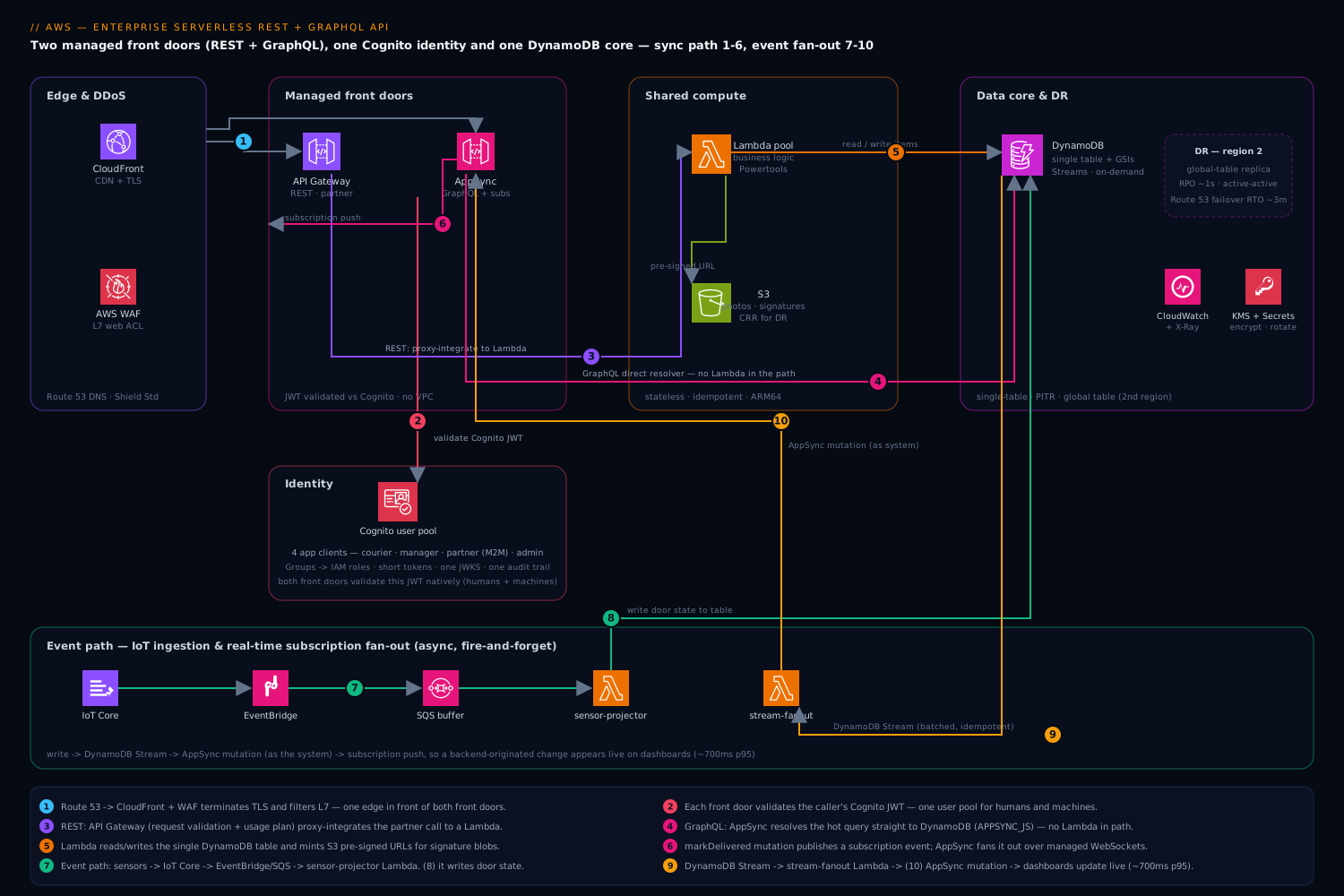
The request path (REST, partner billing call):
- The partner’s generated client calls
https://api.northwind.example/v1/invoices/{id}over TLS 1.3. DNS resolves through Amazon Route 53 to a CloudFront distribution; an AWS WAF web ACL on CloudFront strips the obvious garbage (SQLi/XSS signatures, IP reputation lists, a rate-based rule). - CloudFront forwards to a regional API Gateway REST API. A Cognito authorizer on the route validates the partner’s JWT (machine-to-machine, OAuth2 client-credentials grant from a Cognito app client). API Gateway also enforces request validation against the JSON Schema in the OpenAPI definition and applies a usage plan (API key + throttle + quota) so one partner cannot exhaust the account.
- API Gateway proxy-integrates to a Lambda function (
invoices-api). The function reads from DynamoDB and returns JSON. Idempotent reads are cached in API Gateway’s response cache for hot invoice IDs.
The request path (GraphQL, courier mobile query + subscription):
- The mobile app calls the AppSync GraphQL endpoint (also fronted by Route 53 + custom domain). AppSync authorizes the user’s Cognito ID token directly — no separate Lambda authorizer needed for the common case.
- The GraphQL query resolves field-by-field. A
getDeliveryquery hits a DynamoDB resolver via a VTL or JavaScript (APPSYNC_JS) resolver with no Lambda in the path — AppSync talks to DynamoDB directly, which is the cheapest and lowest-latency option. Adelivery.signaturefield that needs an S3 pre-signed URL is resolved by a Lambda data source (a pipeline resolver chains the DynamoDB read and the Lambda step). - When a courier marks a parcel delivered (a
markDeliveredmutation), AppSync writes to DynamoDB and publishes a subscription event. Every building-manager dashboard subscribed to that locker receives the update over a managed WebSocket — AppSync owns the connection fan-out, so no one runs a socket server.
The event path (IoT sensor ingestion):
- Locker sensors publish state changes to AWS IoT Core, which routes via an IoT rule onto an Amazon EventBridge bus (or directly to an SQS queue). A Lambda consumer (
sensor-projector) writes the new door state into the same DynamoDB table. - That same write triggers a DynamoDB Stream. A Lambda (
stream-fanout) reads the stream and calls an AppSync mutation as the system, which causes the live subscription push to dashboards. This is the trick that makes a backend-originated change appear instantly on a client subscription: write → stream → AppSync mutation → subscription fan-out.
The data layer is a single DynamoDB table in single-table design, with Global Secondary Indexes for the access patterns, DynamoDB Streams feeding the real-time fan-out, point-in-time recovery (PITR) on, and a global table replica in a second region for DR. Cold/large artifacts (parcel photos, signature images) live in S3, referenced from DynamoDB by key.
The whole thing is regional and stateless at the compute tier — every Lambda is horizontally scalable and idempotent, every front door is a managed service that scales without our involvement, and the only durable state is in DynamoDB (multi-region) and S3 (cross-region replicated).
Component breakdown
| Component | Service | Role | Key configuration choices |
|---|---|---|---|
| Edge / CDN / DDoS | CloudFront + AWS WAF + Shield Standard | TLS termination, caching, L7 filtering | WAF managed rule groups (Core, Known-Bad-Inputs, IP reputation) + a rate-based rule; CloudFront in front of both API Gateway and AppSync for one edge and one WAF |
| REST front door | API Gateway (REST, regional) | REST contract, request validation, throttle/quota, response cache | Cognito authorizer; request validators from OpenAPI JSON Schema; usage plans per partner; per-method throttling; access logs to CloudWatch |
| GraphQL front door | AWS AppSync | Schema, resolvers, managed subscriptions | Direct DynamoDB resolvers where possible (no Lambda); pipeline resolvers for multi-step; APPSYNC_JS resolvers; enhanced subscription filtering; caching tier for hot queries |
| Identity | Amazon Cognito user pool | One identity for humans + machines | Groups → roles (courier, manager, partner, admin); app clients per channel; client-credentials for M2M; advanced security (compromised-credential + adaptive MFA); token validity tuned (short access tokens, refresh rotation) |
| Compute | AWS Lambda | Business logic, integrations, stream/event consumers | ARM64 (Graviton) for ~20% better price/perf; Lambda SnapStart or Provisioned/Reserved Concurrency on latency-critical functions; tight per-function IAM; Powertools for logging/tracing/metrics; idempotency layer |
| Data | Amazon DynamoDB | Primary store, single-table | On-demand capacity (matches spiky/seasonal load); single table + GSIs; Streams enabled; PITR on; TTL for ephemeral items; global table for DR |
| Real-time fan-out | DynamoDB Streams + Lambda → AppSync mutation | Backend changes pushed to subscribed clients | Stream batches → idempotent projector → AppSync mutation with IAM auth as the system principal |
| Async / events | EventBridge + SQS + IoT Core | Decoupled ingestion, retries, buffering | SQS as a shock absorber in front of Lambda; DLQs everywhere; EventBridge for routing and future fan-out; partial batch response on SQS/streams |
| Blobs | Amazon S3 | Photos, signatures, exports | Referenced by key from DynamoDB; pre-signed URLs minted by Lambda/AppSync; SSE-KMS; cross-region replication for DR; lifecycle to Intelligent-Tiering |
| Secrets / config | Secrets Manager + SSM Parameter Store | Partner credentials, feature flags | Rotation on secrets; Parameter Store for non-secret config; fetched via Lambda extension/cache, never baked into images |
| Observability | CloudWatch + X-Ray + Powertools | Logs, metrics, traces, alarms | Structured JSON logs; X-Ray traces spanning API GW/AppSync → Lambda → DynamoDB; CloudWatch dashboards + composite alarms; embedded metrics for business KPIs |
A few choices deserve the “why,” because they are where this architecture differs from a naive serverless app.
Why AppSync resolves straight to DynamoDB, not “AppSync → Lambda → DynamoDB.” The reflex is to route every GraphQL field through a Lambda. For simple CRUD that adds latency, cost, and a cold-start surface for no benefit. AppSync’s native DynamoDB resolver (now writable in JavaScript via APPSYNC_JS, not just VTL) handles get/query/put/update directly. Lambda earns its place only when a field needs logic AppSync can’t express cleanly — calling a third party, minting a pre-signed URL, complex authorization. The rule: Lambda is a data source you reach for, not the default path.
Why a single DynamoDB table. Both REST and GraphQL serve the same nouns (deliveries, lockers, invoices, users). Modeling each as its own table would force the GraphQL resolvers and the REST Lambdas to join across tables in application code — slow and bug-prone. A single-table design with a deliberate partition/sort-key scheme and a handful of GSIs lets one item collection answer “get this delivery,” “list a courier’s deliveries today,” and “list a locker’s history” with single-digit-millisecond queries and no joins.
Why on-demand capacity, not provisioned + autoscaling. Northwind’s load is the textbook on-demand case: spiky within the day, seasonal across the year, with an 8x December peak. Provisioned capacity with autoscaling lags sudden spikes (the scaling alarm fires after throttling starts) and you pay for headroom. On-demand absorbs the spike instantly and bills per request. If a workload later becomes large and predictable, provisioned-with-autoscaling (or a reserved-capacity commit) becomes cheaper — but that is an optimization to earn with data, not a starting assumption.
Why Cognito is the single identity even for machines. The partner integration is machine-to-machine, which tempts teams to bolt on a separate API-key or homegrown JWT scheme. Cognito app clients support the OAuth2 client-credentials grant, so the partner gets a real OAuth token from the same issuer humans use. One JWKS endpoint, one set of authorizers, one audit trail. API Gateway and AppSync both natively validate Cognito tokens, so “one identity, two front doors” is literally one user pool referenced twice.
The two front doors up close
The component table above says “API Gateway (REST)” and “AWS AppSync” in one line each. That hides three of the most consequential decisions in the whole architecture: which flavour of API Gateway, which kind of authorizer, and how much you make the front door do before any compute runs. Let’s slow down and teach each one, because getting them right is what separates a serverless API that costs $2k/month from an identical-looking one that costs $12k and pages someone at 2 a.m.
REST API vs. HTTP API vs. WebSocket API
Amazon API Gateway is really three products behind one name. Beginners assume “API Gateway” is one thing; picking the wrong one is a top-five serverless cost mistake.
| Capability | REST API (v1) | HTTP API (v2) | WebSocket API |
|---|---|---|---|
| Best for | Feature-rich public/partner REST | Lean proxy to Lambda; cost/latency-sensitive | Bidirectional, server-push, chat/live |
| Request price (representative, us-east-1) | ~$3.50 / million | ~$1.00 / million | ~$1.00 / million msgs + connection-minutes |
| Added latency | Higher (more features in path) | Lower (~60% less overhead) | n/a (persistent socket) |
| Authorizers | IAM, Cognito user pool, Lambda (TOKEN/REQUEST) | IAM, JWT (native OIDC), Lambda (REQUEST) | IAM, Lambda |
| Usage plans + API keys | Yes | No | No |
| Request/response validation | Yes (JSON Schema) | No | No |
| Mapping templates (VTL) / non-proxy AWS integrations | Yes | No (proxy-style only) | Yes |
| Response caching | Yes (per-stage) | No | No |
| Direct AWS WAF association | Yes (on the stage) | No — front with CloudFront+WAF | No |
| Private (VPC) endpoints | Yes | Yes | No |
| Terraform resource | aws_api_gateway_* |
aws_apigatewayv2_* |
aws_apigatewayv2_* |
The mental model: HTTP API is a thin, cheap, fast proxy — you reach for it when the function itself will do all the work and you don’t need usage plans, request validation, VTL, or a per-stage cache. REST API is the feature-rich one — you pay ~3.5× per request for it, so you only pay that when you actually use those features (the partner-facing contract with request validation, API keys, per-partner quotas, and a response cache is exactly that case). WebSocket API is for when the server needs to push to the client over a long-lived connection.
Northwind uses REST API for the partner billing contract (it genuinely needs usage plans, API keys, request validation, and a response cache) and could have used HTTP API for internal dashboard CRUD to save ~70% on those requests. It uses AppSync — not WebSocket API — for real-time, and that choice deserves a sentence: a raw WebSocket API makes you manage the connection registry (a DynamoDB table of connectionIds), you write the fan-out loop that posts to each connection, and you clean up stale sockets. AppSync’s managed subscriptions do all of that for you — you publish a mutation and AppSync fans it out to every subscribed client. WebSocket API earns its place when you need a protocol AppSync’s GraphQL-subscription model doesn’t fit (a custom binary protocol, a game loop, non-GraphQL messaging).
Where does AWS WAF attach? WAF associates directly with a REST API stage, CloudFront, ALB, AppSync, Cognito user pool, and App Runner — but not with an HTTP API (v2). This is precisely why this architecture puts CloudFront in front of both doors: it gives you one WAF web ACL protecting REST, HTTP, and GraphQL uniformly, instead of three different attachment stories.
Stages, custom domains, and how requests actually route
A stage is a named, deployed snapshot of an API (dev, staging, prod), each with its own throttle settings, cache, logging, and stage variables (e.g. ${stageVariables.lambdaAlias} so prod invokes the prod Lambda alias and dev invokes dev). You deploy to a stage; the stage is what gets a public URL.
A custom domain name (e.g. api.northwind.example) maps a friendly DNS name to one or more APIs via base-path mappings — /v1 → the REST API’s prod stage, /graphql → AppSync — so one domain fronts multiple APIs. You bring an ACM certificate (in the API’s region for regional/private endpoints; in us-east-1 for edge-optimized endpoints, because edge-optimized fronts with CloudFront). In this architecture we deliberately use regional API Gateway endpoints and put our own CloudFront distribution in front, so we control caching and WAF ourselves rather than using the built-in edge-optimized CloudFront we can’t see.
The four authorizer types — and which token to check
This is the single most misunderstood part of an AWS API. There are four ways the front door can decide “is this caller allowed in?”, and they are not interchangeable:
| Authorizer | Works on | How it decides | Use it when |
|---|---|---|---|
| IAM (SigV4) | REST, HTTP, WebSocket, AppSync | Caller signs the request with AWS credentials; API Gateway checks the IAM policy | Internal service-to-service, or clients that already hold AWS creds (via an identity pool) |
| Cognito user pool | REST API only | Gateway validates a Cognito JWT natively | Human users signed in to a Cognito pool, REST API |
| JWT authorizer | HTTP API, AppSync | Gateway validates any OIDC/OAuth2 JWT (Cognito, Auth0, Okta…) against its JWKS | Any standards JWT on an HTTP API |
| Lambda authorizer | REST, HTTP, WebSocket | Your function returns allow/deny (+ an IAM policy or simple boolean) | Custom logic: opaque tokens, per-request context, header/mTLS checks, legacy auth |
Two facts beginners get wrong constantly:
- The Cognito user pool authorizer only exists on REST API. On an HTTP API you use the JWT authorizer (which also validates Cognito tokens, just via the generic OIDC path). If you “port” a REST API to HTTP API you must swap the authorizer type.
- Validate the right token. Cognito issues an ID token (identity claims:
email,cognito:groups) and an access token (authorization claims:scope,client_id). For authorization (scopes, machine-to-machine), check the access token; for who the user is, read the ID token. Always verifyiss(the pool’s issuer URL),aud/client_id,exp, andtoken_use("access"vs"id"). A Lambda authorizer that trusts a token without checkingtoken_usewill happily accept an ID token where an access token was required.
Lambda authorizers come in two request types: TOKEN (the function receives only the token string from a single header — simplest) and REQUEST (the function receives the full request context: headers, query string, path, source IP — needed when the decision depends on more than the token). Both cache the result keyed by an identity source (e.g. the Authorization header) for a configurable TTL, so a hot client isn’t re-authorized on every call. Set that TTL deliberately: too long and a revoked token keeps working; too short and you pay a Lambda invocation per request.
Making the front door do the work: validation, mapping templates, throttling
The cheapest request is the one that never reaches your Lambda. A REST API front door can reject bad input, transform payloads, and rate-limit before any compute runs.
Request validation (REST API). Attach a JSON Schema model and a validator to a method; the gateway rejects a malformed body with a 400 before invoking anything. Authored in the OpenAPI spec so the contract and the enforcement can never drift:
# openapi.yaml (excerpt) — the contract IS the enforcement
paths:
  /v1/invoices:
    post:
      x-amazon-apigateway-request-validator: body-and-params
      requestBody:
        required: true
        content:
          application/json:
            schema: { $ref: "#/components/schemas/CreateInvoice" }
      x-amazon-apigateway-integration:
        type: aws_proxy
        httpMethod: POST
        uri: arn:aws:apigateway:ap-south-1:lambda:path/2015-03-31/functions/arn:aws:lambda:ap-south-1:123456789012:function:invoices-api/invocations
      security:
        - CognitoAuth: []
x-amazon-apigateway-request-validators:
  body-and-params: { validateRequestBody: true, validateRequestParameters: true }
components:
  schemas:
    CreateInvoice:
      type: object
      required: [buildingId, periodMonth, amountMinor]
      properties:
        buildingId:  { type: string, pattern: "^bld_[0-9a-f]{8}$" }
        periodMonth: { type: string, pattern: "^[0-9]{4}-[0-9]{2}$" }
        amountMinor: { type: integer, minimum: 0 }
  securitySchemes:
    CognitoAuth:
      type: apiKey
      name: Authorization
      in: header
      x-amazon-apigateway-authtype: cognito_user_pools
      x-amazon-apigateway-authorizer:
        type: cognito_user_pools
        providerARNs: ["arn:aws:cognito-idp:ap-south-1:123456789012:userpool/ap-south-1_EXAMPLE"]
Mapping templates (VTL). With a non-proxy (AWS or AWS_PROXY) integration you can rewrite the request/response with Velocity Template Language. This is the machinery that lets API Gateway call a service like DynamoDB directly, with no Lambda (covered in the data section). Powerful, but VTL is a quirky, hard-to-test templating language — reach for it for simple shape-shifting, not business logic.
Throttling is a token bucket with a rate (steady requests/second) and a burst (bucket depth). It applies at three levels that stack: account (a regional default around 10,000 rps / 5,000 burst — representative, raise via quota), per-method/stage, and per-usage-plan (per API key). A usage plan ties an API key to a throttle and a quota (e.g. 1,000,000 requests/month), so one partner can’t exhaust the account or blow past their contract:
# One partner, one key, one quota — REST API only
resource "aws_api_gateway_usage_plan" "partner_gold" {
  name = "partner-gold"
  api_stages {
    api_id = aws_api_gateway_rest_api.this.id
    stage  = aws_api_gateway_stage.prod.stage_name
    throttle { path = "/v1/invoices/GET"  rate_limit = 50  burst_limit = 100 }
  }
  throttle_settings { rate_limit = 200, burst_limit = 400 }   # overall for this plan
  quota_settings    { limit = 1000000, period = "MONTH" }
}
resource "aws_api_gateway_usage_plan_key" "partner_gold" {
  key_id        = aws_api_gateway_api_key.partner_gold.id
  key_type      = "API_KEY"
  usage_plan_id = aws_api_gateway_usage_plan.partner_gold.id
}
API keys are for metering and plan identification, not authentication. A key travels in a plaintext header and any client can copy it. Authentication is the authorizer’s job (the Cognito JWT). Use API keys to attach a partner to a usage plan and to meter/limit them — never as the security boundary.
On an HTTP API, the equivalent auth is the native JWT authorizer, and there are no usage plans — you rate-limit at the CloudFront/WAF layer instead:
# HTTP API (v2): native JWT authorizer validates Cognito access tokens directly
resource "aws_apigatewayv2_authorizer" "jwt" {
  api_id           = aws_apigatewayv2_api.http.id
  authorizer_type  = "JWT"
  identity_sources = ["$request.header.Authorization"]
  name             = "cognito-jwt"
  jwt_configuration {
    audience = [aws_cognito_user_pool_client.web.id]                 # the app client id
    issuer   = "https://cognito-idp.ap-south-1.amazonaws.com/${aws_cognito_user_pool.this.id}"
  }
}
You can see why the architecture keeps REST for the partner (usage plans, keys, validation, cache) and would use HTTP API for lean internal endpoints (a third of the price, lower latency, and CloudFront+WAF still provides the rate limiting).
The compute tier up close
The component table says “Lambda: business logic, ARM64, Powertools, idempotency.” Each of those is a real decision with a right and wrong answer. Here is the depth a production team needs.
Proxy integration: the event and response contract
With Lambda proxy integration (AWS_PROXY), API Gateway hands your function the entire request as a JSON event and expects a specific JSON shape back. Get the response shape wrong and the client gets a 502 Bad Gateway even though your code “worked.” A minimal, correct Node.js handler with Lambda Powertools wired in:
// invoices-api handler (Node 20, ARM64) — proxy integration in, proxy shape out
import { Logger }  from "@aws-lambda-powertools/logger";
import { Tracer }  from "@aws-lambda-powertools/tracer";
import { Metrics, MetricUnit } from "@aws-lambda-powertools/metrics";
import { DynamoDBClient } from "@aws-sdk/client-dynamodb";
import { GetCommand, DynamoDBDocumentClient } from "@aws-sdk/lib-dynamodb";

const logger  = new Logger({ serviceName: "invoices-api" });
const tracer  = new Tracer({ serviceName: "invoices-api" });
const metrics = new Metrics({ namespace: "Northwind", serviceName: "invoices-api" });
const ddb = DynamoDBDocumentClient.from(tracer.captureAWSv3Client(new DynamoDBClient({})));

export const handler = async (event) => {
  const invoiceId = event.pathParameters?.id;
  const caller    = event.requestContext.authorizer?.claims?.sub;   // verified Cognito subject
  logger.appendKeys({ invoiceId, caller });                          // structured context on every line

  const res = await ddb.send(new GetCommand({
    TableName: process.env.TABLE,
    Key: { PK: `INVOICE#${invoiceId}`, SK: "META" },
  }));
  metrics.addMetric("InvoiceRead", MetricUnit.Count, 1);            // EMF → CloudWatch metric

  if (!res.Item) return { statusCode: 404, body: JSON.stringify({ error: "not found" }) };
  return {
    statusCode: 200,
    headers: { "content-type": "application/json", "cache-control": "max-age=30" },
    body: JSON.stringify(res.Item),
  };
};
Two things to notice. The verified caller identity comes from event.requestContext.authorizer.claims.sub — the subject claim the Cognito authorizer already validated — never from a body field the client controls. And the function returns { statusCode, headers, body } with a string body; returning a bare object silently breaks proxy integration.
The execution role: least privilege, item-level
Every Lambda assumes an execution role — the IAM role Lambda uses to fetch your data and write logs. The reflex AmazonDynamoDBFullAccess is a security hole. Scope it to the exact table, the exact actions, and — the advanced move — the exact items the function may touch, using the dynamodb:LeadingKeys condition so courier-api can only read partitions whose key starts with the caller’s own id:
{
  "Version": "2012-10-17",
  "Statement": [
    { "Sid": "OwnPartitionOnly",
      "Effect": "Allow",
      "Action": ["dynamodb:GetItem","dynamodb:Query","dynamodb:PutItem","dynamodb:UpdateItem"],
      "Resource": "arn:aws:dynamodb:ap-south-1:123456789012:table/northwind",
      "Condition": { "ForAllValues:StringLike": {
        "dynamodb:LeadingKeys": ["COURIER#${aws:PrincipalTag/sub}"]
      } } },
    { "Sid": "Logs",
      "Effect": "Allow",
      "Action": ["logs:CreateLogStream","logs:PutLogEvents"],
      "Resource": "arn:aws:logs:ap-south-1:123456789012:log-group:/aws/lambda/courier-api:*" }
  ]
}
This is defence in depth: even if a bug let a courier request another courier’s deliveries, IAM refuses the query at the data boundary. Add the managed AWSLambdaBasicExecutionRole for CloudWatch Logs and AWSXRayDaemonWriteAccess for tracing, then nothing else.
Concurrency: the three dials that trip everyone up
Beginners conflate three different concurrency settings. They are not the same:
| Setting | What it does | Costs money when idle? | Prevents cold starts? |
|---|---|---|---|
| Account concurrency | The ceiling of simultaneous executions across ALL functions in the region (default 1,000, raise via quota) | No | No |
| Reserved concurrency | Carves out a guaranteed slice of the account ceiling for one function (and caps it there) | No | No |
| Provisioned concurrency | Pre-initializes N execution environments that are warm and waiting | Yes (you pay for the warm pool) | Yes — no cold start up to N |
Use reserved concurrency two ways: as a guarantee (this critical function always has 100 slots even if others go wild) and as a cap (this function that calls a fragile downstream can never exceed 50 concurrent, protecting the downstream). Setting reserved concurrency to 0 is the emergency “off switch” for a misbehaving function. Use provisioned concurrency only on a latency-critical synchronous path where a cold start would breach your p99 SLO — it costs money around the clock, so you don’t sprinkle it everywhere.
Since the November 2023 scaling update, each function scales independently by up to 1,000 new concurrent executions every 10 seconds, up to your account limit — so one function’s burst no longer steals another’s ramp. That, plus on-demand DynamoDB, is what lets Northwind absorb the 8× December spike with no pre-warming on most functions.
Cold starts and SnapStart
A cold start is the one-time cost the first time a request lands on a brand-new execution environment: AWS downloads your code, starts the runtime, and runs your init code (everything outside the handler — imports, SDK clients, config load). Subsequent requests reuse that warm environment and skip all of it. Cold starts are worse with big deployment packages, heavy init, and JVM/large runtimes; they’re small for a slim Node/Python function. Things that used to make them dramatically worse — attaching to a VPC — are now much cheaper thanks to Hyperplane-shared ENIs, but “no VPC unless you must” remains the default here.
SnapStart attacks cold starts differently: Lambda runs your init once, takes a snapshot of the initialized memory/disk, and restores from that snapshot on future cold starts instead of re-initializing — cutting cold-start latency by up to ~10× on heavy-init functions. Originally Java-only, SnapStart now also supports Python and .NET (GA). Two caveats a production team must internalize:
- Uniqueness. Anything captured once in the snapshot is shared by every restored environment — so a random seed, a unique id, or a database connection generated in init is now identical (or stale) across thousands of invocations. Use the runtime hooks (
afterRestore/ CRaCbeforeCheckpoint) to regenerate per-instance state after restore. - Mutually exclusive with provisioned concurrency. A function version uses either SnapStart or provisioned concurrency, not both. SnapStart is the cheaper cold-start fix (no idle charge for Java; a small cache/restore cost for Python/.NET); provisioned concurrency is the “zero cold start, at a price” fix.
For the full decision tree see the sibling lesson on Lambda cold starts, provisioned concurrency, and SnapStart.
Idempotency: making retries safe
Serverless is an at-least-once world. API Gateway may time out and the client retries; SQS delivers a message at least once; a DynamoDB stream can re-deliver a batch after a partial failure. If markDelivered runs twice, you must not double-charge or double-notify. Idempotency means “running it twice has the same effect as running it once.” Two techniques, used together:
1. Powertools idempotency utility — the first call stores its result in a small DynamoDB idempotency table keyed by an idempotency key (a client-supplied Idempotency-Key header, or a hash of the meaningful payload); a duplicate within the TTL returns the stored result without re-running the body:
# Powertools idempotency — the second identical call replays the first result, no side effects
from aws_lambda_powertools.utilities.idempotency import (
    idempotent, DynamoDBPersistenceLayer, IdempotencyConfig)

persistence = DynamoDBPersistenceLayer(table_name="northwind-idempotency")
config = IdempotencyConfig(event_key_jmespath='headers."Idempotency-Key"', expires_after_seconds=3600)

@idempotent(persistence_store=persistence, config=config)
def handler(event, context):
    charge_partner(event)      # runs exactly once per idempotency key, even under retries
    return {"statusCode": 200}
2. Conditional writes — the database itself enforces “only if not already done” with a ConditionExpression, so even a race between two concurrent retries can’t both win:
UpdateItem  Key {PK: DELIVERY#d_123, SK: META}
  UpdateExpression:    SET #status = :delivered, deliveredAt = :now
  ConditionExpression: attribute_exists(PK) AND #status <> :delivered
The second retry hits ConditionalCheckFailedException and your handler treats that as “already delivered — success,” not an error. In a multi-region global table, where replication is last-writer-wins, idempotency keys plus conditional writes are what keep a dual-region replay from corrupting state.
The data tier up close
“One DynamoDB table in single-table design” is a sentence that hides the hardest and most valuable idea in the architecture. Let’s make it concrete, then show the Lambda-free integration that surprises people.
Single-table design by worked example
In a relational database you model entities (a Deliveries table, a Lockers table, an Invoices table) and join them at query time. DynamoDB has no joins and charges per read, so you model access patterns instead: you write items so that everything a given query needs sits in one partition, retrievable in a single Query. All entity types live in one table with generic keys PK (partition) and SK (sort), and you overload them.
Northwind’s real access patterns and the schema that serves them:
| # | Access pattern | Query |
|---|---|---|
| 1 | Get one delivery | PK = DELIVERY#<id>, SK = META |
| 2 | List a courier’s deliveries for a day | GSI1: GSI1PK = COURIER#<id>, GSI1SK begins_with DATE#<yyyy-mm-dd> |
| 3 | List a locker’s event history | GSI2: GSI2PK = LOCKER#<id>, GSI2SK begins_with EVT# |
| 4 | List a partner’s invoices for a period | GSI3: GSI3PK = PARTNER#<id>, GSI3SK = PERIOD#<yyyy-mm> |
| 5 | Get a user profile | PK = USER#<id>, SK = PROFILE |
The items that satisfy them, all in one table:
PK                  SK                    GSI1PK          GSI1SK                 ...attributes
DELIVERY#d_123      META                  COURIER#c_9     DATE#2026-06-09#d_123  status, lockerId, buildingId
LOCKER#l_44         EVT#2026-06-09T10:03  —               —                      (GSI2PK=LOCKER#l_44, GSI2SK=EVT#…) doorState
INVOICE#inv_501     META                  —               —                      (GSI3PK=PARTNER#p_7, GSI3SK=PERIOD#2026-06) amountMinor
USER#c_9            PROFILE               —               —                      name, role, email
The base table answers “get one thing by id” (patterns 1 and 5). Each Global Secondary Index (GSI) is a reprojection of the same items under a different key, answering a different “list” pattern (2, 3, 4) — you’re trading storage and write cost for read patterns, which is exactly the DynamoDB bargain. Note there are no joins anywhere: a courier’s delivery list is one Query on GSI1, single-digit milliseconds, regardless of table size. This is why REST and GraphQL can share the store — both protocols serve the same nouns, so they hit the same items and indexes. The dedicated lesson on DynamoDB single-table design works this modeling method end to end.
The Lambda-free integration: API Gateway straight to DynamoDB
Here is the part that surprises people: for a dead-simple write or read, API Gateway can call DynamoDB directly — no Lambda at all. You use a REST API AWS (non-proxy) integration with an IAM role that lets API Gateway call dynamodb:PutItem, and a VTL mapping template shapes the HTTP request into a DynamoDB API call and the DynamoDB response back into JSON:
# API Gateway → DynamoDB PutItem, zero Lambda. The gateway assumes a role scoped to PutItem.
resource "aws_api_gateway_integration" "put_event" {
  rest_api_id = aws_api_gateway_rest_api.this.id
  resource_id = aws_api_gateway_resource.events.id
  http_method = aws_api_gateway_method.post_event.http_method
  type                    = "AWS"                               # non-proxy AWS service integration
  integration_http_method = "POST"
  uri         = "arn:aws:apigateway:ap-south-1:dynamodb:action/PutItem"
  credentials = aws_iam_role.apigw_ddb.arn                      # role: dynamodb:PutItem on the table only
  request_templates = {
    "application/json" = <<VTL
{
  "TableName": "northwind",
  "Item": {
    "PK":       { "S": "LOCKER#$input.path('$.lockerId')" },
    "SK":       { "S": "EVT#$context.requestTimeEpoch" },
    "doorState":{ "S": "$input.path('$.doorState')" }
  }
}
VTL
  }
}
When does this beat a Lambda? For an ultra-thin, high-volume, no-logic path — an ingest endpoint that just writes an item — it removes the Lambda invocation cost, the Lambda duration cost, and the cold-start surface entirely, and shaves latency. When does it not? The moment you need real logic, enrichment, a second call, decent error handling, or unit tests — because VTL is an awkward, hard-to-test templating language, not a general-purpose runtime. The rule mirrors the AppSync one from earlier: direct integration is a tool you reach for on the simplest paths, not the default. (On the GraphQL side, AppSync’s direct DynamoDB resolver is the same idea, and its APPSYNC_JS resolvers are far nicer to write than REST-API VTL.)
The caching layer
Three places can cache, each cutting load off the tier below it:
- API Gateway response cache (REST API, per stage): caches a method’s response keyed by path/query/header for a TTL (0.5 GB–237 GB cache sizes). A
GET /v1/invoices/{id}for a hot invoice never reaches Lambda or DynamoDB while cached. You can require cache encryption and allow per-key invalidation (a caller withInvalidateCachepermission can bust it). It bills per hour by cache size, so cache genuinely hot, idempotent reads. - AppSync caching: per-resolver or full-request caching with a TTL, so a hot GraphQL query is served from the cache tier instead of re-resolving to DynamoDB.
- DynamoDB DAX: an in-front, write-through, microsecond-latency cache cluster for read-heavy DynamoDB workloads — reach for it when even single-digit-millisecond DynamoDB reads aren’t fast/cheap enough at extreme read volume.
Cache what is hot and slow-changing (an invoice, a locker’s static metadata); never cache what must be real-time (a live door state — that’s what subscriptions are for). The discipline is choosing a TTL you can defend and having an invalidation story for the moment data changes under a cached key.
Implementation guidance
Provision with Terraform (the user’s house standard) using a layered state layout so blast radius is contained: a network-edge layer (Route 53 zones, ACM certs, CloudFront, WAF), an identity layer (Cognito pool, app clients, groups, IAM roles), a data layer (DynamoDB table, GSIs, streams, S3 buckets, global-table replica), and an app layer (Lambdas, API Gateway, AppSync, EventBridge, SQS) — each with its own remote state in S3 + DynamoDB lock table, wired together with terraform_remote_state data sources or SSM parameters. The serverless functions themselves are best authored with the AWS Serverless Application Model (SAM) or Serverless Framework and consumed by Terraform, or kept fully in Terraform if the team prefers one tool. Whichever — keep the function handler code out of the IaC repo’s critical path: build artifacts in CI, publish a versioned Lambda, and let IaC point at the version/alias.
Concretely:
- API Gateway from OpenAPI. Author the REST contract as an OpenAPI 3 document and import it (
body = file("openapi.yaml")inaws_api_gateway_rest_api, or the v2 equivalent). The spec is the source of truth: request validators, models, and the Cognito authorizer all come fromx-amazon-apigateway-*extensions, so the partner’s generated client and the gateway’s enforcement can never drift. - AppSync schema + resolvers as code. Keep
schema.graphqland each resolver (.jsfor APPSYNC_JS, or.vtl) in the repo; reference them fromaws_appsync_resolver. Direct DynamoDB resolvers need only the table as a data source; pipeline resolvers list their functions in order. - Lambda packaging. ARM64 architecture, a slim runtime (Node 20 / Python 3.13), dependencies in a Lambda layer shared across functions, and Lambda Powertools wired for structured logging, X-Ray tracing, custom metrics, and idempotency. Latency-critical functions get SnapStart (Java) or provisioned/reserved concurrency; everything else runs on-demand.
Networking — and the deliberate choice to stay out of the VPC. This is a point teams get wrong. Lambda, DynamoDB, S3, AppSync, and API Gateway are all “VPC-optional” managed services that reach each other over the AWS network without a VPC. Putting Lambda in a VPC just to talk to DynamoDB adds ENI cold-start cost and a NAT bill for no security benefit — DynamoDB access is governed by IAM, not network reachability. So the default here is no VPC: functions reach DynamoDB/S3/AppSync over their service endpoints, secured by IAM. A Lambda is attached to a VPC only if it must reach something private — an RDS instance, an internal service, a partner over a private link. When that happens, the function gets a VPC config with VPC (Gateway/Interface) endpoints for DynamoDB and S3 so traffic never traverses a NAT, and the NAT is reserved for genuine internet egress. Network isolation here is an IAM-and-resource-policy problem, not a subnet problem.
Identity wiring. One Cognito user pool. Groups (courier, manager, partner, admin) map to IAM roles via the pool’s identity-pool/role mapping for any AWS-resource access, and to scopes/claims for app-level authorization. Separate app clients per channel (mobile, web, partner-M2M) so you can set different token lifetimes, revoke one channel without touching others, and enable the client-credentials grant only on the partner client. Fine-grained authorization lives in two tiers: coarse checks at the front door (the Cognito authorizer rejects an unauthenticated or wrong-audience token before any compute runs), and fine checks in resolvers/Lambdas (a courier can only read their own deliveries — enforced by constraining the DynamoDB query to the caller’s partition, derived from the verified sub claim, never from a client-supplied user ID). For complex policies, AppSync + Amazon Verified Permissions (Cedar) externalizes authorization as policy rather than scattered if statements.
Enterprise considerations
Security and Zero Trust. The architecture is Zero-Trust by construction: every request is authenticated (Cognito JWT) and authorized at the edge and re-checked at the data boundary, with no implicit trust from “being inside the network” — because there largely is no network perimeter to be inside. WAF on CloudFront filters L7 attacks; AWS Shield Standard absorbs common DDoS for free (Shield Advanced if the contractual SLA demands it). Every service-to-service hop is least-privilege IAM — each Lambda’s execution role grants only the specific table actions and item-level conditions it needs (dynamodb:LeadingKeys conditions to scope a function to a tenant’s partition). Data is encrypted with KMS (DynamoDB, S3, Secrets Manager) and in transit with TLS 1.2+ everywhere. Partner secrets rotate in Secrets Manager. The single biggest Zero-Trust win over a server-based design: there is no long-lived host to compromise, patch, or pivot from — compute is ephemeral and per-request.
Cost optimization. Serverless flips the cost model from “pay for capacity” to “pay for use,” which is exactly right for an 8x seasonal swing. Levers, roughly in order of impact:
- Scale to zero overnight — Lambda, API Gateway, and AppSync cost ~nothing when idle, so the quiet 12 hours are nearly free (DynamoDB on-demand storage and a little stream activity aside).
- ARM64/Graviton Lambda — ~20% better price/performance for a config change.
- Right-size memory — Lambda CPU scales with memory; use AWS Lambda Power Tuning to find the cost/latency sweet spot rather than defaulting to 128 MB or 1024 MB.
- AppSync direct resolvers — skipping Lambda for simple GraphQL fields removes both invocation cost and duration cost on the hottest paths.
- DynamoDB on-demand now, reserved/provisioned later — start on-demand for unpredictability; revisit with usage data and buy reserved capacity only for the proven steady-state floor.
- API Gateway response cache + AppSync caching for hot, idempotent reads cuts both Lambda invocations and DynamoDB RCUs.
- Watch the gateway, not just the compute — at high volume, API Gateway per-request charges and CloudFront egress can exceed Lambda cost; an HTTP API (cheaper than REST API) is worth considering when you don’t need REST-API-only features like usage plans or request validation.
Scalability. Each tier scales independently and natively. The real governors to set deliberately: Lambda reserved concurrency to protect downstream systems (and a per-account concurrency budget so one runaway function can’t starve the others), DynamoDB on-demand’s automatic scaling (with adaptive capacity smoothing hot partitions — which a good key design avoids in the first place), and AppSync/API Gateway throttles. The classic serverless scaling trap is a downstream that does not scale — if a Lambda calls a fixed-size relational database, Lambda will happily open 10,000 connections and melt it. Northwind avoids this by keeping the hot path on DynamoDB; any relational dependency would sit behind RDS Proxy to pool connections.
Reliability and DR (RTO/RPO). Within a region, every component is multi-AZ by default (managed services), so single-AZ failure is invisible. For regional DR the design uses DynamoDB global tables (active-active, multi-region, typically sub-second replication → RPO seconds), S3 cross-region replication for blobs, and infrastructure-as-code redeployable into the second region in minutes. Front-door failover is a Route 53 health-checked failover (or latency) routing policy flipping traffic to the standby region’s CloudFront/API Gateway/AppSync. Targets: RPO of seconds (global-table replication lag) and RTO of minutes (DNS failover + already-warm managed services in region 2). Because Lambda/API Gateway/AppSync are deploy-from-IaC and hold no state, “standby region” can be a genuinely warm stack rather than a cold rebuild. Idempotency (Powertools idempotency keys, conditional DynamoDB writes) makes retries and dual-region replays safe. DLQs on every async consumer mean a poison message parks instead of blocking the queue, and partial batch responses on SQS/stream sources mean one bad record doesn’t fail a whole batch.
Observability. Structured JSON logs from every Lambda (Powertools), X-Ray distributed tracing stitching API Gateway/AppSync → Lambda → DynamoDB into one trace so you can see exactly where a slow request spent its milliseconds, CloudWatch metrics (including embedded-metric-format business KPIs like “deliveries completed per minute”), and composite alarms that page only on genuine, correlated problems (error-rate and latency, not a single noisy metric). Track the serverless-specific signals: cold-start rate and duration, concurrency utilization vs. limit, DynamoDB throttles, async DLQ depth, and AppSync subscription connection counts. A dashboard per channel (REST partner, GraphQL mobile, dashboard subscriptions, IoT ingest) keeps a problem in one channel from being masked by health in the others.
Governance. Multi-account via AWS Organizations / Control Tower (separate dev/stage/prod accounts), Service Control Policies to enforce guardrails (deny public S3, require encryption, pin allowed regions), tagging standards for cost allocation per channel and per environment, AWS Config rules for drift and compliance, and CloudTrail for an immutable audit log. Cognito’s audit events and API Gateway/AppSync access logs give a per-request, per-identity trail end to end.
Reference enterprise example
Northwind Lockers, December peak readiness review. Baseline (July): ~3.5 million API/GraphQL operations/day. December peak: ~28 million/day, concentrated 11 a.m.–8 p.m., with a hard spike on the three days before Christmas. Roughly 60% of operations are GraphQL (mobile couriers), 30% REST (partner billing + dashboard CRUD), 10% IoT sensor ingest.
Decisions they made and why:
- GraphQL hot path went Lambda-free. The two highest-volume operations —
listMyDeliveriesand themarkDeliveredmutation — were originally AppSync → Lambda → DynamoDB. Moving them to direct DynamoDB resolvers (APPSYNC_JS) cut p50 latency from ~90 ms to ~22 ms and removed ~14 million Lambda invocations/day at peak. Lambda stayed only on the ~6 fields that genuinely needed it (pre-signed signature URLs, partner-facing enrichment). - DynamoDB single table, on-demand. One table, partition key
PK/ sort keySK, three GSIs (by courier+date, by locker, by partner-invoice-period). On-demand handled the 8x ramp with zero capacity meetings and zero throttling; they confirmed from CloudWatch that adaptive capacity never needed to kick in because no single locker or courier created a hot partition. - Subscriptions for the dashboard, fed by streams. Building managers’ dashboards subscribe per building. When a sensor reports a door event → IoT Core → Lambda projector → DynamoDB write → DynamoDB Stream →
stream-fanoutLambda → AppSync mutation → subscription push. End-to-end “door opens to tile flips” measured ~700 ms at p95 during peak, with zero polling load. - One Cognito pool, four app clients. Mobile (auth-code + PKCE, 1-hour access token, refresh rotation), web dashboard (same), partner (client-credentials grant, scoped to
invoices:read invoices:write), admin (auth-code + mandatory MFA via Cognito advanced security). The partner generated its REST client from Northwind’s published OpenAPI doc; Northwind never wrote partner-specific auth code. - DR: global table + Route 53 failover. Primary
ap-south-1(Mumbai), standbyap-southeast-1(Singapore). DynamoDB global table keeps both regions current; IaC deploys the full app stack in both. A GameDay drill — kill the Mumbai front door — failed DNS over to Singapore in ~3 minutes with no parcel transactions lost (the few in-flight writes replicated within ~1 second and idempotency keys made the client retries safe). Measured RTO ≈ 3 min, RPO ≈ 1 sec.
Cost outcome. The retired EC2 + ALB + self-managed-GraphQL tier had cost a flat ~$4,100/month — sized for a peak that occurred a few days a year. The serverless platform billed ~$1,250 in a quiet month and ~$6,800 in the December peak month, averaging ~$2,300/month across the year — a ~44% reduction — while the December peak was handled with no engineer paged for capacity and the overnight hours cost almost nothing. The team also deleted an entire class of work: no GraphQL servers to patch, no socket fleet to scale, no auth service to run.
Where they spent the savings. Two engineers’ worth of reclaimed operational time went into the things serverless doesn’t give you for free: a shared idempotency/observability Lambda layer, the OpenAPI-and-schema contract discipline, and the cross-region GameDay automation.
Going deeper
This section is for the reader who already builds serverless APIs and wants the internals, the sharp edges, and the numbers.
What actually happens inside the front doors
API Gateway proxy is, under the hood, a request transformer: it maps the HTTP request into the event JSON, invokes Lambda synchronously (the RequestResponse invocation type), and maps your returned JSON back to an HTTP response. That mapping is why the response must be {statusCode, headers, body:"<string>"} — API Gateway is literally reading those fields. A non-proxy integration inserts VTL templates on both legs, which is how the Lambda-free DynamoDB integration works.
AppSync resolvers run in one of two runtimes: legacy VTL or APPSYNC_JS (a constrained JavaScript runtime — not Node). APPSYNC_JS is deliberately limited: ~32 KB of code per resolver, no arbitrary async/network I/O, no while loops of unbounded work — because a resolver must be fast and side-effect-free except through its data source. A resolver has a request function (builds the DynamoDB/HTTP/Lambda call from ctx) and a response function (shapes the result). A pipeline resolver chains several functions in order, threading ctx.stash between them — that’s how “read DynamoDB, then call a Lambda to mint a pre-signed URL” becomes one GraphQL field. When you need real code, an AppSync JavaScript resolver with a Lambda data source hands off to a normal Lambda.
The limits that bite in production
| Limit | Value | Consequence |
|---|---|---|
| API Gateway integration timeout | 29 s (default) | A request that needs longer must go async (return 202 + poll, or Step Functions). You cannot “just wait.” |
| Lambda payload (sync) | 6 MB request/response | Large uploads/downloads go via S3 pre-signed URLs, not through the function. |
| API Gateway payload | 10 MB | Same — big blobs bypass the API. |
| Lambda function timeout | 15 min max | Long jobs are Step Functions / Fargate, not one Lambda. |
Lambda /tmp |
up to 10 GB | Scratch space, but ephemeral — gone when the environment recycles. |
| Lambda memory | 128 MB–10,240 MB | CPU scales with memory; more memory can be cheaper if it finishes proportionally faster. |
| DynamoDB item | 400 KB | Big attributes (photos) go to S3, referenced by key. |
| DynamoDB partition throughput | 3,000 RCU / 1,000 WCU per physical partition | A hot key throttles even on on-demand until adaptive capacity splits it — good key design avoids it. |
| AppSync response | ~30 s, subscription payload caps | Keep resolvers fast; large results paginate. |
The 29-second timeout is the one that reshapes designs: any operation that could exceed it (a bulk export, a third-party call that’s occasionally slow) must be modelled as async — the API returns immediately with a job id, work proceeds on a queue/Step Functions, and the client polls or gets a subscription push when it’s done. Trying to hold the connection open is the classic serverless anti-pattern.
Scaling behavior and the throttle chain
A request can be throttled at several layers, and a 429 (or 502/503) can originate at any of them: WAF rate rule → CloudFront → API Gateway account/method/usage-plan throttle → Lambda reserved-concurrency limit → account concurrency ceiling → DynamoDB partition/table throttle. When you see throttling, walk that chain top to bottom. On-demand DynamoDB is not un-throttleable: it serves your previous peak instantly and doubles capacity as needed, but a sudden jump beyond roughly 2× the prior peak, or a single hot partition, can throttle briefly until it adapts — which is why the reference example checked CloudWatch to confirm adaptive capacity never had to intervene (good key spread).
Every retry must use exponential backoff with jitter (the AWS SDKs do this by default) so a throttle doesn’t turn into a synchronized retry storm. On async and stream/SQS sources, enable partial batch response (ReportBatchItemFailures) so one poison record doesn’t fail and re-deliver the whole batch, and wire a DLQ so the poison message parks for inspection instead of blocking the queue forever.
The cost model, with real arithmetic
Cost is a design input, not an afterthought. Representative us-east-1 unit prices (round numbers; confirm current pricing for your region):
- API Gateway: REST ~$3.50/million, HTTP API ~$1.00/million.
- AppSync: ~$4.00/million query+mutation ops; ~$2.00/million subscription messages + connection-minutes.
- Lambda: $0.20/million requests + $0.0000166667 per GB-second (x86); ARM64 ~20% less per GB-second.
- DynamoDB on-demand: ~$1.25/million write request units, ~$0.25/million read request units (standard table class).
Northwind’s December peak, ~28 M ops/day ≈ ~840 M ops/month, split 60/30/10 GraphQL/REST/IoT. The instructive line item: the 14 M/day of GraphQL reads moved off Lambda onto direct AppSync→DynamoDB resolvers. At ~420 M Lambda invocations/month avoided, that’s ~$84/month in Lambda request charges alone — but the real saving is duration (each avoided invocation was ~30–90 ms of GB-seconds) and the removed cold-start tail on the hottest path. Meanwhile the choice of REST API for the partner (30% of traffic) is a deliberate ~3.5× premium bought on purpose for usage plans and validation — had that traffic been high-volume internal CRUD, HTTP API would have cut it to ~$1.00/million. This is the serverless cost lesson in one paragraph: you pay per request, so where you route each request is a pricing decision.
Two crossover points worth internalizing: (1) at very high, flat, 24/7 volume, per-request API Gateway/Lambda charges can exceed a right-sized Fargate/EC2 fleet behind the same DynamoDB core — measure the crossover, don’t assume. (2) Watch the gateway, not just the compute — at scale, API Gateway and CloudFront egress often out-cost Lambda.
Security internals
- Token validation done right: verify the signature against the pool’s JWKS (cached, rotated), then check
iss,aud/client_id,exp, andtoken_use. Use the access token for scopes/authorization, the ID token for identity. Cognito advanced security adds compromised-credential detection and adaptive MFA. - User pools vs. identity pools (constantly confused): a user pool authenticates (issues JWTs); an identity pool federates those tokens (or Google/SAML/etc.) into temporary AWS credentials via STS tied to an IAM role — so a mobile client can, say, upload straight to its own S3 prefix. User pool = “who are you”; identity pool = “here are scoped AWS creds for you.”
- Item-level authorization with
dynamodb:LeadingKeys(shown earlier) enforces tenant isolation at the IAM layer, below the application. For policy that outgrowsifstatements, AppSync + Amazon Verified Permissions (Cedar) externalizes authorization as versioned policy. - Everything encrypted: KMS on DynamoDB/S3/Secrets Manager, TLS 1.2+ in transit, secrets rotated in Secrets Manager (never baked into the deployment package). The Zero-Trust payoff: no long-lived host to patch or pivot from.
IaC and provider/version caveats
The house standard here is Terraform, but three tools coexist and it’s worth knowing the seams:
- SAM (Serverless Application Model) — a CloudFormation macro tuned for serverless; terse
AWS::Serverless::Function/Api, great local testing (sam local), the fast path for a pure-serverless app. - CDK — real code (TypeScript/Python) synthesizing CloudFormation; strong for teams who want typed abstractions and constructs.
- Serverless Framework — provider-agnostic, plugin-rich, popular for Lambda-first apps.
- Terraform — one tool for the whole estate (network, identity, data, app), which is why it’s the pick when serverless is one slice of a larger platform. A common hybrid: SAM/CDK builds and versions the functions in CI; Terraform points aliases at the published versions.
Version seams that trip teams up: REST API is aws_api_gateway_* (v1); HTTP/WebSocket are aws_apigatewayv2_* (v2) — different resource families, not flags. The Terraform aws provider v5 carried breaking changes (notably around default tags and some S3/aws_s3_bucket_* splits) — pin your provider version. APPSYNC_JS resolvers are the modern default over VTL. SnapStart now spans Java/Python/.NET but stays mutually exclusive with provisioned concurrency. Keep runtimes current (Node 20, Python 3.13) and off deprecated versions — AWS blocks updates to functions on end-of-life runtimes.
Reliability internals
Global tables replicate last-writer-wins with wall-clock timestamps, so a true concurrent write to the same item in two regions resolves to the later timestamp — acceptable for most access patterns, dangerous for counters or balances (model those as append-only events or keep them single-region). Route 53 health-checked failover flips the front door; because Lambda/API Gateway/AppSync are stateless and deploy-from-IaC, the standby region is a genuinely warm stack, giving the reference example its RTO ≈ 3 min, RPO ≈ 1 sec. Idempotency keys plus conditional writes are what make the post-failover client retries safe.
When to use it
Use this architecture when:
- Traffic is variable, spiky, or seasonal, and per-request economics beat steady-state utilization — the December-peak case.
- You need both REST and GraphQL (or expect to), and want one identity and one data layer under them.
- The team is small relative to the surface area and operational attention is the binding constraint — managed services trade money for not running servers, sockets, or auth.
- The data model fits key-value / item-collection access patterns that DynamoDB serves natively (most CRUD and event-projection workloads do).
- You want a genuinely warm multi-region DR story without running active infrastructure you pay for around the clock.
Trade-offs and anti-patterns to avoid:
- Routing every GraphQL field through Lambda. The single most common cost/latency mistake. Use AppSync’s direct DynamoDB (and EventBridge, HTTP, RDS-Data) resolvers; reach for Lambda only when a field needs real logic.
- Putting Lambda in a VPC by reflex. Adds ENI cold-start latency and a NAT bill for zero security benefit when you’re only talking to DynamoDB/S3/AppSync — those are IAM-secured. Stay out of the VPC unless you must reach a private resource.
- Forcing a relational, join-heavy, transaction-heavy domain onto DynamoDB. If your access patterns are genuinely ad-hoc relational, single-table DynamoDB becomes a fight. Use Aurora Serverless v2 behind the same Lambda/API/AppSync front door instead (with RDS Proxy so Lambda concurrency doesn’t exhaust connections), or split the relational slice out.
- Ignoring cold starts on a latency-critical synchronous path. For a sub-100 ms p99 requirement on a Java/large function, budget provisioned concurrency or SnapStart; don’t discover it in production.
- Letting Lambda scale into a downstream that can’t. Cap with reserved concurrency and pool connections; unbounded Lambda concurrency is a foot-gun against fixed-size dependencies.
- Very high, flat, predictable volume where you’re paying API Gateway/Lambda per-request 24/7 at full tilt. At extreme constant scale a container platform (ECS/EKS Fargate, or even reserved EC2) behind the same DynamoDB/Cognito core can be cheaper — measure the crossover rather than assuming serverless is always cheapest.
Alternatives worth naming: a container-based API (ALB + ECS/EKS Fargate) when you need long-lived connections, large in-memory state, non-HTTP protocols, or constant high throughput; Aurora Serverless v2 when the domain is relational; AWS Amplify when a small team wants AppSync + Cognito + DynamoDB scaffolded end to end (Amplify generates much of exactly this stack); and AWS Step Functions layered in when the business logic is a long, multi-step, stateful workflow rather than a request/response API. The front-door pattern — Cognito identity, CloudFront/WAF edge, DynamoDB core — survives most of these swaps, which is the real reason to start here.
Practice challenges
Work these in order — they escalate from beginner to advanced. Try each before opening the solution. All values are representative; the reasoning is the point.
1. (Beginner) REST vs. HTTP API cost. A lean internal dashboard endpoint serves 50 million requests/month and needs no usage plans, request validation, or per-stage cache — just a fast proxy to a Lambda. Estimate the monthly API Gateway request cost on REST API vs. HTTP API, and say which to pick.
<details><summary>Solution</summary>
REST API ≈ 50 M × $3.50/M = $175/month. HTTP API ≈ 50 M × $1.00/M = $50/month. Since none of the REST-only features are needed, pick HTTP API and save ~$125/month (~70%). (Rate-limiting still exists — at the CloudFront/WAF layer.)
Why: HTTP API is the cheap, low-latency proxy; you only pay REST’s premium when you actually use usage plans, API keys, request validation, VTL, or the per-stage cache. </details>
2. (Beginner→Intermediate) Design the keys. You must support “list all events for locker l_44, newest first” as a single, fast query on a table that also holds deliveries, invoices, and users. Give the partition/sort key design (base table or a GSI) that serves it.
<details><summary>Solution</summary>
Put locker events on a GSI (e.g. GSI2PK = LOCKER#l_44, GSI2SK = EVT#<ISO-timestamp>). Query GSI2PK = LOCKER#l_44 AND GSI2SK begins_with "EVT#" with ScanIndexForward = false for newest-first. One partition, single-digit-ms, no scan, no join.
Why: single-table design serves access patterns, not entities — you reproject the same items under a query-shaped GSI key rather than making a separate “events” table. </details>
3. (Intermediate) Least-privilege execution role. Write the IAM policy statement that lets the courier-api Lambda read/write only DynamoDB items whose partition key starts with the caller’s own courier id (a tenant-isolation control below the app layer).
<details><summary>Solution</summary>
{ "Effect": "Allow",
  "Action": ["dynamodb:GetItem","dynamodb:Query","dynamodb:PutItem","dynamodb:UpdateItem"],
  "Resource": "arn:aws:dynamodb:ap-south-1:123456789012:table/northwind",
  "Condition": { "ForAllValues:StringLike": {
    "dynamodb:LeadingKeys": ["COURIER#${aws:PrincipalTag/sub}"]
  } } }
Why: dynamodb:LeadingKeys scopes access to matching partition keys, so even an application bug can’t read another tenant’s partition — IAM refuses it at the data boundary.
</details>
4. (Intermediate) Secure a REST method. In an OpenAPI 3 document, add (a) a Cognito user pool authorizer and (b) body validation to POST /v1/invoices. Sketch the two x-amazon-apigateway-* pieces.
<details><summary>Solution</summary>
# 1) request validator + a schema-backed body
x-amazon-apigateway-request-validators:
  body: { validateRequestBody: true, validateRequestParameters: false }
# on the operation:
post:
  x-amazon-apigateway-request-validator: body
  requestBody: { required: true, content: { application/json: { schema: { $ref: "#/components/schemas/CreateInvoice" } } } }
  security: [ { CognitoAuth: [] } ]
# 2) the authorizer
components:
  securitySchemes:
    CognitoAuth:
      type: apiKey
      name: Authorization
      in: header
      x-amazon-apigateway-authtype: cognito_user_pools
      x-amazon-apigateway-authorizer:
        type: cognito_user_pools
        providerARNs: ["arn:aws:cognito-idp:ap-south-1:123456789012:userpool/ap-south-1_EXAMPLE"]
Why: authoring auth and validation in the spec makes the contract the single source of truth — the partner’s generated client and the gateway’s enforcement can’t drift, and malformed bodies are rejected before any compute runs. </details>
5. (Advanced) Lambda-free write. Configure API Gateway to write a locker door-state event straight to DynamoDB with no Lambda. What integration type, what uri, what IAM does the gateway need, and what’s the one big downside?
<details><summary>Solution</summary>
Use a REST API AWS (non-proxy) integration, uri = arn:aws:apigateway:<region>:dynamodb:action/PutItem, integration_http_method = POST, and a credentials role that grants API Gateway dynamodb:PutItem on that table only. A VTL request template builds the PutItem JSON (PK, SK, doorState) from $input.path(...); a response template shapes the reply.
type = "AWS";  uri = ".../dynamodb:action/PutItem";  credentials = <role with PutItem>
request_templates."application/json" = '{ "TableName":"northwind", "Item": { ... } }'
Downside: the logic lives in VTL — awkward to write, hard to unit-test, no room for enrichment or real error handling. Great for a trivial high-volume ingest path; wrong the moment you need logic.
Why: removing Lambda deletes invocation cost, duration cost, and cold starts on the hottest paths — but VTL’s limits are exactly why direct integration is a reach-for tool, not the default. </details>
6. (Advanced) Pick the cold-start strategy. Three synchronous functions: A — Java, p99 SLO 120 ms, steady 40 rps all day; B — Node, spiky, p99 SLO 400 ms, mostly warm; C — Python, called ~once/hour, p99 SLO 2 s. Choose on-demand, provisioned concurrency, or SnapStart for each, and justify.
<details><summary>Solution</summary>
- A (Java, tight SLO, steady, high volume): SnapStart (Java) — heavy JVM init, and SnapStart cuts cold starts ~10× with no idle charge for Java; if p99 still misses, provisioned concurrency sized to the steady 40 rps (but not both — they’re mutually exclusive). Add
afterRestorehooks to regenerate any per-instance state. - B (Node, spiky, loose SLO, mostly warm): on-demand — Node cold starts are small and the 400 ms budget easily absorbs the occasional one; paying for a warm pool would be waste.
- C (Python, rare, very loose SLO): on-demand — one cold start per hour against a 2 s budget is a non-issue; nothing to buy.
Why: cold-start spend should be bought only where a cold start would actually breach the SLO — heavy runtime + tight latency + real volume (A), not everywhere. </details>
Common beginner mistakes
These are misconceptions, not symptom-fix items — each is a wrong mental model and the right one to replace it with.
-
“Every GraphQL field needs its own Lambda.” No — that’s the top cost/latency mistake. AppSync resolves directly to DynamoDB (and to HTTP, EventBridge, RDS-Data) with no function in the path. Right model: Lambda is a data source you reach for when a field needs real logic (a third-party call, a pre-signed URL), not the default path.
-
“Put Lambda in a VPC to make it secure.” Attaching a VPC to talk to DynamoDB/S3/AppSync adds ENI cold-start cost and a NAT bill for zero security benefit — those services are guarded by IAM, not network reachability. Right model: stay out of the VPC unless you must reach a genuinely private resource (RDS, an internal service); security is an IAM/resource-policy problem here, not a subnet problem.
-
“Use the ID token to check scopes/permissions.” The ID token carries identity (
email,cognito:groups); the access token carries authorization (scope,client_id). Right model: authorize with the access token, identify with the ID token, and always verifytoken_use,iss,aud, andexp. -
“A Cognito authorizer works on my HTTP API.” The Cognito user pool authorizer is REST-API-only. On an HTTP API you use the native JWT authorizer (which validates Cognito tokens via the generic OIDC path). Right model: authorizer type is tied to the API flavour — swap it when you switch flavours.
-
“Reserved concurrency and provisioned concurrency are the same thing.” Reserved carves out (and caps) a slice of the account concurrency ceiling and costs nothing idle; provisioned pre-warms N environments and costs money around the clock but eliminates cold starts. Right model: reserved = a quota guarantee/cap; provisioned = a warm pool you buy for latency.
-
“On-demand DynamoDB can never be throttled.” It serves your prior peak instantly and doubles as needed, but a sudden jump beyond ~2× the previous peak — or a single hot partition — can throttle briefly until it adapts. Right model: on-demand removes capacity planning, not good key design; spread the load across partitions.
-
“I’ll just hold the API request open for a 60-second job.” API Gateway has a ~29-second integration timeout. Right model: anything that might exceed it goes async — return
202with a job id, do the work on a queue/Step Functions, and let the client poll or receive a subscription push. -
“SnapStart eliminates cold starts and I can add provisioned concurrency on top.” SnapStart reduces cold-start latency by restoring from a snapshot, and it is mutually exclusive with provisioned concurrency on the same version. Right model: pick one cold-start strategy per function; and use SnapStart’s runtime hooks so snapshot-shared state (random seeds, connections) is regenerated per instance.
-
“One giant table is bad database design.” In DynamoDB, single-table design is the intended pattern — it serves item-collection access patterns with no joins. Right model: model access patterns, overload
PK/SK, and add GSIs; “normalize into many tables” is relational thinking that forces slow application-side joins. -
“AWS WAF attaches to my HTTP API.” WAF associates with a REST API stage, CloudFront, ALB, AppSync, and Cognito — not an HTTP API (v2). Right model: front the HTTP API (and everything else) with CloudFront + one WAF web ACL for uniform L7 protection.
-
“API keys authenticate the partner.” An API key is a plaintext, copyable identifier for metering and usage-plan attachment, not a credential. Right model: authenticate with the Cognito JWT (the authorizer); use API keys only to meter and rate-limit.
Glossary
- Serverless — a model where you deploy code/config and are billed per request and per millisecond of use, with no servers to provision, patch, or pay for while idle. AWS runs and scales the capacity.
- API Gateway (REST API / v1) — the feature-rich HTTP front door: usage plans, API keys, request validation, VTL mapping templates, per-stage response cache, direct WAF association. Higher per-request price.
- API Gateway (HTTP API / v2) — a lean, cheaper (~$1/M vs ~$3.50/M), lower-latency HTTP front door with a native JWT authorizer; lacks usage plans, validation, VTL, and cache.
- WebSocket API — an API Gateway flavour for persistent, bidirectional connections where the server pushes to clients; you manage the connection registry and fan-out yourself.
- AWS AppSync — the managed GraphQL front door: schema, resolvers, and managed real-time subscriptions (WebSocket fan-out handled for you).
- Resolver (AppSync) — the code that fetches a GraphQL field from a data source. Unit resolvers do one step; pipeline resolvers chain several functions. Written in VTL or APPSYNC_JS (a constrained JS runtime).
- Direct resolver — an AppSync resolver that reads/writes DynamoDB (or HTTP/EventBridge/RDS-Data) with no Lambda in the path — the cheapest, lowest-latency option for simple fields.
- Subscription — a GraphQL operation that pushes live updates to subscribed clients over AppSync’s managed WebSockets, triggered by a matching mutation.
- Proxy integration (
AWS_PROXY) — API Gateway passes the whole request as aneventand expects{statusCode, headers, body}back; the function does everything. - Non-proxy / AWS integration — API Gateway transforms the request with VTL mapping templates and can call an AWS service (e.g. DynamoDB) directly, with no Lambda.
- VTL (Velocity Template Language) — the templating language API Gateway and legacy AppSync use to reshape requests/responses; powerful but awkward and hard to test.
- Cognito user pool — an identity provider that authenticates users/machines and issues JWTs (ID + access tokens). Supports groups, app clients, MFA, and the OAuth2 client-credentials grant for machines.
- Cognito identity pool — federates a user-pool (or third-party) token into temporary AWS credentials via STS + an IAM role, so a client can access AWS resources directly.
- JWT (JSON Web Token) — a signed token proving identity/authorization. ID token = who you are; access token = what you may do (scopes). Verify
iss,aud/client_id,exp,token_use. - Authorizer — the front-door mechanism deciding allow/deny: IAM (SigV4), Cognito user pool (REST only), JWT (HTTP API/AppSync), or Lambda (custom, TOKEN or REQUEST type).
- Usage plan + API key — a REST-API throttle + quota bound to a key, to meter and cap a partner. The key is a metering identifier, not authentication.
- Throttling (token bucket) — a rate (steady req/s) plus a burst (bucket depth); applied at account, method/stage, and usage-plan levels. Over-limit returns
429. - Request validation — API Gateway rejecting a malformed body/params against a JSON Schema before invoking compute.
- Execution role — the IAM role a Lambda assumes to access data and write logs. Scope it least-privilege, ideally item-level (
dynamodb:LeadingKeys). - Account / reserved / provisioned concurrency — the region-wide execution ceiling; a carved-out (and capped) slice for one function; and a pre-warmed pool that removes cold starts at an always-on cost.
- Cold start — the one-time latency to download code, start the runtime, and run init code on a fresh execution environment; skipped on warm reuse.
- SnapStart — cold-start mitigation that snapshots an initialized environment and restores it (Java/Python/.NET); mutually exclusive with provisioned concurrency; needs runtime hooks for per-instance state.
- Lambda Powertools — an AWS library for structured logging, X-Ray tracing, EMF metrics, idempotency, and batch handling.
- Idempotency — the property that running an operation twice has the same effect as once; achieved with idempotency keys (Powertools) and conditional writes.
- DynamoDB single-table design — putting many entity types in one table with overloaded
PK/SKand GSIs, modelling access patterns instead of normalized entities, so queries need no joins. - GSI (Global Secondary Index) — a reprojection of a table’s items under a different key, enabling an additional query pattern at extra storage/write cost.
- DynamoDB Streams — an ordered change log of table writes that a Lambda can consume — here, to fan a backend change out to AppSync subscriptions.
- On-demand capacity — DynamoDB billing per request with automatic scaling; ideal for spiky/seasonal load. (Alternative: provisioned + autoscaling for large, predictable load.)
- Global table — a multi-region, active-active DynamoDB replica set with sub-second, last-writer-wins replication; the backbone of the multi-region DR story (RPO ≈ seconds).
- PITR (point-in-time recovery) — continuous DynamoDB backups allowing restore to any second in the retention window.
- AWS WAF — a Layer-7 web firewall (managed rule groups, IP reputation, rate-based rules) attached to CloudFront/REST-API-stage/AppSync/ALB — not HTTP API.
- X-Ray — distributed tracing that stitches API Gateway/AppSync → Lambda → DynamoDB into one trace to locate latency.
- SAM / CDK / Serverless Framework / Terraform — IaC options: SAM (CloudFormation for serverless), CDK (code→CloudFormation), Serverless Framework (Lambda-first, multi-cloud), Terraform (whole-estate, the house standard here).
- RTO / RPO — Recovery Time Objective (how fast you’re back) and Recovery Point Objective (how much data you can lose); this design targets minutes / seconds.