In the space of a couple of years, generative AI went from a research curiosity to something your bank, your hospital, and your favourite app all quietly use. If the previous lessons taught you the classic AI building blocks — vision, language, speech, document intelligence — this one tackles the wave that changed everything: models that don’t just analyse content but create it. Ask one to draft an email, summarise a contract, write a SQL query, or explain a photograph, and it produces fluent, original output in seconds.
This is Part of Module AI Fundamentals in the Azure Zero-to-Hero course, and it maps directly to the generative-AI objectives of AI-900: Azure AI Fundamentals. We will build the ideas from the ground up. You do not need any maths, any coding, or any prior exposure to AI beyond the earlier fundamentals lessons. By the end you will understand what a large language model (LLM) actually is, the vocabulary that trips everyone up at first — tokens, prompts, completions, temperature, embeddings, vectors — how Microsoft packages OpenAI’s models as the Azure OpenAI Service, how to steer a model with good prompts, and the single most important production pattern in the field: retrieval-augmented generation (RAG), which grounds a model on your own data so it answers from facts instead of guessing. We close with copilots and agents and with the part no responsible architect skips — responsible generative AI: hallucination, grounding, and content safety.
In a nutshell
Imagine hiring a brilliant new colleague who has read almost the entire public internet — every textbook, manual, and forum post up to the day they started. Ask them almost anything and they answer fluently, in seconds, in whatever style you like. That colleague is a large language model (LLM), and generative AI is the field that builds and uses them. Where the “classic” AI from earlier lessons sorts things into buckets (spam or not spam, positive or negative), generative AI writes new things — an email, a summary, a SQL query, even a picture — that never existed before.
But that brilliant hire has two blind spots, and almost everything in this lesson exists to work around them. First, their reading stopped on their first day: they know nothing that happened since, and nothing about your private files. Second, they don’t look facts up — they predict what sounds right. Usually “sounds right” is also true, but sometimes they produce a confident, well-worded answer that is simply wrong; the industry calls this a hallucination. The fix is to stop relying on memory and hand them the relevant page before they answer — an open-book exam instead of a closed one. That “give them the page first” trick is the single most important pattern in the field — retrieval-augmented generation (RAG) — which is why you will hear about it everywhere.
Azure OpenAI — now delivered through Microsoft Foundry (see the naming note in Going deeper) — is simply Microsoft’s way of renting these models inside your own secured Azure account instead of typing into a public website, so an enterprise gets identity, private networking, data residency, and content safety wrapped around them.
Level: Beginner (Azure AI Fundamentals) · Time: ~30 min · Prerequisites: basic IT literacy plus the two earlier AI-900 lessons — AI & machine-learning fundamentals and Azure AI Services; no maths or coding required. By the end you can explain LLMs, tokens, prompts, embeddings, temperature, deployments, RAG, copilots, agents, and the responsible-AI risks — hallucination, grounding, content safety — in plain English, and answer the exam’s generative-AI questions with confidence.
Exam update — “AI-900” is now exam AI-901 (verified on Microsoft Learn, 2026). The certification is still called Microsoft Certified: Azure AI Fundamentals, but the exam behind it changed. Microsoft retired exam AI-900 (June 2026) and replaced it with exam AI-901; the certification was refreshed on 15 April 2026 and its skills are now assessed as “Identify AI concepts and capabilities” and “Implement AI solutions with Microsoft Foundry”, leaning much harder into the generative-AI material this very lesson covers. If you already passed AI-900 you keep the credential — fundamentals certifications don’t expire. Always confirm the live objectives on the official AI-901 exam page before booking. This lesson keeps the familiar “AI-900” heading because that is the module’s heritage, and flags the AI-901 change wherever it matters.
Learning objectives
By the end of this lesson you can:
- Explain in plain English what generative AI and a large language model are, and describe a transformer at a teachable level.
- Define the core vocabulary — token, prompt, completion, context window, temperature, top-p — and predict how each affects a model’s output.
- Explain what embeddings and vectors are and why they let a computer measure meaning rather than matching words.
- Describe the Azure OpenAI Service: its model families, the idea of a deployment, content filters, and data residency, and how it differs from public ChatGPT.
- Apply prompt-engineering basics — clear instructions, examples, system messages, and grounding — to get better results.
- Explain the RAG pattern end to end (retrieve → augment → generate) and why grounding a model on your data matters, using Azure AI Search as the retriever.
- Define copilots and agents at a concept level, and state the key responsible-AI risks of generative models — hallucination, grounding, and content safety — and Azure’s mitigations.
Prerequisites & where this fits
You need only basic IT literacy and the earlier AI-900 fundamentals lessons — the AI & machine-learning fundamentals lesson (what AI is, the six Responsible AI principles) and the Azure AI Services lesson (the applied vision/language/speech building blocks). No coding and no maths are assumed; every term is defined the first time it appears. A free Azure account is enough for the conceptual lab, though note that the Azure OpenAI Service itself requires an approved subscription, so the hands-on section is written so you can follow it whether or not you have OpenAI access. This is the fourth lesson in the AI Fundamentals module, and it is the bridge from “AI that understands” to “AI that creates.”
What is generative AI?
Most of the AI you met earlier is discriminative: it looks at an input and puts it into a bucket. Is this email spam or not? Is the sentiment positive or negative? What objects are in this photo? The model draws a line between categories and tells you which side your input falls on.
Generative AI does the opposite. Instead of sorting existing content, it produces new content — text, code, images, audio — that did not exist before. You give it a starting instruction and it generates something plausible and original in response. The same underlying idea powers a chatbot that writes a poem, a tool that turns a description into a picture, and an assistant that drafts a function from a comment.
For AI-900 the spotlight is on text and code generation, which is driven by large language models. So that is where we will spend most of our time, with a short detour to images near the end.
A quick map of what generative models can produce:
| Modality | What it generates | Everyday example |
|---|---|---|
| Text | Prose, summaries, translations, answers, classifications expressed in words | “Summarise this 20-page report in five bullets.” |
| Code | Source code, queries, scripts, tests | “Write a Python function that validates an email address.” |
| Images | Pictures from a text description (text-to-image) | “A watercolour of the Mumbai skyline at dawn.” |
| Audio / speech | Synthesised speech, music | A natural-sounding voice reading this article aloud. |
| Multimodal | Output that reasons over mixed input — e.g. text + an image | “What is unusual about this photo?” with a picture attached. |
Large language models, explained from scratch
A large language model (LLM) is, at heart, a system that is extraordinarily good at one deceptively simple task: predicting the next word (more precisely, the next token — we’ll get there) given everything that came before. That is genuinely the whole trick. Show it “The capital of France is” and it predicts “Paris.” Show it the first half of a story and it predicts a plausible continuation. Scale that ability up — across billions of examples and billions of internal parameters — and “predict the next word really, really well” turns into something that can summarise, translate, reason step by step, and hold a conversation.
Where does the skill come from? Training. The model is shown an enormous amount of text — books, articles, code, websites — and repeatedly asked to predict the next token. Each time it guesses wrong, its internal numbers (its parameters, also called weights) are nudged slightly so it would guess better next time. Do this trillions of times and the parameters end up encoding a rich, statistical picture of how language — and a surprising amount of the world described in language — fits together. “Large” refers to exactly this: the sheer number of parameters (often hundreds of billions) and the size of the training data.
Two facts about training matter enormously and recur on the exam:
- A model’s knowledge has a cut-off. It only knows what was in its training data, which stops at some date. It has never heard of anything that happened afterwards, and — crucially — it knows nothing about your private documents. This single limitation is the entire reason the RAG pattern (later in this lesson) exists.
- The model is not a database; it is a predictor. It does not “look up” facts; it generates the most probable next token. Usually the most probable continuation is also the true one — but not always, which is why models sometimes produce confident-sounding nonsense, a failure we call hallucination.
The transformer, at a teachable level
Modern LLMs are built on an architecture called the transformer (the T in GPT — Generative Pre-trained Transformer). You do not need the maths for AI-900, but one idea is worth carrying with you because it explains why these models are so good: attention.
When a transformer processes a sentence, every word is allowed to “look at” — to pay attention to — every other word and weigh how relevant each one is to understanding it. Take “The trophy didn’t fit in the suitcase because it was too big.” What does “it” refer to — the trophy or the suitcase? A transformer learns to attend more strongly to “trophy”, because the context (something being too big to fit) makes that the sensible reading. This self-attention mechanism, applied in many layers, lets the model build a context-aware understanding of language rather than treating words in isolation. That is the single sentence to remember: a transformer uses attention to weigh how every token relates to every other token.
The vocabulary that trips everyone up
Before we touch Azure, let’s nail the handful of terms that confuse every newcomer. Get these right and most of generative AI clicks into place.
Tokens
Models do not read words; they read tokens. A token is a chunk of text — often a whole short word, sometimes part of a longer word, sometimes a space or punctuation mark. As a rough English rule of thumb, one token is about four characters, and 100 tokens is about 75 words. The word “tokenisation” might split into token + isation; “cat” is a single token.
Why care? Three reasons, and all three show up in practice and on the exam:
- You pay per token. Azure OpenAI bills by tokens — both the tokens you send (input/prompt tokens) and the tokens the model generates (output/completion tokens). Wordier prompts cost more.
- There is a hard limit. Every model has a context window — the maximum number of tokens it can consider at once, counting prompt plus completion together. Exceed it and the request fails or older context is dropped. Windows range from a few thousand tokens to hundreds of thousands depending on the model.
- Speed scales with tokens. More tokens in and out means a slower, more expensive response.
| Term | Plain meaning | Why it matters |
|---|---|---|
| Token | A chunk of text (~4 characters / ~¾ of a word) | The unit the model reads, the unit you are billed in |
| Input / prompt tokens | Tokens in what you send | Counted towards cost and the context window |
| Output / completion tokens | Tokens the model generates | Counted towards cost and the context window |
| Context window | Max tokens (prompt + completion) the model can handle at once | Caps how much you can feed in and get back |
Prompts and completions
The prompt is the input you give the model — your instruction, question, and any context. The completion is the text the model generates in response. The entire craft of using LLMs well comes down to writing a prompt that makes a good completion likely; that craft has a name, prompt engineering, and we devote a section to it below.
Temperature and top-p
By default an LLM’s next-token prediction is a probability distribution — a ranked list of candidate next tokens with a likelihood attached to each. Two settings let you control how adventurously the model picks from that list:
- Temperature (typically 0 to 1, sometimes up to 2). Low temperature (near 0) makes the model deterministic and focused — it almost always takes the single most probable token, giving consistent, “safe” output. High temperature flattens the probabilities so less-likely tokens get a chance, producing more varied, creative — and less predictable — output.
- Top-p (nucleus sampling, 0 to 1). Instead of scaling probabilities, top-p narrows the pool of candidates: top-p = 0.9 means “only consider the most likely tokens whose probabilities add up to 90%, and ignore the long tail.” Lower top-p = safer; higher = more diverse.
The practical guidance — and the exam answer — is simple: for factual, repeatable tasks (extraction, classification, code) use a low temperature; for creative tasks (brainstorming, marketing copy) raise it. Adjust one of temperature or top-p, not both at once.
| Setting | Range | Low value → | High value → |
|---|---|---|---|
| Temperature | 0–1 (–2) | Focused, deterministic, repeatable | Creative, varied, unpredictable |
| Top-p | 0–1 | Considers only the top few tokens | Considers a wider range of tokens |
Embeddings and vectors: teaching a computer about meaning
Here is a problem classic search cannot solve. Search the word “car” in a document that only ever says “automobile” and a keyword search finds nothing — the letters don’t match even though the meaning is identical. Generative AI systems get around this with embeddings.
An embedding is a way of turning a piece of text (a word, a sentence, a whole paragraph) into a vector — a long list of numbers, often hundreds or thousands of them. A special embedding model produces these vectors so that text with similar meaning ends up with similar numbers. The vector for “car” sits very close to the vector for “automobile” and far from the vector for “banana”. The numbers themselves are not human-readable; what matters is the distances between them.
Once meaning is expressed as numbers, the computer can do something powerful: measure how close two pieces of text are by measuring how close their vectors are. This is vector search (or semantic search), and it is the engine behind the RAG pattern. You store the vectors in a vector database (or a search index that supports vectors, such as Azure AI Search), then, given a question, you embed the question and ask “which stored chunks have the nearest vectors?” — i.e. which are the most semantically relevant, regardless of the exact words used.
A one-line mental model to remember: an embedding turns text into coordinates on a “map of meaning,” and similar meanings sit close together on that map.
The Azure OpenAI Service
OpenAI builds the models (the GPT family and others). Azure OpenAI Service is Microsoft’s way of delivering those same models inside Azure, with the security, compliance, networking, and governance an enterprise needs. It is the difference between using a model on the public internet and running it within your Azure subscription, under your controls.
Why an organisation chooses Azure OpenAI over the public ChatGPT website:
| Capability | What it gives you |
|---|---|
| Enterprise security & identity | Microsoft Entra ID authentication, role-based access control, integration with the rest of Azure |
| Networking controls | Private endpoints / VNet integration so traffic never traverses the public internet |
| Data privacy | Your prompts and completions are not used to train the models, and your data stays within your Azure tenant |
| Data residency | Choose the region your deployment lives in to meet sovereignty rules (e.g. keep data in a chosen geography) |
| Content filtering | Built-in content filters screen prompts and responses for harmful content |
| Compliance & SLA | Azure’s compliance certifications and a service-level agreement |
Model families
Azure OpenAI offers several families of models, each suited to different jobs:
| Family | What it does | Typical use |
|---|---|---|
| GPT chat/completion models (the GPT family) | Generate and reason over text and code; newer versions are multimodal (accept images too) | Chatbots, summarisation, drafting, code, Q&A |
| Embedding models | Turn text into vectors | Semantic search, the retrieve step of RAG, clustering |
| Image-generation models (e.g. the DALL·E family) | Create images from text descriptions | Marketing visuals, concept art |
| Speech models (e.g. the Whisper family) | Transcribe speech to text | Meeting transcripts, captions |
You do not need to memorise specific version numbers for AI-900 — they change often. You should know the categories: a model for chat/text generation, a model for embeddings, a model for images, a model for speech.
Deployments — the idea you must understand
In Azure OpenAI you never call a “model” directly. You create a deployment: a named, callable instance of a chosen model version within your resource. Your application then sends requests to the deployment’s name and endpoint, authenticated with a key or with Microsoft Entra ID. This indirection is deliberate — it lets you pin to a model version, manage capacity, and swap the underlying model later without changing your application’s wiring. The mental model: a deployment is your own named “phone line” to a specific model.
Content filters and data residency
Two governance features deserve a special mention because they appear on the exam and matter in production:
- Content filters. Azure OpenAI automatically runs a content-filtering system over both the prompt and the completion, screening categories such as hate, sexual, violence, and self-harm at configurable severity levels. This is part of Azure AI Content Safety and is on by default — you do not bolt it on afterwards.
- Data residency. Because you choose the Azure region for your resource, you control where your data is processed and stored, which is how organisations meet data-sovereignty obligations.
Prompt engineering basics
A model’s output is only as good as the prompt you give it. Prompt engineering is the practical skill of writing inputs that reliably produce the output you want — no model retraining required. A few high-leverage techniques, all examinable:
- Be clear and specific. Vague in, vague out. “Write something about Azure” is weak; “Write a 100-word introduction to Azure Storage for a beginner, in British English, with no marketing fluff” is strong.
- Use a system message. Most chat models accept a system message that sets the assistant’s role, tone, and rules for the whole conversation — e.g. “You are a concise Azure tutor. Answer in British English. If unsure, say so.” It steers every later reply.
- Give examples (few-shot prompting). Showing the model one or more worked examples of the input→output you want (“few-shot”) dramatically improves consistency, versus zero-shot (no examples). For a classifier, show two or three labelled samples and the model copies the pattern.
- Ask for structure. If you need machine-readable output, say so: “Return the answer as JSON with keys
nameandtotal.” - Encourage reasoning for hard tasks. For multi-step problems, asking the model to “work through it step by step” (chain-of-thought) often improves accuracy.
- Ground the model. The most powerful technique of all: put the relevant facts directly in the prompt so the model answers from them rather than from memory. “Using only the text below, answer the question…” This is grounding, and it leads us straight to RAG.
The RAG pattern: grounding a model on your data
We now arrive at the most important architectural pattern in applied generative AI. Recall the two hard limits of an LLM: it knows nothing past its training cut-off, and it knows nothing about your private documents. So how do you build an assistant that answers questions about your company handbook, your product catalogue, or this month’s policy — none of which the model was trained on?
You do not retrain the model (slow, expensive, and overkill). Instead you use Retrieval-Augmented Generation (RAG): at the moment of the question, you fetch the relevant facts from your own data and hand them to the model as part of the prompt, so it generates an answer grounded in those facts.
The pattern has three steps, and the names give it away:
- Retrieve. Take the user’s question, search your knowledge base for the most relevant chunks of text. This is typically a vector search over embeddings (often combined with keyword search — a hybrid search) using Azure AI Search as the retriever.
- Augment. Insert those retrieved chunks into the prompt alongside the question — “Here are the relevant passages: […]. Using only these, answer: […].” You have augmented the prompt with grounding data.
- Generate. The LLM produces an answer based on the supplied facts, ideally citing which passage each statement came from.
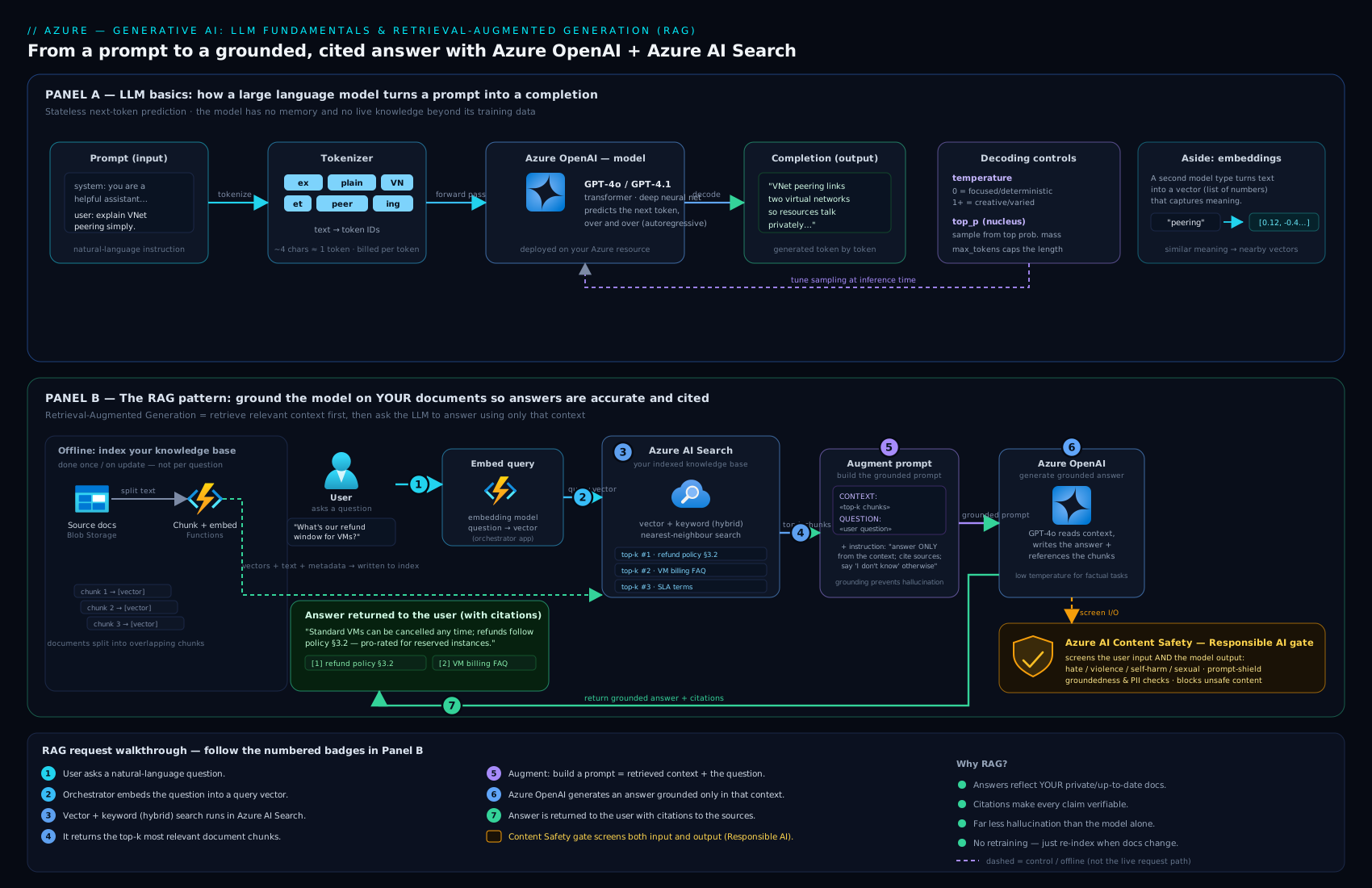
The diagram traces a single question through the full pipeline — embedding the query, retrieving the nearest chunks from an Azure AI Search index, augmenting the prompt with those grounded passages, and generating a cited answer with an Azure OpenAI deployment.
Why RAG is such a big deal, in one paragraph: it gives you a model that answers from current, private, authoritative data; it slashes hallucination because the model is told to use the supplied facts; it lets you cite sources so users can verify; and it needs no retraining — update the documents and the answers update too. The typical Azure shape is Azure AI Search (the retriever, holding your indexed and vectorised content) plus an Azure OpenAI chat deployment (the generator), with an embedding deployment turning both your documents and the incoming question into vectors. Azure even offers a built-in “on your data” capability that wires Azure OpenAI to an Azure AI Search index for you, so a basic RAG chatbot can be stood up without writing the retrieval plumbing by hand.
A crisp contrast to keep the alternatives straight:
| Approach | What it does | When to use it |
|---|---|---|
| Prompt engineering | Steer the base model with better instructions/examples | First resort; cheap; no extra infrastructure |
| RAG | Inject your retrieved facts into the prompt at query time | The model must answer from private/current data — the common enterprise case |
| Fine-tuning | Further-train the model on your examples to change its style/behaviour | You need a consistent format/tone/skill, not new facts; heavier and costlier |
The exam-ready distinction: RAG adds knowledge; fine-tuning adjusts behaviour. If the problem is “the model doesn’t know our facts,” reach for RAG, not fine-tuning.
Copilots and agents
Two words you will hear constantly, defined simply:
- A copilot is an AI assistant embedded inside an application to help you do that app’s work — drafting in a word processor, suggesting code in an editor, summarising a meeting. The human stays in control; the copilot assists. Microsoft’s family of these is branded Copilot, and they are built on the same generative models and grounding patterns covered here.
- An agent goes a step further: given a goal, it can plan and take actions — calling tools, querying systems, chaining several steps — to accomplish a task with more autonomy, rather than only responding to a single prompt. “Find the three cheapest flights and draft an email comparing them” is agent-shaped work: it must search, compare, then write. On Azure, such assistants are built with services like Azure AI Foundry and the Azure AI Agent Service.
For AI-900 you need the concepts: a copilot assists inside an app; an agent pursues a goal by taking actions. Both are applications built on top of models like those in Azure OpenAI — they are not models themselves.
Responsible generative AI
Generative AI inherits all six Microsoft Responsible AI principles you met earlier — fairness, reliability & safety, privacy & security, inclusiveness, transparency, accountability — but it adds risks specific to generated content. Three matter most:
- Hallucination. Because the model predicts plausible text rather than looking up true text, it can produce confident, fluent statements that are simply wrong — a fabricated citation, an invented figure, a made-up policy. The primary defence is grounding: use RAG so the model answers from supplied facts, ask it to cite sources, lower the temperature for factual tasks, and instruct it to say when it does not know.
- Grounding (the fix and the goal). Grounding means tying the model’s output to verifiable source data rather than its parametric memory. A grounded answer can be traced back to a document; an ungrounded one cannot. Grounding is the single most effective lever against hallucination — which is exactly why RAG is so widely adopted.
- Content safety. Generative models could, if unguarded, produce or be coaxed into producing harmful content (hate, violence, self-harm, sexual content), or be manipulated by prompt-injection attacks where hidden instructions in input try to override your rules. Azure’s answer is Azure AI Content Safety and the content filters built into Azure OpenAI, which screen both prompts and completions across harm categories at configurable severities, plus features such as groundedness detection and prompt-shield protections.
The senior-architect summary: never ship a generative feature without grounding, content filtering, a human-in-the-loop for high-stakes output, and clear disclosure that responses are AI-generated and may be imperfect. Transparency and accountability are not optional extras; they are the price of using this technology responsibly.
Going deeper
The concepts above are all AI-900/AI-901 needs. This section is for the reader who will actually build on Azure OpenAI and wants the production nuances behind the friendly summaries — naming, throughput, cost, security, and the ways real deployments break. None of it is required for the fundamentals exam, but all of it appears the moment you ship.
From “Azure OpenAI Service” to Microsoft Foundry — the naming you’ll actually see
The branding has moved three times and interviewers still use all of it, so hold the map rather than any single name: the portal began as Azure AI Studio, became Azure AI Foundry (Ignite 2024), and is now Microsoft Foundry (Ignite 2025). The models once reached through the standalone Azure OpenAI Service are now catalogued as Foundry Models sold by Azure, alongside Anthropic, Meta, Google and others. Crucially the Azure OpenAI resource is not deprecated — the SKU is still creatable, still gets new GPT models, and the move to Foundry is opt-in and reversible, preserving your resource name, endpoint, keys and fine-tunes. So “Azure OpenAI” and “Foundry” are the same models with a bigger, renamed home; the current exam answer is that assistants are built in Microsoft Foundry.
Deployment types, quotas, and throughput
The lesson introduced a deployment as your named phone line to a model. In production the type of that line is a real architectural decision, because it sets price, latency and data-residency behaviour:
| Deployment type | What it optimises for | Billing | Watch-outs |
|---|---|---|---|
| Standard (regional) | Simple pay-as-you-go, data processed in the resource’s region | Per 1K tokens (in/out) | Subject to regional capacity; throttled at your quota |
| Global Standard | Best price and availability, routed to global capacity | Per 1K tokens | Processing may leave your geography — check residency rules |
| Data Zone Standard | Pay-as-you-go kept inside a geography (e.g. EU or US) | Per 1K tokens | The residency-friendly middle ground |
| Provisioned (PTU) | Reserved, predictable low latency for steady high volume | Per hour / reservation (Provisioned Throughput Units) | You pay whether or not you send traffic |
| Batch | Large asynchronous jobs, ~50% cheaper | Per 1K tokens, discounted | Results within a 24-hour window, not real time |
Quota is expressed in TPM — tokens per minute — which Azure translates into a requests-per-minute (RPM) ceiling. Exceed it and you get an HTTP 429 (“too many requests”); the correct response is exponential-backoff retry, spreading load across regions, or moving hot workloads onto PTU. Creating a deployment is a control-plane call — the snippet below is representative and not run here:
az cognitiveservices account deployment create \
  --name <your-openai-resource> --resource-group <your-rg> \
  --deployment-name gpt-4o-chat \
  --model-name gpt-4o --model-version <version> --model-format OpenAI \
  --sku-name GlobalStandard --sku-capacity 50
Model families in 2026 — and why you should not memorise versions
The exam tests categories, not versions, and for good reason: the catalogue changes almost monthly. As a snapshot, the workhorse multimodal chat models are GPT-4o and GPT-4o mini (both GA), with newer frontier generations (the GPT-4.1 and GPT-5 families) arriving continually. A distinct and important newcomer is the reasoning model family (the o-series: o1, o3, o4-mini), which spends hidden reasoning tokens to “think” through hard, multi-step problems before answering — higher latency and cost, and several of them ignore the temperature control because their sampling is fixed. For vectors you reach for text-embedding-3-small (1,536 dimensions) or -large (3,072); for images DALL·E 3 or GPT-image-1; for speech Whisper and the gpt-4o transcription/speech models; and video generation (Sora) is preview. The exam-safe habit: know which category solves a problem, and check the live model catalogue for the version.
Context windows, output caps, and “lost in the middle”
Two limits hide inside “the context window”. The window is the total token budget (prompt plus completion), but there is usually a separate, smaller max-output-tokens cap you set per request — forgetting it is a classic cause of answers that stop mid-sentence. And bigger is not automatically better: research on long contexts shows models attend most reliably to the start and end of the prompt and can under-weight facts buried in the middle (“lost in the middle”). The practical consequence for RAG is decisive — retrieving the five most relevant chunks beats dumping fifty mediocre ones, and costs far less.
Embeddings under the hood
An embedding model maps text to a fixed-length vector; similarity is then measured by the cosine of the angle between two vectors (1.0 = identical direction/meaning, 0 = unrelated). At scale you cannot compare a query against millions of vectors one by one, so vector stores use approximate nearest-neighbour (ANN) indexes such as HNSW to find the closest matches in milliseconds. Two levers dominate retrieval quality: chunk size (too big and a chunk mixes several topics, diluting its vector; too small and it loses context) and chunk overlap (a little repetition across chunk boundaries stops a sentence being split away from its meaning). This is exactly the machinery Azure AI Search provides for the retrieve step.
RAG at production scale
The three-step pattern is clean; making it accurate is where the engineering lives. Production RAG rarely relies on vector search alone — it uses hybrid search (vector plus keyword/BM25) so exact terms like an order number or a policy code are not lost, then applies a semantic reranker to reorder the top candidates by true relevance before they reach the prompt. You then evaluate the system on two axes that beginners conflate: retrieval quality (did we fetch the right chunk?) and groundedness (did the answer actually stick to what we fetched?). Azure’s built-in groundedness detection scores the second. Keeping answers fresh is an indexing problem, not a model problem — re-index when documents change and the answers update with no retraining. For the enterprise shape of this — private endpoints, isolation, scale — see Enterprise RAG on Azure OpenAI, and for the hands-on build, the AI-102 RAG & copilots lesson.
Cost engineering for tokens
Because the bill is tokens × price, the cheapest levers are structural, not clever. Right-size the model — a mini model for extraction/classification, a frontier model only where its capability earns the cost. Cap max output tokens. Exploit prompt caching: when requests share a long identical prefix (a big system prompt), Azure OpenAI can serve it from cache at reduced cost and latency, so put the stable text first and the variable text last. Push non-interactive work (nightly summarisation, bulk classification) onto Batch for roughly half price. And for steady high-volume traffic, model the break-even where PTU beats pay-as-you-go — reserved capacity is cheaper per token only once utilisation is high enough.
Identity, network, and data-privacy controls
Treat an Azure OpenAI resource like any sensitive data plane. Prefer keyless authentication with Microsoft Entra ID and a managed identity over shared keys; grant the least-privileged role rather than owner:
| Role | Grants |
|---|---|
| Cognitive Services OpenAI User | Call the deployment (inference) — the everyday app role |
| Cognitive Services OpenAI Contributor | Create/manage deployments and call them |
| Cognitive Services Contributor | Manage the resource itself |
Lock the network with private endpoints so traffic never touches the public internet; encrypt with customer-managed keys in Azure Key Vault where policy demands it; and remember the data-handling promise that separates Azure from the public chatbot — your prompts and completions are not used to train the models and stay in your tenant. Prompts may be retained transiently for abuse monitoring; eligible customers can apply for modified content filtering / no-data-logging. Where many teams share one model, front it with Azure API Management for per-team token budgets, throttling and cross-region load-balancing.
Failure modes and how they show up
- 429 throttling — you hit TPM/RPM quota; retry with backoff, load-balance across regions, or provision PTU.
- Non-determinism at temperature 0 — output is far more consistent but not bit-for-bit guaranteed (floating-point and routing differences); pass a
seedand compare the returnedsystem_fingerprintfor best-effort reproducibility, and never assume identical strings. - Content-filter blocks — a legitimate prompt or answer is filtered; inspect the category/severity, tune the configurable filter, or request an exception rather than disabling safety.
- Model version retirement — pinned model versions are deprecated on a published schedule; track the retirement notices and test the successor before the cut-off, exactly as you would an OS end-of-life.
- Silent truncation — an answer that stops abruptly usually means the max-output-tokens cap or the context window was hit, not a model “refusing”.
Hands-on lab
The Azure OpenAI Service requires an approved subscription, so this lab is written in two tiers. Everyone can do Part A (it costs nothing and proves the core concepts); do Part B only if your subscription has Azure OpenAI access.
Part A — Tokens, prompts and temperature (no special access, free)
- Open the Azure OpenAI Studio tokenizer page, or any OpenAI-compatible tokenizer, and paste a sentence such as “Generative AI predicts the next token.” Observe how it splits into tokens and note the token count. Try a long, rare word and watch it split into several tokens. Validation: you can state roughly how many tokens your sentence uses and why a wordier prompt costs more.
- In a chat playground you do have (for example the Azure AI Foundry chat playground if available, or the conceptual exercise on paper), write a system message: “You are a concise Azure tutor; answer in British English; if unsure, say so.” Then ask the same factual question twice — once at temperature 0 and once at temperature 0.9. Validation: the low-temperature answer is steady and repeatable; the high-temperature answer varies in wording and length. You have now seen what temperature does.
- Rewrite a vague prompt (“tell me about storage”) into a specific, grounded one (“Using only this paragraph: ‘…’, list in three bullets when to choose Azure Blob Storage”). Validation: the grounded version answers from your text rather than from the model’s memory — a hand-built taste of RAG.
Part B — A grounded chatbot with “on your data” (requires Azure OpenAI access)
- In the Azure portal, create an Azure OpenAI resource in a region close to you (this sets your data residency).
az cognitiveservices account create --name myopenai --resource-group rg-genai-lab --kind OpenAI --sku S0 --location eastus. - In Azure AI Foundry / Azure OpenAI Studio, create a deployment of a chat model and a deployment of an embedding model.
- Create an Azure AI Search service and upload a handful of your own documents (a few PDFs or text files).
- In the chat playground, use “Add your data” to point the chat deployment at your Azure AI Search index — this wires up RAG for you.
- Ask a question whose answer is only in your uploaded documents. Validation: the assistant answers correctly and cites the source document — proof of retrieval-augmented generation. Now ask something not in your data and watch a well-grounded setup say it cannot find the answer rather than hallucinating.
Cleanup. Delete everything so nothing keeps billing: az group delete --name rg-genai-lab --yes --no-wait (do the same for the resource group holding the Search service if separate).
Cost note. Part A is free. In Part B, Azure OpenAI bills per 1,000 tokens (input and output separately) and Azure AI Search bills per hour for the service tier. A short experiment with a small Search tier typically costs only a few rupees (well under ₹100) — but the Search service charges while it exists, whether or not you query it, so the single biggest cost mistake is leaving it running. Delete the resource group the moment you are done.
Common beginner mistakes
These are conceptual traps — wrong mental models rather than broken configuration (for symptom-to-fix issues, see the troubleshooting table below). Each one is a misconception newcomers arrive with, why it misleads them, and the model to replace it with.
-
“The model looks facts up in a database.” Why it’s wrong: an LLM stores no records; it predicts the most probable next token from patterns learned in training. Right model: treat it as a fluent, well-read guesser, not a search engine. When facts must be correct, don’t trust its memory — ground it with RAG and ask for citations.
-
“RAG and fine-tuning solve the same problem.” Why it’s wrong: they fix different things and swapping them wastes weeks. Right model: RAG adds knowledge (your current, private facts, injected at query time); fine-tuning adjusts behaviour (a consistent format, tone or skill). “It doesn’t know our data” is almost always a RAG problem, not a fine-tuning one.
-
“Azure OpenAI trains on my prompts, like the free public chatbot.” Why it’s wrong: it conflates the consumer product with the enterprise service. Right model: in Azure OpenAI / Foundry, your prompts and completions are not used to train the models and stay within your tenant; residency follows the region and deployment type you choose.
-
“Content filtering is on, so my app is responsible/safe.” Why it’s wrong: filters catch harmful content, but responsible AI is a system property, not one switch. Right model: filters are one layer. You still need grounding to fight hallucination, prompt-injection defences for untrusted input, a human in the loop for high-stakes actions, and clear disclosure that answers are AI-generated.
-
“Prompt engineering is just typing the question nicely.” Why it’s wrong: it dismisses the cheapest, highest-leverage control you have. Right model: a system message, one or two worked examples (few-shot), an explicit output format, and grounding measurably change reliability — reach for prompt engineering first, before the heavier tools of RAG or fine-tuning.
-
“Embeddings and chat come from the same model.” Why it’s wrong: they are separate model families with separate deployments. Right model: an embedding model turns text into vectors for retrieval; a chat model generates the answer. A RAG app deploys and pays for both.
Common mistakes & troubleshooting
| Symptom | Likely cause | Fix |
|---|---|---|
| Request rejected for being too long | Prompt + expected completion exceeds the context window | Shorten the prompt, retrieve fewer/smaller chunks, or use a model with a larger window |
| Model gives confident but wrong answers | Hallucination — answering from memory, not facts | Ground it with RAG, lower temperature, ask it to cite sources and to admit uncertainty |
| Bill is higher than expected | Billed per token in and out; long prompts/answers add up | Trim prompts, cap max output tokens, retrieve only the most relevant chunks |
| Output is inconsistent run to run | Temperature/top-p too high for a factual task | Lower temperature (towards 0) for extraction/classification/code |
| Chatbot ignores your documents | Retrieval misconfigured — wrong index, no embeddings, or data not added | Verify the Azure AI Search index, that content is vectorised, and that the deployment is pointed at it |
| “Model not found” when calling the API | Calling the model name instead of your deployment name | Call the deployment name and endpoint, not the raw model id |
| Harmful or off-policy text slips through | Content filtering not configured, or a prompt-injection attack | Use Azure AI Content Safety/content filters and prompt-shield protections; keep a human in the loop |
Best practices
- Start with the cheapest tool that works: try prompt engineering first, add RAG when the model needs your facts, and only fine-tune when you need consistent behaviour, not new knowledge.
- Always ground high-stakes answers and surface citations so users can verify.
- Pick the right model for the job — a small fast model for simple tasks, a larger one only where its capability earns the extra cost and latency.
- Tune temperature to the task: low for factual/extractive work, higher for creative work.
- Control the context window deliberately — retrieve only the most relevant chunks; more context is not always better and always costs more.
- Keep a human in the loop for anything consequential, and disclose clearly that content is AI-generated.
- Monitor cost by tokens and set budgets; tokens are the unit that moves the bill.
Security notes
- Use Microsoft Entra ID, not raw keys, where possible, and store any keys in Azure Key Vault — never in code or prompts.
- Lock down the network with private endpoints / VNet integration so traffic to Azure OpenAI stays off the public internet.
- Never put secrets or unnecessary personal data in prompts — prompts are sent to the service and may be logged for abuse monitoring; minimise what you send.
- Keep content filtering on and tune severities to your context; treat it as a required control, not optional.
- Defend against prompt injection: treat retrieved/user content as untrusted, separate instructions from data, and use prompt-shield/groundedness features.
- Remember data residency: choose the resource region to satisfy sovereignty rules, and recall that, in Azure OpenAI, your data is not used to train the models.
- Govern access with RBAC and audit usage — apply the same least-privilege discipline you would to any sensitive Azure resource.
Interview & exam questions
- What is a large language model, in one sentence? A model trained to predict the next token given preceding text, which at scale can generate, summarise, translate, and reason over language.
- What is a token, and why does it matter? A chunk of text (~4 characters / ~¾ word) — the unit the model reads and the unit you are billed in; prompt + completion tokens must also fit the context window.
- Explain temperature. A setting (≈0–1) controlling randomness: near 0 is focused/deterministic/repeatable; higher is more creative/varied. Use low for factual tasks, high for creative ones.
- What is an embedding, and what is it used for? A numeric vector representing the meaning of text so that similar meanings have similar vectors; it powers semantic/vector search and the retrieve step of RAG.
- What is the RAG pattern and why use it? Retrieve relevant facts from your data, augment the prompt with them, generate a grounded answer. It lets a model answer from private/current data, reduces hallucination, and enables citations — without retraining.
- RAG vs fine-tuning — when each? RAG adds knowledge (use it when the model lacks your facts); fine-tuning adjusts behaviour/style (use it for consistent format/tone). Most “it doesn’t know our data” problems are RAG problems.
- What is a deployment in Azure OpenAI? A named, callable instance of a specific model version in your resource; your app calls the deployment name + endpoint, not the raw model.
- How does Azure OpenAI differ from public ChatGPT? Enterprise identity (Entra ID), RBAC, private networking, data residency, built-in content filtering, compliance/SLA — and your data is not used to train the models.
- What is hallucination and how do you reduce it? Confident but false generated content; mitigate with grounding/RAG, citations, lower temperature, and instructing the model to admit uncertainty.
- Copilot vs agent? A copilot assists a human inside an app; an agent plans and takes actions (calls tools, chains steps) to pursue a goal more autonomously.
- Name the harm categories content filters screen for. Hate, sexual, violence, and self-harm — via Azure AI Content Safety, applied to both prompt and completion at configurable severities.
- What is grounding? Tying a model’s output to verifiable source data rather than its memory — the core technique behind trustworthy generative answers.
Practice challenges
Six exercises that climb from beginner to advanced. Try each before opening the solution. Where no Azure OpenAI access is assumed, the work is on paper — the reasoning is the point. All names, keys and endpoints below are placeholders.
1. (Beginner) Estimate tokens and cost. You send a prompt of about 400 words and expect an answer of about 200 words. Using the rule of thumb 100 tokens ≈ 75 words, estimate the total tokens. If the model bills ₹0.40 per 1,000 input tokens and ₹1.20 per 1,000 output tokens, roughly what does one call cost?
<details><summary>Solution</summary>
400 words ≈ ~535 input tokens; 200 words ≈ ~265 output tokens. Cost ≈ (535/1000 × ₹0.40) + (265/1000 × ₹1.20) ≈ ₹0.21 + ₹0.32 ≈ ₹0.53 per call. Output tokens are pricier, so capping answer length is the bigger lever.
Why: you are billed per token, input and output separately — the core cost model of every LLM. </details>
2. (Beginner) Pick a temperature. For each task choose a temperature near 0 or near 0.9 and justify in one line: (a) extract the invoice total as JSON; (b) write three punchy slogans for a coffee brand; © classify support tickets as billing / technical / other.
<details><summary>Solution</summary>
(a) ~0 — extraction must be exact and repeatable. (b) ~0.9 — you want varied, creative options. © ~0 — classification is factual and should be stable across runs.
Why: low temperature for factual/extractive work, high for creative work — adjust temperature or top-p, not both. </details>
3. (Intermediate) Force a grounded answer. Write a system message and a user prompt template that make a chat model answer only from a supplied passage and say “I don’t know” when the passage doesn’t contain the answer.
<details><summary>Solution</summary>
System: “You are a support assistant. Answer using ONLY the text in CONTEXT. If the answer is not in CONTEXT, reply exactly: ‘I don’t know based on the provided documents.’ Cite the sentence you used.” User: “CONTEXT: {retrieved_passages}\n\nQUESTION: {user_question}”. Keep temperature low.
Why: this is grounding by hand — the same “use only these facts” instruction RAG automates, and the primary defence against hallucination. </details>
4. (Intermediate) Design a RAG pipeline. A company wants a chatbot answering from this quarter’s policy PDFs. Sketch the retrieve → augment → generate flow and name the Azure service or model type playing each part.
<details><summary>Solution</summary>
Ingest (offline): split PDFs into overlapping chunks → an embedding deployment vectorises them → store in Azure AI Search (vector + keyword index). Retrieve: embed the user’s question, run hybrid search + semantic reranker for the top few chunks. Augment: insert those chunks into the prompt with a grounding instruction. Generate: a chat deployment (e.g. GPT-4o) writes a cited answer. Refresh answers by re-indexing when policies change.
Why: RAG supplies private, current knowledge without retraining — the default enterprise pattern. </details>
5. (Advanced) Match workloads to deployment types. Assign the right Azure OpenAI deployment type to each: (a) a customer-facing chatbot at steady 24×7 high volume needing predictable latency; (b) a developer’s occasional testing; © an overnight job summarising 500,000 documents.
<details><summary>Solution</summary>
(a) Provisioned (PTU) — reserved capacity gives predictable latency and cost at high, steady utilisation. (b) Standard (or Global Standard) pay-as-you-go — you pay only for what you use. © Batch — asynchronous, ~50% cheaper, fine for a 24-hour turnaround.
Why: deployment type sets price, latency and residency; PTU wins only once utilisation is high enough to beat pay-as-you-go per token. </details>
6. (Advanced) Harden a production RAG endpoint. List one concrete control in each of four areas — identity, network, content safety, cost — for a RAG API exposed to staff.
<details><summary>Solution</summary>
Identity: authenticate with a managed identity + Entra ID and grant only Cognitive Services OpenAI User (keyless, least privilege). Network: put the resource behind a private endpoint so traffic stays off the public internet. Content safety: keep content filters on, add prompt-shield protections and groundedness detection, and treat retrieved text as untrusted. Cost: cap max output tokens, use prompt caching for the shared system prompt, and right-size to a mini model where it suffices.
Why: an Azure OpenAI endpoint is a sensitive data plane — the same least-privilege, private-network, and cost-governance discipline you apply to any production resource. </details>
Quick check
- In your own words, what single task is an LLM fundamentally trained to do, and how does scaling that turn into useful abilities?
- Why does the same prompt cost more if it is wordier, and what two totals must fit inside the context window?
- A teammate wants a chatbot to answer questions about this quarter’s internal policy PDFs. Should they fine-tune a model or use RAG — and why?
- You are extracting structured fields from invoices and the output keeps varying between runs. Which setting do you change, and in which direction?
- Name the three risks specific to generative AI covered in this lesson and the single most effective mitigation for the first one.
Answers
- An LLM is trained to predict the next token given the preceding text. Scaled across vast data and parameters, “predict the next token really well” generalises into summarising, translating, reasoning, and conversing.
- You are billed per token, so more words = more tokens = more cost. The prompt tokens and the completion tokens together must fit inside the context window.
- Use RAG. The information is private and current (this quarter’s PDFs) — the model needs new knowledge, which RAG supplies by retrieving and grounding. Fine-tuning changes behaviour, not facts, and is heavier and costlier here.
- Lower the temperature (towards 0). Extraction is a factual task, so you want focused, repeatable output rather than creative variation.
- Hallucination, grounding (lack of), and content-safety risks. The most effective mitigation for hallucination is grounding the model on verifiable source data — i.e. use RAG (plus citations, low temperature, and admitting uncertainty).
Exercise
Design — on paper — a grounded customer-support assistant for a fictional company, then justify each choice using this lesson:
- State the data the assistant must answer from (e.g. product manuals, an FAQ, return policy) and explain why a plain LLM cannot answer these out of the box.
- Sketch the RAG pipeline: where embeddings are created, what plays the retriever (name the Azure service), and what plays the generator. Label the three steps retrieve → augment → generate.
- Choose a temperature for this assistant and justify it in one sentence.
- List three responsible-AI safeguards you will include (e.g. grounding with citations, content filtering, human escalation for refunds) and the risk each addresses.
- Name one cost lever you will pull to keep the token bill down.
If you can complete all five with a one-line justification each, you can explain applied generative AI on Azure end to end — exactly the level AI-900 expects.
Certification mapping
- AI-900 (Azure AI Fundamentals): Describe features of generative AI workloads on Azure — the headline objective this lesson covers end to end: what generative AI and LLMs are; tokens, prompts, completions, embeddings; the Azure OpenAI Service (models, deployments, content filters, responsible use); copilots; and grounding/RAG concepts. Expect plain definitional and scenario questions (“what is an embedding?”, “RAG vs fine-tuning?”, “what reduces hallucination?”).
- AI-102 (Azure AI Engineer Associate) on-ramp: this is the conceptual foundation for the generative-AI portions of AI-102, where you go hands-on building RAG solutions with Azure OpenAI and Azure AI Search, configuring deployments, and implementing content safety.
- It also underpins the Responsible AI thread across every Microsoft AI certification.
Glossary
- Generative AI — AI that creates new content (text, code, images, audio) rather than only classifying existing content.
- Large language model (LLM) — a model trained to predict the next token; at scale, capable of generating and reasoning over language.
- Transformer — the neural-network architecture behind modern LLMs, built on the attention mechanism (the T in GPT).
- Attention — the mechanism letting a model weigh how relevant every token is to every other token when building meaning.
- Token — a chunk of text (~4 characters / ~¾ word); the unit a model reads and is billed in.
- Prompt — the input/instruction you give the model. Completion — the text the model generates in response.
- Context window — the maximum number of tokens (prompt + completion) a model can consider at once.
- Temperature — a setting controlling randomness/creativity of output (low = focused, high = varied). Top-p — nucleus sampling; narrows the candidate pool to the most likely tokens summing to p.
- Embedding — a numeric vector representing the meaning of text, so similar meanings sit close together. Vector — the list of numbers itself.
- Vector / semantic search — finding text by closeness of meaning (vector distance) rather than exact keyword match.
- Azure OpenAI Service — Microsoft’s delivery of OpenAI models inside Azure with enterprise security, networking, residency, and content filtering.
- Deployment — a named, callable instance of a specific model version in your Azure OpenAI resource.
- RAG (Retrieval-Augmented Generation) — retrieve relevant facts from your data, augment the prompt with them, generate a grounded answer.
- Grounding — tying a model’s output to verifiable source data rather than its memory.
- Hallucination — confident but false content generated by a model.
- Fine-tuning — further-training a model on your examples to change its behaviour/style (not to add facts).
- Copilot — an AI assistant embedded in an app to help a human. Agent — an AI that plans and takes actions to pursue a goal.
- Azure AI Content Safety — Azure’s service (and the content filters in Azure OpenAI) that screen prompts and completions for harmful content.
- Prompt engineering — the practice of writing inputs that reliably produce the desired output without retraining.
Additional terms introduced in the enhanced sections above:
- Microsoft Foundry — the current name (Ignite 2025) of the platform that was Azure AI Foundry (2024) and Azure AI Studio before that; the umbrella where you now build AI solutions on Azure.
- Foundry Models sold by Azure — the current catalogue name for the models formerly reached through the standalone Azure OpenAI Service (the resource itself is not deprecated).
- Deployment type — the mode of a deployment: Standard (regional), Global Standard (global capacity), Data Zone Standard (kept within a geography), Provisioned/PTU (reserved), Batch (async, discounted).
- PTU (Provisioned Throughput Unit) — reserved model capacity billed by the hour for predictable latency at steady high volume.
- TPM / RPM — tokens-per-minute / requests-per-minute; the quota that, when exceeded, returns HTTP 429.
- Reasoning model (o-series) — models (o1, o3, o4-mini…) that spend hidden reasoning tokens to work through hard problems; higher latency/cost, and some ignore the temperature setting.
- Hybrid search — combining vector (meaning) and keyword/BM25 (exact-term) search so precise identifiers aren’t lost; standard in production RAG.
- Semantic reranker — a second pass that reorders retrieved candidates by true relevance before they reach the prompt.
- Chunking / chunk overlap — splitting documents into passages for embedding, with a little repeated text across boundaries so meaning isn’t cut in half.
- Cosine similarity — the measure of closeness between two embedding vectors (1.0 = same meaning/direction).
- ANN / HNSW — approximate nearest-neighbour indexing (e.g. HNSW) that finds the closest vectors in milliseconds without scanning them all.
- Prompt caching — reusing a shared, unchanging prompt prefix at reduced cost/latency; put stable text first, variable text last.
- Managed identity — an Entra ID identity Azure manages for a workload, enabling keyless authentication to Azure OpenAI instead of shared keys.
- Prompt injection — an attack where hidden instructions in user or retrieved content try to override your system rules; treat all such content as untrusted.
- Prompt shields / groundedness detection — Azure AI Content Safety features that block injection attempts and flag answers not supported by the supplied sources.
- AI-901 — the exam that, from 2026, replaces AI-900 for the Microsoft Certified: Azure AI Fundamentals credential, with expanded generative-AI and Microsoft Foundry coverage.
Next steps
You can now explain generative AI from first principles — tokens and transformers through to a grounded, responsible RAG application on Azure — and answer the classic interview and exam questions on LLMs, embeddings, Azure OpenAI, and RAG.
- Next lesson: DP-900: Core Data Concepts, Roles & Workloads — generative AI runs on data, so the natural next move is the data fundamentals every architect needs.
Related reading to go deeper:
- AI-900: AI & Machine Learning Fundamentals on Azure (incl. Responsible AI) — the classic-ML foundation and the six Responsible AI principles this lesson builds on.
- AI-900: Azure AI Services — Vision, Language, Speech, Document Intelligence & Search — the applied building blocks, including Azure AI Search, the retriever at the heart of RAG.