In a nutshell
Picture a busy restaurant kitchen that has to change its menu mid-service. The amateur move is to stop the line, swap every station, and reopen — diners wait, and some walk out. That is an in-place deploy: you restart the live worker and every request in flight eats a cold start or an outright 503. The professional move is to build the entire new line on a second, identical station behind the pass (a staging slot), taste every dish until it plates perfectly (warm-up on a readiness probe), and only then wheel it into the customer-facing spot in one motion (the swap) — no diner ever sees an empty counter. If a dish comes back wrong, you wheel the old station straight back (a reverse swap: instant rollback, because the previous version is still sitting there).
The hardening half of this lesson is the same kitchen deciding to stop being a street stall open to anyone. It moves the recipes off sticky-notes on the wall and into a locked safe (Key Vault instead of plaintext app settings), fits one guarded delivery door instead of an open counter (a private endpoint, with public access switched off), and sends deliveries in a van with a licence plate the suppliers recognise (a NAT gateway giving a stable outbound IP a partner firewall can allowlist). Four independent doors — inbound, outbound, secrets, and release safety — each with its own lock, each fixable on its own.
That is the whole article: take a default az webapp create that is public, leaky, and restart-on-deploy, and turn it into a network-isolated service you ship to on demand, with a warmed swap and a one-command undo. A total beginner can follow the four planes one at a time; an experienced engineer will still find the swap-with-preview handshake, the boot-time DNS blast radius, and the database-migration nuance that decide whether “zero-downtime” is real or theatre.
Level: Intermediate — you are comfortable with subnets, DNS, and running az · Time: ~70 min to read, a weekend to build the first hardened app. New here? Skim the four planes in the table below, then read start to finish. Already run App Service in production? Jump to Going deeper for run-from-package, ARR affinity, expand/contract migrations, and secret-free pipelines.
A default Azure App Service is reachable from the entire internet, talks to your database over a shared public path, and stores connection strings as plaintext in app settings. Then, when you finally ship a fix, an in-place restart drops live requests on the floor and a bad release means a frantic redeploy under pressure. This guide closes all four gaps — inbound, outbound, secrets, and release safety — turning a az webapp create default into a network-isolated production service you ship to on demand, with a warmed swap and a one-command rollback.
The four problems are independent and have independent fixes. Regional VNet integration governs outbound. Private endpoints govern inbound. Key Vault references plus managed identity kill the secrets. Deployment slots with warm-up and swap-with-preview give you zero-downtime release and instant rollback. You can adopt them in any order, but the order matters in production: get egress right before you force it, get private DNS right before you disable public access, and make your readiness probe honest before you gate a swap on it. Every one of those "before"s is a 2 a.m. incident waiting to happen, and this guide is structured so you never hit them.
By the end you will treat a release the way a payments team does: deploy to staging from inside the VNet, warm the slot on a probe that actually proves the dependency chain, preview production config without moving traffic, swap, and — if a regression surfaces — swap back, because the previous bits are sitting right there in the staging slot. The tables in this guide are the reference you keep open during a change window; the prose explains the mechanism, the code is copy-pasteable az/Bicep, and the tables enumerate every setting, value, default, and gotcha end to end.
What problem this solves
The pain is concrete and it shows up in three flavours. First, exposure: the public *.azurewebsites.net hostname is internet-reachable, so your only access control is application-layer, and your outbound calls leave from a rotating pool of shared Azure IPs that no partner firewall can sensibly allowlist. Second, secret sprawl: connection strings and keys sit as plaintext app settings, visible to anyone with Reader on the resource and trivially leaked into screenshots, exports, and ARM templates. Third, release fragility: an in-place deploy restarts the worker, so live traffic eats a cold start or an outright 503, and a bad release has no fast undo — you redeploy the previous artifact and pray.
What breaks without this discipline: a team scales up the plan to “fix” intermittent 5xx (masking SNAT exhaustion for a day before it returns worse); an engineer disables a firewall rule to “make the deploy work” after locking down public access (because the CI runner now can’t reach Kudu); a midnight release goes out, 500s in production seconds after the swap completes, and nobody can explain why staging was healthy and production was not. Every one of these is avoidable with the exact configuration walked through below.
Who hits this: every team running App Service in production behind a compliance boundary — payments, healthcare, anything with a partner allowlist or a private-only data tier. It bites hardest on apps that resolve names at startup (Key Vault references, private SQL), apps deployed from public-hosted pipelines after a lockdown, and cost-sensitive deployments that never set up slots and therefore release in-place. The fix is never “scale up” — it’s “isolate the three planes and gate the release on real health.”
To frame the whole field before the deep dive, here is each plane this article hardens, the default you inherit, the fix, and the failure you avoid:
| Plane | Default behaviour | The fix | Plan tier needed | Failure avoided |
|---|---|---|---|---|
| Inbound | Public *.azurewebsites.net, open to internet |
Private endpoint + publicNetworkAccess=Disabled |
Basic+ (PE), Standard+ (prod) | Anonymous reachability; app-layer-only access control |
| Outbound | Egress from shared rotating Azure IPs | Regional VNet integration + NAT GW / firewall | Basic+ (integration) | Unfirewallable egress; no stable source IP |
| Secrets | Connection strings as plaintext app settings | Key Vault references + managed identity (or passwordless) | Any tier | Secret leak via export/Reader/screenshot |
| Release | In-place deploy restarts the live worker | Staging slot + warm-up + swap-with-preview | Standard+ (5 slots) / Basic (limited) | Cold start / 503 on every deploy; no fast rollback |
| Observability | Logs not retained; alerts page on staging noise | App Insights + diag settings on both slots, prod-scoped alerts | Any tier | Blind incidents; on-call paged by a staging deploy |
Learning objectives
By the end of this article you can:
- Stand up regional VNet integration on a correctly delegated
Microsoft.Web/serverFarmssubnet and force all egress through it withWEBSITE_VNET_ROUTE_ALLwithout breaking internet-bound calls. - Pin a stable outbound IP with a NAT gateway, or route egress through a hub Azure Firewall for FQDN filtering and logging — and explain when to pick which.
- Eliminate plaintext secrets with Key Vault references resolved by a managed identity, and go one better with passwordless (Entra) auth to SQL, Storage, and Service Bus.
- Lock down inbound with a private endpoint, disable public access, and make the hostname resolve privately with the right
privatelink.azurewebsites.netzone — including the SCM/Kudu deploy-path consequence. - Build a staging slot with sticky slot settings, gate the swap on a real readiness probe, use swap-with-preview for two-phase validation, and roll back with a reverse swap.
- Wire Health Check, autoscale, Application Insights, and slot-aware diagnostic settings so the platform self-heals and alerts page only on production.
- Read the option, limit, and decision tables for every setting above and run the release playbook that maps each post-swap symptom to its root cause, the exact confirm command, and the fix.
Prerequisites & where this fits
You should already understand App Service basics: an App Service plan is the set of VM workers (an SKU like B1, S1, P1v3) you rent, and one or more web apps run on that plan sharing its CPU, memory, and instance count. You should be comfortable running az in Cloud Shell, reading JSON output, and you should know that App Service has deployment slots (staging/production swap targets). Familiarity with VNets, subnets, NSGs, and private DNS is assumed — if any of that is shaky, the Azure VNet deep dive: every setting and Azure Private Endpoints & Private DNS at scale are the upstream reading.
This sits in the Secure-by-default Compute track. It assumes the platform mechanics from the Azure App Service Deep Dive: Plans, Scaling, Slots, TLS and the compute-choice context from App Service vs Container Apps vs AKS. It pairs tightly with Azure Key Vault: secrets, keys, certificates for the secrets plane and Azure Monitor & Application Insights for observability for the alerting plane. When a release does go wrong despite this, the companion Troubleshooting App Service: 502/503, cold starts & restart loops is the incident-time reference.
The examples assume an existing hub-and-spoke topology with the app deployed into a spoke VNet vnet-spoke-app. A quick map of who owns each plane during a change so you escalate to the right person fast:
| Plane | What lives here | Who usually owns it | What they break if it’s wrong |
|---|---|---|---|
| Subnet / delegation | Integration subnet, PE subnet, route tables | Network team | Egress breaks; PE has no IP |
| Private DNS | privatelink.azurewebsites.net, vault zone |
Network / platform | Hostname resolves public → connections fail |
| App config | App settings, slot settings, KV references | App / dev team | Sticky leak; KV ref fails at boot |
| Identity / RBAC | Managed identity, role assignments | Platform + security | MI can’t read vault → crash loop |
| Release pipeline | Slot deploy, warm-up, swap, rollback | App / DevOps | Cold start, broken swap, no rollback |
| Plan & scale | SKU, instance count, autoscale, Always On | Platform | Restart = 503; slot starves prod capacity |
Plan tier matters. VNet integration and private endpoints require Basic or higher; the production scenarios below assume Standard (S1) or Premium v3 (P1v3). Slots, Always On, and per-slot autoscale all need Standard+ for real use. Free/Shared tiers support none of this. The table in Cost & sizing enumerates exactly what each tier unlocks.
Core concepts
Five mental models make every later step obvious, and pinning them down now prevents the most common mistakes.
Inbound and outbound are different subnets with different jobs. Regional VNet integration injects your app’s outbound calls into a delegated subnet (delegated to Microsoft.Web/serverFarms). A private endpoint projects the app inbound as a private NIC in a separate, non-delegated subnet. They are never the same subnet. Conflating them is the single most common networking error here, so the guide keeps them in distinct steps and distinct CIDRs.
The status of a secret reference is an identity question. A Key Vault reference (@Microsoft.KeyVault(...)) resolves only if the app’s managed identity has Key Vault Secrets User and the vault’s network rules let the app reach it. A red “Key Vault Reference” badge in the portal is almost always one of those two — a missing role assignment or a vault firewall/private-endpoint DNS gap — not a syntax problem.
A swap moves traffic between warmed instances; the warm-up is the whole point. A staging slot is a full, addressable copy of the app on the same plan. You deploy to staging, warm it on a readiness path, then swap — App Service redirects production traffic to the already-warm staging instances. If the slot isn’t warm, or the warm-up probe is dishonest, the swap ships a cold or broken worker and you’ve engineered downtime into a feature designed to prevent it.
Slot settings decide what travels. By default, app settings and connection strings follow the slot — they swap with the code. That is wrong for anything environment-specific. Marking a setting as a slot setting (sticky / “deployment slot setting”) pins it to the slot so it never crosses during a swap. The classic disaster is a staging DB connection string promoting itself to production because nobody made it sticky.
Private DNS changes the blast radius for everything that resolves a name. The moment you add a private endpoint — for the app or for Key Vault or SQL — you change how a name resolves inside the VNet. Any service that resolves a hostname at startup (Key Vault references, a SQL connection, a downstream API) is now subject to your private DNS being correct. A private endpoint you add for one resource can break a second resource that merely shares the VNet’s resolver.
The vocabulary in one table
Before the deep sections, pin down every moving part. The glossary repeats these for lookup; this table is the model side by side:
| Concept | One-line definition | Where it lives | Why it matters here |
|---|---|---|---|
| App Service plan | Rented VM workers (SKU + count) | Subscription / RG | Both slots share it; restart = 503 |
| Web app (site) | One app running on a plan | On the plan | The thing you isolate and release |
| Deployment slot | A swappable copy of the app | On the plan | Staging target; rollback lives here |
| Slot setting (sticky) | App setting pinned to a slot | App config | Stops env values crossing a swap |
| Swap-with-preview | Two-phase swap (preview → complete) | Slot operation | Validate prod config before traffic moves |
| VNet integration | App’s outbound into a delegated subnet | Site config + subnet | Governs egress; needs delegation |
WEBSITE_VNET_ROUTE_ALL |
Force all egress (incl. internet) into VNet | App setting | Needs egress path first, or breaks |
| Private endpoint | App projected as a private NIC | PE subnet + NIC | Governs inbound; needs private DNS |
publicNetworkAccess |
Public reachability toggle | Site property | Disabled closes the public door |
| Managed identity | Azure-issued identity for the app | The app | Resolves KV refs; passwordless auth |
| Key Vault reference | @Microsoft.KeyVault(...) app setting |
App setting + identity | Plaintext-free secrets |
| Warm-up ping | Pre-swap probe on a readiness path | App setting | Makes the swap zero-downtime |
| Health Check | Per-instance liveness probe | Site config | Evicts bad instances from rotation |
Step 1 — Regional VNet integration for outbound
Regional VNet integration injects the app’s outbound calls into a dedicated, delegated subnet in your VNet. The subnet must be delegated to Microsoft.Web/serverFarms and should be sized generously — the platform consumes addresses as the plan scales out (a /27 is a sane minimum; /26 for larger plans).
# Delegated subnet for outbound integration
az network vnet subnet create \
  --resource-group rg-app-prod \
  --vnet-name vnet-spoke-app \
  --name snet-appsvc-integration \
  --address-prefixes 10.20.1.0/27 \
  --delegations Microsoft.Web/serverFarms

# Wire the app to it
az webapp vnet-integration add \
  --resource-group rg-app-prod \
  --name app-orders-prod \
  --vnet vnet-spoke-app \
  --subnet snet-appsvc-integration
resource integSubnet 'Microsoft.Network/virtualNetworks/subnets@2023-11-01' = {
  parent: vnet
  name: 'snet-appsvc-integration'
  properties: {
    addressPrefix: '10.20.1.0/27'
    delegations: [ {
      name: 'serverFarms'
      properties: { serviceName: 'Microsoft.Web/serverFarms' }
    } ]
  }
}

resource vnetConn 'Microsoft.Web/sites/networkConfig@2023-12-01' = {
  parent: site
  name: 'virtualNetwork'
  properties: { subnetResourceId: integSubnet.id, swiftSupported: true }
}
At this point outbound calls to RFC 1918 destinations route through the VNet, but internet-bound traffic still leaves via Azure’s shared egress. To force all egress through the VNet — so it can be inspected by a firewall and leave from a predictable IP — set WEBSITE_VNET_ROUTE_ALL:
az webapp config appsettings set \
  --resource-group rg-app-prod \
  --name app-orders-prod \
  --settings WEBSITE_VNET_ROUTE_ALL=1
Once
WEBSITE_VNET_ROUTE_ALL=1is set, the subnet’s effective routes apply to internet traffic too. If the subnet has a route table sending0.0.0.0/0at an Azure Firewall or NAT gateway, every outbound packet now follows it. Without a deliberate egress path, internet calls can break — so configure the next step before flipping this in production. This is badge ④ in the diagram.
The integration subnet has hard requirements; get any of these wrong and integration silently misbehaves or fails to attach. Enumerate them before you build:
| Requirement | Value / rule | Why | What breaks if wrong |
|---|---|---|---|
| Delegation | Microsoft.Web/serverFarms |
Reserves the subnet for App Service | Integration won’t attach |
| Minimum size | /27 (32 IPs) recommended; /28 absolute floor |
Platform consumes IPs on scale-out | Scale-out fails when IPs run out |
| Dedication | One plan per integration subnet | Avoids IP contention | Address conflicts across plans |
| Other resources | None — subnet must be empty of other services | Delegation is exclusive | Create fails |
| NSG | Allowed; must not block needed egress | You can still filter | Over-tight NSG breaks app egress |
| Route table (UDR) | Allowed; honoured when ROUTE_ALL=1 |
This is how you force egress | Missing default route breaks internet |
| Region | Same region as the app/plan | Regional integration is in-region only | Cross-region not supported |
| Service endpoints | Optional; coexist with integration | Lock PaaS to the subnet | — |
The behaviour of WEBSITE_VNET_ROUTE_ALL is the bit people misjudge. Here is exactly what each value does to each traffic class:
WEBSITE_VNET_ROUTE_ALL |
RFC 1918 (private) traffic | Internet-bound traffic | Use when |
|---|---|---|---|
0 (default) |
Routed through the VNet | Leaves via shared Azure egress | You only need to reach private resources |
1 |
Routed through the VNet | Also forced into the VNet (follows UDR/NAT/firewall) | You need egress inspection or a stable source IP |
A few related outbound app settings round out the control surface:
| Setting | Effect | Default | When to set |
|---|---|---|---|
WEBSITE_VNET_ROUTE_ALL |
Force all egress (incl. internet) into the VNet | 0 |
After an egress path (NAT/firewall) exists |
WEBSITE_DNS_SERVER |
Override DNS the app uses | Azure-provided 168.63.129.16 | Custom resolver / on-prem DNS for private zones |
WEBSITE_DNS_ALT_SERVER |
Secondary DNS | none | Resolver redundancy |
WEBSITE_CONTENTOVERVNET |
Route content share over the VNet | 0 |
Fully private storage for the app’s content |
When egress misbehaves, the question is always “which route is actually in effect for this destination?” This decision table maps what you observe to the cause and the next move:
| If you see… | It’s probably… | Do this |
|---|---|---|
| Private (RFC 1918) reachable, internet broken | ROUTE_ALL=1 with no 0.0.0.0/0 egress route |
Add NAT gateway / UDR to the integration subnet |
| Internet fine, private targets unreachable | Integration not attached, or wrong subnet | Re-check az webapp vnet-integration list; delegate the subnet |
| Partner allowlist rejects your calls | Egress leaving on the shared rotating pool | Attach NAT gateway; allowlist its static IP/prefix |
| Egress works but isn’t logged/filtered | No firewall in the path | UDR 0.0.0.0/0 → hub Azure Firewall |
| Intermittent outbound failures under load | SNAT exhaustion on shared egress | NAT gateway (bigger pool) + connection reuse |
| Private DNS names resolve to public IPs | Custom WEBSITE_DNS_SERVER not forwarding the zone |
Point DNS at a resolver that knows the private zones |
Pinning egress with a NAT gateway or firewall
For a stable outbound IP (what most SaaS allowlists and partner firewalls demand), attach a NAT gateway to the integration subnet:
az network public-ip create -g rg-app-prod -n pip-nat-app --sku Standard --allocation-method Static
az network nat gateway create -g rg-app-prod -n nat-app --public-ip-addresses pip-nat-app --idle-timeout 10
az network vnet subnet update \
  -g rg-app-prod --vnet-name vnet-spoke-app \
  --name snet-appsvc-integration --nat-gateway nat-app
For inspection and FQDN filtering, point the subnet’s default route at your hub Azure Firewall instead (UDR with 0.0.0.0/0 → VirtualAppliance → firewall private IP). Use the firewall when you need egress logging and rules; use the NAT gateway when you only need a fixed source IP. They can be combined, but the firewall must then own the route. The trade-off, side by side:
| Egress option | Stable source IP | FQDN filtering / logging | Cost shape | SNAT headroom | Pick when |
|---|---|---|---|---|---|
| Shared Azure egress (default) | No (rotating pool) | No | Free | ~128 ports/instance | Dev / no allowlist needed |
| NAT Gateway | Yes (1 static IP, or a /28 prefix) | No | Hourly + per-GB | Up to ~64,512 ports/IP | Partner allowlist; no inspection |
| Azure Firewall (hub) | Yes (firewall public IP) | Yes (rules + logs) | Higher hourly + per-GB | Firewall SNAT pool | Compliance, egress rules, logging |
| NAT Gateway + Firewall | Yes | Yes | Highest | Largest | Both fixed IP and inspection |
SNAT port exhaustion is the failure that hides behind “intermittent 5xx under load.” The NAT gateway’s far larger port pool is the architectural fix; reusing connections in code is the real fix. The mechanics are covered end to end in Azure NAT Gateway: deterministic egress & SNAT exhaustion.
Step 2 — Kill plaintext secrets with Key Vault references
Never store a connection string or key as a literal app setting. Instead, store the secret in Key Vault and reference it. App Service resolves the reference at startup (and on a refresh interval) using the app’s managed identity — the secret value never appears in configuration.
First, enable a system-assigned identity and grant it read access to the vault. Use RBAC vaults (the modern default) with the Key Vault Secrets User role:
az webapp identity assign -g rg-app-prod -n app-orders-prod

PRINCIPAL_ID=$(az webapp identity show -g rg-app-prod -n app-orders-prod --query principalId -o tsv)
VAULT_ID=$(az keyvault show -g rg-app-prod -n kv-orders-prod --query id -o tsv)

az role assignment create \
  --assignee-object-id "$PRINCIPAL_ID" \
  --assignee-principal-type ServicePrincipal \
  --role "Key Vault Secrets User" \
  --scope "$VAULT_ID"
Then reference the secret. The reference uses a versionless URI so rotation flows through without a redeploy:
az webapp config appsettings set -g rg-app-prod -n app-orders-prod --settings \
  "ServiceBusKey=@Microsoft.KeyVault(SecretUri=https://kv-orders-prod.vault.azure.net/secrets/sb-key/)"
Confirm resolution in the portal: Configuration → Application settings shows a green “Key Vault Reference” badge. A red badge means the identity can’t read the secret (usually a missing role assignment or a vault firewall blocking the app). The two valid reference syntaxes and what each pins:
| Reference form | Example | Rotation behaviour | When to use |
|---|---|---|---|
Versionless SecretUri |
.../secrets/sb-key/ |
Picks up the latest version on refresh (~24h or restart) | Default — rotation flows through |
Versioned SecretUri |
.../secrets/sb-key/<version> |
Pinned to that exact version | You must freeze a value for compliance |
VaultName + SecretName |
VaultName=kv-...;SecretName=sb-key |
Same as versionless | Alternate syntax; identical effect |
When a reference shows red, this table localises it fast:
| Symptom | Likely cause | Confirm | Fix |
|---|---|---|---|
| Red badge, “access denied” | MI lacks Key Vault Secrets User |
az role assignment list --assignee $PRINCIPAL_ID --scope $VAULT_ID |
Grant the role at vault scope |
| Red badge, resolves intermittently | Vault firewall blocks the app’s egress | Vault → Networking; app egress IP | Allow the app’s subnet / NAT IP, or use a vault PE |
| Red badge after adding vault PE | Private DNS for vaultcore not linked |
nslookup kv-...vault.azure.net from Kudu |
Link privatelink.vaultcore.azure.net to the VNet |
| Value is stale after rotation | Versioned URI pins the old version | Inspect the SecretUri |
Switch to versionless; restart to force refresh |
MSI_ENDPOINT/identity errors |
Identity not assigned | az webapp identity show |
az webapp identity assign |
Prefer passwordless over even references
Key Vault references remove plaintext, but the best secret is no secret. For Azure backends that support Entra auth — Azure SQL, Storage, Service Bus, Event Hubs — use the managed identity directly and drop the credential entirely.
- Azure SQL: assign the app’s identity as a contained DB user and connect with
Authentication=Active Directory Default(viaAzure.Identity/Microsoft.Data.SqlClient); no password in the connection string. - Storage / Service Bus: grant a data-plane RBAC role (e.g.
Storage Blob Data Contributor,Azure Service Bus Data Sender) to the identity and authenticate withDefaultAzureCredential.
-- Run against the target database as an Entra admin
CREATE USER [app-orders-prod] FROM EXTERNAL PROVIDER;
ALTER ROLE db_datareader ADD MEMBER [app-orders-prod];
ALTER ROLE db_datawriter ADD MEMBER [app-orders-prod];
The three secret strategies ranked, so you can pick deliberately per dependency:
| Strategy | Plaintext in config? | Credential to rotate? | Setup effort | Use for |
|---|---|---|---|---|
| Plaintext app setting | Yes (visible to Reader) | Yes | None | Never in production |
| Key Vault reference | No | Yes (in the vault) | Low (MI + role + ref) | Third-party / non-Entra secrets |
| Passwordless (Entra MI) | No | No credential exists | Medium (RBAC + code) | Azure SQL / Storage / Service Bus / Event Hubs |
System-assigned vs user-assigned identity is a real fork once you have more than one app:
| Identity type | Lifecycle | Shareable across apps | Best for |
|---|---|---|---|
| System-assigned | Tied to the app; deleted with it | No (1:1) | A single app’s own access |
| User-assigned | Independent resource | Yes (many apps reuse it) | A fleet sharing the same role grants |
The common data-plane roles you’ll actually assign for passwordless auth:
| Backend | Role to grant the MI | Scope |
|---|---|---|
| Azure SQL | Contained DB user + db_datareader/db_datawriter |
The database |
| Blob Storage | Storage Blob Data Contributor |
Storage account / container |
| Queue Storage | Storage Queue Data Contributor |
Storage account |
| Service Bus | Azure Service Bus Data Sender / ...Receiver |
Namespace / queue |
| Event Hubs | Azure Event Hubs Data Sender / ...Receiver |
Namespace / hub |
| Key Vault (secrets) | Key Vault Secrets User |
Vault |
For automatic rotation patterns and event-driven re-reads, see Azure Key Vault: secret rotation with managed identity, and for federated, secretless CI/CD the Key Vault workload identity & secrets guide.
Step 3 — Lock down inbound with a private endpoint
A private endpoint projects the app into your VNet as a private IP and (when enabled) disables public access entirely. Inbound now requires a route into the VNet — from on-prem over ExpressRoute/VPN, from a peered spoke, or via Application Gateway/Front Door as the public front door.
A private endpoint is a separate subnet from the VNet-integration subnet in Step 1. One handles inbound (private endpoint), the other handles outbound (delegated integration). Do not reuse one subnet for both. This is badge ③ territory.
# Dedicated subnet for the private endpoint (no delegation)
az network vnet subnet create \
  -g rg-app-prod --vnet-name vnet-spoke-app \
  --name snet-privateendpoints --address-prefixes 10.20.2.0/27

WEBAPP_ID=$(az webapp show -g rg-app-prod -n app-orders-prod --query id -o tsv)

az network private-endpoint create \
  -g rg-app-prod -n pe-app-orders \
  --vnet-name vnet-spoke-app --subnet snet-privateendpoints \
  --private-connection-resource-id "$WEBAPP_ID" \
  --group-id sites \
  --connection-name pe-app-orders-conn

# Turn off public network access so the app is reachable only via the PE
az webapp update -g rg-app-prod -n app-orders-prod --set publicNetworkAccess=Disabled
resource pe 'Microsoft.Network/privateEndpoints@2023-11-01' = {
  name: 'pe-app-orders'
  location: location
  properties: {
    subnet: { id: peSubnet.id }
    privateLinkServiceConnections: [ {
      name: 'pe-app-orders-conn'
      properties: {
        privateLinkServiceId: site.id
        groupIds: [ 'sites' ]   // 'sites' = the app; 'sites-<slot>' for a slot
      }
    } ]
  }
}
Private endpoints are useless without Private DNS. The app’s hostname must resolve to the private IP from inside the VNet. Create the privatelink.azurewebsites.net zone, link it to the VNet, and register the record (a private-endpoint DNS zone group automates the A record):
az network private-dns zone create -g rg-app-prod -n privatelink.azurewebsites.net

az network private-dns link vnet create \
  -g rg-app-prod -n link-spoke-app \
  --zone-name privatelink.azurewebsites.net \
  --virtual-network vnet-spoke-app --registration-enabled false

az network private-endpoint dns-zone-group create \
  -g rg-app-prod --endpoint-name pe-app-orders \
  -n default --private-dns-zone privatelink.azurewebsites.net --zone-name privatelink_azurewebsites_net
The --group-id (sub-resource) you target depends on what you’re making private. The ones relevant to App Service and its dependencies:
| Service | --group-id (sub-resource) |
Private DNS zone |
|---|---|---|
| App Service (main site) | sites |
privatelink.azurewebsites.net |
| App Service slot | sites-<slotname> |
privatelink.azurewebsites.net |
| Key Vault | vault |
privatelink.vaultcore.azure.net |
| Azure SQL | sqlServer |
privatelink.database.windows.net |
| Blob Storage | blob |
privatelink.blob.core.windows.net |
| Service Bus | namespace |
privatelink.servicebus.windows.net |
The privatelink.azurewebsites.net zone covers all of the app’s hostnames — and that’s the trap with SCM/Kudu:
| Hostname | Resolves via | Consequence when public access is off |
|---|---|---|
app.azurewebsites.net |
privatelink.azurewebsites.net A record |
Browser/API reachable only inside the VNet |
app.scm.azurewebsites.net (Kudu/SCM) |
Same private zone | CI/CD must reach Kudu over the private network |
app-staging.azurewebsites.net (slot) |
Same private zone | Slot also private; deploy the slot from the VNet too |
The SCM/Kudu site shares the hostname. Once public access is disabled, your CI/CD agent must reach the app over the private network (a self-hosted runner in the VNet, or a build that pushes an artifact a VNet-attached deploy step consumes). A public-hosted pipeline doing
zip deploywill start failing — plan the deploy path before you flippublicNetworkAccess.
The inbound access-control surface is broader than just the PE; here is the full set and how they stack:
| Control | What it does | Default | Set via | Note |
|---|---|---|---|---|
| Private endpoint | Projects a private NIC; can disable public | none | az network private-endpoint create |
The strongest inbound control |
publicNetworkAccess |
Master public on/off | Enabled |
az webapp update --set publicNetworkAccess=Disabled |
Disabled requires a PE or VNet route to reach the app |
| Access restrictions (IP ACL) | Allow/deny by IP/CIDR or service tag | Allow all | az webapp config access-restriction add |
Use when you keep public but limit callers |
| SCM site restrictions | Separate ACL for Kudu | Inherits main or open | --scm-site flag |
Lock Kudu independently |
httpsOnly |
Redirect HTTP→HTTPS | false (set it true) |
az webapp update --set httpsOnly=true |
Always on in prod |
| Client certificates (mTLS) | Require a client cert | off | clientCertEnabled |
For mutual TLS scenarios |
Putting the app behind a public front door while keeping the origin private is the common production shape — see Application Gateway with WAF & end-to-end TLS and Azure Front Door & Traffic Manager global failover. The deeper private-DNS-at-scale patterns are in Private Endpoints & Private DNS at scale; the PE-vs-service-endpoint choice is in Private Endpoint vs Service Endpoint.
Step 4 — Deployment slots done right
A staging slot is a full, addressable copy of the app on the same plan. You deploy to staging, warm it, validate it, then swap — App Service redirects production traffic to the warmed instances with no cold start.
az webapp deployment slot create -g rg-app-prod -n app-orders-prod --slot staging
The subtlety that bites everyone is which settings travel during a swap. By default, app settings and connection strings follow the slot — they swap along with the code. That is wrong for anything environment-specific (a staging DB connection string must NOT become production’s). Mark those as slot settings (“deployment slot setting” / sticky) so they stay pinned to the slot:
az webapp config appsettings set -g rg-app-prod -n app-orders-prod --slot staging \
  --slot-settings ASPNETCORE_ENVIRONMENT=Staging "SqlConnection=@Microsoft.KeyVault(SecretUri=https://kv-orders-prod.vault.azure.net/secrets/sql-staging/)"
What travels and what stays is the whole game. This is the definitive matrix — what swaps, what’s sticky, and what you can’t change:
| Setting / element | Swaps with code? | Make it sticky? | Notes |
|---|---|---|---|
| Regular app setting | Yes | — | Feature flags, shared tuning that should promote |
| Slot setting (sticky) | No | Mark it sticky | Env name, env-specific connection strings, slot-scoped keys |
| Connection strings (regular) | Yes | Often should be sticky | Same rule as app settings |
| Key Vault references | Yes (the reference) | Sticky if env-specific URI | The URI travels; resolution happens per-slot identity |
| General settings (stack, Always On) | Yes | n/a | Match staging to prod or behaviour differs post-swap |
| Publishing endpoints / hostnames | No (stay with slot) | n/a | Each slot keeps its own hostname |
| Managed identity | No (per-slot) | n/a | Each slot has its own identity; grant both |
| Private endpoint / inbound config | No (per-resource) | n/a | The slot’s networking is its own |
| TLS/SSL bindings | No | n/a | Bindings stay with the slot |
| Scale settings / autoscale | No (plan-level) | n/a | Plan is shared by both slots |
| Diagnostic settings | No (per-resource) | n/a | Apply to both slots explicitly |
The non-obvious one is managed identity: a slot has its own identity. If you grant only production’s identity
Key Vault Secrets User, staging’s references go red and the app crash-loops the moment you swap. Grant both slot identities, or use a shared user-assigned identity. This is the failure behind badge ⑤.
Warm-up so the swap is actually zero-downtime
A swap is only seamless if the staging instances are already warm. Tell App Service to ping a path on every instance and wait for healthy responses before completing the swap:
az webapp config appsettings set -g rg-app-prod -n app-orders-prod --slot staging --slot-settings \
  WEBSITE_SWAP_WARMUP_PING_PATH=/health/ready \
  WEBSITE_SWAP_WARMUP_PING_STATUSES=200,202 \
  WEBSITE_WARMUP_PATH=/health/ready
WEBSITE_SWAP_WARMUP_PING_PATH and WEBSITE_SWAP_WARMUP_PING_STATUSES gate the swap on your readiness endpoint returning an acceptable status on each instance. /health/ready should check real dependencies (DB reachable, Key Vault references resolved, cache primed) — not just return 200 unconditionally. Pair this with Always On so the slot never idles out before a swap:
az webapp config set -g rg-app-prod -n app-orders-prod --slot staging --always-on true
Every setting that governs the warm-up handshake, with defaults and the gotcha for each:
| Setting | What it does | Default | Valid values | Gotcha |
|---|---|---|---|---|
WEBSITE_SWAP_WARMUP_PING_PATH |
Path pinged before swap completes | / |
any path | / may be slow/unauth; use a real readiness path |
WEBSITE_SWAP_WARMUP_PING_STATUSES |
Statuses counted as “warm” | 200 |
comma list, e.g. 200,202 |
Listing 2x/3xx too loosely passes a broken app |
WEBSITE_WARMUP_PATH |
Path hit on instance start (non-swap warm) | none | any path | Warms scale-out/restart, not just swaps |
WEBSITE_SWAP_WARMUP_MAXATTEMPTS* |
Max warm-up attempts | platform-managed | integer | Tune only if startup is legitimately long |
alwaysOn |
Keep a warm worker resident | false |
true/false |
Off = slot idles out before a swap |
*Behaviour and exposure of the maxattempts knob vary by stack; treat warm-up tuning conservatively and fix slow startup instead of widening the gate.
A readiness path that lies defeats the entire mechanism. Design rule — what /health/ready must and must not check:
/health/ready returns 200 when… |
Include in the check | Never include |
|---|---|---|
| Config is loaded and the process can serve | In-process self-checks | An unconditional return 200 |
| Required deps are reachable | Fast DB ping; resolve a sentinel KV secret | A slow aggregate / report query |
| The instance can serve a real request | Cheap synthetic path | A call to an external payment API |
| — | — | Optional downstreams (cache, search) that may blip |
Swap with auto-rollback semantics
The robust pattern is a swap with preview (two-phase swap). Phase 1 applies production’s slot settings to staging and restarts it under production config — without moving traffic. You validate against the previewed slot, then complete:
# Phase 1: apply target (production) config to staging, no traffic moved yet
az webapp deployment slot swap -g rg-app-prod -n app-orders-prod \
  --slot staging --target-slot production --action preview

# ... run smoke tests against the staging slot now running prod config ...

# Phase 2: complete the swap (traffic moves)
az webapp deployment slot swap -g rg-app-prod -n app-orders-prod \
  --slot staging --target-slot production --action swap
If smoke tests fail during preview, abort with --action reset and nothing reaches users. If a regression surfaces after completion, swap back — the previous production bits are sitting in the staging slot, so rollback is another swap, not a redeploy:
az webapp deployment slot swap -g rg-app-prod -n app-orders-prod --slot staging --target-slot production
The --action values and exactly what each does:
--action |
What happens | Traffic moves? | Use for |
|---|---|---|---|
swap |
Single-phase swap | Yes, immediately | Simple promote when you trust the slot |
preview |
Phase 1: apply target config, restart staging | No | Validate prod config before committing |
swap (after preview) |
Phase 2: complete the previewed swap | Yes | Promote a validated preview |
reset |
Cancel a preview, revert config | No | Abort when smoke tests fail |
The release strategies you can build on slots, compared:
| Strategy | Mechanism | Rollback | Granularity | Best for |
|---|---|---|---|---|
| In-place deploy | Deploy to production directly | Redeploy old artifact | All-or-nothing, with downtime | Never in prod |
| Slot swap | Warm staging → swap | Reverse swap (instant) | All-or-nothing, zero-downtime | Standard releases |
| Swap-with-preview | Two-phase swap | reset or reverse swap |
All-or-nothing, validated | Risk-sensitive releases |
| Canary via traffic % | Route a % to the slot | Set % back to 0 | Percentage of traffic | Gradual exposure |
A canary that routes a slice of live traffic to the staging slot before a full swap is the next maturity step. The traffic-split and blue-green patterns on slots (and with Traffic Manager) are covered in Blue-green deployments with App Service slots & Traffic Manager.
You can route a percentage of production traffic to the slot for a canary without swapping:
# Send 10% of production traffic to the staging slot (canary)
az webapp traffic-routing set -g rg-app-prod -n app-orders-prod \
  --distribution staging=10
# Revert (all traffic back to production)
az webapp traffic-routing clear -g rg-app-prod -n app-orders-prod
Before you ever click swap, run this pre-flight checklist — every row is a real post-swap incident waiting if it’s wrong:
| Pre-swap check | Why it matters | Confirm with |
|---|---|---|
| Staging slot identity has vault access | Else KV refs go red → crash loop post-swap | az webapp identity show --slot staging + role list |
| Env-specific settings are sticky | Else staging values promote to production | ... --slot staging --query "[?slotSetting].name" |
| Warm-up path is a real readiness check | Else the gate passes on a broken app | Read the handler; hit it with a dep down |
alwaysOn on the slot |
Else the slot idles out before swap | az webapp config show --slot staging --query alwaysOn |
| Private DNS for vault/SQL reachable from slot | Else boot-time resolution fails | nslookup from Kudu in the slot |
Plan has headroom (min-count >= 2) |
Else a recycle during deploy zeroes prod | Plan instance count / autoscale min |
| Stack/runtime matches production | Else behaviour diverges after swap | Compare general settings both slots |
| Diagnostic settings on the slot | Else you’re blind during the change | az monitor diagnostic-settings list on the slot |
Step 5 — Health checks, scaling, and resilience
Enable Health Check so the platform pulls unhealthy instances out of rotation and recycles them. App Service polls the path across instances and stops routing to any that fail consistently:
az webapp config set -g rg-app-prod -n app-orders-prod --generic-configurations '{"healthCheckPath": "/health/live"}'
Use a liveness path (/health/live — is the process up?) for Health Check and a readiness path (/health/ready — are dependencies good?) for warm-up. Conflating them recycles healthy instances during a transient dependency blip. The two probes, kept straight:
| Probe | Question it answers | Used by | Fail it when | Never fail it on |
|---|---|---|---|---|
Liveness (/health/live) |
Is this process up? | Health Check (eviction) | The process is wedged | A downstream blip (evicts the fleet) |
Readiness (/health/ready) |
Can it serve (deps OK)? | Swap warm-up | A required dep is unreachable | Optional/best-effort deps |
The Health Check knob set, enumerated:
| Setting / control | What it does | Default | Valid range | When to change |
|---|---|---|---|---|
healthCheckPath |
Path probed per instance | unset (disabled) | any path returning 200 healthy | Always set in prod; keep it shallow |
WEBSITE_HEALTHCHECK_MAXPINGFAILURES |
Consecutive fails before instance replaced | 10 | 2–10 | Lower for fast eviction; higher to ride blips |
WEBSITE_HEALTHCHECK_MAXUNHEALTHYWORKERPERCENT |
Cap % of instances removed at once | 50 | 1–100 | Prevent evicting the whole fleet on a shared dep |
| Probe interval | How often the platform pings | ~1 min | platform-managed | Not directly tunable |
Add autoscale on the plan. Scale on a signal that reflects load (CPU here; queue depth or HTTP queue length are often better):
az monitor autoscale create -g rg-app-prod \
  --resource $(az appservice plan show -g rg-app-prod -n plan-orders-prod --query id -o tsv) \
  --name autoscale-orders --min-count 2 --max-count 10 --count 2

az monitor autoscale rule create -g rg-app-prod --autoscale-name autoscale-orders \
  --condition "CpuPercentage > 70 avg 10m" --scale out 2

az monitor autoscale rule create -g rg-app-prod --autoscale-name autoscale-orders \
  --condition "CpuPercentage < 30 avg 10m" --scale in 1
Autoscale operates on the plan, which both slots share. Staging instances consume the same plan capacity, so size
max-countwith headroom for a slot running warm during a deploy. Keepmin-countat 2+ so production survives an instance recycle.
The scaling signals you can pick and when each is right:
| Autoscale metric | Reflects | Good for | Watch out for |
|---|---|---|---|
CpuPercentage |
Compute load | CPU-bound apps | I/O-bound apps stay low while slow |
MemoryPercentage |
Memory pressure | Memory-heavy workloads | Leaks look like load |
HttpQueueLength |
Requests waiting for a thread | Latency-sensitive web apps | Often the best web signal |
| Service Bus / queue depth | Backlog of work | Worker / queue-driven apps | Needs the queue metric wired in |
| Schedule (time-based) | Known traffic shape | Predictable daily peaks | Doesn’t react to surprises |
The cold-start triggers slots/scaling introduce, and what fixes each:
| Cold-start trigger | When | Fix | Tier |
|---|---|---|---|
| Idle unload (~20 min) | Low-traffic apps | alwaysOn=true |
B1+ |
| Just deployed | After a deploy/restart | Slot-swap with warm-up | S1+ |
| Scaled out (new instance) | Autoscale adds capacity | Pre-warmed instances | P1v3+ |
| Swapped in without warm-up | After a swap | WEBSITE_SWAP_WARMUP_PING_PATH |
B1+ |
Step 6 — Observability and slot-aware alerting
Wire Application Insights for distributed tracing and live metrics, and ship platform logs to Log Analytics via diagnostic settings:
APPI_CONN=$(az monitor app-insights component show -g rg-app-prod --app appi-orders --query connectionString -o tsv)
az webapp config appsettings set -g rg-app-prod -n app-orders-prod \
  --settings APPLICATIONINSIGHTS_CONNECTION_STRING="$APPI_CONN"

az monitor diagnostic-settings create \
  --name diag-to-law \
  --resource $(az webapp show -g rg-app-prod -n app-orders-prod --query id -o tsv) \
  --workspace $(az monitor log-analytics workspace show -g rg-app-prod -n law-orders --query id -o tsv) \
  --logs    '[{"category":"AppServiceHTTPLogs","enabled":true},{"category":"AppServiceConsoleLogs","enabled":true},{"category":"AppServiceAppLogs","enabled":true}]' \
  --metrics '[{"category":"AllMetrics","enabled":true}]'
Apply diagnostic settings to the staging slot too — a slot is a distinct resource and won’t inherit them. Scope production alerts (5xx rate, response-time P95, health-check failures) to the production slot resource ID so a noisy staging deploy doesn’t page on-call. The log categories worth shipping and what each is for:
| Diagnostic category | What it captures | Use it for |
|---|---|---|
AppServiceHTTPLogs |
Per-request access logs (status, latency, bytes) | 5xx rate, slow paths, traffic shape |
AppServiceConsoleLogs |
stdout/stderr from the app/container | Boot errors, port-probe failures |
AppServiceAppLogs |
Application logging (your logger output) | App-level diagnostics |
AppServicePlatformLogs |
Platform/container lifecycle events | Restart/recycle causes |
AppServiceAuditLogs |
SCM/FTP access | Who deployed / accessed Kudu |
AllMetrics |
Platform metrics to the workspace | Long-retention dashboards |
The release-relevant alerts to define, and where to scope each:
| Alert | Signal | Threshold (starting point) | Scope to |
|---|---|---|---|
| Http5xx spike | Http5xx count |
> 1% of requests over 5m | Production slot |
| Response-time P95 | HttpResponseTime P95 |
> your SLO (e.g. 1.5s) | Production slot |
| Health-check failures | HealthCheckStatus |
Any instance unhealthy 5m+ | Production slot |
| Restart rate | Platform restart events | > N in 10m | App (both slots) |
| Post-swap error burst | Http5xx after a swap event |
any non-zero immediately post-swap | Production slot |
During and after a change window, a handful of Log Analytics / App Insights queries answer the questions you’ll actually ask. Keep these ready:
| Question during a release | Table / source | Query gist |
|---|---|---|
| Did 5xx spike right after the swap? | AppServiceHTTPLogs |
filter ScStatus >= 500, bin by minute around the swap time |
| Which exceptions are new post-swap? | exceptions (App Insights) |
summarize count() by problemId, operation_Name since the swap |
| Did a request run and fail, or never arrive? | requests (App Insights) |
a matching requests row that returned 5xx = your code; none = platform/network |
| Is the health path failing per-instance? | requests |
filter url endswith "/health/live", group by cloud_RoleInstance |
| Which dependency started failing under load? | dependencies |
`where success == false |
| Did the app restart, and why? | AppServicePlatformLogs |
look for recycle/restart events with the cause field |
| Is egress hitting SNAT limits? | metric SnatConnectionCount |
any non-zero Failed dimension is the smoking gun |
Application Insights is the single most useful tool when a swap goes wrong — it tells you whether a request ran and failed (your code) or never reached a worker (platform/networking). The deep observability and KQL patterns are in Azure Monitor & Application Insights for observability.
Architecture at a glance
Read the diagram left to right as a release in motion. On the far left, CI/Deploy is a self-hosted runner inside the spoke VNet pushing a run-from-package zip — it has to live in the VNet because, once you disable public access, the SCM/Kudu endpoint is private (badge ③). The artifact lands on the staging slot of the shared App Service Plan (P1v3, Always On). Staging warms on a real /health/ready probe (badge ①) before any traffic moves; the production slot is the swap target carrying live traffic, and both slots draw from the same plan with min 2 instances, so a recycle never zeroes capacity. The two failure points baked into this zone are a dishonest warm-up gate (①) and a non-sticky environment setting leaking across the swap (②).
The remaining three zones are the isolation and data planes the running app depends on at every request and, critically, at boot. Inbound isolation is the private endpoint (10.20.2.x, sites group) plus the privatelink.azurewebsites.net private DNS zone — without that zone link the hostname resolves to the public IP and even the CI runner can’t reach Kudu (③). The outbound plane is the delegated /27 integration subnet with WEBSITE_VNET_ROUTE_ALL=1, fronted by a NAT gateway for a stable egress IP — flip ROUTE_ALL before that egress path exists and every internet call breaks (④). Finally, secrets & data: the managed identity pulls a token to Key Vault (@Microsoft.KeyVault references, get-secret) and to Azure SQL via Entra with no password — and because a freshly-swapped production instance re-resolves every reference at boot, a missing vault private-DNS link or role grant turns a clean swap into a crash loop (⑤). The numbered legend on the diagram narrates each of the five as symptom · confirm · fix — the same five you’ll meet in the troubleshooting playbook below.
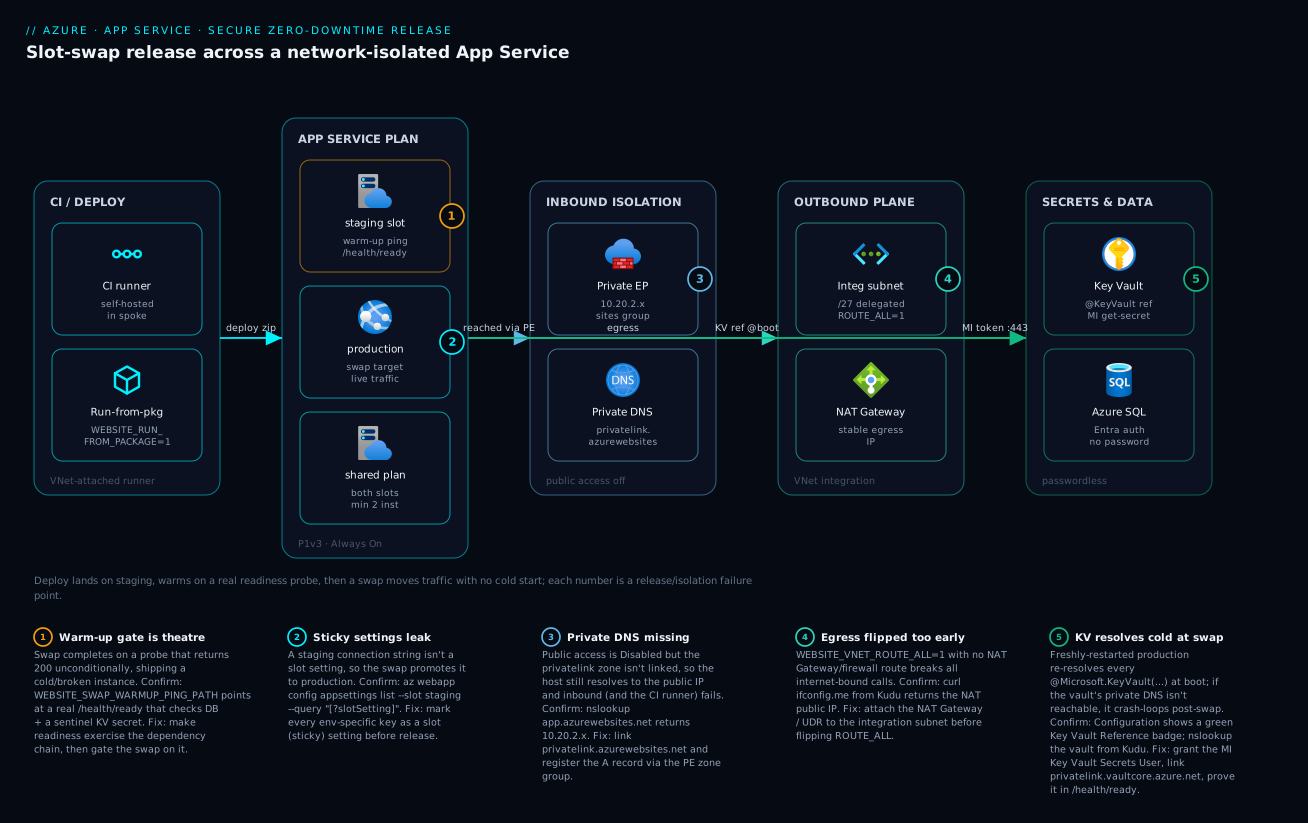
Real-world scenario
A payments team — call them NorthPay — runs app-orders-prod on a P1v3 plan behind a private endpoint, with publicNetworkAccess=Disabled, VNet integration with WEBSITE_VNET_ROUTE_ALL=1 egressing through a NAT gateway, and Key Vault references for every secret. They deploy from a self-hosted runner in the spoke and release with swap-with-preview. Their compliance auditor signed off on the isolation; their SRE lead signed off on the zero-downtime story. Then the first private-network release went sideways.
The deploy to staging succeeded. Preview looked clean — smoke tests passed against staging running production config. They completed the swap at 21:40, and within seconds production threw HTTP 500 on every request. Staging under preview had been healthy; production was not. The on-call engineer’s instinct was to swap back, which they did — and production recovered instantly, because the previous (working) bits were sitting in the staging slot. That reverse swap, completed in under a minute, is exactly the rollback this architecture is supposed to give you, and it bought them the time to find the real cause without an outage.
The cause was Key Vault references and the private endpoint colliding at swap time. The vault had its own private endpoint, but the freshly-restarted production instances re-resolved every @Microsoft.KeyVault(...) reference on startup, and WEBSITE_VNET_ROUTE_ALL=1 forced that DNS lookup through the VNet — where the privatelink.vaultcore.azure.net zone was linked to the spoke but the conditional-forwarder rule on the hub DNS server hadn’t been updated for the new vault. Staging had cached resolved secrets from before the DNS change; production started cold and couldn’t reach the vault. The warm-up ping on /health/ready should have caught it, but the readiness probe only checked SQL, not secret resolution — so the gate passed on an app that couldn’t actually serve. This is badges ① and ⑤ firing together.
Two fixes. First, make readiness actually prove the dependency chain — resolve a sentinel secret, not just open a DB connection:
app.MapHealthChecks("/health/ready", new HealthCheckOptions {
    Predicate = c => c.Tags.Contains("ready")
});
builder.Services.AddHealthChecks()
    .AddAzureKeyVault(new Uri(vaultUri), new DefaultAzureCredential(),
        o => o.AddSecret("health-canary"), tags: new[] { "ready" })
    .AddSqlServer(sqlConn, tags: new[] { "ready" });
Second, gate the swap on it explicitly and confirm the vault is reachable from the integration subnet before releasing:
az webapp config appsettings set -g rg-app-prod -n app-orders-prod --slot staging \
  --slot-settings WEBSITE_SWAP_WARMUP_PING_PATH=/health/ready WEBSITE_SWAP_WARMUP_PING_STATUSES=200
nslookup kv-orders-prod.vault.azure.net   # from Kudu: must return 10.20.2.x, not a public IP
The lesson NorthPay took away: a private endpoint you add for one resource changes the DNS blast radius for every service that resolves a name at startup. Readiness checks have to exercise the secrets path, or warm-up gating is theatre — and the only reason this was a 90-second incident instead of a two-hour one is that the rollback was a reverse swap, not a redeploy.
Going deeper
The six steps above are the build. This section is the production nuance that separates a demo from a payments-grade release — the artifact format, the sticky-session trap, the routing header behind “test in production,” the settings the platform makes sticky whether you ask it to or not, container releases, the database on the critical path, secret-free pipelines, and how a mature team rolls a swap across a fleet without betting everything on one click.
The deploy artifact: run from a package, not a file copy
How the bits land on the slot matters as much as the swap. The old default — a zip deploy that unpacks files into a writable wwwroot — copies files one at a time, so a worker can restart mid-copy and serve a half-written app, and file locks make the deploy itself flaky. Run-from-package fixes this by mounting an immutable zip as a read-only wwwroot: the deploy is atomic (the app is either the old package or the new one, never a blend), cold start is faster because there is no unpack step, and rollback is just re-pointing at the previous package.
# Windows plan: run from a package uploaded to the platform
az webapp config appsettings set -g rg-app-prod -n app-orders-prod --slot staging \
  --settings WEBSITE_RUN_FROM_PACKAGE=1
az webapp deploy -g rg-app-prod -n app-orders-prod --slot staging --type zip --src-path ./app.zip

# Linux plan: point at a blob URL (SAS-scoped, or reached via managed identity + private endpoint)
az webapp config appsettings set -g rg-app-prod -n app-orders-prod --slot staging \
  --settings WEBSITE_RUN_FROM_PACKAGE="https://stdeploy.blob.core.windows.net/pkgs/app-<build>.zip?<sas-placeholder>"
| Mode | WEBSITE_RUN_FROM_PACKAGE |
wwwroot |
Rollback | Best for |
|---|---|---|---|---|
| Zip deploy (writable) | unset / 0 |
Read-write | Redeploy the old zip | Legacy; avoid for prod |
| Package (platform) | 1 |
Read-only | Re-point the package | Windows plans |
| Package (URL) | blob URL | Read-only | Change the URL | Linux; immutable, versioned builds |
A read-only wwwroot also closes an attack surface — code that cannot write its own directory cannot drop a web shell into it. Keep the package in a private, versioned container so every build is an addressable, immutable artifact you can swap back to by name.
ARR affinity: the sticky-session trap in a slotted world
App Service’s front end sets an ARRAffinity cookie by default (clientAffinityEnabled=true) that pins each client to one instance. For a stateless app this is pure downside: it defeats load balancing, and during a scale-out, a rolling restart, or a swap it can hold a user on a draining instance while healthy ones sit idle — the “some users still hit the old/broken worker after I deployed” symptom. Disable it unless you genuinely rely on in-process session state:
az webapp update -g rg-app-prod -n app-orders-prod --set clientAffinityEnabled=false
Keep affinity on only for legacy apps holding session in memory — and even then, moving session to Redis and turning affinity off is the more resilient design.
Warm every cold instance, and test in production by name
WEBSITE_SWAP_WARMUP_PING_PATH (Step 4) gates the swap. But a slot also goes cold on a scale-out or a restart, and the swap ping does nothing for those. On Windows, the IIS <applicationInitialization> element in web.config pre-loads the app on every instance start; on Linux the equivalent is the container start plus WEBSITE_WARMUP_PATH. Configure both and a new instance never serves its first user a cold request:
<!-- web.config (Windows) — pre-warm every instance, not only swaps -->
<system.webServer>
  <applicationInitialization doAppInitAfterRestart="true">
    <add initializationPage="/health/ready" />
  </applicationInitialization>
</system.webServer>
Separately, the traffic-routing percentage in Step 4 assigns clients randomly. To pin a specific client — a QA engineer, a synthetic monitor — to the staging slot without exposing it to anyone else, use the x-ms-routing-name query string or cookie. A slot with a routing percentage of 0 is out of the random rotation but still reachable by name, which is exactly how you exercise staging-under-production-config before committing traffic:
| Request | Routed to | Use for |
|---|---|---|
?x-ms-routing-name=staging |
Staging slot | QA hits the canary explicitly |
?x-ms-routing-name=self |
Production slot | Force back to prod during a canary |
| No header, routing % = 10 | ~10% land on staging | Gradual, random canary exposure |
| No header, routing % = 0 | Always production | Staging reachable only by explicit name |
The settings the platform makes sticky for you
You mark env-specific settings sticky (Step 4). But the platform already treats a class of WEBSITE_* version and extension settings as sticky to the slot by default, so a runtime-version pin does not ride a swap unless you say so. WEBSITE_OVERRIDE_STICKY_EXTENSION_VERSIONS=0 lets those version settings travel with the slot, so you can validate a new .NET/Node version on staging and have the swap promote it:
| Setting | Default (=1) |
Set =0 when |
|---|---|---|
WEBSITE_OVERRIDE_STICKY_EXTENSION_VERSIONS |
Runtime / extension version settings stay stuck to the slot | You want a validated runtime-version bump to promote with the swap |
The lesson: “what swaps” has three tiers — settings you marked sticky (never swap), settings the platform holds sticky (version pins, unless you override), and everything else (swaps). Audit all three before a version upgrade, or staging validates a runtime that production never actually receives.
Container image releases and the multi-container caveat
For a containerized app the artifact is an image tag, and the same slot discipline applies: deploy the new image to staging, warm, swap. Pull from ACR with the app’s managed identity (no registry password) and reference an immutable digest, not a moving tag like :latest, so a reverse swap is unambiguous about which bits it restores:
az webapp config container set -g rg-app-prod -n app-orders-prod --slot staging \
  --container-image-name myacr.azurecr.io/orders@sha256:<digest-placeholder> \
  --container-registry-url https://myacr.azurecr.io
az resource update -g rg-app-prod -n app-orders-prod --resource-type "Microsoft.Web/sites" \
  --set properties.siteConfig.acrUseManagedIdentityCreds=true
Multi-container on App Service (Docker Compose) is a limited, largely legacy option; for real multi-container or microservice workloads Microsoft steers you to Azure Container Apps, which gives you revisions, KEDA scaling, and native traffic-splitting instead of bolting them onto a web app.
The database is on the critical path: expand, then contract
Here is the truth that quietly turns a “zero-downtime” swap back into an outage: a swap is only zero-downtime if both the old and new versions of your code can run against the same database schema at once. During the swap window — and during any rollback afterwards — two versions are live against one database. Ship a destructive migration (drop or rename a column) coupled to the release and you break whichever version does not match.
The pattern is expand/contract (parallel change), spread across two releases:
| Phase | Release | Schema change | Code |
|---|---|---|---|
| Expand | Release N | Add the new nullable column/table; keep the old one | New code writes both old and new; still reads old |
| Migrate | Between | Backfill the new column from the old | Both versions still run against this schema |
| Contract | Release N+1 | Drop the old column — only now | New code reads the new column; nothing reads the old |
Never put the destructive step in the same release as the code that depends on it. The contract release ships only once you are certain no running (or rollback-able) version still reads the old shape. This is the database half of the zero-downtime story the swap alone cannot give you.
Secret-free pipelines: OIDC federated credentials
Step 3 makes CI/CD reach a private Kudu from inside the VNet. The credential the pipeline authenticates with is the other half. Publish profiles and long-lived service-principal secrets are exactly the plaintext credential this article works to delete — from the pipeline too. Use a federated credential: a user-assigned managed identity or app registration that trusts your GitHub Actions / Azure DevOps OIDC issuer for a specific repo, branch, or environment, so no secret is ever stored:
# GitHub Actions — no AZURE_CREDENTIALS secret stored anywhere
permissions:
  id-token: write        # let the runner mint an OIDC token
  contents: read
steps:
  - uses: azure/login@v2
    with:
      client-id: ${{ vars.AZURE_CLIENT_ID }}          # the federated identity
      tenant-id: ${{ vars.AZURE_TENANT_ID }}
      subscription-id: ${{ vars.AZURE_SUBSCRIPTION_ID }}
  - run: az webapp deploy -g rg-app-prod -n app-orders-prod --slot staging --type zip --src-path ./app.zip
The federated credential’s subject pins who may assume the identity — for example repo:contoso/orders:ref:refs/heads/main or repo:contoso/orders:environment:production — so only that branch or environment can deploy. Pair this with a VNet-attached self-hosted runner so the token and the network path are both locked down; the multi-stage YAML with environments and approvals guide wires the gates around it.
Safe-deployment rings at fleet scale
One app is one swap. A fleet across regions should never swap everywhere at once — that is how a bad release becomes a global incident. Roll the swap through rings with a bake time between them, each ring gated on the production-scoped alerts from Step 6:
- Ring 0 (canary): a small
x-ms-routing-nameslice or a single low-risk region. Bake, watch 5xx and P95. - Ring 1: one full region. Bake again.
- Ring 2+: the remaining regions, broadest last.
If any ring trips its alert, the automated response is a reverse swap in that ring and a halt — the bad bits never reach the next ring. Rings turn “we deployed and hoped” into “we deployed to 1% and let the metrics decide,” which is the same instinct as the honest warm-up probe, just applied to the whole fleet instead of a single instance.
Advantages and disadvantages
The hardened architecture is not free — it adds moving parts, subnets, and DNS to reason about. The honest trade-off:
| Advantages | Disadvantages |
|---|---|
| No anonymous internet reachability (private endpoint) | More subnets, DNS zones, and route tables to operate |
| Stable, allowlistable egress IP (NAT gateway) | NAT gateway / firewall add hourly + per-GB cost |
| Zero plaintext secrets; passwordless where possible | Managed identity per slot is easy to forget → swap crash loop |
| Zero-downtime releases with instant rollback (reverse swap) | Slots consume plan capacity; size max-count with headroom |
| Validated promotion (swap-with-preview / canary) | Standard+ tier required; Free/Shared can’t play |
| Self-healing via Health Check + autoscale | A dishonest health path silently defeats warm-up gating |
| Private DNS keeps names resolving inside the VNet | DNS misconfig breaks boot-time resolution app-wide |
| CI/CD path is auditable and VNet-scoped | Public-hosted pipelines must move into the VNet |
When each axis matters: inbound isolation is non-negotiable under a compliance boundary or when the app fronts a private-only data tier; for a purely public marketing site it may be overkill. Stable egress matters the instant a partner firewall enters the picture. Slots with warm-up pay for themselves on the first release you’d otherwise have done in-place during business hours. Passwordless matters most where credential rotation is a recurring operational cost — it deletes the credential entirely. The one axis with no downside worth skipping is killing plaintext secrets: do it on day one regardless of tier.
Hands-on lab
A free-tier-friendly walk-through. Slots and Always On need Standard+, so this lab uses S1 for the slot steps and tears down at the end; the secrets and identity steps work on any paid tier. Everything is copy-pasteable; replace names as needed.
# 0. Variables
RG=rg-zdt-lab; LOC=eastus; PLAN=plan-zdt-lab; APP=app-zdt-$RANDOM; KV=kv-zdt-$RANDOM
az group create -n $RG -l $LOC

# 1. Standard plan + app (S1 unlocks slots + Always On)
az appservice plan create -g $RG -n $PLAN --sku S1 --is-linux
az webapp create -g $RG -p $PLAN -n $APP --runtime "DOTNETCORE:8.0"
az webapp config set -g $RG -n $APP --always-on true

# 2. Managed identity + Key Vault + a secret + a reference
az webapp identity assign -g $RG -n $APP
PID=$(az webapp identity show -g $RG -n $APP --query principalId -o tsv)
az keyvault create -g $RG -n $KV --enable-rbac-authorization true
ME=$(az ad signed-in-user show --query id -o tsv)
az role assignment create --assignee $ME --role "Key Vault Secrets Officer" \
  --scope $(az keyvault show -g $RG -n $KV --query id -o tsv)
az keyvault secret set --vault-name $KV --name health-canary --value ok
az role assignment create --assignee-object-id $PID --assignee-principal-type ServicePrincipal \
  --role "Key Vault Secrets User" --scope $(az keyvault show -g $RG -n $KV --query id -o tsv)
az webapp config appsettings set -g $RG -n $APP --settings \
  "Canary=@Microsoft.KeyVault(SecretUri=https://$KV.vault.azure.net/secrets/health-canary/)"

# 3. Staging slot with sticky settings + warm-up
az webapp deployment slot create -g $RG -n $APP --slot staging
az webapp config appsettings set -g $RG -n $APP --slot staging \
  --slot-settings ASPNETCORE_ENVIRONMENT=Staging \
  WEBSITE_SWAP_WARMUP_PING_PATH=/ WEBSITE_SWAP_WARMUP_PING_STATUSES=200
# Grant the STAGING slot's identity too (the gotcha):
az webapp identity assign -g $RG -n $APP --slot staging
SPID=$(az webapp identity show -g $RG -n $APP --slot staging --query principalId -o tsv)
az role assignment create --assignee-object-id $SPID --assignee-principal-type ServicePrincipal \
  --role "Key Vault Secrets User" --scope $(az keyvault show -g $RG -n $KV --query id -o tsv)

# 4. Swap-with-preview, then complete
az webapp deployment slot swap -g $RG -n $APP --slot staging --target-slot production --action preview
az webapp deployment slot swap -g $RG -n $APP --slot staging --target-slot production --action swap
Expected results and how to verify each:
| Step | What you should see | Verify with |
|---|---|---|
| 1 | App reachable on https://$APP.azurewebsites.net; alwaysOn=true |
az webapp config show -g $RG -n $APP --query alwaysOn |
| 2 | Green “Key Vault Reference” badge on Canary |
az webapp config appsettings list -g $RG -n $APP --query "[?name=='Canary']" |
| 3 | ASPNETCORE_ENVIRONMENT shows slotSetting:true on staging |
... --slot staging --query "[?slotSetting].name" |
| 4 | Swap completes with no error; app stays up | az webapp deployment slot list -g $RG -n $APP -o table |
# 5. Teardown — delete everything
az group delete -n $RG --yes --no-wait
This lab keeps inbound/outbound public for simplicity (no VNet). Add Steps 1 and 3 from the main guide — integration subnet, private endpoint, private DNS — only in a VNet-enabled subscription; doing so on a throwaway lab adds cost and DNS plumbing without teaching the slot mechanics any better.
Common beginner mistakes
These are misconceptions about the model, not symptoms in a log — the wrong mental picture that leads a beginner to build the right thing the wrong way. (For symptom → cause → fix during an incident, use the release playbook below.)
-
“Slots are separate servers or environments.” They are not. Both slots run on the same App Service Plan — the same rented VMs. A warm staging slot and its deploy consume production’s CPU and instance count. Right model: a slot is a second app sharing production’s workers; size the plan (and
max-count) for both running at once. -
“The swap deploys my code.” A swap deploys nothing — it re-points the load balancer to instances that are already running the code you pushed to staging earlier. Right model: deploy → warm → swap are three separate steps; the swap is only the traffic move.
-
“Slots give me zero-downtime automatically.” Only if the slot is warm, the readiness probe is honest, and the database schema is backward-compatible. A cold slot, a lying
/health/ready, or a destructive migration each turns the swap back into downtime. Right model: zero-downtime = warm instances + honest gate + expand/contract schema. -
“
WEBSITE_VNET_ROUTE_ALL=1gives me a firewall.” It only forces traffic into the subnet’s route table. With no NAT gateway or UDR behind it, it simply breaks internet egress. Right model: build the egress path first, then force traffic onto it — never the reverse. -
“Key Vault references make secrets bulletproof.” They remove plaintext from config, but resolution still depends on the slot’s identity, the vault’s network rules, and private DNS — and a secret still exists to rotate. Right model: references are the floor; passwordless (an Entra managed identity, no secret at all) is the ceiling wherever the backend supports it.
-
“My app has one identity.” Every slot has its own managed identity. Granting only production’s is the single most common swap crash loop. Right model: grant both slot identities, or share one user-assigned identity across them.
-
“Disabling public access only changes the browser URL.” The SCM/Kudu deploy endpoint shares the app’s hostname, so it goes private too — a public-hosted pipeline loses its deploy path the moment you flip the switch. Right model: move CI/CD into the VNet before disabling public access.
-
“Session affinity is harmless, leave it on.” For a stateless app the default
ARRAffinitycookie defeats load balancing and can pin users to a draining instance during a rollout or swap. Right model: disable client affinity for stateless apps; keep server-side state in Redis, not in-process.
Common mistakes & troubleshooting
This is the section you keep open during a change window. It is a release playbook: each row is a real failure mode with its symptom, root cause, the exact command or portal path to confirm it, and the fix. Read the prose once; scan the table at 21:40 when a swap just went wrong.
| # | Symptom | Root cause | Confirm (exact command / path) | Fix |
|---|---|---|---|---|
| 1 | 500s in production seconds after swap; staging was healthy | KV references re-resolve at boot; vault unreachable (DNS/role) | Portal: Configuration → green/red KV badge; nslookup kv-...vault.azure.net from Kudu |
Link privatelink.vaultcore.azure.net; grant slot MI Key Vault Secrets User; swap back to recover |
| 2 | Staging DB connection string now live in production | Env setting wasn’t sticky; swapped across | az webapp config appsettings list --slot staging --query "[?slotSetting].name" |
Mark env keys as --slot-settings; swap back; re-release |
| 3 | All internet calls fail after enabling integration | WEBSITE_VNET_ROUTE_ALL=1 with no egress route |
From Kudu: curl -s ifconfig.me (hangs / wrong IP) |
Attach NAT gateway / UDR to integration subnet, then keep ROUTE_ALL=1 |
| 4 | App unreachable after publicNetworkAccess=Disabled |
Private DNS zone not linked; resolves public IP | From a VNet host: nslookup app.azurewebsites.net (returns public IP) |
Link privatelink.azurewebsites.net; register A via PE zone group |
| 5 | CI/CD zip deploy fails after lockdown |
Kudu/SCM now private; public runner can’t reach it | Pipeline log: SCM connect timeout / 403 | Move deploy to a VNet-attached self-hosted runner |
| 6 | KV reference badge red | MI lacks role or vault firewall blocks app | az role assignment list --assignee $PID --scope $VAULT_ID |
Grant Key Vault Secrets User; allow app subnet / use vault PE |
| 7 | Swap completes but users hit a cold start | Warm-up path wrong or slot idled | az webapp config appsettings list --slot staging --query "[?name=='WEBSITE_SWAP_WARMUP_PING_PATH']" |
Set a real readiness path; enable alwaysOn on the slot |
| 8 | Warm-up “passes” but app is broken post-swap | /health/ready returns 200 unconditionally |
Read the health handler; hit it while a dep is down | Make readiness check DB + a sentinel KV secret |
| 9 | Whole app 503s when a downstream blips | Health (liveness) path fails on optional dep → fleet evicted | Health Check blade per-instance status; KQL on the path | Make liveness shallow; raise WEBSITE_HEALTHCHECK_MAXPINGFAILURES |
| 10 | 503 on every deploy/restart | Single instance; in-place restart zeroes capacity | az webapp show --query "siteConfig.numberOfWorkers"; plan instance count |
min-count >= 2; deploy via slot-swap, not in-place |
| 11 | Staging slot crash-loops though production is fine | Slot’s own identity never granted vault access | az webapp identity show --slot staging; role list for that PID |
Grant the staging identity, or use a shared user-assigned identity |
| 12 | Intermittent 5xx / dependency timeouts under load | SNAT port exhaustion on shared egress | Diagnose and solve → SNAT Port Exhaustion; SnatConnectionCount Failed > 0 |
Reuse connections; attach NAT gateway; PE for PaaS targets |
| 13 | 502 only when behind App Gateway/Front Door | Upstream backend timeout shorter than app response | App Insights request duration vs gateway timeout | Speed up the path; raise upstream timeout to match |
| 14 | Secret value stale after rotation | Versioned KV reference URI pinned an old version | Inspect the SecretUri in app settings |
Switch to versionless URI; restart to refresh |
The boot-time DNS distinction (rows 1, 4, 6) is the one that eats the most hours, so call it out explicitly:
| Distinction | The trap | How to tell them apart |
|---|---|---|
| App PE vs vault PE DNS | Fixing the app’s zone but not the vault’s | App reachable, yet KV badge red → the vault’s vaultcore zone is the gap |
| Staging healthy vs production healthy at swap | Cached resolution in staging hides the DNS gap | Production cold-resolves at boot; staging had cached secrets from before a DNS change |
| Cold start vs broken swap | Both look like “slow/erroring after deploy” | A cold start recovers on retry; a broken swap keeps failing → swap back |
Best practices
- Isolate the three planes in distinct subnets: delegated
/27for outbound integration, a separate non-delegated/27for the private endpoint. Never reuse one subnet for both. - Configure egress before forcing it: attach a NAT gateway or firewall route to the integration subnet before setting
WEBSITE_VNET_ROUTE_ALL=1. - Link private DNS before disabling public access:
privatelink.azurewebsites.net(app) andprivatelink.vaultcore.azure.net(vault) must resolve privately first, or boot-time resolution breaks. - Kill plaintext secrets on day one: Key Vault references with a managed identity granted
Key Vault Secrets User; go passwordless for SQL/Storage/Service Bus where Entra auth is supported. - Grant both slot identities: a slot has its own managed identity — grant it vault access too, or use a shared user-assigned identity, or the swap crash-loops.
- Make environment settings sticky: audit
slotSettingon every env-specific key before every release; a non-sticky staging connection string promotes itself to production. - Gate swaps on an honest readiness probe:
/health/readymust check the real dependency chain (DB + a sentinel KV secret), not return 200 unconditionally. - Release via swap-with-preview, roll back via reverse swap: validate prod config without moving traffic; if a regression surfaces, swap back — the old bits are in staging.
- Run
min-count >= 2: so an instance recycle never zeroes production capacity, and sizemax-countwith headroom for a warm staging slot. - Separate liveness from readiness: liveness (Health Check) stays shallow so a downstream blip doesn’t evict the fleet; readiness (warm-up) proves dependencies.
- Apply diagnostic settings to both slots and scope alerts to production: a slot is a distinct resource; alerts on the production slot ID keep a staging deploy from paging on-call.
- Move CI/CD into the VNet before lockdown: a self-hosted runner in the spoke (or a VNet-attached deploy step) so Kudu/SCM stays reachable.
Security notes
- Least privilege on the identity: grant
Key Vault Secrets User(read-only secrets), notKey Vault Administrator. For data planes, grant the narrowest data role (Storage Blob Data Readerover Contributor where reads suffice). - No secret should be plaintext anywhere: not in app settings, not in ARM/Bicep parameters, not in pipeline variables. References resolve at runtime; the value never lands in config or source.
- Private by default, public by exception:
publicNetworkAccess=Disabledwith a private endpoint is the baseline; expose only through a WAF-fronted front door when public reach is genuinely required. httpsOnly=trueand a modern minimum TLS version: redirect HTTP→HTTPS and set the minimum TLS to 1.2+ on both slots.- Lock the SCM/Kudu surface independently: restrict the SCM site to the deploy runner’s source range; it is a separate access-control plane from the main site.
- Encrypt the egress story: force egress through the VNet so traffic can be inspected/logged at a hub firewall, and prefer private endpoints for PaaS targets so data-plane traffic stays on the Azure backbone (no SNAT, no public hop).
- Rotate without redeploy: versionless Key Vault references pick up rotated secrets on refresh — pair with Key Vault secret rotation with managed identity so rotation is event-driven, not a deploy.
- Audit who deploys: enable
AppServiceAuditLogs; treat Kudu access as privileged and review it.
Cost & sizing
What drives the bill here is the plan SKU and instance count (both slots share the plan), plus the NAT gateway / firewall for egress and the private endpoint hourly charge. Slots themselves are free — they consume plan capacity, not a separate line item. Rough figures (USD list, plus an INR feel for budget planning; verify current pricing in the Azure calculator):
| Component | Unit | ~USD/month | ~INR/month | Notes |
|---|---|---|---|---|
| App Service Plan S1 (1 inst) | per instance | ~$70 | ~₹5,800 | Unlocks slots + Always On |
| App Service Plan P1v3 (1 inst) | per instance | ~$120 | ~₹10,000 | Pre-warmed instances; better isolation |
| Each extra instance | per instance | linear | linear | min-count 2 doubles the base |
| Private endpoint | per PE | ~$7 + per-GB | ~₹600 | One per resource made private |
| NAT gateway | hourly + per-GB | ~$32 + data | ~₹2,700 | Stable egress IP |
| Azure Firewall (if used) | hourly + per-GB | ~$900+ | ~₹75,000+ | Shared at the hub, not per-app |
| Key Vault | per 10k ops | cents | cents | References add minimal ops |
| Log Analytics | per GB ingested | ~$2.76/GB | ~₹230/GB | Tune categories to control cost |
What each tier actually unlocks for this topic — pick the lowest tier that has what you need:
| Tier | Slots | Always On | VNet integration | Private endpoint | Pre-warmed | Use for |
|---|---|---|---|---|---|---|
| F1 / D1 | No | No | No | No | No | Throwaway experiments only |
| B1–B3 | Limited | Yes | Yes | Yes | No | Dev/test isolation; light prod |
| S1–S3 | 5 | Yes | Yes | Yes | No | Standard production with slots |
| P1v3–P3v3 | 20 | Yes | Yes | Yes | Yes | Scale-out prod; cold-start-sensitive |
Right-sizing rules: keep min-count at 2 for HA (a single instance means every restart is a 503), set max-count from your peak load plus one warm staging slot’s worth of headroom, and prefer P1v3 over scaling many S1 instances when scale-out cold starts hurt — pre-warmed instances exist only on Premium v3. To control Log Analytics spend, ship only the categories you query (HTTP + Console + App logs cover most incidents; drop the rest until you need them).
Practice challenges
Six exercises, escalating from a five-minute config check to a two-release migration design. Commands are illustrative — names and IDs are placeholders, and nothing here is run live. Try each before opening the solution.
1 (Beginner) — Prove a setting is sticky. Set ASPNETCORE_ENVIRONMENT=Staging on the staging slot so it does not travel to production on a swap, then prove it is sticky.
<details><summary>Solution</summary>
az webapp config appsettings set -g rg-app-prod -n app-orders-prod --slot staging \
  --slot-settings ASPNETCORE_ENVIRONMENT=Staging
az webapp config appsettings list -g rg-app-prod -n app-orders-prod --slot staging \
  --query "[?slotSetting].name" -o tsv   # ASPNETCORE_ENVIRONMENT must appear
Why: a non-sticky env value promotes itself to production on the next swap — the classic “staging config went live” incident. </details>
2 (Beginner) — Grant the slot’s own identity. The staging slot’s Key Vault references are red. Give the slot’s managed identity read access to the vault.
<details><summary>Solution</summary>
az webapp identity assign -g rg-app-prod -n app-orders-prod --slot staging
SPID=$(az webapp identity show -g rg-app-prod -n app-orders-prod --slot staging --query principalId -o tsv)
az role assignment create --assignee-object-id "$SPID" --assignee-principal-type ServicePrincipal \
  --role "Key Vault Secrets User" --scope $(az keyvault show -g rg-app-prod -n kv-orders-prod --query id -o tsv)
Why: every slot has its own identity; granting only production’s is the number-one cause of a post-swap crash loop. </details>
3 (Intermediate) — Force egress safely. Make all outbound traffic leave from a single, allowlistable IP — without breaking internet calls in the process.
<details><summary>Solution</summary>
# 1) Build the egress path FIRST
az network public-ip create -g rg-app-prod -n pip-nat-app --sku Standard --allocation-method Static
az network nat gateway create -g rg-app-prod -n nat-app --public-ip-addresses pip-nat-app
az network vnet subnet update -g rg-app-prod --vnet-name vnet-spoke-app \
  --name snet-appsvc-integration --nat-gateway nat-app
# 2) THEN force traffic onto it
az webapp config appsettings set -g rg-app-prod -n app-orders-prod --settings WEBSITE_VNET_ROUTE_ALL=1
Why: setting ROUTE_ALL=1 before a NAT/UDR exists points every internet packet at a route that is not there — outbound breaks until the path exists.
</details>
4 (Intermediate) — Write an honest readiness gate. Make /health/ready prove the dependency chain (a sentinel Key Vault secret and the database), then gate the swap on it.
<details><summary>Solution</summary>
builder.Services.AddHealthChecks()
    .AddAzureKeyVault(new Uri(vaultUri), new DefaultAzureCredential(),
        o => o.AddSecret("health-canary"), tags: new[] { "ready" })
    .AddSqlServer(sqlConn, tags: new[] { "ready" });
app.MapHealthChecks("/health/ready", new HealthCheckOptions { Predicate = c => c.Tags.Contains("ready") });
az webapp config appsettings set -g rg-app-prod -n app-orders-prod --slot staging --slot-settings \
  WEBSITE_SWAP_WARMUP_PING_PATH=/health/ready WEBSITE_SWAP_WARMUP_PING_STATUSES=200
Why: a probe that returns 200 unconditionally passes the swap gate on an app that cannot actually reach its secrets or database — warm-up theatre. </details>
5 (Advanced) — Canary, validate, then roll back. Release with a two-phase swap, expose ~10% of traffic first, and show the one-command rollback.
<details><summary>Solution</summary>
# Canary: ~10% of live traffic to staging; watch prod-scoped 5xx / P95
az webapp traffic-routing set -g rg-app-prod -n app-orders-prod --distribution staging=10
# Validate prod config with no traffic moved, then complete
az webapp deployment slot swap -g rg-app-prod -n app-orders-prod --slot staging --target-slot production --action preview
az webapp deployment slot swap -g rg-app-prod -n app-orders-prod --slot staging --target-slot production --action swap
# Regression after completion? Reverse swap — the old bits are still in staging
az webapp deployment slot swap -g rg-app-prod -n app-orders-prod --slot staging --target-slot production
az webapp traffic-routing clear -g rg-app-prod -n app-orders-prod
Why: preview validates production config before traffic moves, and rollback is a reverse swap (seconds), never a redeploy (minutes, under pressure). </details>
6 (Advanced) — Design a zero-downtime column rename. You must rename orders.customer to orders.customer_id with no downtime and a working rollback. Describe the releases.
<details><summary>Solution</summary>
- Release N (expand): add the nullable
customer_id; ship code that writes both columns and readscustomer. Old and new versions both run against this schema, so the swap and any reverse swap are safe. - Between: backfill
customer_idfromcustomer. - Release N+1 (contract): switch reads to
customer_id; only now, once no running or rollback-able version readscustomer, drop the old column.
Why: during a swap two versions are live on one database — a destructive change coupled to the release breaks whichever version does not match. Expand/contract keeps every live version valid. </details>
Interview & exam questions
1. Why are the VNet-integration subnet and the private-endpoint subnet always separate?
Integration governs outbound and the subnet must be delegated to Microsoft.Web/serverFarms; a private endpoint governs inbound and lives in a non-delegated subnet as a private NIC. The delegation is exclusive, the jobs are opposite, and the platform won’t let one subnet serve both. (AZ-700, AZ-204)
2. What does WEBSITE_VNET_ROUTE_ALL=1 change, and what must exist first?
It forces all egress — including internet-bound — into the VNet, where it follows the subnet’s route table. A deliberate egress path (NAT gateway or a UDR to a firewall) must exist first, or internet calls break. (AZ-700)
3. A Key Vault reference shows a red badge. Name the two most likely causes.
The app’s managed identity lacks Key Vault Secrets User on the vault, or the vault’s network rules (firewall / private endpoint with missing private DNS) block the app from reaching it. Syntax is rarely the issue. (AZ-204, AZ-500)
4. Why does a slot have its own managed identity, and why does it matter at swap time? Each slot is a distinct resource with its own system-assigned identity. If only production’s identity has vault access, staging’s references go red and the app crash-loops the instant you swap. Grant both, or use a shared user-assigned identity. (AZ-204)
5. What is a slot setting and what disaster does it prevent? A slot (sticky) setting is pinned to its slot and does not travel during a swap. It prevents environment-specific values — like a staging DB connection string — from promoting themselves into production when you swap. (AZ-204)
6. Explain swap-with-preview and how it enables safe rollback.
Phase 1 (preview) applies the target slot’s config to the source and restarts it without moving traffic, so you validate prod config first. Phase 2 (swap) completes it. If a regression appears after completion, a reverse swap rolls back instantly because the previous bits sit in the staging slot. (AZ-204)
7. Why must the warm-up readiness path be “honest”?
The swap completes only when the warm-up path returns an accepted status. If /health/ready returns 200 unconditionally, the gate passes on a broken/cold app and you ship downtime. It must exercise the real dependency chain — DB plus a sentinel secret. (AZ-204)
8. After disabling public access, deployments start failing. Why? The SCM/Kudu endpoint shares the app’s hostname, so it’s now private too. A public-hosted pipeline can no longer reach Kudu. The deploy must run from a VNet-attached self-hosted runner. (AZ-400, AZ-204)
9. How does a private endpoint break a different resource at boot?
It changes how a name resolves inside the VNet. Anything resolving a hostname at startup (a Key Vault reference, a SQL connection) now depends on the relevant private DNS zone being linked. Add a vault PE without linking privatelink.vaultcore.azure.net and references fail at boot. (AZ-700, AZ-500)
10. When do you choose a NAT gateway versus an Azure Firewall for egress? NAT gateway when you only need a stable, allowlistable source IP and a large SNAT pool. Azure Firewall when you also need FQDN filtering, egress rules, and logging. They combine, but the firewall then owns the route. (AZ-700)
11. Why keep min-count >= 2, and how does that interact with slots?
Two instances mean a recycle or platform patch never zeroes production capacity, so an in-place restart stops being a 503. Because both slots share the plan, also size max-count with headroom for a warm staging slot during a deploy. (AZ-204)
12. Liveness vs readiness — which feeds Health Check, and what must each never do? Liveness (“is the process up?”) feeds Health Check and eviction; readiness (“can it serve?”) feeds swap warm-up. Liveness must never hard-fail on an optional downstream (it would evict the whole fleet); readiness must never return 200 unconditionally. (AZ-204)
Quick check
- Which app setting forces internet-bound traffic through the VNet, and what must already exist before you set it?
- You disabled public access and now your pipeline’s
zip deployfails. What changed and what’s the fix? - A swap completed and production immediately 500s while staging was healthy. Name the most likely cause and the fastest recovery.
- What is the one thing a
/health/readywarm-up probe must do to make a swap genuinely safe? - Why is granting only the production slot’s managed identity
Key Vault Secrets Usera problem?
Answers
WEBSITE_VNET_ROUTE_ALL=1. A deliberate egress path — a NAT gateway on the integration subnet, or a UDR0.0.0.0/0to an Azure Firewall — must exist first, or all internet calls break.- Disabling public access also makes the SCM/Kudu endpoint private (it shares the hostname). A public-hosted runner can no longer reach it; move the deploy to a VNet-attached self-hosted runner.
- Key Vault references re-resolve at boot, and the freshly-restarted production instances couldn’t reach the vault (missing
privatelink.vaultcore.azure.netlink or an ungranted slot identity). Fastest recovery: swap back — the working bits are in the staging slot. - Exercise the real dependency chain — at minimum a DB ping and resolving a sentinel Key Vault secret — instead of returning 200 unconditionally, so the gate can’t pass on a broken app.
- Each slot has its own identity. Staging’s Key Vault references go red and the app crash-loops the moment you swap, because staging’s identity was never granted vault access. Grant both, or use a shared user-assigned identity.
Glossary
- Regional VNet integration — injects the app’s outbound traffic into a delegated subnet (
Microsoft.Web/serverFarms) in your VNet. WEBSITE_VNET_ROUTE_ALL— app setting that forces all egress (including internet-bound) through the VNet to follow its route table.- Private endpoint — a private NIC in your VNet that projects the app inbound; paired with
publicNetworkAccess=Disabledit removes public reachability. publicNetworkAccess— site property toggling public reachability;Disabledrequires a private route to reach the app.- Private DNS zone — e.g.
privatelink.azurewebsites.net; makes a hostname resolve to the private endpoint’s IP inside the VNet. - Managed identity — an Azure-issued identity for the app (system- or user-assigned) used to resolve Key Vault references and authenticate passwordless.
- Key Vault reference —
@Microsoft.KeyVault(SecretUri=...)app setting resolved at runtime by the managed identity, so no plaintext secret lives in config. - Passwordless auth — using the managed identity directly against Entra-aware backends (SQL, Storage, Service Bus) so no credential exists to store or rotate.
- Deployment slot — a full, addressable copy of the app on the same plan, used as a staging/swap target.
- Slot setting (sticky) — an app setting/connection string pinned to its slot that does not travel during a swap.
- Swap — redirects production traffic to the warmed staging instances with no cold start; the reverse swap is the rollback.
- Swap-with-preview — a two-phase swap:
previewapplies target config without moving traffic;swapcompletes it;resetaborts. - Warm-up ping —
WEBSITE_SWAP_WARMUP_PING_PATH/...STATUSES; gates a swap on a readiness path returning an accepted status on every instance. - Health Check — a per-instance liveness probe (
healthCheckPath) that evicts and recycles instances that fail it. - NAT gateway — provides a stable, allowlistable outbound IP and a large SNAT port pool for the integration subnet.
- SCM/Kudu — the deployment/management site sharing the app’s hostname; goes private when public access is disabled.
- Run-from-package — deploying an immutable zip that App Service mounts as a read-only
wwwroot(WEBSITE_RUN_FROM_PACKAGE); makes the deploy atomic and rollback a matter of re-pointing at the previous package. - Read-only
wwwroot— a content root the app cannot write to; a side effect of run-from-package that also removes a web-shell attack surface. - ARR affinity — the default
ARRAffinitycookie (clientAffinityEnabled) that pins a client to one instance; a trap for stateless apps behind slots and scale-out. applicationInitialization— the IIS/web.configelement (Windows) that pre-warms the app on every instance start, not just swaps; the Linux equivalent is container start plusWEBSITE_WARMUP_PATH.x-ms-routing-name— a query-string/cookie value that pins a specific client to a named slot, so you can hit staging-under-production-config without exposing it to public traffic.WEBSITE_OVERRIDE_STICKY_EXTENSION_VERSIONS— controls whether runtime/extension version settings stay stuck to a slot (1, default) or travel with the swap (0).- Expand/contract (parallel change) — a two-release migration pattern (add-new, backfill, then drop-old) that keeps old and new code both valid against one schema during a swap and rollback.
- Backward-compatible schema — a database shape both the outgoing and incoming app versions can run against; the precondition that makes a swap genuinely zero-downtime.
- OIDC federated credential — a trust between an Azure identity and a CI/CD issuer (GitHub Actions / Azure DevOps) that lets a pipeline authenticate with a short-lived token and no stored secret or publish profile.
- Safe-deployment ring — a staged rollout (canary → one region → broad) with bake time and alert-gated automatic rollback, so a bad release is caught early and never reaches the whole fleet.
- Container image digest — an immutable
@sha256:...image reference (versus a moving tag like:latest) so a slot swap and its reverse restore an unambiguous set of bits.
Next steps
- Put the private origin behind a WAF front door with Application Gateway with WAF & end-to-end TLS.
- Mature the release into traffic-split canaries and blue-green with Blue-green deployments with App Service slots & Traffic Manager.
- Make secret rotation event-driven, not a redeploy, via Azure Key Vault: secret rotation with managed identity.
- Diagnose any release that still goes wrong with the Troubleshooting App Service: 502/503, cold starts & restart loops playbook.
- Solve the SNAT-exhaustion class of egress failures with Azure NAT Gateway: deterministic egress & SNAT exhaustion.