In a nutshell
Picture a restaurant franchise. Corporate HQ writes the recipes, the pricing, and the house rules once, and every kitchen must follow them. The kitchens are where food is actually cooked and handed to customers. Azure API Management works the same way: the control plane in Azure is HQ — it holds your APIs, your policies, your secrets — and the gateway is the kitchen that terminates real traffic. The managed gateway is HQ’s own flagship kitchen, sitting in Azure. A self-hosted gateway is a franchise kitchen you run in your building — on-prem, in another cloud, next to a backend Azure cannot reach — cooking from the exact same recipes, pulled over the wire from HQ. You get consistency for free; you pay for it by owning the building: the ovens, the staff, the health inspections (HA, scaling, upgrades, egress).
There is one twist that trips everyone. The appliance that enforces “no more than 100 orders every 10 seconds” is a ticket counter, and on the self-hosted gateway each kitchen has its own counter. Run three kitchens and three counters each independently allow 100 — so ~300 slip through. The fix is to wire every kitchen to one shared tally board (an external Redis cache). Most of this lesson’s “why did it do that?!” moments come from that single fact: on the self-hosted gateway, anything that counts or caches is local to a pod until you give it a shared store.
Level: Expert · Time: ~75 min
This is a deep, reference-style lesson — you will read the prose once and keep the tables open during incidents. You do not need to memorize it. If you are new to APIM, read the Prerequisites & where this fits section next (just below) before the deep dives; if you are here to fix something specific, jump to Common mistakes & troubleshooting and the error/limit table. By the end you will be able to deploy the gateway to Kubernetes, author the four-section policy pipeline, validate JWTs and authorize on claims, tier consumers with rate-limit and quota, front LLM backends with the GenAI gateway policies, and ship all of it as config-as-code — and, crucially, know which knob is wrong when a 401 should be a 200.
Azure API Management is two products fused together: a control plane that lives in Azure and a data plane (the gateway) that terminates and shapes API traffic. For pure-cloud estates the managed gateway baked into the APIM instance is enough. The moment an API has to run next to a backend that cannot be reached from Azure — a payments service pinned to an on-prem datacenter, a workload in another cloud, a latency-sensitive endpoint that cannot tolerate a hairpin out to Azure and back — you reach for the self-hosted gateway: the same .NET-based gateway runtime packaged as a container, deployed to your own Kubernetes, configured from the same Azure control plane.
This guide deploys the self-hosted gateway to AKS, then spends most of its length where the real engineering is — the policy pipeline. Policies are the only place APIM does anything interesting: JWT validation, claims-based authorization, tiered rate limiting, response caching, circuit breaking, secret injection. Get the pipeline right and APIM is a serious edge. Get it wrong and it is an expensive reverse proxy. Because this is a reference you will return to mid-incident, every option, limit, error mode and policy is laid out as a scannable table — read the prose once, then keep the tables open when you are debugging a 401 that should be a 200, or a rate limit that admits three times the configured ceiling.
By the end you will stop guessing. When a self-hosted gateway returns 404 for an API you “definitely deployed”, or validate-jwt rejects a token Postman accepted, or your Premium consumers blow past 5,000 rps, you will know exactly which knob is wrong and the exact az / kubectl / KQL command that confirms it. The difference between the managed gateway and the self-hosted one — counters are local, the cache is external, the config is pulled — is the source of three-quarters of the surprises, and this article makes each of them explicit.
Versions and SKUs. Self-hosted gateways require a Developer or Premium tier classic instance, or the v2 Premium tier. Consumption, Basic, and Standard cannot host them. Commands use the
az apimCLI and theMicrosoft.ApiManagementprovider. The gateway container image referenced ismcr.microsoft.com/azure-api-management/gateway:v2, the v2 (rolling) tag; pin a specific build (for example2.x.y) for production.
What problem this solves
The managed gateway forces every request onto the public Azure edge. For most APIs that is fine — it is exactly what you want. But three constraints break the managed-gateway model, and when they bite there is no config flag that helps:
Data residency and locality. A regulated payload (card data, health records) is legally forbidden from transiting a public Azure endpoint, or an on-prem client calling an on-prem backend cannot tolerate a hairpin out to azure-api.net and back — that round trip adds 60–120 ms and routes regulated data across the public gateway. The data plane has to move to where the backend lives while the control plane stays in Azure.
Multi-cloud and hybrid. The backend runs in AWS, GCP, on bare metal, or in an air-gapped datacenter. There is no Azure gateway near it. You still want one consistent policy engine, one developer portal, one place to author JWT validation and rate limits — so you ship the gateway to the backend rather than the backend to the gateway.
Blast-radius isolation. A platform team wants per-team gateways so one team’s policy fragment cannot recycle another’s traffic. Workspaces plus self-hosted (or workspace) gateways give federated, multi-team APIM inside one instance.
What breaks without this knowledge: teams deploy the gateway container, see it report “Connected”, and assume it works — then discover under load that their rate-limit-by-key counters are per-pod (three replicas admit 3× the limit), that cache-lookup is a silent no-op because the self-hosted gateway has no internal cache, or that a single dropped <base /> removed the org-wide JWT check on one API. Who hits this: anyone running APIM as a hybrid or multi-cloud edge, anyone with a regulated or latency-pinned backend, and any platform team federating APIM across squads.
To frame the whole field before the deep dive, here is what changes the instant you move from the managed gateway to the self-hosted one — the table you should internalize first:
| Capability | Managed gateway | Self-hosted gateway | Consequence if you forget |
|---|---|---|---|
| Where it runs | Azure (Microsoft-managed) | Your Kubernetes, anywhere | You own HA, scaling, upgrades, egress |
| Config source | Built in | Pulled from control plane over 443 | Must allow the configuration endpoint outbound |
| Rate-limit / quota counters | Shared across the fleet automatically | Per pod unless external cache attached | 3 replicas admit ~3× the configured limit |
| Response cache | Internal cache available | No internal cache — external only | cache-lookup is a silent no-op |
| Survives control-plane outage | Always online | Serves last-known-good config after first sync | Cold start with no prior sync = no traffic |
| Telemetry | Automatic | Pushed back to the instance / Log Analytics | Lock egress and you go blind |
| Cost model | Included in the instance | Instance + your AKS + Redis + egress | Bill is broader than the managed path |
Learning objectives
By the end of this article you can:
- Explain the APIM topology — one control plane, many gateways (managed, self-hosted, workspace) — and why configuration is authored once and replicated everywhere.
- Deploy the self-hosted gateway to AKS with a rotating gateway token, correct probes (
/status-0123456789abcdef), and the egress the runtime needs. - Engineer the four-section policy pipeline (inbound / backend / outbound / on-error) across the four scopes (global → product → API → operation) and use
<base />deliberately, never accidentally. - Author
validate-jwtagainst Microsoft Entra ID and layer claims-based authorization on top usingoutput-token-variable-name, failing closed. - Tier consumers with
rate-limit-by-keyandquota-by-key, and fix the self-hosted counter-locality trap with an external Redis cache. - Add response caching, retry, and a backend circuit breaker, and know which lives in policy XML versus on the backend entity.
- Keep policy DRY and secret-free with policy fragments, named values, and Key Vault references, and ship APIM as config-as-code through versions, revisions, and APIOps.
- Diagnose the common failures — 404 (unassociated API), 401/403 (JWT/claims), 429 over the limit, 502/503 (backend/breaker), empty named values (Key Vault) — with exact confirm commands.
Prerequisites & where this fits
You should already be comfortable with APIM basics: what an API, product, subscription, and operation are, and that policies are XML. You should know kubectl and a little Kubernetes (Deployment, Service, Secret, probes), be able to run az in Cloud Shell, read JSON output, and understand OAuth2/OIDC at the level of “a JWT has an issuer, an audience, and claims”. Familiarity with HTTP status codes and TLS handshakes helps when the gateway 502s.
This sits in the Networking / Edge track and assumes the platform mechanics from adjacent deep-dives. The identity layer is upstream of it: Entra ID token claims, app roles & on-behalf-of flow explains the tokens validate-jwt checks, and Entra app registration: OIDC confidential clients & federated credentials is how you mint the audiences. The external cache that fixes counter-locality is Azure Cache for Redis: clustering, geo-replication & failover. Secrets ride on Azure Key Vault: secrets, keys & certificates and its secret rotation with managed identity. For an L7 layer in front of APIM, Application Gateway with WAF, mTLS & end-to-end TLS is the upstream that can also emit 502s.
A quick map of who owns what during a gateway incident, so you page the right person:
| Layer | What lives here | Who usually owns it | Failures it causes |
|---|---|---|---|
| Control plane (Azure) | APIs, policies, named values, gateway resource | API platform team | 404 (unassociated API), policy-author bugs |
| Config sync (443 outbound) | Gateway pulling config + pushing telemetry | Platform + network | Stale config, “Disconnected” status |
| Gateway pods (AKS) | The .NET runtime, replicas, probes | Platform / SRE | CrashLoop, cold start with no sync |
| External cache (Redis) | Shared counters + response cache | Platform + data | Over-the-limit throttling, no caching |
| Identity (Entra ID) | OIDC metadata, signing keys, audiences | Identity team | 401 (JWT), 403 (claims) |
| Backend (on-prem / multi-cloud) | The real API + circuit breaker target | App / dev team | 502/503, breaker open, timeouts |
Core concepts
Six mental models make every later diagnosis obvious.
Configuration is authored once in Azure and replicated to every gateway. You do not write policy on the self-hosted gateway. You write it in the control plane, associate the API with the self-hosted gateway resource, and the runtime pulls it. A gateway serves only the APIs explicitly assigned to it — forget the association and you get 404 forever, no matter what policy exists.
The gateway is a deployment target, not a second instance. A self-hosted gateway is a named resource in the control plane that you map to APIs and then run yourself as containers. It authenticates with a gateway token (a scoped, expiring credential) and polls a configuration endpoint (<name>.configuration.azure-api.net, HTTPS/443). It caches the last good config on local disk: a transient Azure outage does not take down your edge — if it has already synced once.
Policies run in four sections, layered across four scopes. Every request flows through inbound → backend → outbound, with on-error entered on any throw. Each section is composed from four scopes — All APIs (global) → Product → API → Operation — and the magic word <base /> injects the enclosing scope’s policy at that point. Drop <base /> and you replace the parent, silently removing inherited rules (your org-wide JWT check, for instance).
Anything that “counts” is per-pod on the self-hosted gateway. rate-limit-by-key, quota-by-key, and cache-lookup/cache-store keep state. On the managed gateway that state is shared automatically. On the self-hosted gateway it is per replica until you attach an external Redis cache. Three pods with calls="100" admit up to ~300 in the window. This single fact is the most common production surprise.
validate-jwt proves the token; a policy expression authorizes the action. validate-jwt checks signature, issuer, audience, and expiry against an OIDC metadata document and (optionally) a coarse required claim. Fine-grained authorization — “POST needs Payments.Write, GET only Payments.Read” — belongs in a <choose> that reads the already-parsed token via output-token-variable-name, and fails closed.
Policy expressions make APIM programmable. Everything inside @( … ) is a C# expression with access to context — context.Request, context.Response, context.User, context.Variables, context.Subscription, context.Product. Multi-statement logic uses @{ … return x; }. This is where APIM stops being declarative.
The vocabulary in one table
Before the deep sections, pin down every moving part. The glossary repeats these for lookup; this is the model side by side:
| Concept | One-line definition | Where it lives | Why it matters here |
|---|---|---|---|
| Control plane | Management API, portal, policy store, named values | Azure (the instance) | Single source of truth; you author here |
| Managed gateway | Built-in data plane at *.azure-api.net |
Azure | Always present; shared counters/cache |
| Self-hosted gateway | Gateway resource run as your containers | Your Kubernetes | Per-pod counters; external cache only |
| Workspace | Isolated APIs/products/policies for a team (v2) | The instance | Federated multi-team APIM |
| Gateway token | Scoped, expiring credential the pod presents | K8s Secret | Expiry = rotation chore (max 30d on CLI) |
| Config endpoint | <name>.configuration.azure-api.net (443) |
Azure | The pod polls it; must be reachable outbound |
| Policy scope | global → product → API → operation | Control plane | <base /> controls inheritance |
<base /> |
Injects the enclosing scope’s policy | In each section | Omit it and you replace the parent |
validate-jwt |
Validates signature/issuer/audience/expiry | inbound | The auth workhorse |
rate-limit-by-key |
Sliding-window throttle keyed by an expression | inbound | Per-pod without external cache |
quota-by-key |
Long-period volume ceiling keyed by an expression | inbound | Contractual plan limits |
| External cache | Registered Redis for counters + responses | Control plane → pod | Mandatory for shared state on self-hosted |
| Named value | Config string / secret / Key Vault reference | Control plane | Keeps secrets out of policy XML |
| Policy fragment | Reusable XML included by reference | Control plane | DRY org-standard policy |
| Revision | Non-breaking iteration of one API version | Control plane | Stage + atomic promote/rollback |
| Version | Breaking change on a new path/header/query | Control plane | Consumers opt in |
APIM topology: managed gateway, workspaces, and self-hosted gateways
Internalize the deployment model before deploying anything. An APIM instance has exactly one control plane and one or more gateways that enforce its configuration:
- Managed gateway — the built-in data plane that ships with the instance, running in Azure, addressed at
https://<name>.azure-api.net. Always present. - Self-hosted gateway — a named gateway resource in the control plane that you map to APIs and run yourself as containers, anywhere. It polls the control plane for configuration and pushes telemetry back.
- Workspaces — a v2 construct giving a team its own isolated set of APIs, products, and policies inside a shared instance, optionally fronted by its own workspace gateway.
RG=rg-apim-prod
APIM=apim-contoso-prod
LOC=eastus

# Create the gateway resource in the control plane (not the container yet)
az apim gateway create \
  --resource-group $RG --service-name $APIM \
  --gateway-id shgw-onprem-dc1 \
  --location-data '{"name":"On-Prem DC1","city":"Dallas","countryOrRegion":"US"}' \
  --description "Self-hosted gateway colocated with payments backend"

# Associate an API with this gateway so the gateway is allowed to serve it
az apim gateway api create \
  --resource-group $RG --service-name $APIM \
  --gateway-id shgw-onprem-dc1 \
  --api-id payments-api
location-data is metadata only — it does not place anything; it labels where you will run the container, surfacing in the portal and metrics, and it is the value --use-from-location later binds a cache to. The association in the second command is the part that matters: without it the gateway returns 404 for that API regardless of policy.
The three gateway types, side by side, so you pick deliberately:
| Dimension | Managed | Self-hosted | Workspace gateway |
|---|---|---|---|
| Runs where | Azure | Your Kubernetes | Azure (per-workspace) |
| Tier required | Any (it is the instance) | Developer / Premium / v2 Premium | v2 (workspaces) |
| Primary use | Pure-cloud APIs | Hybrid / multi-cloud / on-prem locality | Per-team isolation |
| Counters/cache | Shared automatically | Per-pod (external cache to share) | Per-workspace |
| You operate | Nothing | HA, scaling, upgrades, egress | Minimal |
| Addressed at | <name>.azure-api.net |
Your ingress / LB | Workspace endpoint |
| Network reach | Azure backbone | Wherever you deploy it | Azure backbone |
When to choose which deployment target — the decision table:
| If your situation is… | Choose | Because |
|---|---|---|
| Backend reachable from Azure, no locality rule | Managed gateway | Zero ops, shared state for free |
| Backend on-prem / another cloud | Self-hosted gateway | Move the data plane to the backend |
| Regulated payload must not transit public Azure | Self-hosted (colocated) | Payload never leaves the datacenter |
| Latency-pinned: clients + backend both on-prem | Self-hosted (colocated) | Removes the Azure hairpin (~60–120 ms) |
| Many teams, one instance, isolation required | Workspaces (+ workspace gateways) | Per-team blast-radius containment |
| Air-gapped / no outbound to Azure at all | Reconsider — gateway needs 443 to config | Self-hosted still polls the control plane |
The instance SKUs that can and cannot host a self-hosted gateway:
| Tier | Self-hosted gateways | Notes |
|---|---|---|
| Consumption | No | Serverless; managed gateway only |
| Developer (classic) | Yes | Non-SLA; dev/test only |
| Basic (classic) | No | Managed gateway only |
| Standard (classic) | No | Managed gateway only |
| Premium (classic) | Yes | Production; multi-region; VNet |
| Basic v2 | No | Managed gateway only |
| Standard v2 | No | Managed gateway only |
| Premium v2 | Yes | Workspaces + self-hosted; the modern path |
Deploying the self-hosted gateway to AKS with config sync and tokens
The gateway authenticates to the control plane with a gateway token (a scoped, SAS-style credential) and a configuration endpoint. The token has an expiry — for production, treat it as a rotating secret, not a one-time paste.
# Endpoint the container polls for configuration (v2: <name>.configuration.azure-api.net)
echo "https://$APIM.configuration.azure-api.net"

# Generate a gateway token (max 30 days on the CLI; rotate before expiry)
EXPIRY=$(date -u -v+30d '+%Y-%m-%dT%H:%M:%SZ' 2>/dev/null || date -u -d '+30 days' '+%Y-%m-%dT%H:%M:%SZ')
az apim gateway token generate \
  --resource-group $RG --service-name $APIM \
  --gateway-id shgw-onprem-dc1 \
  --key-type primary \
  --expiry "$EXPIRY" \
  --query value -o tsv
Land the endpoint and token in a Kubernetes Secret, then deploy. The gateway also opens an outbound connection for live config sync and telemetry; if egress is locked down, allow the configuration endpoint and the instance’s metrics/telemetry endpoints.
apiVersion: v1
kind: Secret
metadata:
  name: shgw-onprem-dc1-token
  namespace: apim
type: Opaque
stringData:
  # "GatewayKey <gateway-id>&<expiry>&<signature>" — the full token string
  value: "GatewayKey shgw-onprem-dc1&20260708..."
---
apiVersion: apps/v1
kind: Deployment
metadata:
  name: shgw-onprem-dc1
  namespace: apim
spec:
  replicas: 3
  selector:
    matchLabels: { app: shgw-onprem-dc1 }
  template:
    metadata:
      labels: { app: shgw-onprem-dc1 }
    spec:
      containers:
        - name: shgw
          image: mcr.microsoft.com/azure-api-management/gateway:v2
          ports:
            - { name: http,  containerPort: 8080 }
            - { name: https, containerPort: 8081 }
          env:
            - name: config.service.endpoint
              value: "https://apim-contoso-prod.configuration.azure-api.net"
            - name: config.service.auth
              valueFrom:
                secretKeyRef: { name: shgw-onprem-dc1-token, key: value }
            - name: net.server.tls.ciphers.allowed
              value: "TLS_ECDHE_RSA_WITH_AES_256_GCM_SHA384"
          readinessProbe:
            httpGet: { path: /status-0123456789abcdef, port: 8080 }
            initialDelaySeconds: 5
            periodSeconds: 10
          livenessProbe:
            httpGet: { path: /status-0123456789abcdef, port: 8080 }
            initialDelaySeconds: 10
            periodSeconds: 15
          resources:
            requests: { cpu: "200m", memory: "256Mi" }
            limits:   { cpu: "1",    memory: "512Mi" }
/status-0123456789abcdef is the gateway’s built-in liveness path — it returns 200 once the runtime is up, independent of config sync, which makes it the correct probe target. The gateway caches the last successful configuration on local disk; if the control plane is unreachable at startup it will not serve traffic, but if it has already synced and the control plane later goes down, it keeps serving the cached config. That property is the whole point of running it on-prem.
The deployment knobs that actually matter, with their defaults and the trade-off:
| Setting / env var | What it controls | Default | When to change | Trade-off / gotcha |
|---|---|---|---|---|
config.service.endpoint |
Config endpoint the pod polls | (none) | Always set | Must be the *.configuration.* host, not *.azure-api.net |
config.service.auth |
The gateway token | (none) | Always set | Expires (≤30d on CLI); rotate before it does |
replicas |
Pod count for HA + throughput | 1 | Always ≥2 in prod | More pods = more per-pod counters (use external cache) |
net.server.tls.ciphers.allowed |
Allowed TLS ciphers | runtime default | Compliance baselines | Too strict breaks older clients |
| readiness/liveness path | Health probe target | /status-0123456789abcdef |
Rarely | Probing an API path instead = false unhealthy |
resources.requests/limits |
CPU/memory floor/ceiling | (none) | Always set | No limits = noisy-neighbour evictions |
| Local config cache | Survive control-plane outage | on | Leave on | Only helps after the first successful sync |
KEDA/HPA on the Deployment |
Autoscale on CPU/RPS | none | High/variable load | Scale-out multiplies per-pod counters |
Ports and endpoints the gateway uses — open exactly these:
| Port / endpoint | Direction | Purpose | Protocol | Notes |
|---|---|---|---|---|
| 8080 (container) | Inbound | HTTP listener + status path | HTTP | Probe target; front with Service/Ingress |
| 8081 (container) | Inbound | HTTPS listener | HTTPS | TLS to the gateway |
*.configuration.azure-api.net:443 |
Outbound | Config sync | HTTPS | Required; lock egress here, not off |
| Metrics/telemetry endpoint:443 | Outbound | Push logs/metrics to the instance | HTTPS | Without it you lose gateway telemetry |
Redis :6380 (TLS) |
Outbound | External cache + shared counters | Redis/TLS | Colocate to avoid a cross-region hop |
| Backend host/port | Outbound | The actual API call | HTTP(S) | Keep on the local network |
Front the Deployment with a Service (and your own Ingress/LoadBalancer) and the gateway is live, serving only payments-api and reporting health back to the portal.
Policy scopes and the inbound/backend/outbound/on-error pipeline
A policy is XML evaluated in four sections, in order, for every request:
inbound  --> backend --> outbound
   \                         /
    \----> on-error <-------/   (entered on any thrown error)
- inbound — runs before the request hits the backend. Auth, rate limiting, header/body rewrites, routing decisions.
- backend — wraps the actual call to the backend. Retry, circuit breaking, timeout live here.
- outbound — runs after the backend responds, before the client sees it. Response transforms, cache stores, header stripping.
- on-error — entered whenever any section throws. Your single chance to shape a clean error and stop leaking internals.
Policies are layered by scope, and <base /> controls inheritance. Scopes, outermost to innermost: All APIs (global) → Product → API → Operation. At each level, <base /> injects the policy from the enclosing scope. Omit <base /> and you replace the parent — a common and dangerous mistake, because dropping the global inbound <base /> silently removes your org-wide JWT check on that one API.
<!-- API-scope policy: global edge rules run first, then API-specific rules -->
<policies>
  <inbound>
    <base />                                   <!-- inherit global + product inbound -->
    <set-header name="X-Correlation-Id" exists-action="skip">
      <value>@(context.RequestId)</value>
    </set-header>
  </inbound>
  <backend>
    <base />
  </backend>
  <outbound>
    <base />
    <set-header name="Server" exists-action="delete" />
  </outbound>
  <on-error>
    <base />
  </on-error>
</policies>
What each section is for, when it runs, and what not to put there:
| Section | Runs | Put here | Never put here | On the self-hosted gateway |
|---|---|---|---|---|
inbound |
Before backend call | Auth, throttle, rewrite, route | Response transforms | Counters per-pod (external cache) |
backend |
Wraps the backend call | retry, forward-request, timeout, backend select |
Client-facing auth | Breaker lives on backend entity, not here |
outbound |
After backend responds | Response transforms, cache-store, strip headers |
Auth decisions | cache-store needs external cache |
on-error |
On any throw | Clean error shaping, log correlation | Business logic | Same as managed; shape, do not leak |
How <base /> behaves at each scope — the inheritance contract:
| Scope | <base /> injects |
Omitting <base /> means |
Typical use |
|---|---|---|---|
| Global (All APIs) | Nothing (outermost) | n/a | Org-wide JWT, correlation id, CORS |
| Product | The global policy | Drops global rules for this product | Product-tier throttling/quota |
| API | Global + product | Drops product and global rules | API-specific routing, headers |
| Operation | Global + product + API | Drops everything above for this op | Per-operation authz, caching |
The context surface you will use most inside @( … ):
| Member | Type | What it gives you | Common use |
|---|---|---|---|
context.Request |
request | Method, headers, body, IP, URL | Routing, method-based authz |
context.Response |
response | Status, headers, body (outbound/on-error) | Conditional caching, error shaping |
context.Subscription |
subscription | Subscription id/key (nullable) | Counter key, quota key |
context.Product |
product | Product name/id (nullable) | Tiered limits |
context.User |
user | Identity if resolved | Per-user logic |
context.Variables |
dictionary | Cross-section scratchpad | Pass parsed JWT to a later policy |
context.RequestId |
guid | Per-request id | Correlation header |
context.LastError |
error | The thrown error (on-error only) | Decide the client-facing shape |
validate-jwt, OAuth2, and claims-based authorization
The validate-jwt policy is the workhorse of the inbound section. It validates signature, issuer, audience, and expiry against an OpenID Connect metadata endpoint, then exposes the decoded token to later policies. For Microsoft Entra ID, point it at the tenant’s v2 metadata document and check aud against your API’s Application ID URI.
<inbound>
  <base />
  <validate-jwt header-name="Authorization"
                failed-validation-httpcode="401"
                failed-validation-error-message="Unauthorized. Invalid or missing token."
                require-expiration-time="true"
                require-signed-tokens="true"
                clock-skew="120">
    <openid-config url="https://login.microsoftonline.com/{tenant-id}/v2.0/.well-known/openid-configuration" />
    <audiences>
      <audience>api://payments-api</audience>
    </audiences>
    <issuers>
      <issuer>https://login.microsoftonline.com/{tenant-id}/v2.0</issuer>
    </issuers>
    <required-claims>
      <claim name="roles" match="any">
        <value>Payments.Read</value>
        <value>Payments.Write</value>
      </claim>
    </required-claims>
  </validate-jwt>
</inbound>
clock-skew (seconds) absorbs clock drift between your IdP and the gateway — set it explicitly. match="any" admits the request if any listed role is present; match="all" requires every value.
Every validate-jwt attribute that matters, with its default and the failure it prevents:
| Attribute | Values | Default | When to change | Failure it prevents |
|---|---|---|---|---|
header-name |
header carrying the token | Authorization |
Token in a custom header | Reads the wrong header → 401 |
token-value |
expression | (header used) | Token in query/cookie | Non-standard token placement |
failed-validation-httpcode |
401 / 403 | 401 | 403 when token valid but unauthorized | Wrong code confuses clients |
require-expiration-time |
true/false | true | Rarely false | Accepts never-expiring tokens |
require-signed-tokens |
true/false | true | Never set false in prod | Accepts unsigned tokens |
clock-skew |
seconds | implementation default | Always set explicitly | Valid token rejected on drift |
output-token-variable-name |
variable name | (none) | Always, for claims authz | Re-parsing the raw header by hand |
<openid-config url> |
OIDC metadata URL | (none) | Per IdP/tenant | Stale keys / wrong issuer |
<audiences> |
one or more aud |
(none) | Per API | Tokens for another API accepted |
<issuers> |
one or more iss |
(from metadata) | Lock issuer explicitly | Cross-tenant token acceptance |
<required-claims> match |
any / all | any | all for AND semantics |
Coarse role gate too loose |
validate-jwt only proves the token is valid and carries a coarse claim. Fine-grained authorization belongs in a policy expression that reads the already-validated token. Persist it via output-token-variable-name, then fail closed:
<inbound>
  <base />
  <!-- Persist the validated token so operation-scope policy can inspect claims -->
  <validate-jwt header-name="Authorization" output-token-variable-name="jwt"
                failed-validation-httpcode="401" clock-skew="120">
    <openid-config url="https://login.microsoftonline.com/{tenant-id}/v2.0/.well-known/openid-configuration" />
    <audiences><audience>api://payments-api</audience></audiences>
  </validate-jwt>

  <!-- Operation-scope: writes demand the stronger role -->
  <choose>
    <when condition="@(context.Request.Method == "POST" || context.Request.Method == "PUT")">
      <set-variable name="canWrite" value="@(((Jwt)context.Variables["jwt"]).Claims.GetValueOrDefault("roles", "").Contains("Payments.Write"))" />
      <choose>
        <when condition="@(!(bool)context.Variables["canWrite"])">
          <return-response>
            <set-status code="403" reason="Forbidden" />
            <set-body>@("{\"error\":\"Payments.Write role required\"}")</set-body>
          </return-response>
        </when>
      </choose>
    </when>
  </choose>
</inbound>
output-token-variable-name hands you a strongly-typed Jwt object whose .Claims is a dictionary — far more robust than re-parsing the Authorization header. Authorize on claims, never on the raw header.
The auth-failure decision table — which code, what it means, what to check:
| If you see… | It’s probably… | Confirm | Fix |
|---|---|---|---|
| 401 on every call | No/invalid token, wrong header-name, signature fail |
Trace shows validate-jwt rejecting; decode token at jwt.ms |
Send a valid bearer; align header; check OIDC url |
| 401 only after a while | Token expired / clock-skew too tight |
exp claim vs gateway clock |
Raise clock-skew; refresh tokens |
| 401 for one tenant | Issuer/audience mismatch | Compare iss/aud to <issuers>/<audiences> |
Add the correct issuer/audience |
| 403 with valid token | Missing required role/claim | Inspect roles/scp in the token |
Grant the app role; fix <required-claims> |
| 403 only on POST/PUT | Claims-authz <choose> working as intended |
Trace shows the write-role branch | Assign Payments.Write to the caller |
500 in validate-jwt |
OIDC metadata unreachable from the gateway | Gateway egress to login.microsoftonline.com |
Allow outbound to the IdP metadata host |
Token-validation building blocks and where each value comes from:
| Element | What it checks | Source of truth | Common mistake |
|---|---|---|---|
| Signature | Token not tampered | OIDC jwks_uri keys |
Caching stale keys; blocked egress to IdP |
iss (issuer) |
Who minted it | <issuers> / metadata |
Trusting any issuer |
aud (audience) |
Who it’s for | <audiences> |
Accepting another API’s audience |
exp (expiry) |
Still valid | require-expiration-time |
Skew too tight |
roles / scp |
Coarse authorization | <required-claims> / app roles |
Authorizing on raw header text |
| Custom claim | Business rule | Policy expression on parsed Jwt |
Reading claim before validate-jwt ran |
Rate-limit-by-key and quota policies for tiered consumers
Two policies, two purposes, constantly confused:
rate-limit/rate-limit-by-key— a short, sliding window (seconds) to smooth bursts and protect the backend.quota/quota-by-key— a long renewal period (hours/days) enforcing a contractual volume ceiling, e.g. a billing plan.
The -by-key variants let you choose the counter dimension via an expression, which makes per-consumer tiering possible. Key by subscription, by client IP, or by a claim:
<inbound>
  <base />
  <!-- Per-subscription sliding-window throttle: 100 calls / 10s -->
  <rate-limit-by-key calls="100" renewal-period="10"
                     counter-key="@(context.Subscription?.Id ?? context.Request.IpAddress)"
                     remaining-calls-header-name="X-RateLimit-Remaining"
                     remaining-calls-variable-name="remainingCalls"
                     retry-after-header-name="Retry-After" />

  <!-- Tiered monthly quota driven by the product name -->
  <choose>
    <when condition="@(context.Product?.Name == "Premium")">
      <quota-by-key calls="5000000" renewal-period="2592000"
                    counter-key="@(context.Subscription.Id)" />
    </when>
    <otherwise>
      <quota-by-key calls="100000" renewal-period="2592000"
                    counter-key="@(context.Subscription.Id)" />
    </otherwise>
  </choose>
</inbound>
renewal-period is seconds (2592000 = 30 days). The ?. null-conditional on context.Subscription matters: an unauthenticated or subscription-key-less request has no Subscription, so falling back to IpAddress prevents a null-reference error that would otherwise route to on-error and 500.
Self-hosted gateway caveat — counters are local. The
-by-keycounters in a self-hosted gateway are kept per gateway instance (per pod), not shared across replicas, unless you attach an external cache. Three replicas withcalls="100"admit up to ~300 in the window. Configure an external Redis cache (next section) and the rate-limit policies use it as the shared counter store. The managed gateway shares counters automatically; the self-hosted one does not.
rate-limit versus quota — the distinction that prevents the wrong tool:
| Aspect | rate-limit / rate-limit-by-key |
quota / quota-by-key |
|---|---|---|
| Window | Seconds (sliding) | Hours / days (renewal) |
| Purpose | Smooth bursts, protect backend | Enforce contractual volume |
| Over-limit code | 429 Too Many Requests | 403 (quota exceeded) |
| Typical value | 100 / 10s | 5,000,000 / 30 days |
| Key dimension | Expression (-by-key) |
Expression (-by-key) |
| Self-hosted state | Per-pod (needs external cache) | Per-pod (needs external cache) |
| Resets | Continuously (sliding) | At renewal-period boundary |
Counter-key choices and what each tiers on:
counter-key expression |
Tiers by | Use when | Gotcha |
|---|---|---|---|
context.Subscription.Id |
Subscription | Standard per-consumer limits | Null if no subscription key → 500 |
context.Subscription?.Id ?? context.Request.IpAddress |
Subscription, fallback IP | Public + keyed mix | Shared NAT IPs share a counter |
context.Request.IpAddress |
Client IP | Anonymous APIs | Proxies collapse many clients to one IP |
| A JWT claim (e.g. tenant id) | Tenant / org | Multi-tenant SaaS | Requires validate-jwt to have run |
context.Product.Name (in <choose>) |
Product tier | Plan-based limits | Product must be assigned to the sub |
Tiered-plan example values you can lift:
| Plan / product | Rate limit | Quota (30 days) | Over-rate | Over-quota |
|---|---|---|---|---|
| Free | 10 / 10s | 100,000 | 429 + Retry-After | 403 quota exceeded |
| Standard | 100 / 10s | 1,000,000 | 429 + Retry-After | 403 quota exceeded |
| Premium | 1,000 / 10s | 5,000,000 | 429 + Retry-After | 403 quota exceeded |
| Internal / trusted | (none) | (none) | n/a | n/a |
Response caching, backend circuit breaking, and retry policies
External cache for the self-hosted gateway
The internal APIM cache does not exist in the self-hosted gateway — you must register an external Redis-compatible cache. Once registered, both cache-lookup/cache-store and the distributed rate-limit/quota counters use it.
az apim cache create \
  --resource-group $RG --service-name $APIM \
  --cache-id shgw-onprem-redis \
  --connection-string "redis-onprem.internal:6380,password=...,ssl=True" \
  --use-from-location "On-Prem DC1" \
  --description "Redis colocated with self-hosted gateway"
--use-from-location binds the cache to the gateway’s location-data name so that gateway resolves this cache (keep Redis on the same network as the pods to avoid a cross-region hop). Then cache GETs in policy:
<inbound>
  <base />
  <cache-lookup vary-by-developer="false" vary-by-developer-groups="false"
                downstream-caching-type="none" caching-type="external">
    <vary-by-header>Accept</vary-by-header>
    <vary-by-query-parameter>region</vary-by-query-parameter>
  </cache-lookup>
</inbound>
<outbound>
  <base />
  <cache-store duration="30" />   <!-- seconds; only stores cacheable responses -->
</outbound>
caching-type="external" is mandatory on the self-hosted gateway — internal is a no-op there. cache-store honors Cache-Control from the backend, so a no-store backend response is never cached even with this policy present.
Cache-policy options and the trap each guards against:
| Setting | Values | Default | Self-hosted note | Gotcha |
|---|---|---|---|---|
caching-type |
internal / external / prefer-external | prefer-external | Must be external | internal silently does nothing |
vary-by-header |
header name(s) | none | Same | Forgetting Accept mixes formats |
vary-by-query-parameter |
param name(s) | none | Same | Missing a param serves stale variants |
vary-by-developer |
true/false | false | Same | true fragments cache per developer |
downstream-caching-type |
none / private / public | none | Same | public lets shared proxies cache |
cache-store duration |
seconds | (required) | Same | Honors backend Cache-Control: no-store |
allow-private-response-caching |
true/false | false | Same | Caching authorized responses leaks data |
What the external cache backs, and what breaks without it on the self-hosted gateway:
| Feature | With external cache | Without it (self-hosted) |
|---|---|---|
cache-lookup / cache-store |
Works (shared) | Silent no-op |
rate-limit-by-key counters |
Shared across pods | Per-pod (over-admits) |
quota-by-key counters |
Shared across pods | Per-pod (over-admits) |
| Aggregate accuracy under HPA | Holds within a few % | Drifts with replica count |
Backend resilience: retry and circuit breaker
Two layers. retry wraps the backend call and re-sends on transient failure; the backend circuit breaker is configured on the backend entity and trips the whole backend out of rotation when failures cross a threshold. Use both: retry for blips, breaker for a backend that is genuinely down so you stop hammering it.
<backend>
  <retry condition="@(context.Response.StatusCode == 502 || context.Response.StatusCode == 503)"
         count="3" interval="2" max-interval="10" delta="2" first-fast-retry="false">
    <forward-request buffer-request-body="true" timeout="20" />
  </retry>
</backend>
The circuit breaker lives on the Microsoft.ApiManagement/service/backends resource, not in policy XML — define it once and reference the backend with <set-backend-service backend-id="..." />:
resource paymentsBackend 'Microsoft.ApiManagement/service/backends@2023-09-01-preview' = {
  parent: apim
  name: 'payments-backend'
  properties: {
    url: 'https://payments.internal.contoso.com'
    protocol: 'http'
    circuitBreaker: {
      rules: [
        {
          name: 'trip-on-5xx'
          failureCondition: {
            count: 10                 // 10 failures...
            interval: 'PT1M'          // ...within 1 minute...
            statusCodeRanges: [ { min: 500, max: 599 } ]
            errorReasons: [ 'Timeout' ]
          }
          tripDuration: 'PT30S'       // ...opens the circuit for 30s
          acceptRetryAfter: true      // honor backend Retry-After
        }
      ]
    }
  }
}
first-fast-retry="false" keeps the first retry on the backoff schedule (set true only when an immediate single retry is known-safe). The breaker’s acceptRetryAfter makes the gateway respect a backend’s own Retry-After instead of blindly re-probing.
retry versus circuit breaker — two layers, two jobs:
| Aspect | retry (policy) |
Circuit breaker (backend entity) |
|---|---|---|
| Lives in | backend section XML |
Microsoft.ApiManagement/.../backends |
| Granularity | Per request | Per backend (all callers) |
| Triggers on | Your condition (e.g. 502/503) |
failureCondition (count/interval/codes) |
| Effect | Re-sends the same request | Removes backend from rotation for tripDuration |
| Use for | Transient blips | A backend that is genuinely down |
| Risk if misused | Amplifies load on a dying backend | Trips too eagerly → false outage |
retry attributes and their defaults:
| Attribute | Meaning | Typical | Note |
|---|---|---|---|
condition |
When to retry (expression) | 502/503 | Don’t retry non-idempotent writes blindly |
count |
Max retries | 3 | More = more backend load |
interval |
Base wait (s) | 2 | Combined with delta for backoff |
delta |
Backoff increment (s) | 2 | Linear growth per attempt |
max-interval |
Cap on wait (s) | 10 | Prevents unbounded backoff |
first-fast-retry |
First retry immediate | false | true only if a single fast retry is safe |
forward-request timeout |
Per-attempt timeout (s) | 20 | Total time ≈ count × (timeout + interval) |
Circuit-breaker fields:
| Field | Meaning | Example | Effect |
|---|---|---|---|
count |
Failures to trip | 10 | Threshold within the window |
interval |
Window | PT1M |
Rolling failure window |
statusCodeRanges |
Which codes count | 500–599 | Define “failure” |
errorReasons |
Non-HTTP failures | Timeout |
Count timeouts/connect errors |
tripDuration |
Open duration | PT30S |
How long the backend is out |
acceptRetryAfter |
Honor backend Retry-After | true | Respect the backend’s own backoff |
Policy fragments, named values, and Key Vault-backed secrets
Three features keep policy DRY and secret-free.
Named values are the configuration store — plain strings, secrets, or Key Vault references that APIM resolves and auto-rotates (re-fetch interval default 4 hours). Never paste a secret into policy XML; reference a named value.
# Key Vault-backed named value — APIM's managed identity must have 'get' on the secret
az apim nv create \
  --resource-group $RG --service-name $APIM \
  --named-value-id payments-hmac-key \
  --display-name "payments-hmac-key" \
  --secret true \
  --key-vault-secret-id "https://kv-apim-prod.vault.azure.net/secrets/payments-hmac"
Policy fragments are reusable XML snippets included by reference, so the org-standard auth + correlation block is authored once and pulled into every API:
<!-- Fragment: "std-edge" — authored once in the control plane -->
<fragment>
  <validate-jwt header-name="Authorization" failed-validation-httpcode="401">
    <openid-config url="https://login.microsoftonline.com/{tenant-id}/v2.0/.well-known/openid-configuration" />
    <audiences><audience>{{api-audience}}</audience></audiences>
  </validate-jwt>
  <set-header name="X-Correlation-Id" exists-action="skip">
    <value>@(context.RequestId)</value>
  </set-header>
</fragment>
<!-- Any API references the fragment and a named value by {{name}} -->
<inbound>
  <base />
  <include-fragment fragment-id="std-edge" />
  <set-header name="X-Signing-Key" exists-action="override">
    <value>{{payments-hmac-key}}</value>
  </set-header>
</inbound>
{{named-value}} is substituted at runtime; for Key Vault-backed values the resolution and rotation happen in the control plane and replicate to every gateway, including self-hosted ones — the pod never touches Key Vault directly, which keeps the secret out of the cluster.
The three DRY/secret features compared:
| Feature | What it is | Scope | Reused by | Secret-safe? |
|---|---|---|---|---|
| Named value (plain) | A config string | Instance | {{name}} in any policy |
n/a |
| Named value (secret) | A masked secret string | Instance | {{name}} |
Yes (masked in UI/logs) |
| Named value (Key Vault) | A reference to a KV secret | Instance | {{name}} |
Yes (auto-rotated, never in cluster) |
| Policy fragment | Reusable XML block | Instance | <include-fragment> |
Inherits referenced secrets |
Named-value types and their trade-offs:
| Type | --secret |
Rotation | Visible in policy export | Use for |
|---|---|---|---|---|
| Plain | false | Manual edit | Plaintext | Endpoints, feature flags, audiences |
| Secret literal | true | Manual edit | Masked / reference | Quick secrets (prefer Key Vault) |
| Key Vault reference | true | Auto (~4h re-fetch) | Reference only | Real production secrets |
Key Vault-reference requirements — miss one and the value resolves to empty:
| Requirement | How to set | Confirm | Failure if missing |
|---|---|---|---|
| APIM managed identity enabled | az apim update --enable-managed-identity |
az apim show --query identity |
Named value empty at runtime |
Identity has get on the secret |
RBAC Key Vault Secrets User or access policy |
az role assignment list --assignee <pid> |
Empty value → policy uses blank |
| Vault firewall allows APIM | Trusted services / private endpoint | KV networking blade | Resolution fails silently |
| Secret exists and enabled | Vault → Secrets | az keyvault secret show |
Reference resolves to nothing |
Correct SecretUri |
--key-vault-secret-id |
Compare URI | Wrong/old version pinned |
Versioning, revisions, and CI/CD for APIM configuration as code
Two distinct mechanisms, both required for safe change:
- Versions are breaking changes exposed to consumers on a new path/header/query —
v1andv2of an API coexist, each with its own URL. A consumer opts in. - Revisions are non-breaking iterations of a single version — you edit a copy (
;rev=N), test it against the live gateway without affecting production, then make it current in one atomic switch. Revisions carry a changelog and are instantly rollback-able by re-pointingcurrent.
# Create a revision to stage a policy change without touching production traffic
az apim api revision create \
  --resource-group $RG --service-name $APIM \
  --api-id payments-api --api-revision 3 \
  --api-revision-description "Add Payments.Write enforcement on POST"

# After validation, promote it (atomic; instantly reversible)
az apim api release create \
  --resource-group $RG --service-name $APIM \
  --api-id payments-api --release-id rel-3 \
  --api-revision 3 --notes "Enforce write role"
For real config-as-code, do not click in the portal. The APIOps toolkit (the supported pattern) extracts everything — APIs, policies, fragments, named values, backends — into a Git-friendly folder of YAML + raw policy XML, then publishes diffs forward through environments. Policies live as .xml files reviewed in pull requests.
# Azure Pipelines: extract from dev, publish the diff to prod
steps:
  - task: AzureCLI@2
    displayName: Extract APIM config (APIOps)
    inputs:
      azureSubscription: sc-apim
      scriptType: bash
      scriptLocation: inlineScript
      inlineScript: |
        ./extractor \
          --AZURE_SUBSCRIPTION_ID $(subId) \
          --AZURE_RESOURCE_GROUP_NAME rg-apim-dev \
          --API_MANAGEMENT_SERVICE_NAME apim-contoso-dev \
          --API_MANAGEMENT_SERVICE_OUTPUT_FOLDER_PATH $(Build.SourcesDirectory)/apim-artifacts

  - task: AzureCLI@2
    displayName: Publish to prod
    inputs:
      azureSubscription: sc-apim
      scriptType: bash
      scriptLocation: inlineScript
      inlineScript: |
        ./publisher \
          --AZURE_SUBSCRIPTION_ID $(subId) \
          --AZURE_RESOURCE_GROUP_NAME rg-apim-prod \
          --API_MANAGEMENT_SERVICE_NAME apim-contoso-prod \
          --API_MANAGEMENT_SERVICE_OUTPUT_FOLDER_PATH $(Build.SourcesDirectory)/apim-artifacts \
          --COMMIT_ID $(Build.SourceVersion)
--COMMIT_ID makes the publisher diff only what changed in that commit, so a one-line policy edit deploys one policy, not the whole instance. Named-value secrets are never extracted in plaintext — Key Vault references travel as references, real secrets stay in Key Vault.
Versions versus revisions — never confuse them again:
| Aspect | Version | Revision |
|---|---|---|
| Change type | Breaking | Non-breaking |
| Consumer impact | Opt-in (new URL/header/query) | Transparent |
| Coexistence | v1 and v2 side by side |
One is current |
| Promotion | Publish a new version | az apim api release create (atomic) |
| Rollback | Keep old version live | Re-point current to prior revision |
| Use for | New required field, removed field | Bug fix, policy tweak, additive change |
The config-as-code maturity ladder:
| Level | How config changes | Risk | Where teams should be |
|---|---|---|---|
| 0 | Click in the portal | Drift, no audit, no rollback | Never for prod |
| 1 | Bicep/ARM for resources, portal for policy | Partial | Minimum baseline |
| 2 | Bicep + policy XML in Git | Reviewed, reproducible | Good |
| 3 | APIOps extract/publish per commit | Diff-scoped, gated, auditable | Target |
| 4 | Level 3 + revisions for every change | Atomic, instantly reversible | Best |
Going deeper
Everything above is the durable core. This section is for the reader who already runs APIM and wants the newer surface area: the GenAI (AI) gateway policies for fronting LLMs, the VNet integration story across classic and v2 tiers, load-balanced backend pools, and workspaces as true multi-team federation. Each carries the same self-hosted caveat you have now internalized — anything stateful is per-pod until an external cache backs it — so watch for where that reappears.
The GenAI gateway: token limits, semantic caching, LLM metrics
APIM has become a first-class front door for Azure OpenAI and other LLM backends, and it ships a dedicated policy family — often called the AI gateway or GenAI gateway — that solves the three problems classic policies handle badly for model traffic. The problem is that an LLM request is not one unit of load: a single call can consume anywhere from a few hundred to hundreds of thousands of tokens, and your Azure OpenAI deployment is billed and rate-limited in tokens per minute (TPM), not requests per second. rate-limit-by-key counts requests, so it cannot protect a TPM budget. Three policies close the gap:
azure-openai-token-limit(and the provider-agnosticllm-token-limit) throttle by tokens, not calls. Key it per subscription or per claim, settokens-per-minute, and it enforces a TPM ceiling; newer builds add a longertoken-quotaover atoken-quota-periodfor monthly caps.estimate-prompt-tokens="true"counts prompt tokens before the call (pre-emptive, protects the backend);falsereconciles against the model’s reported usage after the response (accurate, but reactive).azure-openai-emit-token-metric(llm-emit-token-metric) emits token-consumption metrics to Application Insights with custom dimensions (subscription, product, API), so you can bill and alert on model spend per consumer.azure-openai-semantic-cache-lookup/-store(llm-semantic-cache-lookup/-store) cache responses by meaning, not by an exact key: an incoming prompt is embedded and matched against cached prompts by cosine similarity above ascore-threshold. A rephrased-but-equivalent question hits the cache. This needs an embeddings backend and a vector-capable external cache (Azure Managed Redis / Azure Cache for Redis Enterprise with RediSearch) — an ordinary Redis will not do.
<inbound>
  <base />
  <!-- Semantic cache first: a near-identical prompt skips the model entirely -->
  <azure-openai-semantic-cache-lookup score-threshold="0.05"
      embeddings-backend-id="embeddings-backend"
      embeddings-backend-auth="system-assigned">
    <vary-by>@(context.Subscription.Id)</vary-by>
  </azure-openai-semantic-cache-lookup>

  <!-- Then a per-consumer TPM ceiling, keyed like any other -by-key policy -->
  <azure-openai-token-limit counter-key="@(context.Subscription.Id)"
      tokens-per-minute="20000" estimate-prompt-tokens="true"
      remaining-tokens-header-name="x-ratelimit-remaining-tokens"
      tokens-consumed-header-name="x-tokens-consumed" />

  <azure-openai-emit-token-metric namespace="genai">
    <dimension name="Subscription" value="@(context.Subscription.Id)" />
    <dimension name="API" value="@(context.Api.Name)" />
  </azure-openai-emit-token-metric>
</inbound>
<outbound>
  <base />
  <azure-openai-semantic-cache-store duration="120" />
</outbound>
On the self-hosted gateway these behave exactly like their classic cousins: the token counters are per pod without the external cache, and semantic caching is a no-op without a registered vector-capable cache. Support for the GenAI policies landed in recent gateway runtime builds — pin a current image tag and confirm the policy is available before you rely on it. The llm-* variants target any OpenAI-compatible chat-completions backend (self-hosted models, third-party providers); the azure-openai-* variants understand the Azure OpenAI wire format directly. Some of this family has moved from preview to GA on a rolling basis — check the current status of the specific policy and whether it is honored by your gateway version, and treat semantic caching as GA-track-but-verify.
| GenAI policy | Section | Meters / does | Key attributes | Self-hosted note |
|---|---|---|---|---|
azure-openai-token-limit / llm-token-limit |
inbound | TPM (+ optional token quota) throttle | tokens-per-minute, counter-key, estimate-prompt-tokens, token-quota |
Per-pod without external cache |
azure-openai-emit-token-metric / llm-emit-token-metric |
inbound | Push token metrics to App Insights | namespace, <dimension> |
Needs telemetry egress |
azure-openai-semantic-cache-lookup / llm-... |
inbound | Cache by prompt-embedding similarity | score-threshold, embeddings-backend-id, <vary-by> |
Needs vector-capable external cache |
azure-openai-semantic-cache-store / llm-... |
outbound | Store the response semantically | duration |
Same vector cache |
VNet integration, private endpoints, and the v2 tiers
The lesson’s SKU table tells you which tiers host a self-hosted gateway; the network story is where the managed gateway itself gets locked down, and it differs sharply between classic and v2 tiers.
On classic Developer/Premium, you inject the instance into a VNet in one of two modes. External keeps a public endpoint on *.azure-api.net but lets the gateway reach private backends. Internal removes the public endpoint entirely — the gateway is reachable only on a private VIP inside the VNet, and you front it with Application Gateway or Front Door to expose selected APIs publicly. Classic VNet injection requires specific NSG rules, most notably inbound on 3443 from the ApiManagement service tag for the control-plane management channel, or the instance goes unhealthy. This is heavyweight: injection is a whole-instance decision made at deploy time.
The v2 tiers rebuilt this. Standard v2 and Premium v2 offer VNet integration for outbound connectivity to private backends (no subnet delegation of the whole instance, far less NSG surface), paired with an inbound private endpoint so consumers reach the instance privately — a much simpler model than classic injection. Standard v2’s VNet integration in particular unlocked private-backend access at a mid tier for the first time. v2 also provisions in minutes rather than the classic 30–45 minutes, which changes how you treat ephemeral/PR environments. Premium v2 is the tier that combines workspaces, self-hosted gateways, and the richest networking; parts of the v2 networking surface have moved through preview to GA on a rolling schedule, so verify the current GA status of injection vs. integration for the exact tier you pick.
| Networking mode | Inbound exposure | Outbound reach | Tiers | Choose when |
|---|---|---|---|---|
| No VNet | Public *.azure-api.net |
Public internet only | Any | Pure-public APIs |
| Classic VNet — External | Public endpoint kept | Private backends via VNet | Developer / Premium | Public API, private backend |
| Classic VNet — Internal | Private VIP only (front with App GW/Front Door) | Private backends via VNet | Developer / Premium | Fully private edge |
| v2 VNet integration (outbound) | Public or private endpoint | Private backends, no full injection | Standard v2 / Premium v2 | Modern private-backend access |
| Private endpoint (inbound) | Private IP for the instance | — | v2 (and Premium via PE) | Consumers must stay off the internet |
For the self-hosted gateway this matters less on the inbound side — you already control its ingress in your own cluster — but the instance’s config and telemetry endpoints still have to be reachable from the pod, so pairing an internal/private instance with a self-hosted gateway means the pod’s egress must be able to resolve and reach those private endpoints. If you are standing up private connectivity, Private Endpoints & Private DNS at scale covers the DNS-zone plumbing that makes the config host resolve correctly from the cluster.
Load-balanced backend pools
The lesson configures a circuit breaker on a single backend entity. The newer, higher-leverage construct is a backend pool: a Microsoft.ApiManagement/service/backends resource of type: 'Pool' that load-balances across several member backends by weight and priority, where each member is itself a normal backend that can carry its own circuit breaker. This is the clean answer to “spread traffic across three regional backends and fail over when one trips” — and it is especially powerful in front of Azure OpenAI, where you round-robin across several deployments (PTU + pay-as-you-go fallback) to squeeze more aggregate TPM.
resource openaiPool 'Microsoft.ApiManagement/service/backends@2023-09-01-preview' = {
  parent: apim
  name: 'openai-pool'
  properties: {
    type: 'Pool'
    pool: {
      services: [
        { id: '/backends/openai-ptu-eastus',  priority: 1, weight: 3 }  // primary group
        { id: '/backends/openai-ptu-westus',  priority: 1, weight: 1 }  // same group, 1/4 of traffic
        { id: '/backends/openai-payg-eastus', priority: 2 }             // failover only
      ]
    }
  }
}
Priority groups create failover tiers: all traffic goes to the lowest-numbered priority group that still has a healthy member; only when every member of priority 1 has its circuit open does traffic spill to priority 2. Weight distributes traffic within a priority group — here east gets 3/4 and west 1/4 of the primary load. Because each member keeps its own circuit breaker, one region tripping simply removes that member and re-weights the survivors; the pool, not policy XML, owns the failover decision. Reference the pool from policy exactly like a single backend: <set-backend-service backend-id="openai-pool" />. Pools moved from preview to GA on the backend API; confirm the API version and GA status you target, and note the self-hosted gateway honors pool routing only on runtime builds that support it.
| Pool field | Meaning | Effect |
|---|---|---|
type: 'Pool' |
Marks the backend as a load-balancer | Enables pool.services |
services[].id |
Reference to a member backend | Each can carry its own circuit breaker |
services[].priority |
Failover tier (lower = preferred) | Spill to the next tier only when all above are open |
services[].weight |
Share within a priority group | Weighted round-robin among healthy members |
Workspaces as multi-team federation
Workspaces get a one-line mention in the topology table; here is the real model. A workspace is a hard boundary inside one instance that gives a team its own APIs, products, subscriptions, named values, and policies, with RBAC scoped to just that workspace — a platform team owns the instance, each product team owns a workspace and cannot see or break another’s config. Traffic for a workspace is served by a workspace gateway: a managed gateway dedicated to that workspace (distinct from the self-hosted gateway, though a workspace can also project to self-hosted gateways). This is genuine federation — one instance, many autonomous teams — and it is the blast-radius answer the lesson’s “who owns what” table gestures at. Workspaces are a v2 capability (Premium v2 for the full feature set); a global policy authored at the instance level still composes with workspace policies through the same <base /> inheritance you already know, so the “dropped <base /> bypasses the org JWT” trap applies across the workspace boundary too — the platform team’s global validate-jwt is exactly what a careless workspace policy can silently drop.
One internals note that ties the section together: the self-hosted gateway’s config-sync loop polls the configuration endpoint on a short interval (on the order of ~10 seconds), writes the last-known-good bundle to local disk, and only then can survive a control-plane outage — which is why a cold start with no prior sync serves nothing. The same external-cache registration (--use-from-location) that shares rate-limit counters is what shares the GenAI token counters and the semantic cache, so a single well-placed Redis fixes counter locality for classic and AI-gateway policies at once.
Architecture at a glance
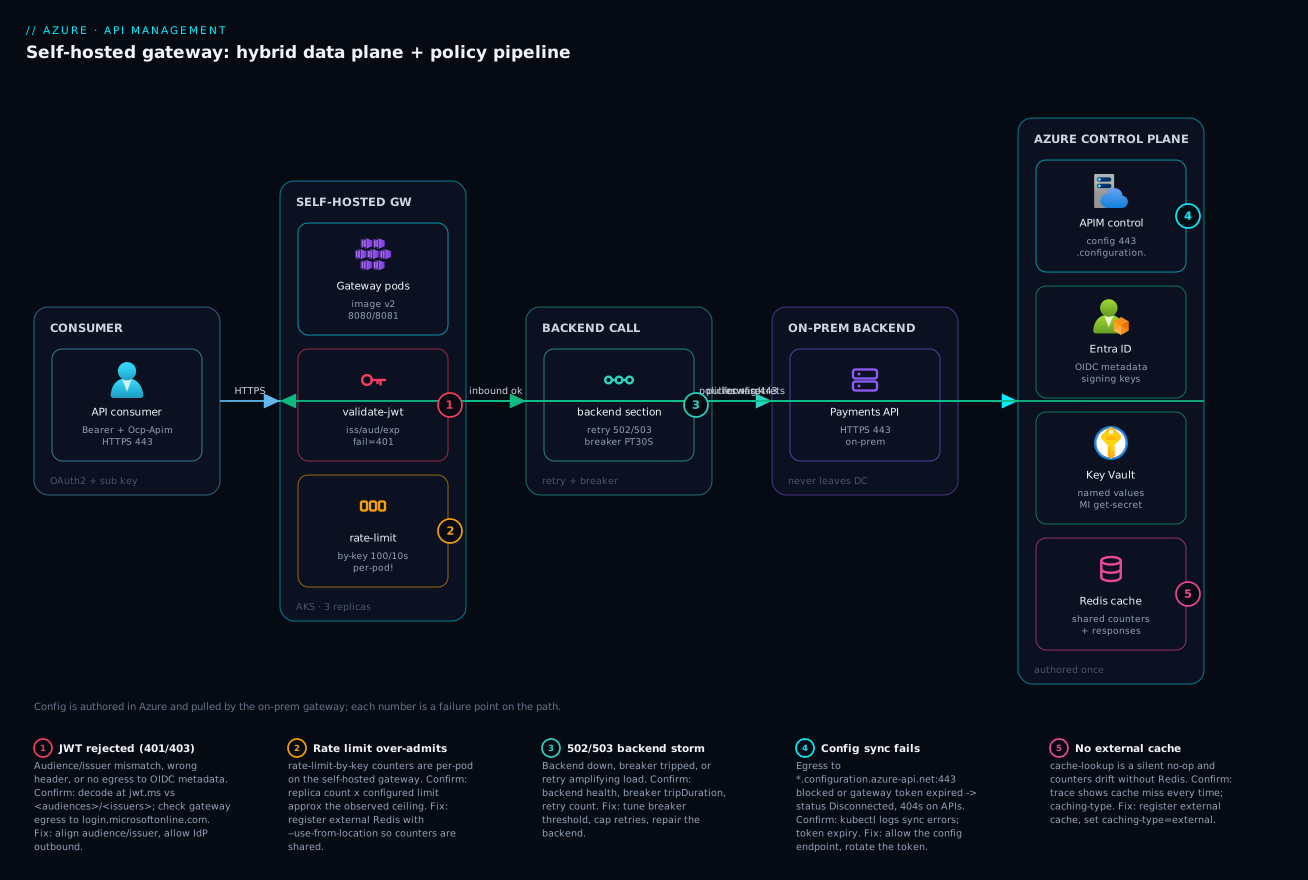
The diagram traces one request from a consumer to a regulated, on-prem backend, left to right, through the layers this article engineered. A consumer presents an OAuth2 bearer token and a subscription key over HTTPS (1). The request lands on the self-hosted gateway running as three replicas in your on-prem AKS, fronted by an ingress on 8080/8081. Inside the gateway the inbound pipeline runs in order: validate-jwt checks the token against Entra ID’s OIDC metadata (2) and rate-limit-by-key consults the shared counter store (3) — the badge sits there because, without the external cache, those counters are per-pod and the aggregate limit silently inflates with replica count. The backend section wraps the call with retry and a backend circuit breaker (4) before the request finally reaches the payments backend that never leaves the datacenter (5).
Two control-plane dependencies hang off the data path. The gateway continuously pulls configuration and pushes telemetry to the APIM control plane in Azure over 443 — policies, named values, and the API associations are authored there, not on the pod. Key Vault supplies secrets as named-value references resolved in the control plane and replicated down, so the pod never touches the vault. Entra ID is the token authority validate-jwt trusts, and Redis, colocated with the pods, is the shared counter and response cache that makes throttling accurate across replicas. The numbered badges mark the failure points; the legend narrates each as symptom, confirm, and fix.
Real-world scenario
Contoso Payments ran APIM as the front door for a card-authorization API whose backend was legally pinned to an on-prem datacenter — data-residency rules forbade the transaction payload from transiting a public Azure endpoint. The managed gateway was a non-starter: every call would hairpin from the on-prem clients out to azure-api.net and back to the on-prem backend, adding ~80 ms and, worse, putting regulated payloads on a path that crossed the public APIM gateway.
They deployed the self-hosted gateway to an on-prem AKS-on-Azure-Stack-HCI cluster colocated with the backend, registered against the production APIM instance (a Premium classic tier). Authoring, JWT policy, and rate limits stayed centralized in Azure; only the data plane moved. The payload never left the datacenter, and the round trip dropped from ~80 ms to single-digit milliseconds.
The bug that nearly shipped: their tiered rate-limit-by-key (Premium consumers at 5,000 rps) let traffic through at roughly 3× the configured ceiling under load. The cause was the self-hosted-gateway counter locality — five replicas, five independent counters. They caught it in a load test only because a downstream fraud system started alerting on volume. The fix was registering an external Redis colocated with the gateway and re-binding the cache so the rate-limit policy used a shared store:
az apim cache create \
  --resource-group rg-apim-prod --service-name apim-contoso-prod \
  --cache-id shgw-redis-dc1 \
  --connection-string "redis-dc1.internal:6380,password=$(cat /run/secrets/redis),ssl=True" \
  --use-from-location "On-Prem DC1"
With the external cache attached, the five replicas shared one counter and the aggregate limit held within a few percent — and the same Redis backed cache-lookup, cutting backend authorization load by a third during a known traffic spike. A second incident a month later taught the <base /> lesson: a developer added an API-scope inbound policy without <base />, silently dropping the global validate-jwt; for ninety minutes that one API accepted unauthenticated calls until an access review flagged 200s with no token. They added a pipeline check that fails any policy XML missing <base /> in a section that the global scope populates.
The lessons the team wrote into their runbook: on the self-hosted gateway, any policy that “counts” (rate-limit, quota, cache) is per-pod until you give it an external cache; and every section that should inherit must carry <base /> — CI enforces both.
Advantages and disadvantages
The self-hosted gateway is a sharp tool with real edges. The explicit trade-off:
| Advantages | Disadvantages |
|---|---|
| Data plane runs next to the backend (locality, residency) | You own HA, scaling, upgrades, and egress |
| Multi-cloud / on-prem / air-gapped backends get one policy engine | Counters/cache are per-pod without external Redis |
| Central authoring; only traffic moves | No internal cache; cache-lookup is a silent no-op |
| Survives a transient control-plane outage (after first sync) | Cold start with no prior sync serves no traffic |
| Same policy language as the managed gateway | Requires Developer/Premium/v2-Premium tier (cost) |
| Federated multi-team APIM via workspaces | More moving parts → more failure modes |
| Telemetry flows back to one place | Token expiry is a recurring rotation chore |
When each side matters: choose the self-hosted gateway when locality, residency, or multi-cloud reach is a hard requirement — those are not negotiable and the managed gateway simply cannot meet them. Accept the operational burden only then; if your backend is reachable from Azure and you have no residency rule, the managed gateway is strictly less work and shares state for free. The per-pod counter trap is the single disadvantage that surprises teams most, so treat the external cache as mandatory infrastructure, not an optimization, the moment you run more than one replica.
Hands-on lab
Stand up a self-hosted gateway against a real APIM instance, watch it connect, and prove JWT + rate-limit enforcement. This uses a Developer-tier instance (the cheapest that hosts a self-hosted gateway) and a local Kubernetes (kind/minikube or any cluster). Delete everything at the end.
Step 1 — Variables and a Developer-tier instance.
RG=rg-apim-lab
LOC=centralindia
APIM=apim-lab-$RANDOM   # globally-unique
az group create -n $RG -l $LOC -o table
az apim create -n $APIM -g $RG -l $LOC \
  --publisher-email you@example.com --publisher-name "Lab" \
  --sku-name Developer -o table   # provisioning takes ~30-45 min
Expected: a long-running create; Developer SKU, status eventually Succeeded.
Step 2 — Create the gateway resource and associate an API.
az apim gateway create -g $RG --service-name $APIM \
  --gateway-id shgw-lab \
  --location-data '{"name":"Lab DC","city":"Pune","countryOrRegion":"IN"}'

# Use the built-in Echo API as the target
az apim gateway api create -g $RG --service-name $APIM \
  --gateway-id shgw-lab --api-id echo-api
Step 3 — Mint a token and deploy the container.
EXPIRY=$(date -u -v+30d '+%Y-%m-%dT%H:%M:%SZ' 2>/dev/null || date -u -d '+30 days' '+%Y-%m-%dT%H:%M:%SZ')
TOKEN=$(az apim gateway token generate -g $RG --service-name $APIM \
  --gateway-id shgw-lab --key-type primary --expiry "$EXPIRY" --query value -o tsv)

kubectl create namespace apim 2>/dev/null
kubectl -n apim create secret generic shgw-lab-token --from-literal=value="$TOKEN"
# Apply a Deployment like the one in the deploy section (replicas: 1 for the lab),
# with config.service.endpoint = https://$APIM.configuration.azure-api.net
Step 4 — Confirm the gateway connects.
kubectl -n apim get pods -l app=shgw-lab
kubectl -n apim logs deploy/shgw-lab | grep -i "configuration"   # expect a successful sync line
# Portal: API Management > Gateways > shgw-lab shows status "Connected"
Expected: a “configuration … applied” log line and Connected in the portal.
Step 5 — Hit the gateway and watch policy enforce.
# Port-forward the gateway, then call the Echo API
kubectl -n apim port-forward deploy/shgw-lab 8080:8080 &
curl -i http://localhost:8080/echo/resource   # 200 if associated, 404 if you skipped Step 2
Add a rate-limit-by-key (e.g. calls="5" renewal-period="10") to the Echo API in the portal, wait for sync, then:
for i in $(seq 1 12); do curl -s -o /dev/null -w "%{http_code}\n" \
  http://localhost:8080/echo/resource; done | sort | uniq -c
Expected: a mix of 200 and 429 once the window fills — the throttle is live.
Validation checklist. You created the gateway resource, associated the API (proving the 404-without-association rule), minted and stored a rotating token, watched the pod sync from the control plane, and saw a policy authored in Azure enforced on your own container. The lab steps mapped to what each proves:
| Step | What you did | What it proves |
|---|---|---|
| 2 | Associate Echo API with the gateway | No association → 404, regardless of policy |
| 3 | Token in a K8s Secret | The pod authenticates with an expiring credential |
| 4 | Watch the sync log + portal status | Config is pulled, not authored on the pod |
| 5 | 404→200, then 429 under load | Association gates routing; policy gates traffic |
Cleanup.
kubectl delete namespace apim
az group delete -n $RG --yes --no-wait
Cost note. A Developer-tier instance is a few rupees per hour and has no SLA; an hour of this lab is well under ₹100, and deleting the resource group stops everything. Never run Developer in production.
Common mistakes & troubleshooting
This is the playbook — the part you bookmark. First a scannable table you read mid-incident, then the entries that bite hardest with full confirm detail.
| # | Symptom | Root cause | Confirm (exact cmd / portal path) | Fix |
|---|---|---|---|---|
| 1 | Gateway returns 404 for an API you “deployed” | API not associated with this gateway | Portal → Gateways → APIs list; az apim gateway api list |
az apim gateway api create --api-id <id> |
| 2 | Premium consumers exceed the rate limit ~N× | Per-pod counters (no external cache) | N replicas; kubectl get pods; load test shows N× |
Register external Redis; --use-from-location |
| 3 | cache-lookup never hits |
Self-hosted has no internal cache | Trace shows no cache hit; caching-type |
Register external cache; set caching-type="external" |
| 4 | 401 on a call Postman accepted | Wrong audience/issuer or header-name |
jwt.ms decode vs <audiences>/<issuers> |
Align audience/issuer; check openid-config url |
| 5 | One API accepts unauthenticated calls | Dropped <base /> removed global JWT |
Diff policy; trace shows no validate-jwt |
Add <base /> to that section; CI gate |
| 6 | Named value resolves empty; policy uses blank | Key Vault reference failing | Portal named value shows error; az apim identity |
Enable identity; grant Key Vault Secrets User; fix URI |
| 7 | Gateway status “Disconnected” | Egress to config endpoint blocked / token expired | kubectl logs sync errors; token expiry |
Allow *.configuration.*:443; rotate token |
| 8 | Pod CrashLoopBackOff at startup | No prior sync + control plane unreachable | kubectl describe pod; logs |
Restore egress; the cache only helps post-sync |
| 9 | 500 instead of 429 under no-key calls | counter-key null-refs on missing Subscription |
Trace → on-error; null context.Subscription |
context.Subscription?.Id ?? context.Request.IpAddress |
| 10 | 502/503 spikes, backend fine in isolation | Circuit breaker tripped or retry storm | Backend health; breaker tripDuration; retry count |
Tune breaker threshold; cap retries; fix backend |
| 11 | Policy change didn’t take effect | Edited a revision, never released it | az apim api revision list; current flag |
az apim api release create to promote |
| 12 | 403 only on POST/PUT | Claims-authz <choose> requires write role |
Trace shows write-role branch | Grant Payments.Write to the caller |
The expanded form for the entries that cost the most time:
1. Gateway returns 404 for an API you “deployed”.
Root cause: The API exists and has policy, but it was never associated with this gateway resource. A self-hosted gateway serves only explicitly assigned APIs.
Confirm: az apim gateway api list -g $RG --service-name $APIM --gateway-id shgw-onprem-dc1 does not list the API; the portal Gateways → APIs blade is empty.
Fix: az apim gateway api create --gateway-id shgw-onprem-dc1 --api-id payments-api. Routing is gated by association before policy ever runs.
2. Premium consumers exceed the configured rate limit by roughly the replica count.
Root cause: rate-limit-by-key/quota-by-key counters are per pod on the self-hosted gateway. Five replicas keep five independent counters, so calls="5000" admits ~25,000.
Confirm: kubectl get pods -n apim -l app=shgw-onprem-dc1 shows N replicas; a load test admits ~N× the limit.
Fix: Register an external Redis (az apim cache create ... --use-from-location "<location-data name>"). The rate-limit policy then uses Redis as a shared counter store and the aggregate holds.
3. cache-lookup never produces a cache hit.
Root cause: The self-hosted gateway has no internal cache; caching-type="internal" (or the default resolving to internal) is a no-op there.
Confirm: API Inspector trace shows the request always reaching the backend; the cache section reports a miss every time.
Fix: Register an external cache and set caching-type="external" on cache-lookup/cache-store.
4. A call Postman/curl accepted with the same token gets 401 at the gateway.
Root cause: Audience or issuer mismatch (<audiences>/<issuers> don’t match the token’s aud/iss), a wrong header-name, or the gateway can’t reach the OIDC metadata to fetch signing keys.
Confirm: Decode the token at jwt.ms and compare aud/iss to the policy; check gateway egress to login.microsoftonline.com.
Fix: Align <audiences>/<issuers>; verify the openid-config url; allow outbound to the IdP.
5. One API silently accepts unauthenticated calls.
Root cause: An API- or operation-scope policy was authored without <base /> in the inbound section, replacing the global policy that carried validate-jwt.
Confirm: Diff the policy; an API Inspector trace shows no validate-jwt ran on that API.
Fix: Add <base /> to the section. Add a CI check that fails any policy missing <base /> where the global scope populates that section.
6. A named value resolves empty and the policy silently uses a blank.
Root cause: A Key Vault reference failing — APIM’s managed identity missing or lacking get, the vault firewall blocking, or the secret deleted/disabled/mis-URI’d.
Confirm: The named value shows an error in the portal; az apim show --query identity; az role assignment list --assignee <principalId>.
Fix: Enable the identity, grant Key Vault Secrets User, allow trusted services on the vault, verify the secret and SecretUri.
7. The gateway shows “Disconnected” in the portal.
Root cause: The pod cannot reach the configuration endpoint (egress blocked) or the gateway token expired.
Confirm: kubectl logs -n apim deploy/shgw-onprem-dc1 shows config-sync errors or auth failures; check the token’s expiry.
Fix: Allow outbound to *.configuration.azure-api.net:443; rotate the token and update the Secret. Automate rotation before the 30-day limit.
The error/limit reference you scan first — every status code and limit you realistically hit:
| Code / limit | Meaning on the gateway | Likely cause | Confirm | Fix |
|---|---|---|---|---|
| 404 | Unknown API on this gateway | API not associated | az apim gateway api list |
Associate the API |
| 401 | validate-jwt rejected |
Bad/missing token, audience/issuer | jwt.ms vs policy | Fix token / policy |
| 403 | Authorized check failed | Missing role/claim or quota exceeded | Trace; quota counter | Grant role; raise quota |
| 429 | Rate limit hit | Too many calls in the window | X-RateLimit-Remaining header |
Back off; raise limit |
| 500 | Policy threw | Null-ref in expression, on-error | Trace → on-error | Null-guard the expression |
| 502 | Bad backend response | Backend down, breaker open, TLS | Backend health; breaker | Fix backend; tune breaker |
| 503 | No healthy backend / gateway | All replicas down, sync failed | kubectl get pods |
Restore replicas/egress |
| 504 | Backend timeout | Backend slower than forward-request timeout |
Trace duration | Raise timeout; speed backend |
| Token expiry | Auth to control plane | ≤30 days on CLI | Token expiry field |
Rotate before expiry |
| Counter scope | Per-pod state | No external cache | Replica count | Attach Redis |
| Named-value re-fetch | KV reference refresh | ~4h default | n/a | Expect ≤4h propagation |
Distinctions that save the most time:
| Distinction | The trap | How to tell them apart |
|---|---|---|
| 404 (no association) vs 404 (wrong path) | Hours in policy when it’s routing | Check the Gateways → APIs list first; no row = association |
| Per-pod vs shared counters | “Rate limit doesn’t work” | Replica count × configured limit ≈ observed ceiling |
internal vs external cache |
“Caching does nothing” | Self-hosted = always external; internal is a no-op |
| Token expiry vs egress block | Both show “Disconnected” | Logs: auth failure = token; connection refused = egress |
Best practices
- Instance must be Developer, Premium, or v2 Premium. Self-hosted gateways are unsupported on Basic/Standard/Consumption — confirm the SKU before you design.
- Always associate the API explicitly (
az apim gateway api create). Routing is gated by association before policy runs; forget it and you get 404 forever. - Treat the gateway token as a rotating secret. Store it as a Kubernetes Secret with a tracked expiry; automate rotation before the 30-day CLI limit.
- Run at least two replicas and set CPU/memory requests and limits — a single pod means every restart is downtime, and no limits invites noisy-neighbour eviction.
- Probe
/status-0123456789abcdef, never an API path. It returns 200 on runtime liveness independent of config sync. - Keep
<base />in every section unless an override is deliberately reviewed. Enforce it in CI — a dropped<base />silently removes inherited JWT/throttle. validate-jwtchecks signature, issuer, audience, and expiry; setclock-skewexplicitly. Do fine-grained authz on the parsedJwtviaoutput-token-variable-name, never on the raw header.- Attach an external Redis cache the moment you run >1 replica. It is mandatory infrastructure for accurate rate-limit/quota counters and the only way to cache responses.
- Set
caching-type="external"on every cache policy —internalis a silent no-op on the self-hosted gateway. - Define the circuit breaker on the backend entity; wrap the backend call with
retryfor transient codes. Capcountso a retry storm doesn’t amplify a partial outage. - All secrets are Key Vault-backed named values. No secret literals in policy XML; the pod never touches the vault.
- Ship config-as-code via APIOps, per commit. Reserve portal editing for emergencies; promote through revisions (non-breaking) and versions (breaking) with atomic, reversible releases.
Security notes
- Managed identity over secrets. Use APIM’s managed identity with Key Vault references so signing keys, connection strings, and API keys never sit in plaintext policy or in the cluster. Grant least privilege —
Key Vault Secrets User, not a broad role. - The pod never touches Key Vault. Resolution and rotation happen in the control plane and replicate down, so a compromised node can’t read the vault directly.
- Lock egress to exactly what the gateway needs — the configuration endpoint, telemetry endpoint, the IdP metadata host, Redis, and the backend. Deny everything else; the gateway is a high-value pivot.
- Authorize on claims, fail closed. A valid signature is not authorization. Read app roles/scopes from the parsed token and return 403 by default, not by omission.
- Keep
<base />so the global JWT check can’t be dropped. A missing inheritedvalidate-jwtis an authentication bypass; enforce it in CI and catch it in access reviews (200s with no token). - Shape errors in
on-error; never leak internals. Backend hostnames, stack traces, and breaker state must not reach the client — send them to Log Analytics. - Protect the gateway token. It is a bearer credential for the control plane; store it as a Secret, restrict RBAC on that Secret, and rotate it. A leaked token lets an attacker impersonate your gateway’s config pull.
- TLS to the gateway and the backend. Terminate on 8081, re-encrypt to the backend, and pin a minimum cipher set; a hybrid edge is no excuse for cleartext on the local network.
The security controls and what each buys you:
| Control | Mechanism | Secures against | Also prevents |
|---|---|---|---|
| Managed identity + KV references | identity + {{kv-name}} |
Secrets in policy / cluster | Hand-rolled rotation breaking the gateway |
| Egress allow-list | NetworkPolicy / firewall | Gateway used as a pivot | Accidental data exfiltration paths |
<base /> enforcement |
CI policy lint | Auth bypass via dropped JWT | Silent loss of org-wide rules |
| Claims-based authz | <choose> on parsed Jwt |
Over-broad access | Authorizing on spoofable header text |
| Token as restricted Secret | K8s RBAC on the Secret | Control-plane impersonation | Long-lived leaked credentials |
on-error shaping |
Clean error body | Internal info leak | Backend topology disclosure |
| TLS terminate + re-encrypt | 8081 + backend HTTPS | Cleartext on the wire | Downgrade on the local network |
Cost & sizing
The bill is broader than the managed path because you pay for the instance and the infrastructure you run the gateway on:
- The APIM instance dominates the floor. A Developer tier is cheap (a few thousand INR/month) but has no SLA and is dev/test only. Premium (classic) and Premium v2 are the production tiers that host self-hosted gateways, and they are materially more expensive — budget per-unit, scaled by region count.
- Your AKS nodes carry the gateway pods. Three small replicas (200m CPU / 256Mi each) fit comfortably on an existing cluster; the marginal cost is near zero if you already run AKS, or a small node pool if not.
- External Redis is the cost you must not skip on the self-hosted gateway — it is what makes counters and caching correct. A small Azure Cache for Redis (or a colocated OSS Redis) is a modest monthly add and pays for itself the first time it prevents over-the-limit traffic or cuts backend load.
- Egress and cross-region hops add up if Redis or the backend is not colocated — keep them on the same network as the pods.
- Gateway runtime itself has no per-call license on top of the instance — you are paying for the instance unit and your own compute, not per request through the self-hosted gateway.
A rough monthly picture for a production hybrid edge: a Premium v2 instance unit, three gateway replicas on an existing AKS cluster (marginal), a small Redis (~₹3,000–8,000), plus Log Analytics ingestion (~₹1,000–3,000). The cost drivers:
| Cost driver | What you pay for | Rough INR / month | What it buys | Watch-out |
|---|---|---|---|---|
| Developer instance | Non-SLA dev/test tier | ~₹4,000–6,000 | A place to host self-hosted (lab) | Never production |
| Premium / Premium v2 unit | Production instance unit | Materially higher (per unit) | SLA, VNet, self-hosted, workspaces | Scales by region/unit count |
| AKS gateway pods | 3× small replicas | Marginal on existing AKS | HA data plane near backend | A dedicated node pool adds cost |
| External Redis | Shared counters + cache | ~₹3,000–8,000 | Accurate limits, response caching | Colocate to avoid cross-region egress |
| Log Analytics | Gateway telemetry ingestion | ~₹1,000–3,000 | Diagnostics + tracing | Sample high-volume APIs |
| Egress / cross-region | Data transfer | Variable | n/a | Keep Redis + backend local |
Sizing rules of thumb:
| Load | Replicas | Per-pod resources | Cache | Note |
|---|---|---|---|---|
| Lab / dev | 1 | 200m / 256Mi | Optional | Counters per-pod is fine |
| Low prod | 2 | 200m / 256Mi | Required (Redis) | HA + shared counters |
| Medium prod | 3–5 | 500m / 512Mi | Required | HPA on CPU/RPS |
| High prod | 5+ (HPA) | 1 / 1Gi | Required + sized Redis | More pods = harder counter accuracy without Redis |
Interview & exam questions
1. What is the APIM self-hosted gateway and when do you use it instead of the managed gateway? It is the APIM data-plane runtime packaged as a container that you deploy to your own Kubernetes, configured from the same Azure control plane. Use it when the backend cannot be reached from Azure or a residency/latency rule forbids the public-Azure hairpin — on-prem, multi-cloud, or air-gapped backends. The control plane (authoring, policy, named values) stays in Azure; only the data plane moves.
2. Which APIM SKUs can host a self-hosted gateway? Developer and Premium (classic), and Premium v2. Consumption, Basic, and Standard (classic and v2) cannot. Developer is dev/test only (no SLA); Premium and Premium v2 are the production tiers.
3. Why might a self-hosted gateway return 404 for an API that exists and has policy? Because the API was never associated with that gateway resource. A self-hosted gateway serves only explicitly assigned APIs; routing is gated by az apim gateway api create before any policy runs. Confirm with az apim gateway api list.
4. On the self-hosted gateway, why can rate-limit-by-key admit far more than its configured limit? The counters are kept per pod, not shared across replicas, unless an external cache is attached. N replicas keep N independent counters, so the aggregate admits ~N× the limit. Register an external Redis (--use-from-location) so the policies use a shared counter store.
5. What does <base /> do, and what is the danger of omitting it? <base /> injects the enclosing scope’s policy at that point in a section (global → product → API → operation). Omitting it replaces the parent instead of inheriting it — most dangerously dropping a global validate-jwt, silently turning one API into an unauthenticated endpoint.
6. How do you do fine-grained authorization beyond what validate-jwt checks? validate-jwt proves signature/issuer/audience/expiry and can require a coarse claim. For per-operation rules, persist the token with output-token-variable-name, then in a <choose> read the strongly-typed Jwt.Claims and return 403 when the required role/scope is absent — failing closed, and never authorizing on the raw Authorization header.
7. Difference between rate-limit and quota policies? rate-limit/rate-limit-by-key is a short sliding window (seconds) that smooths bursts and returns 429; quota/quota-by-key is a long renewal period (hours/days) enforcing a contractual volume ceiling and returns 403. The -by-key variants let you choose the counter dimension (subscription, IP, claim) to tier consumers.
8. Why is cache-lookup a no-op on the self-hosted gateway by default, and how do you fix it? The self-hosted gateway has no internal cache, so caching-type="internal" (or the default resolving to internal) does nothing. Register an external Redis-compatible cache and set caching-type="external" on the cache policies; the same cache also backs shared rate-limit/quota counters.
9. Where does the circuit breaker live, and how does it differ from retry? The circuit breaker is configured on the backend entity (Microsoft.ApiManagement/.../backends), not in policy XML, and trips the whole backend out of rotation for all callers when failures cross a threshold. retry lives in the backend section and re-sends a single request on transient codes. Use retry for blips and the breaker for a backend that is genuinely down.
10. How do you keep secrets out of policy on the self-hosted gateway? Use Key Vault-backed named values. APIM’s managed identity reads the secret, resolves and rotates it in the control plane, and replicates the value to every gateway — the pod never touches Key Vault. Reference it as {{named-value}}; never paste a literal secret into policy XML.
11. What is the difference between a version and a revision, and how do you roll back? A version is a breaking change exposed on a new path/header/query that consumers opt into; a revision is a non-breaking iteration of one version that you stage as ;rev=N and promote atomically with az apim api release create. Roll back by re-pointing current to the prior revision — instant and reversible.
12. How does the self-hosted gateway behave during an Azure control-plane outage? If it has already synced at least once, it serves the last-known-good configuration from local disk, so a transient outage does not take down your edge. If it has never synced (cold start with the control plane unreachable), it will not serve traffic. This resilience-after-first-sync is a primary reason to colocate it with an on-prem backend.
These map to AZ-204 (Developer Associate) — implement API Management, configure policies, secure APIs — and AZ-305 (Solutions Architect) for the hybrid/topology decisions. The identity angle (validate-jwt, app roles, OIDC) touches AZ-500, and the Kubernetes deployment touches AZ-104/CKAD-style operational knowledge. A compact cert mapping:
| Question theme | Primary cert | Objective area |
|---|---|---|
| Self-hosted vs managed, topology, SKUs | AZ-305 | Design hybrid / API architectures |
Policy pipeline, scopes, <base /> |
AZ-204 | Implement API Management |
validate-jwt, claims, OIDC |
AZ-500 / AZ-204 | Secure APIs; identity |
| Rate-limit/quota, caching, counters | AZ-204 | Configure policies |
| Versions, revisions, APIOps | AZ-204 / AZ-400 | Config-as-code, CI/CD |
| AKS deployment, probes, secrets | AZ-104 | Operate workloads on Kubernetes |
Quick check
- A self-hosted gateway returns 404 for an API that clearly exists in the instance and has policy attached. What is the single most likely cause, and the command that confirms it?
- Your Premium consumers are throttled at 5,000 rps but you observe ~20,000 rps getting through. You run four gateway replicas. What is happening and what is the fix?
- True or false: setting
caching-type="internal"oncache-lookupenables response caching on the self-hosted gateway. - An API that should require a bearer token starts accepting unauthenticated calls after a recent policy edit. What was almost certainly changed?
- Where is the backend circuit breaker configured, and how is that different from the
retrypolicy?
Answers
- The API was not associated with that gateway resource — a self-hosted gateway serves only explicitly assigned APIs, and association gates routing before policy runs. Confirm with
az apim gateway api list -g $RG --service-name $APIM --gateway-id <id>(the API will be absent) and fix withaz apim gateway api create --api-id <id>. - The
rate-limit-by-keycounters are per pod; four replicas keep four independent counters, so the aggregate admits ~4× the configured limit. Register an external Redis cache bound with--use-from-locationso the rate-limit policy uses a shared counter store across all replicas. - False. The self-hosted gateway has no internal cache, so
internalis a silent no-op. You must register an external Redis-compatible cache and setcaching-type="external". - A
<base />was dropped from the inbound section at API or operation scope, replacing the inherited global policy that carriedvalidate-jwt— turning the API into an unauthenticated endpoint. Restore<base />and add a CI lint that fails policies missing it where the global scope populates that section. - The circuit breaker is configured on the backend entity (
Microsoft.ApiManagement/.../backends) and trips the whole backend out of rotation for all callers when failures cross a threshold.retrylives in thebackendpolicy section and re-sends a single request on transient codes — retry for blips, breaker for a backend that is genuinely down.
Common beginner mistakes
The troubleshooting section above maps symptoms to fixes. This one is different: it names the wrong mental model that produces the symptom, so you stop generating the bug in the first place. Each is a belief, why it is false, and the model to hold instead.
“The self-hosted gateway is a second, independent APIM.” It is not an instance — it is a data-plane deployment target. You never author policy on the pod; you author in the control plane and the pod pulls it. Right model: one brain (control plane in Azure), many hands (gateways). If you find yourself looking for “where do I edit the policy on the gateway”, you have the model backwards.
“The portal says Connected, so my rate limits work.” “Connected” only means the config-sync channel is healthy — the pod is talking to the control plane. It says nothing about whether stateful policies are correct, because those counters are per-pod. Right model: connectivity and correctness are independent. A perfectly Connected three-replica gateway still admits 3× a rate-limit-by-key ceiling until an external cache backs the counter.
“cache-lookup will speed things up out of the box.” On the self-hosted gateway there is no internal cache, so the policy is a silent no-op — no error, just every request reaching the backend. Right model: on self-hosted, caching is always external. Register a Redis-compatible cache and set caching-type="external", or the policy does nothing at all.
“validate-jwt authorizes the caller.” It authenticates — signature, issuer, audience, expiry — and can check one coarse claim. It does not decide whether this caller may perform this action. Right model: authN ≠ authZ. Fine-grained authorization is your own <choose> reading the parsed Jwt.Claims, failing closed with 403. A valid signature is not permission.
“Omitting <base /> just adds my policy on top.” It replaces the enclosing scope instead of layering onto it. Drop it in an inbound section and you silently delete the inherited global validate-jwt, correlation-id, and CORS. Right model: <base /> is “also run everything I inherit, right here.” Its absence is a deletion, not a no-op — which is why it is the single most dangerous character in the whole pipeline.
“quota and rate-limit are basically the same throttle.” They answer different questions with different windows and different status codes. rate-limit is a seconds-long sliding window that smooths bursts and returns 429; quota is an hours/days renewal ceiling enforcing a contract and returns 403. Right model: rate-limit protects your backend; quota enforces your billing plan. Using one where you need the other either lets a burst through or bills incorrectly.
“The gateway token is set-and-forget.” It is a bearer credential with an expiry — at most 30 days when minted via the CLI. Paste it once and the gateway goes Disconnected the day it lapses. Right model: the token is a short-lived secret; store it as a Kubernetes Secret with a tracked expiry and automate rotation before the deadline, exactly like any other rotating credential.
“GenAI token limits are just request rate limits with a different name.” rate-limit-by-key counts calls; azure-openai-token-limit counts tokens, and one call can burn hundreds of thousands of them. A request-based limit cannot protect a TPM budget. Right model: for model traffic the unit of load is the token — meter tokens, and pair the token limit with a request rate-limit if you also want to cap call frequency.
Practice challenges
Work these in order — they escalate from “make the gateway serve one API” to “front an LLM with a load-balanced pool and ship it as code”. Every ID is a placeholder; nothing here makes a live call, so read each solution as schema-correct reference, not a run log. Try each before opening its solution.
1 — Beginner: make the 404 go away. You created a self-hosted gateway resource shgw-onprem-dc1 and deployed the pod (portal shows Connected), but every call to payments-api returns 404. Write the one command that fixes it, and state why the pod being “Connected” was a red herring.
<details> <summary>Solution</summary>
az apim gateway api create \
  --resource-group $RG --service-name $APIM \
  --gateway-id shgw-onprem-dc1 --api-id payments-api
Confirm with az apim gateway api list --gateway-id shgw-onprem-dc1 ... — the API was absent.
Why: a self-hosted gateway serves only explicitly associated APIs; association gates routing before any policy or sync status matters, so “Connected” tells you nothing about routing. </details>
2 — Beginner→Intermediate: inherit, don’t replace. At API scope you must add a correlation-id header on the way in and strip the Server header on the way out, without dropping the org-wide validate-jwt that lives at global scope. Write the four-section policy, and say what one missing element would silently disable authentication.
<details> <summary>Solution</summary>
<policies>
  <inbound>
    <base />   <!-- inherits global validate-jwt + product policy -->
    <set-header name="X-Correlation-Id" exists-action="skip">
      <value>@(context.RequestId)</value>
    </set-header>
  </inbound>
  <backend><base /></backend>
  <outbound>
    <base />
    <set-header name="Server" exists-action="delete" />
  </outbound>
  <on-error><base /></on-error>
</policies>
Why: omitting <base /> in inbound replaces the inherited global policy — including validate-jwt — turning the API into an unauthenticated endpoint. <base /> means “run everything inherited here too.”
</details>
3 — Intermediate: authorize the write, not just the token. validate-jwt already proves the token. Add operation-scope logic so that POST/PUT require the Payments.Write app role while GET needs only a valid token, failing closed with 403.
<details> <summary>Solution</summary>
<inbound>
  <base />
  <validate-jwt header-name="Authorization" output-token-variable-name="jwt"
                failed-validation-httpcode="401" clock-skew="120">
    <openid-config url="https://login.microsoftonline.com/{tenant-id}/v2.0/.well-known/openid-configuration" />
    <audiences><audience>api://payments-api</audience></audiences>
  </validate-jwt>
  <choose>
    <when condition="@(context.Request.Method == "POST" || context.Request.Method == "PUT")">
      <choose>
        <when condition="@(!((Jwt)context.Variables["jwt"]).Claims.GetValueOrDefault("roles","").Contains("Payments.Write"))">
          <return-response>
            <set-status code="403" reason="Forbidden" />
            <set-body>@("{\"error\":\"Payments.Write role required\"}")</set-body>
          </return-response>
        </when>
      </choose>
    </when>
  </choose>
</inbound>
Why: validate-jwt authenticates and checks a coarse claim; fine-grained authorization reads the strongly-typed Jwt from output-token-variable-name and returns 403 by default — authN is not authZ, and you never authorize on the raw header.
</details>
4 — Intermediate→Advanced: fix the per-pod counter trap. Your three-replica gateway admits ~3× a rate-limit-by-key ceiling. Register the shared store and show the cache policy that now actually works, binding both to the gateway’s location.
<details> <summary>Solution</summary>
az apim cache create \
  --resource-group $RG --service-name $APIM \
  --cache-id shgw-onprem-redis \
  --connection-string "redis-onprem.internal:6380,password=...,ssl=True" \
  --use-from-location "On-Prem DC1"
<inbound>
  <base />
  <cache-lookup caching-type="external" downstream-caching-type="none"
                vary-by-developer="false" vary-by-developer-groups="false">
    <vary-by-header>Accept</vary-by-header>
  </cache-lookup>
</inbound>
<outbound>
  <base />
  <cache-store duration="30" />
</outbound>
Why: --use-from-location binds the Redis to the gateway’s location-data name, so the same store backs shared rate-limit/quota counters and responses; caching-type="external" is mandatory because internal is a silent no-op on the self-hosted gateway.
</details>
5 — Advanced: front two Azure OpenAI backends with a pool + token limit. Spread model traffic across a primary PTU deployment and a pay-as-you-go fallback, and cap each consumer at 20,000 TPM. Write the pool (Bicep) and the inbound policy.
<details> <summary>Solution</summary>
resource openaiPool 'Microsoft.ApiManagement/service/backends@2023-09-01-preview' = {
  parent: apim
  name: 'openai-pool'
  properties: {
    type: 'Pool'
    pool: { services: [
      { id: '/backends/openai-ptu-eastus',  priority: 1, weight: 1 }  // primary
      { id: '/backends/openai-payg-eastus', priority: 2 }             // failover
    ] }
  }
}
<inbound>
  <base />
  <azure-openai-token-limit counter-key="@(context.Subscription.Id)"
      tokens-per-minute="20000" estimate-prompt-tokens="true"
      remaining-tokens-header-name="x-ratelimit-remaining-tokens" />
  <set-backend-service backend-id="openai-pool" />
</inbound>
Why: the pool owns failover (priority 2 is used only when every priority-1 member’s circuit is open), while azure-openai-token-limit meters tokens per minute — not requests — which is the unit Azure OpenAI is actually rate-limited in; keyed per subscription it tiers consumers exactly like rate-limit-by-key.
</details>
6 — Advanced: ship it as code, atomically, with a <base /> guard. Stage a policy change without touching production traffic, promote it in one reversible step, and add a CI check that fails any inbound policy that dropped <base />.
<details> <summary>Solution</summary>
# Stage on a revision (production keeps serving the current one)
az apim api revision create -g $RG --service-name $APIM \
  --api-id payments-api --api-revision 4 \
  --api-revision-description "Enforce Payments.Write on POST"

# Promote atomically; roll back by re-releasing the prior revision
az apim api release create -g $RG --service-name $APIM \
  --api-id payments-api --release-id rel-4 --api-revision 4 --notes "write-role enforcement"
# CI lint: fail if any inbound section has no <base /> (run over exported policy XML)
grep -rzoP '<inbound>(?:(?!<base\s*/>).)*?</inbound>' apim-artifacts/ && {
  echo "ERROR: inbound policy without <base/> — inherited JWT/throttle would be dropped"; exit 1; }
Why: revisions give a non-breaking, instantly reversible change (re-point current), and the lint catches the single highest-severity mistake in the whole lesson — a dropped <base /> that silently removes the inherited validate-jwt — before it ships.
</details>
Glossary
- Control plane — the Azure-resident management API, developer portal, policy store, and named values; the single source of truth you author against.
- Managed gateway — the built-in APIM data plane running in Azure at
<name>.azure-api.net; always present, with shared counters and an internal cache. - Self-hosted gateway — the APIM data-plane runtime as a container you run on your own Kubernetes; serves only associated APIs, with per-pod state unless an external cache is attached.
- Workspace — a v2 construct giving a team isolated APIs/products/policies inside one instance, optionally fronted by a workspace gateway.
- Gateway token — a scoped, expiring credential (≤30 days on the CLI) the gateway pod presents to the control plane to pull configuration.
- Configuration endpoint —
<name>.configuration.azure-api.netover HTTPS/443; the host the pod polls for config and pushes telemetry to. - Policy scope — the four nested levels (All APIs/global → Product → API → Operation) that compose each policy section.
<base />— the element that injects the enclosing scope’s policy; omit it and you replace the parent instead of inheriting it.validate-jwt— the inbound policy that validates a token’s signature, issuer, audience, and expiry against OIDC metadata and optional required claims.output-token-variable-name— thevalidate-jwtattribute that stores the parsed token as a strongly-typedJwtfor later claims-based authorization.rate-limit-by-key— a sliding-window throttle (seconds) keyed by an expression; per-pod on the self-hosted gateway without an external cache.quota-by-key— a long-period (hours/days) volume ceiling keyed by an expression; per-pod without an external cache.- External cache — a registered Redis-compatible store bound with
--use-from-locationthat backs shared counters and response caching on the self-hosted gateway. - Circuit breaker — a rule on the backend entity that removes the backend from rotation for
tripDurationwhen failures cross a threshold; distinct from per-requestretry. - Named value — the APIM configuration store entry (plain string, secret, or Key Vault reference) referenced in policy as
{{name}}. - Policy fragment — a reusable XML block authored once and pulled into policies with
<include-fragment>. - Version — a breaking change exposed on a new path/header/query that consumers opt into.
- Revision — a non-breaking iteration of one version, staged as
;rev=Nand promoted atomically (and reversibly) with a release. - APIOps — the supported config-as-code toolkit that extracts APIM config to Git and publishes per-commit diffs through environments.
- GenAI gateway (AI gateway) — the APIM policy family for fronting LLM/Azure OpenAI backends: token-rate limiting, token-metric emission, and semantic caching, all sharing the self-hosted per-pod-without-external-cache behaviour.
azure-openai-token-limit/llm-token-limit— a tokens-per-minute (and optional token-quota) throttle keyed by an expression; meters model tokens rather than request count, and is per-pod on the self-hosted gateway without an external cache.- Semantic caching (
llm-semantic-cache-lookup/-store) — response caching that matches on prompt-embedding similarity above ascore-thresholdinstead of an exact key; requires an embeddings backend and a vector-capable external cache (e.g. Azure Managed Redis / Redis Enterprise). - Backend pool — a
Microsoft.ApiManagement/service/backendsentity oftype: Poolthat load-balances across member backends byweightandpriority, each member able to carry its own circuit breaker; referenced from policy like a single backend. - VNet injection (External / Internal) — the classic Developer/Premium mode placing the whole instance in a VNet; External keeps a public endpoint, Internal exposes only a private VIP (front it with Application Gateway or Front Door).
- VNet integration (v2) — the v2-tier outbound path to private backends without full injection (GA on Standard v2 and Premium v2), paired with an inbound private endpoint; simpler and lighter than classic injection.
- Private endpoint (APIM) — a private inbound IP for the instance so consumers reach the gateway without traversing the public internet.
- Workspace gateway — a managed gateway dedicated to one workspace, giving a team its own data plane and RBAC-scoped blast-radius boundary inside a single shared instance (a v2 capability).
Next steps
You can now deploy a self-hosted gateway and engineer its policy pipeline. Build outward:
- Next: Entra ID token claims, app roles & on-behalf-of flow — master the tokens
validate-jwtchecks and the claims your authz reads. - Related: Azure Cache for Redis: clustering, geo-replication & failover — size and harden the external cache that makes counters and caching correct.
- Related: Azure Key Vault: secrets, keys & certificates and secret rotation with managed identity — get named-value secrets right so they never resolve empty.
- Related: Application Gateway with WAF, mTLS & end-to-end TLS — the L7 layer that can front APIM and also emit 502s.
- Related: KQL for Azure Monitor & Log Analytics mastery — query
ApiManagementGatewayLogsto find 4xx/5xx by API at speed. - Related: API gateways explained: why you need one — the pattern and where APIM fits among the alternatives.