In a nutshell
If you have only ever used Logic Apps Consumption, picture the difference like this. Consumption is a hot desk in a shared serviced office: you pay a few rupees every time you use the printer, the building’s reception (Microsoft’s shared connectors) handles your mail, and you can’t install your own locked filing cabinet because the space isn’t really yours. Logic Apps Standard is leasing your own small floor in that building. You pay a flat monthly rent whether the floor is busy or empty, you get a private internal corridor (VNet integration) to the secure archive room where the sensitive records live, you install and maintain your own filing cabinets (the storage account the runtime depends on), and you run your own loading dock (a deployment pipeline) instead of asking reception to move things for you.
The B2B/EDI part is the mailroom on that floor. Trading partners ship you sealed, coded parcels — an AS2 envelope wrapping an X12 or EDIFACT document, which you can think of as a purchase order written in a terse industry shorthand. The mailroom decrypts the parcel, checks the sender’s signature, matches the shipping manifest against a signed agreement you keep on file, stamps a receipt (a 997 acknowledgment) to send back, and files the order into your systems. In Standard, that whole mailroom runs on your floor (in-process), which is why it is fast and can reach your private systems — but the agreements and schemas still live in a small records office next door called an integration account.
That single shift — from renting a service to leasing infrastructure — explains almost everything hard about Standard. You gain speed, privacy, and predictable cost; you inherit storage, networking, and deployment as things you now own and can misconfigure. The most infamous rookie surprise: the app simply refuses to start because its own filing cabinets (storage) are not reachable.
Level: Advanced · Time: ~71 min · Format: concepts, decision tables, illustrative az/Bicep/workflow.json snippets (no live runs — all IDs are placeholders), a hands-on lab, and graded practice.
Before you start, be comfortable with the App Service / Functions hosting model, private endpoints and private DNS, and managed identity — the Azure App Service Deep Dive and Azure Storage Accounts Deep Dive are the on-ramps. After this lesson you can decide stateful vs stateless per workflow, make a Standard app fully private (all four storage sub-resources included), pick built-in over managed connectors for anything in your VNet, stand up AS2/X12/EDIFACT with the right integration-account SKU, and ship the project through a staging slot without leaking credentials. The full objectives and prerequisites are spelled out in the two sections just below.
Logic Apps Standard is not “Consumption with a different SKU.” It is a different runtime — the single-tenant Azure Functions host running the Logic Apps engine as an extension — and that one fact drives almost every architectural decision you will make. You get a deployable package of code-like artifacts instead of a portal-bound resource, a dedicated compute plane you can drop into a virtual network, built-in connectors that run in-process, and a flat hosting price instead of per-action billing. The trade is that you now own things the Consumption tier hid from you: the storage account behind run history, the VNet plumbing, the deployment pipeline, and the integration-account lifecycle.
This guide builds a production-grade Standard logic app the way it survives an enterprise: stateful and stateless workflows side by side, locked behind private endpoints, exchanging EDI (AS2/X12/EDIFACT) with trading partners, and shipped through Bicep with deployment slots. The hardest failures in this space are quiet — a logic app that will not start because its storage lost a table private endpoint, a managed connector that silently can’t reach a private SQL server, a poison interchange that hot-loops your consumer. So beyond the prose and the az/Bicep snippets, every section anchors to scannable reference tables: the option matrices you set once, the limits you bump into, and a symptom → cause → confirm → fix playbook you keep open during a cutover.
By the end you will pick stateful versus stateless per workflow deliberately, wire all four storage sub-resources for private access, choose built-in over managed connectors for anything inside your VNet, load and reference B2B artifacts without the old Consumption link step, and ship the whole thing through a staging slot with slot-sticky settings. You will also know exactly which az command or portal blade proves each failure, so a stuck deployment is a ninety-second diagnosis instead of a two-hour one.
What problem this solves
Enterprise integration is where systems that were never meant to talk are forced to. An order placed in a partner’s ERP arrives as an X12 850 over AS2; it must be decoded, validated against an agreement, acknowledged with a 997, transformed, and written to a private order database — durably, with retries, and an audit trail a partner’s dispute can be settled against. Consumption Logic Apps handled the shape of this beautifully but hit two production walls: per-action billing turned high-fan-out EDI into a line item leadership noticed, and the multi-tenant connector model could not reach resources locked behind private endpoints, because connector traffic originates from Microsoft’s network, not yours.
What breaks without Standard’s model: teams either keep paying per-action and accept that a private-only data tier is impossible through managed connectors, or they hand-roll the whole pipeline in Functions and re-implement AS2/EDI from scratch. Both are expensive in different currencies. Standard collapses the gap — in-process B2B operations, VNet-aware built-in connectors, flat compute — but it hands you the operational surface the platform used to hide: storage you must keep reachable, networking you must configure in both directions, and a runtime that simply will not boot if its content share can’t mount.
Who hits this: integration teams moving EDI/B2B workloads off Consumption for cost or network-isolation reasons; platform teams adopting a hub-spoke topology where every PaaS dependency must be private; and anyone who tried to lock down a Standard logic app’s storage by copying an App Service runbook and watched the app refuse to start. The fix is rarely “open it back up” — it’s “find the sub-resource, setting, or DNS zone that’s missing and make the runtime’s dependency reachable.”
To frame the whole field before the deep dive, here is the spread of decisions this article makes concrete, the question each forces, and where the answer lives:
| Decision area | The question it forces | Default that bites | Where you set it |
|---|---|---|---|
| Hosting plan | Dedicated compute or elastic? Isolated? | WS1 may be undersized for B2B | az functionapp plan SKU |
| Per-workflow kind | Durable or in-memory? | Stateful everywhere (storage tax) | kind in workflow.json |
| Run-history storage | Same region? Dedicated? Private? | Shared account, public, no retention | Storage account + host.json |
| VNet — outbound | Route all egress through the VNet? | WEBSITE_VNET_ROUTE_ALL=0 (RFC1918 only) |
App setting + integration |
| VNet — inbound | Private trigger endpoint + lockdown? | Public trigger, Allow default |
Private endpoint + access restriction |
| Connectors | Built-in or managed? | Managed can’t reach private targets | connections.json |
| B2B artifacts | Which integration-account SKU? | Free/Basic can’t hold agreements | Microsoft.Logic/integrationAccounts |
| Error handling | Retry, try/catch, dead-letter? | Default retry on non-idempotent ops | workflow.json actions |
| CI/CD | Slot swap with sticky settings? | Slot loses VNet + steals prod creds | Pipeline + slot settings |
Learning objectives
By the end of this article you can:
- Explain why Logic Apps Standard is the single-tenant Functions host with a Logic Apps extension, and when its flat compute billing beats Consumption’s per-action model (and when it doesn’t).
- Choose stateful vs stateless per workflow from first principles, and design run-history storage as a first-class, retention-bounded dependency.
- Wire VNet integration outbound and a private endpoint inbound, and — the part teams forget — make all four storage sub-resources (
blob,file,table,queue) private withvnetContentShareEnabledand the matching private DNS zones. - Pick built-in (service-provider) connectors for anything in your VNet and reserve managed connectors for public SaaS, and authenticate end-to-end with managed identity instead of keys.
- Stand up AS2/X12/EDIFACT B2B in-process, load partners/agreements/schemas/maps into an integration account of the right SKU, and route functional acks (997/CONTRL) back to partners.
- Build defence in depth for failures with action retry policies, try/catch scopes, and broker-native dead-letter strategy so a poison interchange parks instead of hot-looping.
- Ship the project as a zip to a staging slot, smoke-test, and swap with slot-sticky settings and per-slot VNet integration — and wire Application Insights with the KQL that finds a failing action fast.
- Diagnose the canonical Standard failure modes (won’t start on private storage, managed connector can’t reach private SQL, slot leaked creds) with the exact command or blade that confirms each.
Prerequisites & where this fits
You should be comfortable with the App Service / Functions hosting model — an App Service (or Workflow Standard) plan is the set of VM workers you rent, and the logic app runs on it sharing its CPU and memory — because a Standard logic app is a function app with kind functionapp,workflowapp. You should know how to run az in Cloud Shell, read JSON output, and understand private endpoints, private DNS zones, and managed identity at a working level. Familiarity with EDI concepts (interchange, transaction set, control numbers) helps for the B2B section but is not assumed.
This sits in the Integration & Networking track. Upstream of it are the platform mechanics in the Azure App Service Deep Dive: Plans, Scaling, Slots, TLS (the plan, slots and VNet integration are shared) and the storage fundamentals in Azure Storage Accounts Deep Dive (run history lives there). It pairs tightly with Azure Service Bus sessions, dedup & dead-letter patterns for the messaging backbone, private endpoint vs service endpoint and private endpoints & private DNS at scale for the network isolation, and Azure Monitor & Application Insights for observability for the telemetry. If you are weighing this against code-first orchestration, Azure Durable Functions orchestration patterns is the sibling decision, and the EDI/B2B integration platform on Logic Apps article goes deeper on the trading-partner side.
A quick map of who owns what during an integration incident, so you call the right person fast:
| Layer | What lives here | Who usually owns it | Failure classes it can cause |
|---|---|---|---|
| Trading partner | Their ERP, AS2 endpoint, certs | Partner / EDI team | Bad interchange, expired partner cert, MIC mismatch |
| Logic app workflow | Triggers, actions, scopes | Integration / dev team | Action failure, bad retry, unhandled exception |
| Built-in connectors | In-process SB/SQL/Blob | Integration team | Auth (MI), throttling, connection config |
| Run-history storage | Tables/blobs/queues/files | Platform team | App won’t start, content share won’t mount |
| VNet / DNS | Subnets, PEs, private zones | Network team | No resolution, managed connector can’t reach private |
| Integration account | Partners, agreements, schemas | EDI / integration team | Decode fails, agreement not found, SKU gate |
| CI/CD + slots | Pipeline, slot settings | Platform / DevOps | Leaked creds on swap, slot left VNet |
Core concepts
Six mental models make every later decision obvious.
The resource is a function app wearing a Logic Apps hat. One Standard logic app hosts many workflows, each a workflow.json in its own folder. The resource — not the workflow — is the unit of deployment, scaling, networking, and identity. The az logicapp command group is a thin wrapper over az functionapp; when an operation is missing under logicapp, the functionapp equivalent works because the kind is literally functionapp,workflowapp. Internalise this and the whole platform stops being mysterious: VNet integration, slots, app settings, and Kudu all behave exactly as they do for Functions.
Billing is by allocated compute, not per action. You rent a plan (WS1/WS2/WS3 elastic, or App Service plan, or ASEv3 for full isolation) and pay for vCPU and memory whether it runs one action or ten million. A chatty, high-fan-out workflow is dramatically cheaper here; a workflow that fires ten times a day is cheaper on Consumption. This inversion is the entire economic case for migrating EDI.
Stateful versus stateless is a per-workflow durability contract. Stateful persists every run, every action input/output, and trigger history to external storage — you get durable run history, full inspection, resubmit, and mid-run survival across host restarts. Stateless runs entirely in memory — no persisted history, far lower latency, higher throughput, but no durability and run history off by default. The right pattern is usually both: a stateless front door for low-latency intake calling a stateful core for durable processing.
Built-in connectors run in your process; managed connectors run in Microsoft’s. Built-in (service-provider) connectors — Service Bus, SQL, Blob, Event Hubs, Cosmos DB, and the B2B operations — execute in-process on your plan and therefore honour VNet integration. Managed (API-connection) connectors egress from Microsoft’s multi-tenant connector service, so they cannot reach a private endpoint, and they bill per call. For anything inside your VNet, built-in is not a preference, it’s a requirement.
The storage account is on the hot path of every stateful run. The runtime keeps run history in Azure Storage tables and blobs, mounts its content share from Azure Files, and uses queues for internal dispatch. Lock that storage down wrong and the app won’t even start — it needs blob, file, table, and queue reachable, plus vnetContentShareEnabled to mount the content share over the VNet, plus the four privatelink DNS zones. This is the single most common Standard cutover failure.
B2B operations are in-process, but the artifacts still live in an integration account. In Standard, AS2 (v2), X12, and EDIFACT encode/decode run on your plan — but trading partners, agreements, schemas, maps, and certificates live in an integration account that, unlike Consumption, does not need to be linked to the logic app. Same subscription and region, referenced by name, no link step.
The vocabulary in one table
Before the deep sections, pin down every moving part. The glossary repeats these for lookup; this is the mental model side by side:
| Term | One-line definition | Where it lives | Why it matters |
|---|---|---|---|
| Logic app (Standard) | Function app hosting many workflows | Subscription / RG | Unit of deploy, scale, network, identity |
| Workflow | One workflow.json definition |
Folder in the project | The runnable unit; has a kind |
| Stateful | Persists runs to storage | Storage tables/blobs | Durable, inspectable, resubmittable |
| Stateless | Runs in memory only | The host process | Fast, cheap, no durability |
| Plan (WS1/WS2/WS3) | Elastic single-tenant compute | The plan resource | Sizing, scale-out, isolation |
| Built-in connector | In-process service-provider op | Your plan | Honours VNet; included in compute |
| Managed connector | Multi-tenant API connection | Microsoft infra | Can’t reach private; per-call billing |
| Integration account | Store of B2B artifacts | Same sub + region | Partners, agreements, schemas, certs |
vnetContentShareEnabled |
Mount content share over VNet | Site property | App won’t start on private storage without it |
| VNet integration | Outbound through a subnet | App + delegated subnet | Reach private targets from workflows |
| Private endpoint | Private inbound NIC | A subnet | Lock trigger + storage to the VNet |
| Managed identity | Keyless Entra identity | The logic app | Data-plane RBAC; no secrets to rotate |
| AS2 / X12 / EDIFACT | B2B transport / EDI dialects | In-process operations | Decode, validate, ack, encode |
| Functional ack (997/CONTRL) | Receipt for an interchange | Generated by decode | Tells a partner accept/reject |
Standard vs Consumption: the single-tenant runtime and pricing model
In Consumption, each logic app is one workflow, defined in ARM, billed per action execution, sharing a multi-tenant runtime you do not control. Standard inverts all of that. The clearest way to see the difference is feature by feature:
| Dimension | Consumption | Standard |
|---|---|---|
| Runtime | Multi-tenant, Microsoft-managed | Single-tenant Functions host you provision |
| Workflows per resource | One | Many (one workflow.json each) |
| Billing | Per action execution + connector calls | Allocated compute (vCPU/memory) |
| Compute control | None | WS plan / App Service plan / ASEv3 |
| Built-in connectors | Limited | Rich, in-process, VNet-aware |
| VNet integration | No (managed connectors egress from MS) | Yes (regional integration) |
| Private inbound | No | Private endpoint on the app |
| Deployment unit | ARM template (portal-bound) | Project zip (code-like) |
| Deployment slots | No | Yes |
| Integration account | Must be linked | Referenced, not linked |
| Stateless workflows | No | Yes |
| Local development | Limited | Full (func, VS Code designer) |
| Best for | Low-volume, spiky, SaaS-glue | High-volume, private, B2B, code-like CI/CD |
The decision rule, as a table you can hand to an architect:
| If your workload is… | Pick | Because |
|---|---|---|
| A few runs/day, public SaaS only | Consumption | Per-action billing is near-free at low volume |
| High-fan-out EDI / millions of cheap actions | Standard | Flat compute makes the marginal action free |
| Must reach private-endpoint-only data | Standard | Built-in connectors honour VNet integration |
| Needs durable + low-latency paths together | Standard | Stateful + stateless side by side |
| Code-like CI/CD, slots, local dev | Standard | Project zip, slots, func tooling |
| Bursty, unpredictable, no network needs | Consumption | No idle compute to pay for |
A bare-bones provisioning path — App Service (or WS) plan plus the logic app:
RG=rg-integration-prod
LOC=westeurope
PLAN=asp-logicapps-prod
APP=la-orders-prod
SA=stlaordersprod$RANDOM   # storage backs run history + content

az group create -n $RG -l $LOC

az storage account create -n $SA -g $RG -l $LOC \
  --sku Standard_LRS --kind StorageV2 --min-tls-version TLS1_2 \
  --allow-blob-public-access false

# Workflow Standard plan (elastic) for single-tenant Logic Apps
az functionapp plan create -n $PLAN -g $RG -l $LOC \
  --sku WS1 --is-linux false

az logicapp create -n $APP -g $RG -l $LOC \
  --plan $PLAN --storage-account $SA \
  --functions-version 4
The
az logicappcommand group is a thin wrapper overaz functionapp. Many operations you cannot find underaz logicappexist underaz functionappand work fine, because a Standard logic app is a function app with a Logic Apps extension bundle and akindoffunctionapp,workflowapp.
Choose the hosting plan deliberately — it sets your compute ceiling, scale behaviour, and isolation:
| Plan | Compute model | vCPU / RAM (approx) | Scale-out | Network isolation | When to pick |
|---|---|---|---|---|---|
| WS1 | Elastic (Workflow Standard) | 1 vCPU / 3.5 GB | Auto, to 20 | Regional VNet integration | Most production workloads, moderate volume |
| WS2 | Elastic | 2 vCPU / 7 GB | Auto, to 20 | Regional VNet integration | Heavier EDI, larger payloads, more parallelism |
| WS3 | Elastic | 4 vCPU / 14 GB | Auto, to 20 | Regional VNet integration | High throughput, big-message transforms |
| App Service plan (P1v3+) | Dedicated | 2+ vCPU / 8+ GB | Manual / autoscale | Regional VNet integration | Predictable load, shared with other apps |
| ASEv3 (Isolated v2) | Dedicated, isolated | Large | High | Native, private by default | Hard compliance / single-tenant network needs |
The local project that this resource deploys is just a folder. func init with the workflow worker, or the VS Code “Azure Logic Apps (Standard)” extension, scaffolds:
my-logic-app/
  host.json                 # runtime settings for the whole resource
  local.settings.json       # local-only app settings (do NOT deploy secrets)
  connections.json          # managed + service-provider connection refs
  parameters.json           # workflow parameters (environment-substitutable)
  Orders-Intake/
    workflow.json           # one workflow definition
  EDI-Inbound/
    workflow.json
  workflow-designtime/       # design-time host used by the designer only
    host.json
    local.settings.json
Each file in that layout has a single job — and a single way it bites you if you get it wrong:
| File | Purpose | Deployed? | Gotcha |
|---|---|---|---|
host.json |
Runtime + extension-bundle settings for the resource | Yes | Pins the bundle that carries the engine + built-ins |
local.settings.json |
Local-only app settings | No | Never commit secrets; mirror keys as real app settings |
connections.json |
Connection refs (built-in + managed) | Yes | Built-in: serviceProviderConnections; managed: managedApiConnections |
parameters.json |
Workflow parameters | Yes | Keep env-specific values here, substitute at deploy |
<workflow>/workflow.json |
One workflow definition | Yes | Carries kind (Stateful/Stateless) |
workflow-designtime/ |
Designer-only host | No | Local design experience; not a runtime artifact |
The host.json pins the extension bundle that carries the Logic Apps runtime and all built-in connectors:
{
  "version": "2.0",
  "extensionBundle": {
    "id": "Microsoft.Azure.Functions.ExtensionBundle.Workflows",
    "version": "[1.*, 2.0.0)"
  }
}
Stateful vs stateless workflows and run-history storage design
Every workflow declares a kind: Stateful or Stateless. This is the single most consequential per-workflow choice you make, and it is irreversible only in the sense that switching changes behaviour you may depend on. Lay the two side by side:
| Aspect | Stateful | Stateless |
|---|---|---|
| Run history | Persisted to storage (tables/blobs) | None by default (debug-only opt-in) |
| Mid-run durability | Survives host restart | Lost on restart |
| Latency | Higher (checkpoints to storage) | Low (in-memory) |
| Throughput | Lower per instance | Higher per instance |
| Resubmit / inspect runs | Yes | No |
Until loop durability |
Yes | No (no cross-restart durability) |
| Chunking / large messages | Yes | No |
| Best for | Orchestration, async, human-in-loop, EDI core | Short synchronous request/response, validate-and-forward |
| Storage cost | Accumulates run history | Negligible |
A minimal stateful definition header:
{
  "definition": {
    "$schema": "https://schema.management.azure.com/providers/Microsoft.Logic/schemas/2016-06-01/workflowdefinition.json#",
    "contentVersion": "1.0.0.0",
    "triggers": { },
    "actions": { },
    "outputs": { }
  },
  "kind": "Stateful"
}
Picking which to use, by trigger and intent:
| If the workflow… | Use | Why |
|---|---|---|
| Decodes/validates/persists an EDI interchange | Stateful | Durability + resubmit on partner dispute |
| Validates a webhook and forwards in <1s | Stateless | Latency and throughput; no durability needed |
| Waits on an approval / external callback | Stateful | Must survive across the wait and host restarts |
Fans out to many parallel branches with Until |
Stateful | Loop durability across restarts |
| Is a thin front door calling a stateful core | Stateless | Cheap, fast intake; durability lives downstream |
| Handles large (MB) payloads needing chunking | Stateful | Stateless cannot chunk |
Run-history storage design is your responsibility now. The storage account is on the hot path of every stateful run; treat it as a first-class dependency. Stateless can enable run history for debugging only, at a throughput cost, via Workflows.<name>.OperationOptions = WithStatelessRunHistory.
- Use a dedicated storage account per logic app (or per environment) so run-history I/O does not contend with application data.
- Keep it in the same region as the plan. Cross-region storage adds latency to every action checkpoint.
- Plan retention. Stateful run history accumulates and counts toward cost. Set retention with the
Runtime.Backend.Run.MaxRunHistoryRetentionInDayshost setting and let the engine prune:
{
  "version": "2.0",
  "extensionBundle": {
    "id": "Microsoft.Azure.Functions.ExtensionBundle.Workflows",
    "version": "[1.*, 2.0.0)"
  },
  "extensions": {
    "workflow": {
      "settings": {
        "Runtime.Backend.Run.MaxRunHistoryRetentionInDays": "90"
      }
    }
  }
}
What each storage sub-resource is used for, so you know why all four must be reachable when you go private:
| Storage service | What the runtime uses it for | Lock-down impact if missing |
|---|---|---|
| Blob | Run-history payloads, large action I/O | Run history broken; large messages fail |
| File | The app’s content share (the deployed code) | App won’t start — content share can’t mount |
| Table | Run/trigger state, checkpoints, leases | App won’t start; no durable state |
| Queue | Internal job dispatch between host and engine | Triggers/actions don’t dispatch |
The host settings worth knowing for run-history and dispatcher behaviour:
| Host setting | What it controls | Typical value | When to change |
|---|---|---|---|
Runtime.Backend.Run.MaxRunHistoryRetentionInDays |
Days run history is kept | 90 | Compliance retention or cost control |
Runtime.Trigger.MaximumWaitingRuns |
Cap on queued runs per workflow | Engine default | Bursty triggers overrunning capacity |
Runtime.Backend.VariableOperation.MaximumStatelessVariableSize |
Max variable size (stateless) | Engine default | Larger in-memory variables |
Workflows.<name>.OperationOptions |
Per-workflow behaviour flags | unset | WithStatelessRunHistory for stateless debug |
Runtime.FlowMaintenanceJob.* |
Cleanup/prune cadence | Engine defaults | Tuning prune aggressiveness |
A useful default: make the fast synchronous edges stateless and the orchestration core stateful, and have the stateless front door call the stateful workflow. You get low-latency intake and durable processing without paying the storage tax on every health check.
VNet integration, private endpoints, and access restrictions
Enterprise Standard deployments are almost always private. There are two independent traffic directions, and you configure them separately — confusing them is a top-three mistake.
| Direction | What it covers | Mechanism | Key control |
|---|---|---|---|
| Outbound | Your workflow reaching private SQL/SB/storage | Regional VNet integration (delegated subnet) | WEBSITE_VNET_ROUTE_ALL=1 |
| Inbound | Clients reaching your workflow triggers | Private endpoint on the logic app | Access restriction --default-action Deny |
| Runtime storage | The app reaching its own run history | Storage private endpoints + content share | vnetContentShareEnabled=true + DNS |
Outbound (your workflow reaching private resources) uses regional VNet integration — the same mechanism as App Service. Outbound calls to a private SQL, Service Bus, or storage endpoint route through a delegated subnet:
VNET=vnet-integration
SUBNET=snet-logicapps     # delegated to Microsoft.Web/serverFarms, /26 or larger

az functionapp vnet-integration add -g $RG -n $APP \
  --vnet $VNET --subnet $SUBNET

# Force all outbound traffic through the VNet (not just RFC1918)
az functionapp config appsettings set -g $RG -n $APP \
  --settings WEBSITE_VNET_ROUTE_ALL=1
The subnet has hard requirements — get any of these wrong and integration silently fails or starves you of IPs:
| Subnet requirement | Value | Why |
|---|---|---|
| Delegation | Microsoft.Web/serverFarms |
Required for regional VNet integration |
| Size | /26 or larger | The plan consumes IPs per instance as it scales |
| Dedicated | One integration per subnet | Cannot share with other delegated services |
| Same region | As the plan and VNet | Regional integration is region-bound |
WEBSITE_VNET_ROUTE_ALL |
1 for full egress |
0 routes only RFC1918; public targets bypass the VNet |
Inbound (clients reaching your workflow triggers) uses a private endpoint on the logic app, plus public-access lockdown:
az network private-endpoint create -g $RG -n pe-$APP \
  --vnet-name $VNET --subnet snet-private-endpoints \
  --private-connection-resource-id $(az logicapp show -g $RG -n $APP --query id -o tsv) \
  --group-id sites --connection-name conn-$APP

az functionapp config access-restriction set -g $RG -n $APP \
  --default-action Deny
The storage account is the part teams forget. A Standard logic app cannot start if it cannot reach its own run-history storage. When you lock the storage account behind private endpoints, you must also tell the runtime to mount its content share over the VNet. The modern control is the site property vnetContentShareEnabled (which superseded the WEBSITE_CONTENTOVERVNET=1 app setting). You need private endpoints for all four storage sub-resources — blob, file, table, and queue:
for SUB in blob file table queue; do
  az network private-endpoint create -g $RG -n pe-$SA-$SUB \
    --vnet-name $VNET --subnet snet-private-endpoints \
    --private-connection-resource-id $(az storage account show -g $RG -n $SA --query id -o tsv) \
    --group-id $SUB --connection-name conn-$SA-$SUB
done

# Mount content share over the VNet (required for private storage)
az resource update -g $RG -n $APP \
  --resource-type "Microsoft.Web/sites" \
  --set properties.vnetContentShareEnabled=true
Each storage sub-resource needs its matching private DNS zone linked to the VNet, or name resolution fails before networking does:
| Sub-resource | Private endpoint group-id | Private DNS zone |
|---|---|---|
| Blob | blob |
privatelink.blob.core.windows.net |
| File | file |
privatelink.file.core.windows.net |
| Table | table |
privatelink.table.core.windows.net |
| Queue | queue |
privatelink.queue.core.windows.net |
| Logic app (inbound) | sites |
privatelink.azurewebsites.net |
When you secure storage this way, every app sharing that account must use the same
vnetContentShareEnabledvalue, and you still need the corresponding private DNS zones linked to the VNet, or name resolution fails before networking does. For the DNS design at scale, see private endpoints & private DNS at scale.
The access-restriction model has more than the binary default action — here is the full surface:
| Control | What it does | Values | Note |
|---|---|---|---|
--default-action |
Allow/deny when no rule matches | Allow / Deny |
Set Deny for private-only |
| IP rules | Allow specific CIDRs | CIDR list + priority | For known caller ranges |
| Service-tag rules | Allow an Azure service tag | tag + priority | E.g. a specific PaaS source |
| Private endpoint | Inbound over the VNet | PE on sites |
Bypasses public path entirely |
| SCM site restrictions | Lock Kudu/deploy separately | own rule set | Often Deny public + pipeline IP allow |
Built-in vs managed connectors and authentication patterns
Standard exposes two connector families, and choosing correctly is both a cost and a networking decision.
| Aspect | Built-in (service provider) | Managed (API connection) |
|---|---|---|
| Where it runs | In-process on your plan | Multi-tenant connector infra |
| Networking | Honors VNet integration | Egresses from Microsoft, not your VNet |
| Config lives in | connections.json (serviceProviderConnections) |
connections.json (managedApiConnections) + ARM resource |
| Cost | Included in plan compute | Per-call execution billing |
| Auth | App settings / managed identity | Connection-level auth, often a consent grant |
| Reaches private endpoints | Yes | No |
| Throughput | High (local) | Bounded by connector throttling |
Prefer built-in connectors for anything in your VNet. A managed connector cannot reach a private endpoint, because its traffic originates from Microsoft’s connector service, not your integrated subnet. A built-in Service Bus or SQL connector runs on your plan and respects WEBSITE_VNET_ROUTE_ALL. The common targets and which family to use:
| Target | Built-in available? | Recommendation | Why |
|---|---|---|---|
| Service Bus | Yes | Built-in | VNet-aware, MI auth, high throughput |
| SQL Server / Azure SQL | Yes | Built-in | Reaches private endpoint; MI auth |
| Blob / ADLS | Yes | Built-in | VNet-aware; large I/O |
| Event Hubs | Yes | Built-in | VNet-aware streaming |
| Cosmos DB | Yes | Built-in | VNet-aware; MI auth |
| AS2 / X12 / EDIFACT | Yes | Built-in | In-process B2B operations |
| HTTP (generic) | Yes | Built-in | Honours VNet for private URLs |
| Office 365 / Outlook | No | Managed | Public SaaS; no private path needed |
| Salesforce / ServiceNow | No | Managed | Public SaaS |
| SAP | Yes (built-in) | Built-in | VNet-aware on-prem/private SAP |
Built-in connections are pure config in connections.json, with secrets pulled from app settings:
{
  "serviceProviderConnections": {
    "serviceBus": {
      "parameterValues": {
        "fullyQualifiedNamespace": "@appsetting('SB_NAMESPACE')"
      },
      "serviceProvider": { "id": "/serviceProviders/serviceBus" },
      "displayName": "Orders namespace"
    }
  }
}
For authentication, use managed identity end to end. Assign a system- or user-assigned identity to the logic app and grant it data-plane RBAC on the targets — no connection strings, no shared keys to rotate (the broader pattern is in Key Vault secret rotation with managed identity):
az logicapp identity assign -g $RG -n $APP

PRINCIPAL=$(az logicapp identity show -g $RG -n $APP --query principalId -o tsv)
SB_ID=$(az servicebus namespace show -g $RG -n ns-orders --query id -o tsv)

az role assignment create --assignee $PRINCIPAL \
  --role "Azure Service Bus Data Receiver" --scope $SB_ID
The least-privilege data-plane roles you grant the identity, per target:
| Target | Role for receive/read | Role for send/write | Scope |
|---|---|---|---|
| Service Bus | Azure Service Bus Data Receiver | Azure Service Bus Data Sender | Namespace or entity |
| Storage (Blob) | Storage Blob Data Reader | Storage Blob Data Contributor | Account or container |
| Storage (Queue) | Storage Queue Data Reader | Storage Queue Data Message Sender | Account or queue |
| Azure SQL | (db user mapped to MI) db_datareader |
db_datawriter |
Database |
| Event Hubs | Azure Event Hubs Data Receiver | Azure Event Hubs Data Sender | Namespace or hub |
| Cosmos DB | Cosmos DB Built-in Data Reader | Cosmos DB Built-in Data Contributor | Account (data plane) |
| Key Vault | Key Vault Secrets User | — | Vault |
System-assigned versus user-assigned identity, because the choice affects CI/CD:
| Aspect | System-assigned | User-assigned |
|---|---|---|
| Lifecycle | Tied to the logic app | Independent resource |
| Reuse across apps | No | Yes (share one identity) |
| Pre-grant RBAC before deploy | Hard (principal exists after create) | Easy (create identity first) |
| Slot behaviour | Each slot has its own | Shared if assigned to both |
| Best for | Single app, simple | Fleets, pre-provisioned RBAC, slots |
The built-in connector then authenticates with the identity by referencing it in the connection’s authentication block, so the only thing in local.settings.json is the fully qualified namespace, never a key.
B2B messaging: AS2, X12, EDIFACT, and integration accounts
This is where Standard genuinely diverges from Consumption, and where a lot of stale documentation will mislead you. In Standard, AS2 (v2), X12, and EDIFACT are built-in operations that run in-process — encode, decode, and the AS2 send/receive pipeline all execute on your plan. But the artifacts those operations need — trading partners, agreements, schemas, maps, and certificates — still live in an integration account. The critical change: in Standard, the integration account does not need to be linked to the logic app resource. You reference it, but the old “link the integration account to the logic app” step from Consumption is gone. It must still be in the same subscription and region as the logic app.
The B2B operations available in-process and what each does:
| Operation | Direction | What it does | Key output |
|---|---|---|---|
| AS2 decode | Inbound | Decrypt, verify signature, check MIC | Payload + MDN disposition |
| AS2 encode | Outbound | Sign, encrypt, package per agreement | AS2 message + MDN request |
| X12 decode | Inbound | Parse interchange, validate, ack | Payload + 997/TA1 |
| X12 encode | Outbound | Build interchange from data + agreement | X12 message |
| EDIFACT decode | Inbound | Parse, validate, ack | Payload + CONTRL |
| EDIFACT encode | Outbound | Build interchange | EDIFACT message |
| Transform (Liquid/XSLT/map) | Either | Map between schemas | Transformed payload |
The artifacts you load into the integration account, and which operation needs each:
| Artifact | What it is | Needed by | Format |
|---|---|---|---|
| Partner | Identity + qualifiers (e.g. ZZ, 01) | All B2B | Business identity |
| Agreement | Per-partner protocol settings | Decode/encode | AS2/X12/EDIFACT config |
| Schema | EDI structure (e.g. X12 850) | Decode validation | XSD |
| Map | Source→target transform | Transform | XSLT / Liquid |
| Certificate | Signing/encryption keys | AS2 | Public/private cert |
Provision the integration account and load artifacts:
az resource create -g $RG -n ia-edi-prod \
  --resource-type Microsoft.Logic/integrationAccounts \
  --location $LOC \
  --properties '{"sku":{"name":"Standard"}}'

# Upload an X12 schema (artifacts: schemas, partners, agreements, certs)
az logic integration-account schema create \
  -g $RG --integration-account ia-edi-prod \
  --schema-name X12_850_Schema \
  --content-type application/xml \
  --schema-type Xml \
  --input-path ./artifacts/X12_00401_850.xsd
Pick the SKU deliberately — this is a hard gate, not a soft preference:
| SKU | Agreements (X12/EDIFACT trading) | Artifacts | B2B tracking | Use for |
|---|---|---|---|---|
| Free | No | Tiny limit | No | Throwaway dev only |
| Basic | No | Holds artifacts | No | Storing schemas/maps, no real trading |
| Standard | Yes | Large count | No | Full X12/EDIFACT trading (most prod) |
| Premium-level (for tracking) | Yes | Large | Yes (via Azure Data Explorer) | Transaction-level B2B tracking |
Basic holds artifacts but does not support agreements — so no real X12/EDIFACT trading. B2B tracking for Standard workflows requires a Premium-level integration account — that is the tier gate for getting transaction-level tracking surfaced via Azure Data Explorer.
A decode step references the agreement and validates structure, control numbers, and (for AS2) MIC and signatures:
{
  "Decode_X12_message": {
    "type": "ServiceProvider",
    "inputs": {
      "parameters": {
        "message": "@triggerBody()",
        "agreementName": "Contoso-to-Fabrikam-850"
      },
      "serviceProviderConfiguration": {
        "serviceProviderId": "/serviceProviders/x12",
        "operationId": "decodeX12Message",
        "connectionName": "x12"
      }
    }
  }
}
The decode action returns the parsed payload, a control-number ack disposition, and a generated 997 (X12) or CONTRL (EDIFACT) acknowledgment you route back to the partner. The acknowledgment types and what they mean:
| Ack type | Standard | Scope | Meaning |
|---|---|---|---|
| TA1 | X12 | Interchange | Interchange-level receipt (envelope OK/bad) |
| 997 | X12 | Functional group | Accept/reject of transaction sets |
| 999 | X12 (HIPAA) | Functional group | Implementation ack with error detail |
| CONTRL | EDIFACT | Interchange/message | Syntax acknowledgment |
| MDN | AS2 | Transport | Receipt (signed/unsigned) for the AS2 message |
Wire the functional ack into your error path so a partner gets a negative ack on a bad interchange rather than silence.
Error handling, retry policies, and dead-letter strategies
Logic Apps gives you three layers of failure control. Use all three; relying on any one alone leaves a gap.
| Layer | Scope | Handles | Limit |
|---|---|---|---|
| Action retry policy | One action | Transient dependency blips | Re-runs the same action; bad for non-idempotent ops |
Try/Catch scope (runAfter) |
A block of actions | Logical failure handling, compensation | Within one run; doesn’t persist the message |
| Broker dead-letter | The message itself | Poison messages across retries | Needs a broker (SB/Event Hubs) + a drain workflow |
1. Action-level retry policy. Every action supports a retry policy. Default is exponential, four retries. Tune it explicitly on anything that touches a flaky dependency, and set it to none on non-idempotent operations you do not want re-attempted. The retry-policy options:
| Field | Meaning | Values | Default |
|---|---|---|---|
type |
Retry strategy | none / fixed / exponential |
exponential |
count |
Number of retries | 0–90 | 4 |
interval |
Base interval (ISO 8601) | e.g. PT10S |
varies |
minimumInterval |
Floor for exponential | ISO 8601 | — |
maximumInterval |
Ceiling for exponential | ISO 8601 | — |
{
  "Call_partner_endpoint": {
    "type": "Http",
    "inputs": {
      "method": "POST",
      "uri": "@parameters('partnerUrl')",
      "retryPolicy": {
        "type": "exponential",
        "count": 4,
        "interval": "PT10S",
        "maximumInterval": "PT1H",
        "minimumInterval": "PT10S"
      }
    }
  }
}
When to use which retry type:
| Scenario | Retry type | Rationale |
|---|---|---|
| Idempotent GET to a flaky API | exponential |
Back off through transient outages |
| Rate-limited dependency (429) | exponential w/ longer interval |
Respect throttling windows |
| Fixed-cadence poll | fixed |
Predictable retry timing |
| Non-idempotent POST (charge, create) | none |
Avoid duplicate side effects |
| Operation guarded by idempotency key | exponential |
Safe to retry; dedup handles dups |
2. Scopes with runAfter for try/catch. Wrap a body of actions in a Scope, then add a handler scope that runs only when the first one fails, via runAfter statuses. This is the canonical Logic Apps try/catch. The runAfter statuses you compose with:
| Status | Means | Use in catch |
|---|---|---|
Succeeded |
Action completed OK | Normal forward path |
Failed |
Action threw/errored | Catch handler |
TimedOut |
Action exceeded its timeout | Catch handler |
Skipped |
Upstream didn’t run | Rarely; cleanup branches |
{
  "Try": { "type": "Scope", "actions": { "Process_order": { } } },
  "Catch": {
    "type": "Scope",
    "runAfter": { "Try": ["Failed", "TimedOut"] },
    "actions": {
      "Send_to_deadletter": {
        "type": "ServiceProvider",
        "inputs": {
          "parameters": { "entityName": "orders-deadletter", "message": "@result('Try')" },
          "serviceProviderConfiguration": {
            "serviceProviderId": "/serviceProviders/serviceBus",
            "operationId": "sendMessage",
            "connectionName": "serviceBus"
          }
        }
      }
    }
  }
}
@result('Try') returns the full action results inside the failed scope — inputs, outputs, status, error — which is exactly what you want to capture for a dead-letter record.
3. Dead-letter the message, not just the run. For event-driven intake (Service Bus, Event Hubs), let the broker’s native dead-letter queue do its job: do not auto-complete a message until processing succeeds, so a thrown exception abandons it back to the queue and, after max delivery count, lands it in the DLQ. Pair that with a separate “DLQ drain” workflow that reads the dead-letter subqueue, enriches with the failure reason, and pushes to a triage topic. The result: a poison EDI interchange parks itself instead of hot-looping your consumer. The Service Bus dead-letter mechanics (deep-dived in Service Bus sessions, dedup & dead-letter):
| Mechanism | What triggers it | Where it lands | Recovery |
|---|---|---|---|
| Max delivery count | Repeated abandon/lock-loss | $DeadLetterQueue subqueue |
Drain workflow reads + triages |
| Explicit dead-letter | Code/workflow rejects message | DLQ with reason + description | Inspect reason, fix, resubmit |
| TTL expiry | Message older than TTL | DLQ (if dead-letter-on-expiry on) | Usually drop or alert |
| Auto-complete off | Exception before complete | Back to queue, then DLQ at max | The safe default for poison handling |
CI/CD with deployment slots, parameters, and ARM/Bicep packaging
Standard logic apps deploy as a zip of the project folder — the same artifact you run locally. That makes CI/CD genuinely code-like. Three rules govern it:
| Rule | What it means | Failure if ignored |
|---|---|---|
| Parameterize for environments | Env values in parameters.json / app settings, not workflow.json |
Prod creds baked into a workflow |
| Provision infra with Bicep, identity-first | IaC for the app, plan, storage, RBAC | Drift; manual identity grants |
| Deploy code via slot swap | Zip to staging, smoke-test, swap | In-place deploy = downtime + risk |
Provision infrastructure with Bicep, identity-first:
param location string = resourceGroup().location
param appName string
param planId string
param storageName string

resource logicApp 'Microsoft.Web/sites@2023-12-01' = {
  name: appName
  location: location
  kind: 'functionapp,workflowapp'
  identity: { type: 'SystemAssigned' }
  properties: {
    serverFarmId: planId
    vnetContentShareEnabled: true
    siteConfig: {
      vnetRouteAllEnabled: true
      appSettings: [
        { name: 'FUNCTIONS_EXTENSION_VERSION', value: '~4' }
        { name: 'FUNCTIONS_WORKER_RUNTIME', value: 'node' }
        {
          name: 'AzureWebJobsStorage'
          value: 'DefaultEndpointsProtocol=https;AccountName=${storageName};AccountKey=${listKeys(resourceId('Microsoft.Storage/storageAccounts', storageName), '2023-01-01').keys[0].value};EndpointSuffix=core.windows.net'
        }
        { name: 'APP_KIND', value: 'workflowApp' }
      ]
    }
  }
}
The app settings a Standard logic app actually depends on — what each does and the value that bites:
| App setting | Purpose | Typical value | Gotcha |
|---|---|---|---|
FUNCTIONS_EXTENSION_VERSION |
Functions host major version | ~4 |
Older versions miss the workflow bundle |
FUNCTIONS_WORKER_RUNTIME |
Worker stack | node / dotnet |
Must match the project |
APP_KIND |
Marks it a workflow app | workflowApp |
Wrong/missing → designer/runtime issues |
AzureWebJobsStorage |
Run-history storage connection | conn string / MI ref | Lose it → app won’t start |
WEBSITE_VNET_ROUTE_ALL |
Full egress through VNet | 1 |
0 leaks public traffic out of VNet |
WEBSITE_CONTENTSHARE |
Content share name | auto | Don’t hand-edit on a running app |
APPLICATIONINSIGHTS_CONNECTION_STRING |
Telemetry target | conn string | Missing → no run telemetry |
WORKFLOWS_SUBSCRIPTION_ID / _RESOURCE_GROUP_NAME |
Context for some ops | ids | Needed by certain built-ins |
Deploy code with slots for zero-downtime cutover. Push to a staging slot, validate, then swap:
# one-time: create the staging slot
az functionapp deployment slot create -g $RG -n $APP --slot staging

# in the pipeline: zip-deploy the built project to staging
az functionapp deployment source config-zip \
  -g $RG -n $APP --slot staging --src ./output/app.zip

# smoke test the staging hostname here, then swap into production
az functionapp deployment slot swap -g $RG -n $APP --slot staging --target-slot production
Two slot caveats specific to Standard — both are silent until they hurt:
| Caveat | What goes wrong | Fix |
|---|---|---|
| Settings move on swap | Staging creds/endpoints follow into production | Mark connection/endpoint settings slot-sticky (deployment-slot setting) |
| Slot has no VNet | The slot’s outbound calls leave the VNet | Add VNet integration to the slot’s subnet too |
| Slot identity differs | System-assigned MI per slot lacks RBAC | Use a shared user-assigned identity, or grant the slot’s MI |
| Warm-up skipped | First post-swap runs hit cold workers | Configure swap warm-up ping path |
Mark connection-string and endpoint app settings as slot-sticky so a swap does not move staging credentials into production, and remember that a slot needs its own VNet integration — it is not inherited from production, so integrate the slot’s subnet or its outbound calls leave the VNet. The deployment methods compared:
| Method | Mechanism | Atomic? | Best for |
|---|---|---|---|
config-zip to slot + swap |
Zip deploy, then swap | Yes (swap) | Production CI/CD |
| Run-from-package | Immutable mounted package | Yes | Tamper-proof, fast rollback |
| VS Code publish | IDE zip deploy | No | Dev/test only |
func azure functionapp publish |
CLI zip deploy | No | Scripted dev deploys |
Monitoring with Application Insights and run-time telemetry
Enable Application Insights at creation; the runtime emits structured telemetry for triggers, actions, and the host. Wire it through app settings (the full observability picture is in Azure Monitor & Application Insights):
AI_CONN=$(az monitor app-insights component show -g $RG -a ai-logicapps --query connectionString -o tsv)

az functionapp config appsettings set -g $RG -n $APP \
  --settings APPLICATIONINSIGHTS_CONNECTION_STRING="$AI_CONN"
How workflow telemetry maps to App Insights tables:
| What you want to see | Table | Key columns |
|---|---|---|
| Workflow runs (trigger fired) | requests |
name, success, duration, resultCode |
| Individual action executions | dependencies / traces |
customDimensions.actionName, status |
| Failures / exceptions | exceptions / traces |
message, operation_Name |
| Run/workflow correlation | all | customDimensions.resource_workflowName, run id |
Workflow runs surface as requests, and individual action executions as dependencies and traces, each tagged with the workflow and run identifiers. This KQL pulls failed actions in the last day with their error, grouped by workflow:
traces
| where timestamp > ago(1d)
| extend wf = tostring(customDimensions["resource_workflowName"])
| extend action = tostring(customDimensions["actionName"])
| extend status = tostring(customDimensions["status"])
| where status == "Failed"
| summarize failures = count() by wf, action, message
| order by failures desc
For latency, chart the run duration distribution to catch a workflow whose p95 is creeping toward the host timeout:
requests
| where timestamp > ago(7d)
| where name has "workflow"
| summarize p50 = percentile(duration, 50),
            p95 = percentile(duration, 95),
            p99 = percentile(duration, 99)
            by bin(timestamp, 1h), name
| render timechart
The signals worth an alert, and what each catches before a partner notices:
| Signal | Metric / source | Threshold idea | Catches |
|---|---|---|---|
| Action/trigger failure rate | Workflow Action/Trigger Failures |
>0 sustained | Broken connector, bad agreement |
| Host 5xx | Http5xx (plan) |
spike | Host/plan degradation |
| Memory | MemoryWorkingSet |
near SKU ceiling | OOM risk on big transforms |
| Run latency p95 | requests duration |
creeping up | Throttled dependency, large payloads |
| DLQ depth | Service Bus metric | >0 / climbing | Poison messages accumulating |
| Trigger backlog | Runtime.Trigger waiting runs |
climbing | Intake outrunning capacity |
Going deeper
The prose above is enough to build a Standard logic app. This section is for the engineer who has to reason about one under load, in an audit, or at 2 a.m. — the internals, the knobs the designer hides, and the version caveats that turn a copy-pasted snippet into an incident.
How the runtime actually schedules work
A Standard logic app is the Azure Functions host (WorkflowWebHost) with the Workflows extension loaded from the bundle. Nothing runs “in the workflow engine” in the abstract — every trigger poll, every action, and every stateful checkpoint is a job the engine writes to and reads from the storage account. That is why storage is on the hot path, and why the four sub-resources map so precisely to runtime functions:
- Queues carry the internal job dispatch — a trigger that fires enqueues a job; a worker dequeues it and runs the next action. This queue is also what lets the plan scale out: multiple workers lease jobs from the same queue, so adding instances adds throughput with no coordination you have to write.
- Tables hold the durable state machine — run status, action checkpoints, and the leases that stop two workers executing the same run twice.
- Blobs hold anything too big for a table row: large action inputs/outputs and chunked message bodies.
- Files holds the content share — the deployed code itself, mounted as the app’s
wwwroot.
Scale-out on WS plans is target-based: the platform samples the job backlog against a per-instance concurrency target and adds or removes workers to keep the backlog drained, up to the plan’s scale limit (20 by default, adjustable with functionAppScaleLimit). Because the state lives in storage and not in the worker, a scaled-in worker loses nothing — a half-finished stateful run is picked up by another instance from its last checkpoint. A stateless run has no checkpoint, so a lost worker loses that run; this is the durability trade restated at the infrastructure level. (For the elastic-scaling and cold-start mechanics of the sibling Functions plans, see Azure Functions Flex Consumption: VNet, scaling, cold start.)
Debatching with splitOn, and bounding parallelism with concurrency
Two knobs decide whether a burst of work runs as one giant run or many small ones, and whether it floods a downstream dependency. Neither is obvious in the designer.
splitOn debatches an array-returning trigger into one run per element. A trigger that receives a batch of ten orders can start ten independent runs — each with its own run history, retry, and failure isolation — instead of one run looping ten times. It is set on the trigger, and it only works on triggers (not actions):
"triggers": {
  "When_orders_arrive": {
    "type": "ServiceProvider",
    "inputs": { "parameters": { "queueName": "orders" },
      "serviceProviderConfiguration": {
        "serviceProviderId": "/serviceProviders/serviceBus",
        "operationId": "receiveQueueMessages", "connectionName": "serviceBus" } },
    "splitOn": "@triggerOutputs()?['body']"
  }
}
Concurrency control caps how many of those runs — or how many iterations of a Foreach — execute at once. Left unbounded, a debatched trigger or a wide Foreach will happily open hundreds of parallel connections to a database that tolerates ten. Bound it explicitly:
| Where | Setting | Effect |
|---|---|---|
| Trigger (debatched runs) | runtimeConfiguration.concurrency.runs |
Caps concurrent workflow runs from one trigger |
Foreach loop |
runtimeConfiguration.concurrency.repetitions |
Caps parallel iterations (1 = sequential) |
Foreach (force order) |
operationOptions: "Sequential" |
Ordered processing when sequence matters |
"Foreach_line_item": {
  "type": "Foreach",
  "foreach": "@triggerBody()?['lineItems']",
  "actions": { },
  "runtimeConfiguration": { "concurrency": { "repetitions": 10 } }
}
The mental model: splitOn decides isolation (one poison order fails its own run, not the batch); concurrency decides back-pressure (protect the slow dependency). High-fan-out EDI usually wants both — debatch for isolation, bound for the database.
Maps: the Data Mapper vs raw XSLT/Liquid
The B2B section lists maps as “XSLT / Liquid,” which is true but hides a generational split. Older maps are hand- or BizTalk-authored XSLT; JSON-to-JSON shaping often uses Liquid templates (loaded into the integration account or the app’s Artifacts/Maps folder). The modern path is the VS Code Data Mapper, a visual schema-to-schema designer that emits an .xslt under the hood plus an .lml design file. Which to reach for:
| Tool | Input → output | Authoring | Best for |
|---|---|---|---|
| Data Mapper (VS Code) | XSD/JSON → XSD/JSON | Visual drag + functions | New maps, mixed XML/JSON, maintainability |
| Hand XSLT | XML → XML | Code | Complex EDI transforms, reusing legacy maps |
| Liquid template | JSON → JSON/text | Template code | JSON reshaping, simple text output |
The Data Mapper’s output still runs in the in-process Transform operation, so at runtime there is no difference in where the work executes — only in how maintainable the artifact is a year later.
Keyless to the last connection string
Managed identity removes secrets from connectors, but the default AzureWebJobsStorage app setting is still a storage connection string — the one credential left. Standard supports an identity-based connection for host storage: replace AzureWebJobsStorage with AzureWebJobsStorage__accountName (plus AzureWebJobsStorage__credential=managedidentity) and grant the app’s identity the blob, queue, and table data roles the runtime needs, alongside the account-level role that lets it manage the content share. It is more RBAC to reason about, but it closes the “we’re keyless except for the one big key” gap that a security review will find. Pair it with a private-endpoint-only storage account and the runtime never touches a shared key or the public internet.
DNS is where “private” quietly fails
Private endpoints only work if the app resolves the private IP, and the app resolves names through Azure DNS (168.63.129.16) inside its integrated VNet — but only when WEBSITE_VNET_ROUTE_ALL=1 routes that lookup through the VNet in the first place. If you run a custom DNS server (common in hub-spoke), set WEBSITE_DNS_SERVER to it and make sure it conditionally forwards the privatelink.* zones. The classic symptom is an app that resolves a storage endpoint to its public IP and then fails the firewall — a DNS problem wearing a networking costume.
B2B internals worth knowing before an audit
Under the AS2/X12 prose sit three mechanisms partners will ask about:
- MIC and MDN. AS2 computes a Message Integrity Check (a hash) over the payload; the receiver returns it in the MDN (the signed receipt). A MIC mismatch means the bytes changed in transit or a canonicalisation setting differs — not a signature failure. MDNs can be synchronous (returned on the same connection) or asynchronous (posted back later to a URL), which is why a “sent, no receipt yet” state is normal, not an error.
- Control numbers. X12 carries three: the interchange control number (ISA13), the group control number (GS06), and the transaction-set control number (ST02). The agreement can be set to reject duplicates — a partner re-sending the same ISA13 is a replay you want to detect, not silently reprocess.
- Non-repudiation. A signed MDN is your legal proof of receipt; keep it. That is the audit trail a partner dispute is settled against, and it is a concrete reason the EDI core is stateful — the run history is the evidence.
Version and provider caveats
| Area | Caveat | What to do |
|---|---|---|
| Extension bundle | The engine + built-ins ship in ...ExtensionBundle.Workflows; a pinned old range misses newer connectors and fixes |
Keep host.json on [1.*, 2.0.0) unless you have a reason to pin |
| AS2 | AS2 v2 is the in-process operation in Standard; older docs describe the Consumption AS2 | Confirm you are wiring the built-in, not a managed AS2 |
| Terraform | azurerm_logic_app_standard maps to the site; VNet integration, vnetContentShareEnabled, and storage PEs are separate resources |
Do not expect one resource to wire the whole private topology |
| Entra ID | Managed identity is an Entra ID identity (formerly Azure AD); older RBAC docs use the old name | The concept is unchanged; only the name moved |
Architecture at a glance
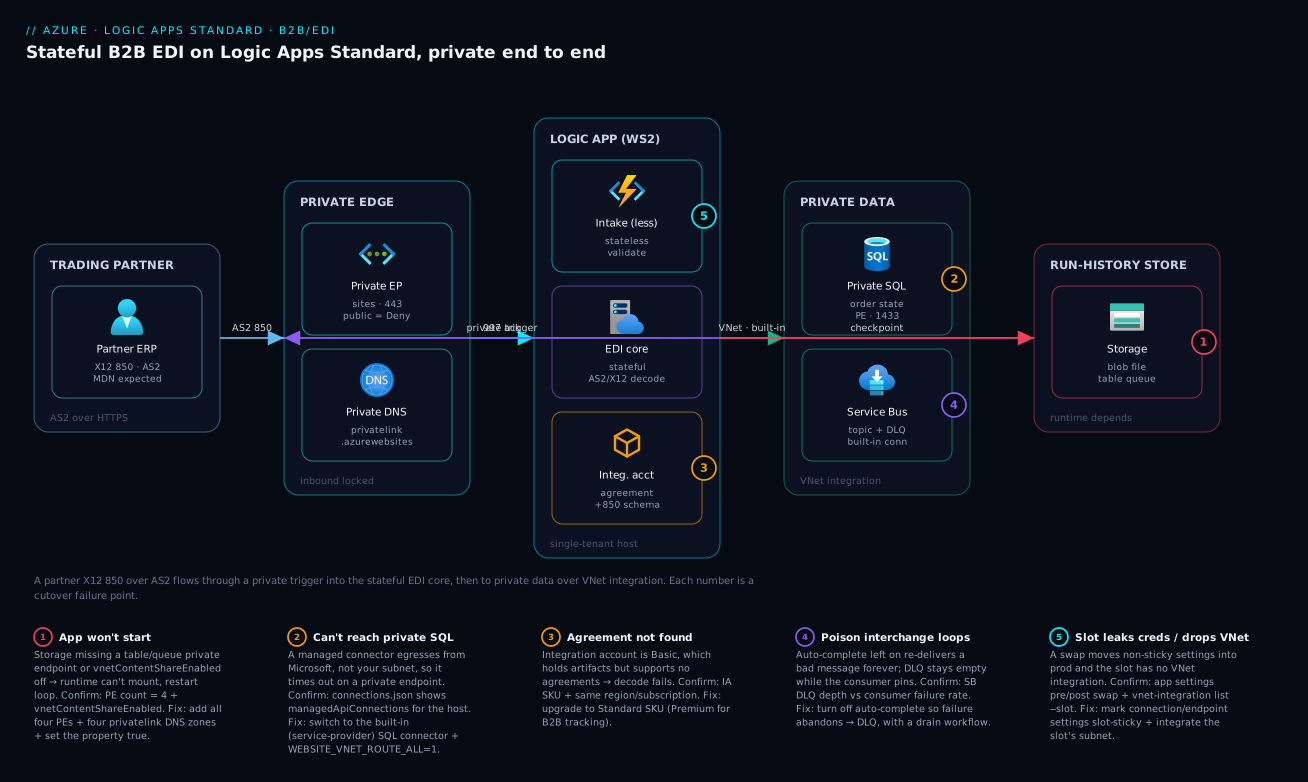
The diagram traces a B2B interchange end to end, left to right, through the real Standard architecture and marks each numbered failure point where a cutover actually breaks. A trading partner sends an X12 850 over AS2 to the logic app’s private trigger endpoint (a private endpoint on sites, with public access set to Deny). Inside the logic app on a WS-series plan, two workflows cooperate: a stateless intake workflow validates and hands off to a stateful EDI core that runs the in-process AS2/X12 decode, references the integration account for the partner agreement and 850 schema, generates the 997 functional ack, and writes order state. Because the workflow uses built-in connectors over VNet integration (WEBSITE_VNET_ROUTE_ALL=1 through a delegated /26 subnet), it reaches the private SQL and Service Bus endpoints that a managed connector never could. Underneath everything sits the run-history storage the runtime cannot live without — all four sub-resources (blob, file, table, queue) reached over private endpoints with vnetContentShareEnabled and the matching privatelink DNS zones.
Read the badges as the failure map for a go-live. Badge 1 is the storage trap: miss the table/queue endpoint or vnetContentShareEnabled and the app won’t start at all. Badge 2 is the managed-connector mistake: point the core at a private SQL through a managed connection and it silently can’t reach it. Badge 3 is the B2B SKU gate: a Basic integration account holds schemas but rejects the agreement, so decode fails. Badge 4 is the poison-message hazard: auto-complete left on means a bad interchange hot-loops instead of dead-lettering. Badge 5 is the slot footgun: swap without slot-sticky settings or per-slot VNet integration and you either leak staging creds into production or push the slot’s egress out of the VNet. The legend narrates each as symptom · confirm · fix.
Real-world scenario
Meridian Freight, a mid-size 3PL, ran EDI intake for retail trading partners on Logic Apps Consumption: AS2 receive, X12 850/856 decode, transform, and a write to an order database. Two engineers owned it; the monthly Logic Apps bill ran about ₹62,000 and nobody loved it. As a large retailer onboarded, two things broke at once. First, per-action billing on high-fan-out 850/856 processing — each interchange fanning into dozens of line-item actions — turned the bill into a number leadership started asking about, projected to roughly triple. Second, a new security baseline mandated that the SQL database holding order state become private-endpoint-only — which the Consumption tier’s managed SQL connector could not reach, because its traffic originates outside the customer’s network.
They migrated to Logic Apps Standard on a WS2 plan inside the platform’s hub-spoke VNet. The structural win was immediate on paper: the built-in SQL and Service Bus connectors run in-process and honour VNet integration, so order writes would flow over the private endpoint with no public exposure, and flat compute billing made the high-action EDI parsing essentially free at the margin. They kept their existing integration account (now unlinked, per the Standard model) for partner agreements and X12 schemas and moved AS2 decode in-process. They split the design: a stateless intake workflow for the AS2 receive and validation, calling a stateful core for decode, transform, ack generation, and the durable order write.
Then cutover went sideways in exactly the way this article warns about. The logic app would not start in the locked-down subscription — it sat in a restart loop with no useful application error. The storage account had been put behind private endpoints to meet the same baseline, but only the blob and file sub-resources had endpoints — the team had followed an App Service runbook. The Logic Apps runtime also needs table and queue storage for run history, and without vnetContentShareEnabled the content share would not mount. The fix was two pieces of infrastructure: private endpoints for all four sub-resources, and the site property flipped on.
// All four storage sub-resources need private endpoints for a Standard logic app
var storageGroups = [ 'blob', 'file', 'table', 'queue' ]

resource pe 'Microsoft.Network/privateEndpoints@2023-11-01' = [for g in storageGroups: {
  name: 'pe-${storageName}-${g}'
  location: location
  properties: {
    subnet: { id: privateEndpointSubnetId }
    privateLinkServiceConnections: [{
      name: 'conn-${g}'
      properties: {
        privateLinkServiceId: storageAccountId
        groupIds: [ g ]
      }
    }]
  }
}]
A second, subtler failure surfaced a week later during a routine deploy: a swap moved the staging Service Bus connection string into production because the setting was not marked slot-sticky, and for twenty minutes production wrote acks to the staging topic. No data was lost — the messages sat in staging — but a partner’s 997s were delayed and the incident bridge convened. The fix was to mark every connection and endpoint app setting as a deployment-slot (sticky) setting and to add VNet integration to the staging slot’s own subnet, which had also been missed.
With all four storage endpoints, the matching privatelink DNS zones linked, vnetContentShareEnabled=true, slot-sticky settings, and the slot integrated, the platform stabilised. Post-migration, EDI processing cost dropped by roughly two-thirds (to about ₹21,000), the private-network audit finding closed, and the next peak onboarding ran without a billing spike. The lesson the team wrote on the wall: “On Standard, the runtime’s own storage is a dependency you provision — and a slot is a second environment, not a copy.”
The cutover as a timeline, because the order of failures is the lesson:
| Time | Symptom | Action taken | Effect | What it should have been |
|---|---|---|---|---|
| Day 0 | App won’t start, restart loop | Read app logs (no error) | Dead end | Check storage reachability first |
| Day 0 +1h | Still looping | Found only blob+file PEs |
Root cause near | Provision all four sub-resources |
| Day 0 +2h | Started | Added table+queue PE + vnetContentShareEnabled |
App boots | Correct fix |
| Day 0 +3h | DNS resolve fails intermittently | One privatelink zone unlinked |
Flaky | Link all four zones to the VNet |
| Day 7 | Acks delayed | Swap moved staging SB conn to prod | Wrong topic 20 min | Mark settings slot-sticky |
| Day 7 +30m | Mitigated | Slot-sticky + integrate slot subnet | Stable swaps | The actual fix is per-slot config |
Advantages and disadvantages
The single-tenant model both enables private, cost-efficient B2B and hands you the operational surface Consumption hid. Weigh it honestly:
| Advantages (why Standard helps you) | Disadvantages (why it bites) |
|---|---|
| Flat compute billing makes high-fan-out EDI essentially free at the margin | You pay for idle compute; low-volume workflows are cheaper on Consumption |
| Built-in connectors run in-process and honour VNet integration — private targets are reachable | Managed connectors still can’t reach private; mixing them is a silent failure |
| Many workflows per resource; one deployment, scaling, identity unit | Resource-level scaling means a noisy workflow can starve quiet ones |
Code-like project zip with slots, local dev, func tooling |
You now own a pipeline, slot settings, and run-history storage |
| Stateful + stateless side by side: durable core, low-latency edges | Choosing wrong (stateful everywhere) taxes throughput and storage |
| In-process AS2/X12/EDIFACT; integration account no longer needs linking | Integration-account SKU is a hard gate (Basic can’t trade) |
| Managed identity end-to-end: no keys to rotate | Slot identities differ; RBAC must be granted per slot or shared |
| Private endpoints lock both inbound trigger and runtime storage | The runtime won’t start if any of four storage sub-resources is unreachable |
The model is right for high-volume, private, B2B and event-driven integration where you want code-like CI/CD and durable processing. It is the wrong tool for a handful of runs a day against public SaaS — that’s Consumption’s home. The disadvantages are all manageable, but only if you know they exist before cutover, which is the entire point of the storage and slot sections above.
Hands-on lab
Stand up a Standard logic app, prove it’s a workflow app (not a plain function app), assign a managed identity, and confirm the runtime storage and VNet wiring — all scriptable in Cloud Shell (Bash). Teardown at the end. This uses a WS1 plan; for a zero-cost dry run you can substitute an existing dev subscription’s free credits.
Step 1 — Variables and resource group.
RG=rg-logicapps-lab
LOC=westeurope
PLAN=plan-la-lab
APP=la-lab-$RANDOM            # globally-unique hostname
SA=stlalab$RANDOM            # storage backs run history
az group create -n $RG -l $LOC -o table
Step 2 — Create the storage account and WS1 plan.
az storage account create -n $SA -g $RG -l $LOC \
  --sku Standard_LRS --kind StorageV2 --min-tls-version TLS1_2 \
  --allow-blob-public-access false -o table

az functionapp plan create -n $PLAN -g $RG -l $LOC --sku WS1 --is-linux false -o table
Expected: a plan row with sku.name = WS1.
Step 3 — Create the logic app and confirm its kind.
az logicapp create -n $APP -g $RG -l $LOC \
  --plan $PLAN --storage-account $SA --functions-version 4 -o table

az logicapp show -g $RG -n $APP --query kind -o tsv
# expect: functionapp,workflowapp
If you see functionapp without ,workflowapp, the workflow extension didn’t attach — recreate with --functions-version 4 and the workflow plan.
Step 4 — Assign a managed identity and grant it a data-plane role.
az logicapp identity assign -g $RG -n $APP -o table
PRINCIPAL=$(az logicapp identity show -g $RG -n $APP --query principalId -o tsv)
echo "Identity principalId: $PRINCIPAL"
# Grant it read on its own storage as a demonstration of keyless RBAC
az role assignment create --assignee $PRINCIPAL \
  --role "Storage Blob Data Reader" \
  --scope $(az storage account show -g $RG -n $SA --query id -o tsv) -o table
Step 5 — Force outbound through a VNet (the integration wiring).
az network vnet create -g $RG -n vnet-lab --address-prefixes 10.40.0.0/16 \
  --subnet-name snet-logicapps --subnet-prefixes 10.40.1.0/26 -o table

az network vnet subnet update -g $RG --vnet-name vnet-lab -n snet-logicapps \
  --delegations Microsoft.Web/serverFarms -o table

az functionapp vnet-integration add -g $RG -n $APP --vnet vnet-lab --subnet snet-logicapps -o table
az functionapp config appsettings set -g $RG -n $APP --settings WEBSITE_VNET_ROUTE_ALL=1 -o table
Step 6 — Verify the deployment behaves as designed.
# 1. Workflow app, not a plain function app
az logicapp show -g $RG -n $APP --query kind -o tsv                       # functionapp,workflowapp
# 2. Managed identity present
az logicapp identity show -g $RG -n $APP --query principalId -o tsv       # a GUID
# 3. Outbound routes through the VNet
az functionapp config appsettings list -g $RG -n $APP \
  --query "[?name=='WEBSITE_VNET_ROUTE_ALL'].value" -o tsv                # 1
# 4. VNet integration is attached
az functionapp vnet-integration list -g $RG -n $APP -o table             # one row
Step 7 — Teardown.
az group delete -n $RG --yes --no-wait
What each verification proves and what a failure means:
| Check | Expected | If it fails |
|---|---|---|
kind |
functionapp,workflowapp |
Workflow extension not attached; recreate |
principalId |
a GUID | Identity not assigned; rerun assign |
WEBSITE_VNET_ROUTE_ALL |
1 |
Only RFC1918 routes the VNet; public bypasses |
vnet-integration list |
one row | Integration not attached / subnet not delegated |
Practice challenges
Six exercises, escalating from a first az query to a private-storage pre-flight check. Each is scriptable in Cloud Shell (Bash) against a throwaway resource group; the snippets are illustrative and use placeholder names. Reveal the solution only after you have attempted it.
1. (Beginner) Prove a logic app is a workflow app. You have been handed a resource name and told “it’s a Standard logic app.” Confirm it from the CLI in one query, and say which value proves it.
<details><summary>Solution</summary>
az logicapp show -g $RG -n $APP --query kind -o tsv
# expect: functionapp,workflowapp
Why: the kind functionapp,workflowapp is the single fact that distinguishes a Standard logic app from a plain function app — a bare functionapp means the workflow extension never attached.
</details>
2. (Beginner) Cap run-history retention at 30 days. Stateful run history accumulates and costs money. Set the runtime to prune runs after 30 days without touching any workflow.
<details><summary>Solution</summary>
{
  "version": "2.0",
  "extensions": {
    "workflow": {
      "settings": { "Runtime.Backend.Run.MaxRunHistoryRetentionInDays": "30" }
    }
  }
}
Why: retention is a host.json runtime setting, not a per-workflow one — it lets the engine prune old runs from storage so run history does not grow unbounded.
</details>
3. (Intermediate) Force all outbound traffic through the VNet. VNet integration is attached, but a workflow calling a public API is still bypassing the VNet. Make every egress route through the subnet and prove it.
<details><summary>Solution</summary>
az functionapp config appsettings set -g $RG -n $APP \
  --settings WEBSITE_VNET_ROUTE_ALL=1
az functionapp config appsettings list -g $RG -n $APP \
  --query "[?name=='WEBSITE_VNET_ROUTE_ALL'].value" -o tsv   # expect: 1
Why: with WEBSITE_VNET_ROUTE_ALL=0 only RFC1918 destinations route through the VNet; 1 forces public targets (and DNS) through it too — which is what a firewalled egress and private DNS both depend on.
</details>
4. (Intermediate) Turn on run history for one stateless workflow to debug it. A stateless workflow fails intermittently and you have no run history to inspect. Enable it for just that workflow, and note the cost.
<details><summary>Solution</summary>
Workflows.Orders-Intake.OperationOptions = WithStatelessRunHistory
(set as an app setting, replacing Orders-Intake with the workflow’s folder name)
Why: stateless workflows keep no run history by default; WithStatelessRunHistory persists it for debugging only — it re-introduces the storage-write latency you chose stateless to avoid, so turn it off afterward.
</details>
5. (Advanced) Debatch a queue trigger and stop it flooding the database. A Service Bus trigger delivers batches of orders; each must be its own run for failure isolation, but no more than ten may hit the private SQL at once. Write the trigger config.
<details><summary>Solution</summary>
"When_orders_arrive": {
  "type": "ServiceProvider",
  "inputs": { "parameters": { "queueName": "orders" },
    "serviceProviderConfiguration": {
      "serviceProviderId": "/serviceProviders/serviceBus",
      "operationId": "receiveQueueMessages", "connectionName": "serviceBus" } },
  "splitOn": "@triggerOutputs()?['body']",
  "runtimeConfiguration": { "concurrency": { "runs": 10 } }
}
Why: splitOn gives each order its own run (a poison message fails alone), and concurrency.runs: 10 bounds parallelism so a burst cannot open more connections than the database tolerates — isolation and back-pressure are separate knobs.
</details>
6. (Advanced) Write a private-storage pre-flight check. Before a locked-down cutover, prove the storage side is complete: all four private endpoints exist, vnetContentShareEnabled is on, and all four privatelink zones are linked. Script it so it fails loudly if anything is missing.
<details><summary>Solution</summary>
# 1. Expect exactly 4 private endpoints against the storage account
az network private-endpoint list -g $RG \
  --query "length([?contains(name,'$SA')])" -o tsv           # expect: 4
# 2. Content share must mount over the VNet
az resource show -g $RG -n $APP --resource-type "Microsoft.Web/sites" \
  --query properties.vnetContentShareEnabled -o tsv           # expect: true
# 3. All four privatelink zones must be linked to the VNet
for Z in blob file table queue; do
  echo -n "$Z: "
  az network private-dns link vnet list -g $RG \
    -z privatelink.$Z.core.windows.net --query "length(@)" -o tsv
done                                                          # each expect: >= 1
Why: the canonical Standard cutover failure is a runtime that cannot reach its own storage — checking PE count, vnetContentShareEnabled, and all four DNS-zone links in one pass catches the table/queue/DNS gaps before the app sits in a restart loop.
</details>
Common beginner mistakes
These are misconceptions, not symptoms — the wrong mental model that leads to the failures in the troubleshooting table. Fix the model and the bugs never happen.
“Standard is just Consumption with a plan attached.” It is a different runtime — the single-tenant Functions host running the Logic Apps engine — not a pricing toggle. That one fact is why you now own storage, networking, and a deployment pipeline. Approach Standard as “Consumption but I picked a plan” and every one of those owned dependencies becomes a surprise at the worst time.
“Stateless is just a faster Stateful, so use it everywhere.” Stateless trades away durability, resubmit, run history, Until durability, and chunking for latency and throughput. Use it for a short validate-and-forward edge; use stateful for anything that must survive a host restart or be replayable in a dispute. Picking stateless for an EDI core does not make it faster — it makes lost runs unrecoverable.
“I made the storage account private, so I followed the App Service checklist.” The App Service habit is blob + file. The Logic Apps runtime also needs table and queue reachable, plus vnetContentShareEnabled to mount the content share over the VNet, plus all four privatelink DNS zones linked. Two of the four is exactly the configuration that produces a silent restart loop.
“VNet integration means my app is now private.” VNet integration is outbound only — your workflow reaching private targets. Inbound lockdown is a separate mechanism (a private endpoint on sites plus a Deny access restriction), and the runtime reaching its own storage is a third. Confusing the three is the top networking mistake; they are configured independently and all three must be right.
“If the app is in the VNet, any connector can reach my private database.” Only built-in (service-provider) connectors run in-process and honour VNet integration. Managed connectors egress from Microsoft’s multi-tenant infrastructure and can never reach a private endpoint — and the failure is a timeout, not a clear “blocked,” which sends people debugging the wrong layer. In a VNet, built-in is not a preference; it is a requirement.
“The integration account must be linked, like in Consumption.” In Standard the link step is gone — you reference partners, agreements, and schemas by name. But two constraints remain and bite: the integration account must be in the same subscription and region, and its SKU is a hard gate (Basic holds artifacts but cannot hold agreements, so no real X12/EDIFACT trading).
“A deployment slot is a copy of production.” A slot is a second environment, not a snapshot. It does not inherit production’s VNet integration, its system-assigned identity is a different principal with its own RBAC, and a swap moves app settings unless you mark them slot-sticky. Treat a slot as a copy and a swap will either push the slot’s egress out of the VNet or move staging credentials into production.
Common mistakes & troubleshooting
These are the failures that actually cost a Standard cutover its weekend. Scan the playbook, then read the detail for whichever row matches. The exact confirm command or blade is in the table — keep it open during go-live.
| # | Symptom | Root cause | Confirm (exact cmd / portal path) | Fix |
|---|---|---|---|---|
| 1 | App won’t start, restart loop, no app error | Storage not fully private (missing table/queue PE) |
az network private-endpoint list -g $RG --query "[?contains(name,'$SA')].name" (expect 4) |
Add all four PEs + vnetContentShareEnabled=true |
| 2 | App starts then fails to mount content | vnetContentShareEnabled off on private storage |
az resource show ... --query properties.vnetContentShareEnabled |
Set the property true |
| 3 | Name resolution fails before networking | privatelink DNS zone not linked to VNet |
az network private-dns link vnet list -g $RG -z privatelink.table.core.windows.net |
Link all four zones to the VNet |
| 4 | Built-in connector can’t reach private SQL/SB | WEBSITE_VNET_ROUTE_ALL=0 (only RFC1918 routed) |
az functionapp config appsettings list --query "[?name=='WEBSITE_VNET_ROUTE_ALL']" |
Set to 1 |
| 5 | Connector to private target times out | Used a managed connector (egresses from MS) | connections.json shows managedApiConnections for a private host |
Switch to the built-in (service-provider) connector |
| 6 | X12/EDIFACT decode: “agreement not found” | Integration account is Basic (no agreements) | Integration account → SKU in portal | Upgrade to Standard SKU |
| 7 | B2B operations fail / artifacts missing | Integration account in wrong region/subscription | Compare IA region vs app region | Move IA to same subscription + region |
| 8 | Poison interchange hot-loops the consumer | Auto-complete on; message re-delivered forever | Service Bus → DLQ depth (zero while looping) | Turn off auto-complete; abandon on failure → DLQ |
| 9 | After swap, prod uses staging creds/endpoint | Settings not slot-sticky | Compare app settings pre/post swap | Mark connection/endpoint settings slot-sticky |
| 10 | Slot’s outbound calls leave the VNet | Slot has no VNet integration (not inherited) | az functionapp vnet-integration list --slot staging (empty) |
Integrate the slot’s subnet too |
| 11 | Run telemetry missing in App Insights | APPLICATIONINSIGHTS_CONNECTION_STRING unset/wrong |
az functionapp config appsettings list --query "[?name=='APPLICATIONINSIGHTS_CONNECTION_STRING']" |
Set the correct connection string |
| 12 | Stateless workflow loses runs on restart | Used stateless for a durable orchestration | workflow.json kind = Stateless |
Switch durable paths to Stateful |
| 13 | Non-idempotent action runs twice | Default exponential retry on a POST |
Action retry policy in workflow.json |
Set retry type to none or add idempotency key |
| 14 | Managed-identity connector: 401/403 | MI lacks data-plane RBAC on target | az role assignment list --assignee $PRINCIPAL (empty) |
Grant the least-privilege data role |
Cause 1 — The runtime can’t reach its own storage
The signature is a logic app stuck in a restart loop with no meaningful application error — because the failure is below your code. The runtime needs blob, file, table, and queue reachable. Teams that follow an App Service runbook create only blob and file and the app never starts.
Confirm. Count the private endpoints against the storage account:
az network private-endpoint list -g $RG \
  --query "[?contains(name,'$SA')].name" -o tsv   # expect 4 entries
az resource show -g $RG -n $APP --resource-type "Microsoft.Web/sites" \
  --query properties.vnetContentShareEnabled -o tsv  # expect: true
Fix. Create all four private endpoints, link the four privatelink DNS zones to the VNet, and set vnetContentShareEnabled=true. This is the two-line infrastructure fix from the scenario.
Cause 5 — A managed connector against a private target
A managed connector’s traffic originates from Microsoft’s connector service, not your integrated subnet, so it cannot reach a private endpoint — and the failure is a timeout, not a clear “blocked” message, which sends people hunting in the wrong place.
Confirm. Inspect connections.json — a managedApiConnections entry pointing at a private host is the smoking gun. Fix. Replace it with the built-in (service-provider) connector, which runs in-process and honours VNet integration. For SQL, Service Bus, Blob, Event Hubs, and Cosmos DB, a built-in exists.
Cause 8 — A poison message that won’t die
With auto-complete left on, an exception still completes the message in some flows, or — worse — the message is re-delivered and re-fails forever, pinning your consumer. The DLQ stays empty while the loop runs, which makes it look like nothing is wrong.
Confirm. Watch the Service Bus DLQ depth (zero while the loop runs) and the consumer’s failure rate (climbing). Fix. Turn off auto-complete so an exception abandons the message back to the queue; after max delivery count it lands in the DLQ, where a drain workflow triages it. This converts a hot loop into a parked message.
Best practices
Crisp, production-grade rules, each earned the hard way:
| # | Rule | Why |
|---|---|---|
| 1 | Make the synchronous edges stateless, the orchestration core stateful | Low-latency intake without the storage tax on every run |
| 2 | Dedicate a same-region storage account per logic app, with retention set | Run history is hot-path; isolate I/O and cap cost |
| 3 | Provision all four storage sub-resources private + vnetContentShareEnabled |
The runtime won’t start otherwise |
| 4 | Link all four privatelink DNS zones to the VNet |
Resolution fails before networking does |
| 5 | Set WEBSITE_VNET_ROUTE_ALL=1 whenever you need private egress |
0 routes only RFC1918; public bypasses the VNet |
| 6 | Use built-in connectors for any in-VNet target | Managed connectors can’t reach private endpoints |
| 7 | Authenticate with managed identity end-to-end; no keys in settings | Nothing to rotate; least-privilege data-plane RBAC |
| 8 | Choose the integration-account SKU for the job (Standard for trading) | Basic can’t hold agreements |
| 9 | Route functional acks (997/CONTRL) back to partners on every interchange | A bad interchange gets a negative ack, not silence |
| 10 | Tune retry per action; set non-idempotent ops to none |
Avoid duplicate side effects on retry |
| 11 | Dead-letter poison messages at the broker, with a drain workflow | A poison interchange parks instead of hot-looping |
| 12 | Deploy the project zip to a staging slot, smoke-test, then swap | Zero-downtime cutover; catch issues in staging |
| 13 | Mark connection/endpoint settings slot-sticky; integrate the slot’s subnet | A swap won’t leak creds or drop the slot out of the VNet |
| 14 | Wire Application Insights and alert on failure rate + DLQ depth | Find a degraded path before a partner does |
Security notes
The security posture for a private B2B pipeline has several non-negotiables:
| Area | Control | How |
|---|---|---|
| Inbound | Private trigger endpoint + deny public | PE on sites; access-restriction --default-action Deny |
| Outbound | Egress through the VNet, optionally a firewall | WEBSITE_VNET_ROUTE_ALL=1; route to Azure Firewall |
| Identity | Managed identity, least-privilege data roles | System/user-assigned MI + scoped RBAC |
| Secrets | None in local.settings.json; Key Vault refs |
@Microsoft.KeyVault(...) resolved by MI |
| Storage | Private endpoints, no public blob access, TLS 1.2+ | --allow-blob-public-access false, --min-tls-version TLS1_2 |
| B2B certs | AS2 signing/encryption certs in the IA / Key Vault | Rotate; never embed in workflows |
| Transport | TLS to partners; AS2 sign + encrypt | Per-agreement AS2 settings |
| Audit | Run history + B2B tracking (Premium IA) | Retention + Azure Data Explorer tracking |
Two specifics that bite: a managed connector that egresses from Microsoft’s network punches a hole in a “private-only” claim, so audit your connections.json for managed entries against private hosts; and a storage account left with allow-blob-public-access true undermines the whole private posture even with private endpoints in place — set it false explicitly. For the egress-control pattern, see Azure Firewall forced tunneling & hub-spoke routing.
Cost & sizing
The bill is driven by allocated compute, not actions — which is the whole reason high-fan-out EDI migrates here. The cost levers:
| Cost driver | What it is | How to control | Rough scale |
|---|---|---|---|
| Plan compute | The WS/ASP/ASE plan (vCPU + RAM) | Right-size WS1→WS3; scale-out bounds | The dominant line item |
| Run-history storage | Tables/blobs for stateful runs | Retention days; dedicated account | Small but grows; prune it |
| Integration account | B2B artifact store (per SKU) | Standard for trading; Premium for tracking | Fixed per SKU/region |
| Managed connector calls | Per-execution on managed connectors | Prefer built-in; reserve managed for SaaS | Avoidable for private targets |
| App Insights ingestion | Telemetry volume | Sampling; cap daily ingestion | Scales with run volume |
| Private endpoints | Per-PE hourly + data | Consolidate; needed for private | Small per endpoint |
Right-sizing the plan by workload shape:
| Workload | Start at | Scale signal | Move to |
|---|---|---|---|
| Moderate EDI, small payloads | WS1 | p95 latency creeping, memory pressure | WS2 |
| Heavier EDI, larger transforms | WS2 | CPU pinned, big-message OOM | WS3 |
| Predictable steady load + other apps | App Service plan (P1v3) | — | scale up / autoscale |
| Hard isolation / compliance | ASEv3 | — | dedicated capacity |
Indicative figures (West Europe; INR ≈ USD × 86, directional only):
| Item | Approx USD/mo | Approx INR/mo | Notes |
|---|---|---|---|
| WS1 plan (1 instance) | ~$175 | ~₹15,000 | Baseline compute |
| WS2 plan (1 instance) | ~$350 | ~₹30,000 | Heavier B2B |
| Integration account (Standard) | ~$1,000 | ~₹86,000 | Per-region trading SKU |
| Dedicated storage (LRS, modest) | ~$5–20 | ~₹400–1,700 | Run history; prune to keep low |
| App Insights (moderate ingest) | ~$30–100 | ~₹2,600–8,600 | Sample to control |
The economic crossover versus Consumption: if your interchanges fan into many cheap actions, flat compute wins decisively (the scenario cut ~two-thirds). If you run a handful of times a day, Consumption’s per-action billing is cheaper — don’t pay for an idle WS plan. There is no free tier for production B2B; the Free integration-account SKU and dev plans are for experiments only.
Interview & exam questions
Model answers in 2–4 sentences. These map to AZ-305 (designing integration), AZ-204 (developing solutions), and integration-architect interviews.
1. Why is Logic Apps Standard not just “Consumption with a different SKU”? Standard runs the Logic Apps engine as an extension on the single-tenant Azure Functions host, so one resource hosts many workflows, billing is by allocated compute rather than per action, and built-in connectors run in-process. That gives you VNet integration, private inbound, slots, and code-like deployment — none of which Consumption’s multi-tenant model offers.
2. When does Consumption beat Standard on cost? When the workload runs infrequently — a handful of executions a day. Consumption’s per-action billing is near-free at low volume, whereas Standard charges for an always-allocated plan. Standard wins when high-fan-out workflows fire many cheap actions, because the marginal action is free.
3. Explain stateful vs stateless and when to use each. Stateful persists every run and action I/O to storage, giving durability, inspection, resubmit, and survival across host restarts — use it for orchestration, async, and EDI cores. Stateless runs in memory for low latency and high throughput with no durability — use it for short synchronous validate-and-forward edges, ideally fronting a stateful core.
4. Your Standard logic app won’t start in a locked-down subscription. First thing you check?
Whether the runtime can reach its own storage. It needs private endpoints for all four sub-resources — blob, file, table, queue — plus vnetContentShareEnabled=true and the four privatelink DNS zones linked. Teams who provision only blob/file (an App Service habit) hit exactly this.
5. Why can’t a managed connector reach a private SQL database? Managed connectors execute on Microsoft’s multi-tenant connector infrastructure and egress from there, not from your integrated subnet, so they have no route to a private endpoint. Use the built-in (service-provider) SQL connector, which runs in-process on your plan and honours VNet integration.
6. How do you configure outbound vs inbound private connectivity?
Outbound uses regional VNet integration through a delegated /26+ subnet, with WEBSITE_VNET_ROUTE_ALL=1 to route all egress (not just RFC1918). Inbound uses a private endpoint on the logic app’s sites group plus an access restriction with --default-action Deny.
7. What changed about integration accounts in Standard? The integration account no longer needs to be linked to the logic app — you reference partners, agreements, and schemas by name, and the old link step is gone. It must still be in the same subscription and region, and you must pick a SKU that supports agreements (Standard), since Basic holds artifacts but can’t trade.
8. Describe the three layers of error handling.
Action-level retry policies handle transient dependency blips (tune them, set non-idempotent ops to none); try/catch via Scope + runAfter handles logical failures and compensation within a run; and broker-native dead-lettering handles poison messages across retries, parking a bad interchange instead of hot-looping the consumer.
9. What are the two slot footguns specific to Standard, and how do you avoid them? A swap moves app settings, so unmarked connection/endpoint settings can leak staging credentials into production — mark them slot-sticky. And a slot does not inherit VNet integration, so its outbound calls leave the VNet — integrate the slot’s own subnet.
10. How do you authenticate built-in connectors without secrets?
Assign the logic app a managed identity and grant it least-privilege data-plane RBAC on each target (e.g. Service Bus Data Receiver, Storage Blob Data Contributor). The connection references the identity, so local.settings.json holds only endpoints — no keys to rotate.
11. Where do workflow runs and actions appear in Application Insights?
Workflow runs surface as requests; individual actions appear as dependencies and traces, each tagged with the workflow and run identifiers via customDimensions. You query traces for failed actions and requests for run-latency percentiles.
12. What integration-account tier do you need for B2B transaction tracking? A Premium-level integration account. Standard supports full agreements and trading, but transaction-level B2B tracking surfaced through Azure Data Explorer is gated behind the Premium tier.
Quick check
- Which two storage sub-resources do teams commonly forget to make private, causing a Standard logic app to fail to start?
- What single app setting forces all outbound traffic (not just RFC1918) through the VNet?
- Why can a managed connector not reach a private-endpoint-only Service Bus namespace?
- Which integration-account SKU is the minimum for real X12/EDIFACT trading, and why isn’t Basic enough?
- After a slot swap, production starts using the staging connection string. What did you forget to do?
Answers
tableandqueue. The runtime needs all four ofblob,file,table,queueplusvnetContentShareEnabled=true; provisioning onlyblob/file(an App Service habit) leaves the app unable to start.WEBSITE_VNET_ROUTE_ALL=1. With it at0, only RFC1918 destinations route through the VNet and public targets bypass it.- Because a managed connector’s traffic originates from Microsoft’s multi-tenant connector infrastructure, not your integrated subnet, so it has no route to a private endpoint. Use the built-in Service Bus connector instead.
- Standard. Basic stores artifacts (schemas, maps) but does not support agreements, and you cannot decode/encode X12/EDIFACT against a partner without an agreement.
- You forgot to mark the connection/endpoint app settings as slot-sticky (deployment-slot settings), so the swap moved staging’s value into production.
Glossary
| Term | Definition |
|---|---|
| Logic Apps Standard | Single-tenant Logic Apps runtime hosted as an extension on the Azure Functions host; kind functionapp,workflowapp. |
| Workflow | One workflow.json definition with a kind of Stateful or Stateless; many per logic app resource. |
| Stateful workflow | A workflow that persists runs and action I/O to external storage, giving durability, inspection, and resubmit. |
| Stateless workflow | A workflow that runs entirely in memory for low latency and high throughput, with no persisted run history by default. |
| Workflow Standard plan (WS1/WS2/WS3) | The elastic single-tenant compute plan that hosts Standard logic apps. |
| Built-in (service-provider) connector | A connector that runs in-process on your plan and honours VNet integration (e.g. Service Bus, SQL, Blob, B2B). |
| Managed (API) connector | A multi-tenant connector that egresses from Microsoft’s infrastructure, bills per call, and cannot reach private endpoints. |
| Integration account | The store of B2B artifacts (partners, agreements, schemas, maps, certificates); in Standard, referenced but not linked. |
vnetContentShareEnabled |
Site property that mounts the app’s content share over the VNet; required when storage is private. |
| VNet integration | Regional outbound connectivity through a delegated /26+ subnet so workflows reach private resources. |
| Private endpoint | A private NIC that brings a resource (the logic app, or each storage sub-resource) onto the VNet. |
| Managed identity | An Entra identity assigned to the logic app for keyless, RBAC-scoped data-plane authentication. |
| AS2 / X12 / EDIFACT | B2B transport (AS2) and EDI dialects (X12, EDIFACT) processed by in-process operations in Standard. |
| Functional acknowledgment (997 / CONTRL) | The receipt returned to a partner indicating acceptance or rejection of an interchange. |
| Dead-letter queue (DLQ) | A broker subqueue where poison messages land after max delivery count, drained by a separate triage workflow. |
| Deployment slot | A swappable copy of the app for zero-downtime deploys; needs its own VNet integration and slot-sticky settings. |
splitOn |
A trigger property that debatches an array into one workflow run per element, isolating each item’s failure and retry. |
| Concurrency control | Runtime settings (concurrency.runs, concurrency.repetitions) that cap parallel runs or Foreach iterations to protect downstream dependencies. |
| Data Mapper | The VS Code visual schema-to-schema map designer that emits XSLT run by the in-process Transform operation. |
| Target-based scaling | The WS-plan scale model that adds or removes workers based on the storage-backed job backlog, up to the scale limit. |
| Identity-based connection | Host storage (AzureWebJobsStorage__accountName) authenticated by managed identity instead of a connection string. |
| MIC (Message Integrity Check) | The AS2 payload hash returned in the MDN; a mismatch means the bytes or canonicalisation differ, not a bad signature. |
| MDN (Message Disposition Notification) | The AS2 receipt (synchronous or asynchronous), signed for non-repudiation of receipt. |
| Control number | The X12 sequence identifiers (ISA13 interchange, GS06 group, ST02 transaction set) an agreement can use to reject duplicates. |
Next steps
- Go deeper on the messaging backbone in Azure Service Bus sessions, dedup & dead-letter patterns.
- Compare this with code-first orchestration in Azure Durable Functions orchestration patterns.
- Master the private-networking layer in private endpoints & private DNS at scale and private endpoint vs service endpoint.
- Tie keyless auth together with Azure Key Vault secret rotation with managed identity.
- Build the trading-partner side end to end in the EDI/B2B integration platform on Logic Apps.