In a nutshell
Picture a busy airport. Thousands of aircraft (your devices) land and take off, but no plane talks to another plane directly — they all talk to the control tower (the MQTT broker). The tower only clears an aircraft it recognises onto a runway it is allowed to use (a permission binding on a topic space), it never waves an unknown plane onto the tarmac (default-deny), and it hands every flight’s data to a central operations desk (routing into a namespace topic). From that desk, different teams take independent copies of the same feed at their own pace — the live-departures board wants everything the instant it happens (push), the overnight audit team collects records when it is ready (pull) — and any record that cannot be filed is placed in a lost-and-found box instead of being shredded (dead-letter to Blob). Lose that box and the records are simply gone, with no alarm. The box, and the alarm on it, is what this lesson is really about.
That is Azure Event Grid’s namespace tier: an MQTT broker for a device fleet, a durable topic that fans one stream out to many consumers, two opposite delivery styles, and a graveyard for events that fail so nothing is lost silently. It sits beside the original Event Grid — the global push router that fires a Function when a blob lands — and the two share a name but almost nothing else. Choosing between them is the very first decision you will make.
Level: Advanced · Time: ~69 min · You will need: comfort with the Azure CLI, JSON/Bicep, and the publish/subscribe idea; a passing familiarity with MQTT (a broker, topics as hierarchical strings, QoS levels) and managed identity helps, but both are re-explained as they come up.
After this lesson you can: pick the right Event Grid surface for a requirement in one glance; stand up an MQTT broker with fleet-scale, default-deny authorization; route MQTT into a topic and fan it out with both push and pull; wire retries and dead-lettering so a downstream outage never loses an event; and read the two metrics — DroppedEventCount versus DeadLetteredCount — that tell you, at 2 a.m., whether you are quietly losing data.
If you remember nothing else, hold these five sentences: there are two Event Grids; MQTT access is default-deny and composed, never per-device; the broker is an island until routing bridges it; push and pull are opposite control directions; and a subscription with no dead-letter destination loses data silently. Everything below is the detail behind those five.
Most teams meet Event Grid as “the thing that fires a function when a blob lands” — the original product, a global push-only router built on custom topics and system topics. The newer surface, Event Grid namespaces, is a different animal: an MQTT v5 broker, a queue-like pull delivery API, namespace topics with 7-day retention, and dead-lettering to Blob Storage. For fleet telemetry ingestion or back-pressure-tolerant fan-out to slow consumers, namespaces are the tier you want, and the design decisions are not obvious.
This guide builds an end-to-end namespace system: MQTT clients publishing telemetry, messages routed into a namespace topic, and two consumer styles — push to Event Hubs and pull for a throughput-controlled worker — with retries and dead-lettering wired correctly. Every command targets the namespace tier, which behaves nothing like the basic tier you may know. And because you will return to this page mid-incident, every resource, setting, schema field, error condition and quota is laid out as a scannable table next to the prose that explains it. Read the narrative once; keep the tables open when the dead-letter count climbs at 02:00.
By the end you will stop guessing about which Event Grid surface to use, how MQTT authorization actually composes, when pull beats push, and why a subscription with no dead-letter destination is a silent data-loss bug waiting for its first regional incident. You will know the exact az path to confirm each of those, the Bicep to make it permanent, and the metric that pages you before a customer notices.
What problem this solves
You have a fleet — vehicles, meters, factory sensors, building controllers — emitting telemetry over MQTT, and a set of downstream systems that must consume it at very different rates. A Stream Analytics job wants a firehose; a compliance archive wants every byte but can tolerate minutes of lag; an alerting function wants only the 2% of readings that breach a threshold. Stitch that together with the wrong primitive and you spend the life of the system fighting it: a push-only router that cannot do back-pressure, a broker that authorizes per-device-per-topic and collapses at 50,000 clients, or a pipeline that drops events under load because nobody configured a place for poison messages to land.
Without a deliberate design, three failures recur in production. First, silent data loss: a push subscription with no dead-letter destination burns through its retry budget during a downstream outage and the events are simply gone — and because the metric that reveals this is DroppedEventCount, not DeliveryAttemptFailCount, nobody is watching it. Second, a broker you cannot manage: authorization modeled as one rule per client per topic is unworkable at fleet scale, so teams over-grant (every device can publish anywhere) and turn an IoT estate into a lateral-movement playground. Third, the wrong delivery mode: a locked-down, on-prem, or batch consumer cannot expose an HTTPS endpoint for push, so it gets bolted on with a polling shim that loses ordering and at-least-once guarantees.
Who hits this: anyone building IoT or device-telemetry ingestion on Azure, anyone fanning one event stream out to consumers with mismatched throughput, and anyone who needs durable retention or a private-network consumer. The namespace tier solves all three — MQTT broker with a scalable authorization model, pull delivery for endpoint-less consumers, and first-class dead-lettering — but only if you pick it deliberately and wire every knob. This article is that wiring, enumerated end to end.
To frame the field before the deep dive, here is the problem space — each failure class, the question it forces, and the first place to look:
| Problem class | What you observe | First question to ask | First place to look | Most common single cause |
|---|---|---|---|---|
| Wrong resource chosen | Fighting the platform for a feature it lacks | Do I need MQTT, pull, or 7-day retention? | The capability matrix below | Picked basic custom topic; needed a namespace |
| Client can’t connect/publish | MQTT CONNECT or PUBLISH silently denied | Is there a permission binding for this client group? | permission-binding list |
Default-deny with no binding |
| Events never leave the broker | MQTT works, nothing downstream fires | Is routing configured and reachable? | routeTopicResourceId |
Routing unset or public access off |
| Consumer overwhelmed | Push consumer 429s / falls behind | Reactive endpoint or back-pressure? | Delivery mode of the subscription | Push to a slow consumer; needed pull |
| Silent data loss | DroppedEventCount > 0 |
Does every subscription have a DLQ? | Subscription dead-letter config | No dead-letter destination |
| Replay impossible | Dead-letter blobs unusable | Do blobs carry the failure reason? | deadletterProperties in the blob |
Not reading deadletterreason |
Learning objectives
By the end of this article you can:
- Choose deliberately between system topics, custom (basic) topics, and namespace topics by mapping each requirement (MQTT, pull, retention, throughput, destination set) to the surface that supports it.
- Stand up an MQTT v5 broker on an Event Grid namespace and model fleet-scale authorization with clients, client groups, topic spaces, and permission bindings under a default-deny posture.
- Configure routing so MQTT messages are wrapped in CloudEvents and published into a namespace (or custom) topic, including the identity model for same-namespace versus cross-resource targets.
- Decide between push and pull delivery per consumer, and explain exactly when pull wins (endpoint-less, back-pressure, private link, scheduled drain).
- Filter server-side with subject filters and advanced filters so a consumer only receives — and only pays for — the events it matches.
- Wire retries, batching, and dead-lettering to Blob Storage correctly, and reason about
maxDeliveryCount,eventTimeToLive,receiveLockDurationInSeconds, anddeliveryRetryPeriodInDays. - Operate the system: route delivery metrics to Log Analytics, alert on
DroppedEventCount(not just failures), and run a replay job that rehydrates dead-lettered events bydeadletterreason. - Diagnose the common failure modes — denied clients, dead routing, push 403s, lock-expiry redelivery loops, silent drops — from symptom to confirmed root cause to fix.
Prerequisites & where this fits
You should be comfortable with the Azure CLI (az), reading and editing JSON, and ARM/Bicep basics. Conceptually you need the publish/subscribe model (producers emit events; subscribers receive copies independently), a working idea of MQTT (a broker, topics as hierarchical strings, QoS levels), and managed identity (an Azure resource authenticating to another via RBAC instead of secrets). Knowing what CloudEvents 1.0 is — a vendor-neutral envelope with id, source, subject, type, time, data — will make the filtering section land immediately.
This sits in the Messaging & Event-Driven track. It is downstream of the broad eventing-versus-messaging decision and upstream of the consumer-side pipelines. Event Grid namespaces are an ingestion and fan-out layer; what you do after the fan-out is a different tool. If your push target is Event Hubs feeding analytics, continue with Azure Event Hubs: Kafka, Capture, Stream Analytics & Throughput Scaling. If you need ordered, transactional, command-style messaging instead of event fan-out, that is Azure Service Bus: Sessions, De-duplication & Dead-Letter Patterns. The pull worker and replay jobs are typically Functions — see Azure Functions: Serverless Patterns and, for orchestrated replay, Azure Durable Functions: Orchestration & Fan-Out Patterns. For the device side of an MQTT estate, Azure IoT Hub, DPS, Edge & Digital Twins Fundamentals is the sibling story. Dead-lettering lands in Blob, so Azure Blob Storage: Lifecycle, Immutability & Soft Delete governs how long those forensics live.
A quick map of who owns what during an incident, so you escalate to the right person fast:
| Layer | What lives here | Who usually owns it | Failure classes it can cause |
|---|---|---|---|
| Device / fleet | X.509 certs, MQTT client, QoS | Device / firmware team | CONNECT failures, bad payloads, clock skew |
| MQTT broker | Topic spaces, permission bindings | Platform / messaging | Default-deny denials, topic-template mismatch |
| Routing | routeTopicResourceId, routing identity |
Platform | Events stuck in broker; CloudEvents wrap issues |
| Namespace topic | Retention, throughput, subscriptions | Platform | Throttling at ingress cap; retention expiry |
| Delivery (push) | Destination, delivery identity | Platform + consumer | 403 to target, dead-letter flood |
| Delivery (pull) | Lock duration, delivery count | Consumer | Lock-expiry redelivery loops |
| Dead-letter | Blob container, namespace MI | Platform + storage | DroppedEventCount, replay forensics |
Core concepts
Five mental models make every later decision obvious.
There are two Event Grids, and they share a name, not a runtime. The classic surface (system topics, custom/basic topics, domains, partner topics) is a global, push-only HTTP router optimized for reacting to Azure resource events and app events. The namespace surface is a regional resource that adds an MQTT broker, a pull delivery queue API, and namespace topics with 7-day retention. They are provisioned, priced, and reasoned about differently. The single most consequential early decision in this whole article is which surface, because picking wrong means re-platforming later.
MQTT authorization composes; it is not per-device. You never write “device 7 may publish to topic X.” Instead you register a client, bucket it with other clients via a client group (a query over client attributes), define a topic space (a set of MQTT topic templates), and grant the group Publisher or Subscriber rights on the space via a permission binding. The leverage is the ${client.authenticationName} variable in a topic template: one template scopes every client to its own subtree without one rule per device. The posture is default-deny — no binding means no access — which is the only correct posture for an IoT fleet.
MQTT and the rest of Azure are bridged by routing, not magic. Messages published to the broker live inside the broker. To reach Functions, Event Hubs, Storage, or any subscriber, you configure routing: every MQTT message is wrapped in a CloudEvents 1.0 envelope (the original MQTT topic becomes subject, the payload becomes data) and published to exactly one topic you nominate. From there, event subscriptions take over. No routing, no downstream — the broker is an island until you build the bridge.
Delivery has two opposite shapes. Push registers a destination and Event Grid sends events to it as they arrive — reactive, zero-polling, but the consumer must be reachable and must absorb the offered rate. Pull inverts control: the consumer connects and receives events with queue semantics (receive, then acknowledge / release / reject), so a struggling consumer simply slows its cadence. Push is for reachable, reactive consumers; pull is for endpoint-less, back-pressure-sensitive, private-network, or scheduled consumers. This fork defines your consumer architecture.
Reliable delivery is three coordinated knobs plus a graveyard. How hard Event Grid retries (maxDeliveryCount, eventTimeToLive, exponential backoff), how it locks on pull (receiveLockDurationInSeconds), and where poison events go to die (dead-letter to Blob) are one system. Get the retries right but skip the dead-letter destination and you do not get errors — you get silent loss, surfaced only by DroppedEventCount. Dead-lettering is not optional hardening; it is the difference between a five-minute replay and an afternoon of forensics, and on a contractual-retention workload it is the difference between compliant and not.
The vocabulary in one table
Before the deep sections, pin down every moving part. The glossary repeats these for lookup; this table is the mental model side by side:
| Concept | One-line definition | Where it lives | Why it matters |
|---|---|---|---|
| Namespace | Regional Event Grid resource hosting broker + topics | Subscription / resource group | The tier that unlocks MQTT, pull, retention |
| MQTT broker | v3.1.1 / v5 pub-sub broker | topicSpacesConfiguration on the namespace |
Device ingestion front door |
| Client | One registry entry per device/app | Under the namespace | The authenticated identity that connects |
| Client group | A query bucketing clients by attribute | Under the namespace | Scales authorization without per-device rules |
| Topic space | A set of MQTT topic templates | Under the namespace | The scope a binding grants rights over |
| Permission binding | Grants a group Pub/Sub on a space | Under the namespace | The only thing that lifts default-deny |
| Namespace topic | Durable topic with 7-day retention | Under the namespace | Where routed events land; fans out |
| Routing | Wraps MQTT → CloudEvents → a topic | topicSpacesConfiguration |
Bridges broker to the rest of Azure |
| Event subscription | A consumer’s filtered view of a topic | Under the topic | One independent copy per subscription |
| Push delivery | Event Grid sends to a destination | Subscription deliveryMode: Push |
Reactive, reachable consumers |
| Pull delivery | Consumer receives with queue semantics | Subscription deliveryMode: Queue |
Back-pressure, endpoint-less consumers |
| Dead-letter | Undeliverable events written to Blob | Subscription DLQ config + MI | Prevents silent loss; enables replay |
| CloudEvents | Vendor-neutral event envelope | Every namespace-topic event | The schema you filter on |
Namespaces vs. custom topics vs. system topics
Pick the wrong resource and you will fight the platform for the life of the system. The three are not interchangeable, and the differences are not cosmetic — they are about whole capabilities (MQTT, pull, retention) that one surface has and another simply does not.
| Capability | System topic | Custom topic (basic) | Namespace topic |
|---|---|---|---|
| Event source | Azure services (Blob, Resource Groups, etc.) | Your app | Your app |
| MQTT broker | No | No | Yes |
| Pull delivery | No | No | Yes |
| Push to Event Hubs | Yes | Yes | Yes |
| Push to Functions, Service Bus, Storage queues, webhooks | Yes | Yes | Not yet (Event Hubs only today) |
| Schema | EventGridSchema / CloudEvents | EventGridSchema / CloudEvents | CloudEvents 1.0 JSON only |
| Max throughput (ingress / egress) | ~5 MB/s | ~5 MB/s | 40 MB/s / 80 MB/s |
| Retention | Best-effort, 24h retry | 24h retry | 7 days |
| Scope | Global | Global | Regional |
| Subscribe to Azure service events | Yes | No | No |
The key trade-off: namespace topics give you MQTT, pull delivery, high throughput, and durable retention, but the push destination set is still narrower than basic (Event Hubs only at time of writing — more are rolling out). A common production shape is therefore MQTT into a namespace topic, push to Event Hubs, then Event Hubs fans out to Stream Analytics, Functions, or Fabric. Namespace topics also accept only CloudEvents 1.0 JSON — no proprietary EventGridSchema.
Map your requirement to the surface with a decision table — find your row and stop:
| If you need… | Then use… | Because… |
|---|---|---|
| To react to Blob/Resource-Group/Azure events | System topic | Only it subscribes to Azure service events |
| Simple app-to-handler push, broad destinations | Custom (basic) topic | Widest push destination set, global, simple |
| An MQTT broker for a device fleet | Namespace topic | Only it speaks MQTT |
| Pull (back-pressure / endpoint-less consumer) | Namespace topic | Only it offers queue-style pull |
| 7-day durable retention | Namespace topic | Basic/system retry for ~24h only |
| 40/80 MB/s throughput | Namespace topic | Basic/system cap near ~5 MB/s |
| Push to Functions or Service Bus today | Custom / system topic | Namespace push is Event Hubs-only for now |
A few hard boundaries that catch people, stated as rules:
| Boundary | The rule | Consequence if ignored |
|---|---|---|
| Namespace topics host only your events | No system/domain/partner topics inside | Can’t get Blob-created events from a namespace |
| Namespace schema | CloudEvents 1.0 JSON only | EventGridSchema producers are rejected |
| Namespace topics can’t subscribe to Azure events | They carry your events only | Use a system topic for resource events |
| MQTT requires opt-in | topicSpacesConfiguration.state = Enabled |
Without it you get pull-only, no broker |
| Region | Namespace is regional, not global | Plan for region affinity / DR explicitly |
Namespace topics cannot host system topics, domain topics, or partner topics, and they cannot subscribe to Azure service events. They carry your events only. If you need Blob-created events, that is still a system topic.
Create the namespace with both MQTT and a system-assigned identity (you will need the identity for routing and dead-letter):
RG=rg-eventing
LOC=eastus
NS=egns-telemetry

az eventgrid namespace create \
  --resource-group $RG \
  --name $NS \
  --location $LOC \
  --topic-spaces-configuration "{state:Enabled}" \
  --identity "{type:SystemAssigned}"
The same provisioning as Bicep, so it is reviewed and repeatable:
resource ns 'Microsoft.EventGrid/namespaces@2024-06-01-preview' = {
  name: 'egns-telemetry'
  location: 'eastus'
  identity: { type: 'SystemAssigned' }
  sku: { name: 'Standard', capacity: 1 }   // throughput units scale ingress/egress
  properties: {
    topicSpacesConfiguration: {
      state: 'Enabled'                       // turns ON the MQTT broker
      maximumClientSessionsPerAuthenticationName: 1
    }
    publicNetworkAccess: 'Enabled'           // broker reachable; lock down consumers, not the broker
  }
}
Enabling topicSpacesConfiguration.state = Enabled is what turns on the MQTT broker; without it you get a pull-delivery-only namespace. The throughput-unit capacity on the SKU scales the ingress/egress ceilings — size it to the fleet, covered in Cost & sizing below.
MQTT broker: clients, topic spaces, and permission bindings
The broker speaks MQTT v3.1.1 and v5 (and both over WebSocket). QoS 0 and 1 are supported; QoS 2 is not. Authorization is not per-client-per-topic — unmanageable at fleet scale. Instead you compose four resources:
- Clients — one registry entry per device/app, keyed by an authentication name (an X.509 cert subject / thumbprint, or a Microsoft Entra identity).
- Client groups — a query over client attributes that buckets clients (e.g. all
building == "b12"sensors). - Topic spaces — a set of MQTT topic templates (e.g.
devices/${client.authenticationName}/telemetry). - Permission bindings — grant a client group
PublisherorSubscriberrights on a topic space.
Here is what each resource is and how the four chain together — the table is the model, the prose below is the why:
| Resource | What it represents | Keyed / defined by | Grants nothing by itself? |
|---|---|---|---|
| Client | One device or app identity | Authentication name (cert / Entra) | Correct — needs a binding |
| Client group | A bucket of clients | A query over client attributes | Correct — needs a binding |
| Topic space | A set of topic templates | One or more MQTT topic patterns | Correct — needs a binding |
| Permission binding | The actual grant | (client group, topic space, Pub/Sub) | This is the only grant |
The MQTT protocol surface — what the broker supports and what it refuses — so you size client expectations correctly:
| MQTT feature | Supported? | Notes / limit |
|---|---|---|
| MQTT v3.1.1 | Yes | Classic broker protocol |
| MQTT v5 | Yes | Properties, reason codes, topic aliases |
| WebSocket transport | Yes | v3.1.1 and v5 over WSS |
| QoS 0 (at most once) | Yes | Fire-and-forget |
| QoS 1 (at least once) | Yes | PUBACK-confirmed |
| QoS 2 (exactly once) | No | Use QoS 1 + idempotent consumers |
| Retained messages | Yes (bounded) | Per broker limits |
| Last Will & Testament (LWT) | Yes | v3.1.1 and v5 |
| Shared subscriptions | Yes (v5) | Group subscriber load balancing |
| User properties (v5) | Yes | Carried into the routed CloudEvent |
| Request/response (v5) | Yes | Response-topic + correlation-data |
| Session expiry / clean start | Yes | Controls reconnect state retention |
| TLS port | 8883 (MQTT), 443 (WSS) | Plaintext 1883 not offered |
Client authentication options, with the trade-off of each:
| Auth method | How it works | Best for | Trade-off |
|---|---|---|---|
| X.509 CA-signed | Device cert chains to a registered CA | Large fleets, cert lifecycle via PKI | Need a CA + issuance pipeline |
| X.509 thumbprint | Pin exact allowed thumbprints on the client | Small/known device sets | Rotation means editing the client |
| Microsoft Entra (JWT) | OAuth token validated by the broker | Apps / services, not constrained devices | Token acquisition on the device side |
Register a client authenticated by X.509 certificate thumbprint:
az eventgrid namespace client create \
  --resource-group $RG \
  --namespace-name $NS \
  --client-name sensor-0007 \
  --authentication-name sensor-0007 \
  --state Enabled \
  --client-certificate-authentication "{validationScheme:ThumbprintMatch,allowedThumbprints:[A1B2C3D4E5F6...]}" \
  --attributes "{building:'b12',role:'sensor'}"
The client resource as Bicep, so the fleet registry is declarative:
resource client 'Microsoft.EventGrid/namespaces/clients@2024-06-01-preview' = {
  parent: ns
  name: 'sensor-0007'
  properties: {
    authenticationName: 'sensor-0007'
    state: 'Enabled'
    clientCertificateAuthentication: {
      validationScheme: 'ThumbprintMatch'
      allowedThumbprints: [ 'A1B2C3D4E5F6...' ]
    }
    attributes: { building: 'b12', role: 'sensor' }   // these power client-group queries
  }
}
The client-resource settings you actually set, with defaults and gotchas:
| Setting | What it does | Default | Valid values | Gotcha |
|---|---|---|---|---|
authenticationName |
The name the cert/Entra identity presents | client name | string | Must match the cert subject/SAN or token claim |
state |
Enabled / Disabled | Enabled | Enabled / Disabled |
Disabling instantly drops the session |
validationScheme |
How the cert is validated | SubjectMatchesAuthenticationName |
ThumbprintMatch / DnsMatchesAuthenticationName / Rfc822... / UriMatches... |
Thumbprint pinning breaks on cert rotation |
allowedThumbprints |
Pinned cert thumbprints | — | up to 2 | Rotation requires editing here |
attributes |
Key/value tags on the client | — | string map | The only thing client-group queries can filter on |
Define a topic space whose template scopes each device to its own subtree, then create a client group that selects the sensors:
az eventgrid namespace topic-space create \
  --resource-group $RG \
  --namespace-name $NS \
  --name ts-telemetry \
  --topic-templates "devices/\${client.authenticationName}/telemetry/#"

az eventgrid namespace client-group create \
  --resource-group $RG \
  --namespace-name $NS \
  --name cg-sensors \
  --query "attributes.role = 'sensor'"
MQTT topic templates support specific wildcards and one powerful variable — get these right or every device shares one scope:
| Template token | Meaning | Example | Effect |
|---|---|---|---|
${client.authenticationName} |
Substituted per connecting client | devices/${client.authenticationName}/# |
Each device scoped to its own subtree |
+ (single-level) |
Matches one topic level | devices/+/telemetry |
Any single device id at that level |
# (multi-level) |
Matches the rest of the tree | devices/sensor-0007/# |
All subtopics under the device |
| Literal segment | Exact match | commands/firmware |
Only that exact topic |
The ${client.authenticationName} variable is the whole point: a single topic space template gives each client publish rights to only its own topic, without one binding per device. Bind publish permission:
az eventgrid namespace permission-binding create \
  --resource-group $RG \
  --namespace-name $NS \
  --name pb-sensors-pub \
  --client-group-name cg-sensors \
  --topic-space-name ts-telemetry \
  --permission Publisher
The permission-binding resource as Bicep, alongside its options:
resource pbPub 'Microsoft.EventGrid/namespaces/permissionBindings@2024-06-01-preview' = {
  parent: ns
  name: 'pb-sensors-pub'
  properties: {
    clientGroupName: 'cg-sensors'
    topicSpaceName: 'ts-telemetry'
    permission: 'Publisher'    // or 'Subscriber'
  }
}
The two permissions and what each actually allows:
| Permission | MQTT verbs allowed | Use it for | Pair it with |
|---|---|---|---|
| Publisher | CONNECT + PUBLISH to the space | Sensors emitting telemetry | A Subscriber binding for consumers |
| Subscriber | CONNECT + SUBSCRIBE to the space | Apps/devices receiving commands | A Publisher binding for the producer side |
A client may not connect, publish, or subscribe to anything until a permission binding explicitly allows it. Default-deny is the security posture, and it is correct for IoT. The most common modeling mistakes here, and what each causes:
| Modeling mistake | Symptom | Fix |
|---|---|---|
| No permission binding for the group | CONNECT/PUBLISH silently denied | Add a Publisher/Subscriber binding |
Topic space too broad (no ${...} var) |
Every device can publish to every topic | Scope the template per authenticationName |
| Client group query references missing attribute | Client never lands in the group | Set the attribute on the client; queries see only attributes |
| Publisher binding but device subscribes | SUBSCRIBE denied | Add a Subscriber binding for the consume side |
| Thumbprint auth + rotated cert | CONNECT fails after rotation | Move to CA-signed validation, or update thumbprints |
Routing MQTT messages into a topic
MQTT messages live inside the broker. To get them into the rest of Azure, configure routing: every message is wrapped in a CloudEvents envelope and published to one namespace topic (or custom topic) you nominate. From there, event subscriptions take over.
First create the destination namespace topic:
az eventgrid namespace topic create \
  --resource-group $RG \
  --namespace-name $NS \
  --name mqtt-ingest
The namespace-topic settings that govern durability and fan-out:
| Setting | What it controls | Default | Range / values | When to change |
|---|---|---|---|---|
eventRetentionInDays |
How long unconsumed events persist | 1 | 1–7 | Raise for slow/batch consumers needing replay window |
inputSchema |
Accepted schema | CloudEventSchemaV1_0 |
CloudEvents 1.0 only | Fixed — namespace topics are CloudEvents-only |
publisherType |
Who publishes to it | Custom |
Custom |
Your events (incl. routed MQTT) |
| (subscriptions) | Independent consumer views | — | up to the per-topic cap | Each gets its own copy of every event |
Routing is set on the namespace’s topicSpacesConfiguration and is most reliably applied as a properties object via az resource. The two fields that matter are routeTopicResourceId (where messages land) and routingIdentityInfo (which identity authenticates the publish — for a namespace topic in the same namespace, None works because no cross-resource role assignment is needed):
{
  "properties": {
    "topicSpacesConfiguration": {
      "state": "Enabled",
      "routeTopicResourceId": "/subscriptions/<SUB>/resourceGroups/rg-eventing/providers/Microsoft.EventGrid/namespaces/egns-telemetry/topics/mqtt-ingest",
      "routingIdentityInfo": { "type": "None" }
    }
  }
}
az resource update \
  --resource-type Microsoft.EventGrid/namespaces \
  --ids "/subscriptions/<SUB>/resourceGroups/$RG/providers/Microsoft.EventGrid/namespaces/$NS" \
  --is-full-object \
  --properties @routing.json
The routing configuration fields, end to end:
| Field | What it does | Same-namespace value | Cross-resource value |
|---|---|---|---|
routeTopicResourceId |
The single topic MQTT messages route to | The namespace topic’s resource id | A custom topic’s resource id |
routingIdentityInfo.type |
Which identity authenticates the publish | None (no role needed) |
SystemAssigned / UserAssigned |
routingEnrichments |
Static/dynamic attributes added to events | optional | optional |
| Public network access | Broker reachability for routing to fire | must remain reachable | must remain reachable |
The two routing targets and their requirements side by side:
| Target | When to use | Schema requirement | Region | Identity / role needed |
|---|---|---|---|---|
| Namespace topic (same NS) | Default; keeps everything in one namespace | CloudEvents 1.0 | same namespace | None |
| Custom topic | Reach a push destination namespace topics lack (e.g. Service Bus) | CloudEvents v1.0 | same region as broker | SystemAssigned + EventGrid Data Sender |
If you route to a custom topic instead (to reach a push destination namespace topics do not yet support, like Service Bus), the topic must use CloudEvents v1.0, sit in the same region, and have the namespace identity granted the EventGrid Data Sender role — set routingIdentityInfo.type to SystemAssigned. Disabling public network access on the namespace breaks routing, so plan private networking on the consumer side, not the broker.
When the broker wraps a message, the CloudEvent’s subject carries the original MQTT topic and data carries the payload — exactly what you filter on next. Here is the field-by-field mapping from an MQTT PUBLISH to the emitted CloudEvent:
| CloudEvent field | Populated from | Example value |
|---|---|---|
specversion |
Fixed | 1.0 |
id |
Generated per event | B688-1234-1235 |
source |
The namespace | egns-telemetry |
subject |
The original MQTT topic | devices/sensor-0007/telemetry/temp |
type |
Broker event type | MQTT.EventPublished |
time |
Broker receive time | 2026-06-08T17:31:00Z |
data |
The MQTT payload | { "celsius": 91.4, "battery": 0.62 } |
Push vs. pull delivery, and when pull wins
This is the design fork that defines your consumer architecture.
Push delivery registers a destination in the subscription, and Event Grid POSTs (or AMQP-sends) events to it as they arrive. It is reactive and zero-polling, but the consumer must expose a reachable endpoint and absorb whatever rate Event Grid pushes (within batching limits).
Pull delivery inverts control: the consumer connects to Event Grid and receives events with queue-like semantics — receive, then acknowledge, release, or reject. Reach for pull when:
- The consumer cannot expose an endpoint (locked-down network, batch job, on-prem worker).
- You need back-pressure — a struggling consumer slows its
receivecadence instead of being overwhelmed. - You need a private link to consume over private IP space (push cannot do this).
- You want to process at a chosen time (overnight batch) rather than as events occur.
The two modes compared on every axis that drives the decision:
| Axis | Push (deliveryMode: Push) |
Pull (deliveryMode: Queue) |
|---|---|---|
| Control direction | Event Grid → consumer | Consumer → Event Grid |
| Consumer must expose endpoint? | Yes | No |
| Back-pressure | No (consumer absorbs offered rate) | Yes (consumer paces receive) |
| Private link to consume | No | Yes |
| Destinations today | Event Hubs (namespace topics) | Any pull client (SDK / REST) |
| Acknowledgement model | HTTP/AMQP delivery result | acknowledge / release / reject |
| Best for | Reactive, reachable services | Batch, on-prem, throttled, private |
| Redelivery control | Backoff + non-retryable 4xx | receiveLockDuration + maxDeliveryCount |
The pull lifecycle verbs and what each does to the lock:
| Verb | Effect | Use when |
|---|---|---|
receive |
Locks N events for the lock duration | Pulling a batch to process |
acknowledge |
Permanently removes the event | Processing succeeded |
release |
Returns the event immediately for redelivery | Transient failure; retry now |
reject |
Drops/dead-letters per policy | Poison event; don’t retry |
renewLock |
Extends the lock | Processing legitimately takes longer |
A push subscription to Event Hubs (the supported namespace push destination today):
az eventgrid namespace topic event-subscription create \
  --resource-group $RG \
  --namespace-name $NS \
  --topic-name mqtt-ingest \
  --name sub-eventhubs \
  --delivery-configuration '{
    "deliveryMode": "Push",
    "push": {
      "deliveryWithResourceIdentity": {
        "identity": { "type": "SystemAssigned" },
        "destination": {
          "endpointType": "EventHub",
          "properties": {
            "resourceId": "/subscriptions/<SUB>/resourceGroups/rg-eventing/providers/Microsoft.EventHub/namespaces/ehns-telemetry/eventhubs/telemetry"
          }
        }
      }
    }
  }'
A pull subscription is just deliveryMode: Queue:
az eventgrid namespace topic event-subscription create \
  --resource-group $RG \
  --namespace-name $NS \
  --topic-name mqtt-ingest \
  --name sub-worker \
  --delivery-configuration '{
    "deliveryMode": "Queue",
    "queue": {
      "receiveLockDurationInSeconds": 60,
      "maxDeliveryCount": 5,
      "eventTimeToLive": "P1D"
    }
  }'
receiveLockDurationInSeconds is the window in which a received event must be acknowledged before it becomes available again; maxDeliveryCount caps redeliveries before the event is dead-lettered or dropped. The full pull-queue setting matrix:
| Setting | What it controls | Default | Range | When to change | Trade-off |
|---|---|---|---|---|---|
receiveLockDurationInSeconds |
Lock window before redelivery | 60 | 60–300 | Slow processing per event | Too long delays retry of genuinely failed events |
maxDeliveryCount |
Attempts before dead-letter | 10 | 1–10 | Fewer retries for fast-fail | Too low dead-letters transient blips |
eventTimeToLive |
Wall-clock ceiling (ISO-8601) | topic retention | up to 7 days | Cap staleness | Too short drops valid-but-late events |
| Max receive batch | Events per receive |
per SDK | bounded | Tune throughput vs lock pressure | Bigger batch + slow worker → lock expiry |
CloudEvents, advanced filters, and subject-based routing
Namespace topics are CloudEvents-native, so filtering keys off CloudEvents attributes and into the data payload. A receive response nests each CloudEvent under event alongside brokerProperties (the lock token and delivery count):
{
  "value": [
    {
      "brokerProperties": { "lockToken": "CiYK...", "deliveryCount": 1 },
      "event": {
        "specversion": "1.0",
        "id": "B688-1234-1235",
        "source": "egns-telemetry",
        "subject": "devices/sensor-0007/telemetry/temp",
        "type": "MQTT.EventPublished",
        "time": "2026-06-08T17:31:00Z",
        "data": { "celsius": 91.4, "battery": 0.62 }
      }
    }
  ]
}
brokerProperties is the operational half of the envelope — the two fields you watch:
brokerProperties field |
Meaning | Why you watch it |
|---|---|---|
lockToken |
Opaque handle for ack/release/reject | Required to acknowledge a specific event |
deliveryCount |
How many times this event was delivered | Climbing count = lock-expiry or release loop |
Filter so a subscription only sees the events it cares about. Two complementary tools:
- Subject filters — cheap prefix/suffix matching on
subject, which for routed MQTT is the device topic. - Advanced filters — typed comparisons (
NumberGreaterThan,StringIn,BoolEquals,StringContains) against any attribute ordatafield via JSON path.
The advanced-filter operators you can use, with an example of each:
| Operator | Type | Example key | Example values |
|---|---|---|---|
NumberGreaterThan / …OrEquals |
number | data.celsius |
[85] |
NumberLessThan / …OrEquals |
number | data.battery |
[0.2] |
NumberInRange / NumberNotInRange |
number | data.rpm |
[[900,1100]] |
NumberIn / NumberNotIn |
number | data.zone |
[1,2,3] |
StringBeginsWith / StringEndsWith |
string | subject |
["devices/"] |
StringContains / StringNotContains |
string | subject |
["/telemetry/"] |
StringIn / StringNotIn |
string | type |
["MQTT.EventPublished"] |
BoolEquals |
bool | data.alarm |
[true] |
IsNullOrUndefined / IsNotNull |
any | data.gps |
— |
Subject vs advanced filters — when to use which:
| Filter kind | Matches on | Cost | Use for |
|---|---|---|---|
| Subject prefix/suffix | subject string only |
Cheapest | Device-topic / tenant scoping |
| Advanced filter | Any attribute or data.* (JSON path) |
Slightly more | Thresholds, enums, booleans in payload |
includedEventTypes |
type allow-list |
Cheap | Restrict to specific event types |
A subscription that only wakes the worker for over-temperature readings from building 12:
{
  "filtersConfiguration": {
    "includedEventTypes": ["MQTT.EventPublished"],
    "filters": [
      { "operatorType": "StringBeginsWith", "key": "subject", "values": ["devices/"] },
      { "operatorType": "NumberGreaterThan", "key": "data.celsius", "values": [85] }
    ]
  }
}
Doing this server-side is not a nicety — it is throughput and cost. Every event a subscription does not match is one your consumer never receives, never locks, and never pays to process. Filter aggressively at the subscription; reserve client-side logic for genuinely dynamic cases.
Retries, batching, and dead-letter to Blob Storage
Reliable delivery is three coordinated settings: how hard Event Grid retries, how it batches on push, and where poison events go to die.
Retry budget. On a pull subscription, eventTimeToLive (the P1D ISO-8601 duration above) is the wall-clock ceiling; maxDeliveryCount is the attempt ceiling. Whichever is hit first ends delivery. On push, Event Grid retries with exponential backoff against transient failures; a hard 4xx (other than throttling) is treated as non-retryable and goes straight to dead-letter.
How push classifies a delivery result — this decides retry vs immediate dead-letter:
| Delivery result | Class | Event Grid behaviour |
|---|---|---|
200/202 success |
Success | Acknowledged, removed |
204 no content |
Success | Acknowledged, removed |
408 / 429 (throttle/timeout) |
Transient | Retry with exponential backoff |
503 / 504 |
Transient | Retry with exponential backoff |
5xx |
Transient | Retry with exponential backoff |
400, 401, 403, 404, 413 |
Non-retryable | Straight to dead-letter |
| Endpoint unreachable | Transient | Retry within the budget |
Budget exhausted (maxDeliveryCount/TTL) |
— | Dead-letter (or drop if no DLQ) |
The four reliability knobs, side by side, so you reason about them as one budget:
| Knob | Applies to | What it bounds | Default | Max |
|---|---|---|---|---|
maxDeliveryCount |
pull (and push attempts) | Number of attempts | 10 | 10 |
eventTimeToLive |
pull | Wall-clock event lifespan | topic retention | 7 days |
receiveLockDurationInSeconds |
pull | Lock per receive |
60 | 300 |
deliveryRetryPeriodInDays |
dead-letter | DLQ retry window | — | 2 |
Dead-letter. Configure a Blob Storage destination so undeliverable events are preserved instead of dropped. Prerequisites: enable a managed identity on the namespace and grant it Storage Blob Data Contributor on the storage account. The subscription property is deadLetterDestinationWithResourceIdentity, and deliveryRetryPeriodInDays sets the maximum dead-letter retry window (max 2 days):
{
  "deadLetterDestinationWithResourceIdentity": {
    "deliveryRetryPeriodInDays": 2,
    "endpointType": "StorageBlob",
    "StorageBlob": {
      "blobContainerName": "deadletter",
      "resourceId": "/subscriptions/<SUB>/resourceGroups/rg-eventing/providers/Microsoft.Storage/storageAccounts/stegdeadletter"
    },
    "identity": { "type": "SystemAssigned" }
  }
}
Dead-lettered events are written as CloudEvents JSON with an added deadletterProperties block — deadletterreason, deliveryattempts, deliveryresult, and timestamps — so a replay job knows why each event failed. Blobs land under a time-partitioned path:
<container>/<namespace>/<topic>/<subscription>/<yyyy>/<MM>/<dd>/<HH>/<guid>.json
The deadletterProperties fields and what each tells a replay job:
deadletterProperties field |
Meaning | Replay decision it drives |
|---|---|---|
deadletterreason |
Why delivery failed | The primary routing key for replay |
deliveryattempts |
How many tries before giving up | Distinguish flaky from hard-fail |
deliveryresult |
Last delivery outcome | e.g. Unauthorized, TimedOut |
lastDeliveryAttemptTime |
When it last tried | Ordering / staleness |
publishTime |
When the event was first published | Latency / SLA forensics |
deadletterreason values you will actually see, and the right replay policy for each:
deadletterreason |
Likely root cause | Replay policy |
|---|---|---|
Unauthorized |
Identity lost the target RBAC role | Fix RBAC, then rehydrate |
TimeToLiveExceeded |
Consumer too slow / down past TTL | Rehydrate if still relevant |
MaxDeliveryCountExceeded |
Repeated transient failure | Investigate target, then rehydrate |
EndpointNotFound |
Target deleted/moved | Fix endpoint, then rehydrate |
| Schema/parse rejection | Producer shipped a bad payload | Do not blindly replay — fix producer |
That deadletterreason is the difference between a five-minute replay and an afternoon of forensics. An Unauthorized reason means fix the consumer’s auth and rehydrate; a parse failure means the producer shipped a bad schema and those events should probably not be replayed at all.
Architecture at a glance
Read the diagram left to right; it is the data path of a real fleet-telemetry system, with the control and failure points numbered. On the far left, the device fleet — sensors and edge gateways authenticated by X.509 or Entra — opens MQTT v5 sessions on port 8883 and PUBLISHes telemetry. Those sessions terminate at the MQTT broker on the Event Grid namespace, where a permission binding (badge 1) is the only thing standing between default-deny and a connected client: no binding, no CONNECT, no PUBLISH, and the failure is silent. Messages that clear authorization are wrapped into CloudEvents and handed to routing (badge 2), which publishes each event into the single namespace topic — durable for up to 7 days, ingress/egress capped at 40/80 MB/s. If routeTopicResourceId is unset or the broker is made unreachable, events pile up in the broker and nothing downstream ever fires.
From the topic, the system fans out by subscription, and each subscription gets its own independent copy of every event. The push subscription (badge 3) sends to Event Hubs using deliveryWithResourceIdentity — and if the namespace’s managed identity lacks Event Hubs Data Sender, every delivery 403s and the dead-letter count floods. In parallel, a pull worker (badge 4) receives with a 60-second lock and a delivery cap of 5; if the worker is slower than the lock, events redeliver and deliveryCount climbs toward the cap. When any subscription exhausts its budget, poison events dead-letter to a Blob container (badge 5) under a time-partitioned path, written by the namespace managed identity holding Storage Blob Data Contributor. The whole method is in the numbers: localize the failure to a hop, read the legend for the symptom, run the named az/metric check, apply the fix. The single most important footer is badge 5 — if there is no dead-letter destination, DroppedEventCount rises and those events are gone, not preserved.
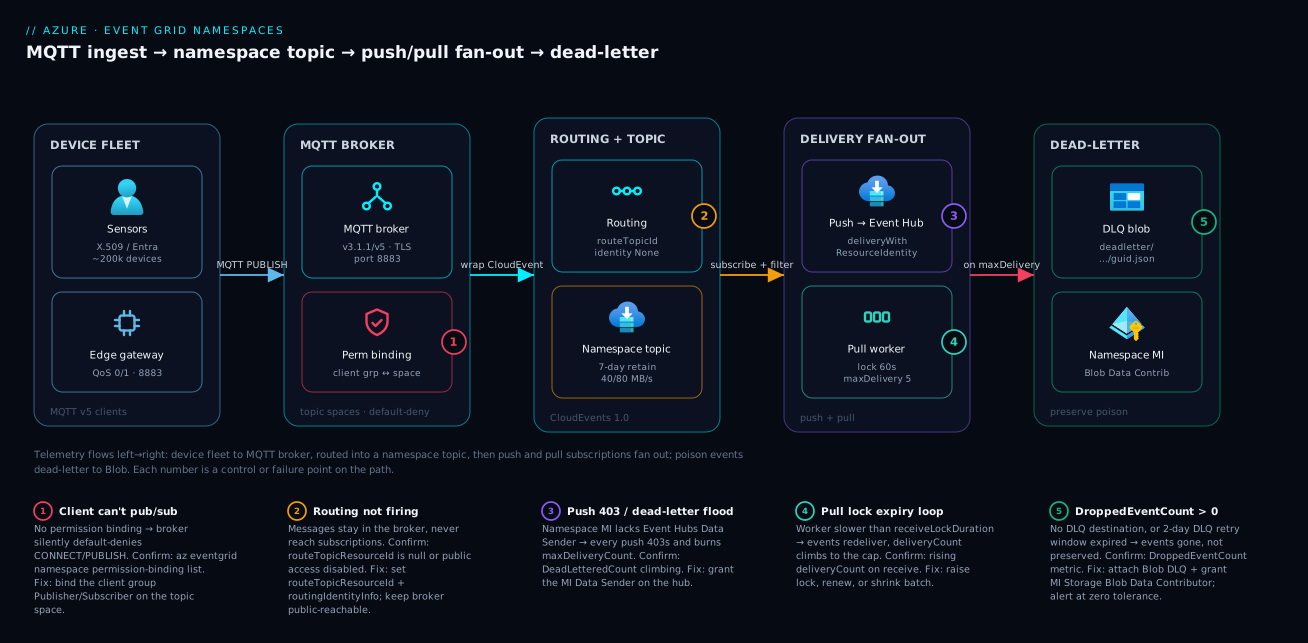
Real-world scenario
Velobyte Mobility runs a connected-vehicle platform ingesting telemetry from roughly 200,000 vehicles over MQTT into an Event Grid namespace in East US, routed to a namespace topic, and pushed to Event Hubs for a Stream Analytics pipeline that powers a live fleet dashboard and a regulatory trip-archive. The platform team is six engineers; the namespace runs at 4 throughput units; the monthly Event Grid + Event Hubs spend is about ₹95,000. Their contract with two fleet operators requires that every trip event be retained for seven years — a hard compliance line, not a best-effort target.
The incident began on a Tuesday at 14:20 when a regional Stream Analytics outage stalled the analytics job. Event Hubs, fed by the push subscription, back-pressured; the push subscription started returning the consumer’s 429/5xx and Event Grid began retrying with backoff. For ninety minutes the job was down. The on-call engineer’s dashboard showed DeliveryAttemptFailCount climbing — alarming, but not yet a data-loss event, because failed-and-retried is not lost. The trap was elsewhere: the subscription had been provisioned a year earlier without a dead-letter destination. As events aged past their delivery budget, they were not dead-lettered — they were dropped. DroppedEventCount was climbing from 14:31, but nobody had an alert on it, because the team had instinctively alerted on “failures,” and a dropped event is, perversely, not counted as a failure. They were silently losing trip data they were contractually required to retain — about two hours of one operator’s fleet, unrecoverable.
The breakthrough came when an engineer pulled the metric explorer and noticed DroppedEventCount was non-zero while DeadLetteredCount was flat zero — the exact inverse of what a healthy pipeline shows. That single comparison named the bug: no graveyard, so the overflow had nowhere to land. The realization reframed the whole pipeline from “retry harder” to “preserve everything, always.”
The fix was two-part and structural. First, every namespace-topic subscription got a mandatory dead-letter destination, enforced in the Bicep subscription module so a subscription literally could not be provisioned without one:
{
  "deadLetterDestinationWithResourceIdentity": {
    "deliveryRetryPeriodInDays": 2,
    "endpointType": "StorageBlob",
    "StorageBlob": {
      "blobContainerName": "vehicle-deadletter",
      "resourceId": "/subscriptions/<SUB>/resourceGroups/rg-fleet/providers/Microsoft.Storage/storageAccounts/stfleetdlq"
    },
    "identity": { "type": "SystemAssigned" }
  }
}
Second, they added a parallel pull subscription on the same topic feeding a back-pressure-tolerant archival worker. Because each subscription gets its own independent copy of every event, the archival path drained at its own pace and could not be starved by the analytics path stalling. They also moved their alerting from DeliveryAttemptFailCount to a zero-tolerance alert on DroppedEventCount, and added a secondary alert on a non-zero DeadLetteredCount so the DLQ filling was visible rather than discovered during an audit.
During the next regional incident six weeks later, the new shape held: DroppedEventCount stayed flat at zero, the dead-letter container captured the analytics overflow, the archival pull worker never even noticed, and a replay job rehydrated the dead-lettered events once Stream Analytics recovered — zero data loss, compliance line held. The cost of the change was a second subscription and a storage account: about ₹4,000/month. The lesson written into their platform standards, in three clauses: on a namespace topic, fan out by subscription, dead-letter every subscription, and alert on dropped — not failed — events.
The incident as a timeline, because the order of moves is the lesson:
| Time | Signal | What it meant | Action | What it should have been |
|---|---|---|---|---|
| 14:20 | Stream Analytics regional outage | Downstream stalled | (alert fires on job) | Expected; back-pressure begins |
| 14:25 | DeliveryAttemptFailCount rising |
Push retrying with backoff | Watch | Not loss yet — retries in flight |
| 14:31 | DroppedEventCount > 0 (unwatched) |
Events being lost | (no alert existed) | Should have paged at zero tolerance |
| 15:10 | Engineer compares metrics | Dropped > 0, dead-lettered = 0 | Diagnose | The breakthrough comparison |
| 15:20 | Root cause: no DLQ destination | Overflow had nowhere to land | — | DLQ should have been mandatory |
| 16:05 | Stream Analytics recovers | Backlog drains | — | — |
| +1 day | DLQ enforced in module + dropped-alert | Loss made impossible to repeat | Structural fix | The actual fix is the platform standard |
| +6 wks | Next incident | DLQ caught overflow, replayed | Zero loss | The standard proven |
Advantages and disadvantages
The namespace model — broker plus durable topic plus independent subscriptions — both enables fleet-scale eventing and introduces failure modes you must design against. Weigh it honestly:
| Advantages (why namespaces help you) | Disadvantages (why they bite) |
|---|---|
| Real MQTT v5 broker with fleet-scale, default-deny authorization (client groups + topic spaces) | QoS 2 unsupported; you must build idempotent consumers for exactly-once semantics |
| Pull delivery gives back-pressure and lets endpoint-less / private / batch consumers subscribe | Pull requires you to write a receive/ack loop and handle lock expiry yourself |
| 7-day retention + dead-letter to Blob preserve events through downstream outages | Dead-letter is opt-in; forget it and you get silent DroppedEventCount loss |
| Each subscription is an independent copy — fan out without consumers starving each other | More subscriptions = more cost and more DLQs to operate and alert on |
| 40/80 MB/s throughput dwarfs basic (~5 MB/s) for high-volume telemetry | Narrower push destination set today (Event Hubs only); other targets need a custom-topic hop |
| Managed-identity delivery — no keys/SAS to rotate to Event Hubs or Blob | Easy to under-grant: a missing Data Sender role 403s every push and floods the DLQ |
| CloudEvents-native + server-side advanced filters cut consumer cost and load | CloudEvents 1.0 JSON only — EventGridSchema producers are rejected outright |
| Regional resource with predictable throughput-unit scaling | Regional, not global — DR/region affinity is your design problem, not the platform’s |
The model is right when you have a device fleet, mismatched-throughput consumers, or a durability/retention requirement. It is the wrong tool for reacting to Azure resource events (use a system topic), for simple app-to-handler push across many destination types (basic custom topic is simpler today), or for ordered transactional command messaging (that is Service Bus). The disadvantages are all manageable — default-deny, opt-in dead-letter, narrow push set — but only if you know they exist and wire around them, which is the entire point of enumerating them here.
Hands-on lab
Stand up a namespace with MQTT, route to a topic, create a pull subscription with dead-lettering, publish a test message, and force a dead-letter — all free-tier-friendly with a single throughput unit; teardown at the end. Run in Cloud Shell (Bash).
Step 1 — Variables and resource group.
RG=rg-egns-lab
LOC=eastus
NS=egns-lab-$RANDOM       # globally-unique
ST=stegdlq$RANDOM         # storage for dead-letter (3-24 lowercase)
az group create -n $RG -l $LOC -o table
Step 2 — Create the namespace with MQTT and a system-assigned identity.
az eventgrid namespace create -g $RG -n $NS -l $LOC \
  --topic-spaces-configuration "{state:Enabled}" \
  --identity "{type:SystemAssigned}" -o table
Expected: a namespace row; topicSpacesConfiguration.state = Enabled.
Step 3 — Create the destination topic and a storage account + container for dead-letter.
az eventgrid namespace topic create -g $RG --namespace-name $NS -n mqtt-ingest -o table
az storage account create -g $RG -n $ST -l $LOC --sku Standard_LRS -o table
az storage container create --account-name $ST -n deadletter --auth-mode login -o table
Step 4 — Grant the namespace identity Storage Blob Data Contributor on the account.
NS_MI=$(az eventgrid namespace show -g $RG -n $NS --query identity.principalId -o tsv)
ST_ID=$(az storage account show -g $RG -n $ST --query id -o tsv)
az role assignment create --assignee-object-id $NS_MI --assignee-principal-type ServicePrincipal \
  --role "Storage Blob Data Contributor" --scope $ST_ID -o table
Expected: a role-assignment row. (Allow ~1–2 minutes for the assignment to propagate before dead-lettering will succeed.)
Step 5 — Create a pull subscription WITH a dead-letter destination.
SUB_JSON=$(cat <<JSON
{
  "deliveryMode": "Queue",
  "queue": { "receiveLockDurationInSeconds": 60, "maxDeliveryCount": 2, "eventTimeToLive": "PT5M" }
}
JSON
)
az eventgrid namespace topic event-subscription create -g $RG --namespace-name $NS \
  --topic-name mqtt-ingest --name sub-worker \
  --delivery-configuration "$SUB_JSON" -o table
Step 6 — Verify the wiring.
az eventgrid namespace show -g $RG -n $NS \
  --query "{state:topicSpacesConfiguration.state, identity:identity.type}" -o table
az eventgrid namespace topic event-subscription show -g $RG --namespace-name $NS \
  --topic-name mqtt-ingest --name sub-worker \
  --query "{mode:deliveryConfiguration.deliveryMode, lock:deliveryConfiguration.queue.receiveLockDurationInSeconds}" -o table
Expected: state = Enabled, identity = SystemAssigned, mode = Queue, lock = 60.
Step 7 — (Optional) Publish a test MQTT message and confirm delivery. With an X.509-registered client (see the MQTT section), publish to devices/<authName>/telemetry/temp using mosquitto_pub over TLS to $NS.<region>-1.ts.eventgrid.azure.net:8883, then receive on the pull subscription via the SDK/REST and confirm the CloudEvent arrives with your payload in data.
Step 8 — Teardown.
az group delete -n $RG --yes --no-wait
A checklist of what “done right” looks like before you tear down:
| Lab check | Pass condition |
|---|---|
| Namespace MQTT enabled | topicSpacesConfiguration.state = Enabled |
| Namespace identity present | identity.type = SystemAssigned |
| Identity can write DLQ | Role assignment Storage Blob Data Contributor exists |
| Subscription is pull | deliveryMode = Queue |
| Dead-letter wired | DLQ container resolves; MI has the role |
Common mistakes & troubleshooting
This is the differentiator. Each row is a real failure mode: the symptom you observe, the root cause, the exact command or metric to confirm it, and the fix. Scan for your symptom, then read the detail below the playbook.
| # | Symptom | Root cause | Confirm (exact command / metric) | Fix |
|---|---|---|---|---|
| 1 | MQTT CONNECT/PUBLISH silently denied | No permission binding for the client group | az eventgrid namespace permission-binding list -g $RG --namespace-name $NS -o table |
Bind the group Publisher/Subscriber on the topic space |
| 2 | Client never lands in its group | Client-group query references an attribute not set on the client | az eventgrid namespace client show … --query attributes |
Set the attribute on the client (queries see only attributes) |
| 3 | CONNECT fails after cert rotation | Thumbprint-pinned auth, cert changed | Client validationScheme = ThumbprintMatch + new thumbprint |
Move to CA-signed validation, or update allowedThumbprints |
| 4 | MQTT works but nothing downstream fires | Routing not configured | az eventgrid namespace show … --query topicSpacesConfiguration.routeTopicResourceId is null |
Set routeTopicResourceId + routingIdentityInfo |
| 5 | Routing stops after a network change | Public access disabled on the namespace | Namespace publicNetworkAccess = Disabled |
Keep the broker reachable; isolate the consumer side instead |
| 6 | Every push delivery 403s; DLQ floods | Namespace MI lacks Event Hubs Data Sender | DeadLetteredCount climbing; role-assignment list on the hub empty |
Grant the MI Azure Event Hubs Data Sender on the hub |
| 7 | Push 4xx straight to dead-letter | Non-retryable result (400/401/403/404/413) | deadletterreason / deliveryresult in the blob |
Fix the endpoint/payload; non-retryable codes never retry |
| 8 | Pull events keep redelivering | Worker slower than receiveLockDurationInSeconds |
deliveryCount rising on receive |
Raise the lock, renewLock, or shrink the receive batch |
| 9 | Events vanish, no blobs appear | No dead-letter destination configured | DroppedEventCount > 0 while DeadLetteredCount = 0 |
Attach a Blob DLQ + grant MI Storage Blob Data Contributor |
| 10 | DLQ configured but still dropping | DLQ retry window (deliveryRetryPeriodInDays) expired |
DroppedEventCount > 0 with DLQ present |
Widen the window (max 2 days); fix the target faster |
| 11 | Producer rejected at ingest | Sent EventGridSchema, not CloudEvents | Publish returns schema error | Emit CloudEvents 1.0 JSON only |
| 12 | Consumer gets events it shouldn’t | Filter too broad / missing | Subscription filtersConfiguration empty |
Add subject + advanced filters server-side |
| 13 | Throughput throttled at peak | Ingress above the namespace cap | PublishFailureCount / throttle responses |
Add throughput units (capacity) on the SKU |
| 14 | Replay can’t decide what to re-send | Not reading deadletterreason |
Blob deadletterProperties ignored |
Branch replay by deadletterreason (transient vs schema) |
No permission binding (rows 1–3). The broker is default-deny: a client with a valid certificate still cannot CONNECT until a permission binding grants its group rights on a space. The denial is silent at the protocol level (an MQTT CONNACK refusal), which is exactly why people stare at certs for an hour. Confirm with permission-binding list; if the binding exists, confirm the client is actually in the group by checking the attribute the group query filters on — a client whose attributes don’t match the query is simply not a member, and group queries can only see attributes, nothing else.
Routing not firing (rows 4–5). If routeTopicResourceId is null, MQTT messages are accepted by the broker and then go nowhere — there is no error, because publishing succeeded; it is delivery that never starts. Confirm by querying the field. The subtle one is row 5: routing requires the broker to be reachable, so disabling publicNetworkAccess to “lock things down” silently breaks routing. Isolate the consumer with private endpoints; keep the broker reachable.
Push 403 and dead-letter flood (rows 6–7). Push to Event Hubs uses deliveryWithResourceIdentity, so the namespace’s managed identity must hold Azure Event Hubs Data Sender on the target hub. Miss it and every delivery 403s — a non-retryable code — so events go straight to dead-letter and DeadLetteredCount climbs in lockstep with traffic. Confirm by listing role assignments on the hub for the namespace principal; the fix is one role assignment.
Pull lock-expiry loop (row 8). If your worker takes longer than receiveLockDurationInSeconds to acknowledge, the lock expires, the event is redelivered, and deliveryCount climbs until it hits maxDeliveryCount and dead-letters — turning slow processing into spurious dead-lettering. Confirm by watching deliveryCount on received events. Fix by raising the lock (up to 300 s), calling renewLock for legitimately long work, or shrinking the receive batch so each event is processed within the lock.
Silent drops (rows 9–10). The headline failure of this whole topic. A subscription with no dead-letter destination drops events once their budget is exhausted, and the metric is DroppedEventCount, not any *FailCount. Confirm by comparing DroppedEventCount (should be zero) against DeadLetteredCount; a healthy pipeline dead-letters and never drops. Even with a DLQ, the deliveryRetryPeriodInDays window (max 2 days) can expire and drop — so fix the target inside that window.
The KQL you keep open during an incident — one query per question:
AzureMetrics
| where ResourceProvider == "MICROSOFT.EVENTGRID"
| where MetricName in ("DeliverySuccessCount", "DeliveryAttemptFailCount", "DeadLetteredCount", "DroppedEventCount", "PublishSuccessCount", "PublishFailureCount")
| summarize Total = sum(Total) by MetricName, bin(TimeGenerated, 5m)
| order by TimeGenerated desc
A decision table that turns the metric pattern into a verdict:
| If you see… | It’s probably… | Do this |
|---|---|---|
DroppedEventCount > 0, DeadLetteredCount = 0 |
No DLQ destination | Attach a Blob DLQ + grant the MI the role |
DeadLetteredCount rising with traffic |
Push 403 (missing Data Sender) | Grant Event Hubs Data Sender on the hub |
deliveryCount climbing on pull |
Lock expiry (slow worker) | Raise lock / renewLock / smaller batch |
PublishFailureCount > 0 at peak |
Ingress throttling | Add throughput units (capacity) |
| Publish rejected immediately | Wrong schema (EventGridSchema) | Emit CloudEvents 1.0 JSON |
| Downstream silent, publish OK | Routing not configured | Set routeTopicResourceId |
Best practices
- Choose the surface deliberately. Use namespaces only when you need MQTT, pull, 7-day retention, or 40/80 MB/s. If you just need app-to-handler push to many destinations, a basic custom topic is simpler today.
- Default-deny, always. Model MQTT authorization with client groups + topic spaces + permission bindings, and scope topic templates per
${client.authenticationName}so no device can touch another’s subtree. - Prefer CA-signed certs over thumbprint pinning for any fleet that rotates certificates — pinning turns every rotation into a CONNECT outage.
- Dead-letter every subscription, no exceptions. Enforce it in your IaC module so a subscription cannot be provisioned without a DLQ destination. This is the single highest-value rule in the article.
- Alert on
DroppedEventCountat zero tolerance, and separately on a non-zeroDeadLetteredCount. Alerting only on “failures” hides the loss. - Filter server-side. Push subject + advanced filters down to the subscription so consumers never receive — or pay for — events they don’t match.
- Fan out by subscription, not by consumer fan-out logic. Each subscription gets an independent copy; a slow consumer on one cannot starve another.
- Use managed-identity delivery (
deliveryWithResourceIdentity) to Event Hubs and Blob — no keys or SAS to rotate — and grant the minimum role (Data Sender, Blob Data Contributor) at the narrowest scope. - Match delivery mode to the consumer, not to habit: push for reactive/reachable, pull for back-pressure/private/batch/endpoint-less.
- Right-size the lock and delivery count together. A lock shorter than worst-case processing plus a low
maxDeliveryCountmanufactures spurious dead-letters. - Keep the broker reachable; isolate the consumer. Private-network the consumer side; disabling public access on the namespace breaks routing.
- Build a replay job before you need it. It should read the DLQ blob, strip
deadletterProperties, and branch ondeadletterreason— rehydrate transient failures, quarantine schema rejections.
Security notes
Three security surfaces, three mechanisms:
- MQTT clients authenticate with X.509 certificates (CA-signed or thumbprint-pinned) or Microsoft Entra ID / JWT. Authorization is the default-deny permission-binding model from the broker section — a client can do nothing until a binding grants it.
- Push to Azure services (Event Hubs, and the destinations rolling out) uses the namespace’s managed identity plus an RBAC role on the target —
deliveryWithResourceIdentity. No keys, no SAS tokens, no secrets to rotate. - Push to webhooks must complete the CloudEvents abuse-protection handshake: Event Grid issues an
OPTIONSrequest with aWebHook-Request-Originheader, and your endpoint must echo it inWebHook-Allowed-Origin. This proves endpoint ownership and stops Event Grid being used to flood a third party. Better still, front the webhook with Microsoft Entra and validate the presented token.
The identity-and-RBAC matrix — exactly which principal needs which role where:
| Action | Principal | Role | Scope | Why |
|---|---|---|---|---|
| Route to a custom topic | Namespace MI | EventGrid Data Sender | The custom topic | Cross-resource publish auth |
| Push to Event Hubs | Namespace MI | Azure Event Hubs Data Sender | The event hub | Deliver without keys/SAS |
| Dead-letter to Blob | Namespace MI | Storage Blob Data Contributor | The storage account / container | Write poison events |
| Manage the namespace | Operator | EventGrid Contributor | Namespace / RG | Provision topics, subscriptions |
| Pull-receive events | Consumer identity | EventGrid Data Receiver | The topic / subscription | Authorized receive/ack |
The network and data-protection controls that matter for this topic:
| Control | What it protects | How to set it | Caveat |
|---|---|---|---|
| TLS on MQTT | In-transit telemetry | Port 8883 (MQTT) / 443 (WSS); plaintext not offered | No 1883 plaintext path exists |
| Private endpoints (consumer) | Consumer-side isolation | Private endpoint on the consumer resource | Don’t disable broker public access — breaks routing |
| Managed identity delivery | Eliminates stored secrets | deliveryWithResourceIdentity |
Under-granting 403s every push |
| Customer-managed keys (storage) | DLQ data at rest | CMK on the dead-letter storage account | Key rotation is your responsibility |
| Blob immutability on DLQ | Tamper-proof forensics | Immutability policy on the DLQ container | Plan retention vs replay cleanup |
| Webhook abuse-protection | Third-party flooding | Echo WebHook-Request-Origin |
Skipping it blocks the subscription |
Grant the namespace identity rights on the Event Hub used by the push subscription:
NS_PRINCIPAL=$(az eventgrid namespace show -g $RG -n $NS --query identity.principalId -o tsv)
EH_ID=$(az eventhubs eventhub show -g $RG --namespace-name ehns-telemetry -n telemetry --query id -o tsv)

az role assignment create \
  --assignee-object-id $NS_PRINCIPAL \
  --assignee-principal-type ServicePrincipal \
  --role "Azure Event Hubs Data Sender" \
  --scope $EH_ID
Cost & sizing
Event Grid namespaces bill on throughput units (the capacity that sets your ingress/egress ceilings), operations (publish/deliver/receive), and the resources they touch — Event Hubs for push, Storage for dead-letter and replay. The MQTT broker’s cost scales with connected clients and message volume. None of these is large per unit, but at fleet scale they add up, and the dominant lever is almost always throughput units sized to peak, not average.
What drives the bill, and how to pull each lever:
| Cost driver | What scales it | How to reduce | Watch-out |
|---|---|---|---|
| Throughput units (capacity) | Peak ingress/egress MB/s | Size to peak, not over-provision | Under-size → PublishFailureCount throttling |
| Operations (publish/deliver) | Event volume | Server-side filtering cuts deliver ops | Client-side filtering still pays to deliver |
| MQTT connections | Concurrent client sessions | Consolidate chatty devices; batch publishes | Per-session limits + cost at fleet scale |
| Event Hubs (push target) | Throughput units on the hub | Right-size hub TUs; Capture for cheap archive | Separate Event Hubs bill |
| Storage (dead-letter) | Volume of dead-lettered events + retention | Lifecycle-tier old DLQ blobs; replay + delete | A flooding DLQ is a symptom — fix the source |
| Replay compute | Functions executions on replay | Replay only what’s relevant by deadletterreason |
Don’t rehydrate schema rejections |
Rough figures for sizing intuition (regional list prices vary; treat as order-of-magnitude):
| Scenario | Shape | Indicative monthly | Notes |
|---|---|---|---|
| Lab / PoC | 1 TU, low volume, 1 subscription | ~₹1,500–3,000 | Plus negligible storage |
| Small fleet | 1–2 TU, ~5k devices, push + pull | ~₹15,000–30,000 | Add Event Hubs separately |
| Large fleet | 4 TU, ~200k devices, push + pull + DLQ | ~₹90,000–120,000 | Throughput units dominate |
| DLQ + replay storage | Standard LRS, modest volume | ~₹2,000–6,000 | Lifecycle-tier to cut it |
Sizing heuristics worth committing to memory:
| Question | Rule of thumb |
|---|---|
| How many throughput units? | Size to peak ingress MB/s, with headroom for retries during incidents |
| Push or pull for cost? | Pull lets a slow consumer self-pace — avoids over-provisioning push targets |
| How long to retain on the topic? | As long as your slowest consumer’s worst-case lag + replay window |
| DLQ storage tier? | Hot for the replay window, then lifecycle to cool/archive |
| When does fan-out cost pay off? | Always, if it prevents one consumer starving another (loss is costlier) |
The cheapest event is the one you filtered out at the subscription, and the most expensive is the one you dropped because there was no dead-letter destination and had to reconstruct from upstream — if you even can. Spend on a throughput unit of headroom and a dead-letter storage account before you spend on incident-response time.
Going deeper
The sections above are the namespace tier end to end. This one fills in what an experienced engineer reaches for once the happy path works: the other Event Grid taught in its own right, multi-tenant fan-out, how certificate trust actually composes, what delivery guarantees you truly get, and the network story.
The basic tier, taught (not just contrasted)
The comparison tables treated the classic surface as “the thing you are not using.” But you will meet it — most Azure resource eventing still runs on it — so know its model directly. The basic tier has four topic types and three input schemas, and it is push-only.
| Basic-tier construct | What it is | Typical source |
|---|---|---|
| System topic | Azure emits resource events onto it | Blob created, RG deployment, Key Vault near-expiry |
| Custom topic | You POST your own app events to its endpoint | A microservice publishing OrderPlaced |
| Partner topic | A SaaS / third party publishes via Partner Events | Auth0, SAP, and other partners |
| Domain | A management wrapper over up to 100,000 topics | Multi-tenant fan-out (below) |
Schema is where basic and namespace genuinely diverge. A basic topic can be told which of three input shapes to expect:
| Schema | Shape | Who uses it | Namespace support |
|---|---|---|---|
| Event Grid schema | Azure’s original {topic, subject, eventType, data, …} |
Legacy Azure sources | Rejected |
| CloudEvents 1.0 (JSON) | CNCF-standard {specversion, type, source, subject, data, …} |
New designs, interop | Only this |
| Custom schema | Your shape plus an input mapping to Event Grid fields | Bring-your-own producers | n/a |
The migration tax hides right here: a producer emitting the proprietary Event Grid schema works against a basic custom topic but is rejected at ingest by a namespace topic, which speaks CloudEvents 1.0 JSON only. Re-platforming from basic to namespace is therefore partly a producer-reshaping job, not just a resource swap.
Retry and dead-letter exist on basic too, with different ceilings than the namespace pull knobs you learned:
| Reliability knob | Basic push | Namespace pull |
|---|---|---|
| Max attempts | up to ~30 (default), configurable | maxDeliveryCount 1–10 |
| Retention / TTL | up to 24h (1440 min), exponential backoff | topic retention up to 7 days; eventTimeToLive |
| Dead-letter | Blob, via deadLetterDestination |
Blob, via deadLetterDestinationWithResourceIdentity |
| Delivery shape | Push only | Push or pull |
The same instinct — dead-letter everything, alert on drops — applies to both surfaces; only the field names and the attempt ceilings change.
Event domains: one resource, many tenants
When you fan the same class of event out to many customers who must never see each other’s data, do not stand up a topic per tenant by hand. Use an event domain — a basic-tier resource that is a container for up to 100,000 domain topics behind one publishing endpoint. You publish an event and name its domain topic (usually the tenant id); Event Grid delivers it to only that topic’s subscribers.
| Domain concept | What it buys you |
|---|---|
| One endpoint, one key / identity | Publish every tenant through a single authenticated door |
| Domain topic per tenant | Materialised on first publish; up to 100,000 per domain |
| Domain-scope subscription | A subscription spanning all topics — your own cross-tenant handler |
| Topic-scope subscription | A subscription a tenant owns, seeing only their topic |
| Per-topic access control | RBAC scoped to a domain topic isolates each tenant’s subscribers |
The pattern: your platform publishes to the domain; each tenant (or your own aggregation service) subscribes at the scope it is entitled to. It is the classic multi-tenant SaaS eventing shape, and it lives on the basic tier — namespaces do not host domains. If your fleet is really “one telemetry stream, thousands of customers, strict isolation,” a domain may belong in front of, or beside, the namespace design in this article.
Certificate trust: thumbprints, CA chains, and proof-of-possession
The MQTT section registered a client by thumbprint — you pin the exact leaf certificate. That does not scale: every renewal re-pins. The fleet-scale answer is a CA chain. You register a CA certificate (root or intermediate, PEM) as a caCertificates resource on the namespace; any client whose leaf certificate chains to that CA is trusted, and its identity is taken from the certificate subject (CN) — so you rotate leaf certs freely without touching Event Grid.
| Trust model | You register | Client presents | Rotation cost |
|---|---|---|---|
| Thumbprint match | Each leaf’s thumbprint (self-signed OK) | The exact pinned leaf | Edit the client on every renewal |
| Subject / DNS / URI match | Nothing per-leaf; a naming rule | A leaf whose CN / SAN matches the client name | None if the name is stable |
| CA chain | A root / intermediate CA cert on the namespace | Any leaf that chains to the CA | None — issue new leaves from your PKI |
Two ideas people conflate are worth separating. Authentication here is proof-of-possession (PoP): during the mutual-TLS handshake the client signs with the certificate’s private key, proving it holds the key, not merely a copy of the public certificate — a stolen public cert alone cannot connect. Chain validation is separate: the broker walks leaf → intermediate → registered root and rejects a break anywhere. A self-signed cert is its own root, fine for a lab or a handful of devices; a real fleet issues leaves from an intermediate under a registered root, so a compromised device is revoked at the leaf rather than by re-pinning thousands of others.
# Register a CA certificate so any chained leaf is trusted (illustrative; PEM is your CA)
az eventgrid namespace ca-certificate create \
  --resource-group $RG --namespace-name $NS \
  --name fleet-root-ca \
  --certificate "@fleet-root-ca.pem"
The client’s validationScheme then decides how a leaf’s identity maps to the authenticationName — SubjectMatchesAuthenticationName (CN equals the client name) is the common fleet choice, so a freshly issued leaf for sensor-9001 is accepted the moment it connects, with no per-device registration call.
What delivery guarantees you actually get
Design for the truth, not the hope: Event Grid is at-least-once and not ordered, on both push and pull. Combined with MQTT QoS, the end-to-end guarantee is the weakest link in the chain.
| Hop | Guarantee | Consequence |
|---|---|---|
| Device → broker (QoS 0) | At most once | A dropped PUBLISH is gone; fine for high-rate, loss-tolerant telemetry |
| Device → broker (QoS 1) | At least once | Duplicates possible on reconnect; consumers must de-dupe |
| Broker → topic (routing) | At least once | A routed event may appear more than once |
| Topic → consumer (push / pull) | At least once, unordered | Retries and redelivery can duplicate and reorder |
The practical rule falls straight out of the table: build idempotent consumers — key on the CloudEvent id (or a device sequence number in data) and treat a repeat as a no-op — and never assume order; if you need ordering, carry a monotonic timestamp or sequence in the payload and sort downstream. This is also why QoS 2 (exactly-once) being unsupported costs you nothing you were entitled to anyway: nothing else in the path is exactly-once, so idempotency is mandatory regardless.
Push batching, and why it is a throughput knob
Push does not have to send one event per request. On a push subscription you tune two batching controls, trading latency for efficiency:
| Batching control | What it bounds | Effect of raising it |
|---|---|---|
maxEventsPerBatch |
Maximum events per delivery request | Fewer round-trips, higher per-request latency |
preferredBatchSizeInKilobytes |
Soft size ceiling per batch | Bigger, denser deliveries; mind the consumer’s body limits |
For a high-rate telemetry firehose to Event Hubs, batching is the difference between one efficient send and thousands of chatty ones. The watch-out is the consumer contract: a webhook that parses one event per call will choke on a batch, and an oversized batch can trip a 413 Payload Too Large — which, per the delivery-result table earlier, is non-retryable and dead-letters immediately.
Network isolation without breaking routing
You isolate the consumer and client side, never the broker’s ability to route. Event Grid namespaces support private endpoints for inbound MQTT and pull traffic, so devices and workers connect over private IP space instead of the public internet. The subtlety the troubleshooting playbook already flags: routing must still publish into the nominated topic, so the pattern is private endpoints on the connections you control, broker reachable for routing — not a blanket publicNetworkAccess: Disabled that silently stops routing. Pair private endpoints with the fleet’s PKI and you have a device path that is private in transit and authenticated by proof-of-possession end to end. The private-endpoint and private-DNS mechanics live in Azure Private Endpoints & Private DNS at Scale; the device-registry and provisioning side is Azure IoT Hub, DPS, Edge & Digital Twins.
Practice challenges
Work each one against the mental model first, then open the solution. They escalate from “confirm you know the surfaces” to “design the multi-tenant, private, no-loss pipeline.” Commands are illustrative — every id is a placeholder and nothing here runs live.
1 (Beginner) — Pick the surface. A team needs to fire an Azure Function whenever a blob is created in a storage account. Which Event Grid surface, and why not a namespace?
<details><summary>Solution</summary>
A system topic. Only the basic surface subscribes to Azure resource events (Blob-created), and only it can push to Functions today; namespace topics carry your events, speak CloudEvents-only, and currently push to Event Hubs only.
Why: the surface is chosen by capability, not fashion — reacting to Azure events is a system-topic job, full stop. </details>
2 (Beginner) — Turn the broker on. You created a namespace but MQTT clients cannot connect at all — there is no broker endpoint. What single property is missing, in CLI and Bicep?
<details><summary>Solution</summary>
topicSpacesConfiguration.state = Enabled. CLI: --topic-spaces-configuration "{state:Enabled}"; Bicep: properties.topicSpacesConfiguration.state: 'Enabled'. Without it you get a pull-delivery-only namespace and no MQTT broker.
Why: the broker is opt-in — the namespace still exists for pull delivery even when MQTT is off. </details>
3 (Intermediate) — Scope a fleet to its own subtree. Write the topic-space template and client-group query so every sensor may publish only under devices/<its-own-name>/telemetry/... and nowhere else.
<details><summary>Solution</summary>
az eventgrid namespace topic-space create -g $RG --namespace-name $NS \
  --name ts-telemetry \
  --topic-templates "devices/\${client.authenticationName}/telemetry/#"
az eventgrid namespace client-group create -g $RG --namespace-name $NS \
  --name cg-sensors --query "attributes.role = 'sensor'"
# then bind Publisher: permission-binding create ... --permission Publisher
The ${client.authenticationName} variable is substituted per connecting client, so one template scopes each device to only its own subtree.
Why: one template plus one binding replaces one-rule-per-device; drop the variable and every sensor can publish everywhere. </details>
4 (Intermediate) — Filter server-side. A worker should wake only for over-temperature readings (data.celsius > 85) on devices/... subjects. Write the filtersConfiguration.
<details><summary>Solution</summary>
{
  "filtersConfiguration": {
    "includedEventTypes": ["MQTT.EventPublished"],
    "filters": [
      { "operatorType": "StringBeginsWith", "key": "subject", "values": ["devices/"] },
      { "operatorType": "NumberGreaterThan", "key": "data.celsius", "values": [85] }
    ]
  }
}
Why: every event the filter rejects is one the consumer never receives, locks, or pays to process — filtering is a cost and throughput control, not a nicety. </details>
5 (Advanced) — Stop the silent loss. A push subscription to Event Hubs shows DroppedEventCount > 0 while DeadLetteredCount stays 0 during a downstream outage. Diagnose in one sentence, then give the JSON that fixes it and the RBAC it requires.
<details><summary>Solution</summary>
The subscription has no dead-letter destination, so once the retry budget is exhausted events are dropped, not preserved. Attach a Blob DLQ and grant the namespace managed identity Storage Blob Data Contributor on the account:
{
  "deadLetterDestinationWithResourceIdentity": {
    "deliveryRetryPeriodInDays": 2,
    "endpointType": "StorageBlob",
    "StorageBlob": {
      "blobContainerName": "deadletter",
      "resourceId": "/subscriptions/<SUB>/resourceGroups/<RG>/providers/Microsoft.Storage/storageAccounts/<ST>"
    },
    "identity": { "type": "SystemAssigned" }
  }
}
Why: DroppedEventCount > 0 with DeadLetteredCount = 0 is the signature of a missing graveyard — a healthy pipeline dead-letters and never drops.
</details>
6 (Advanced) — Design for scale, isolation, and no loss. Sketch the design for one telemetry stream shared by three fleet operators who must never see each other’s data, one analytics consumer that wants the firehose, and one archival consumer that is slow and on-prem. Name the constructs and delivery modes.
<details><summary>Solution</summary>
- Ingestion: MQTT broker on the namespace; CA-chain auth so leaves rotate freely; topic templates scoped per
${client.authenticationName}; per-operator client groups and permission bindings for isolation at the broker. - Fan-out: route into one namespace topic; a subscription per operator (subject / advanced filters, or an event domain in front for hard tenant isolation), plus subscriptions for the two consumers — each is an independent copy.
- Analytics: push to Event Hubs (reactive, reachable), batching tuned for the firehose.
- Archival, on-prem: pull over a private endpoint (endpoint-less, back-pressure, private IP).
- No loss: every subscription carries a Blob dead-letter destination; alert on
DroppedEventCountat zero tolerance and on any non-zeroDeadLetteredCount.
Why: independent subscriptions + matched delivery modes + mandatory dead-lettering is the whole method — isolation at the broker, back-pressure where the consumer needs it, and a graveyard everywhere. </details>
Common beginner mistakes
These are conceptual traps — wrong mental models, not wrong commands. The symptom → cause → fix playbook earlier handles operational failures; this handles the misunderstandings that lead you into them.
“Event Grid is Event Grid — one product.” The single most expensive beginner assumption. The classic push router and the namespace tier share a brand and nothing else: different resources, protocols, schemas, delivery models, and prices. Right model: decide which Event Grid first — MQTT / pull / 7-day retention / high throughput means namespace; reacting to Azure events or broad push means basic. Picking wrong is a re-platform, not a config change.
“A valid certificate means the device can publish.” Beginners burn hours debugging certificates when the cert was never the problem. Authentication (a trusted cert) and authorization (a permission binding) are separate gates, and the broker is default-deny. Right model: a client can do nothing — not even CONNECT — until a permission binding grants its group rights on a topic space. Cert first, binding second; the binding is what lifts the deny.
“My MQTT messages will just show up in my Function.” They will not. Messages published to the broker live inside the broker until routing wraps them in CloudEvents and publishes them to a topic. Right model: the broker is an island and routing is the only bridge. No routeTopicResourceId, no downstream — and because the PUBLISH itself succeeds, there is no error to stare at.
“Retries mean my events are safe.” Retrying and losing are not opposites — an event can exhaust its retry budget and then be dropped if there is nowhere to dead-letter it. Right model: retries buy time; the dead-letter destination buys durability. Watch DroppedEventCount (loss), not just any *FailCount (retrying), and give every subscription a graveyard.
“Push is simpler, so default to push.” Push is simpler only when the consumer is reachable and can absorb the offered rate. Bolt push onto a slow, on-prem, or locked-down consumer and you fight 429s, lost ordering, and dead-letter floods forever. Right model: match the delivery mode to the consumer — pull exists precisely so a struggling or endpoint-less consumer can pace itself.
“Exactly-once (QoS 2) would fix my duplicates.” QoS 2 is unsupported, but chasing it misdiagnoses the problem. Every hop here is at-least-once and unordered, so duplicates and reordering are inherent, not a QoS bug. Right model: make consumers idempotent (key on the CloudEvent id) and order-tolerant; then QoS 1 is all you need and QoS 2’s absence costs you nothing.
“Lock things down by disabling the namespace’s public access.” The instinct is right, the target is wrong: turning off the broker’s public access can silently stop routing, because routing must publish into the topic. Right model: isolate the consumer and client side with private endpoints and keep the broker reachable. You lock down the doors you own, not the tower’s ability to route.
Interview & exam questions
These map to AZ-204 (Develop event-based solutions), AZ-305 (messaging architecture), and AZ-220 (IoT) topics.
-
When do you choose an Event Grid namespace over a basic custom topic? When you need an MQTT broker, pull delivery, 7-day retention, or 40/80 MB/s throughput. Basic custom/system topics remain simpler for app-to-handler push across a wider destination set and for reacting to Azure resource events.
-
How does MQTT authorization scale on a namespace? Not per-device. You register clients, bucket them into client groups via attribute queries, define topic spaces of topic templates, and grant a group Publisher/Subscriber on a space via a permission binding.
${client.authenticationName}in a template scopes each device to its own subtree with one rule. -
What is the default authorization posture and why does it matter? Default-deny: a client with a valid cert can do nothing until a permission binding allows it. For an IoT fleet this is the correct, least-privilege posture — there is no implicit access to over-trust.
-
What does routing do, and what identity does it need? It wraps each MQTT message in a CloudEvents envelope and publishes it to one nominated topic. For a same-namespace topic,
routingIdentityInfoofNonesuffices; for a cross-resource custom topic, the namespace managed identity needs EventGrid Data Sender. -
Push vs pull — when does pull win? When the consumer can’t expose an endpoint, needs back-pressure, requires a private link, or processes on a schedule. Pull inverts control so a struggling consumer paces its own
receiveinstead of being overwhelmed. -
What is the difference between
DroppedEventCountandDeadLetteredCount? Dead-lettered events were preserved to Blob after exhausting their budget; dropped events were lost because no dead-letter destination existed (or its retry window expired). A healthy pipeline dead-letters and never drops — alert on dropped at zero tolerance. -
Which knobs bound retry on a pull subscription?
maxDeliveryCount(attempt ceiling) andeventTimeToLive(wall-clock ceiling); whichever is hit first ends delivery.receiveLockDurationInSecondsgoverns how long each received event is locked before redelivery. -
Why might a push subscription dead-letter every single event? The namespace managed identity lacks Azure Event Hubs Data Sender on the target, so every delivery returns a non-retryable 403 and goes straight to dead-letter. The fix is one role assignment.
-
What causes a pull redelivery loop and how do you fix it? The worker takes longer than
receiveLockDurationInSeconds, so the lock expires and the event redelivers, climbingdeliveryCountuntil it dead-letters. Raise the lock (max 300 s), callrenewLockfor long work, or shrink the receive batch. -
What schema do namespace topics accept, and what’s a consequence? CloudEvents 1.0 JSON only — no proprietary EventGridSchema. A producer emitting EventGridSchema is rejected at ingest, so the migration cost of moving from a basic topic includes re-shaping producers.
-
How do you make dead-letter forensics actionable? Each dead-lettered blob carries
deadletterProperties(deadletterreason,deliveryattempts,deliveryresult, timestamps). A replay job branches ondeadletterreason— rehydrate transient failures (Unauthorized,TimeToLiveExceeded), quarantine schema rejections. -
Why does disabling public network access on the namespace break things? Routing requires the broker to be reachable to publish into the nominated topic; turning off public access silently stops routing. Isolate the consumer side with private endpoints instead, and keep the broker reachable.
Quick check
- What single property turns on the MQTT broker when creating a namespace?
- You registered a client with a valid certificate but it can’t PUBLISH. What is the most likely cause?
- Which metric reveals silent data loss, and what does a healthy value look like?
- A push subscription dead-letters every event with a 403. What role is missing, and where?
- Give two situations where pull delivery is the right choice over push.
Answers
topicSpacesConfiguration.state = Enabledon the namespace — without it you get a pull-only namespace with no broker.- No permission binding grants the client’s group rights on the topic space — the broker is default-deny, so a valid cert alone grants nothing. Confirm with
az eventgrid namespace permission-binding list. DroppedEventCount— dropped events were lost (no dead-letter destination, or the DLQ retry window expired). A healthy pipeline keeps it at zero and dead-letters instead; alert on it at zero tolerance.- Azure Event Hubs Data Sender, granted to the namespace’s managed identity, scoped to the target event hub. The 403 is non-retryable, so every delivery goes straight to dead-letter until the role is assigned.
- Any two of: the consumer cannot expose a reachable endpoint (on-prem/batch/locked-down); you need back-pressure so a slow consumer self-paces; you need a private link to consume over private IP; you process on a schedule rather than reactively.
Glossary
- Event Grid namespace — A regional Event Grid resource that hosts the MQTT broker, namespace topics, and pull delivery; distinct from the classic global push router.
- MQTT broker — The v3.1.1 / v5 publish-subscribe broker exposed by a namespace when
topicSpacesConfiguration.state = Enabled. - Client — A registry entry for one device or app, keyed by an authentication name backed by an X.509 cert or a Microsoft Entra identity.
- Client group — A query over client attributes that buckets clients for authorization (e.g.
attributes.role = 'sensor'). - Topic space — A named set of MQTT topic templates that a permission binding grants rights over.
- Permission binding — The grant tuple (client group, topic space, Publisher/Subscriber); the only thing that lifts default-deny.
- Topic template — An MQTT topic pattern, optionally using
${client.authenticationName}and+/#wildcards, that scopes access. - Namespace topic — A durable topic (up to 7-day retention) that routed MQTT messages and app events land in and fan out from.
- Routing — Namespace configuration that wraps each MQTT message in CloudEvents and publishes it to one nominated topic.
- Event subscription — A consumer’s filtered, independent view of a topic; each gets its own copy of every matching event.
- Push delivery —
deliveryMode: Push; Event Grid sends events to a registered, reachable destination as they arrive. - Pull delivery —
deliveryMode: Queue; the consumer connects and receives events with queue semantics (receive/acknowledge/release/reject). - CloudEvents 1.0 — The vendor-neutral event envelope (
id,source,subject,type,time,data) that namespace topics require. - Advanced filter — A typed comparison (e.g.
NumberGreaterThan,StringIn) against any attribute ordatafield, evaluated server-side. - Dead-letter — Writing undeliverable events to Blob Storage after the retry budget is exhausted, preserving them for replay.
DroppedEventCount— The metric for events lost (not dead-lettered); the zero-tolerance alarm of this whole topic.deadletterreason— A field in a dead-lettered blob’sdeadletterPropertiesthat tells a replay job why the event failed.- Throughput unit — The namespace capacity that sets ingress/egress ceilings; the dominant cost and scaling lever.
- Event Grid (basic tier) — The classic, global, push-only Event Grid: system, custom, and partner topics plus domains, accepting the Event Grid schema, CloudEvents 1.0, or a custom schema. Distinct from the namespace tier taught here.
- System topic — A basic-tier topic onto which an Azure service emits resource events (e.g. Blob created); the only way to subscribe to Azure service events.
- Custom topic — A basic-tier topic you publish your own application events to, over a public endpoint with a wide set of push handlers.
- Partner topic — A basic-tier topic a third-party SaaS publishes to via the Partner Events model.
- Event domain — A basic-tier container for up to 100,000 domain topics behind one endpoint, used for multi-tenant fan-out with per-topic subscriber isolation.
- Event Grid schema — Azure’s original proprietary event envelope; accepted by basic topics but rejected by namespace topics, which require CloudEvents 1.0 JSON.
- CA certificate — A root or intermediate certificate registered on the namespace so any client leaf certificate that chains to it is trusted, removing per-device thumbprint pinning.
- Proof-of-possession (PoP) — Authentication in which the client signs with its certificate’s private key during the TLS handshake, proving it holds the key rather than a copied public certificate.
- At-least-once delivery — The guarantee Event Grid provides on push and pull: every event is delivered one or more times, unordered — so consumers must be idempotent.
- Idempotent consumer — A consumer that treats a repeated event (same CloudEvent
id) as a no-op; the required design given at-least-once, unordered delivery and unsupported QoS 2. maxEventsPerBatch— A push-subscription control setting the maximum number of events per delivery request; larger batches cut round-trips at the cost of per-request latency and body size.- Private endpoint — A network interface giving clients and consumers private-IP inbound access to the namespace; used to isolate the connections you own while keeping the broker reachable for routing.
Next steps
- Send the push fan-out somewhere useful: Azure Event Hubs: Kafka, Capture, Stream Analytics & Throughput Scaling.
- When you need ordered, transactional, command-style messaging instead of event fan-out: Azure Service Bus: Sessions, De-duplication & Dead-Letter Patterns.
- Build the pull worker and replay job as serverless: Azure Functions: Serverless Patterns and, for orchestrated multi-step replay, Azure Durable Functions: Orchestration & Fan-Out Patterns.
- Govern the device side of the MQTT estate: Azure IoT Hub, DPS, Edge & Digital Twins Fundamentals.
- Wire the observability that catches
DroppedEventCountbefore a customer does: Azure Monitor & Application Insights for Observability. - Govern how long dead-letter forensics live in Blob: Azure Blob Storage: Lifecycle, Immutability & Soft Delete.