Every byte you write to Azure is already encrypted at rest with Microsoft-managed keys. That fact lulls a lot of teams into stopping there. This article is about the next two rungs of the ladder: replacing the platform key with a customer-managed key (CMK) you control, and stacking a second independent encryption layer underneath it so that a single compromised key never exposes plaintext.
We will wire CMK across Storage, managed disks, and databases, anchor the keys in a FIPS 140-2 Level 3 Managed HSM, automate rotation, and rehearse the failure modes that actually hurt: a deleted key, a regional outage, a broken identity grant.
In a nutshell
Picture your data as a document you lock inside a strongbox. The key to that box is the data encryption key (DEK) — a fast symmetric key that scrambles the actual bytes. Now, instead of leaving that box key lying around, you lock it inside a safe that only you can open. The safe’s key is your key encryption key (KEK), and when you bring your own KEK it is called a customer-managed key (CMK). Anyone who wants to read the document has to ask your safe to hand back the box key first — and the moment you change the safe’s combination, every copy of the document becomes unreadable, no matter who is holding the ciphertext. That nested pattern, a key protecting a key, is envelope encryption, and it is how essentially all of Azure’s at-rest encryption works.
By default Azure owns both the box and the safe (platform-managed keys), and your data is already AES-256 encrypted at rest without you lifting a finger. Bringing your own CMK swaps out the safe for one you control, so revocation, rotation, and audit all move into your hands. Double encryption (infrastructure encryption) then adds a second, independent lock around the whole box, using a separate implementation and a separate Microsoft-held key — so a flaw in any single layer still leaves the data sealed.
The trade you are making is control for responsibility: once you hold the safe key, losing it or revoking it takes your data offline. The rest of this lesson is about wiring that safe correctly — across Storage, managed disks, and databases — anchoring it in an HSM, rotating it without downtime, and rehearsing the failure modes before they find you.
Level: Advanced · Time: ~31 min
Prerequisites. You should be comfortable with Azure Key Vault, managed identities, and secret rotation and with Entra ID role assignments and RBAC. A working mental model of resource groups, managed identities (system- versus user-assigned), and how a service authenticates to Key Vault will make everything here click. (Entra ID is the current name for what used to be called Azure Active Directory.)
After this lesson you will be able to:
- Explain envelope encryption and the DEK/KEK relationship well enough to defend a design in an audit.
- Choose correctly between platform-managed keys, customer-managed keys, and customer-provided keys for a given compliance requirement.
- Wire CMK across Storage, managed disks (via a Disk Encryption Set), and Azure SQL (TDE with BYOK), each with a least-privilege managed identity.
- Turn on infrastructure (double) encryption where it matters, and know why it must be set at creation.
- Configure automatic key-version rotation and grant keys at a scope that survives it.
- Reason about the availability blast radius of holding your own keys, and build the alerts and drills that keep it from becoming an outage.
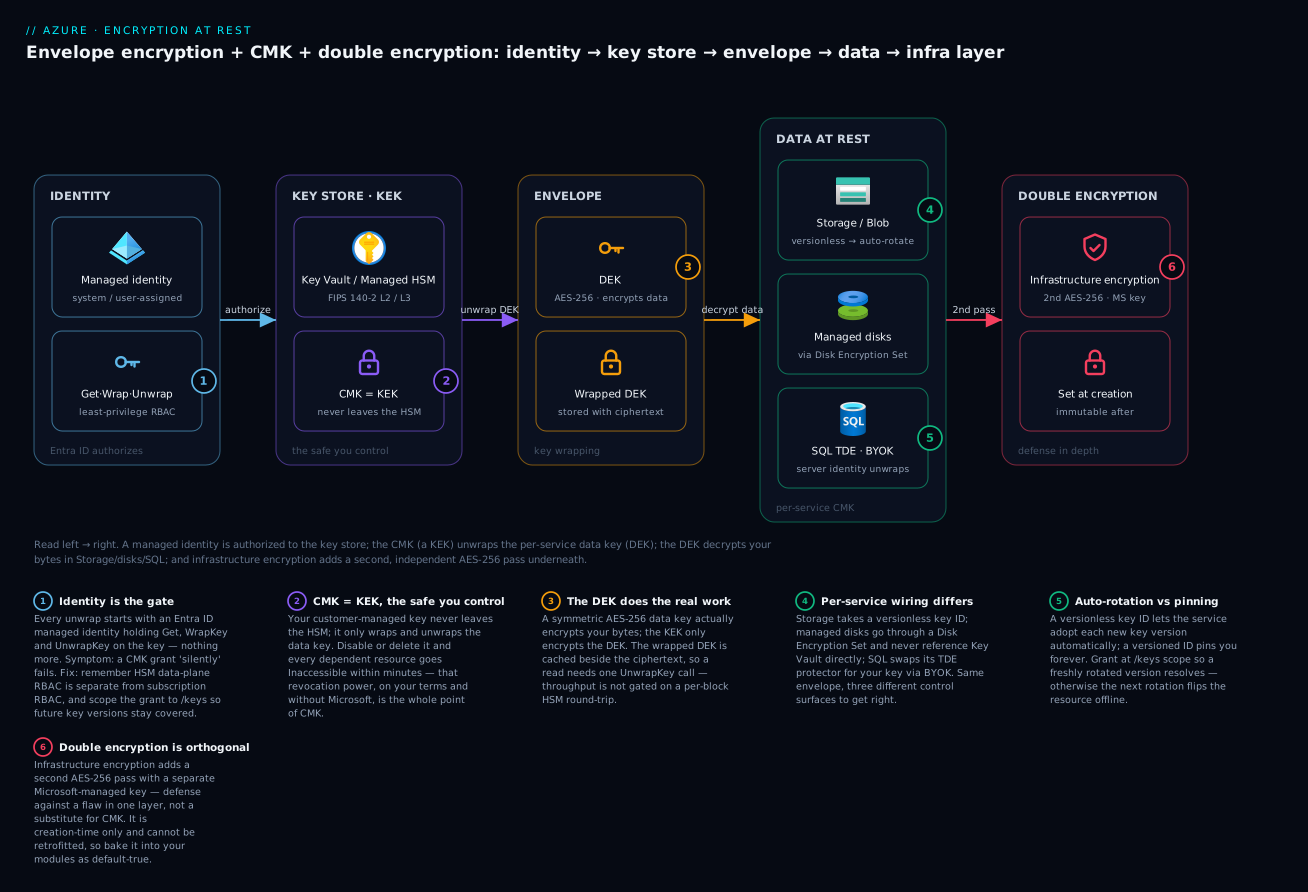
Read the diagram left to right: an Entra ID managed identity is authorized to the key store, the CMK (a KEK) unwraps the per-service data key (DEK), the DEK decrypts your bytes in Storage/disks/SQL, and infrastructure encryption adds a second independent AES-256 pass underneath.
1. The three encryption layers, and what each actually buys you
Azure encryption at rest is layered. Understanding which layer a control belongs to is the difference between a defensible design and cargo-culted config.
| Layer | What it protects | Who holds the key | Threat it addresses |
|---|---|---|---|
| Platform (default) | All data at rest | Microsoft | Lost/stolen physical media |
| Customer-managed key (CMK) | The DEK that encrypts your data | You, in Key Vault / Managed HSM | Insider access, compliance separation of duties, instant revocation |
| Infrastructure encryption (double) | A second, independent AES-256 pass | Microsoft (separate key) | Cryptographic failure or implementation flaw in a single layer |
The mental model is envelope encryption. Your data is encrypted with a data encryption key (DEK). The DEK is wrapped by a key encryption key (KEK) — that KEK is your CMK. Revoke or delete the CMK and the DEK can no longer be unwrapped, so the data is cryptographically inaccessible even though the ciphertext still physically exists. That is the entire point of CMK: you can render data unreadable on your terms, without Microsoft in the loop.
Infrastructure encryption is orthogonal. It adds a second AES-256 encryption at the storage-infrastructure level using a Microsoft-managed key, applied in addition to the service-level encryption. Two independent keys, two independent algorithms-in-practice. It must be enabled at resource creation — you cannot retrofit it.
Callout: CMK and infrastructure encryption are not substitutes. CMK gives you control; infrastructure encryption gives you defense in depth. Regulated workloads usually want both.
2. Choosing a key store: Key Vault Premium vs Managed HSM
Both Key Vault Premium and Managed HSM give you HSM-backed keys. The difference is the boundary and the assurance level.
| Key Vault Premium | Managed HSM | |
|---|---|---|
| HSM model | Shared, multi-tenant HSM | Single-tenant, dedicated HSM pool |
| FIPS validation | FIPS 140-2 Level 2 | FIPS 140-2 Level 3 |
| Admin model | Azure RBAC / access policies | Local RBAC (data-plane), separate from control plane |
| Key ceremony / BYOK | Supported | Supported, with security-domain export |
| Cost | Per-operation | Provisioned (always-on pool) |
Pick Managed HSM when you need Level 3, full single-tenancy, or strict separation between Azure subscription admins and key administrators (the security domain means even a global admin cannot exfiltrate your keys). Pick Key Vault Premium when Level 2 satisfies your auditors and you want pay-per-use economics.
Provisioning a Managed HSM requires an activation step where you supply RSA public keys for the quorum of administrators who hold the security domain.
# Create the Managed HSM (control plane). It starts in a provisioned-but-not-activated state.
az keyvault create \
  --hsm-name "kv-hsm-prod" \
  --resource-group "rg-security" \
  --location "eastus2" \
  --retention-days 90 \
  --administrators "$(az ad signed-in-user show --query id -o tsv)"

# Generate three RSA key pairs for the security-domain quorum, then activate.
# 'quorum 2' means any 2 of the 3 holders can recover the HSM.
az keyvault security-domain download \
  --hsm-name "kv-hsm-prod" \
  --sd-wrapping-keys cert1.cer cert2.cer cert3.cer \
  --sd-quorum 2 \
  --security-domain-file "kv-hsm-prod-SD.json"
The downloaded security-domain file is the crown jewel. Store it offline, split across the quorum holders. Losing it past the quorum threshold means the HSM is unrecoverable by anyone, including Microsoft.
Grant a key-management role on the data plane (Managed HSM uses its own local RBAC, not subscription RBAC):
az keyvault role assignment create \
  --hsm-name "kv-hsm-prod" \
  --role "Managed HSM Crypto Officer" \
  --assignee "$(az ad signed-in-user show --query id -o tsv)" \
  --scope "/keys"
3. CMK for Storage and managed disks
3.1 Create the key
Create an RSA key in the HSM. Use RSA-HSM (or RSA 3072+) for wrapping; storage CMK supports RSA.
az keyvault key create \
  --hsm-name "kv-hsm-prod" \
  --name "cmk-storage" \
  --kty RSA-HSM \
  --size 3072 \
  --ops wrapKey unwrapKey
3.2 Storage account with CMK and a user-assigned identity
The clean pattern is a user-assigned managed identity that you grant access before the storage account references the key. This avoids the chicken-and-egg problem you hit with system-assigned identities.
resource "azurerm_user_assigned_identity" "storage_cmk" {
  name                = "id-storage-cmk"
  resource_group_name = azurerm_resource_group.sec.name
  location            = azurerm_resource_group.sec.location
}

# Grant the identity crypto rights on the HSM (local RBAC role).
resource "azurerm_key_vault_managed_hardware_security_module_role_assignment" "storage" {
  managed_hsm_id     = azurerm_key_vault_managed_hardware_security_module.prod.id
  name               = "00000000-0000-0000-0000-000000000abc"
  scope              = "/keys"
  role_definition_id = "/providers/Microsoft.KeyVault/providers/Microsoft.Authorization/roleDefinitions/21dbd100-6940-42c2-9190-5d6cb909625b" # Managed HSM Crypto User
  principal_id       = azurerm_user_assigned_identity.storage_cmk.principal_id
}

resource "azurerm_storage_account" "data" {
  name                            = "stkvdataprod"
  resource_group_name             = azurerm_resource_group.sec.name
  location                        = azurerm_resource_group.sec.location
  account_tier                    = "Standard"
  account_replication_type        = "GRS"
  min_tls_version                 = "TLS1_2"
  infrastructure_encryption_enabled = true # double encryption, must be set at creation

  identity {
    type         = "UserAssigned"
    identity_ids = [azurerm_user_assigned_identity.storage_cmk.id]
  }

  customer_managed_key {
    managed_hsm_key_id        = azurerm_key_vault_managed_hardware_security_module_key.cmk_storage.versionless_id
    user_assigned_identity_id = azurerm_user_assigned_identity.storage_cmk.id
  }
}
Two things worth calling out. First, infrastructure_encryption_enabled = true is the double-encryption switch and is immutable after creation. Second, referencing the versionless key ID is what enables automatic key-version rotation: when the key rolls to a new version, Storage picks it up without you touching the account.
3.3 Managed disks via Disk Encryption Sets
Managed disks do not reference Key Vault directly. They go through a Disk Encryption Set (DES), which holds the identity and key binding. The DES supports three encryption types — pick EncryptionAtRestWithCustomerKey for CMK, or EncryptionAtRestWithPlatformAndCustomerKeys for double encryption (platform key + CMK).
az disk-encryption-set create \
  --name "des-prod" \
  --resource-group "rg-security" \
  --key-url "https://kv-hsm-prod.managedhsm.azure.net/keys/cmk-disks/<version>" \
  --encryption-type "EncryptionAtRestWithPlatformAndCustomerKeys" \
  --mi-system-assigned

# Grant the DES identity crypto rights, then create a disk bound to it.
DES_PRINCIPAL=$(az disk-encryption-set show -n des-prod -g rg-security --query identity.principalId -o tsv)
az keyvault role assignment create \
  --hsm-name "kv-hsm-prod" \
  --role "Managed HSM Crypto Service Encryption User" \
  --assignee "$DES_PRINCIPAL" \
  --scope "/keys"

az disk create \
  --name "osdisk-app01" \
  --resource-group "rg-security" \
  --size-gb 128 \
  --disk-encryption-set "des-prod"
Note the DES key-url here is versioned. For auto-rotation on disks, set the DES to rotate to the latest version with az disk-encryption-set update --enable-auto-key-rotation true.
4. CMK for Azure SQL and PostgreSQL (TDE with BYOK)
Azure SQL Database uses Transparent Data Encryption (TDE). By default the TDE protector is service-managed; BYOK swaps it for your CMK. The server’s managed identity needs get, wrapKey, and unwrapKey on the key.
# Assign the SQL server's identity rights on the HSM
SQL_PRINCIPAL=$(az sql server show -n sql-prod -g rg-security --query identity.principalId -o tsv)
az keyvault role assignment create \
  --hsm-name "kv-hsm-prod" \
  --role "Managed HSM Crypto Service Encryption User" \
  --assignee "$SQL_PRINCIPAL" \
  --scope "/keys"

# Register the key with the server, then promote it to the active TDE protector
az sql server key create \
  --server "sql-prod" \
  --resource-group "rg-security" \
  --kid "https://kv-hsm-prod.managedhsm.azure.net/keys/cmk-sql/<version>"

az sql server tde-key set \
  --server "sql-prod" \
  --resource-group "rg-security" \
  --server-key-type "AzureKeyVault" \
  --kid "https://kv-hsm-prod.managedhsm.azure.net/keys/cmk-sql/<version>"
For automatic key-version rotation, enable it on the server’s TDE protector so a new key version is adopted without re-running the set command:
az sql server update -n sql-prod -g rg-security --assign-identity
# Then enable auto-rotation of the TDE protector key version:
az sql server tde-key set \
  --server "sql-prod" --resource-group "rg-security" \
  --server-key-type "AzureKeyVault" \
  --auto-rotation-enabled true \
  --kid "https://kv-hsm-prod.managedhsm.azure.net/keys/cmk-sql/<version>"
Azure Database for PostgreSQL Flexible Server follows the same envelope pattern: a user-assigned identity, get/wrapKey/unwrapKey on the key, and the CMK configured at server level. It is set with az postgres flexible-server create --key <key-id> --identity <uami> .... The operational caveat is the same across all of these: if the key becomes inaccessible, the database transitions to an Inaccessible state and goes offline until access is restored.
5. Encryption scopes for per-container key isolation
A single CMK on a storage account is coarse. Encryption scopes let you bind different keys (or the platform key) to individual blob containers or even individual blobs — useful for multi-tenant blob stores where each tenant demands key isolation.
# Create a scope backed by a dedicated CMK
az storage account encryption-scope create \
  --account-name "stkvdataprod" \
  --name "tenant-acme-scope" \
  --key-source "Microsoft.KeyVault" \
  --key-uri "https://kv-hsm-prod.managedhsm.azure.net/keys/cmk-tenant-acme/<version>"

# Create a container that defaults to that scope and forbids overrides
az storage container create \
  --account-name "stkvdataprod" \
  --name "acme-data" \
  --default-encryption-scope "tenant-acme-scope" \
  --prevent-encryption-scope-override true \
  --auth-mode login
--prevent-encryption-scope-override true is the control that matters: it stops a caller from writing a blob under a different scope, guaranteeing every object in the container uses the tenant’s key. You can also enable infrastructure (double) encryption per scope with --require-infrastructure-encryption true at creation.
6. BYOK import and key escrow
CMK does not require Microsoft to generate your key. With BYOK you can import a key generated in your own on-prem HSM, wrapped so the plaintext key never transits in the clear. The workflow: pull a wrapping key (KEK) from the target HSM, wrap your target key with it inside your on-prem HSM, then upload the wrapped blob.
# 1. Create a non-exportable RSA-HSM KEK in the target HSM to wrap with
az keyvault key create --hsm-name "kv-hsm-prod" --name "byok-kek" \
  --kty RSA-HSM --size 4096 --ops import

# 2. (On your on-prem HSM) wrap your target key with the KEK's public key using
#    the CKM_RSA_AES_KEY_WRAP mechanism, producing key-to-import.byok

# 3. Import the wrapped blob — plaintext key material never leaves your HSM
az keyvault key import --hsm-name "kv-hsm-prod" --name "cmk-imported" \
  --byok-file "key-to-import.byok"
Escrow consideration: once you own key generation, you own key loss. If your only copy of an imported key lives in one HSM and you delete it past purge protection, the data is gone. Maintain an offline escrow copy of the source key material under the same controls as your security domain, and document who can reconstitute it.
7. Confidential computing and Secure Key Release
For confidential VMs and confidential containers, you can gate a key so it is only released to a workload that proves, via hardware attestation, that it is running in a genuine trusted execution environment with the expected measurements. This is Secure Key Release (SKR).
The mechanism: mark the key as exportable and attach a release policy that references Microsoft Azure Attestation (MAA). The workload obtains an attestation token from MAA, presents it, and the HSM releases the wrapped key only if the token’s claims satisfy the policy.
{
  "version": "1.0.0",
  "anyOf": [
    {
      "authority": "https://sharedeus2.eus2.attest.azure.net",
      "allOf": [
        { "claim": "x-ms-isolation-tee.x-ms-attestation-type", "equals": "sevsnpvm" },
        { "claim": "x-ms-isolation-tee.x-ms-compliance-status", "equals": "azure-compliant-cvm" }
      ]
    }
  ]
}
az keyvault key create --hsm-name "kv-hsm-prod" --name "skr-key" \
  --kty RSA-HSM --size 3072 --exportable true \
  --policy "skr-release-policy.json"
The key is exportable: true but that does not mean anyone can read it — export is only ever the wrapped form, and only to a caller whose attestation satisfies the policy. This is how you bind a decryption capability to a verified, measured workload rather than to a static identity.
Going deeper
You now have the wiring. This section is the mental model underneath it — the parts that separate someone who can copy a CMK snippet from someone who can design (and defend) a key-management architecture.
Three ways to hold the key — and why the third exists
Section 1 framed platform versus customer-managed keys. There is a third option, and knowing all three is what an auditor is really testing for.
| Model | Who generates the key | Where the key lives | You control revocation? | Who owns availability |
|---|---|---|---|---|
| Platform-managed (default) | Microsoft | Microsoft-managed store | No | Microsoft |
| Customer-managed key (CMK / BYOK) | You, or imported | Your Key Vault / Managed HSM | Yes — disable, delete, or rotate on your terms | You — bounded by your key store’s SLA |
| Customer-provided key | You, per request | Nowhere in Azure — you send it on every call | Total — just stop sending it | Entirely you |
Customer-provided keys (sometimes called “encryption key in the request”) are the extreme end. For Azure Blob, a client can pass an AES-256 key on each read/write via the x-ms-encryption-key, x-ms-encryption-key-sha256, and x-ms-encryption-algorithm: AES256 headers. Azure uses it to encrypt that blob and then forgets it — the key is never persisted. This gives you absolute control and absolutely no safety net: lose the key and the blob is unrecoverable, and every client must now manage key distribution itself. It suits narrow scenarios (a client-side encryption gateway, a regulator who forbids the provider ever holding the key) and is the wrong default for almost everything else. CMK is the pragmatic middle: you hold the master key, Azure holds the operational plumbing.
What “key wrapping” actually does
The word “wrap” hides a subtlety. Your KEK (the CMK) never encrypts your data directly. RSA — the algorithm behind most CMKs — can only encrypt a payload smaller than its modulus, and it is slow. So Azure uses envelope encryption within the wrap itself: a symmetric AES-256 data encryption key encrypts the data, and the KEK wraps only that small DEK. Even the BYOK import you saw uses CKM_RSA_AES_KEY_WRAP — an ephemeral AES key wraps the target key material, and RSA wraps that ephemeral AES key. RSA for key transport, AES for bulk data: this hybrid is universal.
Two consequences fall out of this design:
- Reads are cheap. A service unwraps the DEK once, caches the plaintext DEK in memory, and decrypts blocks locally. You are not making an HSM call per 4 KB read. That is why a busy storage account does not hammer your HSM — and why HSM throughput limits rarely bite for at-rest workloads.
- Rotation is cheap. Rotating your KEK does not re-encrypt your data. The service simply re-wraps the same DEK under the new KEK version. The terabytes on disk never move. This is why “rotate the key” is a metadata operation that completes in seconds, not a multi-hour re-encryption job — a fact that surprises people coming from systems where “rotate” means “rewrite everything.”
The three states of data — and where this lesson sits
At-rest encryption is one leg of a tripod. A complete design addresses all three states, and a strong reviewer will ask about each.
| State | What it means | Primary Azure controls |
|---|---|---|
| At rest | Data sitting on disk | AES-256 SSE (default), CMK for the KEK, infrastructure (double) encryption |
| In transit | Data moving across a network | TLS 1.2+ (set min_tls_version = "TLS1_2"), HTTPS-only on Storage, private endpoints to keep traffic off the public internet |
| In use | Data live in memory / CPU | Confidential computing (AMD SEV-SNP memory encryption + attestation), Always Encrypted for SQL columns, Secure Key Release |
Everything in sections 1–7 is the “at rest” leg. Don’t let CMK become a checkbox that distracts from the other two: a database with a beautiful HSM-backed TDE protector but min_tls_version left at TLS1_0 has a wide-open flank. Encryption in use is the newest and least-understood leg. Two Azure features live here:
- Confidential computing (section 7) encrypts VM/container memory with a per-VM hardware key so even the hypervisor host cannot read plaintext RAM; SKR then releases decryption keys only to an attested enclave.
- Always Encrypted (Azure SQL) encrypts specific columns on the client side. The database engine stores and returns only ciphertext and never possesses the plaintext or the keys. Note the acronym trap: Always Encrypted’s Column Master Key is also abbreviated CMK in the docs — it is unrelated to the customer-managed KEK this lesson is about. With secure enclaves, Always Encrypted can even run range and
LIKEpredicates over encrypted columns inside a protected enclave. See Azure SQL Always Encrypted in context for the column-level story.
CMK beyond Storage, disks, and SQL
The envelope pattern is a platform primitive, so the same shape repeats across services — a managed identity granted Get/WrapKey/UnwrapKey, and a key referenced on the resource. What differs is the tier requirement and the exact control surface:
- Cosmos DB takes an account-level key at creation:
az cosmosdb create --key-uri "https://<vault>.vault.azure.net/keys/<key>". Once set, CMK cannot be removed from the account — plan it up front. A user-assigned identity is referenced with--default-identity. - Service Bus (Premium) and Event Hubs (Premium / Dedicated) support CMK at the namespace, expressed cleanly in Terraform as
azurerm_servicebus_namespace_customer_managed_keywithnamespace_id,key_vault_key_id, and auser_assigned_identity_id. Standard-tier namespaces cannot use CMK at all. - Managed HSM as the key store matters here: not every service accepts a Managed-HSM key, and some historically required a versioned key ID rather than a versionless one. Always confirm the current per-service support matrix before you standardize on HSM keys everywhere — a service that only accepts Key Vault (not Managed HSM) keys will quietly force an exception in an otherwise-uniform design. The Managed HSM deep dive covers the security-domain and single-tenancy internals.
The lesson to internalize: the pattern is uniform (identity → grant → key reference → possible double encryption), but the knobs are per-service. Read each service’s CMK page for the tier gate, the versioned-vs-versionless rule, and whether HSM keys are accepted.
The grant that survives rotation
The identity model is deliberately minimal: an encryption identity should hold exactly Get, WrapKey, and UnwrapKey — never Delete, Purge, or Import. That is the difference between the Crypto Service Encryption User role (what a service identity gets) and Crypto Officer (what a human key admin gets). Least privilege here is not hygiene theatre; it directly bounds your blast radius.
The single most important detail is scope. Grant at /keys (the collection), not at a single key version. When auto-rotation mints a new version, an assignment scoped to the old version does not cover it, the next UnwrapKey fails, and the resource flips to Inaccessible — exactly the enterprise-scenario outage below. Scoping to /keys means every present and future version is covered.
Auto-rotation itself has two independent halves that people conflate:
- A rotation policy on the key decides when a new version is created. You set it once and forget it:
az keyvault key rotation-policy update \
  --hsm-name "kv-hsm-prod" --name "cmk-storage" \
  --value '{"lifetimeActions":[{"trigger":{"timeAfterCreate":"P18M"},"action":{"type":"Rotate"}},{"trigger":{"timeBeforeExpiry":"P30D"},"action":{"type":"Notify"}}],"attributes":{"expiryTime":"P2Y"}}'
- The consuming service’s auto-rotation behavior decides whether it adopts the new version. This is per-service and easy to get wrong:
- Storage adopts automatically when you referenced the versionless key ID — typically within a day of a new version appearing.
- Managed disks (DES) adopt only if you set
--enable-auto-key-rotation trueon the Disk Encryption Set. - SQL TDE adopts only if you set
--auto-rotation-enabled trueon the TDE protector.
Rotating the KEK re-wraps DEKs; it never re-encrypts data (see the key-wrapping section). So there is no throughput or downtime cost to rotation if the grant is scoped correctly. Get the scope wrong and rotation becomes your most reliable self-inflicted outage.
The availability tax of holding your own keys
This is the trade-off the analogy warned about, stated plainly: with CMK, your key store’s availability becomes a hard floor under your data’s availability. You have pulled a dependency that was Microsoft’s problem into your own IAM and operational blast radius. Enumerate the ways it fails, because each maps to a concrete guardrail:
| Failure mode | What it looks like | Guardrail |
|---|---|---|
| Key disabled/deleted | Dependent resources go Inaccessible | Soft-delete + purge protection everywhere; never grant Purge to automation |
| Grant scoped to one version | Next rotation strands the identity | Assign roles at /keys scope |
| Identity cleanup job removes the grant | Silent until the next unwrap | Exclude encryption identities from generic IAM-cleanup automation |
| HSM regional outage | Every resource keyed there stalls | HSM in a paired region / documented recovery; understand this couples your RTO to the HSM SLA |
| Security domain lost | HSM unrecoverable by anyone, including Microsoft | Split the security-domain file across quorum holders, offline |
| Silent unwrap failure | Data offline before you notice | Alert on UnwrapKey failures and KeyNearExpiry; run a synthetic canary probe |
The uncomfortable truth is that a customer-managed key can only ever make your data’s availability worse than the platform default, never better — the value you buy is control, compliance, and instant revocation, not uptime. That is a fine trade for regulated data, but it must be a deliberate one, with the drill (disable a key in non-prod, confirm the outage, re-enable, confirm recovery) rehearsed and timed before you rely on it. The enterprise scenario that follows is exactly this trade going wrong in production.
Enterprise scenario
A payments platform we ran enabled CMK with auto key-version rotation on a tier-0 Azure SQL server, sourcing the TDE protector from Managed HSM. Standard pattern, passed audit. Three months in, the HSM Crypto Officer who had originally been granted access offboarded, and an IAM cleanup job removed their now-orphaned local RBAC assignments. Nothing broke — until the next automatic key rotation. The new key version was created, but the SQL server’s user-assigned identity had only ever been granted Crypto Service Encryption User on the specific key, not at /keys scope. The freshly minted version inherited no assignment the server could resolve, the unwrap failed, and the database flipped to Inaccessible. Failover groups did not help — the replica wrapped against the same HSM key.
The fix had two parts. First, grant the encryption identity at the collection scope so every future version is covered, not just the one present at setup:
az keyvault role assignment create \
  --hsm-name "kv-hsm-prod" \
  --role "Managed HSM Crypto Service Encryption User" \
  --assignee-object-id "$SQL_PRINCIPAL" \
  --assignee-principal-type "ServicePrincipal" \
  --scope "/keys"
Second, we added an Azure Monitor alert on the HSM’s KeyNearExpiry and on any unwrapKey failure, plus a synthetic probe that runs az sql db show --query status against a canary database every five minutes. The real lesson: with CMK you have moved a hard dependency into your own IAM blast radius. Any identity-hygiene automation that touches the HSM is now a potential outage trigger, so key grants must be scoped to survive rotation and excluded from generic cleanup jobs.
Verify
Confirm each layer is actually doing what you configured.
# Storage: CMK source + infrastructure (double) encryption both on
az storage account show -n stkvdataprod -g rg-security \
  --query "{cmk:encryption.keySource, infra:encryption.requireInfrastructureEncryption, keyId:encryption.keyVaultProperties.keyVaultUri}" -o table

# Managed disk: encryption type via its DES
az disk show -n osdisk-app01 -g rg-security \
  --query "encryption.type" -o tsv
# expect: EncryptionAtRestWithPlatformAndCustomerKeys

# SQL: active TDE protector should be your AzureKeyVault key, not ServiceManaged
az sql server tde-key show -n sql-prod -g rg-security \
  --query "{type:serverKeyType, uri:uri}" -o table

# HSM: confirm the key version history (proves rotation happened)
az keyvault key list-versions --hsm-name kv-hsm-prod --name cmk-storage \
  --query "[].{created:attributes.created, enabled:attributes.enabled}" -o table
For a true negative test, disable the key version in a non-prod HSM and confirm the dependent storage account / database becomes inaccessible — then re-enable and confirm recovery. That is the only way to know revocation works before you need it.
Hardening checklist
Pitfalls
- The Inaccessible cascade. Deleting or disabling a CMK takes down every resource that wraps with it. Purge protection is your seatbelt — turn it on everywhere, and never grant
Purgeto automation. - Infrastructure encryption is creation-time only. If you forgot it, your only path is recreate-and-migrate. Bake it into your modules as a default-true variable.
- Versioned vs versionless key IDs. Versionless enables auto-rotation; versioned pins you to one key version forever. Know which your resource needs (Storage wants versionless; some services historically required versioned).
- HSM local RBAC is not subscription RBAC. Owner on the subscription grants nothing on the HSM data plane. Forgetting this is the most common reason a CMK grant silently fails.
- Losing the security domain. Past the quorum threshold, no one — not even Microsoft — can recover a Managed HSM. Treat that file like root key material.
Practice challenges
Work these top to bottom; they escalate from confirming the default to proving your kill-switch. Assume the resource names from the article (stkvdataprod, kv-hsm-prod, rg-security) and substitute placeholders (<version>, principal IDs) as needed. Every command below is real and schema-correct, but was not run against a live subscription here — treat the output shapes as representative.
1. (Beginner) Prove your data is already encrypted before you touch CMK. Query an existing storage account and show which key source it uses by default.
<details> <summary>Solution</summary>
az storage account show -n stkvdataprod -g rg-security \
  --query "encryption.keySource" -o tsv
# representative output: Microsoft.Storage
Why: Microsoft.Storage means platform-managed AES-256 is already active. CMK does not turn on encryption — it replaces the key holder. Establishing this baseline stops the most common beginner misconception before you write a line of CMK config.
</details>
2. (Beginner) Create a wrap-capable key. Create an RSA-HSM key in kv-hsm-prod suitable for wrapping a DEK.
<details> <summary>Solution</summary>
az keyvault key create --hsm-name "kv-hsm-prod" --name "cmk-practice" \
  --kty RSA-HSM --size 3072 --ops wrapKey unwrapKey
Why: Storage, DES, and SQL CMK all need an RSA key whose operations include wrapKey/unwrapKey. An EC key, or an RSA key without those ops, will be rejected when a service tries to bind it.
</details>
3. (Intermediate) Grant an identity so rotation can’t strand it. Give a user-assigned identity the least-privilege encryption role at a scope that covers every future key version.
<details> <summary>Solution</summary>
az keyvault role assignment create \
  --hsm-name "kv-hsm-prod" \
  --role "Managed HSM Crypto Service Encryption User" \
  --assignee "$UAMI_PRINCIPAL" \
  --scope "/keys"
Why: /keys (collection scope), not /keys/cmk-practice/<version>, is what survives auto-rotation. Crypto Service Encryption User is the least-privilege role (Get/Wrap/Unwrap), unlike Crypto Officer which can also delete and purge.
</details>
4. (Intermediate) Enable double encryption on a NEW account and verify it stuck. Create a storage account with infrastructure encryption on, then confirm it.
<details> <summary>Solution</summary>
az storage account create -n stdblenc01 -g rg-security -l eastus2 \
  --sku Standard_GRS --min-tls-version TLS1_2 \
  --require-infrastructure-encryption true

az storage account show -n stdblenc01 -g rg-security \
  --query "encryption.requireInfrastructureEncryption" -o tsv
# representative output: true
Why: infrastructure (double) encryption is creation-time only — there is no update path. Verifying immediately after create is the only way to catch a module that silently dropped the flag before the account holds data.
</details>
5. (Advanced) Give one tenant its own key inside a shared account. Turn a coarse single-CMK storage account into per-container key isolation for a tenant “acme”.
<details> <summary>Solution</summary>
az storage account encryption-scope create \
  --account-name "stkvdataprod" --name "tenant-acme-scope" \
  --key-source "Microsoft.KeyVault" \
  --key-uri "https://kv-hsm-prod.managedhsm.azure.net/keys/cmk-tenant-acme/<version>"

az storage container create \
  --account-name "stkvdataprod" --name "acme-data" \
  --default-encryption-scope "tenant-acme-scope" \
  --prevent-encryption-scope-override true --auth-mode login
Why: --prevent-encryption-scope-override true is the load-bearing flag — without it a caller could write blobs under a different (or the platform) key, breaking the isolation guarantee you promised the tenant.
</details>
6. (Advanced) Prove your revocation kill-switch works — without taking prod down. Design and run a safe revocation drill.
<details> <summary>Solution</summary>
# In a NON-PROD HSM/account only:
# 1. Disable the current key version
az keyvault key set-attributes --hsm-name "kv-hsm-nonprod" \
  --name "cmk-storage" --version "<version>" --enabled false

# 2. Confirm the dependent resource loses access (Storage returns 403 / SQL -> Inaccessible)
az storage blob list --account-name stnpdata --container-name test --auth-mode login
# expect an authorization/key error

# 3. Re-enable and confirm recovery
az keyvault key set-attributes --hsm-name "kv-hsm-nonprod" \
  --name "cmk-storage" --version "<version>" --enabled true
Why: revocation is a control you must test, not assume. Rehearsing (and timing) the disable→outage→re-enable→recover loop in non-prod is the only way to trust your kill-switch — and to know your recovery time — before a real incident forces the question. Pair it with an alert on UnwrapKey failures so production never fails silently.
</details>
Common beginner mistakes
- “I have to enable CMK to encrypt my data.” No. Every Azure service encrypts at rest with AES-256 by default. CMK does not add encryption; it changes who holds the key that unlocks it. The right mental model: default = Microsoft owns the safe; CMK = you own the safe.
- “CMK protects me from hackers breaking in.” Mostly no. CMK addresses insider access, compliance separation-of-duties, and instant revocation — not a network intrusion into a running app that already has a valid session. Reach for network controls, private endpoints, and encryption-in-use for that threat; reach for CMK when you need to prove control of the key and be able to revoke it.
- “I’m Owner on the subscription, so I can manage the HSM keys.” Managed HSM uses its own local (data-plane) RBAC, entirely separate from subscription RBAC. Subscription Owner grants you nothing on the HSM data plane. This is the number-one reason a CMK grant “mysteriously” fails.
- “I’ll turn on double encryption later.” Infrastructure encryption is creation-time only — there is no retrofit. If it matters, it has to be
trueatcreate, so make it a default-true input in your Terraform/Bicep modules. - “Rotating the key will re-encrypt all my terabytes.” It won’t. Rotation creates a new KEK version and the service re-wraps the tiny DEK; your bulk data never moves. Rotation is a seconds-long metadata operation — which is exactly why there’s no excuse to skip it.
- “Versioned or versionless key ID, whatever — they both point to my key.” They behave very differently. A versionless ID lets a service adopt new versions automatically; a versioned ID pins it forever. Grant at
/keysscope and prefer versionless where the service supports it, or your next rotation becomes an outage.
Glossary
- Encryption at rest — Encrypting data where it is stored (disk, blob, database files) so stolen media is useless without the key. On by default in Azure with AES-256.
- DEK (Data Encryption Key) — The symmetric AES-256 key that actually encrypts your data bytes. Fast, and used per-resource; the thing that gets wrapped.
- KEK (Key Encryption Key) — A key whose only job is to encrypt (“wrap”) the DEK. In a CMK design, your customer-managed key is the KEK.
- CMK (Customer-Managed Key) — A KEK that you create/import and hold in your Key Vault or Managed HSM, giving you control over rotation, revocation, and audit. (Beware: Always Encrypted uses “CMK” for its unrelated Column Master Key.)
- Envelope encryption — The pattern of encrypting a key with another key (DEK wrapped by KEK). Lets you revoke access by controlling one small key instead of re-encrypting the data.
- Key wrapping — Encrypting the DEK with the KEK. Because RSA can’t encrypt large data directly, wrapping uses a hybrid (
CKM_RSA_AES_KEY_WRAP) under the hood. - Platform-managed key — The default: Microsoft generates and holds the KEK. Zero effort, zero control.
- Customer-provided key — You send an AES-256 key on every Blob request (
x-ms-encryption-keyheader); Azure uses it and never stores it. Maximum control, no safety net. - BYOK (Bring Your Own Key) — Importing key material you generated (e.g. in an on-prem HSM) into Azure in wrapped form, so plaintext key material never transits in the clear.
- TDE (Transparent Data Encryption) — Database-level at-rest encryption for Azure SQL. Its “TDE protector” is the KEK; BYOK swaps the service-managed protector for your CMK.
- DES (Disk Encryption Set) — The intermediary resource that binds a managed disk to a CMK and an identity; managed disks never reference Key Vault directly.
- Managed HSM — A single-tenant, FIPS 140-2 Level 3, dedicated HSM pool with its own local RBAC and a customer-held security domain.
- Key Vault Premium — A shared, multi-tenant, FIPS 140-2 Level 2 HSM-backed key store billed per operation.
- Infrastructure (double) encryption — A second, independent AES-256 pass with a separate Microsoft key, layered under service-level encryption for defense in depth. Creation-time only.
- Encryption scope — A Storage feature that binds a specific key to individual containers or blobs, enabling per-tenant key isolation within one account.
- SKR (Secure Key Release) — Releasing a key only to a workload that proves, via hardware attestation, it is running in a genuine trusted execution environment with expected measurements.
- Always Encrypted — Client-side column encryption for Azure SQL; the database engine only ever sees ciphertext. An “encryption in use” control, distinct from CMK/TDE.
- Confidential computing — Hardware-encrypted VM/container memory (e.g. AMD SEV-SNP) so even the host cannot read plaintext RAM; the “in use” leg of the encryption tripod.
- FIPS 140-2 — A US standard for cryptographic modules. Level 2 = tamper-evidence; Level 3 = tamper-resistance and identity-based operator authentication.
- Security domain — The cryptographic blob that defines a Managed HSM’s identity and lets you recover it; split across a quorum of holders. Lose it past the quorum threshold and the HSM is gone forever.
- Soft-delete / purge protection — Retention safety nets: soft-delete keeps a deleted key recoverable for a window; purge protection prevents permanent deletion before that window elapses. Both should be on everywhere.
- Versionless key ID — A key URI without a version suffix; lets a service auto-adopt new key versions. A versioned ID pins the resource to one version.
- Inaccessible state — The state a database (or the equivalent failure on Storage) enters when its CMK can no longer be unwrapped; the resource goes offline until key access is restored.
Next steps
Wrap all of the above into a reusable Terraform/Bicep module with enable_double_encryption and key_rotation_policy as first-class inputs, then enforce it with Azure Policy: deny storage accounts where keySource != Microsoft.KeyVault and deny disks not bound to an approved DES. That turns encryption-at-rest from a per-resource decision into a platform guarantee.