Secrets leak through a thousand small cracks: a connection string in appsettings.json, a SAS token pasted into a pipeline variable, a service principal password that hasn’t rotated since the project began. The target state is unambiguous - no secrets in source, no secrets in CI, no secrets in plaintext app settings, and anything that is a secret rotates on a schedule without a human in the loop. This walkthrough gets you there with Key Vault, managed identity, and Event Grid-driven rotation.
In a nutshell
Think of a secret the old way: your app carries a house key on a keyring. Anyone who copies the keyring - a leaked appsettings.json, a pipeline variable, a laptop backup - can open the door forever, and you would never know it happened. This lesson throws the keyring away and replaces it with two ideas that only work in tandem.
First, the app stops carrying keys and carries a badge instead. A managed identity is an identity that Azure creates and looks after on the app’s behalf. When the app needs a secret, it shows its badge to Entra ID, Entra hands back a short-lived token, and Key Vault checks that token before returning the value. Nothing long-lived is ever written into your code, your config, or your pipeline. There is no keyring left to copy.
Second, the few real secrets that must still exist go on a timer. A database password, a storage account key, a TLS certificate - Key Vault knows the day each one expires, and a small automated job regenerates it at its source and writes a new version back before it lapses. Because the app always reads the “current” version, it picks up the new value with no restart. Secrets stop being permanent facts; they self-expire and self-renew on a schedule, with no human in the loop.
Put those two together and the blast radius of a leak collapses. There is almost nothing durable left to steal, and the little that remains is stale within days. That is the whole game: an app that never holds a long-lived password, and secrets that expire on their own.
Level: Advanced · Time: ~40 min
Prerequisites - You should be comfortable with the ideas in Entra ID fundamentals: tenants, users, groups, RBAC and with Azure role assignments, know what a resource group and a VNet are, and ideally have skimmed Key Vault + workload identity for secrets. Reading C# helps for the rotation snippets, but every concept is language-agnostic.
After this lesson you can - (1) create a hardened Key Vault with RBAC authorization, soft-delete, and purge protection; (2) give an app a managed identity and grant it least-privilege data-plane access read with DefaultAzureCredential; (3) reference secrets from App Service and AKS without ever handing a value to a developer; (4) wire an Event Grid SecretNearExpiry event to a Function that rotates a credential with zero downtime; (5) lock a vault behind a private endpoint without breaking platform features; and (6) explain why versionless secret URIs are the linchpin that makes the whole design work.
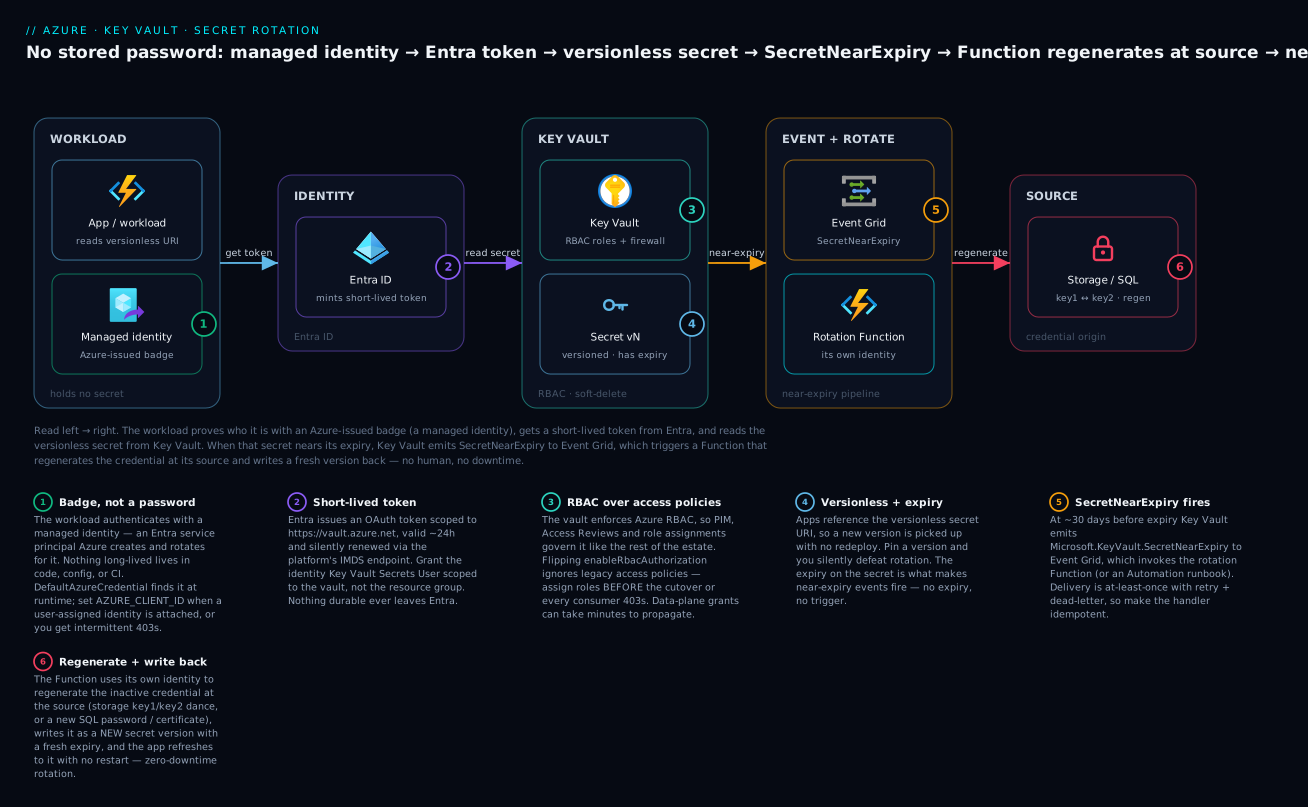
The app proves who it is with an Azure-issued badge (managed identity → Entra token), reads the versionless secret from Key Vault, and when that secret nears its expiry Event Grid fires SecretNearExpiry to a Function that regenerates the credential at its source and writes a fresh version back - no stored password, no downtime.
1. The target state
Before touching anything, fix the contract in your head:
- Application code holds zero credentials. It authenticates to Azure with a managed identity and reads secrets at runtime (or has them injected as Key Vault references).
- CI/CD authenticates to Azure with workload identity federation (OIDC) - no stored client secrets in the pipeline.
- Every long-lived credential (DB passwords, storage keys, certificates) has an owner and a rotation period. Rotation is automated and verified.
The hardest part is not the tooling - it is the inventory. Grep your repos and pipeline definitions for
Password=,AccountKey=,SharedAccessSignature,client_secret, and PEM headers before you start. You cannot eliminate what you have not found.
2. Key Vault data plane: RBAC, not access policies
Create the vault with the RBAC authorization model and protection flags on from day one. Soft-delete is enabled by default and cannot be turned off; purge protection is opt-in but should be mandatory for anything production.
az keyvault create \
  --name kv-kloudvin-prod \
  --resource-group rg-platform-prod \
  --location eastus2 \
  --enable-rbac-authorization true \
  --enable-purge-protection true \
  --retention-days 90 \
  --sku standard
The legacy access policy model grants permissions as a flat list on the vault and is invisible to Azure’s central access tooling. The RBAC model uses standard Azure role assignments, so the same az role assignment list, PIM, and Access Reviews that govern the rest of your estate now cover Key Vault. Pick RBAC and never look back.
The data-plane roles you actually use:
| Role | Use it for |
|---|---|
| Key Vault Secrets User | App/workload read access to secret values |
| Key Vault Secrets Officer | CI or operators that create/update secrets |
| Key Vault Certificates Officer | Managing certificate objects and issuers |
| Key Vault Crypto User | Wrap/unwrap, sign/verify with keys |
| Key Vault Administrator | Break-glass / full data-plane control |
A critical gotcha: enable-rbac-authorization true makes the vault ignore access policies entirely. If you migrate an existing vault, assign the RBAC roles before flipping the flag, or every consumer loses access at the cutover.
3. Wiring app access with managed identity
The whole point is to never hold a credential to reach Key Vault. A managed identity is an Entra ID service principal that Azure manages for you - no secret to store, rotate, or leak.
System-assigned identity is tied to one resource’s lifecycle (deleted with it) and is the right default for a single app. User-assigned identity is a standalone resource you attach to many compute targets - use it when several services share an identity, or when you need the identity (and its role assignments) to exist before the compute does, which matters for clean IaC ordering.
# System-assigned on a Function App
az functionapp identity assign \
  --name func-orders-prod \
  --resource-group rg-platform-prod

PRINCIPAL_ID=$(az functionapp identity show \
  --name func-orders-prod \
  --resource-group rg-platform-prod \
  --query principalId -o tsv)

# Grant read access scoped to the vault, not the resource group
VAULT_ID=$(az keyvault show --name kv-kloudvin-prod --query id -o tsv)

az role assignment create \
  --assignee-object-id "$PRINCIPAL_ID" \
  --assignee-principal-type ServicePrincipal \
  --role "Key Vault Secrets User" \
  --scope "$VAULT_ID"
In code, you never pass a connection string. The DefaultAzureCredential chain finds the managed identity at runtime:
var client = new SecretClient(
    new Uri("https://kv-kloudvin-prod.vault.azure.net/"),
    new DefaultAzureCredential());

KeyVaultSecret secret = await client.GetSecretAsync("Sql-ConnectionString");
If you use a user-assigned identity,
DefaultAzureCredentialneeds to know which one. Set the client ID explicitly viaAZURE_CLIENT_ID(orManagedIdentityCredentialOptions), otherwise the runtime guesses and you get intermittent403s when more than one identity is attached.
For CI, replace the stored secret with federated credentials so the pipeline gets a short-lived token via OIDC:
az ad app federated-credential create \
  --id "$APP_OBJECT_ID" \
  --parameters '{
    "name": "github-main",
    "issuer": "https://token.actions.githubusercontent.com",
    "subject": "repo:kloudvin/platform:ref:refs/heads/main",
    "audiences": ["api://AzureADTokenExchange"]
  }'
4. Storing and referencing secrets
Write secrets once, reference them everywhere. Avoid handing values to developers at all.
az keyvault secret set \
  --vault-name kv-kloudvin-prod \
  --name Sql-ConnectionString \
  --value "Server=tcp:sql-prod.database.windows.net;Database=orders;Authentication=Active Directory Managed Identity;"
Note the connection string above uses managed identity auth to SQL - so even this “secret” contains no password. That is the ideal: many things you used to store as secrets disappear once the downstream service supports Entra auth.
App Service / Functions: Key Vault references
App Service can resolve a Key Vault reference into an app setting at startup, using the app’s managed identity. The app code just reads an environment variable; the platform does the fetch.
az functionapp config appsettings set \
  --name func-orders-prod \
  --resource-group rg-platform-prod \
  --settings "ApiKey=@Microsoft.KeyVault(SecretUri=https://kv-kloudvin-prod.vault.azure.net/secrets/ExternalApiKey/)"
Omit the version GUID from the SecretUri (as above) so the app always resolves the current version - essential for rotation to take effect without a redeploy. App Service refreshes references periodically and on restart.
AKS: Secrets Store CSI driver
In Kubernetes, use the Secrets Store CSI Driver with the Azure provider and workload identity. Secrets are mounted as files (and optionally synced to native Secret objects), fetched by a federated pod identity.
apiVersion: secrets-store.csi.x-k8s.io/v1
kind: SecretProviderClass
metadata:
  name: kv-orders
spec:
  provider: azure
  parameters:
    usePodIdentity: "false"
    clientID: "<workload-identity-client-id>"
    keyvaultName: "kv-kloudvin-prod"
    tenantId: "<tenant-id>"
    objects: |
      array:
        - |
          objectName: ExternalApiKey
          objectType: secret
Mount it on the pod, and enable the optional rotation poller on the driver (--set enableSecretRotation=true --set rotationPollInterval=2m on the Helm install) so mounted values refresh after a Key Vault update.
5. Automated rotation for keys
Key Vault emits Event Grid events on a secret’s lifecycle, including Microsoft.KeyVault.SecretNearExpiry (fired at ~30 days before the secret’s expiry by default). The pattern: set an expiry on the secret, subscribe a rotation Function to the near-expiry event, and have the Function mint a new credential at the source and write the new version back.
Storage account keys are the canonical example. They come in pairs (key1/key2) precisely to allow zero-downtime rotation: regenerate the inactive key, publish it, then the next cycle regenerates the other.
# Give the secret an expiry so near-expiry events fire
az keyvault secret set-attributes \
  --vault-name kv-kloudvin-prod \
  --name StorageKey \
  --expires "2026-07-01T00:00:00Z"

# Subscribe a Function to the near-expiry event
az eventgrid event-subscription create \
  --name rotate-storage-key \
  --source-resource-id "$VAULT_ID" \
  --endpoint-type azurefunction \
  --endpoint "$FUNCTION_RESOURCE_ID" \
  --included-event-types Microsoft.KeyVault.SecretNearExpiry
The rotation Function’s logic, in plain terms:
- Read which key is currently published (store a tag like
CredentialId=key2alongside the secret). - Regenerate the other key on the storage account via the management API.
- Write the new key as a new version of the secret, set a fresh expiry, and flip the tag.
// Regenerate the inactive key, then publish it as a new secret version.
var keys = await storageMgmt.StorageAccounts
    .RegenerateKeyAsync(rg, accountName, new StorageAccountRegenerateKeyParameters("key1"));

var newValue = keys.Value.First(k => k.KeyName == "key1").Value;

await secretClient.SetSecretAsync(new KeyVaultSecret("StorageKey", newValue)
{
    Properties = { ExpiresOn = DateTimeOffset.UtcNow.AddDays(60) }
});
Because apps reference the versionless secret URI, they pick up the new value on their next refresh - no deploy, no downtime. Microsoft publishes a reference implementation of this exact pattern; treat the above as the shape, and lift the production-hardened Function from the docs sample.
6. Rotating certificates with an integrated issuer
For certificates, Key Vault can manage the full lifecycle if you wire in an issuer. Configure the issuer once (DigiCert and GlobalSign are natively integrated; for ACME/Let’s Encrypt you typically front it with an automation Function or use App Service managed certificates for simple cases), then create a certificate policy with auto-renewal.
az keyvault certificate issuer create \
  --vault-name kv-kloudvin-prod \
  --issuer-name DigiCertProd \
  --provider DigiCert \
  --account-id "$DIGICERT_ACCOUNT" \
  --api-key "$DIGICERT_API_KEY"
The policy controls subject, key type, and the renewal trigger. --validity is in months; the lifetime action renews automatically before expiry:
az keyvault certificate create \
  --vault-name kv-kloudvin-prod \
  --name star-kloudvin-io \
  --policy '{
    "issuerParameters": { "name": "DigiCertProd" },
    "keyProperties": { "keyType": "RSA", "keySize": 2048, "reuseKey": false },
    "x509CertificateProperties": {
      "subject": "CN=*.kloudvin.io",
      "validityInMonths": 12
    },
    "lifetimeActions": [{
      "trigger": { "lifetimePercentage": 80 },
      "action": { "actionType": "AutoRenew" }
    }]
  }'
At 80% of lifetime, Key Vault asks the issuer for a renewal and creates a new version automatically. Consumers (App Service custom domains, Application Gateway) that bind to the versionless certificate reference pick it up; for those that cache, you still need a refresh hook.
7. Network lockdown
A vault reachable from the public internet is one stolen token away from exfiltration. Default to deny, then allow only private traffic.
# Default-deny the firewall, but allow trusted Azure services
az keyvault update \
  --name kv-kloudvin-prod \
  --resource-group rg-platform-prod \
  --default-action Deny \
  --bypass AzureServices

# Private endpoint into the platform VNet
az network private-endpoint create \
  --name pe-kv-kloudvin-prod \
  --resource-group rg-platform-prod \
  --vnet-name vnet-platform \
  --subnet snet-privatelink \
  --private-connection-resource-id "$VAULT_ID" \
  --group-id vault \
  --connection-name kv-connection
Then link the privatelink.vaultcore.azure.net Private DNS zone to your VNets so the vault FQDN resolves to the private IP. To fully disable the public endpoint set public network access off:
az keyvault update \
  --name kv-kloudvin-prod \
  --resource-group rg-platform-prod \
  --public-network-access Disabled
Leave
--bypass AzureServiceson, or platform features that legitimately need the data plane (Key Vault references, certificate binding, Event Grid) can break. This is the most common self-inflicted outage during lockdown.
8. Monitoring and protection
Send the AuditEvent logs to Log Analytics so every secret read is attributable, and confirm soft-delete / purge protection are actually on.
az monitor diagnostic-settings create \
  --name kv-audit \
  --resource "$VAULT_ID" \
  --logs '[{"category":"AuditEvent","enabled":true}]' \
  --workspace "$WORKSPACE_ID"
A KQL query to spot anomalous access - reads from outside expected identities:
AzureDiagnostics
| where ResourceType == "VAULTS" and OperationName == "SecretGet"
| summarize count() by identity_claim_appid_g, CallerIPAddress, bin(TimeGenerated, 1h)
| sort by count_ desc
Enterprise scenario
A payments platform we ran had ~40 Function Apps reading secrets from one regional Key Vault. We flipped on --public-network-access Disabled with a private endpoint, rehearsed it in non-prod, and shipped. Within the hour, Key Vault references across half the estate started returning 403, and App Service health probes went red - but only for apps in a second region we had spun up later. The vault itself was fine; the apps could not resolve it.
The gotcha: the private endpoint created a privatelink.vaultcore.azure.net A-record, but the Private DNS zone was linked to only the primary VNet. The secondary region’s VNet had no link, so its SDKs resolved the public vault.azure.net CNAME, hit the now-default-deny firewall, and failed. --bypass AzureServices saved the platform-managed Key Vault references that ran in-region; cross-region traffic had no such grace.
The fix was a single missing zone link, not a rollback:
az network private-dns link vnet create \
  --resource-group rg-platform-prod \
  --zone-name privatelink.vaultcore.azure.net \
  --name link-vnet-secondary \
  --virtual-network vnet-platform-westus2 \
  --registration-enabled false
The lesson that stuck: private endpoints are a DNS problem disguised as a networking problem. We added a post-deploy check - resolve the vault FQDN from a pod in every consuming VNet and assert it returns a 10.x address - and wired it into the pipeline gate. Locking down the data plane is the easy part; proving every consumer still resolves to the private IP is the part that actually keeps you online.
Going deeper
The eight steps above are the what. This section is the why it actually works - the internals, the edge cases, and the failure modes that separate a demo from a design you can run for a payments platform.
How the managed-identity token actually arrives
Managed identity feels like magic - the app holds no secret yet gets a token - so it helps to know the mechanism, because that is where the debugging happens. The Azure platform runs a local metadata endpoint on every compute host: the Instance Metadata Service (IMDS) at 169.254.169.254 for VMs and VM Scale Sets, and an IDENTITY_ENDPOINT + IDENTITY_HEADER pair injected into App Service and Functions. The SDK asks that local endpoint for a token scoped to https://vault.azure.net. The platform - which alone knows which identity is attached to this compute - calls Entra ID and returns a signed JWT. No credential of yours ever crosses the wire; the trust is between the Azure fabric and Entra.
DefaultAzureCredential is not one credential - it is an ordered chain that tries sources in turn: environment variables, then workload identity, then managed identity, then developer tools (Azure CLI, Azure Developer CLI, Visual Studio). Locally it falls through to your az login; in production only the managed-identity link should succeed. The convenience has a sharp edge: when a link fails, the chain silently tries the next one, so a misconfigured identity surfaces as a vague CredentialUnavailable rather than a clear 403. In production, pin the credential explicitly:
// Reuse ONE client for the whole process - never new it per request.
var cred = new DefaultAzureCredential(new DefaultAzureCredentialOptions
{
    ManagedIdentityClientId = Environment.GetEnvironmentVariable("AZURE_CLIENT_ID")
});
var client = new SecretClient(
    new Uri("https://kv-kloudvin-prod.vault.azure.net/"), cred);
Two performance facts worth internalising. First, the token is cached in memory (~24h lifetime, refreshed roughly five minutes before expiry), so the IMDS round-trip happens rarely - do not disable that cache. Second, the SecretClient itself caches and holds a connection pool; construct it once per process and reuse it. New-ing a client per request churns tokens and sockets and is a common cause of 429 throttling under load.
System- vs user-assigned: lifecycle is the real difference
Both are Entra service principals with no stored secret. The difference that matters in production is lifecycle:
| System-assigned | User-assigned | |
|---|---|---|
| Lifecycle | Created/deleted with its resource | Standalone Azure resource |
| Count | Max one per resource | Many; attach to many resources |
| Principal ID | New one each time the resource is recreated | Stable across recreation |
| Role assignments | Re-granted on every recreate | Granted once, survive redeploys |
| Best for | A single, long-lived app | Shared identity, blue/green, IaC ordering |
The stable principal ID is the quiet superpower. Blue/green swaps, scale-set reimaging, and delete-and-recreate deployments all destroy a system-assigned identity’s principal - orphaning its role assignments and any PIM eligibilities - so the next deploy 403s until you re-grant. A user-assigned identity survives all of that: grant the role once, and every future revision of the compute inherits access. For platform teams the clean pattern is one user-assigned identity per app, plus a federatedIdentityCredential on it for AKS workload identity. Codify it so the secure default is the only path:
resource "azurerm_user_assigned_identity" "orders" {
  name                = "id-orders-prod"
  resource_group_name = azurerm_resource_group.platform.name
  location            = azurerm_resource_group.platform.location
}

resource "azurerm_key_vault" "kv" {
  name                          = "kv-kloudvin-prod"
  resource_group_name           = azurerm_resource_group.platform.name
  location                      = azurerm_resource_group.platform.location
  tenant_id                     = data.azurerm_client_config.current.tenant_id
  sku_name                      = "standard"
  enable_rbac_authorization     = true # RBAC, not access policies
  purge_protection_enabled      = true # irreversible once created
  soft_delete_retention_days    = 90
  public_network_access_enabled = false

  network_acls {
    bypass         = "AzureServices"
    default_action = "Deny"
  }
}

# Least-privilege data-plane read, scoped to the vault
resource "azurerm_role_assignment" "orders_secrets_user" {
  scope                = azurerm_key_vault.kv.id
  role_definition_name = "Key Vault Secrets User"
  principal_id         = azurerm_user_assigned_identity.orders.principal_id
}
That is azurerm v4 syntax (note the provider renamed nothing here, but v4 did tighten several defaults - pin version = "~> 4.0"). The Bicep equivalent for the vault:
resource kv 'Microsoft.KeyVault/vaults@2023-07-01' = {
  name: 'kv-kloudvin-prod'
  location: location
  properties: {
    tenantId: subscription().tenantId
    sku: { family: 'A', name: 'standard' }
    enableRbacAuthorization: true      // RBAC data plane
    enableSoftDelete: true
    softDeleteRetentionInDays: 90
    enablePurgeProtection: true        // cannot be unset once true
    publicNetworkAccess: 'Disabled'
    networkAcls: {
      bypass: 'AzureServices'
      defaultAction: 'Deny'
    }
  }
}
RBAC vs access policies: propagation and the two Reader traps
RBAC is Microsoft’s recommended model, and the shift away from access policies is deliberate: access policies are a flat, per-vault permission list that no central tool can see, whereas RBAC role assignments are ordinary Azure roles that PIM, Access Reviews, az role assignment list, and Azure Policy all understand. But RBAC has one property access policies do not: propagation latency. A data-plane role assignment can take several minutes (occasionally up to ten) to take effect, which is the real answer to “I granted the role, why is it still 403?” Wait, or force a token refresh, before assuming the grant is wrong.
Two Reader traps snare beginners. Key Vault Reader is a management-plane role - it lets you see the vault’s metadata and list secret names, but not read secret values; for values you need Key Vault Secrets User. And granting a data-plane role on an access-policy vault does nothing at all, because that vault ignores RBAC. RBAC also supports scoping a role to an individual secret (not just the whole vault) when you need surgical least privilege, and it is the only model where operator access can be made just-in-time - see Entra RBAC governance deep dive for PIM and Access Reviews on these roles.
The rotation event pipeline, and its delivery guarantees
Key Vault is an Event Grid system topic source. The lifecycle events it emits are worth knowing by name: SecretNewVersionCreated, SecretNearExpiry (fired ~30 days before the exp attribute), and SecretExpired, plus the equivalent Key* and Certificate* events. The near-expiry window is fixed at 30 days - you cannot tune it - so if your rotation cadence is shorter than a month, drive rotation from a timer trigger and treat SecretNearExpiry as a backstop rather than the primary clock.
Event Grid delivery is at-least-once, with retry and exponential backoff for up to 24 hours. Two consequences follow. Configure a dead-letter storage container on the subscription so a rotation that keeps failing is captured rather than lost. And make the rotation handler idempotent: the same event can legitimately arrive twice, and a naive handler that “regenerate then publish” on every delivery will double-rotate and can invalidate the key the app is currently using. Guard on a tag (read the currently published CredentialId, bail if it already matches the target). When a rotation needs a hybrid worker, a long-running step, or a non-.NET toolchain, the Microsoft sample also ships an Azure Automation runbook variant of the same pattern - the trigger is identical, only the compute differs.
Rotating KV-integrated services: storage keys and SQL
Storage accounts hand you two keys, key1 and key2, specifically so you can rotate with zero downtime: publish key1, and on the next cycle regenerate and publish key2, alternating forever so the key in flight is never the one you just revoked. The sharp edge nobody warns you about: regenerating a key instantly invalidates every SAS signed with it. Any account SAS or service SAS derived from key1 dies the moment key1 is regenerated. If you rely on SAS, prefer a user-delegation SAS (signed by an Entra token, not the account key) or drop SAS for managed-identity data-plane access entirely, so key rotation stops being a breaking event.
SQL has no “two passwords” feature, so the equivalent zero-downtime pattern is two application logins (app_login_a / app_login_b) that you rotate alternately. Far better, though, is to delete the password from the design altogether: Azure SQL supports Entra managed-identity authentication, which is exactly what the Authentication=Active Directory Managed Identity connection string in section 4 uses. When the downstream service speaks Entra, the “secret” stops being a secret and there is nothing left to rotate. Microsoft’s rotation tutorials ship both single-credential and dual-credential (a/b) samples for storage and SQL - start from those rather than hand-rolling.
Soft-delete and purge protection: the recovery semantics
Soft-delete keeps a deleted vault or object recoverable for the retention window (7-90 days, default 90) and cannot be disabled on new vaults. Purge protection is the stronger guarantee: once enabled it cannot be turned off, and it blocks purge - permanent deletion - even by a Key Vault Administrator until the retention window elapses. That is precisely what stops a compromised admin account or a runaway script from destroying your keys and certificates in seconds. The operational trade-off: a soft-deleted name is not immediately reusable. CI that tears down and recreates a same-named vault (or secret) will hit a Conflict/already exists in soft-deleted state error - you must recover it, purge it (if purge protection allows), or use unique names. Bake that into your teardown scripts before it surprises you at 2 a.m.
Private endpoint + firewall: why it is a DNS problem
The enterprise scenario above showed the symptom; here is the mechanism. Creating a private endpoint injects an A record for the vault into the privatelink.vaultcore.azure.net Private DNS zone. The public name kv-kloudvin-prod.vault.azure.net is itself a CNAME that ultimately points into that privatelink zone. Resolution only returns the private 10.x IP if the querying VNet is linked to that Private DNS zone; an unlinked VNet follows the CNAME to the public IP and slams into your default-deny firewall. --bypass AzureServices is the escape hatch that lets trusted first-party services (App Service Key Vault references, Event Grid, ARM) through the firewall even under default-deny; setting --public-network-access Disabled removes even the firewall allow-list, so everything must arrive via a private endpoint or a trusted-service bypass. The takeaway: lock the vault, then prove resolution from every consuming VNet - see Private endpoints and Private DNS at scale for the zone-linking topology that keeps multi-region estates honest.
Versioning and references: why versionless is the linchpin
Every set on a secret creates an immutable new version with its own URI, .../secrets/{name}/{version}. Two operational truths flow from that. First, pinning a version silently defeats rotation - the app keeps reading the old value forever, no error, no signal; this is the single most common way a “rotating” system quietly stops rotating. Always reference the versionless URI. Second, how fast a new version reaches the app depends on the consumer:
- App Service / Functions Key Vault references refresh periodically (roughly every 24 hours) and on restart. For an immediate cutover you restart the app, touch a config setting, or swap a slot - otherwise a freshly rotated secret can take up to a day to land.
- AKS Secrets Store CSI Driver with
enableSecretRotation=truepolls onrotationPollIntervaland updates the mounted file. But if you also sync into a KubernetesSecretand inject it as environment variables, the pod will not see the change - env vars are read once at container start. Mount the secret as a file and re-read it, or use a reloader controller. This asymmetry bites teams that assumed env injection “just refreshes”:
# Sync to a K8s Secret AND mount as a file. Env vars sourced from the Secret are
# read once at pod start and will NOT refresh on rotation - mount the file and re-read.
apiVersion: secrets-store.csi.x-k8s.io/v1
kind: SecretProviderClass
metadata:
  name: kv-orders-synced
spec:
  provider: azure
  secretObjects:
    - secretName: orders-api-key
      type: Opaque
      data:
        - objectName: ExternalApiKey
          key: apiKey
  parameters:
    usePodIdentity: "false"
    useVMManagedIdentity: "false"
    clientID: "<workload-identity-client-id>"
    keyvaultName: "kv-kloudvin-prod"
    tenantId: "<tenant-id>"
    objects: |
      array:
        - |
          objectName: ExternalApiKey
          objectType: secret
CI without a stored secret: workload identity federation
The pipeline is the last place secrets hide. Federated credentials let GitHub Actions (or any OIDC issuer) exchange a short-lived workflow token for an Azure token, so there is no client secret in the repo at all. The client-id, tenant-id, and subscription-id below are identifiers, not credentials - safe to store as GitHub variables/secrets - and azure/login@v2 uses the OIDC token minted by id-token: write:
# .github/workflows/deploy.yml - OIDC login, no stored client secret
permissions:
  id-token: write   # required to request the OIDC token
  contents: read
jobs:
  deploy:
    runs-on: ubuntu-latest
    steps:
      - uses: azure/login@v2
        with:
          client-id: ${{ secrets.AZURE_CLIENT_ID }}
          tenant-id: ${{ secrets.AZURE_TENANT_ID }}
          subscription-id: ${{ secrets.AZURE_SUBSCRIPTION_ID }}
Cost and scale: cache, do not hammer
Key Vault standard bills per operation - on the order of a couple of rupees per 10,000 secret operations - so the cost of reading a secret is trivial. The real cost is latency and throttling: an app that reads the vault on every request pays a network round-trip each time and can trip the per-vault throttling threshold (a few thousand transactions per 10 seconds), returning 429. Cache the secret in memory with a TTL and let your TTL converge with the rotation schedule; the app re-reads occasionally, not per request. Reserve the Premium SKU for HSM-backed keys that need FIPS 140-2 Level 2 - secrets do not need it - and reach for Managed HSM (a separate, pricier product) only under a regulated key-ceremony requirement. When a single vault genuinely can’t take the load, shard across vaults by workload rather than lifting the SKU.
Verify
Prove the chain works end to end, not just that resources exist:
# 1. The app's identity can actually read (test with its scope, not yours)
az keyvault secret show --vault-name kv-kloudvin-prod --name StorageKey \
  --query "attributes.expires"

# 2. Confirm RBAC, not access policies, is enforcing
az keyvault show --name kv-kloudvin-prod \
  --query "properties.enableRbacAuthorization"

# 3. Confirm purge protection is irreversibly on
az keyvault show --name kv-kloudvin-prod \
  --query "properties.enablePurgeProtection"

# 4. Force a rotation rehearsal: shorten expiry to trigger near-expiry,
#    then watch a NEW secret version appear after the Function runs
az keyvault secret list-versions --vault-name kv-kloudvin-prod --name StorageKey \
  --query "[].{version:id, created:attributes.created}" -o table
The decisive test for zero-downtime: after rotation produces a new version, your app keeps serving traffic with no restart and no error spike, because it references the versionless URI. Watch your app’s dependency-failure metric across the rotation window - it should be flat.
Checklist
Practice challenges
Work these top to bottom - they escalate from a single hardened vault to a multi-region private-endpoint rotation. Try each before opening the solution.
1. (Beginner) Create a hardened vault and prove the flags. Stand up a vault with RBAC authorization and purge protection, then confirm both are actually on.
<details> <summary>Solution</summary>
az keyvault create --name kv-demo-prod --resource-group rg-demo \
  --location eastus2 --enable-rbac-authorization true \
  --enable-purge-protection true --retention-days 90 --sku standard

az keyvault show --name kv-demo-prod \
  --query "{rbac:properties.enableRbacAuthorization, purge:properties.enablePurgeProtection}"
Why: RBAC and purge protection are the two non-negotiable day-one flags - RBAC makes the vault governable by your central access tooling, and purge protection makes destruction recoverable. </details>
2. (Beginner) Give a Function App a system-assigned identity and grant least-privilege read. No stored credential; the role must be scoped to the vault, not the resource group.
<details> <summary>Solution</summary>
az functionapp identity assign --name func-demo --resource-group rg-demo
PID=$(az functionapp identity show --name func-demo -g rg-demo --query principalId -o tsv)
VID=$(az keyvault show --name kv-demo-prod --query id -o tsv)

az role assignment create --assignee-object-id "$PID" \
  --assignee-principal-type ServicePrincipal \
  --role "Key Vault Secrets User" --scope "$VID"
Why: Key Vault Secrets User is the data-plane read-values role; scoping to $VID (the vault) rather than the RG keeps the grant least-privilege. Key Vault Reader would let it see names but not values.
</details>
3. (Intermediate) Turn a plaintext app setting into a versionless Key Vault reference. Move an API key out of app settings so the platform fetches it via managed identity.
<details> <summary>Solution</summary>
az keyvault secret set --vault-name kv-demo-prod --name ExternalApiKey \
  --value "<placeholder-api-key>"

az functionapp config appsettings set --name func-demo -g rg-demo \
  --settings "ApiKey=@Microsoft.KeyVault(SecretUri=https://kv-demo-prod.vault.azure.net/secrets/ExternalApiKey/)"
Why: the reference URI ends at the secret name with no version GUID, so the app always resolves the current version and rotation lands without a redeploy. Pinning a version here would silently freeze the value. </details>
4. (Intermediate) Arm a secret for rotation. Give a secret an expiry and subscribe a Function to its near-expiry event.
<details> <summary>Solution</summary>
az keyvault secret set-attributes --vault-name kv-demo-prod \
  --name StorageKey --expires "2026-12-01T00:00:00Z"

az eventgrid event-subscription create --name rotate-storage-key \
  --source-resource-id "$VID" --endpoint-type azurefunction \
  --endpoint "$FUNCTION_RESOURCE_ID" \
  --included-event-types Microsoft.KeyVault.SecretNearExpiry
Why: no expiry means SecretNearExpiry never fires - the expiry is the clock that arms the whole pipeline. The event triggers ~30 days before the expiry date.
</details>
5. (Advanced) Make the storage-key rotation Function idempotent. Event Grid is at-least-once; a duplicate delivery must not double-rotate. Describe (or code) the guard.
<details> <summary>Solution</summary>
The Function reads a CredentialId tag on the secret (say key2), and rotates the other key. Guard on the tag so a duplicate event is a no-op:
var current = (await secretClient.GetSecretAsync("StorageKey")).Value;
var published = current.Properties.Tags.TryGetValue("CredentialId", out var id) ? id : "key1";
var target = published == "key1" ? "key2" : "key1"; // regenerate the INACTIVE key

// If a prior delivery already flipped us to `target`, bail - idempotent no-op.
if (current.Properties.Tags.GetValueOrDefault("Rotating") == target) return;

var keys = await storageMgmt.StorageAccounts
    .RegenerateKeyAsync(rg, accountName, new StorageAccountRegenerateKeyParameters(target));
var newValue = keys.Value.First(k => k.KeyName == target).Value;

await secretClient.SetSecretAsync(new KeyVaultSecret("StorageKey", newValue)
{
    Properties = { ExpiresOn = DateTimeOffset.UtcNow.AddDays(60),
                   Tags = { ["CredentialId"] = target } }
});
Why: regenerating the inactive key keeps the in-flight key valid (zero downtime), and the tag guard means a redelivered event does not regenerate the key the app is currently using - which would cause an outage, not just a duplicate. </details>
6. (Advanced) Lock a vault to a private endpoint across two regions and prove every consumer resolves the private IP. Default-deny, private endpoint, and a DNS assertion in the pipeline.
<details> <summary>Solution</summary>
# Default-deny + private endpoint (primary region shown)
az keyvault update --name kv-demo-prod -g rg-demo \
  --default-action Deny --bypass AzureServices --public-network-access Disabled

# Link the Private DNS zone to EVERY consuming VNet - primary and secondary
for vnet in vnet-platform-eastus2 vnet-platform-westus2; do
  az network private-dns link vnet create -g rg-demo \
    --zone-name privatelink.vaultcore.azure.net \
    --name "link-$vnet" --virtual-network "$vnet" --registration-enabled false
done

# Pipeline gate: resolve from a pod in each VNet and assert a private 10.x answer
kubectl run dnscheck --image=busybox --restart=Never --rm -it -- \
  nslookup kv-demo-prod.vault.azure.net | grep -E '10\.'
Why: a private endpoint is a DNS change, not just a networking one. If a VNet is not linked to privatelink.vaultcore.azure.net, its SDKs follow the public CNAME and hit the default-deny firewall - so the only real proof is resolving the private IP from every consumer.
</details>
Common beginner mistakes
- “Managed identity is just a stored secret Azure hides for me.” No - there is no secret anywhere. The Azure platform vouches for the compute through its local metadata endpoint, and Entra mints a short-lived token on demand. The right mental model is a badge checked live at the door, not a password hidden in a drawer.
- “I assigned the role, why is it still 403?” Usually one of three things: RBAC data-plane grants take minutes to propagate (wait); you assigned an access policy on an RBAC vault (ignored - use a role); or you granted
Key Vault Reader(metadata) when you neededKey Vault Secrets User(values). - Pinning the version in the reference URI.
.../secrets/ApiKey/abcdef123...freezes the value and silently defeats rotation. Always reference the versionless URI,.../secrets/ApiKey/. - “Rotation means changing the value in Key Vault.” Rotation must regenerate the credential at its source (the storage account, SQL, the issuer) and write the new value back to the vault. Changing only the vault copy leaves the real credential untouched and breaks authentication on the next use.
- Using
DefaultAzureCredentialwith a user-assigned identity but not settingAZURE_CLIENT_ID. With more than one identity attached, the runtime cannot guess which to use and you get intermittent403s. Set the client ID explicitly. - Disabling public access without linking the Private DNS zone to every consumer VNet. SDKs in an unlinked VNet resolve the public IP and hit the default-deny firewall. Link
privatelink.vaultcore.azure.netto each consuming VNet. - Treating storage-key rotation as a single-key operation. Regenerating the live key is an outage. Use the
key1/key2dance: regenerate the inactive key, publish it, alternate. - Flipping
enableRbacAuthorizationon a live vault without pre-assigning roles. The instant the flag flips, access policies stop working - assign the RBAC roles first, or lock the whole estate out at cutover. - New-ing a
SecretClientper request. It churns tokens and connections and invites429throttling. Construct one client per process and reuse it, with an in-memory cache and TTL in front.
Glossary
- Managed identity - an Entra ID service principal that Azure creates and manages for a compute resource, with no secret you ever see, store, or rotate. Comes in system-assigned and user-assigned flavours.
- System-assigned identity - a managed identity tied to one resource’s lifecycle; created and deleted with it, and its principal ID changes if the resource is recreated.
- User-assigned identity - a standalone managed identity you can attach to many resources; its principal ID (and role grants) survive compute recreation.
- Entra ID - Microsoft’s cloud identity provider (formerly Azure Active Directory / Azure AD). It authenticates identities and mints the tokens Key Vault trusts.
- Service principal - the identity object in Entra that represents an application or workload (a managed identity is a special, Azure-managed kind of service principal).
- RBAC (data-plane roles) - Azure role-based access control applied to Key Vault objects; roles like
Key Vault Secrets Usergrant value access and are governable by PIM, Access Reviews, and policy. Microsoft’s recommended model. - Access policy - the legacy per-vault permission list; flat, near-instant, but invisible to central access tooling. Ignored entirely when RBAC authorization is enabled.
DefaultAzureCredential- an SDK credential that tries a chain of sources (env vars → workload identity → managed identity → developer tools) to obtain a token without you hard-coding one.- IMDS (Instance Metadata Service) - the local, non-routable endpoint (
169.254.169.254, orIDENTITY_ENDPOINTon App Service/Functions) that hands a managed-identity token to code running on the compute. - Secret version / versionless URI - each
setcreates an immutable version at.../secrets/{name}/{version}; the versionless URI.../secrets/{name}/always resolves the current version and is what makes rotation transparent. - Key Vault reference - the
@Microsoft.KeyVault(SecretUri=...)syntax that lets App Service/Functions resolve a secret into an app setting using the app’s managed identity. SecretNearExpiry- theMicrosoft.KeyVault.SecretNearExpiryEvent Grid event, emitted ~30 days before a secret’s expiry; the trigger for automated rotation.- Event Grid system topic - the built-in event source that Key Vault publishes lifecycle events to; delivery is at-least-once with retry and optional dead-lettering.
- Soft-delete - a mandatory Key Vault feature that keeps deleted vaults/objects recoverable for 7-90 days (default 90).
- Purge protection - an opt-in, irreversible guarantee that blocks permanent deletion until the soft-delete retention window elapses, even for administrators.
- Private endpoint - a private IP for the vault inside your VNet; combined with the
privatelink.vaultcore.azure.netPrivate DNS zone it keeps vault traffic off the public internet. - Workload identity federation (OIDC) - trust between an external issuer (e.g. GitHub Actions) and Entra that exchanges a short-lived workflow token for an Azure token, removing stored client secrets from CI.
- Secrets Store CSI Driver - the Kubernetes driver that mounts Key Vault secrets as files in a pod (and optionally syncs them to
Secretobjects), authenticated by workload identity. SecretProviderClass- the CSI driver’s custom resource that declares which vault, which identity, and which secrets to mount.- Storage account key (
key1/key2) - the two access keys every storage account carries so one can be regenerated while the other stays live, enabling zero-downtime rotation. - SAS (Shared Access Signature) - a signed URL granting scoped access to storage; account/service SAS are signed by an account key and die when that key is regenerated, whereas a user-delegation SAS is signed by an Entra token.
- Managed HSM - a separate, single-tenant, FIPS 140-2 Level 3 hardware key store for regulated key-ceremony requirements, distinct from a standard/premium vault.
Pitfalls and next steps
The traps that bite teams: forgetting that pinning a secret URI to a specific version silently defeats rotation; flipping a vault to RBAC without pre-assigning roles and locking everyone out; disabling public access but never linking the Private DNS zone, so SDKs resolve the public IP and hit the firewall; and treating storage-key rotation as a single-key operation instead of using the key1/key2 dance for zero downtime.
For next steps, push the same model outward: managed identity for SQL, Service Bus, and Storage data-plane access removes those secrets entirely; layer PIM and Access Reviews on the Key Vault RBAC roles so even operator access is just-in-time; and codify all of the above in Bicep or Terraform so the secure configuration is the default, not a checklist someone has to remember.