In a nutshell
Imagine a bank vault that will only open for an armored truck - and not just any truck, but one that a trusted notary has inspected, sealed, and certified on the spot as genuinely armored: right doors, right guards, right serial number. If a plain van pulls up claiming to be the armored truck, the vault stays shut, because the notary refuses to vouch for it. Secure Key Release (SKR) is that vault. The key lives inside dedicated hardware (Azure Managed HSM), and the HSM refuses to release it until an independent notary - Microsoft Azure Attestation (MAA) - cryptographically confirms that the machine asking for the key is genuinely a locked confidential enclave (a CPU-encrypted VM) running exactly the software you expect. No certification from the notary, no key.
Why does this even need to exist? Ordinary encryption protects data at rest (on disk) and in transit (on the wire), but the instant an application decrypts and uses a key, that key sits in plain memory - where a cloud operator, a compromised hypervisor, or a malicious host could in principle read it. Confidential computing closes that last gap by encrypting memory in use, inside the CPU, and attestation is how a remote party (here, the HSM) gets hard proof of that before trusting the machine with anything valuable. Put the two together and you get a key that is not merely stored securely but is physically unusable anywhere except inside one verified enclave - which is exactly what a regulator means when they demand that “the cloud provider’s own operators must not be able to use this key.”
If you are new to all this, you do not need to build it to understand it. Read for the shape of the trust - who proves what, to whom, and in what order - and the commands will click on a second pass. The three moving parts are always the same: a confidential VM (the thing that must prove itself), an attestation service (the notary), and a Managed HSM (the vault that checks the notary’s certificate against a policy before releasing the key).
Level: Expert · Time: ~46 min
Prerequisites: You should be comfortable with Azure Key Vault, managed identities, and secret retrieval, the basics of confidential computing on Azure, and how customer-managed keys and double encryption work - because a recurring theme here is how SKR differs from CMK. Familiarity with RSA public-key wrapping, RBAC, and reading a JWT’s claims will help.
After this lesson you can:
- Decide correctly between Managed HSM and Key Vault Premium from a threat model, not a feature list.
- Provision and activate a Managed HSM pool, run an M-of-N security-domain quorum ceremony, and custody the artifacts.
- Assign least-privilege local RBAC (Crypto User / Crypto Officer / Administrator) on the HSM data plane.
- Import on-prem keys under BYOK wrap and validate their attestation against the vendor root.
- Author a release policy that gates a key on Microsoft Azure Attestation claims, and release it inside a SEV-SNP or TDX confidential VM.
- Lock down the perimeter (private endpoint, purge protection) and run the backup / disaster-recovery lifecycle.
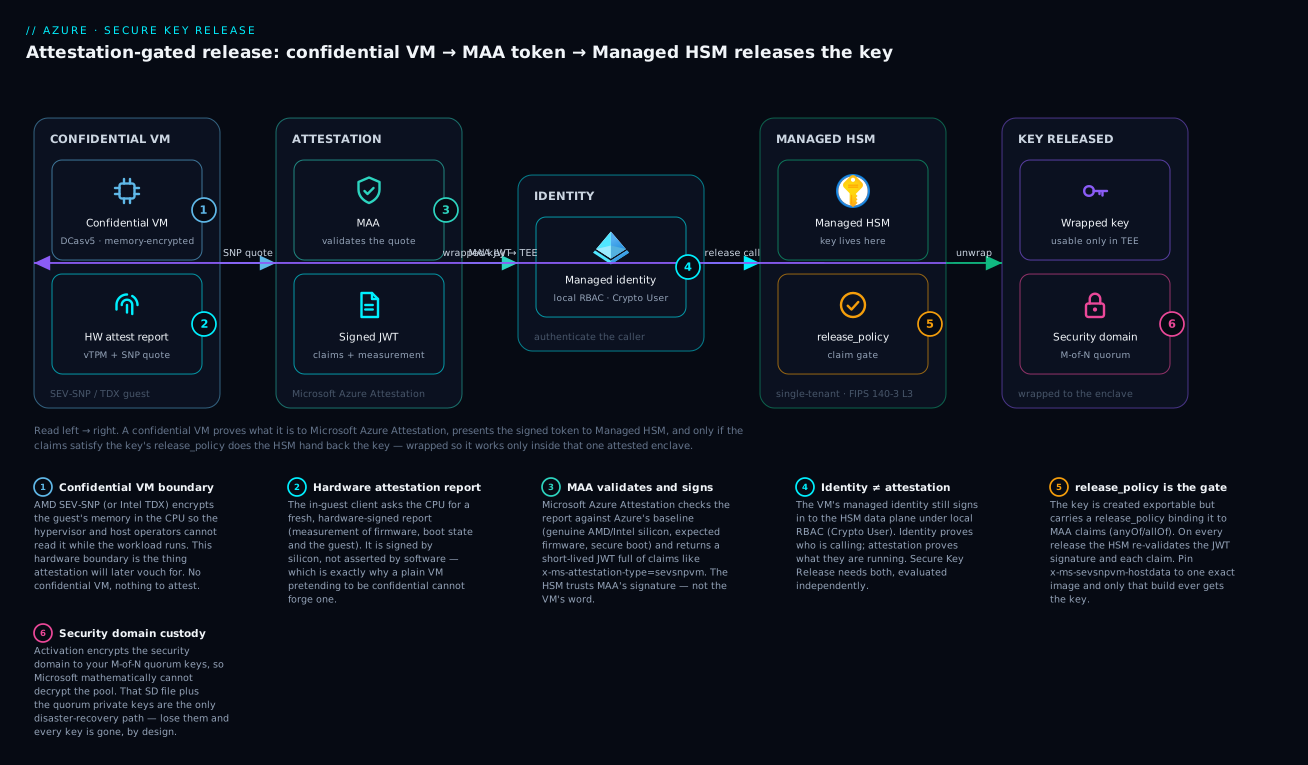
Left to right: the confidential VM asks its CPU for a hardware attestation report, Microsoft Azure Attestation validates it and signs a short-lived token of claims, the VM’s managed identity presents that token to Managed HSM, and only if the token’s claims satisfy the key’s release_policy does the HSM hand back the key - wrapped so it is usable only inside that one attested enclave.
Standard Key Vault gives you a multi-tenant, HSM-backed key store that Microsoft operates for you. That is the right tool for most workloads, and the wrong tool when your threat model says Microsoft operators must never be able to touch your key material, when a regulator demands a single-tenant HSM at FIPS 140-3 Level 3, or when you want a key to be physically unusable outside a CPU you have cryptographically verified. That is the territory of Azure Managed HSM with Secure Key Release (SKR): a key that exists only inside dedicated HSM hardware and is released, wrapped, only to a confidential VM whose AMD SEV-SNP report you have attested.
This is an expert path involving a quorum key ceremony, an offline security domain, and an attestation pipeline. Read it end to end before provisioning anything - some decisions here are irreversible.
1. When you actually need Managed HSM
Reach for Managed HSM, not the Premium SKU of Key Vault, when at least one of these is true:
- Single-tenant isolation. Managed HSM gives you a pool of dedicated HSM partitions. No other Azure customer shares the cryptographic boundary. The Premium vault is multi-tenant HSM-backed.
- FIPS 140-3 Level 3. Managed HSM is validated at FIPS 140-3 Level 3. (Key Vault Premium is FIPS 140-2 Level 3.) If a control framework names Level 3 explicitly, this is the line.
- You own the security domain. Activation produces a security domain encrypted to your RSA keys under a quorum (M of N). Microsoft cannot decrypt it. This is the property that lets you assert operator exclusion.
- Secure Key Release. Both Premium Key Vault and Managed HSM support SKR, but when SKR is the whole point and the keys are high-value, the single-tenant boundary is what auditors want to see.
Cost and operational weight are real. A Managed HSM pool is billed per hour regardless of key count and obligates you to custody of the security domain backup. Do not provision one to hold three secrets. Provision one to be the root of trust for an estate.
2. Provision and activate the pool
Managed HSM has two phases: the resource is provisioned (created in ARM, but cryptographically inert) and then activated (the security domain is generated and downloaded). Between those two steps you supply the quorum of RSA public keys.
Create the pool. The --administrators flag takes Entra object IDs that become the initial local RBAC administrators. --retention-days sets the soft-delete window and cannot be lowered after creation.
az keyvault create --hsm-name kv-mhsm-prod \
  --resource-group rg-security-core \
  --location eastus2 \
  --retention-days 90 \
  --administrators "$(az ad signed-in-user show --query id -o tsv)"
Provisioning returns once the pool exists but reports securityDomain as not activated. Generate three or more RSA key pairs for the quorum holders. In production these private keys live on separate hardware tokens held by separate humans; here we generate them for illustration.
for i in 1 2 3; do
  openssl req -newkey rsa:2048 -nodes -keyout sd-key-$i.key \
    -x509 -days 3650 -subj "/CN=sd-holder-$i" -out sd-cert-$i.cer
done
Activate with a quorum. --sd-quorum 2 means any two of the three certificate holders must cooperate to ever decrypt the security domain.
az keyvault security-domain download --hsm-name kv-mhsm-prod \
  --sd-wrapping-keys sd-cert-1.cer sd-cert-2.cer sd-cert-3.cer \
  --sd-quorum 2 \
  --security-domain-file kv-mhsm-prod-SD.json
The downloaded kv-mhsm-prod-SD.json is the security domain, encrypted such that 2-of-3 private keys are required to recover it. This file plus the private keys are the only way to recover the HSM into a new pool after a disaster. Lose them and the keys are gone permanently - that is the design, not a bug.
3. Design the quorum and key ceremony
The quorum is a governance decision, not a technical default. Get it wrong and you either cannot recover (quorum too high, holders unavailable) or you have weak custody (quorum too low). A workable pattern for a regulated estate:
| Role | Count (N) | Quorum (M) | Custody |
|---|---|---|---|
| Security domain holders | 5 | 3 | FIPS-validated tokens, 3 sites |
| HSM administrators (RBAC) | 3-4 | n/a | Break-glass + PIM-elevated |
Run the activation as a formal ceremony: witnessed, scripted, with each private key generated on its holder’s token and never exported. Record certificate thumbprints in your CMDB. The output you protect forever is the SD file plus the holders’ private keys, stored separately so no single location can both decrypt and reach the file.
After activation, switch the data-plane authentication to local RBAC. Managed HSM does not use Azure RBAC for data operations - it has its own built-in role model evaluated by the HSM itself. Assign the narrowest roles. A crypto user can use keys but not manage them; only an administrator can change role assignments.
# Service identity that will only *use* keys, never manage them
az keyvault role assignment create --hsm-name kv-mhsm-prod \
  --role "Managed HSM Crypto User" \
  --assignee "<app-managed-identity-object-id>" \
  --scope /keys
# Separate identity allowed to import keys (BYOK)
az keyvault role assignment create --hsm-name kv-mhsm-prod \
  --role "Managed HSM Crypto Officer" \
  --assignee "<key-import-pipeline-object-id>" \
  --scope /keys
4. Import on-prem keys with BYOK and verify provenance
If a key was generated on your on-premises HSM and policy says it must never have existed in software, you import it under wrap (BYOK) so the plaintext key never transits Azure unencrypted. The flow:
- Download the Key Exchange Key (KEK) public key from the target HSM. The KEK is an RSA-HSM key generated inside the Managed HSM with
importin its key operations. - On your on-prem HSM, wrap the target key to that KEK using the vendor’s BYOK tool, producing a Key Transfer Blob.
- Upload the blob. The Managed HSM unwraps it inside the cryptographic boundary.
Create the KEK inside the HSM first - note it is hardware-backed (RSA-HSM) and marked for import:
az keyvault key create --hsm-name kv-mhsm-prod \
  --name byok-kek --kty RSA-HSM --size 4096 \
  --ops import \
  --immutable false
Your HSM vendor’s BYOK tooling consumes the KEK public key and emits a transfer blob (key-transfer.byok). Import it:
az keyvault key import --hsm-name kv-mhsm-prod \
  --name payments-wrap-key \
  --byok-file key-transfer.byok
To prove provenance to an auditor, request the key’s attestation - Managed HSM can return a signed statement, chained to the Microsoft HSM vendor root, asserting the key is non-exportable and resident in the HSM. Pull it and validate the certificate chain offline:
az keyvault key get-attestation --hsm-name kv-mhsm-prod \
  --name payments-wrap-key \
  --file payments-wrap-key.attest
The attestation bundle contains the certificate chain plus the attestation blobs. Validate the chain against the vendor root certificate published by Microsoft; that is what turns “we promise it’s in the HSM” into a verifiable claim.
5. Configure the secure key release policy
This is the heart of the design. A key marked exportable with a release policy can be exported - but only when the caller presents an attestation token from Microsoft Azure Attestation (MAA) whose claims satisfy the policy. The key leaves the HSM only as a wrapped blob bound to that attested environment.
Write the policy as a BearerToken-grammar JSON document. The authority must match your MAA instance, and allOf/anyOf express the claim conditions. A minimal policy that gates on a SEV-SNP confidential VM:
{
  "version": "1.0.0",
  "anyOf": [
    {
      "authority": "https://sharedeus2.eus2.attest.azure.net",
      "allOf": [
        {
          "claim": "x-ms-isolation-tee.x-ms-attestation-type",
          "equals": "sevsnpvm"
        },
        {
          "claim": "x-ms-isolation-tee.x-ms-compliance-status",
          "equals": "azure-compliant-cvm"
        }
      ]
    }
  ]
}
Create the releasable key with that policy attached. The --exportable flag is meaningless without --policy; together they mean “exportable only under attestation.”
az keyvault key create --hsm-name kv-mhsm-prod \
  --name cvm-data-key --kty RSA-HSM --size 3072 \
  --exportable true \
  --policy @skr-policy.json
x-ms-compliance-status: azure-compliant-cvm is doing heavy lifting: it asserts MAA validated the SEV-SNP report against Azure’s baseline (genuine AMD silicon, expected firmware, secure boot state). Pin additional claims - x-ms-sevsnpvm-hostdata to bind to a specific guest image measurement, or x-ms-sevsnpvm-bootloader-svn to enforce a minimum firmware version - when you need to tie release to one exact workload.
6. Release the key inside a confidential VM
On the confidential VM (a DCasv5/ECasv5-series SEV-SNP guest), the workload obtains an MAA token and exchanges it for the wrapped key. The clean path uses the Azure SKR tooling, which talks to the in-guest attestation client to fetch a fresh SEV-SNP report and have MAA sign it.
Boot a confidential VM with a Microsoft-defaulted attestation configuration:
az vm create --resource-group rg-confidential \
  --name cvm-payments-01 \
  --image "Canonical:ubuntu-24_04-lts:cvm:latest" \
  --size Standard_DC4as_v5 \
  --security-type ConfidentialVM \
  --enable-vtpm true --enable-secure-boot true \
  --os-disk-security-encryption-type DiskWithVMGuestState \
  --admin-username azureuser --generate-ssh-keys
Inside the guest, perform the release. The AzureAttestSKR helper (shipped in Microsoft’s confidential-computing CVM guest-attestation repo) fetches the report, gets the MAA token, calls the /keys/{name}/release endpoint, and returns the key:
sudo ./AzureAttestSKR \
  -a https://sharedeus2.eus2.attest.azure.net \
  -k https://kv-mhsm-prod.managedhsm.azure.net/keys/cvm-data-key \
  -c imds \
  -u  # unwrap into the guest TEE
If you are wiring this into your own service, the data-plane call is the REST release operation with the MAA JWT in the body. The HSM re-validates the token’s signature and claims against the key’s policy before responding with the wrapped key:
POST https://kv-mhsm-prod.managedhsm.azure.net/keys/cvm-data-key/release?api-version=7.4
Content-Type: application/json

{ "target": "<MAA-attestation-jwt>" }
The response is the key wrapped to the attested environment. A request from a non-attested host, or one whose SEV-SNP report fails MAA validation, never gets a usable key - the HSM refuses the release.
7. Lock down the perimeter
The cryptographic controls above are worthless if the management and data planes are reachable from anywhere. Three controls, all mandatory for production:
Private endpoint. Put the HSM behind Private Link and set public network access to disabled so the data plane is only reachable from your VNets.
az network private-endpoint create --name pe-mhsm \
  --resource-group rg-security-core \
  --vnet-name vnet-hub --subnet snet-privatelink \
  --private-connection-resource-id "$(az keyvault show --hsm-name kv-mhsm-prod --query id -o tsv)" \
  --group-id managedhsm \
  --connection-name mhsm-conn
az keyvault update-hsm --hsm-name kv-mhsm-prod \
  --resource-group rg-security-core \
  --public-network-access Disabled
Purge protection. With purge protection on, even a soft-deleted HSM cannot be permanently removed before the retention window elapses - this defeats a ransomware-style “delete the keys” attack. It is irreversible once enabled.
az keyvault update-hsm --hsm-name kv-mhsm-prod \
  --resource-group rg-security-core \
  --enable-purge-protection true
Least-privilege RBAC. Keep the administrator role count tiny and behind PIM. Crypto Officers import and rotate; Crypto Users only sign, wrap, and release. No identity should hold both Administrator and Crypto Officer in steady state.
8. Operational runbook
Treat the HSM as a system with a lifecycle, not a vault you fill and forget.
Full backup. Back up the entire HSM (all keys, versions, and RBAC) on a schedule to a storage container the HSM identity can write to:
az keyvault backup start --hsm-name kv-mhsm-prod \
  --blob-container-name mhsm-backups \
  --storage-account-name stsecbackups \
  --use-managed-identity true
Disaster recovery. Recovery into a brand-new pool in another region requires the security domain file and the quorum of private keys - this is the only path, which is why custody of those artifacts is the single most important control you own. Provision a fresh pool, then upload the SD with the quorum to reconstitute it.
Key lifecycle. SKR keys should rotate on a defined cadence. A new version inherits the release policy; old versions stay readable for in-flight unwraps until you disable them. Drive this with a rotation policy and watch the audit log.
Going deeper
Everything above is the how. This section is the why underneath - the internals, edge cases, and design forks that separate a lab that works once from a system an auditor signs off on.
Managed HSM vs Key Vault Premium - the differences that matter
Both are “HSM-backed key stores,” so they look interchangeable on a feature grid. They are not. The distinctions are about the trust boundary, not the API.
| Property | Key Vault Premium | Managed HSM |
|---|---|---|
| Tenancy of the HSM | Multi-tenant (shared pool, per-key HSM protection) | Single-tenant - a dedicated pool of partitions is yours alone |
| FIPS validation | 140-2 Level 3 | 140-3 Level 3 |
| Data-plane authorization | Azure RBAC + optional access policies | Local RBAC, evaluated by the HSM, separate from Azure RBAC |
| Root-of-trust custody | Microsoft-held | Security domain you own under an M-of-N quorum |
| Secure Key Release | Supported | Supported |
| Billing | Per-operation + per-key (Premium HSM keys) | Per-hour for the pool, regardless of key count |
| Cross-region HA | Microsoft-managed replication | Pool spans availability zones in-region; cross-region DR is manual (SD restore) |
The one that trips people up is authorization. On Key Vault, you grant “Key Vault Crypto User” as an Azure role and it shows up in your subscription’s access reviews. On Managed HSM, the equivalent grant is invisible to Azure RBAC - it lives inside the HSM, is assigned with az keyvault role assignment create --hsm-name ..., and is scoped either to the whole HSM (/) or to keys (/keys). Your governance tooling that reads Microsoft.Authorization/roleAssignments will simply not see it. Plan for that: local RBAC needs its own review process.
The security domain and quorum, mechanically
The security domain (SD) is what makes “Microsoft cannot use your key” a mathematical statement rather than a promise. At activation you hand the HSM 3 to 10 RSA public keys and a quorum threshold (minimum 2). The HSM generates the domain - which contains the wrapping keys that protect every key you will ever create - and returns it encrypted so that any M of the N private keys can decrypt it, and fewer than M can decrypt nothing.
Consequences that follow directly from that design:
- Microsoft never sees the private keys. They are generated on your side (ideally on hardware tokens). Microsoft holds only the encrypted SD, which is useless without your quorum.
- The SD is the disaster-recovery seed. Restore into a new pool = upload the SD + present the quorum. There is no “reset password” and no support ticket that recovers it.
- Quorum is a governance trade-off. High M (e.g. 5-of-9) = strong custody but painful recovery if holders are unreachable. Low M (2-of-3) = easy recovery but weaker separation. Regulated estates commonly land on 3-of-5 across three geographic sites.
- Rehearse the restore. The first time you exercise the quorum should not be during a real outage. Restore into a throwaway pool at least once and record the runbook.
Local RBAC: the roles you will actually assign
Managed HSM ships a small set of built-in local roles. You assign them at / (HSM-wide) or /keys (or a specific key). The separation of use from manage is the whole point - keep them apart.
| Role | Can do | Typical holder |
|---|---|---|
| Managed HSM Administrator | Manage role assignments, security domain, full control | 2-3 humans, PIM + break-glass only |
| Managed HSM Crypto Officer | Create, import, rotate, delete keys | Key-provisioning pipeline |
| Managed HSM Crypto User | Use keys: sign, verify, wrap, unwrap, encrypt, decrypt, release | Application managed identity |
| Managed HSM Crypto Service Encryption User | Use a key for service-side encryption (CMK for Storage, SQL, disks) | The service’s managed identity |
| Managed HSM Policy Administrator | Manage key-level RBAC policy | Governance automation |
| Managed HSM Crypto Auditor | Read key metadata, list, audit (no crypto ops) | Compliance / read-only reviewer |
| Managed HSM Backup | Perform backup operations | Backup automation identity |
Note that release is a Crypto User operation, not an administrative one - the app identity that consumes the released key needs Crypto User, nothing more. An identity that holds both Administrator and Crypto Officer in steady state is a finding waiting to happen; split them.
How a release policy is actually evaluated
The release_policy is not a filter that runs once at creation - it is re-evaluated by the HSM on every release call. The grammar is deliberately small:
versionpins the grammar (1.0.0).anyOf/allOfcompose conditions.anyOfat the top lets you accept tokens from more than one attestation authority;allOfinside an authority means every listed claim must match.authorityis the MAA endpoint whose signature the HSM will trust for that branch. It must be exact - a bogus authority is one of the easiest ways to prove the policy is really being enforced (temporarily set a wrong one and watch release fail).- Each condition is
{ "claim": "<name>", "equals": "<value>" }. Claims that live under the isolation TEE are addressed with the dottedx-ms-isolation-tee.<claim>path.
Exportable keys that support a release policy include RSA-HSM, EC-HSM, and oct-HSM (symmetric). On a successful release the HSM does not hand back the raw key - it wraps the key to the attested environment’s ephemeral public key (carried in the MAA token), so only that enclave can unwrap it. That wrapping is why a released key intercepted on the wire is inert to anyone but the target TEE.
The claims worth knowing:
| Claim | Binds release to | When to pin it |
|---|---|---|
x-ms-attestation-type = sevsnpvm / tdxvm |
AMD SEV-SNP or Intel TDX hardware | Always |
x-ms-compliance-status = azure-compliant-cvm |
MAA validated the report against Azure’s baseline | Always |
x-ms-sevsnpvm-hostdata |
One exact guest-image / container-policy measurement | High-value keys, one blessed build |
x-ms-sevsnpvm-bootloader-svn |
A minimum firmware security version number | Enforce a patch floor |
x-ms-sevsnpvm-is-debuggable = false |
Non-debuggable guests only | Always, for production |
Confidential computing: SEV-SNP vs TDX, and the token flow
Two hardware families back Azure confidential VMs, and SKR works with both:
- AMD SEV-SNP (Secure Encrypted Virtualization - Secure Nested Paging): the DCasv5/DCadsv5 and ECasv5/ECadsv5 series. Attestation type
sevsnpvm. - Intel TDX (Trust Domain Extensions): the DCesv5/DCedsv5 and ECesv5/ECedsv5 series. Attestation type
tdxvm.
The token flow is the same in shape. The guest runs with a vTPM and secure boot; a guest-attestation client asks the CPU for a hardware-signed report (the SEV-SNP “quote” or TDX quote), which measures firmware, boot state, and guest configuration. The client sends that report to MAA over IMDS collateral (-c imds). MAA validates it against the platform baseline and returns a short-lived, signed JWT whose claims describe exactly what was measured. The HSM never talks to the CPU - it only ever trusts MAA’s signature over MAA’s claims. That indirection is what lets a stateless HSM make a hardware-rooted decision.
Two operational subtleties bite people:
- Tokens are short-lived by design. The MAA JWT expires in minutes. Fetch it fresh at release time; do not cache it into a config file. A “release worked yesterday, fails today” bug is almost always an expired or replayed token.
- The OS disk is part of the boundary.
--os-disk-security-encryption-type DiskWithVMGuestStatebinds the VM guest state (VMGS) into the confidential-disk encryption. Skip it and you weaken the very measurement the policy relies on.
Confidential containers and ACI
You do not need a full VM to hold a key under SKR. Confidential containers on Azure Container Instances (ACI) run on SEV-SNP and produce their own attestation. The clever part: the container group’s confidential computing enforcement (CCE) policy - the allow-list of what may run in the group - is measured, and its hash surfaces as x-ms-sevsnpvm-hostdata. That means you can pin an SKR key to one exact container policy: change the image, the command, or the mounts, and the hostdata changes, and release fails. It is the same operator-exclusion property as a CVM, at container granularity.
On AKS, the equivalent is Confidential Containers (Kata + SEV-SNP), giving pod-level TEEs. Availability moves quickly across regions and versions, so confirm the current GA/preview status for your target region before you design around it. The SKR mechanics are identical - only the thing being measured (a pod’s policy vs a VM’s image) changes.
BYOK vs HYOK vs generate-in-HSM
Where a key is born determines what you can prove about it. Three postures:
| Posture | Where the key is generated | What you can assert | Trade-off |
|---|---|---|---|
| Generate in HSM | Inside the Managed HSM | Key never existed in software; key attestation proves residency | Simplest; provenance rooted in Azure hardware |
| BYOK (import under wrap) | On your on-prem HSM, imported wrapped to the KEK | Plaintext never transited Azure; on-prem origin | You custody the on-prem generation ceremony |
| “HYOK”-style | On your own HSM, never leaves it in usable form | Strongest on-prem provenance claim | Heaviest to operate; Azure only ever sees ciphertext |
BYOK is the workhorse. Note the direction of the wrap: the KEK is generated inside Managed HSM as an RSA-HSM key marked for import; you export its public half, wrap your target key to it on-prem, and upload the transfer blob. The Managed HSM unwraps inside the boundary. At no point does the plaintext key touch Azure software - that is the whole assurance. “HYOK” (hold your own key) is a stricter mindset than a distinct Azure feature: it means the key’s usable form never leaves your custody, and you accept the operational weight that buys.
SKR vs CMK vs double encryption - do not conflate them
These three all involve “your key” but grant fundamentally different properties. Auditors care which one you actually have.
| Control | What it protects against | Who can use the key at runtime |
|---|---|---|
| CMK (customer-managed key) | Data readable if storage is stolen; instant revocation by disabling the key | The Azure service (and its operators, within the service) - the key is released into the service’s encryption context |
| Double / infrastructure encryption | A single-layer cryptographic break (two independent layers) | Same as CMK - it is about layers, not operator exclusion |
| Secure Key Release | Anyone outside a verified enclave - including the cloud provider’s operators | Only code running inside the one attested TEE |
The trap is assuming CMK already gives you operator exclusion. It does not: with CMK, Storage or SQL decrypts your data using your key on Microsoft-operated infrastructure - you can revoke the key, but while it is enabled the service is using it. SKR is the only one of the three where the key is unusable outside hardware you have cryptographically verified. If a requirement literally says “the provider must not be able to use the key,” CMK fails it and SKR passes it. (For the CMK and double-encryption mechanics, see encryption at rest with CMK and double encryption.)
Cost, HA, and the failure modes to plan for
- Cost. A Managed HSM pool bills per hour for the pool - on the order of a few US dollars per hour, a few thousand dollars per month, whether it holds one key or a thousand. Confirm current per-region pricing before you commit. This is why the guidance is “root of trust for an estate,” not “a vault for three secrets.”
- In-region HA. A pool is provisioned as multiple HSM partition instances spread across availability zones where the region supports them, so a single-AZ failure does not take the data plane down. You do not configure this - it is how the pool is built.
- No automatic cross-region replication. Unlike Key Vault, Managed HSM does not silently replicate to a paired region. Cross-region resilience is your job: scheduled full backups plus a rehearsed SD restore into a fresh pool. Treat the SD custody and a tested restore as the real DR control.
- The MAA dependency. Release depends on your MAA instance being reachable and issuing valid tokens. A regional MAA disruption stalls releases even though the HSM is healthy. For critical paths, understand your MAA region and have a plan (e.g. an alternate authority branch in
anyOf). - Throughput. An HSM pool has a finite cryptographic operations-per-second budget. High-rate signing/wrapping workloads should cache released keys inside the enclave for their (short) lifetime rather than calling
releaseon every request.
Enterprise scenario
A European payments platform had to satisfy a banking supervisor’s requirement that the data-encryption keys for cardholder data be (a) in a single-tenant FIPS 140-3 Level 3 HSM and (b) provably unusable by anyone other than the production tokenization service - explicitly including the cloud provider’s own operators. Their first design used Key Vault Premium with RBAC, but the audit failed on two points: the HSM was multi-tenant, and “operators cannot use the key” could not be demonstrated, only asserted.
They moved to Managed HSM and inverted the trust model with SKR. The tokenization service runs on DCasv5 SEV-SNP confidential VMs from a hardened, measured image. They generated the master key in the HSM as exportable with a release policy pinned not just to sevsnpvm and azure-compliant-cvm but to the exact image measurement via x-ms-sevsnpvm-hostdata, so only that one build of the tokenization service could ever obtain the key:
{
  "claim": "x-ms-isolation-tee.x-ms-sevsnpvm-hostdata",
  "equals": "9c8e...the-expected-image-measurement...f1"
}
The result satisfied the supervisor cleanly. The single-tenant Level 3 boundary covered requirement (a). For (b), the security domain (3-of-5 quorum, tokens held by the bank’s own officers across three sites) meant Microsoft mathematically could not decrypt the HSM, and the host-data-pinned release policy meant the key could be unwrapped only inside the attested, measured tokenization VMs - not by an operator, not by a rebuilt image, not from any non-confidential host. The one painful lesson: their first hostdata value was wrong because they hashed the image artifact instead of using the measurement MAA actually reports, and every release silently failed with a policy mismatch until they read the rejected token’s claims and corrected the pin.
Verify
Confirm the system behaves as designed, not just as configured.
- Activation and SD custody.
az keyvault show --hsm-name kv-mhsm-prod --query securityDomainPropertiesreports activated; the SD file and quorum keys are in separate custody and a restore has been rehearsed in a non-prod pool. - Release succeeds only when attested. From inside the confidential VM,
AzureAttestSKRreturns the key. From any non-confidential host or a CVM with a tampered image, thereleasecall is rejected. - Policy actually gates. Temporarily set a bogus
authorityin a test key’s policy and confirm release fails - proving the claims are evaluated, not ignored. - Perimeter closed.
az keyvault show --hsm-name kv-mhsm-prod --query properties.publicNetworkAccessreturnsDisabled; the data plane resolves only over the private endpoint. - Provenance verifiable. The BYOK key’s attestation bundle validates against the published vendor root chain offline.
Checklist
Practice challenges
Work these in order - they escalate from “read the threat model” to “design the failure path.” No live Azure subscription is assumed; the solutions are the commands, policies, and reasoning you would apply.
1. (Beginner) Managed HSM or Key Vault Premium? For each requirement, say which service clears it: (i) “keys must sit in a single-tenant HSM”; (ii) “we need a FIPS 140-3 Level 3 attestation letter”; (iii) “store a dozen app secrets cheaply.”
<details><summary>Show solution</summary>
(i) Managed HSM - Premium is multi-tenant HSM-backed. (ii) Managed HSM - Premium is FIPS 140-2 Level 3; only Managed HSM is 140-3 Level 3. (iii) Neither - use Key Vault Standard/Premium; a per-hour Managed HSM pool for a dozen secrets is money set on fire.
Why: the choice is driven by tenancy, FIPS level, and cost profile - not by which one “has more features.” </details>
2. (Beginner) Provision and confirm activation state. Create a pool with a 90-day soft-delete window and yourself as the initial administrator, then show how you would confirm it is activated (not merely provisioned).
<details><summary>Show solution</summary>
az keyvault create --hsm-name kv-mhsm-lab \
  --resource-group rg-security-core --location eastus2 \
  --retention-days 90 \
  --administrators "$(az ad signed-in-user show --query id -o tsv)"

# Provisioned != activated. Check the security-domain state:
az keyvault show --hsm-name kv-mhsm-lab --query securityDomainProperties
Why: provisioning creates an inert resource; the pool is only usable after the security domain is downloaded, and --retention-days cannot be lowered later - set it deliberately at create time.
</details>
3. (Intermediate) Least-privilege local RBAC. Grant an application managed identity the ability to use and release keys but never manage them, and a pipeline identity the ability to import keys but never use them.
<details><summary>Show solution</summary>
# App: use + release only
az keyvault role assignment create --hsm-name kv-mhsm-prod \
  --role "Managed HSM Crypto User" \
  --assignee "<app-managed-identity-object-id>" --scope /keys

# Pipeline: create/import only
az keyvault role assignment create --hsm-name kv-mhsm-prod \
  --role "Managed HSM Crypto Officer" \
  --assignee "<key-import-pipeline-object-id>" --scope /keys
Why: release is a Crypto User operation, so the app needs only Crypto User; import lives with Crypto Officer. Splitting them keeps any single compromised identity from both minting and exfiltrating keys - and remember these grants are invisible to Azure RBAC reviews.
</details>
4. (Intermediate) A release policy for Intel TDX. Rewrite the SEV-SNP gate from section 5 to accept an Intel TDX confidential VM instead, and additionally require a non-debuggable guest.
<details><summary>Show solution</summary>
{
  "version": "1.0.0",
  "anyOf": [
    {
      "authority": "https://sharedeus2.eus2.attest.azure.net",
      "allOf": [
        { "claim": "x-ms-isolation-tee.x-ms-attestation-type", "equals": "tdxvm" },
        { "claim": "x-ms-isolation-tee.x-ms-compliance-status", "equals": "azure-compliant-cvm" },
        { "claim": "x-ms-isolation-tee.x-ms-sevsnpvm-is-debuggable", "equals": "false" }
      ]
    }
  ]
}
Why: the only structural change from SEV-SNP is x-ms-attestation-type = tdxvm; the compliance claim and the policy grammar are identical, which is the whole point of MAA normalizing across hardware. Pinning is-debuggable = false blocks a debug-enabled guest from ever obtaining the key.
</details>
5. (Advanced) Pin to one exact image - and diagnose the silent failure. You want the key released only to build 9c8e...f1 of your workload. Write the extra claim, then explain how you would debug the case where every release fails with a policy mismatch even though you “used the right hash.”
<details><summary>Show solution</summary>
{ "claim": "x-ms-isolation-tee.x-ms-sevsnpvm-hostdata",
  "equals": "9c8e...the-measurement-MAA-reports...f1" }
Debug path: capture the rejected MAA token the guest actually presented, decode its claims (it is a JWT - Base64URL-decode the payload), and compare its x-ms-sevsnpvm-hostdata against your pinned value. The classic bug is hashing the image artifact yourself instead of using the measurement MAA reports - the two rarely match.
Why: SKR fails closed and silent - a claim mismatch looks identical to a policy that is “just not matching.” The token’s own claims are the ground truth; never trust a hash you computed out-of-band. </details>
6. (Advanced) Design the DR + operator-exclusion proof. Your primary region is gone. List exactly what you must possess to reconstitute the HSM elsewhere, and describe how you would demonstrate to an auditor that Microsoft cannot use the key - not merely assert it.
<details><summary>Show solution</summary>
To reconstitute: (1) the security-domain file, (2) a quorum of the SD private keys (M of N), and (3) a full HSM backup in reachable storage. Provision a fresh pool, upload the SD with the quorum, then restore the backup. Missing the SD or the quorum = permanent, unrecoverable loss - by design.
To demonstrate operator exclusion: show that the SD is encrypted to keys held only by your officers (Microsoft holds only ciphertext, so it cannot decrypt the pool), and show that the production key’s release_policy pins hostdata to one measured build, so the key is unwrappable only inside that attested enclave - not by an operator, not by a rebuilt image, not from any non-confidential host. Then prove it: from a non-attested host, capture the release rejection.
Why: “operator exclusion” is two independent facts - Microsoft cannot decrypt the domain (custody), and the key is unusable outside the enclave (attestation). An auditor wants both shown, not one asserted. </details>
Common beginner mistakes
- “Managed HSM is just Key Vault Premium with a bigger SKU.” It is a different trust model, not a bigger tier. Single-tenant hardware, a security domain you custody, and a separate local RBAC system are the reasons to use it. If none of those three matter to your workload, you probably want Key Vault Premium and its lower cost.
- “
exportable = truemeans anyone can export the key.” Not without arelease_policy- and with one, export only happens for a caller presenting an MAA token whose claims match. In fact, creating an exportable key without a release policy is rejected. Exportable-under-attestation is the opposite of “wide open.” - “SKR is basically CMK / encryption at rest.” CMK lets an Azure service use your key on Microsoft-operated infrastructure (you can revoke, but while enabled the service is using it). SKR makes the key unusable outside a hardware-verified enclave. Only SKR gives operator exclusion; conflating them fails the exact audit that sent you here.
- “If we lose the security domain, Microsoft can restore it.” Microsoft holds only the encrypted SD and none of your quorum private keys. There is no support ticket, no reset. Lose the SD or the quorum and every key is gone permanently - which is precisely the property that lets you claim operator exclusion.
- “Attestation proves who the caller is.” Attestation proves what the machine is running (genuine confidential hardware, expected measurement); the caller’s identity is a separate check (managed identity + local RBAC). SKR needs both, evaluated independently - passing one does not satisfy the other.
- “The MAA token is a credential I can cache.” It expires in minutes by design. Cache it and releases start failing the moment it lapses; the fix is to fetch a fresh token at release time, not to lengthen its life.
- “I’ll compute
hostdataby hashing my image myself.” The pin must equal the measurement MAA reports, not a hash you compute out-of-band. Get this wrong and every release fails closed and silent - read the rejected token’s claims and pin the value it actually carries. - “Managed HSM uses Azure RBAC like everything else.” Its data plane uses local RBAC evaluated inside the HSM, invisible to
Microsoft.Authorization/roleAssignments. Your subscription access reviews will not see who can use the keys - build a separate review for local role assignments.
Glossary
- Managed HSM - a single-tenant, FIPS 140-3 Level 3 hardware security module pool on Azure. You own its security domain; Microsoft operates the hardware but cannot use your keys.
- Key Vault Premium - the multi-tenant, HSM-backed (FIPS 140-2 Level 3) tier of Azure Key Vault. Right for most workloads; not single-tenant.
- HSM (Hardware Security Module) - tamper-resistant hardware that generates, stores, and uses cryptographic keys so the key material never leaves the device in plaintext.
- FIPS 140-3 Level 3 - a US government cryptographic-module validation standard; Level 3 adds physical tamper-resistance and identity-based operator authentication. Managed HSM is validated at this level.
- Security domain (SD) - an encrypted blob, generated at activation, that protects every key in the pool. Encrypted to your M-of-N quorum keys so only you can decrypt it; the sole disaster-recovery seed.
- Quorum (M-of-N) - a threshold scheme where any M of N key holders must cooperate to decrypt the security domain. Balances custody strength against recoverability.
- Local RBAC - Managed HSM’s own role model, evaluated by the HSM for data-plane operations, separate from and invisible to Azure RBAC.
- Crypto User / Crypto Officer / Administrator - the core Managed HSM local roles: use keys (User, includes
release), manage keys (Officer), manage the HSM and role assignments (Administrator). Keep them separated. - BYOK (Bring Your Own Key) - importing an externally generated key into the HSM under wrap, so its plaintext never transits Azure.
- KEK (Key Exchange Key) - an
RSA-HSMkey generated inside the target HSM and marked forimport; you wrap your key to its public half before uploading. - Key Transfer Blob - the wrapped key produced by your on-prem BYOK tooling; the HSM unwraps it inside the cryptographic boundary.
- HYOK (Hold Your Own Key) - a posture where the key’s usable form never leaves your custody; stricter than BYOK, and an operational discipline more than a single Azure feature.
- Secure Key Release (SKR) - the mechanism by which an exportable key is released - wrapped - only to a caller that presents an attestation token satisfying the key’s release policy.
- release_policy - the JSON document attached to an exportable key that lists the attestation authority and the claim conditions (
anyOf/allOf) required to release it. Re-evaluated on every release. - Exportable key - a key created with
exportable = trueand a release policy; releasable only under attestation. Without a policy, creation is rejected. - MAA (Microsoft Azure Attestation) - the service that validates a hardware attestation report against Azure’s baseline and issues a short-lived signed JWT of claims. The notary the HSM trusts.
- Attestation - the process of a machine proving, with hardware-signed evidence, what it is and what it is running, so a remote party can decide whether to trust it.
- AMD SEV-SNP - AMD’s memory-encryption-plus-integrity technology behind Azure SEV-SNP confidential VMs (DCasv5/ECasv5 series). Attestation type
sevsnpvm. - Intel TDX - Intel’s Trust Domain Extensions, the other confidential-VM hardware family on Azure (DCesv5/ECesv5 series). Attestation type
tdxvm. - Confidential VM (CVM) - a VM whose memory is encrypted in use by the CPU, with vTPM and secure boot, so the host and hypervisor cannot read its runtime state.
- TEE (Trusted Execution Environment) - the hardware-isolated, memory-encrypted region where confidential code runs; the “locked enclave” a released key is bound to.
- vTPM - a virtual Trusted Platform Module in the confidential VM, part of the measured boot chain that attestation relies on.
- Confidential containers - container workloads (on ACI, or on AKS via Kata) running inside a SEV-SNP TEE; the container group’s CCE policy hash appears as
hostdata, so SKR can bind to one exact policy. - hostdata / measurement - the value (
x-ms-sevsnpvm-hostdata) representing the exact guest image or container policy; pin it to release a key to only one blessed build. Must equal what MAA reports, not a self-computed hash. - JWT claim - a signed assertion inside the MAA token (e.g.
x-ms-attestation-type = sevsnpvm); the release policy matches on these. - CMK (customer-managed key) - a key you control that an Azure service uses to encrypt data at rest. Revocable, but the service still uses it at runtime - not operator exclusion.
- Envelope encryption - encrypting data with a data-encryption key (DEK) that is itself wrapped by a key-encryption key (KEK/CMK); the pattern behind CMK.
- Double / infrastructure encryption - two independent encryption layers guarding against a single-layer break; about defense-in-depth, not operator exclusion.
- Soft-delete / retention window - the period a deleted HSM or key can be recovered; on Managed HSM the window (
--retention-days) is set at creation and cannot be lowered. - Purge protection - a setting that prevents permanent deletion before the retention window elapses; irreversible once enabled, and a defense against “delete the keys” attacks.
- Private endpoint - a private-IP entry into the HSM over Azure Private Link, so the data plane is reachable only from your VNets with public access disabled.