In a nutshell
Picture the rolling recording on a bank of security cameras. The cameras never stop writing to disk; the disk keeps the last few days and then records over the oldest footage; and any number of people can independently scrub through the same footage — each with their own bookmark — without disturbing anyone else’s view. Azure Event Hubs is that recorder, for events instead of video. Producers (apps, devices, Kafka clients) append a firehose of small events; the hub keeps them for a retention window (1–7 days on Standard); and every consumer group reads the whole stream at its own pace, from its own bookmark (a checkpoint). Reading never removes anything — which is exactly why fan-out to many readers is cheap.
Three facts flow straight from that picture, and they cause almost every real incident. First, if you don’t watch footage before it’s recorded over, it’s gone — a consumer that falls behind its retention window loses events permanently and silently, with every dashboard still green. Second, the recorder is really several tape decks running in parallel — partitions — and each deck keeps its own footage in order, but there is no single global order across decks; on the Standard tier the number of decks is fixed the day you create the hub and can never change. Third, you can bolt a permanent archive onto the side (Capture, writing to a data lake) so you are never racing the record-over clock. Get those three right and Event Hubs is boringly reliable; get them wrong and you learn about it from a customer, not an alert.
Everything else in this lesson — throughput units, the Kafka endpoint, Stream Analytics windows, private endpoints, disaster recovery — hangs off those three ideas. Because you’ll come back to this page mid-incident, it front-loads the mental models and then keeps the numbers, limits and fixes in scannable tables. Read the prose once; keep the tables open when lag starts climbing at 6am.
Level: Advanced (with a genuine beginner on-ramp) · Time: ~70 min read
You’ll get the most from this if you already know what publish/subscribe means, how to run az in Cloud Shell and read its JSON, and roughly what a resource group, a managed identity, and an RBAC role are. After it you’ll be able to size capacity against egress rather than ingress, pick a partition count and key you won’t regret, checkpoint so a crash resumes instead of replaying, turn on Capture for painless replay, front existing Kafka clients with no code change, and run a windowed Stream Analytics query with the delivery guarantee your sink actually supports.
Event Hubs is the part of an Azure data platform that breaks in the least obvious way. A queue that overflows pages you; an ingestion pipeline that silently caps at its throughput-unit ceiling just adds latency, then drops the oldest events off the retention window while every dashboard stays green. The mistakes that cause this are made on day one — wrong partition count, a checkpoint store nobody load-tested, a consumer that commits offsets it never processed — and partition count in particular is immutable on the Standard tier. You live with the choice.
Azure Event Hubs is a managed, multi-tenant event-streaming service: a distributed, append-only commit log you write millions of events per second into, that fans the same stream out to many independent readers, archives it durably, and speaks the Kafka wire protocol so existing producers connect with no code change. It is the front door of nearly every Azure real-time analytics, IoT-telemetry and event-driven architecture. This guide builds a high-throughput pipeline the way it survives production: capacity sized against real numbers, partitions chosen for parallelism without lying about ordering, consumers that checkpoint correctly, Capture archiving every event to ADLS Gen2 for replay, the Kafka endpoint fronting existing producers, and an Azure Stream Analytics (ASA) job doing windowed aggregation with exactly-once output. Examples use the az eventhubs CLI, Bicep, and the modern Azure.Messaging.EventHubs SDK family — the supported successor to the old Microsoft.Azure.EventHubs and WindowsAzure.ServiceBus packages.
By the end you will stop guessing about capacity and ordering. You will size throughput units against egress not ingress, pick a partition count you cannot change later with eyes open, checkpoint after processing so a crash never loses data, and read the three metrics — ThrottledRequests, IncomingBytes/OutgoingBytes, and a derived consumer lag — that tell you the truth when a pipeline silently falls behind. Because this is a reference you will return to mid-incident, the tiers, limits, settings, error conditions and the operational playbook are all laid out as scannable tables: read the prose once, then keep the tables open when lag starts climbing at 6am.
What problem this solves
The pain is silent backpressure. A messaging system that can’t keep up should scream — a full queue, a rejected write, a dead-letter pile. Event Hubs does the opposite: under-provisioned, it throttles producers (adding latency, not errors at first), and under-consumed, it lets lag grow until events age past the retention window and are deleted, on time, exactly as configured. Nothing alarms because nothing is “broken” — the platform is doing precisely what you told it. The data is just gone, and you find out when a downstream report has a six-hour hole.
What breaks without the knowledge in this article: a team sizes a hub for “1 MB/s of telemetry,” forgets that three consumer groups each read the full stream, and is egress-throttled at a third of expected throughput. Or they pick 4 partitions for a 3,000-device fleet, the fleet grows to 120,000, and because at most one reader owns a partition, the enrichment job caps at 4 parallel readers forever — and partition count cannot be raised on Standard. Or they checkpoint before processing “to be safe” and a crash quietly drops every in-flight event. Or they enable Capture, lock the namespace behind a private endpoint, and never notice Capture stopped writing because the storage account lost its network path.
Who hits this: anyone building real-time analytics, IoT ingestion, clickstream or log pipelines, or migrating an existing Kafka workload onto Azure. It bites hardest on high-fan-out workloads (many consumer groups → egress-bound), high-cardinality-but-skewed keys (hot partitions), cost-sensitive Standard deployments (the immutable-partition trap), and anyone who treats Capture and checkpointing as fire-and-forget. The fix is almost never “throw more TUs at it” — it’s “size against egress, key for spread, checkpoint after work, and turn on Capture before you need it.”
To frame the whole field before the deep dive, here is every failure class this article covers, the question it forces, and where to look first:
| Failure class | What’s actually happening | First question to ask | First place to look | Most common single cause |
|---|---|---|---|---|
| Producer throttling | Hit the TU/PU ceiling on ingress | Am I ingress- or egress-bound? | ThrottledRequests + Incoming vs Outgoing bytes |
Egress = ingress × consumer groups, undersized |
| Consumer lag growth | Readers fall behind, events near retention | Is parallelism capped by partition count? | Derived lag: last enqueued seq − checkpoint | Too few partitions; one slow reader |
| Silent data loss | Events aged past retention before read | Did lag exceed the retention window? | Retention setting vs lag trend | Lag never alarmed; retention too short |
| Capture stopped | No Avro files appear in ADLS | Can Capture reach the storage account? | ArchiveLogs; container listing |
Private endpoint / firewall blocks storage |
| Duplicate output | Sink has duplicate rows | Is this sink exactly-once or at-least-once? | Sink type vs ASA guarantee matrix | At-least-once sink + no dedup |
| Kafka client breaks | Producer/consumer errors on EH endpoint | Does the client use an unsupported API? | Client feature use vs supported set | Transactions / idempotent EOS not supported |
Learning objectives
By the end of this article you can:
- Size throughput units against the larger of ingress and total egress (ingress × consumer groups), and configure auto-inflate as a cost guardrail rather than a target.
- Choose a partition count with full awareness that it is immutable on Standard, and pick a partition key that gives per-entity ordering without creating hot partitions.
- Stand up consumers with the
EventProcessorClientand a Blob checkpoint store, checkpointing after idempotent processing and in batches, so a restart resumes instead of replaying from retention. - Enable Capture to ADLS Gen2 with the right interval, size limit,
skip-empty-archives, and{PartitionId}name format, and use the Avro archive for replay and late reprocessing. - Front existing producers and consumers with the Kafka endpoint on port 9093, and name exactly which Kafka APIs (transactions, idempotent EOS, admin) are not supported.
- Write a Stream Analytics query using
TIMESTAMP BY ... OVER <key>on event time with an explicit watermark, and match the sink to the exactly-once vs at-least-once guarantee you actually need. - Lock the namespace onto a VNet with a private endpoint in
privatelink.servicebus.windows.netwithout breaking Capture, and decide when Premium/Dedicated is justified. - Diagnose throttling, lag and Capture failures from
ThrottledRequests,IncomingBytes/OutgoingBytes, derived lag, andAzureDiagnosticslogs — and map each symptom to a confirmed root cause and fix.
Prerequisites & where this fits
You should already understand the basics of cloud messaging — that a publish/subscribe system decouples producers from consumers, that at-least-once delivery means you can see an event more than once, and that ordering and parallelism are usually in tension. You should know how to run az in Cloud Shell, read JSON output, and reason about an Azure resource group, a managed identity, and RBAC role assignments. Familiarity with a lake/storage layer (Blob or ADLS Gen2) and with SQL helps for the Capture and Stream Analytics sections.
This sits in the Data & Analytics track and is the ingestion backbone beneath stream processing and the lake. It pairs tightly with Azure Cosmos DB: Partition-Key Design & RU Optimization — partitioning intuition transfers directly, and Cosmos DB is a common exactly-once ASA sink. It feeds Azure Data Factory, Synapse & Microsoft Fabric Deep Dive for batch/lakehouse processing of the captured Avro, and contrasts with Azure Service Bus: Sessions, Dedup & Dead-Letter Patterns (high-value transactional messaging) and Azure Event Grid: MQTT & Event-Driven Routing (discrete reactive events). The pressure dynamics here are the concrete Azure instance of Backpressure & Flow Control in Streaming Systems.
To place Event Hubs against its neighbours so you don’t pick the wrong service, here is the messaging-family map:
| Service | Model | Best for | Ordering | Retention model | Not for |
|---|---|---|---|---|---|
| Event Hubs | Event streaming (log) | High-volume telemetry, clickstream, Kafka workloads | Per-partition | Time window (1–90d), re-readable | Per-message transactions, competing-consumer work queues |
| Service Bus | Brokered messaging (queue/topic) | Commands, orders, workflows needing transactions | Per-session (FIFO) | Until consumed / TTL | Millions-of-events/sec firehoses |
| Event Grid | Event routing (pub/sub) | Discrete reactive events, MQTT IoT, system events | None | Retry + dead-letter | High-throughput analytics streams |
| Storage Queue | Simple queue | Basic decoupling, large backlogs | None | 7 days | Streaming, fan-out, ordering |
| Kafka (self-managed) | Event streaming (log) | Full Kafka API incl. transactions/Streams | Per-partition | Configurable | Teams who want zero broker ops |
Where Event Hubs sits in a pipeline: producers (devices, apps, Kafka clients) write to a hub; the hub fans the stream to many consumer groups; Capture archives it; consumers (ASA, Functions, Spark) process it; sinks (SQL, Cosmos, the lake) store the results. Get the front door wrong and everything downstream inherits the latency, the lag, and the data loss.
Core concepts
Six mental models make every later decision obvious.
A hub is a partitioned, append-only log — not a queue. A queue hands each message to one consumer and deletes it; a hub keeps every event for the whole retention window and lets every consumer group read the entire stream independently, each at its own position. Nothing is “consumed” or removed by reading. This is why fan-out is cheap and why “the queue is full” is the wrong mental model — there is no draining, only a sliding retention window.
Tier decides the unit, the limits, and what you can change later. Standard bills in throughput units (TUs) and fixes partition count at creation. Premium and Dedicated bill in processing units (PUs) / capacity units (CUs), allow far higher partition counts, let you raise partition count after creation, and include Capture. Choosing the tier is the first irreversible decision; everything below assumes you made it deliberately.
A throughput unit is a two-sided rate limit, and the two sides differ. 1 TU = 1 MB/s or 1000 events/s ingress and 2 MB/s or 4096 events/s egress, whichever you hit first. Egress is double ingress on purpose: every event is typically read by multiple consumer groups, so a single 1 MB/s producer feeding three groups already needs 3 MB/s of egress. You are almost always egress-bound, not ingress-bound — and TUs are shared across the entire namespace, not per hub, so a noisy hub starves a quiet one.
Partition count is your maximum read parallelism AND your unit of ordering — simultaneously. A partition is an ordered, append-only sub-log. Ordering holds within a partition (send order) but never across partitions. And within one consumer group, at most one active reader owns a partition — so N partitions caps you at N concurrent processors. You cannot out-scale your partition count, and on Standard you cannot change it. The partition key is the lever: it hashes to a partition, keeping all events for one key ordered together, provided the key is high-cardinality so the spread stays even.
Consumers checkpoint; the checkpoint is the only thing that makes restart resumable. A consumer group is an independent cursor over the stream. The EventProcessorClient distributes partition ownership across instances, load-balances on scale, and persists progress to a checkpoint store (a Blob container). A checkpoint says “I am done through offset X.” Checkpoint before processing and a crash loses in-flight events (silent loss); checkpoint per event and the Blob store throttles. The rule is: checkpoint after successful, idempotent work, in batches — because Event Hubs is at-least-once and a restart reprocesses from the last checkpoint.
Capture is a free durable archive and the foundation of replay. Capture writes the raw stream to Blob/ADLS as Avro, with no consumer to run and no impact on your egress budget. It is the cheapest durable copy you will get and the answer to “a downstream had a bug for six hours — reprocess yesterday” without ever racing the live retention clock.
The vocabulary in one table
Before the deep sections, pin down every moving part. The glossary at the end repeats these for lookup; this table is the mental model side by side:
| Concept | One-line definition | Where it lives | Why it matters at scale |
|---|---|---|---|
| Namespace | The container + capacity boundary for hubs | Resource group | TUs/PUs are shared here; noisy-neighbour isolation |
| Event hub | One partitioned log (a Kafka “topic”) | In a namespace | The stream you write to and read from |
| Throughput unit (TU) | Standard capacity: 1 MB/s in, 2 MB/s out | Namespace (Standard) | The rate ceiling you throttle against |
| Processing unit (PU) | Premium capacity reservation (CPU/mem) | Namespace (Premium) | Predictable latency, no per-sec throttle |
| Partition | Ordered, append-only sub-log | In a hub | Caps parallelism; ordering granularity |
| Partition key | Value hashed to choose a partition | Per event | Per-key ordering + even spread |
| Consumer group | Independent cursor over the stream | In a hub | One per downstream; fan-out |
| Checkpoint | “Processed through offset X” marker | Blob container | Makes restart resumable; loss if wrong |
EventProcessorClient |
Client that owns partitions + checkpoints | In your consumer app | Don’t hand-roll ownership/load-balance |
| Capture | Auto-archive the stream to Avro | Hub → Blob/ADLS | Replay, audit, late reprocessing |
| Kafka endpoint | Wire-compatible broker on :9093 | Namespace (Std+) | Lift-and-shift Kafka clients |
| Stream Analytics (ASA) | SQL-over-streams engine | Separate resource | Windowed aggregation, exactly-once sinks |
| Auto-inflate | Auto-raise TUs up to a ceiling | Namespace (Standard) | Cost guardrail; ingress-only trigger |
| Retention | How long events are kept | Per hub | Lag past this = permanent data loss |
Tiers, units, and limits — the reference
Half of the bad day-one decisions are a tier-and-limit table away from avoided. This is the canonical comparison — pick the tier before you provision, because the unit, the ceilings, and what you can change later all flip between them.
| Capability | Basic | Standard | Premium | Dedicated |
|---|---|---|---|---|
| Capacity unit | TU | TU | PU | CU |
| Max throughput | 1 TU (20 with quota) | up to 40 TU (more by request) | per-PU, scales with PUs | very high (multi-CU) |
| Consumer groups / hub | 1 | 20 | 100 | 1000 |
| Max retention | 1 day | 7 days | up to 90 days | up to 90 days |
| Capture | Not available | Paid add-on | Included | Included |
| Partition count change after create | No | No (immutable) | Yes (increase only) | Yes (increase only) |
| Max partitions / hub (default) | 32 | 32 | 100 per PU | 1024+ per CU |
| Kafka endpoint | No | Yes | Yes | Yes |
| Tenancy | Multi-tenant | Multi-tenant | Multi-tenant (isolated PUs) | Single-tenant |
| Dynamic partition scale-out | No | No | Yes | Yes |
| Typical use | Dev / low volume | Most workloads | Predictable latency, larger retention | 100+ MB/s, compliance isolation |
The two units behave differently enough that mixing their mental models causes mis-sizing. Here is TU versus PU side by side:
| Dimension | Throughput unit (TU) — Standard | Processing unit (PU) — Premium |
|---|---|---|
| What it is | A two-sided rate limit (1 in / 2 out MB/s) | A CPU/memory reservation |
| Ingress per unit | 1 MB/s or 1000 events/s | ~5–10 MB/s (payload-dependent; validate) |
| Egress per unit | 2 MB/s or 4096 events/s | Generous, no fixed per-sec throttle |
| Throttling model | ThrottledRequests when over |
Latency degrades; no hard per-sec cap |
| Scaling | Auto-inflate (ingress trigger) | Add/remove PUs; no auto-inflate |
| Tenancy | Shared platform | Isolated compute per namespace |
| When to choose | Variable, cost-sensitive workloads | Predictable latency, larger retention, isolation |
And the hard numbers you will actually bump into — keep this open when sizing or debugging a limit error:
| Limit / quota | Standard value | Notes / how it bites |
|---|---|---|
| Ingress per TU | 1 MB/s or 1000 events/s | Whichever trips first |
| Egress per TU | 2 MB/s or 4096 events/s | Double ingress because of fan-out |
| Max TUs (default) | 40 (20 self-service; more by request) | Beyond → Premium/Dedicated |
| Partitions per hub | 1–32 default (more by request) | Immutable on Standard |
| Consumer groups per hub | 20 | Beyond → Premium |
| Max event size | 1 MB (Standard); larger on Premium | Oversized send is rejected |
| Retention | 1–7 days (Standard) | Lag past this = data loss |
| Capture interval | 60–900 seconds | Size or time window, whichever first |
| Capture size limit | 10 MB – 500 MB | Per-window file roll |
| Kafka port | 9093 (TLS) | Not 9092 (no plaintext) |
| AMQP port | 5671 (TLS) | 5672 plaintext not allowed |
| Brokered connections | per-TU allotment | Many short-lived connections exhaust it |
Throughput units, processing units, and auto-inflate
Capacity on the Standard tier is a throughput unit. The egress allowance is double ingress because every event is typically read by multiple consumer groups — so size against the larger of your two numbers, and that number is almost always egress. TUs are shared across the entire namespace: ten hubs in one namespace contend for one TU pool, and a noisy hub starves a quiet one. Isolate latency-sensitive workloads into their own namespace.
Auto-inflate raises TUs automatically up to a ceiling as load grows. It never scales down — that is a manual operation or a scheduled job. Treat the ceiling as a cost guardrail, not a target.
RG=rg-eh-telemetry
NS=eh-telemetry-prod          # globally unique
LOC=eastus

az group create -n $RG -l $LOC

# Standard namespace, auto-inflate 2 -> 10 TUs
az eventhubs namespace create -g $RG -n $NS -l $LOC \
  --sku Standard --capacity 2 \
  --enable-auto-inflate true \
  --maximum-throughput-units 10
resource ns 'Microsoft.EventHub/namespaces@2024-01-01' = {
  name: 'eh-telemetry-prod'
  location: location
  sku: { name: 'Standard', tier: 'Standard', capacity: 2 }
  properties: {
    isAutoInflateEnabled: true
    maximumThroughputUnits: 10
    minimumTlsVersion: '1.2'
  }
}
The Premium/Dedicated unit is the processing unit. PUs are CPU/memory reservations that deliver predictable latency and isolated tenancy; there is no per-second event throttle to reason about the way TUs impose. A rough planning figure is 5–10 MB/s ingress per PU depending on payload size and partition spread — but you validate with a load test, never a brochure number. Auto-inflate is an ingress trigger: if you are egress-bound, it may not fire even while consumers throttle, so alarm on egress throttling directly.
The behaviour of auto-inflate, option by option, because the defaults surprise people:
| Aspect | Behaviour | Default | When to change | Gotcha |
|---|---|---|---|---|
| Direction | Scales up only | up-only | n/a | Never scales down — manual/scheduled |
| Trigger | Ingress throttling | ingress | n/a | Egress-bound workloads may never trigger it |
| Ceiling | maximumThroughputUnits |
none until set | Set as a cost cap | Forgetting it = unbounded bill on a spike |
| Starting capacity | --capacity |
1 | Set to your steady-state | Too low → cold-start throttling before inflate |
| Reaction time | Near-real-time but not instant | — | — | Brief throttling during a sharp spike |
| Scope | Per namespace | namespace | — | All hubs share the inflated capacity |
Sizing is arithmetic, not guesswork. The formula and a worked table:
required_TUs = ceil( max( ingress_MBps / 1 , total_egress_MBps / 2 ) ) where total_egress = ingress × number_of_consumer_groups, then add headroom.
| Ingress | Consumer groups | Total egress | TUs by ingress | TUs by egress | Provision (with headroom) |
|---|---|---|---|---|---|
| 1 MB/s | 1 | 1 MB/s | 1 | 1 | 2 |
| 1 MB/s | 3 | 3 MB/s | 1 | 2 | 3 |
| 5 MB/s | 2 | 10 MB/s | 5 | 5 | 6 |
| 5 MB/s | 4 | 20 MB/s | 5 | 10 | 12 |
| 10 MB/s | 3 | 30 MB/s | 10 | 15 | 18 |
| 20 MB/s | 4 | 80 MB/s | 20 | 40 | consider Premium |
Re-derive this every time you add a consumer group, because each one adds a full copy of egress.
Partition count: ordering vs parallelism
A partition is an ordered, append-only log, and two truths follow that are in tension: ordering is per-partition only (across partitions there is no global order), and parallelism is capped by partition count (within one consumer group, at most one active reader owns a partition, so N partitions means at most N concurrent processors). Partition count is therefore simultaneously your maximum read parallelism and the granularity at which ordering holds. The decision hinges on the partition key.
| Send strategy | Ordering | Parallelism | Hot-partition risk | Use when |
|---|---|---|---|---|
| No key (round-robin) | None | Best balanced spread | Low | Order doesn’t matter; max throughput |
| Partition key (hashed) | Per key | Good if keys high-cardinality | Low with good key | Per-entity ordering (per device, per account) |
| Explicit partition id | Per partition | Manual; you pin yourself | High | Almost never |
Always prefer a partition key over an explicit partition id. A key like region with five values wastes everything beyond five partitions and creates hot partitions; a key like deviceId with 120,000 values spreads evenly while keeping per-device ordering. Sizing rule: partitions ≥ peak TUs (or PU-equivalent throughput), and ≥ your maximum desired consumer parallelism, with headroom. On Standard, partition count is fixed at creation (1–32 by default) and cannot change — so over-provision modestly. 32 is a sane default for a hub you expect to grow; it costs nothing extra on Standard and gives you room.
EH=device-telemetry
az eventhubs eventhub create -g $RG --namespace-name $NS -n $EH \
  --partition-count 32 \
  --cleanup-policy Delete \
  --retention-time-in-hours 168     # 7 days (Standard max is 7d; Premium up to 90d)
resource hub 'Microsoft.EventHub/namespaces/eventhubs@2024-01-01' = {
  parent: ns
  name: 'device-telemetry'
  properties: {
    partitionCount: 32                 // immutable on Standard
    retentionDescription: {
      cleanupPolicy: 'Delete'
      retentionTimeInHours: 168
    }
  }
}
How the partition-count decision differs by tier, and the consequences:
| Tier | Set at create | Change later | Max (default) | What “change” actually does |
|---|---|---|---|---|
| Standard | 1–32 | Never | 32 | n/a — a side-by-side migration is the only path |
| Premium | 1–100/PU | Increase only | 100 × PUs | New partitions start empty; mapping shifts for new sends |
| Dedicated | 1–1024+/CU | Increase only | 1024+ × CUs | Same as Premium; existing data not rebalanced |
On Premium/Dedicated you can increase partition count after creation, but only upward, only with the
Deletecleanup policy (not compaction), and existing data is not rebalanced — new partitions start empty and key-to-partition mapping shifts for new sends. Plan it as a migration, not a knob.
Choosing a partition key well is the whole game. A decision table:
| If your key is… | Cardinality | Spread | Ordering you get | Verdict |
|---|---|---|---|---|
deviceId / userId / accountId |
Very high | Even | Per entity | Ideal |
region / tenant (few values) |
Low | Skewed, hot partitions | Per region | Avoid — hot partitions |
eventType (handful) |
Low | Skewed | Per type | Avoid |
Composite (region:deviceId) |
High | Even | Per composite | Good if you need region locality |
| Random GUID per event | Maximal | Even | None per entity | Use only when order is irrelevant |
| None (round-robin) | n/a | Best | None | Best raw throughput; no ordering |
Consumer groups, checkpoint stores, and the processor client
A consumer group is an independent view over the hub with its own cursor — each group reads the full stream at its own pace. Give every distinct downstream its own group; never share one group across two unrelated apps, or they will steal partition ownership from each other. Standard allows up to 20 consumer groups per hub.
az eventhubs eventhub consumer-group create -g $RG --namespace-name $NS \
  --eventhub-name $EH -n stream-analytics
az eventhubs eventhub consumer-group create -g $RG --namespace-name $NS \
  --eventhub-name $EH -n enrichment-worker
The right consumer abstraction is the EventProcessorClient (or EventHubConsumerClient with a checkpoint store in Python/JS). It does three things you must not hand-roll: distributes partition ownership across instances, load-balances when instances are added or removed, and persists progress to a checkpoint store (a Blob container). Checkpointing is what makes restart resumable — without it, a restart replays from the configured start position.
// Azure.Messaging.EventHubs.Processor — checkpoints to Blob
var storage = new BlobContainerClient(
    new Uri("https://ehcheckpoints.blob.core.windows.net/enrichment"),
    new DefaultAzureCredential());

var processor = new EventProcessorClient(
    storage,
    consumerGroup: "enrichment-worker",
    fullyQualifiedNamespace: "eh-telemetry-prod.servicebus.windows.net",
    eventHubName: "device-telemetry",
    credential: new DefaultAzureCredential());

processor.ProcessEventAsync += async args =>
{
    await HandleAsync(args.Data);          // your idempotent work
    await args.UpdateCheckpointAsync();    // checkpoint AFTER successful processing
};
processor.ProcessErrorAsync += args =>
{
    Log.Error(args.Exception, "partition {P}", args.PartitionId);
    return Task.CompletedTask;
};

await processor.StartProcessingAsync();
Three rules carry the design — and each has a precise failure mode if you get it backwards:
| Rule | Why | What breaks if you don’t | Tuning knob |
|---|---|---|---|
| Checkpoint after processing | A checkpoint is “done through X” | Crash loses every in-flight event — silent data loss | Move UpdateCheckpointAsync after the work |
| Checkpoint in batches | Every checkpoint is a Blob write | Per-event checkpointing throttles storage, dominates latency | Checkpoint every N events / few seconds |
| Make processing idempotent | Event Hubs is at-least-once | Reprocessing after a crash double-applies effects | Dedup on a business key; replay-safe effects |
The checkpoint store itself has properties worth knowing before it bites you:
| Checkpoint-store aspect | Detail | Why it matters |
|---|---|---|
| Backing store | A Blob container (one blob per partition) | Sized writes; can throttle on per-event checkpointing |
| Identity | DefaultAzureCredential / managed identity preferred |
Avoid connection strings in consumers |
| Granularity | Per partition | Each owner writes its own progress blob |
| On startup with no checkpoint | Reads from configured start position | Wrong default → replay from retention start |
| On rebalance | Ownership blobs reassign partitions | Brief duplicate reads during handoff (idempotency covers it) |
| Throttling risk | 429s from the storage account | Batch checkpoints; co-locate store region |
Consumer client choices, so you pick the right one for the language and job:
| Client | Language | Owns partitions? | Checkpoints? | Use when |
|---|---|---|---|---|
EventProcessorClient |
.NET | Yes | Yes (Blob) | Production multi-instance consumers |
EventHubConsumerClient (+ checkpoint store) |
Python / JS | Yes (with store) | Yes | Production in those languages |
EventHubConsumerClient (no store) |
.NET / others | No | No | Quick reads, debugging, single reader |
PartitionReceiver |
.NET | Manual (one partition) | Manual | Fine-grained control; you own ownership |
| Kafka consumer | Any | Yes (Kafka groups) | Kafka offsets | Lift-and-shift existing Kafka consumers |
Event Hubs Capture to ADLS with Avro and replay
Capture automatically writes the raw stream to Blob or ADLS Gen2 as Avro, with no consumer to run and no impact on your TU egress budget. It is the cheapest durable archive you will get and the foundation of replay, late-arriving reprocessing, and audit. Files roll on a size or time window, whichever trips first.
SA=ehcapturelake          # ADLS Gen2 account, hierarchical namespace ON

az eventhubs eventhub update -g $RG --namespace-name $NS -n $EH \
  --enable-capture true \
  --capture-interval 300 \
  --capture-size-limit 314572800 \
  --skip-empty-archives true \
  --destination-name EventHubArchive.AzureBlockBlob \
  --storage-account "/subscriptions/<sub-id>/resourceGroups/$RG/providers/Microsoft.Storage/storageAccounts/$SA" \
  --blob-container capture \
  --archive-name-format '{Namespace}/{EventHub}/{PartitionId}/{Year}/{Month}/{Day}/{Hour}/{Minute}/{Second}'
--capture-interval is seconds (60–900), --capture-size-limit is bytes (10 MB–500 MB). Always set --skip-empty-archives true — otherwise quiet partitions write empty Avro files every interval and you pay for storage, transactions, and downstream scan time on noise. The archive-name-format must contain {PartitionId}, {Namespace}, and {EventHub} (the time tokens are optional but you want them for partition pruning). Each Avro record carries SequenceNumber, Offset, EnqueuedTimeUtc, Body, and Properties, so the archive is self-describing — you can reconstruct exact stream order per partition from the captured files alone.
Every Capture setting, its range, default, and the trade-off:
| Setting | Values | Default | When to change | Trade-off / gotcha |
|---|---|---|---|---|
--enable-capture |
true / false | false | Turn on for replay/audit | Off = no durable archive |
--capture-interval |
60–900 s | 300 | Lower for fresher files | Smaller, more frequent files |
--capture-size-limit |
10–500 MB (bytes) | 314572800 | Lower to bound file size | Many small files vs fewer large |
--skip-empty-archives |
true / false | false | Always set true | Default writes empty files on idle partitions |
--destination-name |
EventHubArchive.AzureBlockBlob |
— | Required | Misnamed = Capture won’t start |
--storage-account |
full resource id | — | Required | Wrong id / no path = no writes |
--blob-container |
container name | — | Required | Must exist or be creatable |
--archive-name-format |
token template | platform default | Add time tokens for pruning | Must include {PartitionId} |
The capture destination format and what each token gives you in the lake path:
| Token | Expands to | Why include it |
|---|---|---|
{Namespace} |
The namespace name | Required; multi-namespace lakes |
{EventHub} |
The hub name | Required; multi-hub separation |
{PartitionId} |
Partition index | Required; per-partition ordering on replay |
{Year}/{Month}/{Day} |
UTC date parts | Date-partition pruning in queries |
{Hour}/{Minute}/{Second} |
UTC time parts | Fine-grained time-window replay |
Capture writes Avro only — there is no JSON or Parquet option. If your lake standard is Parquet, run a downstream conversion (a Synapse/Databricks job, or Stream Analytics with a Parquet output). Do not try to “fix” the Capture format; you cannot. See Azure Data Factory, Synapse & Microsoft Fabric Deep Dive for the conversion job, and Azure Blob Storage: Lifecycle, Immutability & Soft Delete to age the Avro out cheaply.
Replay is “read the Avro back.” Point Spark, Stream Analytics (reference/blob input), or a backfill job at the container and filter by the time path. Capture is the answer to “a downstream had a bug for six hours, reprocess yesterday” without ever touching live retention. The replay options compared:
| Replay method | Reads from | Best for | Watch out for |
|---|---|---|---|
| Re-read live stream (rewind cursor) | The hub (within retention) | Recent reprocessing inside the window | Only works if data still in retention |
| Capture Avro via Spark/Databricks | ADLS | Large historical backfills | Avro schema handling; partition order |
| ASA blob/reference input | ADLS | Stream-style replay into a job | Event-time vs file-time semantics |
| ADF/Synapse pipeline | ADLS | Scheduled batch reprocessing | Format conversion (Avro→Parquet) |
| Custom reader (SequenceNumber order) | ADLS | Exact-order reconstruction | Must sort by SequenceNumber per partition |
Kafka-protocol endpoint for existing producers and consumers
Every Standard+ namespace exposes a Kafka endpoint on port 9093 — your existing Kafka producers and consumers connect to Event Hubs as if it were a broker, no code change, just config. A namespace maps to a bootstrap server; an event hub maps to a Kafka topic; partitions and consumer groups map 1:1. Authentication is SASL/PLAIN over TLS, where the username is the literal string $ConnectionString and the password is the namespace connection string.
# Kafka client config pointing at an Event Hubs namespace
bootstrap.servers=eh-telemetry-prod.servicebus.windows.net:9093
security.protocol=SASL_SSL
sasl.mechanism=PLAIN
sasl.jaas.config=org.apache.kafka.common.security.plain.PlainLoginModule required \
  username="$ConnectionString" \
  password="Endpoint=sb://eh-telemetry-prod.servicebus.windows.net/;SharedAccessKeyName=...;SharedAccessKey=...";
For production, prefer OAuth (SASL/OAUTHBEARER) with Microsoft Entra ID over a connection string so you are not shipping a shared key into every client. Either way, the endpoint is wire-compatible enough for librdkafka, the Java client, Kafka Connect, and most Kafka tooling.
The concept mapping, so a Kafka engineer can translate in their head:
| Kafka concept | Event Hubs equivalent | Notes |
|---|---|---|
| Bootstrap server | Namespace FQDN :9093 |
One per namespace |
| Topic | Event hub | 1:1 |
| Partition | Partition | 1:1; same ordering semantics |
| Consumer group | Consumer group | 1:1; 20 max on Standard |
| Offset | Offset / SequenceNumber | Re-readable within retention |
| Broker | The platform | No broker config you manage |
| Replication factor | Managed by platform | Not a knob you set |
Know the gaps before you bet on it. The supported-vs-not table is the difference between a clean lift-and-shift and a broken Streams app:
| Kafka feature | Supported on EH? | If you need it |
|---|---|---|
| Produce / consume (basic) | Yes | Just works |
| Consumer groups + offsets | Yes | 1:1 mapping |
| SASL/PLAIN over TLS | Yes | Use $ConnectionString |
| SASL/OAUTHBEARER (Entra ID) | Yes | Preferred for prod |
| Kafka Connect | Yes (most connectors) | Validate the specific connector |
| Transactions API | No | Redesign; or self-managed Kafka |
| Idempotent producer (EOS) | No | Dedup downstream instead |
| Kafka Streams (txn-dependent) | Partial/No | Use ASA or self-managed Kafka |
| Compacted topics (Kafka semantics) | No (EH has its own log compaction) | Configure EH compaction separately |
| Broker-level admin ops | No | Use az/ARM for management |
It is excellent for lift-and-shift of producers/consumers; it is not a drop-in for a Kafka Streams app that depends on transactions. Validate your specific client’s feature use against the supported set above.
Stream Analytics: windowing, watermarks, and exactly-once
Azure Stream Analytics (ASA) reads an event hub as input and runs SQL-like queries with temporal windows. The four window types are the vocabulary of stream processing:
| Window | Shape | Overlap | Emits | Use |
|---|---|---|---|---|
| Tumbling | Fixed, non-overlapping | None | At window close | Per-minute counts, billing buckets |
| Hopping | Fixed size, hops by an interval | Yes (by hop) | Each hop | Moving aggregates (“last 5 min, every 1 min”) |
| Sliding | Variable, event-driven | Continuous | On event arrival/expiry | “alert if >N in any 30s” |
| Session | Gap-defined, variable length | None | On gap timeout | User sessions, activity bursts |
| Snapshot | Grouping by exact timestamp | n/a | At each timestamp | System.Timestamp() grouping |
The non-negotiable detail is event time vs arrival time. By default ASA windows on arrival time; for correct results under network delay and retries you must declare the event timestamp and a watermark tolerance via TIMESTAMP BY ... OVER .... The watermark is how far ASA waits for stragglers before closing a window — too tight drops late events, too loose adds latency. Make it explicit.
-- Per-device 1-minute counts on EVENT time, partitioned for scale
SELECT
    deviceId,
    System.Timestamp() AS windowEnd,
    COUNT(*)           AS events,
    AVG(temperature)   AS avgTemp
INTO   [aggregates-output]
FROM   [telemetry-input] TIMESTAMP BY enqueuedAt OVER deviceId
GROUP BY deviceId, TumblingWindow(minute, 1)
TIMESTAMP BY enqueuedAt OVER deviceId applies the timestamp per partition key — substreams — so one slow device cannot hold the global watermark hostage. This is the single highest-leverage clause in an ASA query at scale.
Exactly-once is real but conditional. ASA guarantees exactly-once processing internally, and exactly-once delivery end-to-end only to specific sinks. Match your sink to your guarantee:
| Sink | Delivery guarantee | Notes |
|---|---|---|
| Azure SQL Database | Exactly-once | Native EOS path |
| Cosmos DB | Exactly-once | Upsert on id; see Cosmos partition design |
| Synapse / Blob via Delta (v2 path) | Exactly-once | Streaming-ingestion / Delta output |
| Blob / ADLS (JSON, CSV, Avro, Parquet) | At-least-once | Sink must dedup |
| Event Hubs output | At-least-once | Downstream dedup |
| Service Bus | At-least-once | Use dedup window |
| Power BI | At-least-once (streaming) | Dashboard, not source of truth |
| Table storage / others | At-least-once | Dedup on key |
To use all partitions in parallel, make the job embarrassingly parallel: keep the same partition key from input through GROUP BY to output, and align input partition count, query partitioning, and streaming units (SUs). The ASA scaling levers:
| Lever | What it controls | Symptom it fixes | Limit / note |
|---|---|---|---|
| Streaming Units (SUs) | Compute allocated to the job | High SU% util, watermark delay | Must be a multiple compatible with partitioning |
Query partitioning (PARTITION BY) |
Parallel substreams | Single-threaded bottleneck | Align to input partition key |
| Input partition count | Read parallelism | Under-utilised SUs | Inherited from the hub |
| Output partitioning | Parallel writes to sink | Sink write bottleneck | Sink must support it |
| Compatibility level | Engine semantics version | Subtle behaviour changes | Pin and test before raising |
Add SUs when the job’s SU% utilization or watermark delay climbs.
Networking: private endpoints and dedicated clusters
By default the namespace has a public FQDN. To pull it onto the VNet, disable public access and add a private endpoint, which maps the namespace into private DNS zone privatelink.servicebus.windows.net (Event Hubs shares the Service Bus DNS namespace — this is correct, not a typo).
# Lock down public access, then private endpoint onto the VNet
az eventhubs namespace update -g $RG -n $NS --public-network-access Disabled

az network private-endpoint create -g $RG -n pe-$NS \
  --vnet-name vnet-data --subnet snet-pe \
  --private-connection-resource-id $(az eventhubs namespace show -g $RG -n $NS --query id -o tsv) \
  --group-id namespace \
  --connection-name eh-conn

az network private-dns zone create -g $RG -n privatelink.servicebus.windows.net
az network private-dns link vnet create -g $RG -n link-eh \
  --zone-name privatelink.servicebus.windows.net --virtual-network vnet-data --registration-enabled false
az network private-endpoint dns-zone-group create -g $RG \
  --endpoint-name pe-$NS -n zg \
  --private-dns-zone privatelink.servicebus.windows.net --zone-name servicebus
The network-access controls and what each one does to traffic:
| Control | What it does | Default | When to use | Gotcha |
|---|---|---|---|---|
--public-network-access Disabled |
Blocks all public traffic | Enabled | Private-only namespaces | Breaks Capture unless storage has a path |
Private endpoint (namespace group) |
Maps namespace into the VNet | none | VNet-only access | Needs the servicebus private DNS zone |
| Private DNS zone | privatelink.servicebus.windows.net |
none | Resolve the PE privately | Shared with Service Bus — by design |
| IP firewall rules | Allow specific CIDRs | none | Partner/edge access | Maintenance burden; prefer PE |
| Trusted Microsoft services | Let Capture/ASA reach it | off | Capture to locked storage | Forgetting it = “private networking broke Capture” |
| Kafka over PE | Still port 9093 | — | Kafka clients on the VNet | Same DNS/PE path as AMQP |
The Kafka endpoint over a private endpoint still uses port 9093, and Capture still needs a network path to the storage account — give the storage account a private endpoint too, or enable the trusted Microsoft services firewall exception so Capture can write. Forgetting this is the classic “private networking broke Capture” outage. For the DNS mechanics at scale, see Private Endpoints & Private DNS at Scale and the Private Endpoint vs Service Endpoint trade-off.
A Dedicated cluster is the top tier: single-tenant capacity in CUs, the highest partition counts, 90-day retention, and isolation from noisy-neighbour TU contention. You move to Dedicated when sustained throughput crosses roughly the 100+ MB/s range or when tenancy/compliance demands single-tenant isolation — not before, because it carries a substantial fixed monthly floor.
Going deeper
Four topics live one layer below everything above. None of them change the day-one decisions — they are the parts you reach for once the pipeline is real: governing the shape of your events, surviving a region loss, understanding how “one reader per partition” is actually enforced, and controlling exactly how Stream Analytics treats time.
Schema Registry: governing the payload, not just the framing
Capture writes Avro — but only as framing around whatever bytes you sent. It neither knows nor enforces your payload’s schema, so nothing stops a producer from quietly renaming temperature to tempC and breaking every downstream reader the next morning. The Schema Registry is the piece that governs the payload contract and its evolution. It is hosted inside the Event Hubs namespace itself (available on Standard and above — not Basic), and it is the Azure-native answer to the Confluent Schema Registry that Kafka teams already know.
Schemas live in schema groups. Each registered schema gets an ID; the producer’s serializer embeds that ID in the message so the consumer deserializes by ID instead of guessing or hard-coding a class. The registry supports Avro and JSON Schema, and each group carries a compatibility mode that decides which changes are legal:
| Compatibility mode | A new schema version may… | Protects | Use when |
|---|---|---|---|
| Backward (safe default) | drop fields / add optional ones — new readers can read old data | Consumers you upgrade after producers | Most pipelines; roll consumers last |
| Forward | add fields — old readers can still read new data | Consumers you upgrade before producers | You must deploy readers ahead of writers |
| None | change anything (no checks) | Nothing | Never in production |
# Illustrative — create a schema group with backward compatibility (names are placeholders)
az eventhubs namespace schema-registry create -g $RG --namespace-name $NS \
  --name telemetry-schemas \
  --schema-compatibility Backward \
  --schema-type Avro
Two traps worth naming. First, Capture’s Avro and the Schema Registry are unrelated — Capture frames the raw bytes regardless of whether you use the registry, so “we get Avro from Capture” is not the same as “our payloads are schema-governed.” Second, if you are migrating Kafka clients off the Confluent Schema Registry, the Azure registry’s Avro wire format is not byte-identical to Confluent’s: a client needs the Azure serializer (Microsoft.Azure.Data.SchemaRegistry.ApacheAvro) or a compatible shim — a bootstrap-server swap alone will produce garbled payloads. Access is RBAC-gated with Schema Registry Reader and Schema Registry Contributor roles; grant producers Contributor (they register new versions) and consumers Reader.
Disaster recovery: Geo-DR (metadata) vs Geo-Replication (data, preview)
There are two different features with confusingly similar names, and picking the wrong mental model is a classic way to discover — during a regional outage — that your events were never replicated at all.
| Feature | Replicates | Endpoint on failover | Failover | Availability | Status |
|---|---|---|---|---|---|
| Geo-disaster recovery (Geo-DR) | Metadata only — hubs, consumer groups, properties, SAS rules | A stable Alias repoints to the secondary | Manual promote; pairing then breaks | Standard, Premium, Dedicated | GA |
| Geo-Replication | Metadata and event data | Same namespace hostname | Managed; sync or async, with a data RPO | Premium, Dedicated | Public preview |
Geo-DR pairs a primary and a secondary namespace in two regions behind a stable Alias (a connection name that outlives the failover). It replicates only metadata — never the events themselves. Failover is a manual (or scripted) promote of the secondary; the alias repoints, and the pairing then breaks and must be re-created before you can pair again. The consequence people miss: after failover, clients reconnect through the alias, find every hub and consumer group present, and find zero historical events — because the data was never copied. Geo-DR protects your endpoint identity and configuration, not your data. Your data-side recovery still comes from Capture (in storage the secondary region can reach) or from producers replaying.
# Geo-DR (metadata only): pair a secondary namespace behind a stable alias — IDs are placeholders
az eventhubs georecovery-alias set -g $RG --namespace-name $NS \
  --alias eh-telemetry-dr \
  --partner-namespace "/subscriptions/<sub-id>/resourceGroups/<rg-dr>/providers/Microsoft.EventHub/namespaces/<secondary-ns>"

# Fail over — run against the SECONDARY namespace; it promotes and breaks the pairing
az eventhubs georecovery-alias fail-over -g <rg-dr> --namespace-name <secondary-ns> --alias eh-telemetry-dr
Geo-Replication is the newer feature that actually replicates both metadata and event data, keeps the same fully-qualified namespace name across regions, and offers synchronous or asynchronous modes with a measurable data RPO. It is the real “my events survive a region loss” story — but it is public preview and limited to Premium and Dedicated, so confirm current GA status and regional availability before you put it on a compliance-critical path. Until then, the honest posture for most Standard workloads is: Geo-DR for endpoint/config continuity plus Capture for the data you can’t afford to lose.
The epoch (owner level): how “one reader per partition” is actually enforced
The rule “at most one active reader owns a partition per consumer group” is not a convention — it is enforced by the epoch, called owner level in the modern Azure.Messaging.EventHubs SDK. A receiver attaches to a partition with an owner-level number; the service keeps the reader with the highest level and disconnects any lower one, and it refuses a new reader that attaches with a lower level (a ReceiverDisconnectedException). That is the protocol-level “there can be only one.” The EventProcessorClient manages owner levels for you as it load-balances, which is exactly why an ownership hand-off produces a brief window of duplicate reads — the old owner hasn’t fully stopped as the new one starts — and why idempotent processing is non-negotiable rather than nice-to-have.
Two consequences fall out of this. If you don’t set an owner level (epoch-less receivers), you may attach up to five concurrent readers to one partition in one consumer group — handy for read-only debugging fan-out, but none of them own the partition or checkpoint on your behalf. And two production apps that share one consumer group with owner levels will fight: each keeps kicking the other off its partitions, ownership churns, and neither reads reliably. The fix (“one consumer group per downstream”) is elsewhere in this lesson — now you know the mechanism underneath it.
ASA time model: event vs ingestion vs processing, and the two tolerance dials
The core lesson says “window on event time, not arrival time, and set a watermark.” One layer down there are three clocks and two configurable dials, and knowing them is the difference between “results are late” and “results are wrong.”
| Clock | Where it comes from | ASA uses it when… |
|---|---|---|
| Event time | A field in your payload (e.g. enqueuedAt) |
You declare TIMESTAMP BY <field> — correct under delay/retry |
| Ingestion (arrival) time | EventEnqueuedUtcTime, stamped by Event Hubs |
You omit TIMESTAMP BY — windows drift under network delay |
| Processing time | The wall clock when ASA runs the operator | Only for System.Timestamp() on non-temporal paths |
The two dials live under the job’s event-ordering settings and together drive the watermark:
- Late arrival tolerance — for an event whose event time lags real time by more than this, ASA adjusts its timestamp forward so genuinely-late data still lands in a window instead of vanishing. Set it to your real observed network-plus-retry delay.
- Out-of-order tolerance — a reorder buffer (0 s up to just under an hour). Events within it are re-sorted into event-time order; events still out of order beyond it follow the out-of-order policy: Drop (discard them) or Adjust (clamp their timestamp to the current watermark). Tight tolerances mean lower latency but more drops/adjusts; loose tolerances mean the opposite.
The single highest-leverage clause remains TIMESTAMP BY <ts> OVER <key> — the OVER <key> makes each partition key its own substream with its own watermark, so one slow device can’t hold the whole job’s watermark hostage. The two tolerance dials then decide, per substream, how patient that watermark is. Pin your compatibility level and re-test before raising it, because these ordering semantics are exactly the kind of behaviour a level bump can change.
Architecture at a glance
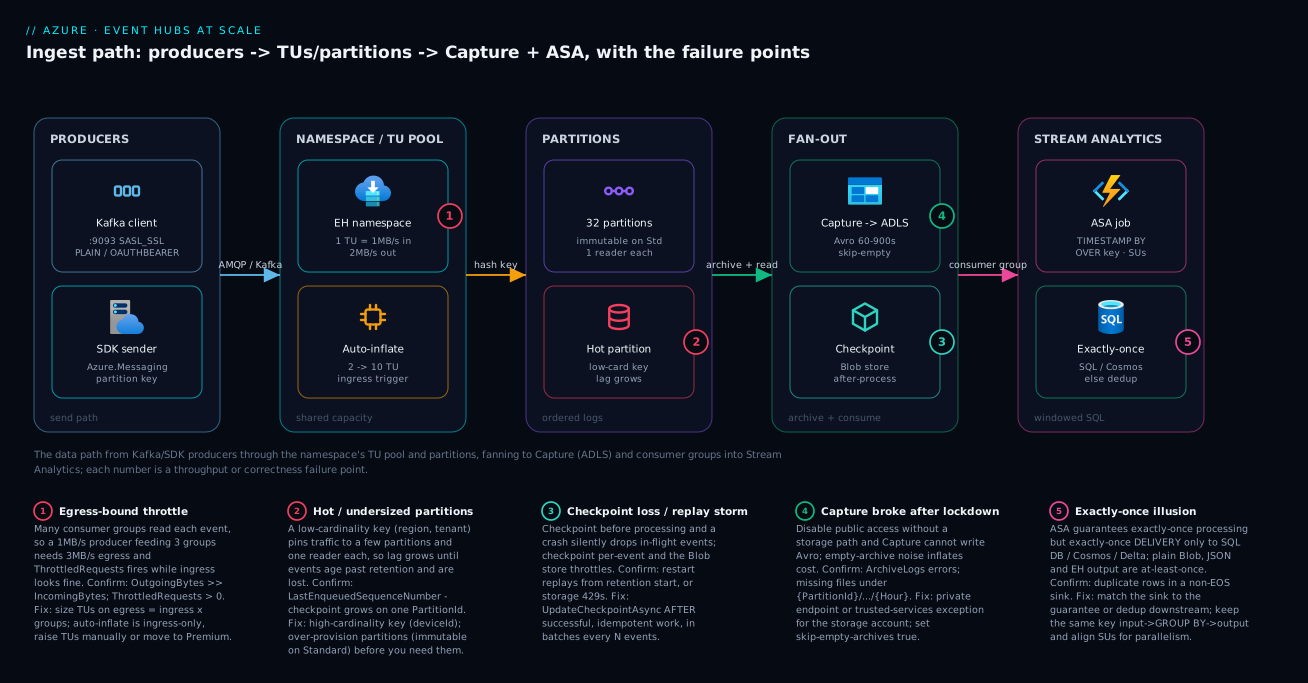
The diagram traces the data as it actually flows — left to right — and pins each throughput-or-correctness failure to the exact hop where it bites. Read it from the left: producers send over the Kafka endpoint (:9093, SASL_SSL) or the Azure.Messaging SDK with a partition key. Both land on the namespace, where the shared TU pool (1 MB/s in, 2 MB/s out per TU) and auto-inflate (an ingress trigger, 2→10 TU) govern capacity — and badge 1 marks the egress-bound throttle that fires here when consumer-group fan-out outruns your TUs. Inside the hub the stream lands on partitions (32, immutable on Standard, one reader each), where badge 2 marks the hot partition a low-cardinality key creates and the lag that grows behind it.
From the partitions the stream fans out two ways: Capture writes Avro to ADLS every 60–900s (badge 4 = Capture broke after a network lockdown), and consumer groups read while a checkpoint store in Blob tracks progress (badge 3 = checkpoint loss or a replay storm from checkpointing before processing). Finally a consumer group feeds the Stream Analytics job — TIMESTAMP BY ... OVER key, scaled by SUs — into an exactly-once sink (SQL/Cosmos) where badge 5 marks the exactly-once illusion of writing to an at-least-once sink. The legend narrates every number as symptom · confirm · fix: localise your problem to a hop, read the cause, run the named check, apply the fix. The single most important read of the diagram: throttling lives at the TU pool (egress, not ingress), and data loss lives at the partitions (lag past retention) — two different hops, two different fixes.
Real-world scenario
Cartos Logistics runs a fleet-telemetry platform: ~120,000 vehicles each emit a GPS-and-diagnostics ping every 5 seconds into a single Standard hub created two years earlier with 4 partitions — chosen when the fleet was 3,000 trucks and 4 felt generous. The namespace runs at 6 TUs with auto-inflate to 10. Two consumer groups read the stream: enrichment-worker (joins route metadata, writes to Cosmos DB) and stream-analytics (per-region speed and idle-time aggregates). Monthly Event Hubs spend is about ₹14,000.
The incident surfaced as a customer complaint, not an alert. A logistics customer’s route-history report for the previous morning had gaps — vehicles that clearly moved showed no positions for a 40-minute stretch. Every dashboard was green. The on-call engineer’s first reflex was to raise TUs (the namespace was occasionally near its egress ceiling during the morning surge), which did nothing, because the problem was not capacity — it was consumer lag exceeding retention.
The breakthrough was deriving lag by hand. There is no single “lag” metric, so the engineer compared each partition’s LastEnqueuedSequenceNumber against the enrichment-worker group’s checkpointed sequence number. On all four partitions the gap was growing through the 7–9am surge and only recovering by mid-morning. With 4 partitions, the enrichment consumer could run at most 4 parallel readers — it had been scaled to 12 instances, but 8 of them sat idle owning nothing, because ownership is capped at one reader per partition. During the surge the 4 active readers fell behind, lag grew, and events that weren’t read within the 7-day retention were deleted on schedule. The “missing” positions had aged out before enrichment ever saw them. No amount of consumer scaling could help: 4 partitions is a hard ceiling of 4 readers, and partition count is immutable on Standard.
The fix was a side-by-side migration, not an in-place change. They provisioned a new hub with 64 partitions, kept the partition key as vehicleId (very high cardinality, so the spread is even and per-vehicle ordering holds), and dual-wrote from producers to old and new hubs for one full retention window. The enrichment service was repointed at the new hub’s consumer group and scaled to 16 instances (well under the 64-partition ceiling, leaving headroom), and lag dropped from 40 minutes to seconds. Capture was enabled on the new hub from minute one, writing Avro to ADLS with skip-empty-archives true — so any future consumer bug is recoverable by replaying yesterday’s Avro instead of racing the retention clock. The old hub was decommissioned after the cutover window closed.
# New hub sized for the real fleet, Capture on from day one
az eventhubs eventhub create -g $RG --namespace-name $NS -n vehicle-telemetry-v2 \
  --partition-count 64 \
  --retention-time-in-hours 168 \
  --enable-capture true --capture-interval 300 --skip-empty-archives true \
  --destination-name EventHubArchive.AzureBlockBlob \
  --storage-account "/subscriptions/<sub-id>/resourceGroups/$RG/providers/Microsoft.Storage/storageAccounts/$SA" \
  --blob-container capture \
  --archive-name-format '{Namespace}/{EventHub}/{PartitionId}/{Year}/{Month}/{Day}/{Hour}/{Minute}/{Second}'
The incident as a timeline, because the order of moves is the lesson:
| Time | Symptom | Action taken | Effect | What it should have been |
|---|---|---|---|---|
| Day 0 | Customer reports route gaps | (ticket filed) | — | Ask: did lag exceed retention? |
| +1h | “Maybe capacity” | Raise TUs 6 → 10 | No change | TUs don’t fix a partition ceiling |
| +2h | Still gaps | Derive lag per partition | Lag grows on all 4 during surge | This was the breakthrough |
| +3h | Root cause found | Realise 4 partitions = 4 readers | Immutable on Standard | — |
| +1 day | Plan | Provision 64-partition hub, dual-write | Both hubs receiving | Side-by-side, never in-place |
| +1 week | Cutover | Repoint enrichment, scale to 16 | Lag → seconds | Correct fix |
| +1 week | Durability | Enable Capture from minute one | Future bugs = replay, not loss | Should have been day one |
The lesson the team internalized: partition count is a day-one capacity decision with no day-two undo on Standard, and lag past retention is silent data loss. Over-provision partitions (they are nearly free), keep a high-cardinality key, alarm on derived lag against the retention window, and turn on Capture before you need it — so the next surprise is a replay, not a data-loss incident.
Advantages and disadvantages
The log-with-fan-out model both enables massive-scale ingestion and causes this class of silent failure. Weigh it honestly:
| Advantages (why this model helps you) | Disadvantages (why it bites) |
|---|---|
| Massive throughput — millions of events/sec, scales with TUs/PUs | Capacity is a two-sided limit you size on egress, not ingress — easy to mis-size |
| Fan-out is free — every consumer group reads the full stream independently | Each consumer group adds a full copy of egress; fan-out quietly makes you egress-bound |
| Re-readable retention enables replay and multiple independent consumers | Lag past retention is silent data loss — no alarm, events just deleted on schedule |
| Per-partition ordering with a good key | Ordering only per partition; partition count caps parallelism, immutable on Standard |
| Capture is a near-free durable archive with no consumer to run | Avro-only; locking the namespace can silently break Capture’s storage path |
| Kafka endpoint lets existing producers/consumers lift-and-shift with no code change | No transactions / idempotent-EOS / Kafka Streams parity — some apps won’t port |
| Stream Analytics gives SQL-over-streams with exactly-once to key sinks | Exactly-once only to SQL/Cosmos/Delta — most sinks are at-least-once, you must dedup |
| Auto-inflate absorbs ingress spikes automatically | Auto-inflate is ingress-only and never scales down — egress throttling stays invisible |
The model is right for high-volume telemetry, clickstream, log and IoT pipelines and for Kafka workloads you want to run without broker ops. It bites hardest on high-fan-out workloads (egress sizing), skewed keys (hot partitions), Standard deployments that under-provision partitions (the immutable trap), and anyone who treats Capture, checkpointing and lag monitoring as fire-and-forget. The disadvantages are all manageable — but only if you know they exist, which is the point of this article.
Hands-on lab
Stand up a Standard namespace, a hub with Capture, send and receive a keyed event, prove ordering, and watch Capture write Avro — all low-cost (Standard 1 TU + a storage account; delete at the end). Run in Cloud Shell (Bash).
Step 1 — Variables and resource group.
RG=rg-eh-lab
LOC=centralindia
NS=ehlab$RANDOM            # globally unique
EH=telemetry
SA=ehlablake$RANDOM       # globally unique, lowercase
az group create -n $RG -l $LOC -o table
Step 2 — Create a Standard namespace (1 TU, auto-inflate to 4).
az eventhubs namespace create -g $RG -n $NS -l $LOC \
  --sku Standard --capacity 1 \
  --enable-auto-inflate true --maximum-throughput-units 4 -o table
Expected: a namespace row with sku.name = Standard, isAutoInflateEnabled = true.
Step 3 — Create an ADLS Gen2 account for Capture.
az storage account create -g $RG -n $SA -l $LOC \
  --sku Standard_LRS --kind StorageV2 --hierarchical-namespace true -o table
az storage container create --account-name $SA -n capture --auth-mode login
Step 4 — Create the hub with 8 partitions and Capture on.
SAID=$(az storage account show -g $RG -n $SA --query id -o tsv)
az eventhubs eventhub create -g $RG --namespace-name $NS -n $EH \
  --partition-count 8 --retention-time-in-hours 24 \
  --enable-capture true --capture-interval 60 --skip-empty-archives true \
  --destination-name EventHubArchive.AzureBlockBlob \
  --storage-account "$SAID" --blob-container capture \
  --archive-name-format '{Namespace}/{EventHub}/{PartitionId}/{Year}/{Month}/{Day}/{Hour}/{Minute}/{Second}' \
  -o table
Expected: partitionCount = 8, captureDescription.enabled = true.
Step 5 — Grant yourself the data role and send a keyed event. Use the SDK or the Kafka endpoint; here, the simplest path is a connection string with Send/Listen (the lab uses a SAS rule, not for production):
az eventhubs eventhub authorization-rule create -g $RG --namespace-name $NS \
  --eventhub-name $EH -n labrule --rights Listen Send
CONN=$(az eventhubs eventhub authorization-rule keys list -g $RG --namespace-name $NS \
  --eventhub-name $EH -n labrule --query primaryConnectionString -o tsv)
echo "Connection string captured (do not commit)."
Send a few events with the same partition key using any SDK quickstart, setting PartitionKey = "device-42" on each. All of them must land on one partition.
Step 6 — Confirm ordering and read the partition. With a consumer, read the events and print PartitionId — every device-42 event shows the same partition id, proving the key→partition hash holds order.
Step 7 — Wait one capture interval, then list the Avro.
sleep 90    # one 60s interval + roll time
az storage blob list --account-name $SA -c capture --auth-mode login \
  --prefix "$NS/$EH/" -o table
Expected: Avro blobs under .../{PartitionId}/.../{Minute} for the partition you wrote to — and no empty files on idle partitions (because skip-empty-archives = true).
Step 8 — Verify configuration end to end.
az eventhubs eventhub show -g $RG --namespace-name $NS -n $EH \
  --query '{partitions:partitionCount, retentionHrs:retentionDescription.retentionTimeInHours, capture:captureDescription.enabled, skipEmpty:captureDescription.skipEmptyArchives}'
az eventhubs namespace show -g $RG -n $NS \
  --query '{sku:sku.name, capacity:sku.capacity, autoInflate:isAutoInflateEnabled, maxTU:maximumThroughputUnits, publicAccess:publicNetworkAccess}'
Step 9 — Teardown (stops all charges).
az group delete -n $RG --yes --no-wait
What each step proves, at a glance:
| Step | Proves | If it fails, suspect |
|---|---|---|
| 2 | Namespace + auto-inflate config | Name not globally unique |
| 3 | ADLS Gen2 with hierarchical namespace | HNS flag omitted |
| 4 | Hub + Capture wiring | Wrong storage id / missing {PartitionId} |
| 5–6 | Keyed send → single partition (ordering) | Key not set; round-robin spread |
| 7 | Capture writes Avro, skips empty | Storage path/role; interval not elapsed |
| 8 | End-to-end config readback | Any of the above |
Practice challenges
Six exercises, escalating from arithmetic to a full DR design. Try each before opening its solution — the one-line why under each answer is the part worth remembering. Nothing here needs a live subscription; the az/SQL snippets are illustrative and every id is a placeholder.
1. (Beginner) Size the throughput units. A hub takes 3 MB/s of ingress and is read by 4 consumer groups. How many throughput units do you provision before headroom, and is the number set by ingress or egress?
<details><summary>Solution</summary>
Egress dominates. total_egress = 3 MB/s × 4 = 12 MB/s; TUs by egress = ceil(12 / 2) = 6. TUs by ingress = ceil(3 / 1) = 3. Provision for 6 TU (then add headroom, e.g. 7–8).
Why: every consumer group reads the full stream, so each one adds a whole copy of egress — you are almost always egress-bound, and egress per TU is 2 MB/s. </details>
2. (Beginner) Count the active readers. A Standard hub has 4 partitions. Your enrichment service is scaled to 12 instances in one consumer group. How many instances actively read, and what is the only way to raise that ceiling?
<details><summary>Solution</summary>
Four read; the other eight sit idle owning nothing, because at most one active reader owns a partition per consumer group. On Standard, partition count is immutable, so the only path to more parallelism is a side-by-side migration to a new hub with more partitions.
Why: parallelism is capped by partition count, and the epoch/owner-level rule enforces one owner per partition — extra instances can’t share a partition. </details>
3. (Intermediate) Wire up Capture correctly. Write the az eventhubs eventhub create for a hub orders with 16 partitions, 3-day retention, and Capture to container capture that rolls every 5 minutes and never writes empty files. Which single token in the name format is non-negotiable for safe replay?
<details><summary>Solution</summary>
az eventhubs eventhub create -g $RG --namespace-name $NS -n orders \
  --partition-count 16 --retention-time-in-hours 72 \
  --enable-capture true --capture-interval 300 --skip-empty-archives true \
  --destination-name EventHubArchive.AzureBlockBlob \
  --storage-account "/subscriptions/<sub-id>/resourceGroups/$RG/providers/Microsoft.Storage/storageAccounts/<sa>" \
  --blob-container capture \
  --archive-name-format '{Namespace}/{EventHub}/{PartitionId}/{Year}/{Month}/{Day}/{Hour}/{Minute}/{Second}'
{PartitionId} is the non-negotiable token.
Why: replay must reconstruct per-partition order, which is only possible if the archive path separates partitions; skip-empty-archives true keeps idle partitions from littering the lake with 0-byte files.
</details>
4. (Intermediate) Pick a partition key for a noisy tenant. A multi-tenant SaaS needs per-tenant ordering, but a handful of whale tenants push 100× the volume of the rest. Keying on tenantId gives ordering but creates hot partitions. What key preserves ordering and spread?
<details><summary>Solution</summary>
Use a composite key such as tenantId:entityId (e.g. tenant7:order-9931). It keeps every event for one entity ordered together while spreading a whale tenant’s traffic across many partitions by the high-cardinality entityId component.
Why: ordering only needs to hold at the granularity you actually consume (usually per entity, not per whole tenant), and a high-cardinality component restores even spread — plain tenantId has too few, too skewed values.
</details>
5. (Advanced) Correct-time ASA aggregation. Write a Stream Analytics query that emits per-device 5-minute average temperature on event time, parallelised per device, and say which two job settings you’d tune so a device that reports 90 seconds late is still counted.
<details><summary>Solution</summary>
SELECT
    deviceId,
    System.Timestamp()      AS windowEnd,
    AVG(temperature)        AS avgTemp,
    COUNT(*)                AS samples
INTO   [aggregates-output]
FROM   [telemetry-input] TIMESTAMP BY enqueuedAt OVER deviceId
GROUP BY deviceId, TumblingWindow(minute, 5)
Tune late arrival tolerance (set it to ≥ 90 s so the straggler is adjusted into its window rather than lost) and out-of-order tolerance (a small reorder buffer, with the policy set to Adjust, not Drop).
Why: TIMESTAMP BY … OVER deviceId gives each device its own substream watermark, and the two ordering dials decide how patient that watermark is before it closes the window.
</details>
6. (Advanced) Design the DR posture. You run a Standard namespace in one region and must survive losing that region. Describe a DR design and state exactly what you’d lose on failover and how you’d recover it.
<details><summary>Solution</summary>
Enable Geo-DR with an Alias to a secondary-region namespace so clients keep a stable endpoint and all hubs/consumer groups/rules are already present after a promote. Because Geo-DR replicates metadata only, you’d lose every event not yet consumed in the primary — so pair it with Capture writing Avro to storage the secondary region can read, and recover the data-side gap by replaying the captured Avro into the new primary. If a data RPO is mandatory and you can move to Premium/Dedicated, evaluate Geo-Replication (public preview) which copies data too.
Why: Geo-DR protects endpoint identity and configuration, not data; on Standard the durable data copy is Capture, and replay — not a namespace restore — is how you backfill. </details>
Common beginner mistakes
These are mental-model errors, not operational symptoms — the wrong picture in your head that leads to the wrong day-one decision. (The symptom → cause → confirm → fix playbook for things already on fire is the Common mistakes & troubleshooting section further down.) Fix the model here and most of those incidents never start.
| Misconception | Why it’s wrong | The right mental model |
|---|---|---|
| “It’s a queue — reading a message consumes it.” | Nothing is removed by reading; events sit for the whole retention window and every consumer group reads them independently. | A rolling recording with per-reader bookmarks (cursors), not a to-do list you drain. |
| “If consumers fall behind, just add throughput units.” | TUs are a rate limit; lag is a parallelism-and-retention problem. More TUs won’t add readers past your partition count. | Lag is fixed by more partitions (parallelism) and/or more retention (time), not more MB/s. |
| “Partition count is like a queue depth I can tune later.” | On Standard it is immutable from creation — it is simultaneously your max parallelism and your ordering granularity. | A day-one, no-undo capacity decision; over-provision (32 costs nothing extra) with eyes open. |
| “A random GUID key is the safest partition key — perfect spread.” | Perfect spread, but it destroys per-entity ordering, since one entity’s events scatter across all partitions. | Use a high-cardinality business key (deviceId); pick “no key” only when order truly doesn’t matter. |
| “Capture is a backup I can restore back into the hub.” | Capture is an Avro archive in a lake; there is no “restore into hub” — you reprocess it downstream. | A durable copy for replay/backfill by a downstream job, not a namespace snapshot. |
| “The Kafka endpoint means I get full Kafka.” | Produce/consume and consumer groups map 1:1, but transactions, idempotent-producer EOS, and txn-dependent Streams are unsupported. | A clean lift-and-shift for producers/consumers — validate any transaction/EOS use before you bet on it. |
| “Stream Analytics is exactly-once, full stop.” | Exactly-once delivery holds only to SQL Database, Cosmos DB, and Delta outputs; most sinks are at-least-once. | Match the sink to the guarantee you need; dedup on a business key for at-least-once sinks. |
| “Geo-DR replicates my events to the other region.” | Geo-DR copies metadata only; your events are not there after failover. | Metadata continuity from Geo-DR plus data durability from Capture (or Geo-Replication, still preview). |
Common mistakes & troubleshooting
This is the section you reopen mid-incident. Each failure mode is symptom → root cause → confirm (exact command/path) → fix. Scan the playbook table first, then read the detail for the row that matches.
| # | Symptom | Root cause | Confirm (exact command / portal path) | Fix |
|---|---|---|---|---|
| 1 | Producers throttled, ingress looks fine | Egress-bound: fan-out × ingress > TUs | ThrottledRequests > 0; OutgoingBytes >> IncomingBytes |
Size TUs on egress; raise TUs / Premium |
| 2 | Consumer lag grows during peak | Parallelism capped by partition count | Derive lag: LastEnqueuedSequenceNumber − checkpoint per partition |
Scale to ≤ partition count; re-partition (new hub) |
| 3 | Report has gaps; dashboards green | Lag exceeded retention; events deleted | Lag trend vs retentionTimeInHours |
Raise retention; fix lag; replay from Capture |
| 4 | No Avro files appear in ADLS | Capture can’t reach storage (PE/firewall) | AzureDiagnostics ... ArchiveLogs errors; empty container |
PE on storage or trusted-services exception |
| 5 | Storage account 429s; latency spikes | Per-event checkpointing | Checkpoint frequency in code; storage throttling metric | Checkpoint in batches every N events |
| 6 | Restart replays the whole stream | Checkpoint never written / before processing | Restart reads from retention start | UpdateCheckpointAsync AFTER processing |
| 7 | Duplicate rows in the sink | At-least-once sink + no dedup | Sink type vs EOS matrix | EOS sink (SQL/Cosmos) or dedup on key |
| 8 | Empty Avro files everywhere, storage bill up | skip-empty-archives not set |
List container; many 0-byte Avro | Set --skip-empty-archives true |
| 9 | Hot partition: one reader pinned at 100% | Low-cardinality partition key | Per-partition throughput skew | High-cardinality key; re-partition |
| 10 | ASA watermark delay climbs, results late | Under-provisioned SUs / not parallel | ASA SU% util + watermark delay metric | Add SUs; PARTITION BY the key |
| 11 | Kafka client errors on transactions | Endpoint doesn’t support Kafka txns/EOS | Client logs: txn/idempotent errors | Remove txn dependency or self-managed Kafka |
| 12 | “Private networking broke everything” | Public access off, no PE/DNS for clients | publicNetworkAccess = Disabled; no PE |
Add PE + private DNS zone (servicebus) |
| 13 | Auto-inflate never fires under load | Auto-inflate is ingress-only | Throttling on egress while ingress low | Raise TUs manually; alarm on egress |
| 14 | Two apps fight over partitions | Shared consumer group | Same group name in two apps | One consumer group per downstream |
Mistake 1 — Sizing TUs on ingress, then egress-throttling
You provision for “1 MB/s of telemetry,” but three consumer groups each read the full stream, so you actually need 3 MB/s of egress. The namespace throttles producers, latency climbs, and the ingress graph looks healthy the whole time.
Confirm. Compare incoming vs outgoing bytes and check throttling:
NSID=$(az eventhubs namespace show -g $RG -n $NS --query id -o tsv)
az monitor metrics list --resource "$NSID" \
  --metric ThrottledRequests IncomingBytes OutgoingBytes \
  --interval PT1M --aggregation Total -o table
OutgoingBytes materially exceeding IncomingBytes with non-zero ThrottledRequests is the signature. Fix: re-size TUs against ingress × consumer_groups / 2, raise the auto-inflate max, and if you are at the Standard ceiling, move to Premium. Auto-inflate will not save you here — it triggers on ingress.
Mistake 2 & 3 — Lag growth and silent data loss past retention
There is no built-in “lag” metric — you derive it. A growing gap between a partition’s last enqueued sequence number and your checkpoint means a consumer is falling behind; if that gap implies a time older than your retention window, events are being deleted before you read them.
Confirm. Per partition, compare last-enqueued vs checkpoint. From the SDK you read LastEnqueuedSequenceNumber off partition properties; the checkpoint lives in your Blob store. As a quick portal proxy, watch the retention window against how far behind the consumer is. The mechanism — not a fake metric — is the point: derive lag, then compare it to retentionTimeInHours.
Fix. Scale the consumer out up to the partition count (more instances beyond that sit idle); if you are already at the partition ceiling on Standard, the only fix is a side-by-side migration to a hub with more partitions (see the real-world scenario). Raise retention to buy recovery time, and replay from Capture to backfill what was lost. Alarm on derived lag relative to retention, not on an absolute number.
Mistake 4 & 8 — Capture broke, or wrote a pile of empty files
Two opposite Capture failures. Lock the namespace behind a private endpoint without giving the storage account a network path and Capture silently stops writing — no error to the producers, just no files. Conversely, leave skip-empty-archives at its default and every idle partition writes an empty Avro file every interval, inflating storage, transaction and scan costs.
Confirm. Check ArchiveLogs and list the container:
AzureDiagnostics
| where ResourceProvider == "MICROSOFT.EVENTHUB"
| where Category == "ArchiveLogs"
| where TimeGenerated > ago(1h)
| summarize count() by OperationName, ResultDescription
| order by count_ desc
az storage blob list --account-name $SA -c capture --auth-mode login --prefix "$NS/$EH/" -o table
No files (with traffic flowing) → network path broken. Many 0-byte files → empty-archive noise. Fix: for the broken path, give the storage account a private endpoint or enable the trusted Microsoft services firewall exception; for the noise, set --skip-empty-archives true.
Mistake 5 & 6 — Checkpointing wrong (too often, or in the wrong order)
Checkpoint per event and every checkpoint is a Blob write — the storage account throttles (429s) and checkpoint latency dominates. Checkpoint before processing (or never) and a crash either loses in-flight events or replays the entire stream on restart.
Confirm. A restart that re-reads from the start of retention means checkpoints aren’t being written (or are written before processing). Storage 429s on the checkpoint container point at per-event checkpointing. Fix: call UpdateCheckpointAsync after successful, idempotent processing, and in batches (every N events or a few seconds). Tune N against your idempotency budget — larger N means more replay on restart but less storage load.
Mistake 7 — Assuming exactly-once for every ASA sink
The ASA “exactly-once” badge applies to processing and to delivery only for SQL Database, Cosmos DB, and Delta-based outputs. Write to plain Blob/JSON, Event Hubs output, or Service Bus and you get at-least-once — duplicates after any retry.
Confirm. Duplicate rows in a non-EOS sink; cross-reference the sink against the exactly-once matrix earlier. Fix: route to an exactly-once sink (SQL/Cosmos with upsert on a business key) or dedup downstream on a unique key. Never assume the badge covers your output.
Mistake 9 — Hot partition from a skewed key
A low-cardinality key (region, tenant) pins most traffic to a few partitions; their single readers saturate while other partitions sit idle, and lag grows on the hot ones only.
Confirm. Per-partition throughput is wildly uneven — one or two partitions near their share, the rest near zero. Fix: switch to a high-cardinality key (deviceId); if the hub already exists on Standard, re-partition via a new hub. A composite key (region:deviceId) preserves locality while restoring spread.
Mistake 12 & 14 — Private-network and consumer-group footguns
Disabling public access without a private endpoint and DNS zone cuts off every client that resolved the public FQDN. Sharing one consumer group across two unrelated apps makes them steal partition ownership from each other, so neither reads reliably.
Confirm. publicNetworkAccess = Disabled with no PE → clients time out resolving. Two apps with the same group name → ownership churn in logs. Fix: add the private endpoint + privatelink.servicebus.windows.net DNS zone for the first; give every downstream its own consumer group for the second. For deeper network-path debugging, see Azure Troubleshooting Methodology: Network, VM, Identity, Storage.
Best practices
Twelve rules that keep an Event Hubs pipeline out of the incident channel:
| # | Practice | Why it matters |
|---|---|---|
| 1 | Choose the tier before provisioning | Unit, limits, and partition-mutability all differ |
| 2 | Size TUs on egress (ingress × groups), not ingress |
Fan-out makes you egress-bound almost always |
| 3 | Set the auto-inflate ceiling as a cost guardrail | Prevents an unbounded bill on a spike |
| 4 | Over-provision partitions (32+) on Standard | Immutable later; partitions are nearly free |
| 5 | Use a high-cardinality partition key | Even spread + per-entity ordering, no hot partitions |
| 6 | One consumer group per downstream | Avoids ownership theft between apps |
| 7 | EventProcessorClient + Blob checkpoint store |
Don’t hand-roll ownership/load-balance |
| 8 | Checkpoint after processing, in batches, idempotently | No silent loss, no storage throttling |
| 9 | Enable Capture with skip-empty-archives + {PartitionId} |
Free replay; no empty-file noise |
| 10 | Validate the Kafka endpoint against your client’s feature use | Transactions/EOS aren’t supported |
| 11 | ASA: TIMESTAMP BY ... OVER <key> + explicit watermark |
Event-time correctness; substreams |
| 12 | Match the ASA sink to the required guarantee | Exactly-once only to SQL/Cosmos/Delta |
Two more that are operational rather than configuration: alarm on derived lag relative to retention (not an absolute number), and re-derive your TU math every time you add a consumer group.
Security notes
Event Hubs security is identity, network, and encryption — and the defaults are not the production posture.
| Control | Default | Production setting | How |
|---|---|---|---|
| Auth model | SAS connection strings | Entra ID + RBAC / managed identity | Azure Event Hubs Data Sender / ...Data Receiver roles |
| Local (SAS) auth | Enabled | Disabled where possible | --disable-local-auth true |
| TLS | 1.0+ allowed historically | Minimum TLS 1.2 | minimumTlsVersion: '1.2' |
| Public network access | Enabled | Disabled (private-only) | --public-network-access Disabled + PE |
| Network isolation | Public FQDN | Private endpoint | privatelink.servicebus.windows.net |
| Encryption at rest | Microsoft-managed keys | CMK if compliance requires | Premium/Dedicated + Key Vault |
| Capture storage auth | Account key | Managed identity | Grant the namespace identity Storage Blob Data Contributor |
| Diagnostic logging | Off | On to Log Analytics | Diagnostic settings → OperationalLogs, ArchiveLogs |
The RBAC data roles are the ones to know — they replace shared keys:
| Role | Grants | Assign to |
|---|---|---|
Azure Event Hubs Data Owner |
Full data-plane (send + receive + manage) | Admins / break-glass |
Azure Event Hubs Data Sender |
Send only | Producer apps |
Azure Event Hubs Data Receiver |
Receive only | Consumer apps / ASA |
# Grant a producer app's managed identity send-only, scoped to one hub
PRINCIPAL=$(az webapp identity show -n producer-app -g rg-app --query principalId -o tsv)
az role assignment create --assignee "$PRINCIPAL" \
  --role "Azure Event Hubs Data Sender" \
  --scope $(az eventhubs eventhub show -g $RG --namespace-name $NS -n $EH --query id -o tsv)
Prefer Entra ID over connection strings everywhere, scope roles to the hub (not the namespace) where you can, and disable local auth once every client is on managed identity. For secret-handling where a connection string is unavoidable, store it in Key Vault and rotate it — see Azure Key Vault: Secret Rotation with Managed Identity.
Cost & sizing
What drives the Event Hubs bill, and how to keep it honest:
| Cost driver | Billed on | Rough figure (varies by region) | How to control |
|---|---|---|---|
| Throughput units (Standard) | Per-TU-hour | ~₹2,000–2,500 / TU / month | Size on egress; auto-inflate ceiling; scale down off-peak |
| Ingress events | Per million events | small per-million | Batch sends; avoid tiny events |
| Capture (Standard add-on) | Per-TU-hour add-on | ~₹0.10 / TU / hour | Worth it for replay; included on Premium |
| Capture storage | ADLS storage + transactions | per-GB + per-10k ops | skip-empty-archives; lifecycle to cool/archive |
| Processing units (Premium) | Per-PU-hour | substantial fixed/PU | Right-size PUs with load tests |
| Capacity units (Dedicated) | Per-CU-month | large fixed floor | Only at 100+ MB/s or compliance |
| Stream Analytics | Per streaming-unit-hour | per-SU-hour | Right-size SUs; stop idle jobs |
| Storage egress (replay) | Per-GB read | per-GB | Replay only what you need; date-prune |
Right-sizing levers, ranked by impact:
| Lever | Effect on bill | Effort | Risk |
|---|---|---|---|
| Size TUs on egress (not over-provision) | High | Low | Under-size → throttling; keep headroom |
| Auto-inflate ceiling | Medium | Trivial | Too low → throttling on spikes |
| Scheduled scale-down off-peak | Medium | Medium | Cron/automation to lower TUs |
skip-empty-archives |
Medium (storage) | Trivial | None |
| Lifecycle Avro to cool/archive | Medium (storage) | Low | Slower replay from archive tier |
| Standard vs Premium choice | High | Planning | Premium floor wasted at low volume |
| Right-size ASA SUs | Medium | Low | Too few → watermark delay |
There is no free tier for Event Hubs Standard, but the lab above runs on 1 TU + LRS storage for a few rupees if you delete the resource group when done. A worked baseline: a 6-TU Standard namespace with Capture and one ASA job (small SU count) lands around ₹14,000–18,000/month — the Cartos scenario’s figure. Premium starts well above that as a fixed floor, justified only when you need predictable latency, >7-day retention, or tenancy isolation.
Interview & exam questions
Mapped to DP-203 (Data Engineering on Azure) and AZ-204/AZ-305 where messaging appears.
-
Why is Event Hubs egress capacity double its ingress per TU? Because every event is typically read by multiple consumer groups, and each group reads the full stream — so egress demand is
ingress × consumer_groups. The 2:1 ratio assumes meaningful fan-out; you still size against the larger of your two numbers. -
Can you change partition count after creating a hub? On Standard, no — it is immutable, and the only path to more partitions is a side-by-side migration to a new hub. On Premium/Dedicated you can increase it (never decrease), but existing data isn’t rebalanced and key mapping shifts for new sends.
-
Why checkpoint after processing rather than before? A checkpoint means “processed through offset X.” Checkpoint before processing and a crash loses every in-flight event between the checkpoint and the failure — silent data loss. After-processing checkpointing makes a restart resume correctly given idempotent work.
-
Event Hubs delivers at-least-once. What does that force on your consumer? Idempotent processing. After a crash you reprocess from the last checkpoint, so you may see events more than once; dedup on a business key or design effects to be replay-safe.
-
What does Capture write, and what format constraint does it impose? It archives the raw stream to Blob/ADLS as Avro only — no JSON/Parquet option. If your lake standard is Parquet, run a downstream conversion. Always enable
skip-empty-archivesand include{PartitionId}in the name format. -
A consumer is scaled to 20 instances on a 4-partition hub. How many actively read? Four — at most one active reader owns a partition per consumer group, so 16 instances sit idle owning nothing. Parallelism is capped by partition count.
-
When does auto-inflate fail to help you? When you are egress-bound. Auto-inflate triggers on ingress throttling, so if consumer-group fan-out is your constraint, it may never fire while consumers throttle. Alarm on egress directly and raise TUs manually.
-
Which ASA sinks give true end-to-end exactly-once? Azure SQL Database, Cosmos DB, and Delta-based outputs (Synapse/Blob via the v2 path). Plain Blob/JSON, Event Hubs output, and Service Bus are at-least-once — the sink must dedup.
-
What’s the single highest-leverage clause in an ASA query at scale, and why?
TIMESTAMP BY <ts> OVER <key>— it applies event-time per partition key (substreams), so one slow producer can’t hold the global watermark hostage, and it enables embarrassingly-parallel processing aligned to the input partitions. -
How do you derive consumer lag without a built-in metric? Compare each partition’s
LastEnqueuedSequenceNumberagainst your checkpointed sequence number; a growing gap is lag. Critically, compare that gap to the retention window — lag exceeding retention means permanent data loss. -
What Kafka features does the Event Hubs endpoint NOT support? The transactions API, idempotent-producer EOS, Kafka-semantics compacted topics, and broker-level admin operations. It’s a clean lift-and-shift for produce/consume and consumer groups; not a drop-in for a transaction-dependent Kafka Streams app.
-
Why might “private networking” break Capture, and how do you fix it? Disabling public access cuts the namespace’s path to the storage account too. Give the storage account a private endpoint, or enable the trusted Microsoft services firewall exception, so Capture can keep writing Avro.
Quick check
- You have 2 MB/s ingress and 4 consumer groups. How many TUs (whichever side dominates) before headroom?
- True or false: increasing partition count is a simple knob on a Standard hub.
- Where do you call
UpdateCheckpointAsyncrelative to your processing logic, and why? - Which two Avro-path requirements must
--archive-name-formatsatisfy for safe replay? - Name one ASA sink that is exactly-once and one that is at-least-once.
Answers
- Egress dominates:
4 × 2 MB/s = 8 MB/s egress ÷ 2 = 4 TU(vs2 TUby ingress). Size for 4 TU, then add headroom (e.g. 5–6). - False. Partition count is immutable on Standard; only Premium/Dedicated allow an increase (never decrease), and existing data isn’t rebalanced.
- After successful, idempotent processing, in batches — so a crash never loses in-flight events and the Blob store isn’t throttled by per-event writes.
- It must include
{PartitionId}(for per-partition ordering on replay) and the{Namespace}/{EventHub}tokens; time tokens are optional but enable date/time pruning. - Exactly-once: Azure SQL Database (or Cosmos DB / Delta). At-least-once: plain Blob/JSON (or Event Hubs output / Service Bus).
Glossary
| Term | Definition |
|---|---|
| Event Hubs | Managed, partitioned event-streaming service (a distributed append-only log) with Kafka-protocol compatibility. |
| Namespace | The container and capacity boundary for one or more hubs; TUs/PUs are shared here. |
| Event hub | A single partitioned log — the Kafka “topic” equivalent — you produce to and consume from. |
| Throughput unit (TU) | Standard capacity unit: 1 MB/s (or 1000 events/s) ingress, 2 MB/s (or 4096 events/s) egress. |
| Processing unit (PU) | Premium capacity reservation (CPU/memory) with predictable latency and no per-second throttle. |
| Capacity unit (CU) | Dedicated single-tenant capacity unit for the highest scale and isolation. |
| Partition | An ordered, append-only sub-log; ordering holds within it, and one reader owns it per consumer group. |
| Partition key | A value hashed to choose a partition, giving per-key ordering and (with high cardinality) even spread. |
| Consumer group | An independent cursor over the stream; each downstream gets its own. |
| Checkpoint | A persisted “processed through offset X” marker in a Blob store that makes restart resumable. |
EventProcessorClient |
The SDK client that distributes partition ownership, load-balances, and checkpoints. |
| Capture | The feature that auto-archives the raw stream to Blob/ADLS as Avro for replay and audit. |
| Auto-inflate | Automatic upward TU scaling (ingress-triggered) up to a configured ceiling; never scales down. |
| Kafka endpoint | The wire-compatible broker on port 9093 that lets Kafka clients connect with no code change. |
| Stream Analytics (ASA) | A SQL-over-streams engine with temporal windows and exactly-once delivery to specific sinks. |
| Watermark | How long ASA waits for late (straggler) events before closing a window. |
| Retention | How long events are kept in the hub; lag exceeding it is permanent data loss. |
| Schema Registry | Namespace-hosted store of Avro/JSON payload schemas (in schema groups) that governs event structure and evolution; separate from Capture’s Avro framing. |
| Compatibility mode | Per-schema-group rule (Backward / Forward / None) deciding which schema changes are allowed; Backward is the safe default. |
| Geo-DR (Alias) | Metadata-only cross-region pairing behind a stable alias; failover promotes the secondary but replicates no event data. GA. |
| Geo-Replication | Newer feature replicating both metadata and event data across regions under one hostname (sync/async); Premium/Dedicated, public preview. |
| Epoch / owner level | The number that enforces a single owner per partition per consumer group — a lower-level receiver is disconnected or refused. |
| Substream | An independent per-partition-key stream (via TIMESTAMP BY … OVER key) with its own watermark, so one slow key can’t stall the job. |
| Event time | When an event actually happened, taken from a payload field via TIMESTAMP BY; the correct basis for windowing under delay. |
| Ingestion time | When Event Hubs received the event (EventEnqueuedUtcTime); ASA’s default if you omit TIMESTAMP BY. |
| Late arrival tolerance | ASA setting for how far behind real time an event’s timestamp may lag before it is adjusted forward into a window rather than dropped. |
| Out-of-order tolerance | ASA reorder-buffer window; events still out of order beyond it are Dropped or Adjusted per the out-of-order policy. |
| Streaming unit (SU) | The compute allocation for a Stream Analytics job; raise it when SU% utilization or watermark delay climbs. |
| ADLS Gen2 | Azure Data Lake Storage Gen2 — Blob storage with a hierarchical namespace, a common Capture destination. |
| Avro | The compact, self-describing binary format Capture writes (carrying SequenceNumber, Offset, EnqueuedTimeUtc, Body, Properties). |
| SASL/OAUTHBEARER | Kafka auth mechanism using Microsoft Entra ID tokens — preferred over SASL/PLAIN with a shared connection string for production. |
Next steps
- Azure Cosmos DB: Partition-Key Design & RU Optimization — the same partitioning intuition, and a common exactly-once ASA sink.
- Azure Data Factory, Synapse & Microsoft Fabric Deep Dive — batch/lakehouse processing of the captured Avro and Avro→Parquet conversion.
- Azure Service Bus: Sessions, Dedup & Dead-Letter Patterns — when you need transactional messaging instead of a streaming firehose.
- Backpressure & Flow Control in Streaming Systems — the general theory behind the throttling and lag dynamics here.
- Azure Private Endpoints & Private DNS at Scale — locking the namespace onto a VNet without breaking Capture.