In a nutshell
Picture a car factory’s assembly line. Raw parts arrive at the loading dock exactly as the supplier shipped them — dented, unsorted, some in the wrong box. They move down the belt and stop at stations: one straightens and inspects, the next bolts sub-assemblies together, the next paints and polishes. A finished car — uniform, trustworthy, ready to sell — rolls off the end. Nobody sells the raw parts, and nobody throws them away either: the dock keeps a record of exactly what turned up, so any car can be rebuilt from scratch if a later station got something wrong.
An end-to-end data pipeline is that assembly line, for data. Raw records arrive from source systems (an app database, a SaaS API, a stream of website clicks) and land untouched in the bronze layer — the loading dock. They flow to silver, where they are de-duplicated, typed and validated (the straightening-and-inspection station). They flow to gold, where they are shaped into the business-ready facts and aggregates a report actually consumes (paint and polish). Finished insight — “yesterday’s sales by region” — rolls off the end into Power BI by 8 a.m. A fast lane runs alongside for events that cannot wait for the overnight shift, driving a live “orders in the last five minutes” tile. And the whole floor is wrapped in the factory’s safety systems: who is allowed in (identity), fences around the site (private networking) and a logbook of where every part came from (governance and lineage).
This lesson is the build guide for that factory on Azure. You will not merely name Data Factory, Synapse, Event Hubs and Fabric — you will wire them together, choose between the realistic options at each station, and be able to say why on a whiteboard and then again on Monday in the portal.
Level: Advanced · Time: ~42 min
Before you start, you want the Azure basics: the tenant → subscription → resource-group hierarchy, how storage accounts work (ADLS Gen2 is a feature of one), and Entra identity + RBAC — because a data platform is identity plus storage plus compute. A little SQL and Python help but are not required; every snippet is explained. The full prerequisite and objective lists follow immediately below.
By the end you will be able to stand up an ADLS Gen2 medallion lake; ingest with Data Factory / Synapse pipelines using the right integration runtime and an incremental/CDC load; transform bronze → silver → gold in Delta with Spark or SQL; bolt on a real-time Event Hubs → Stream Analytics path; serve through dedicated/serverless SQL, Fabric and Power BI; and wrap all of it in orchestration, CI/CD, managed identity, private endpoints and Purview governance.
Exam status — verify before you book. The DP-203 “Data Engineering on Microsoft Azure” exam was retired on 31 March 2025, and with it the Azure Data Engineer Associate credential and its renewal assessments. Microsoft’s current data-engineering certification is DP-700 “Implementing Data Engineering Solutions Using Microsoft Fabric” (the Fabric Data Engineer Associate, which reached GA in November 2024); DP-600 “Fabric Analytics Engineer Associate” covers the modelling-and-serving half. There is no automatic transfer from DP-203 to DP-700 — you sit DP-700 fresh. We keep the DP-203 framing deliberately: the underlying skills are unchanged (pipelines, medallion, Delta, Spark, streaming, serving), and the enormous installed base of Synapse/ADF platforms is exactly what you will operate and migrate for years yet. Every pattern below maps one-to-one onto Fabric, and we flag the Fabric equivalent as we go — so read “DP-203” here as the name of a durable skill set, and sit DP-700 for the badge. (Always confirm the live exam list on Microsoft Learn, as the certification portfolio keeps moving.)
Knowing the names of the Azure analytics services is one thing; being able to assemble them into a working pipeline that ingests yesterday’s orders, cleanses them overnight, joins a live clickstream, and lights up a dashboard by 8 a.m. is another entirely. This lesson is the second of those skills. It is a senior data engineer’s build walkthrough of an end-to-end Azure data platform — the kind of thing you design in an interview on a whiteboard and then implement for real on Monday.
We will follow data through the five stages every platform shares — ingest, store, transform, serve — with streaming running alongside as a first-class path, and orchestration, CI/CD, security and governance wrapped around the whole thing. At each stage we do not merely name the service: we choose between the realistic options (Data Factory vs Synapse pipelines, dedicated vs serverless SQL, Stream Analytics vs Spark Structured Streaming, Synapse vs Microsoft Fabric vs Databricks), say why, and show the az/JSON shape of how it is wired. This is the build-skills companion to the platform overview, and it maps directly to the DP-203: Data Engineering on Microsoft Azure objectives — ingestion and transformation, securing and monitoring data storage and processing, and (increasingly) the Microsoft Fabric-era successor skills.
A note on the 2026 landscape. Microsoft has frozen new investment in standalone Synapse Analytics and made Microsoft Fabric its strategic data platform; the DP-203 exam is being retired in favour of Fabric-centric certifications (DP-700, DP-600). We teach the DP-203 build because the concepts are identical — pipelines, medallion, Delta, Spark, streaming, serving — and the huge installed base of Synapse/ADF estates is exactly what you will operate and migrate. Every pattern here translates one-to-one to Fabric, and we flag the Fabric equivalent as we go.
Learning objectives
By the end of this lesson you can:
- Design and build an ingestion layer with Azure Data Factory / Synapse pipelines — choosing the right integration runtime, and implementing both full and incremental/CDC loads.
- Lay out an ADLS Gen2 lake using the medallion (bronze/silver/gold) architecture in Delta/Parquet, and partition it so it performs.
- Transform data in batch with Synapse Spark and SQL pools (and know when Databricks is the better engine), applying cleansing, conforming and aggregation.
- Build a streaming path with Event Hubs feeding Stream Analytics or Spark Structured Streaming, and reason about windowing, watermarks and exactly-once.
- Serve the curated data through a dedicated SQL pool / Fabric Warehouse and Power BI (including DirectLake), and choose the serving engine deliberately.
- Operationalise the platform — orchestration (triggers, dependencies), CI/CD (Git integration, ARM/Bicep, deployment), security (managed identity, private endpoints) and governance (Microsoft Purview).
- Answer the DP-203-style design questions an interviewer will ask about each of the above.
Prerequisites
You should be comfortable with the Azure fundamentals — the tenant → subscription → resource group → resource hierarchy, storage accounts (ADLS Gen2 is a storage-account feature), and Entra identity and RBAC, because a data platform is identity plus storage plus compute. Reading SQL and a little Python/PySpark helps but is not required — we explain every snippet. If you want the conceptual map first (what each service is and the Synapse-vs-Fabric-vs-Databricks decision in depth), read the companion Data Factory, Synapse & Microsoft Fabric deep dive — this lesson assumes that map and concentrates on building the pipeline. It sits in the Data Engineering module of the Azure Zero-to-Hero course and is an Advanced lesson; the natural predecessor in the certification ladder is AI-102: Building Production AI.
Core concepts: the shape of an end-to-end pipeline
Before any service, fix the mental model. A data platform is a conveyor belt with five stations. Data is pushed onto the belt by ingestion, parked in the lake, refined by transformation, and handed off to consumers by the serving layer — with a fast lane (streaming) running in parallel for events that cannot wait for the nightly batch.
| Stage | Job | Primary Azure services (Synapse era → Fabric era) |
|---|---|---|
| Ingest | Pull/push data from sources into the lake | Data Factory / Synapse pipelines → Fabric Data Factory, Dataflows Gen2; Event Hubs/IoT (streaming) |
| Store | Hold raw and refined data cheaply, durably, in open formats | ADLS Gen2 (Delta/Parquet) → OneLake |
| Transform | Cleanse, conform, aggregate — raw → trustworthy | Synapse Spark & SQL pools, Databricks → Fabric notebooks / SQL / Dataflows |
| Serve | Expose curated, modelled data with good performance | Dedicated/serverless SQL → Fabric Warehouse/Lakehouse, Power BI (DirectLake) |
| Stream | Process events continuously, low latency | Event Hubs → Stream Analytics / Spark Structured Streaming → Fabric Eventstream / Eventhouse (KQL) |
Four cross-cutting ideas underpin everything and recur in every interview:
- Separation of storage and compute. The lake (cheap object storage) holds the data permanently; transient, independently-scaled compute (Spark or SQL) attaches only when work is needed and scales to zero after. This is why a 50 TB lake can cost a few hundred rupees a day at rest while a large cluster runs for an hour and bills only for that hour.
- ELT over ETL. Because storage is cheap and the engines are elastic, the modern pattern lands raw data first (Extract-Load) and transforms inside the platform (Transform) using its own compute — rather than transforming on a separate box before loading (classic ETL). The medallion architecture is ELT made concrete.
- Batch and streaming are two speeds of the same belt. Batch processes bounded data on a schedule (nightly orders); streaming processes unbounded data continuously (clickstream events). A mature platform runs both and reconciles them in the serving layer — the Lambda/Kappa debate is exactly this.
- Idempotency and incremental loading. Re-running a pipeline must not double-count. We achieve this with watermarks (load only rows newer than last time), Delta
MERGE(upsert, not append) and deterministic partitioning. An engineer who cannot make a load idempotent cannot be trusted with production data.
A few terms you will use constantly: OLTP (transactional source systems — your apps, many small writes) vs OLAP (the analytics store — large aggregating reads); CDC (Change Data Capture — capturing only inserts/updates/deletes since last run instead of re-reading the whole table); watermark (the high-water value, e.g. a LastModified timestamp, that marks where the last load stopped); and schema-on-read (the lake imposes structure when you read, not when you write).
Ingest: Data Factory, Synapse pipelines & integration runtimes
Azure Data Factory (ADF) is Azure’s serverless data-integration (ELT orchestration) service — a managed conductor that moves and orchestrates data without storing it. The same engine is embedded in Synapse as Synapse pipelines and in Microsoft Fabric as Fabric Data Factory / Dataflows Gen2; the authoring concepts are near-identical, so learn one and you know all three. Use standalone ADF when integration is the whole job; use Synapse pipelines when ingestion lives next to your Spark/SQL analytics in one workspace; use Fabric for new, BI-led platforms.
The building blocks:
| Concept | What it is |
|---|---|
| Pipeline | A workflow — an ordered, branching graph of activities |
| Activity | One step (Copy, Data Flow, notebook, stored proc, Lookup, ForEach, If, Until, Web) |
| Dataset | A named, typed view of data in a store (a table, a folder of CSVs) |
| Linked service | A connection string / credential to a store or compute (the “data source”) |
| Trigger | What starts a pipeline — schedule, tumbling window, storage event, or manual |
| Integration runtime (IR) | The compute that actually executes an activity |
The integration runtime is the single most-tested ingestion concept because it decides where the work runs and what it can reach:
| Integration runtime | Where it runs | Use it for | Gotcha |
|---|---|---|---|
| Azure IR | Microsoft-managed, in Azure | Cloud-to-cloud copy, public endpoints, Data Flow execution (Spark under the hood) | Auto-resolves region; pick region for data residency/latency |
| Self-hosted IR (SHIR) | A VM/host you install inside your network | On-prem or private sources (SQL Server, file shares, private endpoints) | Dials outbound to ADF (firewall-friendly — no inbound ports); install ≥2 nodes for HA |
| Azure-SSIS IR | Managed cluster of SSIS nodes in Azure | Lift-and-shift existing SSIS packages unchanged | Always-on cluster — pause/stop when idle or it bills 24×7 |
Interview classic — “How do you copy data from an on-prem SQL Server into the lake?” Install a Self-hosted Integration Runtime inside the on-prem network; it makes an outbound HTTPS connection to ADF, so no inbound firewall ports are opened. Use it as the IR on the source linked service.
Full vs incremental & CDC
Re-copying an entire table every night does not scale. The two patterns:
- Watermark-based incremental load. Store the last successfully-loaded high-water value (e.g.
MAX(LastModified)) in a small control table or pipeline variable. Each run: Lookup the old watermark → Lookup the new max → Copy only rows whereLastModified > old AND <= new→ write the new watermark. This is the canonical ADF pattern and the one to draw in an interview. - Native Change Data Capture (CDC). When the source supports it (Azure SQL/SQL Server CDC, Postgres logical replication, Cosmos DB change feed), capture inserts/updates/deletes directly from the transaction log — far cheaper and it preserves deletes. ADF/Synapse offer a CDC resource and the Copy/Mapping Data Flow “enable change data capture” toggle that automate this.
On the lake side, both patterns land into Delta and use MERGE (upsert) so a re-run is idempotent — late or duplicate rows update in place rather than appending.
// Copy activity source — incremental query using pipeline parameters
"source": {
  "type": "AzureSqlSource",
  "sqlReaderQuery": "SELECT * FROM dbo.Orders WHERE LastModified > '@{pipeline().parameters.oldWatermark}' AND LastModified <= '@{pipeline().parameters.newWatermark}'"
}
Store: ADLS Gen2, the medallion & Delta/Parquet
The lake is Azure Data Lake Storage Gen2 (ADLS Gen2) — a storage account with the hierarchical namespace (HNS) enabled, which gives real folders and POSIX-style ACLs instead of a flat blob namespace. HNS must be enabled at creation and cannot be toggled on later — a favourite exam gotcha. Organise the lake with the medallion architecture: three layers (containers) of rising data quality.
| Layer | Also called | Contents | Format | Who writes it |
|---|---|---|---|---|
| Bronze | Raw / landing | Data exactly as ingested, immutable, append-only, partitioned by load date | Parquet/Delta (or raw CSV/JSON) | Ingestion pipelines |
| Silver | Cleansed / conformed | De-duplicated, typed, validated, conformed keys; one row per business entity | Delta | Transform jobs |
| Gold | Curated / serving | Business-level aggregates, star-schema facts & dimensions, ready for reporting | Delta | Transform jobs |
File format is a deliberate choice:
| Format | What it is | When |
|---|---|---|
| CSV/JSON | Row-based text | Only at the very edge (raw bronze ingest); never for analytics — slow, untyped, huge |
| Parquet | Columnar, compressed, typed | Good general analytics format; great scan/compression |
| Delta Lake | Parquet + a transaction log | The default for silver/gold — adds ACID transactions, time-travel, schema enforcement/evolution and efficient MERGE/upserts; the open format Synapse, Fabric and Databricks all share |
Partitioning is how you make the lake fast: physically split data into folders by a frequently-filtered column — usually date (/year=2026/month=06/day=15/) — so engines prune (skip) irrelevant partitions instead of scanning everything. Partition on columns you filter on, keep partition counts sane (avoid thousands of tiny partitions), and watch the small-file problem — many tiny files crush performance, so compact them (Delta OPTIMIZE) into ~128 MB–1 GB files.
# Land bronze → write Delta silver, partitioned, with an idempotent upsert
from delta.tables import DeltaTable
df = spark.read.format("delta").load("abfss://bronze@lake.dfs.core.windows.net/orders")
silver_path = "abfss://silver@lake.dfs.core.windows.net/orders"
(DeltaTable.forPath(spark, silver_path).alias("t")
  .merge(df.alias("s"), "t.order_id = s.order_id")
  .whenMatchedUpdateAll().whenNotMatchedInsertAll().execute())   # idempotent
Transform (batch): Synapse Spark, SQL pools & Databricks
Transformation turns bronze into trustworthy silver and curated gold. You have three engines; choosing well is a core DP-203 skill.
| Engine | Language | Best for | Billing model | Pick it when |
|---|---|---|---|---|
| Synapse Spark pool | PySpark/Scala/Spark SQL | Big, complex, semi-structured transforms; ML feature prep | Per vCore-hour while the pool is active (auto-pause when idle) | Heavy/flexible engineering inside Synapse |
| Synapse SQL — serverless | T-SQL over lake files | Ad-hoc exploration, light transforms, CREATE EXTERNAL TABLE/CETAS |
Per TB scanned, no infra | Intermittent SQL over the lake; cheapest for occasional queries |
| Synapse SQL — dedicated pool | T-SQL, MPP warehouse | Steady, heavy warehouse loads and serving | Provisioned DWU, billed 24×7 (pause when idle) | Predictable high-volume warehouse workloads |
| Azure Databricks | PySpark/Scala/SQL, Photon | Premier Spark/ML/AI lakehouse; multi-cloud; large-scale engineering | Per DBU + VM | Serious data engineering/data science, multi-cloud, or where Synapse Spark falls short |
The realistic 2026 pattern: Spark (Synapse or Databricks) for the bronze→silver→gold transforms, serverless SQL for cheap ad-hoc exploration, and a dedicated pool or Fabric Warehouse only when a high-concurrency relational serving layer is required. Synapse Spark and Mapping Data Flows (ADF’s visual, code-free Spark) cover most cleansing; drop to notebooks for complex logic.
Typical silver→gold transform steps: deduplicate, enforce/cast types, conform keys (map source codes to canonical dimension keys), handle slowly-changing dimensions (SCD), then aggregate into gold facts. Spark SQL or T-SQL both express this; the lake’s Delta format gives you MERGE for SCD Type-2 history.
Interview classic — “Dedicated vs serverless SQL pool?” Dedicated is a provisioned, always-on MPP warehouse sized in DWUs — fast and predictable for steady heavy loads, but you pay 24×7 so pause it when idle. Serverless queries lake files on demand and bills per TB scanned with no infrastructure — ideal for ad-hoc and intermittent work.
Stream: Event Hubs + Stream Analytics / Spark Structured Streaming
Some data cannot wait for the nightly batch — fraud signals, IoT telemetry, clickstream. The streaming fast lane has three parts: an ingestion buffer, a stream processor, and a sink (usually the lake and/or a hot store).
Azure Event Hubs is the ingestion buffer — a massively-scalable, Kafka-protocol-compatible event broker that absorbs millions of events/sec into partitions and retains them for a window so consumers can read at their own pace. (IoT Hub sits in front for device fleets; Event Hubs Capture can auto-archive raw events straight to the lake as bronze.) Then you pick a processor:
| Azure Stream Analytics (ASA) | Spark Structured Streaming (Synapse/Databricks) | |
|---|---|---|
| Language | SQL-like query | PySpark/Scala |
| Ops model | Fully managed, serverless (Streaming Units) | You run a Spark cluster/job |
| Best for | Quick, declarative windowed aggregations, routing, alerting | Complex logic, ML scoring, joining streams to large lake tables, unified batch+stream code |
| Windowing | Tumbling, hopping, sliding, session, snapshot | Tumbling/sliding + custom; watermarks for late data |
| Sinks | Power BI (live), SQL, ADLS, Cosmos, Event Hubs, Functions | Anything Spark writes — Delta lake, DB, etc. |
Windowing is the heart of stream processing — you cannot aggregate an infinite stream without bounding it in time:
| Window | Behaviour | Example |
|---|---|---|
| Tumbling | Fixed, non-overlapping buckets | Count orders per 5-minute block |
| Hopping | Fixed size, overlapping by a hop | 10-min totals emitted every 5 min |
| Sliding | Emits when events enter/leave the window | Alert if >100 events in any 1-min window |
| Session | Groups bursts separated by a gap of inactivity | A user’s browsing session |
Two more must-knows: a watermark tells the engine how long to wait for late-arriving events before closing a window (trade latency vs completeness), and exactly-once processing (checkpointing + idempotent sinks, e.g. Delta) prevents double-counting on failure/replay. In Fabric, this whole path becomes Eventstream → Eventhouse (KQL).
-- Azure Stream Analytics: orders per product per 5-minute tumbling window
SELECT productId, System.Timestamp() AS windowEnd, COUNT(*) AS orders
INTO   [powerbi-output]
FROM   [eventhub-input] TIMESTAMP BY eventTime
GROUP  BY productId, TumblingWindow(minute, 5)
Serve: dedicated SQL, Microsoft Fabric & Power BI
The serving layer exposes gold data to humans and tools with good performance and security. Options:
| Serving surface | What it is | When |
|---|---|---|
| Synapse serverless SQL | Pay-per-TB T-SQL over gold Delta/Parquet (views, external tables) | Cheap, intermittent BI/ad-hoc on the lake |
| Synapse dedicated SQL pool | Provisioned MPP warehouse; load gold into relational tables | High-concurrency, low-latency enterprise reporting |
| Microsoft Fabric Warehouse / Lakehouse SQL endpoint | SaaS warehouse over OneLake | The 2026 default for new platforms |
| Power BI | The BI/visualisation layer on top of any of the above | Always — the dashboard the business actually sees |
Power BI storage modes are the serving decision most often probed: Import (data copied into Power BI — fastest, but stale until refresh), DirectQuery (queries the source live — fresh, but slower and load-heavy), and DirectLake (a Fabric-only mode that reads Delta tables directly from OneLake in memory — Import-grade speed with live data, no import refresh or DirectQuery round-trip). DirectLake resolves the classic Import-vs-DirectQuery trade-off and is a key reason new platforms target Fabric.
Interview classic — “A report must show live lake data at near-Import speed. What do you choose?” DirectLake mode on Microsoft Fabric — it reads Delta straight from OneLake, giving Import-speed performance on live data.
Orchestrate, CI/CD, secure & govern
A pipeline that only runs when you click “Debug” is a prototype. Production needs the wrapper.
Orchestration. Pipelines are driven by triggers: schedule (wall-clock), tumbling window (fixed, dependency-aware, back-fillable slices — the right choice for incremental loads), storage-event (a new blob arrives), and manual. Inside a pipeline you express dependencies (activity success/failure/completion/skip), loops (ForEach, Until), branching (If/Switch) and parameters; chain pipelines with Execute Pipeline. A master pipeline typically: ingest → transform → load serving → refresh Power BI dataset, each step gated on the previous succeeding.
CI/CD. Never author straight into the Live (published) mode in production. The flow:
- Connect the ADF/Synapse workspace to a Git repo (Azure Repos or GitHub) — work happens on feature branches in collaboration mode.
- Merge to the collaboration branch; publish generates ARM templates (the
adf_publish/workspace_publish branch) describing every pipeline, dataset and linked service. - A release pipeline (Azure DevOps/GitHub Actions) deploys those ARM templates to dev → test → prod, overriding environment-specific values (connection strings, IRs) via parameters/override files. Infra (storage, Synapse, Key Vault, networking) is itself defined in Bicep/Terraform.
# Provision the lake (HNS on) and a Synapse workspace — infra-as-code outline
az storage account create -n kvlakedp203 -g rg-data \
  --sku Standard_LRS --kind StorageV2 --hns true            # HNS = ADLS Gen2
az synapse workspace create -n kv-syn-dp203 -g rg-data \
  --storage-account kvlakedp203 --file-system lake \
  --sql-admin-login-user sqladmin --sql-admin-login-password '<pwd>' \
  --location southindia
Security. Apply Zero-Trust to data: authenticate every hop with managed identity / Microsoft Entra (never account keys or passwords in pipelines — secrets live in Key Vault and are referenced by linked services); enforce least privilege with RBAC + ADLS ACLs; keep traffic off the public internet with private endpoints (and a managed VNet with managed private endpoints for Synapse/ADF) or a Self-hosted IR for on-prem; encrypt at rest (platform or customer-managed keys) and in transit. Lock storage account public network access down and reach it via Private Link.
Governance. Microsoft Purview provides the catalogue and control plane: automatically scan sources to build a discoverable data map, classify and sensitivity-label PII, trace end-to-end lineage (source → transform → report), and centralise access policies and insights — the cure for an ungoverned “data swamp”. Lineage in particular is what lets you answer “where did this number in the board report come from?”.
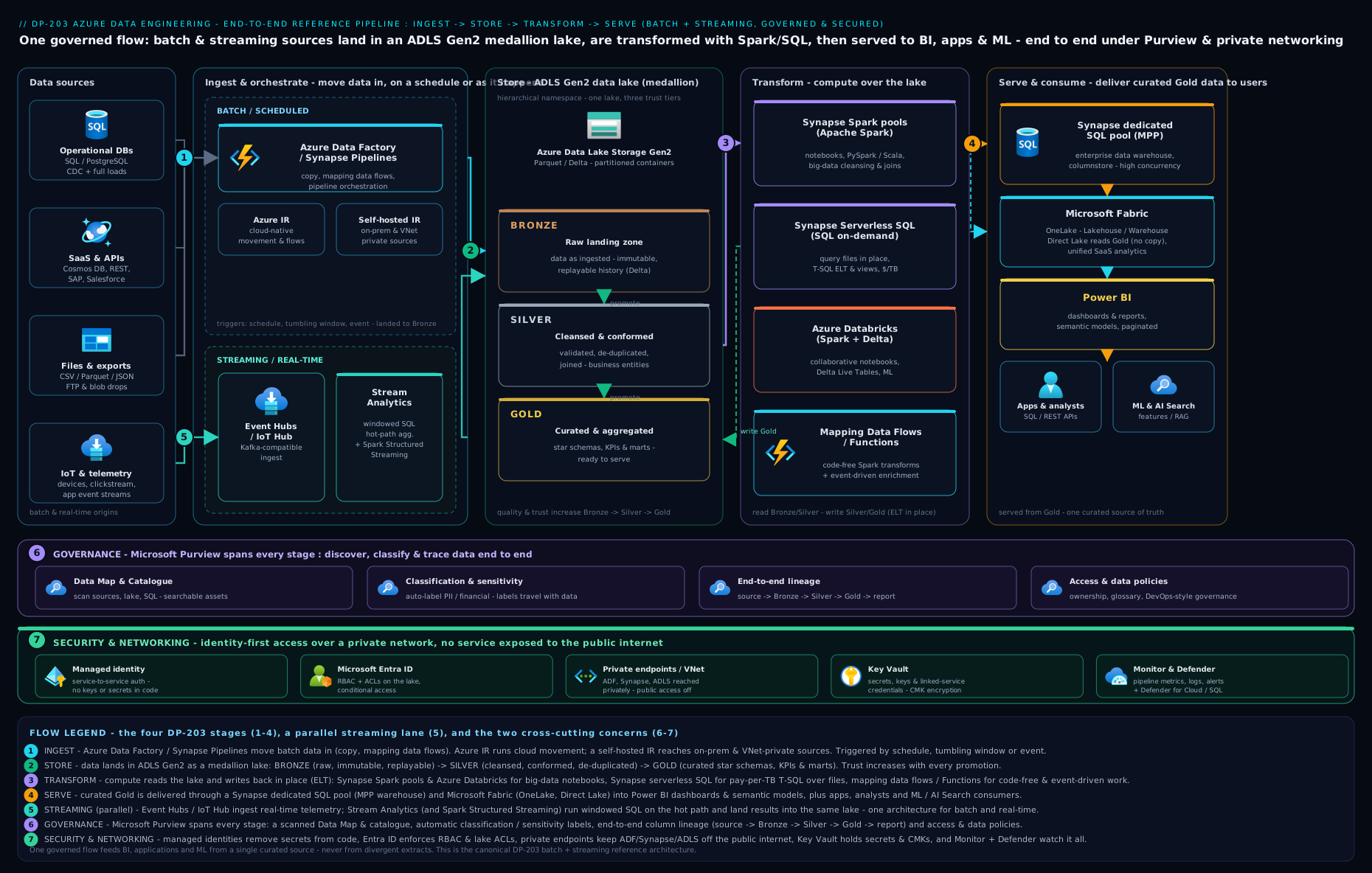
The diagram traces a single record’s journey: an on-prem source crosses a Self-hosted IR into bronze, batch and streaming paths converge through silver into gold Delta tables, and the dedicated SQL pool / Fabric Warehouse serves Power BI — all wrapped by orchestration, managed identity, private endpoints and Purview.
Going deeper
The sections above are the what and why of each station. This one is the machinery inside the stations — the internals that separate an engineer who can draw the pipeline from one who can keep it fast, correct and cheap at 3 a.m. Skip it on a first read; come back when a MERGE is slow, a stream is double-counting, or a dedicated pool bill has quietly doubled.
How Delta actually gives you ACID on plain object storage
ADLS Gen2 is “just” object storage — it has no transactions of its own. Delta bolts them on with a transaction log in a hidden _delta_log/ folder beside the data. Every write appends an ordered, numbered JSON commit (00000000000000000001.json) listing which Parquet files were added and removed; every ten commits Delta writes a Parquet checkpoint so a reader never has to replay the whole history. A reader computes the table’s current state by reading the latest checkpoint plus the JSON commits after it — the log, not a file listing, is the source of truth. This is what gives you time-travel (VERSION AS OF n reads the state at commit n) and ACID: writers use optimistic concurrency — two jobs may prepare commits simultaneously, but the log accepts them one at a time and a conflicting writer retries against the new snapshot.
A MERGE is therefore not an in-place edit: it rewrites whole Parquet files that contain matched rows and records the swap in the log (copy-on-write). That is why a merge touching a few rows can rewrite gigabytes if those rows are scattered — and why partitioning and clustering matter so much. Modern engines soften this with deletion vectors (merge-on-read: mark rows deleted in a side file, rewrite lazily), but availability varies by engine and Delta version, so treat it as an optimisation to confirm, not assume. Three maintenance verbs keep a Delta table healthy: OPTIMIZE compacts many small files into ~128 MB–1 GB ones; ZORDER BY (or Databricks liquid clustering) co-locates rows by a high-selectivity column so min/max statistics in the log let engines skip files (data skipping); and VACUUM physically deletes files no longer referenced, past a retention window (7 days by default) — run it too eagerly and you break time-travel and any in-flight readers.
Dedicated SQL pool internals: distributions, DWU and data movement
A dedicated SQL pool (Synapse) or a Fabric Warehouse is an MPP engine: your table is sliced across exactly 60 distributions, and compute nodes (sized by DWU) are mapped across them. The single biggest performance lever is how each table is distributed, because a join whose keys live on different nodes forces data movement (a shuffle) — the classic cause of a query that “worked in dev, crawls in prod”.
| Distribution | How rows are placed | Use for | Cost if wrong |
|---|---|---|---|
| Hash | By a hash of a chosen column | Large fact tables; hash on the common join/aggregation key | Skew (one hot value) or joining on a non-distribution key → shuffle |
| Round-robin | Evenly, at random | Staging/landing tables, or when no good hash key exists | Every join needs movement — never for a big fact you join often |
| Replicated | Full copy on every node | Small dimensions (< ~2 GB) | A “small” dim that grows re-broadcasts on every change — watch the size |
The rule interviewers probe: hash-distribute big facts on the join key, replicate small dimensions, round-robin only staging. Then reach for the rest of the toolbox — statistics (create/refresh them; the optimiser is blind without them), resource classes / workload management (governing memory and concurrency), result-set caching and materialized views for repeated aggregations, and a high-throughput bulk load via COPY INTO or PolyBase rather than row-by-row inserts. Everything here bills 24×7 once provisioned, so pause the pool when idle — the cheapest tuning is the pool that isn’t running.
Streaming for real: exactly-once, checkpoints and the late-data dial
Under the streaming diagram sit some sharp edges. Event Hubs parallelism and ordering are both the partition: order is guaranteed only within a partition, and a consumer group is one independent reader’s view with its own saved offset (checkpoint). Throughput is bought in Throughput Units (auto-inflate to a cap) on Standard, Processing Units on Premium. A stream processor can only go as parallel as the partitions feeding it.
Azure Stream Analytics scales in Streaming Units, but you only get true parallelism when the job is embarrassingly parallel — input partition key, PARTITION BY, and output all aligned; otherwise SUs sit idle while one partition bottlenecks. Spark Structured Streaming earns exactly-once from three things together: a durable checkpoint location (offsets + a write-ahead log of what was planned), replayable sources (Event Hubs/Kafka), and an idempotent sink (Delta commits are atomic and de-duplicated by the log) — lose the checkpoint directory and you lose the guarantee. The watermark is the dial everyone under-thinks: it tells the engine how long to hold windowed/join state waiting for stragglers before it emits a result and evicts that state; set it long and memory grows and results lag, set it short and genuinely late events are dropped. There is no free lunch — you are choosing where on the latency-vs-completeness line to sit, per query.
Orchestration & CI/CD you only learn in production
The core section gave the happy path; production adds nuance. A tumbling-window trigger is more than “run on a schedule”: its windows are dependency-aware and back-fillable, support retry with a delay, and can declare a self-dependency with a concurrency limit so slice N+1 waits for N — exactly what an ordered incremental load needs. On the release side, never hand-edit the ARM publish branch: the modern flow validates and generates the ARM template in CI with the @microsoft/azure-data-factory-utilities npm package (no manual “Publish” click), then a release stage stops triggers → deploys → restarts triggers (deploying over a running trigger is a well-known way to corrupt a run). Keep every environment-specific value out of the artifacts: global parameters plus Key Vault-referenced linked services mean the same template promotes dev → test → prod with only an override file changing. Synapse workspaces deploy through their own Synapse workspace deployment task rather than ADF’s, and a self-hosted IR can be shared across factories so lower environments reuse one gateway.
Performance and cost engineering
Most Azure data bills are self-inflicted, and the fixes are boringly consistent. File sizing dominates the lake — the small-file problem (thousands of KB-sized files) makes both Spark and serverless SQL crawl because every file is an open/close/list; compact to ~128 MB–1 GB. Serverless SQL bills per TB scanned, so SELECT * over unpartitioned CSV is the expensive anti-pattern: project only the columns you need, filter on a partitioned path so the engine prunes, and store gold as Parquet/Delta (columnar) not CSV — the same query can cost 10× less purely from format and pruning. Spark pools should autoscale and auto-pause, run on right-sized nodes, and lean on Adaptive Query Execution and (where available) Photon to cut vCore-hours. Event Hubs wants auto-inflate rather than a permanently over-provisioned tier. And for steady, predictable spend, reserved capacity (dedicated pools) or a fixed Fabric F-SKU capacity turns variable per-query cost into a flat, plannable one. The one habit that saves the most rupees remains unglamorous: pause and auto-pause everything the instant it is idle, and never leave an Azure-SSIS IR running overnight.
Everything maps to Fabric (the DP-700 direction)
Because Microsoft has frozen new investment in standalone Synapse and made Microsoft Fabric the strategic platform, the durable value of this lesson is that every component has a one-to-one Fabric equivalent. Learn the pattern once; run it on either.
| Synapse / ADF component (DP-203) | Microsoft Fabric equivalent (DP-700) |
|---|---|
| ADLS Gen2 storage account (the lake) | OneLake (one tenant-wide lake, Delta-native) |
| Azure Data Factory / Synapse pipelines | Data Factory in Fabric (pipelines) + Dataflows Gen2 |
| Synapse Spark pool / notebooks | Fabric Spark compute + notebooks |
| Synapse dedicated SQL pool | Fabric Warehouse |
| Synapse serverless SQL over the lake | Lakehouse SQL analytics endpoint |
| Event Hubs → Stream Analytics | Eventstream → Eventhouse (KQL database) |
| Power BI Import / DirectQuery | DirectLake (Import-speed on live OneLake Delta) |
| Microsoft Purview (separate) | Purview folded into Fabric / OneLake governance |
The migration you will actually be paid to do is this table, table row by table row — which is why the “retired” DP-203 skills are the opposite of dead weight.
Hands-on lab
We will build a mini end-to-end pipeline entirely from the az CLI and free/low-cost tiers: create an ADLS Gen2 lake with medallion containers, stand up a serverless SQL endpoint over the lake, run an incremental Copy, and query the result — then clean up. (Spark and dedicated pools cost real money per hour, so the lab uses serverless SQL and tiny data to stay near-free.)
Prerequisites: an Azure subscription and the az CLI logged in (az login).
1. Resource group + ADLS Gen2 lake with medallion containers.
az group create -n rg-dp203-lab -l southindia

az storage account create -n kvdp203lab$RANDOM -g rg-dp203-lab \
  --sku Standard_LRS --kind StorageV2 --hns true            # HNS => ADLS Gen2
# capture the exact name it created:
SA=$(az storage account list -g rg-dp203-lab --query "[0].name" -o tsv)

for layer in bronze silver gold; do
  az storage fs create -n $layer --account-name $SA --auth-mode login
done
az storage fs list --account-name $SA --auth-mode login -o table   # expect 3 rows
Expected: a storage account with isHnsEnabled: true and three filesystems (bronze/silver/gold).
2. Land a tiny bronze dataset (stand-in for an ingested file).
printf 'order_id,product,amount,LastModified\n1,pen,40,2026-06-15T09:00:00Z\n2,book,250,2026-06-15T09:05:00Z\n' > orders.csv
az storage fs file upload -f bronze -s orders.csv \
  -p year=2026/month=06/day=15/orders.csv --account-name $SA --auth-mode login
Expected: the file lands under a date-partitioned path in bronze.
3. Query the lake with serverless SQL (the cheapest transform/serve surface). Create a Synapse workspace (its serverless SQL endpoint is always-on and billed only per TB scanned):
az synapse workspace create -n kvsyndp203$RANDOM -g rg-dp203-lab \
  --storage-account $SA --file-system bronze \
  --sql-admin-login-user sqladmin --sql-admin-login-password 'P@ssw0rd-Change-Me!' \
  -l southindia
az synapse workspace firewall-rule create --workspace-name <wsName> -g rg-dp203-lab \
  -n allowAll --start-ip-address 0.0.0.0 --end-ip-address 255.255.255.255   # lab only!
Then in the Synapse serverless SQL endpoint (Synapse Studio or sqlcmd), run an OPENROWSET over the lake — this is a real “serve straight from the lake” query, no data loaded:
SELECT product, SUM(amount) AS total
FROM OPENROWSET(
  BULK 'https://<SA>.dfs.core.windows.net/bronze/year=2026/month=06/day=15/orders.csv',
  FORMAT='CSV', PARSER_VERSION='2.0', HEADER_ROW=TRUE) AS rows
GROUP BY product;
Expected: two rows — book 250, pen 40.
Validation: you ingested to bronze, partitioned by date, and served an aggregate from the lake with zero provisioned compute — the medallion + serverless pattern in miniature.
Cleanup (important — do this to stop charges):
az group delete -n rg-dp203-lab --yes --no-wait
Cost note (INR). Run end to end and tidied up within the hour this stays in the few-rupees range: ADLS Gen2 LRS storage on this data is effectively nil; serverless SQL bills per TB scanned and this query scans kilobytes (~₹0); the Synapse workspace itself is free (you pay for the pools, which we never started). The expensive things — dedicated SQL pools (DWU, ~₹thousands/day), Spark pools and Stream Analytics SUs — are all avoided here. The one rule that saves real money: pause dedicated pools and auto-pause Spark pools the instant they are idle, and never leave an Azure-SSIS IR running.
Common mistakes & troubleshooting
| Symptom | Likely cause | Fix |
|---|---|---|
| “Cannot enable hierarchical namespace” on an existing account | HNS is a create-time-only setting | Create a new ADLS Gen2 account with --hns true and migrate data |
| On-prem Copy fails / times out | No Self-hosted IR, or it cannot reach ADF | Install SHIR inside the network (outbound 443); register it on the source linked service; add a 2nd node for HA |
| Re-running a load double-counts rows | Append instead of upsert; no watermark | Use Delta MERGE keyed on the business key + a watermark to load only new rows |
| Spark/SQL queries are mysteriously slow | Small-file problem / no partition pruning | OPTIMIZE (compact) Delta tables; partition on the filtered column; avoid one-file-per-record writes |
| Dedicated SQL pool bill is huge | Pool left running 24×7 | Pause the dedicated pool when idle; consider serverless for intermittent loads |
| Stream Analytics job lags / drops events | Under-provisioned Streaming Units or skewed Event Hub partitions | Scale up SUs; align query partitioning with Event Hub partition key; tune watermark/late-arrival |
| Pipeline runs in dev but the prod deploy points at dev sources | Environment values not parameterised in CI/CD | Override linked-service/IR values per environment via ARM template parameters |
| “Login failed” / key leaked in a linked service | Using account keys/passwords instead of identity | Switch to managed identity; store any unavoidable secret in Key Vault and reference it |
Common beginner mistakes
These are misconceptions rather than symptoms — the wrong mental model that produces a whole class of bugs. (The symptom → cause → fix table above is the companion for when something is already broken.)
-
“The lake is just a folder, so I’ll dump CSVs and query them.” Raw CSV is fine at the very edge (bronze landing), but it is row-based, untyped and uncompressed — every analytic query re-scans the whole file. Right model: land raw, then convert to columnar Delta/Parquet for silver/gold. The medallion isn’t bureaucracy; it’s the difference between scanning kilobytes and scanning terabytes.
-
“I’ll turn on hierarchical namespace later, once I need real folders.” You can’t. HNS is decided at account creation and cannot be toggled on afterwards. Right model: decide the account is a lake up front (
--hns true); if you discover a flat blob account too late, you recreate and migrate, you don’t reconfigure. -
“Re-running the pipeline is safe — it’s the same data.” Append-based loads double-count on every re-run, and pipelines re-run constantly (retries, backfills, that one manual trigger during an incident). Right model: design for idempotency from day one — a watermark to load only new rows and a Delta
MERGEto upsert, so a replay converges instead of duplicating. -
“More partitions means faster queries.” Over-partitioning (say, by the hour, or by a high-cardinality ID) explodes the table into thousands of tiny files — the small-file problem — and adds metadata overhead that slows everything. Right model: partition on a low-cardinality column you actually filter on (usually date), and compact with
OPTIMIZE. Pruning helps; fragmentation hurts. -
“Serverless SQL is basically free.” It is cheap, not free: it bills per terabyte scanned, so a
SELECT *over unpartitioned CSV can quietly cost real money. Right model: the cost is a function of bytes read — project only needed columns, filter on partitioned paths so the engine prunes, and store in Parquet/Delta. Format and pruning, not the tier, decide the bill. -
“Streaming replaces batch.” They are two speeds of the same belt, not competitors. Real-time gives you low latency but is harder to reprocess and reconcile; batch gives you cheap, correct, replayable history. Right model: most platforms run both and reconcile in the serving layer (the Lambda/Kappa question) — a live tile and a nightly conformed warehouse.
-
“Account keys are simpler than managed identity.” A connection string in a linked service is the fastest way to leak a credential into Git and the number-one audit finding on data platforms. Right model: authenticate every hop with managed identity / Entra, keep any unavoidable secret in Key Vault referenced by the linked service, and disable storage account keys where you can. Identity is the default, not the upgrade.
-
“Spin up a dedicated SQL pool — that’s the warehouse.” A dedicated pool is a provisioned MPP engine billed 24×7 by DWU; left running for an intermittent workload it is the classic bill shock. Right model: use serverless SQL or Spark for intermittent/ad-hoc work, reserve a dedicated pool for steady high-concurrency serving and pause it when idle — and for a brand-new platform, default to Fabric rather than standalone Synapse at all.
Best practices
- Land raw, transform in-platform (ELT). Keep an immutable bronze copy so you can always reprocess; never throw away the source of truth.
- Make every load idempotent. Watermarks + Delta
MERGE. A re-run must converge to the same result, not duplicate data. - Delta for silver/gold, partition deliberately, and
OPTIMIZE. Open format, ACID, time-travel, and good file sizes — fight the small-file problem proactively. - Right-size and pause compute. Serverless/auto-pause for intermittent work; reserve dedicated pools for steady high-volume serving and pause them when idle.
- Parameterise everything for CI/CD. Git-backed authoring, ARM/Bicep deploys, environment overrides — no manual changes in production.
- One master orchestration with explicit dependencies. Ingest → transform → serve → refresh, each gated on success, with alerting on failure.
- Reconcile batch and streaming in the serving layer, and prefer a single Spark codebase (Structured Streaming) when you need both speeds to share logic.
Security notes
- Identity, not keys. Use managed identity / Microsoft Entra for every service-to-service hop; disable storage account keys where possible and put any unavoidable secret in Key Vault, referenced by the linked service.
- Least privilege. Combine Azure RBAC (control plane) with ADLS ACLs (data plane, folder-level) so each pipeline identity touches only its own containers.
- Private networking. Use private endpoints + a managed VNet with managed private endpoints (Synapse/ADF) so data never traverses the public internet; use a Self-hosted IR for on-prem. Set storage public network access to disabled.
- Encryption. Platform-managed keys by default; customer-managed keys (CMK) in Key Vault / Managed HSM where compliance demands; TLS in transit everywhere.
- Govern and audit. Purview for classification, sensitivity labels and lineage; enable diagnostic logs on ADF/Synapse/storage to a Log Analytics workspace; apply Azure Policy to enforce private-endpoint-only and CMK across the estate.
Interview & exam questions
- “Walk me through an end-to-end Azure data pipeline.” Ingest with ADF/Synapse pipelines (right IR, incremental/CDC) → land bronze in ADLS Gen2 → transform to silver/gold Delta with Spark/SQL → serve via dedicated/serverless SQL or Fabric + Power BI; a parallel Event Hubs → Stream Analytics/Spark streaming path; all wrapped in orchestration, CI/CD, managed-identity security and Purview governance.
- “Which integration runtime for on-prem data, and why is it firewall-friendly?” Self-hosted IR — installed inside the network, it dials outbound to ADF, so no inbound ports are opened.
- “How do you implement an incremental load?” Store a watermark (e.g.
MAX(LastModified)); each run loads only rows newer than the stored value, then advances the watermark; upsert with DeltaMERGEfor idempotency. Use native CDC when the source supports it (captures deletes too). - “Describe the medallion architecture.” Bronze (raw/immutable as-ingested) → silver (cleansed/conformed/typed) → gold (curated business aggregates/star schema). Each layer is produced from the previous; keeps raw history and centralises cleansing.
- “Why Delta over plain Parquet?” Delta adds a transaction log → ACID transactions, time-travel, schema enforcement/evolution and efficient
MERGE; it is the shared open format across Synapse, Fabric and Databricks. - “Dedicated vs serverless SQL pool — when each?” Dedicated = provisioned MPP, fast/predictable for steady heavy loads, billed 24×7 (pause when idle). Serverless = pay-per-TB-scanned over lake files, ideal for ad-hoc/intermittent.
- “Stream Analytics vs Spark Structured Streaming?” ASA = serverless, SQL-like, fast to build for windowed aggregations/routing/alerting. Structured Streaming = full code, complex logic/ML/stream-to-lake joins, and one codebase for batch + stream.
- “Explain the windowing types.” Tumbling (fixed, non-overlapping), hopping (fixed, overlapping by a hop), sliding (emits as events enter/leave), session (groups bursts separated by an inactivity gap).
- “What is a watermark in streaming, and what trade-off does it represent?” The threshold for how long to wait for late events before closing a window — longer = more complete but higher latency; shorter = lower latency but may drop stragglers.
- “How do you do CI/CD for Data Factory/Synapse?” Git-integrated authoring on feature branches → publish generates ARM templates → a release pipeline (DevOps/GitHub Actions) deploys to dev/test/prod with per-environment parameter overrides; infra in Bicep/Terraform.
- “How do you secure the platform?” Managed-identity/Entra auth (no keys), RBAC + ADLS ACLs, private endpoints/managed VNet/SHIR, encryption (CMK where needed), and Purview classification + diagnostic logging.
- “Synapse, Fabric, or Databricks for a new platform — and what about the existing Synapse estate?” Fabric is the strategic default for new, Microsoft-centric, BI-led platforms; Databricks for heavy engineering/ML or multi-cloud; operate the existing Synapse estate but plan its migration to Fabric — start nothing new on Synapse.
Quick check
- Why must hierarchical namespace be decided at storage-account creation, and what do you do if an existing account lacks it?
- You need only the rows changed since last night, including deletes, from an Azure SQL source. Which technique, and what lands in the lake to keep re-runs idempotent?
- Name the three medallion layers in order and the file format you would use for silver/gold.
- A clickstream must drive a live Power BI tile updated every few seconds with a 5-minute rolling count. Which streaming services and which window type?
- For a brand-new, Microsoft-centric, BI-led platform in 2026, which serving/platform choice is the strategic default, and which Power BI storage mode gives live data at Import speed?
Answers
- HNS is a create-time-only setting — it cannot be toggled on later; you create a new ADLS Gen2 account with HNS enabled and migrate the data.
- Native Change Data Capture (CDC) (it captures inserts/updates/deletes); land into Delta and apply with
MERGE(upsert), keyed on the business key, so re-runs converge instead of duplicating. - Bronze → silver → gold; use Delta for silver and gold (Parquet + transaction log).
- Event Hubs → Stream Analytics (or Spark Structured Streaming) → Power BI live output, using a hopping window (5-minute size, short hop) — or a sliding/tumbling window depending on exact semantics.
- Microsoft Fabric (Warehouse/Lakehouse on OneLake) is the strategic default; DirectLake gives live data at Import-grade speed.
Exercise
Design (on paper, then sketch the az/JSON outline) an end-to-end platform for a mid-size retailer with three sources: an on-prem SQL Server of orders, a SaaS CRM exposing a REST API, and a website clickstream of events. Requirements: a single trustworthy analytics store; a sales dashboard refreshed by 8 a.m. daily; a live “orders in the last 5 minutes” tile; and customer PII that must be discoverable and protected.
Produce: (a) the ingest design — which integration runtime per source, and full vs incremental/CDC for each; (b) the lake design — medallion containers, formats, and the partitioning scheme; © the batch transform engine choice with a one-line justification, including how you make the load idempotent; (d) the streaming path — Event Hubs + processor + window type for the live tile; (e) the serving layer and the Power BI storage mode with reasons; (f) the orchestration (trigger types + dependency chain) and CI/CD approach; and (g) three security/governance controls (identity, networking, Purview). Bonus: name one place the small-file problem could bite and how you would prevent it.
Practice challenges
Six exercises, easiest first. Try each before opening the solution. Commands are real and schema-correct for the 2026 surfaces; nothing here needs to be run against a live subscription to be understood, but everything will run if you have one (mind the cost note in the lab). Replace every <placeholder> with your own value — never paste a real subscription ID, key or connection string.
1. (Beginner) Create the lake correctly — and prove HNS is on. Create an ADLS Gen2 storage account and confirm the hierarchical namespace is actually enabled (the setting you cannot add later).
<details> <summary>Solution</summary>
az storage account create -n <lakeacct> -g <rg> \
  --sku Standard_LRS --kind StorageV2 --hns true      # --hns true => ADLS Gen2
az storage account show -n <lakeacct> -g <rg> \
  --query isHnsEnabled -o tsv                          # must print: true
Why: hierarchical namespace is a create-time-only flag — if isHnsEnabled is false you have an ordinary blob account and must recreate, not reconfigure.
</details>
2. (Beginner–Intermediate) Write the incremental Copy source. In an ADF/Synapse Copy activity, express a watermark window using pipeline parameters so each run reads only rows changed since the last successful load.
<details> <summary>Solution</summary>
"source": {
  "type": "AzureSqlSource",
  "sqlReaderQuery": "SELECT * FROM dbo.Orders WHERE LastModified > '@{pipeline().parameters.oldWatermark}' AND LastModified <= '@{pipeline().parameters.newWatermark}'"
}
Pattern around it: Lookup old watermark → Lookup MAX(LastModified) as new → Copy the window → write the new watermark to a control table only on success.
Why: a bounded > old AND <= new window plus a persisted watermark makes the load restartable and non-overlapping — a re-run reloads the same window, never a double.
</details>
3. (Intermediate) Make silver idempotent with a Delta MERGE. In PySpark, upsert bronze orders into a silver Delta table keyed on the business key so re-running never duplicates.
<details> <summary>Solution</summary>
from delta.tables import DeltaTable
src = spark.read.format("delta").load("abfss://bronze@<lake>.dfs.core.windows.net/orders")
tgt = "abfss://silver@<lake>.dfs.core.windows.net/orders"
(DeltaTable.forPath(spark, tgt).alias("t")
  .merge(src.alias("s"), "t.order_id = s.order_id")
  .whenMatchedUpdateAll()
  .whenNotMatchedInsertAll()
  .execute())
Why: MERGE on the key is an upsert, so a replay converges to the same table (SCD Type-1) instead of appending — the definition of an idempotent load.
</details>
4. (Intermediate) Bound a stream with a tumbling window. Write an Azure Stream Analytics query that emits, per product, the order count for each non-overlapping 1-minute window, to a Power BI output.
<details> <summary>Solution</summary>
SELECT productId, System.Timestamp() AS windowEnd, COUNT(*) AS orders
INTO   [powerbi-output]
FROM   [eventhub-input] TIMESTAMP BY eventTime
GROUP  BY productId, TumblingWindow(minute, 1)
Why: TIMESTAMP BY eventTime makes the window event-time based (not arrival time), and a tumbling window gives fixed, non-overlapping buckets — the correct shape for a clean “per minute” count.
</details>
5. (Advanced) Choose distributions to kill data movement. In a dedicated SQL pool you load a 2 TB FactSales and a 5 MB DimProduct and join them on ProductKey. Write the CREATE TABLE distribution clauses and justify them.
<details> <summary>Solution</summary>
CREATE TABLE dbo.FactSales ( /* columns... */ )
WITH ( DISTRIBUTION = HASH(ProductKey), CLUSTERED COLUMNSTORE INDEX );

CREATE TABLE dbo.DimProduct ( /* columns... */ )
WITH ( DISTRIBUTION = REPLICATE, CLUSTERED COLUMNSTORE INDEX );
Why: hash-distributing the big fact on the join key co-locates matching rows on the same distribution, and replicating the tiny dimension puts a full copy on every node — so the join needs no shuffle (the number-one cause of slow MPP queries). </details>
6. (Advanced) Fix the small-file problem and control scan cost. A gold Delta table has accumulated thousands of tiny files and queries have slowed. Compact and cluster it, reclaim old files safely, and state the serving-side change that cuts serverless cost.
<details> <summary>Solution</summary>
-- Spark SQL on the Delta table
OPTIMIZE gold.sales ZORDER BY (customer_id);   -- compact to big files + data skipping
VACUUM   gold.sales RETAIN 168 HOURS;          -- remove unreferenced files (>= 7-day default)
Serving side: query gold as Parquet/Delta on a partitioned path and select only needed columns, so serverless SQL prunes partitions and scans less.
Why: OPTIMIZE/ZORDER turns many tiny files into a few large, well-clustered ones (fewer opens, more file-skipping), and because serverless bills per TB scanned, pruning + column projection is a direct rupee saving. Keep VACUUM retention ≥ the default 7 days or you break time-travel and running readers.
</details>
Certification mapping
DP-203 (Data Engineering on Microsoft Azure):
- Design and implement data storage — ADLS Gen2, the medallion layering, partitioning, file/Delta formats, and serving structures (dedicated/serverless SQL).
- Develop data processing — batch ingestion and transformation with Data Factory/Synapse pipelines and Spark/SQL pools, incremental loads and CDC, and streaming with Event Hubs + Stream Analytics / Spark Structured Streaming (windowing, watermarks).
- Secure, monitor and optimise data storage and processing — managed identity, private endpoints, RBAC/ACLs, encryption (CMK), diagnostic logging, pipeline/query monitoring, and the small-file/partition-pruning optimisations.
Fabric-era successors (the live exams):
- DP-700 (Fabric Data Engineer Associate) — the same medallion/Delta/pipeline/streaming skills on OneLake, Eventstream/Eventhouse and Fabric notebooks.
- DP-600 (Fabric Analytics Engineer) — modelling and serving (Warehouse, DirectLake, Power BI).
(These build skills also underpin AZ-305 “design data storage solutions” scenarios.)
Glossary
- Azure Data Factory (ADF) / Synapse pipelines — serverless data-integration/ELT orchestration; moves and orchestrates data, doesn’t store it (the same engine appears in Fabric Data Factory).
- Integration runtime (IR) — the compute that runs an activity: Azure (cloud), Self-hosted (on-prem/private, outbound-only), Azure-SSIS (lift-and-shift SSIS).
- Change Data Capture (CDC) — capturing only inserts/updates/deletes since the last run (preserves deletes), vs re-reading the whole table.
- Watermark — the high-water value (e.g. a
LastModifiedtimestamp) marking where the last incremental load stopped. - ADLS Gen2 / hierarchical namespace (HNS) — a storage account with real folders + POSIX ACLs (the lake); HNS is set at creation only.
- Medallion (bronze/silver/gold) — lake layering by data quality: raw → cleansed/conformed → curated/aggregated.
- Delta Lake — Parquet + a transaction log adding ACID, time-travel, schema enforcement and
MERGE; the open table format shared by Synapse, Fabric and Databricks. - Partitioning / small-file problem — splitting data into folders for pruning; too many tiny files degrade performance (fix by
OPTIMIZE/compaction). MERGE/ upsert / idempotency — update-or-insert by key so a re-run converges instead of duplicating.- Synapse Spark pool / SQL pool (dedicated vs serverless) — Spark compute; provisioned MPP warehouse (DWU, pause when idle) vs pay-per-TB-scanned SQL over lake files.
- Azure Databricks — first-party, multi-cloud, best-in-class Spark/ML lakehouse (Delta, Unity Catalog, MLflow, Photon).
- Event Hubs — massively scalable, Kafka-compatible event-ingestion buffer (partitions, Capture).
- Azure Stream Analytics (ASA) — serverless, SQL-like stream processor (Streaming Units).
- Spark Structured Streaming — Spark’s streaming API; one codebase for batch + stream, watermarks, exactly-once.
- Windowing (tumbling/hopping/sliding/session) — ways to bound an unbounded stream in time for aggregation.
- Watermark (streaming) — how long to wait for late events before closing a window (latency vs completeness).
- Microsoft Fabric / OneLake / DirectLake — Microsoft’s SaaS analytics platform; its single tenant-wide lake; the Power BI mode reading Delta directly from OneLake at Import speed.
- Microsoft Purview — unified data governance: catalogue/data map, classification & sensitivity labels, end-to-end lineage, access policies.
- Managed identity / private endpoint — keyless Entra identity for service-to-service auth; private IP access to PaaS over the Microsoft backbone (no public internet).
- OLTP vs OLAP — the transactional source systems (many small writes, your apps) versus the analytical store (large aggregating reads, the platform you build here).
- ELT vs ETL — load raw first and transform inside the platform with its own elastic compute (modern, medallion) versus transform on a separate box before loading (classic).
- Schema-on-read — the lake stores files untyped and imposes structure when you read them, not when you write — the opposite of a relational database’s schema-on-write.
- Slowly Changing Dimension (SCD) — how a dimension tracks history: Type 1 overwrites (no history), Type 2 inserts a new versioned row per change; Delta
MERGEimplements both. _delta_log/ transaction log — the ordered JSON-commit-plus-Parquet-checkpoint folder that gives a Delta table its ACID guarantees, optimistic concurrency and time-travel.OPTIMIZE/ Z-ORDER /VACUUM— Delta maintenance: compact small files into large ones, co-locate rows by a column so engines skip files (data skipping), and delete unreferenced files past the retention window.- DWU (Data Warehouse Unit) — the bundled compute/IO/memory unit that sizes a dedicated SQL pool (and its 24×7 bill); scale it up for more MPP throughput.
- Distribution (hash / round-robin / replicated) — how a dedicated pool spreads a table across its 60 distributions; the right choice (hash big facts on the join key, replicate small dims) avoids data movement (shuffles).
COPY INTO/ PolyBase — the high-throughput, parallel bulk-load paths into a dedicated SQL pool / Fabric Warehouse (never load a warehouse row-by-row).OPENROWSET/ external table / CETAS — serverless-SQL ways to query lake files in place and to materialise query results back to the lake (CREATE EXTERNAL TABLE AS SELECT).- Streaming Unit (SU) — the compute/throughput unit that sizes an Azure Stream Analytics job; true parallelism needs the input partition,
PARTITION BYand output all aligned. - Throughput Unit / consumer group / offset (Event Hubs) — TU = ingress/egress capacity (auto-inflate to a cap); a consumer group is one reader’s independent view; the offset is the saved position it resumes from (its checkpoint).
- Managed VNet / managed private endpoint — an Azure-managed virtual network for ADF/Synapse whose private endpoints reach data stores over the Microsoft backbone, so you get private networking without running the network yourself.
- Lambda / Kappa architecture — two ways to reconcile batch and streaming: Lambda runs both a batch and a speed layer and merges them; Kappa runs a single streaming-first path and reprocesses from the log.
- Data Integration Unit (DIU) / degree of copy parallelism — the two knobs that scale a Data Factory Copy activity’s throughput (managed compute power, and how many parallel readers/writers it uses).
Next steps
- Continue the certification ladder with SC-100: Cybersecurity Architect — Zero-Trust Strategy & Reference Designs — the data platform you just built holds an organisation’s most sensitive information, so designing security at strategy level is the natural next step.
- Go deeper on the platform’s conceptual map and the Synapse vs Fabric vs Databricks decision in the Data Factory, Synapse & Microsoft Fabric deep dive.
- See how streaming sources feed the platform in Event Hubs, Kafka & capture — the real-time complement to batch ingestion.