In a nutshell
Imagine the two buildings your data has lived in before. A warehouse is tidy and strict: every box is labelled, shelved to a plan, and a clerk checks your badge before you touch anything — wonderful for reporting, hopeless the moment you want to store something that doesn’t fit the shelving. A lake is the opposite: a huge, cheap reservoir where you can pour anything in any shape — wonderful for data science, hopeless for governance, because nobody can tell you what is in the water or who has been drinking from it. The lakehouse is the trick of getting both at once: the warehouse’s structure, transactions, and speed layered directly on top of the lake’s cheap, open storage. One copy of the data, in open Delta format on ADLS Gen2, that a SQL analyst and a machine-learning model both read from the same tables.
Unity Catalog is the part that makes it safe to let 600 people in. Picture a single security desk and a single card catalog serving every reading room in a library system. The security desk (access control) checks one badge list and applies one set of rules — this reader may see these shelves, with the sensitive pages redacted — no matter which room they walk into. The card catalog (the metastore) is the one authoritative index of every book: what it is, who wrote it, and which book it was copied from (lineage). Before Unity Catalog, every Databricks workspace ran its own desk and its own catalog, so a book governed in one room was an ungoverned free-for-all in the next — which is exactly how you end up with the seven copies of the truth this article opens with. Unity Catalog lifts governance above the workspaces, so catalog.schema.table means one governed thing everywhere.
Hold those two pictures together and you have the whole lesson: structure plus flexibility in one open store (the lakehouse), governed by one desk and one catalog sitting above every workspace (Unity Catalog) — wired privately enough that a regulator will sign off. The article that follows builds this as a real reference architecture for a regulated health insurer. If you are new to Databricks, treat that narrative as the tour and this opener as the map to keep in your head the whole way through; every Databricks-specific term is defined as it appears and collected in the Glossary at the end.
Level: Advanced · Time: ~47 min
Prerequisites
- Comfort with core Azure — resource groups, VNets and subnets, Private Endpoints / Private Link, and Entra ID (the identity service formerly called Azure AD). The networking and identity lessons earlier in this course are the on-ramp.
- Familiarity with ADLS Gen2 (hierarchical-namespace blob storage) and the idea of object storage used as a data lake.
- A working feel for SQL, and ideally a little PySpark; you should recognise what a table, a view, and a
GRANTare. - You do not need prior Databricks experience. Every Databricks term is explained inline the first time it appears.
After this lesson you will be able to
- Explain the lakehouse pattern in plain terms and say why Unity Catalog governance sits above workspaces rather than inside each one.
- Distinguish the Databricks control plane from the compute (data) plane, and describe a fully private workspace deployment — VNet injection, Secure Cluster Connectivity (no public IP), and front-end plus back-end Private Link.
- Navigate the Unity Catalog object model — metastore → catalog → schema → table / view / volume — and tell a managed table from an external one brokered by a storage credential and external location.
- Reason about Delta Lake internals: ACID through the transaction log, time travel, and file layout (
OPTIMIZE, Z-ordering, Liquid Clustering). - Enforce fine-grained governance — grants, row filters, column masks, tags, and audit — and read a column-level lineage graph.
- Size and cost compute honestly with the DBU model across all-purpose clusters, SQL warehouses, and serverless.
A national health insurer’s chief data officer walks out of an audit with a finding that cannot be argued away: the actuarial team, the fraud team, and three regional marketing teams each maintain their own copy of the member-claims data, extracted on different days through different scripts, and nobody can say who can see protected health information, where a given column came from, or whether the “risk score” in the board deck was computed from the same data the regulator was shown. Seven copies of the truth, four of them stale, none of them governed. The mandate that lands on the data platform team is precise and uncomfortable: one governed copy of every dataset, row- and column-level control over PHI that survives an HHS audit, end-to-end lineage from raw feed to the dashboard, and self-service for 600 analysts and data scientists who will revolt if you make them file a ticket for every table. A pile of notebooks pointed at a storage account is not the answer. This article is the reference architecture for building that platform properly on Azure Databricks with Unity Catalog — a private-networked, identity-gated, lineage-tracked lakehouse that a HIPAA compliance officer and a CISO will actually sign.
The pressures stack the way they always do in regulated data. Regulation (HIPAA, plus state insurance law) means every access to PHI needs an enforced policy and an audit trail, and the data cannot sit on the public internet. Scale means tens of terabytes of claims, eligibility, and clinical feeds landing daily, queried by 600 people who each think their workload is the priority. Governance means one catalog, one permission model, one lineage graph — not a per-team patchwork. And cost means compute that today runs 24/7 because nobody trusts auto-termination, billed to a single cost center instead of charged back. The lakehouse is the pattern that satisfies all four at once: open Delta tables on cheap object storage with the ACID guarantees, governance, and performance people used to buy a warehouse for — one copy of the data, governed in place, serving SQL analytics and ML from the same tables.
Why not the obvious shortcuts
The naive fixes each fail predictably, and naming why matters because someone on the project will propose all three.
A classic data warehouse (Synapse dedicated pools, Snowflake) governs beautifully but forces a copy: claims data lands in a lake, then gets loaded again into the warehouse, and now you maintain two systems, two security models, and a nightly ETL that is the thing most likely to break at 3 a.m. — and the data scientists still can’t train models on warehouse-locked tables. A plain data lake (just ADLS Gen2 with notebooks) is cheap and open but has no real governance: permissions are storage-account ACLs that nobody can reason about, there is no column masking, no lineage, and “who queried this PHI” is unanswerable. Per-workspace Hive metastores — the old Databricks default — scatter your metadata across every workspace, so a table governed in the actuarial workspace is invisible and ungoverned in the fraud one, which is exactly the seven-copies problem you were hired to kill.
The lakehouse with Unity Catalog threads the needle. Data lives once as Delta tables on ADLS Gen2. Unity Catalog sits above every workspace as a single account-level governance plane: one three-level namespace (catalog.schema.table), one place to grant access, fine-grained row filters and column masks for PHI, and automatic lineage captured down to the column. Governance becomes a property of the data, enforced by the engine on every query, instead of a hope in each team’s scripts.
Architecture overview
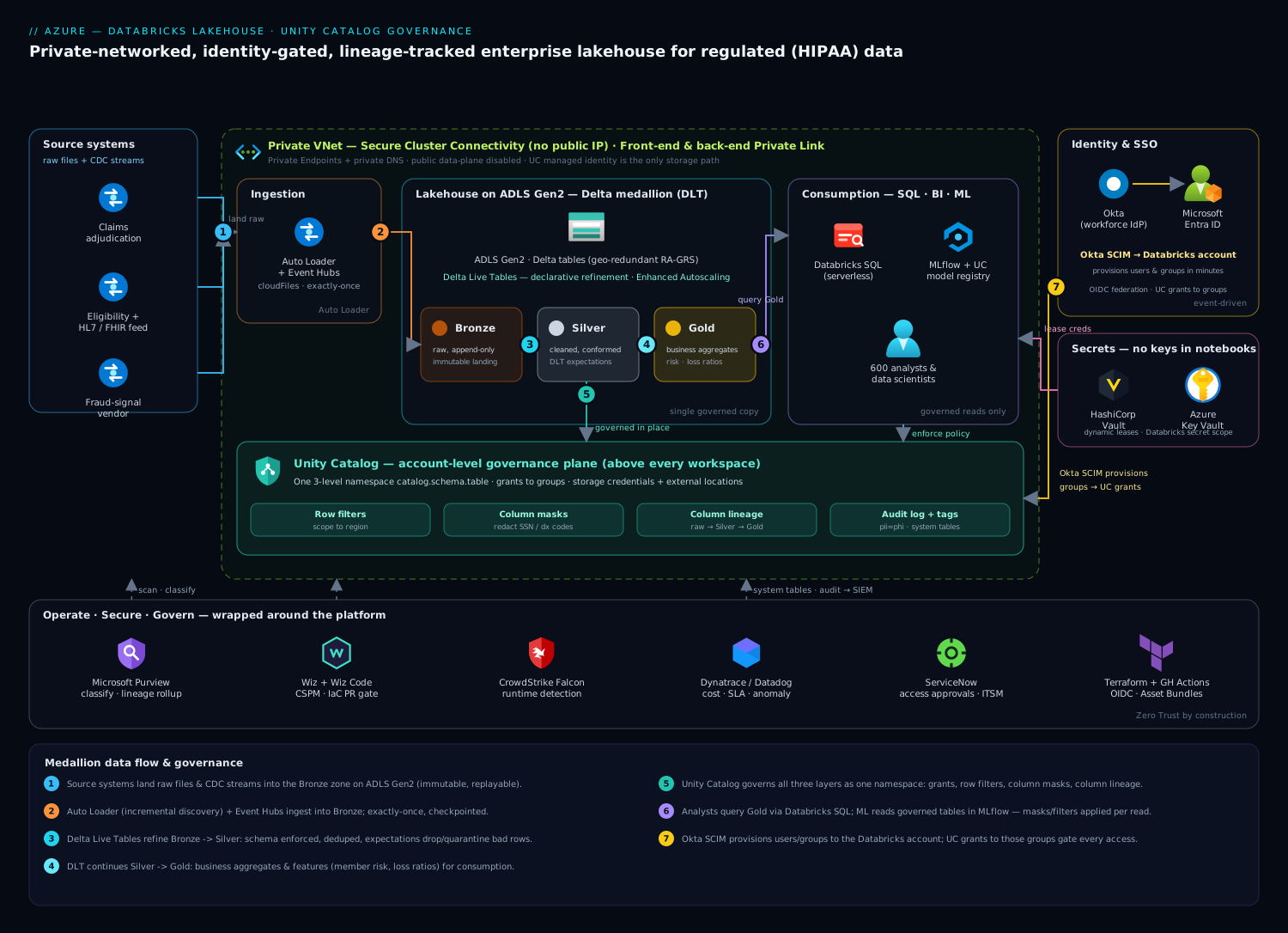
The platform runs two distinct concerns that share storage and governance but live on different schedules: data engineering pipelines that refine raw feeds into trustworthy tables, and consumption workloads — SQL analytics, BI, and ML — that read those tables. Keeping them separate in your head is the first step to operating this well.
The defining property of the topology is the one the security team cares about most: storage and the control plane are private, and every public data-plane surface is disabled. ADLS Gen2, the Databricks workspaces, Key Vault, and the supporting PaaS expose private IPs inside the VNet via Private Endpoints; the workspaces use Secure Cluster Connectivity (no-public-IP) so cluster nodes have no inbound public address, and Private Link carries both the front-end (user → workspace) and back-end (cluster → control plane) traffic. No claims record and no query result ever traverses the public internet — which is what makes a HIPAA story defensible.
The medallion data flow, following the path a claim takes:
- Source systems — the claims adjudication platform, the eligibility system, an HL7/FHIR clinical feed, and a fraud-signal vendor — land raw files and CDC streams into the Bronze zone on ADLS Gen2. Ingestion uses Databricks Auto Loader (incremental file discovery) and, for streaming feeds, Event Hubs. Bronze is the immutable landing record: raw, append-only, exactly as received, so you can always replay.
- Delta Live Tables (DLT) pipelines refine Bronze → Silver: schema is enforced, types are cast, duplicates are dropped, member identifiers are standardized, and DLT expectations (declarative data-quality constraints) quarantine or drop rows that fail —
EXPECT member_id IS NOT NULL ON VIOLATION DROP ROW. Silver is the cleaned, conformed, queryable record of claims and members. - DLT continues Silver → Gold: business-level aggregates and features — per-member risk scores, fraud-likelihood features, monthly loss ratios — modeled for consumption. Gold tables are what the board deck and the actuarial models read, and because they are derived through governed, lineage-tracked DLT, you can prove what every number came from.
- Unity Catalog governs all three layers as one namespace. A SQL analyst opens Databricks SQL against a serverless SQL warehouse and queries
prod.gold.member_risk; the engine checks UC permissions, applies the row filter that scopes the analyst to their permitted regions, and applies the column mask that redacts SSN and diagnosis codes unless the caller is in thephi_clearedgroup — all before a single row is returned. - Data scientists work in the same catalog from notebooks and MLflow, reading governed Silver/Gold tables, registering models in the Unity Catalog model registry, and serving features through the online store — never extracting PHI to a laptop, because the governed table is easier to use than a copy would be.
Identity and provisioning, independent and event-driven: the insurer’s workforce IdP is Okta, federated to Microsoft Entra ID so Azure and Databricks see a first-class Entra token. Okta provisions users and groups into the Databricks account via SCIM — when HR moves an analyst into the actuarial group in Okta, SCIM pushes that group into Databricks within minutes, and Unity Catalog grants attached to the group take effect immediately. Deprovisioning is the same path in reverse, which is the control an auditor actually tests. Secrets that are not managed identities — the fraud vendor’s API key, JDBC credentials for the source systems — live in HashiCorp Vault (or Azure Key Vault behind a Databricks secret scope), leased dynamically and never written into notebook source.
Component breakdown
| Component | Service / tool | Role in the platform | Key configuration choices |
|---|---|---|---|
| Edge / BI delivery | Akamai | TLS, anycast, WAF for the analytics portal and embedded dashboards | WAF rules on the BI front door; origin shield to the private workspace endpoint |
| Identity / SSO | Okta + Microsoft Entra ID | Workforce SSO (Okta) federated to Entra for native Azure + Databricks auth | OIDC federation; Okta SCIM provisions users/groups to the Databricks account |
| Governance plane | Unity Catalog | One account-level catalog: grants, row filters, column masks, lineage | Three-level namespace; storage credentials + external locations; ABAC tags |
| Storage | ADLS Gen2 | Single governed copy of Bronze/Silver/Gold Delta tables | Hierarchical namespace; Private Endpoint; public access disabled |
| Ingestion | Auto Loader + Event Hubs | Incremental file and stream ingestion into Bronze | cloudFiles schema evolution; checkpointed exactly-once |
| Pipelines | Delta Live Tables | Declarative medallion refinement with quality expectations | Expectations (drop/quarantine); Enhanced Autoscaling; serverless DLT |
| SQL analytics | Databricks SQL (serverless) | Governed BI/SQL on Gold; auto-suspend warehouses | Serverless warehouses; auto-stop 5–10 min; Photon engine |
| ML | MLflow + UC model registry | Train on governed tables, register/serve models with lineage | Models in UC; feature/online store; no PHI extraction |
| Secrets | HashiCorp Vault / Key Vault | Source-system creds, vendor API keys | Dynamic leases; Databricks secret scope backed by Key Vault |
| Catalog / lineage (enterprise) | Microsoft Purview | Enterprise-wide catalog, classification, business glossary, lineage rollup | UC ↔ Purview integration; auto-classify PHI; scan ADLS |
| CSPM / data posture | Wiz + Wiz Code | Cloud posture, sensitive-data exposure, attack paths; IaC scanning | Agentless scan of ADLS/Databricks; Wiz Code gates Terraform PRs |
| Runtime security | CrowdStrike Falcon | Runtime threat detection on cluster/driver compute | Sensor via init script on node pools; detections to the SOC |
| Observability | Dynatrace / Datadog | Job/pipeline telemetry, cost-per-workload, SLA dashboards | System tables + REST metrics ingested; anomaly detection |
| ITSM / approvals | ServiceNow | Access-request approvals, change gates, incident records | Catalog access request → grant; auto-ticket on policy breach |
| CI / IaC | GitHub Actions + Terraform | Asset-bundle deploys; infrastructure as code | OIDC to Azure (no stored creds); Databricks Asset Bundles |
A few of these choices deserve the why, because they are the ones teams get wrong.
Why Unity Catalog, not per-workspace Hive metastores. The single most consequential decision is making governance account-level, above the workspaces, not bolted into each one. Unity Catalog gives you one identity model (UC trusts the Entra/Okta-provisioned principals), one permission grammar (GRANT SELECT ON ... TO <group>), one lineage graph that spans every workspace, and one audit log. With per-workspace metastores, a table governed in the actuarial workspace is a different, ungoverned object in the fraud workspace — the architecture guarantees divergence. UC makes prod.gold.member_risk mean exactly one governed thing everywhere.
Why row filters and column masks belong in the catalog, not the query. It is tempting to put PHI redaction in each report’s SQL or in the BI tool. Do not — that means every new query is a new place to get masking wrong, and one missed WHERE clause leaks diagnosis codes across a HIPAA line. Instead, attach the policy to the table in Unity Catalog so the engine enforces it on every read, from SQL, notebooks, and BI alike:
-- Column mask: redact SSN unless the caller is PHI-cleared
CREATE FUNCTION prod.security.mask_ssn(ssn STRING)
  RETURN CASE WHEN is_account_group_member('phi_cleared')
              THEN ssn ELSE 'XXX-XX-' || right(ssn, 4) END;

ALTER TABLE prod.silver.member
  ALTER COLUMN ssn SET MASK prod.security.mask_ssn;

-- Row filter: scope analysts to their permitted regions
CREATE FUNCTION prod.security.region_filter(region STRING)
  RETURN is_account_group_member('phi_cleared')
      OR region = current_recipient('region');  -- via session/group tag

ALTER TABLE prod.gold.member_risk
  SET ROW FILTER prod.security.region_filter ON (region);
Protection stays a property of the data, enforced by the engine — not a discipline you have to re-impose in every notebook.
Why Delta Live Tables, not hand-written notebook ETL. Medallion pipelines built as a chain of scheduled notebooks become a tangle of MERGE statements, manual checkpoints, and silent data-quality drift. DLT makes the pipeline declarative: you describe the Silver and Gold tables and their constraints, and DLT manages dependency ordering, incremental processing, retries, and autoscaling. The expectations are the part that pays for itself — a row that fails EXPECT valid_claim_date is dropped or quarantined with a recorded count, so a bad upstream feed shows up as a quality metric instead of a wrong number in the board deck three weeks later.
Implementation guidance
Provision with Terraform, and treat the network and the metastore as the first deliverables. Two things, gotten wrong, sink this architecture silently: private DNS (endpoints that resolve to firewalled public IPs and hang) and metastore topology (workspaces attached to the wrong or to multiple metastores).
- A hub/spoke or single VNet with the two delegated subnets every Databricks workspace requires (host + container), plus a subnet for the Private Endpoints.
- Private Endpoints and private DNS zones for ADLS Gen2 (
privatelink.dfs.core.windows.net,privatelink.blob.core.windows.net), the Databricks back-end and browser-auth (privatelink.azuredatabricks.net), and Key Vault — linked to the VNet. Forgetting one zone is the single most common failure on this architecture. - The Databricks workspaces with Secure Cluster Connectivity (no public IP) and VNet injection, public network access disabled, front-end and back-end Private Link enabled.
- One Unity Catalog metastore per region, with a dedicated ADLS Gen2 container as its managed root, attached to every workspace in that region. One metastore is the whole point — resist the urge to make several.
- Storage credentials + external locations in UC pointing at your ADLS containers through an Entra managed identity (an Access Connector for Azure Databricks), so UC — not a storage key — brokers every data-plane read.
A minimal Terraform shape for the metastore and its storage binding communicates the intent — UC owns the storage, no keys:
resource "databricks_metastore" "this" {
  name          = "uc-insurer-cin"
  region        = "centralindia"
  storage_root  = "abfss://uc-root@stucinsurer.dfs.core.windows.net/"
  force_destroy = false
}

resource "databricks_metastore_data_access" "mi" {
  metastore_id = databricks_metastore.this.id
  name         = "uc-access-connector"
  azure_managed_identity {
    access_connector_id = azurerm_databricks_access_connector.uc.id
  }
  is_default = true   # UC brokers storage via managed identity, not account keys
}

resource "databricks_metastore_assignment" "prod" {
  metastore_id = databricks_metastore.this.id
  workspace_id = azurerm_databricks_workspace.prod.workspace_id
}
The pipeline that applies this runs in GitHub Actions, authenticating to Azure via OIDC federation so there is no stored service-principal secret to leak. Application and pipeline code ship as Databricks Asset Bundles from the same pipeline, and Wiz Code scans the Terraform and bundle definitions on every pull request — flagging a workspace defined with public access or a storage account missing its Private Endpoint before it merges, not after an auditor finds it.
Identity: provision the humans, kill the keys. Human SSO flows Okta → Entra → Databricks: analysts log in with the bank’s Okta credentials and conditional-access policies, Okta federates to Entra over OIDC, and — critically — Okta SCIM provisions the user and their group memberships into the Databricks account, so the Entra group an analyst belongs to is the same principal Unity Catalog grants against. You manage access by granting to groups in UC and managing group membership in Okta; deprovisioning a leaver in Okta removes their Databricks access on the next SCIM sync. Storage is reached only through UC’s managed identity — there are no account keys in any notebook — and the residual secrets (source-system JDBC creds, the fraud vendor’s API key) live in HashiCorp Vault or a Key Vault-backed secret scope, leased short and never committed.
Governance wiring. Model the namespace deliberately: a catalog per environment (dev, staging, prod) or per domain, schemas for bronze/silver/gold, and grants only ever to groups. Tag PHI columns with UC tags (pii=phi) so policy and discovery can key off the tag rather than column names. Carry the medallion contract in the table itself — Bronze append-only, Silver conformed, Gold consumption — and let DLT’s lineage plus UC’s column lineage answer “where did this number come from” without a meeting.
Enterprise considerations
Security & Zero Trust. The architecture is Zero Trust by construction: identity-based access only (UC principals from Okta/Entra), least-privilege grants to groups, no public data-plane surface, no storage keys. Layer on top: (a) row filters and column masks so PHI exposure is enforced by the engine, not by query discipline; (b) Wiz running continuous CSPM and sensitive-data-exposure scanning across ADLS and the workspaces, alerting the moment a container drifts to public exposure or a grant widens access too far — the posture backstop behind UC’s controls — with Wiz Code shifting that check left into IaC pull requests; © CrowdStrike Falcon sensors deployed via cluster init script on the driver and worker nodes for runtime threat detection, feeding the insurer’s SOC; (d) UC and workspace audit logs (and system tables) streamed to the SIEM so “who queried which PHI table, when, and what policy applied” is a query, not an investigation; (e) a policy breach — a failed access attempt, a grant that violates a guardrail — auto-raises a ServiceNow incident so security has a ticket, not just a log line. Azure Policy denies any storage account or workspace created with public network access, and Wiz independently verifies the policy is actually holding.
Cost optimization. Compute dominates a lakehouse bill, and the default failure is clusters that never turn off.
| Lever | Mechanism | Typical effect |
|---|---|---|
| Serverless + auto-stop | Databricks SQL serverless warehouses auto-suspend after 5–10 min idle | Stops paying for idle BI compute overnight |
| DLT Enhanced Autoscaling | Pipelines scale workers to backlog, down to zero between runs | Right-sizes ingestion to actual load |
| Spot / Photon | Spot workers for fault-tolerant jobs; Photon for vectorized SQL | Lower $/job and faster queries (fewer node-hours) |
| Storage tiering + OPTIMIZE | OPTIMIZE/Z-ORDER + Vacuum; cool tier for cold Bronze |
Less data scanned per query; cheaper at-rest |
| Tagging + system tables | Tag clusters/warehouses by team; bill from system.billing.usage |
Real chargeback per cost center |
Tag every cluster and warehouse by team, read system.billing.usage for actual consumption, and pipe it to Dynatrace or Datadog for the chargeback dashboard the CFO sees — so the fraud team owns its spend and the marketing teams can no longer hide a 24/7 cluster.
Scalability. Each concern scales independently. Ingestion scales with Auto Loader’s incremental discovery and Event Hubs partitions; DLT scales workers to backlog via Enhanced Autoscaling. Databricks SQL scales up (warehouse t-shirt size) for heavier queries and out (multi-cluster load balancing) for analyst concurrency at month-end close. ML training scales with job clusters sized per run. Delta itself scales through partitioning, Z-ORDER clustering on common filter columns (member_id, region, claim_date), and OPTIMIZE compaction so the 600th analyst’s query doesn’t scan ten thousand small files. The natural ceiling is ADLS throughput and your regional Databricks quota, which is why a 600-seat rollout plans capacity and a paired region early.
Failure modes, and what each one looks like. Name them before they page you.
- A missing private DNS zone link — the workspace or storage endpoint deploys clean but resolves to a firewalled public IP, and clusters fail to start or jobs hang until timeout. Mitigation: assert every zone link in Terraform and in a post-deploy smoke test.
- The small-files problem — streaming ingestion writes millions of tiny Delta files and query latency degrades badly over weeks. Mitigation: scheduled
OPTIMIZE+VACUUM, and auto-compaction on the streaming tables. - Schema drift from an upstream feed — the claims vendor adds a column or changes a type and a naive pipeline silently corrupts Silver. Mitigation: Auto Loader schema evolution plus DLT expectations that quarantine offending rows and surface a quality alert.
- Ungoverned escape hatch — a team spins up a workspace not attached to the metastore, or reads ADLS with a storage key, and creates an ungoverned copy. Mitigation: Azure Policy + Wiz to forbid key access and unattached workspaces; UC managed identity as the only storage path.
- Concurrent-write conflicts — overlapping
MERGEs on the same Delta table throw conflicts under heavy ingestion. Mitigation: partition to isolate writers, and let Delta’s optimistic concurrency retry. - Regional outage — see DR below.
Reliability & DR (RTO/RPO). Decide the numbers per tier. The durable source of truth is ADLS Gen2 with geo-redundant storage (RA-GRS), so the data survives a regional loss with near-zero RPO. Delta’s transaction log makes recovery point-in-time precise. For the platform, DR means a paired-region workspace and metastore kept warm, with Delta Deep Clone replicating critical Gold tables cross-region on a schedule and DLT pipelines redeployable from the Asset Bundle in the secondary. A pragmatic target for this platform: RTO 1–2 hours to bring analytics and pipelines back in the paired region, RPO 15 minutes for replicated Gold tables, with full rebuild from geo-redundant Bronze possible within hours if needed. Akamai health checks drive failover for the BI front door.
Observability. Instrument pipelines and warehouses end to end in Dynatrace or Datadog by ingesting UC system tables (system.access.audit, system.billing.usage, query history) and DLT/job run metrics via the REST API. Emit the metrics the business actually cares about — pipeline freshness/SLA (is Gold current?), DLT expectation pass-rate (data-quality health), cost per team, query p95 latency, and access anomalies (a principal reading a PHI table it never touched before). New datasets and access grants pass through a ServiceNow request-and-approval flow before going live, giving compliance a documented gate.
Governance & lineage. This is the heart of the mandate. Unity Catalog captures automatic column-level lineage for every table, view, and DLT pipeline, so “this board-deck risk score derives from these Silver claims columns through this Gold transform” is a graph you can show an auditor, not a tribal memory. Roll that up to enterprise scope with Microsoft Purview: Purview scans and classifies the catalog (auto-tagging PHI/PII), maintains the business glossary and data-product catalog the whole insurer browses, and federates UC lineage into an organization-wide view alongside non-Databricks sources. Pin the contract: grants only to groups, PHI columns tagged and masked, model versions registered in UC, pipeline code in version control and reviewable. Together UC (enforcement + fine-grained lineage) and Purview (enterprise catalog + classification) answer the three questions that started this project — who can see PHI, where every column came from, and whether the board’s number matches the regulator’s.
Explicit tradeoffs
Accept these or do not build it. Unity Catalog is a real migration if you are coming from per-workspace Hive metastores — you must consolidate to a single metastore, move tables to external locations brokered by managed identity, and rewrite key-based access; it is worth it, but it is not free. Some legacy patterns (certain init-script tricks, direct DBFS-root writes, a few third-party connectors) are constrained on UC-enabled clusters, so audit your existing notebooks before you flip the switch. The fully private posture that makes the security team sign costs you setup complexity — VNet injection, no-public-IP, multiple private DNS zones, front-end and back-end Private Link — and the price of forgetting one piece is a silent cluster-start hang, not a clear error. The Okta-to-Entra-to-Databricks SCIM chain adds moving parts the single-IdP shops will not need, but it is the only way group changes and deprovisioning stay honest at 600 seats. And DLT’s declarative model trades some low-level control for managed reliability — most teams should take that trade; the handful with exotic streaming logic may keep those few jobs as Structured Streaming jobs and let DLT own the rest.
The alternatives, and when they win. If your governance needs are modest and you live entirely in the Microsoft stack, Microsoft Fabric / Synapse with Purview is a coherent first-party option — fewer vendors, tighter Power BI integration, less flexibility for heavy data science. If you are a pure-SQL analytics shop with no ML and no streaming, a cloud data warehouse (Snowflake, Synapse dedicated) is simpler to operate — accept the copy and the second security model. If your data volumes are small and static, you may not need a lakehouse at all; a governed warehouse or even Postgres will do. Graduate to this full private-networked, Unity-Catalog-governed lakehouse when one governed copy, fine-grained PHI control, column-level lineage, and self-service for hundreds of users at scale are all simultaneously non-negotiable — which, for a regulated insurer, they are.
The shape of the win
For the insurer, the payoff is not “Databricks.” It is that an actuary queries prod.gold.member_risk, sees exactly the regions and the non-PHI columns they are cleared for — enforced by the catalog, not by a hope in the query — and the lineage graph proves the risk score traces cleanly from the raw claims feed through governed Silver and Gold transforms, so the number in the board deck is provably the same number the regulator was shown. Seven copies of the truth collapse to one. The CDO can answer “who can see PHI and where did this come from” in seconds, the analysts got self-service instead of a ticket queue, and the HHS auditor got an enforced policy and a complete audit trail. Everything upstream — the Private Link posture, the Okta-to-Entra SCIM provisioning, the Vault-held secrets, the Wiz and Wiz Code posture scanning, the CrowdStrike sensors, the Purview classification, the Dynatrace cost-and-freshness dashboards — exists to make a CISO, a compliance officer, and a CFO each say yes. The architecture here is the destination; consolidate one domain first if you must, but this is where a governed enterprise lakehouse has to land.
Going deeper
The article above is the architecture. This section is the machinery underneath it — the parts an experienced engineer needs to operate the platform, debug it at 3 a.m., and defend the design in a review. It deliberately explains what the narrative assumed rather than repeating it.
The control plane and the compute (data) plane
Every networking decision in this architecture makes sense once you can see the two halves Databricks is built from.
The control plane is the Databricks-managed service running in Databricks’ own Azure subscription: the web UI, the REST API, the notebook and query editors, the job scheduler, the cluster manager, and the Unity Catalog metastore service. It holds metadata and orchestration — notebook source, job definitions, query history, the catalog’s grants and lineage, encrypted secrets — but not your data.
The compute plane (Databricks long called it the data plane, and now splits it in two) is where clusters actually run and touch data:
- Classic compute plane — clusters run on VMs in your own Azure subscription and VNet. This is what VNet injection and Secure Cluster Connectivity configure. You own the network; Databricks orchestrates it.
- Serverless compute plane — clusters run in Databricks’ account, pre-warmed for fast start and reached over the Microsoft backbone. You give up direct network ownership in exchange for seconds-to-start compute and no idle VMs.
The load-bearing fact: your data never lives in the control plane. It sits in your ADLS Gen2 the entire time, and compute reads it directly. That is why a private-networking story is even possible — you are securing the path between your compute and your storage, plus the relay back to a control plane that only ever sees metadata and encrypted secrets. It is also why “no public IP” is a property of the compute plane while “front-end Private Link” is about reaching the control-plane UI and API: two different surfaces, which the next section separates.
A private workspace, switch by switch
The article’s “everything is private” posture is really four independent switches plus their DNS. Teams get burned because they flip three and forget the fourth, and the fourth fails silently.
- VNet injection deploys the (classic-plane) workspace into your VNet instead of a Databricks-managed one. It requires two delegated subnets — a host (public) subnet and a container (private) subnet, both delegated to
Microsoft.Databricks/workspaces— plus address space for the Private Endpoints. Without injection, clusters land in a network you cannot see or route. - Secure Cluster Connectivity (SCC / no-public-IP / NPIP) removes every public IP from cluster nodes. Rather than the control plane connecting inbound to clusters, each cluster opens an outbound relay to the control plane. There is no inbound port to attack. On Azure this is the default for new workspaces.
- Back-end Private Link carries the cluster → control-plane relay (the SCC connection) and the cluster’s control-plane REST calls over a Private Endpoint on
privatelink.azuredatabricks.net, so even that control traffic avoids the public internet. - Front-end Private Link carries user → workspace traffic (web UI and API) over a Private Endpoint, so analysts reach the workspace only from your network — via ExpressRoute or VPN — never the open internet.
Two more pieces finish it: public network access disabled on the workspace (so the front door is Private-Link-only), and Private Endpoints plus private DNS zones for every data service the clusters call — ADLS (privatelink.dfs.core.windows.net, privatelink.blob.core.windows.net), Key Vault, Event Hubs. The failure the article flags is worth restating mechanically: if a private DNS zone is missing or unlinked, the hostname resolves to the service’s public IP, the firewall drops the packet, and the cluster hangs at start or the job stalls until timeout — no clean error, just a hang. Assert every zone link in Terraform and re-check it in a post-deploy smoke test.
Unity Catalog’s object model
Unity Catalog governs data through a strict hierarchy, and the top of it is the piece people under-plan.
- Metastore — the top-level container, created once per region and attached to every workspace in that region. It is not the old Hive metastore; it is an account-level object with its own managed storage location, and a workspace attaches to exactly one. One metastore per region is the whole point — spinning up several re-creates the per-workspace fragmentation you are paid to kill.
- Catalog — the first level of the namespace and the usual unit of environment or domain isolation (
prod,dev, orclaims,member). - Schema (a.k.a. database) — the second level, grouping objects (
bronze,silver,gold). - Objects — the third level: tables, views, materialized views, volumes (governed storage for non-tabular files — PDFs, images, model artifacts), functions, and registered models.
That is the three-level namespace: catalog.schema.object, e.g. prod.gold.member_risk. Every query, grant, and lineage edge is expressed in these three parts, which is why the same name resolves to the same governed object in every workspace on the metastore. Privileges inherit downward — a grant on a catalog flows to its schemas and their tables unless overridden — and reaching an object always requires USE CATALOG and USE SCHEMA on its parents plus the privilege on the object itself.
Managed vs external tables, and the no-keys data path
Unity Catalog stores tables one of two ways, and the choice decides who cleans up the bytes.
- A managed table lives in UC’s managed storage (which you can set at metastore, catalog, or schema level). UC owns its full lifecycle:
DROP TABLEdeletes the underlying files, and predictive optimization can auto-runOPTIMIZE/VACUUMon it. Managed is the default and the recommendation for data born in the lakehouse. Managed tables are Delta by default (UC has been gaining managed open-format support beyond Delta). - An external table points at a path you control through an external location. UC governs access to it, but
DROP TABLEremoves only the metadata — the files remain. Use external tables for data with an independent lifecycle, data shared with non-Databricks systems, or files landed by another tool.
Critically, neither ever uses a storage account key. Access is brokered by two securables:
- A storage credential wraps an Azure identity — on Azure, the Access Connector for Azure Databricks, a managed identity — that UC itself (not the end user) uses to reach storage.
- An external location pairs that credential with an
abfss://path and is itself a securable you grant on.READ FILES,WRITE FILES,CREATE EXTERNAL TABLE, and volume access are all granted at the external-location level.
So the data path is always principal → UC grant check → UC’s managed identity → ADLS. There is no code path where a notebook holds a storage key — which is precisely the “ungoverned escape hatch” the architecture forbids, closed by design rather than by policy alone.
Delta Lake internals
Delta Lake is what turns a pile of Parquet files into a table with guarantees. The mechanism is a transaction log.
Every Delta table has a _delta_log/ directory of ordered JSON commit files, periodically compacted into Parquet checkpoints. Each commit atomically records which data files an operation added and removed. A reader reconstructs table state by replaying the log; a Parquet file is “in” the table only if the log says so.
- ACID comes from that log. A writer stages new Parquet files, then attempts to commit log version N+1 under optimistic concurrency control — if another writer committed N+1 first, the loser re-reads and retries. The commit is atomic, so a reader never sees a half-written table, and a failed job leaves orphan files that
VACUUMlater reclaims rather than a corrupt table. - Time travel falls straight out of the log:
SELECT * FROM t VERSION AS OF 42orTIMESTAMP AS OF '2026-08-01'reads the table as of that commit. It underpins reproducible ML (“what did this table say when the model trained?”), point-in-time audit, andRESTOREafter a bad write — bounded by log and file retention (VACUUMenforces a default 7-day data-retention floor). - File layout is the performance knob. Streaming and frequent
MERGEs create many small files, and query latency degrades with file count.OPTIMIZEcompacts them; Z-ordering (OPTIMIZE … ZORDER BY (member_id, claim_date)) co-locates rows by common filter columns so the engine skips more files. The newer Liquid Clustering (CLUSTER BY) replaces the rigid choice between partitioning and Z-order with an adaptive clustering you can change without rewriting the table — now the recommended default for new tables. Deletion vectors let deletes and updates mark rows without rewriting whole files, and predictive optimization can runOPTIMIZE/VACUUMfor you on managed tables.
This is why the lakehouse can promise warehouse behaviour on lake storage: the guarantees live in the transaction log and the file layout, not in a proprietary storage engine you cannot open with anything else.
Fine-grained governance, mechanically
The article shows the what — a column mask, a row filter. Here is the how, because the evaluation model is where mistakes hide.
- Privileges are granted in SQL:
GRANT SELECT ON TABLE prod.gold.member_risk TO actuarialandGRANT USE CATALOG ON CATALOG prod TO analysts(group names that need special characters are wrapped in backticks in real SQL). Object ownership implies full control. Always grant to groups, never individuals, so access follows group membership managed in your IdP. - Row filters and column masks are ordinary SQL UDFs attached to a table. A column mask is a function applied to a column on read (
ALTER TABLE … ALTER COLUMN ssn SET MASK …); a row filter is a boolean function applied per row (ALTER TABLE … SET ROW FILTER … ON (region)). Inside them you branch on the caller with functions likeis_account_group_member('phi_cleared')orcurrent_user(), or a lookup against a mapping table. The engine applies them on every read path — SQL, notebook, BI, ML — so no query can forget them. - Tags (
ALTER TABLE … SET TAGS ('pii' = 'phi')) let policy and discovery key off a classification instead of column names, feeding attribute-based patterns and Purview classification. - Lineage is captured automatically at table and column level for notebooks, jobs, DLT, and SQL — no instrumentation — and is itself access-controlled: you see lineage only for objects you are entitled to see.
- Audit lands in system tables:
system.access.audit(who did what),system.access.table_lineageandcolumn_lineage,system.billing.usage(consumption). “Who read this PHI table last month” becomes a SQL query oversystem.access.audit— the answer an auditor actually wants, not a log-scraping project.
Identity: from Entra / Okta to Unity Catalog principals
Unity Catalog grants against account-level principals — users, groups, and service principals defined once for the whole Databricks account, then exposed to workspaces by identity federation. Getting those principals in place is a provisioning problem, not a console one.
- SCIM provisioning is the supported path: Entra ID (or, as in the article, Okta federated to Entra) pushes users and their group memberships into the Databricks account. A group created and populated in the IdP becomes the exact principal UC grants against, and a leaver removed in the IdP loses Databricks access on the next sync. You manage access by granting to groups in UC and managing membership in the IdP.
- SSO and SCIM are different channels. SSO (OIDC/SAML to the IdP) logs a person in; SCIM decides who exists and which groups they are in. People conflate them — you need both, and a grant to a group is inert until SCIM has created that group.
- “Credential passthrough” is not the modern model. Legacy Azure Databricks offered Azure AD credential passthrough, where a cluster used the end user’s Entra token to reach ADLS directly. That feature is deprecated and not supported on Unity Catalog. UC deliberately inverts it: storage is reached by UC’s managed identity, and per-user control is enforced by UC grants plus row/column policies, not by handing each user’s cloud credential to the storage layer. If an existing design still leans on passthrough, that is a migration item, not a pattern to copy into this architecture.
Compute: clusters, SQL warehouses, serverless, Photon
“Compute” on Databricks is several products with different billing and different Unity Catalog support.
- All-purpose clusters back interactive notebook work and stay up while people use them (they should auto-terminate on idle). Job clusters are created for a single job run and terminate at the end — materially cheaper for scheduled pipelines.
- UC access modes matter. Clusters run as Standard (formerly Shared — multi-user, full UC governance) or Dedicated (formerly Single user — one principal, needed for some ML and streaming workloads). Legacy “No-Isolation Shared” clusters do not get full UC enforcement; standardise on the UC-capable modes or the governance you designed is quietly bypassed.
- SQL warehouses are the SQL-optimised compute behind Databricks SQL and BI tools, in three flavours — Classic, Pro, and Serverless. Serverless warehouses start in seconds from Databricks’ serverless plane and are the usual choice for bursty BI, because you stop paying for idle far faster.
- Serverless compute now also backs notebooks, jobs, and DLT on Azure, removing cluster spin-up waits and idle VMs entirely at a bundled per-DBU price.
- Photon is Databricks’ vectorised, C++ query engine — a drop-in accelerator for SQL and DataFrame work. It consumes DBUs at a higher rate but typically finishes in fewer node-hours, so for scan-heavy SQL it is often cheaper per query despite the higher unit rate. Benchmark it on your own workload; do not assume in either direction.
The DBU cost model, concretely
A Databricks bill is not one number. On Azure Databricks it is two meters that both scale with usage:
- DBUs — a Databricks Unit is a normalised measure of processing consumed per hour. Cost = DBUs consumed × a per-DBU price that depends on the compute type (Jobs, All-Purpose, SQL, DLT), the workspace tier (Unity Catalog and RBAC require Premium; the Standard tier has no UC), and whether Photon or serverless is in play. This appears on your Azure invoice.
- Infrastructure — for classic compute, the underlying Azure VMs, managed disks, and networking in your subscription, billed by Azure directly. For serverless, that VM cost is bundled into the DBU price — one line item, no separate VM bill to reconcile.
Two design consequences follow. First, idle is the enemy: a classic cluster left running bills DBUs and VMs for doing nothing — hence auto-termination, job clusters, and serverless auto-stop. Second, chargeback needs tags: tag every cluster and warehouse by team, then read actual consumption from system.billing.usage, so the fraud team owns its DBUs and no one can hide a 24/7 cluster. Committed-use discounts (pre-purchased DBCUs) and spot VMs for fault-tolerant jobs are the other large levers. (Every specific rate varies by region, tier, and time — model on current published pricing, never on a remembered figure.)
Interop: Delta Sharing, Microsoft Fabric, OneLake
Because the lakehouse stores open Delta, the data does not have to stay inside Databricks — which matters in a Microsoft shop that also runs Fabric and Power BI.
- Delta Sharing is an open protocol for sharing live Delta tables without copying. In Unity Catalog you define a share (a set of tables/volumes), a recipient, and grants; the recipient reads current data through the protocol. Recipients can be another Databricks / UC account (Databricks-to-Databricks sharing, with row and column policies preserved) or any open-protocol client — pandas, Apache Spark, Power BI, and Microsoft Fabric. It replaces “export a CSV to the partner every month” with a governed, revocable, always-current feed.
- Microsoft Fabric plus OneLake. Fabric’s OneLake is a single, Delta-Parquet-native lake, so Databricks tables and Fabric items share the same on-disk format. The practical bridges are OneLake shortcuts (Fabric references your ADLS/Delta data in place, no copy), Delta Sharing into Fabric, and evolving Unity Catalog ↔ Fabric integration that surfaces UC catalogs inside Fabric’s OneLake catalog. Treat the deepest of these as fast-moving — confirm GA versus preview for your tenant before you design a hard dependency on it. The through-line is the same as the whole lesson: one open copy of the data, governed once, readable by many engines.
Practice challenges
Work these in a lab workspace with a Unity Catalog metastore attached. No live runs are shown — every statement is schema-correct and current Databricks SQL / Terraform; replace each <placeholder> with your own value. Solutions are collapsed: try first, then expand. They climb from “read the namespace” to “prove governance to an auditor,” mirroring the Going-deeper sections above.
1. Read the three-level namespace (beginner). From a SQL editor, list the catalogs you can see, the schemas in prod, and the tables in prod.gold, then inspect one table’s storage and owner.
<details> <summary>Show solution</summary>
SHOW CATALOGS;
SHOW SCHEMAS IN prod;
SHOW TABLES  IN prod.gold;

DESCRIBE TABLE EXTENDED prod.gold.member_risk;   -- Type (MANAGED/EXTERNAL), Location, Owner
SELECT current_catalog(), current_metastore();
Why: everything in Unity Catalog is addressed as catalog.schema.object; being fluent in the three-level namespace is the prerequisite for every grant, mask, and lineage query that follows — and DESCRIBE … EXTENDED is how you tell a managed table from an external one at a glance.
</details>
2. Create a governed table and grant it to a group (beginner). Make a catalog lab, a schema lab.sandbox, a managed Delta table claims, and grant read access to the data-analysts group.
<details> <summary>Show solution</summary>
CREATE CATALOG IF NOT EXISTS lab;
CREATE SCHEMA  IF NOT EXISTS lab.sandbox;

CREATE TABLE lab.sandbox.claims (
  claim_id   STRING,
  member_id  STRING,
  amount     DECIMAL(12,2),
  claim_date DATE
);                       -- managed Delta table by default (UC owns its files)

GRANT USE CATALOG ON CATALOG lab            TO `data-analysts`;
GRANT USE SCHEMA  ON SCHEMA  lab.sandbox    TO `data-analysts`;
GRANT SELECT      ON TABLE   lab.sandbox.claims TO `data-analysts`;
Why: a grant on the table alone is not enough — UC requires USE CATALOG and USE SCHEMA on the parents too. Forgetting the parent grants is the single most common “why can’t they see it?” support ticket.
</details>
3. Wire storage with no keys (intermediate). Register an external location over an ADLS container through the Access Connector managed identity, then create an external table on it — in Terraform, then the SQL equivalent.
<details> <summary>Show solution</summary>
resource "databricks_storage_credential" "ext" {
  name = "cred-claims-ext"
  azure_managed_identity {
    access_connector_id = azurerm_databricks_access_connector.uc.id
  }
}

resource "databricks_external_location" "claims" {
  name            = "loc-claims-raw"
  url             = "abfss://raw@<storage-account>.dfs.core.windows.net/claims/"
  credential_name = databricks_storage_credential.ext.name
}
GRANT READ FILES, CREATE EXTERNAL TABLE
  ON EXTERNAL LOCATION `loc-claims-raw` TO `data-engineers`;

CREATE TABLE prod.bronze.claims_raw
  USING DELTA
  LOCATION 'abfss://raw@<storage-account>.dfs.core.windows.net/claims/';
Why: this is the no-keys data path in one place — UC’s managed identity (the Access Connector) brokers storage, the external location is the securable you grant on, and no notebook ever holds a storage account key. It closes the “ungoverned escape hatch” by construction. </details>
4. Enforce PHI protection on the table, not in the query (intermediate). Add a column mask that redacts ssn for anyone outside phi_cleared, and a row filter that scopes non-cleared callers to their own region.
<details> <summary>Show solution</summary>
-- Column mask: redact SSN unless the caller is PHI-cleared
CREATE OR REPLACE FUNCTION prod.security.mask_ssn(ssn STRING)
  RETURN CASE WHEN is_account_group_member('phi_cleared')
              THEN ssn
              ELSE 'XXX-XX-' || right(ssn, 4) END;

ALTER TABLE prod.silver.member
  ALTER COLUMN ssn SET MASK prod.security.mask_ssn;

-- Row filter: non-cleared callers see only their permitted region
CREATE OR REPLACE FUNCTION prod.security.region_rls(region STRING)
  RETURN is_account_group_member('phi_cleared')
      OR region = (SELECT allowed_region                -- your mapping table
                   FROM   prod.security.user_region
                   WHERE  user_email = current_user());

ALTER TABLE prod.gold.member_risk
  SET ROW FILTER prod.security.region_rls ON (region);
Why: attaching the policy to the table means every read path — SQL, notebook, BI, ML — is filtered by the engine, so one missed WHERE clause in a report can no longer leak diagnosis codes across a HIPAA line. The filter/mask are just governed SQL UDFs, and current_user() / is_account_group_member() are how they read the caller.
</details>
5. Fix file layout and use time travel (advanced). Compact and cluster the hot Gold table, reclaim tombstoned files safely, then read the table exactly as it stood when a model trained.
<details> <summary>Show solution</summary>
-- Compact small files and co-locate by common filters
OPTIMIZE prod.gold.member_risk ZORDER BY (member_id, claim_date);

-- Preferred for new tables: let Liquid Clustering adapt without a rewrite
ALTER TABLE prod.gold.member_risk CLUSTER BY (member_id, region);

-- Reclaim files tombstoned by updates/deletes (respects the retention floor)
VACUUM prod.gold.member_risk RETAIN 168 HOURS;   -- 7 days

-- Time travel: read the table as the model saw it
SELECT count(*) FROM prod.gold.member_risk VERSION AS OF 128;
SELECT count(*) FROM prod.gold.member_risk TIMESTAMP AS OF '2026-08-01T00:00:00';
Why: the small-files problem from streaming ingestion is the classic latency killer; OPTIMIZE/clustering restores read performance by letting the engine skip files, and time travel — free from the transaction log — gives you reproducible training sets and point-in-time audit without keeping snapshot copies.
</details>
6. Prove the governance mandate (advanced). Answer the two questions the whole project exists for: where did a Gold table’s data come from, and who has read a PHI table recently — using only the UC system tables.
<details> <summary>Show solution</summary>
-- Lineage: what fed a Gold table, and who produced it, over 90 days
SELECT source_table_full_name, target_table_full_name, entity_type, created_by
FROM   system.access.table_lineage
WHERE  target_table_full_name = 'prod.gold.member_risk'
  AND  event_time > current_timestamp() - INTERVAL 90 DAYS;

-- Audit: Unity Catalog access events on PHI over the last 30 days
SELECT event_time, user_identity.email, action_name
FROM   system.access.audit
WHERE  service_name = 'unityCatalog'
  AND  event_time > current_timestamp() - INTERVAL 30 DAYS
ORDER BY event_time DESC;
Why: automatic lineage and the audit system tables are the deliverables of the governance story — “where did this board-deck number come from” and “who touched PHI” collapse from an investigation into two SQL queries. (system tables may need enabling per metastore; column names are stable but confirm against current docs.)
</details>
Common beginner mistakes
These are misconceptions about how the platform works, distinct from the operational failure modes catalogued earlier (missing DNS zones, small files, schema drift, concurrent writes). Each one leads a newcomer to build something that looks right and governs wrong.
- “Unity Catalog is just the Hive metastore with a new name.” No. The Hive metastore is per-workspace and two-level (
schema.table), with no lineage, masks, or account-level grants. Unity Catalog is account-level, three-level (catalog.schema.object), and carries governance, lineage, and audit above every workspace. Attaching a workspace to a single shared metastore is the entire point — treating UC as a renamed Hive metastore reproduces the fragmentation you were hired to remove. - “Granting
SELECTon the table is enough.” It is not. UC requiresUSE CATALOGandUSE SCHEMAon the parents plus the object privilege. A grant chain that stops at the table leaves the user unable to see it and you unable to explain why. - “I’ll put the PHI redaction in each report’s SQL / the BI tool.” That makes every new query a fresh chance to get masking wrong, and one forgotten
WHEREleaks protected data. Attach the row filter and column mask to the table in UC so the engine enforces them on every read path — SQL, notebook, BI, ML — with no query-author discipline required. - “The lakehouse keeps a separate governed copy of the lake.” No — the governed tables are the lake files: Delta on ADLS Gen2, governed in place. One copy, read by SQL and ML alike. If you find yourself copying data into a second store to govern it, you have rebuilt the warehouse-plus-lake duplication the lakehouse exists to end.
- “No-public-IP means my storage is private too.” Secure Cluster Connectivity only removes public IPs from compute. ADLS, Key Vault, and Event Hubs still each need their own Private Endpoint and a linked private DNS zone. These are independent switches, and the storage one failing is a silent cluster-start hang, not a clear error.
- “Managed and external tables perform differently, so I’ll pick for speed.” They do not differ in query performance — both are Delta. The difference is lifecycle and ownership:
DROPdeletes the files for a managed table but only the metadata for an external one. Choose on who should own the bytes, not on imagined speed. - “Serverless is always cheaper” / “Photon always costs more.” Neither is a rule. Serverless removes idle-VM waste but bundles a per-DBU price; Photon bills DBUs faster but often finishes in fewer node-hours. The real, reliable waste is a classic cluster left running idle, billing DBUs and VMs for nothing. Measure with
system.billing.usage, do not guess. - “Credential passthrough is how Unity Catalog reads my storage.” Azure AD credential passthrough is a legacy, deprecated feature that UC does not support. UC reaches storage through its managed identity and enforces per-user access with grants and row/column policies — it never hands the user’s cloud token to the storage layer.
- “One metastore per workspace (or per team) keeps things tidy.” The opposite. Create one metastore per region, shared by every workspace in it. Multiple metastores re-create the per-workspace silos and make
prod.gold.member_riskmean different, ungoverned things in different places.
Glossary
- Lakehouse — an architecture that puts warehouse-style structure, transactions, and performance directly on cheap, open lake storage, so one copy of the data serves both SQL analytics and machine learning.
- Delta Lake — the open table format underneath the lakehouse: Parquet data files plus a transaction log that adds ACID guarantees, time travel, and schema enforcement.
- Transaction log (
_delta_log) — the ordered record of commits (added/removed files) that defines a Delta table’s state; readers replay it, and it is the source of ACID and time travel. - ACID — Atomicity, Consistency, Isolation, Durability: the guarantees that make concurrent reads and writes on a Delta table safe, via atomic log commits and optimistic concurrency control.
- Time travel — querying a Delta table as of an earlier version or timestamp (
VERSION AS OF/TIMESTAMP AS OF), used for reproducibility, audit, and rollback. - OPTIMIZE / Z-ordering —
OPTIMIZEcompacts many small files into fewer large ones;ZORDER BYco-locates rows by common filter columns so the engine can skip more files (data skipping). - Liquid Clustering — an adaptive alternative to partitioning + Z-order (
CLUSTER BY) that can be changed without rewriting the table; the recommended layout default for new tables. - Deletion vectors — a Delta feature that records deleted/updated rows as markers instead of rewriting whole files, speeding up
DELETE/UPDATE/MERGE. - Predictive optimization — Databricks automatically running
OPTIMIZE/VACUUMon managed UC tables, so file maintenance is not a manual chore. - Unity Catalog (UC) — Databricks’ account-level governance layer above all workspaces: one identity model, one permission grammar, one lineage graph, one audit trail.
- Metastore — the top of the UC hierarchy, created once per region and attached to every workspace in that region; the account-level catalog of everything (not the old Hive metastore).
- Catalog / Schema — the first and second levels of the UC namespace; a catalog usually maps to an environment or domain, a schema (database) groups tables and views.
- Three-level namespace — addressing every object as
catalog.schema.object(e.g.prod.gold.member_risk), so the same name means the same governed object everywhere. - Managed table — a table whose files UC owns in managed storage;
DROPdeletes the data and predictive optimization can maintain it. The default. - External table — a table whose files live at a path you control via an external location; UC governs access but
DROPremoves only the metadata. - Storage credential — a UC securable wrapping an Azure identity (on Azure, the Access Connector managed identity) that UC itself uses to reach storage — never a storage account key.
- External location — a UC securable pairing a storage credential with an
abfss://path; the object you grantREAD FILES,WRITE FILES, andCREATE EXTERNAL TABLEon. - Access Connector for Azure Databricks — the Azure resource that gives UC a managed identity to broker storage access, so no keys live in notebooks.
- Volume — a UC securable for governed non-tabular files (PDFs, images, model artifacts), addressed in the same three-level namespace as tables.
- Row filter / Column mask — SQL UDFs attached to a table so the engine restricts rows or redacts columns on every read, based on the caller’s group or identity.
- Grant / Privilege — UC access control in SQL (
GRANT SELECT,USE CATALOG,MODIFY, …); privileges inherit downward and should always target groups, not individuals. - Tag — a key/value label on a UC object or column (e.g.
pii = phi) that policy, discovery, and Purview classification can key off instead of column names. - Lineage — the automatically captured graph of how data flows table-to-table and column-to-column across notebooks, jobs, DLT, and SQL; itself access-controlled.
- System tables — Databricks-managed governance tables under the
systemcatalog (system.access.audit,system.access.table_lineage,system.billing.usage, …) you query for audit, lineage, and cost. - Control plane — the Databricks-managed service (UI, APIs, scheduler, cluster manager, UC service) that holds metadata and orchestration but never your data.
- Compute (data) plane — where clusters run and touch data: the classic plane in your own VNet, or the serverless plane in Databricks’ account.
- VNet injection — deploying a workspace’s classic compute into your own VNet, using two delegated subnets (host and container) plus space for Private Endpoints.
- Secure Cluster Connectivity (SCC / NPIP) — “no public IP”: cluster nodes have no inbound public address and instead open an outbound relay to the control plane.
- Private Link (front-end / back-end) — Private Endpoints carrying user→workspace traffic (front-end) and compute→control-plane traffic (back-end) over
privatelink.azuredatabricks.net, off the public internet. - Auto Loader — Databricks’ incremental file-ingestion mechanism (
cloudFiles) that discovers and loads new files exactly once, with schema evolution. - Delta Live Tables (DLT) — a declarative framework for building medallion pipelines: you describe tables and quality constraints, and DLT manages ordering, incremental processing, retries, and autoscaling.
- Expectations — declarative data-quality rules in DLT (
EXPECT … ON VIOLATION DROP ROW) that drop or quarantine bad rows and record the count as a quality metric. - Medallion (Bronze / Silver / Gold) — the layering pattern: Bronze is raw/append-only, Silver is cleaned and conformed, Gold is business-level aggregates ready for consumption.
- Photon — Databricks’ vectorised C++ query engine; a drop-in accelerator that bills DBUs at a higher rate but often finishes in fewer node-hours.
- Cluster (all-purpose vs job) — compute for Spark work: all-purpose clusters back interactive notebooks; job clusters spin up for one run and terminate, and are cheaper for scheduled pipelines.
- Access mode (Standard / Dedicated) — the UC-capable cluster modes: Standard (formerly Shared, multi-user) and Dedicated (formerly Single-user); legacy no-isolation clusters lack full UC enforcement.
- SQL warehouse — SQL-optimised compute behind Databricks SQL and BI tools, offered as Classic, Pro, or Serverless (which starts in seconds and auto-stops fast).
- Serverless compute — compute that runs in Databricks’ account with no cluster spin-up or idle VMs, billed at a bundled per-DBU price; available for SQL, notebooks, jobs, and DLT on Azure.
- DBU (Databricks Unit) — the normalised unit of processing you are billed for per hour; total Databricks cost is DBUs × a type/tier-dependent price, plus underlying Azure VM cost for classic compute.
- Workspace tier (Standard / Premium) — the Azure Databricks SKU; Unity Catalog and role-based access control require Premium — the Standard tier has no UC.
- SCIM — the provisioning protocol that pushes users and groups from an IdP (Entra ID / Okta) into the Databricks account, creating the principals UC grants against; separate from SSO sign-in.
- Identity federation — exposing account-level UC principals (users, groups, service principals) to individual workspaces, so access is managed once for the whole account.
- Delta Sharing — an open protocol for sharing live Delta tables without copying; UC manages shares, recipients, and grants, and recipients can be Databricks or any open-protocol client.
- OneLake / Microsoft Fabric — Fabric’s single Delta-Parquet-native lake (OneLake) and analytics suite; interoperates with UC data via OneLake shortcuts, Delta Sharing, and evolving UC↔Fabric integration.
- Microsoft Purview — Microsoft’s enterprise data-governance service that scans and classifies the catalog, maintains the business glossary, and rolls UC lineage into an organisation-wide view.
- MLflow — the open platform for tracking experiments, packaging models, and managing model versions; models register into Unity Catalog for governed, lineage-tracked serving.
- Databricks Asset Bundles — the packaging/deployment unit (jobs, pipelines, config as code) that CI ships to a workspace, enabling infrastructure-as-code for Databricks assets.