In a nutshell
Picture the lobby of a big office building that houses several companies. Out front there’s one street address – a single public IP. At the desk sits a sharp concierge who does four things for every visitor before letting them upstairs: reads the name on the envelope and the floor they want (the URL path and the Host header), checks them against the security guard’s watch-list (the WAF), opens the sealed envelope to confirm it’s genuine and re-seals it for the internal courier (TLS termination and re-encryption), then hands it to the right team’s mailroom (the backend pool). One address, many tenants, every request read and routed by someone who actually opens it.
Azure Application Gateway v2 is that concierge, operating at Layer 7 (HTTP/HTTPS). A plain load balancer works at Layer 4 – it moves packets by IP and port and never opens the envelope, so it cannot route by URL, cannot run a web firewall, and cannot terminate TLS. Application Gateway is a reverse proxy: it always terminates the TLS connection, and that is exactly what lets it read the request, run the Web Application Firewall (WAF) against the decrypted text, choose a backend from the path and the hostname, and then re-encrypt on the way to a private server inside your virtual network. The “v2” matters – it is the current generation that autoscales, spreads across availability zones, and pulls its certificates from Key Vault. (v1 has been retired.)
For a beginner, the single idea to hold on to is this: a Layer 7 gateway understands the request; a Layer 4 balancer only understands the connection. Every advanced feature in this lesson – path routing, host-based multi-site, the WAF, cert-from-Key-Vault, header rewrites – exists only because the gateway decrypts and reads what a plain load balancer never sees.
Level: Advanced · Time: ~34 min
Before you start, you should be comfortable with:
- Azure virtual networks and subnets, NSGs, and the difference between a private and a public IP – the gateway lives in its own dedicated subnet (VNet basics).
- TLS at a high level: certificates, private keys, SNI, and what “terminating” a connection actually means.
- Managed identity and Key Vault – the gateway reads its certificate through a user-assigned identity (Key Vault + managed identity).
- HTTP fundamentals: the difference between a Host header and a URL path, and what a 403 versus a 502 is telling you.
After this lesson you’ll be able to:
- Explain where App Gateway v2 fits versus Front Door and a Standard Load Balancer, and choose correctly.
- Stand up a zone-redundant, autoscaling WAF_v2 gateway on a dedicated subnet with a static public IP.
- Wire multi-site listeners and URL path maps so several apps share one IP and route by host and path.
- Terminate and re-encrypt TLS end-to-end with a certificate sourced from Key Vault by a user-assigned identity.
- Configure a WAF policy (OWASP CRS + bot manager), understand anomaly scoring, and tune it from Detection to Prevention with per-rule, per-field exclusions.
- Add custom rules (rate limiting, geo/IP match), header rewrites, health probes, and connection draining.
- Read the resource anatomy well enough to translate any of it into Terraform or an AGIC Ingress.
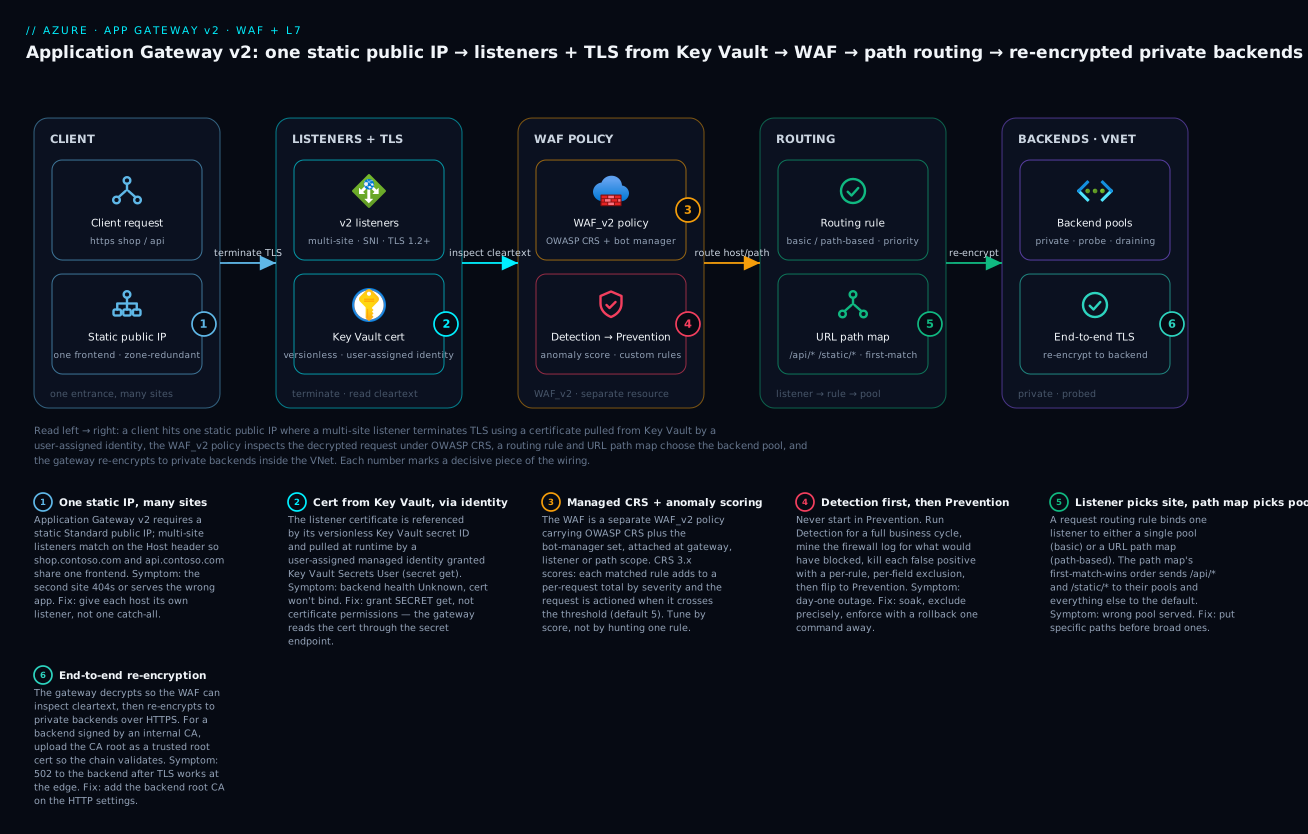
Walkthrough: a client hits one static public IP where a multi-site listener terminates TLS with a certificate pulled from Key Vault by a user-assigned identity, the WAF_v2 policy inspects the decrypted request under OWASP CRS, a routing rule and URL path map choose the backend pool, and the gateway re-encrypts to private backends inside the VNet – each numbered badge marks a decisive piece of the wiring.
Standing up an Application Gateway is a ten-minute portal exercise. Standing up one that routes three apps off one public IP, terminates and re-encrypts TLS with certificates it never stores, autoscales across availability zones, and runs a WAF in Prevention mode that hasn’t broken a single legitimate request in six months – that takes deliberate work. This walkthrough builds exactly that, then spends real time on the part everyone skips: tuning the WAF from Detection to Prevention by reading logs instead of guessing.
Where regional L7 fits: App Gateway vs Front Door vs a plain Load Balancer
Three Azure services overlap in people’s heads and they shouldn’t. Pick wrong and you either pay for an edge you can’t lock down or hit a protocol wall.
| Service | Scope | OSI layer | WAF | Best for |
|---|---|---|---|---|
| Application Gateway v2 | Regional | L7 (HTTP/HTTPS) | Yes (regional WAF policy) | In-VNet web apps/APIs needing path routing, mTLS to backends, private backends |
| Front Door (Std/Premium) | Global | L7 (HTTP/HTTPS) | Yes (global WAF policy) | Anycast edge, caching, global failover across regions |
| Load Balancer (Standard) | Regional | L4 (TCP/UDP) | No | Non-HTTP TCP/UDP, ultra-low-latency passthrough, any protocol |
The deciding questions: do you need the L7 features (URL path routing, header rewrite, cookie affinity, TLS termination) inside a VNet where backends are private? That’s Application Gateway. Do you need a global anycast front with caching? That’s Front Door. Is it non-HTTP, or do you want pure L4 passthrough with no proxy? Standard Load Balancer.
A common and correct pattern is Front Door in front of Application Gateway: Front Door for global anycast and caching at the edge, App Gateway as the regional L7 router with private backends and a second WAF layer. They are complementary, not competing. This article focuses on the regional App Gateway tier.
A note on tiers before we touch anything: v1 is retired for new deployments – Microsoft announced retirement and you should not build on it. Everything here is v2 (Standard_v2 or WAF_v2). The WAF lives on the WAF_v2 SKU, configured through a separate WAF policy resource that you associate with the gateway, listeners, or path rules.
Step 1 - Lay down the network and a v2 gateway
Application Gateway v2 needs a dedicated subnet – nothing else can live in it – with at least a /24 recommended for headroom (each scale-unit consumes addresses). Give it a Standard public IP that is static (v2 requires static, and the zone-redundant SKU pins the IP across zones).
RG=rg-appgw-prod
LOC=eastus2
VNET=vnet-appgw
SUBNET=snet-appgw

az group create -n $RG -l $LOC

az network vnet create -g $RG -n $VNET \
  --address-prefix 10.40.0.0/16 \
  --subnet-name $SUBNET \
  --subnet-prefix 10.40.0.0/24

# Backend subnet for the apps (private)
az network vnet subnet create -g $RG --vnet-name $VNET \
  -n snet-backends --address-prefix 10.40.1.0/24

# Static, zone-redundant public IP (zones 1,2,3)
az network public-ip create -g $RG -n pip-appgw \
  --sku Standard --allocation-method Static \
  --zone 1 2 3
Now the gateway itself, in WAF_v2, autoscaling, zone-redundant. I’ll create it minimal here and layer routing on afterward, because the CLI’s single-shot create gets unwieldy fast.
az network application-gateway create -g $RG -n agw-prod \
  --sku WAF_v2 \
  --location $LOC \
  --zones 1 2 3 \
  --min-capacity 2 \
  --max-capacity 10 \
  --vnet-name $VNET --subnet $SUBNET \
  --public-ip-address pip-appgw \
  --priority 100 \
  --frontend-port 80 \
  --http-settings-port 80 \
  --http-settings-protocol Http \
  --servers 10.40.1.10 10.40.1.11
--min-capacity 2 is the floor that absorbs the next traffic spike while autoscale reacts; never set it to 1 in production – you want at least two instances spread across zones so a single zone loss doesn’t drop you to zero. --max-capacity 10 caps cost; each capacity unit is roughly 10 Mbps of compute + connections, so size it from your peak RPS, not a guess. The --priority flag is mandatory for v2 request routing rules; lower numbers win when rules overlap.
Step 2 - Listeners, rules, and backend pools: multi-site and URL path maps
Real gateways serve more than one site off one IP. Two routing dimensions stack:
- Multi-site listeners match on the
Hostheader (shop.contoso.comvsapi.contoso.com) – different apps, same frontend IP/port. - URL path maps match on the path within a site (
/images/*to a static pool,/api/*to the API pool).
Let’s add a second backend pool, a multi-site HTTPS listener (we wire the cert in Step 3), and a path map.
# Second backend pool for the API tier
az network application-gateway address-pool create -g $RG \
  --gateway-name agw-prod -n pool-api \
  --servers 10.40.1.20 10.40.1.21

# Static-content pool
az network application-gateway address-pool create -g $RG \
  --gateway-name agw-prod -n pool-static \
  --servers 10.40.1.30 10.40.1.31

# HTTP settings the backends actually expect (HTTPS, probe-bound)
az network application-gateway http-settings create -g $RG \
  --gateway-name agw-prod -n hs-api \
  --port 443 --protocol Https \
  --host-name-from-backend-pool true \
  --probe probe-api --timeout 30 \
  --connection-draining-timeout 60
--host-name-from-backend-pool true forwards the backend pool member’s hostname as SNI/Host on re-encryption, which is what most app servers and their certificates expect; if your backends share one hostname, set --host-name api.internal.contoso.com explicitly instead. Now the path map – this is the URL routing brain:
# Path-based rule map: default goes to the web pool,
# /api/* to the API pool, /static/* to static.
az network application-gateway url-path-map create -g $RG \
  --gateway-name agw-prod -n pathmap-shop \
  --paths "/api/*" \
  --address-pool pool-api \
  --http-settings hs-api \
  --default-address-pool appGatewayBackendPool \
  --default-http-settings appGatewayBackendHttpSettings \
  --rule-name rule-api

az network application-gateway url-path-map rule create -g $RG \
  --gateway-name agw-prod --path-map-name pathmap-shop \
  -n rule-static --paths "/static/*" \
  --address-pool pool-static --http-settings hs-api
The mental model that prevents 90% of routing bugs: a request routing rule binds one listener to either a single backend (basic rule) or a path map (path-based rule). The listener decides which site; the path map decides which pool within that site. A path that matches nothing in the map falls to the default-address-pool. Order matters in path maps – first match wins – so put specific patterns before broad ones.
Step 3 - TLS termination, end-to-end re-encryption, and certs from Key Vault
You have three TLS postures, and you should know which you’re choosing:
- TLS termination only – gateway decrypts, talks HTTP to backends. Simplest; backend traffic is plaintext inside the VNet.
- End-to-end (re-encryption) – gateway decrypts (to run WAF + routing on cleartext), then re-encrypts to the backend over HTTPS. This is what regulated workloads need: the WAF must see plaintext to inspect it, but the wire to the backend is still encrypted.
- TLS passthrough – not supported on App Gateway. If you need the backend to terminate TLS itself with no decryption at the edge, use a Standard Load Balancer (L4). App Gateway is a proxy; it always terminates.
We’ll do end-to-end, and – critically – source the listener certificate from Key Vault so the gateway never holds the private key in its config and rotation happens in one place.
First, the identity and access. v2 reads Key Vault secrets through a user-assigned managed identity, and you must grant it secret get (the cert is exposed as a secret), not just certificate permissions.
# User-assigned identity the gateway will use
az identity create -g $RG -n id-appgw
IDENTITY_ID=$(az identity show -g $RG -n id-appgw --query id -o tsv)
IDENTITY_PRINCIPAL=$(az identity show -g $RG -n id-appgw --query principalId -o tsv)

KV=kv-appgw-prod
# RBAC model: the identity needs to READ secrets (the cert is a secret)
az role assignment create \
  --assignee-object-id $IDENTITY_PRINCIPAL \
  --assignee-principal-type ServicePrincipal \
  --role "Key Vault Secrets User" \
  --scope $(az keyvault show -n $KV --query id -o tsv)

# Attach the identity to the gateway
az network application-gateway identity assign -g $RG \
  --gateway-name agw-prod --identity $IDENTITY_ID
If your Key Vault uses the legacy access-policy model instead of RBAC, grant
--secret-permissions get(andlist) to the identity’s principal viaaz keyvault set-policy. Usingcertificatepermissions alone is the single most common reason the gateway shows “Unknown” health and refuses to bind the cert – App Gateway pulls the cert via the secret endpoint.
Now reference the Key Vault cert by its secret ID (use the versionless URI so rotation is picked up automatically – if you pin a version, the gateway keeps serving the old cert after rotation):
KV_SECRET_ID=$(az keyvault certificate show \
  --vault-name $KV -n shop-contoso-com \
  --query sid -o tsv | sed 's#/[^/]*$##')   # strip version -> versionless

az network application-gateway ssl-cert create -g $RG \
  --gateway-name agw-prod -n cert-shop \
  --key-vault-secret-id "$KV_SECRET_ID"

# HTTPS multi-site listener bound to that cert and host
az network application-gateway http-listener create -g $RG \
  --gateway-name agw-prod -n lsnr-shop-https \
  --frontend-port 443 --frontend-ip appGatewayFrontendIP \
  --ssl-cert cert-shop --host-name shop.contoso.com

# Bind listener -> path map via a path-based routing rule
az network application-gateway rule create -g $RG \
  --gateway-name agw-prod -n rule-shop \
  --rule-type PathBasedRouting \
  --http-listener lsnr-shop-https \
  --url-path-map pathmap-shop \
  --priority 110
For re-encryption to a backend whose certificate is signed by a private/internal CA, upload the root CA as a trusted root cert on the HTTP settings so the gateway validates the backend’s chain. With a public CA-signed backend cert you can skip this; App Gateway v2 trusts well-known public roots.
az network application-gateway root-cert create -g $RG \
  --gateway-name agw-prod -n root-internal-ca \
  --cert-file ./internal-root-ca.cer

az network application-gateway http-settings update -g $RG \
  --gateway-name agw-prod -n hs-api \
  --root-certs root-internal-ca
Finally, enforce a modern TLS floor with an SSL policy – do not serve TLS 1.0/1.1 from a 2026 gateway:
az network application-gateway ssl-policy set -g $RG \
  --gateway-name agw-prod \
  --policy-type Predefined \
  --policy-name AppGwSslPolicy20220101  # TLS 1.2+ baseline
Step 4 - Health probes, connection draining, and autoscaling
A backend pool with no custom probe uses a default probe that hits the backend’s root path and expects 200-399. That’s almost never what you want. Define an explicit probe with a real health endpoint and an accepted-status range:
az network application-gateway probe create -g $RG \
  --gateway-name agw-prod -n probe-api \
  --protocol Https --host-name-from-http-settings true \
  --path /healthz \
  --interval 15 --timeout 10 --threshold 3 \
  --match-status-codes 200-399
--host-name-from-http-settings true makes the probe send the same SNI/Host the real traffic uses – essential when the backend serves multiple vhosts, otherwise the probe hits the wrong site and marks a healthy backend down. --threshold 3 means three consecutive failures before eviction, which rides out a single GC pause without flapping.
Connection draining (set on the HTTP settings in Step 2 via --connection-draining-timeout 60) is what makes deployments graceful: when you pull a member from the pool, in-flight requests get up to 60s to finish instead of being cut. Without it, every backend deploy throws 502s at users mid-request.
Autoscaling is already on from Step 1 (--min-capacity / --max-capacity). The two facts that matter operationally:
- The floor pre-warms – those min instances are always running, so a sudden spike is absorbed by min capacity while autoscale spins up more. Scale-out is not instantaneous; min capacity is your shock absorber.
- Zone redundancy (
--zones 1 2 3) spreads instances across physical zones. Combined with min-capacity >= 2, a full zone failure leaves you serving from the survivors with zero config change.
Step 5 - WAF policy: CRS rule sets, anomaly scoring, exclusions
The WAF is a separate policy resource. Create it in Detection first – never start in Prevention on a real app, you will block legitimate traffic on day one.
az network application-gateway waf-policy create -g $RG \
  -n wafpol-prod --location $LOC

# Managed ruleset: OWASP CRS 3.2 + the Microsoft bot manager ruleset
az network application-gateway waf-policy managed-rule \
  rule-set add -g $RG --policy-name wafpol-prod \
  --type OWASP --version 3.2

# Start in DETECTION, request-body inspection on, sane size caps
az network application-gateway waf-policy policy-setting update \
  -g $RG --policy-name wafpol-prod \
  --state Enabled --mode Detection \
  --request-body-check true \
  --max-request-body-size-in-kb 128 \
  --file-upload-limit-in-mb 100

# Associate the policy with the gateway
POLICY_ID=$(az network application-gateway waf-policy show \
  -g $RG -n wafpol-prod --query id -o tsv)
az network application-gateway update -g $RG -n agw-prod \
  --set firewallPolicy.id=$POLICY_ID
Understand anomaly scoring, because it’s how CRS 3.x decides to block. Each matched rule adds to a per-request score by severity (Critical = 5, Error = 4, Warning = 3, Notice = 2). When the cumulative score crosses the anomaly threshold (default 5) the request is actioned. So a single Critical rule, or a couple of lesser ones together, trips it. This is why you tune by score, not by hunting one rule – a false positive is usually one over-eager Critical match, and you exclude precisely that match for precisely that field.
Exclusions are scalpel, not hammer. Exclude a specific rule against a specific request attribute (a header, a cookie, a form arg) rather than disabling the rule globally:
# Real example: a legacy app posts HTML in a field named "description",
# tripping the XSS rule 941330. Exclude THAT rule for THAT arg only.
az network application-gateway waf-policy managed-rule \
  exclusion rule-set add -g $RG --policy-name wafpol-prod \
  --type OWASP --version 3.2 \
  --group-name REQUEST-941-APPLICATION-ATTACK-XSS \
  --rule-ids 941330 \
  --match-variable RequestArgNames \
  --selector-match-operator Equals \
  --selector description
That keeps 941330 protecting every other argument and every other endpoint. The lazy alternative – disabling rule group 941 entirely – would strip XSS protection from the whole app to fix one field.
Step 6 - Detection-then-Prevention: read the logs, kill false positives, then enforce
This is the step that separates a WAF that protects from a WAF that gets disabled after the first outage. The discipline: run Detection in production for one to two full business cycles (a week, including a deploy and a peak), mine the firewall_log for what would have been blocked, fix each false positive with a targeted exclusion, and only then flip to Prevention.
Diagnostic logs must be on – send ApplicationGatewayFirewallLog to a Log Analytics workspace:
az monitor diagnostic-settings create \
  --name diag-agw \
  --resource $(az network application-gateway show -g $RG -n agw-prod --query id -o tsv) \
  --workspace $(az monitor log-analytics workspace show -g $RG -n law-appgw --query id -o tsv) \
  --logs '[{"category":"ApplicationGatewayFirewallLog","enabled":true},
           {"category":"ApplicationGatewayAccessLog","enabled":true}]'
Now the query that does the real work. In Detection mode every rule that matched is logged with action == "Matched" (it didn’t block, it noted). Group by rule, host, and target field to see your top false-positive candidates:
AzureDiagnostics
| where Category == "ApplicationGatewayFirewallLog"
| where action_s in ("Matched", "Blocked")
| summarize hits = count(),
            sampleUri = any(requestUri_s),
            sampleMsg = any(Message)
        by ruleId_s, ruleGroup_s = details_data_s, hostname_s
| order by hits desc
Read it like a triage nurse. High-hit rules against a known-good endpoint and a known field are almost always false positives – write an exclusion (Step 5) for that rule + field. Low-hit rules with attack-shaped URIs against random paths are real probing – leave them. Anything you’re unsure about, leave the rule on; the cost of a real block in Prevention is a page, the cost of a missed exclusion is a 403 for one customer who’ll email you. Bias toward keeping protection.
Once the firewall log is quiet of false positives across a full cycle, flip to Prevention:
az network application-gateway waf-policy policy-setting update \
  -g $RG --policy-name wafpol-prod --mode Prevention
Keep diagnostics on after the switch and watch action_s == "Blocked". The first 24-48 hours in Prevention is when a missed false positive surfaces as a real 403 – have the exclusion-add command ready and a rollback to Detection one CLI call away.
Step 7 - Custom rules: rate limiting and geo/IP match
Managed rules handle OWASP; custom rules handle your policy – rate limits, geo-blocks, allowlists. Custom rules evaluate by priority (lower wins) and run before managed rules, so a custom Allow can short-circuit an allowlisted partner past the managed set, and a custom Block stops abuse before it ever costs you CRS evaluation.
Rate limiting (v2 supports it natively) – throttle by client IP over a sliding window:
az network application-gateway waf-policy custom-rule create \
  -g $RG --policy-name wafpol-prod -n rateLimitPerIp \
  --priority 10 --rule-type RateLimitRule \
  --action Block \
  --rate-limit-threshold 100 \
  --rate-limit-duration OneMin \
  --group-by-user-session ClientAddr
This blocks any single client IP exceeding 100 requests/minute – a blunt but effective brake on credential-stuffing and scraping. For login endpoints specifically, add a MatchRule condition scoping it to /login with a tighter threshold.
Geo and IP match conditions on a standard MatchRule:
# Block a list of countries outright (priority before rate limit if stricter)
az network application-gateway waf-policy custom-rule create \
  -g $RG --policy-name wafpol-prod -n geoBlock \
  --priority 5 --rule-type MatchRule --action Block

az network application-gateway waf-policy custom-rule match-condition add \
  -g $RG --policy-name wafpol-prod --rule-name geoBlock \
  --match-variables RemoteAddr \
  --operator GeoMatch \
  --values "KP" "Some-Other-CC"

# Allowlist a partner CIDR ABOVE everything (lowest priority number)
az network application-gateway waf-policy custom-rule create \
  -g $RG --policy-name wafpol-prod -n partnerAllow \
  --priority 1 --rule-type MatchRule --action Allow

az network application-gateway waf-policy custom-rule match-condition add \
  -g $RG --policy-name wafpol-prod --rule-name partnerAllow \
  --match-variables RemoteAddr --operator IPMatch \
  --values "203.0.113.0/24"
GeoMatch uses Microsoft’s IP-to-country mapping on RemoteAddr. One trap: if Application Gateway sits behind Front Door or another proxy, RemoteAddr is the proxy’s IP, not the client’s – match on the X-Forwarded-For variable (RequestHeaders / X-Forwarded-For) instead, or your geo rule judges the wrong address.
Verify
Confirm the gateway is healthy, routing splits correctly, TLS is what you intend, and the WAF blocks attacks while passing benign traffic.
Backend health – every member should be Healthy. Anything Unknown usually means probe SNI/host mismatch or a Key Vault permission gap:
az network application-gateway show-backend-health \
  -g $RG -n agw-prod \
  --query "backendAddressPools[].backendHttpSettingsCollection[].servers[].{addr:address,health:health}" \
  -o table
Routing matrix with curl – prove host and path routing land on the right pool. --resolve pins the hostname to the gateway IP so DNS isn’t in the way:
GWIP=$(az network public-ip show -g $RG -n pip-appgw --query ipAddress -o tsv)

# Each line should hit the expected pool; check the served content/headers.
curl -sk --resolve shop.contoso.com:443:$GWIP \
  https://shop.contoso.com/          -o /dev/null -w "default -> %{http_code}\n"
curl -sk --resolve shop.contoso.com:443:$GWIP \
  https://shop.contoso.com/api/health -o /dev/null -w "api     -> %{http_code}\n"
curl -sk --resolve shop.contoso.com:443:$GWIP \
  https://shop.contoso.com/static/logo.png -o /dev/null -w "static  -> %{http_code}\n"
TLS posture – confirm the served cert and that TLS 1.1 is refused:
# Served leaf cert subject/issuer
echo | openssl s_client -connect $GWIP:443 \
  -servername shop.contoso.com 2>/dev/null \
  | openssl x509 -noout -subject -issuer

# This MUST fail to handshake on the 2022 SSL policy:
openssl s_client -connect $GWIP:443 -servername shop.contoso.com -tls1_1
Benign-attack payload test – in Prevention, a textbook (harmless) SQLi/XSS string in a query arg should return 403, and a normal request should return 200. This is a non-destructive probe of your own gateway, not anyone else’s:
# Should be 403 (Blocked) once in Prevention
curl -sk --resolve shop.contoso.com:443:$GWIP \
  "https://shop.contoso.com/?id=1%27%20OR%20%271%27%3D%271" \
  -o /dev/null -w "sqli-probe -> %{http_code}\n"

# Should be 200/expected (clean request)
curl -sk --resolve shop.contoso.com:443:$GWIP \
  "https://shop.contoso.com/?id=42" \
  -o /dev/null -w "clean      -> %{http_code}\n"
Confirm the block in logs – the SQLi probe should appear as Blocked with the matching CRS rule:
AzureDiagnostics
| where Category == "ApplicationGatewayFirewallLog"
| where action_s == "Blocked"
| project TimeGenerated, ruleId_s, requestUri_s, clientIp_s, Message
| order by TimeGenerated desc
| take 20
Enterprise scenario
A payments platform team ran a single Application Gateway v2 fronting a checkout app and a partner API off one public IP, end-to-end TLS, WAF in Prevention. After a routine release of the checkout service, the partner integration team opened a Sev2: a subset of partner POSTs to /api/settlement started returning 403 with no app-side log entry. The app was healthy; the gateway’s access log showed the 403, and the firewall log showed CRS rule 942100 (SQL injection, libinjection) matching the request body.
The cause was correct WAF behavior meeting a real payload: the settlement API legitimately accepts a metadata field containing free-form merchant notes, and one merchant had started sending notes that contained a SQL-looking substring. The body matched 942100, the anomaly score crossed the threshold, the request was blocked. Disabling the SQLi group wholesale was floated and rejected – this was a payments path, stripping SQLi inspection was a non-starter.
The fix was a targeted body exclusion: rule 942100 excluded only for the metadata argument, leaving SQLi inspection intact on every other field and endpoint. They validated it in Detection on a parallel policy for 48 hours against replayed partner traffic before applying it to the live Prevention policy.
az network application-gateway waf-policy managed-rule \
  exclusion rule-set add -g $RG --policy-name wafpol-prod \
  --type OWASP --version 3.2 \
  --group-name REQUEST-942-APPLICATION-ATTACK-SQLI \
  --rule-ids 942100 \
  --match-variable RequestArgNames \
  --selector-match-operator Equals \
  --selector metadata
The lasting lesson the team wrote into their runbook: every new field on a WAF-protected API is a potential false positive, so request-body schema changes now go through a Detection-mode soak before Prevention, and exclusions are always scoped to a single rule + single argument – never a rule group, never a global disable.
Going deeper
The v2 resource anatomy: how the pieces actually connect
Application Gateway looks like one resource in the portal, but internally it is a graph of sub-resources, and almost every “why is it doing that?” question is answered by knowing which sub-resource owns which decision. A request flows through them in a fixed order:
- Frontend IP configuration + frontend port – the socket the world connects to. One public (static Standard) and/or one private frontend IP; ports are just numbers (80, 443).
- Listener – binds a frontend IP + port + protocol and, for HTTPS, an SSL certificate. A basic listener answers for any hostname on that port; a multi-site listener additionally matches the Host header (and uses SNI to pick the right cert), which is how many sites share one IP.
- Request routing rule – the switchboard. It carries a priority (mandatory in v2, lower wins) and is either basic (listener → one backend pool + one HTTP setting) or path-based (listener → a URL path map).
- URL path map – ordered path patterns (
/api/*,/static/*), each pointing at a pool + HTTP setting, plus a default pool for everything that does not match. First match wins. - HTTP settings (
backendHttpSettings) – how the gateway talks to the backend: protocol/port, the probe that gates health, connection draining, cookie-based affinity, request timeout, whether to take the host header from the pool, and any trusted root cert for re-encryption. - Backend pool – the actual targets: IPs, FQDNs, NICs, a VM scale set, or App Services.
| Sub-resource | Decides | Bind-to |
|---|---|---|
| Frontend IP + port | Where clients connect | Public/private IP + port number |
| Listener | Which site (host) + which cert | Frontend IP/port (+ SSL cert) |
| Routing rule (priority) | Listener → pool or path map | One listener |
| URL path map | Which pool within a site | A path-based rule |
| HTTP settings | How to reach the backend | Pool + probe (+ root cert) |
| Backend pool | The targets | HTTP settings via the rule |
The one ordering fact that saves hours: the WAF runs before the routing rule picks a pool. A request matches a listener, is evaluated by the WAF policy in scope (custom rules by priority, then managed rules by anomaly score), and only a surviving request is routed. So a WAF 403 never reaches your backend and never appears in the app’s own logs – it lives in the firewall log, not the application access path. That single fact explains most “the app returned a 403 but has no record of the request” tickets.
Cookie-based affinity: available, rarely what you want
HTTP settings can pin a client to one backend instance with a gateway-issued cookie (ApplicationGatewayAffinity, plus ApplicationGatewayAffinityCORS for cross-origin). It exists for legacy apps that keep session state in server memory. The cost is uneven load – a busy client sticks to one instance regardless of how loaded it is – and it fights graceful scaling and draining. The right model for anything new is stateless backends with session state in Redis or a database, affinity off, so any instance can serve any request. Reach for affinity only when you genuinely cannot make the app stateless.
The WAF policy as code
The WAF is a first-class resource (azurerm_web_application_firewall_policy), and expressing it in Terraform makes tuning auditable – every exclusion becomes a reviewed diff instead of a portal click nobody remembers:
resource "azurerm_web_application_firewall_policy" "prod" {
  name                = "wafpol-prod"
  resource_group_name = azurerm_resource_group.appgw.name
  location            = azurerm_resource_group.appgw.location

  policy_settings {
    enabled                     = true
    mode                        = "Detection" # flip to "Prevention" only after the soak
    request_body_check          = true
    max_request_body_size_in_kb = 128
    file_upload_limit_in_mb     = 100
  }

  managed_rules {
    managed_rule_set {
      type    = "OWASP"
      version = "3.2"
    }
    managed_rule_set {
      type    = "Microsoft_BotManagerRuleSet"
      version = "1.0"
    }

    # Per-rule, per-field exclusion -- the scalpel, expressed as code
    exclusion {
      match_variable          = "RequestArgNames"
      selector                = "metadata"
      selector_match_operator = "Equals"
      excluded_rule_set {
        type    = "OWASP"
        version = "3.2"
        rule_group {
          rule_group_name = "REQUEST-942-APPLICATION-ATTACK-SQLI"
          excluded_rules  = ["942100"]
        }
      }
    }
  }

  custom_rules {
    name      = "rateLimitPerIp"
    priority  = 10
    rule_type = "RateLimitRule"
    action    = "Block"

    rate_limit_duration  = "OneMin"
    rate_limit_threshold = 100
    group_rate_limit_by  = "ClientAddr"

    match_conditions {
      match_variables { variable_name = "RemoteAddr" }
      operator           = "IPMatch"
      negation_condition = false
      match_values       = ["0.0.0.0/0"]
    }
  }
}
Three things worth internalizing from that block:
- Association scope decides blast radius. A WAF policy attaches at gateway/global, per-site (a specific listener), or per-URI (a specific path-map path rule); the most specific wins. That is how you run strict rules on
/adminand looser ones on/staticfrom separate policies – per-URI is precise policy without one giant rule list. modeis the only line between “protecting” and “reporting”. Detection logs matches and blocks nothing; Prevention enforces. Flipping it in code, gated by a PR, makes the move to Prevention a reviewed change with a one-line rollback.- Exclusions are scoped inside the resource, not globally. The
excluded_rule_setblock ties the exclusion to one rule, in one group, against one request attribute – the Terraform equivalent of the CLI scalpel from Step 5. To tune (not exclude) a managed rule, use arule_group_overridewith arule { id, enabled, action }block; the olddisabled_ruleslist is superseded inazurermv4.
End-to-end TLS, the identity requirement, and silent rotation
Two facts trip people repeatedly. First, App Gateway integrates with Key Vault only through a user-assigned managed identity – a system-assigned identity is not supported for the certificate pull, so you must create id-appgw and assign it (Step 3). Second, the certificate is read through the Key Vault secret endpoint, so the identity needs Key Vault Secrets User (RBAC) or get on secrets (access policy); a certificate-scoped role leaves the gateway unable to bind and shows backend health Unknown.
Rotation is the reward for doing it right. Reference the cert by its versionless secret ID and the gateway polls Key Vault roughly every four hours, picks up the renewed version, and rebinds with no redeploy. Pin a version and you freeze the cert – rotating in Key Vault changes nothing the gateway serves. For mutual TLS (client-certificate auth), v2 adds SSL profiles: a per-listener object carrying its own SSL policy plus a Trusted Client Certificate (the CA chain you accept from clients), so you can require client certs on /partner while the public site stays one-way.
Autoscaling, capacity units, and zone redundancy
v2 bills as a small fixed hourly charge per gateway plus consumption in Capacity Units (CU). A CU is the scale atom, and it has three dimensions – the gateway sizes to the maximum of them per instance: roughly 2,500 persistent connections, ~2.22 Mbps of throughput, and a compute-unit share for TLS handshakes and WAF inspection (WAF work and larger keys cost more compute). --min-capacity reserves always-on instances – your shock absorber, because scale-out takes a minute or two – and --max-capacity caps spend. WAF_v2 carries a higher fixed price than Standard_v2; zone redundancy is free – spreading across zones 1/2/3 costs nothing extra and, with min-capacity ≥ 2, survives a full zone loss with zero config change. Size min-capacity from your steady peak and let autoscale ride spikes; size max from the CU math above, not a guess.
The dedicated subnet and the ports you must never block
v2 must live in its own subnet – no other resource may share it, and a v1 and a v2 gateway cannot coexist in one subnet. Recommend a /24: each scale instance consumes a private IP and you want headroom for scale-out. Two networking traps:
- Infrastructure ports. v2 requires inbound TCP 65200-65535 from the GatewayManager service tag (Azure-authenticated management traffic, protected by certificates). If an NSG on the subnet blocks it, the gateway goes unhealthy in ways that look like app problems. Allow GatewayManager on those ports and AzureLoadBalancer inbound.
- Forced tunneling. v2 does not support a default route (
0.0.0.0/0) on the subnet pointing at an NVA or VPN for its own traffic – that breaks management connectivity. You may use UDRs for specific prefixes, but do not force-tunnel the whole subnet. (Newer enhanced network control relaxes some of this; check the current support matrix before relying on it.)
If you do not want a public frontend at all, v2 now supports a private-only deployment (private frontend IP, no public IP), lifting the old rule that every v2 needed a public IP.
Header and URL rewrites
v2 can rewrite request and response headers and even the URL path/query (v1 cannot). You group rules into a rewrite rule set and attach it to a routing rule. Two everyday wins: add security headers centrally so every backend inherits HSTS, and strip fingerprinting headers:
az network application-gateway rewrite-rule set create -g $RG \
  --gateway-name agw-prod -n rwset-security

az network application-gateway rewrite-rule create -g $RG \
  --gateway-name agw-prod --rule-set-name rwset-security \
  -n add-hsts --sequence 100 \
  --response-headers "Strict-Transport-Security=max-age=31536000; includeSubDomains"

# Attach the rewrite set to the routing rule
az network application-gateway rule update -g $RG \
  --gateway-name agw-prod -n rule-shop \
  --rewrite-rule-set rwset-security
Rewrites can be conditional on server variables (for example, only add HSTS when the request arrived over HTTPS), and URL rewrite can optionally re-evaluate the path map after rewriting so the new path routes to the right pool. Centralizing headers here means one place to fix a CSP or HSTS policy instead of editing every app.
AGIC: driving the gateway from Kubernetes
For AKS, the Application Gateway Ingress Controller (AGIC) turns Kubernetes Ingress objects into gateway config. Enable it as an add-on (az aks ... --enable-addons ingress-appgw --appgw-id <appgw-resource-id>) or via Helm; it watches Ingress, Services, and Endpoints and programs listeners, rules, pools, and probes to match – and with Azure CNI it targets pod IPs directly, so traffic goes gateway → pod, bypassing kube-proxy:
apiVersion: networking.k8s.io/v1
kind: Ingress
metadata:
  name: shop
  annotations:
    kubernetes.io/ingress.class: azure/application-gateway
    appgw.ingress.kubernetes.io/ssl-redirect: "true"
    appgw.ingress.kubernetes.io/backend-protocol: "https"
spec:
  rules:
    - host: shop.contoso.com
      http:
        paths:
          - path: /api
            pathType: Prefix
            backend:
              service:
                name: api-svc
                port:
                  number: 443
Two things to know: one AGIC manages one gateway, and Microsoft’s next-generation successor is Application Gateway for Containers (a Gateway-API / ALB-controller service, now GA). Greenfield AKS ingress increasingly targets it, though AGIC remains supported for App Gateway v2.
v1 → v2 is a migration, not a switch
There is no in-place SKU upgrade from v1 to v2. You deploy a new v2 gateway side by side – Microsoft ships a PowerShell migration script that copies listeners, pools, HTTP settings, and WAF config into a fresh v2 – validate it, then cut over DNS to the new frontend IP. Budget for a new static public IP (or plan the IP move), re-test WAF behaviour because CRS versions differ between v1 and v2, and soak in Detection before you enforce. With v1 retired, this is now a “when,” not an “if.”
Regional vs global: App Gateway and Front Door, revisited
The intro table said what to pick; here is the why at depth. Front Door is a global anycast service: it terminates TLS at the edge POP nearest the user, can cache, splits the TCP/TLS path for latency, and runs a global WAF using the Microsoft Default Rule Set (DRS). App Gateway is regional, lives inside your VNet, reaches private backends, can do mTLS to the backend, and runs a per-URI WAF on OWASP CRS. They compose: Front Door at the edge, App Gateway as the regional L7 router. When you layer them, do two things so App Gateway only trusts Front Door:
- Restrict the network – allow the gateway’s inbound only from the AzureFrontDoor.Backend service tag, so random internet cannot hit it directly.
- Verify identity at L7 – add a WAF custom rule that blocks any request whose
X-Azure-FDIDheader is not your Front Door ID, so someone else’s Front Door cannot reach your origin.
Together they turn “a gateway on the internet” into “a gateway only my own edge can use” – the difference between a public origin and a private one that merely happens to have a public IP.
Practice challenges
Work these in order; each builds on the gateway from the walkthrough. The commands are real and current (az CLI, azurerm v4), but they touch a live subscription and a WAF – test in a non-production resource group, and read every change before you apply it.
1. (Beginner) Add a second site off the same IP. You already serve shop.contoso.com. Add api.contoso.com on the same gateway and public IP. What is the minimum set of resources, and what must the two listeners share versus differ?
<details><summary>Solution</summary>
A second multi-site listener (same frontend IP + port 443, different --host-name) and a request routing rule that binds it to the API pool:
az network application-gateway http-listener create -g $RG \
  --gateway-name agw-prod -n lsnr-api-https \
  --frontend-port 443 --frontend-ip appGatewayFrontendIP \
  --ssl-cert cert-api --host-name api.contoso.com

az network application-gateway rule create -g $RG \
  --gateway-name agw-prod -n rule-api-site \
  --rule-type Basic --http-listener lsnr-api-https \
  --address-pool pool-api --http-settings hs-api --priority 120
They share the frontend IP and port; they differ by --host-name (and each needs its own cert, matched by SNI). Why: multi-site listeners route by the Host header, so many sites live behind one IP – one catch-all listener cannot select the right cert or the right app.
</details>
2. (Beginner) Prove TLS 1.1 is refused. The gateway uses AppGwSslPolicy20220101. Write the one-liner that must fail to handshake, and say why it fails.
<details><summary>Solution</summary>
openssl s_client -connect $GWIP:443 -servername shop.contoso.com -tls1_1
It must fail (no shared protocol). Why: the AppGwSslPolicy20220101 predefined policy floors the gateway at TLS 1.2, so a client forced to TLS 1.1 has nothing to negotiate – exactly what you want from a 2026 gateway.
</details>
3. (Intermediate) Fix “Unknown” backend health after wiring a Key Vault cert. The gateway shows every backend Unknown and will not bind the listener cert. The identity has Key Vault Certificates Officer. What is wrong, and what is the exact fix?
<details><summary>Solution</summary>
App Gateway reads the certificate through the Key Vault secret endpoint, not the certificate endpoint – so a certificate-scoped role is insufficient. Grant the identity Key Vault Secrets User (RBAC) or --secret-permissions get list (access-policy model):
az role assignment create \
  --assignee-object-id $IDENTITY_PRINCIPAL \
  --assignee-principal-type ServicePrincipal \
  --role "Key Vault Secrets User" \
  --scope $(az keyvault show -n $KV --query id -o tsv)
Why: the cert (with its private key) is exposed as a secret; without secret get the gateway cannot fetch it, so it cannot bind the listener or probe the backend – the classic “Unknown health” cause.
</details>
4. (Intermediate) Kill a false positive without lowering the shield. The firewall log shows CRS rule 942100 matching the metadata form field on /api/settlement. Write the exclusion that keeps SQL-injection protection everywhere else.
<details><summary>Solution</summary>
az network application-gateway waf-policy managed-rule \
  exclusion rule-set add -g $RG --policy-name wafpol-prod \
  --type OWASP --version 3.2 \
  --group-name REQUEST-942-APPLICATION-ATTACK-SQLI \
  --rule-ids 942100 \
  --match-variable RequestArgNames \
  --selector-match-operator Equals \
  --selector metadata
Why: the exclusion scopes to one rule (942100) against one field (metadata), so SQLi inspection still covers every other argument and endpoint – unlike disabling group 942, which would strip SQLi protection app-wide.
</details>
5. (Advanced) Rate-limit only the login path. The site already has a global 100 req/min per-IP rule. Add a tighter brake – 20 req/min per IP – that applies only to /login, and leaves everything else at 100. Which rule type, priority, and condition?
<details><summary>Solution</summary>
A RateLimitRule with a match condition scoping it to /login, at a lower priority number than the global rule so it wins first:
az network application-gateway waf-policy custom-rule create \
  -g $RG --policy-name wafpol-prod -n rateLimitLogin \
  --priority 8 --rule-type RateLimitRule --action Block \
  --rate-limit-threshold 20 --rate-limit-duration OneMin \
  --group-by-user-session ClientAddr

az network application-gateway waf-policy custom-rule match-condition add \
  -g $RG --policy-name wafpol-prod --rule-name rateLimitLogin \
  --match-variables RequestUri --operator BeginsWith --values "/login"
Why: custom rules evaluate by priority (lower wins) and a rate-limit rule can carry a match condition, so scoping on RequestUri BeginsWith /login throttles credential-stuffing on the sensitive path without punishing normal browsing elsewhere.
</details>
6. (Advanced) Lock the gateway to accept traffic only from your Front Door. Front Door sits in front of this gateway. Give the two-layer control that stops anyone reaching the origin directly, and write the L7 half.
<details><summary>Solution</summary>
Two layers: (a) at the network, allow the gateway’s inbound only from the AzureFrontDoor.Backend service tag (via NSG on the subnet); (b) at L7, a WAF custom rule that blocks any request whose X-Azure-FDID header is not your Front Door ID:
az network application-gateway waf-policy custom-rule create \
  -g $RG --policy-name wafpol-prod -n onlyMyFrontDoor \
  --priority 3 --rule-type MatchRule --action Block

az network application-gateway waf-policy custom-rule match-condition add \
  -g $RG --policy-name wafpol-prod --rule-name onlyMyFrontDoor \
  --match-variables RequestHeaders --selector X-Azure-FDID \
  --operator Equal --negation true \
  --values "<your-frontdoor-id-guid>"
Why: the service tag stops the random internet from hitting the origin, and the X-Azure-FDID check stops someone else’s Front Door from using your gateway – the service tag alone would still trust every Front Door tenant on Azure.
</details>
Common beginner mistakes
These are conceptual traps – wrong mental models rather than wrong commands. (For symptom → cause → fix operational issues, see Verify and the Enterprise scenario above.)
-
“App Gateway is just a load balancer with a fancier name.” A Standard Load Balancer is L4 – it forwards by IP and port and never reads the request. App Gateway is an L7 reverse proxy that terminates TLS, reads the URL and headers, runs a WAF, and re-encrypts. Right model: L4 understands the connection; L7 understands the request. If you need URL routing, host-based multi-site, TLS termination, or a WAF, only L7 can do it.
-
“I’ll start the WAF in Prevention so we’re protected on day one.” Prevention on an untuned policy blocks legitimate traffic immediately – a self-inflicted outage. Right model: Detection first, soak for a full business cycle including a deploy and a peak, kill each false positive with a targeted exclusion, then flip to Prevention with a rollback one command away.
-
“Grant the identity certificate permissions on Key Vault.” App Gateway pulls the cert through the secret endpoint, so certificate-only permissions leave it unable to bind (backend health shows Unknown). Right model: grant Key Vault Secrets User /
secret get– the cert-with-key is delivered as a secret. -
“Pin the cert to a specific version so it stays stable.” A pinned version freezes the gateway on the old cert; when Key Vault rotates, the gateway keeps serving the expired one. Right model: reference the versionless secret ID – the gateway polls Key Vault (~every 4 hours) and rebinds the renewed cert automatically.
-
“The rule is noisy, so disable its rule group.” Disabling group 941 or 942 strips XSS or SQLi protection from the whole app to fix one field. Right model: an exclusion scoped to one rule + one request attribute – protection stays everywhere except the one known-good field.
-
“One big catch-all listener is simpler than a listener per site.” A single basic listener cannot select the right certificate by SNI or route different hosts to different apps, so the second site serves the wrong content or fails TLS. Right model: multi-site listeners match the Host header – one listener (and cert) per hostname.
-
“Autoscale means I can set min-capacity to 1 (or 0).” Scale-out is not instantaneous; a spike arriving before new instances warm up drops requests, and a single instance dies with its zone. Right model: min-capacity ≥ 2 across zones 1/2/3 is your shock absorber and your zone-failure survivor – autoscale handles the spike above that floor.
-
“I’ll put the gateway in my app’s subnet to save address space.” v2 demands a dedicated subnet – nothing else may live there – and blocking its 65200-65535 / GatewayManager infrastructure ports makes it fail in ways that mimic app bugs. Right model: give it its own /24 and leave the infra ports open.
-
“GeoMatch and rate limits see my real client IPs, even behind Front Door.” With a proxy in front,
RemoteAddris the proxy’s IP, so your geo-block and per-IP limit judge the wrong address. Right model: match onX-Forwarded-For(or group rate limits by it) whenever a CDN or Front Door sits ahead of the gateway.
Glossary
- Application Gateway v2 — Azure’s regional L7 (HTTP/HTTPS) reverse proxy and load balancer. Terminates TLS, routes by host and path, runs a WAF, and re-encrypts to backends. v1 is retired.
- Standard_v2 / WAF_v2 — the two v2 SKUs.
WAF_v2adds the Web Application Firewall;Standard_v2is routing/TLS without it. - L7 vs L4 — Layer 7 reads the HTTP request (URL, headers, body); Layer 4 (Standard Load Balancer) forwards by IP/port and never opens it.
- Listener — binds a frontend IP + port + protocol (and, for HTTPS, a cert). It decides which site a request belongs to.
- Multi-site listener — a listener that matches on the Host header, so many sites share one IP/port; uses SNI to select the cert.
- SNI (Server Name Indication) — the TLS extension carrying the requested hostname, letting one IP present the right certificate per site.
- Request routing rule — binds one listener to either a single backend (basic) or a URL path map (path-based). Carries a mandatory priority (lower wins) in v2.
- URL path map — ordered path patterns (
/api/*,/static/*) → pools, plus a default pool. First match wins; a non-match falls to the default. - HTTP settings (
backendHttpSettings) — how the gateway reaches the backend: protocol/port, probe, timeout, connection draining, cookie affinity, host-header source, and trusted root cert. - Backend pool — the set of targets (IPs, FQDNs, NICs, VMSS, App Services) a rule sends traffic to.
- Health probe — a periodic request (custom path, interval, timeout, unhealthy threshold, accepted status codes) that gates whether a pool member receives traffic.
- Connection draining — on backend removal or deploy, lets in-flight requests finish (up to the configured timeout) instead of being cut, avoiding 502s.
- Cookie-based affinity — a gateway cookie (
ApplicationGatewayAffinity) that pins a client to one instance; only for stateful legacy apps, at the cost of even load. - TLS termination — the gateway decrypts the client’s TLS so it can read (and WAF-inspect) the request; App Gateway always terminates – it cannot do pure passthrough.
- End-to-end TLS (re-encryption) — after inspecting cleartext, the gateway re-encrypts to the backend over HTTPS; needed where the wire to the backend must stay encrypted.
- SSL policy — the negotiated TLS floor and cipher set.
AppGwSslPolicy20220101enforces TLS 1.2+. - SSL profile — a per-listener object holding an SSL policy plus (for mTLS) a Trusted Client Certificate to authenticate clients.
- Trusted root certificate — the CA root uploaded on HTTP settings so the gateway validates a backend cert signed by a private/internal CA.
- Key Vault secret ID (versionless) — the URI the gateway uses to fetch the listener cert; versionless means rotation is picked up automatically (~4-hour poll).
- User-assigned managed identity — the identity App Gateway uses to read Key Vault. System-assigned is not supported for the cert pull; the identity needs Secrets User /
secret get. - WAF policy (
azurerm_web_application_firewall_policy) — the separate resource carrying managed rules, custom rules, exclusions, and the Detection/Prevention mode; attached at gateway, listener, or path scope. - OWASP CRS (Core Rule Set) — the managed ruleset App Gateway’s WAF runs (e.g. 3.2) to detect common attacks (SQLi, XSS, protocol abuse).
- Bot Manager ruleset — Microsoft’s managed rules classifying and acting on known bot traffic, layered on top of CRS.
- Anomaly scoring — CRS 3.x adds a per-request score by rule severity (Critical 5, Error 4, Warning 3, Notice 2); the request is actioned when the total crosses the anomaly threshold (default 5).
- Detection vs Prevention — Detection logs matches but blocks nothing; Prevention enforces. Always soak in Detection before enforcing.
- Exclusion — a scalpel that stops a specific rule firing against a specific request attribute (arg, header, cookie), leaving the rule active everywhere else.
- Custom rule — your policy (rate limit, geo/IP allow/block), evaluated by priority before managed rules; a
RateLimitRuleor aMatchRule. - RateLimitRule / GeoMatch / IPMatch — throttle by client over a sliding window; match a country via Microsoft’s IP-to-country map; match a CIDR.
- Capacity Unit (CU) — the v2 scale/billing atom: the max of ~2,500 persistent connections, ~2.22 Mbps throughput, and a compute-unit share (TLS + WAF work) per instance.
- Autoscaling (min/max capacity) —
--min-capacityreserves always-on instances (the shock absorber);--max-capacitycaps cost. Scale-out is not instant. - Zone redundancy — spreading instances across availability zones 1/2/3 (free); with min-capacity ≥ 2, survives a zone loss with no config change.
- Dedicated subnet — v2’s own subnet (nothing else allowed); a /24 is recommended, and inbound 65200-65535 / GatewayManager must stay open.
- Rewrite rule set — request/response header and URL path/query rewrites (v2 only), attached to a routing rule – e.g. add HSTS, strip
Server. - AGIC (Application Gateway Ingress Controller) — the AKS add-on/controller that programs an App Gateway v2 from Kubernetes Ingress objects. Application Gateway for Containers is its GA next-gen (Gateway API) successor.
- Front Door — Azure’s global anycast L7 edge with caching and a global WAF (Microsoft Default Rule Set); complementary to App Gateway, often layered in front of it.
- X-Forwarded-For / X-Azure-FDID — the client-IP header to match on when behind a proxy; and the Front Door instance ID to verify so only your Front Door can reach the gateway.