In a nutshell
Imagine your app’s passwords, connection strings, and TLS certificates all live in one locked mailroom in your office building — that mailroom is Azure Key Vault. The old, dangerous way to let people in was to cut copies of the mailroom key and hand one to every contractor on a lanyard: copies pile up, one gets dropped in a car park, and now a stranger can open the room. Every leaked .env file and every AZURE_CREDENTIALS blob pasted into a repo is exactly that lost lanyard.
The whole point of this lesson is a mailroom with no shared key at all. When you walk up, the building’s own badge reader — the platform your workload runs on — confirms who you are with a badge that only works for the next few minutes and is useless if photocopied. The mailroom staff check your name against a posted list (Azure RBAC) and hand you only your parcel, nothing else. That badge reader is a managed identity when your workload lives inside Azure. When the workload lives somewhere else — a GitHub Actions runner, a Kubernetes pod, another cloud — the mailroom has agreed in advance to trust a partner company’s badge reader too: that agreement is workload identity federation, and it means outside workers get in without ever being issued a permanent building key.
The trap this lesson keeps returning to is subtle: if the badge you present is itself a stored password, you have not removed the lost-lanyard risk, you have only moved it one door upstream. That upstream credential is called secret-zero, and eliminating it — not creating the vault — is the entire discipline here.
Level: Advanced · Time: ~75 min
Before you start, you want the ideas from Azure Entra ID Fundamentals: a tenant, an app registration, a service principal, and an RBAC role assignment on a scope. You do not need OIDC internals — just “an issuer mints a signed token with claims; a relying party validates it.” The full prerequisites and the ownership map are spelled out two sections down.
By the end you will be able to stand up a vault with the escalation-safe authorization model, pick the right flavour of managed identity per workload, federate GitHub Actions and AKS with no stored secret, rotate keys and certificates the vault owns, and localise any passwordless failure to a single hop. If you only skim once, read the prose, then keep the option matrices and the failure playbook open when a deploy dies at 02:00 — that is what they are built for.
Every stored credential is a liability with a half-life: secrets expire at the worst moment, leak into logs and .env files, and outlive the engineer who created them. This guide walks the full path to a secret-free estate — Azure Key Vault as the system of record for the few secrets you cannot avoid, managed identities for anything running inside Azure, and workload identity federation (OIDC) to extend that passwordless model to GitHub Actions and AKS. The destination is an estate where the only thing you rotate is trust, not strings.
The reason this is hard is not the vault — creating a vault takes one command. The reason is the bootstrap: to read a secret you must first authenticate, and if that authentication is itself a stored secret you have moved the problem one hop upstream, not solved it. The entire discipline in this article is closing that last gap so that no stored credential anywhere grants access to your secrets. You will learn the exact trust assertions (issuer, subject, audience), the RBAC roles that gate the data plane, the federation subjects for each platform, and — because this is operational — the precise az and portal paths to confirm why a passwordless sign-in failed, since the failure modes are subtle and the error messages are deliberately vague.
By the end you will be able to stand up Key Vault with the right authorization and network posture, attach the right flavour of managed identity to each Azure workload, federate GitHub Actions and AKS service accounts to Entra ID with no stored secret, rotate secrets with zero downtime, and prove the whole thing is secret-free with Resource Graph and audit logs. Because you will return to this mid-incident, the federation subjects, the RBAC roles, the error codes, and the failure playbook are all laid out as scannable tables — read the prose once, then keep the tables open when a deploy fails at 02:00 with AADSTS70021.
What problem this solves
Secrets do not fail loudly. They fail at 02:00 on a Saturday when a certificate expires, or six months after an engineer leaves and their personal access token is finally revoked, or the day a .env file lands in a public repo. The pain in production terms is fourfold: expiry (a rotated database password that nobody propagated takes the app down), leakage (a secret in CI logs, an image layer, a Slack message), sprawl (the same credential copied into twelve app settings, none of which you can find when you must rotate), and attribution loss (a shared service-principal secret used by forty pipelines, so a breach implicates all of them and the audit trail names one principal for every action).
What breaks without this: teams hand-roll secret rotation and it desynchronises; they store an AZURE_CREDENTIALS JSON blob in every GitHub repo and can never rotate it without coordinating forty pipelines; they grant a runtime workload Key Vault Contributor (a control-plane role) and accidentally let it grant itself more access. The instinct — “we have a vault, we are secure” — is the trap. A vault you authenticate to with a stored secret is a vault with a key under the doormat.
Who hits this: every team running workloads that need credentials — which is every team. It bites hardest on CI/CD pipelines (the long-lived deploy credential is the single most over-privileged, most-copied secret in most estates), AKS workloads (pod-managed identity is deprecated and the migration is non-obvious), and multi-repo platforms (the 20-federated-credential ceiling arrives fast when you model identity per repository). The fix is almost never “add another secret to the vault” — it is “make the platform vouch for the workload so there is no secret to store.”
To frame the whole field before the deep dive, here is every identity-bootstrap mechanism this article covers, where the trust originates, and the one failure that defines it:
| Mechanism | Where identity originates | Use it for | Defining failure mode |
|---|---|---|---|
| System-assigned managed identity | Azure platform, bound 1:1 to one resource | A standalone Azure service whose identity should die with it | Identity vanishes on resource delete; orphaned role assignments |
| User-assigned managed identity (UAMI) | Azure platform, standalone resource | Workload families that share access; survives blue/green | Forget to attach it → workload falls back to no identity |
| Workload identity federation (FIC) | External OIDC issuer (GitHub, AKS, GitLab) | Workloads outside Azure’s IMDS reach | Subject string drift → AADSTS70021 no matching FIC |
| Key Vault reference | App setting resolved by a managed identity | Injecting a vault secret into app config without code | Identity lacks Secrets User → resolves to empty → crash loop |
| CSI Secrets Store | UAMI brokered into a pod via a webhook | Mounting vault secrets as files in AKS | Missing pod label → no token → mount fails |
Learning objectives
By the end of this article you can:
- Explain the secret-zero problem and how platform-issued identity (managed identity and federation) eliminates the bootstrap credential entirely.
- Stand up Key Vault with the correct authorization model (RBAC over access policies), soft-delete, purge protection, and private networking — and justify each choice.
- Choose between system-assigned and user-assigned managed identities per workload, and assign least-privilege Key Vault data-plane roles at the right scope.
- Configure a federated identity credential (issuer / subject / audience) and federate GitHub Actions and AKS service accounts to Entra ID with no stored secret.
- Use Key Vault references and the Secrets Store CSI driver so application code never handles a secret string, and rotate without redeploying.
- Implement zero-downtime rotation with versionless references, CSI polling, and Event Grid notifications — treating rotation as a vault-side event consumers observe.
- Audit the estate for orphaned secrets with Resource Graph, route Key Vault
AuditEventlogs to Log Analytics, and alert on anomalous access. - Diagnose a failed passwordless sign-in to a specific cause — wrong subject, missing role, vault firewall, IMDS unreachable, 20-FIC ceiling — using exact commands.
Prerequisites & where this fits
You should already understand Entra ID basics: a tenant, an app registration (the identity of an application), a service principal (the local instance of that app in a tenant), and Azure RBAC (role assignments on a scope). You should be comfortable running az in Cloud Shell, reading JSON output, and reading a Bicep resource. Familiarity with OIDC at the level of “an issuer mints a signed token with claims, a relying party validates it” is assumed; you do not need to know JOSE internals.
This sits at the centre of the Identity & Platform Security track. Upstream of it is Azure Entra ID Fundamentals: Tenants, Users, Groups & RBAC, which defines the principals you assign roles to, and Entra Managed Identities Deep Dive: User-Assigned, FIC & RBAC, which goes deeper on the identity objects themselves. It pairs tightly with Azure Key Vault: Secrets, Keys & Certificates (the data-plane objects you are protecting) and Azure Key Vault Secret Rotation with Managed Identity. The federation half generalises across clouds — see GitHub Actions OIDC: Keyless Deploys to Multi-Cloud and Workload Identity Federation for Secretless CI/CD.
A quick map of who owns each layer, so you escalate to the right team when a passwordless flow breaks:
| Layer | What lives here | Who usually owns it | Failure classes it causes |
|---|---|---|---|
| External OIDC issuer | GitHub/AKS token endpoint, sub claim shape |
Platform / DevOps | AADSTS70021 (no matching FIC), subject drift |
| Entra ID (FIC + app/UAMI) | Trust assertions, app registration, role grants | Identity team | AADSTS700213, AADSTS50034, missing role |
| Key Vault control plane | Vault config, networking, RBAC model | Platform team | Privilege escalation via access policies |
| Key Vault data plane | Secret values, versions, rotation | Secret-ops + app | Forbidden (no Secrets User), empty KV reference |
| Network path | Private endpoint, vault firewall, DNS | Network team | Resolution to public IP, firewall block, timeout |
| Workload runtime | IMDS / projected SA token, SDK credential | App / dev team | DefaultAzureCredential chain failures |
Core concepts
Five mental models make every later step obvious.
Secret-zero is the only hard part. To read a secret from Key Vault, a workload must authenticate to Entra ID. If that authentication relies on a stored client secret, you have only moved the problem one hop upstream. The answer is platform-issued identity: the platform a workload runs on (an Azure VM, an AKS pod, a GitHub runner) issues it a short-lived token, and Entra ID is configured to trust that platform. No secret is stored anywhere. Everything in this article is a variation on that single idea.
Managed identity is “Azure trusts itself”; federation is “Entra trusts a named external subject.” Inside Azure, the platform mints and rotates an identity bound to a resource and exposes it via IMDS (the Instance Metadata Service at 169.254.169.254). Outside Azure, an external OIDC issuer mints a token and Entra ID validates it against a configured federated identity credential (FIC). Both paths end in a normal short-lived Entra access token and zero stored secrets. The fork is purely “is the workload inside Azure’s IMDS reach?”
A FIC is a three-field trust assertion, matched exactly. A federated identity credential says: I will accept a token from this issuer, identifying this subject, for this audience. All three must match the incoming token exactly — subjects are case- and string-sensitive. Issuer is the OIDC issuer URL; subject is the sub claim (a repo+environment, or a Kubernetes service account); audience for Entra is always api://AzureADTokenExchange. Get one character wrong and Entra returns “no matching federated identity credential,” not “access denied” — a distinction that wastes hours if you do not know it.
Authorization has two planes, and confusing them is the classic mistake. The control plane (manage the vault: create it, set networking, assign roles) is governed by Azure RBAC roles like Key Vault Contributor. The data plane (read/write secret values) is governed either by legacy access policies or by Azure RBAC data roles like Key Vault Secrets User. A runtime workload needs data-plane read and nothing else; giving it Contributor lets it grant itself more — a privilege-escalation path that RBAC-for-data-plane closes.
Rotation is a vault-side event consumers observe, never a coordinated deploy. The discipline is: store each secret in exactly one place (the vault), reference it versionlessly everywhere, and let resolvers follow the current version. A versioned URI or a hardcoded value anywhere reintroduces a rotation outage. Done right, rotating a secret is one operation in the vault; every consumer picks it up on its own refresh cadence.
The vocabulary in one table
Before the deep sections, pin down every moving part. The glossary repeats these for lookup; this table is the model side by side:
| Concept | One-line definition | Where it lives | Why it matters here |
|---|---|---|---|
| Key Vault | Managed store for secrets, keys, certs | Resource group | The system of record for unavoidable secrets |
| Secret-zero | The bootstrap credential you must not have | (nowhere, ideally) | The whole problem this article solves |
| Managed identity | Platform-minted identity for an Azure resource | Entra + resource | Passwordless auth inside Azure |
| UAMI | Standalone, reusable managed identity | Its own resource | Shared access across a workload family |
| IMDS | Metadata endpoint that issues the token | 169.254.169.254 |
Where in-Azure workloads get their token |
| FIC | Federated identity credential (trust assertion) | On an app or UAMI | Lets Entra trust an external OIDC subject |
| Issuer / subject / audience | The three fields a FIC matches | In the FIC + token | All must match exactly or sign-in fails |
| Access policy | Legacy flat data-plane permission list | On the vault | The escalation-prone model to avoid |
| RBAC data role | Secrets User/Officer/Administrator |
Role assignment | The recommended least-privilege model |
| Key Vault reference | @Microsoft.KeyVault(SecretUri=…) |
App setting | Injects a secret without code seeing it |
| CSI Secrets Store | Mounts vault secrets as files in a pod | AKS add-on | Workload-identity-mode secret mounting |
| Versionless URI | SecretUri ending in / (no version) |
Reference / config | The foundation of zero-downtime rotation |
The authorization & error reference
Before the per-step detail, here is the lookup table you scan first when a passwordless flow fails: every error you realistically see across Key Vault, managed identity, and federation, what it means, the likely cause, how to confirm it, and the fix. The non-obvious ones are the AADSTS codes (Entra token-exchange failures) and the difference between a control-plane 403 and a data-plane Forbidden.
| Code / error | Where it surfaces | Likely cause | How to confirm | First fix |
|---|---|---|---|---|
AADSTS70021 No matching federated identity record |
azure/login, token exchange |
Token sub does not match any FIC subject |
Compare workflow environment/ref to FIC subject |
Fix the subject string to match exactly |
AADSTS700213 No matching federated identity record for issuer |
Token exchange | Issuer URL wrong/trailing-slash mismatch | az ad app federated-credential list vs token iss |
Correct the FIC issuer URL |
AADSTS700211 No configured federation in tenant |
Token exchange | Issuer not configured at all | List FICs on the app/UAMI | Add the FIC for that issuer/subject |
AADSTS50034 User/app not found in directory |
azure/login |
Wrong client-id / SP not created |
az ad sp show --id <appId> |
az ad sp create --id; fix client-id |
AADSTS7000215 Invalid client secret provided |
azure/login |
A secret is still being sent (not OIDC) | Workflow uses creds: JSON, not OIDC |
Remove AZURE_CREDENTIALS; use id-token: write |
Forbidden (data plane) |
az keyvault secret show |
Identity lacks Key Vault Secrets User |
az role assignment list --assignee <pid> |
Grant Secrets User at vault scope |
403 (control plane) |
az keyvault update |
Identity lacks Key Vault Contributor |
Role list on the vault scope | Grant control role to the operator |
ForbiddenByFirewall |
Any data-plane call | Vault firewall blocks the caller | Vault → Networking shows “selected networks” | Add IP / private endpoint / trusted services |
| KV reference empty / app crash | App boot | Identity not enabled or lacks role; bad URI | Environment variables blade red error | Enable identity; grant role; fix SecretUri |
SecretNotFound (404) |
Resolve | Secret deleted/disabled, or wrong vault name | az keyvault secret show 404 |
Restore/enable secret; correct vault |
maximum allowed value of 20 |
federated-credential create |
20-FIC ceiling on the app/UAMI | az ad app federated-credential list | length |
Consolidate via env scoping / flexible FIC |
Conflict on purge |
az keyvault purge |
Purge protection blocks hard-delete | Vault shows enablePurgeProtection: true |
Wait out retention; this is by design |
Three reading notes that save the most time:
| Distinction | The trap | How to tell them apart |
|---|---|---|
AADSTS70021 (subject) vs 700213 (issuer) |
Both say “no matching federated identity” | 70021 = subject mismatch; 700213 = issuer mismatch — check which field differs |
Control-plane 403 vs data-plane Forbidden |
Both look like “permission denied” | 403 on vaults/write-type ops = RBAC; Forbidden on secrets/getValue = data role/policy |
| “No matching FIC” vs “access denied” | You add a role when the subject is wrong | If the token never exchanged, it is a FIC/subject problem, not RBAC — no token reached the data plane |
Step 1 — Key Vault foundations
Before federating anything, get the vault right. Two decisions dominate: the authorization model and data protection. Both are one-way doors in practice.
RBAC over access policies. Legacy access policies are a flat list on the vault; anyone with Microsoft.KeyVault/vaults/write (Contributor, Key Vault Contributor) can grant themselves data access — a privilege-escalation path. Azure RBAC uses the standard role-assignment plane, supports scoping down to an individual secret, and is the recommended model. As of recent Key Vault API versions, RBAC is the default for newly created vaults.
az keyvault create \
  --name kv-plat-prod-001 \
  --resource-group rg-platform-prod \
  --location australiaeast \
  --enable-rbac-authorization true \
  --enable-purge-protection true \
  --retention-days 90 \
  --public-network-access Disabled \
  --sku standard
resource kv 'Microsoft.KeyVault/vaults@2023-07-01' = {
  name: 'kv-plat-prod-001'
  location: location
  properties: {
    tenantId: subscription().tenantId
    sku: { family: 'A', name: 'standard' }
    enableRbacAuthorization: true       // RBAC data plane, not access policies
    enableSoftDelete: true              // always on; explicit for clarity
    softDeleteRetentionInDays: 90
    enablePurgeProtection: true         // irreversible — production default
    publicNetworkAccess: 'Disabled'
    networkAcls: { defaultAction: 'Deny', bypass: 'AzureServices' }
  }
}
The two authorization models, side by side — pick RBAC unless you have a specific legacy reason:
| Dimension | Access policies (legacy) | Azure RBAC (recommended) |
|---|---|---|
| Granularity | Per-vault only (all secrets) | Per-vault, per-object (down to one secret) |
| Escalation risk | High — vaults/write can self-grant data |
Low — data roles are separate from control |
| Where it lives | A list on the vault resource | Standard role assignments (auditable centrally) |
| Max entries | ~1024 policies per vault | RBAC role-assignment limits per scope |
| PIM / just-in-time | Not supported | Supported (eligible roles, activation) |
| Default for new vaults | Off | On (recent API versions) |
| Use it when | A legacy tool hard-codes policy APIs | Everything else |
The data-plane RBAC roles you will actually use, and who gets each:
| Role | Grants | Assign to | Never assign to |
|---|---|---|---|
| Key Vault Secrets User | Read secret values | Runtime workloads (MI, federated apps) | Humans by default |
| Key Vault Secrets Officer | Create/update/delete secrets | CI/CD that seeds secrets; secret-ops | Runtime app identities |
| Key Vault Certificates Officer | Manage certificates | PKI automation, cert-ops | Runtime app identities |
| Key Vault Crypto User | Use keys (wrap/unwrap/sign) | Apps doing envelope encryption | Anyone needing only secrets |
| Key Vault Crypto Officer | Manage keys (create/rotate/delete) | Key-ops, HSM admins | Runtime app identities |
| Key Vault Administrator | All data-plane ops | Break-glass, platform admins only | Pipelines, runtime workloads |
| Key Vault Reader | Read vault metadata (not values) | Auditors, inventory tooling | — |
Assign least privilege at the secret scope where you can, and never hand a runtime workload more than Secrets User:
az role assignment create \
  --role "Key Vault Secrets User" \
  --assignee-object-id "$APP_PRINCIPAL_ID" \
  --assignee-principal-type ServicePrincipal \
  --scope "/subscriptions/$SUB/resourceGroups/rg-platform-prod/providers/Microsoft.KeyVault/vaults/kv-plat-prod-001/secrets/orders-db-conn"
Soft-delete and purge protection. Soft-delete (always on) recovers a deleted vault or secret within the retention window. Purge protection blocks even a privileged actor from hard-deleting before that window elapses, defeating a ransomware-style destroy. It is irreversible once enabled — that is the point. The data-protection knobs and their trade-offs:
| Setting | Values | Default | When to change | Trade-off / gotcha |
|---|---|---|---|---|
enableSoftDelete |
true (forced) | true | Cannot disable | Deleted objects occupy the namespace until purged |
softDeleteRetentionInDays |
7–90 | 90 | Lower only for cost/test | Can’t reuse a soft-deleted name until purge/retention |
enablePurgeProtection |
true / (unset) | unset | Always on in prod | Irreversible; blocks redeploy that recreates the same vault name |
enableRbacAuthorization |
true / false | true (new) | Keep true | Switching mid-life requires re-granting data access |
publicNetworkAccess |
Enabled / Disabled | Enabled | Disabled in prod | Disabling without a private path locks out your own pipelines |
networkAcls.defaultAction |
Allow / Deny | Allow | Deny in prod | Deny without bypass: AzureServices breaks some integrations |
sku.name |
standard / premium | standard | premium for HSM-backed keys | Premium costs more; only needed for FIPS 140-2 L2 keys |
Network isolation. --public-network-access Disabled plus a private endpoint keeps the data plane off the internet. Pair it with a Key Vault firewall that allows trusted Azure services so platform integrations still resolve. The network options, ordered by how locked-down they are:
| Posture | What it does | Effort | Use it for | Watch-out |
|---|---|---|---|---|
| Public, no firewall | Reachable from anywhere with RBAC | None | Dev/throwaway only | Data plane on the internet |
| Public + IP firewall | Allow-listed source IPs only | Low | Small fixed egress sets | Cloud Shell / runner IPs drift |
| Trusted services bypass | Allow Azure platform integrations | Low | App Service KV references, etc. | Broad “Azure services,” not your tenant only |
| Private endpoint | Vault gets a private IP in your VNet | Medium | Production default | Needs privatelink.vaultcore.azure.net DNS |
| Private + public disabled | Only the VNet path resolves | Medium | Strict isolation/compliance | Pipelines need a private path or self-hosted runner |
Step 2 — Managed identities, decoded
Inside Azure, you almost never need federation — you need a managed identity. There are two flavours, and choosing wrong creates real operational pain.
- System-assigned: lifecycle tied 1:1 to a single resource — created and deleted with it. Good for a standalone service where the identity should never outlive the workload.
- User-assigned (UAMI): a standalone resource you create once and attach to many workloads. This is what you want at platform scale: assign Key Vault RBAC to the UAMI once, and every App Service, VM, or AKS pod that carries it inherits access. It also survives blue/green resource replacement.
# A UAMI shared across a workload family
az identity create \
  --name id-orders-api \
  --resource-group rg-platform-prod \
  --location australiaeast

APP_PRINCIPAL_ID=$(az identity show -n id-orders-api -g rg-platform-prod --query principalId -o tsv)
APP_CLIENT_ID=$(az identity show -n id-orders-api -g rg-platform-prod --query clientId -o tsv)
The two flavours, decided as a table — most platforms standardise on UAMI:
| Dimension | System-assigned | User-assigned (UAMI) |
|---|---|---|
| Lifecycle | Born/dies with the resource | Independent resource |
| Reuse across workloads | No (1:1) | Yes (1:many) |
| Survives blue/green replace | No (new identity each time) | Yes (re-attach the same UAMI) |
| Role-assignment churn | Re-grant on every recreate | Grant once, inherit everywhere |
| Best for | A single standalone service | A workload family / platform scale |
| Federation target | Cannot hold a FIC | Can hold FICs (AKS, external) |
| Cleanup risk | Auto-cleaned with resource | Orphaned role assignments if forgotten |
| Cost | Free | Free |
Where you can attach a managed identity, and how the token is delivered — this determines whether you even can use one:
| Host | MI support | Token delivery | Notes / limit |
|---|---|---|---|
| App Service / Functions | System + user | IMDS-like endpoint (env-injected) | Multiple UAMIs allowed; pick one for KV references |
| Virtual Machine / VMSS | System + user | IMDS 169.254.169.254 |
UAMI must be assigned to the VM |
| AKS (workload identity) | UAMI via FIC | Projected SA token → exchange | Pod-managed identity is deprecated |
| Container Apps | System + user | Managed endpoint | Similar to App Service |
| Logic Apps (Standard) | System + user | Managed endpoint | Use for connectors needing KV |
| Azure DevOps / GitHub | App + FIC (federation) | External OIDC, not IMDS | No IMDS off-Azure → federation, not MI |
For an App Service, attach the UAMI and point app settings at the vault using Key Vault references — the platform resolves them at startup using the identity, so your code never sees a secret string:
az webapp identity assign \
  --name app-orders-prod --resource-group rg-platform-prod \
  --identities "/subscriptions/$SUB/resourceGroups/rg-platform-prod/providers/Microsoft.ManagedIdentity/userAssignedIdentities/id-orders-api"

az webapp config appsettings set \
  --name app-orders-prod --resource-group rg-platform-prod \
  --settings "Db__ConnString=@Microsoft.KeyVault(SecretUri=https://kv-plat-prod-001.vault.azure.net/secrets/orders-db-conn/)"
resource site 'Microsoft.Web/sites@2023-12-01' = {
  name: 'app-orders-prod'
  location: location
  identity: {
    type: 'UserAssigned'
    userAssignedIdentities: { '${uami.id}': {} }
  }
  properties: {
    serverFarmId: plan.id
    keyVaultReferenceIdentity: uami.id   // which identity resolves KV references
    siteConfig: {
      appSettings: [
        {
          name: 'Db__ConnString'
          value: '@Microsoft.KeyVault(SecretUri=https://kv-plat-prod-001.vault.azure.net/secrets/orders-db-conn/)'
        }
      ]
    }
  }
}
The
SecretUriwithout a version (trailing/) resolves the current version. That single decision is the foundation of zero-downtime rotation in Step 6. With multiple UAMIs attached, you must setkeyVaultReferenceIdentityor the platform does not know which identity to use and the reference fails.
The Key Vault reference syntax has exactly two forms — know both and their reload behaviour:
| Reference form | Resolves | Reloads on rotation? | Use it when |
|---|---|---|---|
SecretUri=…/secrets/<name>/ (no version) |
Current version | Yes (on restart + periodic refresh) | Default — enables rotation |
SecretUri=…/secrets/<name>/<version> |
That pinned version | No — frozen | Almost never; reintroduces rotation outages |
VaultName=…;SecretName=… (alt syntax) |
Current version | Yes | Older syntax; prefer SecretUri |
Step 3 — Workload identity federation: how the trust works
Federation lets Entra ID accept an OIDC token from an external issuer in exchange for an Entra access token — no client secret involved. You configure a federated identity credential (FIC) on either an app registration or a user-assigned managed identity. A FIC is a trust assertion with three fields that must all match the incoming token:
- issuer — the OIDC issuer URL (e.g.
https://token.actions.githubusercontent.com, or your AKS cluster’s OIDC issuer URL) - subject — the exact
subclaim identifying the workload (a repo+branch, a repo+environment, or a Kubernetes service account) - audience — for Entra this is
api://AzureADTokenExchange
At runtime the external platform issues a short-lived OIDC token, the workload presents it to Entra ID’s token endpoint, Entra validates issuer/subject/audience against a configured FIC, and returns a normal access token. The OIDC token lives minutes; nothing durable is stored.
The three fields, what each does, and the exact failure when it is wrong:
| FIC field | What it is | Example | Failure if wrong |
|---|---|---|---|
issuer |
OIDC issuer URL (must match token iss) |
https://token.actions.githubusercontent.com |
AADSTS700213 issuer mismatch |
subject |
Exact sub claim of the workload |
repo:contoso/orders-api:environment:prod |
AADSTS70021 no matching subject |
audiences |
Who the token is for (Entra fixed value) | api://AzureADTokenExchange |
Token rejected / audience mismatch |
name |
A label for the FIC (your choice) | gh-orders-prod-env |
Cosmetic; must be unique on the object |
Where you can host a FIC, and the trade-off:
| FIC host | Holds FICs? | Pros | Cons |
|---|---|---|---|
| App registration | Yes | Supports flexible FICs (claims matching, wildcards) | Two objects (app + SP) to manage |
| User-assigned MI | Yes | Single object; natural for AKS SAs | Exact-match subjects only (no wildcards yet) |
| System-assigned MI | No | — | Cannot federate; use a UAMI instead |
Limit: a single managed identity (or app) supports a maximum of 20 federated identity credentials. Plan subjects accordingly — one FIC per branch and per environment adds up fast. Flexible federated credentials (claims matching with wildcards) exist for GitHub/GitLab/Terraform Cloud on app objects if you outgrow exact-match.
The federation limits you will actually hit:
| Limit | Value | Consequence | Mitigation |
|---|---|---|---|
| FICs per app / UAMI | 20 | 21st create fails | Env-scope subjects; flexible FIC; one identity per trust boundary |
| OIDC token lifetime (GitHub) | ~minutes | Long jobs may need re-issue | SDK re-requests automatically |
| Entra access-token lifetime | ~60–90 min | Token expires mid-job | SDK refreshes via the FIC |
| Subject string length / format | Issuer-defined | Mismatch → 70021 | Copy the exact sub from a token dump |
| Flexible FIC issuers | GitHub/GitLab/TF Cloud (app only) | Not on UAMI | Use an app registration for wildcards |
Step 4 — Federating GitHub Actions to Azure
This kills the AZURE_CREDENTIALS JSON secret that haunts so many pipelines. Create (or reuse) an app registration, then add a FIC whose subject pins the exact repo and ref.
APP_ID=$(az ad app create --display-name "gh-orders-deploy" --query appId -o tsv)
az ad sp create --id "$APP_ID"
The subject claim is where least privilege lives. Pin to a branch or a GitHub Environment — environment scoping is stronger because it lets you gate on approvals and environment protection rules:
# Environment-scoped: only the 'prod' environment of this repo can assume the identity
az ad app federated-credential create \
  --id "$APP_ID" \
  --parameters '{
    "name": "gh-orders-prod-env",
    "issuer": "https://token.actions.githubusercontent.com",
    "subject": "repo:contoso/orders-api:environment:prod",
    "audiences": ["api://AzureADTokenExchange"]
  }'
Common subject formats — copy the one that matches how the workflow is triggered:
| Scenario | Subject | Strength |
|---|---|---|
| Branch push | repo:ORG/REPO:ref:refs/heads/main |
Medium (no approvals) |
| Tag | repo:ORG/REPO:ref:refs/tags/v1.2.3 |
Medium |
| Pull request | repo:ORG/REPO:pull_request |
Low (any PR) |
| Environment (preferred) | repo:ORG/REPO:environment:prod |
High (approvals + protection rules) |
| Reusable workflow | repo:ORG/REPO:job_workflow_ref:ORG/REPO/.github/workflows/x.yml@ref |
High (pins the workflow) |
| Org-wide (flexible FIC) | claims match repository_owner == 'ORG' |
Scales to many repos |
Grant the app’s service principal only the roles that deployment needs — scoped to the target resource group, never the subscription. Then the workflow needs the id-token: write permission and the azure/login action with no secret:
name: deploy-orders
on:
  push:
    branches: [main]

permissions:
  id-token: write        # required to request the GitHub OIDC token
  contents: read

jobs:
  deploy:
    runs-on: ubuntu-latest
    environment: prod      # must match the FIC subject 'environment:prod'
    steps:
      - uses: actions/checkout@v4
      - uses: azure/login@v2
        with:
          client-id: ${{ vars.AZURE_CLIENT_ID }}
          tenant-id: ${{ vars.AZURE_TENANT_ID }}
          subscription-id: ${{ vars.AZURE_SUBSCRIPTION_ID }}
      - run: az webapp deploy --name app-orders-prod --resource-group rg-platform-prod --src-path ./app.zip --type zip
Note AZURE_CLIENT_ID and friends are repository variables, not secrets — they are identifiers, not credentials, and leaking them grants nothing without the matching OIDC trust. The two workflow permissions that gate this, and what breaks without them:
| Workflow element | Purpose | If missing | Symptom |
|---|---|---|---|
permissions: id-token: write |
Lets the job request the GitHub OIDC token | No token minted | azure/login cannot get an assertion |
permissions: contents: read |
Checkout access | Checkout fails | Job fails before login |
environment: prod |
Adds environment:prod to the sub |
Subject mismatch | AADSTS70021 if FIC is env-scoped |
client-id (variable, not secret) |
Identifies the app to Entra | Wrong/empty | AADSTS50034 app not found |
azure/login@v2 |
Performs the token exchange | (older v1 lacks OIDC) | Falls back to secret-based login |
The GitHub-vs-secret comparison that justifies the migration:
| Aspect | AZURE_CREDENTIALS secret (old) |
OIDC federation (new) |
|---|---|---|
| Stored credential | Long-lived JSON in every repo | None |
| Rotation | Manual, coordinated across repos | Nothing to rotate |
| Blast radius if leaked | Full SP access until revoked | Identifiers only; useless without trust |
| Scoping | One SP, broad | Per repo/branch/environment subject |
| Audit attribution | Shared SP for all repos | Per-FIC, per-environment sign-in |
| Approvals gate | No | Yes (environment protection rules) |
Step 5 — AKS workload identity
Inside the cluster, pod-managed identity is deprecated; Microsoft Entra Workload ID is the model. The cluster runs an OIDC issuer, and a mutating webhook injects a projected service-account token plus the environment variables the Azure SDKs expect. Enable both:
az aks update \
  --name aks-plat-prod --resource-group rg-platform-prod \
  --enable-oidc-issuer \
  --enable-workload-identity

OIDC_ISSUER=$(az aks show -n aks-plat-prod -g rg-platform-prod \
  --query "oidcIssuerProfile.issuerUrl" -o tsv)
Federate a UAMI to a specific Kubernetes service account. The subject is system:serviceaccount:<namespace>:<name> and the issuer is the cluster’s OIDC URL:
az identity federated-credential create \
  --name fic-orders-sa \
  --identity-name id-orders-api \
  --resource-group rg-platform-prod \
  --issuer "$OIDC_ISSUER" \
  --subject "system:serviceaccount:orders:sa-orders" \
  --audiences "api://AzureADTokenExchange"
Annotate the service account with the UAMI client ID, and label pods to opt in. The annotation tells the webhook which identity to broker; the pod label flips the workload into the webhook’s injection path.
apiVersion: v1
kind: ServiceAccount
metadata:
  name: sa-orders
  namespace: orders
  annotations:
    azure.workload.identity/client-id: "<APP_CLIENT_ID of id-orders-api>"
---
apiVersion: apps/v1
kind: Deployment
metadata:
  name: orders-api
  namespace: orders
spec:
  template:
    metadata:
      labels:
        azure.workload.identity/use: "true"   # opt this pod into the webhook
    spec:
      serviceAccountName: sa-orders
      containers:
        - name: orders-api
          image: acrplatprod.azurecr.io/orders-api:1.4.0
The four moving parts of AKS workload identity, and the failure when each is missing — this is the table to keep open when a pod can’t get a token:
| Part | What it does | If missing | How to confirm |
|---|---|---|---|
--enable-oidc-issuer |
Cluster issues OIDC tokens | No issuer URL to federate | az aks show --query oidcIssuerProfile.issuerUrl empty |
--enable-workload-identity |
Installs the mutating webhook | No env vars / token injected | Webhook pods absent in kube-system |
FIC subject = system:serviceaccount:ns:name |
Entra trusts that SA | AADSTS70021 |
Compare FIC subject to the pod’s SA |
SA annotation client-id |
Tells webhook which identity | Webhook can’t broker | kubectl get sa -o yaml shows no annotation |
Pod label azure.workload.identity/use: "true" |
Opts the pod in | No env vars injected | kubectl exec … env | grep AZURE_ empty |
The environment variables the webhook injects (your SDK reads these automatically):
| Variable | Value | Used by |
|---|---|---|
AZURE_CLIENT_ID |
The UAMI client ID | SDK to identify the identity |
AZURE_TENANT_ID |
Your tenant | SDK token request |
AZURE_FEDERATED_TOKEN_FILE |
Path to the projected SA token | SDK reads the assertion |
AZURE_AUTHORITY_HOST |
Entra login host | SDK token endpoint |
With DefaultAzureCredential, the SDK inside the pod now authenticates with zero config. If you prefer secrets mounted as files, layer the Azure Key Vault provider for Secrets Store CSI Driver, which also works in workload-identity mode:
apiVersion: secrets-store.csi.x-k8s.io/v1
kind: SecretProviderClass
metadata:
  name: spc-orders-kv
  namespace: orders
spec:
  provider: azure
  parameters:
    usePodIdentity: "false"
    clientID: "<APP_CLIENT_ID of id-orders-api>"   # workload identity mode
    keyvaultName: "kv-plat-prod-001"
    tenantId: "<TENANT_ID>"
    objects: |
      array:
        - |
          objectName: orders-db-conn
          objectType: secret
Enable the add-on with rotation when you create or update the cluster:
az aks enable-addons \
  --addons azure-keyvault-secrets-provider \
  --name aks-plat-prod --resource-group rg-platform-prod \
  --enable-secret-rotation \
  --rotation-poll-interval 2m
The two ways an AKS pod consumes a vault secret, side by side — DefaultAzureCredential vs CSI mount:
| Aspect | SDK + DefaultAzureCredential |
CSI Secrets Store mount |
|---|---|---|
| How the app gets the value | Calls Key Vault at runtime | Reads a mounted file |
| Code change | Minimal (SDK call) | None (read a file path) |
| Rotation pickup | Per call / your cache | Polled at rotation-poll-interval |
| Network path | Pod → Key Vault (needs egress/PE) | Same, via the CSI driver pod |
K8s Secret sync |
No | Optional (secretObjects) |
| Best for | Apps already using the SDK | Legacy apps that expect files |
| Failure mode | Token/role errors surface in app | Mount fails → pod stuck ContainerCreating |
Step 6 — Rotation without downtime
Rotation breaks applications when code pins a version. The discipline is to reference secrets without a version and let the resolver follow the current one.
- App Service / Key Vault references: a versionless
SecretUri(Step 2) re-resolves on app restart and on a periodic refresh, so rotating the secret in the vault propagates without a redeploy. - CSI driver: with
--enable-secret-rotation, the provider polls the vault everyrotation-poll-interval(default 2 minutes) and updates both the mounted files and any synced KubernetesSecret. Mounted file content updates in place; apps that read the file per request pick it up automatically. Apps that read once at startup still need a signal — watch the file or subscribe to the rotation. - Event-driven: Key Vault emits
Microsoft.KeyVault.SecretNewVersionCreatedto Event Grid. Wire that to a Function or webhook to trigger graceful cache invalidation or a rolling restart the moment a new version lands, rather than waiting on a poll interval.
How each consumer picks up a rotated secret, and the latency you should expect:
| Consumer | Pickup mechanism | Typical latency | App restart needed? | Gotcha |
|---|---|---|---|---|
| App Service KV reference | Restart + periodic refresh | Up to several hours (refresh) | No (but restart is instant) | Pinned version never refreshes |
| CSI mount (per-request read) | Poll interval | rotation-poll-interval (2m default) |
No | App must re-read the file |
| CSI mount (read at startup) | Poll updates file only | n/a until restart | Yes, or watch the file | Stale in-memory value |
| SDK + cached secret | Your cache TTL | Your design | No | Cache too long → stale; too short → throttle |
| Event Grid → Function | Event push | Seconds | Optional (you control) | Must build the handler |
| Hardcoded value anywhere | None | Never | Yes (redeploy) | This is the anti-pattern |
The golden rule: store the secret in exactly one place (the vault), reference it versionlessly everywhere, and treat rotation as a vault-side operation that consumers observe — never a coordinated multi-system deploy.
The Event Grid event types Key Vault emits, and what to wire each to:
| Event type | Fires when | Wire it to |
|---|---|---|
SecretNewVersionCreated |
A new secret version is created | Cache invalidation / rolling restart |
SecretNearExpiry |
Secret nears its expiry date | Rotation automation / alert |
SecretExpired |
Secret has expired | Page on-call; block deploys |
CertificateNewVersionCreated |
Cert renewed | Reload TLS listeners |
CertificateNearExpiry / Expired |
Cert lifecycle | PKI automation / alert |
KeyNewVersionCreated |
Key rotated | Re-wrap data-encryption keys |
Step 7 — Auditing and detecting orphaned secrets
You cannot claim “secret-free” without proving it. Two fronts: find the secrets you missed, and watch the vault you kept.
Find orphaned secrets. Sweep app settings and pipeline definitions for plaintext that should be a Key Vault reference or a federated identity:
# App settings that look like inline secrets rather than KV references
az webapp config appsettings list -n app-orders-prod -g rg-platform-prod \
  --query "[?!contains(value, '@Microsoft.KeyVault')].name" -o tsv
Hunt the classic offenders across the estate with Resource Graph — for example, web apps inventory, then app registrations that still carry password credentials (a federation candidate):
az graph query -q "
  resources
  | where type == 'microsoft.web/sites'
  | extend kind = tostring(kind)
  | project name, resourceGroup, kind"
The estate-wide checks worth scripting into a weekly job:
| What to hunt | Where | Why it matters | Action |
|---|---|---|---|
App settings without @Microsoft.KeyVault |
App Service config | Inline secret instead of a reference | Convert to a KV reference |
App registrations with passwordCredentials |
Entra (Graph) | A federation candidate / leakable secret | Add a FIC, revoke the secret |
| SP secrets nearing expiry | Entra | Imminent outage when they lapse | Federate or rotate |
Pinned-version SecretUri |
App config | Breaks rotation silently | Drop the version segment |
| Vaults with access policies (not RBAC) | Key Vault | Escalation-prone authorization | Migrate to RBAC data plane |
| Vaults with public network + no firewall | Key Vault | Data plane on the internet | Add private endpoint / firewall |
Key Vault Administrator on a runtime identity |
RBAC | Massive over-grant | Downgrade to Secrets User |
Diagnostic logs. Route Key Vault AuditEvent logs to Log Analytics so every data-plane access is queryable and retained:
az monitor diagnostic-settings create \
  --name kv-audit \
  --resource "/subscriptions/$SUB/resourceGroups/rg-platform-prod/providers/Microsoft.KeyVault/vaults/kv-plat-prod-001" \
  --logs '[{"category":"AuditEvent","enabled":true}]' \
  --workspace "/subscriptions/$SUB/resourceGroups/rg-obs/providers/Microsoft.OperationalInsights/workspaces/law-platform"
The Key Vault log categories and what each is the source of truth for:
| Category | Captures | Use it for |
|---|---|---|
AuditEvent |
Every data-plane op (get/set/delete) + caller identity | Who read which secret, and result |
AzurePolicyEvaluationDetails |
Policy evaluation on the vault | Compliance/governance audits |
AllMetrics |
Latency, availability, saturation | Health dashboards, capacity |
Alert on anomalies. A KQL alert for access from an unexpected identity or a spike in SecretGet denials catches both misconfiguration and intrusion:
AzureDiagnostics
| where ResourceType == "VAULTS" and OperationName == "SecretGet"
| where ResultType != "Success"
| summarize denials = count() by identity_claim_appid_g, bin(TimeGenerated, 15m)
| where denials > 10
The KQL you will reach for most — one query per question you ask during an incident or audit:
| Question | Operation filter | Key column | One-liner |
|---|---|---|---|
| Who is being denied secrets? | SecretGet, ResultType != Success |
identity_claim_appid_g |
summarize count() by appid |
| Who read this specific secret? | SecretGet, success |
id_s (secret URI) |
where id_s contains "orders-db-conn" |
| Sudden spike in reads (exfil)? | SecretGet |
bin(TimeGenerated, 5m) |
summarize count() by bin(…) |
| New/unexpected caller identity? | any | identity_claim_appid_g |
distinct appid vs an allow-list |
| Secret deletions (destructive)? | SecretDelete |
CallerIPAddress |
where OperationName == "SecretDelete" |
| Access from outside expected IPs? | any | CallerIPAddress |
where CallerIPAddress !in (…) |
Architecture at a glance
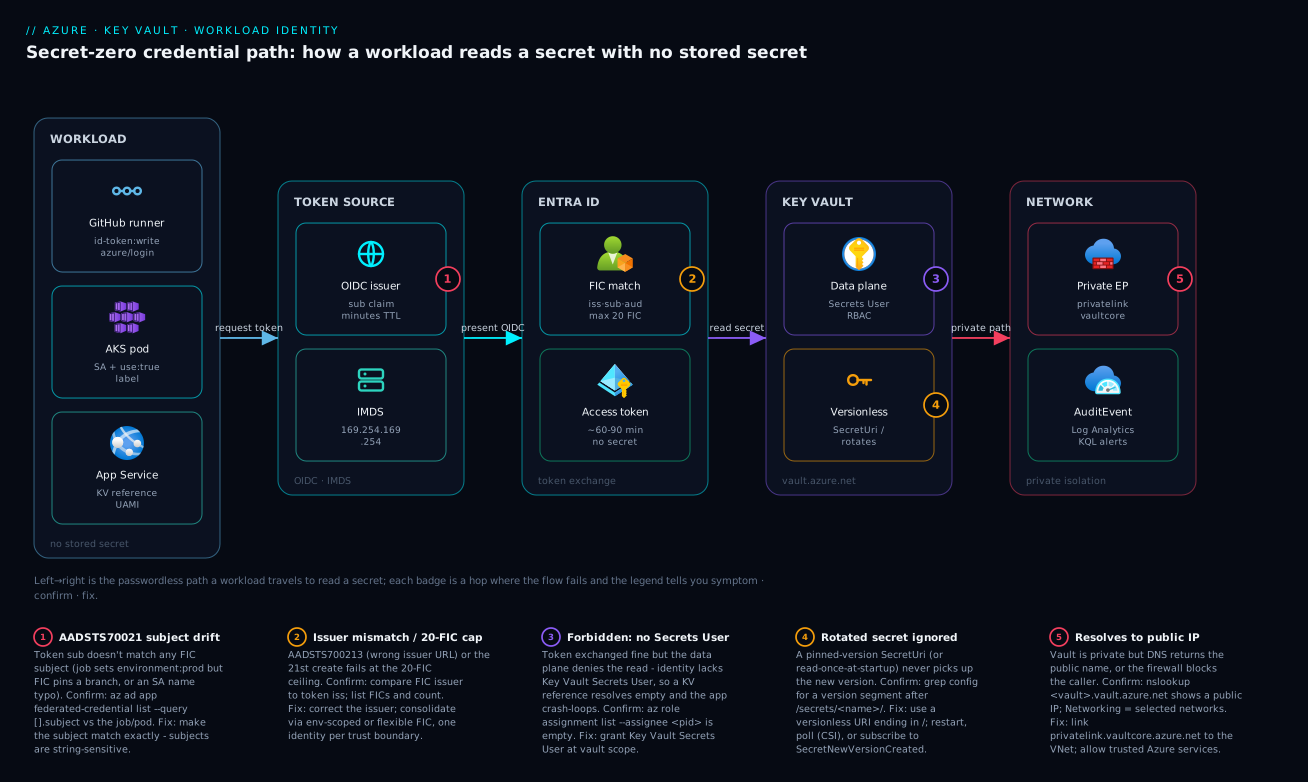
The diagram traces the credential path exactly as a workload travels it, left to right, with each numbered badge marking the precise hop where a passwordless flow fails. Read it as the secret-zero journey: a workload (a GitHub runner, an AKS pod, or an App Service) starts with no stored secret. Off-Azure, the external OIDC issuer mints a short-lived token whose sub claim names the workload; on-Azure, IMDS plays the same role. That token is presented to Entra ID, where a federated identity credential (or the managed identity itself) is matched on issuer/subject/audience and exchanged for a normal Entra access token. Only then does the workload reach the Key Vault data plane, where an RBAC data role (Key Vault Secrets User) gates whether it can read the secret value — which finally resolves the versionless reference the app consumes. The private endpoint on the right keeps that last hop off the internet.
Notice the badges cluster where trust is actually established and where it most often breaks: badge 1 on the issuer/subject (the AADSTS70021 subject-drift trap), badge 2 on the Entra FIC (issuer mismatch and the 20-FIC ceiling), badge 3 on the data-plane role grant (the Forbidden that means “no Secrets User,” not “wrong subject”), badge 4 on the versionless reference (a pinned version that silently never rotates), and badge 5 on the network path (a private endpoint whose DNS resolves to a public IP). The legend narrates each as symptom · confirm · fix — that is the whole diagnostic method: localise the failure to one hop, read the confirm command, apply the fix.
Real-world scenario
Meridian Retail runs a forty-service microservice platform on Azure: AKS for the runtime, App Service for a handful of legacy APIs, and GitHub Actions for every deployment. The platform team is six engineers; the estate spans three subscriptions in australiaeast. Their mandate from a post-incident review was blunt: after a contractor’s leaked personal access token was found to still hold deploy rights two months after offboarding, no long-lived deploy secret may exist anywhere in the estate within one quarter.
They started where the risk was highest — CI/CD. Every one of the forty repos carried the same AZURE_CREDENTIALS JSON secret for a single shared service principal. They federated each repo’s prod environment to one shared gh-deploy app registration, one FIC per repo. Within two weeks they hit the wall: the 21st az ad app federated-credential create failed with The number of federated identity credentials on the application has reached the maximum allowed value of 20. The instinct was to mint more app registrations — but that scatters role assignments and audit identity across dozens of principals, exactly the sprawl they were trying to kill.
The fix was to stop modelling identity per repo. They created one user-assigned managed identity per deployment tier (id-deploy-prod, id-deploy-nonprod) and adopted GitHub’s repository_owner claim instead of pinning each repo. Crucially, a plain sub match cannot express “any repo in this org,” so they switched to a flexible federated credential on an app registration, using claimsMatchingExpression against assertion.repository_owner gated on the prod environment:
az ad app federated-credential create \
  --id "$APP_ID" \
  --parameters '{
    "name": "gh-org-prod",
    "issuer": "https://token.actions.githubusercontent.com",
    "audiences": ["api://AzureADTokenExchange"],
    "claimsMatchingExpression": {
      "value": "claims['"'"'repository_owner'"'"'] eq '"'"'meridian'"'"' and claims['"'"'environment'"'"'] eq '"'"'prod'"'"'",
      "languageVersion": 1
    }
  }'
One credential now covered every repo the org owned, gated on prod so approvals still applied. Forty FICs collapsed to two, role assignments lived on two identities, and sign-in logs attributed every deploy to one auditable principal.
The AKS side had its own trap. Three teams had copied a working SecretProviderClass but their pods kept failing with secrets that mounted empty. The platform on-call traced it to two distinct causes via the failure table: two teams had omitted the azure.workload.identity/use: "true" pod label (so the webhook never injected the token — kubectl exec … env | grep AZURE_ came back empty), and one team’s FIC subject read system:serviceaccount:orders:orders-sa while the deployment used serviceAccountName: sa-orders — a one-token mismatch that produced AADSTS70021, not a Key Vault error, which is why they had spent a day staring at vault RBAC.
By quarter end: every pipeline federated, the AZURE_CREDENTIALS secret deleted from all forty repos, AKS on workload identity with CSI rotation polling every two minutes, App Service on versionless references, and a Resource Graph job that fails the nightly build if any app registration still carries a password credential. The contractor-token class of incident became impossible — there was no longer a stored credential to leak. The lesson on the wall: “Federation subjects map to a trust boundary, not to a repository. Model the boundary first and the credential count takes care of itself.”
The migration as a timeline, because the order of moves is the lesson:
| Week | State | Action taken | Effect | What it should have been |
|---|---|---|---|---|
| 1 | 40 repos, shared AZURE_CREDENTIALS |
Federate each repo’s prod env to one app | First repos go secretless | Sound start |
| 2 | 20 FICs created | 21st federated-credential create fails |
Hit the 20-FIC ceiling | Anticipate the ceiling up front |
| 2 | Ceiling hit | Plan to mint more app registrations | Identity/audit sprawl looming | Don’t — model the boundary |
| 3 | Re-modelled | UAMI per tier + flexible FIC on repository_owner |
40 FICs → 2; one principal per tier | The correct design |
| 4 | AKS migration | Copy SecretProviderClass, pods mount empty |
Two causes: missing label + subject typo | Use the failure table first |
| 4 | Diagnosed | Add pod label; fix FIC subject to match SA | Pods get tokens; secrets mount | — |
| 13 | Secret-free | Delete AZURE_CREDENTIALS; nightly Graph gate |
Leak-class incident impossible | The destination |
Advantages and disadvantages
The passwordless model removes the credential you most fear leaking, but it relocates the complexity into trust configuration — which has its own sharp edges. Weigh it honestly:
| Advantages (why this model wins) | Disadvantages (why it bites) |
|---|---|
| No stored credential to leak — the highest-risk secret simply does not exist | Trust config (issuer/subject/audience) is exact-match and unforgiving — one typo → cryptic AADSTS70021 |
| Nothing to rotate — rotation becomes a vault-side event, not a coordinated deploy | The 20-FIC ceiling forces you to model trust boundaries, not just wire up repos |
| Per-workload, per-environment attribution in sign-in logs | Failures are vague by design — “no matching FIC” vs “access denied” confuses teams for hours |
| RBAC data plane gives least privilege down to a single secret | Two authorization planes (control vs data) — easy to grant the wrong one |
Managed identity needs zero app config inside Azure (DefaultAzureCredential) |
Off-Azure (CI, on-prem) you must federate — IMDS isn’t there to lean on |
| Private endpoint + RBAC keeps the data plane off the internet | Disabling public access without a private path locks out your own pipelines |
| Purge protection defeats a ransomware-style destroy | Purge protection is irreversible and blocks redeploys that recreate a vault name |
The model is right for any estate that runs workloads needing credentials — which is all of them — and especially for CI/CD and AKS where the long-lived deploy secret is the crown-jewel risk. It bites hardest on teams that model identity per repository (the FIC ceiling), teams new to the control/data-plane split (wrong-role grants), and anyone who flips network isolation before landing a private path. Every disadvantage is manageable — but only if you know it exists, which is the point of this article.
Hands-on lab
Stand up a vault with RBAC, attach a user-assigned identity, store a secret, grant least privilege, and read it back as that identity — all free-tier-friendly. Then reproduce the classic Forbidden failure and fix it. Run in Cloud Shell (Bash).
Step 1 — Variables and resource group.
RG=rg-kv-lab
LOC=australiaeast
KV=kv-lab-$RANDOM        # globally-unique vault name
UAMI=id-kv-lab
az group create -n $RG -l $LOC -o table
SUB=$(az account show --query id -o tsv)
Step 2 — Create a vault with RBAC authorization (no access policies).
az keyvault create -n $KV -g $RG -l $LOC \
  --enable-rbac-authorization true \
  --sku standard -o table
Expected: a vault row; properties.enableRbacAuthorization = true.
Step 3 — Create a user-assigned identity and capture its principal ID.
az identity create -n $UAMI -g $RG -l $LOC -o table
PID=$(az identity show -n $UAMI -g $RG --query principalId -o tsv)
CID=$(az identity show -n $UAMI -g $RG --query clientId -o tsv)
echo "principalId=$PID clientId=$CID"
Step 4 — Seed a secret (as yourself — you need Secrets Officer). First grant yourself, then write:
ME=$(az ad signed-in-user show --query id -o tsv)
az role assignment create --assignee-object-id $ME --assignee-principal-type User \
  --role "Key Vault Secrets Officer" \
  --scope "/subscriptions/$SUB/resourceGroups/$RG/providers/Microsoft.KeyVault/vaults/$KV"
# wait a few seconds for RBAC to propagate, then:
az keyvault secret set --vault-name $KV --name demo-conn --value "Server=db;Pwd=p@ss" -o table
Step 5 — Reproduce the Forbidden failure. The UAMI has no data role yet. Simulate its access check:
# This lists role assignments for the UAMI on the vault — expect EMPTY (the bug)
az role assignment list --assignee $PID \
  --scope "/subscriptions/$SUB/resourceGroups/$RG/providers/Microsoft.KeyVault/vaults/$KV" -o table
Empty output is the root cause: a workload carrying this UAMI would get Forbidden on SecretGet, which surfaces as an empty Key Vault reference and a crash loop — not an obvious “denied” in the app.
Step 6 — Grant least privilege and confirm.
az role assignment create --assignee-object-id $PID --assignee-principal-type ServicePrincipal \
  --role "Key Vault Secrets User" \
  --scope "/subscriptions/$SUB/resourceGroups/$RG/providers/Microsoft.KeyVault/vaults/$KV"

az role assignment list --assignee $PID \
  --scope "/subscriptions/$SUB/resourceGroups/$RG/providers/Microsoft.KeyVault/vaults/$KV" \
  --query "[].roleDefinitionName" -o tsv
# Expected: Key Vault Secrets User
Any workload (App Service, AKS pod) carrying this UAMI can now read demo-conn via a versionless reference — with zero stored secret.
Validation checklist. You created an RBAC vault, attached a reusable identity, hit the exact Forbidden/empty-reference failure from a missing data role, and fixed it with least privilege. No secret was stored to authenticate. The steps mapped to what each proves:
| Step | What you did | What it proves | Real-world analogue |
|---|---|---|---|
| 2 | RBAC vault, no access policies | The escalation-safe model is one flag | Every new production vault |
| 4 | Grant yourself Secrets Officer |
Control and data planes are separate | Seeding secrets from CI |
| 5 | UAMI has no role → empty result | The “empty KV reference” crash has a cause | The 02:00 crash-loop |
| 6 | Grant Secrets User, confirm |
Least privilege is the fix, not Administrator |
Hardening every workload identity |
Cleanup (avoid lingering charges and a soft-deleted name).
az group delete -n $RG --yes --no-wait
# The vault soft-deletes; purge if you want the name back immediately (no purge protection here):
az keyvault purge --name $KV --no-wait 2>/dev/null || true
Cost note. A Standard vault has no hourly charge — you pay per 10,000 operations (fractions of a rupee for this lab). The UAMI is free. Deleting the resource group stops everything; the vault soft-deletes for 90 days unless purged.
Common mistakes & troubleshooting
This is the playbook — the part you bookmark. First as a scannable table you read mid-incident, then the entries that bite hardest in full.
| # | Symptom | Root cause | Confirm (exact cmd / portal path) | Fix |
|---|---|---|---|---|
| 1 | azure/login fails AADSTS70021 no matching FIC |
Workflow environment/ref ≠ FIC subject |
Compare workflow sub to az ad app federated-credential list --id <appId> |
Correct the subject string to match exactly |
| 2 | AADSTS700213 no matching issuer |
FIC issuer URL wrong / trailing slash |
az ad app federated-credential list vs token iss |
Fix the issuer URL (no trailing slash) |
| 3 | AADSTS7000215 invalid client secret |
Workflow still sends a secret, not OIDC | Workflow uses creds: JSON; no id-token: write |
Add permissions: id-token: write; remove AZURE_CREDENTIALS |
| 4 | 21st FIC create fails “maximum value of 20” | 20-FIC ceiling on the app/UAMI | az ad app federated-credential list --id <appId> | jq length |
Env-scope subjects; flexible FIC; one identity per tier |
| 5 | App boots, KV-backed setting is empty, crash loop | Identity lacks Key Vault Secrets User |
Env variables blade red error; az role assignment list --assignee <pid> empty |
Grant Secrets User at vault scope |
| 6 | Forbidden on az keyvault secret show |
No data role, or vault on access policies | az keyvault show --query properties.enableRbacAuthorization |
Grant Secrets User (RBAC) or add access policy |
| 7 | KV reference resolves to public IP / times out | Vault firewall blocks, or private DNS wrong | Vault → Networking “selected networks”; nslookup <vault>.vault.azure.net |
Add private endpoint + privatelink.vaultcore.azure.net zone; allow trusted services |
| 8 | AKS pod has no AZURE_* env vars |
Missing pod label azure.workload.identity/use |
kubectl exec … env | grep AZURE_ empty |
Add the label; restart the deployment |
| 9 | AKS pod gets token but AADSTS70021 |
FIC subject ≠ system:serviceaccount:ns:name |
Compare FIC subject to serviceAccountName |
Fix subject to match the SA exactly |
| 10 | CSI mount stuck ContainerCreating |
SecretProviderClass wrong vault/secret/clientID |
kubectl describe pod events; CSI driver logs |
Correct keyvaultName/objectName/clientID |
| 11 | Secret rotated but app still uses the old value | Pinned-version SecretUri, or read-once-at-startup |
Grep config for a version segment in the URI | Drop the version; restart or watch the file |
| 12 | Can’t recreate a vault — name “already exists” | Soft-deleted vault holds the name | az keyvault list-deleted --query "[].name" |
Recover it, or purge (if not purge-protected) |
| 13 | az keyvault purge fails Conflict |
Purge protection blocks hard-delete | az keyvault show --query properties.enablePurgeProtection |
Wait out retention — by design, not a bug |
| 14 | Deploy works on main but not on a tag |
FIC subject pins a branch, not the tag | Token sub is ref:refs/tags/… |
Add a tag-subject FIC or use a broader claim |
The expanded form, with the full reasoning for the entries that waste the most time:
1. azure/login fails with AADSTS70021 “No matching federated identity record found.”
Root cause: The OIDC token’s sub claim does not match any FIC subject. Most often the workflow lacks the environment: key (so the sub is ref:… not environment:prod), or a branch/tag/environment was renamed.
Confirm: Print the FIC subjects with az ad app federated-credential list --id "$APP_ID" --query "[].subject" and compare to how the workflow is actually triggered. Add a debug step to dump the token claims if unsure.
Fix: Make the subject string match the token exactly — including environment:prod when the job sets environment: prod. Subjects are case- and string-sensitive.
4. The 21st az ad app federated-credential create fails: “maximum allowed value of 20.”
Root cause: The 20-FIC ceiling per app/UAMI, reached because identity was modelled per repo/branch.
Confirm: az ad app federated-credential list --id "$APP_ID" | jq length returns 20.
Fix: Stop pinning each repo. Use environment-scoped subjects, or a flexible federated credential matching repository_owner on an app registration, or one identity per trust boundary (deployment tier) rather than per repo. Minting more app registrations scatters audit identity — avoid it.
5. App boots but a Key Vault-backed app setting is empty and the app crash-loops.
Root cause: The app’s identity has no Key Vault Secrets User role (or no identity is enabled, or the SecretUri is wrong), so the reference resolves to nothing. The app never sees “denied” — it sees an empty connection string.
Confirm: Portal → Environment variables shows the reference with a red error; az webapp config appsettings list --query "[?contains(value,'KeyVault')]"; check az webapp identity show and az role assignment list --assignee <principalId>.
Fix: Enable the identity; grant Key Vault Secrets User; set keyVaultReferenceIdentity if multiple UAMIs are attached; verify the secret exists/enabled and the URI (drop any pinned version).
7. The Key Vault reference resolves to a public IP or times out behind a private endpoint.
Root cause: The vault is private but DNS resolves the public name, or the vault firewall blocks the caller.
Confirm: nslookup kv-plat-prod-001.vault.azure.net returns a public IP instead of the private endpoint IP; the vault’s Networking blade shows “selected networks” without your path.
Fix: Link the privatelink.vaultcore.azure.net private DNS zone to the VNet (group id vault); allow trusted Azure services on the firewall for App Service KV references; ensure the app’s outbound routes through the VNet.
8 & 9. AKS pod can’t authenticate. Two distinct failures that look identical from the app:
8 — no AZURE_* env vars at all: the pod is missing azure.workload.identity/use: "true", so the webhook never injected the token. Confirm with kubectl exec … env | grep AZURE_ (empty). Fix: add the label, restart.
9 — env vars present but AADSTS70021: the FIC subject does not match the pod’s service account. Confirm by comparing the FIC subject to the deployment’s serviceAccountName. Fix: align the subject to system:serviceaccount:<ns>:<name> exactly.
11. A rotated secret is ignored; the app keeps using the old value.
Root cause: A pinned-version SecretUri (which never refreshes) or an app that reads the secret once at startup and caches it forever.
Confirm: Grep the config/Bicep for a version segment after /secrets/<name>/; check whether the app re-reads on each use.
Fix: Use a versionless SecretUri; for CSI mounts read the file per request; subscribe to SecretNewVersionCreated for an immediate signal, or restart on rotation.
12 & 13. Vault name conflicts and purge.
12 — “name already exists” on create: a soft-deleted vault still holds the name. az keyvault list-deleted to see it; recover with az keyvault recover, or az keyvault purge if it is not purge-protected.
13 — purge fails Conflict: purge protection is on and the retention window has not elapsed. This is by design — there is no override. Plan vault names so you do not need to recreate them.
Best practices
- RBAC for the data plane, always. Set
enableRbacAuthorization: trueand useKey Vault Secrets User/Officer/Administrator. Access policies let a control-plane role self-grant data access. - Least privilege, scoped to the secret where you can. A runtime workload gets
Secrets Userand nothing more — neverAdministratororContributor. Scope to the individual secret if the role plane allows it. - Federate, don’t store. Anything off-Azure (GitHub, GitLab, on-prem) gets a FIC, not a stored secret. Delete
AZURE_CREDENTIALSand SP passwords once federation is proven. - Model FIC subjects to a trust boundary, not a repository. One identity per deployment tier with environment-scoped or flexible subjects, so you never hit the 20-FIC ceiling or scatter audit identity.
- Prefer UAMI over system-assigned at scale. Grant Key Vault access to the UAMI once; every workload that carries it inherits access and survives blue/green.
- Reference secrets versionlessly. A versionless
SecretUriis the foundation of zero-downtime rotation; a pinned version anywhere reintroduces an outage. - Enable purge protection and soft-delete in production. They defeat accidental and malicious destruction; accept that purge protection is irreversible.
- Disable public network access and add a private endpoint — but land the private path (DNS zone, trusted services) before flipping the switch, or you lock out your own pipelines.
- Set
keyVaultReferenceIdentitywhen multiple UAMIs are attached. Otherwise the platform cannot decide which identity resolves references, and they fail. - Treat subjects as a contract. Renaming a GitHub Environment, branch, or Kubernetes service account silently breaks the FIC — change them deliberately and update the FIC in lockstep.
- Route
AuditEventto Log Analytics and alert on anomalies. Denial spikes and unexpected caller identities catch both misconfiguration and intrusion. - Gate the build on a secret-free invariant. A nightly Resource Graph sweep that fails if any app registration still carries a password credential keeps the estate honest.
The settings worth standardising across every vault and identity, with the value you want:
| Standard | Setting / control | Target value | Why |
|---|---|---|---|
| RBAC data plane | enableRbacAuthorization |
true |
Escalation-safe, scoped, PIM-capable |
| Purge protection | enablePurgeProtection |
true |
Defeats destructive delete |
| Soft-delete retention | softDeleteRetentionInDays |
90 |
Maximum recovery window |
| Network | publicNetworkAccess |
Disabled (+ PE) |
Data plane off the internet |
| Default network action | networkAcls.defaultAction |
Deny (+ trusted bypass) |
Deny-by-default with platform exceptions |
| Runtime role | data role on workload identity | Key Vault Secrets User |
Least privilege |
| Reference form | SecretUri |
versionless (…/) |
Zero-downtime rotation |
| KV ref identity | keyVaultReferenceIdentity |
the chosen UAMI | Disambiguates multi-UAMI resolution |
Security notes
- Eliminate the credential, don’t just hide it. The strongest control is that no stored secret grants access at all — federation and managed identity achieve that. Where a secret is unavoidable, it lives in exactly one vault, read via a least-privilege data role.
- Separate control and data planes. Operators who manage the vault (
Key Vault Contributor) should not automatically read secret values; data access is a separateSecrets User/Officergrant. RBAC enforces this split; access policies do not. - Least privilege and scope. Grant
Secrets Userat the secret scope where possible, not the whole vault, and never grantAdministratorto a runtime identity. Use PIM to make break-glassAdministratoreligible, not standing. - Network-isolate the data plane. Private endpoint plus
publicNetworkAccess: Disabledkeeps secret reads on the backbone. A firewall withdefaultAction: Denyand trusted-services bypass admits only the platform integrations you need. - Protect against destruction. Purge protection plus soft-delete defeats a ransomware-style destroy; diagnostic logs make every delete attributable.
- Pin and scan what pulls secrets. For AKS, pin image digests and scan images; the workload identity is only as trustworthy as the code it runs.
- Treat federation subjects as security boundaries. An over-broad subject (e.g.
pull_requestfrom any fork) is an access-grant; prefer environment-scoped subjects with approvals, and audit flexible-FIC claim expressions like any other policy. - Watch the audit log. A spike in
SecretGet, access from an unexpectedappid, or reads from outside expected IPs is an early intrusion or misconfiguration signal — alert on it.
The security controls and what each defends against:
| Control | Mechanism | Defends against | Also prevents |
|---|---|---|---|
| Federation / managed identity | FIC, IMDS | Leaked long-lived secret | Rotation outages |
| RBAC data plane | Secrets User/Officer roles |
Privilege escalation via control plane | Over-broad data access |
| Secret-scoped assignment | Role at /secrets/<name> |
One identity reading every secret | Lateral access within a vault |
| Private endpoint + firewall | publicNetworkAccess: Disabled |
Data plane exposed to the internet | Exfil from outside the VNet |
| Purge protection + soft-delete | Vault data-protection flags | Malicious/accidental destroy | Irrecoverable loss |
| Environment-scoped subjects | FIC subject + GH protection rules | Untrusted repos/forks deploying | Unapproved production deploys |
AuditEvent + alerts |
Diagnostic logs → KQL | Silent abuse | Undetected misconfiguration |
Cost & sizing
The bill for this whole pattern is dominated by operations, not capacity — which is why it is one of the cheapest security wins available.
- Key Vault is priced per operation, not per hour. A Standard vault charges per 10,000 secret operations (a few rupees per 10k); a Premium vault adds HSM-backed key operations at a higher per-op rate and a small per-key monthly charge for HSM-protected keys. Most secret-only workloads never leave Standard.
- Managed identities and FICs are free. UAMIs, system-assigned identities, and federated credentials cost nothing — the savings versus rotating and storing secrets are pure upside.
- The hidden cost is operation volume. Apps that read a secret on every request instead of caching it can generate millions of vault operations and a surprising bill; cache with a sane TTL (Key Vault references and the CSI driver do this for you).
- Private endpoints add a small hourly charge plus per-GB processing — modest, and the right trade for keeping the data plane private. Budget one private endpoint per vault per VNet that needs it.
- Log Analytics ingestion for
AuditEventis billed per GB — trivial for most vaults, but a high-traffic vault’s audit stream is worth a retention/sampling review.
A rough monthly picture and what drives each line:
| Cost driver | What you pay for | Rough INR / month | What it buys | Watch-out |
|---|---|---|---|---|
| Standard vault operations | Per 10k secret ops | ~₹20–200 (typical app) | The secret store itself | Per-request reads blow this up |
| Premium vault (HSM keys) | Higher per-op + per-key | ~₹400+ per HSM key | FIPS 140-2 L2 key protection | Only if you need HSM-backed keys |
| Managed identities / FICs | — | ₹0 | Passwordless auth | None |
| Private endpoint | Hourly + per-GB | ~₹400–900 each | Data plane off the internet | One per vault per VNet |
Log Analytics (AuditEvent) |
Per-GB ingestion | ~₹100–1,000 | Queryable audit trail | High-traffic vaults ingest more |
| Caching layer (your design) | — | ₹0 | Cuts operation count ~10–100× | Stale-vs-throttle TTL tuning |
The cache-vs-cost trade-off as a table — pick a TTL that fits the secret’s rotation cadence:
| Read pattern | Vault ops | Rotation latency | Cost | Use when |
|---|---|---|---|---|
| Per request, no cache | Very high | Instant | Highest | Almost never |
| Cache with short TTL (1–5 min) | Moderate | ≤ TTL | Low | Frequently-rotated secrets |
| KV reference / CSI poll | Low | Refresh/poll interval | Low | App Service / AKS default |
| Cache + Event Grid invalidation | Lowest | Seconds (event-driven) | Lowest | Rotation-sensitive, high-traffic |
Going deeper
The steps above optimise for the federation half of a secret-free estate. This section goes under the hood of the other half — the data-plane objects Key Vault actually holds (secrets, keys, certificates), the Managed HSM tier most teams meet only when a compliance auditor asks for it, and the rotation nuance that separates “the vault rotates it for you” from “you must automate it.” None of this contradicts the earlier model; it fills the corners the passwordless walkthrough skipped.
Keys are crypto-as-a-service, not just stored strings
A secret is an opaque value the vault hands back verbatim. A key is different: the private key never leaves the vault. You do not download an RSA private key and sign locally — you call the vault to sign, unwrapKey, or decrypt, and only the result comes back. This is why keys carry their own RBAC roles (Key Vault Crypto User to use a key, Key Vault Crypto Officer to manage one) distinct from the secret roles: reading a secret value and performing a cryptographic operation are genuinely different privileges.
| Key attribute | Values | Notes |
|---|---|---|
kty (key type) |
RSA, RSA-HSM, EC, EC-HSM, oct-HSM |
-HSM = hardware-protected (Premium vault or Managed HSM); oct-HSM (symmetric AES) is Managed HSM only |
size (RSA) |
2048, 3072, 4096 | Larger = slower ops; 3072 is a common CMK default |
curve (EC) |
P-256, P-384, P-521, P-256K | P-256K (secp256k1) for blockchain-style signing |
ops |
encrypt/decrypt, wrapKey/unwrapKey, sign/verify |
Grant only the operations the workload performs |
exportable |
true / false | Almost always false; a non-exportable HSM key cannot be extracted at all |
Keys are the one Key Vault object with native, first-class rotation — the vault generates the new version itself because it owns the material. Set a rotation policy and forget it:
az keyvault key create --vault-name kv-plat-prod-001 --name cmk-storage \
  --kty RSA --size 3072 --ops wrapKey unwrapKey --exportable false

# Native auto-rotation: rotate 30 days before expiry, notify 30 days out, 1-year lifetime
az keyvault key rotation-policy update --vault-name kv-plat-prod-001 --name cmk-storage \
  --value '{
    "lifetimeActions": [
      { "trigger": { "timeBeforeExpiry": "P30D" }, "action": { "type": "Rotate" } },
      { "trigger": { "timeBeforeExpiry": "P30D" }, "action": { "type": "Notify" } }
    ],
    "attributes": { "expiryTime": "P1Y" }
  }'
Two production uses of keys dominate. BYOK (bring your own key) imports a key generated in your own HSM on-prem, wrapped with a Key Exchange Key so the plaintext key material never appears outside an HSM boundary in transit — the target must be a Premium vault or Managed HSM. Customer-managed keys (CMK) point an Azure service’s encryption-at-rest at a key you control instead of a Microsoft-managed one: Storage, SQL TDE, Cosmos DB, Managed Disks, Service Bus, and more. CMK has three hard requirements people trip over — the vault must have soft-delete and purge protection enabled, the service’s managed identity needs Key Vault Crypto Service Encryption User (get + wrap + unwrap), and you should reference the key versionlessly so the service auto-follows a rotated version. The full CMK/double-encryption story is its own topic — see Encryption at Rest, CMK & Double Encryption.
Certificates are a cert + key + secret triple under one name
A Key Vault certificate is not a fourth object type — it is three views of one thing. Create orders-tls and the vault exposes it three ways under the same name: GET /certificates/orders-tls (the X.509 metadata and policy), GET /keys/orders-tls (the private key, for signing), and GET /secrets/orders-tls (the full PFX/PEM bundle, including the private key, base64-encoded). That last one is the sharp edge: on a vault that also holds certificates, Key Vault Secrets User can exfiltrate private keys through the secret view — unless the certificate’s key is marked non-exportable or HSM-backed. Scope certificate vaults deliberately.
The certificate policy is where auto-rotation lives. It names the subject, SANs, key type, validity, the issuer, and a lifetimeActions trigger (renew at a percentage of lifetime, e.g. 80%, or N days before expiry).
| Issuer type | How it signs | Auto-rotates? | Use it for |
|---|---|---|---|
| Self-signed | Vault signs its own cert | Yes (vault renews) | Internal/dev TLS, mTLS between your own services |
| Integrated CA (DigiCert, GlobalSign) | Vault auto-enrolls with the CA | Yes (vault re-enrolls) | Public TLS where the CA is onboarded to the vault |
| Non-integrated / “Unknown” | Vault emits a CSR; you get it signed externally and merge it back | No (manual merge) | Any CA not integrated with Key Vault |
Consumers close the loop: App Service, Application Gateway, and Front Door can reference a Key Vault certificate through a managed identity and pick up renewals automatically — the same versionless discipline as secrets, applied to TLS. That is how a public certificate rotates every 90 days with nobody touching a listener.
The vault versus Managed HSM
The sku.name flag hides a bigger decision than “standard or premium.” There are effectively three key-protection tiers, and the third — Azure Key Vault Managed HSM — is a separate resource type, not a checkbox on a vault.
| Dimension | Standard vault | Premium vault | Managed HSM |
|---|---|---|---|
| Key protection | Software | Shared/multi-tenant HSM | Single-tenant dedicated HSM pool |
| FIPS validation | 140-2 Level 1 | 140-2 Level 2 | 140-2 Level 3 (140-3 on newer pools) |
| Stores | Secrets, keys, certs | Secrets, keys, certs | Keys only (RSA, EC, symmetric oct-HSM) |
| Authorization | Azure RBAC / access policies | Azure RBAC / access policies | Local (HSM) RBAC — its own plane |
| Throughput | Shared limits | Shared limits | Dedicated, high crypto throughput |
| Cost model | Per operation | Per op + per HSM key | Flat hourly per HSM pool (much higher floor) |
| Reach for it when | Secrets + most keys | HSM-backed keys, cheap entry | FIPS L3, single-tenancy, secure key release, high volume |
Two Managed-HSM concepts have no vault equivalent. First, its local RBAC is administered at the data plane with roles like Managed HSM Crypto User and Managed HSM Administrator — Azure RBAC control-plane roles do not grant key access, which surprises teams expecting Owner to work. Second, the security domain: at activation you download an encrypted blob protected by a quorum (e.g. 3-of-5) of RSA key pairs you supply, and without it the HSM cannot be recovered or cloned — it is also the cryptographic proof that Microsoft cannot access your keys. Lose the security domain and the quorum keys and the HSM is unrecoverable by design. Managed HSM is the substrate for secure key release to confidential VMs; that attestation-gated flow is covered in Managed HSM & Secure Key Release.
What the vault rotates itself, and what it cannot
Step 6 treated rotation as “a vault-side event consumers observe.” True — but who creates the new version differs by object type, and conflating them is a common planning error:
| Object | New version created by | Native rotation? | The catch |
|---|---|---|---|
| Key | The vault (it owns the material) | Yes — rotation policy | Consumers must use a versionless key id to follow it |
| Certificate | The vault, via the issuer | Yes — policy lifetimeActions |
Non-integrated issuers need a manual merge |
| Secret (external credential) | You / your automation | No — the vault can’t log into your database | Subscribe to SecretNearExpiry, run a Function that rotates the source and writes the new value back |
The distinction is the whole point: the vault can mint a new RSA key or renew a self-signed cert because that material originates inside it. It cannot rotate a third-party API key or a database password, because rotating those means calling that system — so a “secret” whose value lives in an external system is rotated by an Event Grid SecretNearExpiry → Function loop you build, not by a policy. The managed-identity-driven version of that loop is walked end to end in Key Vault Secret Rotation with Managed Identity.
Why AAD Pod Identity was retired
Step 5 says pod-managed identity is deprecated; here is why, because the failure modes teach the design. The old AAD Pod Identity ran a NMI (Node Managed Identity) DaemonSet that intercepted the pod’s IMDS calls to 169.254.169.254 and brokered a UAMI token, wiring pods to identities through AzureIdentity/AzureIdentityBinding CRDs. It worked, but the seams hurt: a race between pod start and identity assignment produced intermittent 404s, identity was effectively node-scoped (any pod that could reach the node NMI was in the blast radius), and IMDS interception was fragile under scale and node churn.
Microsoft Entra Workload ID discards interception entirely. The cluster runs an OIDC issuer; a mutating webhook projects a signed service-account token into the pod; the SDK exchanges that token with Entra against a federated credential scoped to the exact service account. No CRDs, no DaemonSet on the IMDS path, and trust is per-service-account rather than per-node. It is the same issuer/subject/audience machinery as GitHub OIDC — which is the elegance: one federation model, whether the workload is a pod or a pipeline.
| Aspect | AAD Pod Identity (retired) | Entra Workload ID (current) |
|---|---|---|
| Token delivery | NMI intercepts IMDS | Projected SA token → OIDC exchange |
| Trust granularity | Node-scoped (CRD binding) | Per service account (FIC subject) |
| Moving parts | NMI + MIC + 2 CRDs | OIDC issuer + mutating webhook |
| Failure signature | Intermittent 404 on token | Deterministic AADSTS70021 on subject typo |
| Status | Deprecated / OSS archived | GA, the supported model |
Common beginner mistakes
The troubleshooting table earlier is symptom → cause → fix for when something is already broken. This one is different: it is the set of misconceptions that make beginners build the wrong thing in the first place. Each is a wrong mental model and the right one to replace it with.
| Misconception | Why it’s wrong | The right mental model |
|---|---|---|
| “We put secrets in a vault, so we’re secure.” | If the workload authenticates to the vault with a stored client secret, you have only moved the risk one hop upstream — that stored secret is now the crown jewel. | Eliminate the bootstrap credential. A vault reached via a stored secret is a vault with a key under the doormat; a vault reached via managed identity or federation has no key to lose. |
| “Managed identity and federation are two different products to choose between.” | They are two entrances to the same building. Both end in an ordinary short-lived Entra access token and zero stored secrets. | The only fork is location: inside Azure’s IMDS reach → managed identity; outside it (CI, other clouds, on-prem) → federation. Same destination, different door. |
“Key Vault Contributor lets my app read secrets.” |
That is a control-plane role — it manages the vault (and can self-grant data access), but under RBAC it does not grant reading secret values. | Control plane manages the box; data plane reads what’s inside. A runtime workload gets the data role Key Vault Secrets User and nothing more. |
“AADSTS70021 means my role assignment is wrong, so I’ll fix RBAC.” |
No token was ever exchanged, so nothing reached the data plane to be denied. It is a subject/issuer/FIC mismatch, upstream of RBAC entirely. | If the token never exchanged, it is a trust-assertion problem (fix the FIC subject), not a permissions problem. Roles are irrelevant until a token arrives. |
| “A certificate in Key Vault is just a certificate.” | It is a cert + private key + secret under one name; anyone with Key Vault Secrets User can pull the full PFX — private key included — through the secret view. |
Treat a certificate vault as holding private keys, and scope Secrets User accordingly (or mark the key non-exportable/HSM-backed). |
| “Rotating a secret means redeploying every consumer.” | Pinning a version or hardcoding a value is what forces the coordinated redeploy — the outage is self-inflicted. | Store it once, reference it versionlessly everywhere, and let consumers follow the current version on their own refresh cadence. Rotation is an event they observe, not a deploy you orchestrate. |
| “Managed HSM is just a pricier Key Vault.” | It is a different resource with a different authorization plane: single-tenant, keys-only, governed by local HSM RBAC, gated by a security domain you must never lose. | Reach for it only for FIPS 140-2 Level 3, single-tenancy, or secure key release — not as a default upgrade. Its flat hourly floor and separate RBAC are deliberate, not overhead. |
The thread running through all seven: name the plane and the trust boundary before you grant anything. Most passwordless mistakes are a plane confusion (control vs data) or a boundary confusion (per-repo vs per-tier) dressed up as a permissions bug.
Interview & exam questions
1. What is the secret-zero problem and how do managed identity and federation solve it? Secret-zero is the bootstrap credential: to read a secret you must authenticate, and if that authentication is itself a stored secret you have only moved the problem upstream. Managed identity (inside Azure) and workload identity federation (outside) solve it by having the platform issue a short-lived token that Entra ID trusts, so no durable credential is stored anywhere.
2. Why prefer Azure RBAC over access policies for a Key Vault data plane? Access policies are a flat per-vault list, and anyone with vaults/write (Contributor) can self-grant data access — a privilege-escalation path. RBAC separates control-plane from data-plane permissions, supports scoping to a single secret, integrates with PIM, and is the default for new vaults. A runtime workload should get Key Vault Secrets User and nothing more.
3. A GitHub Actions deploy fails with AADSTS70021. What’s wrong and how do you confirm? The OIDC token’s sub claim does not match any federated identity credential’s subject — usually the workflow sets environment: prod but the FIC subject pins a branch (or vice versa), or something was renamed. Confirm by listing FIC subjects (az ad app federated-credential list) and comparing to how the job is triggered. Fix the subject to match exactly; subjects are string-sensitive.
4. What are the three fields of a federated identity credential, and what does each match? Issuer (the OIDC issuer URL, matched against the token’s iss), subject (the exact sub claim identifying the workload — a repo+environment or a Kubernetes service account), and audience (for Entra, always api://AzureADTokenExchange). All three must match the incoming token exactly or Entra returns “no matching federated identity,” not “access denied.”
5. When do you use a system-assigned versus a user-assigned managed identity? System-assigned when the identity should live and die with one resource (a standalone service). User-assigned (UAMI) when many workloads share access or the identity must survive blue/green replacement — you grant Key Vault RBAC to the UAMI once and every workload that carries it inherits access. AKS workload identity and external federation require a UAMI (or app), since system-assigned identities cannot hold FICs.
6. An app boots but a Key Vault-backed setting is empty and it crash-loops, with no exception. What do you check? A Key Vault reference resolved to nothing because the identity isn’t enabled, lacks Key Vault Secrets User, the vault firewall blocks it, or the SecretUri is wrong. Check the Environment variables blade for a red reference error, az webapp identity show, and az role assignment list --assignee <principalId>. With multiple UAMIs attached, also set keyVaultReferenceIdentity.
7. Why might an AKS pod fail to get a token even though workload identity is enabled? Two distinct causes: the pod is missing the azure.workload.identity/use: "true" label, so the webhook never injects the env vars/token (kubectl exec … env | grep AZURE_ is empty); or the FIC subject doesn’t match the pod’s service account (env vars present but AADSTS70021). Fix the label or align the subject to system:serviceaccount:<ns>:<name>.
8. You hit “maximum allowed value of 20” creating federated credentials. What now? You hit the 20-FIC ceiling because identity was modelled per repo/branch. Don’t mint more app registrations (that scatters audit identity). Consolidate with environment-scoped subjects, or a flexible federated credential matching repository_owner on an app registration, or one identity per deployment tier — model the trust boundary, not the repository.
9. How do you rotate a secret with zero downtime? Reference it versionlessly everywhere (a SecretUri ending in /), store it in exactly one vault, and let consumers follow the current version: App Service KV references re-resolve on restart/refresh, the CSI driver polls at rotation-poll-interval, and SecretNewVersionCreated via Event Grid can trigger immediate invalidation. Never pin a version or hardcode the value — that reintroduces a coordinated-deploy outage.
10. What does purge protection do, and what’s the catch? It blocks even a privileged actor from hard-deleting a vault or secret before the soft-delete retention window elapses, defeating a ransomware-style destroy. The catch: it is irreversible once enabled, and it blocks redeploys that try to recreate the same vault name within retention — so name vaults deliberately and don’t enable it in throwaway environments you recreate often.
11. How do you keep a Key Vault’s data plane off the internet without breaking App Service references? Set publicNetworkAccess: Disabled and add a private endpoint with the privatelink.vaultcore.azure.net DNS zone linked to the VNet, and enable the firewall’s trusted Azure services bypass so platform integrations (App Service KV references) still resolve. Land that private path before disabling public access, or you lock out your own pipelines.
12. What’s the difference between a control-plane 403 and a data-plane Forbidden on Key Vault? A control-plane 403 (e.g. on vaults/write) means the caller lacks an RBAC management role like Key Vault Contributor. A data-plane Forbidden (on secrets/getValue) means it lacks a data role/access policy like Key Vault Secrets User. They are governed by different planes — granting the wrong one is the classic mistake.
These map to AZ-500 (Security Engineer) — manage Key Vault, secrets, keys, certificates; configure managed identities; workload identity — and AZ-204 (Developer) — secure app configuration data, implement managed identities and Key Vault references. The federation and AKS angles touch AZ-400 and the Kubernetes specialty. A compact cert-mapping for revision:
| Question theme | Primary cert | Exam objective area |
|---|---|---|
| Key Vault RBAC vs access policies | AZ-500 | Secure data and applications; Key Vault |
| Managed identity (system vs user) | AZ-500 / AZ-204 | Implement and manage identities for resources |
| FIC fields, GitHub OIDC | AZ-400 / AZ-500 | Secure pipelines; workload identity federation |
| AKS workload identity | AKS specialty / AZ-500 | Secure Kubernetes workloads |
| KV references, rotation | AZ-204 | Secure app configuration data |
| Networking, private endpoint | AZ-500 / AZ-700 | Secure the data plane; private connectivity |
Quick check
- To read a secret from Key Vault a workload must authenticate to Entra ID. What is the name of the problem where that authentication itself needs a stored credential, and what mechanism removes it?
- A GitHub Actions job sets
environment: prodbutazure/loginfailsAADSTS70021. Where is the mismatch, and what one command shows you the configured value to compare against? - True or false: granting a runtime web app
Key Vault Contributoris the correct least-privilege way to let it read a secret. - Your AKS pod has none of the
AZURE_*environment variables. What single piece of Kubernetes YAML is almost certainly missing? - You rotated a secret in the vault but the App Service still uses the old value. Name the most likely cause in the reference URI.
Answers
- The secret-zero problem. It is removed by platform-issued identity — a managed identity (inside Azure, via IMDS) or workload identity federation (outside, via an OIDC token Entra trusts) — so no durable credential is stored.
- The FIC subject does not match the token’s
sub. The job’ssubisrepo:ORG/REPO:environment:prod, so the FIC subject must be exactly that. Confirm the configured value withaz ad app federated-credential list --id <appId> --query "[].subject". - False.
Key Vault Contributoris a control-plane role (manage the vault) and lets the identity self-grant more access. The least-privilege data-plane role to read secret values isKey Vault Secrets User. - The pod (template) label
azure.workload.identity/use: "true". Without it the mutating webhook does not inject the projected token or theAZURE_*env vars, so the SDK has nothing to exchange. - A pinned secret version in the
SecretUri(a version segment after…/secrets/<name>/). A pinned version never refreshes; use a versionless URI ending in/so the current version is resolved.
Practice challenges
Work these in order — each builds on the vault and user-assigned identity from the hands-on lab. Commands are illustrative and use placeholder names; none is run live here. Try each before opening the solution.
Challenge 1 (beginner) — Prove a vault is escalation-safe. You inherit a vault and need to confirm it uses RBAC, not legacy access policies, before trusting it. Find the one property that tells you.
<details> <summary>Solution</summary>
az keyvault show -n kv-plat-prod-001 -g rg-platform-prod \
  --query "properties.enableRbacAuthorization" -o tsv
# true  → RBAC data plane (good).  false/blank → access policies (escalation-prone).
Why: enableRbacAuthorization: true means data access is granted by role assignments a control-plane role cannot self-grant — the whole reason RBAC is the default for new vaults.
</details>
Challenge 2 (beginner) — Least privilege at the secret scope. Grant your UAMI read access to only the secret orders-db-conn, not the whole vault.
<details> <summary>Solution</summary>
az role assignment create \
  --assignee-object-id "$PID" --assignee-principal-type ServicePrincipal \
  --role "Key Vault Secrets User" \
  --scope "/subscriptions/$SUB/resourceGroups/rg-platform-prod/providers/Microsoft.KeyVault/vaults/kv-plat-prod-001/secrets/orders-db-conn"
Why: scoping the role to /secrets/<name> (not the vault) means a compromise of this identity leaks one secret, not every secret in the vault — least privilege where the RBAC plane allows it.
</details>
Challenge 3 (intermediate) — Wire an App Service to rotate for free. Point an app setting at orders-db-conn so rotation propagates with no redeploy, on an app that has two UAMIs attached.
<details> <summary>Solution</summary>
az webapp config appsettings set -n app-orders-prod -g rg-platform-prod \
  --settings "Db__ConnString=@Microsoft.KeyVault(SecretUri=https://kv-plat-prod-001.vault.azure.net/secrets/orders-db-conn/)"
# With >1 UAMI attached, tell the platform WHICH identity resolves references:
az webapp update -n app-orders-prod -g rg-platform-prod \
  --set keyVaultReferenceIdentity="/subscriptions/$SUB/resourceGroups/rg-platform-prod/providers/Microsoft.ManagedIdentity/userAssignedIdentities/id-orders-api"
Why: the versionless SecretUri (trailing /) re-resolves to the current version on refresh; keyVaultReferenceIdentity disambiguates which of the two identities does the resolving — omit it and the reference fails.
</details>
Challenge 4 (intermediate) — Make a key rotate itself. Create a CMK-style RSA key that the vault auto-rotates 30 days before a one-year expiry, with no automation of your own.
<details> <summary>Solution</summary>
az keyvault key create --vault-name kv-plat-prod-001 --name cmk-storage \
  --kty RSA --size 3072 --ops wrapKey unwrapKey --exportable false
az keyvault key rotation-policy update --vault-name kv-plat-prod-001 --name cmk-storage \
  --value '{ "lifetimeActions": [
      { "trigger": { "timeBeforeExpiry": "P30D" }, "action": { "type": "Rotate" } } ],
      "attributes": { "expiryTime": "P1Y" } }'
Why: keys are the one object the vault can rotate natively because it owns the material — no Event Grid, no Function. Consumers using a versionless key id follow the new version automatically. </details>
Challenge 5 (advanced) — Prove a GitHub deploy uses no secret. Federate the prod environment of contoso/orders-api and show the workflow logs contain no credential — only identifiers.
<details> <summary>Solution</summary>
az ad app federated-credential create --id "$APP_ID" --parameters '{
  "name": "gh-orders-prod-env",
  "issuer": "https://token.actions.githubusercontent.com",
  "subject": "repo:contoso/orders-api:environment:prod",
  "audiences": ["api://AzureADTokenExchange"] }'
permissions: { id-token: write, contents: read }
jobs:
  deploy:
    environment: prod                      # adds environment:prod to the sub
    steps:
      - uses: azure/login@v2
        with:                              # variables, NOT secrets
          client-id: ${{ vars.AZURE_CLIENT_ID }}
          tenant-id: ${{ vars.AZURE_TENANT_ID }}
          subscription-id: ${{ vars.AZURE_SUBSCRIPTION_ID }}
Why: client-id/tenant-id are identifiers, not credentials — leaking them grants nothing without the matching OIDC trust, which is why there is nothing in the repo to rotate or steal.
</details>
Challenge 6 (advanced) — Collapse 40 FICs into 2. You have 40 repos, one FIC each, and the 21st federated-credential create just failed with “maximum allowed value of 20.” Redesign to two identities without minting 40 app registrations.
<details> <summary>Solution</summary>
# One flexible FIC per tier, matching any repo the org owns, gated on the prod environment
az ad app federated-credential create --id "$APP_ID_PROD" --parameters '{
  "name": "gh-org-prod",
  "issuer": "https://token.actions.githubusercontent.com",
  "audiences": ["api://AzureADTokenExchange"],
  "claimsMatchingExpression": {
    "value": "claims['\''repository_owner'\''] eq '\''contoso'\'' and claims['\''environment'\''] eq '\''prod'\''",
    "languageVersion": 1 } }'
Why: a plain sub match cannot express “any repo in this org,” so a flexible federated credential matching repository_owner collapses 40 exact-match FICs into one per deployment tier — you model the trust boundary, not the repository, and never hit the 20-FIC ceiling.
</details>
Glossary
-
Key Vault — Azure’s managed store for secrets, keys, and certificates, with a control plane (manage the vault) and a data plane (read/write values).
-
Secret-zero — the bootstrap credential you would need to authenticate in order to read a secret; the problem managed identity and federation eliminate.
-
Managed identity — a platform-minted, platform-rotated identity for an Azure resource, exposed via IMDS; needs no stored secret.
-
System-assigned identity — a managed identity whose lifecycle is tied 1:1 to a single resource (created and deleted with it).
-
User-assigned managed identity (UAMI) — a standalone, reusable managed-identity resource attached to many workloads; can hold federated credentials.
-
IMDS — the Instance Metadata Service (
169.254.169.254) that issues an in-Azure workload its managed-identity token. -
Workload identity federation — configuring Entra ID to trust an external OIDC issuer’s token in exchange for an Entra access token, with no stored secret.
-
Federated identity credential (FIC) — the trust assertion (issuer, subject, audience) on an app or UAMI that Entra matches against an incoming OIDC token.
-
Issuer / subject / audience — the three FIC fields: the OIDC issuer URL, the exact
subclaim of the workload, andapi://AzureADTokenExchangefor Entra. -
Access policy — the legacy, escalation-prone, per-vault data-plane permission model; superseded by RBAC.
-
RBAC data role —
Key Vault Secrets User/Officer/Administrator(and crypto/cert equivalents) granting least-privilege data-plane access. -
Key Vault reference — an app setting of the form
@Microsoft.KeyVault(SecretUri=…)resolved at boot by the app’s managed identity. -
keyVaultReferenceIdentity— the site setting that tells App Service which attached identity resolves Key Vault references when more than one is present. -
CSI Secrets Store — the Kubernetes provider that mounts Key Vault secrets as files in a pod, working in workload-identity mode.
-
Versionless URI — a
SecretUriending in/(no version segment) that resolves the current version, enabling zero-downtime rotation. -
Purge protection — an irreversible vault setting blocking hard-delete before the soft-delete retention window elapses.
-
Soft-delete — always-on recovery of a deleted vault/secret within a retention window (7–90 days).
-
Flexible federated credential — a FIC on an app registration that matches token claims with expressions/wildcards (e.g.
repository_owner), beyond exact-subject matching. -
Key (crypto object) — a cryptographic key whose private material never leaves the vault; you invoke
sign/wrapKey/decryptoperations and receive only the result (crypto-as-a-service), gated byKey Vault Crypto User/Officerroles. -
Key rotation policy — a native Key Vault policy (
lifetimeActions+expiryTime) that makes the vault generate a new key version automatically, e.g. 30 days before expiry, with no external automation. -
BYOK (bring your own key) — importing a key generated in your own HSM, wrapped with a Key Exchange Key so the plaintext never leaves an HSM boundary in transit; requires a Premium vault or Managed HSM.
-
Customer-managed key (CMK) — a key you control in Key Vault used as the encryption-at-rest key for an Azure service (Storage, SQL TDE, Cosmos, Disks); needs soft-delete + purge protection and a
Key Vault Crypto Service Encryption Usergrant to the service identity. -
Certificate (Key Vault) — a single object exposed three ways under one name: the certificate view, the key view (private key), and the secret view (full PFX/PEM including the private key) — so
Secrets Usercan reach private keys on a certificate vault. -
Certificate issuer — how a Key Vault certificate is signed: self-signed, an integrated CA (DigiCert/GlobalSign, auto-enrolled), or non-integrated (you merge an externally signed cert); the first two support auto-renewal.
-
Managed HSM — a single-tenant, FIPS 140-2 Level 3 dedicated HSM pool that stores keys only, with its own local RBAC plane and a flat hourly cost — distinct from the multi-tenant Standard/Premium vault.
-
Security domain — the encrypted blob, protected by a quorum of RSA key pairs you supply, that is required to recover or clone a Managed HSM and proves Microsoft cannot access your keys; unrecoverable if lost.
-
AAD Pod Identity — the deprecated AKS mechanism that brokered identity by intercepting a pod’s IMDS calls via an NMI DaemonSet and CRDs; replaced by OIDC-based Entra Workload ID.
-
Trusted Azure services bypass — a Key Vault firewall setting that admits Microsoft platform integrations (e.g. App Service Key Vault references) while
defaultAction: Denyblocks everything else.
Next steps
You can now stand up a secret-free path end to end and diagnose where a passwordless flow breaks. Build outward:
- Next: Azure Key Vault: Secrets, Keys & Certificates — go deep on the data-plane objects you are protecting and their lifecycle.
- Related: Azure Key Vault Secret Rotation with Managed Identity — automate the rotation half with managed identity and Event Grid.
- Related: Entra Managed Identities Deep Dive: User-Assigned, FIC & RBAC — the identity objects and federated credentials in full.
- Related: AKS Secrets Store CSI: Key Vault Sync & Rotation — the file-mount path for cluster workloads, with rotation.
- Related: GitHub Actions OIDC: Keyless Deploys to Multi-Cloud — generalise federation across Azure, AWS, and GCP from one workflow.
- Related: Azure Private Endpoints & Private DNS at Scale — get the vault’s private network path right so references never resolve to a public IP.