In a nutshell
Picture a modern office building where every single door — the street entrance, the elevator, the door to each floor, and the door to each individual room — has a badge reader, and every reader checks your badge every time you approach, no matter how many doors you already walked through. Your badge opens only the rooms your job actually needs, and only during the hours you are expected. Getting into the lobby earns you nothing: the elevator still checks you, and so does the room at the end of the hall. That building is Zero Trust. The old way — one guard at the front door and free run of the building once you are inside — is exactly the “castle” model this lesson is about to bury.
Translate the building back to the cloud and the three rules fall out on their own. Every door checks every time is verify explicitly: authenticate and authorise each request on its own merits, using every signal available. Your badge opens only what you need, only when you need it is least privilege: minimum permissions, narrowest scope, shortest time. And assume somebody tailgated in behind a real employee is assume breach: design so that a stranger who slips past one door still cannot reach anything valuable behind the next one. Remember the badge-checking building and you already understand Zero Trust; the rest of this lesson is simply which Azure service plays the part of each door reader.
For a beginner the payoff is one reframing: you stop thinking about security as a wall around the outside and start thinking about it as a check at every step inside. That single shift is what separates a modern Azure architect from someone still defending a perimeter that stopped existing the day the first laptop left the office.
Level: Advanced · Time: ~28 min
Prerequisites — Be comfortable with the Azure building blocks earlier lessons covered: subscriptions and resource groups, Microsoft Entra ID and RBAC, and virtual networks. No prior security background is assumed — every term is defined the first time it appears, and there is a glossary at the end.
By the end you will be able to — (1) explain Zero Trust as a strategy (three principles) rather than a product you switch on; (2) reconcile Microsoft’s official six-pillar model with the seven-layer defence-in-depth model this lesson teaches; (3) place the right Azure control on each pillar — Conditional Access, PIM, Intune, NSG/ASG, Private Link, Defender for Cloud, Sentinel; (4) locate any estate on the Zero Trust maturity model (Traditional → Advanced → Optimal) and name its next concrete step; and (5) connect all of it to the frameworks an architect is measured against — CAF Secure, the MCSB, and Defender for Cloud Secure Score.
For thirty years, enterprise security was built like a castle: a hard outer wall — the corporate firewall — and a soft, trusting interior. Once you were “inside the network”, you were assumed to be friendly. That model died the moment laptops left the building, applications moved to SaaS, and attackers learned that one phished password drops them behind the wall, where nothing is checked again. Zero Trust is the security model that replaces the castle. Its premise is brutal and simple: there is no trusted interior. Every request — from any user, on any device, to any resource — is treated as if it originated on an open, hostile network and must prove itself, every time.
This lesson teaches Zero Trust the way a cloud architect actually applies it: as a set of three principles enforced across seven defence layers, each backed by specific Azure services. You will learn what Zero Trust means (not just the buzzword), how it maps onto identity, devices, network, application, workload, data, and your security operations centre (SOC), and how the Microsoft Cloud Security Benchmark (MCSB) turns the philosophy into a checklist you can audit against. By the end you will be able to look at any Azure estate and name, layer by layer, what is protecting it — and what is missing. This is core ground for both SC-900 (security fundamentals) and AZ-500 (the Azure security engineer exam).
Learning objectives
By the end of this lesson you can:
- State the three Zero Trust principles — verify explicitly, use least-privilege access, assume breach — and explain what each one changes about how you build systems.
- Describe the seven security layers (identity, endpoint/device, network, application, workload, data, monitoring/SOC) and what each defends against.
- Map the right Azure security service to each layer: Entra ID / Conditional Access / PIM, Intune & Defender for Endpoint, NSG / Azure Firewall / Private Link, WAF, Defender for Cloud, Key Vault & encryption, and Microsoft Sentinel.
- Explain what the Microsoft Cloud Security Benchmark is and how it relates to Defender for Cloud’s Secure Score.
- Reason about defence in depth — why no single layer is sufficient, and how layers compensate for one another when one fails.
- Run a hands-on check that surfaces your environment’s Secure Score and top security recommendations from the CLI.
Prerequisites & where this fits
You should be comfortable with Azure’s basic building blocks — subscriptions and resource groups, Microsoft Entra ID and RBAC, and virtual networks — all covered earlier in this course. You do not need prior security experience; every term is defined the first time it appears. This is Lesson G5, in the Security module of the Azure Zero-to-Hero course. It is the conceptual keystone for everything security-related that follows: where earlier lessons taught individual services, this one gives you the framework that tells you why each service exists and where it sits. The very next lesson, on Key Vault and workload identity, is the data- and secrets-layer in action.
Core concepts: what Zero Trust actually is
Zero Trust is not a product you buy or a single box you tick. Microsoft, building on the original NIST framing (SP 800-207), defines it as a security strategy grounded in three principles. Internalise these, because every design decision below flows from them.
| Principle | What it means in practice | The mindset shift |
|---|---|---|
| Verify explicitly | Authenticate and authorise every request using all available signals — identity, device health, location, resource sensitivity, real-time risk — not just “are you on the corporate network?” | Trust is earned per request, never granted by location. |
| Use least-privilege access | Give each identity the minimum permissions, for the shortest time, scoped as narrowly as possible. Use just-in-time and just-enough access, and adaptive policies. | Standing, broad admin rights are a liability, not a convenience. |
| Assume breach | Design as if an attacker is already inside. Segment to limit blast radius, encrypt end to end, and instrument everything so you can detect and respond. | The question is not if but when — so contain and observe. |
Two further ideas make these workable:
- Defence in depth. No single control is perfect, so you stack independent layers. If MFA is bypassed, device compliance still gates access; if the network is breached, data is still encrypted; if a workload is compromised, the SOC still sees the anomaly. Each layer assumes the one in front of it might fail. This is why Zero Trust is inherently multi-layer — the title of this lesson.
- The blast radius. When (not if) something is compromised, how much can the attacker reach? Least privilege and segmentation exist to make that answer “very little”. A flat network with a global-admin service account has an enormous blast radius; a micro-segmented estate with scoped, just-in-time identities has a tiny one.
A note on terminology. People say “Zero Trust” to mean three different things: the strategy (the three principles), the architecture (the layered design below), and sometimes a specific product like Zero Trust Network Access (ZTNA). In this lesson, “Zero Trust” means the strategy and the architecture; products are named explicitly.
The seven layers of the Zero Trust model
Microsoft’s Zero Trust architecture organises defences into a set of interlocking domains. Throughout, identity is the new perimeter — it is the connective tissue that every other layer leans on, because every request begins with who (or what) is asking. Here are the seven layers, what each defends, and the primary failure each one is designed to stop.
| # | Layer | Defends | Primary threat it stops |
|---|---|---|---|
| 1 | Identity | Who/what is requesting access | Credential theft, phishing, password spray |
| 2 | Endpoint / device | The device making the request | Compromised, jailbroken or non-compliant devices |
| 3 | Network | Traffic between resources | Lateral movement, unwanted exposure |
| 4 | Application | The apps users and services consume | App-layer attacks (OWASP), shadow IT |
| 5 | Workload / infrastructure | VMs, containers, PaaS, IaC | Misconfiguration, vulnerable images, drift |
| 6 | Data | The information itself | Exfiltration, leakage, unauthorised reads |
| 7 | Monitoring / SOC | Visibility across all the above | Undetected breach, slow response |
A useful way to picture it: layers 1–6 are concentric rings of prevention and containment around your data; layer 7 wraps the whole thing in detection and response. Get a request through identity, and it still faces the device check; past the device, the network; and so on inward — while the SOC watches every step. Let us walk each layer and the Azure services that implement it.
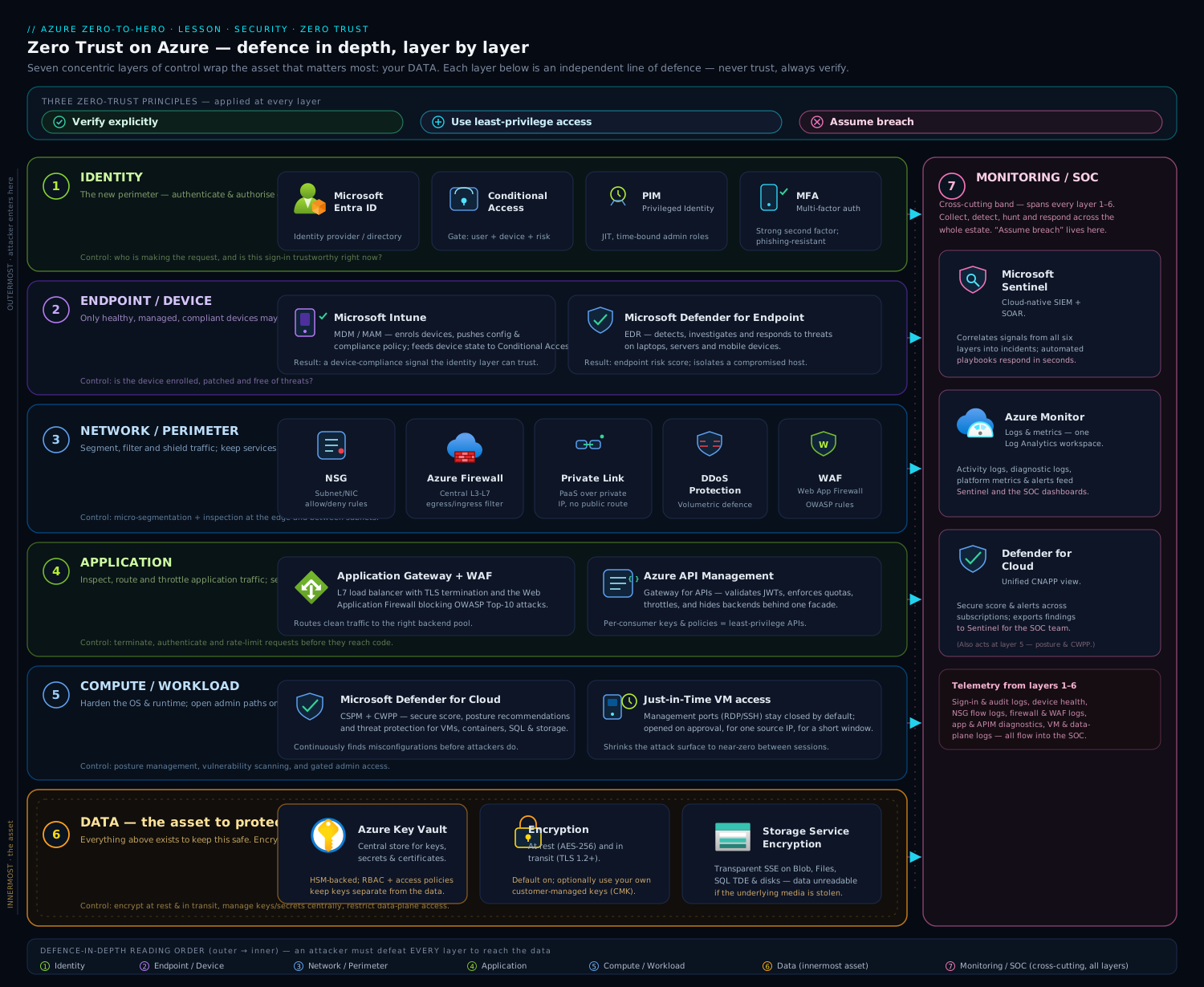
The diagram above shows the seven layers as nested rings around your data, with the Azure service that owns each layer labelled on its ring and the SOC (Microsoft Sentinel) drawing telemetry from all of them — read it from the outside in to follow a request’s journey, or from the centre out to see how data is protected in depth.
Layer 1 — Identity: the new perimeter
Because every request starts with an identity, this is the layer that matters most. If you secure only one layer well, secure this one.
Microsoft Entra ID is the identity provider: it authenticates users, groups, service principals, and managed identities, and issues the tokens that everything else trusts. (We covered Entra in depth in Microsoft Entra ID fundamentals and Entra RBAC & governance.) On top of Entra, three capabilities deliver the Zero Trust principles:
- Conditional Access (CA) is the policy engine that verifies explicitly. Every sign-in is evaluated against a set of signals — who the user is, the device’s compliance state, the location/IP, the application requested, and the real-time sign-in risk computed by Entra ID Protection — and CA returns a decision: allow, require multi-factor authentication (MFA), require a compliant or hybrid-joined device, force a password change, limit the session, or block outright. This is where “are you on the corporate network?” is replaced by “prove it, with every signal I have.” A baseline Zero Trust posture requires phishing-resistant MFA for all users and blocks legacy authentication protocols (which cannot do MFA and are a favourite of password-spray attacks).
- Privileged Identity Management (PIM) delivers least privilege for admins. Instead of standing Owner or Global Administrator rights, privileged roles are made eligible: an admin must activate the role just-in-time, often with justification, approval, and MFA, for a bounded window (say, four hours), after which it expires automatically. This shrinks the window an attacker can abuse a privileged account from “always” to “rarely”. See PIM just-in-time elevation in the governance lesson.
- Entra ID Protection supplies the risk signals — detecting leaked credentials, impossible-travel, anonymous-IP and malware-linked sign-ins — that Conditional Access consumes to make adaptive, real-time decisions. This is the “verify explicitly using real-time signals” principle made concrete.
The Zero Trust instinct here: assign roles to groups, scope them narrowly, make privilege temporary, and gate every sign-in with adaptive policy.
Layer 2 — Endpoint and device
A verified user on a compromised laptop is still a breach. The device is part of the request, so its health and compliance become an access signal.
- Microsoft Intune is the mobile device and application management (MDM/MAM) service. It enforces device compliance policies — disk encryption on, OS patched, no jailbreak, antivirus healthy — and reports each device as compliant or non-compliant to Entra. Conditional Access then consumes that state: require a compliant device becomes a grant control, so a non-compliant phone simply cannot reach corporate data. Intune also enables app protection policies that wrap corporate data inside apps (preventing copy-paste or “save as” to personal storage) even on unmanaged devices.
- Microsoft Defender for Endpoint (MDE) is endpoint detection and response (EDR): it watches process, file, and network behaviour on the device, blocks malware, and raises alerts on suspicious activity. Critically, MDE feeds a device risk score back into the loop, so a device showing active threats can be marked at-risk and have its access tightened automatically.
Together these close the assume breach gap on the endpoint: even a legitimate user is continuously re-evaluated based on the device’s live posture.
Layer 3 — Network: segment and never trust the wire
Zero Trust does not abolish the network layer — it inverts its assumption. The network is treated as hostile, traffic is micro-segmented, and resources are exposed as narrowly as possible. (Foundations are in the VNet deep dive and private endpoints at scale.)
| Service | Role in the network layer | Zero Trust contribution |
|---|---|---|
| Network Security Groups (NSGs) | Stateful allow/deny rules on subnets and NICs, by IP, port, protocol, and service tag | Micro-segmentation — default-deny between tiers limits lateral movement |
| Azure Firewall | Managed, stateful L3–L7 firewall with FQDN filtering, threat intel, and forced tunnelling | Central egress control and inspection in a hub-spoke topology |
| Azure Private Link / Private Endpoints | Brings PaaS services (Storage, SQL, Key Vault) onto your private VNet via a private IP | Removes public exposure entirely — the service is unreachable from the internet |
| Azure DDoS Protection | Absorbs volumetric attacks at the network edge | Availability under attack |
| Azure Bastion | Browser-based RDP/SSH with no public IP on the VM | Eliminates exposed management ports — a top breach vector |
The Zero Trust pattern is hub-spoke with forced tunnelling: spokes (workloads) route all egress through a hub that hosts Azure Firewall, while inbound PaaS access uses Private Link so nothing sensitive listens on a public IP. Default-deny NSGs between tiers mean that compromising the web tier does not hand the attacker the database. We cover the firewall and routing patterns in the networking module, and Azure Bastion for jump-free admin access.
Layer 4 — Application
Applications are where users and attackers actually meet, so this layer hardens the front door of your apps and brings shadow IT under control.
- Web Application Firewall (WAF) — available on Azure Application Gateway (regional) and Azure Front Door (global edge) — inspects HTTP/S traffic and blocks the OWASP Top 10 (SQL injection, cross-site scripting, and friends) via managed rule sets, plus custom and rate-limit rules. It is the application-layer complement to the network firewall: Azure Firewall guards the network, WAF guards the HTTP request. (See App Gateway WAF & end-to-end TLS.)
- Conditional Access (again) governs access to applications — both Microsoft and your own apps registered in Entra — so the same adaptive identity policy that protects sign-in protects each app.
- Microsoft Defender for Cloud Apps (a Cloud Access Security Broker, CASB) discovers shadow IT — the unsanctioned SaaS apps employees use — and lets you assess and govern them, applying session controls to risky usage.
The principle in play: verify explicitly at the app boundary, and assume the request payload itself may be malicious.
Layer 5 — Workload and infrastructure
This layer protects what runs your code: VMs, containers and AKS, App Service, databases, and the infrastructure-as-code (IaC) that provisions them. The dominant risk here is not a clever exploit but misconfiguration — a storage account left public, a VM with an open SSH port, an unpatched image.
The hub for this layer is Microsoft Defender for Cloud (MDC), which has two complementary halves:
- Cloud Security Posture Management (CSPM) — continuously assesses your resources against best-practice controls and produces a Secure Score plus prioritised, actionable recommendations (“encrypt this disk”, “restrict this NSG”, “enable MFA for these admins”). The free Foundational CSPM tier gives you the score and recommendations across the estate; the paid Defender CSPM adds attack-path analysis, agentless vulnerability scanning, and a cloud security graph.
- Cloud Workload Protection (CWP) — the paid Defender plans (Defender for Servers, for Containers, for Storage, for SQL, for App Service, for Key Vault, and more). These add runtime threat detection: a Defender-for-Servers agent raises alerts on suspicious process execution; Defender for Storage flags malware uploads and anomalous access; Defender for Containers scans images in the registry and watches the cluster at runtime.
Defender for Cloud is also where the Microsoft Cloud Security Benchmark lives as the default compliance standard — more on that next. Posture management prevents (fix it before it is exploited); workload protection detects (catch it if it is). Both embody assume breach at the infrastructure level. Shift-left further with Azure Policy as code so non-compliant resources are blocked at deploy time, and for hybrid/multi-cloud servers, Azure Arc projects the same controls onto machines outside Azure.
Layer 6 — Data: the thing you are actually protecting
Every other layer exists to protect this one. If an attacker reaches the data but it is encrypted, scoped, and labelled, the breach is contained.
- Encryption at rest is on by default for Azure Storage and managed disks using service-managed keys (SSE). For regulatory control you can supply customer-managed keys (CMK) held in Azure Key Vault (or Managed HSM), which lets you control rotation and revocation — revoke the key and the data is unreadable.
- Encryption in transit uses TLS everywhere; enforce a minimum TLS version and Secure transfer required on storage.
- Azure Key Vault is the secrets, keys, and certificates store — the heart of this layer. Apps fetch secrets at runtime using a managed identity instead of embedding credentials, and Key Vault audits every access. This is exactly the subject of the next lesson.
- Data classification and protection — Microsoft Purview Information Protection discovers and labels sensitive data (PII, financial, health) and can encrypt or restrict it based on label, so protection travels with the data wherever it goes.
The Zero Trust instinct: encrypt everything, control the keys, eliminate stored secrets, and know where your sensitive data is. The next lesson, Key Vault & workload identity, is this layer in practice.
Layer 7 — Monitoring and the SOC: assume breach, made operational
The first six layers try to prevent and contain. This one accepts that something will get through and ensures you see it and respond. It is the operational embodiment of assume breach.
- Microsoft Sentinel is Azure’s cloud-native SIEM (security information and event management) and SOAR (security orchestration, automation and response). It ingests logs and alerts from every layer above — Entra sign-ins, NSG/firewall flow logs, Defender for Cloud and Defender for Endpoint alerts, app and platform logs — into a Log Analytics workspace, correlates them with analytics rules and machine learning to surface real incidents above the noise, and drives automated response through playbooks (e.g. disable a user, isolate a device, block an IP).
- Azure Monitor and Log Analytics provide the underlying telemetry pipeline and the KQL query language Sentinel hunts with. (See the Azure Monitor deep dive.)
- Microsoft Defender XDR unifies the Defender signals (endpoint, identity, email, cloud apps) into cross-domain incidents that Sentinel can correlate further.
Without this layer, the others are flying blind: you might prevent 99% of attacks and never know about the 1% that lands. Sentinel is what turns “assume breach” from a slogan into a 2 a.m. alert and an automated containment.
The Microsoft Cloud Security Benchmark
Principles and layers are the why and the what. The Microsoft Cloud Security Benchmark (MCSB) is the how-do-I-measure-it — Microsoft’s prescriptive set of security best practices, mapped to industry standards, that you can audit your estate against.
A few things to understand for the exams and for real use:
- The MCSB is organised into control domains — Network Security (NS), Identity Management (IM), Privileged Access (PA), Data Protection (DP), Asset Management (AM), Logging & Threat Detection (LT), Incident Response (IR), Posture & Vulnerability Management (PV), Endpoint Security (ES), Backup & Recovery (BR), DevOps Security (DS), and Governance & Strategy (GS). Notice how cleanly these domains map onto the seven layers above — IM/PA to identity, NS to network, DP to data, LT/IR to the SOC, and so on. The benchmark is the layered model, expressed as auditable controls.
- Each control is cross-mapped to other frameworks — CIS Controls, NIST SP 800-53, and PCI-DSS — so satisfying the MCSB moves you toward those compliance regimes too.
- The MCSB is the default standard in Defender for Cloud. Your Secure Score is, in effect, your weighted percentage of MCSB (and related) controls satisfied across your subscriptions. Improving Secure Score is implementing the benchmark.
- Beyond MCSB, Defender for Cloud’s regulatory compliance dashboard lets you add standards (PCI-DSS, ISO 27001, SOC 2, CIS Azure Foundations) and track conformance against each.
The practical loop is: MCSB defines the controls → Defender for Cloud assesses them → Secure Score quantifies your posture → recommendations tell you the highest-impact fixes → you remediate and the score rises. That loop is how an architect drives measurable security improvement rather than guessing.
Putting it together: the layer-to-service map
Here is the single table to memorise — every layer, its Azure services, and which Zero Trust principle each most embodies. If you can reproduce this from memory, you understand the model.
| Layer | Primary Azure services | Strongest principle |
|---|---|---|
| Identity | Microsoft Entra ID, Conditional Access, PIM, Entra ID Protection, MFA | Verify explicitly + least privilege |
| Endpoint / device | Microsoft Intune, Defender for Endpoint | Verify explicitly (device signal) |
| Network | NSGs, Azure Firewall, Private Link, DDoS Protection, Bastion | Assume breach (segment, contain) |
| Application | WAF (App Gateway / Front Door), Conditional Access, Defender for Cloud Apps | Verify explicitly + assume breach |
| Workload / infra | Defender for Cloud (CSPM + workload plans), Azure Policy, Update Manager | Assume breach + least privilege |
| Data | Key Vault, encryption (SSE/CMK), TLS, Purview Information Protection | Assume breach (contain the prize) |
| Monitoring / SOC | Microsoft Sentinel (SIEM/SOAR), Azure Monitor / Log Analytics, Defender XDR | Assume breach (detect & respond) |
| Governance (cross-cutting) | Microsoft Cloud Security Benchmark, Defender for Cloud Secure Score, Azure Policy | All three (measure & enforce) |
Going deeper
You now have the seven layers and the service that owns each. This section is for the reader who wants the architect’s view sitting behind that map: how Microsoft frames the model officially, the advanced identity and network controls that separate a mature estate from a checkbox one, the maturity model that tells you where you actually stand, and where the whole industry is heading. None of this replaces the layers above — it is the depth underneath them.
Six pillars, seven layers — one model, two maps
Microsoft’s own Zero Trust guidance is organised into six pillars, not seven layers: Identities, Endpoints, Apps, Data, Infrastructure, Networks — wrapped by three cross-cutting capabilities, Visibility, Automation, and Orchestration. If you have read Microsoft docs and wondered why they say six while this lesson says seven, here is the reconciliation: the seven-layer model simply promotes that cross-cutting visibility wrapper into a first-class ring — the SOC — so beginners can see where detection lives instead of treating it as an invisible dusting over everything. The two maps describe the same territory.
| Microsoft pillar | This lesson’s layer | What changes when you name it a ring |
|---|---|---|
| Identities | Layer 1 — Identity | Same. The connective tissue every request starts with. |
| Endpoints | Layer 2 — Endpoint / device | Same. Device health becomes an access signal. |
| Networks | Layer 3 — Network | Same. The wire is hostile; segment it. |
| Apps | Layer 4 — Application | Same. Harden the front door and govern shadow IT. |
| Infrastructure | Layer 5 — Workload / infrastructure | Same. VMs, containers, PaaS, IaC. |
| Data | Layer 6 — Data | Same. The prize everything else protects. |
| Visibility, Automation, Orchestration (cross-cutting) | Layer 7 — Monitoring / SOC | Made an explicit ring so you can see where Sentinel sits. |
The practical lesson: whichever map you draw on a whiteboard, an architect must be able to point at a control and say which pillar it serves and which principle it enforces. That fluency — not the count — is what interviewers and design reviews probe.
Identity, advanced: from “MFA on” to phishing-resistant, continuous, and adaptive
Layer 1 said “require MFA and block legacy auth.” That is the floor. The ceiling looks different.
- Phishing-resistant MFA. Ordinary MFA (a push notification, an OTP code) can still be phished or MFA-fatigued. Phishing-resistant methods bind the credential to the origin so a look-alike site cannot replay it: FIDO2 security keys, Windows Hello for Business, device-bound passkeys in Microsoft Authenticator, and certificate-based authentication. You do not just hope users pick these — you require them with Conditional Access authentication strengths, a policy control that says “this app admits only phishing-resistant methods.” Reserve the strongest strength for your most sensitive apps (finance, admin portals) and you have graded assurance instead of one blunt MFA toggle.
- Continuous Access Evaluation (CAE). An access token normally lives about an hour, which means a user you just disabled can keep working until their token expires — a real assume-breach gap. CAE lets Entra ID and supporting resources (Exchange Online, SharePoint, Microsoft Graph, and more) re-evaluate a live session in near real time when a critical event fires: the account is disabled or deleted, the password is reset, an admin revokes sessions, or Entra ID Protection raises the user’s risk. The token is challenged mid-session rather than honoured to expiry. This is “verify explicitly” extended from sign-in to the whole session.
- Token protection. Stolen-token replay (lifting a valid session cookie from a compromised machine) is a rising attack. Token protection cryptographically binds a session token to the device it was issued to, so a token copied elsewhere is useless. Availability and scope are still expanding — confirm the current state in your own tenant before you depend on it — but the direction is clear: the token itself becomes device-bound.
- Least privilege past PIM. PIM removes standing privilege in time; two siblings remove it in scope. Just-Enough-Access (JEA) means custom roles and narrowly scoped assignments so an operator who only restarts VMs cannot also read Key Vault. Just-in-time (JIT) VM access (a Defender for Servers feature) keeps management ports (RDP/SSH) closed by default and opens them only for a named user, from a named IP, for a bounded window. And every workload that can use a managed identity should — a secret you never store is a secret nobody can steal.
Network: micro-segmentation and the death of the flat network
The single worst network anti-pattern is the flat network: everything in one subnet, NSGs wide open, so compromising the web tier hands the attacker the database. Zero Trust replaces it with default-deny micro-segmentation, and the tool that keeps that maintainable at scale is the Application Security Group (ASG). Instead of writing NSG rules against brittle IP ranges, you tag NICs with a role — asg-web, asg-db — and write rules between roles. Add a server to the role and it inherits the policy automatically; no rule edits, no IP bookkeeping.
az network asg create -g rg-prod -n asg-web -l eastus
az network asg create -g rg-prod -n asg-db  -l eastus

az network nsg rule create -g rg-prod --nsg-name nsg-app -n allow-web-to-db \
  --priority 200 --direction Inbound --access Allow --protocol Tcp \
  --source-asgs asg-web --destination-asgs asg-db --destination-port-ranges 5432
That rule says only members of asg-web may reach members of asg-db, and only on 5432. Everything else between the tiers is denied by the NSG’s default rules. Layer that with Private Link (so the database has no public IP at all), Azure Firewall for inspected central egress in a hub-spoke, and Azure Policy guardrails that deny the creation of a public IP or a permissive NSG rule at deploy time, and the blast radius of any single compromise collapses. Micro-segmentation is not paranoia; it is the difference between an incident and a catastrophe.
Endpoints and apps: compliance as a gate, allow-listing as a habit
Beyond the Intune compliance signal already covered, mature estates add two things. On endpoints, attack surface reduction (ASR) rules and application control (allow-listing what may execute) shrink what malware can do even after it lands, and app protection / MAM policies wrap corporate data inside apps on unmanaged devices so a personal phone can use Outlook without letting the user copy data into a personal note. For SaaS, Microsoft Defender for Cloud Apps (the CASB) moves from discovering shadow IT to governing it with real-time session controls — for example, allow a risky SaaS app to be read but block downloads to an unmanaged device. The theme is the same as identity: the grant is conditional and continuously re-evaluated, never a one-time yes.
Data: you cannot protect what you have not classified
Encryption and Key Vault (Layer 6) protect data you know about. The advanced move is classification first. Microsoft Purview Information Protection discovers sensitive data (PII, financial, health), applies sensitivity labels — manually or by auto-labelling on content patterns — and lets Data Loss Prevention (DLP) policies act on the label: block this labelled document from leaving, encrypt it so protection travels with the file even outside Azure. Pair that with customer-managed keys in Key Vault (rotate and revoke on your schedule), Key Vault RBAC + purge protection + network restriction, and you have data that is classified, encrypted, key-controlled, and audited. Classification is the step teams skip and then discover, mid-incident, that they never knew where the crown jewels were.
Assume breach, operationalised: Defender XDR and Sentinel converge
Layer 7 introduced Sentinel. The current-generation picture is convergence. Microsoft Defender XDR unifies the Defender signals — endpoint, identity, email, cloud apps — into cross-domain incidents, and Microsoft Sentinel (the SIEM/SOAR) correlates those alongside everything else, including non-Microsoft sources. Microsoft now surfaces Sentinel inside the Microsoft Defender portal as a single “unified SecOps” experience, so analysts triage one incident queue instead of pivoting between tools. The hunting language throughout is KQL:
SigninLogs
| where TimeGenerated > ago(24h)
| where RiskLevelDuringSignIn in ("high", "medium")
| summarize attempts = count(), apps = make_set(AppDisplayName)
    by UserPrincipalName, IPAddress, RiskLevelDuringSignIn
| order by attempts desc
That query surfaces risky sign-ins in the last day, grouped by user and IP — the kind of hunt an analyst turns into an analytics rule that raises an incident, which a playbook (SOAR) then answers automatically: disable the user, revoke sessions, isolate the device. The measure of this layer is not how many alerts you collect but how low you drive mean time to detect and mean time to respond.
Shift left: Zero Trust in the pipeline
Assume breach is cheapest to honour before a resource exists. The MCSB’s DevOps Security (DS) domain and Defender for Cloud’s DevOps security posture push controls into CI/CD: Azure Policy with deny effects blocks a non-compliant resource at deploy time, and Microsoft Security DevOps (MSDO) runs IaC, secret, and container scanning in the pipeline so a misconfiguration is caught in a pull request, not in production.
trigger:
  - main
pool:
  vmImage: ubuntu-latest
steps:
  - task: MicrosoftSecurityDevOps@1
    displayName: Scan IaC and containers before deploy
A finding here costs a code review; the same finding in production costs an incident. That asymmetry is the whole argument for shifting security left.
Where do you actually stand? The Zero Trust maturity model
Zero Trust is not binary; it is a journey you can measure. Microsoft frames maturity in three stages — Traditional → Advanced → Optimal — applied per pillar. Reading a row tells you the next concrete move.
| Pillar | Traditional | Advanced | Optimal |
|---|---|---|---|
| Identity | Passwords, on-prem only | MFA + Conditional Access + risk signals | Passwordless, phishing-resistant, CAE, real-time risk everywhere |
| Network | Flat VNet, wide NSGs | Segmented tiers, some Private Link | Full micro-segmentation, ASGs, no public PaaS, identity-aware access |
| Devices | Unmanaged | Enrolled + compliance policies | Compliance + EDR risk feeding access decisions in real time |
| Data | Unclassified, default encryption | Some labelling, CMK on sensitive stores | Auto-labelled, DLP-enforced, protection travels with the data |
| SOC | Ad-hoc logs | Central Sentinel workspace | XDR + Sentinel unified, ML analytics, automated response |
The US government’s CISA Zero Trust Maturity Model v2.0 tells the same story with four stages (Traditional, Initial, Advanced, Optimal) across five pillars (Identity, Devices, Networks, Applications & Workloads, Data) plus three cross-cutting capabilities (Visibility & Analytics, Automation & Orchestration, Governance). If you work with public-sector or regulated customers you will be assessed against that model; the shape maps cleanly onto Microsoft’s pillars.
How it all maps: strategy, methodology, controls, measurement
Architects get asked how Zero Trust relates to the other frameworks Microsoft ships. They are not competitors; they are four altitudes of the same climb.
| Altitude | Framework | What it gives you |
|---|---|---|
| Strategy | Zero Trust (3 principles, 6 pillars) | Why — the philosophy and the design goals |
| Methodology | CAF Secure (Cloud Adoption Framework) | How to run the programme — disciplines: access control, security operations, asset protection, security governance, innovation/DevSecOps |
| Controls | Microsoft Cloud Security Benchmark | What to implement — auditable controls per domain (NS, IM, PA, DP, LT, …) |
| Measurement | Defender for Cloud Secure Score | How you are doing — a live, weighted percentage of MCSB controls met |
The loop closes: Zero Trust sets the intent, CAF Secure turns intent into a security programme, the MCSB turns the programme into specific controls, and Secure Score turns controls into a number you can trend on a dashboard and defend in a board review. When someone asks “are we Zero Trust?”, the honest, architect-grade answer is a maturity stage per pillar plus a Secure Score trend — never a yes/no.
The direction of travel: SASE and SSE
Finally, where is this going? Toward SASE (Secure Access Service Edge) — the convergence of networking and security into one cloud-delivered edge — and its security half, SSE (Security Service Edge): secure web gateway, CASB, ZTNA (Zero Trust Network Access, the identity-aware replacement for the VPN), and firewall-as-a-service, all delivered from the cloud.
Microsoft’s SSE is Global Secure Access, delivered through two services in the Microsoft Entra Suite: Entra Internet Access (a secure web gateway plus CASB that protects access to internet, Microsoft 365, and SaaS traffic) and Entra Private Access (ZTNA that publishes private, on-prem apps without a legacy VPN). The strategically important part for this lesson is what they do to the model: Conditional Access now governs network traffic itself, not just app sign-in. A compliant network check can require that traffic flow through Global Secure Access, and access decisions gain source-IP and network signals they never had. This is identity as the new perimeter reaching its logical conclusion — the network stops being a place you trust and becomes just another resource that Conditional Access evaluates, request by request, exactly like the badge reader on every door.
Hands-on lab: read your Secure Score and top recommendations
This lab is read-only, free, and takes about ten minutes. You will surface your subscription’s Defender for Cloud Secure Score and its highest-impact recommendations from the CLI — the data-driven heartbeat of your Zero Trust posture. Use Azure Cloud Shell (bash) or a local shell with the Azure CLI; nothing here creates billable resources.
Step 1 — Sign in and select your subscription
az login --only-show-errors
az account show --query "{name:name, id:id}" --output table
Step 2 — Register the Security resource provider (one-off)
The Secure Score and recommendations live under Microsoft.Security. Registration is free and instant.
az provider register --namespace Microsoft.Security
az provider show --namespace Microsoft.Security --query "registrationState" -o tsv
Wait until it prints Registered (re-run the second line if it still says Registering).
Step 3 — Read your overall Secure Score
az security secure-scores list \
  --query "[].{name:displayName, current:score.current, max:score.max, percentage:score.percentage}" \
  --output table
Expected output (yours will differ):
Name     Current    Max    Percentage
-------  ---------  -----  ------------
ASC        28.00    58.0          0.48
A percentage of 0.48 means you have satisfied 48% of the weighted MCSB controls Defender for Cloud assesses. That single number is your Zero Trust posture, quantified.
Step 4 — List your top security recommendations
These are the concrete, prioritised fixes — each one is a control from the benchmark you have not yet met:
az security assessment list \
  --query "[?status.code=='Unhealthy'].{recommendation:displayName, resource:resourceDetails.Id}" \
  --output table 2>/dev/null | head -20
You will see items like “Management ports should be closed on your virtual machines”, “Storage account should use a private link connection”, or “MFA should be enabled on accounts with owner permissions” — each mapping directly to a layer above (network, data, identity).
Step 5 — See which regulatory standards you are tracked against
az security regulatory-compliance-standards list \
  --query "[].{standard:name, state:state}" --output table
The Microsoft Cloud Security Benchmark appears here as the default standard.
Validation
You have completed the lab when Step 3 returns a numeric Secure Score and Step 4 lists at least one recommendation. Pick the single highest-impact recommendation, read its description in the portal (Defender for Cloud → Recommendations), and note which of the seven layers it belongs to. That is the muscle this whole lesson builds: turning a finding into a layer.
Cleanup
Nothing to delete — every command was read-only and created no resources.
Cost note
Free. Reading the Secure Score, recommendations, and the Foundational CSPM data carries no charge. Cost only begins if you enable a paid Defender plan (e.g. Defender for Servers at roughly USD 15 per server per month, or Defender for Storage per-transaction). Do not enable a plan for this lab.
Practice challenges
Work these in order — they climb from “name the pieces” to “make the architect’s call.” Try each before opening its solution. Where a command is shown it is illustrative and schema-correct; nothing here is a captured live run.
1. (Beginner) Principle → control. Write the three Zero Trust principles and, for each, name the single Azure control that most embodies it.
<details> <summary>Solution</summary>
Verify explicitly → Conditional Access (evaluates every sign-in against all signals). Use least-privilege access → Privileged Identity Management (PIM) (just-in-time, time-bound privileged roles). Assume breach → Microsoft Sentinel (detect and respond across every layer). Other defensible answers exist (e.g. Entra ID Protection for verify explicitly), but these are the canonical one-each mapping.
Why: if you cannot attach a principle to a concrete control, you are reciting the buzzword, not applying the strategy. </details>
2. (Beginner) Six pillars, seven layers. List Microsoft’s six pillars and say which of this lesson’s seven layers has no matching pillar, and why it still deserves to be a ring.
<details> <summary>Solution</summary>
Pillars: Identities, Endpoints, Apps, Data, Infrastructure, Networks. The seven-layer model’s extra ring is Monitoring / SOC (Layer 7), which Microsoft treats as the cross-cutting Visibility, Automation, and Orchestration wrapper rather than a pillar. It is promoted to a ring so a learner can see where detection and response live instead of assuming it happens invisibly.
Why: the count is trivia; being able to reconcile the two maps is what a design review actually tests. </details>
3. (Intermediate) A Conditional Access baseline. In words, design the Conditional Access posture for a sensitive finance app. Name every CA feature you rely on.
<details> <summary>Solution</summary>
Target the finance app in a policy that: requires phishing-resistant MFA via a Conditional Access authentication strength; requires a compliant device (Intune grant control); blocks legacy authentication in a separate all-apps policy; scopes users by group; and excludes two break-glass accounts. Layer Entra ID Protection so a high sign-in-risk user is additionally challenged or blocked, and rely on Continuous Access Evaluation so a disabled account loses the session immediately, not at token expiry.
Why: one blunt “require MFA” toggle is the floor; graded, signal-driven, session-aware policy is the actual verify-explicitly ceiling. </details>
4. (Intermediate) Kill the flat network. You inherit one VNet with web and database VMs in a single subnet and an NSG that allows all intra-subnet traffic. Design the micro-segmentation and sketch the key rule.
<details> <summary>Solution</summary>
Tag NICs by role with Application Security Groups and write NSG rules between roles, not IP ranges, on a default-deny base:
az network asg create -g rg-prod -n asg-web -l eastus
az network asg create -g rg-prod -n asg-db  -l eastus
az network nsg rule create -g rg-prod --nsg-name nsg-app -n allow-web-to-db \
  --priority 200 --direction Inbound --access Allow --protocol Tcp \
  --source-asgs asg-web --destination-asgs asg-db --destination-port-ranges 5432
Then remove the database’s public IP with Private Link, and add an Azure Policy deny on public IPs so the flat state cannot return. New servers inherit policy by joining the ASG.
Why: micro-segmentation is the control that turns “web tier compromised” into a contained event instead of a database breach. </details>
5. (Advanced) Move a stuck Secure Score. Your Defender for Cloud Secure Score has sat at 48% for a month. Describe the remediation loop and which MCSB domains to prioritise for the biggest, fastest wins.
<details> <summary>Solution</summary>
Run the loop: sort recommendations by potential score increase (not severity), fix the highest-weight controls first, re-check, repeat. Prioritise the Identity Management (IM) and Privileged Access (PA) domains — MFA on privileged accounts, PIM, no permanent Owners — because they carry high weight and huge blast-radius reduction, then Network Security (NS) (close management ports, Private Link, restrict permissive NSGs). Chasing many low-weight items is why the score “won’t move.”
Why: Secure Score is a weighted percentage — an architect optimises for leverage, not for the count of green checks. </details>
6. (Advanced) Place yourself on the maturity model. Your estate has MFA and NSGs, plus Defender for Cloud’s free CSPM — but no PIM, no Private Link, and no Sentinel. What maturity stage are you at, and what are the next three moves toward Advanced across the pillars?
<details> <summary>Solution</summary>
You are early Traditional-to-Advanced: identity and network have a floor but no depth, and the SOC ring is effectively absent (posture visibility without detection or response). Three highest-leverage moves: (1) PIM on every privileged role to remove standing admin (Identity → Advanced); (2) Private Link + default-deny/ASG segmentation to remove public PaaS exposure and flatten blast radius (Network → Advanced); (3) stand up Sentinel with the Entra, Activity, and Defender connectors so “assume breach” becomes an actual alert and an automated response (SOC → Advanced).
Why: naming a stage and the next three moves per pillar is exactly the deliverable a real Zero Trust review produces — not a yes/no. </details>
Common mistakes & troubleshooting
| Symptom | Likely cause | Fix |
|---|---|---|
az security secure-scores list returns empty |
Microsoft.Security provider not registered, or no resources assessed yet |
Run Step 2 and wait for Registered; ensure the subscription has at least one resource |
| MFA “enabled” but attackers still get in | Legacy authentication protocols (IMAP/POP/SMTP) bypass MFA | Block legacy auth in Conditional Access; require phishing-resistant MFA |
| Conditional Access policy locks you out | No break-glass account excluded from the policy | Always create two excluded break-glass emergency-access accounts, monitored heavily |
| Secure Score barely moves after fixes | Remediated low-weight controls, not the high-impact ones | Sort recommendations by potential score increase and tackle those first |
| PaaS service still reachable from the internet after adding a Private Endpoint | Public network access not disabled; DNS not pointed at the private IP | Set public network access to Disabled and use a Private DNS zone |
| Sentinel shows no data | No data connectors enabled, or wrong Log Analytics workspace | Enable connectors (Entra, Defender, Activity) and confirm the workspace |
| Disk/storage “encrypted” but auditors want key control | Using service-managed keys (SSE) only | Switch to customer-managed keys (CMK) in Key Vault for control over rotation/revocation |
| Defender recommendations appear but no threat alerts | Only free CSPM is on; runtime detection needs paid plans | Enable the relevant Defender workload plan (Servers, Storage, etc.) |
Common beginner mistakes
These are misconceptions, not error messages — the wrong mental model that quietly steers good engineers into bad designs. The troubleshooting table above fixes symptoms; this section fixes thinking.
-
“We bought Zero Trust” / “we turned on the Zero Trust product.” There is no such product, and no switch. Zero Trust is a strategy — three principles applied across six pillars — realised by dozens of Azure controls working together. Any vendor selling you a single “Zero Trust box” is selling you one layer and a logo. Right model: Zero Trust is an architecture and a programme you mature over time, not a SKU you purchase.
-
“We enabled MFA, so we’re Zero Trust now.” MFA is one control on one layer, and it is the floor of that layer, not the ceiling. Meanwhile legacy authentication may still bypass it, service principals may hold standing Owner rights, and PaaS services may sit on public IPs. Right model: verify explicitly means every signal on every request across every layer — and defence in depth means an attacker only needs the one door you left open.
-
“Zero Trust means no network security / rip out the firewall.” Zero Trust does not abolish the network layer; it inverts its assumption. The wire is treated as hostile, so you micro-segment it, remove public exposure with Private Link, and inspect egress with Azure Firewall — and Global Secure Access is now bringing Conditional Access to the network. Right model: the network still matters enormously; you just stop trusting it.
-
“Assume breach is defeatist — it means we expect to lose.” Assume breach is not surrender; it is engineering discipline. It is why you segment to shrink blast radius, encrypt so a reached store is still unreadable, use least privilege so a stolen identity reaches little, and instrument everything so you detect and contain fast. Right model: you plan for the breach precisely so it stays small and survivable.
-
“Zero Trust just adds friction and blocks users.” Done badly it can; done well it is adaptive — friction rises only with risk. A low-risk sign-in from a compliant device sails through, while a risky one is challenged. Passwordless and phishing-resistant methods are usually less friction than the passwords they replace. Right model: the goal is right-sized trust per request, not maximum friction.
-
“Zero Trust is the identity team’s project.” Identity is the highest-leverage pillar, but a Zero Trust programme that stops there is a third of a strategy. Networks, data classification, device compliance, SecOps, and DevOps all have to move. Right model: it is a cross-cutting programme with an owner per pillar and a shared measure (Secure Score) — not one team’s task.
-
“We configured it, so we’re done.” Posture drifts, new resources appear non-compliant, attackers change tactics, and yesterday’s Advanced is tomorrow’s baseline. Right model: maturity is continuous — review Secure Score and high-severity findings on a cadence and keep climbing the model.
Best practices
- Start with identity. It is the highest-leverage layer: enforce MFA everywhere, block legacy auth, and put every privileged role behind PIM before anything else.
- Treat Secure Score as a KPI. Track it over time, set a target, and review the top recommendations weekly. It is your objective measure of Zero Trust progress.
- Default-deny, then allow. Whether NSGs, firewall rules, or Conditional Access — start from “block everything” and open only what is needed.
- Eliminate standing privilege. Just-in-time (PIM) elevation and managed identities remove the always-on credentials attackers hunt for.
- Remove public exposure. Use Private Link for PaaS and Bastion for VM management so nothing sensitive listens on a public IP.
- Centralise telemetry. Funnel every layer’s logs into one Sentinel/Log Analytics workspace — you cannot correlate what you cannot see.
- Shift security left. Enforce baselines with Azure Policy and scan IaC and container images before deployment, not after.
- Automate response. Wire Sentinel playbooks so common incidents (compromised user, malware on a host) are contained in seconds, not hours.
Security notes
Zero Trust is the security topic, so the notes here are about avoiding its classic pitfalls. The most dangerous failure mode is a false sense of completion: deploying MFA and declaring victory while legacy auth, over-privileged service principals, and public PaaS endpoints quietly remain. Defence in depth means all layers, weighted by leverage — an attacker only needs one open door. Equally, guard the break-glass accounts that are deliberately excluded from Conditional Access: they are the keys to the kingdom and must have long, vaulted passwords (or FIDO2 keys), be excluded from only the policies they must be, and trigger an alert on every use. Finally, remember that monitoring is not optional — prevention without detection is half a strategy; if Sentinel and the Defender plans are off, you are assuming breach but unable to act on it. Review your Secure Score and your high-severity recommendations on a cadence, and treat each unhealthy finding as a real, exploitable gap rather than a number to massage.
Interview & exam questions
-
What are the three principles of Zero Trust? Verify explicitly (authenticate and authorise every request using all available signals), use least-privilege access (minimum permissions, just-in-time, just-enough), and assume breach (segment, encrypt, and instrument as if an attacker is already inside).
-
What does “assume breach” change about how you architect a system? You stop relying on a trusted interior. You micro-segment the network to limit lateral movement, encrypt data end to end so a reached store is still unreadable, minimise blast radius with scoped least-privilege identities, and instrument everything so a compromise is detected and contained quickly.
-
Why is identity called “the new perimeter”? Because the network boundary no longer contains your users, devices, or apps — they are everywhere. Every request begins with an identity, so identity (Entra ID + Conditional Access) is where access is actually decided. Securing identity protects every other layer that trusts its tokens.
-
What is Conditional Access and what signals can it use? It is Entra ID’s policy engine that evaluates each sign-in against signals — user/group, device compliance, location/IP, the target application, and real-time sign-in risk — and returns a decision: allow, require MFA, require a compliant device, force a password reset, limit the session, or block. It is the “verify explicitly” principle implemented.
-
How does PIM implement least privilege? It makes privileged roles eligible rather than permanently assigned. Admins activate a role just-in-time — with justification, approval, MFA, and a time limit — after which it expires. This shrinks the window in which a privileged account can be abused from “always” to “rarely”.
-
What is the difference between Azure Firewall and a Web Application Firewall (WAF)? Azure Firewall protects the network (L3–L7, FQDN filtering, central egress control, hub-spoke). A WAF (on Application Gateway or Front Door) protects the application by inspecting HTTP/S requests and blocking the OWASP Top 10 (SQLi, XSS) at L7. They are complementary, not alternatives.
-
What are the two halves of Microsoft Defender for Cloud? CSPM (Cloud Security Posture Management) — continuous best-practice assessment producing the Secure Score and recommendations, free at the Foundational tier — and CWP (Cloud Workload Protection) — the paid Defender plans that add runtime threat detection for servers, storage, containers, SQL, and more. Posture prevents; workload protection detects.
-
What is the Microsoft Cloud Security Benchmark, and how does it relate to Secure Score? The MCSB is Microsoft’s prescriptive set of security controls (organised into domains like Network Security, Identity Management, Data Protection), cross-mapped to CIS and NIST. It is the default standard in Defender for Cloud, and your Secure Score is essentially your weighted percentage of MCSB controls satisfied — so raising Secure Score is implementing the benchmark.
-
What role does Microsoft Sentinel play in a Zero Trust architecture? Sentinel is the cloud-native SIEM/SOAR that operationalises “assume breach”: it ingests logs and alerts from every layer, correlates them into incidents, and drives automated response via playbooks. It is the detection-and-response wrapper around the preventive layers.
-
A user authenticates successfully with MFA from a compromised, non-compliant laptop. Which layer stops the breach, and how? The endpoint/device layer. Intune reports the device as non-compliant, and Conditional Access — configured to require a compliant device — blocks access despite the valid MFA. Defender for Endpoint would additionally flag the active threat and lower the device’s risk score.
-
Why is encryption at rest alone not sufficient data protection in a Zero Trust model? Because it only protects against physical media theft. A compromised application identity with read access decrypts data transparently. Zero Trust layers it: least-privilege access to the data, customer-managed keys you can revoke, classification/labelling via Purview, and monitoring for anomalous access — encryption is one control among several.
-
You enabled MFA but attackers still compromise mailboxes. What did you likely miss? Legacy authentication protocols (IMAP, POP, SMTP basic auth) that cannot perform MFA and silently bypass it. The fix is a Conditional Access policy that blocks legacy authentication outright, alongside requiring phishing-resistant MFA for interactive sign-ins.
Quick check
- Name the three Zero Trust principles.
- Which Azure service is the policy engine that decides whether a sign-in is allowed, challenged, or blocked?
- Which layer does Azure Private Link belong to, and what does it remove?
- What single number in Defender for Cloud quantifies your security posture, and what does it measure?
- Which service is Azure’s SIEM/SOAR, and which Zero Trust principle does it most embody?
Answers
- Verify explicitly, use least-privilege access, and assume breach.
- Conditional Access (in Microsoft Entra ID).
- The network layer; it removes a PaaS service’s public internet exposure by giving it a private IP on your VNet.
- The Secure Score — your weighted percentage of Microsoft Cloud Security Benchmark controls satisfied across the estate.
- Microsoft Sentinel; it most embodies assume breach (detection and response across all layers).
Exercise
Pick one real (or sandbox) Azure subscription and produce a one-page Zero Trust gap assessment. Make a seven-row table — one row per layer — and for each row write (a) the Azure service(s) currently protecting it, (b) the single biggest gap, and © the highest-impact fix. Then run the lab’s Step 3 and Step 4 to capture your Secure Score and top three recommendations, and map each recommendation to one of your seven rows. Finish with one sentence naming the one layer you would harden first and why. This is exactly the exercise an architect does in a security review — and it forces you to connect the principles, the layers, the services, and the measurable score into a single coherent picture.
Certification mapping
| Exam | Objective area this supports |
|---|---|
| SC-900 (Security, Compliance & Identity Fundamentals) | Describe the concepts of security and compliance — the Zero Trust model and its principles, defence in depth, and the shared-responsibility context. Describe Microsoft security solutions — Defender for Cloud, Sentinel, and the Defender suite at a conceptual level. |
| AZ-500 (Azure Security Engineer Associate) | Spans all five domains: Manage identity and access (Conditional Access, PIM), Secure networking (NSG, Firewall, Private Link, WAF), Secure compute, storage & databases (Key Vault, encryption, CMK), and Manage security operations (Defender for Cloud, Secure Score, MCSB, Sentinel). This lesson is the connective framework for the whole exam. |
| AZ-104 (Azure Administrator) | Implement and manage virtual networking and monitor and maintain Azure resources — the NSG/segmentation and monitoring layers covered here. |
Glossary
- Zero Trust — a security strategy that trusts no request by default and verifies each one explicitly, using least privilege and assuming breach.
- Verify explicitly — authenticate and authorise every request using all available signals, not network location.
- Least-privilege access — granting the minimum permissions, for the shortest time, at the narrowest scope.
- Assume breach — designing as if an attacker is already inside: segment, encrypt, and instrument everything.
- Defence in depth — stacking independent security layers so that the failure of one is caught by another.
- Blast radius — how much an attacker can reach once a given identity or resource is compromised.
- Conditional Access (CA) — Entra ID’s policy engine that evaluates sign-in signals and returns allow/MFA/block decisions.
- Privileged Identity Management (PIM) — just-in-time, time-bound, approved activation of privileged roles.
- Microsoft Intune — the MDM/MAM service that enforces device compliance and app protection policies.
- Defender for Endpoint (MDE) — endpoint detection and response (EDR) that protects and scores devices.
- Network Security Group (NSG) — stateful allow/deny rules applied to subnets and NICs for micro-segmentation.
- Azure Firewall — managed stateful L3–L7 firewall for central egress control and inspection.
- Private Link / Private Endpoint — brings a PaaS service onto your VNet via a private IP, removing public exposure.
- Web Application Firewall (WAF) — L7 protection against OWASP attacks on App Gateway or Front Door.
- Defender for Cloud (MDC) — Azure’s CSPM (posture/Secure Score) and CWP (runtime threat detection) platform.
- Secure Score — a weighted percentage of security controls satisfied, used as a posture KPI.
- Microsoft Cloud Security Benchmark (MCSB) — Microsoft’s prescriptive security controls, cross-mapped to CIS/NIST, and the default standard in Defender for Cloud.
- Key Vault — Azure’s managed store for secrets, keys, and certificates.
- Customer-managed key (CMK) — an encryption key you control in Key Vault, enabling rotation and revocation.
- Microsoft Sentinel — Azure’s cloud-native SIEM/SOAR for log correlation, detection, and automated response.
- SIEM / SOAR — security information & event management; security orchestration, automation & response.
- Break-glass account — an emergency-access admin account deliberately excluded from Conditional Access and heavily monitored.
- Six-pillar model — Microsoft’s official Zero Trust framing: Identities, Endpoints, Apps, Data, Infrastructure, Networks, wrapped by cross-cutting visibility, automation, and orchestration.
- Managed identity — an Entra identity Azure manages for a workload, so it authenticates to services without any stored secret.
- Application Security Group (ASG) — a label applied to NICs so NSG rules are written between roles (web, db) instead of brittle IP ranges.
- Phishing-resistant MFA — authentication bound to the legitimate origin so it cannot be phished or replayed: FIDO2 keys, Windows Hello for Business, device-bound passkeys, certificate-based auth.
- Authentication strength — a Conditional Access control that requires a specific grade of credential (e.g. phishing-resistant only) for a given app.
- Continuous Access Evaluation (CAE) — near-real-time re-evaluation of a live session so critical events (account disabled, risk raised) revoke access before the token would normally expire.
- Token protection — cryptographically binding a session token to its device so a stolen token cannot be replayed elsewhere.
- Just-in-time (JIT) VM access — a Defender for Servers feature that keeps management ports closed and opens them only for a named user, IP, and time window.
- Just-Enough-Access (JEA) — least privilege by scope: custom roles and narrow assignments so an identity can do only its specific task.
- Sensitivity label — a Microsoft Purview Information Protection tag that classifies data and can enforce encryption/restrictions that travel with the file.
- Data Loss Prevention (DLP) — policies that detect and block sensitive data (often by sensitivity label) from leaving approved boundaries.
- Microsoft Defender XDR — the platform that unifies Defender endpoint, identity, email, and cloud-app signals into cross-domain incidents.
- Unified SecOps — Microsoft’s single analyst experience surfacing Sentinel (SIEM/SOAR) inside the Microsoft Defender portal.
- KQL (Kusto Query Language) — the query language used to hunt and build analytics rules across Log Analytics and Sentinel.
- Zero Trust maturity model — a staged assessment of how far each pillar has progressed (Microsoft: Traditional → Advanced → Optimal; CISA v2.0 adds an Initial stage).
- CAF Secure methodology — the Cloud Adoption Framework’s security methodology that turns Zero Trust intent into a run-able programme (access control, security operations, asset protection, governance, DevSecOps).
- SASE / SSE — Secure Access Service Edge (network + security converged at the cloud edge) and its security half, Security Service Edge (SWG, CASB, ZTNA, FWaaS).
- ZTNA — Zero Trust Network Access: identity-aware, per-app access that replaces the all-or-nothing VPN.
- Global Secure Access — Microsoft’s SSE offering: Entra Internet Access (SWG/CASB) and Entra Private Access (ZTNA), extending Conditional Access to network traffic.
- Microsoft Security DevOps (MSDO) — tooling that runs IaC, secret, and container security scans inside CI/CD so issues are caught before deployment.
- Attack surface reduction (ASR) — endpoint rules that block common malware behaviours so a compromised process can do less.
Next steps
Continue the Security module with Eliminating Secrets: Key Vault & Workload Identity — the data-and-secrets layer in practice, where you remove long-lived credentials from your estate entirely. Then deepen specific layers:
- Entra RBAC & Governance Deep Dive — least privilege and PIM for the identity layer.
- Application Gateway WAF & End-to-End TLS — the application layer, hands-on.
- Private Endpoints & Private DNS at Scale — removing public exposure across the estate.
- Azure Policy as Code — enforcing the benchmark automatically at deploy time.