In a nutshell
DNS is a phonebook: you ask for a name (db01.corp.contoso.com) and get back an address (192.168.10.42). In a hybrid estate you have two phonebooks that don’t know about each other. On-premises has the corporate one — every server, printer, and domain controller. Azure has a private one — the privatelink.* zones that turn a storage account or Key Vault into a private IP inside your network. Neither can read the other’s book, so a name that resolves perfectly on one side comes back empty on the other.
The Azure DNS Private Resolver is a bilingual switchboard operator you install in your Azure hub. When the office asks for an Azure private name, the operator answers from the Azure phonebook. When an Azure VM asks for a corporate name, the operator places a call to the on-prem operator and relays the answer back. It speaks both directions, and — this is the whole point — it is a managed service, not a pair of VMs you patch, cluster, and get paged about at 3 a.m. The old pattern was two forwarder VMs running BIND or the Windows DNS role sitting in the middle of every lookup; the switchboard replaces both of them.
Why should a beginner care? Because the single most common “it works from Azure but times out from the office” outage is a hybrid DNS gap, and almost every private-endpoint rollout eventually hits it. Get this one service right and name resolution stops being a fragile hand-built thing you babysit.
Level: Advanced · Time: ~37 min
Prerequisites — you’ll get the most from this if you already understand:
- VNets, subnets, and peering — see Azure Virtual Network basics: subnets, NSGs, peering.
- Private endpoints and how
privatelink.*Private DNS zones work — see Private Endpoints and Private DNS at scale. - Hub-and-spoke topology and forced tunnelling — see Azure Firewall, forced tunnelling, and hub-spoke routing.
- Basic Terraform with the
azurermprovider (resources, references,apply).
After this lesson you can:
- Explain why Azure-provided DNS (
168.63.129.16) cannot serve hybrid resolution on its own. - Deploy a DNS Private Resolver with delegated inbound and outbound endpoint subnets using Terraform.
- Point on-prem DNS at the inbound endpoint so the office resolves
privatelink.*and internal Azure names. - Build a forwarding ruleset with rules and VNet links so Azure workloads resolve on-prem domains without touching a single VM NIC.
- Centralise Private DNS zones in the hub so one authoritative set of zones serves both directions.
- Migrate off legacy forwarder VMs with a validated, parallel-run cutover — and know the traps that cause post-migration outages.
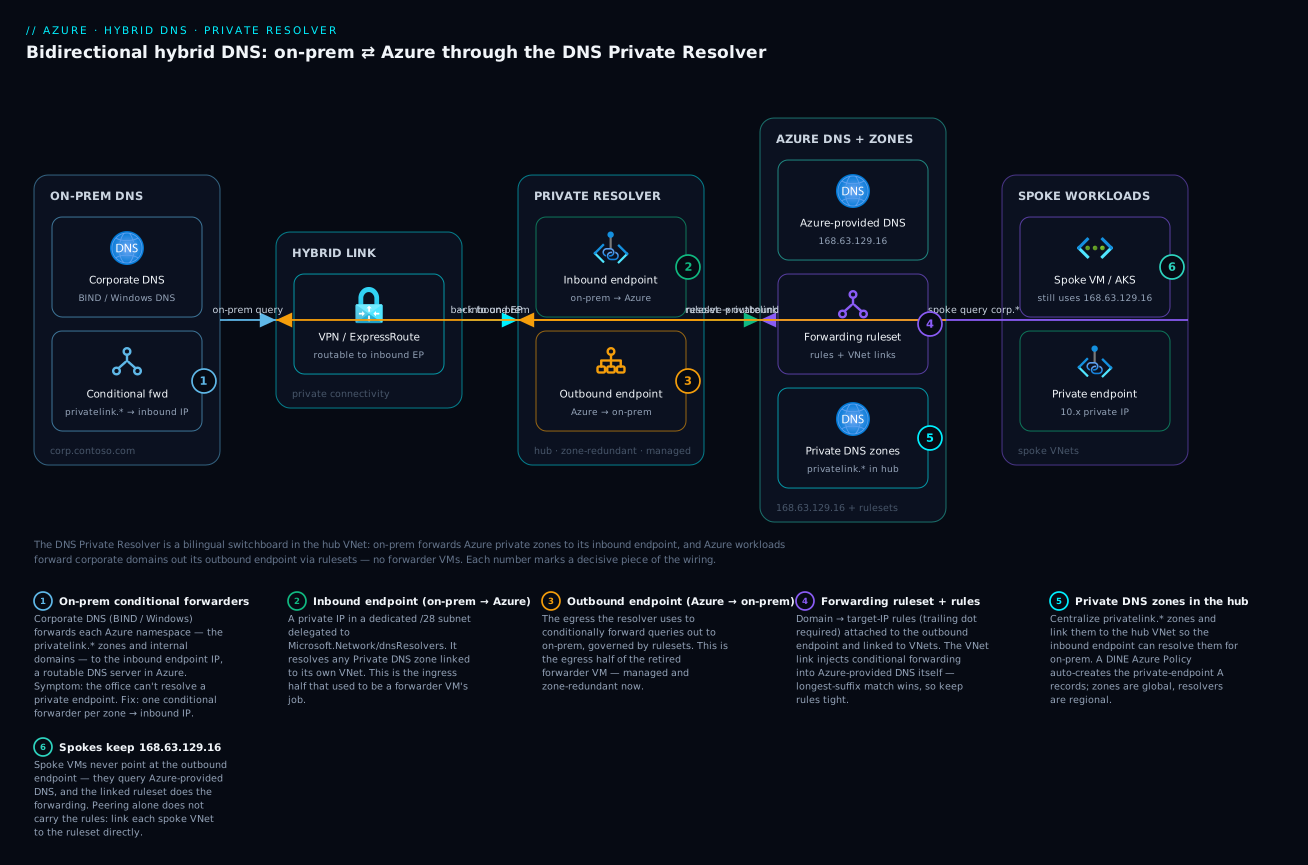
Read it as two conversations meeting at the switchboard in the middle: on-prem queries flow left-to-right into the inbound endpoint to reach the privatelink.* zones, while spoke workloads keep querying 168.63.129.16 and the linked forwarding ruleset sends corporate domains back out the outbound endpoint to on-prem — no forwarder VMs anywhere on the path.
For years the standard answer to hybrid DNS on Azure was a pair of forwarder VMs running BIND or the Windows DNS role, conditional-forwarding queries in both directions. They worked, but they were a maintenance tax: patching, HA, scaling, and a single point of failure sitting in the middle of every name lookup. The Azure DNS Private Resolver replaces that pattern entirely with a managed, zone-redundant service that does both inbound and outbound conditional forwarding. This guide builds bidirectional resolution end to end with Terraform and decommissions the VMs for good.
1. Why the default Azure DNS breaks for hybrid
Every Azure VNet ships with Azure-provided DNS at the virtual IP 168.63.129.16. It resolves public names, Azure internal names, and any Private DNS zones linked to the VNet. It is also a closed box with two hard limits that matter for hybrid:
- It is only reachable from inside the VNet. On-premises hosts cannot query
168.63.129.16over a VPN or ExpressRoute. It is a link-local address, not routable across the gateway. So the moment on-prem needs to resolve a Private Link FQDN likemystorage.privatelink.blob.core.windows.net, it has no path to the answer. - It cannot conditionally forward. You cannot tell
168.63.129.16“sendcorp.contoso.comto my on-prem domain controllers.” It only knows what is linked to the VNet.
This is the crux of the hybrid DNS problem. Private endpoints depend on Private DNS zones, and those zones only resolve through Azure-provided DNS. On-prem needs a routable resolver in Azure to reach them, and Azure workloads need a way to forward corporate domains back to on-prem. The DNS Private Resolver provides both directions as a managed service.
The failure mode is subtle. A private endpoint’s public CNAME still resolves from anywhere, but it points at the
privatelinkzone, and only Azure-provided DNS holds the private A record. On-prem clients get the public CNAME, fail to resolve the private zone, and fall back to the public IP, which the Private Link firewall then refuses. The symptom is “it works from Azure but times out from the office.”
2. Architecture: inbound, outbound, and rulesets
The Private Resolver is a single resource deployed into a VNet (the hub, in a hub-and-spoke topology). It exposes three concepts:
| Component | Direction | Purpose |
|---|---|---|
| Inbound endpoint | On-prem to Azure | A private IP in a dedicated subnet that on-prem DNS forwards to. Resolves Azure Private DNS zones and Azure internal names. |
| Outbound endpoint | Azure to on-prem | The egress point the resolver uses to send queries out, governed by forwarding rulesets. |
| DNS forwarding ruleset | Azure to on-prem | A set of conditional-forwarding rules (domain to target IPs) attached to an outbound endpoint and linked to one or more VNets. |
Each endpoint lives in its own dedicated subnet, delegated to Microsoft.Network/dnsResolvers. A subnet that holds a resolver endpoint cannot hold anything else, and the two endpoints cannot share a subnet. Microsoft recommends a /28 per endpoint subnet; that is the practical minimum to plan for.
The flow in each direction:
On-prem to Azure:
  corp DNS server  -->  inbound endpoint IP  -->  Azure Private DNS zones

Azure to on-prem:
  spoke VM  -->  168.63.129.16  -->  outbound endpoint (via ruleset rule)  -->  on-prem DNS
The important and often-missed detail: spoke VMs still point at 168.63.129.16. They do not point at the outbound endpoint directly. The ruleset is linked to the VNet, which injects the conditional-forwarding behavior into Azure-provided DNS itself. You change nothing on the VM NICs.
3. Provision the resolver and delegated subnets with Terraform
Start with the subnets. In a hub VNet, carve two /28s that exist only for the resolver. Note the delegation block: the resolver will refuse to deploy into a subnet that is not delegated to it.
resource "azurerm_subnet" "dns_inbound" {
  name                 = "snet-dns-inbound"
  resource_group_name  = azurerm_resource_group.hub.name
  virtual_network_name = azurerm_virtual_network.hub.name
  address_prefixes     = ["10.0.16.0/28"]

  delegation {
    name = "Microsoft.Network.dnsResolvers"
    service_delegation {
      name    = "Microsoft.Network/dnsResolvers"
      actions = ["Microsoft.Network/virtualNetworks/subnets/join/action"]
    }
  }
}

resource "azurerm_subnet" "dns_outbound" {
  name                 = "snet-dns-outbound"
  resource_group_name  = azurerm_resource_group.hub.name
  virtual_network_name = azurerm_virtual_network.hub.name
  address_prefixes     = ["10.0.16.16/28"]

  delegation {
    name = "Microsoft.Network.dnsResolvers"
    service_delegation {
      name    = "Microsoft.Network/dnsResolvers"
      actions = ["Microsoft.Network/virtualNetworks/subnets/join/action"]
    }
  }
}
Now the resolver itself, bound to the hub VNet, plus both endpoints:
resource "azurerm_private_dns_resolver" "this" {
  name                = "dnspr-hub-prod"
  resource_group_name = azurerm_resource_group.hub.name
  location            = azurerm_resource_group.hub.location
  virtual_network_id  = azurerm_virtual_network.hub.id
}

resource "azurerm_private_dns_resolver_inbound_endpoint" "this" {
  name                    = "inbound"
  private_dns_resolver_id = azurerm_private_dns_resolver.this.id
  location                = azurerm_private_dns_resolver.this.location

  ip_configurations {
    private_ip_allocation_method = "Dynamic"
    subnet_id                    = azurerm_subnet.dns_inbound.id
  }
}

resource "azurerm_private_dns_resolver_outbound_endpoint" "this" {
  name                    = "outbound"
  private_dns_resolver_id = azurerm_private_dns_resolver.this.id
  location                = azurerm_private_dns_resolver.this.location
  subnet_id               = azurerm_subnet.dns_outbound.id
}
After apply, capture the inbound endpoint’s allocated IP. You will hand this to the on-prem team. It is exposed under the inbound endpoint’s ip_configurations:
az dns-resolver inbound-endpoint show \
  --resource-group rg-hub-prod \
  --dns-resolver-name dnspr-hub-prod \
  --name inbound \
  --query "ipConfigurations[0].privateIpAddress" -o tsv
Use a static (dynamic-but-stable) posture for this IP. With
Dynamicallocation the resolver picks the first free address in the subnet and holds it for the life of the endpoint, which is why a dedicated subnet matters: nothing else can take that address. If you need a guaranteed value to bake into on-prem config ahead of time, setprivate_ip_allocation_method = "Static"and supplyprivate_ip_address.
4. On-prem to Azure: point corporate DNS at the inbound endpoint
This direction is pure on-prem configuration. The inbound endpoint IP (say 10.0.16.4) is now a fully routable DNS server reachable over your VPN or ExpressRoute private peering. On the corporate DNS servers, create conditional forwarders for the Azure-side namespaces you want on-prem to resolve.
The namespaces to forward are the Private DNS zone names your private endpoints use. For example, to let on-prem resolve private endpoints for Blob, Key Vault, and your internal app domain:
On Windows Server DNS:
# Forward the Private Link zones to the Azure inbound endpoint
Add-DnsServerConditionalForwarderZone `
  -Name "privatelink.blob.core.windows.net" `
  -MasterServers 10.0.16.4

Add-DnsServerConditionalForwarderZone `
  -Name "privatelink.vaultcore.azure.net" `
  -MasterServers 10.0.16.4

Add-DnsServerConditionalForwarderZone `
  -Name "azure.contoso.internal" `
  -MasterServers 10.0.16.4
On a BIND resolver the equivalent is a forward only zone:
zone "privatelink.blob.core.windows.net" {
    type forward;
    forward only;
    forwarders { 10.0.16.4; };
};
That is the entire on-prem-to-Azure path. The inbound endpoint resolves anything the hub VNet can see, which includes every Private DNS zone linked to the hub. The next step makes sure the right zones are linked.
5. Azure to on-prem: forwarding rulesets linked to spokes
Now the reverse direction. Create a ruleset attached to the outbound endpoint, add a rule per on-prem domain, and link the ruleset to the VNets whose workloads need on-prem resolution.
resource "azurerm_private_dns_resolver_dns_forwarding_ruleset" "this" {
  name                                       = "ruleset-onprem"
  resource_group_name                        = azurerm_resource_group.hub.name
  location                                   = azurerm_resource_group.hub.location
  private_dns_resolver_outbound_endpoint_ids = [
    azurerm_private_dns_resolver_outbound_endpoint.this.id
  ]
}

resource "azurerm_private_dns_resolver_forwarding_rule" "corp" {
  name                      = "corp-contoso-com"
  dns_forwarding_ruleset_id = azurerm_private_dns_resolver_dns_forwarding_ruleset.this.id
  domain_name               = "corp.contoso.com."   # trailing dot is required
  enabled                   = true

  target_dns_servers {
    ip_address = "192.168.10.10"
    port       = 53
  }
  target_dns_servers {
    ip_address = "192.168.10.11"
    port       = 53
  }
}
The domain_name must end in a trailing dot — this is a fully qualified domain name and the API rejects it otherwise. The rule says “any query under corp.contoso.com goes to these on-prem DNS servers.” List two or more targets for redundancy.
Link the ruleset to each VNet that should inherit these rules. The hub VNet plus every spoke that runs workloads needing on-prem names:
resource "azurerm_private_dns_resolver_virtual_network_link" "hub" {
  name                      = "link-hub"
  dns_forwarding_ruleset_id = azurerm_private_dns_resolver_dns_forwarding_ruleset.this.id
  virtual_network_id        = azurerm_virtual_network.hub.id
}

resource "azurerm_private_dns_resolver_virtual_network_link" "spoke_app" {
  name                      = "link-spoke-app"
  dns_forwarding_ruleset_id = azurerm_private_dns_resolver_dns_forwarding_ruleset.this.id
  virtual_network_id        = azurerm_virtual_network.spoke_app.id
}
Once linked, any VM in the spoke that resolves db01.corp.contoso.com while pointing at 168.63.129.16 gets the query conditionally forwarded out the outbound endpoint to on-prem — without touching the VM. A spoke VNet must be directly linked to the ruleset; peering alone does not propagate the rules. This catches people relying on hub-spoke peering to do the work it does not do.
6. Integrate Private DNS zones so private endpoints resolve from on-prem
For step 4’s conditional forwarders to return real answers, the Private DNS zones must be linked to the hub VNet — the VNet hosting the inbound endpoint. The inbound endpoint resolves against the zones linked to its own VNet. If your privatelink.blob.core.windows.net zone is only linked to a spoke, on-prem queries hit the inbound endpoint and get nothing.
resource "azurerm_private_dns_zone" "blob" {
  name                = "privatelink.blob.core.windows.net"
  resource_group_name = azurerm_resource_group.hub.name
}

# Link the zone to the HUB so the inbound endpoint can resolve it for on-prem
resource "azurerm_private_dns_zone_virtual_network_link" "blob_hub" {
  name                  = "link-blob-hub"
  resource_group_name   = azurerm_resource_group.hub.name
  private_dns_zone_name = azurerm_private_dns_zone.blob.name
  virtual_network_id    = azurerm_virtual_network.hub.id
}
The clean pattern at scale is centralize all Private DNS zones in the hub, link every zone to the hub VNet, and use Azure Policy with a DINE (deployInIfNotExists) effect to auto-create private endpoint A records in the correct hub zone. Spokes resolve through hub-linked zones via the ruleset/peering, and on-prem resolves through the inbound endpoint — one authoritative set of zones, two consumers. Avoid scattering duplicate zones per spoke; that path leads to drift and split-brain answers.
Enterprise scenario
A retail platform team migrating from forwarder VMs hit a split-brain failure two days after cutover. AKS pods in the spoke could resolve db01.corp.contoso.com, but pods specifically could not resolve a new on-prem domain payments.corp.contoso.com that other Azure VMs resolved fine. The forwarding rule existed, the VNet was linked, and nslookup from the node host worked. The problem was CoreDNS: the cluster ran a custom Corefile ConfigMap that hard-forwarded corp.contoso.com to the old forwarder VM IPs, which had just been deleted. Pods never reached 168.63.129.16, so the ruleset never fired.
The fix was to stop overriding Azure-provided DNS inside the cluster and let the resolver own forwarding. They replaced the stale block with a default upstream that points back at the VNet resolver:
# coredns-custom ConfigMap (kube-system) — let Azure DNS + the ruleset decide
apiVersion: v1
kind: ConfigMap
metadata:
  name: coredns-custom
  namespace: kube-system
data:
  forward-onprem.override: |
    forward corp.contoso.com 168.63.129.16 {
      policy sequential
    }
After kubectl -n kube-system rollout restart deployment coredns, pods forwarded corp.contoso.com to 168.63.129.16, which applied the linked ruleset and reached the new outbound endpoint. The lesson: the Private Resolver only works for workloads that actually query Azure-provided DNS. Any layer that shortcuts it — CoreDNS overrides, hard-coded /etc/resolv.conf, or appliance-based DNS — bypasses the ruleset entirely. Audit those layers before deleting the old forwarders, not after.
Verify
Validate both directions explicitly. Half-working hybrid DNS is the default state, so test each path.
From an Azure spoke VM, confirm Azure-to-on-prem forwarding (an on-prem name should resolve to its private IP):
# Spoke VM still points at Azure-provided DNS; the ruleset does the forwarding
nslookup db01.corp.contoso.com        # expect on-prem private IP, e.g. 192.168.x.x

# A private endpoint resolves to its private IP, not the public one
nslookup mystorage.blob.core.windows.net   # expect 10.x.x.x via the privatelink zone
From an on-prem host, confirm on-prem-to-Azure resolution through the inbound endpoint:
# Resolve a Private Link FQDN; must return the private 10.x address
dig +short mystorage.privatelink.blob.core.windows.net

# Query the inbound endpoint directly to isolate the resolver from the forwarder chain
dig @10.0.16.4 mystorage.privatelink.blob.core.windows.net +short
Confirm the control-plane wiring from the CLI:
# Inbound endpoint IP is what on-prem forwarders target
az dns-resolver inbound-endpoint show -g rg-hub-prod \
  --dns-resolver-name dnspr-hub-prod -n inbound \
  --query "ipConfigurations[0].privateIpAddress" -o tsv

# Forwarding rules are present and enabled
az dns-resolver forwarding-rule list -g rg-hub-prod \
  --ruleset-name ruleset-onprem \
  --query "[].{domain:domainName,state:forwardingRuleState}" -o table

# The spoke VNet is actually linked to the ruleset (peering is not enough)
az dns-resolver vnet-link list -g rg-hub-prod \
  --ruleset-name ruleset-onprem --query "[].name" -o table
A correct deployment resolves on-prem names from Azure to private IPs, resolves Azure private endpoints from on-prem to private IPs, and shows the inbound IP, enabled rules, and the expected VNet links.
Decommission the forwarder VMs
Cut over without an outage by running both in parallel briefly:
- Deploy the resolver, rulesets, and zone links while the VMs still serve.
- Point on-prem conditional forwarders at the inbound endpoint IP instead of the forwarder VM IPs.
- Link the ruleset to spokes so Azure-side queries forward via the outbound endpoint instead of the VMs.
- Lower the TTL on relevant records ahead of time, then watch resolver query logs and on-prem DNS logs for a full business cycle.
- Once traffic to the VMs drops to zero, stop them for a cooling-off period, then delete the VMs, their NICs, disks, and any custom DNS server settings on VNets that referenced them.
Do not forget the VNet’s custom DNS servers setting. If your VNets were configured to use the forwarder VM IPs as custom DNS, you must clear that back to Default (Azure-provided) so spokes use
168.63.129.16and pick up the ruleset. Leaving stale custom DNS pointing at deleted VMs is the most common post-migration outage.
Migration checklist
Cost, capacity, and pitfalls
The Private Resolver bills on two axes: an hourly charge per endpoint (you have two) and a per-million-queries charge. For most environments this lands well under the fully loaded cost of two HA VMs once you count compute, patching, and on-call. There is no instance to size.
Capacity is the constraint to design around. Each endpoint has a published throughput ceiling — on the order of ~10,000 queries per second per endpoint — and the resolver itself enforces a per-resolver QPS limit. For very high-volume estates, monitor actual QPS and treat the limit as a real planning number, not a theoretical one. The service is zone-redundant by design, so HA is not your problem anymore, but throughput is.
Enable diagnostic settings on the resolver and stream query logs to Log Analytics so you can see exactly which domains forward where and catch resolution failures early:
az monitor diagnostic-settings create \
  --name dnspr-diag \
  --resource $(az dns-resolver show -g rg-hub-prod -n dnspr-hub-prod --query id -o tsv) \
  --workspace $(az monitor log-analytics workspace show -g rg-hub-prod -n law-hub --query id -o tsv) \
  --logs '[{"categoryGroup":"allLogs","enabled":true}]'
Last, the pitfalls that bite in production:
- Trailing dots and rule order. Forwarding rule
domain_namevalues are FQDNs and need the trailing dot. Longest-suffix match wins, so a broad rule forcontoso.com.can shadow a more specific intent — keep rules tight. - Peering is not a ruleset link. A spoke must be linked to the ruleset directly. Relying on hub-spoke peering to carry forwarding rules silently fails.
- Zones linked to the wrong VNet. The inbound endpoint only resolves zones linked to its VNet. Centralize zones in the hub and link them there.
- Stale custom DNS after cutover. Clear VNet custom DNS back to Default, or spokes keep asking dead forwarder VMs.
- QPS blind spots. Without query logging you will not see the resolver approaching its throughput limit until lookups start timing out. Turn logging on from day one.
Build both directions, prove each with a real lookup to a private IP, and only then delete the VMs. Done this way, hybrid DNS stops being a fragile pair of boxes you babysit and becomes a managed, zone-redundant part of the platform that scales without your attention.
Going deeper
You’ve built and migrated. Now the internals — the parts that decide whether this design survives contact with a real multi-region estate, a locked-down subnet, or an auditor.
Why it genuinely replaces the forwarder-VM (NVA) pattern
The old pattern was two or more VMs running BIND or the Windows DNS role as a network virtual appliance (NVA), doing conditional forwarding in both directions. Everything about it was your job. The resolver moves that work to the platform:
| Concern | Forwarder-VM / NVA pattern | DNS Private Resolver |
|---|---|---|
| High availability | You build it: 2+ VMs, availability set/zones, health probes, a load balancer in front | Built-in, zone-redundant, backed by a service SLA |
| Patching & OS lifecycle | Your maintenance windows, your CVEs, your reboots | None — no OS you can see |
| Scaling | Resize/scale-set the VMs; guess the ceiling | Add endpoints (up to the per-resolver limit); QPS ceiling is published |
| Config surface | BIND named.conf / Windows DNS console, drift-prone |
Declarative rules + links in ARM/Terraform |
| Cost model | Fully-loaded VM cost + on-call time | Per-endpoint hour + per-million queries |
| Failure blast radius | A patched-wrong or overloaded VM breaks every lookup | Managed control plane; you own only the rules |
The trade you accept: you lose the ability to run arbitrary DNS features the appliance offered (custom views, DNS64, exotic recursion policies, DNSSEC signing on the box). The resolver does conditional forwarding and resolution against linked zones — nothing more. For 95% of hybrid estates that is exactly the feature set you actually used.
Inbound endpoints, in detail
An inbound endpoint is a private IP allocated from its delegated subnet that behaves as a DNS listener reachable from anywhere with a route to that IP — which, over VPN or ExpressRoute private peering, means on-prem. It answers for:
- Every Private DNS zone linked to the endpoint’s own VNet (this is the critical scoping rule — see below).
- Azure-internal names the VNet can see, and public names via Azure’s recursive resolvers.
Two nuances that trip people up. First, you can provision more than one inbound endpoint (up to the documented limit) — useful when different on-prem sites should target different IPs, or to raise aggregate inbound QPS. Second, the allocation method matters operationally: Dynamic picks and holds the first free address for the endpoint’s life, which is stable enough for most, but if an auditor or a firewall change-request needs a value committed months ahead, use Static with an explicit private_ip_address inside the delegated subnet’s range.
Outbound endpoints and how rulesets actually attach
An outbound endpoint is the egress identity the resolver uses when it forwards a query out to on-prem. On its own it does nothing — it must be referenced by a DNS forwarding ruleset. The relationship is:
outbound endpoint  ←──referenced by──  DNS forwarding ruleset  ──contains──▶  forwarding rules
                                               │
                                               └──linked to──▶  one or more VNets (same region)
The rule that changes everyone’s mental model: linking a ruleset to a VNet mutates that VNet’s Azure-provided DNS behaviour. After the link, 168.63.129.16 inside that VNet consults the ruleset before answering. That is why spoke VMs never point at the outbound endpoint — they keep using the default resolver, and the link does the rest.
Rules: matching, trailing dots, wildcards, and reverse DNS
A forwarding rule maps a domain suffix to one or more target DNS servers. Four things worth internalising:
- FQDN with a trailing dot.
corp.contoso.com.— the API stores an absolute name. Omit the dot and Terraform/ARM rejects it. - Longest-suffix match wins. If you have both
contoso.com.andpayments.corp.contoso.com., a query for the latter matches the more specific rule. A broad rule silently shadows intent for everything below it that lacks a tighter rule — so resist a catch-all unless you mean it. - The wildcard
.rule. A rule whose domain is the root.forwards everything not otherwise matched to on-prem — the “on-prem is authoritative for the internet” pattern. Powerful and dangerous: pair it with tighter rules (or hub-linked Private DNS zones) for the Azure namespaces you must keep resolving in Azure, or you black-holeprivatelink.*. - Reverse DNS (PTR). Rules work for reverse zones too — forward
10.in-addr.arpa.to on-prem if the corporate resolver owns reverse lookups for the private ranges. Easy to forget until an app does a reverse lookup and stalls.
The privatelink.* integration and the zone-scoping rule
Private endpoints resolve because a Private DNS zone (privatelink.blob.core.windows.net, privatelink.vaultcore.azure.net, and so on) holds the A record that maps the resource’s public FQDN to its private IP. Two independent scoping facts combine into the single most common misconfiguration:
- Spoke workloads resolve a
privatelink.*name only if the zone is linked to a VNet they resolve through (directly, or via the hub). - The inbound endpoint resolves a
privatelink.*name only if the zone is linked to the endpoint’s own VNet (the hub).
So the zone must be linked to the hub for on-prem to work, independently of whatever spoke links exist for Azure-side resolution. The scalable answer is a hub-centralised Private DNS design: every privatelink.* zone lives once, in the hub, linked to the hub VNet; an Azure Policy with a DINE (DeployIfNotExists) effect watches private-endpoint creation and writes the A record into the correct hub zone automatically. One authoritative set of zones, two readers (spokes via peering/links, on-prem via the inbound endpoint), zero per-spoke duplication and no split-brain.
Note the asymmetry that makes this work cleanly: Private DNS zones are global resources, but the resolver and its rulesets are regional. That single fact drives the multi-region design below.
The 168.63.129.16 wireserver and Azure-provided DNS
168.63.129.16 is a special, static virtual public IP owned by the Azure platform, identical in every VNet and region. It is often called the wireserver. Beyond DNS it also serves the VM the platform’s health probe for load balancers, parts of DHCP, and the guest-agent communication channel. For our purposes three properties matter:
- It is reachable only from inside a VNet — it is not routed across a gateway, so on-prem can never reach it. This is why you need an inbound endpoint.
- Inside the VNet it is the default recursive resolver and the injection point that rulesets and linked Private DNS zones hook into.
- If a VNet’s custom DNS servers setting is populated, VMs use those instead of
168.63.129.16— which is exactly how the legacy forwarder VMs inserted themselves, and exactly what you must clear on cutover so the ruleset takes over.
Subnet delegation: Microsoft.Network/dnsResolvers
Each endpoint subnet is delegated to Microsoft.Network/dnsResolvers, which hands subnet control to the resolver service and blocks anything else from deploying there. Practical rules:
- One endpoint per subnet, dedicated. Inbound and outbound cannot share; neither can co-tenant with VMs or other services.
- Size for growth but not waste. A
/28(11 usable host IPs after Azure reserves 5) is the recommended minimum. There is no benefit to oversizing beyond planned extra endpoints. - NSGs are allowed but sharp. You may attach an NSG to a delegated resolver subnet, but a default-deny that blocks UDP/TCP 53 or the platform’s required flows will break resolution in ways that look like intermittent timeouts. If you must apply one, allow the DNS ports and the Azure platform ranges, and test both directions after.
- Route tables / forced tunnelling. A UDR that black-holes the resolver’s egress (e.g. forcing 0.0.0.0/0 to a firewall that drops DNS) breaks outbound forwarding. In a forced-tunnelling hub, make sure the outbound endpoint’s path to on-prem targets is actually permitted.
Resiliency and scale versus the NVA
The resolver is zone-redundant with a service SLA — you no longer engineer HA. What you do engineer is throughput and limits. Treat these as current planning numbers and re-check the docs, since service limits evolve:
| Dimension | Typical documented limit | Design implication |
|---|---|---|
| Inbound endpoints per resolver | up to 5 | Scale inbound QPS / multi-site targeting by adding endpoints |
| Outbound endpoints per resolver | up to 5 | Rarely the bottleneck; usually one is enough |
| Rules per forwarding ruleset | up to ~1000 | Plenty; consolidate suffixes rather than enumerate hosts |
| VNet links per ruleset | up to ~500 | The practical spoke ceiling per ruleset in a region |
| Rulesets per outbound endpoint | up to 2 | Split rule sets by lifecycle/owner if needed |
| QPS per endpoint | ~10,000 QPS | Monitor real QPS; add endpoints before you hit it |
Because HA is solved and throughput is capped, your monitoring shifts from “is the box up?” to “how close are we to the QPS ceiling, and which domains dominate?” — which is exactly what the diagnostic query logs answer.
Cross-region and hub-spoke DNS architecture
Here the regional-vs-global asymmetry becomes the whole design. A ruleset can only link to VNets in the same region as the resolver, but Private DNS zones are global. The accepted multi-region pattern:
- Deploy a resolver per region, each in that region’s hub VNet, each with its own outbound endpoint and a regional ruleset linked to that region’s spokes.
- Keep one global set of
privatelink.*zones, linked to every regional hub VNet, so an inbound endpoint in any region can resolve private endpoints, and DINE policy still writes records once. - Give each region’s on-prem site (or the nearest) the local inbound endpoint IP as its conditional-forwarder target, so office-to-Azure lookups stay in-region.
- Replicate the forwarding rules across regional rulesets (Terraform modules or
for_eachmake this a copy) socorp.contoso.com.forwards to on-prem from every region.
This keeps each region self-sufficient for both directions while sharing one authoritative zone set — no cross-region DNS hairpin, no single regional dependency for name resolution.
RBAC and identity notes
Managing the resolver is an ARM control-plane operation. Network Contributor on the resolver’s resource group covers create/read/update of Microsoft.Network/dnsResolvers/*, its endpoints, rulesets, rules, and links; tighten to a custom role scoped to those actions for least privilege. The DINE policy’s managed identity needs Private DNS Zone Contributor on the hub zones (and Reader where it evaluates), or record creation silently fails and private endpoints resolve to nothing. None of this touches data-plane secrets — there are no keys or connection strings in the resolver itself — but the identity that writes A records is a real privilege you should scope deliberately.
Practice challenges
Work these in order — they escalate from subnet arithmetic to a multi-region reasoning problem. Try each before opening the solution.
Challenge 1 — Size the endpoint subnets (beginner). Your hub VNet is 10.0.0.0/16 and you’ve reserved 10.0.16.0/24 for platform services. Carve the two smallest recommended, non-overlapping subnets for the inbound and outbound resolver endpoints and give their exact CIDRs.
<details> <summary>Solution</summary>
10.0.16.0/28 for inbound and 10.0.16.16/28 for outbound (the next contiguous /28). Each /28 is 16 addresses (Azure reserves 5, leaving 11 usable) — the recommended minimum, and they must not overlap.
Why: endpoints require dedicated, delegated subnets that can’t co-tenant; a /28 each is the documented floor and adjacent /28s pack them without waste.
</details>
Challenge 2 — Delegate the subnet (beginner-intermediate). Write the Terraform delegation block that lets the outbound subnet host a resolver endpoint.
<details> <summary>Solution</summary>
delegation {
  name = "Microsoft.Network.dnsResolvers"
  service_delegation {
    name    = "Microsoft.Network/dnsResolvers"
    actions = ["Microsoft.Network/virtualNetworks/subnets/join/action"]
  }
}
Why: without delegation to Microsoft.Network/dnsResolvers, the endpoint refuses to deploy — the delegation is what hands subnet control to the resolver service.
</details>
Challenge 3 — Forward a corporate domain with redundancy (intermediate). Write a forwarding rule that sends corp.contoso.com to two on-prem DNS servers, 192.168.10.10 and 192.168.10.11. Name one thing that will make the API reject your rule.
<details> <summary>Solution</summary>
resource "azurerm_private_dns_resolver_forwarding_rule" "corp" {
  name                      = "corp-contoso-com"
  dns_forwarding_ruleset_id = azurerm_private_dns_resolver_dns_forwarding_ruleset.this.id
  domain_name               = "corp.contoso.com."   # trailing dot required
  enabled                   = true

  target_dns_servers { ip_address = "192.168.10.10"; port = 53 }
  target_dns_servers { ip_address = "192.168.10.11"; port = 53 }
}
The rejection trap: omitting the trailing dot on domain_name. It must be an FQDN (corp.contoso.com.).
Why: the resolver stores an absolute name; two targets give redundancy so a single on-prem DNS outage doesn’t break forwarding. </details>
Challenge 4 — The spoke that won’t resolve on-prem (intermediate). A spoke VNet is peered to the hub. Hub VMs resolve corp.contoso.com fine; spoke VMs return NXDOMAIN. The rule exists and is enabled, and the spoke has default (Azure-provided) DNS. What’s wrong, and what’s the fix?
<details> <summary>Solution</summary>
The ruleset is not linked to the spoke VNet. Peering does not propagate forwarding rules. Add a azurerm_private_dns_resolver_virtual_network_link for the spoke:
resource "azurerm_private_dns_resolver_virtual_network_link" "spoke_app" {
  name                      = "link-spoke-app"
  dns_forwarding_ruleset_id = azurerm_private_dns_resolver_dns_forwarding_ruleset.this.id
  virtual_network_id        = azurerm_virtual_network.spoke_app.id
}
Why: a ruleset only alters Azure-provided DNS in VNets it is directly linked to — peering carries traffic, not DNS rules. </details>
Challenge 5 — On-prem can’t reach a private endpoint (advanced). Azure VMs resolve mystorage.privatelink.blob.core.windows.net to 10.x, but the on-prem office gets nothing from the inbound endpoint. The on-prem conditional forwarder points at the correct inbound IP and the ruleset is healthy. Where’s the gap?
<details> <summary>Solution</summary>
The privatelink.blob.core.windows.net zone is not linked to the hub VNet (the inbound endpoint’s VNet) — it’s probably only linked to the spoke. The inbound endpoint resolves only zones linked to its own VNet, so add:
resource "azurerm_private_dns_zone_virtual_network_link" "blob_hub" {
  name                  = "link-blob-hub"
  resource_group_name   = azurerm_resource_group.hub.name
  private_dns_zone_name  = "privatelink.blob.core.windows.net"
  virtual_network_id    = azurerm_virtual_network.hub.id
}
Why: spoke resolution and inbound-endpoint resolution are scoped independently — on-prem resolution needs the zone linked to the hub, regardless of spoke links. </details>
Challenge 6 — On-prem authoritative for everything, Azure private names still local (advanced). The security team wants all DNS from Azure to egress to on-prem for logging, except the privatelink.* names and Azure public service names, which must keep resolving in Azure. Sketch the rule/zone strategy and name the ordering rule you’re relying on.
<details> <summary>Solution</summary>
Add a wildcard rule with domain_name = "." targeting the on-prem DNS servers, so every unmatched query egresses. Then ensure the Azure names you must keep local are handled more specifically: link the privatelink.* Private DNS zones to the hub/spoke VNets (linked zones are consulted by Azure-provided DNS ahead of forwarding), and add tighter forwarding rules only where a specific Azure suffix must resolve differently. You’re relying on longest-suffix match — a linked zone or a more specific rule beats the . catch-all.
Why: the . rule is a black hole for anything not more specifically resolved, so the private names survive only because their zones/rules are the tighter match. Test privatelink.* immediately after adding the wildcard — this is the classic self-inflicted outage.
</details>
Common beginner mistakes
These are conceptual traps — wrong mental models rather than wrong commands. Each is a belief that feels right and quietly breaks the design.
- “Spoke VMs must point at the outbound endpoint IP.” They must not. Spoke VMs keep using Azure-provided DNS (
168.63.129.16); the ruleset-to-VNet link injects forwarding into that resolver. Pointing a NIC at the outbound endpoint is both unnecessary and unsupported — the outbound endpoint is an egress identity, not a DNS listener. - “Peering the spoke to the hub is enough for it to inherit the rules.” Peering moves packets; it does not move DNS rules. Every VNet that needs on-prem resolution must be linked to the ruleset directly. This is the single most common “works in the hub, fails in the spoke” bug.
- “The inbound endpoint can resolve any Private DNS zone in my subscription.” It resolves only zones linked to its own VNet (the hub). A zone linked to a spoke but not the hub is invisible to on-prem, even though Azure VMs resolve it fine. Right model: link
privatelink.*zones to the hub for the on-prem direction, separately from spoke links. - “One resolver covers all my regions.” The resolver and its rulesets are regional; a ruleset links only to same-region VNets. Deploy a resolver per region. The thing that is global is the Private DNS zone — link those global zones to every regional hub.
- “I need to change VM DNS settings on both sides.” Only on-prem changes (conditional forwarders → inbound IP). Azure VM NICs stay on default DNS. If you find yourself editing
/etc/resolv.confor NIC DNS on Azure workloads, you’re probably fighting the resolver instead of using it. - “The trailing dot on the rule domain is a nicety.” It’s mandatory.
corp.contoso.comis rejected;corp.contoso.com.is accepted. The dot marks an absolute FQDN, and the API enforces it. - “A resolver endpoint can share a subnet with my VMs.” No — the subnet is dedicated and delegated to
Microsoft.Network/dnsResolvers, and nothing else can live there. Plan the two/28s up front, before the address plan is frozen. - “CoreDNS / a DNS appliance will just work on top of the resolver.” Any layer that shortcuts Azure-provided DNS — a CoreDNS override forwarding to old IPs, a hard-coded
resolv.conf, an NVA doing its own forwarding — bypasses the ruleset entirely. Audit these before deleting the legacy forwarders, not after the outage.
Glossary
- Azure DNS Private Resolver — the managed, zone-redundant Azure service that provides recursive DNS and conditional forwarding for a VNet, replacing self-managed forwarder VMs. Hosts inbound and outbound endpoints.
- Inbound endpoint — a private IP in a dedicated, delegated subnet that on-prem DNS forwards queries to. Resolves Private DNS zones and internal names linked to the endpoint’s VNet. The “on-prem → Azure” direction.
- Outbound endpoint — the resolver’s egress identity for sending queries out to on-prem, activated by attaching a DNS forwarding ruleset. The “Azure → on-prem” direction.
- DNS forwarding ruleset — a container of forwarding rules that references an outbound endpoint and is linked to one or more VNets. Linking a ruleset to a VNet changes that VNet’s Azure-provided DNS behaviour.
- Forwarding rule — a single mapping of a domain suffix (FQDN with trailing dot) to one or more target DNS server IPs. Matched by longest suffix.
- Virtual network link (ruleset) — the association that applies a ruleset’s rules to a specific VNet. Required per VNet; peering does not substitute for it.
- Conditional forwarding — resolving a specific domain by forwarding its queries to a designated DNS server, rather than answering recursively. The core mechanic in both directions here.
- Private DNS zone — an Azure-managed, global DNS zone (e.g.
privatelink.blob.core.windows.net) resolvable only through Azure-provided DNS or the resolver, holding the private A records for private endpoints. privatelink.*zone — the specific family of Private DNS zones that map a PaaS resource’s public FQDN to its private-endpoint IP. One zone per service (blob, vault, sql, etc.).- Private endpoint — a NIC with a private IP in your VNet that fronts an Azure PaaS service, making it reachable privately; its name resolves via a
privatelink.*zone. - Azure-provided DNS /
168.63.129.16— the platform’s built-in recursive resolver (the “wireserver”), identical in every VNet, reachable only from inside a VNet, and the hook point for linked zones and rulesets. - Subnet delegation (
Microsoft.Network/dnsResolvers) — marking a subnet as owned by the resolver service so it can host an endpoint; the subnet then holds nothing else. - Hub-and-spoke — a topology where shared services (here, the resolver and centralised Private DNS zones) live in a hub VNet that spokes peer to.
- VPN / ExpressRoute gateway — the private connectivity between on-prem and Azure over which on-prem reaches the inbound endpoint IP and the outbound endpoint reaches on-prem targets.
- FQDN / trailing dot — a fully qualified domain name written absolutely, ending in a dot (
corp.contoso.com.); required on forwarding-rule domains. - DINE policy (DeployIfNotExists) — an Azure Policy effect that auto-remediates — here, creating a private endpoint’s A record in the correct hub Private DNS zone via a managed identity.
- Split-brain DNS — the failure where the same name resolves differently (or only) on one side of the estate, typically from duplicated or wrongly-linked zones. The outcome this design avoids.
- Forwarder VM / NVA — the legacy pattern of running BIND or Windows DNS on VMs as a network virtual appliance to do hybrid forwarding; what the resolver retires.
- Zone-redundant — spread across availability zones so a single-zone failure doesn’t take the service down; the resolver is zone-redundant by design.
- Reverse DNS /
in-addr.arpa— the PTR namespace mapping IPs back to names; forwardable to on-prem with a rule when the corporate resolver owns reverse lookups for private ranges.