In a nutshell
Think of a gated community. Every house sits on a side street – a spoke – and none of those streets has its own on-ramp to the highway. Instead, every street feeds into one road that runs past a single guarded gate (the hub, where Azure Firewall lives). Want to visit a neighbour two streets over? You still drive out to the gate and back in, so the guard sees you both ways. Want to reach the outside world? Same gate. Nothing leaves the community or crosses between streets without passing the guard – because the roads are paved to lead there and nowhere else.
In Azure, “paving the roads” is done with user-defined routes (UDRs). A freshly deployed Azure Firewall is just a guard standing in an empty booth: unless you rewrite the roads, every spoke keeps using Azure’s built-in shortcut straight to the internet and the guard never sees a single car. The whole craft of this lesson is rewriting those roads so that inbound, outbound, and spoke-to-spoke traffic all funnel through the firewall – and then, if compliance demands it, forced tunneling: sending even internet-bound traffic back to your on-prem head office first, like requiring every delivery van to check in at corporate HQ before it is allowed onto the public road.
If you have ever deployed a firewall, written perfect rules, and watched traffic sail past it untouched, this lesson is the missing half: the firewall only ever inspects what your routes hand it. Get the routing right and the firewall becomes the one audited choke point every security team and auditor wants; get it wrong and it is an expensive appliance inspecting nothing.
Level: Advanced · Time: ~30 min
Prerequisites – you will move fastest if you already understand VNets, subnets, and that VNet peering is non-transitive (Azure Virtual Network basics: subnets, NSGs, peering), the difference between system routes and user-defined routes, and how a hub-spoke landing zone is laid out (Landing zone network topology). A working mental model of BGP route propagation over ExpressRoute/VPN (BGP route control) makes the forced-tunneling section click.
After this lesson you can:
- Explain why a deployed Azure Firewall inspects nothing until UDRs point traffic at it, and prove it with effective routes.
- Write the
0.0.0.0/0 -> VirtualApplianceUDR that forces every spoke’s egress through the hub firewall – and know which subnets must never get it. - Force spoke-to-spoke traffic through the firewall with symmetric UDRs and avoid asymmetric-routing drops.
- Enable forced tunneling correctly, including the mandatory
AzureFirewallManagementSubnetand its untouched routing. - Diagnose the three classic failures – missing UDR, asymmetric return path, and SNAT-port exhaustion – from effective routes and firewall logs.
- Choose between hub-spoke manual UDRs and Virtual WAN Routing Intent for programming inspected egress at scale.
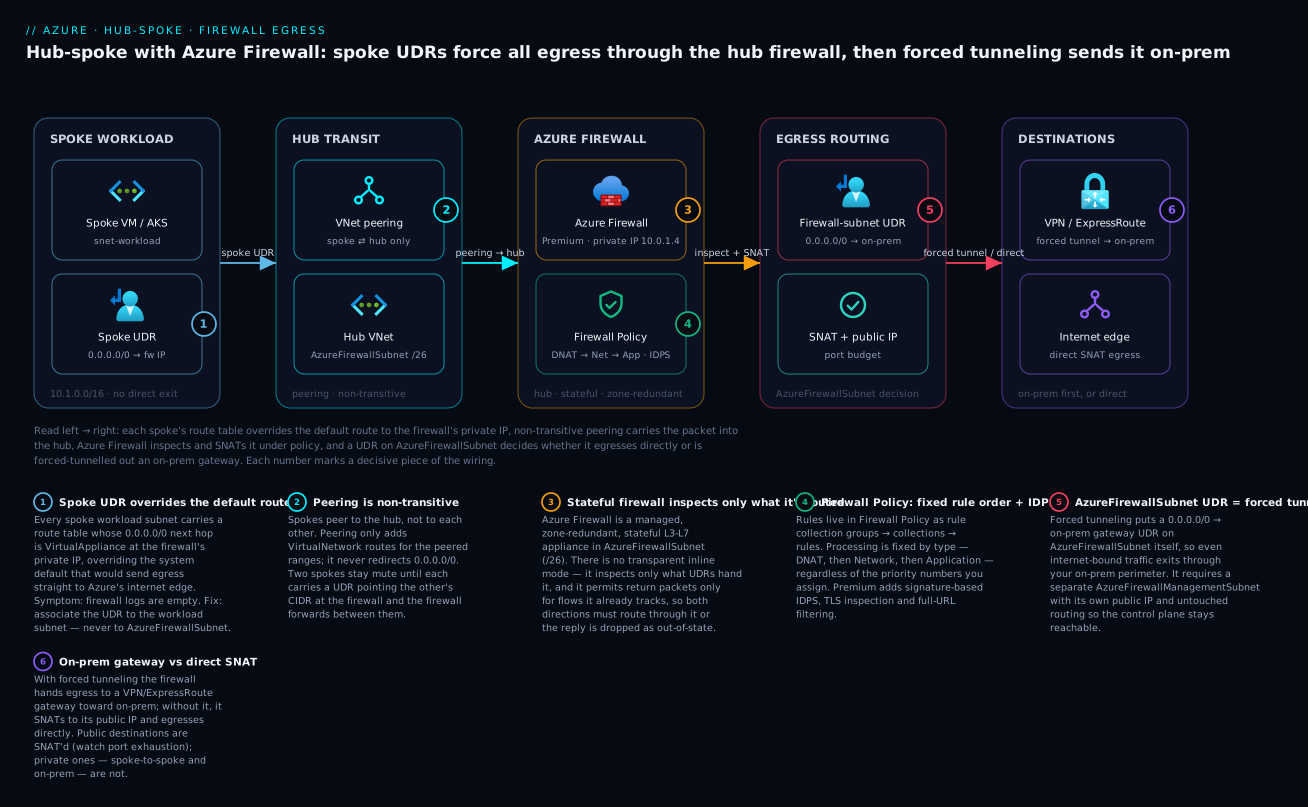
Read the diagram left to right: each spoke’s route table overrides the default route to the firewall’s private IP (1), non-transitive peering carries the packet into the hub (2), Azure Firewall inspects and SNATs it under its policy (3-4), and a UDR on AzureFirewallSubnet (5) decides whether the flow egresses directly or is forced-tunnelled out an on-prem gateway (6).
Deploying Azure Firewall in the hub is the easy part. Making sure traffic actually traverses it – inbound, outbound, and spoke-to-spoke – is where most hub-spoke designs quietly leak. This walkthrough builds a fully inspected topology with user-defined routes (UDRs) and Firewall Policy, then digs into the failure modes that look like firewall bugs but are really routing bugs.
The default-route problem: why a deployed firewall inspects nothing
Every Azure subnet ships with invisible system routes. The two that matter here:
0.0.0.0/0->Internet(the default route)- Each VNet/peered address space ->
VirtualNetwork
A VM in a spoke reaches the internet because the system default route sends it straight to Azure’s internet edge – not through your hub. Peering a spoke to the hub does not redirect that traffic; peering only adds VirtualNetwork routes for the peered ranges. So you can stand up Azure Firewall, point DNS at it, write beautiful rules, and still have every spoke egress the internet directly, completely bypassing inspection.
The firewall only sees what you route to it. There is no transparent/inline mode in Azure – inspection is entirely a function of UDRs. If the effective route for a destination does not point at the firewall, that traffic is invisible to it.
The fix is to override system routes with UDRs whose next hop is the firewall’s private IP, applied to every spoke workload subnet and (for forced tunneling) the gateway subnet.
Step 1 – Deploy Azure Firewall with a Firewall Policy and rule collection groups
Use Firewall Policy (not classic rules). Policy is the modern object model: it supports rule collection groups, hierarchy/inheritance (a base policy plus child policies), IDPS, TLS inspection, and central management across firewalls.
The hierarchy is strict and worth memorizing:
Firewall Policy
└─ Rule Collection Group   (has a priority; an ordering container)
   └─ Rule Collection      (has a priority + action: Allow/Deny for net/app, or DNAT)
      └─ Rule              (the actual match: source, dest, port, protocol/FQDN)
Processing order across types is fixed regardless of priority numbers: DNAT first, then Network, then Application. Within a type, lower priority number wins.
The firewall needs a dedicated /26 subnet named exactly AzureFirewallSubnet. Deploy:
RG=rg-hub-prod
LOC=eastus2
HUB_VNET=vnet-hub

# Dedicated subnet for the firewall (must be this exact name, /26 minimum)
az network vnet subnet create \
  --resource-group "$RG" --vnet-name "$HUB_VNET" \
  --name AzureFirewallSubnet --address-prefixes 10.0.1.0/26

# Public IP for SNAT egress (Standard SKU, static)
az network public-ip create \
  --resource-group "$RG" --name pip-azfw \
  --sku Standard --allocation-method Static

# Firewall Policy (Premium unlocks IDPS + TLS inspection)
az network firewall policy create \
  --resource-group "$RG" --name afwp-hub \
  --sku Premium --location "$LOC"

# The firewall itself, bound to the policy
az network firewall create \
  --resource-group "$RG" --name afw-hub --location "$LOC" \
  --sku AZFW_VNet --tier Premium \
  --firewall-policy afwp-hub
Associate the public IP and the firewall’s subnet via an IP configuration, then capture the private IP – this is the next-hop address every UDR will use:
az network firewall ip-config create \
  --resource-group "$RG" --firewall-name afw-hub \
  --name fw-ipconfig --vnet-name "$HUB_VNET" \
  --public-ip-address pip-azfw

# Persist the firewall private IP for the UDRs that follow
FW_PRIVATE_IP=$(az network firewall show \
  --resource-group "$RG" --name afw-hub \
  --query "ipConfigurations[0].privateIPAddress" -o tsv)
echo "Firewall private IP: $FW_PRIVATE_IP"   # e.g. 10.0.1.4
Now lay down the rule collection groups. I separate them by concern so priorities stay sane as the estate grows:
# Group 1: DNAT (lowest number = evaluated earliest among groups)
az network firewall policy rule-collection-group create \
  --resource-group "$RG" --policy-name afwp-hub \
  --name rcg-dnat --priority 100

# Group 2: Network rules (L3/L4 allow/deny)
az network firewall policy rule-collection-group create \
  --resource-group "$RG" --policy-name afwp-hub \
  --name rcg-network --priority 200

# Group 3: Application rules (L7 FQDN filtering)
az network firewall policy rule-collection-group create \
  --resource-group "$RG" --policy-name afwp-hub \
  --name rcg-application --priority 300
Step 2 – Write UDRs to pull spoke egress through the firewall
Create a route table, add the override default route, and associate it to each spoke workload subnet. --next-hop-type VirtualAppliance plus the firewall private IP is the entire trick.
SPOKE_RG=rg-spoke-app
SPOKE_VNET=vnet-spoke-app

az network route-table create \
  --resource-group "$SPOKE_RG" --name rt-spoke-egress

# Override the system 0.0.0.0/0 -> Internet route; send it to the firewall
az network route-table route create \
  --resource-group "$SPOKE_RG" --route-table-name rt-spoke-egress \
  --name default-to-firewall \
  --address-prefix 0.0.0.0/0 \
  --next-hop-type VirtualAppliance \
  --next-hop-ip-address "$FW_PRIVATE_IP"

# Apply to the workload subnet (NOT to AzureFirewallSubnet)
az network vnet subnet update \
  --resource-group "$SPOKE_RG" --vnet-name "$SPOKE_VNET" \
  --name snet-workload \
  --route-table rt-spoke-egress
Never associate a
0.0.0.0/0 -> firewallroute toAzureFirewallSubnet. The firewall would try to route its own SNAT’d egress back to itself, creating a loop. The firewall subnet must keep its system default route toInternet.
Two longest-prefix-match details that bite people:
- A
0.0.0.0/0UDR also captures traffic to public Azure PaaS endpoints (Storage, Key Vault, etc.). That is usually what you want for inspection, but it means those flows now need firewall rules. Service Endpoints can short-circuit specific PaaS over the Azure backbone if you’d rather not route them through the firewall. - UDRs do not override more-specific system routes by accident.
0.0.0.0/0is the least specific prefix, so anything with a longer match (a peered VNet range, a Service Endpoint route) still wins. East-west redirection therefore needs its own explicit route, covered next.
In Terraform the same intent is more maintainable across many spokes:
resource "azurerm_route_table" "spoke_egress" {
  name                = "rt-spoke-egress"
  location            = var.location
  resource_group_name = var.spoke_rg

  route {
    name                   = "default-to-firewall"
    address_prefix         = "0.0.0.0/0"
    next_hop_type          = "VirtualAppliance"
    next_hop_in_ip_address = var.fw_private_ip
  }
}

resource "azurerm_subnet_route_table_association" "workload" {
  subnet_id      = azurerm_subnet.workload.id
  route_table_id = azurerm_route_table.spoke_egress.id
}
Step 3 – Force east-west (spoke-to-spoke) traffic through the hub
By default, two spokes peered to the same hub cannot talk directly – peering is non-transitive, so there’s no data path between them at all unless you enable gateway/route propagation or peer them. The clean, inspected pattern is: add a UDR on each spoke that routes the other spokes’ ranges to the firewall, and let the hub forward between them.
For this to work the firewall acts as a router between spokes, which requires the spokes to be peered to the hub with traffic forwarding allowed, and a route on each spoke pointing the remote spoke CIDRs at the firewall:
# On spoke-app, send traffic destined for spoke-data to the firewall
az network route-table route create \
  --resource-group "$SPOKE_RG" --route-table-name rt-spoke-egress \
  --name to-spoke-data \
  --address-prefix 10.2.0.0/16 \
  --next-hop-type VirtualAppliance \
  --next-hop-ip-address "$FW_PRIVATE_IP"

# Symmetrically, on spoke-data, route spoke-app's range to the firewall
az network route-table route create \
  --resource-group rg-spoke-data --route-table-name rt-data-egress \
  --name to-spoke-app \
  --address-prefix 10.1.0.0/16 \
  --next-hop-type VirtualAppliance \
  --next-hop-ip-address "$FW_PRIVATE_IP"
The symmetry is mandatory. If spoke-app routes to spoke-data via the firewall but spoke-data replies directly (because it has no return UDR), you get classic asymmetric routing – the firewall sees a SYN with no matching return flow, drops the out-of-state packets, and the connection hangs. More on diagnosing that below.
Then a network rule collection lets the inspected east-west flow through:
az network firewall policy rule-collection-group collection add-filter-collection \
  --resource-group "$RG" --policy-name afwp-hub \
  --rule-collection-group-name rcg-network \
  --name allow-spoke-to-spoke \
  --collection-priority 200 \
  --action Allow \
  --rule-name app-to-data \
  --rule-type NetworkRule \
  --source-addresses 10.1.0.0/16 \
  --destination-addresses 10.2.0.0/16 \
  --destination-ports 443 1433 \
  --ip-protocols TCP
Step 4 – DNAT for inbound, FQDN application rules for outbound
Inbound with DNAT
To publish a workload, DNAT translates firewallPublicIP:port to the private backend. The DNAT rule implicitly creates the matching network allow, but the return path still depends on a UDR – the backend’s subnet must route 0.0.0.0/0 (or at least the client ranges) back through the firewall, or the response goes out the system default route and the flow is asymmetric.
PIP=$(az network public-ip show -g "$RG" -n pip-azfw --query ipAddress -o tsv)

az network firewall policy rule-collection-group collection add-nat-collection \
  --resource-group "$RG" --policy-name afwp-hub \
  --rule-collection-group-name rcg-dnat \
  --name inbound-web \
  --collection-priority 100 \
  --action DNAT \
  --rule-name https-to-appvm \
  --destination-addresses "$PIP" \
  --destination-ports 443 \
  --source-addresses "*" \
  --translated-address 10.1.0.10 \
  --translated-port 443 \
  --ip-protocols TCP
Outbound with FQDN application rules
Application rules filter HTTP/HTTPS (and optionally any TCP via FQDN) by destination name, doing TLS SNI inspection so you allow *.ubuntu.com without hardcoding IPs:
az network firewall policy rule-collection-group collection add-filter-collection \
  --resource-group "$RG" --policy-name afwp-hub \
  --rule-collection-group-name rcg-application \
  --name allow-os-updates \
  --collection-priority 300 \
  --action Allow \
  --rule-name linux-repos \
  --rule-type ApplicationRule \
  --source-addresses 10.1.0.0/16 \
  --protocols Http=80 Https=443 \
  --target-fqdns "*.ubuntu.com" "*.azure.com"
Application rules do not SNAT to a single port the way you might expect, but network rules and DNAT do SNAT by default when the destination is a public IP – which is exactly what drives the port-exhaustion failure mode later. FQDN tags (
WindowsUpdate,AzureKubernetesService, etc.) are a convenient shortcut for well-known endpoint sets.
Forced tunneling to on-prem and the management subnet requirement
If compliance demands that internet-bound traffic exit through your on-prem perimeter rather than Azure’s edge, you enable forced tunneling. This is a deploy-time decision and has a hard prerequisite: a second dedicated subnet named exactly AzureFirewallManagementSubnet (also /26) with its own public IP. This carries the firewall’s management plane traffic (health, signature updates, logging) so the control plane stays reachable even after you redirect the data plane’s default route to on-prem.
# Required management subnet for forced tunneling
az network vnet subnet create \
  --resource-group "$RG" --vnet-name "$HUB_VNET" \
  --name AzureFirewallManagementSubnet --address-prefixes 10.0.1.64/26

az network public-ip create \
  --resource-group "$RG" --name pip-azfw-mgmt \
  --sku Standard --allocation-method Static
The firewall must be created with both a data-path IP config and a management IP config (--management-public-ip / management ip-config) to enable forced tunneling – it cannot be added to an existing firewall that lacks it without redeployment. Once enabled, you place a UDR on AzureFirewallSubnet sending 0.0.0.0/0 to your on-prem next hop (the VPN/ER gateway or an on-prem NVA), and crucially you do not put a default route on the management subnet – it must retain its direct Internet route.
| Subnet | Default route (0.0.0.0/0) | Public IP |
|---|---|---|
AzureFirewallSubnet |
-> on-prem gateway (forced tunnel) | data-path PIP (still required) |
AzureFirewallManagementSubnet |
-> Internet (system route, untouched) | management PIP |
| Spoke workload subnets | -> firewall private IP | none |
The single most common forced-tunneling outage: someone associates the spoke’s
0.0.0.0/0 -> firewallroute table to the management subnet, or removes the management PIP. The firewall loses its control plane and transitions to a failed state. Keep the management subnet’s routing pristine.
Diagnosing asymmetric routing and SNAT-port exhaustion
Asymmetric routing
Symptoms: connections that “sometimes” work, TCP handshakes that hang, pings succeeding while TCP fails. Azure Firewall is stateful – it only permits return packets belonging to a flow it already tracks. If the return path skips the firewall, those packets are dropped as out-of-state.
Root causes, in order of frequency:
- A UDR on one side but not the other (east-west, see Step 3).
- A DNAT’d inbound flow whose backend subnet lacks a return UDR.
- On-prem advertising a route over ExpressRoute/VPN that pulls the return path around the firewall.
Confirm it with effective routes on the actual NIC (the source of truth – it merges system routes, UDRs, and BGP):
az network nic show-effective-route-table \
  --resource-group "$SPOKE_RG" --name nic-appvm-01 \
  --output table
If both directions don’t resolve to VirtualAppliance at the firewall IP, you have your answer. Network Watcher’s connection troubleshoot / next-hop checks confirm the per-hop decision:
az network watcher show-next-hop \
  --resource-group "$SPOKE_RG" \
  --vm appvm-01 \
  --source-ip 10.1.0.10 \
  --dest-ip 10.2.0.10 \
  --nic nic-appvm-01
SNAT-port exhaustion
When the firewall SNATs outbound traffic to a public destination, every concurrent flow to the same destination IP:port consumes one ephemeral source port per public IP. A single public IP gives roughly 64K ports total, but the practical ceiling per backend destination is far lower (about 1,024 ports per destination endpoint before reuse pressure). High-fanout workloads – think thousands of nodes hammering one API endpoint – exhaust ports and new connections fail with timeouts that masquerade as firewall blocks.
The fixes, in order of leverage:
- Add more public IPs (or an Azure NAT Gateway pattern where applicable). Each public IP linearly multiplies available SNAT ports. This is the primary lever.
- Watch the SNAT port utilization metric and alert well before 100 percent.
- Reduce churn: connection pooling/keep-alive on the client side dramatically cuts port turnover.
# Scale SNAT capacity by attaching additional public IPs
az network public-ip create -g "$RG" -n pip-azfw-2 --sku Standard --allocation-method Static
az network firewall ip-config create \
  --resource-group "$RG" --firewall-name afw-hub \
  --name fw-ipconfig-2 --public-ip-address pip-azfw-2
Traffic to private destinations (spoke-to-spoke, on-prem) is not SNAT’d by default, so east-west flows don’t consume SNAT ports. You can also disable SNAT for specified IP ranges (e.g. all RFC 1918) via the policy’s private-range setting when on-prem must see original client IPs.
Centralized logging, IDPS, and validation
Send firewall logs to Log Analytics via a diagnostic setting; resource-specific tables (AZFWNetworkRule, AZFWApplicationRule, AZFWNatRule, AZFWIdpsSignature) are far cheaper to query than the legacy AzureDiagnostics blob:
LAW_ID=$(az monitor log-analytics workspace show \
  -g "$RG" -n law-hub --query id -o tsv)

az monitor diagnostic-settings create \
  --name afw-to-law \
  --resource $(az network firewall show -g "$RG" -n afw-hub --query id -o tsv) \
  --workspace "$LAW_ID" \
  --export-to-resource-specific true \
  --logs '[{"categoryGroup":"allLogs","enabled":true}]'
On Premium, turn on IDPS in the policy for signature-based detection. Run it in Alert mode first to baseline false positives, then move to Alert+Deny once the signal is clean:
az network firewall policy intrusion-detection add \
  --resource-group "$RG" --policy-name afwp-hub \
  --mode Alert
A quick KQL sanity check that flows are actually being inspected and decided:
AZFWApplicationRule
| where TimeGenerated > ago(15m)
| summarize count() by Action, Fqdn, Rule
| order by count_ desc
Enterprise scenario
A payments platform team flipped their entire AKS landing zone to forced tunneling for PCI sign-off. The hub firewall’s AzureFirewallSubnet got the 0.0.0.0/0 -> on-prem ER gateway UDR, on-prem advertised a default route over ExpressRoute, and within an hour every new pod hung on image pulls and the cluster’s egress to the Azure Container Registry timed out. The kicker: it looked like a firewall block, but the firewall logs showed nothing being denied.
The trap was BGP. With a default route learned over ExpressRoute and route propagation enabled on the spoke route tables, the 0.0.0.0/0 from on-prem was overriding the spokes’ carefully written -> firewall UDR for any traffic the explicit route didn’t cover. Effective routes told the whole story instantly:
az network nic show-effective-route-table -g rg-aks -n aks-node-nic-0 -o table
# 0.0.0.0/0  BGP  10.250.0.4 (on-prem)  <-- NOT the firewall, NOT forced-tunnel path
The fix had two parts. First, disable route propagation on the spoke route tables so a learned default can never silently replace the firewall next hop:
az network route-table update -g rg-aks -n rt-aks-egress \
  --disable-bgp-route-propagation true
Second, keep ACR and AKS control-plane egress on the inspected path with an explicit FQDN rule (AzureKubernetesService tag plus *.azurecr.io) rather than relying on the default route at all. After that, every node’s effective route resolved to VirtualAppliance at the firewall, on-prem saw the SNAT’d egress, and PCI got their single audited choke point. Lesson: forced tunneling and ExpressRoute default routes fight over the same 0.0.0.0/0, and BGP wins unless you stop it.
Going deeper
The four steps above give you a working inspected topology. This section is for the reader who owns the design at scale: the SKU trade-offs, the exact evaluation semantics, the Virtual WAN alternative that retires manual UDRs, and the internals behind SNAT and DNS that decide whether the whole thing holds up under load.
Firewall SKUs: Basic, Standard, Premium
The SKU (called the tier on both the firewall and its policy) is a deploy-time choice – you cannot hot-swap Basic to Standard to Premium; changing tier is a redeploy, and the firewall’s tier and its policy’s tier must match.
| Capability | Basic | Standard | Premium |
|---|---|---|---|
| Target | Small business / dev, <250 Mbps | Most production | Regulated / TLS-inspected |
| Throughput (max) | ~250 Mbps | ~30 Gbps | ~100 Gbps |
| Autoscale | No (fixed 2 instances) | Yes (scales out) | Yes (scales out) |
| Network + application + NAT rules | Yes | Yes | Yes |
| Threat intelligence | Alert only | Alert + Deny | Alert + Deny |
| Web categories | No | By domain/FQDN | By full URL (with TLS) |
| IDPS (signature-based) | No | No | Yes |
| TLS inspection | No | No | Yes |
| URL filtering (full path) | No | No | Yes |
| Management subnet required | Always | Only for forced tunneling | Only for forced tunneling |
A few things that trip people up:
- Basic always needs
AzureFirewallManagementSubnet, even without forced tunneling – it uses a dedicated management NIC by design. Standard/Premium only require it when you turn on forced tunneling. - Only Premium can decrypt TLS. TLS inspection needs an intermediate CA certificate in Key Vault, referenced by a user-assigned managed identity granted
get/liston secrets. Without decryption, application rules match on the TLS SNI (the server name in the handshake), which is enough for*.ubuntu.com-style allow-listing but not for inspecting the full URL path or payload. - IDPS is Premium-only. It is signature-based (think Suricata-style rules) and runs on decrypted traffic when TLS inspection is on, or on cleartext otherwise.
Rule processing order, collection groups, and policy inheritance
The order is fixed by rule type, not by the priority numbers you assign:
- DNAT rules – evaluated first; a match translates the destination and implicitly allows the flow.
- Network rules – L3/L4 by IP, port, protocol, plus service tags and FQDNs for non-HTTP traffic.
- Application rules – L7 (HTTP/HTTPS and MSSQL) by FQDN, with SNI or full-URL inspection.
If a network rule matches a flow, application rules are not evaluated for it – a common surprise when a broad network allow silently shadows a narrower L7 rule you expected to hit. Within each rule type, evaluation walks rule collection groups then collections by ascending priority (lower number first), and the first match wins.
Firewall Policy inheritance is how one platform team governs hundreds of firewalls. A parent (base) policy is referenced by many child policies – typically one child per landing zone. At evaluation time, for each rule type, the parent’s rule collection groups are processed before the child’s. So a platform-mandated “deny known-bad” or “allow shared DNS/NTP/AV” always wins over a workload team’s rules, and the child cannot loosen what the parent set. Child policies also inherit threat-intel mode, IDPS, and DNS settings from the parent.
# A per-landing-zone child policy that inherits the platform base
az network firewall policy create \
  --resource-group "$RG" --name afwp-spoke-lz1 \
  --base-policy afwp-platform-base \
  --sku Premium --location "$LOC"
The base + child must share a tier – you cannot base a Premium child on a Standard parent.
The UDR pattern under the hood: effective routes and BGP
Routing decisions in Azure resolve by longest-prefix match, then by a fixed source precedence when prefixes tie: UDR > BGP > system route. That precedence is why a 0.0.0.0/0 UDR beats the 0.0.0.0/0 system default – but it is also why a 0.0.0.0/0 learned over BGP (from ExpressRoute/VPN) beats the system default and can coexist with your UDR. When two 0.0.0.0/0 routes exist (your UDR and a BGP-learned one), the UDR wins for that exact prefix – but the enterprise scenario above shows the real trap: propagation can inject more specific prefixes or interact with disabled/enabled propagation in ways that pull specific destinations off the firewall path.
The only reliable check is effective routes on the NIC, never the route-table definition, because effective routes merge system + UDR + BGP into the actual forwarding table:
az network nic show-effective-route-table -g "$SPOKE_RG" -n nic-appvm-01 -o table
Two levers keep this deterministic:
--disable-bgp-route-propagation trueon spoke route tables stops a learned default from ever appearing next to your firewall UDR.- Explicit, specific FQDN/prefix rules for must-inspect destinations (ACR, AKS control plane, package repos) so you never depend on
0.0.0.0/0catch-all behaviour for critical egress.
Forced tunneling internals
Forced tunneling splits the firewall’s two planes onto two subnets on purpose:
- Data plane (
AzureFirewallSubnet): its0.0.0.0/0UDR points at your on-prem next hop, so tenant egress is tunnelled. - Management plane (
AzureFirewallManagementSubnet): keeps its untouched system default toInternetvia its own public IP, so Microsoft can reach the firewall for health probes, signature/threat-intel updates, and log shipping.
If the management subnet ever loses its direct internet path – someone associates the tenant route table to it, or deletes the management PIP – the firewall’s control plane goes dark and it transitions to a failed state that a data-plane change cannot fix; recovery is often a redeploy. This is why the management IP config must exist at creation time: you cannot bolt forced tunneling onto a firewall that was built without a management IP config.
SNAT ports, public IPs, and NAT Gateway
Azure Firewall allocates a fixed pool of SNAT ports per public IP per backend instance – Microsoft documents roughly 2,496 SNAT ports per public IP – and it scales out to more instances under load, so the real budget is about 2,496 x instances x public IPs. That is generous for typical traffic but thin for high-fanout egress to a single destination IP:port. Two levers, in order of leverage:
- Add public IPs. Each additional public IP linearly multiplies the SNAT budget and the firewall round-robins across them. Simple, and the first thing to reach for.
- Integrate an Azure NAT Gateway on
AzureFirewallSubnet. Each NAT Gateway public IP provides ~64,512 SNAT ports and you can attach up to 16, pushing the ceiling past a million ports – the recommended fix for genuinely SNAT-heavy egress. Mind the current constraint: NAT Gateway with Azure Firewall is supported on a firewall deployed without Availability Zones (or within a single zone) – verify the zone caveat against your resiliency design before committing.
# NAT Gateway pattern to massively raise the SNAT ceiling
az network public-ip create -g "$RG" -n pip-ngw --sku Standard --allocation-method Static
az network nat gateway create -g "$RG" -n ngw-azfw \
  --public-ip-addresses pip-ngw --idle-timeout 4
az network vnet subnet update -g "$RG" --vnet-name "$HUB_VNET" \
  --name AzureFirewallSubnet --nat-gateway ngw-azfw
Alert on the SNAT port utilization metric well below 100 percent, and remember: private destinations are not SNAT’d, so east-west and on-prem flows never draw from this budget.
Firewall Manager, secured virtual hubs, and Routing Intent
Everything above assumes a hub-spoke VNet where you write and associate every UDR. The Virtual WAN alternative replaces that manual routing with Routing Intent. When you deploy Azure Firewall into a Virtual WAN hub, the hub becomes a secured virtual hub, and Routing Intent lets you declare two policies – Internet traffic and Private traffic – whose next hop is the firewall. Virtual WAN then programs the effective routes on every connected VNet and branch automatically; you stop hand-writing 0.0.0.0/0 -> fw on each spoke.
# vWAN secured hub: declare intent instead of writing per-spoke UDRs
az network vhub routing-intent create \
  --resource-group "$RG" --vhub-name vhub-secured --name ri-secure \
  --routing-policies '[
    {"name":"InternetTraffic","destinations":["Internet"],"nextHop":"<firewall-resource-id>"},
    {"name":"PrivateTrafficPolicy","destinations":["PrivateTraffic"],"nextHop":"<firewall-resource-id>"}
  ]'
Azure Firewall Manager is the control plane over both models: it manages Firewall Policies centrally and, for Virtual WAN, orchestrates secured hubs and their Routing Intent. Rule of thumb: greenfield, multi-region, many-branch topologies lean Virtual WAN + Routing Intent (routing is a managed service); established hub-spoke estates that need fine-grained, per-subnet routing keep manual UDRs. The firewall, policy, IDPS, and DNAT/rule concepts in this lesson are identical either way – only who programs the routes changes.
DNS proxy and FQDN consistency
FQDN filtering only holds up if the firewall and the client resolve a name to the same IP. Enable the firewall’s DNS proxy: point the spoke VNets’ DNS at the firewall’s private IP, and the firewall forwards queries (to Azure-provided DNS or your custom servers) and caches the answers. Now an FQDN used in a network rule – not just application rules – resolves reliably, and the client’s connection lands on an IP the firewall has already resolved and allowed. Without DNS proxy, a client and the firewall can resolve the same FQDN to different IPs (round-robin, short TTLs) and network-rule FQDN matches become flaky.
az network firewall policy update \
  --resource-group "$RG" --name afwp-hub \
  --enable-dns-proxy true --dns-servers 10.0.0.4
Logs, structured tables, workbooks, and Policy Analytics
Beyond the resource-specific tables shown earlier, two features earn their keep in production:
- The Azure Firewall Workbook – a prebuilt Azure Monitor workbook over those tables giving application/network/NAT rule hits, IDPS signatures, and top flows without hand-writing KQL. Point it at the same Log Analytics workspace.
- Policy Analytics – surfaces rule-hit counts, flags rules that never match, detects overlapping/redundant rules, and recommends tightening broad rules or promoting IP-based network rules to FQDN application rules. On a firewall carrying hundreds of rules this is how you keep the policy lean and find the shadow-matched rules that never fire.
For deep flow-level troubleshooting, enable the additional top flows (fat flow) and flow trace logs on the policy – they add SYN/FIN/RST and connection-state detail that ordinary rule logs omit, which is exactly what you need to nail an asymmetric-routing case.
Practice challenges
Work these in order – they escalate from “read a route table” to “convert a live estate to forced tunneling.” Each solution notes the why, not just the command.
1. (Beginner) Prove whether a spoke VM’s egress actually goes through the firewall. You deployed the firewall and wrote rules, but the logs are empty. Without changing anything, determine whether traffic is even reaching the firewall.
<details> <summary>Solution</summary>
az network nic show-effective-route-table -g rg-spoke-app -n nic-appvm-01 -o table
# Look at the 0.0.0.0/0 row: Next Hop Type + Next Hop IP
If 0.0.0.0/0 resolves to Internet (system) rather than VirtualAppliance at the firewall IP, the spoke is bypassing the firewall entirely – that’s why the logs are empty. Why: effective routes are the merged truth (system + UDR + BGP); the route-table definition can look right while the effective route does not.
</details>
2. (Beginner-Intermediate) Force the workload subnet’s egress through the firewall. Create the override default route and associate it to snet-workload – and state which subnet must never receive it.
<details> <summary>Solution</summary>
az network route-table create -g rg-spoke-app -n rt-spoke-egress
az network route-table route create -g rg-spoke-app --route-table-name rt-spoke-egress \
  --name default-to-firewall --address-prefix 0.0.0.0/0 \
  --next-hop-type VirtualAppliance --next-hop-ip-address 10.0.1.4
az network vnet subnet update -g rg-spoke-app --vnet-name vnet-spoke-app \
  --name snet-workload --route-table rt-spoke-egress
Never associate this route table to AzureFirewallSubnet. Why: the firewall would route its own SNAT’d egress back to itself – a loop; the firewall subnet must keep its system default to Internet.
</details>
3. (Intermediate) Allow only OS-update egress and verify from inside a VM. Add an application rule permitting *.ubuntu.com and prove an un-allowed FQDN is blocked.
<details> <summary>Solution</summary>
az network firewall policy rule-collection-group collection add-filter-collection \
  -g rg-hub-prod --policy-name afwp-hub --rule-collection-group-name rcg-application \
  --name allow-os-updates --collection-priority 300 --action Allow \
  --rule-name linux-repos --rule-type ApplicationRule \
  --source-addresses 10.1.0.0/16 --protocols Http=80 Https=443 \
  --target-fqdns "*.ubuntu.com"
# From the VM:
az vm run-command invoke -g rg-spoke-app -n appvm-01 --command-id RunShellScript \
  --scripts "curl -s -o /dev/null -w '%{http_code}' https://archive.ubuntu.com; echo; curl -s -m 5 -o /dev/null -w '%{http_code}' https://www.example-not-allowed.com || echo BLOCKED"
Why: application rules match on FQDN/SNI, so you allow a domain without hardcoding IPs; the second curl fails because no rule permits it and the firewall default is deny. </details>
4. (Intermediate-Advanced) Fix an asymmetric east-west flow. spoke-app can open a connection to spoke-data but it hangs; spoke-data has no return route through the firewall. Restore symmetry.
<details> <summary>Solution</summary>
# On spoke-data, route spoke-app's range back through the firewall
az network route-table route create -g rg-spoke-data --route-table-name rt-data-egress \
  --name to-spoke-app --address-prefix 10.1.0.0/16 \
  --next-hop-type VirtualAppliance --next-hop-ip-address 10.0.1.4
Why: Azure Firewall is stateful and drops return packets for flows it never saw; the reply was leaving spoke-data directly. A symmetric return UDR sends both directions through the firewall so the flow stays in-state. </details>
5. (Advanced) Diagnose and remediate SNAT-port exhaustion. A high-fanout workload behind the firewall starts timing out to one public API under load; firewall logs show no denies. Confirm the cause and raise the ceiling.
<details> <summary>Solution</summary>
# Confirm: SNAT Port Utilization metric trending toward 100%
# Fix A (simple): add public IPs
az network public-ip create -g rg-hub-prod -n pip-azfw-2 --sku Standard --allocation-method Static
az network firewall ip-config create -g rg-hub-prod --firewall-name afw-hub \
  --name fw-ipconfig-2 --public-ip-address pip-azfw-2
# Fix B (scale): NAT Gateway on AzureFirewallSubnet for ~64,512 ports/IP
Why: each public IP adds ~2,496 SNAT ports per instance; a single IP starves a fan-out to one destination. More IPs (or a NAT Gateway) multiply the port budget. Empty deny logs are the tell – exhaustion looks like a timeout, not a block. </details>
6. (Advanced) Convert a spoke estate to forced tunneling without dropping the firewall’s control plane. Route all internet-bound traffic to on-prem, keep the firewall healthy, and stop BGP from overriding your routes.
<details> <summary>Solution</summary>
# 1. Management subnet + PIP must exist (firewall created with a management IP config)
az network vnet subnet create -g rg-hub-prod --vnet-name vnet-hub \
  --name AzureFirewallManagementSubnet --address-prefixes 10.0.1.64/26
# 2. Default route to on-prem on the DATA subnet only
az network route-table route create -g rg-hub-prod --route-table-name rt-azfw-subnet \
  --name to-onprem --address-prefix 0.0.0.0/0 \
  --next-hop-type VirtualAppliance --next-hop-ip-address 10.250.0.4   # on-prem NVA/gateway
# 3. Stop a learned default from replacing spoke UDRs
az network route-table update -g rg-spoke-app -n rt-spoke-egress --disable-bgp-route-propagation true
Leave AzureFirewallManagementSubnet on its system default to Internet with its own PIP. Why: the management plane needs direct internet for health/signatures/logging; disabling BGP propagation prevents an ExpressRoute-learned 0.0.0.0/0 from silently winning over your firewall next hop.
</details>
Common beginner mistakes
- “I deployed the firewall, so traffic goes through it.” Deploying inspects nothing. Azure has no transparent/inline firewall mode – inspection is entirely a function of UDRs. Right model: the firewall is a next hop you must route to; until a UDR points
0.0.0.0/0(and east-west CIDRs) at its private IP, the system default sends everything around it. - “Peering both spokes to the hub lets them talk.” Peering is non-transitive: spoke-to-hub and spoke-to-hub do not make spoke-to-spoke. Right model: add a UDR on each spoke pointing the other’s CIDR at the firewall, and let the firewall forward – symmetrically, on both sides.
- “I’ll put the
0.0.0.0/0 -> firewallroute on every subnet, includingAzureFirewallSubnet.” That loops the firewall’s own egress back to itself. Right model: the firewall subnet keeps its system default toInternet(or, under forced tunneling, points to on-prem – never to the firewall’s own private IP). - “Forced tunneling just needs a route on the firewall subnet.” It also needs a dedicated
AzureFirewallManagementSubnetwith its own public IP and untouched routing, and a management IP config created with the firewall. Right model: two planes, two subnets – redirect the data plane, never the management plane. - “My route table looks correct, so routing is correct.” The route-table definition is not the forwarding table. Right model: always confirm with
show-effective-route-tableon the real NIC, because BGP from ExpressRoute/VPN can override what you wrote. - “The firewall logs will show why it’s broken.” Asymmetric drops and route-bypass often show nothing in the deny logs – the packet either never reached the firewall or was dropped as out-of-state. Right model: empty logs plus hanging connections points at routing or SNAT, not a rule.
- “One public IP is plenty for egress.” A single IP starves high-fanout egress to one destination (SNAT-port exhaustion) with timeouts that look like blocks. Right model: watch SNAT port utilization; add public IPs or a NAT Gateway before you hit the wall.
- “FQDN rules work fine with default DNS.” Network-rule FQDN matching needs the firewall and client to resolve names identically. Right model: enable the firewall DNS proxy so both sides see the same cached answer.
Verify
Run these after every routing change – effective routes are the only truth that matters.
# 1. The spoke NIC's default route points at the firewall, not Internet
az network nic show-effective-route-table \
  -g "$SPOKE_RG" -n nic-appvm-01 -o table
# Expect: 0.0.0.0/0  VirtualAppliance  10.0.1.4  (Active)

# 2. From a spoke VM, an allowed FQDN succeeds and an un-allowed one is blocked
#    (run inside the VM via run-command)
az vm run-command invoke -g "$SPOKE_RG" -n appvm-01 \
  --command-id RunShellScript \
  --scripts "curl -s -o /dev/null -w '%{http_code}' https://www.azure.com; echo; curl -s -m 5 -o /dev/null -w '%{http_code}' https://www.example-not-allowed.com || echo BLOCKED"

# 3. Next hop for an east-west destination resolves to the firewall both ways
az network watcher show-next-hop -g "$SPOKE_RG" --vm appvm-01 \
  --source-ip 10.1.0.10 --dest-ip 10.2.0.10 --nic nic-appvm-01

# 4. Inbound DNAT reaches the backend (from outside)
curl -sv https://$PIP/healthz
In Log Analytics, confirm the allow/deny verdicts line up with intent:
AZFWNetworkRule
| where TimeGenerated > ago(30m)
| project TimeGenerated, SourceIp, DestinationIp, DestinationPort, Action, Rule
| order by TimeGenerated desc
Rollout checklist
Pitfalls and next steps
The recurring theme: Azure Firewall inspects only what your routes send it, and it drops anything whose return path it didn’t see. Most “the firewall is broken” tickets are really one of three things – a missing UDR, an asymmetric return path, or SNAT exhaustion. Validate with effective routes, not by reading your route-table definitions, because BGP from an ExpressRoute/VPN gateway can silently override what you wrote.
From here, layer in Firewall Policy hierarchy (a platform-team base policy inherited by per-landing-zone child policies), centralize a single firewall across a connectivity subscription in an Azure Landing Zone, and codify the entire UDR + policy surface in Terraform so new spokes inherit inspected egress by default rather than by manual association.
Glossary
- UDR (user-defined route) – a route you author in a route table to override Azure’s system routes. Here,
0.0.0.0/0 -> VirtualApplianceat the firewall’s private IP is the route that forces spoke egress through the firewall. - System route – a route Azure injects automatically (e.g.
0.0.0.0/0 -> Internet,<VNet range> -> VirtualNetwork). Invisible until you list effective routes; overridden by a matching UDR. - Effective routes – the merged forwarding table on a NIC (system + UDR + BGP). The single source of truth; check with
az network nic show-effective-route-table. - Next hop type
VirtualAppliance– the route next-hop kind that sends traffic to a specific private IP (the firewall), as opposed toInternet,VirtualNetwork, orVirtualNetworkGateway. AzureFirewallSubnet– the exactly-named, dedicated/26subnet the firewall’s data plane lives in. Keeps a default route toInternet(or, under forced tunneling, to on-prem) – never to the firewall itself.AzureFirewallManagementSubnet– the exactly-named/26subnet for the firewall’s management plane, required for forced tunneling (and always for the Basic SKU). Keeps an untouched directInternetroute with its own public IP.- Firewall Policy – the modern object model for firewall rules: rule collection groups -> collections -> rules, with inheritance, IDPS, TLS inspection, and central management. Replaces classic rules.
- Rule collection group / rule collection / rule – the three-level policy hierarchy; groups and collections carry priorities, and rules carry the match (source, destination, port, protocol/FQDN).
- DNAT (destination NAT) – translates
firewallPublicIP:portto a private backend for inbound publishing; evaluated before network and application rules. - SNAT (source NAT) – rewrites the source IP/port on outbound flows to a public destination; consumes ephemeral ports per public IP and can exhaust under high fan-out.
- SNAT-port exhaustion – running out of source ports for concurrent flows to one destination; presents as timeouts, not denies. Fixed with more public IPs or a NAT Gateway.
- Forced tunneling – routing the firewall’s own internet-bound egress to an on-prem next hop via
AzureFirewallSubnet’s0.0.0.0/0UDR, so traffic exits through the on-prem perimeter. - Hub-spoke – a topology where a central hub VNet (hosting shared services like the firewall) peers to many workload spoke VNets.
- VNet peering (non-transitive) – private connectivity between two VNets; it does not chain, so two spokes peered to the same hub cannot reach each other without explicit routing through the hub.
- IDPS (intrusion detection and prevention system) – Premium-only signature-based detection/blocking; run in Alert mode first, then Alert+Deny.
- TLS inspection – Premium decryption of HTTPS (via a Key Vault CA cert + user-assigned managed identity) so rules can match the full URL and payload, not just the SNI.
- FQDN tag – a Microsoft-maintained named set of endpoints (e.g.
WindowsUpdate,AzureKubernetesService) usable in application rules instead of hand-listing FQDNs. - Service tag – a named set of Azure service IP ranges (e.g.
Storage,Sql) usable in network rules. - BGP route propagation – learning routes over ExpressRoute/VPN into a route table; can inject a
0.0.0.0/0that competes with your firewall UDR. Disable with--disable-bgp-route-propagation truewhere determinism matters. - DNS proxy – the firewall acting as DNS forwarder/cache so clients and firewall resolve FQDNs identically, making FQDN filtering (especially in network rules) reliable.
- Secured virtual hub – an Azure Virtual WAN hub with Azure Firewall deployed into it; managed by Azure Firewall Manager.
- Routing Intent – the Virtual WAN feature that declares Internet and/or Private traffic should traverse the firewall, and programs connected route tables automatically – the managed alternative to hand-written spoke UDRs.
- Azure Firewall Manager – the central control plane for Firewall Policies and for secured virtual hubs and their Routing Intent.
- NAT Gateway – an outbound-SNAT service that, attached to
AzureFirewallSubnet, raises the SNAT-port ceiling dramatically (~64,512 ports per public IP, up to 16 IPs). - Resource-specific Log Analytics tables – the modern, cheaper-to-query firewall log tables (
AZFWNetworkRule,AZFWApplicationRule,AZFWNatRule,AZFWIdpsSignature) versus the legacyAzureDiagnosticsblob. - Policy Analytics – built-in analytics over firewall traffic that flags unused/overlapping rules and recommends optimizations.