In a nutshell
Picture a private office building that only your company occupies. The building itself is the virtual network (VNet) — your own walled-off space in Azure with a street-address range (its IP address space) that nobody else shares. Inside, you divide the building into floors: each floor is a subnet, a slice of that address range set aside for one kind of work — reception and the public lobby on one floor, the application teams on another, the finance systems locked away on a third.
Every floor has a badge reader on its doors, and the rules programmed into those readers — who may enter, from where, through which door (port) — are the Network Security Group (NSG). A well-written badge rule says “only staff coming up from the app floor may open the finance-floor door, and nobody else,” which is exactly how you stop a compromised public-lobby machine from ever reaching the finance database. And when two of your buildings need to move people between them privately, without anyone stepping onto the public street, you build a private skybridge — that is VNet peering: a direct, private link over Azure’s own backbone, never the public internet.
That is the whole lesson in four objects: building, floors, door-badge rules, skybridge. Everything else in Azure networking — firewalls, load balancers, VPNs, private DNS — hangs off those four. Get the building’s floor plan and badge rules right at the start and the rest of your Azure estate has solid ground to stand on; get them wrong and you spend years renovating an occupied building, which is as painful as it sounds.
Level: Beginner · Time: ~37 min
Before you start, be comfortable with:
- What an IP address and CIDR notation mean — that
10.20.0.0/16describes a range of addresses, and a bigger number after the slash means a smaller range. - The idea of a TCP port (443 for HTTPS, 1433 for SQL Server) as the “door number” a service listens on.
- Basic Azure vocabulary — subscription, resource group, region — at the level of having created one resource in the portal.
- No prior networking career is assumed. This is a foundational lesson, and the office-building analogy above is enough to begin.
After this lesson you will be able to:
- Explain what a VNet, subnet, NSG, and VNet peering are, and sketch how they fit together.
- Plan a non-overlapping IP address space and carve it into subnets that leave room to grow.
- Write NSG rules that allow only the traffic you intend and deny the rest — and explain why they are stateful.
- Connect two VNets with peering, and explain why a third VNet is not automatically reachable.
- Recognise where a firewall, private endpoints, custom DNS, and route tables attach later, and read the deeper lessons (VNet deep dive: every setting, the network landing zone) with the vocabulary already in place.
A regional logistics company — think a parcel carrier running depots, sortation hubs, and a fleet-tracking platform across three states — has just been told by its new CISO that “everything in Azure is on one flat network, and that has to change this quarter.” Today a single virtual network holds the public-facing tracking website, the internal warehouse-management app, a finance database, and a handful of developer test machines, all able to reach each other freely. An auditor flagged it: a compromised web server could talk straight to the finance database, and there is nothing in the network itself stopping it. The company is not asking for a fancy zero-trust mesh — it is asking for the fundamentals, done correctly, so the next thing they build sits on solid ground instead of being a flat network with a bigger blast radius. This article is that foundation: what a virtual network actually is, how subnets and network security groups carve it into defensible zones, how peering stitches networks together, and where the bigger pieces — a firewall, identity, monitoring — bolt on later.
If you are early in a cloud career, this is the layer everything else stands on. Compute, databases, Kubernetes, and AI services all ultimately plug into a network. Get the network model wrong and you spend years fighting it; get it right at the start and the rest of the platform has a place to live.
What a virtual network actually is
An Azure Virtual Network (VNet) is your own private slice of network inside Azure — a logically isolated space with a private IP address range that you control, the cloud equivalent of the network behind your office router. Nothing outside it can reach into it unless you explicitly allow it. When you create a VNet you give it an address space in CIDR notation, for example 10.20.0.0/16, which reserves roughly 65,000 private IP addresses for resources you place inside.
Two rules trip up almost every beginner, so learn them now:
- A VNet lives in one region and one subscription. It does not stretch across regions on its own — connecting regions is a job for peering, which we get to below.
- Address spaces must not overlap if you ever want to connect two networks. If your production VNet is
10.20.0.0/16and your on-premises depot network is also10.20.0.0/16, you can never peer or VPN them cleanly, because a packet for10.20.5.4would not know which side to go to. Plan your ranges centrally, on a spreadsheet, before anyone clicks create. This is the single most common foundational mistake in enterprise Azure, and it is almost impossible to fix later without renumbering live systems.
For the logistics company, the first decision is simply to stop using one VNet for everything and instead reserve a clean, non-overlapping block — say 10.0.0.0/8 for all of Azure — and hand out /16 slices per environment: 10.10.0.0/16 for shared services, 10.20.0.0/16 for production, 10.30.0.0/16 for development. That allocation plan, boring as it sounds, is the real deliverable of week one.
Subnets: carving the network into zones
A VNet is a single big room. Subnets are the walls you build inside it. A subnet is a sub-range of the VNet’s address space — for example, inside 10.20.0.0/16 you might define 10.20.1.0/24 (256 addresses) for web servers and 10.20.2.0/24 for databases. Each resource you deploy — a virtual machine’s network card, a load balancer, a private endpoint — gets an IP from exactly one subnet.
Why bother splitting at all? Because the subnet is the natural unit you attach security and routing rules to. Putting the public website in a web subnet and the finance database in a data subnet lets you say, at the network layer, “the data subnet only accepts connections from the app subnet, and nothing else” — which is precisely the auditor’s complaint, solved.
A few subnet facts that matter in practice:
- Azure reserves 5 IPs per subnet (the first four and the last), so a
/24gives you 251 usable addresses, not 256. Size accordingly; do not carve a/29for a subnet that will hold a database, an app, and room to grow. - Some Azure services demand their own dedicated subnet. Azure Firewall must live in a subnet literally named
AzureFirewallSubnet; a VPN/ExpressRoute gateway needs aGatewaySubnet; Azure Bastion needsAzureBastionSubnet. Leave room for these even if you add them later. - Subnet design is hard to change once resources are deployed. You cannot shrink a subnet that has live resources in it. Plan a little headroom.
Here is a minimal Terraform sketch of the production VNet with three subnets. The logistics team uses Terraform as its infrastructure-as-code tool so the entire network is defined in version-controlled files rather than clicked together in the portal — which means the layout is reviewable, repeatable across dev and prod, and recoverable if someone deletes the wrong thing.
resource "azurerm_virtual_network" "prod" {
  name                = "vnet-prod-eastus"
  address_space       = ["10.20.0.0/16"]
  location            = "eastus"
  resource_group_name = "rg-network-prod"
}

resource "azurerm_subnet" "web" {
  name                 = "snet-web"
  virtual_network_name = azurerm_virtual_network.prod.name
  resource_group_name  = "rg-network-prod"
  address_prefixes     = ["10.20.1.0/24"]
}

resource "azurerm_subnet" "app" {
  name                 = "snet-app"
  virtual_network_name = azurerm_virtual_network.prod.name
  resource_group_name  = "rg-network-prod"
  address_prefixes     = ["10.20.2.0/24"]
}

resource "azurerm_subnet" "data" {
  name                 = "snet-data"
  virtual_network_name = azurerm_virtual_network.prod.name
  resource_group_name  = "rg-network-prod"
  address_prefixes     = ["10.20.3.0/24"]
}
Network Security Groups: the firewall on every door
A Network Security Group (NSG) is a stateful packet filter — a list of allow/deny rules for traffic in and out. It is the tool that actually enforces “web can talk to app, app can talk to data, web cannot talk to data directly.” You attach an NSG to a subnet (covering everything in it) or to an individual network interface (one VM), and the rules are evaluated by priority number, lowest first, with the first match winning.
Each rule specifies a priority (100–4096), a direction (inbound/outbound), source and destination (IP ranges, or handy service tags like Internet, VirtualNetwork, AzureLoadBalancer), a port range, a protocol, and allow or deny. Azure adds invisible default rules at the bottom: inbound traffic within the VNet is allowed, traffic from the load balancer is allowed, and everything else inbound from the internet is denied — but you should never rely on defaults alone; write your intent explicitly.
The word that matters most is stateful. If you allow an inbound connection on port 443, the return traffic is automatically permitted — you do not write a matching outbound rule for replies. This trips up people coming from old-school stateless ACLs.
Here is the data subnet’s NSG expressing the auditor’s requirement directly: the database accepts SQL (1433) only from the app subnet, and explicitly denies everything else inbound.
resource "azurerm_network_security_group" "data" {
  name                = "nsg-data"
  location            = "eastus"
  resource_group_name = "rg-network-prod"

  security_rule {
    name                       = "Allow-SQL-From-App"
    priority                   = 100
    direction                  = "Inbound"
    access                     = "Allow"
    protocol                   = "Tcp"
    source_address_prefix      = "10.20.2.0/24"   # app subnet only
    destination_port_range     = "1433"
    source_port_range          = "*"
    destination_address_prefix = "10.20.3.0/24"
  }

  security_rule {
    name                       = "Deny-All-Inbound"
    priority                   = 4096
    direction                  = "Inbound"
    access                     = "Deny"
    protocol                   = "*"
    source_address_prefix      = "*"
    destination_port_range     = "*"
    source_port_range          = "*"
    destination_address_prefix = "*"
  }
}
With that NSG attached to snet-data, a compromised web server can no longer reach the finance database at all — the network drops the packet before the database process ever sees it. That is defense in depth at the network layer, and it is exactly the control the audit demanded.
NSGs are not a full firewall, and you should know the limit. They filter on IP addresses, ports, and protocols (Layers 3–4). They do not inspect application content, do not do URL filtering, cannot detect a malicious payload inside an allowed HTTPS connection, and offer no threat intelligence. They answer “is this address allowed to talk to that port” — nothing more. That boundary is exactly why a firewall enters the picture later (below).
VNet peering: connecting networks privately
So far the production VNet stands alone. Real platforms have several VNets — separate environments, separate regions, shared services — and they need to talk. VNet peering connects two VNets so resources in each can reach the other over Azure’s private backbone, using private IPs, as if they were one network. Traffic never touches the public internet, latency is low, and there is no gateway or VPN appliance to manage.
Key properties to internalize:
- Peering is non-transitive. If VNet A peers with B, and B peers with C, A still cannot reach C. Each pair you want connected needs its own peering (or a routing appliance in B that forwards traffic — the seed of the hub-spoke pattern below).
- It works across regions and across subscriptions (global VNet peering), which is how the logistics company will eventually link its east-coast and west-coast VNets, or connect a VNet owned by a different business unit’s subscription.
- You configure both sides. Peering is a relationship; each VNet declares it. The portal can do both halves; in Terraform you write two
azurerm_virtual_network_peeringresources, one per direction. - Overlapping address spaces cannot peer — the renumbering trap from the very first section comes due here.
This is where the upfront address plan pays off. Because shared services were placed at 10.10.0.0/16, production at 10.20.0.0/16, and dev at 10.30.0.0/16 — none overlapping — they can all peer freely. Had two of them collided, peering would simply be impossible.
Architecture overview
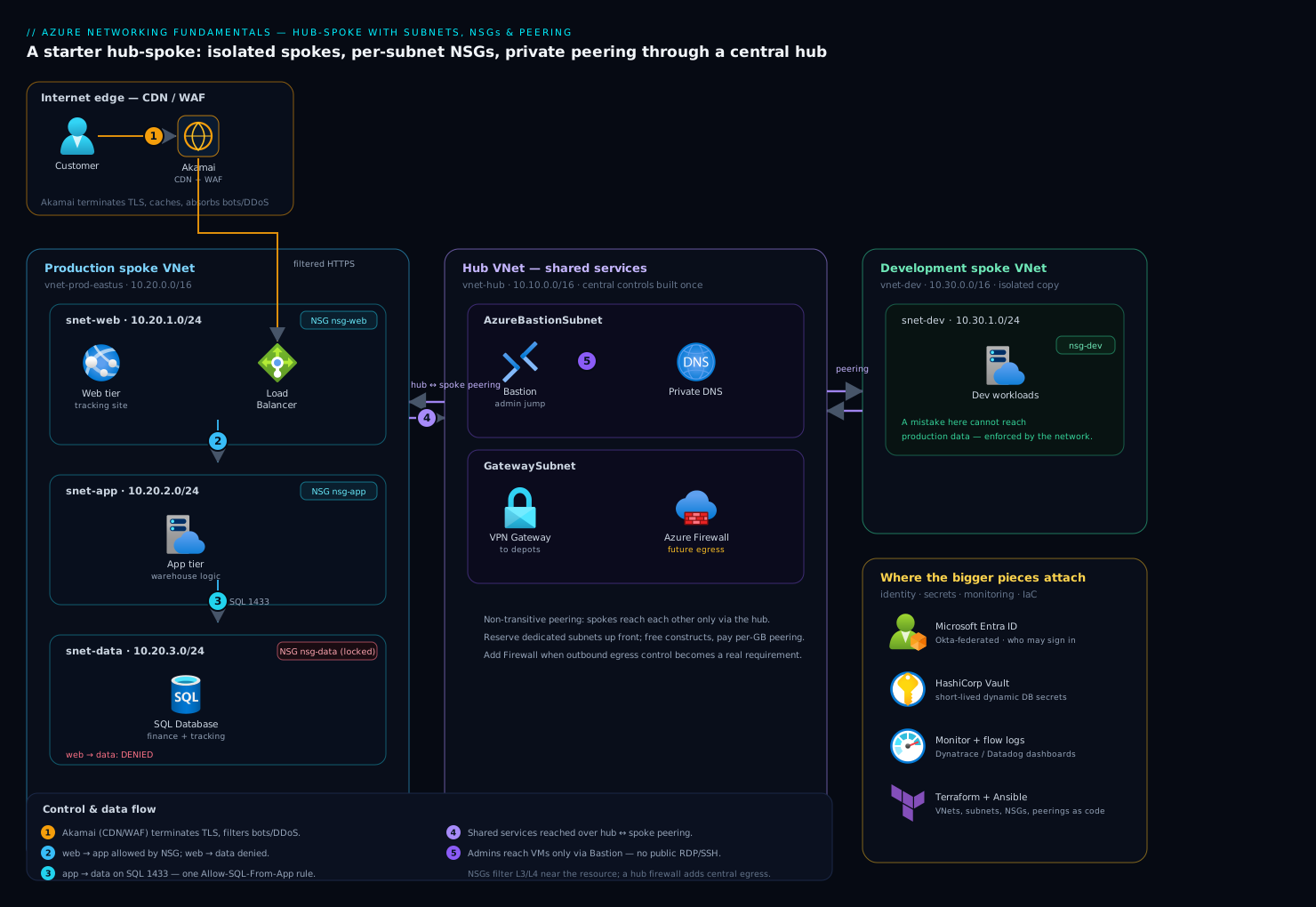
The starter design the logistics company lands on is a hub-spoke topology — the most common enterprise pattern in Azure, and one you should learn early because nearly every real deployment grows into it. A central hub VNet holds shared services that everything needs; each workload lives in its own spoke VNet, peered to the hub but not to each other. Traffic between spokes flows through the hub, where it can be inspected and controlled centrally.
The hub (10.10.0.0/16) holds the things every workload shares: a connectivity gateway back to the depots, DNS, a future firewall, and a secure-jump path for admins. The hub is where central controls live so you build them once, not per spoke.
Production spoke (10.20.0.0/16) holds the live tracking platform across its three subnets — web (public-facing, behind a load balancer and a CDN), app (the warehouse-management logic), and data (the finance and tracking databases). Each subnet has an NSG; the data NSG is the locked-down one shown above.
Development spoke (10.30.0.0/16) is an isolated copy for the engineers. Because it is a separate spoke peered only to the hub, a mistake in dev cannot reach production data — the network itself enforces the boundary the flat design never had.
Control and data flow, end to end:
- A customer tracking a parcel hits the public website. Akamai sits at the edge as the CDN and web application firewall — it terminates TLS close to the user, caches static tracking-page assets, and absorbs bot and DDoS traffic before any request reaches Azure. Only legitimate, filtered traffic arrives at the
websubnet’s load balancer. - The web tier calls the
apptier. Theweb-to-apphop is permitted by NSG rules; the reverse and any directweb-to-dataattempt is denied. - The
apptier queries thedatatier on port 1433, allowed by the singleAllow-SQL-From-Apprule. Nothing else on the network can reach the database. - When production needs something from shared services — central DNS, a secrets fetch, the route to on-premises depots — it crosses the hub-to-spoke peering into the hub.
- Administrators never expose RDP/SSH to the internet. They reach VMs through Azure Bastion in the hub (its own
AzureBastionSubnet), brokered by identity, so management ports stay closed on every NSG.
This is deliberately a starting architecture. It is correct, defensible, and small — and it has obvious seams where the next pieces attach.
Where the bigger pieces attach
The fundamentals above are necessary but not sufficient for a mature platform. Here is where the named enterprise tools plug in, and crucially why each one is needed beyond what NSGs and peering already give you.
| Concern | Tool | What it adds that the network layer cannot |
|---|---|---|
| Deep traffic inspection | Azure Firewall (or a third-party virtual appliance like Palo Alto / Fortinet) | Application-layer and URL filtering, threat intelligence, and a central choke point — far beyond an NSG’s IP/port matching |
| Human & service identity | Microsoft Entra ID, federated from Okta | The network says where traffic may go; identity says who may sign in. Okta is the workforce IdP; it federates to Entra so Azure honors a first-class token, and Entra Conditional Access gates the Bastion admin path |
| Secrets | HashiCorp Vault | Database credentials and API keys must not sit in NSG rules, code, or config files. Vault issues short-lived, dynamic secrets so the app authenticates to the database without a static password living anywhere |
| Cloud posture | Wiz / Wiz Code | Continuously scans for the exact mistakes this article warns about — an NSG accidentally opened to Internet, a database subnet that drifted public — and maps attack paths across the peered VNets. Wiz Code catches a risky NSG change in the Terraform pull request, before it ships |
| Runtime threat detection | CrowdStrike Falcon | NSGs cannot see a process running on a VM. Falcon sensors on the VMs detect a compromise inside an allowed connection and feed the security team |
| Monitoring & flow visibility | Dynatrace / Datadog | NSG flow logs show connections; Dynatrace or Datadog turn that into dashboards and alerts — which subnet talks to which, latency across the peering, and an alert when a denied-traffic spike signals an attack or a misconfiguration |
| Operations & change control | ServiceNow | A new peering or an NSG rule change is a network change with blast radius. ServiceNow gates it behind an approval and records who changed what, when |
| Automation & delivery | Terraform + Ansible, driven by GitHub Actions / Jenkins / Argo CD | Terraform defines the VNets, subnets, NSGs, and peerings; Ansible configures the OS inside the VMs; the pipeline (GitHub Actions or Jenkins, with Argo CD for any Kubernetes spoke) applies changes consistently with no manual portal clicking |
A few of these deserve a sentence on why now, because a junior engineer will be asked.
Why a firewall when you already have NSGs. The auditor’s next finding will be outbound: a compromised VM in any subnet can currently reach the entire internet on port 443, which is how data gets exfiltrated and malware phones home. NSGs cannot tell a legitimate API call from a connection to an attacker’s server — both are “443 to the internet.” Put Azure Firewall (or a vendor virtual appliance) in the hub, point every spoke’s outbound traffic at it with a route, and you get URL filtering, threat-intel-based blocking, and one inspected, logged egress point. NSGs do the cheap, fast, near-the-resource filtering; the firewall does the deep, central inspection. You want both — defense in depth — not one or the other.
Why identity sits beside the network, not inside it. Network rules answer “can 10.20.2.4 reach port 1433.” They say nothing about which human is logged into that machine. Okta authenticates the workforce and federates to Microsoft Entra ID, so an admin reaching a VM through Bastion is first proven to be a real, authorized person under Conditional Access — the network controls the path, identity controls the principal, and a real platform needs both.
Why secrets never live in the network config. It is tempting to think a locked-down data subnet means the database is safe enough to use a shared password. It is not — anything inside the app subnet can read that password. HashiCorp Vault issues a short-lived, per-application credential, so even a breach of the app tier yields a secret that expires in minutes rather than a permanent key to the finance database.
Failure modes, cost, and tradeoffs
The failure modes here are mostly self-inflicted, and naming them prevents them:
- Overlapping address spaces. Decided at creation, fatal at peering time, fixable only by renumbering live systems. Maintain one central IP-allocation plan. This is the cardinal sin.
- An NSG rule too broad. A rule with source
*orInternetwhere it should have been a subnet range silently exposes a workload. Wiz catches the drift in the running environment; Wiz Code catches it in the Terraform pull request. Always prefer service tags and specific ranges over*. - Forgetting peering is non-transitive. Two spokes “should” talk because both peer the hub — but they cannot, directly. Either peer them explicitly or route them through a firewall in the hub. Surprising the first time, obvious forever after.
- Asymmetric routing once a firewall arrives. Send traffic to the firewall on the way out but let replies bypass it, and the stateful firewall drops the half-conversation. When you add the hub firewall, route both directions through it.
- A missing reserved subnet. Discovering you need
AzureFirewallSubnetorGatewaySubnetafter the address space is fully carved means re-planning. Reserve a slot for them up front.
Cost. The fundamentals are cheap by design. VNets, subnets, and NSGs are free — you pay for the resources inside them, not the network constructs. The meaningful line items are: VNet peering charges a small per-GB fee for data crossing the peering (in and out, and more for cross-region global peering — a reason to keep chatty workloads in the same region); Azure Bastion, Azure Firewall, and VPN/ExpressRoute gateways are billed hourly whether busy or idle, so add them when you need them, not speculatively. For a junior estimate: the starter hub-spoke with Bastion runs a modest fixed monthly cost; the firewall roughly doubles the network baseline and is the single biggest network line item, which is why teams adopt it when egress control becomes a real requirement rather than on day one.
| Approach | Pros | Cons | When to choose |
|---|---|---|---|
| Single flat VNet, NSGs only | Simplest, cheapest, fastest to stand up | No central control point; spokes cannot be isolated cleanly; outbound is unfiltered | A genuinely small, single-workload deployment or a sandbox |
| Hub-spoke, NSGs, no firewall yet | Clean isolation, central shared services, room to grow, low cost | Outbound traffic still unfiltered; relies on NSGs alone for east-west | The right starting point for most enterprises — where the logistics company lands |
| Hub-spoke with Azure Firewall | Central inspected egress, URL filtering, threat intel, full defense in depth | Higher fixed cost; routing complexity; another component to operate | When outbound control, compliance, or scale demands it — the natural next step |
The honest tradeoffs. Hub-spoke adds moving parts a single flat VNet does not have: peerings to manage, routing to reason about, and the discipline of a central address plan. For a five-resource hobby project that overhead is not worth it — a single VNet with good NSGs is fine. But for anything an auditor will look at, anything multi-environment, or anything that will grow, the flat network is the liability the logistics company started with, and the modest extra structure here is what lets the platform scale without a painful renumbering project two years in. Start with this hub-spoke, leave the seams for the firewall and identity and monitoring tools visible, and add each piece when its specific need shows up.
The shape of the win
The logistics company’s auditor reopens the finding a quarter later and walks the same path: the public website can no longer reach the finance database, because the data subnet’s NSG drops the packet; the development environment is a separate spoke that cannot touch production data at all; and admin access runs through Bastion under an Entra-federated Okta login instead of an RDP port open to the internet. None of that required exotic technology — it is VNets, subnets, NSGs, and peering, the four fundamentals, arranged into a small hub-spoke and laid down in Terraform so it is repeatable and reviewable. The firewall, the deeper monitoring in Dynatrace, the Vault-issued database credentials, and the Wiz posture scanning all have an obvious place to attach when their need arrives. That is the whole point of getting the foundation right: the next thing the company builds sits on defensible ground, and the flat-network blast radius that started this is gone for good.
Going deeper
The sections above are the working knowledge — enough to design and defend a starter network. This section is the mechanism underneath: the details that separate someone who uses a VNet from someone who can debug one at 2 a.m. If you are brand new, skim it now and return when the fundamentals feel comfortable.
Address space, subnet CIDR, and the five IPs Azure takes from every subnet
A VNet can hold more than one address space — you can add a second block like 10.21.0.0/16 later if the first fills up — but every subnet must be a non-overlapping sub-range that fits inside one of those blocks. The prefix length is the whole game: each +1 on the /n halves the range. A /16 is ~65,536 addresses; a /24 is 256; a /27 is 32; a /29 is 8. Azure’s smallest allowed subnet is a /29, and because of the reservation below that leaves only three usable addresses — a practical floor of /28 or larger for anything real.
The reservation is the part beginners miss. In every subnet, Azure takes five addresses, not the two you lose on a traditional on-premises subnet. For a subnet 10.20.1.0/24:
| Address | Reserved for |
|---|---|
10.20.1.0 |
Network address (the subnet identifier itself) |
10.20.1.1 |
The subnet’s default gateway |
10.20.1.2 |
Azure DNS mapping (maps the platform DNS into this subnet) |
10.20.1.3 |
Azure DNS mapping (second) |
10.20.1.255 |
Network broadcast address (the last address in the range) |
So a /24 yields 251 usable addresses, a /27 yields 27, and a /29 yields 3. Size for five fewer than the arithmetic suggests, and always leave headroom — you can grow a subnet’s prefix only if the adjacent space is free and (in most cases) the resources tolerate it, so it is far cheaper to over-provision the plan than to renumber later.
NSG rules in depth — priority, direction, defaults, service tags, ASGs, and the two-NSG evaluation
An NSG is two ordered rule lists, one inbound and one outbound, evaluated independently. Within each list, rules run lowest priority number first, and the first match wins — evaluation stops there, so a broad Deny at priority 200 is never reached if a narrow Allow at 100 already matched. Your rules occupy priorities 100–4096.
Below your rules sit Azure’s default rules, which you cannot delete (only override with a lower number). They are worth memorising:
| Direction | Priority | Name | Effect |
|---|---|---|---|
| Inbound | 65000 | AllowVnetInBound |
Allow anything sourced from VirtualNetwork (including peered VNets) |
| Inbound | 65001 | AllowAzureLoadBalancerInBound |
Allow the AzureLoadBalancer service tag (health probes) |
| Inbound | 65500 | DenyAllInBound |
Deny everything else |
| Outbound | 65000 | AllowVnetOutBound |
Allow anything destined for VirtualNetwork |
| Outbound | 65001 | AllowInternetOutBound |
Allow all outbound to Internet |
| Outbound | 65500 | DenyAllOutBound |
Deny everything else |
Two consequences fall straight out of that table: inside a VNet, east-west traffic is allowed by default (rule 65000) — a flat VNet with no custom NSGs is wide open between resources — and outbound to the internet is open by default (65001), which is the exact gap a firewall later closes. List them live with az network nsg rule list -g rg-network-prod --nsg-name nsg-data --include-default -o table.
Stateful is the property that saves you writing half your rules. Allow an inbound flow on 443 and the return packets are permitted automatically; you never write an outbound “reply” rule. The NSG tracks the flow’s state and matches the response to the request.
Service tags are Microsoft-maintained, auto-updated groups of IP ranges you reference by name instead of hardcoding addresses: Internet, VirtualNetwork, AzureLoadBalancer, AzureCloud, Storage, Sql, AzureKeyVault, and regional variants such as Storage.EastUS or Sql.WestEurope. Microsoft updates the underlying IPs; your rule stays correct. Always prefer a service tag or a specific subnet range over *.
Application Security Groups (ASGs) let rules read like intent instead of arithmetic. Put every web NIC in a web-asg and every app NIC in an app-asg, then a rule says “web-asg → app-asg on 443” — no IP ranges, and it keeps working as you scale the tiers. ASG members must live in the same VNet.
resource "azurerm_application_security_group" "web" {
  name                = "asg-web"
  location            = "eastus"
  resource_group_name = "rg-network-prod"
}

resource "azurerm_application_security_group" "app" {
  name                = "asg-app"
  location            = "eastus"
  resource_group_name = "rg-network-prod"
}

# ...then a rule references the groups instead of CIDRs:
#   source_application_security_group_ids      = [azurerm_application_security_group.web.id]
#   destination_application_security_group_ids = [azurerm_application_security_group.app.id]
Finally, the subtlety that produces the most “but my rule allows it!” tickets: an NSG can be attached to a subnet, to a NIC, or to both, and when both exist, traffic must pass BOTH. For a packet arriving inbound to a VM, Azure evaluates the subnet NSG first, then the NIC NSG; for a packet leaving outbound, it evaluates the NIC NSG first, then the subnet NSG. It is a logical AND — the more restrictive layer wins. A subnet-level Deny at priority 200 blocks the traffic even if the NIC NSG explicitly allows it, because the packet never survives the subnet layer. When you attach an NSG to a subnet in current azurerm, you use a dedicated association resource (the inline network_security_group_id argument on azurerm_subnet was removed):
resource "azurerm_subnet_network_security_group_association" "data" {
  subnet_id                 = azurerm_subnet.data.id
  network_security_group_id = azurerm_network_security_group.data.id
}
When a rule and reality disagree, ask Azure for the effective rules rather than re-reading your Terraform: az network nic list-effective-nsg --resource-group rg-network-prod --name nic-app-01 flattens both NSGs into the actual evaluated set, and Network Watcher’s az network watcher test-ip-flow tells you exactly which rule would allow or deny a specific 5-tuple.
Peering — non-transitive, forwarded traffic, gateway transit, and reaching across regions and subscriptions
Peering carries four flags worth knowing by name, all set per side on each azurerm_virtual_network_peering:
allow_virtual_network_access(defaulttrue) — the basic “let the peered VNet’s addresses reach mine.”allow_forwarded_traffic— accept packets that originated elsewhere and were forwarded by an appliance in the peer (rather than sourced from the peer’s own address space). This is the flag that makes hub routing work: when spoke traffic is forwarded by the hub firewall, the destination spoke’s peering must allow forwarded traffic or it is dropped.allow_gateway_transit(set on the hub) — offer the hub’s VPN/ExpressRoute gateway to peers.use_remote_gateways(set on the spoke) — consume the hub’s gateway instead of deploying your own in every spoke. The pairallow_gateway_transit+use_remote_gatewaysis how one gateway in the hub serves the whole estate.
Because peering is non-transitive, spoke-to-spoke traffic is not automatic even when both peer the hub. To make it flow you place a firewall or NVA in the hub, add a User-Defined Route on each spoke pointing the other spoke’s range at the hub appliance’s IP, and set allow_forwarded_traffic = true on the hub-side peerings — the hub becomes a router you programmed, not a magic pass-through.
resource "azurerm_virtual_network_peering" "spoke_to_hub" {
  name                         = "prod-to-hub"
  resource_group_name          = "rg-network-prod"
  virtual_network_name         = azurerm_virtual_network.prod.name
  remote_virtual_network_id    = azurerm_virtual_network.hub.id
  allow_virtual_network_access = true
  allow_forwarded_traffic      = true
  use_remote_gateways          = true   # consume the hub's gateway
}

resource "azurerm_virtual_network_peering" "hub_to_spoke" {
  name                         = "hub-to-prod"
  resource_group_name          = "rg-network-hub"
  virtual_network_name         = azurerm_virtual_network.hub.name
  remote_virtual_network_id    = azurerm_virtual_network.prod.id
  allow_virtual_network_access = true
  allow_forwarded_traffic      = true
  allow_gateway_transit        = true   # offer the hub's gateway
}
Global VNet peering connects VNets in different regions, and peering also works across subscriptions and even across Entra tenants — you just need the right RBAC (the Network Contributor role, or a custom role with the peering action) on both VNets, and you must create both peering resources, since a one-sided peering sits in an Initiated/Disconnected state until its partner exists. Data across a peering is billed both directions, and cross-region global peering costs more per GB than same-region — a concrete reason to keep chatty workloads co-located. For the hub-spoke at enterprise scale, and the Virtual WAN alternative that replaces the hand-built mesh, see the network landing zone lesson and Azure Firewall forced tunneling.
Service endpoints vs private endpoints
Both keep traffic to Azure PaaS (Storage, SQL, Key Vault) off the public internet, but they are very different tools:
| Service endpoint | Private endpoint (Private Link) | |
|---|---|---|
| What it is | A subnet setting that routes PaaS traffic over the Azure backbone and stamps it with your subnet identity | A NIC with a private IP in your subnet that maps to one specific PaaS resource |
| The PaaS resource | Keeps its public IP; you lock it to your subnet via the service’s own firewall | Gets a private IP in your address space; public access can be disabled entirely |
| Reach from on-premises | No — service endpoints do not extend over VPN/ExpressRoute | Yes — reachable from on-prem over private connectivity |
| DNS | No DNS change needed | Requires a privatelink.* Private DNS zone or the name still resolves public |
| Cost | Free | Hourly + per-GB |
| Scope | Whole service (e.g. all of Storage) in the region | One specific resource — stronger exfiltration protection |
Rule of thumb: reach for private endpoints for new designs, on-prem-reachable data paths, and anywhere data-exfiltration protection matters; service endpoints are a lighter, free lock-down for simple same-region cases. Doing private endpoints at scale is its own discipline — see private endpoints and Private DNS at scale.
The Terraform trap: inline subnet blocks vs standalone azurerm_subnet
azurerm lets you declare subnets two ways, and mixing them is the single most common networking footgun in the provider. You can nest subnet { } blocks inside the azurerm_virtual_network resource, or declare each subnet as a separate azurerm_subnet resource (as this lesson does). Use both and they fight: on every apply, the VNet resource notices subnets it does not manage inline and tries to remove them, while the standalone resources notice they are gone and recreate them — a perpetual diff, and worse, a subnet being deleted and recreated takes everything in it with it.
Pick one model and stay in it. Prefer standalone azurerm_subnet resources: they let you attach NSGs and route tables via association resources, set delegations, and manage each subnet’s lifecycle independently — which is exactly why the code above uses them and never writes an inline subnet { } block on the VNet.
UDR and route tables — overriding Azure’s default routing
Azure gives every subnet system routes for free: traffic to the local VNet, to peered VNets, to on-prem via a gateway, and a default 0.0.0.0/0 → Internet. A route table (a “User-Defined Route”, UDR) lets you override them. Each route names a destination prefix and a next hop type: VirtualAppliance (with an IP — a firewall/NVA), VirtualNetworkGateway, Internet, VnetLocal, or None (a black hole). Routing picks the longest-prefix match; on a tie, a UDR beats a BGP-learned route, which beats a system route.
The canonical use is forcing inspected egress: point 0.0.0.0/0 at the hub firewall so nothing leaves without passing through it.
resource "azurerm_route_table" "spoke_egress" {
  name                = "rt-spoke-egress"
  location            = "eastus"
  resource_group_name = "rg-network-prod"
}

resource "azurerm_route" "default_to_firewall" {
  name                   = "default-to-hub-firewall"
  resource_group_name    = "rg-network-prod"
  route_table_name       = azurerm_route_table.spoke_egress.name
  address_prefix         = "0.0.0.0/0"
  next_hop_type          = "VirtualAppliance"
  next_hop_in_ip_address = "10.10.0.4"   # the hub firewall's private IP
}

resource "azurerm_subnet_route_table_association" "app" {
  subnet_id      = azurerm_subnet.app.id
  route_table_id = azurerm_route_table.spoke_egress.id
}
When traffic goes somewhere you did not expect, ask for the effective routes on the NIC: az network nic show-effective-route-table --resource-group rg-network-prod --name nic-app-01 shows every system, peering, and user route as Azure actually applies them. Mind the asymmetric-routing trap the existing failure-modes section warns about — once a firewall is the next hop, route both directions through it or the stateful firewall drops the return half of the conversation.
DNS and the magic address 168.63.129.16
By default, VMs in a VNet resolve names through Azure-provided DNS, and the resolver they talk to lives at a special virtual IP: 168.63.129.16. This address is constant in every region and every VNet, and Azure uses it for far more than DNS — it is the platform channel for DHCP lease, the source of load-balancer health probes, and general host-to-platform communication. Practical rule: never block 168.63.129.16 in an NSG or black-hole it with a None route, or you break DNS, DHCP, and health probes for yourself. It is not reachable from outside your VNet, so there is nothing to “lock down” about it. (Do not confuse it with 169.254.169.254, the link-local Instance Metadata Service that serves VM metadata and managed-identity tokens — a different address doing a different job.)
Two extensions of the default you will meet quickly:
- Custom DNS servers. Set the VNet’s DNS to your own resolvers (for example, domain controllers or a DNS Private Resolver) and every VM in the VNet inherits them — the usual choice for hybrid name resolution back to on-prem.
- Azure Private DNS zones. Host private zones for internal names and, critically, the
privatelink.*zones that make private endpoints resolvable. You link the zone to the VNet; optionally Azure auto-registers VM records. This is the mandatory other half of a private endpoint: without the linkedprivatelink.blob.core.windows.netzone (and its record), a client resolves the storage account’s public IP and Private Link silently does nothing — the number-one private-endpoint bug.
One NSG corollary: because health probes and some platform traffic arrive from 168.63.129.16 under the AzureLoadBalancer service tag, keep the default AllowAzureLoadBalancerInBound rule (or an explicit equivalent) in place on subnets behind a load balancer, or your healthy instances start failing their probes.
Practice challenges
Work these top to bottom; they escalate from beginner to advanced. Try each before opening the solution.
1. (Beginner) Count the usable addresses. You carve a /27 subnet at 10.20.5.0/27 for a small app tier. How many usable IPs do you get, and which specific addresses can you not assign?
<details><summary>Solution</summary>
A /27 is 32 addresses; Azure reserves 5, leaving 27 usable. The unusable ones are 10.20.5.0 (network), 10.20.5.1 (default gateway), 10.20.5.2 and 10.20.5.3 (Azure DNS mapping), and 10.20.5.31 (broadcast). Why: every Azure subnet loses five addresses, not the two you lose on-prem — forgetting this is how a subnet you sized “exactly right” runs out early.
</details>
2. (Beginner) Allow only HTTPS inbound to the web subnet. Write the NSG rule (portal fields or az) that lets the internet reach the web tier on 443 and nothing else, and say why you do not need a matching outbound rule.
<details><summary>Solution</summary>
az network nsg rule create -g rg-network-prod --nsg-name nsg-web \
  -n Allow-HTTPS-Inbound --priority 100 --direction Inbound --access Allow \
  --protocol Tcp --source-address-prefixes Internet \
  --destination-port-ranges 443 --destination-address-prefixes '*'
Everything else inbound is already dropped by the default DenyAllInBound (65500). Why: NSGs are stateful — the return traffic for an allowed inbound 443 flow is permitted automatically, so no outbound “reply” rule is needed. Using the Internet service tag as the source is cleaner than a CIDR list.
</details>
3. (Intermediate) The rule that “should” work. A VM’s NIC NSG allows SSH (22) from your office IP, but you still cannot connect. The subnet NSG has only the default rules plus one custom rule: Deny-All-Inbound at priority 200. What is happening, and how do you fix it without opening the subnet wide?
<details><summary>Solution</summary>
Both NSGs are evaluated and traffic must pass both; for inbound, the subnet NSG is evaluated first, and its priority-200 Deny blocks 22 before the NIC’s allow is ever consulted at the subnet layer. Fix: add an Allow-SSH-From-Office rule at a lower priority number (e.g. 150) on the subnet NSG as well, scoped to your office IP. Why: subnet-plus-NIC evaluation is a logical AND — the more restrictive layer wins, so an allow must exist at every layer the packet crosses.
</details>
4. (Intermediate) Make two spokes talk. Spoke A (10.20.0.0/16) and Spoke B (10.30.0.0/16) both peer the hub (10.10.0.0/16), but A cannot reach B. Give two different ways to fix it and the tradeoff between them.
<details><summary>Solution</summary>
(a) Direct peering between A and B — simplest, lowest latency, but the number of peerings grows combinatorially and skips central inspection. (b) Route through the hub firewall/NVA: add a UDR on A sending 10.30.0.0/16 → hubFirewallIP (and the mirror on B), set allow_forwarded_traffic = true on the hub-side peerings, and let the appliance forward. Why: peering is non-transitive — A↔hub and B↔hub never imply A↔B; the hub only routes between spokes if you program it to.
</details>
5. (Advanced) The private endpoint that still resolves public. You created a private endpoint for a storage account, disabled its public access, and now the app VM cannot reach the blob URL — a DNS lookup returns a public IP. Diagnose and fix.
<details><summary>Solution</summary>
The privatelink.blob.core.windows.net Private DNS zone is not linked to the VNet (or the endpoint’s A record was never registered), so resolution falls through the public CNAME chain and hands back the public IP — which now refuses the connection. Fix: create/link the privatelink.blob.core.windows.net zone to the VNet and register the private endpoint’s record (the portal does this automatically if you let it during endpoint creation). Why: a private endpoint is half networking and half DNS; without the private zone the private IP exists but nothing resolves to it.
</details>
6. (Advanced) The subnets that will not stop churning. In Terraform, your azurerm_subnet resources are destroyed and recreated on every apply, even though no one edited them. terraform plan shows the subnets being removed and added each time. Diagnose the root cause and give the fix.
<details><summary>Solution</summary>
The parent azurerm_virtual_network also declares inline subnet { } blocks. The two models fight: the VNet resource removes subnets it does not see inline, while the standalone azurerm_subnet resources recreate them — forever. Fix: remove the inline subnet { } blocks and manage every subnet as a standalone azurerm_subnet resource (or, less commonly, do the reverse — but never both). Why: the inline-vs-standalone subnet conflict is the classic azurerm footgun, and it can take live resources down with each recreate.
</details>
Common beginner mistakes
The Failure modes section above lists operational traps. These are conceptual ones — the wrong mental model a beginner carries in, and the right one to replace it with.
- “I allowed inbound 443, so now I need a matching outbound rule for the reply.” No. NSGs are stateful: allow the inbound connection and the return packets are permitted automatically. Writing phantom outbound “reply” rules — or, worse, blocking outbound and breaking your own responses — comes straight from a stateless-ACL mindset. Right model: reason about who initiates a connection; the response rides the same allowed flow.
- “A
/24gives me 256 usable addresses.” It gives 251. Azure reserves five per subnet (.0,.1,.2,.3, and the last). Size for five fewer than the arithmetic suggests, and never carve a subnet so tight there is no headroom — you cannot easily grow one that already holds resources. - “Both spokes peer the hub, so they can talk to each other.” Peering is non-transitive. A↔hub and B↔hub does not give you A↔B. The hub is a router you must configure, not a pass-through. Right model: each pair needs its own peering, or a firewall/NVA in the hub plus UDRs and
allow_forwarded_traffic. - “NSG defaults deny everything, so I’m isolated by default.” Inside the VNet, the default rules allow all VNet-to-VNet traffic (rule 65000), and allow all outbound to the internet (65001). A flat VNet with no custom NSGs is wide open east-west and outbound. Right model: write explicit rules for isolation; never lean on defaults to keep tiers apart.
- “An NSG is a firewall.” It filters L3/L4 only — IP, port, protocol. No URL filtering, no payload inspection, no threat intelligence. Right model: NSGs are the cheap, fast guard near each resource; Azure Firewall is the deep, central inspector. Real designs run both.
- “I’ll lock things down by blocking
168.63.129.16.” That virtual IP is Azure’s own platform channel for DNS, DHCP, and load-balancer health probes; block it and you break name resolution and probes for yourself. Right model: leave it alone — it is not reachable from outside your VNet, so there is nothing to harden there.
Glossary
- Virtual Network (VNet) — your private, isolated network in Azure, scoped to one region and one subscription, defined by one or more IP address spaces. The “office building.”
- Address space — the VNet’s overall IP range(s) in CIDR (e.g.
10.20.0.0/16); subnets are carved from within it. - CIDR notation — an IP range written as
address/prefix(e.g./24); a larger prefix number means a smaller range. - Subnet — a sub-range of the VNet’s address space where resources get their IPs; the unit you attach NSGs and route tables to. A “floor.”
- Reserved IPs — the five addresses Azure takes from every subnet (network, gateway, two for DNS, broadcast), so a
/24yields 251 usable, not 256. - Network Security Group (NSG) — a stateful L3/L4 packet filter of allow/deny rules, attachable to a subnet and/or a NIC. The “door-badge rules.”
- Security rule / priority — one allow-or-deny entry (priority 100–4096); rules evaluate lowest-number-first and the first match wins.
- Stateful — the NSG remembers established flows, so an allowed inbound connection’s return traffic is permitted automatically (no matching outbound rule needed).
- Default rules — Azure’s built-in NSG rules (65000/65001/65500) that allow intra-VNet and load-balancer traffic and outbound internet, then deny the rest.
- Service tag — a Microsoft-maintained, auto-updated named group of IP ranges (
Internet,VirtualNetwork,AzureLoadBalancer,Storage,Sql, …) usable in rules instead of hardcoded IPs. - Application Security Group (ASG) — a named group of NICs used as a rule source/destination so rules read “web → app” instead of CIDRs; members must share a VNet.
- Network interface (NIC) — a VM’s virtual network card; it holds the VM’s private IP and can carry its own NSG.
- Two-NSG evaluation — when a subnet NSG and a NIC NSG both exist, traffic must pass both (inbound: subnet then NIC; outbound: NIC then subnet) — the more restrictive layer wins.
- Effective rules / effective routes — the flattened, as-applied view Azure computes (
az network nic list-effective-nsg,... show-effective-route-table); use these to debug, not your source files. - VNet peering — a private, low-latency link between two VNets over Azure’s backbone so they route to each other by private IP. The “skybridge.”
- Non-transitive — a peered pair does not route through a common peer; A↔hub and B↔hub never imply A↔B without extra routing.
- Global VNet peering — peering between VNets in different regions (also works across subscriptions and tenants with the right RBAC).
allow_forwarded_traffic— a peering flag that accepts packets forwarded by an appliance (not originated in the peer); required for hub-routed spoke-to-spoke traffic.- Gateway transit —
allow_gateway_transit(hub) +use_remote_gateways(spoke): one hub gateway serves every spoke instead of a gateway per spoke. - Hub-spoke — the topology where a central hub VNet holds shared services and workload spokes peer to it (but not to each other).
- Service endpoint — a subnet setting that keeps PaaS traffic on the Azure backbone and locks the PaaS resource to your subnet; free, same-region, no on-prem reach.
- Private endpoint / Private Link — a NIC with a private IP in your subnet mapped to a specific PaaS resource; fully private and on-prem-reachable, but requires a
privatelink.*Private DNS zone. - Private DNS zone — an Azure-hosted private DNS zone linked to a VNet; the
privatelink.*zones hold the records that make private endpoints resolvable. 168.63.129.16— Azure’s constant virtual IP for platform DNS, DHCP, and load-balancer health probes; never block it. Not the same as IMDS.- IMDS (
169.254.169.254) — the link-local Instance Metadata Service serving VM metadata and managed-identity tokens. - Route table / UDR — a User-Defined Route table that overrides Azure’s system routes for a subnet.
- Next hop — where a route sends matching traffic:
VirtualAppliance(+IP),VirtualNetworkGateway,Internet,VnetLocal, orNone. - System routes — the routes Azure creates automatically (local VNet, peered VNets, gateway, default internet) before any UDR.
- Azure Bastion — managed, browser-based RDP/SSH to VMs that have no public IP; lives in
AzureBastionSubnet. AzureFirewallSubnet/GatewaySubnet/AzureBastionSubnet— exactly-named subnets that Azure Firewall, VPN/ExpressRoute gateways, and Bastion respectively require.