In a nutshell
Imagine a security firm that manages hundreds of buildings it does not own — a different alarm panel, a different key, a different paper logbook in every one. Instead of ripping out and standardising each building, it drops one small, outbound-only sensor into each that phones home to a single control room. Every building keeps operating exactly as before; head office simply gains one map, one rulebook, and one audit trail that reach every site at once. Azure Arc-enabled servers is that sensor for your servers. The Connected Machine agent projects an off-Azure box — in a colo, in an AWS account, in a GCP project — into Azure Resource Manager (ARM) as a governable resource. The workload never moves and no inbound port opens; Azure’s governance plane just reaches in.
Concretely, once a server is “Arc-enabled” you can point the same Azure Policy baselines, RBAC role assignments, Resource Graph queries, and tags at it that you already use for native Azure VMs — plus enforce in-guest hardening with Machine Configuration and deliver paid Extended Security Updates (ESU) to the legacy Windows Server 2012/2012 R2 hosts you cannot migrate yet. The mental shift beginners must make: Arc is not a migration and not an app runtime — it is a control-plane projection. The management plane itself is free per machine; you pay only for the value-add services (Defender, ESU, extra telemetry) you actually switch on.
Level: Advanced — with a beginner on-ramp · Time: ~67 min read
New here? You only need three ideas to follow along: ARM is Azure’s control plane (every Azure thing is an ARM resource), Azure Policy is how Azure enforces rules across many resources at once, and a managed identity is a passwordless identity Azure hands to a resource so it can authenticate without a stored secret. The Prerequisites & where this fits section links the deeper background; the Glossary at the end defines every term the first time you meet it.
By the end you will be able to onboard a machine non-interactively without leaking a secret, prove it compliant with a single Resource Graph query, link an ESU license so a 2012 box keeps receiving patches, and — just as important for the invoice — cleanly stop every one of those bills on decommission.
A fleet of 600 Windows and Linux servers spread across two colo datacenters, an AWS account, and a GCP project is not a “we’ll get to it” problem. The moment your security team asks “which of these is missing a CIS baseline, which still runs an out-of-support OS, and who can touch them,” you need one control plane. Azure Arc-enabled servers projects each machine into Azure Resource Manager as a Microsoft.HybridCompute/machines resource. From there, the same management groups, Azure Policy assignments, RBAC, and Resource Graph queries you use for native Azure VMs reach into your hybrid estate — without lifting a single workload.
The pain this kills is governance fragmentation. Every server outside Azure today lives in a different tool: SCCM here, Ansible there, a spreadsheet of “boxes we should really patch.” There is no single answer to “is this fleet compliant,” no single RBAC plane, no single audit trail. Arc collapses that into ARM: one inventory, one policy engine, one identity model, one query language. The agent is read-mostly and outbound-only, so the security review is tractable; the per-machine cost for the management plane is zero (you pay only for the value-add services — Defender, Update Manager extras, ESU — you actually consume).
This walkthrough does the work a platform team actually has to do: onboard at scale non-interactively, manage extensions, enforce in-guest configuration with Machine Configuration (formerly Guest Configuration), report compliance through Azure Policy, deliver Extended Security Updates (ESU) for Windows Server 2012/2012 R2 through Arc, lock agent traffic behind a Private Link Scope, and scope RBAC so a stolen credential’s blast radius stays small. By the end you will be able to onboard a machine, prove it compliant, and explain every byte the agent puts on the wire. I assume Owner on the subscription and root/administrator on the machines.
What problem this solves
Hybrid estates rot in the dark. A server in a colo that nobody onboarded to any management plane is invisible: it does not appear in your secure-score, it does not get patched on a schedule, its drift from the CIS baseline is unknown, and the list of who can RDP to it lives in someone’s head. When the auditor or the breach forces the question, you have no answer and no tooling to get one fast. Multiply by 600 machines across three clouds and the gap is not an inconvenience — it is the finding that fails the audit.
What breaks without Arc: you run N management tools for N environments, each with its own identity model and its own blind spots. Patching is manual or scripted per-site, so a critical CVE sits unpatched on the boxes nobody remembered. Compliance is a quarterly fire drill of screenshots instead of a live Resource Graph query. Secrets sit on disk because there is no managed identity to authenticate scripts. And legacy Windows Server 2012/2012 R2 hosts — the ones you cannot migrate for 18 months — run with no security updates at all because ESU outside Azure requires a delivery channel you do not have.
Who hits this: every organization with servers outside Azure that still need Azure-grade governance — regulated enterprises (PCI, HIPAA), companies mid-migration with a long on-prem tail, and multicloud shops who refuse to run three separate governance stacks. The teams who feel it most acutely are the platform/SRE function asked to produce one compliance dashboard, and the security function that needs RBAC and audit to reach the boxes ARM cannot otherwise see.
To frame the whole field before the deep dive, here is every capability Arc adds, the on-prem pain it replaces, and where in this article it lives:
| Capability | What it gives you | Pain it replaces | Covered in |
|---|---|---|---|
| Inventory in ARM | Each server a HybridCompute/machines resource |
Spreadsheets, drift, “what do we even own” | Core concepts |
| Managed identity | Per-machine MI via local IMDS, no stored secrets | Service-account passwords on disk | Core concepts, §Agent |
| Machine Configuration | DSC-style in-guest audit + remediation | Manual hardening, no drift detection | §Machine Configuration |
| Azure Policy at scale | Assign baselines at management-group scope | Per-site scripts, no central reporting | §Policy & compliance |
| Extensions | AMA, Custom Script, dependency agent like a VM | Per-tool agent sprawl | §Extensions |
| Extended Security Updates | Patches for WS2012/2012 R2 off-Azure | Unpatched out-of-support OS | §ESU |
| Private Link | Agent data plane over a private endpoint | Agent telemetry on the public internet | §Private Link |
| RBAC + audit | Purpose-built roles, ARM activity log | Credentials in someone’s head | §RBAC |
Learning objectives
By the end of this article you can:
- Explain the Connected Machine agent architecture — its services, its outbound-only
443connectivity, the local IMDS endpoint, and the three connectivity modes — and validate reachability withazcmagent checkbefore onboarding. - Onboard hundreds of servers non-interactively with a least-privilege service principal, keep the secret off the command line and out of logs, and handle golden-image cloning without hostname collisions.
- Author, sign, and publish a Machine Configuration package, assign it through Azure Policy, and choose correctly between
Audit,ApplyAndMonitor, andApplyAndAutoCorrect. - Drive Azure Policy guest assignments at management-group scope, run remediation tasks against a pre-existing fleet, and answer “what’s non-compliant” with one Resource Graph query.
- Provision and link Extended Security Updates licenses for Windows Server 2012/2012 R2 with the correct
Type/Edition/Processors, manage them as code, and stop billing cleanly on decommission. - Stand up an Azure Arc Private Link Scope with the right private DNS zones, and identify the two endpoints (Entra ID, ARM) that never traverse the scope.
- Scope RBAC with purpose-built Arc roles instead of Contributor, layer
denypolicy guardrails on extensions and tags, and reason about blast radius. - Run a symptom → cause → confirm → fix playbook for the agent failures you will actually hit in production.
Prerequisites & where this fits
You should be comfortable with the Azure governance fundamentals: how management groups, subscriptions, and resource groups nest (see Azure Resource Hierarchy Explained), how Azure Policy definitions, initiatives, assignments, and effects work (see Azure Policy: Governance at Scale), and how RBAC role assignments scope down (see Azure Entra RBAC Governance Deep Dive). You should be able to run az in Cloud Shell, read JSON output, and write a small Bicep template. Familiarity with managed identities (Entra Managed Identities Deep Dive) and Private Link / private DNS (Azure Private Link & Private DNS for PaaS) will make the networking sections land faster.
This sits in the Hybrid & Governance track. Arc-enabled servers is the foundation; its siblings extend the same control plane to other resource types — Azure Arc-Enabled Kubernetes: GitOps, Policy & Fleet Management does for clusters what this article does for VMs. Downstream of onboarding sit the value-add services: Azure Update Manager: Maintenance Configurations & Patch Orchestration with Arc for fleet patching, Defender for Servers for threat protection, and the Azure Monitor data-collection pipeline for telemetry. In a full platform this all lands inside an Enterprise-Scale Landing Zone management-group hierarchy.
A quick map of who owns what during a rollout, so you assign the work correctly:
| Layer | What lives here | Who usually owns it | What goes wrong if neglected |
|---|---|---|---|
| Network egress | Firewall/NSG rules, proxy, Private Link | Network team | Onboarding hangs; agent can’t reach Azure |
| Identity | Onboarding SPN, machine MI, RBAC | Identity team | Over-privileged SPN; stolen-secret blast radius |
| Agent lifecycle | Install, connect, upgrade, agent version | Platform/Ops | Stale agents; missed CVE fixes in the agent itself |
| Policy & config | Initiatives, Machine Config packages, remediation | Governance team | “0% compliant”; drift undetected |
| Patching | Update Manager, maintenance configs, ESU | Platform/Ops | Unpatched fleet; ESU billing surprises |
| Audit & reporting | Resource Graph, Log Analytics, diagnostics | Security/Audit | No evidence trail for the auditor |
Core concepts
Five mental models make every later decision obvious.
Arc projects a server into ARM as a resource you can govern. A connected machine becomes a Microsoft.HybridCompute/machines resource with the same primitives as a native VM: tags, RBAC at the resource scope, policy assignments inherited from its resource group / subscription / management group, and a row in Resource Graph. Nothing about the workload changes — the OS, the apps, the network all stay put. What changes is that Azure’s governance plane now reaches the box. The mental shift: Arc is not a migration and not an agent that runs your workload; it is a control-plane projection.
The agent is low-privilege, outbound-only, and identity-bearing. The Connected Machine agent is one package — the azcmagent CLI plus three services (the Hybrid Instance Metadata Service, the GuestConfig service, and the extension manager). It runs as a low-privilege service, polls Azure over outbound HTTPS (443) only, and never opens an inbound port. On connect, the machine receives a system-assigned managed identity backed by a certificate the agent rotates; in-guest tooling reads tokens from a local IMDS endpoint at http://localhost:40342, so scripts authenticate with no stored secret.
Machine Configuration is the in-guest enforcement engine, and it is in-box. Azure Policy alone sees ARM-level properties; it cannot see a registry value or a sysctl setting inside the OS. Machine Configuration runs DSC-style packages inside the guest to assert that state — registry keys, file contents, installed packages, service states, secedit/sysctl. Critically, on Arc servers the engine ships in the agent — you do not deploy a separate ConfigurationforWindows/ConfigurationforLinux extension as you do on Azure VMs. That removes a whole DeployIfNotExists prerequisite from your design.
Connectivity has three modes, and two endpoints always go public. The agent connects in direct mode (outbound to public endpoints, optionally via proxy), proxy mode, or Private Link mode (the his and guestconfiguration data planes over a private endpoint). The trap that sinks rollouts: Entra ID (login.microsoftonline.com) and Azure Resource Manager (management.azure.com) traffic always use public endpoints, even with Private Link. Block them and the agent cannot authenticate no matter how healthy the private endpoint is.
Governance reaches in: policy, ESU, and patching all ride the projection. Once a machine is in ARM, the value flows: assign baselines via policy at management-group scope and they cascade; deliver Extended Security Updates to off-Azure WS2012/2012 R2 boxes through a license resource you link to the machine; orchestrate patches across the whole fleet with Update Manager; reach the box with az ssh arc through ARM with no inbound port. The single projection is the foundation every other capability stands on.
The vocabulary in one table
Pin down every moving part before the deep sections. The glossary at the end repeats these for lookup; this table is the model side by side:
| Concept | One-line definition | Where it lives | Why it matters |
|---|---|---|---|
| Arc-enabled server | An off-Azure machine projected into ARM | Microsoft.HybridCompute/machines |
The unit you govern |
azcmagent |
The Connected Machine agent CLI | On the server | Connect, check, config, show |
| Hybrid IMDS | Local metadata + token endpoint | localhost:40342 |
Secretless in-guest auth |
| System-assigned MI | Per-machine identity, cert-backed | The machine resource | RBAC for in-guest scripts |
| Machine Configuration | In-guest DSC audit/remediation engine | In-box in the agent | Sees registry/file/service state |
| Guest assignment | A Machine Config package bound to a machine | guestConfigurationAssignments |
Carries compliance status |
assignmentType |
Audit vs Apply behaviour of an assignment | On the guest assignment | Read-only vs self-healing |
| ESU license | A first-class ARM resource for WS2012 patches | HybridCompute/licenses |
Funds the off-Azure patch channel |
| License profile | Links an ESU license to a machine | machines/licenseProfiles/default |
Activates ESU on that box |
| Private Link Scope | Routes agent data plane privately | HybridCompute/privateLinkScopes |
Keeps telemetry off the internet |
| Connectivity mode | direct / proxy / Private Link | Agent config | Shapes firewall design |
| Onboarding SPN | Least-privilege identity that connects machines | Entra app registration | Blast-radius control |
1. The Connected Machine agent: architecture and connectivity modes
The agent is a single package — the azcmagent CLI plus services (the Hybrid Instance Metadata Service, the GuestConfig service, the extension manager). It runs low-privilege, polls Azure over outbound HTTPS (443) only, and never opens an inbound port. Three facts shape every design decision:
- Identity. On connect, the machine gets a system-assigned managed identity backed by a certificate the agent rotates. In-guest tooling reads tokens from a local IMDS endpoint (
http://localhost:40342), so scripts authenticate with no stored secret. - Machine Configuration is built in. Unlike Azure VMs, Arc servers do not need the
ConfigurationforWindows/ConfigurationforLinuxextension deployed separately — the agent ships it in-box, removing a wholeDeployIfNotExistsstep from your design. - Connectivity modes: direct (outbound to public endpoints, optionally via proxy), proxy, and Private Link (his/guestconfiguration data-plane over a private endpoint). Entra ID and Resource Manager traffic always use public endpoints even with Private Link — plan firewall rules accordingly.
The agent’s moving parts, what each does, and what it talks to:
| Component | Role | Talks to | If it’s unhealthy you see |
|---|---|---|---|
azcmagent (CLI) |
Connect/disconnect, config, check, show | Local services | Can’t run lifecycle commands |
| Hybrid Instance Metadata Service (HIMDS) | Identity + metadata, token broker | localhost:40342, Entra ID |
Scripts can’t get a token |
| GuestConfig service | Runs Machine Config packages in-guest | *.guestconfiguration.azure.com |
Compliance never evaluates |
| Extension manager | Installs/updates extensions (AMA, etc.) | *.his.arc.azure.com, download CDN |
Extensions stuck “Creating” |
| Auto-upgrade service | Self-updates the agent | Download CDN | Agent drifts to stale versions |
The three connectivity modes, side by side — pick per security posture:
| Mode | Data-plane path | Setup | When to use | Limitation |
|---|---|---|---|---|
| Direct | Public endpoints over 443 | None (default) | Simplest; non-regulated estates | Telemetry traverses the internet |
| Proxy | Public endpoints via HTTP proxy | azcmagent config set proxy.url |
Egress only allowed via proxy | Proxy must allow the FQDN set |
| Private Link | his + guestconfiguration over private endpoint | Private Link Scope + DNS | Regulated; no public agent traffic | Entra ID + ARM still go public |
Every endpoint the agent needs, the mode that uses it, and what breaks if you block it:
| Endpoint (FQDN) | Purpose | Direct | Private Link | Block it and… |
|---|---|---|---|---|
login.microsoftonline.com |
Entra ID auth (token) | Public | Public | Agent can’t authenticate |
pas.windows.net |
Entra ID (PoP) | Public | Public | Auth flows fail |
management.azure.com |
Azure Resource Manager | Public | Public | Connect/heartbeat fails |
*.his.arc.azure.com |
Hybrid identity + metadata data plane | Public | Private | Heartbeat/MI breaks |
*.guestconfiguration.azure.com |
Machine Config data plane | Public | Private | Compliance never runs |
*.guestnotificationservice.azure.com |
Notifications (SSH, Run Command) | Public | Public | az ssh arc / Run Command fail |
Download CDN (aka.ms, download.microsoft.com) |
Agent + extension binaries | Public | Public | Install/upgrade fails |
Configure the proxy before connecting so onboarding itself can route out:
azcmagent config set proxy.url "http://proxy.corp.local:3128"
azcmagent config set proxy.bypass "Arc,ArcData"   # built-in bypass lists

# Verify reachability of every required endpoint BEFORE onboarding
azcmagent check --location eastus
azcmagent check returns a pass/fail per required FQDN (*.his.arc.azure.com, *.guestconfiguration.azure.com, login.microsoftonline.com, management.azure.com, and the download CDN). Bake it into golden-image validation.
The azcmagent subcommands you will actually use, and when:
| Command | What it does | Run it when |
|---|---|---|
azcmagent check --location <r> |
Pre-flight every required FQDN | Before onboarding; image validation |
azcmagent connect --config <f> |
Onboard the machine to ARM | First-boot automation |
azcmagent show |
Status, mode, heartbeat, MI, agent version | Verifying health |
azcmagent config set proxy.url <u> |
Point the agent at an HTTP proxy | Proxy-only egress |
azcmagent config list |
Dump current agent configuration | Auditing a box’s settings |
azcmagent logs |
Bundle agent logs for support | Diagnosing a failed connect |
azcmagent disconnect |
Cleanly remove the ARM resource + MI | Decommissioning |
azcmagent upgrade |
Manually upgrade the agent | When not on auto-upgrade |
Two firewall facts that catch teams every single time:
| Fact | The trap | The rule |
|---|---|---|
| Entra ID + ARM are always public | “We’re on Private Link, why won’t it connect?” | Allow AzureActiveDirectory + AzureResourceManager service tags |
| Notifications use a separate FQDN | SSH/Run Command “just doesn’t work” | Allow *.guestnotificationservice.azure.com |
2. At-scale onboarding with a service principal
Interactive login does not scale to 600 servers. Create a dedicated onboarding service principal with the narrowest role for the job — Azure Connected Machine Onboarding — scoped to the single resource group that holds the machines. It can create Arc server resources and nothing else; a leaked secret cannot pivot.
# Dedicated onboarding identity, scoped to one RG, narrowest built-in role
az ad sp create-for-rbac \
  --name "sp-arc-onboarding" \
  --role "Azure Connected Machine Onboarding" \
  --scopes "/subscriptions/<sub-id>/resourceGroups/rg-arc-servers"
Never put the secret on a command line — azcmagent echoes arguments to logs in some failure paths. Use a config file referenced with --config; the agent reads the credential from disk and keeps it out of the console:
# /etc/arc-onboard.json  (mode 0600, deleted after onboarding)
cat > /etc/arc-onboard.json <<'JSON'
{
  "subscriptionId": "<sub-id>",
  "resourceGroup": "rg-arc-servers",
  "location": "eastus",
  "tenantId": "<tenant-id>",
  "servicePrincipalId": "<app-id>",
  "servicePrincipalSecret": "<secret>",
  "cloud": "AzureCloud"
}
JSON
chmod 600 /etc/arc-onboard.json

azcmagent connect \
  --config /etc/arc-onboard.json \
  --tags "Datacenter=COLO1,App=Payments,Owner='Platform Eng'" \
  --correlation-id "$(uuidgen)"

shred -u /etc/arc-onboard.json   # remove the secret immediately
Windows uses the same azcmagent connect --config from an elevated session. For golden images, do not onboard before cloning — install the agent, leave it disconnected, and let first-boot automation (cloud-init, Ansible, an MDT/Intune task) run connect with a per-machine --resource-name so hostnames do not collide. Certificate-based SPN auth (--service-principal-cert) is better where you can distribute certs — it removes the long-lived secret entirely. Use --use-azcli (agent 1.59+) only for ad-hoc operator onboarding, never unattended fleets.
The onboarding methods, ranked by fleet-fit:
| Method | Auth | Best for | Avoid when |
|---|---|---|---|
SPN secret via --config |
Client secret in a 0600 file | Unattended fleets | Cert distribution is feasible (use cert) |
SPN certificate (--service-principal-cert) |
Cert, no long-lived secret | Highest-security fleets | No PKI to distribute certs |
--use-azcli |
Operator’s az login |
Ad-hoc, a few boxes | Any unattended/at-scale flow |
| Interactive device code | Browser login | One box, a lab | Anything past a handful |
azcmagent connect with --access-token |
Pre-fetched ARM token | Pipelines that already hold a token | Long-lived storage of the token |
The azcmagent connect flags that matter at scale, and why:
| Flag | Purpose | Default / note |
|---|---|---|
--config <file> |
Read params + secret from disk, off the CLI | Keeps the secret out of logs |
--resource-name <name> |
Set the ARM resource name explicitly | Avoids hostname collisions on cloned images |
--tags "k=v,..." |
Stamp governance tags at onboard | Pairs with deny-untagged policy |
--correlation-id <guid> |
Group a batch onboarding for support | One UUID per rollout wave |
--private-link-scope <id> |
Onboard directly into a Private Link Scope | Regulated estates |
--cloud <name> |
Target sovereign clouds | AzureCloud default |
--service-principal-cert <path> |
Cert-based auth, no secret | Preferred over --config secret |
--correlation-id + --tags together |
Auditable, attributable onboarding | Always in production |
The least-privilege role math — what each onboarding-related role can and cannot do:
| Role | Can | Cannot | Give it to |
|---|---|---|---|
Azure Connected Machine Onboarding |
Create + read Arc machine resources | Manage extensions, ESU, delete arbitrary resources | The onboarding SPN |
Azure Connected Machine Resource Administrator |
Manage machines, extensions, ESU | Touch unrelated resource types | Platform/Ops humans |
Contributor (anti-pattern) |
Everything in scope | — | No one for onboarding |
Reader on the Arc RG |
Read inventory + compliance | Change anything | Auditors, monitoring |
A pre-onboarding readiness checklist, as a table you can tick:
| Check | Command / action | Pass criteria |
|---|---|---|
| Endpoints reachable | azcmagent check --location <r> |
All FQDNs PASS |
| Proxy configured (if used) | azcmagent config list |
proxy.url set, bypass set |
| SPN scoped to one RG | az role assignment list --assignee <app-id> |
Single RG scope, onboarding role only |
| Secret off the CLI | Review automation | Secret only in 0600 --config file |
| Tags planned | Onboarding script | Owner, Datacenter, DataClassification present |
| Image not pre-connected | Golden image build | Agent installed, disconnected |
3. Machine Configuration: audit and remediation in-guest
Machine Configuration runs DSC-style packages inside the OS to assert state Azure Policy alone cannot see — registry values, file contents, installed packages, service states, sysctl/secedit settings. The engine is in-box on Arc servers, so you only assign policy.
Every configuration is an MOF compiled into a signed .zip package published to Blob Storage, then referenced by a policy definition. Author it with the GuestConfiguration PowerShell module:
Install-Module -Name GuestConfiguration -Scope CurrentUser

# Compile your DSC config (here: assert a registry value) then package it
New-GuestConfigurationPackage `
  -Name 'EnforceTlsRegistry' `
  -Configuration './EnforceTlsRegistry.mof' `
  -Type 'ApplyAndAutoCorrect' `   # Audit | ApplyAndMonitor | ApplyAndAutoCorrect
  -Path './package'

# Test against the local machine before publishing
Get-GuestConfigurationPackageComplianceStatus `
  -Path './package/EnforceTlsRegistry.zip'
The -Type you compile in determines behavior and maps directly to the assignmentType on the resulting guest assignment resource:
| assignmentType | Test result false ⇒ | Use it for |
|---|---|---|
Audit |
report NonCompliant, do nothing |
read-only compliance reporting |
ApplyAndMonitor |
apply once at assignment, then only report drift | one-time enforcement, manual re-apply |
ApplyAndAutoCorrect |
run Set to remediate on every evaluation |
continuous, self-healing enforcement |
A subtlety that bites people: when a custom policy first deploys an assignment, assignmentType can briefly read Null before resolving (typically within an hour). Do not alert on that transient state.
Generate a policy definition from the package and assign it. For audit-only baselines (the CIS/STIG built-ins), the initiatives already exist — assign those directly rather than authoring your own.
New-GuestConfigurationPolicy `
  -PolicyId (New-Guid) `
  -ContentUri 'https://stgarc.blob.core.windows.net/pkgs/EnforceTlsRegistry.zip' `
  -DisplayName 'Enforce TLS registry baseline' `
  -Platform 'Windows' `
  -PolicyVersion '1.0.0' `
  -Mode 'ApplyAndAutoCorrect' `
  -Path './policy'
What Machine Configuration can assert (and what it cannot)
The engine reaches deep into the OS, but it is not a general-purpose config-management tool. Know the boundary:
| Resource class | Examples it can assert | Platform |
|---|---|---|
| Registry | Key/value presence, type, data | Windows |
| File / directory | Existence, content hash, ACL | Windows + Linux |
| Service / daemon | Running/stopped, start mode | Windows + Linux |
| Installed package | Present/absent, version | Windows + Linux |
| Security policy | secedit settings, audit policy | Windows |
| Kernel/sysctl | sysctl parameters |
Linux |
| Local users/groups | Membership, presence | Windows + Linux |
| Environment | Environment variables | Windows + Linux |
The authoring-to-enforcement pipeline, stage by stage:
| Stage | Tool / artifact | Output | Gotcha |
|---|---|---|---|
| 1. Author config | DSC config → .mof |
Compiled MOF | Test resources exist on the platform |
| 2. Package | New-GuestConfigurationPackage |
Signed .zip |
-Type bakes in the behaviour |
| 3. Test locally | Get-…PackageComplianceStatus |
Pass/fail | Run on the target OS family |
| 4. Publish | Upload to Blob Storage | Public/SAS ContentUri |
Lock down the container |
| 5. Generate policy | New-GuestConfigurationPolicy |
Policy definition JSON | Mode must match package -Type |
| 6. Assign | az policy assignment create |
Assignment at scope | Identity needed for Apply modes |
| 7. Remediate | az policy remediation create |
Existing fleet brought in | DINE/Modify ignore existing without this |
Built-in initiatives you should assign rather than author from scratch:
| Built-in initiative | Asserts | Mode |
|---|---|---|
| CIS Microsoft Windows Server benchmark | CIS hardening controls | Audit |
| Windows machines should meet STIG requirements | DISA STIG controls | Audit |
| Linux machines should meet STIG requirements | DISA STIG (Linux) | Audit |
| Audit machines with insecure password security settings | Password policy | Audit |
| Deploy prerequisites to enable Guest Configuration | Identity + (VM) extension wiring | DeployIfNotExists |
Common authoring mistakes and their fix:
| Mistake | Symptom | Fix |
|---|---|---|
| Package unsigned where signing is required | Assignment fails to apply | Sign the package; set the signature validation policy |
Mode ≠ package -Type |
Apply does nothing / errors | Regenerate policy with matching Mode |
ContentUri not reachable from the guest |
Status stuck, never evaluates | Public/SAS URL the agent can GET |
| Tested on the wrong OS family | “Compliant” locally, fails in fleet | Test on the actual target OS |
Alerting on transient Null assignmentType |
False “broken” alerts on day one | Exclude the first hour after assign |
4. Extension management and VM-like operations
Arc servers accept the same extension model as Azure VMs through Microsoft.HybridCompute/machines/extensions. Day one you deploy the Azure Monitor Agent (telemetry to a Data Collection Rule) and, where used, the Custom Script Extension. Push them at scale with policy, or imperatively for a single box:
# Install the Azure Monitor Agent extension on an Arc server
az connectedmachine extension create \
  --resource-group "rg-arc-servers" \
  --machine-name "colo1-pay-01" \
  --name "AzureMonitorWindowsAgent" \
  --publisher "Microsoft.Azure.Monitor" \
  --type "AzureMonitorWindowsAgent" \
  --enable-auto-upgrade true
--enable-auto-upgrade true opts the extension into automatic minor-version upgrades — set it everywhere so you are not chasing CVEs in the agents themselves. Keep the agent current too via automatic agent upgrade so azcmagent self-updates.
Beyond extensions, Arc unlocks VM-like operations: SSH/RDP over Arc (az ssh arc, through ARM with no inbound port), Azure Update Manager for cross-fleet patch orchestration, and Run Command for one-off scripts audited through ARM — replacing bastion and jump-box sprawl with RBAC-governed, logged access.
The extensions you will actually deploy on Arc servers, and what each delivers:
| Extension | Publisher / type | Delivers | Auto-upgrade? |
|---|---|---|---|
| Azure Monitor Agent (Windows) | Microsoft.Azure.Monitor / AzureMonitorWindowsAgent |
Logs + metrics to a DCR | Yes — set it |
| Azure Monitor Agent (Linux) | Microsoft.Azure.Monitor / AzureMonitorLinuxAgent |
Logs + metrics to a DCR | Yes — set it |
| Custom Script (Windows) | Microsoft.Compute / CustomScriptExtension |
Run a script once | Manual |
| Custom Script (Linux) | Microsoft.Azure.Extensions / CustomScript |
Run a script once | Manual |
| Dependency agent | Microsoft.Azure.Monitoring.DependencyAgent |
VM Insights service map | Yes |
| Defender for Servers | via Defender plan | EDR / vuln assessment | Managed by Defender |
VM-like operations Arc unlocks, and what they replace:
| Operation | Command / entry point | Replaces | Inbound port? |
|---|---|---|---|
| SSH over Arc | az ssh arc -n <m> -g <rg> |
Bastion / jump box | None |
| RDP over Arc | SSH tunnel via Arc | RDP gateway | None |
| Run Command | az connectedmachine run-command create |
PsExec, ad-hoc SSH | None |
| Patch orchestration | Azure Update Manager | WSUS/SCCM per site | None |
| Inventory & changes | Azure Inventory / Change Tracking | Manual audits | None |
| Telemetry | AMA → DCR → Log Analytics | Per-tool log agents | None |
Extension lifecycle states and what each means:
| State | Meaning | Action |
|---|---|---|
Creating |
Install in progress | Wait; check after a few minutes |
Succeeded |
Installed and healthy | None |
Failed |
Install/run errored | Read extension status message; reinstall |
Updating |
Auto-upgrade applying | Wait |
Deleting |
Removal in progress | Wait |
Stuck Creating (>15 min) |
Extension manager can’t reach endpoints | Check his/CDN egress |
5. Azure Policy guest assignments and compliance reporting
The standard path is the built-in initiative “Deploy prerequisites to enable Guest Configuration policies on virtual machines.” On Azure VMs it deploys the extension and a system-assigned identity; on Arc servers the extension half is a no-op (it’s in-box) but the identity wiring still applies. Assign it at the management-group level so new machines inherit it.
DeployIfNotExists and Modify assignments act only on new or updated resources. To bring the existing 600 into compliance you must create a remediation task — the single most common reason teams see “0% compliant” and panic. Trigger it on the assignment:
# Remediate all existing in-scope machines for one policy assignment
az policy remediation create \
  --name "remediate-machinecfg-baseline" \
  --policy-assignment "<assignment-id>" \
  --resource-discovery-mode ReEvaluateCompliance
Compliance lands in Azure Resource Graph — how you answer “what’s broken” across the whole fleet in one query instead of clicking through the portal:
// Non-compliant Machine Configuration assignments across the estate
guestconfigurationresources
| where type =~ "microsoft.guestconfiguration/guestconfigurationassignments"
| extend status = tostring(properties.complianceStatus)
| extend machine = tostring(split(id, "/")[8])
| where status =~ "NonCompliant"
| project machine, name, status, lastComplianceChecked = properties.lastComplianceStatusChecked
| order by machine asc
Policy effects you will combine for an Arc estate, and what each does:
| Effect | Behaviour | Acts on existing? | Use it for |
|---|---|---|---|
Audit |
Flags non-compliance, changes nothing | Yes (reports) | CIS/STIG reporting |
AuditIfNotExists |
Audits when a related resource is missing | Yes (reports) | “MI not enabled” checks |
DeployIfNotExists |
Deploys the missing piece | No — needs remediation | Wiring identity/extensions |
Modify |
Adds/updates a property (e.g. tags) | No — needs remediation | Tag normalization |
Deny |
Blocks the create/update | N/A (preventive) | Extension allowlist, required tags |
Disabled |
Turns the rule off | — | Temporarily silencing |
The complianceStatus values and how to read them:
| Status | Meaning | Likely action |
|---|---|---|
Compliant |
Guest assertion passed | None |
NonCompliant |
Assertion failed (or DINE not remediated) | Run remediation / fix drift |
Null (transient) |
Assignment just created, not evaluated | Wait up to ~1 hour |
Pending |
Evaluation queued | Wait |
Error |
Package couldn’t run | Check ContentUri, agent health |
The “0% compliant and panicking” decision table:
| If you see… | It’s probably… | Do this |
|---|---|---|
Every machine NonCompliant right after assigning DINE |
Remediation never ran | az policy remediation create |
Null status across a new assignment |
First-hour transient | Wait, then re-check |
| Some machines missing entirely | MI/prereqs not wired | Assign the prerequisites initiative at MG scope |
Error on specific machines |
ContentUri unreachable or agent down |
Fix egress / azcmagent show |
| Compliant locally, NonCompliant in fleet | Tested on wrong OS family | Re-test on the target OS |
Scopes and inheritance — assign high, let it cascade:
| Assign at… | Inherited by | Use for |
|---|---|---|
| Management group | All child subs + RGs + machines | Org-wide baselines (CIS) |
| Subscription | All RGs + machines in the sub | Per-environment policy |
| Resource group | Machines in that RG | The Arc-servers RG specifically |
| Resource | One machine | Exceptions (rare; prefer exclusions) |
6. Extended Security Updates for Windows Server 2012/2012 R2 through Arc
This is frequently the business case that funds the entire rollout. Windows Server 2012/2012 R2 are out of support; ESU delivers patches for up to three more years, and Arc is the delivery mechanism for machines not in Azure. You provision a license resource, then link it to each eligible server; patches flow through Windows Update / Azure Update Manager and bill monthly — no MAK keys to distribute.
The license is a first-class ARM resource (Microsoft.HybridCompute/licenses). Provision it with the CLI, attesting to Software Assurance or SPLA coverage:
# Provision a Datacenter physical-core ESU license (min 16 physical cores)
az connectedmachine license create \
  --license-name "esu-ws2012-dc-colo1" \
  --resource-group "rg-arc-servers" \
  --location "eastus" \
  --license-type "ESU" \
  --state "Activated" \
  --target "Windows Server 2012 R2" \
  --edition "Datacenter" \
  --type "pCore" \
  --processors 16
Watch the licensing rules that actually cost money:
TypeispCoreorvCore. Physical-core licenses carry a mandatory 16-core minimum; virtual-core a minimum of 8 per VM. The three valid combinations are Standard vCore, Standard pCore, and Datacenter pCore.- You can resize
--processorsafter provisioning and move licenses between resource groups/subscriptions — they are normal ARM resources, queryable in Resource Graph. - Attesting to SA/SPLA coverage is a licensing commitment, not a checkbox.
The license parameters and their rules — get these wrong and you over- or under-pay:
| Parameter | Values | Rule / minimum | Notes |
|---|---|---|---|
--license-type |
ESU |
Only ESU today | The resource type |
--state |
Activated / Deactivated |
Deactivate to stop billing | PATCH to change |
--target |
Windows Server 2012 / 2012 R2 |
Match the OS exactly | Mismatched target won’t link |
--edition |
Standard / Datacenter |
Datacenter only with pCore |
Drives price tier |
--type |
pCore / vCore |
pCore min 16; vCore min 8 | Physical vs virtual cores |
--processors |
integer | ≥ minimum for the type | Resizable post-provisioning |
The three valid license combinations (anything else is invalid):
| Combination | Edition | Type | Minimum cores |
|---|---|---|---|
| Standard vCore | Standard | vCore | 8 per VM |
| Standard pCore | Standard | pCore | 16 physical |
| Datacenter pCore | Datacenter | pCore | 16 physical |
Linking is a licenseProfiles/default child on the machine. Declare it in Bicep so it lives in source control alongside the license:
@description('Resource ID of the ESU license to assign')
param esuLicenseId string
param machineName string

resource esuLink 'Microsoft.HybridCompute/machines/licenseProfiles@2023-06-20-preview' = {
  name: '${machineName}/default'
  location: resourceGroup().location
  properties: {
    esuProfile: {
      assignedLicense: esuLicenseId
    }
  }
}
To unlink (machine decommissioned, or moved into Azure where ESU is free), PUT the same licenseProfiles/default with an empty esuProfile: {}. Deactivate a license by PATCHing its state to Deactivated so billing stops.
The ESU lifecycle, operation by operation:
| Operation | How | Billing effect |
|---|---|---|
| Provision license | az connectedmachine license create --state Activated |
Billing starts on activation |
| Link to machine | PUT licenseProfiles/default with assignedLicense |
Machine becomes eligible for patches |
| Resize cores | Update --processors |
Bill follows new core count |
| Move license | Move the ARM resource to another RG/sub | No billing change |
| Unlink machine | PUT licenseProfiles/default with esuProfile: {} |
Machine no longer eligible |
| Deactivate license | PATCH state = Deactivated |
Billing stops |
| Delete license | Delete the ARM resource | Removed entirely |
ESU eligibility and “do I even need it” decision table:
| Situation | ESU via Arc needed? | Why |
|---|---|---|
| WS2012/2012 R2 in a colo/on-prem | Yes | Out of support; Arc is the channel |
| WS2012/2012 R2 in another cloud | Yes | Same — off-Azure |
| WS2012/2012 R2 already in Azure (IaaS) | No | ESU is free for Azure VMs |
| WS2016+ | No | Still in support |
| Migrating off 2012 within months | Maybe | Bridge until migration completes |
7. Private Link Scope for secure agent-to-Azure traffic
For regulated estates that forbid agent traffic over the public internet, an Azure Arc Private Link Scope (Microsoft.HybridCompute/privateLinkScopes) routes the his and guestconfiguration data planes through one private endpoint over ExpressRoute or VPN. One scope serves many machines; a virtual network maps to at most one scope.
# Create the scope, then a private endpoint bound to its 'hybridcompute' group
az connectedmachine private-link-scope create \
  --resource-group "rg-arc-net" \
  --location "eastus" \
  --scope-name "pls-arc-prod" \
  --public-network-access Disabled

scopeId=$(az connectedmachine private-link-scope show \
  --resource-group "rg-arc-net" --scope-name "pls-arc-prod" --query id -o tsv)

az network private-endpoint create \
  --resource-group "rg-arc-net" \
  --name "pe-arc-prod" \
  --location "eastus" \
  --vnet-name "vnet-hub" \
  --subnet "snet-pe" \
  --private-connection-resource-id "$scopeId" \
  --group-id "hybridcompute" \
  --connection-name "arc-conn"
Two private DNS zones must resolve to the endpoint’s private IPs (a third only if you also run Arc-enabled Kubernetes):
privatelink.his.arc.azure.com
privatelink.guestconfiguration.azure.com
# privatelink.dp.kubernetesconfiguration.azure.com   # only for Arc K8s
Critically, Microsoft Entra ID (login.microsoftonline.com, pas.windows.net) and Azure Resource Manager (management.azure.com) do not traverse the scope — they keep using public endpoints. Allow those via the AzureActiveDirectory and AzureResourceManager service tags on your firewall/NSG, or servers fail to authenticate even with a healthy private endpoint. Onboard new machines with --private-link-scope <scope-resource-id>; associate existing ones afterward (up to 15 minutes to start accepting connections).
What goes private versus what stays public — the table that prevents the #1 Private Link failure:
| Traffic | Endpoint | Path with Private Link | Firewall requirement |
|---|---|---|---|
| Hybrid identity / metadata | *.his.arc.azure.com |
Private (via scope) | Private DNS zone privatelink.his.arc.azure.com |
| Machine Configuration | *.guestconfiguration.azure.com |
Private (via scope) | Private DNS zone privatelink.guestconfiguration.azure.com |
| Entra ID auth | login.microsoftonline.com, pas.windows.net |
Public | Allow AzureActiveDirectory service tag |
| Azure Resource Manager | management.azure.com |
Public | Allow AzureResourceManager service tag |
| Notifications | *.guestnotificationservice.azure.com |
Public | Allow the FQDN |
| Agent/extension binaries | Download CDN | Public | Allow the CDN FQDNs |
Private DNS zones required, keyed by what you run:
| Private DNS zone | Required for | Maps to |
|---|---|---|
privatelink.his.arc.azure.com |
All Arc servers via Private Link | PE private IP |
privatelink.guestconfiguration.azure.com |
Machine Configuration | PE private IP |
privatelink.dp.kubernetesconfiguration.azure.com |
Arc-enabled Kubernetes only | PE private IP |
Private Link Scope constraints worth internalizing:
| Constraint | Value | Implication |
|---|---|---|
| Scopes per VNet | At most 1 | Plan one scope per hub VNet |
| Machines per scope | Many | One scope serves a whole datacenter |
| Association propagation | Up to ~15 min | Don’t expect instant connect after associating |
public-network-access |
Disabled for strict |
Forces all data-plane traffic private |
| Entra ID + ARM | Always public | Service-tag rules are mandatory |
8. RBAC scoping and operational guardrails
The whole point of projecting servers into ARM is that existing governance applies. Use the purpose-built Arc roles instead of broad Contributor:
| Role | Grants | Give it to |
|---|---|---|
Azure Connected Machine Onboarding |
create/read Arc server resources only | the onboarding SPN |
Azure Connected Machine Resource Administrator |
manage Arc servers, extensions, ESU | platform/ops team |
Reader on the Arc RG |
read-only inventory and compliance | auditors, monitoring |
Layer policy guardrails on top so the estate stays inside the rails:
- A
denyonMicrosoft.HybridCompute/machines/extensionsrestricted to an allowlist of publishers/types — extensions run as root/SYSTEM, so stop arbitrary ones from being pushed. - A
denyon machines missing required tags (Owner,Datacenter,DataClassification) so nothing onboards anonymously. - Diagnostic settings shipping agent and policy events to a central Log Analytics workspace.
// Deny any Arc extension not on the allowlist (policyRule fragment)
"if": {
  "allOf": [
    { "field": "type", "equals": "Microsoft.HybridCompute/machines/extensions" },
    { "not": {
        "field": "Microsoft.HybridCompute/machines/extensions/type",
        "in": ["AzureMonitorWindowsAgent", "AzureMonitorLinuxAgent", "CustomScriptExtension"]
    }}
  ]
},
"then": { "effect": "deny" }
The guardrail policies every Arc estate should carry, and the blast radius each contains:
| Guardrail | Effect | Contains | Without it |
|---|---|---|---|
| Extension allowlist | Deny |
Arbitrary root/SYSTEM code via extensions | Any operator pushes anything |
| Required-tags | Deny |
Anonymous/unowned onboarding | Ungoverned ghost machines |
| Diagnostic settings to LA | DeployIfNotExists |
Missing audit trail | No central evidence |
| Allowed locations | Deny |
Sprawl into unintended regions | Cost + data-residency leaks |
| Agent auto-upgrade enforced | Audit/config |
Stale, vulnerable agents | CVEs in the agent itself |
Blast-radius reasoning — what a stolen credential can do, by identity:
| Compromised identity | Can do | Cannot do | Mitigation |
|---|---|---|---|
| Onboarding SPN | Create Arc machines in one RG | Manage extensions, delete, pivot | Cert auth; rotate; scope to one RG |
| Machine MI (one box) | Whatever RBAC you granted that MI | Anything you didn’t grant | Grant MI least privilege; per-machine |
| Resource Administrator human | Manage all Arc machines + extensions | Touch unrelated resource types | PIM/JIT; conditional access |
| Reader | View inventory/compliance | Change anything | Fine as-is |
Architecture at a glance
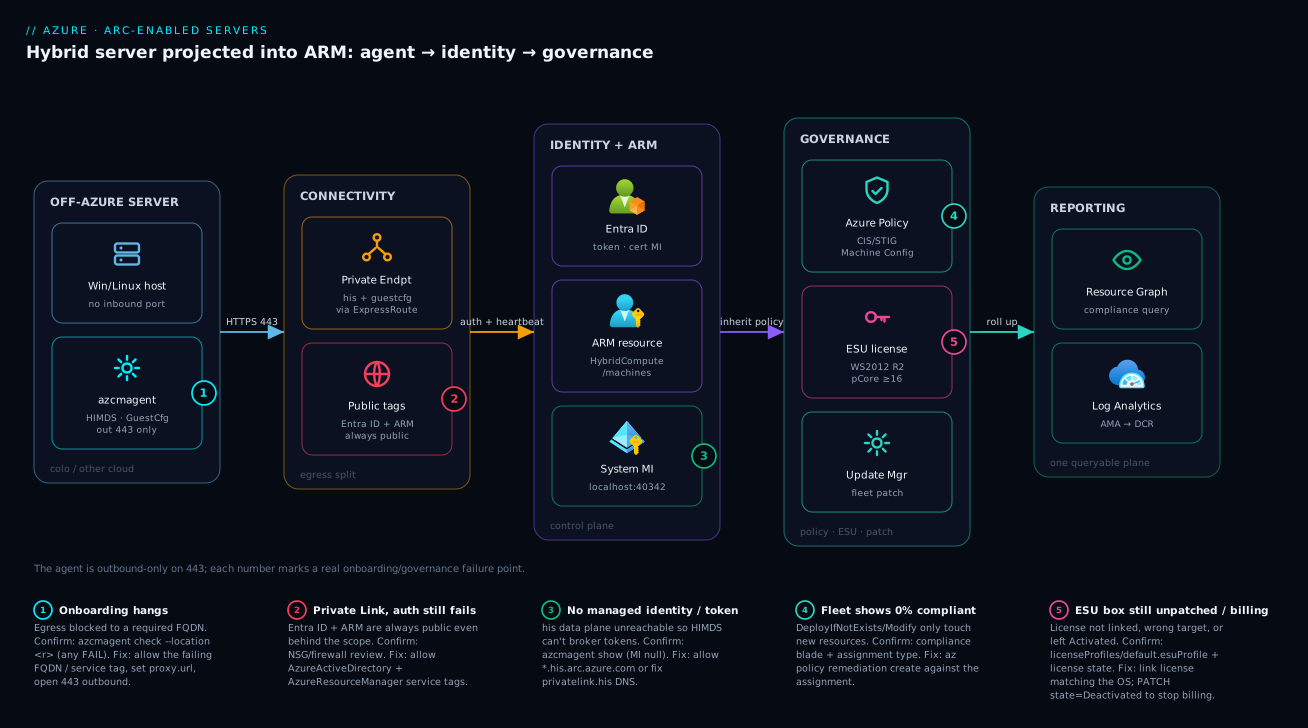
Read the diagram left to right as the control-plane projection it is. On the far left, an off-Azure server in a colo or another cloud runs the Connected Machine agent — azcmagent plus the HIMDS, GuestConfig, and extension-manager services — listening on no inbound port and reaching out only on HTTPS 443. That outbound traffic splits at the connectivity layer: with Private Link, the his and guestconfiguration data planes ride a private endpoint through your hub VNet over ExpressRoute/VPN, while Entra ID and Azure Resource Manager stay on public endpoints (the rule that trips everyone — allow the AzureActiveDirectory and AzureResourceManager service tags or nothing authenticates). Once through, the agent authenticates to Entra ID, the machine surfaces in ARM as a HybridCompute/machines resource with a system-assigned managed identity, and from there the governance plane takes over.
The right of the diagram is where the value lands. Azure Policy assigns CIS/STIG baselines and Machine Configuration packages that the in-guest engine evaluates and (optionally) auto-corrects; ESU licenses link to each WS2012/2012 R2 box to fund off-Azure patching through Update Manager; and Resource Graph + Log Analytics roll the whole fleet’s compliance and telemetry into one queryable plane. The numbered badges mark the five places this breaks in production — onboarding egress, the always-public Entra ID/ARM path, the in-box Machine Config engine, the ESU link, and the private-endpoint DNS — and the legend narrates each as symptom · confirm · fix. Follow the path once and you have the whole system: agent out on 443, identity to Entra ID, resource in ARM, governance reaching back in.
Real-world scenario
A payments platform team I worked with — call them NorthPay — ran 420 Windows Server 2012 R2 hosts across two PCI-scoped datacenters. The constraint was hard: the auditor would not accept agent telemetry crossing the public internet, and every box needed ESU because migrating the legacy payment gateway off 2012 R2 was an 18-month project they could not front-load. Their first attempt onboarded everything in direct mode and immediately failed the network review.
The fix had three parts. First, a Private Link Scope per datacenter, fronted by a private endpoint on the existing ExpressRoute-connected hub VNet, with the his and guestconfiguration zones in central private DNS. Second — the part that broke — they had blocked all outbound internet at the firewall, and onboarding hung. The agent still needs Entra ID and ARM over the public internet even behind Private Link, so they added exactly two service-tag rules and nothing else:
# The only public egress the agent needs behind Private Link
az network nsg rule create -g rg-pci-net --nsg-name nsg-arc \
  --name AllowAAD --priority 150 --direction Outbound --access Allow \
  --protocol Tcp --source-address-prefixes VirtualNetwork \
  --destination-address-prefixes AzureActiveDirectory --destination-port-ranges 443
az network nsg rule create -g rg-pci-net --nsg-name nsg-arc \
  --name AllowARM --priority 151 --direction Outbound --access Allow \
  --protocol Tcp --source-address-prefixes VirtualNetwork \
  --destination-address-prefixes AzureResourceManager --destination-port-ranges 443
Third, ESU as code: one Datacenter pCore license per physical host (2-socket boxes, well over the 16-core floor), provisioned and linked through a Bicep loop over an inventory file with assignedLicense referencing the license resource ID. Compliance — the CIS baseline via Machine Configuration ApplyAndMonitor and ESU coverage — rolled up into one Resource Graph dashboard the auditor could query directly. The review passed on the second pass, and the only public traffic on the wire was two service tags to identity and ARM.
The numbers told the story to the CFO. The management plane itself cost ₹0 per machine; the spend was ESU (the unavoidable cost of running an out-of-support OS for 18 more months) plus a modest Log Analytics ingestion bill and the private-endpoint hours. Against the alternative — a forced, rushed migration of the payment gateway, or a failed PCI audit — it was trivially justified. The lesson NorthPay wrote on the wall: “Private Link makes the data plane private; it does not make identity private. Allow Entra ID and ARM, or you have a beautiful endpoint nobody can authenticate through.”
The rollout as a timeline, because the order of moves is the lesson:
| Phase | Action | Result | What it taught |
|---|---|---|---|
| Week 1 | Onboard all in direct mode | Failed network review | Read the security requirement first |
| Week 2 | Private Link Scope per DC + private DNS | Data plane private | Scope-per-hub-VNet pattern |
| Week 2 | Blocked all egress → onboarding hung | Agents couldn’t connect | Entra ID + ARM are always public |
| Week 2 | Added two service-tag rules | Onboarding succeeded | Minimal public egress, nothing more |
| Week 3 | ESU as code (Bicep loop over inventory) | All 420 licensed + linked | Licenses are ARM resources — treat as code |
| Week 4 | CIS via Machine Config + Resource Graph dashboard | Auditor queried compliance directly | One queryable plane beats screenshots |
| Audit | Second-pass review | Passed | Two service tags on the wire, nothing else |
Advantages and disadvantages
Projecting servers into ARM is powerful, but it is not free of trade-offs. Weigh it honestly:
| Advantages | Disadvantages |
|---|---|
| One control plane (policy, RBAC, Resource Graph) across on-prem + multicloud | Another agent to install, version, and keep healthy on every box |
| Management plane is free per machine; pay only for value-add services | Value-add services (Defender, ESU, extra ingestion) do cost real money |
| Managed identity per machine — no service-account secrets on disk | Misunderstanding “always-public Entra ID/ARM” stalls Private Link rollouts |
| Machine Configuration sees in-guest state Azure Policy alone cannot | Authoring/signing custom packages has a learning curve |
| ESU through Arc is the only sane channel for off-Azure WS2012/2012 R2 | ESU licensing rules (16-core floor, edition×type combos) are easy to over-buy |
| Same extension model as Azure VMs (AMA, Custom Script, Defender) | Extensions run as root/SYSTEM — a real attack surface without a deny allowlist |
az ssh arc / Run Command replace bastion + jump-box sprawl, fully audited |
Outbound-only by design — no inbound management without going through ARM |
The model is right when you have servers outside Azure that genuinely need Azure-grade governance, identity, and patching — regulated estates, long migration tails, multicloud shops. It is over-engineering for a handful of boxes you will retire next quarter, or for workloads that have no compliance, identity, or patching requirement at all. The disadvantages are all manageable — but only if you know they exist, which is the point of this article.
Going deeper
The eight numbered sections are the operating manual. This section is the layer underneath — the mechanics that decide why the manual reads the way it does, and the parts that only bite once you are past your first hundred machines. None of it re-teaches the flow above; each subsection changes a design decision or a diagnosis.
How the Hybrid IMDS actually hands out a token (and why it is SSRF-hardened)
Earlier you saw that in-guest scripts read managed-identity tokens from http://localhost:40342 with no stored secret. The how matters, because a naive local metadata endpoint is a Server-Side Request Forgery (SSRF) magnet: any low-privileged web app on the box could curl it and walk off with a machine-identity token. Arc’s HIMDS closes that hole with a challenge–response handshake:
- Your code issues
GET http://localhost:40342/metadata/identity/oauth2/token?api-version=2020-06-01&resource=https://management.azure.com/with the headerMetadata: true. - HIMDS replies
401 Unauthorizedwith aWww-Authenticate: Basic realm=<path>header naming a challenge-token file on local disk (%ProgramData%\AzureConnectedMachineAgent\Tokens\*.keyon Windows,/var/opt/azcmagent/tokens/*.keyon Linux). - That file is readable only by a privileged local principal — the Hybrid agent extension applications group on Windows, the
himdsgroup on Linux. Your code reads it and re-sends the request withAuthorization: Basic <file-contents>. - Only now does HIMDS mint the token.
The security property: a token is obtainable only by a caller that can already read a root/Administrator-protected file, so an unprivileged SSRF cannot escalate to a cloud credential. The contrast with the Azure VM story:
| Aspect | Azure VM IMDS (169.254.169.254) |
Arc HIMDS (localhost:40342) |
|---|---|---|
| Endpoint | Link-local 169.254.169.254 |
Loopback 127.0.0.1:40342 |
| To obtain a token | Metadata: true header only |
Metadata: true plus the challenge-token file (HTTP Basic) |
| Anti-SSRF control | Header + fabric network isolation | Privileged-file challenge — must read a root-only file |
| Identity backing | Azure fabric-issued | A certificate the agent rotates |
The design lesson: when you grant a machine’s system-assigned MI a role, you are trusting every privileged process on that box, because HIMDS deliberately makes the token reachable by exactly those principals. Scope the MI’s RBAC as tightly as you would a human account.
The agent status lifecycle: Connected → Disconnected → Expired
azcmagent show and the machine’s properties.status move through three states, and the difference between the last two is the one that generates 3 a.m. pages:
| Status | What it means | How you get here | Recovery |
|---|---|---|---|
Connected |
Heartbeat received recently (the agent beats roughly every 5 min) | Normal steady state | — |
Disconnected |
No heartbeat past the offline threshold; ARM marks it stale | Box powered off, egress broke, or the agent service stopped | Restore power/egress/service — it re-beats on its own |
Expired |
Offline long enough that the managed-identity certificate could not be renewed | A box left off for weeks/months | Re-run azcmagent connect — the identity must be re-established |
The subtlety beginners miss: Disconnected is self-recovering — bring the box back and the agent resumes where it left off. Expired is not, because the certificate the agent rotates for the managed identity has lapsed. The machine resource still exists in ARM, but its identity is dead, and every Machine Configuration evaluation or MI-authenticated script against it fails until you reconnect. This is exactly why a long-powered-off DR or seasonal box that “was fine last quarter” comes back Expired. Put a Resource Graph alert on properties.status != 'Connected', and treat Expired as a reconnect task, never a transient blip.
Machine Configuration internals: cadence, the DSC engine, and package signing
Three internals the audit-vs-apply section deferred:
- Cadence. The guest configuration agent re-evaluates every assignment roughly every 15 minutes. That is your drift-detection window and, for
ApplyAndAutoCorrect, your self-heal interval — compliance in Resource Graph is eventually-consistent on a ~15-minute clock, not instant. Do not alarm on a fresh assignment before it has had a cycle. - The engine is DSC, and it is cross-platform in-box. On Windows it is not classic Windows PowerShell DSC with the old LCM; on Linux there is no PowerShell dependency at all. The agent carries its own Desired State Configuration runtime, which is why the same signed package format runs on both OS families.
- Signing is per-OS and enforceable.
Protect-GuestConfigurationPackagesigns a package with a code-signing certificate on Windows or a GPG key on Linux. Enforce that only signed content runs — via the agent’s signature-validation setting or by policy — for anyApplypackage, because an unsigned Apply package is arbitrary code executing as SYSTEM/root at each evaluation.
Mapping the assignmentType you choose to the DSC methods it actually runs each cycle makes the behaviour concrete:
| assignmentType | DSC methods run per cycle | Net effect |
|---|---|---|
Audit |
Get + Test |
Reports Compliant/NonCompliant; never calls Set |
ApplyAndMonitor |
Test + Set at first apply, then Get/Test |
Enforces once; afterwards reports drift without re-fixing |
ApplyAndAutoCorrect |
Test, and Set whenever Test fails |
Continuous self-heal, every ~15 min |
ESU deeper: the extended-support clock, SQL Server 2012, and Arc ESU vs volume-license ESU
The ESU section covered the Windows Server license mechanics. Three things it did not:
The clock is fixed and public. Windows Server 2012/2012 R2 left extended support on 10 October 2023. ESU buys up to three more years from that date: Year 1 (Oct 2023–Oct 2024), Year 2, and Year 3 ending 10 October 2026 — a hard wall, and prices rise each year by design. ESU is a bridge, not a destination: size the migration to finish before the year whose price you refuse to pay.
SQL Server 2012 ESU rides Arc too, but through a different door. SQL Server 2012 left support on 12 July 2022, and its ESUs are delivered through SQL Server enabled by Azure Arc — the Azure extension for SQL Server, resource type Microsoft.AzureArcData/sqlServerInstances, not the Microsoft.HybridCompute/licenses resource you use for the OS. You Arc-enable the SQL instance, set it to pay-as-you-go licensing, and ESUs bill automatically, with no separate license object to link. (SQL 2012’s three ESU years ran out in July 2025, so by this article’s date that specific window has closed; the pattern still applies to later SQL versions as they age out.)
Arc-delivered ESU is a different product from the old volume-license ESU — and the delta is the whole reason Arc is now the recommended channel:
| Dimension | Volume-license (traditional) ESU | Arc-delivered ESU |
|---|---|---|
| Activation | MAK product keys bought via Volume Licensing, installed/KMS-activated per server | No keys — enrollment is the linked license resource |
| Purchase model | Annual, paid up front for the whole year | Monthly, metered pay-as-you-go through Azure |
| Granularity | Fixed per-core SKU count committed ahead | Resizable cores; movable between RGs/subscriptions |
| Stopping cost | Committed for the purchased year | Deactivate the license → billing stops |
| Delivery | You distribute patches yourself | Flows via Windows Update / Azure Update Manager |
| Management surface | Licensing portal + spreadsheets | An ARM resource — queryable in Resource Graph, IaC-able |
The practical consequence: with Arc ESU you can onboard a box mid-month, patch it, decommission it, and stop paying — none of which the up-front MAK-key model allows. That elasticity is why a shrinking 2012 estate is far cheaper on Arc than on VL keys. Patch delivery for both the OS ESU and the wider fleet is Azure Update Manager on Arc.
Defender for Servers on Arc: how the plan actually lands on an off-Azure box
The cost table listed Defender for Servers; here is the mechanism, because Arc changes it. Defender for Servers is a plan within Microsoft Defender for Cloud, enabled at subscription scope (or per-resource). The moment the plan is on, Defender auto-provisions onto every Arc-connected machine in scope — and Arc-connection is the hard prerequisite: an un-onboarded on-prem box is simply invisible to Defender for Servers.
What lands, and the on-prem gotcha:
| Piece | What it is | On Arc, on-prem |
|---|---|---|
| MDE sensor | Microsoft Defender for Endpoint EDR (MDE.Windows/MDE.Linux extension) |
Auto-provisioned via the Arc extension channel — needs MDE egress on top of the Arc FQDNs |
| MDVM | Defender Vulnerability Management scan | Agent-based on Arc; surfaces CVEs into Defender for Cloud |
| Agentless scanning | Snapshot-based malware/secret scan | Not available for on-prem Arc — it needs cloud disk snapshots, so it covers Azure/AWS/GCP VMs only |
| Plan 1 vs Plan 2 | P1 = MDE/EDR only; P2 adds premium MDVM, JIT, file-integrity monitoring, 500 MB/day free ingestion, regulatory compliance | Same split applies on Arc |
The two design consequences: (1) the agentless scanning you may lean on for cloud VMs does not reach your colo boxes — on-prem Arc is agent-based Defender or nothing, so budget the MDE agent everywhere; and (2) Defender adds its own outbound endpoints (the MDE service FQDNs) beyond the Arc set, so a locked-down Private Link estate must open those too, or EDR silently fails to report. The sensor detail lives in Defender for Servers: CWPP for Hybrid & Multicloud and Defender for Endpoint onboarding.
Hands-on lab
Onboard a single machine, prove it healthy, assign an audit baseline, and tear it down — all on a free-tier-friendly Linux VM (you can use a small Azure VM as the “off-Azure” stand-in, or any Ubuntu box you control). Run the Azure-side commands in Cloud Shell (Bash); run the agent commands on the target machine.
Step 1 — Variables and resource group.
RG=rg-arc-lab
LOC=eastus
SP_NAME=sp-arc-lab-onboard
az group create -n $RG -l $LOC -o table
Expected: a resource-group row with provisioningState: Succeeded.
Step 2 — Create the least-privilege onboarding SPN.
az ad sp create-for-rbac \
  --name "$SP_NAME" \
  --role "Azure Connected Machine Onboarding" \
  --scopes "$(az group show -n $RG --query id -o tsv)"
# Note the appId, password, tenant — you'll put them in a 0600 file on the box
Expected: JSON with appId, password, tenant. Treat the password like a secret.
Step 3 — On the target machine, install the agent. (Linux one-liner; Windows uses the MSI.)
# On the Ubuntu box (run as root)
wget https://aka.ms/azcmagent -O ~/install_linux_azcmagent.sh
bash ~/install_linux_azcmagent.sh
azcmagent version   # confirm the CLI is installed
Step 4 — Pre-flight the endpoints before connecting.
azcmagent check --location eastus
# Expect PASS for his, guestconfiguration, login.microsoftonline.com, management.azure.com, CDN
If any FQDN fails, fix egress before continuing — onboarding will hang otherwise.
Step 5 — Connect using the SPN via a 0600 config file (secret off the CLI).
cat > /etc/arc-onboard.json <<JSON
{ "subscriptionId":"<sub-id>","resourceGroup":"rg-arc-lab","location":"eastus",
  "tenantId":"<tenant>","servicePrincipalId":"<appId>","servicePrincipalSecret":"<password>",
  "cloud":"AzureCloud" }
JSON
chmod 600 /etc/arc-onboard.json

azcmagent connect --config /etc/arc-onboard.json \
  --tags "Owner=Lab,Datacenter=LAB,DataClassification=None" \
  --correlation-id "$(uuidgen)"

shred -u /etc/arc-onboard.json
Expected: Connected machine to Azure. The box now exists in ARM.
Step 6 — Verify health from both sides.
azcmagent show   # on the box: Status: Connected, an Agent Version, a MI principal id

# From Cloud Shell
az connectedmachine show -g $RG -n "$(hostname)" \
  --query "{status:status, agentVersion:agentVersion, mi:identity.principalId}" -o jsonc
Expected: status: Connected, a non-null mi.
Step 7 — Assign an audit-only CIS-style baseline at the RG scope. Use a built-in audit initiative so there’s nothing to author:
# Example: assign a built-in 'audit insecure password settings' style policy at the RG
az policy assignment create \
  --name "lab-audit-baseline" \
  --scope "$(az group show -n $RG --query id -o tsv)" \
  --policy-set-definition "<built-in-initiative-id>"   # pick an Arc-applicable audit initiative
Compliance takes time to evaluate; check it in Resource Graph after ~30–60 minutes with the guestconfigurationresources query from section 5.
Step 8 — Teardown (stop all billing and remove the resource).
# On the box: cleanly disconnect (removes the ARM resource + MI)
azcmagent disconnect --config /dev/null 2>/dev/null || azcmagent disconnect

# From Cloud Shell: nuke the RG and the SPN
az group delete -n $RG --yes --no-wait
az ad sp delete --id "<appId>"
Expected: the machine disappears from ARM; the RG deletes asynchronously. Nothing here incurs ongoing cost once removed.
Practice challenges
Work these in order — each escalates from beginner to advanced. Do them against the free-tier lab box from the Hands-on lab, or reason them on paper. Every solution is one command or query plus a one-line why. These are deliberately not the guided lab: they force you to choose the right primitive rather than follow a script. (All IDs are placeholders; nothing here is run live.)
1 (Beginner) — Read a box’s health before you trust it. You have just installed the agent on a new machine but not connected it. Print (a) whether every required endpoint is reachable and (b) the agent’s current status, mode, and identity. Which two commands, and what in the output tells you the box is ready to onboard?
<details> <summary>Solution</summary>
azcmagent check --location eastus   # every required FQDN must read PASS
azcmagent show                      # Status, Agent version, Agent mode, MI principal id
Why: check proves egress before you burn an onboarding attempt; show is your single health pane afterwards — a null MI or a Disconnected/Expired status is your first red flag.
</details>
2 (Beginner → Intermediate) — Onboard without a blast radius. Write the command that creates the narrowest identity capable of connecting machines, scoped to a single resource group rg-arc-servers. Which built-in role, and why not Contributor?
<details> <summary>Solution</summary>
az ad sp create-for-rbac \
  --name "sp-arc-onboarding" \
  --role "Azure Connected Machine Onboarding" \
  --scopes "/subscriptions/<sub-id>/resourceGroups/rg-arc-servers"
Why: Azure Connected Machine Onboarding can only create and read Arc machine resources — a leaked secret cannot manage extensions (root/SYSTEM code), touch ESU, or delete anything; Contributor would hand all of that to an attacker.
</details>
3 (Intermediate) — Fix the classic Private Link onboarding hang. Your regulated estate has a healthy Private Link Scope and private DNS, but onboarding hangs at connect and all internet egress is blocked. Add the minimum outbound rules that make onboarding succeed — no more.
<details> <summary>Solution</summary>
# Exactly two service-tag rules — Entra ID and ARM never traverse Private Link
az network nsg rule create -g rg-net --nsg-name nsg-arc --name AllowAAD \
  --priority 150 --direction Outbound --access Allow --protocol Tcp \
  --destination-address-prefixes AzureActiveDirectory --destination-port-ranges 443
az network nsg rule create -g rg-net --nsg-name nsg-arc --name AllowARM \
  --priority 151 --direction Outbound --access Allow --protocol Tcp \
  --destination-address-prefixes AzureResourceManager --destination-port-ranges 443
Why: login.microsoftonline.com and management.azure.com are always public even behind Private Link; the private endpoint only carries the his/guestconfiguration data planes.
</details>
4 (Intermediate → Advanced) — Scope the ESU population in one query. Before you provision a single ESU license, list every Arc machine that needs one: running Windows Server 2012 or 2012 R2, with its status and agent version. Write the Resource Graph (KQL) query.
<details> <summary>Solution</summary>
resources
| where type =~ "microsoft.hybridcompute/machines"
| extend osSku = tostring(properties.osSku), status = tostring(properties.status),
         agent = tostring(properties.agentVersion)
| where osSku has "2012"
| project name, osSku, status, agent, resourceGroup, subscriptionId
| order by name asc
Why: you cannot bill (or budget) ESU for boxes you cannot see — the OS inventory is step zero; you then cross-reference each machine’s licenseProfiles/default to find which of these still lack a linked license.
</details>
5 (Advanced) — Buy the cheapest correct ESU license for a small VM. A single 2-vCPU Windows Server 2012 R2 virtual machine needs ESU. Write the az connectedmachine license create that minimises spend while staying valid, and state the trap.
<details> <summary>Solution</summary>
az connectedmachine license create \
  --license-name "esu-ws2012-std-vcore-vm01" \
  --resource-group "rg-arc-servers" --location "eastus" \
  --license-type ESU --state Activated \
  --target "Windows Server 2012 R2" \
  --edition Standard --type vCore --processors 8
Why: vCore avoids the 16-core pCore floor and Standard is cheaper than Datacenter — but vCore still floors at 8, so a 2-core VM bills for 8 cores; you cannot size below the floor, only choose the cheaper floor.
</details>
6 (Advanced) — Hunt the fleet’s risky agents. Write one Resource Graph query that surfaces every Arc machine that is either identity-dead (Expired) or running a stale agent below version 1.40 — the boxes that will silently drop out of compliance and EDR.
<details> <summary>Solution</summary>
resources
| where type =~ "microsoft.hybridcompute/machines"
| extend status = tostring(properties.status), agent = tostring(properties.agentVersion)
| where status =~ "Expired" or agent < "1.40"
| project name, status, agent, resourceGroup, lastStatusChange = properties.lastStatusChange
| order by status asc, agent asc
Why: Expired machines need a fresh azcmagent connect (the MI certificate lapsed — restarting the box alone will not fix it), and stale agents miss both CVE fixes and features; note the version compare is lexical, so pin a real floor and parse the parts for exact numeric ranges.
</details>
Common mistakes & troubleshooting
Most Arc incidents are one of a dozen failure modes, and each has a precise signal. Scan the playbook, then read the detail for the row that matches.
| # | Symptom | Root cause | Confirm (exact command / path) | Fix |
|---|---|---|---|---|
| 1 | Onboarding hangs / times out | Egress blocked to a required FQDN | azcmagent check --location <r> |
Allow the failing FQDN / service tag |
| 2 | “Connected” but no managed identity | his data plane unreachable | azcmagent show (MI null) |
Allow *.his.arc.azure.com / fix PE DNS |
| 3 | Private Link healthy, auth still fails | Entra ID/ARM blocked (always public) | NSG/firewall rules review | Allow AzureActiveDirectory + AzureResourceManager tags |
| 4 | Compliance shows 0%/all NonCompliant |
DINE/Modify never remediated existing fleet | Compliance blade; assignment type | az policy remediation create |
| 5 | assignmentType reads Null |
Transient first-hour state | guestconfigurationresources query |
Wait ~1 hour; don’t alert on it |
| 6 | Machine Config never evaluates | guestconfiguration data plane blocked | azcmagent check; status Error |
Allow *.guestconfiguration.azure.com |
| 7 | ESU machine still unpatched | License not linked, or wrong target | licenseProfiles/default.esuProfile empty |
Link license; match --target to OS |
| 8 | ESU bill higher than expected | Over-provisioned cores / wrong type | az connectedmachine license show |
Resize --processors; correct pCore/vCore |
| 9 | Cloned image → duplicate/colliding names | Onboarded before cloning | Two machines, same name in ARM | Onboard at first boot with --resource-name |
| 10 | Extension stuck Creating |
Extension manager can’t reach his/CDN | Extension status; egress | Allow his + download CDN FQDNs |
| 11 | Secret leaked in logs | Secret passed on the CLI | Review automation/log capture | Use --config 0600 file; rotate the secret |
| 12 | Agent on a stale version (CVE) | Auto-upgrade not enabled | azcmagent show version |
Enable automatic agent upgrade |
| 13 | az ssh arc fails |
Notifications FQDN blocked | Test SSH; egress | Allow *.guestnotificationservice.azure.com |
| 14 | Disconnected machine still billing ESU | License left Activated | az connectedmachine license show --query state |
PATCH state to Deactivated |
Onboarding hangs (rows 1–3)
By far the most common rollout failure, and almost always egress. The agent must reach five endpoint classes; block any and connect stalls. The decision table:
If azcmagent check fails on… |
It’s probably… | Do this |
|---|---|---|
login.microsoftonline.com / management.azure.com |
Entra ID/ARM blocked (even behind Private Link) | Allow AzureActiveDirectory + AzureResourceManager tags |
*.his.arc.azure.com |
his data plane / private DNS broken | Fix PE + privatelink.his.arc.azure.com zone |
*.guestconfiguration.azure.com |
guestconfiguration data plane blocked | Allow it (or fix its private DNS zone) |
| Download CDN | Binary download blocked | Allow aka.ms / download.microsoft.com |
| Everything | No egress at all / wrong proxy | Set proxy.url; open 443 outbound |
Compliance shows 0% (rows 4–6)
The panic moment. Nine times in ten it is a remediation task that never ran, because DeployIfNotExists and Modify only act on new/updated resources:
| Observation | Cause | Fix |
|---|---|---|
| All existing machines NonCompliant after assigning DINE | No remediation task | az policy remediation create --policy-assignment <id> |
Brand-new assignment shows Null |
First-hour transient | Wait; exclude from alerting |
Status Error on specific boxes |
guestconfiguration unreachable | Fix egress; azcmagent show |
| Some machines absent from results | MI prerequisites not assigned | Assign the prerequisites initiative at MG scope |
ESU surprises (rows 7, 8, 14)
ESU is the part that touches the invoice, so its failure modes cost money, not just availability:
| Symptom | Cause | Confirm | Fix |
|---|---|---|---|
| Machine eligible but unpatched | License not linked | licenseProfiles/default.esuProfile.assignedLicense empty |
PUT the profile with the license ID |
| “Won’t link” error | --target ≠ the OS |
Compare license target to OS version | Recreate license with correct target |
| Bill too high | Cores over-provisioned | az connectedmachine license show --query processors |
Resize down; verify pCore vs vCore |
| Still billing after decommission | License left Activated |
--query state |
PATCH state = Deactivated |
Common beginner mistakes
The troubleshooting playbook above fixes symptoms. This section fixes the mental models that produce them — the misconceptions a newcomer to Arc almost always carries in, and the corrected model that makes the rest of the lesson click. (Distinct from the symptom → cause → fix table: those are operational, these are conceptual.)
| Misconception | Why it’s wrong | The right mental model |
|---|---|---|
| “Arc migrates my server into Azure.” | Nothing moves — no VM is created, no disk copied; the workload, OS, and network are untouched. | Arc is a control-plane projection: only a governable representation of the box appears in ARM. The box stays exactly where it is. |
| “The agent runs — or could disrupt — my workload.” | The Connected Machine agent is low-privilege, outbound-only, and opens no inbound port; it manages, it does not host. | Think of it as a read-mostly reporter that carries an identity, not a hypervisor or an application runtime. |
| “Private Link makes all agent traffic private.” | Entra ID (login.microsoftonline.com) and ARM (management.azure.com) always use public endpoints. |
Private Link privatises the data plane (his/guestconfiguration); identity and control stay public by design — allow the two service tags. |
| “Assigning a policy fixes the machines I already have.” | DeployIfNotExists/Modify act only on new or updated resources; existing boxes stay NonCompliant. |
Policy is go-forward enforcement; a remediation task is the separate, explicit step that reaches back to the existing fleet. |
| “ESU is billed per server.” | ESU bills by cores, with hard floors (pCore ≥ 16, vCore ≥ 8), edition, and coverage year — never per box. | ESU sizing is core math: right-size cores and pick the cheapest valid edition × type, or you over-pay on every machine. |
| “Arc itself costs money per machine.” | The management plane — inventory, policy, Machine Configuration, Resource Graph — is free. | You pay only for value-add services you switch on (Defender, ESU, extra ingestion, private endpoints). Budget those, not “Arc.” |
| “The machine’s managed identity can already act on Azure.” | A fresh system-assigned MI has zero permissions until you grant it RBAC. | An MI is an identity, not an authorisation — it can do exactly what you role-assign it, and nothing more. |
| “Arc servers need the Guest Configuration extension, like Azure VMs do.” | On Arc the Machine Configuration engine ships in-box with the agent. | One fewer DeployIfNotExists prerequisite than an Azure VM — assign the policy, skip the extension deployment. |
Best practices
- Onboard with a dedicated, RG-scoped SPN carrying only
Azure Connected Machine Onboarding; prefer certificate auth, pass any secret via a 0600--configfile, andshredit after. - Bake
azcmagent checkinto golden-image validation. Never ship an image that can’t pre-flight its endpoints; configure the proxy beforeconnect. - Never pre-connect a golden image. Install the agent disconnected, and onboard at first boot with a per-machine
--resource-nameto avoid name collisions. - Tag at onboard (
Owner,Datacenter,DataClassification) and enforce a deny-untagged policy so nothing onboards anonymously. - Assign policy at the management-group scope so new machines inherit baselines automatically; reserve resource-scope assignments for genuine exceptions.
- Always run a remediation task after any
DeployIfNotExists/Modifyassignment against a pre-existing fleet — assignment alone never touches existing machines. - Pick
assignmentTypedeliberately:Auditfor reporting,ApplyAndMonitorfor one-time enforcement,ApplyAndAutoCorrectonly where self-healing is genuinely wanted. - Restrict extensions to an allowlist with a
denypolicy — extensions run as root/SYSTEM and are a real attack surface. - Enable auto-upgrade on both the agent and every extension so you are not chasing CVEs in your own tooling.
- Treat ESU licenses as code (Bicep), with the correct edition×type combo and core count; deactivate on decommission so billing stops.
- For regulated estates, use a Private Link Scope per hub VNet — and always allow the
AzureActiveDirectory+AzureResourceManagerservice tags for the unavoidable public egress. - Ship agent and policy diagnostics to a central Log Analytics workspace and build the compliance view in Resource Graph, not portal screenshots.
Security notes
The security posture of an Arc estate rests on three pillars: identity blast radius, the in-guest attack surface, and network exposure. Tighten each deliberately.
| Control | Default / risk | Hardened state |
|---|---|---|
| Onboarding identity | A broad SPN can pivot if leaked | RG-scoped onboarding role, cert auth, rotation |
| Secret handling | Secret on the CLI leaks to logs | 0600 --config file, shredded after use |
| Machine MI privilege | MI inherits whatever you grant | Least-privilege RBAC per machine |
| Extensions | Run as root/SYSTEM, push anything | Deny allowlist of publishers/types |
| Inbound exposure | — | None by design; outbound 443 only |
| Agent data plane | Telemetry over the public internet | Private Link Scope + private DNS |
| Entra ID + ARM egress | Often over-broad “allow internet” | Scoped AzureActiveDirectory + AzureResourceManager tags |
| Audit trail | Scattered/none | ARM activity log + diagnostics to central LA |
| Access to boxes | Standing RDP/SSH, jump boxes | az ssh arc / Run Command via ARM, PIM-gated |
Identity-specific guidance:
| Identity | Least-privilege rule | Extra hardening |
|---|---|---|
| Onboarding SPN | Onboarding role, one RG | Certificate auth; short rotation; alert on use |
| Machine system-assigned MI | Grant only what the in-guest scripts need | Per-machine scoping; review grants quarterly |
| Operator (Resource Administrator) | Scoped to the Arc RG/sub | PIM/JIT activation; conditional access |
| Auditor (Reader) | Read-only inventory + compliance | No write paths at all |
The network exposure model in one line per layer: inbound — nothing, ever (the agent opens no port); outbound — 443 only, to a known FQDN set, ideally split into private (data plane) and tightly-scoped public (identity/ARM); lateral — a compromised box’s MI can do only what you granted it, so least-privilege the MI as if it were a user.
Cost & sizing
The headline that funds the rollout: the Arc management plane is free. There is no per-machine charge to project a server into ARM, run Machine Configuration audits, assign policy, or query Resource Graph. You pay only for value-add services you opt into. Knowing exactly what bills prevents both sticker shock and the opposite error — assuming Arc itself costs money and under-deploying.
| Component | Bills? | Driver | Rough figure |
|---|---|---|---|
| Arc management plane (inventory, policy, Resource Graph) | No | — | ₹0 |
| Machine Configuration audit/remediation | No | — | ₹0 |
| Azure Monitor Agent data ingestion | Yes | GB ingested to Log Analytics | ~₹220–280 / GB ingested |
| Log Analytics retention beyond free period | Yes | GB-months retained | Per GB-month after 31 days free |
| Defender for Servers (Plan 1/2) | Yes | Per server/hour | ~$15/server/month (Plan 2) |
| Update Manager (Arc machines) | Yes | Per Arc server/hour for patch mgmt | ~$5/Arc-server/month equiv |
| Extended Security Updates | Yes | Core count × edition × year | Year 1 lowest, rises Y2/Y3 |
| Private endpoint | Yes | Hours + GB processed | ~₹0.90/hr + per-GB |
ESU sizing is where the real money is, and it scales by cores, not machines:
| Lever | Effect on ESU bill | Right-sizing move |
|---|---|---|
Core count (--processors) |
Linear | Provision the actual cores, not a round-up |
Type (pCore vs vCore) |
pCore floors at 16 | Use vCore (min 8) for small VMs |
| Edition (Standard vs Datacenter) | Datacenter costs more | Standard unless density justifies DC |
| Year of coverage | Y1 < Y2 < Y3 | Migrate before Y3 to cap exposure |
| Deactivation on decommission | Stops billing | PATCH state=Deactivated promptly |
Right-sizing rules of thumb:
| If you have… | Choose | Why |
|---|---|---|
| A small 2-core VM on WS2012 R2 | vCore, Standard |
pCore’s 16-core floor over-buys |
| A dense 2-socket physical host | pCore, Datacenter |
DC covers unlimited VMs on the host |
| A short migration runway | ESU Year 1 only | Cap the most expensive years |
| Light telemetry needs | Tight DCR scope | Ingestion is the sleeper cost |
| Heavy compliance/threat needs | Defender Plan 2 | Worth it for EDR + vuln assessment |
The free tier in practice: onboarding, inventory, policy, Machine Configuration, and Resource Graph cost nothing — you can govern a 600-machine estate’s compliance for ₹0. The bill arrives only with ingestion (control your DCR scope), Defender (opt in where threat protection is needed), Update Manager extras, ESU (the cost of running an out-of-support OS), and private endpoints. Budget those five line items, not “Arc.”
Interview & exam questions
These map to AZ-104, AZ-500, and AZ-305, where hybrid governance, Arc, and Machine Configuration appear.
1. What does Azure Arc-enabled servers actually do to an on-prem machine? It projects the machine into Azure Resource Manager as a Microsoft.HybridCompute/machines resource, so ARM governance — RBAC, Azure Policy, Resource Graph, tags — reaches it. The workload, OS, and network are unchanged; only the control plane extends.
2. The agent is connected but in-guest scripts can’t get a token. Likely cause? The his data plane (*.his.arc.azure.com) is unreachable, so the Hybrid IMDS at localhost:40342 can’t broker tokens. Confirm with azcmagent show (null MI) and fix the egress or the private DNS zone.
3. You enabled a Private Link Scope but onboarding still fails to authenticate. Why? Entra ID (login.microsoftonline.com) and ARM (management.azure.com) always use public endpoints even with Private Link. You must allow the AzureActiveDirectory and AzureResourceManager service tags; the private endpoint only carries the his/guestconfiguration data planes.
4. Difference between Audit, ApplyAndMonitor, and ApplyAndAutoCorrect? Audit reports non-compliance and changes nothing. ApplyAndMonitor applies once at assignment then only reports drift. ApplyAndAutoCorrect runs the Set to remediate on every evaluation — continuous self-healing.
5. You assigned a DeployIfNotExists policy but the existing fleet shows 0% compliant. Fix? DINE and Modify act only on new/updated resources. Create a remediation task (az policy remediation create) to bring existing machines into scope.
6. Why don’t Arc servers need the Guest Configuration extension? The Machine Configuration engine ships in-box with the Connected Machine agent. On Azure VMs you deploy the extension separately; on Arc that half of the prerequisites initiative is a no-op (the identity wiring still applies).
7. What’s the minimum core count for an ESU pCore license, and which edition pairs with it? 16 physical cores minimum for pCore. Datacenter is only valid with pCore; the three valid combos are Standard vCore (min 8), Standard pCore (min 16), and Datacenter pCore (min 16).
8. How do you onboard 500 servers non-interactively without leaking a secret? A dedicated SPN with Azure Connected Machine Onboarding scoped to one RG; pass the secret via a 0600 --config file (never the CLI, which can echo to logs) and shred it after; prefer certificate auth where you can distribute certs.
9. A cloned golden image produced colliding machine names in ARM. What did they do wrong? They onboarded before cloning. Install the agent disconnected in the image, and run connect at first boot with a per-machine --resource-name.
10. Which role should the onboarding identity have, and why not Contributor? Azure Connected Machine Onboarding — it can only create/read Arc machine resources. Contributor would let a leaked secret manage extensions (root/SYSTEM code), ESU, and other resources, a far larger blast radius.
11. How do you stop ESU billing for a decommissioned server? Unlink it (PUT licenseProfiles/default with an empty esuProfile: {}) and, if no other machine uses the license, PATCH the license state to Deactivated to stop billing.
12. What is the single most common reason a Private Link Arc rollout fails the first time? Blocking all outbound internet, forgetting that Entra ID and ARM must stay public. The endpoint looks healthy but nothing can authenticate until the two service tags are allowed.
Quick check
- Which two endpoint classes always use public endpoints, even behind an Arc Private Link Scope?
- You see all existing machines as
NonCompliantright after assigning aDeployIfNotExistspolicy. What did you forget? - What is the mandatory minimum core count for an ESU
pCorelicense? - Where does in-guest tooling read managed-identity tokens from, with no stored secret?
- Why must you avoid passing the SPN secret on the
azcmagent connectcommand line?
Answers
- Microsoft Entra ID (
login.microsoftonline.com,pas.windows.net) and Azure Resource Manager (management.azure.com). Allow theAzureActiveDirectoryandAzureResourceManagerservice tags or the agent can’t authenticate. - A remediation task.
DeployIfNotExists/Modifyact only on new/updated resources; runaz policy remediation createagainst the assignment to bring the existing fleet in. - 16 physical cores. (
vCoreminimum is 8 per VM; Datacenter is only valid withpCore.) - The local Hybrid IMDS endpoint at
http://localhost:40342, brokered by the agent’s system-assigned managed identity. azcmagentcan echo command-line arguments to logs in some failure paths, leaking the secret. Use a 0600--configfile andshredit after onboarding (or use certificate auth).
Glossary
- Azure Arc-enabled servers — Projection of an off-Azure machine into ARM as a
Microsoft.HybridCompute/machinesresource so Azure governance applies. - Connected Machine agent (
azcmagent) — The single package (CLI + HIMDS, GuestConfig, extension-manager services) that connects and manages an Arc server; outbound-only on 443. - Hybrid Instance Metadata Service (HIMDS) — Local service at
localhost:40342that brokers managed-identity tokens and metadata in-guest. - System-assigned managed identity — Per-machine, certificate-backed identity created at connect; lets in-guest scripts authenticate to Azure with no stored secret.
- Machine Configuration — In-box DSC-style engine that audits and optionally remediates in-guest state (registry, files, services, sysctl).
- Guest assignment — A Machine Configuration package bound to a machine (
guestConfigurationAssignments), carrying the compliance status. assignmentType— Whether a guest assignment isAudit,ApplyAndMonitor, orApplyAndAutoCorrect.- Extended Security Updates (ESU) — Paid security patches for out-of-support Windows Server 2012/2012 R2, delivered off-Azure through Arc.
- ESU license — First-class ARM resource (
HybridCompute/licenses) you provision and link to eligible machines. - License profile — The
machines/licenseProfiles/defaultchild that links an ESU license to a machine. - Connectivity mode —
direct,proxy, orPrivate Link; shapes which endpoints go public vs private. - Azure Arc Private Link Scope —
HybridCompute/privateLinkScopesresource that routes the his/guestconfiguration data planes over a private endpoint. - Onboarding service principal — A dedicated, RG-scoped Entra identity with
Azure Connected Machine Onboardingused to connect machines non-interactively. - Remediation task — The action that brings existing resources into compliance for
DeployIfNotExists/Modifypolicies. - Service tag — A named IP range (e.g.
AzureActiveDirectory,AzureResourceManager) used in NSG/firewall rules to allow the always-public agent egress. - Challenge token (HIMDS) — A local, privilege-protected file the agent names in a
401/Www-Authenticateresponse; a caller must read it to obtain a managed-identity token, which is what blocks SSRF againstlocalhost:40342. - Agent status (
Connected/Disconnected/Expired) — The machine’s connection lifecycle.Disconnectedself-recovers when the box returns;Expiredmeans the identity certificate lapsed and requires a freshazcmagent connect. - DSC (Desired State Configuration) — The state model Machine Configuration packages compile to; the Arc agent carries its own cross-platform DSC runtime, so one package format runs on Windows and Linux.
- Package signing — Signing a Machine Configuration package with a code-signing certificate (Windows) or a GPG key (Linux) via
Protect-GuestConfigurationPackage, so only trusted content runs in-guest as SYSTEM/root. - SQL Server enabled by Azure Arc — The Arc capability (
Microsoft.AzureArcData/sqlServerInstances) that manages and licenses SQL Server instances, including SQL Server 2012 ESU — a separate path from the OS-levelHybridCompute/licensesresource. - Volume-license (MAK) ESU — The traditional key-based ESU model: MAK product keys bought up front via Volume Licensing and activated per server; contrasted with metered, keyless Arc-delivered ESU.
- Defender for Servers (Plan 1 / Plan 2) — The Microsoft Defender for Cloud plan that auto-provisions EDR and vulnerability assessment onto Arc-connected machines; Plan 2 adds premium MDVM, JIT, file-integrity monitoring, and free ingestion.
- MDE (Microsoft Defender for Endpoint) — The EDR sensor (
MDE.Windows/MDE.Linuxextension) that Defender for Servers deploys onto Arc machines; it needs its own outbound endpoints beyond the Arc FQDN set. - Agentless scanning — Snapshot-based malware/secret/vulnerability scanning in Defender for Cloud that covers Azure/AWS/GCP VMs but not on-prem Arc machines, which rely on agent-based MDE/MDVM instead.
Next steps
- Azure Arc-Enabled Kubernetes: GitOps, Policy & Fleet Management — extend the same control-plane projection from servers to clusters.
- Azure Update Manager: Maintenance Configurations & Patch Orchestration with Arc — orchestrate patching (including ESU delivery) across the fleet you just onboarded.
- Defender for Servers: CWPP for Hybrid & Multicloud — add EDR and vulnerability assessment to your Arc machines.
- Azure Policy: Governance at Scale — deepen the policy assignments, initiatives, and remediation that drive Arc compliance.
- Enterprise-Scale Landing Zone: Management-Group Hierarchy Design — place your Arc estate inside a governed landing-zone hierarchy.