In a nutshell
Level: Advanced · Time: ~38 min
Picture a brilliant new intern with a photographic memory of the whole internet, a supreme confidence, and no idea which of your company’s rules are still in force. Left alone, that intern will answer any question instantly — and will cheerfully invent a policy when it doesn’t actually know one. A production AI solution is the office you build around that intern so its answers can be trusted: a reference library it must quote from (your documents, retrieved — that’s RAG), a house rule that it may only answer from the pages you hand it and must cite them or say “I don’t know” (grounding), and a supervisor who spot-checks its work and stops anything harmful before it reaches a customer (evaluation, content safety, monitoring). This lesson is about building that whole office on Azure — not just hiring the intern.
Concretely: you stand up a Microsoft Foundry (formerly Azure AI Foundry) workspace, deploy Azure OpenAI models, wire documents into Azure AI Search so the model answers from facts, make quality a number with prompt flow evaluation, let the model act through agents and tools, pull structured fields out of forms with Document Intelligence, and wrap the lot in safety and observability — the jump from pasting a prompt into a chat box to engineering a system that survives real users, real load, and real auditors.
You need the AI fundamentals (tokens, embeddings, prompts, the RAG idea) and core Azure (resource groups, RBAC, managed identity, Key Vault, Entra) — the detailed Learning objectives and Prerequisites sections below spell this out. After this lesson you will be able to: deploy and govern Azure OpenAI models with the right capacity model; build a grounded, cited, evaluated RAG pipeline end to end; and operate it responsibly with safety, tracing and cost controls.
Exam status — read this first (current as of 2026). Microsoft retired exam AI-102 on 30 June 2026; you can no longer schedule or renew the Azure AI Engineer Associate credential through it. Its successor is exam AI-103 — Microsoft Certified: Azure AI Apps and Agents Developer Associate (Python + Microsoft Foundry; a 120-minute proctored exam; review the official AI-103 study guide for the authoritative, current objective list rather than any fixed question count). The final AI-102 refresh — skills measured as of 23 December 2025 — had already reshaped the blueprint in exactly the direction this lesson teaches: it split out an explicit “Implement an agentic solution” (5–10%) domain and rebranded the platform from Azure AI Foundry to Microsoft Foundry. The engineering skills on this page — RAG, grounding, evaluation, agents, Document Intelligence, content safety, observability — are precisely what AI-103 assesses, so the lesson stays current for the job; only the exam code and some product names have moved on. Wherever you read “Azure AI Foundry” below, the newest docs say “Microsoft Foundry” — same platform.
The demo always works. You wire GPT to a handful of PDFs over a weekend, it answers beautifully, and someone important says the word “production”. Six weeks later the same system is hallucinating policy that was rescinded last year, the bill has quadrupled because nobody capped tokens, a customer has coaxed it into saying something the legal team had to apologise for, and not one person can answer the question every regulator eventually asks: how do you know this answer was grounded in an approved document? The gap between a notebook that impresses a stakeholder and a service that survives contact with real users, real load, and real auditors is exactly what the AI-102: Azure AI Engineer Associate certification is about — and, far more importantly, it is what the job is about.
This lesson is the build half of being an Azure AI engineer. The fundamentals lessons (AI-900) taught you what the services are; here we make production decisions and write code. We will stand up an Azure AI Foundry hub and project, deploy Azure OpenAI models and reason about PTU versus pay-as-you-go and content filters, build retrieval-augmented generation (RAG) end to end on Azure AI Search with integrated vectorization, evaluate and harden prompts with prompt flow, build agents that call tools, extract structured data from forms with Document Intelligence (prebuilt and custom), apply the Vision and Language SDKs where they still beat a generative model, gate everything with Azure AI Content Safety, and finish with the part most teams skip until it bites them — monitoring, observability and responsible AI for a system that is, by nature, non-deterministic.
Mental model: a production AI solution is three layers. A reasoning layer (the model) that you steer but do not fully control; a grounding layer (your data, retrieved) that bounds what the model can truthfully say; and a governance layer (safety, evaluation, observability) that lets you ship something non-deterministic and still sleep at night. AI-102 tests all three. Most failures live in the second and third.
Learning objectives
By the end of this lesson you will be able to:
- Provision and organise an Azure AI workspace using Azure AI Foundry hubs and projects, and explain how the hub centralises connections, security and quota for many projects.
- Deploy and operate Azure OpenAI models, choosing between PTU and pay-as-you-go, configuring content filters and abuse monitoring, and protecting capacity with quotas and rate limits.
- Design and build a RAG pipeline end to end with Azure AI Search integrated vectorization, hybrid + semantic ranking, and citation-grounded answers.
- Evaluate and improve prompts and flows with prompt flow, groundedness/relevance metrics, and agents that call tools and APIs safely.
- Extract structured data from documents with Document Intelligence prebuilt and custom models, and apply the Vision and Language SDKs to the analytical tasks they still win.
- Operationalise responsible AI with Content Safety, the six Responsible AI principles, monitoring, tracing and cost controls suitable for a regulated production estate.
Prerequisites
You should be comfortable with the AI fundamentals — tokens, embeddings, prompts and the RAG idea (see AI-900: Generative AI & Azure OpenAI Fundamentals) — and with core Azure concepts: resource groups, RBAC, managed identity, Key Vault, and Microsoft Entra for authentication. You will write a little Python; the same operations exist in C#, JavaScript and the REST API, and the portal mirrors them. This is the AI Engineering module of the Azure Zero-to-Hero course and maps directly to the AI-102 objective domains. Have an Azure subscription with access to Azure OpenAI (it is enabled by default for most subscriptions today; some model families and regions still gate behind a request) and permission to create resources. For the lab you will use free-tier and lowest-SKU options throughout and tear everything down at the end.
Core concepts: the AI engineer’s mental model
Before the portals and SDKs, fix the vocabulary that AI-102 leans on and that distinguishes an engineer from someone who pasted a prompt into a chat box.
| Term | What it means | Why it matters |
|---|---|---|
| Azure AI Foundry | The unified platform (portal at ai.azure.com + SDK) for building, evaluating and operating generative-AI apps. Formerly “Azure AI Studio”. |
The single front door for AI-102. Replaces juggling separate studios. |
| Hub | A top-level Foundry resource that centralises shared connections, compute, security and quota for many projects. | One hub, governed once; many project teams inherit it. |
| Project | A workspace inside a hub where you build, deploy and evaluate one solution. | The unit of work and isolation per app/team. |
| Connection | A stored, governed link to a resource — Azure OpenAI, AI Search, Storage, an API. | Secrets live once on the connection, not scattered in code. |
| Deployment | A named, callable instance of a model (e.g. gpt-4o-prod) with its own capacity and content filter. |
You call the deployment name, not the raw model — lets you swap models behind a stable name. |
| Grounding | Supplying the model with retrieved, authoritative context so it answers from facts. | The single biggest lever on truthfulness. Ungrounded models confabulate. |
| RAG | Retrieval-Augmented Generation: retrieve relevant chunks, then generate an answer grounded in them, with citations. | The dominant pattern for “chat over my data”. |
| Prompt flow | Foundry’s authoring + evaluation tool for chaining prompts, code and tools into a testable flow. | Turns prompt-tinkering into engineering with metrics. |
| Agent | A model given a goal plus tools (functions/APIs it may call) and allowed to plan and act over several steps. | Moves from “answer a question” to “complete a task”. |
| PTU | Provisioned Throughput Units — reserved, dedicated model capacity with predictable latency. | The capacity model for steady, high-volume production. |
| Content Safety | A service (and built-in filters) that detect harmful text/image content and prompt-injection. | The guardrail layer; non-negotiable in production. |
Two distinctions trip people up and recur on the exam. First, model versus deployment: gpt-4o is a model; gpt-4o-prod is your deployment of it, with its capacity, version-upgrade policy and content filter. Your application code references the deployment name, which is precisely what lets you upgrade the underlying model version without touching the app. Second, fine-tuning versus RAG: fine-tuning changes the model’s behaviour and style; RAG changes the facts it has access to at answer time. When the complaint is “it doesn’t know our data” or “our data changes”, the answer is almost always RAG, not fine-tuning — a favourite exam trap.
Azure AI Foundry: hubs, projects and connections
Azure AI Foundry is where an AI-102 solution lives. The resource hierarchy is the first thing to get right because it determines how you govern secrets, cost and access.
A hub is the shared, governed foundation. It is an Azure resource (in a resource group, in a region) that owns the things many teams should not each reinvent: connections to Azure OpenAI, Azure AI Search and Storage; an associated Key Vault (for connection secrets) and Storage account (for artefacts and flows); networking posture (public, or private with managed VNet and private endpoints); and quota. A project is created inside a hub and is where one team builds one solution — it inherits the hub’s connections and security but has its own assets (deployments, indexes, flows, evaluations).
The practical pattern for an organisation: one hub per environment or business unit, governed by a platform team (networking locked down, connections vetted, quota allocated, Entra RBAC assigned), and a project per application. This gives you central control with team autonomy — the landing-zone idea applied to AI.
| Foundry concept | Scope | You configure | Typical owner |
|---|---|---|---|
| Hub | Many projects | Connections, networking/VNet, Key Vault, Storage, quota, RBAC | Platform / CCoE team |
| Project | One solution | Deployments, indexes, flows, evaluations, agents | Application team |
| Connection | Hub (shared) or project | Target resource + auth (Entra ID or key) | Platform / app team |
| Compute | Hub | Compute instances/clusters for flow authoring & jobs | Platform team |
Authentication choices matter for the exam and for security. Connections can authenticate with Microsoft Entra ID (the resource’s managed identity is granted RBAC on the target — preferred, keyless) or with an API key (stored in the hub’s Key Vault). The Foundry hub itself has a managed identity; give that identity Cognitive Services OpenAI User on the Azure OpenAI resource and Search Index Data Reader/Contributor on AI Search, and you can run a whole RAG stack with no keys in code. RBAC roles you must recognise: Azure AI Developer (build within a project), Cognitive Services OpenAI User/Contributor (call/deploy models), and Owner/Contributor on the hub for platform setup.
Deploying Azure OpenAI models: PTU vs PAYG, versions and content filters
A model is useless until you create a deployment — a named, callable instance with its own capacity, version policy and content filter. The decisions here drive both your latency SLA and your bill.
Choosing a model
Pick the smallest model that meets the quality bar; intelligence is expensive and slow. A pragmatic ladder:
| Need | Reach for | Note |
|---|---|---|
| High-quality reasoning, multimodal | GPT-4o / GPT-4.1 family | Strong default for copilots and RAG answer generation. |
| Cheap, fast, high-volume | GPT-4o mini (or small models) | Great for classification, routing, simple extraction at scale. |
| Embeddings for RAG | text-embedding-3-large (or -small) |
-large ≈ better recall; -small ≈ cheaper/faster. Pick one and stay consistent — you cannot mix embedding models in one vector field. |
| Image generation | DALL·E / image models | Separate quota; subject to content filters. |
The exam-relevant point: embeddings and chat are different deployments with different pricing and quotas, and a RAG system needs both.
PTU vs pay-as-you-go (the capacity decision)
This is the AI-102 cost question that always appears.
| Dimension | Pay-as-you-go (Standard) | Provisioned Throughput (PTU) |
|---|---|---|
| Billing | Per 1K/1M tokens consumed | Reserved PTUs (hourly, or monthly/yearly reservation) |
| Capacity | Shared pool; subject to others’ load | Dedicated, reserved for you |
| Latency | Variable; can throttle (429) under load | Predictable, low jitter |
| Best for | Spiky, low/medium, dev/test, bursty | Steady high volume, latency-sensitive production |
| Cost shape | Cheap at low volume; scales linearly | Fixed; cheaper per token only above a break-even |
| Throttling | 429s when quota/TPM exceeded | Yours alone; queues within your PTU |
Rule of thumb: start on pay-as-you-go; move steady, high-throughput, latency-critical workloads to PTU once volume is predictable and you have hit the break-even (and consider a reservation for a further discount). Many estates run a hybrid — PTU for the baseline, PAYG spillover for peaks. Two related knobs: Standard (regional) vs Global Standard / Data Zone deployments trade strict data-residency for higher, cheaper global capacity — pick based on your residency obligations; and dynamic quota, which lets a deployment temporarily exceed its TPM when spare capacity exists.
Quota, TPM and version upgrades
Capacity is governed by Tokens-Per-Minute (TPM) quota per region per model, which you allocate across deployments; TPM implies a Requests-Per-Minute (RPM) ceiling. Exceed it and you get HTTP 429 — handle it with exponential backoff and retry, and architecturally with PTU or by spreading load. Each deployment has a version upgrade policy: upgrade when expired, upgrade automatically to default, or no auto-upgrade (pin a version). Pin versions in production and test upgrades deliberately — model updates can shift behaviour.
Content filters (the safety gate on every call)
Every Azure OpenAI deployment runs a content filter by default. It evaluates prompts (input) and completions (output) across hate, sexual, violence and self-harm, each at severity safe/low/medium/high, and you set the threshold at which content is blocked. Additional protections: prompt-shield for jailbreak/prompt-injection detection, protected-material detection (copyrighted text/code), and optional groundedness checks. You can create custom content filter configurations (e.g. stricter for a public-facing bot, looser for an internal red-teaming tool) and attach them per deployment. Filtered requests return a content_filter finish reason — your app must handle that gracefully, not crash. This is the layer the legal team cares about; treat default-on as a floor, not a ceiling.
# Create an Azure OpenAI deployment (CLI). The deployment NAME is what your app calls.
az cognitiveservices account deployment create \
  --name my-aoai --resource-group rg-ai102 \
  --deployment-name gpt-4o-prod \
  --model-name gpt-4o --model-version "2024-08-06" \
  --model-format OpenAI \
  --sku-name Standard --sku-capacity 20   # 20 = 20K TPM (PAYG). Use ProvisionedManaged for PTU.
Building RAG end to end with Azure AI Search
RAG is the workhorse of AI-102 and of real life. The architecture: ingest documents → chunk them → embed each chunk → index the vectors and text in Azure AI Search → at query time, retrieve the most relevant chunks (vector + keyword), rerank, then generate an answer grounded in those chunks with citations. Grounding quality — and therefore answer truthfulness — is bounded entirely by what retrieval surfaces. Spend your effort on the retrieval layer.
Integrated vectorization: let AI Search run the pipeline
The classic mistake is hand-rolling an embedding pipeline. Azure AI Search integrated vectorization does it for you: an indexer pulls from a data source (Blob, ADLS, SQL, Cosmos), a skillset splits documents into chunks and calls an Azure OpenAI embedding skill to vectorise them, and a vectorizer on the index lets you query with plain text (AI Search embeds the query for you). You maintain no embedding code and change-tracking keeps the index fresh as documents change.
Retrieval modes — and why hybrid + semantic wins
| Mode | How it works | Strength | Weakness |
|---|---|---|---|
| Keyword (BM25) | Lexical term matching | Exact terms, codes, IDs (“error 0x80070057”) | Misses synonyms/paraphrase |
| Vector | Cosine similarity over embeddings | Semantic meaning, paraphrase | Misses exact keywords; can return plausible-but-wrong |
| Hybrid | Run both, fuse with RRF | Best recall — covers semantics and keywords | Slightly more compute |
| + Semantic ranker | L2 re-rank of top results by a language model | Precision: pushes the right chunk to the top | Small added latency/cost |
The production default is hybrid retrieval + semantic ranking: it catches both meaning and exact terms, then reranks so the chunk that actually answers the question lands in the top few you send to the model.
Grounding the generation — and citations
Retrieve the top k chunks, place them in the system/context message, and instruct the model to answer only from the provided context and cite sources, refusing when the context is insufficient. Citations (title, url, last_modified carried in the index) are how you answer “is this from the current SOP?” — and how a user trusts the answer.
# Minimal RAG: vector+keyword retrieve, then ground the LLM. Keyless via Entra/managed identity.
from azure.identity import DefaultAzureCredential
from azure.search.documents import SearchClient
from azure.search.documents.models import VectorizableTextQuery
from openai import AzureOpenAI

cred = DefaultAzureCredential()
search = SearchClient("https://my-search.search.windows.net", "kb-chunks", cred)

def retrieve(question, k=5):
    results = search.search(
        search_text=question,                       # BM25 (keyword)
        vector_queries=[VectorizableTextQuery(      # vector; AI Search embeds the query
            text=question, k_nearest_neighbors=k, fields="content_vector")],
        query_type="semantic", semantic_configuration_name="kb-semantic",  # rerank
        select=["content", "title", "url"], top=k)
    return list(results)

def answer(question):
    chunks = retrieve(question)
    context = "\n\n".join(f"[{c['title']}]({c['url']})\n{c['content']}" for c in chunks)
    aoai = AzureOpenAI(azure_endpoint="https://my-aoai.openai.azure.com",
                       azure_ad_token_provider=lambda: cred.get_token(
                           "https://cognitiveservices.azure.com/.default").token,
                       api_version="2024-10-21")
    resp = aoai.chat.completions.create(
        model="gpt-4o-prod",
        messages=[
            {"role": "system", "content":
             "Answer ONLY from the provided context and cite the [title](url) you used. "
             "If the context is insufficient, say you don't know."},
            {"role": "user", "content": f"Context:\n{context}\n\nQuestion: {question}"}],
        temperature=0.2)
    return resp.choices[0].message.content
On Your Data is the low-code variant: Azure OpenAI’s Add your data feature wires a chat deployment to an AI Search index for you, returning grounded answers with citations and minimal code — excellent for a fast internal copilot, while the SDK path above gives you full control for anything bespoke.
Prompt flow and evaluation: making non-determinism measurable
A prompt that “seems better” is an opinion. Prompt flow (in Foundry) turns that into a measurement. A flow is a graph of nodes — prompts, Python, and tool calls — that you run against a test dataset and evaluate with metrics. You author it visually or in code, version it, and deploy it as an endpoint.
For RAG and copilots, the evaluation metrics you must know:
| Metric | Question it answers |
|---|---|
| Groundedness | Is the answer supported by the retrieved context (not hallucinated)? |
| Relevance | Does the answer actually address the question? |
| Retrieval / context recall | Did retrieval surface the chunks needed to answer? |
| Coherence / Fluency | Is the answer well-formed and readable? |
| Similarity | How close is the answer to a known-good (“ground truth”) answer? |
Foundry runs these with AI-assisted evaluation (a model grades the output) over a dataset, so you can compare prompt A vs prompt B, or model X vs Y, on numbers, and catch regressions before users do. The engineering discipline: evaluate before you ship, and re-evaluate on every change — to the prompt, the model version, the chunking, or the retrieval config. Pair it with red-teaming (adversarial prompts) and content-safety evaluation to measure your guardrails, not just your accuracy.
Agents and tool-calling
A copilot answers; an agent acts. You give a model a goal plus a set of tools — functions or APIs it may call — and it plans, calls tools, observes results, and iterates until done. The mechanism is tool/function calling: you describe each tool with a JSON schema; the model, when it decides a tool is needed, returns a structured call (name + arguments); your code executes it and feeds the result back; the model continues. Azure AI Foundry Agent Service packages this with managed tools (code interpreter, file/knowledge search over your AI Search index, OpenAPI tools, function tools), conversation threads, and built-in tracing — so you do not hand-roll the orchestration loop.
# Tool-calling: the model asks to call a tool; you run it and return the result.
tools = [{"type": "function", "function": {
    "name": "get_order_status",
    "description": "Look up an order's shipping status by id.",
    "parameters": {"type": "object",
        "properties": {"order_id": {"type": "string"}},
        "required": ["order_id"]}}}]

resp = aoai.chat.completions.create(model="gpt-4o-prod", tools=tools,
    messages=[{"role": "user", "content": "Where is order A-7741?"}])
# resp.choices[0].message.tool_calls -> {name: get_order_status, args: {order_id: "A-7741"}}
# You execute get_order_status, append the result as a tool message, and call again to get the reply.
Agent design principles for production (and the exam): give tools least privilege (an agent that can call an API can be talked into misusing it — scope its permissions and validate arguments), keep a human in the loop for consequential actions, cap iterations to bound cost and runaway loops, and trace every step for debugging and audit. The Model Context Protocol (MCP) is the emerging open standard for exposing tools to agents in a portable way; Foundry’s agent tooling interoperates with it.
Document Intelligence: prebuilt and custom models
Not every document problem is a generative one. Azure AI Document Intelligence (formerly Form Recognizer) extracts structured data — fields, tables, key-value pairs, selection marks — from documents with high precision and confidence scores, which a free-form LLM does not reliably give you. It is the right tool for invoices, receipts, IDs, contracts and forms.
| Model type | What it does | Use when |
|---|---|---|
| Read (OCR) | Text + language + handwriting extraction | You need raw text/OCR from images or PDFs |
| Layout | Text + tables + structure + selection marks | You need document structure (great as a RAG pre-processor) |
| Prebuilt (Invoice, Receipt, ID, Business card, Tax forms, Contract, Health insurance) | Domain models that return named fields out of the box | Your document is a common type — zero training |
| Custom — template | Train on as few as 5 of your consistent-layout forms | Fixed-layout proprietary forms |
| Custom — neural | Trains on varying layouts; more robust | Same logical form, varied layouts |
| Custom classification | Routes a document to the right extraction model | Mixed document streams |
| Composed | Bundles several custom models behind one endpoint | Many form types, one call |
Custom-model workflow: label sample documents in Document Intelligence Studio (which produces the .labels.json/.ocr.json artefacts), train, check per-field accuracy/confidence, then call the model by id. The Layout model deserves special mention for AI-102: it is an excellent RAG pre-processor, turning messy PDFs (with tables) into clean, structured Markdown/text chunks that embed far better than naive PDF text extraction.
from azure.ai.documentintelligence import DocumentIntelligenceClient
from azure.identity import DefaultAzureCredential

di = DocumentIntelligenceClient("https://my-di.cognitiveservices.azure.com",
                                DefaultAzureCredential())
poller = di.begin_analyze_document("prebuilt-invoice",
            AnalyzeDocumentRequest(url_source="https://.../invoice.pdf"))
result = poller.result()
for doc in result.documents:
    total = doc.fields.get("InvoiceTotal")
    print(total.content, total.confidence)   # value + a confidence score you can threshold on
Vision and Language SDKs: where analysis still beats generation
Generative models are not always the answer. The Azure AI Vision and Azure AI Language services do specific analytical jobs faster, cheaper and with measurable confidence.
Azure AI Vision — Image Analysis 4.0 (captions, dense captions, tags, objects, OCR/Read, smart crops, background removal), Face (detection, verification, liveness — gated for responsible use), and Video Indexer. Custom Vision trains your own image classification or object-detection model on a few hundred labelled images.
Azure AI Language — a suite over text: sentiment analysis & opinion mining, key phrase extraction, named-entity recognition (NER) and PII detection/redaction, entity linking, language detection, summarisation (extractive + abstractive), Conversational Language Understanding (CLU) (intent + entity for bots), Custom Question Answering (a managed knowledge base over your FAQ/docs), and custom text classification/NER.
| Task | Reach for | Not the LLM because |
|---|---|---|
| Redact PII from 10M records | Language PII | Deterministic, cheap, auditable; LLM is slow/costly/variable |
| Classify support tickets at scale | Custom text classification / small model | Fixed labels, high volume, measurable accuracy |
| Read text from scanned images | Vision Read (OCR) | Purpose-built OCR beats generic vision prompts on cost |
| Intent + slots for a bot | CLU | Structured intents/entities with confidence |
| FAQ bot over a fixed KB | Custom Question Answering | Curated answers, no hallucination risk |
The engineering judgement AI-102 rewards: use the specialised service when the task is well-defined, high-volume, or needs confidence scores; reach for the generative model when the task is open-ended, conversational, or requires synthesis. Often the best design combines them — e.g. Vision Read or Document Intelligence Layout to extract text, Language to redact PII, then an LLM to summarise.
Content safety and responsible AI
Shipping a non-deterministic system to the public is an act of risk management. Azure AI Content Safety is the guardrail layer beyond the per-deployment content filter: APIs to analyse text and images for hate/sexual/violence/self-harm with severity scores, Prompt Shields to detect jailbreak and indirect prompt-injection (e.g. malicious instructions hidden in a retrieved document), Groundedness detection to flag ungrounded (hallucinated) claims, Protected material detection, and custom blocklists. You apply it on input (before the model sees a prompt) and output (before the user sees a completion).
Wrap this in Microsoft’s six Responsible AI principles, which AI-102 expects you to apply, not just recite:
| Principle | In practice for your solution |
|---|---|
| Fairness | Evaluate across user groups; watch for biased outputs in your eval set |
| Reliability & safety | Content Safety, groundedness checks, evaluation gates, graceful failure |
| Privacy & security | Keyless auth, PII redaction, data residency, no training on your data by default |
| Inclusiveness | Accessible UX; languages and modalities your users actually use |
| Transparency | Cite sources; tell users they’re talking to AI; explain limits |
| Accountability | Human oversight for consequential actions; audit trails; an owner |
A crucial, exam-favourite fact: Azure OpenAI does not use your prompts or completions to train the foundation models, and data stays within your Azure tenant’s governance — a key reason enterprises choose it over consumer endpoints. Abuse monitoring stores prompts/completions briefly for safety review; regulated workloads can apply for modified/limited abuse monitoring to reduce even that.
Monitoring, observability and operations
A model you cannot see is a model you cannot trust. Production AI needs three views.
Platform metrics — Azure OpenAI emits, to Azure Monitor, token usage (prompt/completion), request counts, latency, and throttled (429) counts. Diagnostic logs capture requests and content-filter actions. Build a dashboard and alert on rising 429s (capacity pressure), latency spikes, and cost (token) trends.
Application tracing — capture, per request, the prompt, retrieved context, the answer, token counts, latency and evaluation scores. Foundry and the agent service provide built-in tracing; integrate Application Insights for end-to-end traces across your app, retrieval and the model. This is how you debug “why did it say that?” — you can see exactly which chunks were retrieved and what the model was given.
Quality monitoring in production — sampling live traffic and running the same evaluation metrics (groundedness, relevance) you used pre-ship, so you catch drift, a bad model upgrade, or a content change that quietly degraded retrieval. Close the loop: log thumbs-up/down, feed failures back into your eval set.
And the operational lever everyone learns the hard way — cost control: cap max_tokens, choose the smallest sufficient model, cache repeated answers, trim retrieved context to what’s needed, and move steady high volume to PTU. Tokens are the unit of spend; watch them like you’d watch egress.
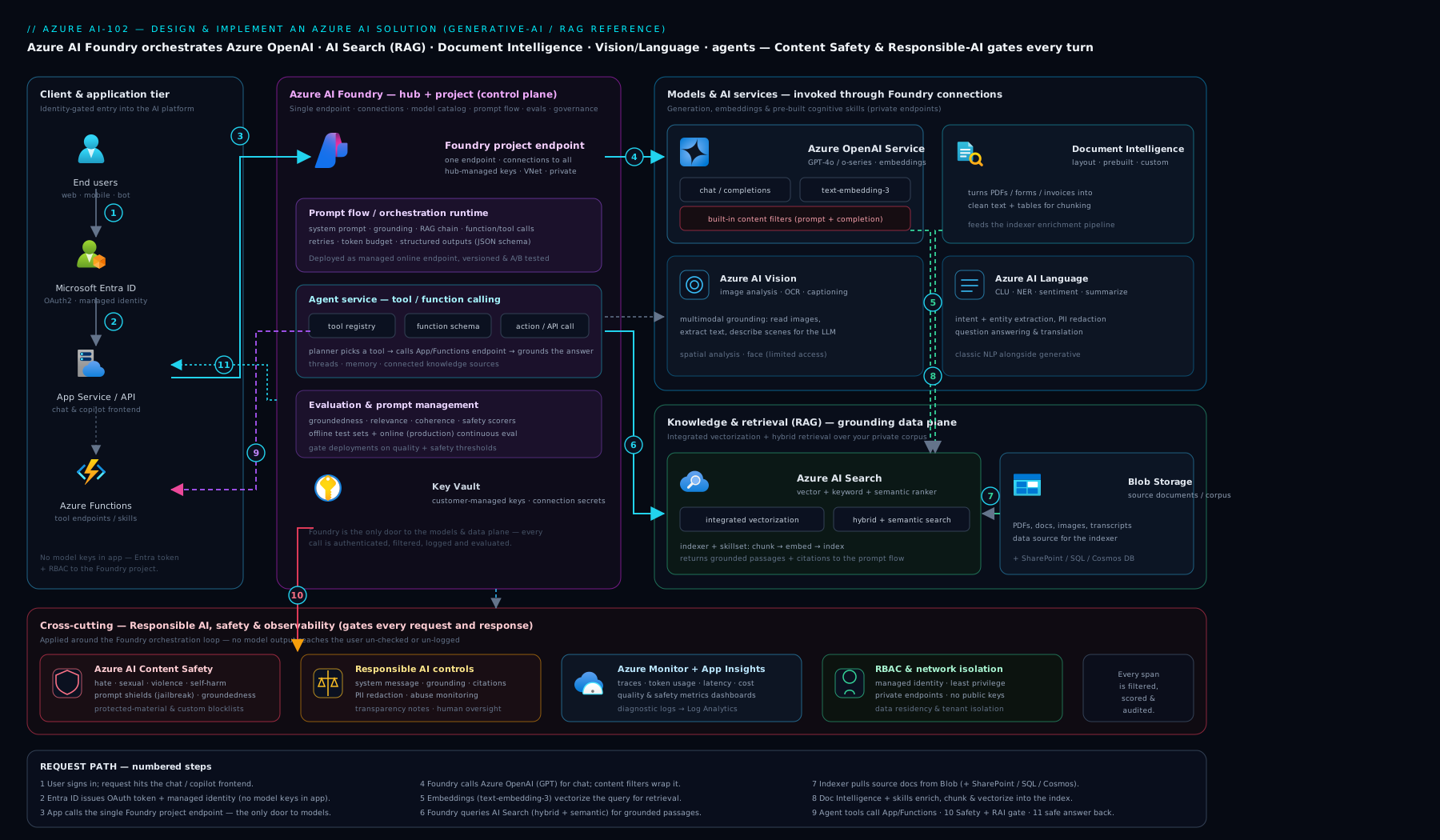
The diagram traces a request through the three layers — retrieval (AI Search) grounding the reasoning layer (Azure OpenAI), all wrapped by the governance layer (content safety, evaluation, tracing) — which is the shape of essentially every AI-102 solution you will build.
Going deeper
The sections above get you to a working, grounded, governed solution. This is the production-engineering layer underneath them — the internals, the cost maths, and the 2025–26 platform shifts that separate a demo from a system that holds up under load, an audit, and a silent model upgrade. None of it re-teaches the basics; it is the part that bites six weeks after launch.
Chunking is the retrieval decision you actually control
Integrated vectorization hides the embedding pipeline, but it does not make the chunking decision for you — and chunking, not the model, is usually what decides whether RAG works. Chunk too big and one embedding smears several topics together, recall drops, and you burn context tokens shipping irrelevant text to the model; chunk too small and the answer fragments across chunks the ranker can’t stitch back together. Sensible defaults for prose are ~300–500 tokens per chunk with 10–15% overlap; the built-in split skill exposes exactly these knobs (textSplitMode: pages, maximumPageLength, pageOverlapLength).
Two upgrades matter in production. First, layout-aware beats naive: run Document Intelligence Layout first so tables, headings and reading order survive, and embed each table row with its header context rather than as orphaned numbers. Second, carry metadata on every chunk (title, section, url, last_modified) — it sharpens filters, powers citations, and lets you do parent/child retrieval (match on a small precise chunk, but return the larger parent for context). The iron rule underneath all of it: one embedding model per vector field, forever. You cannot mix text-embedding-3-large and -small vectors in the same field; changing the embedding model means re-embedding the entire corpus. The text-embedding-3-* models support a dimensions parameter (Matryoshka representation) so you can truncate, say, 3072→1024 dimensions to cut index size ~3× for a modest recall cost — decide this before you index a million documents.
Vector-index internals and what actually costs money
Azure AI Search offers two vector algorithms: HNSW (approximate, graph-based, fast — the default, tuned with m, efConstruction, efSearch trading recall against latency and memory) and exhaustiveKNN (exact, linear scan — reserve for small or precision-critical fields, or as a k-recall baseline). The number that surprises teams is that vector storage, not query volume, is usually the dominant AI Search cost. Three levers pull it down:
- Quantization — scalar (float32→int8, ~4× smaller) or binary (up to ~28× smaller) compression on stored vectors. You recover the small recall loss with oversampling (
defaultOversampling) plus rerank-with-original-vectors, so the compressed index does the fast fan-out and full-precision vectors (or the semantic ranker) restore precision at the top. - Dimension reduction — the Matryoshka
dimensionstrick above. stored: falseon the vector field — drops the extra retrievable copy of the raw vector when you never need to return it, only search it.
Remember the semantic ranker is a separately-metered tier with its own quota — it is the cheapest large accuracy win in RAG, but budget for it rather than assuming it’s free.
Throughput and token economics past the PTU table
PTU sizing is not a guess. Provisioned capacity is a function of the model and your prompt/response token mix, so use the Foundry capacity calculator and then load-test to confirm — a chatty 4k-token-in/1k-out workload needs very different PTUs from short classifications. Note the per-model PTU minimum, that PTUs are regional, and that a provisioned deployment queues within your PTU instead of returning 429; spillover can route overflow to a PAYG deployment so peaks don’t fail. Four cost levers rarely used by beginners:
- Prompt caching — on supported models the static prefix of a prompt (system message + tool definitions + pinned context) is cached automatically once it exceeds ~1,024 tokens, and cached input tokens are billed at a steep discount. Order your prompt static-first, variable-last to actually hit the cache.
- Batch API — asynchronous, ~24-hour turnaround, roughly 50% cheaper: ideal for bulk enrichment, offline evaluation runs, and index back-fills where latency is irrelevant.
- Structured Outputs — JSON-schema-constrained decoding produces reliably parseable output for tool arguments and downstream systems, far more robust than “please reply in JSON”.
- Failure-mode hygiene — honour the
Retry-Afterheader on 429 instead of hammering; handle thecontent_filterfinish reason and a truncated stream (finish_reason: length) as first-class outcomes; set client timeouts and capmax_tokens; and treat 429 (throttle → retry), 5xx (transient → retry), 400 (fix the request) as three different bugs, not one.
Evaluation and red-teaming as a pipeline, not a one-off
Pre-ship evaluation is table stakes; the advanced move is online (continuous) evaluation — sample live traffic and score it with the same groundedness/relevance metrics, so a bad model auto-upgrade or a quietly-changed source document shows up as a metric dip before users complain. Many Foundry evaluators are ground-truth-free (they judge groundedness, relevance and coherence without a reference answer), which is what lets you run them in production where you have no labels. On the safety side, the Foundry AI Red Teaming agent (built on the open-source PyRIT toolkit) automates adversarial probing — jailbreaks, indirect prompt injection, harmful-content coaxing — so your guardrails are measured, not assumed. Gate a release on both a quality bar and a safety bar.
The 2025–26 agent-platform shift
Agent orchestration has consolidated. The Microsoft Foundry Agent Service (GA) provides managed threads/runs, tool execution and built-in tracing, and supersedes the earlier Assistants API — so you no longer hand-roll the plan→call→observe loop. For code-first, complex, multi-agent orchestration, the Microsoft Agent Framework (the convergence of Semantic Kernel and AutoGen) is the SDK the refreshed exam now names. Tools are increasingly exposed through MCP (Model Context Protocol), the portable open standard Foundry’s agent tooling interoperates with. The design principles do not change with the branding: least-privilege tools, validate every argument before acting, cap iterations, keep a human in the loop for consequential actions, and trace every step for cost control and audit.
Isolation: the private-endpoint mesh
A regulated deployment turns public network access off on the Foundry hub, the Azure OpenAI resource, AI Search and Storage, and connects them over private endpoints inside a managed VNet. The non-obvious wrinkle for RAG: AI Search calling Azure OpenAI (for integrated vectorization) needs a shared private link from Search into the Azure OpenAI private endpoint — inbound private endpoints alone aren’t enough. Get the Private DNS zones right, or name resolution silently falls back to the public endpoint and the call fails closed.
Multimodal extraction: Content Understanding
New in the refreshed blueprint and worth knowing beyond Document Intelligence: Azure Content Understanding (in Foundry Tools) is a single service that extracts structured fields, classifications and summaries across documents, images, audio and video — where Document Intelligence is document-centric. Availability varies by modality (parts shipped as preview), so confirm the current GA status of the modality you need before building production on it.
Hands-on lab
We will build the spine of a RAG system: an Azure OpenAI resource with a chat and an embedding deployment, an Azure AI Search service, and a grounded query — all on the lowest/free SKUs, keyless where possible, and torn down at the end. Allow about 30 minutes.
1. Set variables and create the resource group.
RG=rg-ai102-lab; LOC=eastus
az group create -n $RG -l $LOC -o table
2. Create an Azure OpenAI resource and two deployments.
AOAI=aoai-ai102-$RANDOM
az cognitiveservices account create -n $AOAI -g $RG -l $LOC \
  --kind OpenAI --sku S0 --custom-domain $AOAI -o table

# Chat model
az cognitiveservices account deployment create -n $AOAI -g $RG \
  --deployment-name gpt-4o-mini --model-name gpt-4o-mini \
  --model-version "2024-07-18" --model-format OpenAI \
  --sku-name Standard --sku-capacity 10
# Embedding model (RAG needs both)
az cognitiveservices account deployment create -n $AOAI -g $RG \
  --deployment-name text-embedding-3-small --model-name text-embedding-3-small \
  --model-version "1" --model-format OpenAI \
  --sku-name Standard --sku-capacity 10
3. Create an Azure AI Search service on the FREE tier.
SEARCH=srch-ai102-$RANDOM
az search service create -n $SEARCH -g $RG -l $LOC --sku free -o table
The free AI Search tier supports vector and semantic search for small datasets — ideal for this lab. (Production uses Basic/Standard for scale and SLA.)
4. Grant your own identity keyless access (RBAC), then validate.
ME=$(az ad signed-in-user show --query id -o tsv)
SUB=$(az account show --query id -o tsv)
# Let yourself call the model and read/write the index without keys:
az role assignment create --assignee $ME --role "Cognitive Services OpenAI User" \
  --scope /subscriptions/$SUB/resourceGroups/$RG/providers/Microsoft.CognitiveServices/accounts/$AOAI
az role assignment create --assignee $ME --role "Search Index Data Contributor" \
  --scope /subscriptions/$SUB/resourceGroups/$RG/providers/Microsoft.Search/searchServices/$SEARCH
5. Smoke-test the chat deployment (keyless, via Entra token).
ENDPOINT="https://$AOAI.openai.azure.com"
TOKEN=$(az account get-access-token --resource https://cognitiveservices.azure.com \
  --query accessToken -o tsv)
curl -s "$ENDPOINT/openai/deployments/gpt-4o-mini/chat/completions?api-version=2024-10-21" \
  -H "Authorization: Bearer $TOKEN" -H "Content-Type: application/json" \
  -d '{"messages":[{"role":"user","content":"Reply with exactly: AI-102 lab OK"}],"max_tokens":10}'
Expected output (validation): a JSON completion whose content is AI-102 lab OK, confirming the resource, the deployment, and keyless Entra auth all work. If you get 401, RBAC hasn’t propagated — wait a minute and retry. If 404, check the deployment name. If 429, your capacity is busy — retry.
6. (Optional) Index a document and run a grounded query using the Python snippet in the RAG section: create an index with a vector field + vectorizer pointing at your text-embedding-3-small deployment, push a few text chunks, then call answer("..."). Watch it return an answer with a citation.
7. Cleanup — delete everything (important to stop charges).
az group delete -n $RG --yes --no-wait
# Azure OpenAI/Cognitive Services soft-delete; purge to free the name + stop any residual:
az cognitiveservices account purge -n $AOAI -g $RG -l $LOC 2>/dev/null || true
Cost note (INR). On these SKUs the lab is essentially free: Azure AI Search free tier is ₹0; Azure OpenAI bills per token, and a few smoke-test calls on gpt-4o-mini/text-embedding-3-small cost a fraction of a rupee. The only way this lab costs anything noticeable is if you leave a paid Search tier or a busy deployment running — hence the cleanup. Delete the resource group the moment you’re done and the running cost returns to ₹0.
Common mistakes & troubleshooting
| Symptom | Likely cause | Fix |
|---|---|---|
| Frequent HTTP 429 under load | TPM/RPM quota exceeded; shared capacity busy | Exponential backoff + retry; raise quota; move to PTU; spread load |
| RAG answers are plausible but wrong | Pure vector search missed the right chunk | Use hybrid + semantic ranking; improve chunking; raise top-k |
| Model invents facts / no citations | Ungrounded prompt; context too thin | Instruct “answer only from context, cite, else say you don’t know”; check retrieval recall |
| 401 Unauthorized on a keyless call | Managed identity lacks RBAC, or not propagated | Grant Cognitive Services OpenAI User; wait for propagation |
| 404 on a model call | Calling the model name, not the deployment name | Reference the deployment name you created |
| Outputs occasionally blocked | Content filter triggered (content_filter finish reason) |
Handle gracefully in code; tune a custom content filter if appropriate |
| Document Intelligence misses fields | Wrong model for the doc; too few/poor training labels | Use the right prebuilt; add/clean labelled samples; try neural custom |
| Costs creep up unexpectedly | Uncapped tokens, oversized model, no caching | Cap max_tokens, right-size the model, cache, trim context |
Common beginner mistakes
These are misconceptions, not error messages — the wrong mental model that produces bad designs (the symptom→cause→fix table above handles the runtime errors). Fix the model and the errors mostly never happen.
| Misconception | Why it’s wrong | The right mental model |
|---|---|---|
| “More context in the prompt = better answers.” | Stuffing the prompt dilutes the model’s attention, inflates cost and latency, and often lowers accuracy (the right fact drowns in noise). | Retrieve the right few chunks and trim. Better retrieval + reranking beats a bigger context window almost every time. |
| “RAG stops hallucinations.” | RAG bounds what the model can truthfully say, but it can still misread a chunk, or retrieval can miss the answer entirely and the model fills the gap. | RAG plus a cite-or-refuse prompt plus a groundedness gate. Grounding is a system property, not a single feature. |
| “Fine-tune the model so it knows our data.” | Fine-tuning changes style and behaviour, not the live facts a model has access to — and your data changes weekly. | RAG for changing knowledge; fine-tuning for format, tone, or a task the model should internalise. “It doesn’t know our (changing) data” → RAG. |
| “The default content filter is the whole safety story.” | The per-deployment filter is a floor. It doesn’t stop instructions hidden in a retrieved document, or ungrounded claims in the output. | Defence in depth: Prompt Shields for injection, Content Safety on input and output, groundedness checks, blocklists, red-teaming. |
| “Vector search is strictly better than keyword.” | Pure vector search misses exact tokens — error codes, part numbers, IDs — because they carry little semantic signal. | Hybrid (BM25 + vector) with semantic ranking. Keyword for exactness, vector for meaning, reranker for precision. |
| “Bigger model = better solution.” | Cost and latency balloon, and for well-defined tasks a small model or a specialised service is more accurate and measurable. | Smallest sufficient model. Use Vision/Language/Document Intelligence for structured, high-volume tasks; reserve the LLM for open-ended synthesis. |
| “It works in my notebook, so it’s done.” | A notebook has no load, no drift, no adversaries, no audit trail — the four things that break AI in production. | “Done” means evaluated, traced, monitored, safety-gated and cost-capped. The notebook is the start of engineering. |
| “Keys in an environment variable are fine.” | Keys leak, get committed, and never rotate on their own; they’re the first thing an attacker looks for. | Keyless by default: managed identity + Entra RBAC; unavoidable secrets on a Foundry connection in Key Vault. |
| “I can swap the embedding model later.” | You can’t mix embedding models in one vector field; changing it means re-embedding the entire corpus and rebuilding the index. | Choose one embedding model (and its dimensions) before you index at scale, and standardise on it. |
Best practices
- Reference deployments, not models — a stable deployment name lets you upgrade the underlying model version without code changes; pin versions in production.
- Start PAYG, graduate to PTU for steady, latency-sensitive volume; consider reservations and PTU + PAYG spillover for peaks.
- Make retrieval excellent — hybrid + semantic ranking, deliberate chunking, integrated vectorization so you maintain no embedding pipeline.
- Evaluate before and after every change — groundedness, relevance, retrieval recall — and gate deployments on the numbers; re-run on model upgrades.
- Keep humans in the loop for agents that take consequential actions; cap iterations and least-privilege every tool.
- Use the specialised service (Vision/Language/Document Intelligence) when the task is well-defined, high-volume, or needs confidence scores; reserve the LLM for open-ended synthesis.
- Instrument everything — token usage, latency, 429s, and per-request traces (prompt, context, answer, scores) in Application Insights.
- Control cost as a first-class concern — smallest sufficient model,
max_tokenscaps, caching, trimmed context.
Security notes
- Prefer keyless auth everywhere: managed identity + Entra RBAC, secrets on Foundry connections in Key Vault, never API keys in code or config.
- Least privilege RBAC —
Cognitive Services OpenAI Userto call,Contributoronly where you must deploy; scope tightly. - Network isolation for sensitive workloads: a private/managed-VNet Foundry hub with private endpoints to Azure OpenAI, AI Search and Storage; public access off.
- Defend against prompt injection — treat retrieved content as untrusted, use Prompt Shields, and never let a tool execute solely on model-supplied arguments without validation.
- Protect data — Azure OpenAI does not train on your data; apply PII redaction (Language) before storage/logging; honour data residency with regional/Data-Zone deployments; consider modified abuse monitoring for regulated data.
- Filter input and output with Content Safety; maintain blocklists; handle blocked responses gracefully.
- Audit — trace every agent step and every consequential action; keep an owner and an incident path for harmful-output reports.
Interview & exam questions
1. When would you choose PTU over pay-as-you-go for Azure OpenAI? Choose PTU for steady, high-volume, latency-sensitive production where you need dedicated, predictable capacity and have passed the per-token break-even; choose PAYG for spiky, low/medium, or dev/test traffic where you pay only for what you use. Many estates run PTU baseline + PAYG spillover.
2. Your RAG chatbot hallucinates. What do you check, in order? Retrieval first: is recall good (did the right chunk get retrieved)? Switch to hybrid + semantic ranking, revisit chunking and top-k. Then grounding: does the prompt instruct answer only from context, cite, else refuse? Then measure with groundedness/relevance evaluation to confirm the fix.
3. Fine-tuning vs RAG — when each? RAG when the issue is facts/knowledge, especially data that changes — it injects current context at answer time. Fine-tuning when the issue is behaviour, format or style the model should internalise. “It doesn’t know our (changing) data” → RAG.
4. Difference between a model and a deployment? A model (e.g. gpt-4o) is the underlying intelligence; a deployment (e.g. gpt-4o-prod) is your named, callable instance with its own capacity, version policy and content filter. Apps call the deployment name, which lets you upgrade the model version behind a stable name.
5. What does a content filter evaluate, and on what? Severity (safe/low/medium/high) across hate, sexual, violence, self-harm, on both input prompts and output completions, plus prompt-injection (Prompt Shields) and protected-material detection. You set thresholds and can attach custom filters per deployment.
6. What is integrated vectorization in Azure AI Search? AI Search runs the whole RAG ingestion pipeline: an indexer pulls source docs, a skillset chunks and calls an Azure OpenAI embedding skill, and a vectorizer lets you query in plain text (it embeds the query). You write no embedding code, and change-tracking keeps the index fresh.
7. Hybrid search and semantic ranking — why both? Hybrid fuses keyword (BM25) and vector results with RRF, catching exact terms and meaning; the semantic ranker then L2 re-ranks the top results to push the most relevant chunk to the top — recall from hybrid, precision from the reranker.
8. When use Document Intelligence instead of GPT for extraction? When you need structured fields with confidence scores from forms/invoices/IDs — Document Intelligence is purpose-built and reliable, and custom models train on as few as 5 samples. GPT is for open-ended understanding; for fixed fields you want measurable accuracy. The Layout model is also a great RAG pre-processor.
9. How do you do keyless auth from your app to Azure OpenAI? Enable a managed identity, grant it Cognitive Services OpenAI User on the resource, and authenticate with an Entra token (DefaultAzureCredential) — no keys in code or config. Store any unavoidable secrets on a Foundry connection in Key Vault.
10. What does prompt flow’s evaluation measure for a RAG app? Groundedness (answer supported by context), relevance (answers the question), retrieval/context recall, coherence/fluency, and similarity to ground truth — run as AI-assisted evaluation over a test dataset so you compare changes on numbers and catch regressions.
11. What is prompt injection and how do you defend against it? An attacker hides malicious instructions in input or in retrieved content to hijack the model. Defend with Prompt Shields (jailbreak/indirect-injection detection), treating retrieved data as untrusted, scoping tools to least privilege, and validating any tool arguments before acting.
12. Does Azure OpenAI train on your prompts? No — your prompts and completions are not used to train the foundation models and stay within your tenant’s governance. Abuse monitoring briefly stores them for safety review; regulated workloads can apply for modified/limited abuse monitoring.
Quick check
- You need predictable low latency for a high-volume production chatbot. Which capacity model?
- Your RAG app returns plausible-but-wrong chunks for queries containing exact error codes. What retrieval change helps most?
- True or false: your application code should reference the model name (e.g.
gpt-4o) directly. - Which Azure service gives you structured invoice fields with confidence scores and can train on as few as five samples?
- Name two prompt-flow evaluation metrics you’d gate a RAG deployment on.
Answers
- Provisioned Throughput Units (PTU) — dedicated, predictable capacity for steady high volume; PAYG latency varies under shared load.
- Hybrid retrieval (keyword + vector) with semantic ranking — pure vector misses exact terms like error codes; BM25 catches them and the reranker promotes the right chunk.
- False. Reference the deployment name (e.g.
gpt-4o-prod); it carries capacity/version/filter and lets you upgrade the model behind a stable name. - Azure AI Document Intelligence (prebuilt Invoice model; custom template models train on ~5 samples).
- Any two of groundedness, relevance, retrieval/context recall, coherence/fluency, similarity.
Exercise
Take the lab’s RAG spine and turn it into a small grounded copilot over your own documents. (1) Create an AI Search index with a vector field and a vectorizer pointing at your text-embedding-3-small deployment. (2) Use Document Intelligence Layout to convert three of your own PDFs (pick some with tables) into clean text, chunk them, and push them to the index. (3) Implement the answer() function with hybrid + semantic retrieval and a cite-or-refuse system prompt. (4) Build a tiny evaluation set of 10 question/ground-truth pairs and run groundedness + relevance in prompt flow. (5) Add Content Safety on the input. Then write a paragraph: what did the evaluation scores reveal, and what one change (chunking, top-k, model, or prompt) moved them most? Tear everything down afterwards.
Practice challenges
Work these in order — they climb from “prove the plumbing” to “run it like production”. All snippets are illustrative (schema-correct, not live-run against this machine); every endpoint, key and id is a placeholder. Reuse the Hands-on lab resources, and tear everything down afterwards.
1. (Beginner) Call the deployment, not the model. Create a chat deployment named gpt-4o-mini-dev and make one call that references the deployment name. Why does the name matter?
<details> <summary>Solution</summary>
az cognitiveservices account deployment create -n $AOAI -g $RG \
  --deployment-name gpt-4o-mini-dev --model-name gpt-4o-mini \
  --model-version "2024-07-18" --model-format OpenAI \
  --sku-name Standard --sku-capacity 10
# Your app then calls model="gpt-4o-mini-dev" — the DEPLOYMENT name, never "gpt-4o-mini".
Why: the deployment name is your stable indirection layer — it carries capacity, version policy and content filter, so you can upgrade the underlying model version without touching app code. Calling the raw model name is a classic 404. </details>
2. (Beginner) Go keyless. Grant your own identity the right role and call the model with an Entra token instead of a key. Which role, and why keyless?
<details> <summary>Solution</summary>
az role assignment create --assignee $(az ad signed-in-user show --query id -o tsv) \
  --role "Cognitive Services OpenAI User" \
  --scope /subscriptions/$SUB/resourceGroups/$RG/providers/Microsoft.CognitiveServices/accounts/$AOAI
TOKEN=$(az account get-access-token --resource https://cognitiveservices.azure.com --query accessToken -o tsv)
# Then call with:  -H "Authorization: Bearer $TOKEN"   (no api-key header)
Why: Cognitive Services OpenAI User is the least-privilege “call the model” role; an Entra token means there is no key to leak, rotate, or commit to git. A fresh assignment can take a minute to propagate (transient 401).
</details>
3. (Intermediate) Make retrieval hybrid + semantic. Turn a plain vector query into hybrid (keyword + vector) with semantic reranking. Why is this the production default?
<details> <summary>Solution</summary>
results = search.search(
    search_text=question,                                   # BM25 keyword arm
    vector_queries=[VectorizableTextQuery(text=question,
        k_nearest_neighbors=10, fields="content_vector")],  # vector arm (query embedded for you)
    query_type="semantic", semantic_configuration_name="kb-semantic",  # L2 rerank
    select=["content","title","url"], top=5)
Why: pure vector misses exact tokens (error codes, SKUs, IDs); BM25 catches them; RRF fuses both for recall; the semantic ranker then reorders so the chunk that actually answers lands in the top few you send to the model — recall and precision. </details>
4. (Intermediate) Shrink the index bill. Configure the vector field so the index is cheaper to store without wrecking recall. What are you trading?
<details> <summary>Solution</summary>
// representative index config (Azure AI Search)
"vectorSearch": {
  "algorithms": [{ "name": "hnsw", "kind": "hnsw" }],
  "compressions": [{ "name": "bq", "kind": "binaryQuantization",
                     "rerankWithOriginalVectors": true, "defaultOversampling": 10 }],
  "profiles": [{ "name": "vp", "algorithm": "hnsw", "compression": "bq" }]
},
"fields": [{ "name": "content_vector", "type": "Collection(Edm.Single)",
             "dimensions": 1024, "stored": false, "vectorSearchProfile": "vp" }]
Why: binary quantization + stored:false + reduced dimensions can cut vector storage many-fold (storage is the dominant AI Search cost); defaultOversampling + rerankWithOriginalVectors buy the recall back at the top. The trade is a little query-time compute for a much smaller, cheaper index.
</details>
5. (Advanced) Survive a 429. Wrap model calls so throttling is handled correctly — honouring Retry-After, capping attempts. Why not just loop and retry immediately?
<details> <summary>Solution</summary>
import time, random
from openai import RateLimitError

def with_retry(call, max_tries=5):
    for i in range(max_tries):
        try:
            return call()
        except RateLimitError as e:
            hdr = getattr(getattr(e, "response", None), "headers", {}) or {}
            wait = float(hdr.get("retry-after", 0)) or min(2 ** i + random.random(), 30)
            time.sleep(wait)            # honour server guidance, else exponential backoff + jitter
    raise RuntimeError("retries exhausted — shed load or move to PTU")
Why: immediate retries amplify the overload and get you throttled harder. Retry-After is the server telling you exactly how long to wait; jittered exponential backoff avoids a thundering herd. If 429s are chronic, the real fix is more quota or PTU, not more retries. (The official SDK already auto-retries with backoff; this makes the policy explicit and bounded.)
</details>
6. (Advanced) Gate the deploy on numbers. Design a release gate that blocks a RAG update unless quality and safety pass. What do you measure, and against what?
<details> <summary>Solution</summary>
- Build a test set of ~30–50 question / ground-truth pairs plus adversarial prompts.
- In prompt flow, run AI-assisted evaluation for groundedness, relevance and retrieval/context recall; run the AI Red Teaming agent (PyRIT) for jailbreak/XPIA/harmful-content coverage.
- Gate: fail the pipeline if groundedness or relevance drops below the current baseline, or any safety category regresses. Re-run the gate on every prompt, chunking, model-version or retrieval change.
- Add online evaluation on sampled production traffic to catch post-deploy drift.
Why: an AI change that “seems better” is an opinion; gating on metrics turns non-determinism into a pass/fail signal and catches regressions (a model auto-upgrade, a chunking tweak) before users do — the single discipline that most separates a demo from a service. </details>
Certification mapping
This lesson covers the build-skills core of AI-102: Azure AI Engineer Associate: planning and managing an Azure AI solution (Azure AI Foundry hubs/projects, connections, responsible AI), implementing generative AI (deploying Azure OpenAI models, PTU vs PAYG, content filters, prompt engineering, RAG, agents), implementing knowledge mining and document intelligence (Azure AI Search RAG indexing, Document Intelligence prebuilt/custom), and implementing computer vision and natural language solutions (Vision and Language SDKs). The monitoring, content-safety and responsible-AI material maps to the exam’s emphasis on operating AI solutions responsibly. It also reinforces architecture-level decisions relevant to AZ-305 where AI workloads appear in a design.
Glossary
-
Azure AI Foundry — the unified platform (portal + SDK) for building, evaluating and operating generative-AI apps; formerly Azure AI Studio.
-
Hub / Project — a hub centralises shared connections, security, compute and quota; a project is a per-solution workspace inside it.
-
Connection — a governed, stored link (with auth) from Foundry to a resource such as Azure OpenAI, AI Search or Storage.
-
Deployment — a named, callable instance of a model with its own capacity, version policy and content filter.
-
PTU (Provisioned Throughput Unit) — reserved, dedicated Azure OpenAI capacity giving predictable latency.
-
PAYG / Standard — pay-per-token Azure OpenAI capacity drawn from a shared pool.
-
RAG (Retrieval-Augmented Generation) — retrieve relevant context, then generate a grounded, cited answer.
-
Integrated vectorization — Azure AI Search running chunking + embedding + indexing for you via indexer and skillset.
-
Hybrid search / Semantic ranker — fusing keyword + vector retrieval (RRF), then L2 re-ranking for precision.
-
Prompt flow — Foundry’s tool for authoring and evaluating prompt/code/tool flows against datasets.
-
Agent / Tool-calling — a model given tools and allowed to plan and act over multiple steps via structured function calls.
-
Document Intelligence — service extracting structured fields/tables from documents (prebuilt + custom); formerly Form Recognizer.
-
Content Safety / Prompt Shields — guardrail service detecting harmful content, jailbreaks and prompt-injection on input and output.
-
Groundedness — the degree to which an answer is supported by the retrieved context (the inverse of hallucination).
-
TPM / 429 — Tokens-Per-Minute quota; exceeding it returns HTTP 429 (throttling).
-
Microsoft Foundry — the 2025 rebrand of Azure AI Foundry; the same unified platform (portal + SDK) for building, evaluating and operating AI apps. Latest docs and the AI-103 exam use this name.
-
AI-103 / Azure AI Apps and Agents Developer Associate — the successor certification and exam that replaced the retired AI-102 (retired 30 June 2026); Python + Microsoft Foundry focused.
-
Microsoft Agent Framework — the code-first SDK for complex, multi-agent orchestration; the convergence of Semantic Kernel and AutoGen, named in the refreshed exam blueprint.
-
MCP (Model Context Protocol) — an open standard for exposing tools to agents in a portable way; Foundry agent tooling interoperates with it.
-
HNSW — Hierarchical Navigable Small World, the approximate-nearest-neighbour graph algorithm Azure AI Search uses by default for fast vector search (vs exact
exhaustiveKNN). -
Quantization (scalar / binary) — compressing stored vectors (float32→int8 ~4×, or binary up to ~28×) to cut Azure AI Search index storage, the dominant vector cost; recall is recovered with oversampling + rerank.
-
Matryoshka /
dimensions— truncatable embeddings (text-embedding-3-*) that let you shrink vector dimensions to trade a little recall for much smaller, cheaper indexes. -
Prompt caching — automatic, discounted billing on the static prefix (system + tools + pinned context, ≥ ~1,024 tokens) of a prompt; order prompts static-first to benefit.
-
Batch API — asynchronous Azure OpenAI processing (~24-hour window, ~50% cheaper) for latency-tolerant bulk jobs like enrichment, evals and back-fills.
-
Structured Outputs — JSON-schema-constrained model decoding that guarantees reliably parseable output for tool arguments and downstream systems.
-
PTU spillover — routing request overflow beyond your provisioned (PTU) capacity to a pay-as-you-go deployment so peaks don’t fail.
-
XPIA (indirect / cross-prompt injection) — malicious instructions hidden inside retrieved content that try to hijack the model; countered with Prompt Shields and treating retrieved data as untrusted.
-
Online / continuous evaluation — running quality/safety metrics on sampled production traffic to catch drift after deployment.
-
Content Understanding — a Foundry Tools service that extracts structured fields, classifications and summaries across documents, images, audio and video (availability varies by modality).
Next steps
You can now build the full arc of an AI-102 solution — a governed Foundry workspace, deployed and safety-filtered Azure OpenAI models, a grounded and evaluated RAG pipeline, tool-calling agents, document and vision/language extraction, and the observability to run it all responsibly in production.
- Next lesson: DP-203: End-to-End Azure Data Engineering — Ingest, Store, Transform, Serve & Stream — every AI system runs on data, so the natural next move is building the pipelines that feed it.
Related reading to go deeper:
- Azure AI Search for RAG: Vector Indexing, Hybrid Search, Semantic Ranking, and Indexer Pipelines — the retrieval layer of this lesson, in full depth.
- AI-900: Generative AI & Azure OpenAI Fundamentals — the tokens-to-RAG foundations this build lesson assumes.
- Azure OpenAI Enterprise Landing Zone — the networking, identity and governance scaffolding for running Azure OpenAI at enterprise scale.