Microsoft Defender for Identity (MDI, formerly Azure ATP) is the sensor layer that gives Defender XDR visibility into on-prem Active Directory. It reads domain-controller traffic and Windows events to detect what EDR cannot see cleanly: pass-the-ticket, DCSync, golden-ticket forgery, and reconnaissance walks across the directory. The license is bundled with E5 / standalone, but it does nothing until you deploy sensors, give it a directory service account (DSA), and tune the noise out. This guide is the rollout I run on tier-0 environments: sensors on DCs / AD CS / AD FS, honeytoken traps, ISPM remediation, and lateral-movement investigation feeding XDR incidents.
A correction up front, because it trips people: MDI runs almost entirely on the sensor installed on the domain controller itself. The old “standalone sensor + port mirroring” story is deprecated for new deployments — plan for the unified sensor on every writable DC.
In a nutshell
Imagine your Active Directory is an office building. The front door — the sign-in page — has a guard checking badges, and that guard is your MFA and Conditional Access. But once someone is inside holding a stolen badge, the door guard never sees them again. They wander the corridors, try door handles, copy a master key from an unattended desk, and eventually walk into the server room. Microsoft Defender for Identity is the grid of motion sensors wired into the corridors. It does not check badges at the entrance; it watches how people move around inside and raises an alarm when someone behaves like an intruder — rattling every door (reconnaissance), using a key that was cut for a different person (pass-the-ticket), or forging a master key on the building’s own key-cutting machine (a golden ticket from a stolen KRBTGT).
Why does this need to be a separate product? Your endpoint antivirus (EDR) sees processes on a laptop, and Entra ID sees cloud sign-ins — but neither cleanly sees the Active Directory protocol traffic flowing between machines: the Kerberos tickets, the LDAP queries, the replication requests. That traffic is exactly where domain-takeover attacks happen, and it is invisible unless something is watching the domain controllers themselves. MDI is that something — a lightweight sensor on each DC that reads the traffic and Windows events, learns what a normal directory looks like, and flags the moves only an attacker makes.
The one-line mental model to keep: MFA stops the break-in at the door; Defender for Identity catches the burglar already walking the halls. You need both. The rest of this lesson is the full rollout — installing the sensors, giving them a read-only service account, laying decoy “honeytoken” accounts as tripwires, fixing the standing weaknesses attackers rely on (that is ISPM), and wiring every alert into one Defender XDR incident.
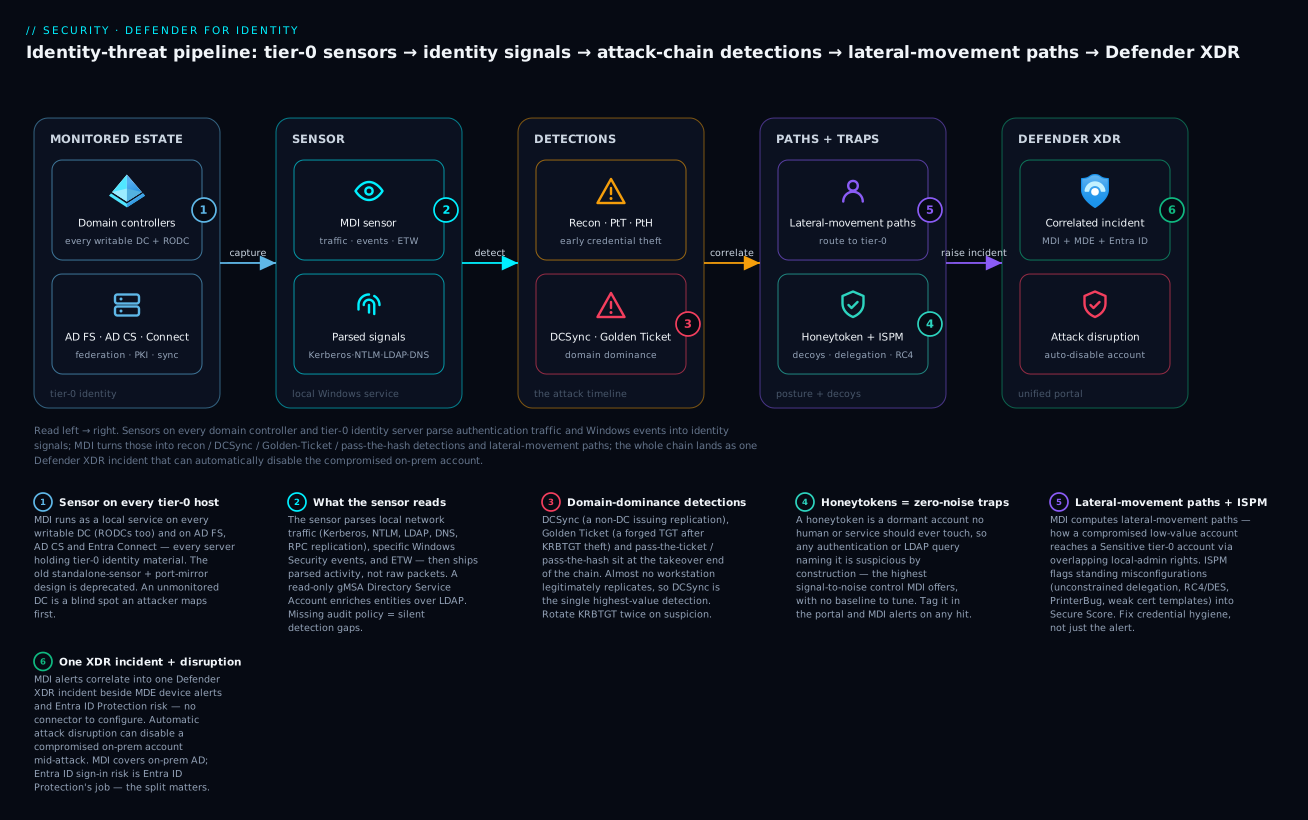
Read it left → right: sensors on every domain controller and tier-0 identity server parse authentication traffic and Windows events into identity signals, MDI turns those into recon / DCSync / Golden-Ticket / pass-the-hash detections and lateral-movement paths, and the whole chain lands as one Defender XDR incident that can automatically disable the compromised on-prem account.
Level: Advanced · Time: ~42 min
Before you start, you should be comfortable with:
- Active Directory basics — domain controllers, the difference between Kerberos and NTLM, LDAP, and what a Domain Admin is.
- The idea of a tiered admin model — tier-0 is anything that controls identity itself (DCs, AD CS, AD FS, Entra Connect).
- The Microsoft Defender XDR portal, and ideally Entra ID Protection (the two correlate together).
- Enough PowerShell to run AD cmdlets, and enough Group Policy to set audit settings.
After this lesson you will be able to:
- Explain what an MDI sensor actually reads and why it must sit on every writable domain controller.
- Create a gMSA Directory Service Account and roll sensors out without threatening production stability.
- Turn on the exact Windows audit policy the high-value detections depend on.
- Deploy honeytoken accounts and Sensitive entity tags as high-signal tripwires.
- Read a Lateral Movement Path and collapse it with credential hygiene.
- Triage MDI alerts as Defender XDR incidents and tune noise with exclusions — never blanket disables.
1. Architecture: what the sensor actually covers
The MDI sensor is a Windows service that runs locally on the server it monitors. It captures traffic to/from that machine (Kerberos, NTLM, LDAP, DNS, RPC) and parses Windows events, then ships parsed activity — not raw packets — to the cloud service. One sensor type covers multiple roles:
| Role | What MDI detects there | Notes |
|---|---|---|
| Domain Controller | Pass-the-ticket, DCSync, golden ticket, recon, brute force | Install on every writable DC; RODCs are supported too |
| AD CS (Certificate Services) | Certificate-based attacks (ESC1/ESC8-style abuse, suspicious enrollments) | Sensor on the CA server |
| AD FS | Password spray / brute force against federation, suspicious sign-ins | Install on AD FS and WAP servers |
| Entra Connect | Detections around the sync server as a tier-0 asset | Sensor on the Entra Connect host |
Rule of thumb: any server holding tier-0 identity material (DC, CA, AD FS, Entra Connect) gets a sensor. Coverage gaps are blind spots an attacker will find first.
The sensor self-throttles and backs off rather than starve the DC — that design is what lets you put it directly on production DCs without a separate capture appliance.
2. Plan: directory service account and network
Before any install, create the Directory Service Account. MDI uses it to query AD/AD CS over LDAP for entity enrichment (resolving SIDs, group membership, lateral-movement paths). A read-only group Managed Service Account (gMSA) is the supported best practice — no static password to rotate or leak.
# 1. KDS root key (only once per forest; takes effect after 10h, or use -10h in a lab)
Add-KdsRootKey -EffectiveImmediately

# 2. Security group whose members may retrieve the gMSA password = the DCs/CA/ADFS sensors
$sensors = Get-ADComputer -Filter 'OperatingSystem -like "*Server*"' -SearchBase "OU=Domain Controllers,DC=corp,DC=contoso,DC=com"
New-ADGroup -Name "gMDI-Sensors" -GroupScope Global -GroupCategory Security
Add-ADGroupMember -Identity "gMDI-Sensors" -Members $sensors

# 3. Create the gMSA the sensors will run the query account as
New-ADServiceAccount -Name "svc-mdi" -DNSHostName "svc-mdi.corp.contoso.com" `
  -PrincipalsAllowedToRetrieveManagedPassword "gMDI-Sensors"
Then register corp\svc-mdi$ in the Defender portal under Settings > Identities > Directory service accounts. If you also monitor AD CS or run object auditing, the DSA needs read permission on the relevant containers (it does not need Domain Admin — that is an anti-pattern).
For deleted-object recon detection, grant the DSA read on the Deleted Objects container:
$deletedObjects = "CN=Deleted Objects,DC=corp,DC=contoso,DC=com"
dsacls $deletedObjects /takeOwnership
dsacls $deletedObjects /g "corp\svc-mdi:LCRP"
Network requirements: each sensor needs outbound HTTPS (443) to its regional MDI cloud endpoint (*.atp.azure.com). It does not need inbound. Confirm name resolution and that any proxy passes the sensor’s traffic. For environments with strict egress, the sensor supports a configured proxy at install time.
3. Install sensors and enable auditing
Download the sensor package and access key from Settings > Identities > Sensors > Add sensor. Install silently on each DC; the same binary detects whether it is on a DC, CA, or AD FS host.
# Run from the extracted package; quiet install with the workspace access key
.\"Azure ATP sensor Setup.exe" /quiet NetFrameworkCommandLineArguments="/q" AccessKey="<workspace-access-key>"
Detections depend on Windows event auditing being on. MDI relies on specific Security events (e.g., 4726, 4728/4729, 4670, 7045, 8004 for NTLM). Configure advanced audit policy and NTLM auditing via Group Policy so the sensor sees the events it parses:
Computer Configuration > Policies > Windows Settings > Security Settings >
  Advanced Audit Policy Configuration:
    Account Management        -> Audit Security Group Management: Success+Failure
    Account Management        -> Audit User Account Management:  Success+Failure
    DS Access                 -> Audit Directory Service Changes: Success+Failure
    Detailed Tracking         -> Audit Process Creation (4688) on tier-0 hosts

Network security: Restrict NTLM: Audit NTLM authentication in this domain -> Enable all
The portal surfaces audit-policy health warnings per sensor — act on them. Silent gaps in audit policy are the most common reason a detection “doesn’t fire.”
4. Tune the high-value detections
Out of the box MDI watches for the credential-theft chain. The four you should validate first, because they map directly to real intrusions:
- Pass-the-Ticket — a Kerberos TGT/TGS used from a different source than it was issued to. MDI correlates the ticket across machines.
- DCSync (suspected DCSync attack) — a non-DC principal issuing replication requests (
DRSGetNCChanges). This is how Mimikatz/secretsdump pulls the KRBTGT and every hash. There is almost no legitimate reason for a workstation to replicate. - Golden Ticket — anomalies in TGT lifetime, encryption downgrade, or forged tickets after a KRBTGT compromise.
- Reconnaissance — SAMR/LDAP enumeration of users, groups, and admins (BloodHound-style sweeps).
Validate DCSync coverage safely with a benign replication call rather than running real attack tooling. Confirm the alert lands in the portal and in AlertInfo/IdentityDirectoryEvents. To suppress known benign replication (your actual DCs, Entra Connect), add them as exclusions rather than disabling the rule — covered in section 8.
A genuinely useful hardening step is forcing KRBTGT rotation after any golden-ticket suspicion. Rotate twice, with a gap longer than the max ticket lifetime, so old forged tickets die:
# Use Microsoft's New-KrbtgtKeys.ps1; rotate, wait > max TGT lifetime (default 10h), rotate again
.\New-KrbtgtKeys.ps1   # run once, wait the replication + ticket-lifetime window, then run again
5. Deploy honeytokens and entity tags
Honeytokens are the highest signal-to-noise control MDI gives you. A honeytoken is a dormant account that no human or service should ever touch — so any authentication or query against it is, by definition, suspicious. Create a believable but unused account (looks privileged, named like a real admin), leave it disabled-but-tagged or enabled-with-no-logon, and tag it in MDI.
# A plausible-looking but unused account. Strong random password, no SPNs, never used interactively.
New-ADUser -Name "svc-backup-admin" -SamAccountName "svc-backup-admin" `
  -AccountPassword (ConvertTo-SecureString (([System.Web.Security.Membership]::GeneratePassword(24,6))) -AsPlainText -Force) `
  -Enabled $true -PasswordNeverExpires $true `
  -Description "Backup service (do not use)" -Path "OU=Service Accounts,DC=corp,DC=contoso,DC=com"
Then tag it in the Defender portal: Settings > Identities > Entity tags > Honeytoken, add svc-backup-admin. MDI raises Honeytoken activity alerts on any auth, Kerberos request, or LDAP query referencing it. Pair this with Sensitive tags so MDI treats your true tier-0 accounts/groups as crown jewels in lateral-movement-path math:
| Entity tag | Use it for | Effect |
|---|---|---|
| Honeytoken | Decoy accounts/devices | Any activity raises an alert |
| Sensitive | Tier-0 admins, DAs, Backup Operators, Exchange roles | Prioritized in LMP and exposure scoring |
| Exchange server / VPN | Known infra | Reduces false positives, contextualizes traffic |
MDI auto-flags built-in sensitive groups (Domain Admins, Enterprise Admins, etc.), but it does not know about your custom tier-0 group named Corp-Server-Admins — tag it explicitly.
6. Remediate identity posture (ISPM)
MDI feeds Identity Security Posture Management assessments into Microsoft Secure Score (Defender portal > Secure score, identity recommendations) and exposes them under Identities > Health issues / posture. These are standing misconfigurations attackers exploit before they ever throw an exploit:
- Unsecure Kerberos delegation (unconstrained delegation on non-DC hosts — a tier-0 escalation path)
- Accounts with reversible-cleartext passwords or
DES/RC4-only encryption - Print Spooler enabled on DCs (PrinterBug / coercion)
- Dormant/stale privileged accounts and SID-history risks
- Weak certificate templates (ESC misconfigurations) when AD CS sensors are present
Hunt the worst offender — unconstrained delegation — directly, then remediate by switching to constrained (or resource-based constrained) delegation:
# Find computers/users trusted for unconstrained delegation (excluding DCs)
Get-ADObject -Filter {(UserAccountControl -band 0x80000) -eq 0x80000} `
  -Properties UserAccountControl,servicePrincipalName |
  Where-Object { $_.DistinguishedName -notlike '*OU=Domain Controllers*' } |
  Select-Object Name,DistinguishedName

# Remediate: remove the TRUSTED_FOR_DELEGATION flag and pin to specific SPNs (constrained)
Set-ADComputer -Identity "APP01" -TrustedForDelegation $false
Set-ADComputer -Identity "APP01" -Add @{ "msDS-AllowedToDelegateTo" = @("HTTP/web01.corp.contoso.com") }
Work the recommendations as a backlog with owners and target dates. The score is a proxy; the goal is shrinking the tier-0 attack surface.
7. Investigate lateral-movement paths and tier-0 exposure
The feature that earns MDI its keep is the Lateral Movement Path (LMP). MDI computes, from logon and admin-rights data, the chain by which a non-sensitive account that an attacker might compromise could reach a Sensitive account — e.g., a help-desk user who is local admin on a workstation where a Domain Admin logged on. Open any sensitive user/device in the portal and review the Lateral movement paths tab (and the time-bounded LMP report under reports).
The fix is almost always credential hygiene: stop tier-0 accounts logging on to tier-1/2 assets (clean-source / tiered admin), and remove standing local-admin overlaps. Validate where a DA has authenticated recently with hunting:
// Where have tier-0 accounts authenticated? Surface tier-0 creds landing on non-DC hosts.
IdentityLogonEvents
| where Timestamp > ago(7d)
| where AccountUpn in~ ("da-alice@corp.contoso.com", "da-bob@corp.contoso.com")
| where LogonType in ("Interactive", "RemoteInteractive")
| where DeviceName !contains "DC"
| summarize Logons = count(), Devices = make_set(DeviceName) by AccountUpn
| sort by Logons desc
Each result on a non-DC host is a path to collapse — either an LMP MDI already drew, or one to feed back into your tiering model.
8. Wire into Defender XDR: incidents, hunting, exclusions
MDI alerts don’t live in a silo — they correlate into Defender XDR incidents alongside MDE device alerts and Entra ID Protection risk, so a pass-the-ticket from MDI and a suspicious process from MDE collapse into one incident with a unified graph. No connector to configure: enabling MDI surfaces it in the unified portal automatically. (If you forward to Sentinel, use the Microsoft Defender XDR connector to pull incidents + raw Identity* tables, not a legacy per-product connector.)
The MDI advanced-hunting tables you will live in:
// Recent identity alerts with the entities involved (great for an incident triage hunt)
AlertInfo
| where Timestamp > ago(24h)
| where ServiceSource == "Microsoft Defender for Identity"
| join kind=inner AlertEvidence on AlertId
| project Timestamp, Title, Severity, Category, EntityType, AccountName, DeviceName
| sort by Timestamp desc
// Directory changes to sensitive groups — catch privilege escalation as it happens
IdentityDirectoryEvents
| where Timestamp > ago(7d)
| where ActionType in ("Group Membership changed", "Account Password changed")
| where TargetAccountDisplayName has_any ("Domain Admins", "Enterprise Admins", "Corp-Server-Admins")
| project Timestamp, ActionType, AccountUpn, TargetAccountUpn, TargetDeviceName
Operational tuning to fight alert fatigue. The deployment is not done until the noise is gone:
- Exclusions, not disables. For each detection (DCSync, recon, honeytoken, etc.), add the legitimate sources under Settings > Identities > <detection> > Exclusions — your real DCs and Entra Connect for replication; vuln scanners for recon. Keep the detection on; scope out the known-good.
- Benchmark coverage. Run controlled, safe tests per technique (a benign replication call, an authorized BloodHound run in a window, a logon to the honeytoken) and confirm each lands in
AlertInfo. Track which MITRE ATT&CK techniques you can actually detect — gaps usually trace back to missing audit policy (section 3) or an unmonitored DC. - Tune severity by tagging. Sensitive/honeytoken tags raise signal; correctly tagging known infra (VPN, Exchange) cuts false positives at the source.
- Watch sensor health. Under Settings > Identities > Sensors, every writable DC should report healthy and current; a silent unhealthy sensor is an invisible coverage gap.
Verify
Run this end-to-end before calling the deployment production-ready:
# 1. Every writable DC has a running, healthy sensor service
Invoke-Command -ComputerName (Get-ADDomainController -Filter *).HostName -ScriptBlock {
  Get-Service -Name "AATPSensor" -ErrorAction SilentlyContinue |
    Select-Object @{n='DC';e={$env:COMPUTERNAME}}, Status, StartType
}
# 2. The gMSA installs and the sensor hosts can retrieve its password
Test-ADServiceAccount -Identity "svc-mdi"   # run on a sensor host; expect True
// 3. The pipeline is alive: identity activity is reaching the cloud (run in advanced hunting)
IdentityDirectoryEvents
| where Timestamp > ago(1h)
| summarize Events = count(), DCs = dcount(DeviceName)
- Portal: Settings > Identities > Sensors — all writable DCs + CA/AD FS/Entra Connect green and on the current version.
- Trigger a honeytoken logon and confirm a “Honeytoken activity” alert appears within minutes and correlates into an XDR incident.
- Confirm DSA status is healthy under Directory service accounts (no LDAP-bind errors).
- Secure Score shows MDI identity recommendations and the count is trending down week over week.
Enterprise scenario
A retail platform team (~30k seats, single forest, 14 DCs across 3 regions) ran MDI for a year but kept getting paged on a recurring suspected DCSync alert every night at 02:10. The on-call assumption was “false positive, ignore it” — exactly the alert-fatigue failure mode MDI is meant to prevent. The constraint: they could not simply disable the DCSync rule, because DCSync is the single highest-value detection they had against KRBTGT theft, and compliance required it stay active.
Investigation in advanced hunting showed the replication source was a host named BKP-VEEAM01 — a backup appliance running an AD-aware backup job that legitimately issued DRSGetNCChanges. It looked identical to secretsdump to the sensor. The wrong fixes (disable the rule; give the appliance Domain Admin to “make it stop”) were both on the table.
The correct fix was a scoped exclusion plus tighter least-privilege, leaving the detection fully armed for every other source:
// Confirm the only DCSync replicator is the known appliance before excluding it
IdentityDirectoryEvents
| where Timestamp > ago(30d)
| where ActionType == "Directory Services replication"
| summarize Count = count() by AccountUpn, DeviceName
| sort by Count desc
They added BKP-VEEAM01 to the DCSync detection exclusion list (Settings > Identities > Suspected DCSync attack > Exclusions), reduced the appliance’s replication rights to the minimum its job required, and left DCSync detecting on every other principal. Nightly false pages went to zero, and three weeks later the rule fired on a workstation during an actual red-team engagement — caught precisely because they had tuned instead of disabled.
Checklist
Going deeper
The eight steps above get a working deployment. This section is for the engineer who has to defend the design in a review, tune it at scale, or explain to an auditor exactly what MDI can and cannot see.
Inside the sensor: traffic, events, and ETW
The sensor is not a packet appliance you point at a SPAN/mirror port — it is a service co-located with the role it protects, tapping three data sources at once:
- Network traffic to/from the host, captured locally by the sensor’s own network-capture driver (no port mirroring, no separate NIC). It parses the identity protocols directly: Kerberos (AS-REQ/AS-REP, TGS-REQ), NTLM, LDAP and LDAP ping, DNS, and DCE/RPC — including the directory-replication (DRSR) interface that DCSync abuses. It ships parsed activity, not raw packets, so the bandwidth to the cloud is modest and no payload leaves the DC.
- Windows event log — the specific Security events the detections key off, for example 4776 (NTLM credential validation), 4726 (user account deleted), 4728/4729/4730 (group membership), 4670 (permissions on an object changed), 7045 (service installed), and 8004 (NTLM authentication). This is the whole reason audit policy matters: no event means no detection, no matter how healthy the sensor looks.
- ETW (Event Tracing for Windows) providers for signals that never reach the Security log — notably certain Active Directory Certificate Services traces, which is how a sensor on the CA reasons about certificate-abuse patterns and some of the newer detections.
There is a fourth input that is easy to overlook: the Directory Service Account (DSA). Over LDAP it enriches entities — resolving SIDs to names, expanding group membership, reading object metadata — so an alert reads “pass-the-ticket for da-alice on FINANCE-PC” instead of a raw SID. A read-only gMSA is the supported design; putting Domain Admin on the DSA is both unnecessary and a tier-0 risk in its own right (you have just created a highly privileged account whose whole job is to sit on every DC).
Crucially, the sensor self-throttles: it caps its own CPU and memory and backs off under load rather than starve lsass or the DC’s own workload. That self-limiting design is the entire reason Microsoft retired the old standalone-sensor + port-mirroring model in favour of an on-DC sensor — the appliance approach missed local and encrypted traffic and was operationally heavy to run.
The four role placements and what each one buys you
The architecture table in section 1 lists where sensors go; here is why each placement matters:
- Domain Controller — the core placement. It sees Kerberos, NTLM, LDAP, and replication traffic. Every writable DC needs one, and RODCs are supported. This is where reconnaissance, pass-the-ticket, pass-the-hash, DCSync, and golden-ticket detections actually live. One un-sensored writable DC is a hole an attacker can route all of their traffic through.
- AD CS (Certificate Services) — the certificate authority. Certificate-based escalation (ESC1, ESC8, and relatives) has become one of the shortest paths to Domain Admin in many environments, so a sensor on the CA surfaces suspicious enrollments and certificate-based authentication abuse that a DC sensor alone would miss.
- AD FS / WAP — federation. Detects password spray and brute force against the federation endpoint and suspicious token issuance. If you still federate to Microsoft 365 or SaaS, this is a live sign-in attack surface that lives outside the DC.
- Entra Connect (sync server) — this box holds credentials that can write into Entra ID and it reads the whole of on-prem AD. It is tier-0 whether or not the org treats it that way, and a sensor here monitors it as the crown-jewel asset it actually is.
Identity signals and the attack timeline
MDI’s detections are ordered along the intrusion kill chain, and the portal groups them into phases. Reading the timeline is what turns a pile of alerts into a story:
- Reconnaissance — SAMR/LDAP enumeration of users, groups, and admins (BloodHound/SharpHound sweeps), DNS reconnaissance (zone-transfer attempts), and account enumeration via Kerberos. Cheap, early, and high-volume.
- Compromised credentials — brute force, password spray, and unusual authentication (for instance a service account suddenly logging on interactively).
- Lateral movement — pass-the-ticket, pass-the-hash, overpass-the-hash, NTLM relay, and remote-execution paths as the account hops toward tier-0.
- Domain dominance — DCSync, golden ticket, skeleton key, malicious replication, and DCShadow. The attacker now effectively owns the directory.
- Exfiltration / impact — the final acts once dominance is achieved.
The reason the timeline matters: a single “suspected DCSync” is loud on its own, but MDI’s real value is that the same incident often also carries the reconnaissance and lateral-movement steps that led there — because one sensor fabric observed all of it. You get a narrative, not an isolated ping.
Lateral-movement paths (LMP): the math behind the graph
The Lateral Movement Path deserves a closer look because it is the feature people most often misread. MDI continuously builds a graph from two facts it can directly observe: (a) who has logged on where, and (b) who holds local-administrator rights where. An LMP is a path through that graph from a non-sensitive account (easy to phish) to a Sensitive account (tier-0), via a machine where the sensitive account left credentials in memory and the non-sensitive account is local admin.
Worked example: help-desk user svc-helpdesk is local admin on WKS-42; Domain Admin da-alice logged on to WKS-42 last Tuesday and left a ticket/hash in LSASS; therefore compromising svc-helpdesk → dumping WKS-42 → stealing da-alice’s credential → owning the domain. MDI draws that as a three-hop path and scores your exposure. The remediation is never “patch a CVE” — it is clean-source / tiered admin: stop tier-0 accounts from ever authenticating to tier-1/2 machines, and remove the standing local-admin overlaps. LMP is only as accurate as your tagging, which is exactly why applying the Sensitive tag to your custom tier-0 groups is not optional.
The marquee detections, in one place
- Reconnaissance — enumeration via SAMR, LDAP, and DNS. Exclude authorized vulnerability scanners so they don’t drown the signal.
- Pass-the-Ticket (PtT) — a Kerberos ticket used from a different source host/IP than it was issued to; MDI correlates the ticket across machines.
- Pass-the-Hash / Overpass-the-Hash (PtH/OPtH) — an NTLM hash reused on another host, or a hash used to request a Kerberos ticket.
- Suspected DCSync — a non-DC principal issuing
DRSGetNCChangesreplication. There is near-zero legitimate reason for a workstation to replicate, which is what makes this the single highest-value detection — it is how secretsdump/Mimikatz pulls the KRBTGT hash and every other credential. - Golden Ticket — a forged TGT after KRBTGT compromise; MDI flags anomalous ticket lifetime, encryption downgrade (RC4 where AES is expected), and tickets for non-existent accounts. Response is the double KRBTGT rotation from section 4.
- Skeleton Key / Malicious replication / DCShadow — deeper domain-dominance techniques the sensor’s view of replication and authentication can surface.
Honeytokens: why they are the best signal you own
A honeytoken is a dormant account or device that no human or service should ever legitimately touch. Because its baseline activity is exactly zero, any authentication, Kerberos request, or LDAP query that names it is suspicious by construction — there is nothing to tune, unlike behavioural detections that first have to learn what “normal” looks like. Make it believable: name it like a real privileged account, give it a description and an OU that fit the story, set a strong random password, add no SPNs, and never log on with it. Tag it under Entity tags > Honeytoken. An attacker doing reconnaissance sees a juicy-looking admin account, probes it — and trips the wire. Pair a honeytoken account with a honeytoken device so you cover both directions of authentication.
ISPM: fixing the standing weaknesses before they are used
Identity Security Posture Management is the proactive half of MDI. Instead of waiting for an attack, it continuously assesses the directory for the misconfigurations that make attacks trivial and scores them into Secure Score. The recurring offenders are worth knowing by name:
- Unconstrained Kerberos delegation on non-DC hosts — a direct tier-0 escalation path; switch to constrained or resource-based constrained delegation.
- Reversible / cleartext passwords and RC4 / DES-only accounts — downgrade fuel for Kerberoasting and golden tickets.
- Print Spooler running on DCs — the PrinterBug coercion primitive, often chained into NTLM relay to AD CS.
- Dormant privileged accounts and SID-history abuse risks.
- Weak certificate templates (the ESC family) when AD CS sensors are present.
- Accounts that don’t require Kerberos pre-authentication — the AS-REP roasting surface.
Work them as a backlog with named owners and target dates. The Secure Score number is a proxy; the real goal is shrinking the tier-0 attack surface, and some items may be legitimately risk-accepted with a documented reason rather than “fixed.”
One portal, one incident — and automatic attack disruption
MDI does not stand alone. Its alerts correlate into Defender XDR incidents next to Microsoft Defender for Endpoint (device) alerts and Entra ID Protection (cloud identity) risk, so a pass-the-ticket from MDI, a suspicious lsass read from MDE, and a risky sign-in from Entra collapse into one incident with a unified entity graph. There is no connector to configure — enabling MDI surfaces it in the unified portal automatically. The advanced-hunting Identity* tables (IdentityLogonEvents, IdentityDirectoryEvents, IdentityQueryEvents, IdentityInfo) share the wider XDR schema, so you can join identity activity to device and email events in a single query.
The capability worth planning for explicitly is automatic attack disruption. When XDR’s correlation reaches high confidence that an identity attack is in progress — for example, a confirmed compromised account being used for lateral movement — it can act, disabling the user in on-prem Active Directory (with the MDI sensor as the enforcement point) and revoking sessions, to contain the blast radius while responders catch up. This is why MDI is an enforcement plane and not only a detection one, and it depends on the remediation actions being configured so the account MDI uses has the delegated rights to disable a user. Treat that delegation as tier-0 and scope it tightly.
The coverage split: on-prem AD vs Entra ID
Here is the misconception that costs teams the most: MDI does not protect Entra ID (cloud) sign-ins. The product name — Defender for Identity — invites the mistake, but its lens is on-premises Active Directory (plus AD FS, AD CS, and Entra Connect). Cloud identity risk — risky sign-ins, leaked-credential detection, impossible travel, token theft in Entra — is Entra ID Protection’s job. The two are complementary and they correlate inside Defender XDR: a compromised on-prem account that then does something risky in the cloud shows both signals in one incident. But they are different products with different sensors. If you run a cloud-only Entra tenant with no on-prem AD, MDI has almost nothing to watch; if you are hybrid, you need both. Assuming MDI covers Entra sign-ins is the fastest way to leave a hole exactly where the modern attacker lives.
Practice challenges
Work these in order — they escalate from “can you place the sensors” to “can you tune a real detection under a compliance constraint.” Try each before opening the solution.
1. (Beginner) Decide the sensor footprint. You inherit a single-forest estate: 3 writable DCs, 1 read-only DC (RODC) in a branch, 1 Enterprise CA (AD CS), 2 AD FS servers + 1 Web Application Proxy, 1 active Entra Connect + 1 staging Entra Connect, 4 file servers, and 20 application servers. Which machines get an MDI sensor?
<details><summary>Solution</summary>
All three writable DCs, the RODC, the AD CS server, both AD FS servers, the WAP, and both Entra Connect hosts (active and staging) — eleven sensors. The file servers and application servers do not, because they hold no tier-0 identity material. Why: MDI sensors go on anything that holds or controls identity — leaving the RODC or the staging Connect box unmonitored creates exactly the blind spot an attacker maps first. </details>
2. (Beginner) Stand up the Directory Service Account as a gMSA. Write the PowerShell to create the KDS root key (lab-immediate) and a gMSA svc-mdi whose password can only be retrieved by the sensor hosts in the group gMDI-Sensors.
<details><summary>Solution</summary>
Add-KdsRootKey -EffectiveImmediately   # lab; production takes effect after 10h
New-ADServiceAccount -Name "svc-mdi" -DNSHostName "svc-mdi.corp.contoso.com" `
  -PrincipalsAllowedToRetrieveManagedPassword "gMDI-Sensors"
Then register corp\svc-mdi$ under Settings > Identities > Directory service accounts. Why: a read-only gMSA means there is no static password to rotate or leak, and only the sensor hosts can retrieve it — you never grant the DSA Domain Admin.
</details>
3. (Intermediate) Diagnose a detection that won’t fire. In a test, your “suspected over-pass-the-hash” and sensitive-group-change detections stay silent even though the sensor shows healthy. Which settings are almost certainly missing, and where do you set them?
<details><summary>Solution</summary>
Advanced Audit Policy is not configured. Turn on Account Management → Audit Security Group Management and Audit User Account Management (Success+Failure), DS Access → Audit Directory Service Changes, and Network security: Restrict NTLM → Audit NTLM authentication in this domain → Enable all — all via a GPO linked to the Domain Controllers OU. Why: MDI parses specific Security events (4728/4729 for group changes, 4776/8004 for NTLM); with no audit policy there is no event to parse, so the detection cannot fire — and the sensor health page will warn you about exactly this. </details>
4. (Intermediate) Lay a honeytoken and predict its behaviour. Create a believable honeytoken admin account, tag it, and state precisely what activity raises an alert and why there are effectively no false positives.
<details><summary>Solution</summary>
New-ADUser -Name "svc-backup-admin" -SamAccountName "svc-backup-admin" `
  -AccountPassword (ConvertTo-SecureString (([System.Web.Security.Membership]::GeneratePassword(24,6))) -AsPlainText -Force) `
  -Enabled $true -PasswordNeverExpires $true `
  -Description "Backup service (do not use)" -Path "OU=Service Accounts,DC=corp,DC=contoso,DC=com"
Then tag it under Settings > Identities > Entity tags > Honeytoken. Any authentication, Kerberos TGS request, or LDAP query that names the account raises a “Honeytoken activity” alert. Why: its legitimate baseline activity is zero, so there is nothing to tune out — the signal-to-noise is as clean as MDI gets. </details>
5. (Advanced) Read and collapse a lateral-movement path. MDI shows an LMP: svc-helpdesk (not sensitive) → WKS-42 → da-alice (Sensitive, Domain Admin). Explain the three hops and give two structural fixes, plus the hunt to confirm da-alice’s recent logons.
<details><summary>Solution</summary>
svc-helpdesk is local admin on WKS-42; da-alice logged on to WKS-42 and left a credential in LSASS; so compromising svc-helpdesk → dumping WKS-42 → stealing da-alice → owning the domain. Two fixes: (1) stop da-alice — any tier-0 account — from logging on to tier-1/2 machines (clean-source / privileged access workstations); (2) remove svc-helpdesk’s standing local-admin on WKS-42 (use JIT/LAPS instead). Confirm the exposure with:
IdentityLogonEvents
| where Timestamp > ago(14d)
| where AccountUpn =~ "da-alice@corp.contoso.com"
| where LogonType in ("Interactive", "RemoteInteractive")
| summarize LastSeen = max(Timestamp), Logons = count() by DeviceName
| sort by Logons desc
Why: an LMP is a credential-overlap problem, not a vulnerability — you collapse it by fixing hygiene, not by patching a box. </details>
6. (Advanced) Tune a noisy DCSync without going blind. A backup appliance BKP-VEEAM01 triggers “suspected DCSync” every night. Compliance forbids disabling the rule. Write the hunt that proves the only replicator is the appliance, then state the exact tuning action.
<details><summary>Solution</summary>
IdentityDirectoryEvents
| where Timestamp > ago(30d)
| where ActionType == "Directory Services replication"
| summarize Count = count() by AccountUpn, DeviceName
| sort by Count desc
If the only non-DC replicator is BKP-VEEAM01, add it to Settings > Identities > Suspected DCSync attack > Exclusions and reduce its replication rights to the least its job needs — leaving DCSync armed for every other principal. Why: a scoped exclusion silences the known-good source while keeping the highest-value detection live; disabling the rule would blind you to real KRBTGT theft, which is the whole reason the rule exists.
</details>
Common beginner mistakes
- “Defender for Identity protects our Entra ID / cloud sign-ins.” It does not. MDI watches on-premises Active Directory (and AD FS/AD CS/Entra Connect); cloud identity risk is Entra ID Protection’s job. Right model: MDI is the on-prem sensor, Entra ID Protection is the cloud sensor, and they correlate inside Defender XDR — but they are two different products.
- “We have MFA, so lateral movement is covered.” MFA gates the front door; it does not re-prompt when an attacker replays a stolen Kerberos ticket or NTLM hash between machines. Right model: prevention (MFA / Conditional Access) and detection (MDI) are different layers, and you need both.
- “The DSA needs Domain Admin to see everything.” It needs read, not admin. A Domain-Admin DSA is a tier-0 liability sitting on every DC and an anti-pattern. Right model: least privilege via a read-only gMSA, with extra read grants only where a specific detection requires them.
- “We deployed the sensors, so we’re done.” The detections depend on Windows audit policy; without it they silently never fire, no matter how green the sensors look. Right model: sensor + correct audit policy + healthy sensor status are all required before coverage is real.
- “That detection is noisy — turn it off.” Disabling blinds you, and for DCSync that means blinding yourself to KRBTGT theft. Right model: add the known-good source as an exclusion and keep the rule armed for everyone else.
- “Honeytokens are fiddly and low-value.” They are the highest-signal control MDI offers and almost zero-maintenance, precisely because a decoy account’s baseline activity is zero. Right model: a well-named decoy account is a tripwire with essentially no false positives.
- “Port mirroring / a standalone sensor is how MDI works.” That design is deprecated for new deployments. Right model: the unified sensor runs on every writable DC and tier-0 identity server.
- “One sensor per site is enough.” Every writable DC (and RODC) needs its own sensor; an un-sensored DC is a corridor with no motion detector. Right model: full DC coverage, verified on the Sensors health page.
- “Secure Score at 100% means we’re secure.” The score is a proxy for tier-0 attack surface, not a guarantee, and some recommendations may be risk-accepted with a reason. Right model: work ISPM as a prioritized backlog with owners, not as a number to game.
Glossary
- MDI (Microsoft Defender for Identity) — formerly Azure ATP; the sensor-based service that detects identity attacks against on-premises Active Directory and feeds Defender XDR.
- Sensor — the lightweight Windows service installed on a DC (or AD FS / AD CS / Entra Connect) that parses local traffic and events and ships parsed activity to the MDI cloud.
- DSA (Directory Service Account) — the read-only account MDI uses to query AD over LDAP for entity enrichment; best implemented as a gMSA.
- gMSA (group Managed Service Account) — an AD account whose password is managed by AD and retrievable only by named hosts, so there is no static secret to rotate or leak.
- KDS root key — the forest-wide key that must exist before gMSAs can be created; created once with
Add-KdsRootKey. - Tier-0 — the set of assets that control identity itself: domain controllers, AD CS, AD FS, and Entra Connect. Compromising any of them can mean compromising the whole directory.
- Kerberos — the primary AD authentication protocol, based on tickets (TGT and TGS) issued by the KDC on the DC.
- TGT / TGS — Ticket-Granting Ticket (proves who you are) and Ticket-Granting Service ticket (grants access to a specific service); the currency of Kerberos.
- KRBTGT — the special account whose key signs every Kerberos ticket; stealing its hash lets an attacker forge tickets (a golden ticket), which is why you rotate it twice on suspicion.
- NTLM — the legacy challenge/response authentication protocol; relevant because pass-the-hash and NTLM relay attacks target it.
- LDAP — the directory query protocol; reconnaissance tools use it to enumerate users, groups, and admins.
- DCSync — an attack in which a non-DC principal issues a
DRSGetNCChangesreplication request to pull password hashes (including KRBTGT) straight from a DC. - Pass-the-Ticket (PtT) — reusing a stolen Kerberos ticket from a different machine than it was issued to.
- Pass-the-Hash / Overpass-the-Hash (PtH/OPtH) — authenticating with a stolen NTLM hash, or using that hash to request a Kerberos ticket, without ever knowing the password.
- Golden Ticket — a forged TGT created after KRBTGT compromise, granting arbitrary access that survives password resets until KRBTGT is rotated.
- Reconnaissance — the enumeration phase (SAMR/LDAP/DNS sweeps such as BloodHound) where an attacker maps accounts, groups, and paths.
- Lateral Movement Path (LMP) — MDI’s computed graph showing how a compromised low-value account could reach a Sensitive tier-0 account through overlapping local-admin rights and logons.
- Honeytoken — a dormant decoy account or device that no one should ever use, so any activity against it is an alert with essentially no false positives.
- Entity tag (Sensitive / Honeytoken / Exchange / VPN) — a label you apply in MDI that changes how it scores and alerts on an entity; Sensitive raises priority in LMP math, Honeytoken makes any activity an alert.
- ISPM (Identity Security Posture Management) — MDI’s proactive assessments of standing misconfigurations (unconstrained delegation, RC4/DES, PrinterBug, weak cert templates) surfaced into Secure Score.
- Secure Score — the Microsoft aggregate posture metric that MDI’s identity recommendations feed into; a proxy for how much tier-0 attack surface remains.
- Unconstrained / Constrained delegation — Kerberos delegation modes; unconstrained lets a host impersonate a user to any service (a tier-0 risk), constrained (and RBCD) pins it to named services.
- RBCD (Resource-Based Constrained Delegation) — a safer delegation model configured on the target resource rather than the front-end service.
- AD CS / ESC1 / ESC8 — Active Directory Certificate Services and named certificate-abuse escalation techniques that a CA sensor helps detect.
- AD FS / WAP — Active Directory Federation Services and the Web Application Proxy that publishes it; a federation sign-in surface MDI can monitor.
- Entra Connect — the server that synchronizes on-prem AD to Entra ID; a tier-0 asset because it can write to the cloud directory.
- Entra ID Protection — the cloud identity-risk service (risky sign-ins, leaked credentials, impossible travel); complementary to MDI, which covers on-prem.
- Defender XDR — the unified Microsoft extended-detection portal where MDI, MDE, and Entra signals correlate into single incidents.
- Advanced hunting / KQL — the Kusto Query Language interface over the shared
Identity*, device, and email tables in Defender XDR. - Automatic attack disruption — an XDR capability that can act mid-attack (e.g., disabling a compromised on-prem account via the MDI sensor) to contain the blast radius.
- RODC (Read-Only Domain Controller) — a DC that holds a read-only replica, typically in a branch; still requires a sensor.
- MITRE ATT&CK — the public catalogue of adversary techniques you benchmark MDI’s detection coverage against.