In a nutshell
Think of hybrid identity as giving every employee one badge that opens two sets of doors. The first set is the on-premises building — the file shares, the domain-joined laptop, the fifteen-year-old line-of-business app — all governed by your on-prem Active Directory. The second set is the cloud offices — Microsoft 365, the Azure portal, and a growing floor of SaaS apps — governed by Microsoft Entra ID (the service formerly called Azure AD). Historically those were two separate badges with two separate passwords. Hybrid identity keeps the two directories in sync so the same badge — one username, one password, ideally no password at all — opens everything, and the person signs in once.
The magic is a small sync service running on a server inside your network. It quietly copies users, groups, and (optionally) devices up to Entra ID every few minutes, and it arranges things so that when someone signs in to a cloud app, their on-prem password still checks out — either because a scrambled, one-way fingerprint of it was copied to the cloud (Password Hash Sync), or because the cloud briefly phones home to a domain controller to verify it (Pass-through Authentication), or because an on-prem federation server vouches for them (AD FS, now the legacy option Microsoft is retiring). On top of that sits Conditional Access — the bouncer that checks who, on what device, from where, how risky before it lets the token through — and PIM, which hands out admin power only for a few minutes at a time.
Why a beginner should care: almost every real Azure or Microsoft 365 estate is hybrid. If you understand how the badge stays valid on both sides of the firewall — and how to make cloud sign-in keep working even when the on-prem building loses power — you understand the backbone that everything else (email security, Zero Trust, device management, SaaS onboarding) is bolted to.
Level: Advanced · Time: ~58 min
Prerequisites — you’ll get the most from this if you already know:
- What Active Directory is at a basic level (users, groups, OUs, domain-joined Windows, Kerberos as “the on-prem logon”).
- What Microsoft Entra ID is and the idea of a tenant, plus tokens and MFA (OAuth / OIDC / SAML at a hand-wave level).
- Basic Azure concepts — subscriptions, RBAC roles, Log Analytics — and why identity is treated as the security perimeter.
After this lesson you’ll be able to:
- Explain the two independent planes of hybrid identity — provisioning (how objects get copied) versus authentication (how the password is validated) — and design each on its own.
- Choose between Entra Connect Sync and Entra Cloud Sync, and between Password Hash Sync, Pass-through Authentication, and federation, and justify the choice.
- Tell the three device-identity states apart — Entra registered, Entra joined, Entra hybrid joined — and know which Conditional Access signal each produces.
- Distinguish Entra ID from Entra Domain Services, and know when a workload actually needs the latter.
- Lay out a safe rollout order (source anchor → PHS + Seamless SSO → hybrid join → break-glass → Conditional Access in report-only → PIM) and the monitoring that keeps it healthy.
Almost every enterprise that runs Azure or Microsoft 365 started somewhere else: an on-premises Active Directory forest that has been the source of truth for users, groups, and computers for fifteen years, sitting behind the firewall, governing file shares, line-of-business apps, and the Windows logon itself. The cloud did not replace that directory — it created a second one, Microsoft Entra ID, with its own users, its own sign-in, and its own MFA. Hybrid identity is the discipline of making those two directories behave as one identity, one password, one set of access policies — so a user signs in once, with one credential, and is governed by a single, conditional, just-in-time access model whether they open a domain-joined laptop, a SaaS app, or the Azure portal. This article is a complete, reusable Azure reference architecture for hybrid identity and SSO, anchored on five pillars: Entra Connect / Cloud Sync for provisioning, a deliberate sign-in method (Password Hash Sync, Pass-through Authentication, or federation), Seamless SSO for silent corporate logon, Conditional Access as the policy perimeter, and Privileged Identity Management (PIM) for just-in-time admin.
The business scenario
The pattern below is deliberately scale-agnostic. The same topology serves a 120-person manufacturer with one AD domain and a 90,000-person bank with a multi-forest AD/AD-LDS estate; only the sync topology, the sign-in choice, and the operational rigor change.
Concretely, the recurring problem looks like this. An organization has an established on-premises Active Directory and is adopting cloud services — Microsoft 365, Azure, and a growing portfolio of SaaS apps that speak SAML or OIDC. The business needs people to be productive in the cloud without a second password and a second help desk, but identity, security, and audit teams have hard requirements that a naive “create cloud accounts by hand” or “stand up ADFS and forget it” approach cannot meet:
- One identity, one credential. A user must authenticate everywhere with the same username and password (ideally passwordless) they use to log into Windows. No duplicate accounts, no “cloud password” drift, no separate onboarding.
- The on-prem directory stays authoritative for lifecycle. Joiners, movers, and leavers are still driven by HR → AD. When an account is disabled on-prem, cloud access must die with it, fast — a terminated employee must not keep a live Microsoft 365 session.
- Identity is the perimeter, and it must be conditional. Sign-in must enforce MFA, evaluate device compliance and sign-in risk, block legacy protocols, and adapt by location — for cloud apps and, increasingly, for on-prem apps published through the cloud.
- No standing privileged access. Global Administrator and other high-blast-radius roles must be eligible, not active — claimed just-in-time, time-boxed, approval-gated, and fully audited. “A dozen permanent Global Admins” is a finding, not a baseline.
- Survive an on-prem outage. If the data centre, the domain controllers, or the WAN link is down, cloud sign-in must still work. An identity design that takes Microsoft 365 down whenever AD sneezes is unacceptable.
- It must be operable by a normal identity team — reproducible, observable, with a clean recovery story when the sync server or a directory object goes wrong.
The architecture that follows satisfies all of these with first-party Entra capabilities and no third-party identity brokers.
Architecture overview
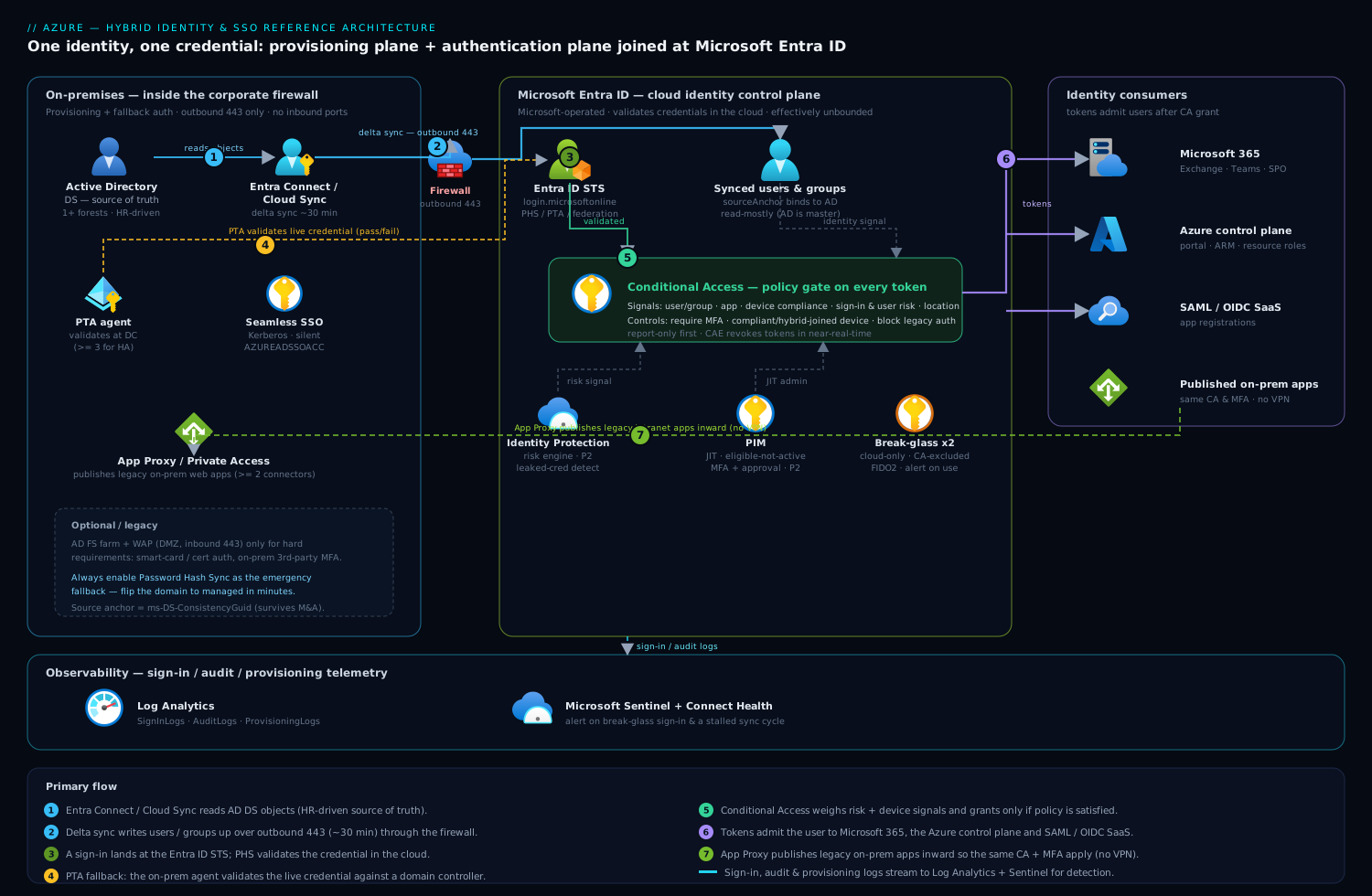
Hybrid identity has two distinct planes that people routinely conflate: a provisioning plane (how identities and their attributes get copied from AD into Entra ID) and an authentication plane (how a sign-in is validated and where the password is actually checked). Designing them independently is the key insight of this architecture.
The provisioning plane runs on a schedule, not on the request path. On a domain-joined server inside the corporate network, Microsoft Entra Connect Sync (or the lighter, agent-based Entra Cloud Sync) reads objects from one or more AD forests, applies attribute transformations and scoping filters, and writes the resulting users, groups, and contacts up to Entra ID over outbound HTTPS (443) every few minutes — by default a delta sync every 30 minutes. The cloud objects carry an immutable anchor (sourceAnchor / ms-DS-ConsistencyGuid) that permanently ties each Entra user back to its AD object, and userPrincipalName is mapped so the on-prem and cloud identity share the same logon name. Critically, Entra ID is read-mostly here: AD remains the source of truth, and (with the optional Entra Connect cloud-to-on-prem write-back features) only a controlled set of attributes — self-service password resets, device objects, group memberships — flow back down.
The authentication plane is where the sign-in choice lives, and it is the single most consequential decision in the whole design. When a user signs in to a cloud endpoint, the request lands at the Entra ID STS (login.microsoftonline.com), which must verify the credential one of three ways. With Password Hash Synchronization (PHS), Connect has already synced a hash-of-the-hash of the user’s AD password into Entra ID, so Entra validates the credential itself — the on-prem directory is not on the request path at all. With Pass-through Authentication (PTA), Entra hands the credential to a lightweight PTA agent running on-prem, which validates it against a domain controller and returns pass/fail — the password is never stored in the cloud, but a live agent must be reachable. With federation (AD FS or a third-party IdP), Entra redirects the browser to the on-prem federation service, which authenticates the user and returns a signed SAML/WS-Fed token. Layered on top of all three is Seamless Single Sign-On (Seamless SSO): for users on a domain-joined, corporate-network device, Entra silently obtains a Kerberos ticket (using a synthetic computer account AZUREADSSOACC) so the corporate logon flows straight into cloud apps with no password prompt at all.
Once the credential is validated, the request does not simply succeed — it passes through Conditional Access, the policy engine that sits in front of every token issuance. Conditional Access evaluates signals (user/group, application, device state from Intune/Entra-joined compliance, sign-in and user risk from Identity Protection, named locations, client app) and applies controls (require MFA, require compliant or hybrid-joined device, require token-protection, block, or grant). Only if the policy is satisfied does Entra ID issue the access and refresh tokens, and with Continuous Access Evaluation (CAE) those tokens can be revoked in near-real-time when risk spikes or the account is disabled.
For on-premises web apps that can’t be modernized, the Entra Private Access / Application Proxy connector publishes them through Entra ID so the same Conditional Access and MFA apply to a legacy intranet app as to a SaaS app — extending the identity perimeter inward without a VPN. And for administration, no one holds standing high-privilege roles: Privileged Identity Management makes Global Administrator, Privileged Role Administrator, and the Azure resource roles eligible, so an admin activates a role for a bounded window, satisfying MFA and (for the crown-jewel roles) an approval, with every activation logged and reviewed.
Picture the diagram as two halves joined at Entra ID. Left half (on-prem, inside the firewall): AD DS domain controllers; the Entra Connect / Cloud Sync server reading from them; a PTA agent and a Seamless SSO computer object; optionally an AD FS farm + WAP and an App Proxy connector. A single upward arrow labelled “outbound 443, delta sync every 30 min + auth agents” crosses the firewall. Center: Microsoft Entra ID — the STS, the synced users/groups, Conditional Access as a gate in front of token issuance, Identity Protection feeding risk signals into it, and PIM governing the admin roles. Right half (the things that consume identity): Microsoft 365, the Azure control plane, SAML/OIDC SaaS apps, and (looping back left through App Proxy) the published on-prem web apps. Sign-in logs and audit logs stream down to Log Analytics / Microsoft Sentinel along the bottom.
Component breakdown
| Component | Role in the architecture | Why it’s here | Key configuration choices |
|---|---|---|---|
| Entra Connect Sync | Server-based engine that synchronizes AD objects → Entra ID and hosts PHS/PTA | Provisioning plane for complex, multi-forest, or write-back estates | Staging-mode second server for HA/DR; ms-DS-ConsistencyGuid as source anchor; OU/attribute filtering; Group/Device/Password write-back as needed; ≤ Connect supported version |
| Entra Cloud Sync | Lightweight provisioning agents (no full sync server) managed from the cloud | Simpler, agent-resilient provisioning; multi-forest/M&A; gradual ADFS exit | Multiple agents for HA; cloud-managed scoping; use alongside Connect (group-by-group) during migration |
| Password Hash Sync (PHS) | Syncs a non-reversible hash-of-hash so Entra validates passwords itself | Default and recommended sign-in; cloud-resilient; enables leaked-credential detection | Enable even as a federation/PTA backup; pairs with Seamless SSO; near-instant for synced password changes |
| Pass-through Authentication (PTA) | On-prem agents validate the live credential against a DC | “Password must not live in the cloud” policy without federation complexity | ≥ 3 agents for HA; PHS enabled as fallback; agents need outbound 443 only |
| AD FS / federation (optional) | On-prem STS issues SAML/WS-Fed tokens; full control of the auth pipeline | Only for hard requirements (smart-card/cert auth, third-party MFA on-prem, custom claims) | Treat as legacy; WAP in DMZ; PHS enabled as emergency backup; plan migration to cloud auth |
| Seamless SSO | Silent Kerberos-based sign-in for domain-joined, on-network devices | Removes the password prompt entirely for corporate users | Synthetic AZUREADSSOACC computer object; roll over its Kerberos key periodically; browser/GPO config |
| Hybrid Azure AD Join | Registers domain-joined Windows devices into Entra ID | Produces the device identity Conditional Access needs as a signal | SCP via GPO or Connect; enables “require hybrid-joined device” controls and device-bound tokens |
| Conditional Access | Policy engine gating every token issuance on signals → controls | “Verify explicitly / least privilege / adaptive trust” — identity is the perimeter | Require MFA + compliant/hybrid-joined device; block legacy auth; sign-in/user-risk policies; named locations; report-only → on rollout |
| Identity Protection | Risk engine (leaked creds, impossible travel, anonymous IP, token replay) | Feeds risk signals into Conditional Access for adaptive policy | Requires Entra ID P2; risk-based CA (high risk → block, medium → MFA + password change) |
| Privileged Identity Management (PIM) | Just-in-time, time-boxed, approval-gated activation of privileged roles | “No standing privilege” — shrinks the high-value target surface | Roles Eligible not Active; activation MFA + approval for Global Admin; access reviews; activation alerts |
| Entra Application Proxy / Private Access | Reverse-proxy connectors that publish on-prem web apps through Entra | Extends Conditional Access + MFA to legacy apps without a VPN | ≥ 2 connectors per group for HA; pre-auth via Entra; KCD for Kerberos back-ends |
| Break-glass accounts | Two cloud-only emergency Global Admins, excluded from all CA | Recovery path if federation, PTA, sync, or a CA policy locks everyone out | *.onmicrosoft.com, not synced/federated; CA-excluded; FIDO2 + vaulted; high-severity sign-in alert |
| Log Analytics + Sentinel | Sign-in/audit/provisioning telemetry, detection, and reporting | “Continuously monitor” the whole identity plane | Stream Entra SignInLogs/AuditLogs; Connect Health for sync/agent health; alert on sync stalls and risky sign-ins |
A few configuration choices deserve emphasis because they are where most “hybrid identity” designs quietly go wrong:
- Enable Password Hash Sync even if you federate or use PTA. PHS is the backup authentication path. If AD FS or the PTA agents are down, an admin can flip the domain to managed (PHS) in minutes and keep cloud sign-in alive — but only if hashes are already syncing. There is no good reason not to have it on.
- Source anchor is forever — pick
ms-DS-ConsistencyGuid. The source anchor permanently binds a cloud user to its AD object. Using the mutableobjectGUIDbreaks identities during forest migrations and M&A; the consistency GUID survives them. Get this wrong and you face painful re-matching later. - Conditional Access goes live in report-only first. A bad CA policy at tenant scope is the fastest way to lock out the entire company. Every new policy ships in report-only, is validated against real sign-in logs, then is enforced — and break-glass accounts are excluded from all of it.
- Seamless SSO is not SSO-the-protocol; it’s the silent on-network experience. It rides on top of PHS or PTA via Kerberos. Remember to roll the
AZUREADSSOACCKerberos decryption key on a schedule — a stale key is a recurring, hard-to-diagnose outage cause.
Implementation guidance
Provisioning topology. Decide between Entra Connect Sync and Entra Cloud Sync (you can run both). Choose Connect when you need attribute write-back, exchange-hybrid, device write-back, or per-attribute transformation logic across a complex forest. Choose Cloud Sync when you want agent-based resilience, simpler ops, multi-forest/M&A onboarding, or a gradual exit from AD FS — its agents are stateless and you run several for HA. For Connect, always deploy a second server in staging mode: it stays fully synced but inactive, so failover is a single switch instead of a multi-hour rebuild during an incident.
Sign-in choice. Default to Password Hash Sync + Seamless SSO — it is Microsoft’s recommended method, it keeps cloud sign-in independent of on-prem availability, and PHS uniquely enables leaked-credential detection in Identity Protection. Use PTA + Seamless SSO only when a written policy forbids any password material (even a salted hash-of-hash) in the cloud — and still enable PHS as the emergency fallback. Reserve federation (AD FS) for genuine hard requirements (smart-card/certificate auth, an on-prem third-party MFA you cannot replace, or claims rules a cloud policy cannot express), treat it as legacy, and plan its retirement; Microsoft’s own guidance and tooling now push federated tenants toward cloud authentication.
IaC and configuration-as-code. The connectors (Connect/Cloud Sync agents) are agent installs on Windows, not Terraform resources — but everything downstream of them should be code:
- Terraform
azuread/azurermis a strong fit for the policy plane. Define Conditional Access policies (azuread_conditional_access_policy), named locations, groups used for CA targeting and PIM eligibility, app registrations for SaaS SSO, and role assignments. Keep policies in report-only state in code and promote via a variable so the same module governs rollout. - Bicep / ARM covers the supporting Azure resources — the Log Analytics workspace, diagnostic settings that route
SignInLogs/AuditLogs/ProvisioningLogsto it, and any Sentinel analytics rules — though the directory objects themselves live in Graph/azuread. - Microsoft Graph (PowerShell or Bicep
Microsoft.Graphresources) can declare Conditional Access, authentication methods policy, and PIM role-management policy settings, so even the identity-governance config is reviewable in source control rather than clicked through the portal.
Networking and firewall wiring. The sync server and the PTA/App-Proxy connectors need outbound HTTPS (443) only to a defined set of Microsoft endpoints — no inbound ports, which is why this works behind a corporate firewall without a DMZ (federation/AD FS is the exception: its WAP belongs in the DMZ with inbound 443). Allowlist the documented Entra Connect / connector FQDNs through the proxy/firewall, and prefer a dedicated outbound path so a proxy change doesn’t silently stall sync. There is no VNet or private endpoint on the request path for cloud auth — the whole point of PHS is that authentication happens in the cloud.
Identity wiring (the order that matters).
- Stand up Connect/Cloud Sync, set the source anchor to
ms-DS-ConsistencyGuid, scope by OU/attribute, and verify objects and UPNs match. - Enable Password Hash Sync and Seamless SSO; confirm a synced user can sign in to the cloud and that on-network domain-joined devices sign in silently.
- Turn on Hybrid Azure AD Join (SCP via Connect or GPO) so devices register and Conditional Access has a device signal.
- Create the two break-glass accounts, exclude them from all Conditional Access, and wire a high-severity sign-in alert.
- Author Conditional Access in report-only: a baseline requiring MFA for all users, a policy requiring compliant/hybrid-joined devices for sensitive apps, a block-legacy-authentication policy, and risk-based policies (high sign-in risk → block, user risk → secure password change). Validate against sign-in logs, then enforce.
- Onboard PIM: make Global Administrator and the other Tier-0 roles eligible, require MFA + approval to activate Global Admin, set short activation windows, and schedule quarterly access reviews.
- (Optional) Deploy App Proxy / Private Access connectors and publish legacy web apps with Entra pre-authentication so the same CA applies.
Operational guardrails. Install Entra Connect Health to monitor sync latency, PTA/AD FS agent health, and the AD FS performance counters; alert when a delta sync hasn’t completed or an agent goes unhealthy. Schedule the AZUREADSSOACC Kerberos key rollover. Keep Connect within the supported-version window — Microsoft retires old builds on a hard cadence.
Enterprise considerations
Security & Zero Trust. This architecture implements the Zero-Trust signals on the identity plane: verify explicitly (Conditional Access on every token, MFA, device and risk signals, CAE for continuous re-evaluation), least privilege (PIM just-in-time admin, group-based access, access reviews), and assume breach (Identity Protection leaked-credential and impossible-travel detection feeding adaptive policy; block-legacy-auth to kill the protocols that bypass MFA). The single most valuable property: a terminated employee’s access dies on the next sync cycle (account disabled in AD → propagated to Entra → CAE can revoke live sessions in near-real-time), and a leaked AD password is detected by Identity Protection precisely because PHS is enabled. Block-legacy-authentication alone closes the most-exploited MFA-bypass on the planet (IMAP/POP/SMTP/older Office clients).
Cost optimization. The provisioning and sign-in plumbing — Entra Connect, Cloud Sync, PHS, PTA, Seamless SSO, Hybrid Join — is included with all Entra ID tiers, including the free tier bundled with Microsoft 365. The cost is licensing for the advanced policy: Conditional Access requires Entra ID P1, and Identity Protection (risk-based CA) and PIM require P2. Tactics: license P2 for the privileged population and the higher-risk user segments, and P1 across the broader workforce (commonly delivered via the Microsoft Entra Suite, EMS E5, or Microsoft 365 E5/E3+add-ons). Avoid the classic waste of running AD FS purely out of inertia — a federation farm is servers, certificates, WAP nodes, and patching you pay for in people-time; moving to PHS retires all of it. There is no per-sync or per-token Azure meter here, so the bill is predictable and license-driven.
Scalability. Entra Connect handles very large directories (hundreds of thousands of objects) on a single appropriately-sized server, with the staging server as warm standby; Cloud Sync scales horizontally by adding agents. PTA and App Proxy scale by adding connectors to a connector group. The authentication plane (Entra STS) is Microsoft-operated and effectively unbounded — your sign-in throughput is not your problem. Onboarding a new forest (M&A) is an additive operation: point a new Cloud Sync agent or Connect connector at it, map the source anchor, and scope.
Reliability & DR (RTO/RPO). The headline reliability win of PHS is that cloud sign-in does not depend on on-prem availability at all — if the data centre is dark, Microsoft 365 and Azure sign-in keep working. The components to make redundant are the provisioning and fallback paths: run two Connect servers (active + staging) or multiple Cloud Sync / PTA / App Proxy agents so no single box is a single point of failure. A practical posture: provisioning RPO ≈ one sync cycle (≤ 30 min) of attribute changes, and provisioning RTO ≈ minutes (promote the staging server). For authentication, with PHS the effective auth RTO during an on-prem outage is zero because the cloud already validates credentials; with PTA/federation, the documented break-glass is to convert the domain to managed (PHS) — which is exactly why PHS must always be pre-enabled. DR for the directory itself is Microsoft’s responsibility within Entra ID; your DR plan is “keep a healthy second sync path and a tested break-glass.”
Observability. Stream Entra ID sign-in logs, audit logs, and provisioning logs to Log Analytics, and correlate in Microsoft Sentinel: blocked legacy-auth attempts, Conditional Access failures and grants, risky sign-ins, PIM activations, and break-glass usage. Use Entra Connect Health for sync latency, agent health, and AD FS counters, and alert on a stalled sync, an unhealthy PTA agent, or a Kerberos-key staleness window approaching. The two highest-value alerts: any break-glass account sign-in, and a sync cycle that hasn’t completed (because a stalled sync silently freezes joiner/leaver propagation).
Governance. Govern the privileged plane with PIM (eligible-not-active, approval-gated, time-boxed) and quarterly access reviews of privileged roles and of guest access. Govern which identities exist via the on-prem HR → AD lifecycle plus Entra entitlement management for any cloud-born and guest accounts. Enforce posture with Conditional Access coverage monitoring (catch users or apps with no policy) and policy-as-code review in Terraform/Graph so every CA change is peer-reviewed. Maintain a written break-glass runbook and test it.
Reference enterprise example
Meridian Components, a mid-sized industrial manufacturer (~6,800 employees across India, the UK, and Germany; two AD forests after a 2024 acquisition), runs Microsoft 365 and a growing Azure estate. It is exiting a tired AD FS deployment: the farm had a near-miss certificate-expiry incident that briefly threatened Microsoft 365 sign-in for the whole company, and the security team wants risk-based access and just-in-time admin that AD FS does not provide. The brief: one credential everywhere, kill AD FS, enforce conditional and just-in-time access, and never let an on-prem outage take down cloud sign-in.
Decisions.
- Password Hash Sync + Seamless SSO as the target sign-in method (retiring AD FS), with PHS deliberately enabled first as the AD FS fallback during the migration so a federation failure can no longer black out Microsoft 365.
- Entra Cloud Sync for the second (acquired) forest and Entra Connect (active + staging) for the legacy primary forest — running both, migrating users group-by-group, with
ms-DS-ConsistencyGuidas the source anchor on both so the M&A re-match is clean. - Hybrid Azure AD Join for the ~5,500 Windows endpoints so Conditional Access can require a compliant/hybrid-joined device.
- Conditional Access rolled out report-only → enforced: MFA for everyone, compliant/hybrid-joined device for finance and engineering-IP apps, block legacy auth tenant-wide, and risk-based policies (high sign-in risk → block, user risk → secure password change) via Identity Protection.
- PIM for the 14 Global-Admin-eligible staff and the Azure resource roles: Global Admin activation requires MFA and approval, capped at a 4-hour window, with quarterly access reviews.
- Entra Application Proxy to publish three legacy on-prem intranet apps so they inherit the same MFA and Conditional Access — letting the team finally turn off the corporate VPN for those apps.
- Two cloud-only break-glass accounts, FIDO2-secured, excluded from all CA, with split-vaulted credentials and a Sentinel high-severity sign-in alert.
Realistic numbers. Provisioning runs a delta sync every 30 minutes across ~7,200 synced objects; staging-server failover was rehearsed at under 5 minutes. Licensing landed at Entra ID P2 for ~900 users (all privileged staff plus finance/engineering and other higher-risk segments) and P1 for the remaining ~5,900 workforce, delivered through the organization’s Microsoft 365 E5/E3+EMS mix. In the first month after enforcing block-legacy-auth, Sentinel showed ~31,000 legacy-protocol sign-in attempts blocked — every one a pre-MFA bypass that previously could have succeeded. Identity Protection flagged 17 leaked-credential users (detectable only because PHS was now on) and auto-forced secure password changes. The AD FS farm — four servers and two WAP nodes — was decommissioned, removing the certificate-expiry blast radius entirely.
Outcome. Six weeks after cutover, a planned data-centre power test took the primary forest’s domain controllers and the WAN link fully offline for three hours — and Microsoft 365 and Azure sign-in were completely unaffected, because PHS validates credentials in the cloud. The only impact was that new HR changes paused until the sync server came back, which the team had accepted as the design’s RPO. Admin behavior shifted from 14 standing Global Admins to zero standing privilege: every privileged action is now a logged, approved, time-boxed PIM activation, which the auditor cited approvingly. The VPN requirement for the three published intranet apps was dropped. The identity team operates the whole estate — two forests, two sync paths, CA, PIM — with a 3-person crew, leaning on Connect Health and Sentinel alerts rather than manual checks.
When to use it
Use this architecture when you have an established on-premises Active Directory, you are adopting (or have adopted) Microsoft 365 and/or Azure, and you need users to have one credential and a single, conditional, just-in-time access model across on-prem and cloud. It scales from a single-domain SMB to a multi-forest global enterprise, and it is the de-facto baseline for every Microsoft hybrid shop.
Trade-offs. It introduces sync infrastructure to own and patch (mitigated by Cloud Sync’s agent model or a Connect staging server), and it makes Entra ID a hard dependency for cloud access — which is the point, but means Conditional Access and break-glass discipline are non-negotiable. The advanced value (risk-based CA, PIM) sits behind P2 licensing, so the security model has a real cost. Federation (if you keep it) is the heaviest variant operationally and the one Microsoft is steering customers away from.
Anti-patterns to avoid.
- Running federation/PTA with PHS disabled — you have thrown away your emergency authentication fallback and your leaked-credential detection.
- Using
objectGUIDas the source anchor — it breaks identities across forest migrations and M&A; usems-DS-ConsistencyGuid. - Enforcing a new Conditional Access policy without report-only first, or without excluding break-glass accounts — the classic way to lock out the whole company.
- Leaving legacy authentication enabled — it bypasses MFA and is the single most-exploited sign-in path.
- Standing Global Admins instead of PIM-eligible — a permanent fleet of high-blast-radius accounts is a finding, not a baseline.
- A single Connect server with no staging/standby, or a stale
AZUREADSSOACCKerberos key — both are avoidable outages.
Alternatives. If you have no on-prem directory at all (a true cloud-native or startup posture), skip the hybrid bridge entirely: make Entra ID the sole source of truth, use cloud-only accounts, and apply the same Conditional Access + PIM model — there is nothing to sync. If you are running a non-Microsoft IdP (Okta, Ping) as the primary, you can still federate Entra ID to it, but you lose the tight native integration with Conditional Access, Identity Protection, and managed-device signals that makes this design cohesive — a common interim state during consolidation rather than a target. If your goal is to provision SaaS app accounts (not validate sign-in), that is SCIM-based app provisioning, a complementary capability layered on top of this architecture, not a replacement for it. And if you are mid-journey on a federation server today, the right move is rarely “rebuild ADFS” — it is to enable PHS, point Cloud Sync at your forests, and migrate to cloud authentication, arriving exactly at the architecture above.
Going deeper
The reference architecture above sits at “boxes and arrows” altitude. This section drops below it — the internals, the version caveats, and the edge cases that separate a design that demos from one that survives an audit and a data-centre outage. Nothing here replaces what came earlier; it goes underneath it.
Two provisioning engines: Entra Connect Sync vs Entra Cloud Sync
Connect Sync is a full Windows application — a metaverse and connector spaces backed by a local SQL/LocalDB database, with a rich declarative-provisioning rule engine — installed on a server you own and patch. Cloud Sync is a lightweight, stateless agent (the same provisioning-agent family PTA uses): it keeps no local database, the sync logic and scoping live in the cloud, and you run several agents for resilience. The choice is not “old vs new” — Microsoft’s strategic direction is Cloud Sync — but Connect still owns capabilities Cloud Sync does not yet cover.
| Capability | Entra Connect Sync | Entra Cloud Sync |
|---|---|---|
| Users / groups / contacts | ✔ | ✔ |
| Password Hash Sync | ✔ | ✔ |
| Pass-through Auth + Seamless SSO | ✔ | ✔ |
| Multiple disconnected forests | one install reads many forests | ✔ per-agent scoping — strong for M&A |
| Device sync → Entra hybrid join | ✔ | ✖ (needs Connect) |
| Device writeback | ✔ | ✖ |
| Group writeback (M365 + security) | ✔ | ✔ (cloud security/M365 groups) |
| Exchange hybrid writeback / Exchange attributes | ✔ | ✖ |
| Rich per-attribute custom sync-rule expressions | ✔ (declarative provisioning) | limited attribute mapping |
| Very large single groups | high limits | a per-group member-count limit — plan around it |
| Server + local DB to own and patch | yes | no — stateless agents |
Rule of thumb: run Cloud Sync alone for greenfield, simple, or M&A / multi-forest estates and anywhere you want to shed the sync server; keep Connect where you still need device sync (for hybrid join), Exchange hybrid, device writeback, or complex transformation logic. The two can run side-by-side against different OUs or forests during a migration — the supported coexistence model — so you move group-by-group instead of big-bang.
The three sign-in methods, under the hood
- Password Hash Sync (PHS) — recommended. What syncs is not the password, and not even the on-prem hash an attacker could replay against AD. Connect takes the on-prem MD4 / NTLM hash, adds a per-user salt, and runs it through PBKDF2 (HMAC-SHA256), 1,000 iterations, storing that in Entra ID — a hash of a hash. It cannot be reversed to the password and cannot be used to log in to on-prem AD, so its blast radius if the Entra copy leaked is far smaller than the on-prem hash itself. PHS uniquely powers leaked-credential detection: Identity Protection compares the synced verifier against credentials found in public breach dumps and flags matches — a signal you lose if you federate with PHS off. On-prem password changes propagate in about 2 minutes via a dedicated fast path, separate from the 30-minute object sync. Because the cloud holds the verifier, authentication does not touch on-prem at all — the outage-survivability property.
- Pass-through Authentication (PTA). No password material lives in the cloud. Lightweight PTA agents register with Entra and hold a certificate. At sign-in, Entra ID drops the credential — encrypted with the agent’s public key — into a queue; an agent picks it up over its existing outbound connection, decrypts it with its private key, validates it against a domain controller, and returns only pass/fail. Run three or more agents (never one — that is a single point of sign-in failure), and enable PHS underneath as the break-glass: if every agent is unreachable, PTA sign-in stops until you flip the domain to managed.
- Federation (AD FS / third-party) — legacy, being retired. Entra redirects the browser to an on-prem STS that returns a signed SAML / WS-Fed token. It is the heaviest option — a farm, a WAP in the DMZ, certificates that expire and take sign-in down with them — and Microsoft now actively steers tenants off it. Keep it only for genuine hard requirements (smart-card / certificate auth, an on-prem third-party MFA you cannot yet replace, or claims logic a cloud policy cannot express). The migration path is well-paved: enable PHS, use the portal’s staged rollout to move batches of users from federated to cloud auth and validate before cutting the whole domain, then convert the domain to managed.
Naming / version note: “Azure AD Connect” is now Microsoft Entra Connect; keep it inside Microsoft’s supported-version window — old builds are retired on a hard cadence, and a retired build can simply stop syncing.
Seamless SSO is Kerberos in disguise
Seamless SSO is often misread as “the SSO protocol”. It is not — it is the silent, no-prompt experience for users already on the corporate network on a domain-joined device, and it rides on top of PHS or PTA. Mechanically it is Kerberos: Connect (or Cloud Sync) creates a computer object named AZUREADSSOACC in on-prem AD and shares its Kerberos decryption key with Entra ID. When such a user hits login.microsoftonline.com, the browser silently requests a Kerberos ticket for that object and presents it; Entra decrypts it with the shared key and issues tokens with no password prompt. Two operational gotchas dominate: roll the AZUREADSSOACC Kerberos decryption key on a schedule (Microsoft recommends roughly every 30 days — a stale key is a classic, hard-to-diagnose intermittent outage), and non-Microsoft browsers or non-domain devices need the Entra URLs placed in an intranet / trusted-sites zone via GPO to send the ticket. On Entra joined and hybrid joined Windows devices the Primary Refresh Token already delivers SSO, so Seamless SSO mainly matters for the domain-joined-but-not-yet-Entra-registered population.
What actually syncs — filtering, and who is the source of authority
You choose which objects flow up, via OU-based, attribute-based, or group-based scoping. Sync too much and you pollute Entra with service accounts and stale objects; sync too little and people cannot sign in — so scope deliberately and review it. Cautions:
- Filtering is not a “hide” switch. Removing an in-scope object deletes its Entra representation and its cloud access — sometimes exactly what you want, sometimes a self-inflicted outage. Test scope changes in a lab first.
userPrincipalNameand the source anchor are foundational. The UPN suffix should be an internet-routable domain that matches a verified tenant domain (never.local), and the source anchor must bems-DS-ConsistencyGuid, not the mutableobjectGUID, so identities survive forest migration and M&A.- Source of authority. In the classic model the directory is the unit of authority: on-prem AD is authoritative, Entra is read-mostly, and the only things flowing down are the controlled write-back exceptions (password / SSPR, groups, devices). Microsoft has begun introducing a finer, per-object “source of authority” — converting an individual synced object so Entra becomes authoritative for it, part of the longer arc toward retiring on-prem AD. Treat per-object SOA conversion as a newer, evolving capability to track, not the default posture; for now, design as “AD authoritative + explicit write-back.”
Device identity: registered vs joined vs hybrid joined
Conditional Access is only as strong as its device signal, and there are three distinct device-identity states people conflate. (Microsoft renamed all three: “Azure AD registered / joined / hybrid joined” → Microsoft Entra registered / joined / hybrid joined.)
| Device state | What it is | Signs in with | On-prem AD? | Typical use | CA signal it gives |
|---|---|---|---|---|---|
| Entra registered | Gets an Entra identity, but the user’s primary logon stays personal | Personal account; org access via the registered identity | No | BYOD, personal mobiles, contractors | “registered device”; pairs with Intune app-protection (MAM) |
| Entra joined | Joined only to Entra ID (cloud-primary) | Org Entra account (PRT-backed SSO) | No | Cloud-first, remote-first, new fleets | “Entra joined”; can be “compliant” via Intune |
| Entra hybrid joined | Domain-joined to on-prem AD and registered to Entra | Org AD account (also PRT) | Yes | Estates with on-prem AD, GPO, imaging | “hybrid joined”; the bridge state during cloud migration |
The token that makes joined and hybrid-joined devices feel seamless is the Primary Refresh Token (PRT) — issued at device sign-in, bound to the device (and its TPM where present), and used to silently obtain app tokens. Hybrid join is the one that requires device synchronization (Connect Sync) plus a Service Connection Point (SCP) so the device can discover its tenant; it is a transition target — greenfield fleets should go straight to Entra joined and skip the on-prem dependency.
Group writeback and device writeback
Write-back is the controlled reverse flow, and two kinds matter:
- Group writeback lets cloud-created groups (Microsoft 365 groups, and — with Group Writeback v2 — cloud security groups) be written down into on-prem AD as distribution / security groups, so legacy on-prem apps that only understand AD group membership can consume cloud-managed groups. Cloud Sync supports group writeback; device writeback still requires Connect.
- Device writeback writes Entra device objects back into on-prem AD. Its historical purpose was device-aware Conditional Access for AD FS and for on-prem resources — letting on-prem enforcement reason about a device’s Entra state. As AD FS retires this matters less, but it remains the mechanism if any on-prem enforcement point needs device awareness.
Both widen the trust surface, so enable only the write-back you actually consume — every reverse flow is another path an attacker could ride from cloud back into AD.
Entra ID is not Entra Domain Services
A recurring source of confusion — three genuinely different things:
| Microsoft Entra ID | Microsoft Entra Domain Services | Self-managed AD DS (VMs / on-prem) | |
|---|---|---|---|
| What it speaks | Modern web auth — OAuth 2.0 / OIDC / SAML, Graph | Legacy protocols — LDAP(S), Kerberos, NTLM, domain join, Group Policy | Same legacy protocols, plus full schema control |
| You run domain controllers? | No (Microsoft-run, global) | No — Microsoft runs a managed domain for you | Yes — you build, patch, back up DCs |
| Populated from | Cloud-native + synced from AD | One-way sync from Entra ID (which itself may be fed from on-prem) | Authoritative itself |
| Reach for it when | Any modern cloud app, M365, Azure | A lift-and-shift legacy app in Azure needs LDAP / Kerberos / GPO but you don’t want to run DCs or VPN back to on-prem AD | You need full AD control, schema extensions, on-prem workloads |
The key insight: Entra ID cannot do LDAP / Kerberos / NTLM / GPO, so an old app that domain-joins its servers or binds to LDAP cannot authenticate against Entra ID directly. Entra Domain Services fills exactly that gap in Azure — a managed domain, one-way-synced from your tenant, with no domain controllers for you to operate — so you can drop a legacy app’s dependency on a line back to the corporate data centre. It is not a replacement for Entra ID and not the same as running your own domain controllers on Azure VMs.
Conditional Access as the replacement for AD FS claim rules
Teams migrating off AD FS often ask, “where did my claim rules go?” They split across three cloud features:
- Access decisions (who may get a token, under what conditions) move from AD FS issuance authorization rules to Conditional Access — signals (user/group, app, device state, sign-in / user risk, location, client) → grant controls (MFA, compliant / hybrid-joined device, block). CA expresses adaptive, risk-based logic AD FS never could.
- Claim shaping (what the token carries) moves from AD FS issuance transform rules to Entra token configuration / optional claims, claims-mapping policies, and, for hard cases, a custom claims provider.
- MFA and step-up move from the on-prem AD FS MFA adapter to Entra MFA, and authentication context lets one CA policy demand step-up for a specific sensitive action inside an app — a capability with no clean AD FS analogue.
Plan the mapping rule-by-rule before you decommission the farm, and validate every new CA policy in report-only with break-glass accounts excluded.
Monitoring and health — what “green” looks like
Green means: the delta sync completing on schedule, all agents healthy, the Kerberos key fresh, and no silent CA gaps. Instrument it with Microsoft Entra Connect Health (sync latency, PTA / AD FS agent health, AD FS performance counters) and by streaming SignInLogs, AuditLogs, and ProvisioningLogs to Log Analytics / Microsoft Sentinel. Two alerts earn their keep above all others: any break-glass account sign-in, and a sync cycle that has not completed — a stalled sync silently freezes joiner / mover / leaver propagation, which is a security problem because a disabled account keeps its cloud access. A representative Log Analytics query for blocked legacy authentication:
SigninLogs
| where TimeGenerated > ago(7d)
| where ResultType == 53003                       // blocked by Conditional Access
| where ClientAppUsed in ("Other clients", "IMAP4", "POP3", "SMTP", "MAPI", "Exchange ActiveSync")
| summarize attempts = count() by UserPrincipalName, ClientAppUsed, IPAddress
| order by attempts desc
(Representative — the exact result shape depends on your tenant and policy set.) Pair it with an alert on AADConnectHealth sync-latency and agent-health signals, and a scheduled reminder to roll the AZUREADSSOACC Kerberos key.
Practice challenges
Work these top to bottom — they escalate from “name the concept” to “design the rollout.” No live tenant is needed; each is a design or reasoning exercise with a concrete answer.
1 (Beginner) — Sort the tasks into the two planes. Label each as provisioning plane or authentication plane: (a) a new hire’s AD account appears in Entra 20 minutes after HR creates it; (b) a user typing their password into login.microsoftonline.com is verified; © a group’s membership change flows up to the cloud; (d) a sign-in is checked for MFA and device compliance.
<details><summary>Solution</summary>
Provisioning plane: (a) and © — copying objects/attributes AD → Entra on a schedule. Authentication plane: (b) and (d) — validating a live sign-in and gating the token. Why: the single biggest design insight of hybrid identity is that these two planes are independent — you pick a sync engine for one and a sign-in method for the other, separately. </details>
2 (Beginner) — Pick the sign-in method. A security policy states: “no password material of any form may be stored in the cloud, but on-prem outages must not black out Microsoft 365 sign-in.” Which method, and what is the catch?
<details><summary>Solution</summary>
The policy is internally contradictory, so the honest answer is PTA + Seamless SSO, with PHS enabled as the emergency break-glass. Pure PTA satisfies “no password in the cloud” but does depend on on-prem agents, so an on-prem outage stops sign-in — unless PHS is pre-enabled so you can flip the domain to managed. Why: PHS is the only method that makes cloud sign-in fully independent of on-prem; keeping it enabled underneath PTA/federation is the standard resilience move. </details>
3 (Intermediate) — Connect Sync or Cloud Sync? You just acquired a company with its own AD forest, you want Microsoft Entra hybrid join on the acquired fleet’s ~2,000 domain-joined laptops, and you would rather not stand up another full sync server. Can Cloud Sync alone do it?
<details><summary>Solution</summary>
No — not alone. Cloud Sync happily onboards the acquired forest’s users/groups and even does PHS, but device synchronization (required for hybrid join) needs Connect Sync. Options: run Connect for the device-sync piece (and Cloud Sync for users), or move that fleet’s target to Entra joined instead of hybrid joined and skip device sync entirely. Why: hybrid join depends on device objects reaching Entra, and only Connect Sync provides device sync today. </details>
4 (Intermediate) — Match the device state. Assign Entra registered, Entra joined, or Entra hybrid joined: (a) a contractor’s personal iPhone accessing Outlook; (b) a brand-new remote-first startup’s Windows laptops with no on-prem AD; © an existing enterprise’s imaged, GPO-managed, domain-joined desktops that must also satisfy a “compliant device” CA policy.
<details><summary>Solution</summary>
(a) Entra registered (BYOD, personal primary logon). (b) Entra joined (cloud-primary, no on-prem AD). © Entra hybrid joined (domain-joined and Entra-registered — the bridge state). Why: each state produces a different Conditional Access device signal, and choosing the wrong one either blocks legitimate users or fails to give CA the signal it needs. </details>
5 (Advanced) — Ship a Conditional Access baseline safely. Write the minimal Terraform for an “MFA for all users” policy that (i) starts in report-only and (ii) excludes the two break-glass accounts, and state the two-step promotion path.
<details><summary>Solution</summary>
resource "azuread_conditional_access_policy" "require_mfa_all" {
  display_name = "Baseline - Require MFA for all users"
  state        = "enabledForReportingButNotEnforced"   # report-only first

  conditions {
    client_app_types = ["all"]
    applications {
      included_applications = ["All"]
    }
    users {
      included_users = ["All"]
      excluded_users = [var.breakglass1_object_id, var.breakglass2_object_id]
    }
  }

  grant_controls {
    operator          = "OR"
    built_in_controls = ["mfa"]
  }
}
Promotion path: (1) deploy in enabledForReportingButNotEnforced, validate against real SigninLogs for a week; (2) flip state to "enabled". Why: enabledForReportingButNotEnforced is the report-only state, and excluding break-glass accounts from every policy is what stops a bad CA rule from locking out the whole tenant.
</details>
6 (Advanced) — Reason through an on-prem blackout. The data centre loses power for three hours: domain controllers, the Connect server, the PTA agents, and the WAN link are all down. For each sign-in method — PHS, PTA, federation — say whether cloud sign-in still works, and what the recovery lever is if it does not.
<details><summary>Solution</summary>
- PHS: cloud sign-in keeps working — Entra already holds the verifier and validates in the cloud; only new HR/attribute changes pause until sync returns (that pause is your provisioning RPO, ≤ one sync cycle).
- PTA: sign-in stops — no agent is reachable to validate credentials. Recovery: convert the domain to managed (PHS), which only works if PHS was pre-enabled.
- Federation (AD FS): sign-in stops — the on-prem STS is unreachable. Same recovery: flip to managed / PHS, again only if PHS was already syncing.
Why: this is the whole argument for “enable PHS even when you use PTA or federation” — it is your authentication break-glass, and without it an on-prem outage becomes a total Microsoft 365 outage. </details>
Common beginner mistakes
These are conceptual traps — wrong mental models a learner brings in — distinct from the architectural anti-patterns listed under “When to use it.” Fix the model and the design follows.
- “Hybrid identity means my on-prem AD and Entra ID are one directory.” They are two separate directories that a sync engine keeps aligned. Objects are copied from AD into Entra (into Entra’s own store), each tied back by a source anchor. Right model: two directories, one identity — kept in sync, not merged.
- “Password Hash Sync uploads my users’ passwords (or the AD hash) to the cloud.” It uploads neither. PHS syncs a salted PBKDF2-SHA256 hash of the NTLM hash — a one-way “hash of a hash” that cannot be reversed to the password and cannot be replayed against on-prem AD. Right model: PHS stores a verifier, not a credential, which is precisely why it is safe and why it enables leaked-credential detection.
- “Seamless SSO is the thing that gives me single sign-on to cloud apps.” SSO to cloud apps comes from the token / Primary Refresh Token issued after any successful sign-in. Seamless SSO is only the silent, no-password-prompt experience for domain-joined, on-network users, layered on top of PHS or PTA via Kerberos. Right model: Seamless SSO removes a prompt; it is not what makes SSO work.
- “If on-prem AD or the data centre goes down, cloud sign-in goes down.” True only for PTA and federation. With PHS, Entra validates credentials itself, so cloud sign-in is unaffected by an on-prem outage — the reason PHS is the recommended default and the reason to keep it enabled underneath PTA/federation.
- “Entra ID can domain-join my VMs or answer LDAP/Kerberos queries.” It cannot — Entra ID speaks modern web auth (OAuth/OIDC/SAML), not LDAP/Kerberos/NTLM/GPO. A legacy app that needs those wants Entra Domain Services (a managed domain) or self-managed AD DS, not Entra ID. Right model: pick the directory service by the protocol the workload needs.
- “Filtering an OU out of sync just hides those users from the cloud.” Removing an in-scope object from the sync scope deletes its Entra object — and its cloud access, licenses, and mailbox association go with it. Right model: sync scope is a lifecycle decision, not a visibility filter; test scope changes in a lab before production.
Glossary
- Active Directory (AD DS) — the on-premises directory that has historically been the source of truth for users, groups, and domain-joined computers; speaks Kerberos, NTLM, LDAP, and Group Policy.
- Microsoft Entra ID — Microsoft’s cloud identity service (formerly Azure AD); speaks modern web auth (OAuth 2.0, OIDC, SAML) and is the identity behind Microsoft 365 and Azure.
- Tenant — a single organization’s dedicated Entra ID instance, identified by a tenant ID and one or more verified domains.
- Provisioning plane — how identities and attributes get copied from AD into Entra ID (the sync engine); runs on a schedule, off the request path.
- Authentication plane — how a live sign-in is validated and where the password is actually checked; the request path.
- Microsoft Entra Connect Sync — the server-based sync engine (formerly Azure AD Connect) with a local database and rich rule engine; needed for device sync, Exchange hybrid, and device writeback.
- Microsoft Entra Cloud Sync — the lightweight, cloud-managed, agent-based sync option; stateless agents, strong for multi-forest/M&A, but no device sync (yet).
- Password Hash Sync (PHS) — syncs a salted PBKDF2-SHA256 hash of the on-prem NTLM hash so Entra validates passwords itself; the recommended, outage-resilient method that also enables leaked-credential detection.
- Pass-through Authentication (PTA) — on-prem agents validate the live credential against a domain controller; no password material stored in the cloud, but sign-in depends on the agents being reachable.
- Federation / AD FS — an on-prem STS issues SAML/WS-Fed tokens; the heaviest, legacy option Microsoft is retiring in favor of cloud authentication.
- Seamless SSO — the silent, no-password-prompt experience for domain-joined, on-network users; rides on PHS/PTA using a Kerberos ticket for the
AZUREADSSOACCcomputer object. AZUREADSSOACC— the synthetic AD computer object whose Kerberos decryption key is shared with Entra to make Seamless SSO work; its key should be rolled roughly every 30 days.- Primary Refresh Token (PRT) — a device-bound token issued to Entra joined / hybrid joined devices that silently obtains app tokens, delivering SSO without prompts.
- Source anchor — the immutable attribute (
ms-DS-ConsistencyGuid, not the mutableobjectGUID) that permanently ties an Entra user back to its AD object across forest migrations and M&A. - userPrincipalName (UPN) — the internet-style logon name (
user@domain); its suffix should match a verified tenant domain, never.local. - Filtering / scoping — choosing which objects sync by OU, attribute, or group; removing an in-scope object deletes its Entra representation.
- Source of authority — which directory is authoritative for an object; classically the whole on-prem directory, with a newer per-object model letting Entra become authoritative for selected objects.
- Write-back — the controlled reverse flow of specific data cloud → AD: password/SSPR writeback, group writeback (M365 + cloud security groups), and device writeback.
- Microsoft Entra registered — a device (often BYOD/personal) that has an Entra identity while the user’s primary logon stays personal.
- Microsoft Entra joined — a device joined only to Entra ID (cloud-primary, no on-prem AD).
- Microsoft Entra hybrid joined — a device domain-joined to on-prem AD and registered to Entra; the bridge state during cloud migration.
- Microsoft Entra Domain Services — a managed domain providing legacy protocols (LDAP, Kerberos, NTLM, domain join, GPO) in Azure, one-way-synced from Entra; for lift-and-shift legacy apps, with no DCs for you to run.
- Conditional Access (CA) — the policy engine that evaluates signals (user, app, device, risk, location) and applies controls (MFA, compliant/hybrid-joined device, block) before every token issuance.
- Continuous Access Evaluation (CAE) — near-real-time revocation of already-issued tokens when risk spikes or an account is disabled.
- Identity Protection — the risk engine (leaked creds, impossible travel, anonymous IP, token replay) that feeds risk signals into Conditional Access; requires Entra ID P2.
- Leaked-credential detection — Identity Protection matching the synced verifier against public breach dumps; available only when PHS is enabled.
- Privileged Identity Management (PIM) — just-in-time, time-boxed, approval-gated activation of privileged roles so no one holds standing admin; requires Entra ID P2.
- Break-glass account — a cloud-only emergency Global Administrator, excluded from all Conditional Access, used to recover if a policy or auth path locks everyone out.
- Entra Application Proxy / Private Access — reverse-proxy connectors that publish on-prem web apps through Entra so the same CA and MFA apply, without a VPN.
- Entra Connect Health — the monitoring service for sync latency, PTA/AD FS agent health, and AD FS counters.
- Staged rollout — the portal feature that moves batches of users from federated to cloud authentication for validation before converting the whole domain.
- Managed vs federated domain — whether Entra validates sign-in itself (managed: PHS/PTA) or delegates to an on-prem STS (federated: AD FS); the emergency recovery lever is converting federated → managed.