A SOC that clicks “Create analytics rule” in the portal is building a detection estate it cannot reason about. Six months in, nobody can tell you which rules changed, who tuned the threshold on the impossible-travel detection, or whether the rule running in production matches the one in your DR workspace. There is no diff, no peer review, no rollback. When an analyst “fixes” a noisy rule at 2 a.m. by widening a filter, that change is invisible until it misses the next real intrusion.
Detection-as-code fixes this the same way infrastructure-as-code fixed configuration drift: the Git repository becomes the source of truth, every change is a reviewed pull request, and a pipeline deploys identical content to every workspace. This guide builds that system on Microsoft Sentinel - repository structure, KQL validation, a CI/CD pipeline, and multi-workspace and MSSP fan-out - and is opinionated about where Microsoft’s built-in repositories connector ends and where you need your own pipeline.
In a nutshell
Think about how a modern software team ships a change. Nobody logs into the live production server and edits the running app by hand — that would be untraceable and terrifying. Instead they write the change as code in a branch, a teammate reviews the pull request, automated tests run in a pipeline, and only then does a robot — the pipeline — deploy it. Detection-as-code applies that exact discipline to your security detections.
A “detection” here is an analytics rule: a saved query that watches your logs for an attack pattern and raises an alert. In the seductive-but-dangerous portal way, you click “Create analytics rule,” fill in a form, and hope you remember what you did. In the detection-as-code way, that rule is a file in a Git repository — reviewed, versioned, tested, and deployed by pipeline to every workspace identically. The portal becomes a place you look, not a place you change things.
Here is the whole cast in plain language. Git is the single source of truth — the folder of rule files everyone agrees is “the real config.” A pull request is the peer review: a colleague reads the diff of your KQL before it goes live. CI (continuous integration) is the robot that checks your work — at minimum, “does this query even parse?” A pipeline is the robot that deploys the approved rules to your Sentinel workspace(s). And the Content Hub is Microsoft’s app-store of ready-made detections you start from, instead of writing everything yourself.
Why should a beginner care? Because the portal has no memory. It cannot tell you who changed a rule, when, or why; it has no undo and no diff; and it happily lets two workspaces drift apart. Detection-as-code trades a little setup for the ability to answer “prove this detection ran, unmodified, all quarter” with a git log, and to rebuild an entire SOC’s content from a git clone. That is the difference between a detection estate you can reason about and one you can only apologise for.
Level: Advanced · Time: ~40 min
Prerequisites
- You have used Microsoft Sentinel and understand analytics rules, incidents, and the Log Analytics workspace they sit on. The Microsoft Sentinel deployment, analytics, and SOAR lesson is the on-ramp.
- Basic KQL (
where,extend,project) and comfort reading a Bicep or ARM template. You do not need to be an expert — every snippet below is explained. - Familiarity with Git (branch, commit, pull request) and one CI system — GitHub Actions or Azure DevOps Pipelines.
- An Azure subscription with Microsoft Sentinel Contributor on the target workspace’s resource group, plus permission to register an Entra app for the pipeline’s federated credential.
After this lesson you will be able to
- Lay out a content repository that a human and a pipeline can navigate, with KQL in its own lintable files loaded via
loadTextContent(). - Author analytics rules as reusable Bicep modules with a stable GUID, so edits are idempotent updates, not delete-and-recreate.
- Validate KQL against the Log Analytics engine (
| take 0) and templates with ARM-TTK /Test-AzTemplate, failing the pull request before merge. - Decide honestly between the built-in Repositories connector and your own CI/CD pipeline — and combine them.
- Fan out one repo to many workspaces, including cross-tenant MSSP delivery over Azure Lighthouse with zero customer secrets.
- Treat Content Hub solutions as a pinned, forked upstream dependency, map detections to MITRE ATT&CK, and catch drift between portal edits and Git.
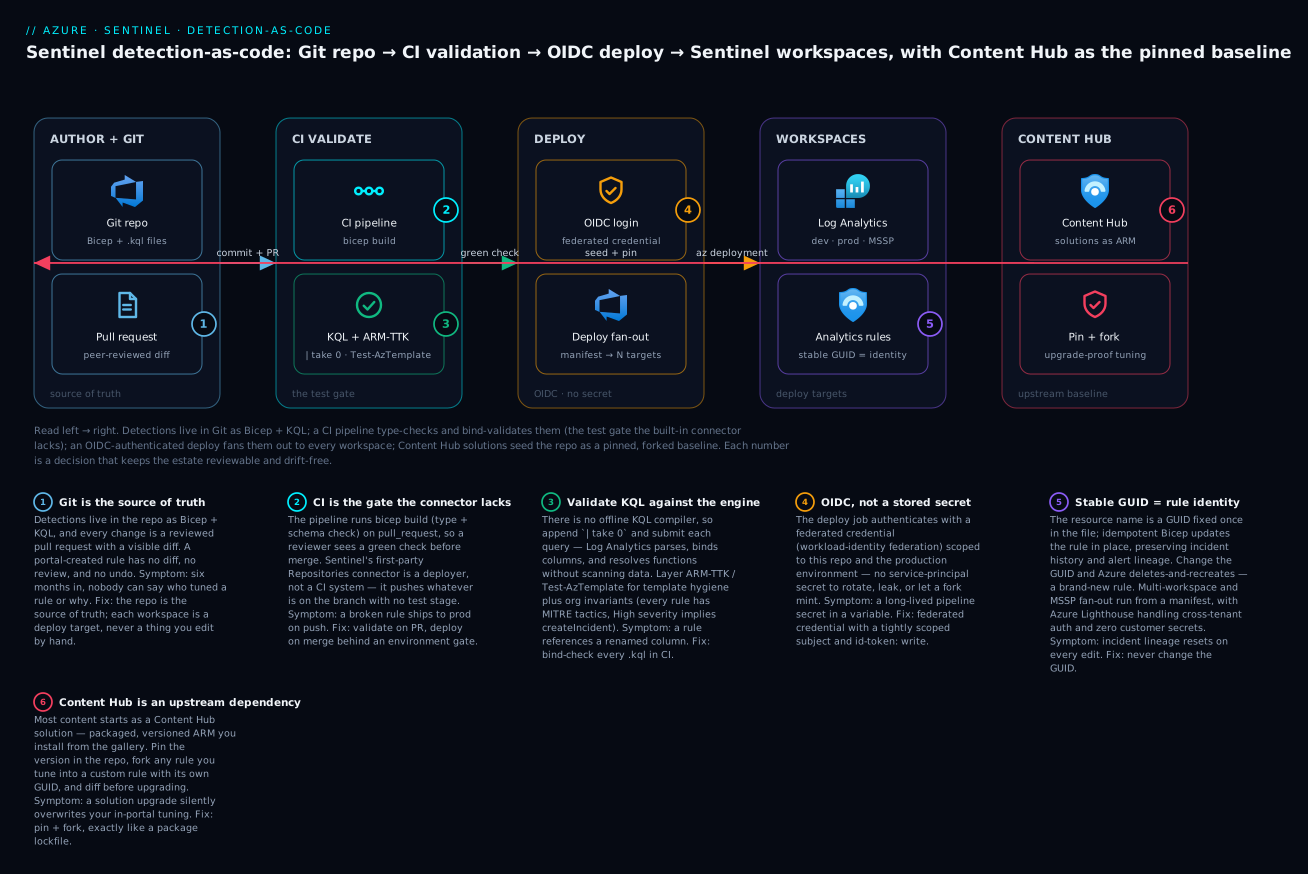
The pipeline reads left to right: detections live in Git as Bicep + KQL, a CI stage type-checks and bind-validates them (the test gate the built-in connector lacks), an OIDC-authenticated deploy fans them out to every workspace, and Content Hub solutions seed the repo as a pinned, forked baseline.
1. Why detection-as-code, concretely
Three failure modes drive the decision, and naming them keeps the design honest:
| Problem | Portal-managed reality | Detection-as-code |
|---|---|---|
| Drift | Dev, staging, prod rules diverge silently | One repo deploys identical content everywhere |
| No peer review | A tuning change ships with zero eyes on it | Every KQL change is a reviewed PR with a diff |
| Not reproducible | Rebuilding a workspace means re-clicking | git clone + pipeline rebuilds the SOC content |
The unit of work shifts from “a rule in a workspace” to “a content file in a branch.” That reframing is the whole point. A detection is now testable, reviewable, and versioned, and the workspace is a deployment target, not a database you edit by hand.
Detection-as-code does not replace the analyst. It replaces the undocumented, unreviewed mutation. The analyst still writes the KQL - they just do it in a branch, with a colleague reviewing the logic before it touches production.
2. Structure the content repository
Lay the repo out so a human and a pipeline can both navigate it. Separate content by type (because deployment tooling and validation differ per type) and keep environment-specific values in parameter files, never in the rule body.
sentinel-content/
  analytics-rules/
    impossible-travel.bicep
    impossible-travel.parameters.json          # default params
    impossible-travel.parameters-<prodWsId>.json
    aadsts-brute-force.bicep
  hunting-queries/
    rare-process-by-host.json
  workbooks/
    identity-overview.json
  parsers/
    asim-auth-custom.kql
  shared/
    rule.bicep                                  # one reusable module
  tests/
    kql-validate.ps1
    schema-validate.ps1
  sentinel-deployment.config                    # repositories-connector config
  .github/workflows/deploy.yml
Author rules as Bicep rather than hand-written ARM JSON. Bicep gives you parameters, type checking, and loadTextContent() so the KQL lives in a separate .kql file that linters and your editor understand - instead of being trapped as an escaped one-line string inside JSON.
A single reusable module keeps every rule consistent. This is the schema Sentinel actually expects for a scheduled rule:
// shared/rule.bicep
@description('Log Analytics / Sentinel workspace name')
param workspaceName string

@description('Stable GUID for this rule - keep it constant across edits')
param ruleId string

param displayName string
param description string = ''
param query string

@allowed(['High', 'Medium', 'Low', 'Informational'])
param severity string

@description('ISO 8601 duration, e.g. PT1H')
param queryFrequency string = 'PT1H'

@description('ISO 8601 duration, e.g. PT1H')
param queryPeriod string = 'PT1H'

@allowed(['GreaterThan', 'LessThan', 'Equal', 'NotEqual'])
param triggerOperator string = 'GreaterThan'

param triggerThreshold int = 0
param enabled bool = true
param tactics array = []
param techniques array = []

resource workspace 'Microsoft.OperationalInsights/workspaces@2023-09-01' existing = {
  name: workspaceName
}

resource rule 'Microsoft.SecurityInsights/alertRules@2025-09-01' = {
  name: ruleId
  scope: workspace
  kind: 'Scheduled'
  properties: {
    displayName: displayName
    description: description
    severity: severity
    enabled: enabled
    query: query
    queryFrequency: queryFrequency
    queryPeriod: queryPeriod
    triggerOperator: triggerOperator
    triggerThreshold: triggerThreshold
    suppressionDuration: 'PT1H'
    suppressionEnabled: false
    tactics: tactics
    techniques: techniques
    incidentConfiguration: {
      createIncident: true
      groupingConfiguration: {
        enabled: true
        reopenClosedIncident: false
        lookbackDuration: 'PT5H'
        matchingMethod: 'AllEntities'
      }
    }
  }
}
The ruleId deserves emphasis. The resource name is the rule’s identity in Azure. Generate a GUID once, store it in the file, and never change it - then edits are idempotent updates, not delete-and-recreate (which loses incident history and resets the rule’s alert lineage). A deleted-and-recreated rule is a new rule as far as your incidents are concerned.
The per-rule file just supplies values and imports the module:
// analytics-rules/impossible-travel.bicep
param workspaceName string

module r '../shared/rule.bicep' = {
  name: 'impossible-travel'
  params: {
    workspaceName: workspaceName
    ruleId: 'b2f1c7a4-9d3e-4a8b-bb21-7e5d4c0a1f93'  // stable GUID
    displayName: 'Impossible travel - successful sign-in'
    description: 'Successful sign-ins from geographically distant locations within an implausible window.'
    severity: 'Medium'
    query: loadTextContent('./impossible-travel.kql')
    queryFrequency: 'PT1H'
    queryPeriod: 'PT6H'
    triggerThreshold: 0
    tactics: ['InitialAccess', 'CredentialAccess']
    techniques: ['T1078']
  }
}
3. Author analytics rules with KQL validation
The KQL lives on its own so it is readable, diffable, and lintable:
// analytics-rules/impossible-travel.kql
let lookback = 6h;
let threshold_kmh = 800.0;   // faster than a commercial flight => impossible
SigninLogs
| where TimeGenerated > ago(lookback)
| where ResultType == 0
| extend lat = toreal(LocationDetails.geoCoordinates.latitude),
         lon = toreal(LocationDetails.geoCoordinates.longitude)
| where isnotnull(lat) and isnotnull(lon)
| order by UserPrincipalName asc, TimeGenerated asc
| serialize
| extend prevLat = prev(lat), prevLon = prev(lon),
         prevTime = prev(TimeGenerated), prevUser = prev(UserPrincipalName)
| where UserPrincipalName == prevUser
| extend distKm = geo_distance_2points(lon, lat, prevLon, prevLat) / 1000.0
| extend hours = datetime_diff('second', TimeGenerated, prevTime) / 3600.0
| where hours > 0
| extend speedKmh = distKm / hours
| where speedKmh > threshold_kmh
| project TimeGenerated, UserPrincipalName, distKm, speedKmh, IPAddress
There is no separate “KQL compiler” you can shell out to, so validation is layered. The cheapest, most reliable gate is to submit the query to the workspace as a query job and fail on a parse or semantic error - the Log Analytics query engine is the authoritative validator:
# tests/kql-validate.ps1 - fail the build if any KQL is syntactically invalid
param([string]$WorkspaceId, [string]$RulesPath = './analytics-rules')

Connect-AzAccount -Identity | Out-Null
$failed = @()

Get-ChildItem -Path $RulesPath -Filter '*.kql' -Recurse | ForEach-Object {
    $kql = Get-Content $_.FullName -Raw
    # Wrap so we validate syntax cheaply without scanning real data
    $probe = "$kql`n| take 0"
    try {
        Invoke-AzOperationalInsightsQuery -WorkspaceId $WorkspaceId -Query $probe -ErrorAction Stop | Out-Null
        Write-Host "PASS  $($_.Name)"
    } catch {
        Write-Host "FAIL  $($_.Name) :: $($_.Exception.Message)"
        $failed += $_.Name
    }
}

if ($failed.Count -gt 0) { throw "KQL validation failed: $($failed -join ', ')" }
Appending | take 0 means the engine parses, binds column references, and resolves functions - catching the real bugs (a renamed column, a typo’d operator, a function that does not exist) - without scanning data or costing query volume. That is the unit test for a detection: does this query bind against the schema it claims to read?
Add a second, schema-level gate that lints the rule structure itself. bicep build already type-checks the Bicep, so wire policy assertions on top - reject any rule missing MITRE tactics, any severity of High without createIncident: true, any queryPeriod shorter than queryFrequency. These are organizational invariants, not Azure’s, so they live in your test script.
4. Repositories connector versus a custom pipeline
Sentinel ships a first-party repositories feature (Content management -> Repositories) that connects a GitHub or Azure DevOps repo and auto-generates a workflow. Know exactly what it does before you decide.
When you create a connection, Sentinel registers an Entra app called Azure Sentinel Content Deployment App (suffixed with the repository ID), grants it access to the workspace’s resource group, and drops a workflow into your repo. On every push it deploys changed content. Its smart deployments feature tracks a CSV in the .sentinel folder to avoid redeploying files that did not change since the last commit.
| Dimension | Repositories connector | Custom pipeline |
|---|---|---|
| Setup | Minutes, portal-driven | You build it |
| Auth | Auto-created service principal | Your federated credential / OIDC |
| Testing gates | None - it deploys on push | Whatever you wire in |
| Multi-workspace | One connection per workspace | One pipeline, fan-out loop |
| Promotion (dev -> prod) | Not built in | Branch/environment gates |
| Approvals | None | Native (environments / approvals) |
The honest read: the connector is a deployer, not a CI system. It has no test stage and no promotion gates - it pushes whatever is on the branch. Use it for a single workspace where “merge to main = live in prod” is acceptable. For anything with environments, approvals, or pre-deployment validation, build your own pipeline. You can also do both: let the connector own the final deploy step while your pipeline owns testing and promotion, configured through sentinel-deployment.config.
That config file (root of the repo, lowercase keys) controls prioritization, exclusion, and parameter-file mapping for the connector:
{
  "prioritizedcontentfiles": [
    "analytics-rules/impossible-travel.bicep"
  ],
  "excludecontentfiles": [
    "analytics-rules/experimental-draft.bicep",
    "tests"
  ],
  "parameterfilemappings": {
    "11111111-1111-1111-1111-111111111111": {
      "analytics-rules/impossible-travel.bicep": "analytics-rules/impossible-travel.parameters-prod.json"
    }
  }
}
The GUID key is the workspace ID, which is how one repo maps different parameter files to different target workspaces. Note the casing - prioritizedcontentfiles, not camelCase - and forward slashes only; backslashes break the deployment script.
5. Build the CI/CD pipeline
Here is a GitHub Actions pipeline that does what the connector will not: lint, validate KQL, then deploy with OIDC (no stored secret). It authenticates via a federated credential, so there is no service-principal secret to rotate or leak.
# .github/workflows/deploy.yml
name: Sentinel Detection-as-Code

on:
  pull_request:
    branches: [ main ]
  push:
    branches: [ main ]

permissions:
  id-token: write      # required for OIDC federated login
  contents: read

jobs:
  validate:
    runs-on: ubuntu-latest
    steps:
      - uses: actions/checkout@v4

      - name: Azure login (OIDC)
        uses: azure/login@v2
        with:
          client-id: ${{ secrets.AZURE_CLIENT_ID }}
          tenant-id: ${{ secrets.AZURE_TENANT_ID }}
          subscription-id: ${{ secrets.AZURE_SUBSCRIPTION_ID }}

      - name: Bicep build (type + schema check)
        run: |
          for f in analytics-rules/*.bicep; do
            echo "Building $f"
            az bicep build --file "$f"
          done

      - name: KQL syntax validation
        uses: azure/powershell@v2
        with:
          inlineScript: ./tests/kql-validate.ps1 -WorkspaceId '${{ vars.DEV_WORKSPACE_ID }}'
          azPSVersion: latest

  deploy:
    needs: validate
    if: github.ref == 'refs/heads/main' && github.event_name == 'push'
    runs-on: ubuntu-latest
    environment: production        # gate with required reviewers
    steps:
      - uses: actions/checkout@v4

      - name: Azure login (OIDC)
        uses: azure/login@v2
        with:
          client-id: ${{ secrets.AZURE_CLIENT_ID }}
          tenant-id: ${{ secrets.AZURE_TENANT_ID }}
          subscription-id: ${{ secrets.AZURE_SUBSCRIPTION_ID }}

      - name: Deploy analytics rules
        run: |
          for f in analytics-rules/*.bicep; do
            az deployment group create \
              --resource-group rg-sec-sentinel-prod \
              --template-file "$f" \
              --parameters workspaceName='law-sentinel-prod' \
              --name "sentinel-$(basename "$f" .bicep)-${{ github.run_id }}"
          done
Two design choices matter. First, validation runs on pull_request so a reviewer sees a green check (or a real failure) before merge - the test gate the connector lacks. Second, environment: production ties the deploy job to GitHub’s environment protection, so a human approves before anything reaches prod, and the approval is logged.
The federated credential is configured once on the app registration, scoped to this repo and (critically) to the production environment so a fork or an arbitrary branch cannot mint a token:
az ad app federated-credential create \
  --id "$APP_OBJECT_ID" \
  --parameters '{
    "name": "github-sentinel-prod",
    "issuer": "https://token.actions.githubusercontent.com",
    "subject": "repo:contoso/sentinel-content:environment:production",
    "audiences": ["api://AzureADTokenExchange"]
  }'
6. Multi-workspace and Lighthouse MSSP fan-out
One repo, many workspaces. Drive the fan-out from a manifest rather than hard-coding targets, so onboarding a workspace is a one-line edit:
// workspaces.json
[
  { "rg": "rg-sec-sentinel-prod", "ws": "law-sentinel-prod", "subId": "1111-...-1111" },
  { "rg": "rg-sec-sentinel-eu",   "ws": "law-sentinel-eu",   "subId": "2222-...-2222" }
]
# deploy every rule to every workspace in the manifest
jq -c '.[]' workspaces.json | while read -r ws; do
  rg=$(echo "$ws" | jq -r '.rg')
  name=$(echo "$ws" | jq -r '.ws')
  subId=$(echo "$ws" | jq -r '.subId')
  az account set --subscription "$subId"
  for f in analytics-rules/*.bicep; do
    az deployment group create \
      --resource-group "$rg" --template-file "$f" \
      --parameters workspaceName="$name" \
      --name "sentinel-$(basename "$f" .bicep)-$(date +%s)"
  done
done
For an MSSP, customer workspaces live in customer tenants. Do not store customer logs in your tenant - use Azure Lighthouse delegated access. Once each customer delegates the right scope to your SOC’s Entra group, your deployment principal can target their workspace cross-tenant with no per-tenant credential. The delegation is granted via an ARM offer deployed in the customer subscription:
// lighthouse-offer.bicep - deployed in the CUSTOMER subscription (subscription scope)
targetScope = 'subscription'

param mspTenantId string
param sentinelDeployGroupId string   // your SOC's Entra group object ID

resource assignment 'Microsoft.ManagedServices/registrationAssignments@2022-10-01' = {
  name: guid(subscription().id, sentinelDeployGroupId)
  properties: {
    registrationDefinitionId: definition.id
  }
}

resource definition 'Microsoft.ManagedServices/registrationDefinitions@2022-10-01' = {
  name: guid(subscription().id, 'sentinel-mssp')
  properties: {
    registrationDefinitionName: 'Sentinel content deployment'
    managedByTenantId: mspTenantId
    authorizations: [
      {
        principalId: sentinelDeployGroupId
        // Microsoft Sentinel Contributor
        roleDefinitionId: 'ab8e14d6-4a74-4a29-9ba8-549422addade'
      }
    ]
  }
}
Grant the least privilege that still works: Microsoft Sentinel Contributor lets the principal manage analytics rules without broad subscription rights. After delegation, the same fan-out loop deploys to delegated workspaces - the customer’s subscription ID goes in the manifest and Lighthouse handles the cross-tenant authorization transparently. No customer secret ever lands in your pipeline.
7. Content Hub solutions and safe upgrades
Most production Sentinel content does not start as your custom code - it starts as a Content Hub solution (Microsoft 365 Defender, Threat Intelligence, a vendor connector). These are packaged, versioned ARM templates installed from the gallery, and they cut across detection-as-code in a way that bites teams who ignore it.
The trap: you install a solution, then tune one of its rules in the portal. Later the solution ships v2.1, you upgrade, and your tuning is silently overwritten - the upgrade reapplies the template’s version of that rule. Treat Content Hub solutions as an upstream dependency, exactly like a third-party library:
- Pin the version. Record the installed solution version in your repo (a simple
solutions.json) so upgrades are deliberate, reviewed commits - not surprise drift. - Fork, do not mutate. Never tune a solution-managed rule in place. Instead disable it and create your tuned copy as a custom rule with its own stable GUID in your repo. Your version is now upgrade-proof.
- Diff before upgrading. Pull the new solution template, diff it against the pinned one, and review what changed before merging the version bump.
// solutions.json - pin your upstream content versions
{
  "Microsoft Entra ID": "3.0.7",
  "Threat Intelligence": "3.0.3",
  "Microsoft Defender XDR": "3.1.2"
}
This is the same discipline as pinning a package lockfile. The Content Hub gives you breadth fast; the repo gives you control. Forking the rules you tune is what reconciles the two - your customizations survive every upstream upgrade because they are yours, with identities the solution does not own.
8. Promotion, rollback, and change auditing
Wire a real promotion path. Map environments to branches and let merges be the promotion event:
feature/*  --PR-->  develop  --(auto-deploy)-->  DEV workspace
develop    --PR-->  main     --(approval)----->  PROD workspace(s)
A merge to develop deploys to the dev workspace automatically; a tuner sees the rule fire on real-but-non-prod telemetry. A reviewed PR into main, gated by the production environment’s required reviewers, promotes it. Tag every production release so each deploy maps to an immutable commit:
git tag -a "release-2026.06.08" -m "Add impossible-travel rule; tune brute-force threshold"
git push origin "release-2026.06.08"
Rollback is git revert plus a re-run of the pipeline. Because rules carry stable GUIDs and Bicep deployment is idempotent, reverting the commit and redeploying restores the previous rule definition exactly - same identity, same incident lineage. There is no “undo” button in the portal that does this; the repo is the undo.
Auditing comes from three layers that together answer “who changed this detection, when, and why”:
| Question | Source of truth |
|---|---|
| Who changed the KQL and why? | Git history + PR review thread |
| When did it deploy to prod? | Pipeline run + git tag |
| What did Azure actually apply? | AzureActivity deployment events / resource deployment history |
Enterprise scenario
A global financial-services platform team ran Sentinel for the group SOC plus a managed offering for fourteen subsidiary banks, each in its own tenant for regulatory isolation. They had ~180 analytics rules and were managing them by hand. The breaking point came during an audit: a regulator asked them to prove that a specific anti-fraud detection had been running, unmodified, in a particular subsidiary’s workspace for the prior quarter. They could not. There was no diff, no deploy record, no way to show the rule in tenant 9 matched the approved baseline. Worse, a spot check found three subsidiaries running subtly different versions of that rule because someone had “quickly tuned” each one in the portal months earlier.
The constraint was hard: they could not centralize logs (data-residency law per subsidiary), and they could not put a credential for each customer tenant in a pipeline (the security team vetoed standing cross-tenant secrets outright).
They solved it with detection-as-code over Lighthouse. All 180 rules moved into one repo as Bicep modules with stable GUIDs. Each subsidiary delegated Microsoft Sentinel Contributor on its workspace resource group to a single SOC Entra group via a Lighthouse offer - so zero customer secrets entered the pipeline. The pipeline authenticated to the MSP tenant with OIDC, then fanned out across all fifteen workspaces (group + fourteen subsidiaries) from a manifest, Lighthouse handling each cross-tenant hop. The audit answer became trivial: git log for the rule, the tagged release, and the AzureActivity deployment event in that tenant’s workspace, all reconciling to one approved commit.
The detail that made the regulator happy was a drift-detection job. A scheduled run redeployed the repo in --what-if mode against every workspace and alerted on any difference - catching the moment any rule diverged from the baseline:
# nightly drift check - flags any rule that no longer matches the repo
az deployment group what-if \
  --resource-group "$rg" \
  --template-file analytics-rules/anti-fraud-velocity.bicep \
  --parameters workspaceName="$ws" \
  --no-pretty-print | tee whatif.json

# any change type other than NoChange/Ignore means the live rule drifted
if jq -e '.changes[] | select(.changeType != "NoChange" and .changeType != "Ignore")' whatif.json >/dev/null; then
  echo "DRIFT DETECTED in $ws" && exit 1
fi
Within a quarter, “prove this detection ran unmodified” went from a multi-day forensic exercise to a one-line query, and portal-side tuning effectively stopped because the pipeline made it pointless - any manual change was reverted by the next deploy and flagged by drift detection.
Verify
Confirm the system end to end, not just that the pipeline went green:
-
Rule exists and matches the repo. In the target workspace, open the analytics rule and confirm its query matches the committed
.kqlbyte for byte.az sentinel alert-rule show \ --resource-group rg-sec-sentinel-prod \ --workspace-name law-sentinel-prod \ --rule-id b2f1c7a4-9d3e-4a8b-bb21-7e5d4c0a1f93 \ --query "{name:displayName, enabled:enabled, freq:queryFrequency}" -
Identity is stable. Edit the rule’s description, push, redeploy, and confirm the rule’s resource ID is unchanged - proving it was updated, not recreated.
-
KQL gate actually fails. Introduce a deliberate typo (
SiginLogs) in a branch and confirm the PR check goes red before merge. -
Promotion gate holds. Confirm a merge to
mainpauses for approval rather than deploying immediately. -
Rollback restores exactly.
git revertthe last change, redeploy, and confirm the rule returns to its prior definition with the same GUID. -
Drift is detected. Hand-edit the rule in the portal, run the
what-ifdrift job, and confirm it flags the divergence.
Checklist
Going deeper
The Repositories feature, end to end
Sentinel’s first-party path to Git is Content management → Repositories. Connect a GitHub or Azure DevOps repo and Sentinel does three things at once: it registers an Entra app named Azure Sentinel Content Deployment App (suffixed with the repository ID), grants it access to the workspace’s resource group, and commits a deployment workflow (or pipeline) into your repo. From then on, every push deploys the changed content.
- On GitHub it drops a workflow at
.github/workflows/sentinel-deploy-<connection-id>.ymlthat calls Microsoft’s deployment logic. - On Azure DevOps it creates a pipeline that runs the same deployment PowerShell.
- Smart deployments (on by default) tracks a CSV under the
.sentinelfolder recording the last-deployed commit per file, so unchanged files are skipped on the next run — faster, and it avoids needless redeploys.
What the connector does not give you: a test stage, environment promotion, or approvals. It is a deployer, and that single fact is why the rest of this lesson builds a pipeline around it (or instead of it). A custom Azure DevOps pipeline that adds the missing gates mirrors the GitHub Actions one from section 5:
# azure-pipelines.yml - custom Azure DevOps pipeline (validate, then deploy)
trigger:
  branches:
    include:
      - main

pool:
  vmImage: ubuntu-latest

stages:
  - stage: validate
    jobs:
      - job: lint_and_test
        steps:
          - task: AzureCLI@2
            inputs:
              azureSubscription: sc-sentinel-oidc   # workload-identity federation service connection
              scriptType: bash
              scriptLocation: inlineScript
              inlineScript: |
                for f in analytics-rules/*.bicep; do az bicep build --file "$f"; done
          - task: AzurePowerShell@5
            inputs:
              azureSubscription: sc-sentinel-oidc
              azurePowerShellVersion: latestVersion
              ScriptPath: tests/kql-validate.ps1
              ScriptArguments: -WorkspaceId $(DEV_WORKSPACE_ID)
  - stage: deploy
    dependsOn: validate
    condition: and(succeeded(), eq(variables['Build.SourceBranch'], 'refs/heads/main'))
    jobs:
      - deployment: deploy_prod
        environment: sentinel-production   # ADO environment with required approvals
        strategy:
          runOnce:
            deploy:
              steps:
                - task: AzureCLI@2
                  inputs:
                    azureSubscription: sc-sentinel-oidc
                    scriptType: bash
                    scriptLocation: inlineScript
                    inlineScript: |
                      for f in analytics-rules/*.bicep; do
                        az deployment group create \
                          --resource-group rg-sec-sentinel-prod \
                          --template-file "$f" \
                          --parameters workspaceName=law-sentinel-prod \
                          --name "sentinel-deploy-$(Build.BuildId)"
                      done
The Azure DevOps environment: sentinel-production plays the same role GitHub’s environment: production does — it is where you attach required approvers so a human gates the prod deploy.
Every content type is a template
Detection-as-code is not limited to analytics rules. Nearly everything in Sentinel is an ARM resource under the Microsoft.SecurityInsights (or a neighbouring) provider, which is exactly why it is all deployable as Bicep/ARM:
| Content type | Resource type | Notes |
|---|---|---|
| Scheduled / NRT analytics rule | Microsoft.SecurityInsights/alertRules |
kind: Scheduled or NRT; the rule’s name is its stable GUID |
| Hunting query / saved search | Microsoft.OperationalInsights/workspaces/savedSearches |
category Hunting Queries |
| Automation rule | Microsoft.SecurityInsights/automationRules |
ordered, no-code triage |
| Playbook | Microsoft.Logic/workflows |
a Logic App; deploy the workflow plus its API connections |
| Workbook | Microsoft.Insights/workbooks |
serializedData holds the gallery template JSON |
| Watchlist | Microsoft.SecurityInsights/watchlists (+ watchlistItems) |
reference data joined via _GetWatchlist() |
| Data connector | Microsoft.SecurityInsights/dataConnectors |
some are ARM-deployable, some remain portal-only |
Author them all the same way: Bicep with loadTextContent() for the KQL/JSON body, a stable name, and a parameter file per environment. Hunting queries and workbooks are the easy wins to bring under version control first — they carry no incident lineage, so there is no GUID-stability risk if you get a name wrong early.
Content Hub solutions as your baseline
Most production content does not begin as your code — it begins as a Content Hub solution: a packaged, versioned ARM template bundling a connector, analytics-rule templates, hunting queries, workbooks, and playbooks for a product (Microsoft Entra ID, Threat Intelligence, a vendor firewall). Installing a solution creates rule templates; you then instantiate a template into a live rule. Treat solutions as the baseline you build on, not content you edit in place:
- Install breadth from the Hub quickly, then pin each solution’s version in a
solutions.json(section 7) so upgrades are deliberate, reviewed commits. - Instantiate the templates you want as your own rules with your own GUID, so your tuning is upgrade-proof.
- Microsoft ships new detections continuously; a scheduled review of new templates keeps coverage current without surrendering control of the rules you run.
The out-of-the-box content is a head start, not a strategy. The repo is where breadth becomes a maintained, reviewable estate.
CI validation beyond | take 0
The | take 0 engine probe from section 3 is the KQL unit test — it proves a query binds to the schema. Layer template-level validation on top:
- Bicep build —
az bicep buildtype-checks and compiles to ARM; a failed build fails the PR. Free, fast, catches schema and reference errors before anything deploys. - ARM-TTK /
Test-AzTemplate— the Azure Resource Manager Template Toolkit runs best-practice assertions over the compiled ARM (hard-coded locations, missingapiVersion, insecure defaults, unused parameters). Run it against thebicep buildoutput:
# tests/arm-ttk.ps1 - lint the compiled ARM with the ARM Template Toolkit (arm-ttk)
Import-Module ./arm-ttk/arm-ttk.psd1
$failed = @()
Get-ChildItem ./analytics-rules -Filter '*.bicep' | ForEach-Object {
    $json = "$($_.BaseName).json"
    az bicep build --file $_.FullName --outfile $json
    $results = Test-AzTemplate -TemplatePath $json
    if ($results | Where-Object { -not $_.Passed }) {
        Write-Host "FAIL  $($_.Name)"
        $failed += $_.Name
    }
}
if ($failed.Count -gt 0) { throw "ARM-TTK failed: $($failed -join ', ')" }
- Org invariants — the assertions Azure does not enforce but your SOC requires: every rule carries MITRE
tactics; noHighseverity withoutcreateIncident: true;queryPeriod >= queryFrequency; a stable GUID present and unique across the repo. These live in your own test script (PowerShell, or a few lines ofjqover the compiled ARM). Together —bicep build, ARM-TTK,| take 0, and org invariants — that is the four-layer gate the Repositories connector simply does not have.
Parameterizing per environment
Never bake an environment value into a rule body. The rule module takes workspaceName (and thresholds, lookbacks) as parameters; each environment supplies its own parameter file:
impossible-travel.parameters-dev.json    -> law-sentinel-dev,  threshold 0
impossible-travel.parameters-prod.json   -> law-sentinel-prod, threshold 0
For the Repositories connector, parameterfilemappings (keyed by workspace ID, section 4) picks the right file per workspace. For your own pipeline, pass --parameters @<file> in the deploy step, or drive it from the workspaces.json manifest (section 6). The rule logic is identical in every workspace; only the parameters differ — and that is precisely what makes “identical content everywhere” both true and auditable. If you find yourself editing the rule body per environment, you have reintroduced the drift you were trying to kill.
The SecDevOps loop and peer review
Detection-as-code is SecDevOps: the same author → review → test → deploy → monitor loop developers use, applied to detections. The peer review is the heart of it — a second analyst reads the KQL diff and asks the questions the portal never forces:
- Does the logic match the stated threat, or will an obvious variant slip past it?
- Is it entity-mapped and MITRE-tagged so incidents correlate?
- What is the expected false-positive rate, and is there a suppression or exception path?
- Is
queryPeriodlong enough to catch the pattern but not so long it double-counts? - Does it read a table that actually exists in the target workspace’s connectors?
Push as much as possible down into CI checks (so review focuses on logic, not hygiene), and keep a short detection review checklist in the PR template. Monitoring closes the loop: track each rule’s alert volume and true-positive rate after deploy, and feed the tuning back as the next pull request. The rule you shipped is a hypothesis; the next PR is the correction.
MITRE ATT&CK mapping and coverage
Every rule should carry tactics and techniques. Beyond tagging individual rules, aggregate them into a coverage map so the gaps become visible. Export your rule set and summarise by technique:
# count how many rules cover each technique, from the compiled ARM
jq -r '.resources[].properties.techniques[]?' analytics-rules/*.json \
  | sort | uniq -c | sort -rn
Feed that into a MITRE ATT&CK Navigator layer JSON to visualise coverage (dark = well covered, blank = a gap). Sentinel’s own MITRE ATT&CK blade shows coverage from active rules and templates; detection-as-code lets you compute the same thing in CI and fail a release if coverage for a priority technique regresses. Coverage is a portfolio metric, not a per-rule one — the map is what tells you where to write the next detection, rather than adding a fifth rule for a technique you already cover six ways.
Drift: portal edits versus Git
The exact failure mode detection-as-code exists to kill: someone tunes a rule in the portal, and now the live rule no longer matches the repo. Two defences, used together:
- Detect it. A scheduled
az deployment group what-if(section 8 and the enterprise scenario) redeploys the repo in preview mode and flags any rule whose live state differs from the template. Run it nightly per workspace and alert on any change type other thanNoChange/Ignore. - Prevent it. Make production drift hard: grant analysts Microsoft Sentinel Responder (triage incidents) rather than Contributor in prod, so they cannot edit rule definitions in the portal at all. Rule changes then have exactly one path — a pull request. The connector’s smart deployments helps too: because it redeploys from the branch, a manual edit is overwritten on the next push (and flagged by drift detection in the window between).
Drift detection plus least-privilege RBAC is what lets you tell an auditor a detection ran unmodified: you hold both the negative proof (no drift alert fired) and the positive proof (the git-tagged deploy reconciles to one approved commit).
Sigma to KQL conversion
You do not have to write every detection from scratch. Sigma is a vendor-neutral, YAML-based detection format with a large public rule library. Convert Sigma rules to KQL with pySigma (the sigma-cli tool) and the Kusto/Sentinel backend, then wrap the output as a Bicep rule in your repo. A Sigma rule is just structured YAML:
# sigma/whoami-recon.yml
title: Whoami Execution for Reconnaissance
id: 8de89f4b-e4e5-4e3a-9d8b-1f7c2a0b9e11
status: experimental
description: Detects execution of whoami.exe, a common post-exploitation discovery command.
references:
  - https://attack.mitre.org/techniques/T1033/
author: SOC Team
date: 2026/01/10
logsource:
  category: process_creation
  product: windows
detection:
  selection:
    Image|endswith: '\whoami.exe'
  condition: selection
falsepositives:
  - Legitimate administrative activity
level: low
tags:
  - attack.discovery
  - attack.t1033
Convert it with the Kusto backend, which targets Sentinel/Defender tables via a pipeline that maps Sigma fields to the right schema:
pip install sigma-cli pysigma-backend-kusto
# emit KQL for Sentinel (ASIM) or Defender XDR tables
sigma convert --target kusto --pipeline sentinel_asim sigma/whoami-recon.yml
Treat the generated KQL as a starting point: review it, entity-map it, tune the false positives, then commit it as a rule with its own stable GUID. Sigma gives you breadth and a shared community language; your repo gives the result an identity, tests, and a deployment path. Field mappings are backend-specific and evolve, so always validate the emitted KQL with the | take 0 probe before you trust it — a converted rule that binds is the floor, not the finish line.
Practice challenges
Work these in a lab subscription and a scratch repo. No live runs are shown — every command and template is schema-correct and current; replace each <placeholder> with your own value. Try each one first, then expand the solution.
1. Give a rule a stable identity (beginner). Generate a GUID and set it as a rule’s resource name, and explain in one sentence why it must never change afterwards.
<details> <summary>Show solution</summary>
# any of these generates a v4 GUID
uuidgen                         # macOS / Linux
pwsh -c "[guid]::NewGuid()"     # PowerShell
Put it in the file and keep it forever:
ruleId: 'b2f1c7a4-9d3e-4a8b-bb21-7e5d4c0a1f93' // stable GUID = the rule's identity in Azure
Why: the resource name is the rule’s identity — an idempotent deploy updates it in place and keeps incident history; change the GUID and Azure deletes the old rule and creates a new one, resetting alert lineage.
</details>
2. Get KQL out of the JSON prison (beginner). Move an inline KQL string out of a rule template and into its own .kql file, then load it in Bicep.
<details> <summary>Show solution</summary>
// in the rule module
param query string

// in the per-rule file
query: loadTextContent('./impossible-travel.kql')
Why: KQL in its own file is diffable, lintable, and syntax-highlighted by your editor; trapped as an escaped one-line JSON string it is unreviewable and error-prone. </details>
3. Wire the engine as your KQL unit test (intermediate). Add a validation step that fails the build on a KQL parse error, without scanning any data.
<details> <summary>Show solution</summary>
# cheapest authoritative gate: submit each query with | take 0
$probe = "$(Get-Content ./analytics-rules/impossible-travel.kql -Raw)`n| take 0"
Invoke-AzOperationalInsightsQuery -WorkspaceId $WorkspaceId -Query $probe -ErrorAction Stop
Run it over every *.kql in CI and throw if any query fails (the full loop is tests/kql-validate.ps1 in section 3).
Why: there is no offline KQL compiler — the Log Analytics engine is the only authoritative validator. | take 0 makes it parse, bind columns, and resolve functions without scanning data or costing query volume.
</details>
4. Constrain the connector (intermediate → advanced). You are using the Repositories connector but must keep drafts and tests out of prod and target a prod parameter file to one workspace. Write the sentinel-deployment.config.
<details> <summary>Show solution</summary>
{
  "excludecontentfiles": [
    "analytics-rules/experimental-draft.bicep",
    "tests"
  ],
  "parameterfilemappings": {
    "11111111-1111-1111-1111-111111111111": {
      "analytics-rules/impossible-travel.bicep": "analytics-rules/impossible-travel.parameters-prod.json"
    }
  }
}
Why: the connector deploys whatever is on the branch with no test stage, so excludecontentfiles is your only guard against shipping drafts, and the workspace-ID-keyed parameterfilemappings is how one repo sends the right per-environment values to each workspace. Keys are lowercase and paths use forward slashes only.
</details>
5. Adopt a community detection via Sigma (advanced). Convert the whoami Sigma rule to KQL and wrap it as a repo rule with its own GUID and MITRE tags.
<details> <summary>Show solution</summary>
sigma convert --target kusto --pipeline microsoft_xdr sigma/whoami-recon.yml > whoami-recon.kql
// analytics-rules/whoami-recon.bicep
param workspaceName string
module r '../shared/rule.bicep' = {
  name: 'whoami-recon'
  params: {
    workspaceName: workspaceName
    ruleId: '7c19a0e2-4b6d-4f1a-9c33-2d8e5f0b7a44'   // new stable GUID - yours, not the solution's
    displayName: 'Whoami execution - reconnaissance'
    severity: 'Low'
    query: loadTextContent('./whoami-recon.kql')
    tactics: ['Discovery']
    techniques: ['T1033']
  }
}
Why: Sigma gives you a vetted, vendor-neutral detection for free; wrapping it with your own GUID, entity mapping, and MITRE tags turns borrowed logic into a rule your pipeline owns, tests, and can roll back. </details>
6. Prove no drift, org-wide (advanced). Write a nightly check that runs what-if for every workspace in workspaces.json and exits non-zero on any drift.
<details> <summary>Show solution</summary>
#!/usr/bin/env bash
set -euo pipefail
drift=0
jq -c '.[]' workspaces.json | while read -r ws; do
  rg=$(echo "$ws" | jq -r '.rg'); name=$(echo "$ws" | jq -r '.ws')
  az account set --subscription "$(echo "$ws" | jq -r '.subId')"
  for f in analytics-rules/*.bicep; do
    az deployment group what-if \
      --resource-group "$rg" --template-file "$f" \
      --parameters workspaceName="$name" --no-pretty-print | tee whatif.json >/dev/null
    if jq -e '.changes[] | select(.changeType != "NoChange" and .changeType != "Ignore")' whatif.json >/dev/null; then
      echo "DRIFT in $name :: $(basename "$f")"; drift=1
    fi
  done
done
exit $drift
Why: what-if is the diff between the repo and the live workspace; failing the job on any change type other than NoChange/Ignore turns “prove this rule was not tampered with” into a one-line, scheduled audit control.
</details>
Common beginner mistakes
- “The Repositories connector is my CI/CD pipeline.” It is a deployer — no test stage, no approvals, no promotion. It pushes whatever is on the branch. Add your own validation and environment gates, or let the connector own only the final deploy while your pipeline owns testing and promotion.
- “I’ll just tune this one rule in the portal.” That is drift. The next deploy overwrites your change (or smart-deploy skips the file and now live ≠ repo), and either way you have lost the audit trail. Tune in a branch, always — the portal is read-only in your mental model of prod.
- “The rule’s GUID is cosmetic; I can regenerate it.” The resource
nameis the rule’s identity. Change it and Azure deletes the old rule and creates a new one — incident history and alert lineage gone. Fix the GUID once, keep it forever. - “Installing a Content Hub solution and forking its rules are the same thing.” Solution-managed rules are overwritten on the next solution upgrade. To keep your tuning, disable the solution rule and create your own custom rule with its own GUID. Fork, do not mutate.
- “If the KQL parses, the detection works.” Parsing (
| take 0) proves the query binds to the schema — not that it catches the threat or that it will not drown you in false positives. Validate the logic against sample data and in peer review, not just the syntax. - “OIDC is just a cleaner place to keep the secret.” There is no secret. A federated credential mints a short-lived token scoped to your repo and environment; a fork or an arbitrary branch cannot obtain one. That scoping is the security win, not the convenience.
- “One
parameters.jsonis enough for everything.” Workspace name/ID and environment-specific thresholds must live in per-environment parameter files, mapped per workspace. A single file for all environments quietly reintroduces the drift detection-as-code exists to remove. - “Detection-as-code replaces the analyst.” It replaces the undocumented, unreviewed mutation. Analysts still write the KQL — in a branch, with a reviewer, behind a test gate. The skill moves up a level; it does not disappear.
Glossary
- Detection-as-code — managing SIEM detections (analytics rules, hunting queries, workbooks) as version-controlled, peer-reviewed, tested code deployed by pipeline rather than clicked in a portal.
- Analytics rule — a saved detection that runs on a schedule (or near-real-time) and raises alerts/incidents; in Sentinel it is a
Microsoft.SecurityInsights/alertRulesresource whosenameis a stable GUID. - Hunting query — an on-demand KQL query for proactively searching logs; stored as a
savedSearchesresource in the workspace. - Playbook — an automated response workflow built on Azure Logic Apps (
Microsoft.Logic/workflows), triggered from an incident. - Workbook — an interactive, KQL-backed dashboard; deployed as a
Microsoft.Insights/workbooksresource. - KQL (Kusto Query Language) — the read-only query language every Sentinel detection and hunt is written in.
| take 0probe — appending| take 0to a query so the Log Analytics engine parses and binds it (columns, functions) without scanning data — the cheapest authoritative KQL syntax check.- Bicep — Azure’s typed, human-readable domain language that compiles to ARM JSON; gives parameters, type checking, and
loadTextContent(). - ARM template — the JSON deployment format for Azure resources; Bicep compiles down to it.
loadTextContent()— a Bicep function that inlines an external file (e.g. a.kqlquery) at build time, keeping KQL in its own lintable file.- Stable GUID (resource name) — the immutable identifier that is a rule’s identity in Azure; kept constant so edits are idempotent updates, not delete-and-recreate.
- Idempotent deployment — re-running the same template produces the same result; reverting a commit and redeploying restores the prior rule exactly, same identity and lineage.
- Content Hub — Sentinel’s in-product gallery of packaged, versioned content solutions.
- Solution — a packaged, versioned ARM bundle (connector + rule templates + workbooks + playbooks) for a product; an upstream dependency to pin and fork, not to edit.
- Rule template — the pattern shipped by a solution; you instantiate it into a live analytics rule.
- Repositories (feature) — Sentinel’s first-party GitHub/Azure DevOps integration that auto-generates a deployment workflow and pushes content on every commit; a deployer, not a CI system.
sentinel-deployment.config— the repo-root file (lowercase keys) that steers the Repositories connector:prioritizedcontentfiles,excludecontentfiles,parameterfilemappings.- Smart deployments — the connector feature that tracks last-deployed commits in a
.sentinelCSV to skip unchanged files. - ARM-TTK /
Test-AzTemplate— the Azure Resource Manager Template Toolkit and its cmdlet, which lint compiled ARM for best-practice violations. - Parameter file — a per-environment JSON file of values (workspace name/ID, thresholds) mapped to a template so one rule deploys identically everywhere with different inputs.
- OIDC / federated credential — workload-identity federation: the pipeline mints a short-lived token scoped to a repo and environment instead of storing a service-principal secret.
- Environment / approval gate — a GitHub or Azure DevOps environment with required reviewers, tying a deploy job to a logged human approval.
- Promotion — moving a change from dev to prod via branches/environments (feature → develop → main), so a merge is the promotion event.
- Drift — divergence between the live workspace and the repo, typically from a portal edit; detected with
what-if, prevented with least-privilege RBAC. what-if—az deployment group what-if: a preview that reports what a deployment would change, used here as a drift diff against live rules.- Azure Lighthouse — delegated cross-tenant management that lets an MSSP deploy into a customer’s workspace with no customer secret in the pipeline.
- MSSP — Managed Security Service Provider: a firm running SOC operations across multiple customer tenants.
- Microsoft Sentinel Contributor / Responder — the deployment role (manage rules) versus the analyst role (triage incidents, no rule edits) — using Responder in prod is how you stop portal drift.
- MITRE ATT&CK — the industry taxonomy of adversary tactics (the why) and techniques (the how, e.g. T1033) used to tag detections and measure coverage.
- Sigma — a vendor-neutral YAML detection format with a large public rule library, convertible to KQL.
- pySigma /
sigma-cli— the toolchain (sigma convert) that turns Sigma YAML into KQL for a target backend (Kusto/Sentinel/Defender). - SecDevOps — applying the DevOps author → review → test → deploy → monitor loop to security detections.