Classic UI-based release pipelines were easy to click together and impossible to review. Multi-stage YAML pipelines put the entire promotion path — build, dev, test, prod, approvals, and gates — under version control next to the code it ships. This guide builds a defensible, production-grade pipeline that takes a single commit from dev to prod with real guardrails.
In a nutshell
Think of a multi-stage pipeline as a relay race. One runner — the Build stage — does the hard work once: it compiles, tests, and hands a single baton (the build artifact) to the next runner. Every following runner — dev, then test, then prod — carries that same baton forward; nobody re-runs the first leg. And between every hand-off there is a checkpoint: the next runner cannot start until a judge waves them on. Those judges are approvals and gates, and — this is the twist that trips everyone up — they do not stand on the track (the YAML file). They stand at the Environment, a separate object that a developer editing the pipeline cannot reach.
So the whole lesson is really two ideas. Build once, promote the same artifact dev → test → prod, so what you approve is byte-for-byte what ships. And let the Environment, not the YAML, decide whether a stage may proceed, so your production guardrails cannot be edited away inside a pull request.
That separation is why YAML pipelines beat the old click-together “classic release” UI: the promotion path and the code live together in Git and get reviewed together, while the human and automated guardrails live on protected resources that a different, higher permission controls.
Level: Advanced · Time: ~37 min
Before this lesson, be comfortable with: a single-stage YAML pipeline (trigger, pool, jobs, steps, tasks); what a build artifact is and why you publish one; and Entra ID groups + RBAC basics, since prod approvals bind to a group, not to people. If those are fuzzy, skim Entra ID fundamentals: tenants, users, groups, RBAC and Key Vault with workload identity first.
After this lesson you will be able to:
- Structure a pipeline into stages → jobs → deployment jobs with an explicit
dependsOngraph and branchconditions. - Model dev/test/prod as Environments and attach approvals, business-hours, exclusive-lock, and automated gates (Azure Monitor / Invoke REST / Azure Function) so promotion is gated by policy, not trust.
- Tell apart the three expression tiers —
${{ }}(compile-time),$[ ](runtime), and$( )(macro) — and know which one runs when. - Wire a keyless Azure Resource Manager service connection with workload identity federation (OIDC) so no cloud secret is ever stored.
- Enforce governance with extends templates + a Required-template check, and scope variable groups / Key Vault secrets per stage with correct masking.
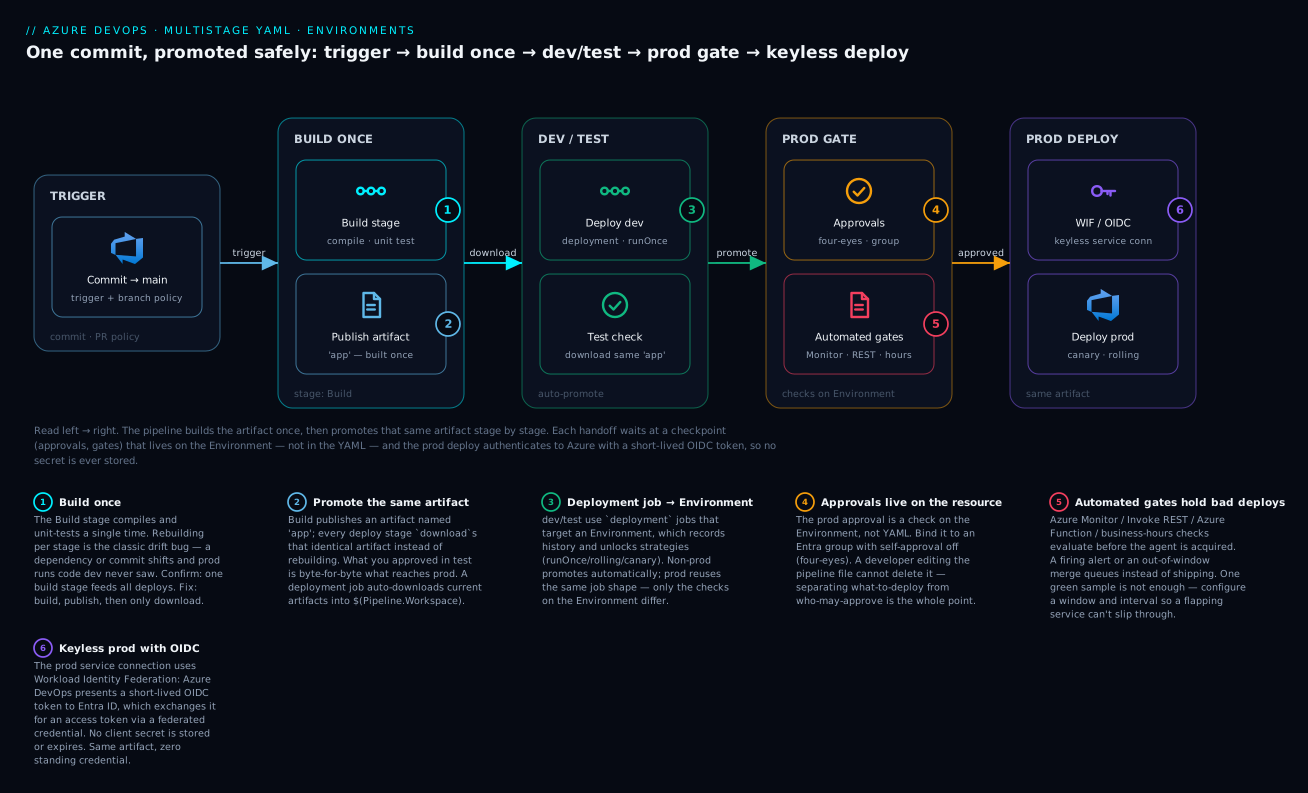
Walkthrough: the same artifact, built once on the left, is promoted rightward through dev/test and into prod, pausing at each Environment’s checkpoint — approvals and automated gates — before a keyless, OIDC-authenticated deploy ever touches production.
The multi-stage mental model
A YAML pipeline is a hierarchy: a pipeline contains stages, a stage contains jobs, and a job contains steps. There are two kinds of jobs:
- A regular
jobruns steps on an agent. - A
deploymentjob targets an Environment, records deployment history against it, and unlocks lifecycle hooks and deployment strategies (runOnce,rolling,canary).
The key mental shift from classic releases: approvals and gates are not pipeline YAML. They are checks attached to a protected resource — almost always an Environment, sometimes a service connection or variable group. The pipeline declares what it wants to deploy and where; the Environment’s checks decide whether it is allowed to proceed. This separation is deliberate: a developer editing the pipeline file cannot remove a production approval, because that approval lives on the Environment, governed by a different permission.
Checks run before the deployment job’s agent is acquired. A blocked approval costs you nothing in agent minutes.
Step 1 — Structure stages and the dependsOn graph
Stages run sequentially by default, each depending on the previous one. Make dependencies explicit so the graph is obvious and so you can fan out later. A deployment job names its target Environment under environment:.
trigger:
  branches:
    include: [ main ]

pool:
  vmImage: ubuntu-latest

stages:
  - stage: Build
    jobs:
      - job: build
        steps:
          - task: DotNetCoreCLI@2
            inputs:
              command: publish
              publishWebProjects: true
              arguments: '--configuration Release --output $(Build.ArtifactStagingDirectory)'
          - publish: $(Build.ArtifactStagingDirectory)
            artifact: app

  - stage: DeployDev
    dependsOn: Build
    jobs:
      - deployment: deploy
        environment: dev
        strategy:
          runOnce:
            deploy:
              steps:
                - download: current
                  artifact: app
                - script: echo "Deploying to dev"

  - stage: DeployTest
    dependsOn: DeployDev
    jobs:
      - deployment: deploy
        environment: test
        strategy:
          runOnce:
            deploy:
              steps:
                - download: current
                  artifact: app
                - script: echo "Deploying to test"

  - stage: DeployProd
    dependsOn: DeployTest
    jobs:
      - deployment: deploy
        environment: prod
        strategy:
          runOnce:
            deploy:
              steps:
                - download: current
                  artifact: app
                - script: echo "Deploying to prod"
Two details worth internalizing:
- Inside a
deploymentjob you do not add an explicitcheckoutfor the source. TherunOnce.deploylifecycle skips source checkout by default; youdownloadbuild artifacts instead. If you genuinely need the repo in a deployment job, add- checkout: self. dependsOnaccepts a list.dependsOn: [DeployDev, IntegrationTests]lets a stage wait on multiple predecessors, which is how you model parallel test stages converging before prod.
To gate a stage on a non-default branch or a condition, combine dependsOn with condition:
  - stage: DeployProd
    dependsOn: DeployTest
    condition: and(succeeded(), eq(variables['Build.SourceBranch'], 'refs/heads/main'))
Step 2 — Model dev/test/prod as Environments
Create one Environment per deployment target under Pipelines -> Environments. Environments give you three things classic releases bolted on awkwardly: deployment history per target, resource scoping (you can add specific Kubernetes namespaces or VMs as resources), and a place to hang checks.
You can create them in the portal or via the CLI:
az pipelines environment create \
  --name prod \
  --organization https://dev.azure.com/contoso \
  --project Payments
Environment names referenced in YAML are created on first run if they do not exist — but an auto-created Environment has no checks. Always pre-create production Environments and attach checks before the pipeline can target them, or your first prod run sails straight through.
For container or VM workloads, target a resource within the Environment using the environment.resourceName form:
      - deployment: deploy
        environment: prod.payments-ns   # Kubernetes resource "payments-ns" in env "prod"
        strategy:
          runOnce:
            deploy:
              steps:
                - task: KubernetesManifest@1
                  inputs:
                    action: deploy
                    manifests: manifests/deployment.yaml
Step 3 — Manual approvals, business-hours, and exclusive locks
Checks are configured on the Environment (the … menu -> Approvals and checks). The three you will reach for most:
Approvals. Designate approver users or groups. Use a group, not individuals, so on-call rotation does not break promotions. Set a timeout (the run waits, pending, until then) and decide whether the approver who requested the run may also approve it — for prod, turn that off to enforce four-eyes.
Business hours. A check that only passes during a defined window and time zone. Attach it to prod so a Friday-evening merge queues until Monday morning rather than deploying into the weekend.
Exclusive lock. Guarantees only one run at a time can pass through the Environment. Without it, two merges in quick succession can both enter the prod stage and race. With it, runs serialize; the newer run waits for the lock. Pair this with the pipeline-level setting to cancel superseded runs if you only ever care about the latest commit reaching prod.
Checks have a time out and a separate evaluation retry cadence. An approval that no one actions within its timeout fails the stage — it does not silently pass. Set the timeout to match your real escalation SLA.
You cannot define these checks in pipeline YAML; that is the point of putting them on the resource. What you can version-control is the Environment-and-checks configuration itself, by managing Azure DevOps with Terraform (the azuredevops provider exposes azuredevops_environment and check resources), so even your approval policy is reviewable.
Step 4 — Automated deployment gates
A gate is an automated check that polls an external system and only passes when a condition holds. This is how you stop a promotion when production is already unhealthy. Two built-in checks cover most needs:
Query Azure Monitor alerts. Configure the check with a subscription, resource group, and the alert rules to evaluate. The check passes only when no configured alert is firing. Attach it to prod so an active “5xx spike” or “p99 latency” alert blocks the next deployment automatically.
Invoke REST API. Call any HTTPS endpoint and pass/fail based on the response. Use it to query a change-freeze calendar, a feature-flag service, or your own health endpoint. The check succeeds when the response matches your success criteria; configure it to retry on a cadence so a transient failure does not immediately fail the stage.
A robust gate pattern: give the check a window and an interval (for example, evaluate every 5 minutes for up to 30 minutes). The check must report healthy on each sample before the stage proceeds — a single green blip will not let a flapping service through.
You can also write your own gate purely in YAML by making an early job fail fast on a probe, but prefer the resource-level checks: they run before agent acquisition and apply no matter which pipeline targets the Environment.
      - deployment: deploy
        environment: prod
        strategy:
          runOnce:
            preDeploy:
              steps:
                - script: ./scripts/smoke-check.sh   # in-pipeline guard, complements gates
            deploy:
              steps:
                - download: current
                  artifact: app
                - script: ./scripts/deploy.sh
Step 5 — Template libraries and required-template enforcement
Copy-pasting stages across repos is how pipelines rot. Azure DevOps has two template mechanisms:
Includes templates inject reusable YAML (steps, jobs, or stages) into a pipeline the author controls. Good for sharing a build sequence.
Extends templates invert control: the pipeline extends a template that owns the overall shape, and the template decides which parameterized hooks the consumer may fill. This is the security-relevant one. Combined with a required template check on a protected resource, you can mandate that any pipeline touching prod must extend an approved governance template — there is no way to deploy to that Environment otherwise.
A consumer pipeline:
# azure-pipelines.yml in an app repo
resources:
  repositories:
    - repository: templates
      type: git
      name: Platform/pipeline-templates
      ref: refs/tags/v3

extends:
  template: stages/deploy.yml@templates
  parameters:
    serviceName: payments-api
    environments: [ dev, test, prod ]
The governing template:
# stages/deploy.yml in Platform/pipeline-templates
parameters:
  - name: serviceName
    type: string
  - name: environments
    type: object
    default: [ dev ]

stages:
  - ${{ each env in parameters.environments }}:
      - stage: Deploy_${{ env }}
        jobs:
          - deployment: deploy
            environment: ${{ env }}
            strategy:
              runOnce:
                deploy:
                  steps:
                    - download: current
                      artifact: app
                    - script: ./deploy.sh ${{ parameters.serviceName }} ${{ env }}
The ${{ each ... }} is a compile-time expansion. Template expressions resolve when the YAML is parsed, before runtime — so the loop literally generates one stage per environment in the expanded pipeline. Pin the template repository to a tag (ref: refs/tags/v3), not a branch, so a platform change cannot silently alter every consumer’s prod path.
To enforce it: on the prod Environment, add a Required template check pointing at stages/deploy.yml@templates. Pipelines that do not extend it are rejected at queue time.
Step 6 — Variables, parameters, and keyless deploys
Variable groups hold shared, often-secret values (linked to Key Vault for secrets). Reference them at the stage or job scope so dev values never leak into prod:
  - stage: DeployProd
    variables:
      - group: payments-prod   # variable group, may be Key Vault-backed
    jobs:
      - deployment: deploy
        environment: prod
        # ...
A variable group can itself be a protected resource with its own approval check, so granting a pipeline access to prod secrets requires a sign-off independent of the Environment.
Runtime parameters (parameters: at the top of the pipeline) are typed and shown in the Run pipeline dialog. Unlike variables, they expand at compile time, so they can drive ${{ if }} / ${{ each }} logic — ideal for an optional “deploy hotfix to prod only” toggle.
Keyless deploys with workload identity federation. Do not store cloud secrets in service connections. Create the Azure Resource Manager service connection using Workload Identity Federation: Azure DevOps presents a short-lived OIDC token to Microsoft Entra ID, which exchanges it for an access token via a federated credential on an app registration or managed identity. No client secret is stored, nothing expires under you, and tasks like AzureCLI@2 authenticate transparently:
            deploy:
              steps:
                - task: AzureCLI@2
                  inputs:
                    azureSubscription: payments-prod-wif   # WIF service connection
                    scriptType: bash
                    scriptLocation: inlineScript
                    inlineScript: |
                      az group list --output table
Azure DevOps can convert existing secret-based ARM connections to WIF in place, and it surfaces a warning when a connection still uses an expiring secret. Treat that warning as a backlog item.
Going deeper
The six steps above are the what. This section is the why it behaves that way — the internals that separate a pipeline that merely runs from one you can defend in a post-incident review.
The three expression tiers: ${{ }}, $[ ], and $( )
Azure Pipelines has three substitution syntaxes, evaluated at three different times. Mixing them up is the single most common source of “my variable is empty” bugs.
| Syntax | Name | Evaluated | Can drive structure? | Reads |
|---|---|---|---|---|
${{ }} |
Template / compile-time expression | When YAML is parsed, before the run starts | Yes — ${{ if }}, ${{ each }}, keys, template selection |
parameters.*, static variables known at compile time |
$[ ] |
Runtime expression | When the stage/job/step is about to run | No — whole-value only (in variables: / condition:) |
runtime variables, dependencies / stageDependencies outputs |
$( ) |
Macro | At task execution, substituted by the agent just before the task runs | No — value substitution inside inputs/scripts | runtime variables (leaves $(x) literal if undefined) |
The practical rule: ${{ }} shapes the pipeline, $[ ] decides at run time, $( ) fills in a value. A ${{ }} cannot see a variable set by a running job (it already expanded before anything ran); a $( ) cannot decide whether a stage exists (that was settled at compile time). An example that uses all three on purpose:
parameters:
  - name: deployHotfix
    type: boolean
    default: false

variables:
  isMain: $[eq(variables['Build.SourceBranch'], 'refs/heads/main')]   # runtime

stages:
  - ${{ if eq(parameters.deployHotfix, true) }}:      # compile-time: stage exists only if true
      - stage: Hotfix
        condition: eq(variables.isMain, 'True')        # runtime decision
        jobs:
          - job: ship
            steps:
              - script: echo "Shipping build $(Build.BuildId)"   # macro at task time
parameters.deployHotfix is known at queue time, so ${{ if }} can add or drop the whole stage. isMain is only knowable at runtime, so it is a $[ ]. $(Build.BuildId) is a plain value the agent substitutes when the script task runs. (Note the runtime boolean compares against the string 'True'.)
Conditions and cross-stage outputs
condition: accepts the status functions succeeded(), failed(), always(), succeededOrFailed(), canceled() plus and / or / not / eq / ne. A subtle trap: the moment you set a custom condition, you lose the implicit succeeded(). condition: eq(variables['Build.SourceBranch'], 'refs/heads/main') will run the stage even if an upstream stage failed, because you replaced the default. Always fold succeeded() back in:
condition: and(succeeded(), eq(variables['Build.SourceBranch'], 'refs/heads/main'))
condition also does not create ordering — that is dependsOn’s job. To read a value another stage produced, mark it a multi-job output variable and reach it via stageDependencies (in a job) or dependencies (at stage level):
  - stage: Plan
    jobs:
      - job: decide
        steps:
          - bash: echo "##vso[task.setvariable variable=go;isOutput=true]yes"
            name: gate
  - stage: Apply
    dependsOn: Plan
    condition: eq(dependencies.Plan.outputs['decide.gate.go'], 'yes')
Deployment jobs, strategies, and lifecycle hooks
A deployment job is not a normal job with extra keys — it changes the execution model. It records history against the Environment, it auto-downloads all current pipeline artifacts into $(Pipeline.Workspace) (a regular job does not), it skips source checkout by default, and it exposes lifecycle hooks so you can slot pre-flight and post-traffic logic around the deploy itself.
| Strategy | Shape | Runs on | Hooks, in order |
|---|---|---|---|
runOnce |
Deploy once | Any environment resource | preDeploy → deploy → routeTraffic → postRouteTraffic → on: { failure, success } |
rolling |
Batches of targets, maxParallel |
VM resources only | Same hooks, run per batch |
canary |
increments: [10, 20], shift traffic in slices |
K8s / manual traffic | preDeploy → per-increment (deploy → routeTraffic → postRouteTraffic) → on: |
The hook you will reach for most is postRouteTraffic: after traffic shifts to the new version, run a soak — query Azure Monitor, watch error rate — and let on: failure trigger a rollback before the next canary increment. This is where a canary “rolls itself back,” and it pairs with the same Azure Monitor gate you put on the Environment.
      - deployment: deploy
        environment: prod
        strategy:
          canary:
            increments: [ 10, 25 ]
            deploy:
              steps:
                - download: current
                  artifact: app
                - script: ./deploy.sh
            postRouteTraffic:
              steps:
                - script: ./soak-check.sh      # watch metrics for this increment
            on:
              failure:
                steps:
                  - script: ./rollback.sh
              success:
                steps:
                  - script: echo "increment healthy"
Environment resources: Kubernetes and VMs
An Environment is not only a label — it can hold resources you target individually with environment: name.resource:
- Kubernetes — connect a namespace (via a service account / kubeconfig). Deployment jobs targeting it get review-app and canary support with
KubernetesManifest@1, and history shows pod status inline. - Virtual machines — register each VM by running the environment’s registration script; it installs a deployment agent on the box. Tag the VMs (
web,db) and a rolling strategy walks batches across only the tagged machines, honouringmaxParallelso you never take the whole tier down at once.
Scoping a resource per unit of deployment is also how you keep an exclusive lock from serialising unrelated services — model prod.payments-api and prod.ledger as separate resources so a lock on one never blocks the other (exactly the incident in the enterprise scenario below).
Checks in depth — and the order they run
Checks are evaluated before an agent is acquired, so a blocked run costs zero agent minutes. Beyond the approvals, business-hours, and exclusive-lock covered earlier, the full menu of automated checks:
- Azure Monitor — passes only when the named alert rules are not firing. The health gate for “don’t deploy onto an incident.”
- Invoke REST API — call any HTTPS endpoint; pass/fail on the response (a change-freeze calendar, a feature-flag service, your own
/ready). Configure it to retry on a cadence so a transient blip does not fail the stage. - Invoke Azure Function — like the REST check but calls a Function; useful when the decision needs custom logic (query a database, evaluate a policy) you would rather host than embed. Supports an asynchronous callback pattern for long-running evaluations.
- Required template — the pipeline must
extenda named template, or it is rejected at queue time (governance; see below). - Evaluate artifact — run a Rego policy against artifact metadata (for example container-image provenance) before it may deploy.
All checks share a timeout: an approval nobody actions, or a gate that never goes green, fails the stage when the timeout elapses — it does not silently pass. Set the timeout to your real escalation SLA.
Service connections: WIF/OIDC internals vs SP secrets
The old way: an Azure Resource Manager service connection backed by a service-principal client secret, stored in Azure DevOps, expiring on a schedule you will forget. The modern way: Workload Identity Federation (WIF), which stores nothing.
Under the hood, WIF is an OIDC token exchange:
- At deploy time, Azure DevOps mints a short-lived OIDC token (a JWT) whose
issueris your ADO organization and whosesubjectidentifies the org / project / service-connection. - A federated identity credential (FIC) on an Entra app registration (or a user-assigned managed identity) is configured to trust exactly that issuer + subject.
- Entra validates the token against the FIC and returns a normal access token. The
AzureCLI@2/AzurePowerShell/ ARM-deployment tasks then call Azure with it.
No secret is stored, nothing expires under you, and the token lives only minutes and only for that run. Trade-offs to know: not every older task supports WIF (check the task version), and the FIC subject is an exact string match — a renamed service connection breaks the trust until you update the credential. Azure DevOps can convert an existing secret-based connection to WIF in place and warns when one still uses an expiring secret; treat that warning as a backlog item. For the Key Vault side of keyless secrets, see Key Vault with workload identity.
Variables, Key Vault linkage, and how masking really works
A variable group is shared key/values reused across pipelines. Link it to Key Vault and the secret names become variables whose values are fetched at runtime and marked secret — but that requires the service-connection identity to hold Key Vault Secrets User (RBAC) or a get/list access policy on the vault.
Secret masking is best-effort substring replacement: the agent scans log output and replaces exact matches of a secret value with ***. Two consequences engineers miss:
- If you transform a secret — base64-encode it, split it, print half — the transformed form is not masked. Never
echoa secret, even “just the first few characters.” - Secret variables are not auto-injected into your script’s environment.
$(mySecret)inline in ascriptstep works (and is masked), but for a child process you must map it explicitly:
              - script: ./deploy.sh
                env:
                  API_TOKEN: $(apiToken)     # secret mapped in on purpose
Templates: parameter types, stepList, and required-template governance
extends inverts control so the template owns the pipeline’s shape and the consumer only fills typed holes. Template parameters are strongly typed — string, number, boolean, object, and crucially the list types stepList / jobList / stageList. A governance template can accept a consumer’s steps as a stepList and inject them between mandated pre- and post-steps the consumer cannot remove:
# governance template owns the wrapper; the consumer supplies only the middle
parameters:
  - name: userSteps
    type: stepList
    default: []
steps:
  - script: ./mandatory-prescan.sh         # always runs first
  - ${{ each s in parameters.userSteps }}:
      - ${{ s }}
  - script: ./mandatory-attest.sh          # always runs last
Pair extends with a Required template check on the prod Environment and pin the template repo to an immutable tag (ref: refs/tags/v3, never a branch). Now every pipeline that reaches prod is guaranteed to run your prescan and attestation, and a platform change cannot silently alter every consumer’s prod path — you roll consumers to a new tag deliberately.
Enterprise scenario
A payments platform team ran ~40 microservices, each extending a shared stages/deploy.yml@templates pinned to refs/tags/v3. Prod was protected by a four-eyes approval and an exclusive lock. The incident: a Sev-2 outage needed a hotfix shipped in minutes, but the exclusive lock was held by a long-running canary from an unrelated service that was parked in postRouteTraffic waiting on its Azure Monitor gate. The hotfix run sat queued behind it. Worse, the parked run could not be approved-through because the on-call engineer wasn’t in the approver group — that was the four-eyes design working exactly as intended, against us.
The root cause was scoping the exclusive lock at the whole prod Environment instead of per service. We re-modeled each service as a resource inside the Environment (prod.payments-api, prod.ledger) and moved the lock to the resource via the runOnce deployment targeting that resource, so locks no longer cross service boundaries:
      - deployment: deploy
        environment: prod.payments-api   # per-service resource, lock is scoped here
        strategy:
          runOnce:
            deploy:
              steps:
                - download: current
                  artifact: app
                - script: ./deploy.sh payments-api
We also added a dedicated break-glass pipeline that extends the same governance template but targets a separate prod-hotfix Environment whose approval group includes on-call, with the Azure Monitor gate kept but business-hours dropped. Lesson: an exclusive lock and a global four-eyes approval are correct defaults, but if they share a single blast radius they will eventually serialize an emergency behind a routine deploy. Scope locks to the unit you actually deploy, and pre-build the break-glass path before you need it.
Verify
Run the pipeline from main and confirm each guardrail actually engages:
# Trigger a run and capture its id
az pipelines run \
  --name payments-cd \
  --branch main \
  --organization https://dev.azure.com/contoso \
  --project Payments

# Inspect stage timeline; prod should sit in "pending"/"waiting" until approved
az pipelines runs show \
  --id <runId> \
  --organization https://dev.azure.com/contoso \
  --project Payments \
  --query "{status:status, result:result}"
What “correct” looks like:
- Dev deploys automatically; test waits on its approval; prod waits on approval plus any business-hours and Azure Monitor gates.
- The prod stage shows no agent consumed while a check is pending — checks gate before agent acquisition.
- Triggering a second run while one holds the exclusive lock leaves the second queued, not racing.
- A run from a non-
mainbranch never reaches the prod stage (theconditionfilters it out). - Forcing an alert into a firing state causes the Azure Monitor check to hold the prod stage until the alert clears.
Production checklist
Pitfalls
- Auto-created Environments have no checks. If prod is created implicitly on first run, your first deploy is ungated. Pre-create and protect it.
- Approvals are not in YAML. Reviewers who only read the pipeline file cannot see your guardrails — point them at the Environment configuration, or codify it with Terraform so it is reviewable.
- Branch-pinning templates. A template referenced by branch means a platform commit instantly changes every consumer’s prod behavior. Pin to immutable tags and roll consumers forward deliberately.
- Gates that pass on one green sample. Configure a window and interval so a flapping dependency cannot slip a bad deploy through between failures.
- Forgetting
dependsOnon fan-in. A prod stage that lists only one predecessor will start before parallel integration stages finish. List every dependency explicitly.
Common beginner mistakes
These are misconceptions — wrong mental models — as opposed to the symptom-level traps in Pitfalls above.
-
“I’ll rebuild in each stage to be safe.” Rebuilding per environment is how you ship code test never saw: a dependency floats, a base image updates, and prod diverges. The right model is build once, publish an artifact, and only
downloadit in every deploy stage. The artifact — not the source — is the unit you promote. -
“Approvals go somewhere in the YAML.” They do not, by design. Approvals and gates are checks on the Environment, governed by a permission a pull-request author does not have. If you go looking for the prod approval in
azure-pipelines.yml, you will never find it — open Pipelines → Environments → prod → Approvals and checks. -
“A custom
conditionstill runs only on success.” The instant you write your owncondition, the implicitsucceeded()is gone, so the stage can run after an upstream failure. Always writeand(succeeded(), <your test>). And rememberconditiondoes not create ordering — you still needdependsOn. -
“
${{ }},$[ ], and$( )are just different brackets for the same thing.” They evaluate at three different times. Reach for${{ }}expecting a runtime value and you get whatever was known at compile time — usually empty. Match the tier to when you need the value. -
“Secrets from my variable group are automatically in my script’s environment.” Secret variables are not mapped into the environment for child processes.
$(secret)inline in ascriptstep works; a called script or tool sees nothing unless you add an explicitenv:mapping. (And masking only covers the exact value — never print a transformed secret.) -
“A
deploymentjob checks out my repo like a normal job.” It does not. Deployment jobs skip source checkout and instead auto-download current artifacts. If your deploy genuinely needs the repo, add- checkout: selfexplicitly. -
“Referencing a new Environment name is enough to protect it.” An Environment auto-created on first run has no checks — your first prod deploy sails straight through. Pre-create prod Environments and attach approvals/gates before any pipeline can target them.
Practice challenges
Work these against a scratch project. Each has a hidden solution and a one-line why, escalating beginner → advanced. Try it before you expand the answer.
1. (Beginner) Restrict prod to main. Given a DeployProd stage that depends on DeployTest, add a condition so it only runs for commits on main, and still only after test succeeds.
<details><summary>Solution</summary>
  - stage: DeployProd
    dependsOn: DeployTest
    condition: and(succeeded(), eq(variables['Build.SourceBranch'], 'refs/heads/main'))
Why: without succeeded() the custom condition would let prod run even if test failed; Build.SourceBranch is the full ref, hence refs/heads/main.
</details>
2. (Beginner) Build once, deploy the same artifact. A teammate’s dev stage rebuilds the app from source. Change the pipeline so Build publishes an artifact and dev downloads it instead.
<details><summary>Solution</summary>
  - stage: Build
    jobs:
      - job: build
        steps:
          - script: ./build.sh
          - publish: $(Build.ArtifactStagingDirectory)
            artifact: app
  - stage: DeployDev
    dependsOn: Build
    jobs:
      - deployment: deploy
        environment: dev
        strategy:
          runOnce:
            deploy:
              steps:
                - download: current
                  artifact: app
Why: the deployment job auto-downloads current artifacts, but naming the download makes intent explicit; dev now runs the byte-for-byte built artifact instead of a fresh build.
</details>
3. (Intermediate) Generate one stage per environment. Replace three near-identical deploy stages with a compile-time loop over [dev, test, prod].
<details><summary>Solution</summary>
parameters:
  - name: environments
    type: object
    default: [ dev, test, prod ]

stages:
  - ${{ each env in parameters.environments }}:
      - stage: Deploy_${{ env }}
        jobs:
          - deployment: deploy
            environment: ${{ env }}
            strategy:
              runOnce:
                deploy:
                  steps:
                    - download: current
                      artifact: app
Why: ${{ each }} is a compile-time expansion, so the loop literally emits one real stage per environment before the run starts — not a runtime iteration.
</details>
4. (Intermediate) Use a Key Vault secret safely. Bring apiToken from a Key Vault-linked variable group into a prod deploy and pass it to ./deploy.sh without leaking it.
<details><summary>Solution</summary>
  - stage: DeployProd
    variables:
      - group: payments-prod        # Key Vault-linked; apiToken is a secret
    jobs:
      - deployment: deploy
        environment: prod
        strategy:
          runOnce:
            deploy:
              steps:
                - script: ./deploy.sh
                  env:
                    API_TOKEN: $(apiToken)
Why: secret variables are not auto-mapped to the environment; the explicit env: mapping passes it to the child process, and the value stays masked in logs (never echo it).
</details>
5. (Advanced) Canary with an automatic rollback. Make the prod deploy shift traffic in two increments and roll back if a post-traffic soak fails.
<details><summary>Solution</summary>
      - deployment: deploy
        environment: prod
        strategy:
          canary:
            increments: [ 10, 25 ]
            deploy:
              steps:
                - download: current
                  artifact: app
                - script: ./deploy.sh
            postRouteTraffic:
              steps:
                - script: ./soak-check.sh
            on:
              failure:
                steps:
                  - script: ./rollback.sh
Why: postRouteTraffic soaks each increment; on: failure fires the rollback before the next slice, so a bad version never reaches the full fleet.
</details>
6. (Advanced) Enforce a governance template. Ensure any pipeline deploying to prod must extend stages/deploy.yml@templates (pinned to a tag), so nobody can hand-roll a prod stage.
<details><summary>Solution</summary>
Consumer pipeline:
resources:
  repositories:
    - repository: templates
      type: git
      name: Platform/pipeline-templates
      ref: refs/tags/v3
extends:
  template: stages/deploy.yml@templates
  parameters:
    serviceName: payments-api
Then, on the prod Environment, add a Required template check pointing at stages/deploy.yml@templates.
Why: the Required-template check rejects at queue time any run that does not extend the approved template; the tag pin stops a platform change from silently altering every consumer’s prod path. </details>
Glossary
- Stage — the top-level unit of a pipeline; contains jobs. Stages run in
dependsOnorder (sequential by default). - Job — a set of steps that run together on one agent. A regular job runs steps; a deployment job targets an Environment.
- Deployment job — a special job (
deployment:) that records history against an Environment, auto-downloads artifacts, skips source checkout, and unlocks strategies and lifecycle hooks. - Step / Task — the smallest unit of work; a step is either a
scriptor atask:(a packaged, versioned action such asAzureCLI@2). - Agent / Pool — the machine that runs a job, drawn from a pool (
vmImage: ubuntu-latestfor Microsoft-hosted, or a self-hosted pool). - Artifact — the built output published by one stage (
publish) and consumed by later stages (download). The unit you promote unchanged from dev to prod. - Environment — a named deployment target (dev/test/prod) that records deployment history, can hold resources, and is where checks live.
- Environment resource — a specific target inside an Environment (a Kubernetes namespace or a registered VM), addressed as
environment: name.resource. - Check — a policy attached to a protected resource (usually an Environment) that must pass before a deployment job proceeds; evaluated before an agent is acquired.
- Approval — a check requiring a human (ideally a group) to sign off. With self-approval off, it enforces four-eyes.
- Gate — an automated check that polls an external system (Azure Monitor, REST, Azure Function) and passes only when a condition holds.
- Exclusive lock — a check that serialises runs so only one at a time passes through an Environment (or resource).
- Business-hours check — a gate that only passes inside a defined time window and time zone.
- Service connection — a stored credential or identity that Azure DevOps uses to reach an external system such as an Azure subscription.
- Workload Identity Federation (WIF) / OIDC — a keyless service connection: Azure DevOps presents a short-lived OIDC token to Entra ID, which exchanges it for an access token. No secret stored.
- Federated identity credential (FIC) — the trust record on an Entra app / managed identity that matches the OIDC token’s issuer and subject, enabling the exchange.
- Variable group — shared key/value pairs reusable across pipelines; can be linked to Key Vault and can itself be a protected resource.
- Key Vault-linked variable group — a variable group whose values are fetched from Key Vault at runtime and marked secret (requires the identity to have get/list on the vault).
- Secret masking — the agent replacing exact secret values with
***in logs; best-effort and only for the untransformed value. - Template — reusable YAML. An includes template injects YAML into a pipeline the author controls; an extends template owns the shape and the consumer fills typed holes.
- Required template check — a check that rejects any pipeline not extending a named template — the governance lever for prod.
- Runtime parameter — a typed input (
parameters:) shown in the Run dialog, expanded at compile time so it can drive${{ if }}/${{ each }}. ${{ }}/$[ ]/$( )— the three expression tiers: compile-time template, runtime, and macro substitution respectively.- Strategy — how a deployment job rolls out:
runOnce,rolling(VM batches), orcanary(traffic in increments). - Lifecycle hook — a phase of a deployment strategy (
preDeploy,deploy,routeTraffic,postRouteTraffic,on: failure/success) where you place steps. - Four-eyes — the control that the person who triggers a run cannot also approve it, so two people are always involved.
Next, layer in a canary or rolling strategy on the prod deployment job and wire its postRouteTraffic hook to the same Azure Monitor gate — so a bad canary rolls itself back before it ever reaches the full fleet.