In a nutshell
A CloudFormation template is deliberately dumb: it is a static list of resources with no loops, no functions, and only a small handful of built-in operations. That is a feature — a template is meant to be a flat, reviewable artifact you can read top to bottom. But the day you need ten near-identical subnets, a condition that branches on how many items are in a list, or a resource type AWS has not modelled yet, that dumbness becomes a wall. The extension points in this lesson are the ladders over that wall.
The one mental model that makes all of them click is when each one runs. There are exactly two moments:
- Template-processing time — before any resource is touched. This is when transforms and macros run. They rewrite the text of your template into a different, usually longer, template.
- Stack-operation time — while resources are actually created, updated, or deleted. This is when custom resources and registry resource providers run. They do real things: call APIs, look values up, manage objects with a lifecycle.
Here is the analogy to hold onto: a macro is a find-and-replace robot you hire to rewrite your template before the build. You hand it your template with a bit of shorthand — say, a made-up Count: 3 property — and before CloudFormation ever reads it for real, the robot expands the shorthand into three fully spelled-out resources. CloudFormation never sees your shorthand; it only sees the robot’s output. That is exactly why, all through this lesson, you inspect the processed template: it is what actually gets deployed, the same way the compiled program — not your source code — is what really runs.
CDK is the same idea approached from the opposite end. Instead of writing YAML, you write TypeScript (or Python) that generates the template, and when the friendly, opinionated abstractions do not expose the knob you need, escape hatches let you reach past them and edit the raw CloudFormation output before it is ever sent. Knowing this ladder is what stops the panicked “I’ll just abandon CDK and hand-write YAML” over-reaction.
Level: Advanced · Time: ~30 min
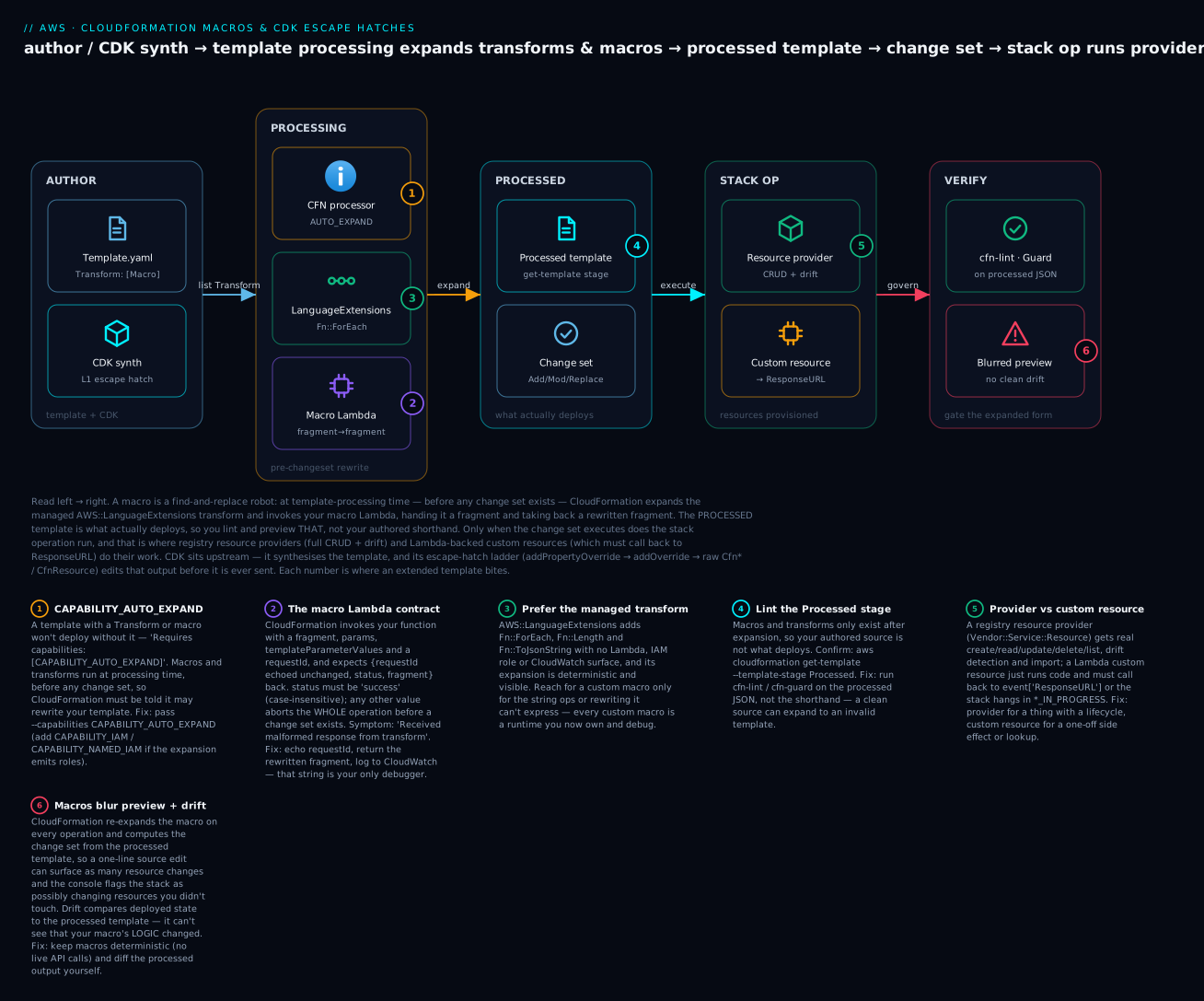
The diagram traces one template left to right: you author it (or synth it from CDK), CloudFormation expands transforms and your macro Lambda at processing time, the resulting processed template becomes the change set, and only then does the stack operation run your resource providers and custom resources — with linting, previews, and drift always operating on the expanded form, never your source.
Prerequisites & what you’ll be able to do
Know first: you should be comfortable authoring a basic CloudFormation template (Parameters, Resources, Outputs), have deployed at least one stack and read a change set, and be able to write a small Lambda function. Familiarity with the core intrinsics (Ref, Fn::GetAtt, Fn::Sub, Fn::FindInMap) helps. If change sets, rollback, and drift are still fuzzy, read the sibling CloudFormation StackSets, custom resources & drift lesson first, and IaC core concepts: state, drift, idempotency for the vocabulary that spans every IaC tool.
After this you can:
- Pick the right extension point by lifecycle — a transform or macro when you are rewriting the template, a provider or custom resource when you are managing a thing that has a lifecycle.
- Author, register, and consume a Lambda-backed macro, and read its strict request/response contract without guessing.
- Choose the AWS-managed
AWS::LanguageExtensionstransform over a hand-rolled macro whenever it suffices — and know when it does not. - Inspect the processed template, and explain why change-set previews and drift detection look muddy when a macro is involved.
- Reach past CDK’s L2 constructs with the escape-hatch ladder (
addPropertyOverride→addOverride→ rawCfn*) without abandoning CDK, then verify the override landed withcdk synth.
CloudFormation is a declarative language with no loops, no first-class functions, and a deliberately small set of intrinsics. That ceiling is a feature: a template is meant to be a static, reviewable artifact. But the moment you need ten near-identical subnets, a conditional that branches on a list length, or a resource type AWS has not modeled yet, you hit the wall. The interesting part of CloudFormation is the set of extension points the service exposes for exactly these cases: client-side transforms (SAM), template macros, the AWS::LanguageExtensions transform, the resource provider registry, custom resources, and finally CDK escape hatches when you generate the template instead of writing it.
This guide walks each mechanism, where it runs in the deployment lifecycle, and the failure modes that bite in production. Everything targets the current CloudFormation control plane and CDK v2.
1. Know where each extension runs before you reach for it
The single most common mistake is using the wrong extension for the job because people do not internalise when each one executes. Macros and transforms run at template-processing time, before any resource is touched. Resource providers and custom resources run during the actual stack operation, as part of the change set being executed.
| Mechanism | Runs when | Runs where | Use it for |
|---|---|---|---|
Transform (SAM, LanguageExtensions) |
Template processing, pre-changeset | CloudFormation service | Macro-expanding shorthand into full resources |
Template Macro |
Template processing, pre-changeset | Your Lambda | Custom template-to-template rewriting (loops, string ops) |
| Resource provider (registry type) | Stack operation | AWS-hosted, your handler | A real, first-class resource type with full CRUD + drift |
| Custom resource | Stack operation | Your Lambda / SNS | One-off gaps, side effects, lookups, glue |
Rule of thumb: if you are rewriting the template, you want a macro or transform. If you are managing a thing that has a lifecycle, you want a resource provider or a custom resource. Mixing these up produces code that is impossible to reason about.
A processed template is what CloudFormation actually deploys. Always inspect it before trusting a macro:
aws cloudformation get-template \
  --stack-name my-stack \
  --template-stage Processed \
  --query 'TemplateBody' --output text
2. Author a Lambda-backed template macro
A macro is a Lambda function plus an AWS::CloudFormation::Macro resource that registers it by name. When a template references the macro under its top-level Transform, CloudFormation invokes your function with the template fragment, and your function returns a rewritten fragment. This is the escape hatch for syntactic features the language lacks: real loops, string manipulation, injecting boilerplate.
The contract is strict. CloudFormation sends an event and expects a JSON response containing requestId (echoed back unchanged), a status of SUCCESS or FAILURE, and the rewritten fragment.
# macro_handler.py - expands a "Count" property into N copies of a resource
import copy

def handler(event, context):
    fragment = event["fragment"]
    new_resources = {}

    for name, resource in fragment.get("Resources", {}).items():
        count = resource.get("Count")
        if count is None:
            new_resources[name] = resource
            continue

        # Strip the synthetic Count key before emitting real CFN
        template = copy.deepcopy(resource)
        template.pop("Count", None)

        for i in range(int(count)):
            new_resources[f"{name}{i}"] = copy.deepcopy(template)

    fragment["Resources"] = new_resources

    return {
        "requestId": event["requestId"],
        "status": "SUCCESS",
        "fragment": fragment,
    }
Register the function as a macro in its own stack. The macro and the Lambda must live in the same account and region as the stacks that consume it.
# macro-registration.yaml
AWSTemplateFormatVersion: "2010-09-09"
Resources:
  MacroFunction:
    Type: AWS::Lambda::Function
    Properties:
      Handler: macro_handler.handler
      Runtime: python3.12
      Timeout: 30
      Role: !GetAtt MacroRole.Arn
      Code:
        S3Bucket: !Ref ArtifactBucket
        S3Key: macro_handler.zip

  CountMacro:
    Type: AWS::CloudFormation::Macro
    Properties:
      Name: CountMacro          # this is the name templates reference
      FunctionName: !GetAtt MacroFunction.Arn
Consume it by listing the macro name in Transform. The synthetic Count property only exists because the macro removes it before CloudFormation validates the resource:
AWSTemplateFormatVersion: "2010-09-09"
Transform: [CountMacro]
Resources:
  Topic:
    Type: AWS::SNS::Topic
    Count: 3
    Properties:
      DisplayName: worker-topic
Hard-won lessons that are not obvious from the docs:
- No drift, no rollback semantics inside the macro. A macro is a pure template-rewrite. If it throws, the entire operation fails before a change set exists. You get one error string back; log generously to CloudWatch because that is your only debugger.
- Macros do not compose with cross-stack references cleanly. A template that uses a macro cannot be used as a nested stack via
AWS::CloudFormation::Stackin some configurations, andpackage/deploywill refuse certain combinations. Validate the processed output early. - Macros run with their own IAM role, but they cannot read other AWS resources unless you make API calls inside the handler. Keep them deterministic; a macro that calls out to live infrastructure is a macro that makes your template non-reproducible.
3. Use AWS::LanguageExtensions for loops and intrinsics
Before writing a custom macro for a loop, check whether the AWS-managed AWS::LanguageExtensions transform already covers it. It is a first-party transform that adds Fn::ForEach, Fn::Length, Fn::ToJsonString, and relaxes some intrinsic-function restrictions (for example, allowing Ref and Fn::GetAtt inside Fn::Sub-adjacent positions and intrinsics in more places). No Lambda, no registration, no IAM.
Fn::ForEach takes a loop name, an identifier, a collection, and an output map whose keys and values can reference the identifier with &{Identifier} for logical-ID interpolation and ${Identifier} for values.
AWSTemplateFormatVersion: "2010-09-09"
Transform: AWS::LanguageExtensions
Parameters:
  BucketNames:
    Type: CommaDelimitedList
    Default: "logs,artifacts,backups"
Resources:
  Fn::ForEach::Buckets:
    - LogicalId                       # the loop identifier
    - !Ref BucketNames                # the collection
    - "${LogicalId}Bucket":           # output key template
        Type: AWS::S3::Bucket
        Properties:
          BucketName: !Sub "myorg-${LogicalId}"
Fn::Length is the conditional-on-list-length primitive that plain CloudFormation cannot express. Pair it with Conditions:
Transform: AWS::LanguageExtensions
Conditions:
  HasMultipleAZs:
    !Not [!Equals [!Length !Ref SubnetList, 1]]
The transform is the right default for templated infrastructure because AWS owns the implementation and its expansion is deterministic and visible in the processed template. Reach for a custom macro only when you need string operations or rewriting logic that LanguageExtensions does not provide.
If
Fn::ForEachplusFn::Lengthsolves it, never write a Lambda macro for the same thing. You are taking on a runtime, an IAM role, and a CloudWatch debugging surface to reinvent something AWS maintains for free.
4. Build a first-class resource type with the CloudFormation CLI
When you need a real resource type, not template sugar, build a resource provider and publish it to the registry. A registry resource type gets a fully namespaced name (Vendor::Service::Resource), participates in drift detection, supports create/read/update/delete/list handlers, and is referenced exactly like an AWS-native type. This is the path for managing third-party SaaS or internal control-plane objects as native CloudFormation resources.
Scaffold with the CloudFormation CLI (cfn). It generates a JSON schema for your type and language-specific handler stubs (Java, Go, Python, TypeScript).
pip install cloudformation-cli cloudformation-cli-python-plugin
cfn init       # choose RESOURCE, type name MyOrg::Billing::Budget, language Python
The schema is the contract. You declare properties, which are createOnlyProperties (force replacement), which are readOnlyProperties (set by the handler, not the user), and the primaryIdentifier:
{
  "typeName": "MyOrg::Billing::Budget",
  "properties": {
    "Name":  { "type": "string" },
    "Limit": { "type": "number" },
    "Arn":   { "type": "string" }
  },
  "primaryIdentifier": ["/properties/Arn"],
  "readOnlyProperties": ["/properties/Arn"],
  "createOnlyProperties": ["/properties/Name"],
  "additionalProperties": false
}
Implement the handlers, then submit. cfn submit builds the package, registers the type version, and (with --set-default) makes it the active version in the account/region:
cfn generate          # regenerate code from schema after edits
cfn submit --set-default --region us-east-1
A submitted private type is then usable like any native resource:
Resources:
  TeamBudget:
    Type: MyOrg::Billing::Budget
    Properties:
      Name: platform-team
      Limit: 5000
The reason to pay the cost of a provider over a custom resource: drift detection works (CloudFormation calls your read handler and diffs), the type is discoverable in the registry, and list enables import. A custom resource gets none of that.
5. Fill the gaps with custom resources and lifecycle hooks
For genuinely one-off needs, a side effect, an AMI lookup, a string transform, calling an API once during deploy, a full resource provider is overkill. The AWS::CloudFormation::CustomResource (or its Custom:: alias) backed by Lambda is the right tool. CloudFormation invokes your function on create, update, and delete, and blocks the stack operation until your function calls back to the pre-signed S3 URL in event["ResponseURL"].
The two failure modes that cause stuck stacks: not responding at all, and not handling Delete.
import json, urllib.request

def send(event, status, data=None, physical_id=None):
    body = json.dumps({
        "Status": status,
        "Reason": "See CloudWatch logs",
        "PhysicalResourceId": physical_id or event["LogicalResourceId"],
        "StackId": event["StackId"],
        "RequestId": event["RequestId"],
        "LogicalResourceId": event["LogicalResourceId"],
        "Data": data or {},
    }).encode()
    req = urllib.request.Request(
        event["ResponseURL"], data=body, method="PUT",
        headers={"content-type": "", "content-length": str(len(body))},
    )
    urllib.request.urlopen(req)

def handler(event, context):
    try:
        if event["RequestType"] == "Delete":
            # Always succeed Delete unless you truly own teardown,
            # or a failed create will wedge the rollback.
            send(event, "SUCCESS")
            return
        # Create / Update logic here
        send(event, "SUCCESS", data={"Result": "ok"})
    except Exception:
        send(event, "FAILED")   # never let the Lambda time out silently
Non-negotiable patterns:
- Always respond, including in the failure path. A
try/exceptthat postsFAILEDis what saves you from a stack stuck inCREATE_IN_PROGRESSfor an hour until the resource timeout fires. - Treat
Deleteas best-effort. If a create fails, CloudFormation rolls back by deleting the resource it just half-created. ADeletethat throws on a resource that never fully existed wedges the rollback. - Watch the
PhysicalResourceId. If you return a different physical ID during anUpdate, CloudFormation interprets it as a replacement and issues aDeletefor the old ID afterward. Keep it stable unless you intend replacement.
This is also where CloudFormation Hooks differ in intent: a custom resource manages a thing, whereas a Hook (AWS::Hooks) inspects and can block create/update/delete of other resources for policy enforcement, before they are provisioned. Reach for Hooks when the goal is a guardrail, not a managed object.
6. Drop to L1 constructs and escape hatches in CDK
Most of the time you are not hand-writing templates, you are generating them with CDK. CDK’s L2 constructs are opinionated, and periodically the property you need is not surfaced, or a brand-new CloudFormation property ships before the L2 catches up. CDK has a layered set of escape hatches for exactly this, and knowing them prevents the “I’ll just drop CDK and write YAML” overreaction.
Escape hatch 1: override properties on the underlying L1 (Cfn*) resource. Every L2 wraps an L1. Reach into it and override raw CloudFormation properties by their CloudFormation names (not the CDK camelCase):
const bucket = new s3.Bucket(this, "Data");

// Get the L1 child and override a raw CFN property
const cfnBucket = bucket.node.defaultChild as s3.CfnBucket;
cfnBucket.addPropertyOverride(
  "AccelerateConfiguration.AccelerationStatus",
  "Enabled",
);

// Remove a property the L2 set that you do not want
cfnBucket.addPropertyDeletionOverride("LoggingConfiguration");
Escape hatch 2: raw overrides for non-property fields such as UpdateReplacePolicy, DeletionPolicy, Metadata, or Condition, which are not under Properties:
cfnBucket.addOverride("DeletionPolicy", "Retain");
cfnBucket.addOverride("Metadata.guard.SuppressedRules", ["S3_BUCKET_LOGGING_ENABLED"]);
Escape hatch 3: use the L1 directly when there is no L2 at all (common for day-one resource launches). Cfn* constructs map one-to-one onto the resource and accept every property the resource supports:
new cfn.CfnResource(this, "Raw", {
  type: "MyOrg::Billing::Budget",
  properties: { Name: "platform-team", Limit: 5000 },
});
The escape-hatch order is the mental model: prefer the L2 property, then
addPropertyOverride, thenaddOverride, then drop to theCfn*L1. Abandoning CDK for raw YAML because one property is missing is almost always the wrong trade.
After applying any escape hatch, synthesize and read the actual template. CDK’s job is to emit CloudFormation; verify the override landed where you expect:
cdk synth MyStack > /tmp/synth.yaml
7. Verify
Treat every extended template as untrusted until the processed output, linting, policy, and a real deploy agree.
Inspect the processed template. Macros and transforms only manifest after processing, so lint the expanded form, not your source:
aws cloudformation get-template \
  --stack-name my-stack --template-stage Processed \
  --query 'TemplateBody' --output text > processed.json
Lint with cfn-lint. It understands the resource specification, validates intrinsic usage, and supports the LanguageExtensions transform natively:
pip install cfn-lint
cfn-lint template.yaml
Enforce policy with CloudFormation Guard. cfn-guard runs declarative rules against the template (or the processed output) and fails the build on violations, this is your policy-as-code gate in CI:
cfn-guard validate --data processed.json --rules guardrails.guard
Integration-test with taskcat. It deploys the stack into real accounts/regions from a config, reports pass/fail per region, and tears down. This is the only check that proves your macro/provider/custom resource behaves end to end:
# .taskcat.yml
project:
  name: extended-cfn
  regions: [us-east-1, eu-west-1]
tests:
  default:
    template: template.yaml
pip install taskcat
taskcat test run
For resource providers specifically, run the contract tests the CLI generates before you trust submit:
cfn test # runs the resource type contract test suite against your handlers
Checklist
Going deeper
The seven sections above are the what. This section is the how it actually works under the hood — the processing pipeline, the exact macro contract, and the reasons macros make change sets and drift harder to trust. Read it once and the failure modes stop being mysterious.
The template-processing pipeline, in order
Everything in the top-level Transform section, plus every inline Fn::Transform scattered through the template, runs at processing time, in sequence, before a change set exists. When you list more than one, CloudFormation applies them in order, and each stage receives the output of the previous one — a pipeline, not a set. That ordering is a real design lever: put AWS::LanguageExtensions first if a downstream custom macro expects the loops already expanded.
AWSTemplateFormatVersion: "2010-09-09"
Transform:
  - AWS::LanguageExtensions   # runs first: expands Fn::ForEach / Fn::Length
  - CountMacro                # runs second: sees the already-expanded template
Resources:
  Topic:
    Type: AWS::SNS::Topic
    Count: 3
    Properties:
      DisplayName: worker-topic
The built-in and custom rewriters you will actually reach for:
| Transform | What it is | Invoked as | Runs where | Reach for it when |
|---|---|---|---|---|
AWS::Serverless-2016-10-31 |
SAM macro (AWS-managed) | top-level Transform |
CloudFormation service | You want AWS::Serverless::Function/Api/SimpleTable shorthand |
AWS::LanguageExtensions |
AWS-managed transform | top-level Transform |
CloudFormation service | Loops (Fn::ForEach), Fn::Length, Fn::ToJsonString, relaxed intrinsics |
AWS::Include |
AWS-managed snippet include | inline Fn::Transform |
CloudFormation service | Splicing a shared YAML/JSON snippet (stored in S3) into many templates |
| Custom macro | Your Lambda, registered as AWS::CloudFormation::Macro |
top-level Transform or inline Fn::Transform |
Your Lambda | String ops / rewriting the managed transforms can’t express |
AWS::Serverless (SAM) is worth calling out because it is the macro almost everyone uses without realising it is one — a SAM template is a plain CloudFormation template with a Transform that expands AWS::Serverless::Function into a Lambda function, an execution role, event-source mappings, and permissions:
AWSTemplateFormatVersion: "2010-09-09"
Transform: AWS::Serverless-2016-10-31
Resources:
  HealthApi:
    Type: AWS::Serverless::Function
    Properties:
      Handler: app.handler
      Runtime: python3.12
      Events:
        Get:
          Type: Api
          Properties:
            Path: /health
            Method: get
AWS::Include is the simplest transform of all — it inlines a snippet from S3 wherever you place the Fn::Transform, letting you keep one canonical block (standard tags, a bucket policy, a set of alarms) and splice it into every template:
Resources:
  Fn::Transform:
    Name: AWS::Include
    Parameters:
      Location: s3://myorg-cfn-snippets/common-resources.yaml
Every one of these requires CAPABILITY_AUTO_EXPAND at deploy time. Because a transform can create resources you did not literally write (including IAM), CloudFormation refuses to run it unless you acknowledge that up front — Requires capabilities: [CAPABILITY_AUTO_EXPAND]. Pass it (and add CAPABILITY_IAM / CAPABILITY_NAMED_IAM if the expansion emits roles):
aws cloudformation deploy \
  --template-file template.yaml --stack-name my-stack \
  --capabilities CAPABILITY_AUTO_EXPAND CAPABILITY_IAM
The macro Lambda contract, field by field
The reason macros feel finicky is that the request/response shape is exact and undocumented failures return terse strings. Here is the whole contract. CloudFormation invokes your function with this event:
| Request field | Meaning |
|---|---|
fragment |
The thing to rewrite: the entire template for a whole-template macro, or the local node for an Fn::Transform snippet macro. Whatever you return replaces it. |
params |
Only for Fn::Transform snippet macros — the literal Parameters you passed at the call site. Not resolved against template parameters. |
templateParameterValues |
The resolved values of the template’s Parameters section. |
requestId |
An opaque ID you must echo back unchanged. |
transformId |
<accountId>::<macroName>. |
region / accountId |
Where the operation is running. |
A representative event (account ID is a placeholder):
{
  "region": "us-east-1",
  "accountId": "111122223333",
  "fragment": { "AWSTemplateFormatVersion": "2010-09-09", "Resources": {} },
  "transformId": "111122223333::StandardTags",
  "params": { "Team": "platform", "CostCenter": "4812" },
  "requestId": "b2c3d4e5-6f70-4a1b-9c2d-3e4f5a6b7c8d",
  "templateParameterValues": { "Env": "prod" }
}
Your response must be exactly three keys:
| Response field | Required | Meaning |
|---|---|---|
requestId |
yes | Must equal the request’s requestId, or CloudFormation rejects the response as malformed. |
status |
yes | success (case-insensitive — so the SUCCESS used in section 2 is equally valid). Any other value is treated as failure and aborts the operation. |
fragment |
yes | The rewritten template/snippet that replaces the input. |
The most common self-inflicted wound is returning a well-formed rewrite but forgetting the requestId, which surfaces as the unhelpful Received malformed response from transform <id>. Echo it, always.
Snippet macros vs whole-template macros
There are two ways to invoke your macro, and they hand your function different fragments:
- A whole-template macro is listed in the top-level
Transform. Itsfragmentis the entire template (after any earlier transforms). Use it for cross-cutting rewrites: expand aCount, inject standard tags into every resource, add aDependsOneverywhere. - A snippet macro is invoked with an inline
Fn::Transformat a specific spot. Itsfragmentis just the node where you placed it, plus the literalparams. Use it for a local transform — rewrite one resource’sProperties, generate one policy document.
Here the same macro name (StandardTags) is invoked as a snippet, scoped to a single bucket’s Properties, receiving Team/CostCenter as params:
Resources:
  AppBucket:
    Type: AWS::S3::Bucket
    Properties:
      Fn::Transform:
        Name: StandardTags
        Parameters:
          Team: platform
          CostCenter: "4812"
      BucketName: !Sub "myorg-${Env}-assets"
def handler(event, context):
    fragment = event["fragment"] or {}     # the map Fn::Transform replaces
    params = event.get("params", {})       # literal Parameters from the call site
    tags = fragment.get("Tags", [])
    for key, value in params.items():
        tags.append({"Key": key, "Value": str(value)})
    fragment["Tags"] = tags
    return {"requestId": event["requestId"], "status": "success", "fragment": fragment}
The distinction that trips people up: params (snippet) is literal text you typed at the call site, while templateParameterValues (available to both forms) is the resolved stack parameters. If you need the deployed environment name, read templateParameterValues, not params.
Ordering and failure semantics
Because processing is a single, synchronous, pre-changeset pipeline, its failure mode is blunt:
- All or nothing. If any transform or macro returns a non-
successstatus or throws, the entire operation fails before a change set is created. There is no partial expansion, no half-built stack — and no stack events to read, because nothing was provisioned. Your only signal is the error string and whatever your macro logged to CloudWatch. - It re-runs on every operation. CloudFormation expands the macro on every create, update, and change-set request, feeding it the current template each time. This is why a macro must be deterministic: the same input must always produce the same output. A macro that reads live infrastructure (an API call to fetch “the latest AMI”) makes two deploys of identical source produce different templates — reproducibility gone.
- Reserved edges. You cannot use a macro in the
AWSTemplateFormatVersion, and macro use inside StackSets and some nested-stack configurations is restricted. Validate the processed output early rather than discovering the limit at deploy time.
Why macros muddy change sets and drift
This is the single biggest reason to prefer AWS::LanguageExtensions (deterministic, AWS-owned, visible) over a custom macro whenever it suffices:
- The change set is computed from the processed template, not your source. So a one-line edit to your shorthand can surface as a dozen resource changes in the preview — and there is no clean mapping back to the line you actually touched.
- CloudFormation flags the whole stack as potentially volatile. Because the macro re-runs on every operation and could emit anything, a change set for a macro template carries a warning that it might change or replace resources you did not directly edit. You lose the crisp “this and only this changes” guarantee that makes plain CloudFormation reviewable.
- Generated logical IDs churn. Macros that mint logical IDs (like the
Countexpander’sTopic0,Topic1, …) can renumber resources when the input shifts, turning a rename into a destroy-and-recreate. - Drift detection can’t see macro-logic drift. Drift compares the deployed resource’s actual state to the processed template’s expected properties. If your macro’s logic changed but the emitted properties happen to match, drift reports
IN_SYNC— the drift is invisible. And if the macro is non-deterministic, “expected” is a moving target, so drift is meaningless.
The practical rule: diff the processed output yourself as part of review, keep macros deterministic, and treat any custom macro as a component that needs its own tests — not a free abstraction.
The CDK escape-hatch ladder in depth
Section 6 lists the rungs; here is the mechanical detail that makes them predictable. Every add*Override call ultimately writes a raw path into the synthesized CloudFormation JSON, and the Property* variants are just sugar that prefixes Properties.:
| CDK call | Lowers to | Use for |
|---|---|---|
addPropertyOverride("A.B", v) |
addOverride("Properties.A.B", v) |
Set/override a resource property by its CloudFormation name |
addPropertyDeletionOverride("A.B") |
addDeletionOverride("Properties.A.B") |
Remove a property the L2 injected that you don’t want |
addOverride("DeletionPolicy", v) |
(raw top-level field) | Non-Properties fields: DeletionPolicy, UpdateReplacePolicy, Condition, Metadata |
addDeletionOverride("Metadata.X") |
(raw top-level field) | Remove any non-Properties field |
overrideLogicalId("Name") |
(renames the element) | Pin a generated logical ID so a refactor doesn’t destroy/recreate the resource |
Two rungs section 6 did not show — deleting arbitrary fields, and pinning a logical ID (the most under-used escape hatch, and the one that saves you from an accidental replacement when you rename a construct):
import * as cdk from "aws-cdk-lib";
import * as s3 from "aws-cdk-lib/aws-s3";

const bucket = new s3.Bucket(this, "Data");
const cfnBucket = bucket.node.defaultChild as s3.CfnBucket;

// Delete ANY field by path (not just under Properties)
cfnBucket.addDeletionOverride("Metadata.aws:cdk:path");

// Pin the logical ID so renaming the construct doesn't replace the bucket
cfnBucket.overrideLogicalId("DataBucket");
When there is no L2 at all, drop to the raw L1 — CfnResource from the core aws-cdk-lib, which maps one-to-one onto any resource type including your registry providers:
import * as cdk from "aws-cdk-lib";

new cdk.CfnResource(this, "Budget", {
  type: "MyOrg::Billing::Budget",
  properties: { Name: "platform-team", Limit: 5000 },
});
For a fleet-wide override — “add this tag to every bucket,” “force RetentionPolicy on all log groups” — do not hand-edit each L1. Use an Aspect, which visits every node in the construct tree and lets you apply the override once:
import { Aspects, IAspect } from "aws-cdk-lib";
import { IConstruct } from "constructs";

class RetainBuckets implements IAspect {
  visit(node: IConstruct): void {
    if (node instanceof s3.CfnBucket) {
      node.addOverride("DeletionPolicy", "Retain");
    }
  }
}
Aspects.of(this).add(new RetainBuckets());
Because overrides are stringly-typed, they bypass the L2’s type checking entirely — a typo in "AccelerationStatus" fails silently at deploy, not at compile. Always cdk synth and read the emitted template after any escape hatch to confirm the override landed where you meant.
Custom resources vs macros vs providers — the decision, one more time
If you remember one table from this lesson, make it this one. It collapses the whole lesson into a single lifecycle question:
| Runs when | You get | Reach for it when | |
|---|---|---|---|
| Macro / transform | Template processing (pre-changeset) | Text rewriting of the template | You need loops, shorthand, or injected boilerplate — a syntactic gap |
| Custom resource | Stack operation | A callback-driven side effect | A one-off lookup / API call / glue with no real lifecycle to manage |
| Resource provider (registry) | Stack operation | A first-class type: full CRUD, drift, list/import |
You manage a thing with a lifecycle as a native CloudFormation resource |
Practice challenges
Work these in order — they escalate from “read the processed template” to “choose and scaffold the right mechanism.” Each has a worked solution; try it before you open it.
1. (Beginner) See what actually deployed. A stack my-stack was deployed from a template that lists a Transform. Print the template CloudFormation actually built, not your source.
<details> <summary>Solution</summary>
aws cloudformation get-template \
  --stack-name my-stack \
  --template-stage Processed \
  --query 'TemplateBody' --output text
Why: the Processed stage is the post-expansion template — the only version that reflects what your macros and transforms produced. The Original stage is your shorthand and never deploys as written.
</details>
2. (Beginner) Reach for the managed transform first. You need three S3 buckets named from a CommaDelimitedList parameter, with no Lambda. Which transform, and roughly what does the loop look like?
<details> <summary>Solution</summary>
AWS::LanguageExtensions with Fn::ForEach:
Transform: AWS::LanguageExtensions
Parameters:
  Names: { Type: CommaDelimitedList, Default: "logs,artifacts,backups" }
Resources:
  Fn::ForEach::Buckets:
    - Id
    - !Ref Names
    - "${Id}Bucket":
        Type: AWS::S3::Bucket
        Properties: { BucketName: !Sub "myorg-${Id}" }
Why: a managed transform gives you the loop with no runtime, IAM role, or CloudWatch debugging surface to own — always try it before writing a custom macro. </details>
3. (Intermediate) Fix the malformed macro. A macro returns {"status": "SUCCESS", "fragment": {…}} and CloudFormation fails with Received malformed response from transform. What is missing, and why does it matter?
<details> <summary>Solution</summary>
The response is missing requestId. It must echo the request’s requestId unchanged:
return {"requestId": event["requestId"], "status": "SUCCESS", "fragment": fragment}
Why: CloudFormation invokes the macro asynchronously and uses requestId to correlate the response with the invocation; without it the response is rejected regardless of status. (status itself is case-insensitive, so SUCCESS is fine.)
</details>
4. (Intermediate) Snippet, not whole-template. You want to inject a standard Tags block into one resource’s Properties, not every resource in the template, and pass the team name at the call site. Which macro form, and where does the team name arrive in your handler?
<details> <summary>Solution</summary>
Invoke the macro inline with Fn::Transform inside that resource’s Properties, and pass Parameters:
    Properties:
      Fn::Transform:
        Name: StandardTags
        Parameters: { Team: platform }
In the handler the team name arrives in event["params"]["Team"] (literal call-site parameters), while the node being rewritten is event["fragment"].
Why: a snippet macro is scoped to its node and receives params literally — use templateParameterValues instead only when you need resolved stack parameters.
</details>
5. (Advanced) Retain a bucket the L2 won’t let you. In CDK, an s3.Bucket L2 needs DeletionPolicy: Retain and UpdateReplacePolicy: Retain, and you must drop a LoggingConfiguration the L2 injected. Write the escape hatches, then say how you verify them.
<details> <summary>Solution</summary>
const cfnBucket = bucket.node.defaultChild as s3.CfnBucket;
cfnBucket.addOverride("DeletionPolicy", "Retain");
cfnBucket.addOverride("UpdateReplacePolicy", "Retain");
cfnBucket.addPropertyDeletionOverride("LoggingConfiguration");
Verify with cdk synth MyStack and read the emitted YAML — confirm both policies sit at the resource top level and LoggingConfiguration is gone from Properties.
Why: DeletionPolicy/UpdateReplacePolicy are non-Properties fields (so addOverride, not addPropertyOverride), and addPropertyDeletionOverride removes an L2-injected property — the escape-hatch ladder edits the synthesized template without leaving CDK.
</details>
6. (Advanced) Pick the mechanism. You must manage an internal SaaS “Budget” object as a native CloudFormation resource with real drift detection and import support. Macro, custom resource, or resource provider? Name the scaffold command and the three schema keys that matter.
<details> <summary>Solution</summary>
A registry resource provider — only it gives CRUD + drift + list/import:
cfn init          # RESOURCE, MyOrg::Billing::Budget, Python
cfn submit --set-default --region us-east-1
The schema must declare primaryIdentifier (how CFN identifies the object), readOnlyProperties (set by your handler, e.g. Arn), and createOnlyProperties (force replacement when changed, e.g. Name). Run cfn test (contract tests) before trusting submit.
Why: a macro only rewrites text and a custom resource just runs code with no drift or import — a first-class type with a lifecycle needs a provider. </details>
Common beginner mistakes
-
“A macro is a function I call at deploy time.” No — it runs at processing time, before any resource exists. It rewrites template text; it cannot read the live state of resources being created or react to what got built. Right model: a macro is a pre-build find-and-replace robot. If you need behavior during the deploy (a lookup, an API call), that is a custom resource, not a macro.
-
“I linted my template, so it’s valid.” You linted your source; the macro’s output is the real template. A clean-looking source can expand into something invalid. Right model:
aws cloudformation get-template --template-stage Processed, then runcfn-lint/cfn-guardon the processed JSON. -
“My macro threw, so CloudFormation will roll it back.” There is nothing to roll back — the operation fails before a change set exists, so there are no stack events to read. Right model: a macro failure gives you one error string; log generously to CloudWatch because that is your only debugger.
-
“I don’t need any capabilities for a simple transform.” Any
Transformor macro is rejected withoutCAPABILITY_AUTO_EXPAND(Requires capabilities: [CAPABILITY_AUTO_EXPAND]), and you also needCAPABILITY_IAM/CAPABILITY_NAMED_IAMif the expansion emits roles. Right model: acknowledge the capability up front indeploy/create-change-set. -
“One property is missing, so I’ll drop CDK and hand-write YAML.” An over-reaction that throws away everything CDK gives you. Right model: climb the escape-hatch ladder — L2 property →
addPropertyOverride→addOverride→ rawCfn*— thencdk synthto confirm. -
“A macro and a custom resource are interchangeable.” They run at different lifecycle stages and solve different problems. Right model: rewriting the template → macro/transform; a one-off side effect or lookup → custom resource; a native type with drift and import → resource provider.
-
“My custom resource is stuck in
CREATE_IN_PROGRESS.” It never called back toevent["ResponseURL"](or it threw onDelete). Right model: always PUT toResponseURL— including in the failure path — and treatDeleteas best-effort so a failed create can still roll back.
Glossary
Transform(template section): the top-level key that lists the transforms/macros CloudFormation should apply to the whole template at processing time, in order.- Macro: a Lambda function registered as an
AWS::CloudFormation::Macrothat rewrites template text. CloudFormation hands it a fragment and uses whatever it returns. Fn::Transform: the intrinsic that invokes a macro (orAWS::Include) on a local node rather than the whole template — the “snippet macro” call site.- Template-processing time: the moment before any change set, when transforms and macros run. Contrast with stack-operation time.
- Stack-operation time: the moment resources are actually created/updated/deleted — when custom resources and resource providers run.
- Processed template: the fully expanded template after all transforms/macros ran. This is what deploys; inspect it with
--template-stage Processed. CAPABILITY_AUTO_EXPAND: the acknowledgment you must pass to deploy a template containing a macro or transform, because expansion can create resources you did not literally write.AWS::LanguageExtensions: the AWS-managed transform that addsFn::ForEach,Fn::Length,Fn::ToJsonString, and relaxes intrinsic restrictions — no Lambda required.AWS::Include: an AWS-managed transform that splices a YAML/JSON snippet stored in S3 into the template at theFn::Transformlocation.- SAM (
AWS::Serverless-2016-10-31): the AWS-managed macro that expandsAWS::Serverless::*shorthand into full Lambda/API/table resources. - Fragment: the piece of template CloudFormation sends a macro to rewrite — the whole template (whole-template macro) or a single node (snippet macro).
requestId: the opaque ID CloudFormation sends a macro; the response must echo it unchanged or be rejected as malformed.templateParameterValuesvsparams: the resolved stack parameters (available to any macro) versus the literalParameterspassed at anFn::Transformcall site (snippet macros only).- Resource provider (registry type): a first-class custom resource type (
Vendor::Service::Resource) with create/read/update/delete/list handlers, drift detection, and import — built with thecfnCLI and published to the registry. - Custom resource: an
AWS::CloudFormation::CustomResource(orCustom::*) backed by Lambda/SNS that runs code during the stack operation and must call back toevent["ResponseURL"]. PhysicalResourceId: the stable identifier a custom resource returns; changing it during an update signals a replacement, triggering a delete of the old ID.- L1 /
Cfn*construct: the CDK construct that maps one-to-one onto a raw CloudFormation resource. Thenode.defaultChildof an L2 is its L1. - L2 construct: the opinionated, higher-level CDK construct (e.g.
s3.Bucket) that wraps an L1 and adds sensible defaults and helper methods. - Escape hatch: any CDK mechanism (
addPropertyOverride,addOverride,addDeletionOverride, dropping to L1) for reaching past an L2 to edit the raw CloudFormation output. overrideLogicalId: a CDK call that pins a resource’s generated logical ID so renaming the construct does not cause a destroy-and-recreate.- Aspect: a CDK visitor that walks the whole construct tree, used to apply an override (a tag, a policy) across many resources at once.
- Drift detection: CloudFormation’s comparison of a deployed resource’s actual state against the (processed) template’s expected properties. Registry providers support it; plain custom resources do not.
- Change set: the preview of what a stack update will add, modify, or replace — computed from the processed template when macros are involved.
cfn-lint/cfn-guard/taskcat: the verification trio — lint the (processed) template, enforce policy-as-code, and integration-test a real deploy across regions.