In a nutshell
Think of a StackSet as a franchise headquarters. A restaurant chain’s HQ designs one blueprint — the same kitchen layout, the same signage, the same fryer — and pushes it to every branch location, whether there are five franchises or five thousand. When a new franchise opens, it receives the blueprint automatically. When HQ revises the blueprint, the change rolls out to the branches a few at a time, so one bad revision never shutters the whole chain overnight. A CloudFormation StackSet is that headquarters for your AWS estate: you write one template (the blueprint), and CloudFormation fans it out as a stack instance into every account and region you target — and into every new account that later joins a targeted organizational unit.
This lesson is about the three capabilities that turn plain CloudFormation into an org-scale control plane:
- StackSets — deploy one template across many accounts and regions from a single place, with dials that control how fast and how safely the rollout happens.
- Custom resources — teach CloudFormation to manage things it has no built-in type for (seed a table, look up a value, call a third-party API during deploy) by handing the work to a Lambda function that must call back when it is done.
- Drift detection — ask CloudFormation whether reality still matches the blueprint after someone clicked around in the console, so you find out on your schedule instead of during an incident.
If you have never deployed a single stack, this is not your starting point — this is the advanced tier. But the mental models are plain enough that a careful beginner can follow every step, and the failure modes here are exactly the ones that page senior engineers at 3 a.m.
Level: Advanced · Time: ~29 min
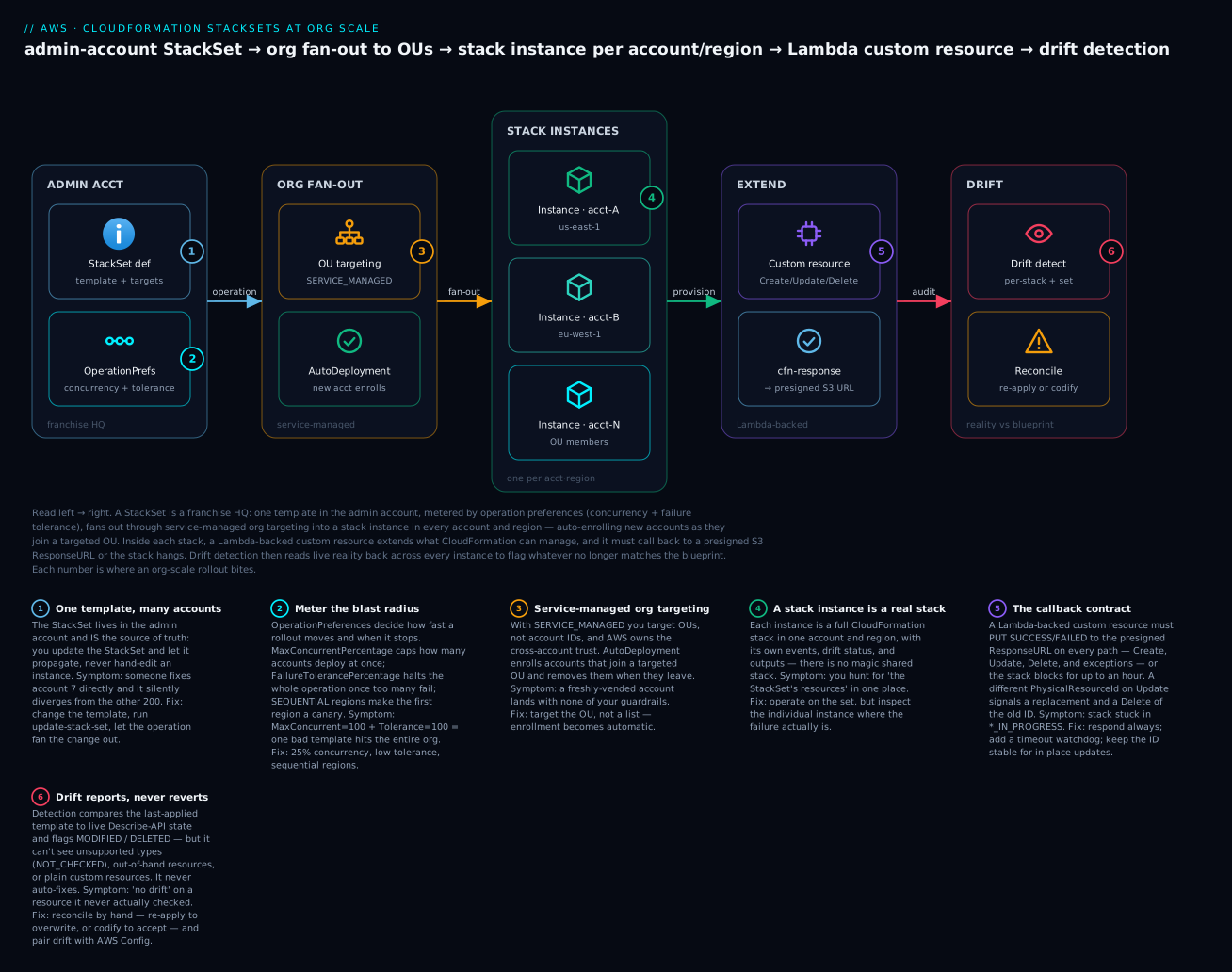
The diagram traces one template from the admin account left to right: operation preferences meter the blast radius, service-managed targeting fans the template out to a stack instance in every account and region (auto-enrolling new accounts), a Lambda-backed custom resource extends what each stack can manage, and drift detection reads live reality back to flag anything that no longer matches the blueprint.
Prerequisites & what you’ll be able to do
Know first: you should have deployed at least one CloudFormation stack and read a change set, be comfortable with core template anatomy (Parameters, Resources, Outputs, Ref, Fn::GetAtt), and be able to write a small Lambda function. A working grasp of AWS Organizations (a management account, OUs, member accounts) is essential for the StackSets half. If drift and idempotency are still fuzzy as concepts, read IaC core concepts: state, drift, idempotency first; for the sister extension mechanisms (macros, transforms, resource providers), see Extending CloudFormation with macros, transforms & CDK escape hatches.
After this you can:
- Choose between self-managed and service-managed StackSets, and explain why service-managed is the right default for an org landing zone.
- Roll a template out to whole OUs with
AutoDeploymentso new accounts enroll themselves, while metering blast radius withMaxConcurrentPercentageandFailureTolerancePercentage. - Write a Lambda-backed custom resource that responds on every path —
Create,Update,Delete, and exceptions — and reason correctly aboutPhysicalResourceIdand replacement. - Run drift detection per-stack and across an entire StackSet, and say precisely what it does and does not catch.
- Reconcile drift deliberately — re-apply to overwrite, or codify to accept — instead of letting CloudFormation guess.
Most teams write off CloudFormation after their first 500-line YAML file and reach for CDK or Terraform. That’s a mistake deep inside AWS Organizations, where CloudFormation is the substrate StackSets, Control Tower, and Service Catalog are built on and the only engine that deploys across every account with native org trust. This is the part that earns its keep: org-wide rollout, extending the resource model, enforcing policy before a resource exists, and keeping reality honest with drift detection.
1. When raw CloudFormation beats CDK and Terraform on AWS
Pick the tool for the constraint, not the fashion. CloudFormation wins in a narrow but important band:
- No external state, no state lock to corrupt. The stack is the state, stored and managed by the service. There is no S3 backend to bootstrap, no DynamoDB lock table, no
terraform force-unlockat 3 a.m. - Native org trust. StackSets with
SERVICE_MANAGEDpermissions deploy into accounts created by AWS Organizations without you provisioning a cross-account IAM role per account. Terraform needs an assumable role wired into every account first. - Drift detection and Hooks are first-party. The control plane knows the desired state, so it can compare live resources against it and can intercept create/update operations with policy checks before mutation.
- It’s the lingua franca. Control Tower, Service Catalog, SAM, and CDK all compile down to CloudFormation. CDK is a synthesizer; the thing that actually runs is a template.
CDK is the better authoring experience for complex app stacks; Terraform wins the moment you span multiple clouds. But for an AWS landing zone, guardrails, and account baselines, raw CloudFormation plus StackSets is frequently the right answer precisely because it has the fewest moving parts.
Rule of thumb: “deploy this baseline into every account and keep it correct” is a StackSets job. “Build a bespoke application” is a CDK job (which still emits CloudFormation).
2. Multi-account, multi-region rollout with StackSets
A StackSet is a template plus a deployment definition that fans out stack instances across target accounts and regions. The pivotal choice is the permission model.
Self-managed requires you to pre-create two IAM roles: an administration role in the admin account and an execution role in every target account trusting it. This is the legacy path and the source of most StackSet pain.
Service-managed integrates with AWS Organizations: AWS manages the trust, you target organizational units (OUs) instead of enumerating account IDs, and new accounts landing in a targeted OU enroll automatically. This is what you want for a landing zone.
Before service-managed StackSets work, enable trusted access between CloudFormation and Organizations once, from the management account:
aws cloudformation activate-organizations-access
Create a service-managed StackSet, then roll it out to OUs. Two operational dials matter more than anything else here: --auto-deployment (enroll/remove accounts as OU membership changes) and the --operation-preferences that control blast radius.
# Create the StackSet (run from the Organizations management or a delegated admin account)
aws cloudformation create-stack-set \
  --stack-set-name org-baseline-guardrails \
  --template-body file://baseline.yaml \
  --permission-model SERVICE_MANAGED \
  --auto-deployment Enabled=true,RetainStacksOnAccountRemoval=false \
  --capabilities CAPABILITY_NAMED_IAM \
  --description "Account baseline: config recorder, log bucket, IAM password policy"

# Roll out to OUs, region by region, with a conservative failure tolerance
aws cloudformation create-stack-instances \
  --stack-set-name org-baseline-guardrails \
  --deployment-targets OrganizationalUnitIds=ou-ab12-1a2b3c4d,ou-ab12-5e6f7g8h \
  --regions us-east-1 eu-west-1 \
  --operation-preferences \
      RegionConcurrencyType=SEQUENTIAL,MaxConcurrentPercentage=25,FailureTolerancePercentage=5
FailureTolerancePercentage=5 means the operation stops rolling forward once more than 5% of instances fail, so a bad template in account 3 doesn’t get force-fed to 200 more. RegionConcurrencyType=SEQUENTIAL deploys one region fully before the next, which is what you want for a regional canary. Switch to PARALLEL only once you trust the change.
Updating the template is its own operation. Always update the StackSet and let it propagate, rather than touching instances directly:
aws cloudformation update-stack-set \
  --stack-set-name org-baseline-guardrails \
  --template-body file://baseline.yaml \
  --capabilities CAPABILITY_NAMED_IAM \
  --operation-preferences MaxConcurrentPercentage=25,FailureTolerancePercentage=0
| Concern | Self-managed | Service-managed |
|---|---|---|
| Trust setup | You create admin + execution roles per account | AWS Organizations manages trust |
| Targeting | Explicit account IDs | OUs (and the whole org root) |
| New-account enrollment | Manual | Automatic deployment |
| Best for | Pre-existing accounts outside Orgs | Landing zones, org guardrails |
3. Extending the resource model with Lambda-backed custom resources
When no AWS resource type exists for what you need (seed a DynamoDB table, look up an AMI by SSM parameter, call a third-party API during deploy), a custom resource bridges the gap. CloudFormation sends a request to a Lambda function (or SNS topic), and the stack blocks until your code calls back to a pre-signed S3 URL with SUCCESS or FAILED.
The contract is unforgiving, and getting it wrong is the classic CloudFormation foot-gun. Three rules keep you out of trouble:
- You must always respond. If your function errors, times out, or forgets to POST to the response URL, the stack hangs for up to an hour, then fails. Wrap everything in try/except and respond in the failure path too.
- Handle all three request types.
Create,Update, andDeleteall invoke the same function. ADeletethat throws will wedge a stack you can never cleanly remove. - PhysicalResourceId semantics drive replacement. Return a stable ID for in-place updates. Return a different ID and CloudFormation treats it as a replacement, then sends a
Deletefor the old physical ID after the new one succeeds. Mishandling this is how custom resources delete the thing they just created.
A minimal, correct handler in Python. The cfnresponse module ships in the Lambda Python runtime when you author inline, but for real code vendor your own small responder so behavior is explicit:
import json, urllib.request

def send(event, context, status, data=None, physical_id=None):
    body = json.dumps({
        "Status": status,
        "Reason": f"See CloudWatch log stream: {context.log_stream_name}",
        "PhysicalResourceId": physical_id or event.get("PhysicalResourceId") or context.log_stream_name,
        "StackId": event["StackId"],
        "RequestId": event["RequestId"],
        "LogicalResourceId": event["LogicalResourceId"],
        "Data": data or {},
    }).encode()
    req = urllib.request.Request(event["ResponseURL"], data=body, method="PUT")
    req.add_header("content-type", "")
    req.add_header("content-length", str(len(body)))
    urllib.request.urlopen(req)

def handler(event, context):
    try:
        rt = event["RequestType"]
        if rt == "Delete":
            # idempotent teardown; never raise on a resource that's already gone
            return send(event, context, "SUCCESS")
        # Create/Update work goes here
        result = {"Value": "computed-output"}
        send(event, context, "SUCCESS", data=result, physical_id="my-stable-id")
    except Exception as e:
        print(f"failed: {e}")
        send(event, context, "FAILED")
Reference it from the template. Outputs the function returns under Data are readable with !GetAtt:
Resources:
  Seed:
    Type: Custom::Seed
    Properties:
      ServiceToken: !GetAtt SeedFunction.Arn
      # Any change to these properties triggers an Update invocation
      TableName: !Ref AppTable
      Version: "3"

Outputs:
  SeedValue:
    Value: !GetAtt Seed.Value
Failure-mode hard truth: a Lambda timeout does not notify CloudFormation. Set the function timeout well below the resource’s 1-hour ceiling, and consider a Step Functions or SNS pattern for long-running work. For genuinely reusable extensions, prefer a registered resource type (Section 8) over a one-off custom resource. AWS also publishes the open-source
AWSUtility::CloudFormation::CommandRunnerand the broader CloudFormation Provider Development Kit (CFN-CLI) for this.
4. Proactive policy enforcement with Hooks
Drift detection tells you something went wrong after it happened. Hooks stop it before. A CloudFormation Hook runs custom validation at PRE_PROVISION (and optionally PRE_UPDATE / PRE_DELETE) for targeted resource types, and can fail the operation so the resource is never created. This is policy-as-code that runs inside the deploy, not a nightly scan.
Two flavors exist. Guard Hooks let you write rules in CloudFormation Guard DSL with no Lambda to operate. Lambda Hooks call your own function for arbitrary logic. For most guardrails, Guard is the lower-maintenance choice. A rule that forbids public S3 buckets:
# s3-no-public.guard
rule s3_buckets_block_public_access {
    AWS::S3::Bucket {
        Properties {
            PublicAccessBlockConfiguration exists
            PublicAccessBlockConfiguration.BlockPublicAcls == true
            PublicAccessBlockConfiguration.RestrictPublicBuckets == true
        }
    }
}
Hooks are themselves CloudFormation extensions, configured via the type configuration. The critical setting is failure mode: FAIL blocks non-compliant deploys; WARN only emits to the stack events. Start in WARN to measure impact, then promote to FAIL.
# Set a hook to actively block non-compliant operations
aws cloudformation set-type-configuration \
  --type HOOK \
  --type-name MyOrg::Guard::S3Public \
  --configuration '{
    "CloudFormationConfiguration": {
      "HookConfiguration": {
        "TargetStacks": "ALL",
        "FailureMode": "FAIL",
        "Properties": {}
      }
    }
  }'
Deploy a Hook org-wide by activating it as a third-party/private type in each account (a StackSet that registers the hook is the clean pattern). Because Hooks evaluate at the control-plane level, they catch changes made through the console, CLI, or CDK alike, not just your pipeline. That coverage is the entire point: an SCP can deny an API call broadly, but a Hook can apply nuanced, template-aware logic (“RDS must have StorageEncrypted: true and deletion protection”) that an SCP can’t express.
5. Change sets and nested stacks for safe, reviewable updates
Never run update-stack blind against production. A change set is a dry run: CloudFormation computes the diff and, crucially, tells you which resources will be replaced (destroyed and recreated) versus modified in place. Replacement is where outages hide.
aws cloudformation create-change-set \
  --stack-name prod-network \
  --change-set-name net-2026-06-04 \
  --template-body file://network.yaml \
  --capabilities CAPABILITY_IAM

# Inspect before executing; look hard at "Replacement": "True"
aws cloudformation describe-change-set \
  --stack-name prod-network --change-set-name net-2026-06-04 \
  --query 'Changes[].ResourceChange.{LogicalId:LogicalResourceId,Action:Action,Replace:Replacement}' \
  --output table

aws cloudformation execute-change-set \
  --stack-name prod-network --change-set-name net-2026-06-04
For new stacks, --change-set-type CREATE gives you the same preview before the first deploy. The change set is the artifact your reviewer approves in a PR or a pipeline manual-approval gate.
Nested stacks decompose a large template into reusable child stacks referenced by an AWS::CloudFormation::Stack resource pointing at a child template in S3. The parent’s change set surfaces nested changes when you pass --include-nested-stacks, so you keep one reviewable diff across the whole tree. Nested stacks share a lifecycle with the parent (delete the parent, the children go too), which is the right coupling for “these components are one unit.” When components have independent lifecycles, use cross-stack references via Export/Fn::ImportValue instead, and accept that an export can’t be changed while another stack imports it.
6. Detecting and reconciling drift across stacks and an Organization
Drift is the gap between the template and what’s actually deployed after someone clicks in the console. CloudFormation detects it asynchronously: you start a detection operation, poll for completion, then read per-resource results.
# Per-stack: start, wait, then inspect
DID=$(aws cloudformation detect-stack-drift --stack-name prod-network \
  --query StackDriftDetectionId --output text)

aws cloudformation describe-stack-drift-detection-status \
  --stack-drift-detection-id "$DID" \
  --query '{Status:DetectionStatus,Drift:StackDriftStatus}'

# Show exactly which resources drifted and how
aws cloudformation describe-stack-resource-drifts \
  --stack-name prod-network \
  --stack-resource-drift-status-filters MODIFIED DELETED \
  --query 'StackResourceDrifts[].{Id:LogicalResourceId,Status:StackResourceDriftStatus}' \
  --output table
At org scale, you don’t want to script a loop over every account. StackSets has native drift detection that fans out across all stack instances:
OID=$(aws cloudformation detect-stack-set-drift \
  --stack-set-name org-baseline-guardrails \
  --query OperationId --output text)

aws cloudformation describe-stack-set-operation \
  --stack-set-name org-baseline-guardrails --operation-id "$OID" \
  --query 'StackSetOperation.StatusReason'
Reconciliation is deliberately manual, and that’s correct. CloudFormation does not auto-revert drift, because the right response depends on intent:
- Unintended drift: re-run
update-stack(or update the StackSet) with the unchanged template. CloudFormation pushes the desired state back, overwriting the manual change. - Intended change made out-of-band: update the template to match reality, then deploy, so code and cloud reconverge with the template as the source of truth. Then find out who clicked in the console and close that door with the Hook and SCP from Section 4.
Operationalize this: an EventBridge scheduled rule that triggers stack/StackSet drift detection on a cadence, with results sent to Security Hub or an SNS alert. Drift you don’t measure is drift you discover during an incident.
7. Deletion safety: stack policies, retention, and termination protection
Three independent controls protect against the worst CloudFormation mistakes. Use all three; they guard different layers.
Termination protection is a stack-level flag that blocks delete-stack entirely. Turn it on for anything stateful or production:
aws cloudformation update-termination-protection \
  --stack-name prod-network --enable-termination-protection
DeletionPolicy and UpdateReplacePolicy are per-resource attributes. DeletionPolicy: Retain keeps a resource when its stack is deleted; Snapshot takes a final snapshot for resources that support it (RDS, EBS, ElastiCache). Set UpdateReplacePolicy too, because a replacement during an update deletes the old resource just as surely as a stack delete:
Resources:
  DataBucket:
    Type: AWS::S3::Bucket
    DeletionPolicy: Retain
    UpdateReplacePolicy: Retain
  AppDatabase:
    Type: AWS::RDS::DBInstance
    DeletionPolicy: Snapshot
    UpdateReplacePolicy: Snapshot
    Properties:
      DeletionProtection: true
Stack policies are JSON documents (distinct from IAM) that restrict which resources an update may modify or replace. The canonical pattern is “allow everything, deny replacement of the database”:
{
  "Statement": [
    { "Effect": "Allow", "Action": "Update:*", "Principal": "*", "Resource": "*" },
    { "Effect": "Deny", "Action": ["Update:Replace", "Update:Delete"],
      "Principal": "*", "Resource": "LogicalResourceId/AppDatabase" }
  ]
}
aws cloudformation set-stack-policy \
  --stack-name prod-network --stack-policy-body file://stack-policy.json
These layers compose: termination protection stops accidental stack deletes, the stack policy stops a careless update from replacing your database, and DeletionPolicy/UpdateReplacePolicy are the last net if the resource leaves the stack anyway.
8. Modularizing with the CloudFormation Registry and modules
Copy-pasted YAML rots. Two registry features give you real reuse with versioning.
Modules (MODULE type) package a fragment of template (resources plus their wiring) into a versioned, reusable building block that expands inline at deploy time. Unlike nested stacks, a module isn’t a separate stack at runtime, so there’s no extra stack to manage and no cross-stack export limits, while still centralizing a pattern like “our standard encrypted bucket.” Author the fragment, then register it:
aws cloudformation register-type \
  --type MODULE \
  --type-name MyOrg::S3::SecureBucket::MODULE \
  --schema-handler-package s3://my-cfn-artifacts/secure-bucket-module.zip
Resource types (RESOURCE type), built with the CloudFormation Provider Development Kit (CFN-CLI), are full custom providers with create/read/update/delete/list handlers and drift support. This is the production-grade alternative to a Lambda-backed custom resource: it participates in drift detection, gets a proper schema, and is versioned in the registry. Reach for it when an extension is reused across many stacks and teams.
Both are governed by the same registry primitives: register-type to publish a version, set-type-default-version to promote, and (for service-managed StackSets) a registration StackSet so every account has the type available.
Verify
After wiring the above, confirm each piece independently rather than trusting a green stack.
# StackSet rolled out cleanly to every targeted instance
aws cloudformation list-stack-instances \
  --stack-set-name org-baseline-guardrails \
  --query 'Summaries[?StackInstanceStatus.DetailedStatus!=`SUCCEEDED`]'

# No drift across the StackSet (empty/IN_SYNC is the pass condition)
aws cloudformation list-stack-instances \
  --stack-set-name org-baseline-guardrails \
  --query 'Summaries[].{Account:Account,Drift:DriftStatus}' --output table

# Hook is registered and set to FAIL where you intend
aws cloudformation describe-type \
  --type HOOK --type-name MyOrg::Guard::S3Public \
  --query '{Status:DeprecatedStatus,Default:DefaultVersionId}'

# Termination protection is on for stateful stacks
aws cloudformation describe-stacks \
  --stack-name prod-network \
  --query 'Stacks[0].EnableTerminationProtection'
A real end-to-end test for the Hook: submit a change set that creates a public S3 bucket and confirm it is rejected with the Hook’s failure reason in the stack events. A guardrail you haven’t watched block something is a guardrail you don’t actually have.
Checklist
Pitfalls
The failures that recur on real estates, in priority order:
- Custom resources that never call back. A timeout or unhandled exception wedges the stack for an hour. This is the single most common CloudFormation outage. Respond in every code path.
- Replacement you didn’t see coming. Editing an immutable property (a DB engine, a subnet’s AZ) silently triggers destroy-and-recreate. Read change sets for
"Replacement": "True"before every prod execute, and back it with a stack policy. DeletionPolicywithoutUpdateReplacePolicy. Teams protect against stack deletion but forget that a replacement during a routine update deletes the resource too. Set both.- StackSets fanned out at full concurrency.
MaxConcurrentPercentage=100withFailureTolerancePercentage=100turns one bad template into an org-wide incident. Canary by region first. - Hooks left in
WARNforever. A warning that blocks nothing is theater. Measure inWARN, then commit toFAIL.
Next steps: codify all of this as a pipeline (CodePipeline or GitHub Actions) where the only way to change production is a reviewed change set that has passed Hook validation, then let StackSets and scheduled drift detection keep the org converged without anyone touching a console.
Going deeper
The eight sections above are the what and the how. This section is the why it behaves that way — the trust and concurrency mechanics that decide whether a StackSet rollout is safe, the exact callback contract a custom resource lives or dies by, and the precise edges of what drift detection can see. Read it once and the failure modes stop being mysterious.
StackSets: the deployment engine, dial by dial
A StackSet has three moving parts: an administration account (where the StackSet definition lives), the target accounts and regions (where stack instances land), and the permission model that decides how the admin account is allowed to act in the targets. Everything else is tuning.
Self-managed trust is two IAM roles you create yourself: an AWSCloudFormationStackSetAdministrationRole in the admin account and an AWSCloudFormationStackSetExecutionRole in every target account that trusts it. You own the trust graph, which is why self-managed is the path for accounts that predate your Organization or live outside it. Service-managed trust hands that graph to AWS: after activate-organizations-access, CloudFormation uses service-linked roles and the Organizations trust relationship, so you never provision a role per account. That is the whole reason service-managed is the landing-zone default — the trust plumbing scales itself.
CallAs decides who runs the operation. From the management account you pass --call-as SELF (the default). From a delegated administrator — a member account you have registered so the org root is not your daily driver — you pass --call-as DELEGATED_ADMIN. Same StackSet, least-privilege operator. (Register one first with aws organizations register-delegated-administrator --service-principal member.org.stacksets.cloudformation.amazonaws.com --account-id <DELEGATED_ADMIN_ACCOUNT_ID>.)
AutoDeployment is the franchise-enrollment switch. With Enabled=true, an account that joins a targeted OU gets the stack instance automatically, and one that leaves has it removed — unless RetainStacksOnAccountRemoval=true keeps the stack behind (useful when the account is leaving the org but the workload must survive the departure).
The dials that actually prevent incidents live in OperationPreferences:
| Field | What it controls | Safe starting point | Notes |
|---|---|---|---|
RegionConcurrencyType |
Regions rolled SEQUENTIAL or PARALLEL |
SEQUENTIAL |
Sequential makes the first region a canary |
MaxConcurrentPercentage / MaxConcurrentCount |
How many accounts deploy at once | 25% (or a low count) |
Percentage scales with the fleet automatically |
FailureTolerancePercentage / FailureToleranceCount |
Failures allowed before the operation stops rolling forward | 0–5% |
0 = stop on the first failed instance |
ConcurrencyMode |
Whether concurrency shrinks as failures approach tolerance | STRICT_FAILURE_TOLERANCE |
SOFT_FAILURE_TOLERANCE keeps speed, drops the coupling |
RegionOrder |
Explicit region rollout order | least-critical region first | The first region in the list is your canary |
Two entries are worth dwelling on. ConcurrencyMode is the subtle one: the default STRICT_FAILURE_TOLERANCE reduces concurrency as failures accumulate so it can stop precisely at your tolerance — safest, slightly slower. SOFT_FAILURE_TOLERANCE keeps MaxConcurrent pinned regardless, trading that precision for throughput on a fleet you already trust. And ManagedExecution (--managed-execution Active=true, set on the StackSet itself) lets a StackSet run non-conflicting operations concurrently and queue conflicting ones, instead of rejecting a second operation outright — the difference between a StackSet you can drive from a pipeline and one that throws OperationInProgressException the moment two changes overlap.
Putting the advanced knobs together, a delegated-admin update that canaries safely and can run alongside unrelated operations:
aws cloudformation update-stack-set \
  --stack-set-name org-baseline-guardrails \
  --template-body file://baseline.yaml \
  --capabilities CAPABILITY_NAMED_IAM \
  --call-as DELEGATED_ADMIN \
  --managed-execution Active=true \
  --operation-preferences RegionConcurrencyType=SEQUENTIAL,MaxConcurrentPercentage=25,FailureTolerancePercentage=0,ConcurrencyMode=STRICT_FAILURE_TOLERANCE
Custom resources: the callback contract in full
A custom resource is CloudFormation making a request to your asynchronous code and then blocking the entire stack until you answer. The service sends the request and waits; you must send the answer. Here is the request CloudFormation delivers to your function:
| Request field | Meaning |
|---|---|
RequestType |
Create, Update, or Delete — the same function handles all three |
ResponseURL |
The presigned S3 URL you must PUT your result to |
StackId / RequestId / LogicalResourceId |
Echo all three back unchanged so CloudFormation can correlate the response |
ResourceType |
Custom::Name or AWS::CloudFormation::CustomResource |
ResourceProperties |
The Properties you set in the template — your inputs |
OldResourceProperties |
On Update only — the previous properties, for diffing |
PhysicalResourceId |
Present on Update/Delete — the ID you returned last time |
Your job is to PUT a JSON body to ResponseURL, a presigned URL that is time-limited and needs no AWS credentials — which is exactly why the request must be answered promptly and why the empty content-type header matters (S3 rejects the signed PUT if you send one). The response shape:
| Response field | Rule |
|---|---|
Status |
SUCCESS or FAILED — any other value is treated as a failure |
PhysicalResourceId |
A stable ID; changing it on Update triggers a replacement |
Reason |
Human-readable failure text — point it at the CloudWatch log stream |
StackId / RequestId / LogicalResourceId |
Echoed from the request, unchanged |
Data |
Key/value outputs, readable in the template with !GetAtt Resource.Key |
NoEcho |
true masks the Data values in stack events and outputs |
The cfnresponse module AWS injects into inline Python Lambdas wraps this PUT for you, but for real, versioned code you either vendor a tiny responder (as in Section 3) or adopt a provider framework — the open-source crhelper library, or CDK’s custom_resources.Provider construct — which adds retries, a clean decorator API, and an async IsComplete pattern: your onEvent handler kicks off slow work and returns, and CloudFormation polls a separate isComplete handler until the work finishes.
That async pattern exists because of a trap in the timeouts. The resource-level timeout is one hour, but a Lambda function is killed at 15 minutes, and a dying Lambda does not notify CloudFormation — the stack simply waits out the full hour before failing. When you cannot use the provider framework, the defensive move is a watchdog that fires an alarm just before the runtime kills the function and sends FAILED on the way out:
import json, signal, urllib.request

def send(event, context, status, data=None, physical_id=None, reason=None):
    body = json.dumps({
        "Status": status,
        "Reason": reason or f"See CloudWatch log stream: {context.log_stream_name}",
        "PhysicalResourceId": physical_id or event.get("PhysicalResourceId") or context.log_stream_name,
        "StackId": event["StackId"],
        "RequestId": event["RequestId"],
        "LogicalResourceId": event["LogicalResourceId"],
        "NoEcho": False,
        "Data": data or {},
    }).encode()
    req = urllib.request.Request(event["ResponseURL"], data=body, method="PUT")
    req.add_header("content-type", "")
    req.add_header("content-length", str(len(body)))
    urllib.request.urlopen(req)

def handler(event, context):
    # Watchdog: fire ~2s before the runtime kills us so CloudFormation always hears back.
    def timeout_handler(_signum, _frame):
        send(event, context, "FAILED", reason="Function timed out")
    signal.signal(signal.SIGALRM, timeout_handler)
    signal.alarm(max(int(context.get_remaining_time_in_millis() / 1000) - 2, 1))
    try:
        if event["RequestType"] == "Delete":
            return send(event, context, "SUCCESS")   # idempotent teardown
        # real Create/Update work here
        send(event, context, "SUCCESS", data={"Value": "computed"}, physical_id="my-stable-id")
    except Exception as e:
        print(f"failed: {e}")
        send(event, context, "FAILED", reason=str(e))
Finally, PhysicalResourceId is identity, and identity drives replacement. Return the same ID on Update and CloudFormation updates in place. Return a different one and CloudFormation reads it as “this is a new resource”: it creates the new one, then sends a Delete carrying the old physical ID once the new one succeeds. That trailing delete is how a custom resource destroys the very object it just provisioned — and why an accidental str(uuid4()) returned as the ID on every update is a genuine outage waiting for its first Update.
Drift detection: what it sees and what it misses
Drift detection is a comparison, run on demand and asynchronously. CloudFormation takes the resource properties from the last applied template as the expected state, calls the live Describe APIs for the actual state, and reports each resource IN_SYNC, MODIFIED, or DELETED. At the stack level you get a rolled-up StackDriftStatus; detect-stack-set-drift fans that same detection across every instance and rolls it up per account and region.
What it reliably catches: a property a human changed in the console (MODIFIED), and a managed resource someone deleted out from under the stack (DELETED). What it misses is the part people forget:
- Unsupported resource types and properties. Drift covers a large but incomplete set of resource types; anything outside it comes back
NOT_CHECKED, and even for supported types not every property is compared. A “no drift” result on aNOT_CHECKEDresource is silence, not a pass. - Resources created entirely outside the stack. Drift only inspects resources the stack knows about. A rogue security group someone created next to your stack is invisible — there is no expected state for it to diverge from.
- Plain custom resources. A Lambda-backed custom resource has no
readhandler, so CloudFormation cannot fetch its actual state and cannot meaningfully drift-check it. Only a registry resource type with a realreadhandler participates in drift. - Some structural or nested properties. Deeply nested or dynamically-generated properties (certain inline policies, computed values) can slip past the comparison.
| Situation | What drift shows | The right response |
|---|---|---|
| Someone hand-edited a security group rule | MODIFIED |
Re-run update-stack / update-stack-set with the unchanged template to overwrite |
| A managed resource was deleted in the console | DELETED |
Re-apply to recreate — or retire it in the template if the deletion was intended |
| An intended change was made out-of-band | MODIFIED |
Update the template to match reality, then deploy — codify the change |
| A resource type drift cannot inspect | NOT_CHECKED |
Not covered here — add an AWS Config rule or a registry provider with a read handler |
Reconciliation stays manual on purpose (Section 6 covers the two responses). The operational move is to schedule detection — an EventBridge rule that triggers detect-stack-drift / detect-stack-set-drift on a cadence and routes results to Security Hub or SNS — because the drift you never measure is the drift you meet during an incident.
Practice challenges
Work these in order — they escalate from “turn on the org trust” to “drive a delegated-admin rollout.” Each has a worked solution; try it before you open it.
1. (Beginner) Turn on org-scale deployment. A service-managed StackSet must target OUs. What one-time command enables the trust, and which two flags do you pass at create-stack-set time so new accounts enroll automatically?
<details> <summary>Solution</summary>
aws cloudformation activate-organizations-access
# then at create-stack-set time:
#   --permission-model SERVICE_MANAGED \
#   --auto-deployment Enabled=true,RetainStacksOnAccountRemoval=false
Why: activate-organizations-access turns on trusted access once from the management account; SERVICE_MANAGED lets you target OUs and hands the cross-account trust to AWS, and AutoDeployment enrolls accounts as they join a targeted OU — so you never pre-create an execution role per account.
</details>
2. (Beginner) Meter the blast radius. You are rolling a template to 300 accounts and want to deploy regions one at a time and halt the whole operation once more than 5% of instances fail. Write the --operation-preferences.
<details> <summary>Solution</summary>
--operation-preferences RegionConcurrencyType=SEQUENTIAL,MaxConcurrentPercentage=25,FailureTolerancePercentage=5
Why: SEQUENTIAL makes the first region a canary; FailureTolerancePercentage=5 stops the operation once more than 5% of instances fail, so a bad template cannot be force-fed to the rest; and a percentage scales with the fleet automatically as it grows.
</details>
3. (Intermediate) Unwedge a DELETE_FAILED stack. A stack is stuck in DELETE_FAILED because its custom resource’s Lambda threw on the Delete event. What is the one-line fix in the handler, and why does it matter?
<details> <summary>Solution</summary>
if event["RequestType"] == "Delete":
    return send(event, context, "SUCCESS")   # never raise if the thing is already gone
Why: the same function handles Create/Update/Delete; a Delete that throws (or times out) leaves the stack unable to finish deletion. Treat teardown as best-effort and respond SUCCESS unless a real cleanup genuinely must block the delete.
</details>
4. (Intermediate) Stop the accidental replacement. On an Update where the properties barely changed, your custom resource returns a new PhysicalResourceId. What does CloudFormation do next, and how do you keep it from deleting the underlying object?
<details> <summary>Solution</summary>
Returning a different PhysicalResourceId signals a replacement: CloudFormation creates the new logical resource, then sends a Delete carrying the old physical ID after the new one succeeds. Keep the ID stable for in-place updates:
send(event, context, "SUCCESS", physical_id=event["PhysicalResourceId"]) # reuse the old ID
Why: PhysicalResourceId is CloudFormation’s identity for the resource; changing it is the documented signal for “replace me,” and the trailing Delete is exactly how custom resources destroy what they just created.
</details>
5. (Advanced) Find the drifted accounts across the org. Kick off drift detection across an entire StackSet and then list only the account/region pairs that actually drifted, without looping over accounts yourself.
<details> <summary>Solution</summary>
OID=$(aws cloudformation detect-stack-set-drift \
  --stack-set-name org-baseline-guardrails \
  --query OperationId --output text)

# after the operation completes, list only the drifted instances:
aws cloudformation list-stack-instances \
  --stack-set-name org-baseline-guardrails \
  --query 'Summaries[?DriftStatus==`DRIFTED`].{Account:Account,Region:Region}' \
  --output table
Why: detect-stack-set-drift fans a single detection operation across every instance; the per-instance DriftStatus then tells you exactly which account/region pairs diverged — no per-account scripting required.
</details>
6. (Advanced) Drive it from a delegated admin, safely. You want a member account (not the org root) to run StackSet updates, and you want unrelated StackSet operations to be able to run concurrently rather than erroring. Name the two flags and what each buys you.
<details> <summary>Solution</summary>
aws cloudformation update-stack-set \
  --stack-set-name org-baseline-guardrails \
  --call-as DELEGATED_ADMIN \
  --managed-execution Active=true \
  --template-body file://baseline.yaml \
  --capabilities CAPABILITY_NAMED_IAM \
  --operation-preferences RegionConcurrencyType=SEQUENTIAL,MaxConcurrentPercentage=25,FailureTolerancePercentage=0
Why: --call-as DELEGATED_ADMIN lets a registered delegated-administrator member account run the operation instead of the management account (least privilege for the org root); --managed-execution Active=true lets non-conflicting StackSet operations run concurrently and queues conflicting ones instead of failing them with OperationInProgressException.
</details>
Common beginner mistakes
-
“A StackSet deploys resources.” No — a StackSet deploys stack instances, and each instance is a real, ordinary CloudFormation stack in one account and region. You operate on the StackSet and it propagates; editing an instance’s stack directly is how you create drift between the set and the stack.
-
“Service-managed means I list account IDs.” Backwards. Service-managed targets OUs (and the org root), and
AutoDeploymentenrolls new accounts for you. Enumerating account IDs is the self-managed style — reaching for it under a service-managed model is a sign you have the wrong mental picture. -
“Full concurrency is faster, so use it.”
MaxConcurrentPercentage=100withFailureTolerancePercentage=100turns one bad template into an org-wide incident before anyone can react. Right model: canary by region (SEQUENTIAL), meter concurrency (25%), and tolerate few failures (0–5%). -
“My custom resource’s Lambda returned cleanly, so the stack continues.” Not unless it
PUTa response to the presignedResponseURL. A function that finishes without calling back leaves the stack hanging for up to an hour. Right model:send()on every path, including exceptions andDelete. -
“A Lambda timeout surfaces as a stack error quickly.” A Lambda timeout does not notify CloudFormation at all; the stack waits out the full one-hour resource timeout before failing. Right model: add a watchdog (a
SIGALRMalarm, or the provider framework’sIsCompletepattern) that sendsFAILEDjust before the runtime kills the function. -
“Drift detection reverts drift.” It only reports. Reconciliation is deliberately manual because the correct response depends on intent — re-apply the template to overwrite an accidental change, or update the template to codify an intended one.
-
“No drift means everything matches.” Only for the resource types and properties drift can actually inspect. Unsupported types come back
NOT_CHECKED, some properties are never compared, and resources created entirely outside the stack are invisible to it. Pair drift with AWS Config for real coverage.
Glossary
- StackSet: a template plus a deployment definition that fans out stack instances across many accounts and regions from one administration account. The franchise headquarters.
- Stack instance: a single, ordinary CloudFormation stack that a StackSet created in one account + region. There is no shared “StackSet stack” — the instances are where the resources live.
- Administration account: the account that holds the StackSet definition and initiates operations (the management account, or a delegated admin).
- Target account: an account a StackSet deploys a stack instance into.
- Self-managed permissions: trust you wire yourself with an
AWSCloudFormationStackSetAdministrationRole(admin account) and anAWSCloudFormationStackSetExecutionRole(each target). Used for accounts outside AWS Organizations. - Service-managed permissions: trust managed by AWS through Organizations, using service-linked roles. Lets you target OUs and auto-enroll new accounts.
- Trusted access: the org-level switch, enabled once with
activate-organizations-access, that lets CloudFormation act across the Organization for service-managed StackSets. CallAs(SELF/DELEGATED_ADMIN): whether the operation runs as the management account or as a registered delegated-administrator member account.- Delegated administrator: a member account registered so StackSet operations need not run from the org root.
- Organizational unit (OU): a container of accounts in AWS Organizations; the targeting unit for service-managed StackSets.
AutoDeployment: the setting that enrolls accounts joining a targeted OU and removes instances from accounts that leave.RetainStacksOnAccountRemoval: keeps a stack behind when its account leaves the OU/org, instead of deleting it.OperationPreferences: the per-operation controls for rollout speed and safety — concurrency, failure tolerance, region order.MaxConcurrentPercentage/MaxConcurrentCount: how many target accounts deploy at once.FailureTolerancePercentage/FailureToleranceCount: how many instances may fail before the operation stops rolling forward.RegionConcurrencyType: whether regions roll outSEQUENTIAL(canary) orPARALLEL.ConcurrencyMode:STRICT_FAILURE_TOLERANCEshrinks concurrency to honor the tolerance precisely;SOFT_FAILURE_TOLERANCEkeeps concurrency pinned for speed.ManagedExecution: a StackSet setting that lets non-conflicting operations run concurrently and queues conflicting ones instead of rejecting them.- Custom resource: an
AWS::CloudFormation::CustomResource(orCustom::*) backed by Lambda/SNS that runs code during a stack operation and must call back toevent["ResponseURL"]. ServiceToken: the property on a custom resource that points CloudFormation at the Lambda function or SNS topic to invoke.ResponseURL(presigned URL): the time-limited, credential-free S3 URL a custom resource mustPUTitsSUCCESS/FAILEDresult to.PhysicalResourceId: the stable identifier a custom resource returns; changing it on anUpdatesignals a replacement and triggers aDeleteof the old ID.cfnresponse: the helper module AWS injects into inline Python Lambdas to send the response; real code vendors its own responder or uses a provider framework.- Provider framework: a library (
crhelper, or CDK’scustom_resources.Provider) that handles retries, the responsePUT, and the asyncIsCompletepolling pattern for long-running work. - Drift detection: an on-demand, asynchronous comparison of a stack’s last-applied template against live resource state, reporting
IN_SYNC,MODIFIED,DELETED, orNOT_CHECKED. NOT_CHECKED: the drift result for a resource type or property CloudFormation cannot inspect — coverage silence, not a clean pass.- Hook: a control-plane validation (Guard or Lambda) that runs at
PRE_PROVISION/PRE_UPDATE/PRE_DELETEand can fail an operation before a resource is created. - Change set: a preview of what a stack update will add, modify, or replace — the artifact a reviewer approves before an update runs.
DeletionPolicy/UpdateReplacePolicy: per-resource attributes thatRetainorSnapshota resource on stack delete and on replacement, respectively.- Termination protection: a stack-level flag that blocks
delete-stackentirely. - Stack policy: a JSON document (distinct from IAM) restricting which resources an update may modify or replace.