There is a long-lived AWS access key in your Terraform pipeline right now: a CI variable named AWS_SECRET_ACCESS_KEY, scoped to the whole project, masked, protected, rotated last quarter. It can create IAM roles, delete buckets, and read every other secret in the account, with no expiry. If it leaks through a set -x, a third-party action, or a printed environment, the blast radius is the entire account until a human revokes it — and nobody will know it leaked, because the key looks identical whether your pipeline uses it or an attacker does.
The fix is not “rotate more often.” It is to stop issuing standing credentials at all. Every credential your pipeline touches should be minted on demand, scoped to the run that needs it, and revoked when the run ends. Vault’s dynamic secrets engines do the minting; OIDC federation handles the bootstrap so there is no “secret zero” to protect; and Terraform’s ephemeral values keep the minted secret out of state. This guide wires all three together, then migrates a static-key pipeline onto them. It assumes Vault 1.15+, Terraform 1.11+, and the hashicorp/vault provider 5.x.
In a nutshell
Think about the difference between a copied house key and a hotel keycard. Give a contractor a copy of your house key and it opens every door, forever, whether they still work for you or not — and if they lose it, you will not find out until someone walks in. A hotel keycard is the opposite: the front desk mints one when you check in, it opens only your room, and it stops working the moment you check out. Nobody bothers photocopying it, because a copy is worthless tomorrow morning.
A long-lived cloud key in a CI pipeline is the copied house key. Dynamic credentials are the hotel keycard: Vault mints a fresh, narrowly-scoped credential for a single Terraform run, and it self-expires when the run ends. There is no standing secret sitting in a variable waiting to leak, and a credential that does escape is useless within minutes.
Three moving parts make this work, and this lesson wires all three together. Vault dynamic secrets engines do the minting — cloud credentials, database users, RabbitMQ logins, on demand. OIDC/JWT federation lets the pipeline prove who it is without holding any secret to begin with. And Terraform’s ephemeral resources and write-only arguments keep the minted secret out of the state file. Get all three right and there is no long-lived secret anywhere in the chain — not in a CI variable, not in a provider block, not in state.
Level: Advanced · Time: ~30 min
Prerequisites: comfort with the core Terraform workflow (init / plan / apply), a feel for how remote state stores everything it manages as plaintext JSON, and basic CI/CD. Vault familiarity helps but is not assumed — each moving part is explained where it first appears.
After this lesson you can: name every place a secret hides in an IaC pipeline; enable a Vault dynamic secrets engine for AWS, Azure, and databases; federate CI to Vault with JWT/OIDC and lock it down with bound_claims; keep secrets out of state with ephemeral resources and write-only arguments; and align lease TTLs and revocation so a credential never outlives the run that used it.
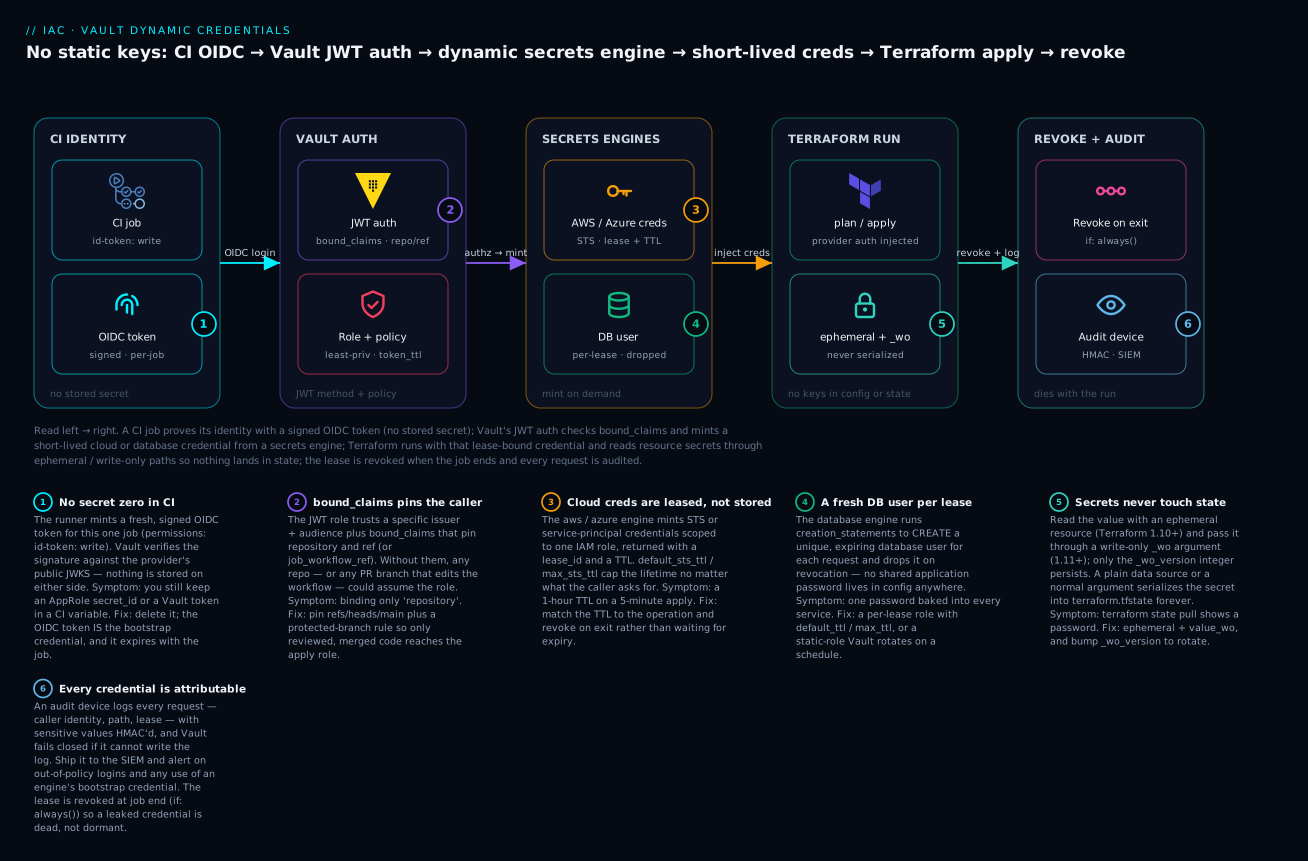
The pipeline proves its identity with a signed OIDC token, Vault checks the claims and mints a short-lived credential from a secrets engine, Terraform runs with that lease-bound credential while reading resource secrets through ephemeral / write-only paths, and the lease is revoked and audited the moment the job ends.
1. Where static credentials actually hide
Before removing secrets, name every place they live. There are four, and teams usually think about only the first.
| Location | Example | Why it is dangerous |
|---|---|---|
| CI/CD variables | AWS_SECRET_ACCESS_KEY, ARM_CLIENT_SECRET |
Standing, broadly scoped, survive every run |
| Provider config | provider "aws" { access_key = var.key } |
Often committed; ends up in plan logs |
| Terraform state | aws_db_instance.password, any data.vault_* read |
Stored in plaintext inside state, forever |
| Plan/apply logs | terraform plan echoing a sensitive variable |
Persisted in CI artifacts and run history |
The state file is the worst offender because it is silent. A
data "vault_generic_secret"block reads a secret at plan time and writes it verbatim intoterraform.tfstate. Encrypting the backend does not help anyone holdingterraform state pullor read access to the bucket. Any secret that flows through adatasource or a normal resource argument is a secret you have persisted, not one you have merely used.
The target end state: provider auth comes from a short-lived token federated from CI identity, and any secret a resource needs is read through an ephemeral resource or passed via a write-only argument so it is never serialized.
2. Dynamic secrets engines for AWS, Azure, and databases
A dynamic secrets engine generates credentials at request time, hands back a lease, and revokes the credential automatically when the lease expires. Enable the AWS engine and define a role mapped to a least-privilege policy:
# Bootstrap credential: an IAM user Vault uses ONLY to mint other creds.
vault secrets enable -path=aws aws

vault write aws/config/root \
  access_key="$VAULT_AWS_BOOTSTRAP_KEY" \
  secret_key="$VAULT_AWS_BOOTSTRAP_SECRET" \
  region=eu-west-1

# A role that produces STS credentials limited to one IAM policy.
vault write aws/roles/terraform-plan \
  credential_type=assumed_role \
  role_arns="arn:aws:iam::111122223333:role/tf-plan-readonly"

vault write aws/roles/terraform-apply \
  credential_type=assumed_role \
  role_arns="arn:aws:iam::111122223333:role/tf-apply"
Reading the role returns a fresh, expiring credential — access_key, secret_key, security_token, plus a lease_id and lease_duration:
vault read aws/creds/terraform-apply
The Azure engine works the same way (vault secrets enable -path=azure azure, then a role whose azure_roles scopes a short-lived service principal to a resource group), and GCP, RabbitMQ, and others follow the identical enable/config/role shape. The database engine is where dynamic credentials earn their keep: instead of a shared application password baked into config, Vault creates a unique database user per lease and drops it on revocation:
vault secrets enable -path=postgres database

vault write postgres/config/app-db \
  plugin_name=postgresql-database-plugin \
  allowed_roles="app-readwrite" \
  connection_url="postgresql://{{username}}:{{password}}@db.internal:5432/app?sslmode=require" \
  username="$VAULT_DB_BOOTSTRAP_USER" \
  password="$VAULT_DB_BOOTSTRAP_PASSWORD"

vault write postgres/roles/app-readwrite \
  db_name=app-db \
  default_ttl=1h max_ttl=24h \
  creation_statements="CREATE ROLE \"{{name}}\" WITH LOGIN PASSWORD '{{password}}' VALID UNTIL '{{expiration}}'; GRANT SELECT, INSERT, UPDATE, DELETE ON ALL TABLES IN SCHEMA public TO \"{{name}}\";"
Each engine still relies on one bootstrap credential (aws/config/root, azure/config, the DB admin). That is the engine’s own secret zero, not your pipeline’s, and it lives only inside Vault — your pipeline never sees it.
3. Vault-backed dynamic provider credentials in HCP Terraform
On HCP Terraform (or Terraform Enterprise), you do not have to script vault read and shuttle the output into provider env vars. Vault-backed dynamic provider credentials make the platform authenticate to Vault and inject minted cloud credentials into the run, with no static keys in the workspace. It stacks two features: the workspace federates its own signed workload-identity token into a Vault JWT role (so HCP Terraform holds no Vault token), and the Vault-backed AWS/Azure/GCP layer uses that session to mint cloud credentials from the secrets engine for the run’s duration.
Set these workspace environment variables. The AWS-specific names below are exact:
# Enable Vault auth for the workspace (common variables).
TFC_VAULT_PROVIDER_AUTH = "true"
TFC_VAULT_ADDR          = "https://vault.internal:8200"
TFC_VAULT_RUN_ROLE      = "tfc-aws"        # Vault JWT role HCP Terraform logs into
# TFC_VAULT_NAMESPACE   = "admin/platform" # Vault Enterprise/HCP namespace, if used

# Enable the Vault-backed AWS layer (AWS-specific variables).
TFC_VAULT_BACKED_AWS_AUTH           = "true"
TFC_VAULT_BACKED_AWS_AUTH_TYPE      = "assumed_role"   # or iam_user / federation_token
TFC_VAULT_BACKED_AWS_RUN_VAULT_ROLE = "terraform-apply" # role in the aws/ engine
TFC_VAULT_BACKED_AWS_MOUNT_PATH     = "aws"             # defaults to "aws"
# Split plan/apply privileges by using separate roles:
TFC_VAULT_BACKED_AWS_PLAN_VAULT_ROLE  = "terraform-plan"
TFC_VAULT_BACKED_AWS_APPLY_VAULT_ROLE = "terraform-apply"
With those set, the AWS provider block carries no credentials at all:
provider "aws" {
  region = "eu-west-1"
  # No access_key, no secret_key, no profile.
  # HCP Terraform injects STS credentials from Vault for this run.
}
The mechanism is identical for Azure (TFC_VAULT_BACKED_AZURE_*) and GCP (TFC_VAULT_BACKED_GCP_*). The platform handles lease acquisition and revocation: when the run finishes, the lease is revoked and the credential dies. Using TFC_VAULT_BACKED_AWS_PLAN_VAULT_ROLE to give plans read-only access while reserving the privileged role for apply is the highest-value control here, since most pipeline activity is planning.
4. Authenticating CI to Vault with JWT/OIDC and bound claims
Self-hosted CI (GitHub Actions, GitLab, Azure DevOps) authenticates to Vault using the JWT auth method and the OIDC token the platform already issues to every job — no Vault token, no AppRole secret_id to rotate. Configure Vault to trust the CI provider’s issuer:
vault auth enable jwt

# GitHub Actions OIDC issuer + its JWKS, so Vault can verify token signatures.
vault write auth/jwt/config \
  oidc_discovery_url="https://token.actions.githubusercontent.com" \
  bound_issuer="https://token.actions.githubusercontent.com"
The critical control is bound_claims. Without it, any GitHub repository could authenticate to this role. Bind it to your specific repository and, ideally, a protected branch or environment:
vault policy write tf-apply - <<EOF
path "aws/creds/terraform-apply" { capabilities = ["read"] }
path "postgres/creds/app-readwrite" { capabilities = ["read"] }
EOF

vault write auth/jwt/role/gha-terraform-apply \
  role_type="jwt" \
  user_claim="actor" \
  bound_audiences="https://github.com/acme-corp" \
  bound_claims_type="glob" \
  bound_claims=-<<EOF
{
  "repository": "acme-corp/platform-infra",
  "ref": "refs/heads/main",
  "job_workflow_ref": "acme-corp/platform-infra/.github/workflows/apply.yml@refs/heads/main"
}
EOF
  token_policies="tf-apply" \
  token_ttl="20m" \
  token_max_ttl="30m"
Bind on
job_workflow_reforref, not justrepository. Binding only the repository lets any branch — including an attacker’s PR branch that edits the workflow — assume the apply role. Pinningreftorefs/heads/mainplus a protected-branch rule keeps the privileged role reachable only from reviewed, merged code.
The GitHub Actions job exchanges its OIDC token for a Vault token in one step:
permissions:
  id-token: write   # required to mint the OIDC token
  contents: read

jobs:
  apply:
    runs-on: ubuntu-latest
    steps:
      - uses: actions/checkout@v4

      - name: Authenticate to Vault
        uses: hashicorp/vault-action@v3
        with:
          url: https://vault.internal:8200
          method: jwt
          role: gha-terraform-apply
          # Pulls the OIDC token from the runner automatically.
          exportToken: true   # sets VAULT_TOKEN for later steps
          secrets: |
            aws/creds/terraform-apply access_key | AWS_ACCESS_KEY_ID ;
            aws/creds/terraform-apply secret_key | AWS_SECRET_ACCESS_KEY ;
            aws/creds/terraform-apply security_token | AWS_SESSION_TOKEN

      - name: Terraform apply
        run: |
          terraform init
          terraform apply -auto-approve
The AWS credentials in the environment are now STS tokens valid for the role’s lease TTL, federated from a token that lived only for this job. No standing secret exists anywhere in the chain.
5. Aligning leases, TTLs, and revocation to pipeline lifetime
Dynamic credentials are only as good as their TTLs. The rule: a credential’s lifetime should match the operation, not the day. A plan takes minutes, an apply minutes to low tens of minutes. A one-hour TTL on an apply credential leaves a 50-minute window of usable, leaked credential after the run ends.
Set TTLs at the role and tighten the auth token at the JWT role:
# Cap how long minted AWS creds live regardless of caller request.
vault write aws/roles/terraform-apply \
  credential_type=assumed_role \
  role_arns="arn:aws:iam::111122223333:role/tf-apply" \
  default_sts_ttl=20m max_sts_ttl=30m
Explicitly revoke at the end of the job so credentials die the moment work finishes, rather than waiting for expiry:
# Best-effort revocation in an always-run cleanup step.
vault lease revoke -prefix aws/creds/terraform-apply || true
vault token revoke -self || true
In GitHub Actions, put this in a step with if: always(). Revocation is idempotent and safe to fail. The combination — short max_sts_ttl as the backstop, explicit revoke as the fast path — means a credential is almost never valid outside the run that created it.
Do not raise TTLs to “fix” flaky long applies. If an apply legitimately exceeds 30 minutes, split the configuration or use targeted applies — do not widen the window. A 4-hour TTL chosen for one slow module is a 4-hour exposure on every run.
6. Keeping secrets out of state with ephemeral resources and write-only arguments
Federating the provider solves authentication but does nothing for secrets a resource consumes — a generated database password, an API token written into a Key Vault. Read those with an ephemeral resource (Terraform 1.10+) and pass them via a write-only argument (Terraform 1.11+). Neither is ever written to plan or state.
The vault_database_secret ephemeral resource mints a dynamic DB credential exposed only during the run:
terraform {
  required_providers {
    vault = { source = "hashicorp/vault", version = "~> 5.1" }
  }
}

# Mints a unique DB user from the role; never serialized to state.
ephemeral "vault_database_secret" "app" {
  mount = "postgres"
  name  = "app-readwrite"   # the database role name
}
ephemeral blocks may only be referenced from other ephemeral contexts: provider config, other ephemeral resources, ephemeral variables/outputs, or write-only arguments. Assigning ephemeral.vault_database_secret.app.password to a normal resource argument is rejected at validate time — exactly the guardrail you want.
Feed the value into a resource through its write-only (_wo) argument. Write-only arguments are not stored in state; only the companion _wo_version integer is persisted, and you bump it to force a new value to be sent:
# azurerm 4.34+ exposes write-only secret values.
resource "azurerm_key_vault_secret" "db_password" {
  name         = "app-db-password"
  key_vault_id = azurerm_key_vault.app.id

  value_wo         = ephemeral.vault_database_secret.app.password
  value_wo_version = 1   # increment to rotate the stored secret
}
Compare the two data paths:
| Approach | What lands in state | Rotation trigger |
|---|---|---|
data "vault_generic_secret" -> value |
The secret, in plaintext | Re-read on every plan |
ephemeral + value_wo |
Nothing but value_wo_version |
Increment value_wo_version |
To compute or template a sensitive value before passing it on, mark variables and outputs ephemeral = true so they too are excluded from artifacts:
variable "extra_db_grant" {
  type      = string
  ephemeral = true
}
Migrate one secret-bearing resource at a time. After switching to value_wo, run terraform plan and confirm the diff shows the write-only version changing rather than the secret, then terraform state pull to prove the secret is gone.
7. Auditing, secret zero, and break-glass
Dynamic credentials make auditing tractable because every credential is attributable. Enable an audit device so every request is logged with caller identity, path, and lease:
vault audit enable file file_path=/var/log/vault/audit.log
Audit logs HMAC sensitive values by default, so they record that gha-terraform-apply read aws/creds/terraform-apply, without leaking the credential. Ship these to your SIEM and alert on what should never happen: a JWT login whose repository claim is not allow-listed, a privileged-role read outside change windows, or any direct use of an engine’s bootstrap credential.
Secret zero is the credential that bootstraps everything else. OIDC federation largely eliminates it for CI — the “secret” is the platform’s signing key, which you do not hold. What remains is each engine’s admin credential (aws/config/root, the DB admin). Reduce its standing power: scope the AWS bootstrap user to only sts:AssumeRole and iam:GetUser, and where supported, configure engines to use instance/workload identity instead of a static key.
Break-glass must exist and must be loud. When Vault is unreachable and an apply genuinely cannot wait, you need a documented path that is auditable and self-expiring:
# Pre-create a sealed-away root-policy token, stored offline, with a hard cap.
vault token create \
  -policy=break-glass \
  -ttl=1h -use-limit=10 \
  -display-name=break-glass-$(date +%Y%m%d)
Keep it out of normal automation, require two people to retrieve the token, and fire a high-severity alert the instant the break-glass policy is used. A break-glass path nobody notices is just a backdoor.
Going deeper
The seven sections above are the working system. This section is for the engineer who has to defend it in a review, debug it at 2 a.m., and answer “but what about…” — the leak surfaces nobody mentions, the lease internals, the keyword that looks like it protects state but does not, and the operational edges.
The full leak surface: plan output, provider debug logs, and the CI environment
Section 1 named four hiding places. Three of them leak in ways that surprise people, because the secret is used correctly but echoed somewhere durable. The state file is silent; these are noisy but easy to miss.
| Surface | How the secret escapes | Mitigation |
|---|---|---|
| Plan output / run UI | A sensitive value is safe, but a value built with nonsensitive(), a local derived from it, or a resource argument the provider does not mark sensitive prints in the diff |
Keep secrets in ephemeral values; never nonsensitive() a real secret to satisfy a for_each |
| Provider debug logs | TF_LOG=DEBUG/TRACE (and TF_LOG_PROVIDER) dump full request/response bodies — including auth headers and secret payloads — to stderr or TF_LOG_PATH |
Never set TF_LOG=TRACE in shared CI; if you must, scrub and never upload the log as an artifact |
| CI environment | set -x (bash xtrace), a printenv/env debug step, or a third-party action that logs its inputs prints exported creds; GitHub masks known secrets, not values it never saw |
Export minted creds only in the step that needs them; avoid set -x; pin and review third-party actions |
| CI artifact / cache | A plan file (terraform plan -out) is a real secret carrier — a saved plan can embed sensitive input values |
Treat *.tfplan as sensitive; do not cache or publish it; prefer speculative plans that are not persisted |
The pattern behind all four: a credential is only as secret as the most durable place it is ever written. Dynamic credentials shrink the damage (a leaked STS token expires in minutes), but a leaked plan file or debug log can still expose a database password that a write-only argument would have kept out of state entirely. Defense in depth means both: mint short-lived and keep the value off every durable surface.
Lease lifecycle: TTL, renewal, revocation, and the max_ttl backstop
Every dynamic secret is wrapped in a lease: an ID, a duration, and a renewable flag. Understanding the four operations that act on a lease is what lets you reason about “how long could this credential possibly live?”
| Operation | Command | Effect |
|---|---|---|
| Read (mint) | vault read aws/creds/terraform-apply |
Creates a lease at default_ttl; starts the clock |
| Renew | vault lease renew <lease_id> |
Extends the lease, but never past max_ttl (the hard ceiling) |
| Revoke (one) | vault lease revoke <lease_id> |
Immediately invalidates that credential — Vault deletes the STS session / drops the DB user |
| Revoke (prefix) | vault lease revoke -prefix aws/creds/terraform-apply |
Kills every lease under the path — the cleanup-step hammer |
Two ceilings bound the exposure. default_ttl (or default_sts_ttl for AWS) is what a credential starts with; max_ttl (max_sts_ttl) is the absolute cap that renewal can never exceed. A long-running apply that legitimately needs more time should renew within the max, not be handed a giant TTL up front. And revocation is the fast path: waiting for a 20-minute TTL to expire still leaves 20 minutes of live credential after a job that took 4. That is why the if: always() cleanup step matters more than the TTL — the TTL is the backstop, explicit revoke is the intent.
A subtle failure: if the Vault token that created a lease is revoked, its child leases are revoked with it (leases form a tree).
vault token revoke -selfat job end therefore cascades — one call cleans up both the token and the credentials it minted. That is the belt to the TTL’s braces.
Rotating the roots: static roles and the engine’s own secret zero
Dynamic credentials solve the pipeline’s secrets, but two static credentials remain: the engine bootstrap (aws/config/root, the DB admin) and any legacy shared password an app cannot yet mint per-lease. Vault has an answer for both.
For the bootstrap, rotate it so no human ever knows it again. After configuring the engine with an initial key, tell Vault to rotate it in place — the new value lives only inside Vault:
# AWS engine: rotate the root credential Vault uses to mint STS creds.
vault write -f aws/config/rotate-root

# Database engine: rotate the admin password Vault connects with.
vault write -f database/rotate-root/app-db
For an app that genuinely needs a stable username (a service that cannot reconnect on every lease), use a static role instead of a dynamic one. Vault owns the password and rotates it on a schedule; the app reads the current value:
vault write postgres/static-roles/reporting \
  db_name=app-db \
  username="reporting_svc" \
  rotation_period=24h

vault read postgres/static-creds/reporting   # returns the current password + ttl
The distinction is worth internalizing: dynamic roles create a brand-new user per request (best for pipelines and ephemeral consumers); static roles keep one user and rotate its password (best for long-lived services that cannot handle a new username each time). Both remove the standing, human-known secret — the goal is that the only thing a person ever holds is a policy, not a password.
The vault provider: configure Vault as code, don’t read app secrets into state
The hashicorp/vault provider is a double-edged tool. Used well, it manages Vault configuration as code — mounts, roles, policies, auth backends — so the whole scheme above is reviewable and reproducible:
resource "vault_jwt_auth_backend_role" "gha_apply" {
  backend        = "jwt"
  role_name      = "gha-terraform-apply"
  role_type      = "jwt"
  user_claim     = "actor"
  bound_audiences = ["https://github.com/acme-corp"]
  bound_claims = {
    repository = "acme-corp/platform-infra"
    ref        = "refs/heads/main"
  }
  token_policies = ["tf-apply"]
  token_ttl      = 1200
}
The anti-pattern is using the same provider’s data sources to read application secrets: data "vault_generic_secret", data "vault_kv_secret_v2". Those execute at plan time and write the secret straight into state — the exact silent leak from section 1. The rule of thumb: use the vault provider to shape Vault (resources that configure it), and use ephemeral vault_*_secret resources to read from Vault (values that must never persist). If you see a data "vault_ block feeding a resource argument, that is a secret in state waiting to be discovered.
sensitive is not ephemeral: what each keyword actually does
The single most common misconception in Terraform secret handling is that sensitive = true keeps a value out of state. It does not. sensitive only redacts the value from CLI output and plan diffs — the value is still written to state in plaintext. Three keywords, three very different jobs:
| Keyword / feature | Redacts CLI + plan output? | Kept out of state? | Use it for |
|---|---|---|---|
sensitive = true (var/output), sensitive() |
Yes | No — still in state | Stopping a value from printing; not a state control |
nonsensitive() |
Removes redaction | No | Rare, deliberate un-marking (e.g. a non-secret derived value); never on a real secret |
ephemeral resource / ephemeral = true (1.10+) |
Yes | Yes — never serialized | Reading a secret you must not persist |
Write-only argument _wo / _wo_version (1.11+) |
Yes (value not shown) | Yes — only the version int persists | Passing a secret into a resource without storing it |
Sensitivity also propagates: any expression derived from a sensitive value is itself sensitive, which is why people reach for nonsensitive() to escape a for_each or a map key — and in doing so print the secret. If you find yourself unmarking a secret to make the language cooperate, that is a design smell: the value should be ephemeral, not nonsensitive.
Ephemeral resources and write-only arguments, in depth (version-gated)
Ephemeral resources have their own lifecycle, distinct from managed resources: Terraform opens them (fetches the value), may renew them during a long operation, and closes them at the end of the graph walk — the value exists only for the duration of the run, in memory, never on disk. They cannot have count/for_each drift because they are not tracked; there is no terraform destroy for them.
A few sharp edges to flag, all version-gated — confirm your versions before relying on them:
- Ephemeral resources require Terraform 1.10+; write-only arguments require 1.11+. On older versions neither block type parses.
- Write-only support is per-provider and per-argument. Not every secret argument has a
_wotwin.azurerm_key_vault_secret.value_woneeds azurerm 4.34+;aws_db_instance.password_woneeds a recent aws provider (5.75+). Check the resource docs for the specific_woargument before designing around it. _wo_versionis the rotation handle. The value itself is not in state, so Terraform cannot diff it to notice a change — bumping the integer is how you tell it to send a new value. Forget to bump it and rotation silently no-ops.- OpenTofu diverges. OpenTofu offers native state and plan encryption (from 1.7) as a complementary at-rest control that Terraform lacks, and has its own timeline for ephemeral / write-only support — pin to a version whose docs list them rather than assuming parity with Terraform.
State encryption (OpenTofu) and keeping secrets out of state (ephemeral / write-only) are not the same control. Encryption protects the file at rest; ephemeral means there is nothing to protect in the first place. Prefer the latter for secrets, and treat encryption as defense in depth for everything else state records.
Workload identity all the way down
OIDC removes the pipeline’s secret zero, but you can push keyless auth further so nothing in the chain holds a static key:
- Engine → cloud. Instead of an
aws/config/rootaccess key, run Vault on a host with an instance profile / IRSA (AWS), a managed identity (Azure), or a service account (GCP), and leave the engine’s static key blank so it uses that ambient identity to mint. The engine’s secret zero disappears too. - CI → cloud directly. When you do not run Vault, the same OIDC token can authenticate straight to the cloud —
aws-actions/configure-aws-credentialsswaps a GitHub OIDC token for STS creds against a federated IAM role, no Vault in the path. See the companion lesson on GitHub Actions OIDC for Terraform. Vault earns its place when you also need database creds, cross-cloud minting, or a central audit trail; for one cloud and no DB, direct OIDC is simpler. - Bound claims are the trust boundary either way. Whether the token is presented to Vault’s JWT role or an IAM role’s trust policy, the security rests entirely on binding the subject/claims to a specific repo, branch, and workflow. A keyless setup bound to
repository:*is less safe than a static key in a locked vault, because anyone’s fork can assume it.
Sealing and audit: the trust base under everything
All of this assumes Vault itself is trustworthy, which rests on two mechanisms. Sealing: Vault boots sealed — its data is encrypted and it will answer nothing until unsealed with a quorum of key shares (Shamir) or, in production, an auto-unseal stanza backed by a cloud KMS/HSM:
seal "awskms" {
  region     = "eu-west-1"
  kms_key_id = "arn:aws:kms:eu-west-1:111122223333:key/EXAMPLE-KMS-KEY-ID"
}
A sealed Vault mints nothing — which is precisely why the break-glass token from section 7 exists, and why “Vault is down” is a real operational scenario to rehearse, not a hypothetical. Audit is the other pillar, and it is stricter than logging usually is: Vault treats audit as on the request path and fails closed — if it cannot write to a mandatory audit device, it stops responding rather than serve a request it cannot log. That guarantees no un-audited credential is ever issued, but it also means a full audit disk can take Vault offline, so audit storage is a first-class capacity concern, not an afterthought.
Partial applies, -target, and the TTL-widening trap
The tempting fix for a slow apply is to widen the credential TTL or to -target a subset of resources. Both are traps:
-targetskips the dependency graph. It applies only the named resources and their dependencies, which can leave the configuration in a state Terraform itself considers inconsistent — the next full plan shows churn. It is a recovery tool, not a routine one, and every-targetrun is another window where a leased credential is live.- Widening TTLs to survive a long apply is exposure, not resilience. A 4-hour TTL chosen so one slow module finishes is a 4-hour credential on every run of that pipeline. The right fixes are structural: split the configuration so each apply is short, run independent stacks in parallel, or renew within
max_ttlrather than starting high. - Partial applies and leases interact badly. If an apply fails halfway, some resources are created and the run’s lease is about to expire — a retry may need a fresh credential mid-operation. Design applies to be idempotent and short enough that one lease covers the whole run, so a retry is a clean re-run, not a race against expiry.
The through-line: every operational shortcut that keeps a credential alive longer or applies outside the normal graph enlarges the blast radius. Short, whole-graph applies with tight leases are not just cleaner Terraform — they are the security control.
Verify
Prove the static credentials are gone, not merely unused.
# 1. A minted credential is short-lived and tied to a lease.
vault read -format=json aws/creds/terraform-apply | jq '{lease_duration, lease_id}'

# 2. The provider blocks carry no credentials.
grep -REn 'access_key|secret_key|client_secret|password\s*=' ./*.tf && echo "STATIC CREDS FOUND" || echo "clean"

# 3. No secret persisted in state from ephemeral usage.
terraform state pull | jq -r '.. | objects | select(has("password")) | .password' \
  | grep -v null && echo "SECRET IN STATE" || echo "no plaintext secrets in state"
A passing run shows a non-null lease_duration, “clean” provider files, and “no plaintext secrets in state”. In the cloud audit trail (CloudTrail / Azure Activity Log), the actor for the apply should be the assumed role with a federated STS session, never a long-lived IAM user.
Migration checklist
Practice challenges
Work these against a lab Vault (dev mode is fine for 1–3) and a scratch Terraform config. Every credential, ARN, and account ID below is a placeholder — never paste a real secret into a command or a .tf file. Try each before opening the solution.
1. (Beginner) Inventory the leak surface in a config directory.
Given a folder of .tf files, list both the static credentials and the reads that would persist a secret to state.
<details> <summary>Solution</summary>
# Static creds in provider/resource arguments:
grep -REn 'access_key|secret_key|client_secret|password\s*=' ./*.tf
# Data-source reads that serialize secrets into state:
grep -REn 'data "vault_' ./*.tf
Why: static creds hide in arguments, but a data "vault_*" block is the silent leak — it writes the secret verbatim into terraform.tfstate.
</details>
2. (Beginner → Intermediate) Mint a credential and prove it self-expires. Enable the AWS engine, add a read-only plan role, and show the lease.
<details> <summary>Solution</summary>
vault secrets enable -path=aws aws
vault write aws/roles/terraform-plan \
  credential_type=assumed_role \
  role_arns="arn:aws:iam::111122223333:role/tf-plan-readonly"
vault read -format=json aws/creds/terraform-plan | jq '{lease_id, lease_duration}'
Why: a non-null lease_duration is the proof the credential is leased, not standing — it will be revoked automatically when the lease ends.
</details>
3. (Intermediate) Lock a JWT role to one repository and branch.
Write a GitHub Actions JWT role that only acme-corp/platform-infra on refs/heads/main can assume.
<details> <summary>Solution</summary>
vault write auth/jwt/role/gha-terraform-apply \
  role_type="jwt" user_claim="actor" \
  bound_audiences="https://github.com/acme-corp" \
  bound_claims_type="glob" \
  bound_claims=-<<EOF
{ "repository": "acme-corp/platform-infra",
  "job_workflow_ref": "acme-corp/platform-infra/.github/workflows/apply.yml@refs/heads/main" }
EOF
  token_policies="tf-apply" token_ttl="20m" token_max_ttl="30m"
Why: pinning job_workflow_ref (not just repository) stops an attacker’s PR branch that edits the workflow from assuming the apply role.
</details>
4. (Intermediate → Advanced) Match the TTL to the operation and revoke on exit. Cap the minted credential’s lifetime and add a cleanup step that revokes even when the job fails.
<details> <summary>Solution</summary>
vault write aws/roles/terraform-apply \
  credential_type=assumed_role \
  role_arns="arn:aws:iam::111122223333:role/tf-apply" \
  default_sts_ttl=20m max_sts_ttl=30m
- name: Revoke Vault lease and token
  if: always()
  run: |
    vault lease revoke -prefix aws/creds/terraform-apply || true
    vault token revoke -self || true
Why: max_sts_ttl is the backstop and if: always() is the fast path — together the credential is dead within the run window, not dormant for an hour.
</details>
5. (Advanced) Move a resource secret out of state.
Replace a data "vault_generic_secret" + normal argument with an ephemeral read + write-only argument, then prove state is clean.
<details> <summary>Solution</summary>
ephemeral "vault_database_secret" "app" {
  mount = "postgres"
  name  = "app-readwrite"
}

resource "azurerm_key_vault_secret" "db_password" {
  name             = "app-db-password"
  key_vault_id     = azurerm_key_vault.app.id
  value_wo         = ephemeral.vault_database_secret.app.password
  value_wo_version = 1
}
terraform state pull | jq -r '.. | objects | select(has("password")) | .password' | grep -v null \
  && echo "SECRET IN STATE" || echo "clean"
Why: only value_wo_version persists — the password is opened in memory and never serialized, so state pull finds nothing.
</details>
6. (Advanced) Rotate without a plaintext diff, and rotate the roots. Rotate the stored secret from challenge 5, then remove the last human-known static credentials.
<details> <summary>Solution</summary>
# Rotate the write-only value: bump the version, re-apply.
value_wo_version = 2
# Rotate the engine bootstraps so no human knows them anymore.
vault write -f aws/config/rotate-root
vault write -f database/rotate-root/app-db
# For a stable-username service, let Vault own + rotate the password:
vault write postgres/static-roles/reporting \
  db_name=app-db username="reporting_svc" rotation_period=24h
Why: with write-only args the value is not in state to diff, so _wo_version is the rotation trigger; rotate-root makes even the admin credential unknown to any person.
</details>
Common beginner mistakes
Distinct from the symptom→fix table above, these are misconceptions — the wrong mental model, why it bites, and the model to replace it with.
| The belief | Why it bites | The right model |
|---|---|---|
| “Encrypting the state backend protects the secret.” | Anyone with terraform state pull or bucket read access sees plaintext; encryption only guards the file at rest on the provider’s disk. |
The secret must never enter state — use ephemeral + value_wo, not encryption-after-the-fact. |
“sensitive = true keeps it out of state.” |
sensitive only redacts CLI/plan output; the value is still written to terraform.tfstate verbatim. |
sensitive hides display; ephemeral controls persistence. Different jobs. |
| “Rotating the static key every quarter is enough.” | Between rotations the standing key still has full blast radius, and a leak looks identical to legitimate use. | Stop issuing standing creds; mint per-run and let them self-expire. Rotation frequency is irrelevant if there is nothing standing to rotate. |
| “Binding the JWT role to the repository is secure.” | Any branch — including an attacker’s PR that edits the workflow — matches repository. |
Pin ref / job_workflow_ref to a protected branch so only reviewed, merged code assumes the role. |
| “A longer TTL is just more convenient.” | Every extra minute of TTL is an extra minute a leaked credential works after the run ends. | Match the TTL to the operation and revoke on exit; the TTL is a backstop, not a comfort setting. |
| “OIDC means there is no secret zero left.” | The engine’s bootstrap (aws/config/root, DB admin) is still a static credential inside Vault. |
Scope it to bare minting permissions and rotate-root it so no human knows it. |
“-target is a fine way to skip the slow module.” |
It bypasses the dependency graph, can leave state inconsistent, and adds another live-credential window. | Split the configuration so applies are short; keep -target for recovery only. |
Glossary
- Dynamic secret — a credential Vault generates on request rather than storing, wrapped in a lease and revoked automatically when the lease ends. The hotel keycard.
- Secrets engine — the Vault component that mints and manages a class of credential (
aws,azure,database,gcp,pki, …), enabled at a mount path. - Lease — the handle on a dynamic secret: a
lease_id, alease_duration(TTL), and arenewableflag. Revoking the lease kills the credential. - TTL / max_ttl — the credential’s starting lifetime and the absolute ceiling that renewal can never exceed. For the AWS engine,
default_sts_ttl/max_sts_ttl. - Revocation — invalidating a credential immediately (
vault lease revoke) instead of waiting for expiry; the fast path in a cleanup step. Revoking a token cascades to its child leases. - Renewal — extending a lease within its
max_ttl(vault lease renew) so a long operation keeps a still-short credential rather than starting with a wide one. - Static role — a Vault role that keeps one database username and rotates its password on a schedule, for services that cannot handle a new username per lease. Contrast with a dynamic role, which creates a fresh user per request.
- Secret zero — the credential that bootstraps all the others (here, an engine’s admin key). OIDC removes the pipeline’s secret zero;
rotate-rootremoves the human’s knowledge of the engine’s. - JWT / OIDC auth method — a Vault auth backend that trusts short-lived, signed identity tokens a CI platform already issues, verifying them against the issuer’s public JWKS. No stored Vault token.
bound_claims— the constraints a JWT role requires in the token (repository, ref, workflow). The trust boundary of the whole keyless scheme; loose claims = anyone can assume the role.- STS / assumed_role — AWS Security Token Service short-lived credentials; the AWS engine’s
assumed_roletype mints them by assuming a least-privilege IAM role. - Vault-backed dynamic provider credentials — the HCP Terraform feature (
TFC_VAULT_PROVIDER_AUTH+TFC_VAULT_BACKED_*) that logs the workspace into Vault and injects minted cloud creds into a run, so provider blocks hold no keys. - Ephemeral resource — a Terraform 1.10+ block whose value exists only during the run and is never written to plan or state; referenceable only from other ephemeral contexts.
- Write-only argument (
_wo/_wo_version) — a Terraform 1.11+ resource argument whose value is not stored in state; only the companion_wo_versioninteger persists, and bumping it forces a new value to be sent. sensitive/sensitive()/nonsensitive()— display controls: they redact (or un-redact) a value in CLI and plan output. They do not keep the value out of state.- Audit device — a Vault sink (
file,syslog,socket) that logs every request with sensitive values HMAC’d. Vault fails closed if it cannot write to a mandatory device. - Seal / unseal / auto-unseal — Vault boots sealed (encrypted, answering nothing) until unsealed by a key-share quorum (Shamir) or a cloud KMS/HSM (
sealstanza). A sealed Vault mints nothing. - Response wrapping — delivering a secret as a single-use wrapping token (
-wrap-ttl) that the recipientvault unwraps once, so the secret never sits in an intermediary’s logs. - Break-glass — a pre-created, sealed-away, short-TTL, use-limited token for when Vault is unreachable and an apply cannot wait; retrieved by two people and loudly alerted on.
- Blast radius — the total damage a leaked credential can do. Standing keys have an account-wide, open-ended blast radius; a leased, least-privilege credential’s is minutes wide and narrowly scoped.