In a nutshell
Two things make a Terraform pipeline dangerous: the long-lived cloud key sitting in a repository secret, and the apply that runs a plan nobody actually reviewed. This lesson removes both. GitHub Actions logs in to your cloud with a short-lived, per-run token instead of a stored key, the plan is posted on the pull request for a human to read, and the exact plan that was reviewed is the one that applies.
The mental model for OIDC (OpenID Connect): instead of every automation carrying a photocopied master key that opens every door forever, the workflow shows a signed employee badge at the door. GitHub stamps a fresh badge for each run that says “I am the apply job of my-org/infra, deploying to the prod environment.” The cloud checks the signature against GitHub’s public keys, confirms the badge names exactly who it is willing to trust, and buzzes the door open for about an hour. Nothing is copied, nothing is stored, and the badge is worthless the moment the run ends.
The second half — plan on the PR, apply on merge — is the change-management half. terraform plan writes a binary plan file, that file is attached to the run, and on merge the pipeline downloads that same file and applies it. Terraform refuses to apply a saved plan if the world moved since it was made, so “what you reviewed” and “what you ship” are guaranteed to be the same bytes.
Level: Intermediate · Time: ~35 min
Before this lesson, be comfortable with: the Terraform core loop (init / plan / apply) and remote state with locking (State deep dive), the provider lock file and plugin behaviour (Providers deep dive), and what drift is (Drift detection). A sibling lesson builds the same idea on Azure DevOps.
After this lesson you can:
- Configure GitHub OIDC so a workflow assumes a cloud role with no stored access key, scoped to one repository and environment.
- Read and write the
sub/audclaim binding that is the entire security boundary of keyless auth. - Build a plan-on-PR / apply-on-merge pipeline that comments the plan and applies the exact saved plan artifact.
- Gate production behind a GitHub environment with required reviewers, a wait timer, and
main-only deployment branches. - Serialize applies with concurrency groups and
-lock-timeoutso two runs never fight over state. - Catch out-of-band changes with a scheduled drift plan that files an issue.
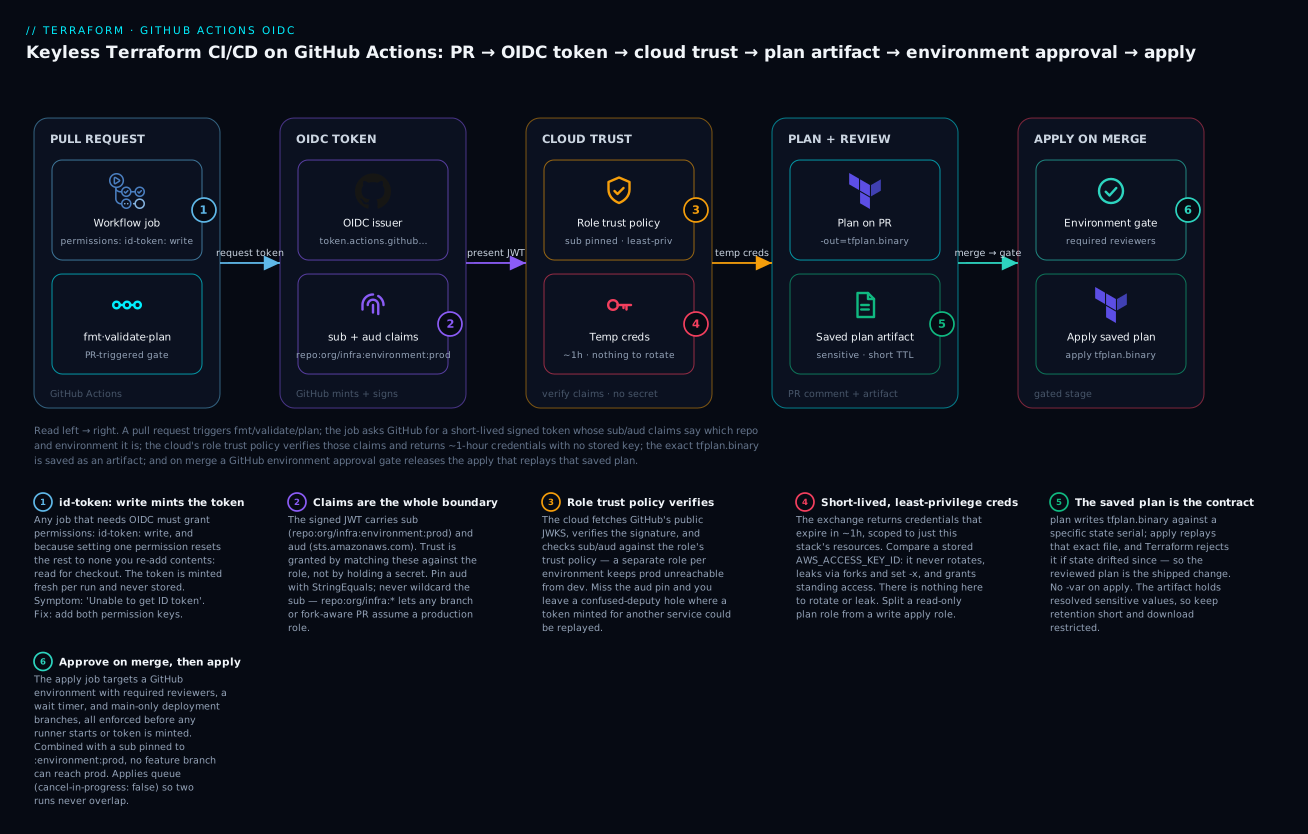
Read left to right: the workflow requests a short-lived signed token whose sub/aud claims say which repo and environment it is, the cloud’s role trust policy verifies those claims and returns ~1-hour credentials with no stored key, plan runs on the PR and its exact binary is saved as an artifact, and on merge an environment approval gate releases the apply that replays that saved plan.
Most Terraform pipelines die one of two deaths. The first is the long-lived cloud access key baked into a repository secret, rotated never, scoped to everything, and one log leak away from owning your account. The second is the apply that runs against a plan nobody saw, because plan and apply were two independent jobs that each re-planned, and the world moved in between. This guide builds a pipeline that closes both: GitHub’s OpenID Connect (OIDC) issuer hands the workflow a short-lived cloud role with no stored secret, the plan is rendered as a sticky PR comment a human can read, and the exact binary plan is saved as an artifact and replayed on apply so what you reviewed is what you ship.
The examples target AWS because the role-assumption story is the most explicit there, but the OIDC pattern is identical on Azure (azure/login with federated credentials) and GCP (Workload Identity Federation). The pipeline mechanics are cloud-agnostic.
1. Keyless cloud auth with GitHub OIDC
Every GitHub Actions run can request a signed JSON Web Token from GitHub’s OIDC provider, https://token.actions.githubusercontent.com. Your cloud trusts that issuer, validates the token’s claims (which repo, which branch, which environment), and returns short-lived credentials. No AWS_ACCESS_KEY_ID ever touches a secret store.
On AWS this is a two-part setup: an IAM OIDC identity provider, and a role whose trust policy pins the sub claim. Here is the trust policy. The sub condition is the entire security boundary, so be precise.
{
  "Version": "2012-10-17",
  "Statement": [
    {
      "Effect": "Allow",
      "Principal": {
        "Federated": "arn:aws:iam::123456789012:oidc-provider/token.actions.githubusercontent.com"
      },
      "Action": "sts:AssumeRoleWithWebIdentity",
      "Condition": {
        "StringEquals": {
          "token.actions.githubusercontent.com:aud": "sts.amazonaws.com"
        },
        "StringLike": {
          "token.actions.githubusercontent.com:sub": "repo:my-org/infra:environment:prod"
        }
      }
    }
  ]
}
Scope the
subto an environment (repo:my-org/infra:environment:prod), not to a branch wildcard likerepo:my-org/infra:*. A wildcard subject means any workflow on any branch or PR from a fork-aware ref can assume your production role. Binding to a GitHub environment lets you layer reviewer approval (Step 6) on top of the cloud trust. Use a separate role per environment with asubthat matches that environment exactly.
You can create the OIDC provider once with the CLI. GitHub no longer requires a thumbprint on this provider (AWS validates the issuer’s certificate against its trust store), but passing a placeholder is still accepted:
aws iam create-open-id-connect-provider \
  --url https://token.actions.githubusercontent.com \
  --client-id-list sts.amazonaws.com
In the workflow, you request the token by granting id-token: write permission and then exchanging it. The official aws-actions/configure-aws-credentials action does the AssumeRoleWithWebIdentity call for you:
permissions:
  id-token: write   # REQUIRED to mint the OIDC token
  contents: read

jobs:
  plan:
    runs-on: ubuntu-latest
    steps:
      - uses: actions/checkout@v4
      - uses: aws-actions/configure-aws-credentials@v4
        with:
          role-to-assume: arn:aws:iam::123456789012:role/gha-terraform-prod
          aws-region: eu-west-1
          role-session-name: gha-${{ github.run_id }}
The credentials returned default to a one-hour TTL and exist only for the life of the job. There is nothing to rotate and nothing to leak.
2. Repository structure and a matrix for multiple environments
Keep each environment’s root module separate so its state, variables, and backend are unambiguous. A layout that scales:
infra/
  modules/                # reusable, versioned modules
    network/
    eks/
  environments/
    dev/
      main.tf
      backend.tf          # backend "s3" { key = "dev/terraform.tfstate" }
      dev.auto.tfvars
    staging/
    prod/
  .github/workflows/
    terraform-plan.yml
    terraform-apply.yml
    drift.yml
The matrix lets one workflow fan out across environments while still giving each its own role and backend. Drive fail-fast: false so a broken dev does not mask a prod problem:
jobs:
  plan:
    strategy:
      fail-fast: false
      matrix:
        include:
          - env: dev
            role: arn:aws:iam::111111111111:role/gha-terraform-dev
          - env: staging
            role: arn:aws:iam::222222222222:role/gha-terraform-staging
          - env: prod
            role: arn:aws:iam::333333333333:role/gha-terraform-prod
    runs-on: ubuntu-latest
    defaults:
      run:
        working-directory: infra/environments/${{ matrix.env }}
For real pipelines, add a paths filter or a change-detection step so a PR touching only dev/ does not run a prod plan. The dorny/paths-filter action is the common choice; for brevity I keep the full matrix here.
3. Caching providers and the plugin cache
Terraform re-downloads providers on every init unless you point it at a shared plugin cache and then persist that cache between runs. Two things have to line up: the TF_PLUGIN_CACHE_DIR environment variable, and a cache key derived from the lockfile so the cache invalidates only when provider versions actually change.
env:
  TF_PLUGIN_CACHE_DIR: ${{ github.workspace }}/.terraform.d/plugin-cache
  TF_IN_AUTOMATION: "true"      # quiets interactive-only hints in CI output

steps:
  - run: mkdir -p ${{ env.TF_PLUGIN_CACHE_DIR }}

  - uses: actions/cache@v4
    with:
      path: ${{ env.TF_PLUGIN_CACHE_DIR }}
      key: tf-plugins-${{ runner.os }}-${{ hashFiles('infra/environments/**/.terraform.lock.hcl') }}
      restore-keys: |
        tf-plugins-${{ runner.os }}-
Two correctness notes that trip people up:
- The plugin cache and
.terraform.lock.hclare partners. Commit the lockfile (with multi-platform hashes viaterraform providers lock -platform=linux_amd64 ...) soinitvalidates against pinned checksums instead of silently pulling new versions. The cache speeds up the download; the lockfile guarantees integrity. - Do not cache the
.terraform/directory itself. It contains backend-initialized state config and absolute symlinks into the plugin cache that do not survive a cache restore cleanly. Cache onlyTF_PLUGIN_CACHE_DIR.
If you use hashicorp/setup-terraform, set terraform_wrapper: false when you need to capture raw stdout (the wrapper rewrites output and can interfere with parsing plan text). It is fine to leave the wrapper on for jobs that only need exit codes.
4. Run plan on PRs and render a sticky comment
The PR job does three things in order: init, fmt -check plus validate as fast gates, then plan with a detailed exit code. The -detailed-exitcode flag is the linchpin — it returns 0 for no changes, 2 for a non-empty diff, and 1 for an error, which lets the comment distinguish “nothing to do” from “here is what will change.”
- name: Terraform Init
  run: terraform init -input=false

- name: Format check
  run: terraform fmt -check -recursive

- name: Validate
  run: terraform validate -no-color

- name: Terraform Plan
  id: plan
  run: |
    set +e
    terraform plan -input=false -no-color -lock-timeout=300s \
      -out=tfplan.binary -detailed-exitcode 2>&1 | tee plan.txt
    echo "exitcode=${PIPESTATUS[0]}" >> "$GITHUB_OUTPUT"
  continue-on-error: true
set +e plus PIPESTATUS[0] is deliberate: a tee in the pipeline would otherwise mask Terraform’s real exit code, and -detailed-exitcode’s 2 would be read as a failure. We capture the true code and decide what to do with it in the comment step.
For the comment itself, use a sticky comment so each new push updates one comment instead of spamming the PR. marocchino/sticky-pull-request-comment keys off a header and edits in place. Wrap the plan in a collapsible block and trim it — a 4000-line plan blows past the GitHub comment size limit (~65 KB), so truncate the captured text.
- name: Trim plan output
  if: always()
  run: |
    # Keep the tail; the summary line and resource changes live near the end.
    tail -c 60000 plan.txt > plan.trimmed.txt || cp plan.txt plan.trimmed.txt

- name: Comment plan on PR
  if: github.event_name == 'pull_request'
  uses: marocchino/sticky-pull-request-comment@v2
  with:
    header: terraform-plan-${{ matrix.env }}
    message: |
      ### Terraform Plan: `${{ matrix.env }}`

      Outcome: `${{ steps.plan.outputs.exitcode == '2' && 'changes pending' || steps.plan.outputs.exitcode == '0' && 'no changes' || 'error' }}`

      <details><summary>Show plan</summary>

      ```hcl
      ${{ ... }}
      ```
      </details>

      *Pusher: @${{ github.actor }} | Commit: `${{ github.sha }}`*
GitHub Actions cannot interpolate a multi-line file into a YAML scalar with ${{ }} directly. The clean way is to read the trimmed file in a prior step into a multiline GITHUB_OUTPUT (using a random delimiter), then reference that output. Here is that read step, which you place before the comment and reference as steps.read.outputs.plan:
- name: Read trimmed plan
  id: read
  run: |
    {
      echo 'plan<<__TFPLAN__'
      cat plan.trimmed.txt
      echo '__TFPLAN__'
    } >> "$GITHUB_OUTPUT"
Then the comment body uses ${{ steps.read.outputs.plan }} inside the fenced block. One more guard: if you ever accept PRs from forks, do not use pull_request_target with checkout of the head ref and live credentials — that hands a fork your cloud role. Run plans from forks with read-only credentials or behind a manual gate.
5. Save the plan artifact and apply it exactly
This is the step that makes the pipeline trustworthy. The binary plan you produced — tfplan.binary — is a frozen description of the change against a specific state serial. Upload it as an artifact, and on apply, download that same file and run terraform apply tfplan.binary. Terraform refuses to apply a saved plan if the state has drifted since the plan was made, so you get a hard guarantee: the apply is the review, or it errors.
# In the plan job (push to main, post-merge):
- name: Upload plan artifact
  uses: actions/upload-artifact@v4
  with:
    name: tfplan-${{ matrix.env }}
    path: infra/environments/${{ matrix.env }}/tfplan.binary
    retention-days: 5
# In the apply job:
- name: Download plan artifact
  uses: actions/download-artifact@v4
  with:
    name: tfplan-${{ matrix.env }}

- name: Terraform Apply
  run: terraform apply -input=false -lock-timeout=300s tfplan.binary
Note there are no -var flags on the apply. A saved plan already has every variable value baked in; passing variables to apply <planfile> is an error. This is a feature: it removes the entire class of “the plan used one value and the apply used another.”
The artifact contains the literal planned changes and any sensitive values that appear in the plan. Treat the artifact store as sensitive, keep retention-days short, and restrict who can download workflow artifacts via repository permissions.
6. Environment protection rules and manual approvals
The apply job runs in a GitHub environment, and environments carry protection rules that GitHub enforces before the job’s runner starts. This is where required reviewers and wait timers live — and crucially, the environment is also what the OIDC sub claim binds to, so the cloud trust and the approval gate reinforce each other.
Reference the environment in the job:
jobs:
  apply:
    environment: prod          # gates on environment protection rules
    runs-on: ubuntu-latest
    permissions:
      id-token: write
      contents: read
Configure the rules under Settings -> Environments -> prod:
| Rule | Setting | Why |
|---|---|---|
| Required reviewers | 1-6 named people or teams | A human approves the apply; the job pauses until then |
| Wait timer | e.g. 5 minutes | A cool-off window to cancel a bad merge |
| Deployment branches | “Selected branches” -> main |
Only main can deploy to prod; PR branches cannot |
| Environment secrets | scoped to this env | Secrets here are unreadable from dev/staging jobs |
When the apply job is reached, GitHub posts a “Review pending deployments” prompt and freezes the job. No runner spins up, no OIDC token is minted, and nothing in the cloud happens until a designated reviewer clicks approve. Combine “Deployment branches: main” with the sub claim pinned to :environment:prod and you have defense in depth: even a workflow change cannot reach prod from a feature branch.
7. Concurrency groups to prevent overlapping applies
Two applies against the same state at the same time is how you corrupt a state file or fight over a lock. GitHub’s concurrency key serializes runs that share a group name. For applies, you want to queue, not cancel — never abort an apply mid-flight.
concurrency:
  group: terraform-apply-${{ matrix.env }}
  cancel-in-progress: false     # NEVER cancel a running apply
For PR plans, the opposite is correct: an outdated plan is useless, so cancel superseded runs to save minutes:
concurrency:
  group: terraform-plan-${{ github.ref }}
  cancel-in-progress: true
concurrency controls GitHub-side scheduling; Terraform’s backend state lock (DynamoDB for the S3 backend, or native locking for newer backends) is the authoritative guard at the cloud layer. Keep both. The -lock-timeout=300s on plan and apply means a run will wait up to five minutes for a stale lock to clear instead of failing instantly — useful when a previous job is finishing its unlock.
8. Drift detection on a schedule, surfaced as issues
State drifts: someone clicks in the console, an autoscaler changes a tag, a sister pipeline edits a shared resource. Catch it on a cadence with a scheduled plan that asserts “no changes” and opens a GitHub issue when that assertion fails.
name: Drift detection
on:
  schedule:
    - cron: "0 6 * * 1-5"   # 06:00 UTC, weekdays
  workflow_dispatch: {}       # allow manual runs

permissions:
  id-token: write
  contents: read
  issues: write               # required to open/update issues

jobs:
  drift:
    strategy:
      fail-fast: false
      matrix:
        env: [dev, staging, prod]
    runs-on: ubuntu-latest
    environment: ${{ matrix.env }}
    defaults:
      run:
        working-directory: infra/environments/${{ matrix.env }}
    steps:
      - uses: actions/checkout@v4
      - uses: aws-actions/configure-aws-credentials@v4
        with:
          role-to-assume: arn:aws:iam::${{ vars.AWS_ACCOUNT_ID }}:role/gha-terraform-${{ matrix.env }}
          aws-region: eu-west-1
      - run: terraform init -input=false

      - name: Detect drift
        id: drift
        run: |
          set +e
          terraform plan -input=false -no-color -lock-timeout=120s -detailed-exitcode
          echo "exitcode=$?" >> "$GITHUB_OUTPUT"

      - name: Open or update drift issue
        if: steps.drift.outputs.exitcode == '2'
        uses: actions/github-script@v7
        with:
          script: |
            const env = '${{ matrix.env }}';
            const title = `Drift detected in ${env}`;
            const body = `\`terraform plan\` returned changes for **${env}** at ${new Date().toISOString()}.\n` +
                         `Run: ${context.serverUrl}/${context.repo.owner}/${context.repo.repo}/actions/runs/${context.runId}`;
            const existing = await github.rest.issues.listForRepo({
              owner: context.repo.owner, repo: context.repo.repo,
              state: 'open', labels: 'drift'
            });
            const match = existing.data.find(i => i.title === title);
            if (match) {
              await github.rest.issues.createComment({
                owner: context.repo.owner, repo: context.repo.repo,
                issue_number: match.number, body
              });
            } else {
              await github.rest.issues.create({
                owner: context.repo.owner, repo: context.repo.repo,
                title, body, labels: ['drift']
              });
            }
Reading the exit code: 2 means drift (a non-empty plan), 0 means clean, 1 means the run itself broke (which you also want to know about). Deduplicating on issue title means a persistent drift accrues comments on one issue instead of opening a new one every weekday morning. Create the drift label once in the repo so labels: ['drift'] resolves.
Going deeper
The seven sections above build a working pipeline. This section is the why underneath the how — the token internals, the trust semantics across clouds, what the saved plan actually contains, and the scoping and locking decisions that separate a demo from production.
The OIDC token, claim by claim
Any job that sets id-token: write can call a GitHub-provided endpoint (ACTIONS_ID_TOKEN_REQUEST_URL, using the ACTIONS_ID_TOKEN_REQUEST_TOKEN bearer) and get back a signed JWT. A JWT is three base64url segments — header, payload, signature. Your cloud fetches GitHub’s public keys from https://token.actions.githubusercontent.com/.well-known/jwks and verifies the signature; if it validates, the payload’s claims are trustworthy. The claims that matter:
| Claim | Example value | What it pins |
|---|---|---|
iss |
https://token.actions.githubusercontent.com |
The issuer — which GitHub minted it |
aud |
sts.amazonaws.com |
The audience — who the token is for |
sub |
repo:my-org/infra:environment:prod |
The subject — which repo/ref/environment |
repository |
my-org/infra |
The repo, standalone |
ref |
refs/heads/main |
The git ref that triggered the run |
environment |
prod |
The deployment environment, if the job declares one |
job_workflow_ref |
my-org/infra/.github/workflows/apply.yml@refs/heads/main |
The exact workflow file + ref |
You do not set sub; GitHub assembles it from the run context. When a job declares environment: prod, GitHub switches the sub to the :environment:prod form — which is exactly why binding trust to an environment is stronger than binding to a branch. (You can customize the subject format per repository in organization settings, but the default forms below are what almost everyone should use.)
aud and the confused-deputy trap. aud answers “who is this token for.” AWS requires aud = sts.amazonaws.com; Azure requires api://AzureADTokenExchange; GCP uses the audience configured on your workload-identity provider. Pin aud with StringEquals (exact match), and use StringLike on sub only when you genuinely need a wildcard segment. A trust policy that checks sub but forgets aud is a confused-deputy hole: a token minted for a different service could, in principle, be replayed against yours.
The trust object differs by cloud but the shape is the same — verify claims, hand back short-lived credentials:
| Cloud | Trust object | Binds sub via |
Exchange call |
|---|---|---|---|
| AWS | IAM role + IAM OIDC identity provider | ...:sub condition (StringLike/StringEquals) |
sts:AssumeRoleWithWebIdentity |
| Azure | Federated identity credential on a user-assigned managed identity | subject must equal sub byte-for-byte |
token exchange for an Entra ID token |
| GCP | Workload Identity Federation pool + OIDC provider | attribute-condition (CEL) + principalSet:// binding |
STS token → service-account impersonation |
On Azure a classic federated credential has no wildcard: subject must match GitHub’s sub exactly (flexible FICs add a claimsMatchingExpression for many branches). On GCP an empty attribute-condition means every repository on GitHub can assume your identity — the condition is effectively mandatory, e.g. assertion.repository_owner == 'my-org'.
What the branch / environment binding actually protects
The sub you pin decides who can assume a role. The common forms:
sub form |
Matches | Use for |
|---|---|---|
repo:ORG/REPO:environment:prod |
Jobs declaring environment: prod |
Production apply role (tightest) |
repo:ORG/REPO:ref:refs/heads/main |
Runs on the main branch |
Non-environment, main-only jobs |
repo:ORG/REPO:pull_request |
pull_request-triggered runs |
Read-only plan role for PRs |
repo:ORG/REPO:* |
Anything — any branch, any PR | Never for a write role |
Fork safety is a property of GitHub’s defaults, not something you turn on: a pull_request from a fork runs with a read-only GITHUB_TOKEN and no access to secrets or OIDC. The dangerous combination is pull_request_target, which runs in the base repository’s context with secrets and OIDC available; if you then check out the fork’s head ref and run its code, you have handed an attacker your cloud role. Keep the PR plan role pinned to :pull_request, read-only, and never mix pull_request_target + head checkout + credentials.
Least-privilege role scoping (two roles, not one)
The trust policy in Step 1 decides who may assume the role; the role’s permission policy decides what they can then do. A demo attaches AdministratorAccess and moves on. Production splits the pipeline into two roles:
- Plan role —
subpinned to:pull_request, permissions read-only (Describe*,Get*,List*). A malicious PR that reaches it still cannot mutate anything. - Apply role —
subpinned to:environment:prod, permissions scoped to the resource types this stack manages, ideally under a permissions boundary so the role can never grant itself more.
A read-oriented plan policy looks roughly like this:
{
  "Version": "2012-10-17",
  "Statement": [
    {
      "Effect": "Allow",
      "Action": [
        "ec2:Describe*", "eks:Describe*", "eks:List*",
        "s3:GetObject", "s3:ListBucket",
        "dynamodb:GetItem", "dynamodb:PutItem", "dynamodb:DeleteItem"
      ],
      "Resource": "*"
    }
  ]
}
Note the DynamoDB actions in a “read-only” policy: acquiring and releasing the S3 backend’s state lock writes a lock item, so PutItem/DeleteItem on the lock table are part of what a plan needs. This is a classic gotcha — scope the lock table’s actions, or plan fails on LOCK with an access-denied error. Never attach AdministratorAccess to a pipeline role “to make it work”: a leaked or misused apply role should be able to damage exactly one stack’s blast radius, not the whole account.
Inside the saved plan (and why apply rejects a stale one)
tfplan.binary is not a text dump; it is a serialized snapshot containing:
- the planned action for every resource (create / update / delete / replace),
- the resolved values of variables and data sources at plan time,
- the provider versions used,
- and the state lineage + serial it was computed against.
On terraform apply tfplan.binary, Terraform re-locks state, reads the current serial, and compares it to the one recorded in the plan. If the serial advanced — someone applied in between — it errors (“Saved plan is stale”) instead of applying a plan built against a picture of the world that no longer exists. That comparison is the guarantee that makes plan-on-PR trustworthy: the reviewed plan applies, or nothing does.
Because the plan has variables baked in, apply <planfile> forbids -var and -var-file; passing one is an error by design, not an inconvenience. And on security: the binary contains resolved sensitive values (any secret that appears in the diff) in cleartext, plus a full map of your infrastructure. Treat the artifact store as sensitive — short retention-days, restricted download, never posted anywhere public. The text plan in the PR comment is safer only to the extent your resources mark values sensitive (Terraform prints (sensitive value)); a badly modeled output can still spill a secret into the comment.
fmt / validate / plan as staged, cheapest-first gates
The order in Step 4 is deliberate — fail on the cheapest signal first:
terraform fmt -check -recursive— pure formatting, zero cloud calls, no credentials. It can even run before the OIDC exchange, so a whitespace-only failure never burns a token.terraform validate— internal consistency (types, required arguments, references) with no cloud access, though it needsinitto load providers.terraform plan— the only step that needs cloud read access; this is where the plan role is used.- Optional policy gate — run
terraform show -json tfplan.binaryand feed the JSON to OPA/conftest or Checkov between plan and apply, so a policy violation blocks the apply, not just lints the source.
Matrix over environments vs Terraform workspaces
A frequent confusion: the pipeline matrix and Terraform workspaces are not the same isolation mechanism.
- The matrix in Step 2 fans one workflow across
dev/staging/proddirectories, each with its own backend, role, and tfvars. Isolation is by directory + backend + cloud account — the strongest boundary. - Workspaces keep multiple states in one backend under one configuration. They are convenient for short-lived parallel copies of the same environment, but a weak boundary for prod: one backend, one set of credentials, and one fat-fingered
terraform workspace selectaway from applying to the wrong state.
For separated environments, prefer directory-per-env (as Step 2 does) and reserve workspaces for ephemeral copies. If you must drive workspaces from a matrix, select explicitly with terraform workspace select -or-create "$ENV" and never let anything real live in the default workspace.
Concurrency: GitHub scheduling vs the backend state lock
These are two independent guards and you keep both:
concurrencyis GitHub-side scheduling. It serializes runs that share a group name. Applies queue (cancel-in-progress: false); PR plans cancel superseded runs (cancel-in-progress: true).- The backend state lock (a DynamoDB item for S3, a blob lease for
azurerm, native locking for newer backends) is the authoritative guard at the cloud layer. It stops even runs from different pipelines, or aterraform applyfrom someone’s laptop.-lock-timeout=300smakes a run wait for a busy lock instead of failing instantly.
Do not substitute one for the other. Concurrency without a state lock lets an out-of-band apply corrupt state; a state lock without concurrency lets ten queued runs each wait the full timeout and burn minutes.
Drift, refresh-only, and scheduled plans at scale
The scheduled plan -detailed-exitcode in Step 8 is the floor, not the ceiling:
terraform plan -refresh-onlyisolates state-vs-reality drift from config-vs-state changes — use it when you want to know only whether the cloud moved out from under you, not whether someone also edited HCL.- At scale, a per-stack matrix with
fail-fast: falsekeeps one drifted stack from masking others; deduping the issue by title keeps a persistent drift on a single ticket instead of a new one every morning. - OpenTofu note: the OIDC and pipeline mechanics are identical to Terraform’s. If you adopt OpenTofu’s state encryption, both the remote state and — with care — the saved-plan artifact are encrypted at rest, which pairs well with the short artifact retention above. Treat drift as a lifecycle to reconcile on a cadence, not a one-off surprise discovered at the next apply.
Verify
Confirm each layer independently before you trust the pipeline end to end.
# 1. OIDC trust: decode the role's trust policy and confirm the sub is pinned,
#    not wildcarded.
aws iam get-role --role-name gha-terraform-prod \
  --query 'Role.AssumeRolePolicyDocument' --output json | jq .

# 2. No long-lived keys remain in repo secrets (should NOT list AWS_ACCESS_KEY_ID).
gh secret list --repo my-org/infra

# 3. Saved-plan apply guarantee: prove a stale plan is rejected.
#    Plan, then mutate state out-of-band, then apply the OLD plan -> must error.
terraform plan -out=tfplan.binary
terraform apply -auto-approve            # makes a change, bumps state serial
terraform apply tfplan.binary            # EXPECT: "Saved plan is stale" error

# 4. Plugin cache hit: run init twice; the second run should report
#    providers used from the cache, not re-downloaded.
TF_PLUGIN_CACHE_DIR=$PWD/.cache terraform init
TF_PLUGIN_CACHE_DIR=$PWD/.cache terraform init   # look for "using ... from cache"
In the GitHub UI, confirm the behavioral gates:
- Open a PR that changes infra and check that exactly one sticky plan comment appears per environment and updates (does not duplicate) on a second push.
- Merge it and watch the
applyjob pause on “Review pending deployments” until a required reviewer approves. - Trigger two applies to the same environment back to back; the second must queue (not cancel) behind the first.
- Run the drift workflow via
workflow_dispatchagainst an environment you know is clean (exit0, no issue) and one you have deliberately drifted (exit2, issue opened).
Checklist
A pipeline built this way has no key to steal, no plan to second-guess, and no door to prod that a feature branch can open. The plan a reviewer reads is the plan that applies, an approval stands between merge and mutation, and anything that drifts overnight is waiting in your issue tracker by the time you open your laptop.
Practice challenges
Work these against a throwaway repo and a sandbox cloud account — never production. Each solution states the why in one line.
1. (Beginner) Grant the token permission. A workflow’s OIDC exchange fails with Error: Could not assume role ... Unable to get ID token. The permissions: block reads permissions:\n contents: read. Fix it.
<details><summary>Show solution</summary>
permissions:
  id-token: write   # mint the OIDC JWT
  contents: read    # still need to check out code
Why: minting the OIDC token requires id-token: write, and because declaring any permissions: key drops every other permission to none, you must re-list contents: read or actions/checkout breaks.
</details>
2. (Beginner) Write the subject. Your repo is acme/platform and you want only the prod-environment apply job to assume the role. Write the sub the trust policy should match, and say why repo:acme/platform:* is unsafe.
<details><summary>Show solution</summary>
repo:acme/platform:environment:prod
Why: it matches only jobs that declare environment: prod; the wildcard :* matches every branch and every pull request, so any feature-branch or fork-aware run could assume a production role.
</details>
3. (Intermediate) Stop tee from hiding failures. This step reports success even when the plan errors, because the pipeline’s exit status is tee’s, not Terraform’s:
- run: terraform plan -no-color | tee plan.txt
Rewrite it to capture Terraform’s real exit code and expose 2 (changes) vs 1 (error).
<details><summary>Show solution</summary>
- id: plan
  run: |
    set +e
    terraform plan -input=false -no-color -detailed-exitcode -out=tfplan.binary 2>&1 | tee plan.txt
    echo "exitcode=${PIPESTATUS[0]}" >> "$GITHUB_OUTPUT"
  continue-on-error: true
Why: in a pipeline the shell reports the last command’s status (tee), so ${PIPESTATUS[0]} recovers terraform’s code; -detailed-exitcode makes 2 mean “changes pending” rather than a generic failure.
</details>
4. (Intermediate) Apply exactly what was planned. Given a plan job that produces tfplan.binary, wire the artifact hand-off so the apply job runs that exact plan. What must you not pass to apply?
<details><summary>Show solution</summary>
# plan job
- uses: actions/upload-artifact@v4
  with: { name: tfplan-prod, path: infra/environments/prod/tfplan.binary, retention-days: 5 }

# apply job
- uses: actions/download-artifact@v4
  with: { name: tfplan-prod }
- run: terraform apply -input=false -lock-timeout=300s tfplan.binary
Why: applying the saved binary guarantees the reviewed plan is the shipped change; you must not pass -var/-var-file — a saved plan has variables baked in and apply <planfile> rejects them.
</details>
5. (Advanced) Two roles, least privilege. Split a single all-powerful role into a PR plan role and a prod apply role. State each role’s sub and permission posture, and name the one DynamoDB nuance a “read-only” plan role still needs.
<details><summary>Show solution</summary>
- Plan role:
sub=repo:ORG/REPO:pull_request; read-only cloud perms (Describe*/Get*/List*). - Apply role:
sub=repo:ORG/REPO:environment:prod; write perms scoped to this stack’s resource types, under a permissions boundary. - DynamoDB nuance: even the read-only plan role needs
GetItem/PutItem/DeleteItemon the state-lock table, because acquiring and releasing the lock writes to it.
Why: a malicious PR can reach only the read-only plan role, so it cannot mutate the cloud; production writes require an environment-gated, boundary-capped role. </details>
6. (Advanced) Gate and serialize prod. Configure the apply so that (a) a human must approve, (b) only main can deploy, and © two applies never overlap. List the GitHub settings and the workflow keys.
<details><summary>Show solution</summary>
- Environment protection (Settings → Environments →
prod): Required reviewers (1+), Deployment branches → Selected →main, optional wait timer. - Workflow:
environment: prodon the apply job, plus:
concurrency:
  group: terraform-apply-prod
  cancel-in-progress: false   # queue applies, never cancel mid-flight
Why: required reviewers + main-only deployment + a sub pinned to :environment:prod is defense in depth (no feature branch can reach prod), and cancel-in-progress: false serializes applies so overlapping runs never corrupt state.
</details>
Common beginner mistakes
| Misconception | Why it’s wrong | Right mental model |
|---|---|---|
| “OIDC is just another secret to store.” | Nothing is stored. GitHub mints a fresh, signed token per run; the cloud verifies the signature and discards it. | A badge checked at the door, not a key kept in a drawer — nothing to rotate or leak. |
“repo:org/infra:* is fine — it’s my repo.” |
The wildcard matches every branch and every pull request, including fork-aware refs. Any run can assume the role. | Pin sub to one environment (:environment:prod); use a separate read-only role for PRs. |
“I set id-token: write and now checkout fails.” |
Declaring any permissions: key sets every other permission to none. |
List all permissions you need: id-token: write and contents: read. |
“Plan and apply are just two jobs that re-run plan/apply.” |
Two independent plans can diverge; the world moves between them. | Save tfplan.binary on plan; apply that file — Terraform rejects it if state drifted. |
“I’ll pass the same -vars to apply to be safe.” |
apply <planfile> forbids -var; the plan already has values baked in. |
Trust the saved plan; if a value must change, make a new plan. |
“Cache .terraform/ to speed up init.” |
That directory holds backend config and absolute symlinks that do not survive a restore. | Cache only TF_PLUGIN_CACHE_DIR, keyed off .terraform.lock.hcl. |
“GitHub concurrency means I don’t need state locking.” |
Concurrency only serializes GitHub runs; a laptop apply still races. |
Keep both: concurrency for the pipeline, backend lock for the cloud. |
“cancel-in-progress: true everywhere saves minutes.” |
Cancelling a running apply can leave state half-written. | Cancel superseded plans; never cancel an apply — queue it. |
“pull_request_target lets me plan fork PRs with my role.” |
It runs with secrets in the base context; checking out the fork head hands attackers your cloud role. | Plan forks with a read-only role or behind a manual gate; never combine pull_request_target + head checkout + creds. |
| “The environment approval also protects the plan.” | Protection rules gate the apply job’s runner; PR plans run without them. | Gate applies with environments; gate plans with a read-only role and branch protection. |
Glossary
- OIDC (OpenID Connect) — an identity layer over OAuth 2.0; here, the protocol GitHub uses to vouch for a workflow’s identity to your cloud without a shared secret.
- JWT (JSON Web Token) — a signed token of three base64url parts (header, payload, signature). The payload carries claims; the signature lets the cloud verify GitHub minted it.
- Claim — a field inside the token payload (
sub,aud,ref,environment, …). sub(subject) — the claim identifying who the token represents:repo:ORG/REPO:environment:ENV. The core of the trust boundary.aud(audience) — the claim identifying what the token is for (sts.amazonaws.comon AWS). Pin it to prevent confused-deputy replay.id-token: write— the workflow permission that lets a job request an OIDC token. Without it, the exchange fails.- IAM OIDC identity provider — the AWS object that registers
token.actions.githubusercontent.comas a trusted issuer. - Trust policy — the policy on a role that says which principals (here, which
sub/aud) may assume it. sts:AssumeRoleWithWebIdentity— the AWS call that swaps a verified OIDC token for temporary credentials.- Federated identity credential (FIC) — Azure’s equivalent trust object on a managed identity;
subjectmust equal GitHub’ssub. - Workload Identity Federation (WIF) — GCP’s equivalent: a pool + provider with an attribute condition and a
principalSet://binding. - Saved plan / plan file — the binary
tfplan.binaryfromplan -out; a frozen description of changes tied to a state serial. -detailed-exitcode— aplanflag:0= no changes,1= error,2= changes pending.PIPESTATUS— a bash array of each piped command’s exit code;${PIPESTATUS[0]}recovers Terraform’s code past atee.- Sticky comment — a PR comment that edits itself in place on each push (via a
headerkey) instead of posting a new one. - GitHub environment — a named deployment target (
prod) that carries protection rules and scoped secrets, and that flips the token’ssubto the:environment:form. - Protection rules — environment gates: required reviewers, wait timer, allowed deployment branches.
- Concurrency group — a GitHub key that serializes runs sharing a name; applies queue, plans cancel.
-lock-timeout— how long a run waits for a busy state lock before failing.- State lock — the backend’s mutual-exclusion guard (DynamoDB item, blob lease) that stops concurrent writers at the cloud layer.
- Drift — divergence between real infrastructure and Terraform state, caused by out-of-band changes.
- Plugin cache — the shared provider-binary directory (
TF_PLUGIN_CACHE_DIR) that avoids re-downloading providers each run. .terraform.lock.hcl— the dependency lock file pinning provider versions and their checksums.- Least privilege — granting a role only the permissions its job needs; a plan role is read-only, an apply role writes only its stack.
- Permissions boundary — an AWS cap on the maximum permissions a role can hold, so it cannot escalate itself.
- Confused deputy — an attack where a trusted component is tricked into using its authority for an attacker; pinning
audprevents the OIDC variant.