A manufacturing company runs three on-prem Nutanix clusters — two in a primary data centre, one at a DR site — and the platform team has been building VMs by hand in the Prism Central UI for two years. The result is exactly what you would expect: snowflake VMs with inconsistent specs, network placements that nobody can explain, and a security team that cannot tell which workloads are PCI-scoped because the “tagging” lives in a spreadsheet. The mandate from the new head of infrastructure is blunt: every VM, every category, every subnet attachment goes through Terraform, reviewed in a pull request, with the same identity and audit story the cloud estate already has. This guide is the concrete walk-through for getting there with the official Terraform NX provider (nutanix/nutanix) driving Prism Central — provisioning AHV VMs, modelling workloads with categories, and enforcing network segmentation as code.
The reason this matters beyond tidiness: on AHV, categories are not cosmetic labels. They are the keying mechanism for Flow microsegmentation policy, for protection-policy membership, and for image placement. Get categories wrong and your security policy silently applies to the wrong VMs. So the job is not “Terraform some VMs” — it is to make the category model, the subnet model, and the VM model one coherent, version-controlled source of truth.
In a nutshell
If you have ever used a public cloud, you already understand Nutanix — you just ran it in someone else’s data centre. Nutanix AHV is a hyperconverged private cloud: it fuses compute, storage, and virtualisation onto the same commodity servers, so a rack of machines behaves like one elastic pool you carve VMs out of. Prism Central is that private cloud’s control plane — the single pane, like the Azure Portal or GCP console but one you own, that manages every cluster, VM, subnet, image, and policy. And Terraform, through the nutanix/nutanix provider, is how you talk to that control plane in code instead of by clicking: you declare “one RHEL 9 VM, 4 vCPU, on the app subnet, tagged PCI” and Terraform makes Prism Central build it.
The mental model in one line: Terraform → Prism Central (control plane) → AHV clusters (the compute) → your VMs. Terraform never touches a host directly; it hands a desired-state spec to Prism Central, and Prism Central drives the clusters. That is exactly the shape of the public-cloud providers you may already know — swap “Prism Central” for “Azure Resource Manager” and the picture is identical.
Why a beginner should care: the same Terraform skills that provision cloud VMs transfer, almost unchanged, to the on-prem estate most enterprises still run. Learn this once and “infrastructure as code” stops being a cloud-only idea — the private data centre becomes just another provider block.
Level: Advanced · Time: ~30 min
What you should already know
- Core Terraform mechanics:
provider,resource,datasource,variable,for_each, and theinit → plan → applyloop. - Why remote, locked state matters for shared infrastructure (this lesson assumes it and explains the on-prem twist).
- Basic virtualisation vocabulary — hypervisor, VM, vNIC, VLAN — and what a base/“golden” image is.
- Comfort reading HCL blocks and a little
bash/curl. No prior Nutanix experience is required.
What you’ll be able to do after this
- Point the
nutanix/nutanixprovider at a Prism Central endpoint using credentials sourced from Vault, never a.tfvarsfile. - Resolve clusters, subnets, and images by name with data sources instead of hard-coded UUIDs.
- Model a governed category taxonomy and stamp VMs with it so Flow microsegmentation and audit both key off one source of truth.
- Provision an AHV VM — sized, network-attached, image-cloned, and cloud-init-customised — and scale it to a fleet with a module and a map.
- Explain where the v3-era resources end and the newer v4-backed
_v2resources begin, and when to reach for Nutanix Self-Service (Calm) instead of Terraform.
Prerequisites
- A Prism Central instance (pc.2024.x or later) managing one or more registered AHV clusters, reachable on TCP 9440.
- An AHV cluster with at least one storage container and the AOS version compatible with your PC.
- A service account in Prism Central with a custom role scoped to VM, subnet, category, and image operations — not
Prism Admin. We will source its credentials from HashiCorp Vault, never from a.tfvarsfile. - Terraform ≥ 1.6 and the
nutanix/nutanixprovider ≥ 1.9 (the version exposing the v3 resources used here). - A Subnet (VLAN-backed or VPC overlay) already trunked to the AHV hosts at the physical-switch level — Terraform attaches NICs to subnets, it does not configure your top-of-rack.
- The nutanix_v3 API enabled (default on modern PC) and an IP block reserved for IPAM-managed subnets if you want Nutanix to hand out guest IPs.
Target topology
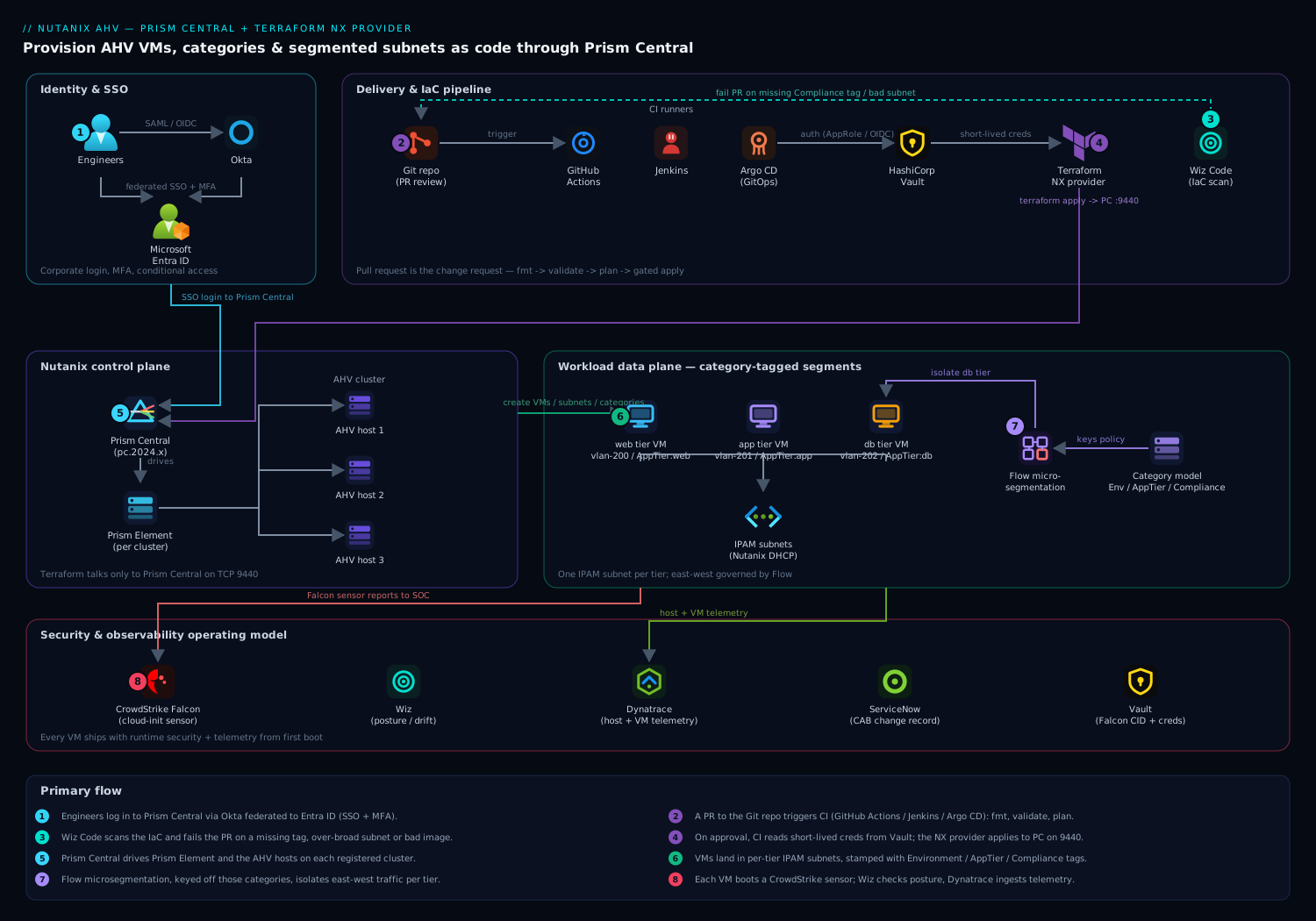
The control plane is Prism Central, which fronts the registered AHV cluster(s). Terraform talks only to Prism Central on 9440; Prism Central in turn drives the Prism Element on each cluster and the AHV hosts. Above Terraform sits the delivery chain — a Git repo, a CI runner (Jenkins, GitHub Actions, or Argo CD for the pull-through model), and HashiCorp Vault issuing the Prism credentials at plan time. Human access to Prism Central federates through Okta to Microsoft Entra ID over SAML/OIDC so engineers log in with corporate SSO and MFA rather than local Prism accounts. On the data path, every provisioned VM lands in a category-tagged segment whose east-west traffic is governed by Flow microsegmentation rules keyed off those same categories, and each guest carries a CrowdStrike Falcon sensor while Wiz scans the estate for posture drift and Dynatrace ingests host and VM telemetry.
1. Create a scoped Prism Central service account and store it in Vault
Do not run Terraform as admin. Create a dedicated identity with only the rights it needs, then put its secret where pipelines — not humans — can read it.
In Prism Central, create a local service account (or, better, an Entra-federated service identity), then define a custom role granting only VM, subnet, image, and category operations. With the role assigned, write the credential into HashiCorp Vault under the KV mount your CI is allowed to read:
# Write the Prism Central service-account creds into Vault KV v2
vault kv put secret/nutanix/prod \
  endpoint="pc.prod.internal" \
  username="svc-terraform@corp.example.com" \
  password='REDACTED_USE_VAULT_GENERATED'

# A short-lived token for the CI run is minted from a bound role, not a static token
vault token create -policy=nutanix-terraform -ttl=30m -format=json
The point of Vault here is concrete: the Prism password never lands in Git, in a terraform.tfvars, or in CI environment history. The pipeline authenticates to Vault (AppRole for Jenkins, OIDC/JWT auth for GitHub Actions), reads secret/nutanix/prod at plan time, and the lease expires 30 minutes later. If a runner is compromised, the blast radius is one expired token.
2. Configure the Terraform NX provider
Pin the provider and feed it the Vault-sourced values via environment variables, so nothing sensitive is written to disk. The provider reads NUTANIX_USERNAME, NUTANIX_PASSWORD, and NUTANIX_ENDPOINT automatically.
# versions.tf
terraform {
  required_version = ">= 1.6"
  required_providers {
    nutanix = {
      source  = "nutanix/nutanix"
      version = ">= 1.9.5"
    }
  }
  # Remote state — on-prem MinIO/S3-compatible bucket with locking via DynamoDB-compatible table,
  # or Terraform Cloud. Never local state for shared infrastructure.
  backend "s3" {
    bucket = "tfstate-nutanix-prod"
    key    = "ahv/clusters.tfstate"
    region = "us-east-1"
  }
}

# provider.tf
provider "nutanix" {
  # endpoint / username / password come from NUTANIX_* env vars exported from Vault
  port                 = 9440
  insecure             = false   # validate the PC certificate; ship the CA to the runner
  wait_timeout         = 60      # minutes the provider waits on long VM tasks
  session_auth         = true    # reuse a session cookie instead of basic-auth per call
}
Export the Vault values in the CI step right before terraform plan:
export NUTANIX_ENDPOINT="$(vault kv get -field=endpoint secret/nutanix/prod)"
export NUTANIX_USERNAME="$(vault kv get -field=username secret/nutanix/prod)"
export NUTANIX_PASSWORD="$(vault kv get -field=password secret/nutanix/prod)"
terraform init -input=false
terraform plan -out=tfplan -input=false
Two flags earn their keep. insecure = false forces TLS validation against Prism Central’s certificate — distribute the internal CA to your runners rather than disabling verification. session_auth = true makes the provider authenticate once and reuse the session cookie, which materially cuts API round-trips when you are creating dozens of VMs in one apply.
3. Look up the cluster, subnets, and images with data sources
Never hard-code UUIDs. Resolve them at plan time with data sources so the same code runs against prod, DR, and a lab cluster by changing one variable.
# data.tf
data "nutanix_clusters" "all" {}

locals {
  # Pick the target cluster by name from the PC inventory
  cluster_uuid = one([
    for c in data.nutanix_clusters.all.entities :
    c.metadata.uuid if c.name == var.cluster_name
  ])
}

# A pre-existing VLAN-backed subnet, trunked to the hosts at the switch
data "nutanix_subnet" "app_tier" {
  subnet_name = "vlan-201-app"
}

# A golden image previously uploaded to the cluster (e.g. via Packer)
data "nutanix_image" "rhel9_base" {
  image_name = "rhel9-base-2026.05"
}
one(...) is deliberate: if the cluster name matches zero or two entries, the plan fails loudly instead of silently picking one. That is exactly the behaviour you want when a typo could otherwise deploy your PCI workload onto the lab cluster.
4. Define the category model — the keystone
This is the step teams skip and regret. Categories are the join key between VMs and every policy that governs them. Model them as code, with explicit keys and the full set of allowed values, so a VM can only ever be tagged with a value that exists.
# categories.tf
resource "nutanix_category_key" "environment" {
  name        = "Environment"
  description = "Deployment environment, drives Flow policy scope"
}

resource "nutanix_category_value" "env_values" {
  for_each   = toset(["prod", "dr", "nonprod"])
  name       = nutanix_category_key.environment.name
  value      = each.value
}

resource "nutanix_category_key" "app_tier" {
  name        = "AppTier"
  description = "Three-tier role: web, app, or db — segmentation boundary"
}

resource "nutanix_category_value" "tier_values" {
  for_each   = toset(["web", "app", "db"])
  name       = nutanix_category_key.app_tier.name
  value      = each.value
}

resource "nutanix_category_key" "compliance" {
  name        = "Compliance"
  description = "Regulatory scope; pci-scoped VMs get a stricter Flow ruleset"
}

resource "nutanix_category_value" "compliance_values" {
  for_each   = toset(["pci", "internal", "public"])
  name       = nutanix_category_key.compliance.name
  value      = each.value
}
With this in place, Compliance: pci is a first-class, governed value — not free text in a spreadsheet. When the security team writes a Flow policy that isolates PCI workloads, it targets this category, and the moment a VM is tagged pci by Terraform it inherits that policy. The audit answer to “which VMs are PCI-scoped?” becomes a single category query in Prism Central instead of a forensic exercise.
5. Provision an AHV VM and tag it with categories
Now the VM itself. This resource attaches the NIC to the looked-up subnet, clones from the golden image into a new disk, sizes CPU/RAM, and — critically — stamps the governance categories from step 4.
# vm-app.tf
resource "nutanix_virtual_machine" "app01" {
  name                 = "app01-prod"
  cluster_uuid         = local.cluster_uuid
  num_vcpus_per_socket = 2
  num_sockets          = 2          # 4 vCPU total
  memory_size_mib      = 8192       # 8 GiB

  # Governance: these tags are what Flow, protection policies, and reporting key off
  categories {
    name  = nutanix_category_key.environment.name
    value = "prod"
  }
  categories {
    name  = nutanix_category_key.app_tier.name
    value = "app"
  }
  categories {
    name  = nutanix_category_key.compliance.name
    value = "internal"
  }

  # NIC on the app-tier subnet; IPAM hands out the guest IP
  nic_list {
    subnet_uuid = data.nutanix_subnet.app_tier.metadata.uuid
  }

  # Boot disk cloned from the golden image
  disk_list {
    data_source_reference = {
      kind = "image"
      uuid = data.nutanix_image.rhel9_base.metadata.uuid
    }
    disk_size_mib = 51200   # resize the cloned disk to 50 GiB
  }

  # Cloud-init for first-boot config (user, packages, CrowdStrike sensor install)
  guest_customization_cloud_init_user_data = base64encode(templatefile("${path.module}/cloud-init/app.yaml.tftpl", {
    falcon_cid = var.falcon_cid
  }))

  lifecycle {
    ignore_changes = [disk_list[0].disk_size_mib]  # avoid churn if AOS reports a rounded size
  }
}
The cloud-init user-data is where runtime security joins on day zero: the template installs the CrowdStrike Falcon sensor and registers it with your CID, so the VM reports to the SOC from first boot rather than waiting for a config-management sweep. Keep the CID itself in Vault and pass it through a variable — never inline it.
For fleets, wrap this in a small module and drive it with a map, so adding a VM is a four-line data change in a pull request:
module "app_fleet" {
  source   = "./modules/ahv-vm"
  for_each = var.app_vms        # map of name -> {vcpu, mem, tier}
  name     = each.key
  vcpu     = each.value.vcpu
  memory   = each.value.mem
  tier     = each.value.tier
  cluster_uuid = local.cluster_uuid
  subnet_uuid  = data.nutanix_subnet.app_tier.metadata.uuid
}
6. Create segmented subnets as code
If your subnets are not pre-created, Terraform can define VLAN-backed subnets with Nutanix IPAM so each tier gets its own L2 segment and managed address pool. This is the network half of segmentation — the categories in step 4 are the policy half.
# subnets.tf — a managed, IPAM-backed app-tier subnet on VLAN 201
resource "nutanix_subnet" "app_tier_managed" {
  name        = "vlan-201-app"
  cluster_uuid = local.cluster_uuid
  vlan_id     = 201
  subnet_type = "VLAN"

  # Nutanix IPAM: it owns DHCP and hands out guest IPs from this range
  subnet_ip          = "10.20.1.0"
  default_gateway_ip = "10.20.1.1"
  prefix_length      = 24

  ip_config_pool_list_ranges = ["10.20.1.50 10.20.1.250"]

  dhcp_options = {
    domain_name_servers = "10.0.0.53,10.0.0.54"
    domain_name         = "prod.internal"
  }
}
Define one subnet per tier — web on 200, app on 201, db on 202 — so the L2 boundaries line up with the AppTier category. The microsegmentation policy then has both a network boundary and a category boundary to work with, which is belt-and-braces isolation for the db tier in particular.
7. Wire the pull request into CI and let the platform tools take over
The whole point is that none of this runs from a laptop. The repo is the source of truth; a pull request is the change request.
- GitHub Actions / Jenkins runs
fmt → validate → planon every PR, authenticates to Vault for the Prism creds, and posts the plan as a comment for review. Apply is gated on approval and runs only from the protected branch. - Argo CD suits teams that prefer GitOps pull-through: a controller reconciles the desired state from Git rather than CI pushing it, which keeps drift visible.
- Wiz Code runs in the PR as IaC scanning: it flags a VM created without the
Compliancecategory, a subnet with an over-broad DHCP range, or an image not on the approved list — before merge, so misconfigurations never reach Prism Central. - A merged change can open a ServiceNow change record automatically (via the pipeline’s API call), giving the CAB the audit trail it needs without an engineer filing tickets by hand.
A representative GitHub Actions plan job:
jobs:
  plan:
    runs-on: self-hosted        # runner on a network that can reach pc.prod.internal:9440
    permissions: { id-token: write, contents: read }
    steps:
      - uses: actions/checkout@v4
      - name: Auth to Vault via OIDC
        run: |
          export VAULT_ADDR=https://vault.internal:8200
          TOKEN=$(vault write -field=token auth/jwt/login role=nutanix-terraform jwt=$ACTIONS_ID_TOKEN)
          echo "VAULT_TOKEN=$TOKEN" >> $GITHUB_ENV
      - name: Export Nutanix creds + plan
        run: |
          export NUTANIX_ENDPOINT="$(vault kv get -field=endpoint secret/nutanix/prod)"
          export NUTANIX_USERNAME="$(vault kv get -field=username secret/nutanix/prod)"
          export NUTANIX_PASSWORD="$(vault kv get -field=password secret/nutanix/prod)"
          terraform init -input=false && terraform plan -out=tfplan
      - name: Wiz IaC scan
        run: wiz-cli iac scan --path . --policy "Nutanix-Baseline"
Validation
After apply, confirm the desired state landed — do not trust the apply log alone.
# 1. Terraform's own view: no drift, expected resource count
terraform plan -detailed-exitcode    # exit 0 = no changes pending; 2 = drift

# 2. Confirm the VM exists and is powered on, via the v3 API
curl -ksu "$NUTANIX_USERNAME:$NUTANIX_PASSWORD" \
  -H 'Content-Type: application/json' -X POST \
  "https://$NUTANIX_ENDPOINT:9440/api/nutanix/v3/vms/list" \
  -d '{"kind":"vm","filter":"vm_name==app01-prod"}' | jq '.entities[].status.resources.power_state'

# 3. Verify the governance categories actually attached
curl -ksu "$NUTANIX_USERNAME:$NUTANIX_PASSWORD" \
  -H 'Content-Type: application/json' -X POST \
  "https://$NUTANIX_ENDPOINT:9440/api/nutanix/v3/vms/list" \
  -d '{"kind":"vm","filter":"vm_name==app01-prod"}' | jq '.entities[].metadata.categories_mapping'
In the Prism Central UI, run a category query for Compliance: internal and confirm app01-prod appears — that single query is what your security and audit teams will use, so prove it works now. Finally, confirm in Dynatrace that the new host and VM are reporting metrics; if the OneAgent or host extension was baked into the golden image, telemetry should appear within minutes, closing the loop that the workload is both built and observed.
Rollback / teardown
Because everything is declarative, rollback is removing the resource from code or destroying a scoped target — never clicking around Prism Central, which would create the drift this whole exercise eliminates.
# Tear down a single VM only, leaving categories and subnets intact
terraform destroy -target=nutanix_virtual_machine.app01 -auto-approve

# Roll back a bad change by reverting the PR and re-applying the previous state
git revert <merge-commit> && terraform apply -input=false

# Full environment teardown (lab only) — destroy order is provider-managed
terraform destroy -input=false
Destroy VMs and subnets before category keys: a category value still referenced by a VM cannot be deleted, and Terraform will (correctly) error rather than orphan policy. If a VM is stuck in a delete task, check Prism Central’s task list — a lingering image clone or a protection-policy membership can hold it, and clearing that lets the next apply converge.
Common pitfalls
- Treating categories as cosmetic. They drive Flow policy, protection policies, and image placement. A VM created without its
Compliancecategory is invisible to the security policy that should isolate it. Make the category a required module input so it cannot be forgotten — and let Wiz Code fail the PR if it is missing. - Hard-coded UUIDs. Cluster, subnet, and image UUIDs differ across PCs and change on rebuild. Always resolve them via data sources, or the same code silently targets the wrong cluster.
- Disabling TLS verification.
insecure = trueis the lazy fix for a self-signed PC cert and a standing audit finding. Ship the internal CA to runners and keepinsecure = false. - Local or unlocked state. Two engineers applying against shared infrastructure without state locking will corrupt it. Use a locking remote backend from day one.
- VLAN not trunked at the switch. Terraform attaches a NIC to a subnet; it does not configure your physical fabric. If the VLAN is not trunked to the AHV hosts, the VM gets a NIC with no connectivity and the failure looks like a guest problem.
- Disk-size drift churn. AOS sometimes reports a rounded disk size, so every plan shows a phantom change.
ignore_changesondisk_size_mib(as in step 5) suppresses it. - Running as Prism Admin. Over-privileged service accounts turn a compromised runner into a cluster-wide incident. Scope the custom role to exactly VM/subnet/image/category operations.
Security notes
Identity is the spine. Engineers reach Prism Central through Okta federated to Microsoft Entra ID, so access is corporate SSO with MFA and conditional access — no shared local Prism logins. Terraform’s own credential is a scoped, short-lived secret issued by HashiCorp Vault at plan time, never persisted. Runtime protection rides into every VM via the CrowdStrike Falcon sensor installed by cloud-init, reporting to the SOC from first boot. Posture is continuously checked by Wiz across the estate — drift to an over-broad subnet, an untagged compliance workload, a VM off the approved image — with Wiz Code shifting the same checks left into the pull request. Network segmentation is enforced in two layers that reinforce each other: L2 subnet boundaries per tier (step 6) and Flow microsegmentation rules keyed off the AppTier and Compliance categories (step 4), so the database tier is isolated by both its network and its policy. The combination means a single missing tag is caught three times — by Wiz Code in the PR, by the category-required module input, and by the audit category query.
Cost notes
On-prem Nutanix cost is dominated by licensed cores and consumed storage, not by an hourly meter, so the levers are different from cloud. First, right-size at provisioning: the module forces explicit vcpu/memory inputs in the pull request, which makes oversizing a visible, reviewable decision rather than a default. Second, drive density — because VMs are now uniform and category-tagged, you can confidently bin-pack and reclaim the snowflake over-provisioning that came from manual builds. Third, retire cleanly: terraform destroy -target releases licensed cores and storage the moment a workload is decommissioned, where a hand-built VM tends to linger and keep consuming its allocation. Finally, feed Dynatrace host and VM utilisation back to capacity planning — sustained low CPU across a category is the signal to consolidate, and because the category model is real, that report is one query rather than a spreadsheet reconciliation. The same uniformity that buys you security buys you density, and density is the whole cost story on owned hardware.
Going deeper
One provider, two API generations — and the naming churn to expect
The single most important thing to understand about nutanix/nutanix is that it currently straddles two generations of the Prism Central API, and the resource you pick tells the provider which one to drive.
The resources in this lesson — nutanix_virtual_machine, nutanix_subnet, nutanix_image, nutanix_category_key/nutanix_category_value, nutanix_project — are the first-generation resources, backed by the Prism Central v3 “intentful” API (/api/nutanix/v3/..., the same endpoints the Validation step curls). They shipped in the provider’s 1.x line and are the battle-tested path for AHV today.
Starting with the provider’s 2.x line, Nutanix began shipping a second generation of resources backed by the newer v4 APIs (namespaced as vmm, networking, clustermgmt, iam, prism). These carry a _v2 suffix: nutanix_virtual_machine_v2, nutanix_subnet_v2, nutanix_image_v2, nutanix_category_v2, and so on.
The trap — and the reason to read the changelog before every upgrade — is what _v2 actually means. It is the provider’s second-generation resource, not “version 2 of the API.” The underlying REST API is v4; the resource label is v2. Mixing that up leads people to assume the two are interchangeable. They are not — the schemas differ substantially. A quick orientation:
| Concern | v3-backed (1st-gen, this lesson) | v4-backed (_v2, newer) |
|---|---|---|
| VM resource | nutanix_virtual_machine |
nutanix_virtual_machine_v2 |
| Subnet | nutanix_subnet |
nutanix_subnet_v2 |
| Image | nutanix_image |
nutanix_image_v2 |
| Category | nutanix_category_key + nutanix_category_value (two resources) |
nutanix_category_v2 (one key-value entity) |
| Flow policy | nutanix_network_security_rule |
nutanix_network_security_policy_v2 |
| Categories on a VM | repeated categories { name value } blocks |
a referenced list of category ext_ids |
| Minimum platform | pc.2022.x+ | pc.2024.x+ / AOS with v4 GA |
Practical guidance: for new AHV automation on a current Prism Central, the v4-backed _v2 resources are the strategic direction and worth prototyping. For an existing estate, the v3 resources here remain fully supported — do not rewrite working state on a whim, because there is no in-place “upgrade” from nutanix_virtual_machine to nutanix_virtual_machine_v2. They are different resource addresses, so a migration is a deliberate import-and-state-move exercise, VM by VM (see Practice challenge 5). Pin the provider (version = ">= 1.9.5" here) and bump it on purpose, reading the changelog, rather than floating onto a 2.x that quietly changes a schema under you.
The v3 “intentful” API: async tasks and how idempotency actually works
When you apply a nutanix_virtual_machine, the provider does not block a socket while a VM boots. The v3 API is asynchronous and intent-based. Every entity is three envelopes:
spec— the desired state you declared (name, vCPU, disks, categories).status— the observed state Prism Central reports back.metadata— identity and bookkeeping, including aspec_versioninteger.
A create or update POSTs the spec and immediately gets back a task reference (a UUID). The provider then polls /api/nutanix/v3/tasks/{uuid} until it reaches SUCCEEDED or FAILED — and that is exactly what the provider’s wait_timeout = 60 governs: how many minutes it will wait on a long clone or migration before giving up. This is why a big first apply “hangs” politely — it is watching image-clone tasks complete, not stuck.
Idempotency falls out of this model. Terraform stores the entity UUID in state; on the next plan it reads status and diffs it against your spec. Two subtleties bite beginners:
statuscan legitimately differ fromspecfor fields the platform normalises — the classic beingdisk_size_mib, which AOS may round. That phantom diff is why step 5 usesignore_changes. The drift is real to Terraform but cosmetic in reality.spec_versionis optimistic concurrency. Prism Central increments it on every change. If someone edits the VM in the UI between your plan and apply, the version moves and the write can be rejected — the platform’s built-in protection against two writers clobbering each other. The lesson’s answer (all changes through PRs, humans locked out via scoped roles) exists precisely sospec_versionnever surprises you.
Images and disk cloning — where the boot disk really comes from
nutanix_image is how a golden image enters the cluster — uploaded from a URL or a local file, then registered so every cluster under Prism Central can clone from it. The VM’s boot disk in step 5 is not a fresh blank volume; the data_source_reference = { kind = "image", uuid = ... } tells AHV to clone the image into a new vDisk, then disk_size_mib grows the clone. Cloning is a metadata operation on Nutanix’s distributed storage fabric — near-instant and space-efficient until the guest writes — which is why standing up fifty VMs from one RHEL image does not copy fifty full disks.
Two production notes. First, build the image once with Packer (the nutanix Packer plugin talks to the same Prism Central) so the image is itself code, and Terraform only consumes it by name — the clean division of labour is Packer bakes, Terraform places. Second, you can add extra data disks by repeating disk_list blocks without a data_source_reference (a blank disk) and set device_properties to control boot order; leaving boot order implicit is a common reason a multi-disk VM boots to the wrong volume.
Categories, projects, and policy — the governance spine
Categories are covered in the body as the keystone; the deeper point is how they interlock with two neighbours:
nutanix_projectis a Prism Central project: a container that binds users, roles, resource quotas, and default subnets together — and it is the unit Nutanix Self-Service (Calm) consumes. Provisioning VMs into a project via Terraform is how you enforce “team X may burn at most N vCPU on subnet Y,” turning cost and blast-radius limits into declared policy rather than tribal knowledge.- Flow microsegmentation (
nutanix_network_security_rulein v3) is a firewall policy that targets categories, not IPs. A rule like “AppTier: db accepts 5432 only from AppTier: app” follows the VM wherever it lands, because it is keyed off the tag, not the address. That is why the body insists the category model is the join key — get the tag right and the policy is automatic; get it wrong and the firewall silently protects the wrong machine.
Model the taxonomy narrow and enumerated (as step 4 does with for_each over a toset) so a VM can only ever carry a value that exists — free-text categories are how the spreadsheet problem creeps back in through the code.
Guest customization: cloud-init and sysprep
The guest_customization_cloud_init_user_data in step 5 is the Linux path. The provider gives you three doors:
| Guest | Attribute | Payload |
|---|---|---|
| Linux | guest_customization_cloud_init_user_data |
base64-encoded cloud-init YAML |
| Windows | guest_customization_sysprep |
an unattend.xml (base64) |
| Windows (templated) | guest_customization_sysprep_custom_key_values |
key/values injected into the unattend |
All three run on first boot inside the guest, after AHV has cloned and started it — the hand-off point where infrastructure provisioning becomes OS configuration. Keep the payloads small and idempotent: set the hostname, join the domain or install the security agent (the body’s CrowdStrike example), then let a real config-management tool or a bootstrapped agent take it from there. Cramming full application setup into cloud-init is fragile because first boot has no retry loop — if a package mirror blips, the VM is up but half-built, and Terraform considers it “done.”
A representative cloud-init payload for the Linux template referenced in step 5:
#cloud-config
hostname: app01-prod
fqdn: app01-prod.prod.internal
users:
  - name: svcapp
    groups: [wheel]
    sudo: "ALL=(ALL) NOPASSWD:ALL"
    ssh_authorized_keys:
      - "ssh-ed25519 AAAA_PLACEHOLDER_PUBLIC_KEY svcapp@corp"
write_files:
  - path: /etc/falcon/cid
    permissions: "0600"
    content: "PLACEHOLDER_FALCON_CID"
runcmd:
  - [ /opt/CrowdStrike/falconctl, -s, --cid, "PLACEHOLDER_FALCON_CID" ]
  - [ systemctl, enable, --now, falcon-sensor ]
The Terraform / Nutanix Self-Service (Calm) boundary
A recurring architecture question: if Nutanix already ships Self-Service (the product formerly called Calm), why Terraform at all? They solve different halves.
- Terraform owns the infrastructure substrate — VMs, subnets, images, categories, projects — declaratively, in your Git/PR/CI story, alongside the rest of your cloud estate in one workflow and one policy engine (OPA/Sentinel/Wiz).
- Self-Service / Calm owns the application layer — multi-VM blueprints, a self-service marketplace, day-2 actions (scale, patch, backup) exposed to end users, and app-centric lifecycle in Calm’s own DSL.
The clean split most shops land on: Terraform builds the platform and the guardrails (projects, quotas, categories, base subnets); Calm publishes self-service application blueprints on top of that governed substrate. Trying to make Terraform a self-service portal for non-engineers, or make Calm your infrastructure-as-code system of record, fights each tool’s grain. Where they meet is the project — Terraform provisions and quota-bounds it; Calm consumes it as the tenancy boundary for blueprints.
Practice challenges
Work these in order; each <details> has a reference solution and a one-line reason it is the right move. No live cluster is needed to reason through them — treat them as a code review of your own HCL.
1 — (Beginner) Configure the provider without secrets on disk.
Pin nutanix/nutanix to a 1.9.x-or-later minor and configure the provider so it reads its endpoint, username, and password from the environment (not from HCL literals). Show versions.tf + provider.tf and the three export lines.
<details> <summary>Show solution</summary>
terraform {
  required_providers {
    nutanix = { source = "nutanix/nutanix", version = ">= 1.9.5, < 2.0.0" }
  }
}
provider "nutanix" {
  port         = 9440
  insecure     = false
  session_auth = true
}
export NUTANIX_ENDPOINT="$(vault kv get -field=endpoint secret/nutanix/lab)"
export NUTANIX_USERNAME="$(vault kv get -field=username secret/nutanix/lab)"
export NUTANIX_PASSWORD="$(vault kv get -field=password secret/nutanix/lab)"
Why: the provider reads NUTANIX_* from the environment, so the secret lives in Vault and the process env for one run — never in a committed .tfvars. The < 2.0.0 ceiling keeps you on the v3-backed resources until you choose to move.
</details>
2 — (Beginner) Resolve a cluster by name, fail loudly on ambiguity.
Given data "nutanix_clusters" "all" {}, produce the UUID of the cluster named in var.cluster_name, such that a typo (zero matches) or a duplicate name (two matches) errors the plan rather than guessing.
<details> <summary>Show solution</summary>
locals {
  cluster_uuid = one([
    for c in data.nutanix_clusters.all.entities :
    c.metadata.uuid if c.name == var.cluster_name
  ])
}
Why: one() returns the single element or errors on zero/many — the guard that stops the same code from silently deploying onto the wrong cluster.
</details>
3 — (Intermediate) Make the compliance tag impossible to forget. Wrap the VM in a module whose interface forces a compliance value from an allowed set, so a VM can never be created untagged. Show the variable with validation.
<details> <summary>Show solution</summary>
variable "compliance" {
  type = string
  validation {
    condition     = contains(["pci", "internal", "public"], var.compliance)
    error_message = "compliance must be one of: pci, internal, public."
  }
}
Inside the module, feed it straight into a categories { name = "Compliance" value = var.compliance } block.
Why: a required variable with validation turns “someone forgot the tag” into a plan-time error, backing up the Wiz-in-PR check with a hard schema guard.
</details>
4 — (Intermediate) Add a data disk and pin boot order. Extend the VM with a second, blank 100 GiB data disk while guaranteeing it boots from the cloned image disk, not the new one.
<details> <summary>Show solution</summary>
# Boot disk: cloned from the golden image (device index 0)
disk_list {
  data_source_reference = { kind = "image", uuid = data.nutanix_image.rhel9_base.metadata.uuid }
  disk_size_mib         = 51200
  device_properties {
    device_type  = "DISK"
    disk_address = { device_index = 0, adapter_type = "SCSI" }
  }
}
# Blank data disk (device index 1)
disk_list {
  disk_size_mib = 102400
  device_properties {
    device_type  = "DISK"
    disk_address = { device_index = 1, adapter_type = "SCSI" }
  }
}
Why: a disk_list block without data_source_reference is a blank volume; setting explicit device_index values makes boot order deterministic instead of leaving AHV to guess.
</details>
5 — (Advanced) Plan a v3 → v4 resource migration.
You want to move nutanix_virtual_machine.app01 onto the v4-backed nutanix_virtual_machine_v2 without destroying the running VM. Outline the safe path and why a plain rename will not do.
<details> <summary>Show solution</summary>
A plain rename destroys and recreates, because the two are different resource types at different addresses, not a renamed instance. The safe path:
- Add the new
nutanix_virtual_machine_v2resource (do not apply a destroy of the old one yet). terraform import nutanix_virtual_machine_v2.app01 <vm-ext-id>to bind the existing VM to the new resource.terraform state rm nutanix_virtual_machine.app01to release the old address without touching the VM.terraform planand reconcile schema differences (categories move from repeated blocks to a referenced list) until the plan is a clean no-op.
Why: moved {} blocks only work between the same resource type; crossing resource types is an import + state rm, done per VM in a maintenance window, never a bulk float onto 2.x.
</details>
6 — (Advanced) Ship a governed VM end to end, gated in CI.
Assemble: an enumerated category taxonomy, a VM that stamps Environment/AppTier/Compliance and installs an agent via cloud-init, and a PR job that fails if the Compliance category is absent. Sketch the pieces and the guardrail.
<details> <summary>Show solution</summary>
- Taxonomy:
nutanix_category_key+ afor_each-over-tosetnutanix_category_valuefor each ofEnvironment,AppTier,Compliance(as in step 4). - VM: three
categories {}blocks +guest_customization_cloud_init_user_data = base64encode(templatefile(...))that installs the agent (as in step 5). - Guardrail (representative, in the PR pipeline):
# Fail the PR if any VM file lacks a Compliance category value
grep -L 'value *= *"\(pci\|internal\|public\)"' vm-*.tf \
  && { echo "VM missing Compliance category"; exit 1; } || true
wiz-cli iac scan --path . --policy "Nutanix-Baseline"
Why: three defences stack — the required module input (schema), the CI grep (fast local gate), and Wiz IaC (policy engine) — so a missing tag is caught before it ever reaches Prism Central. The grep is a belt-and-braces check, not a substitute for the policy scan.
</details>
Common beginner mistakes
These are conceptual misreads — the wrong mental model — as opposed to the operational traps in Common pitfalls above.
- “
_v2means version 2 of the API.” No —nutanix_virtual_machine_v2is the provider’s second-generation resource, which happens to be backed by the v4 REST API. The number on the resource and the number on the API are different axes. Right model: resource generation ≠ API version; read the changelog, not the suffix. - “Terraform configures the network.” It attaches a vNIC to an existing subnet and, with IPAM, hands out a guest IP — but it does not trunk your VLAN to the hosts or touch the top-of-rack switch. Right model: Terraform places the VM on the fabric; it does not build the fabric. A VM with a NIC and no connectivity is almost always an untrunked VLAN, not a Terraform bug.
- “Categories are just labels, I’ll tidy them later.” On AHV categories are the join key for Flow policy, protection policies, and image placement. An untagged VM is invisible to the policy meant to protect it. Right model: the category is load-bearing security config, not metadata — model it before the VM, not after.
- “The apply is hung.” A long first apply is usually the provider polling an async v3 task (an image clone, a migration) up to
wait_timeout. Right model: the v3 API is asynchronous — the provider is watching a task complete, not frozen. Check Prism Central’s task list before you Ctrl-C. - “Prism Central and Prism Element are the same thing.” Prism Element manages a single cluster; Prism Central is the multi-cluster control plane the provider talks to on 9440. Right model: Terraform → Prism Central → (many) Prism Elements. Point the provider at an Element and the category/Flow/project resources are not there.
- “I’ll bump the provider to latest to get new features.” Floating onto the 2.x line can swap schemas and pull in
_v2behaviour you did not ask for. Right model: pin and upgrade deliberately — a provider version is a dependency, not a live feed.
Glossary
- AHV — Nutanix’s built-in, KVM-based hypervisor; the layer that actually runs your VMs, without a separate hypervisor licence.
- AOS — Acropolis Operating System, the distributed storage-and-compute software that turns a set of nodes into one Nutanix cluster.
- Hyperconverged infrastructure (HCI) — an architecture that collapses compute, storage, and virtualisation onto the same commodity servers instead of separate SAN/server/hypervisor tiers.
- Prism Element (PE) — the management interface for a single Nutanix cluster.
- Prism Central (PC) — the multi-cluster control plane that manages many clusters plus categories, Flow, projects, and images. This is what the Terraform provider talks to (TCP 9440).
nutanix/nutanixprovider — the official Terraform provider that drives Prism Central’s API.- v3 (intentful) API — the first-generation Prism Central REST API (
/api/nutanix/v3/...) that the 1.x resources use; asynchronous and spec/status based. - v4 API — Nutanix’s newer, namespaced REST API generation (
vmm,networking,iam, …) that the provider’s_v2resources target. _v2resource — a second-generation provider resource (e.g.nutanix_virtual_machine_v2) backed by the v4 API. The suffix is the resource generation, not the API version.spec/status/metadata— the three envelopes of a v3 entity: desired state, observed state, and identity/bookkeeping.spec_version— an integer inmetadatathat Prism Central bumps on every change; the basis for optimistic-concurrency protection against two simultaneous writers.- Async task — a v3 mutation returns a task UUID immediately; the provider polls it to completion, bounded by
wait_timeout. wait_timeout— provider setting for how many minutes to wait on a long task (VM clone, migration) before failing.session_auth— provider setting to authenticate once and reuse a session cookie, cutting API round-trips on big applies.- Category (key / value) — a governed tag, e.g.
Compliance: pci. In v3 a key (nutanix_category_key) and its allowed values (nutanix_category_value) are separate resources; in v4 a category is one key-value entity. - Flow / microsegmentation — Nutanix’s distributed firewall; policies target categories, not IP addresses, so a rule follows the VM.
- Protection policy — a data-protection (snapshot/replication) policy whose membership is also category-driven.
- Project (
nutanix_project) — a Prism Central container binding users, roles, resource quotas, and default subnets; the tenancy unit that Nutanix Self-Service consumes. - Image / golden image (
nutanix_image) — a registered base disk (often built with Packer) that VMs clone their boot disk from. - Disk cloning / vDisk — creating a VM disk as a space-efficient copy of an image on Nutanix’s storage fabric, rather than a full byte copy.
- IPAM — IP Address Management; when a subnet is IPAM-managed, Nutanix owns DHCP and hands guest IPs from a defined pool.
- Subnet (VLAN-backed / VPC overlay) — an L2 segment for VM NICs, either mapped to a physical VLAN or an overlay inside a Nutanix VPC.
- Guest customization — first-boot configuration injected into the guest OS: cloud-init (Linux) or sysprep (Windows).
- cloud-init — the Linux standard for first-boot config (users, packages, files, commands), passed here as base64 YAML.
- sysprep — the Windows equivalent, driven by an
unattend.xml. - Data source — a read-only Terraform lookup (
data "nutanix_subnet" ...) that resolves live IDs at plan time so UUIDs are never hard-coded. ext_id— the external identifier a v4 (_v2) resource uses to reference an entity, e.g. onimport.- Nutanix Self-Service (Calm) — Nutanix’s application-blueprint and self-service-marketplace product; owns the app layer above the infrastructure substrate Terraform provisions.
- HashiCorp Vault — the secrets manager that issues the short-lived Prism Central credential at plan time so it never lands in Git or
.tfvars. - Service account — a non-human Prism Central identity with a scoped custom role (VM/subnet/image/category only), used by the pipeline instead of
admin.