A media-streaming company runs its transcoding fleet on an on-premises OpenStack cloud — the economics of pushing petabytes through a public-cloud egress meter never worked, so the platform team owns the hardware in two colocation halls. The mandate from the new VP of Engineering is blunt: “every tenant network and every VM is built by a pipeline, reviewed in a pull request, and reproducible — no more snowflake instances that someone clicked into existence at 2 a.m. during an incident.” Today the transcoding tenant is a hand-built mess: networks created in Horizon, security groups nobody can explain, and a nova boot runbook that drifts from reality every release. This guide rebuilds that tenant the right way: a declarative footprint in Terraform for the stable infrastructure, Heat for the autoscaling worker group that has to react to queue depth, and a real operating model around both so a CISO and an on-call engineer are equally comfortable with it.
The two tools are not competitors here — they have different jobs. Terraform (with the terraform-provider-openstack) owns the long-lived, cross-resource footprint: the tenant network, router, subnets, key pairs, security groups, and the baseline instances, all in version control with a remote state file and a plan you review before every apply. Heat — OpenStack’s native orchestration service — owns the things that must live inside the cloud and react to it: an autoscaling group of transcoding workers driven by Aodh alarms on queue depth, where the scaling logic belongs next to the resources it scales. You will provision both from one pipeline and end with a tenant where nothing exists that a reviewer did not approve.
In a nutshell
Every public cloud hands you the same primitive Lego bricks — virtual machines, virtual networks, disks, load balancers, an identity system — behind an API. OpenStack is that same set of bricks, except you run the datacenter. It is the open-source software that turns a rack of your own servers into a cloud with a Nova (compute) API, a Neutron (networking) API, a Cinder (block-storage) API, and so on. A media company that would rather not pay a public-cloud egress meter on every petabyte can own the hardware and still hand engineers a self-service “give me a VM” button.
Here is the payoff for anyone who already knows Terraform: driving OpenStack is the exact same plan → apply loop you use for AWS or Azure. You do not learn a new workflow — you point the terraform-provider-openstack at your cloud’s Keystone (identity) endpoint instead of at AWS, and every habit transfers: a data source looks up an image by name, a resource block declares a network, terraform plan shows the diff, a reviewer approves the pull request, terraform apply builds it. The only genuinely new idea is Heat, OpenStack’s own built-in orchestration engine — think of it as the CloudFormation that ships inside OpenStack — for the one job Terraform is awkward at: scaling a fleet up and down from inside the cloud in response to the cloud’s own alarms.
A mental model to carry through the lesson: picture OpenStack as an apartment building you own and rent out. Nova furnishes the rooms (VMs), Neutron runs the wiring and plumbing (networks, routers, floating IPs), Cinder rents storage lockers (volumes), Glance is the catalogue of room layouts (images), Keystone is the front desk that checks everyone’s ID (identity and projects), and Heat is the building manager who adds or removes rooms as occupancy rises and falls (autoscaling). Terraform is the architect’s blueprint that says exactly how the building is laid out; Heat is the manager acting on that blueprint after move-in.
Level: Advanced · Time: ~40 min
What you need first: comfort with the core Terraform loop (init / plan / apply, providers, resources, data sources, remote state) from the earlier lessons, plus a working OpenStack cloud you can reach (the Prerequisites just below list the exact services). If the words “state file”, “drift”, and “idempotent” still feel fuzzy, read IaC core concepts: state, drift, idempotency first.
After this lesson you will be able to:
- Authenticate the OpenStack provider three ways —
clouds.yaml,OS_*environment variables, and a scoped application credential — and explain when each fits. - Build a complete tenant footprint in Terraform: a Neutron network, subnets, router, security groups, Nova instances, Cinder volumes, and floating IPs, every UUID resolved by name.
- Decide, resource by resource, what belongs in Terraform versus a Heat/HOT stack, and wire the clean handoff between them with
openstack_orchestration_stack_v1. - Read the provider’s
_v2/_v3resource naming, and reach for Octavia load balancers, availability-zone hints, and boot-from-volume when a design calls for them. - Sidestep the classic OpenStack-on-Terraform traps: the Nova-legacy vs Neutron resource families, floating-IP association, and quota walls mid-apply.
Prerequisites
- An OpenStack cloud (this guide targets a 2024.1 “Caracal” or newer release) with Nova (compute), Neutron (networking), Glance (images), Cinder (block storage), Heat (orchestration), and Aodh (alarming) enabled. Confirm with
openstack service list. - A project (tenant) and a user with the
memberrole on it, plus quota for at least 8 instances, 2 routers, 4 networks, and 8 floating IPs (openstack quota show). - The
openstackCLI (python-openstackclient) and thepython-heatclientplugin installed locally. - Terraform 1.7+ and the
terraform-provider-openstack/openstackprovider 2.x. - An external/provider network already created by the cloud operator (commonly named
publicorext-net) that floating IPs are allocated from. Find it withopenstack network list --external. - A pre-uploaded Glance image (e.g.
Ubuntu-22.04-LTS) and a flavor (e.g.m1.large) — list withopenstack image listandopenstack flavor list.
Target topology
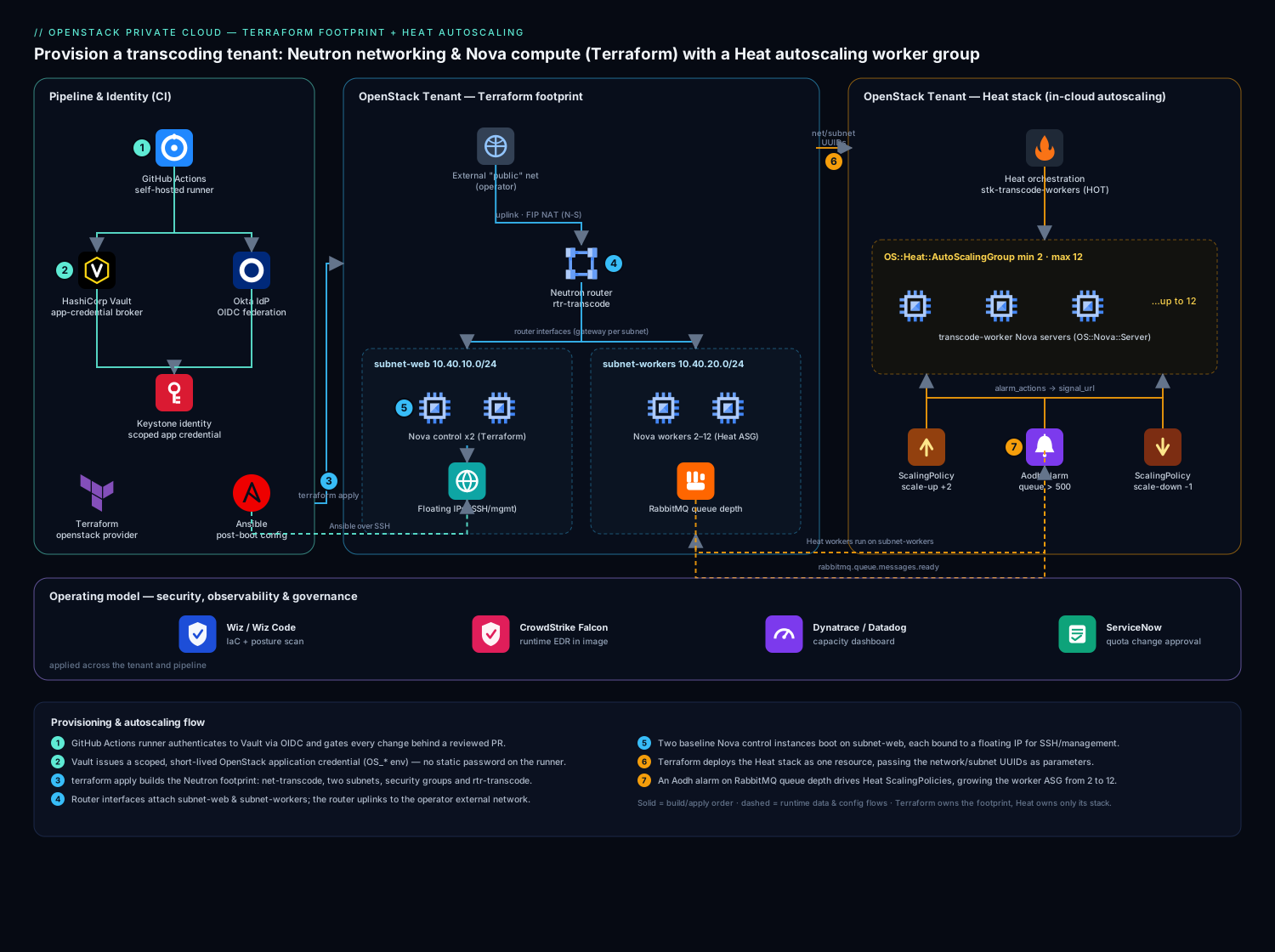
The tenant you build has a clean two-tier shape. A Neutron tenant network (net-transcode) carries two subnets — a web subnet for the control instances and a workers subnet for the transcoding fleet — both behind a single Neutron router that uplinks to the operator’s external network for north-south traffic and floating-IP NAT. Two baseline Nova instances (a control node and a NFS/queue node) are provisioned by Terraform and pinned to the web subnet, each fronted by a floating IP for SSH/management. The transcoding workers are not in Terraform — they are an OS::Heat::AutoScalingGroup managed by a Heat stack on the workers subnet, scaling between 2 and 12 instances based on an Aodh alarm watching RabbitMQ queue depth. Security groups gate every flow: management SSH only from the bastion CIDR, transcoding RPC only between the two subnets, and egress for image pulls. Identity for the humans and pipeline comes from Okta federated into Keystone over OIDC, so an engineer logs in once with corporate credentials and the pipeline assumes a scoped service identity rather than carrying a static password.
1. Lay down credentials and the Terraform provider
Never put OpenStack credentials in a .tf file or a committed clouds.yaml. The pipeline pulls a short-lived application credential from HashiCorp Vault (Vault’s role here is the single broker of all OpenStack and cloud secrets — it issues a scoped, expiring app credential per run so no long-lived password ever lands on a runner or in state). Locally, engineers authenticate through Okta → Keystone OIDC and source the resulting OS_* environment, which terraform-provider-openstack reads natively.
Create an application credential scoped to just this project so the pipeline cannot touch other tenants:
# Authenticated as the human/service user, mint a restricted app credential
openstack application credential create terraform-transcode \
  --role member \
  --description "CI footprint for transcode tenant" \
  --expiration 2026-07-10T00:00:00 \
  --restricted          # cannot create further app credentials

# Output gives id + secret — these are what Vault stores and injects, never committed
Point the provider at the cloud. Configure it from environment variables so the same code runs locally and in CI with zero edits:
# providers.tf
terraform {
  required_version = ">= 1.7.0"
  required_providers {
    openstack = {
      source  = "terraform-provider-openstack/openstack"
      version = "~> 2.1"
    }
  }
  backend "s3" {
    # Swift/Ceph RGW S3-compatible endpoint holds remote state + a DynamoDB-style lock
    bucket = "tfstate-transcode"
    key    = "openstack/footprint.tfstate"
    # endpoint, region, credentials come from backend config / env in CI
  }
}

# All auth (auth_url, application_credential_id/secret, region) is read from
# OS_* env vars injected by Vault — nothing sensitive lives in this file.
provider "openstack" {}
Initialize and confirm the provider can reach Keystone:
export OS_AUTH_TYPE=v3applicationcredential
export OS_AUTH_URL=https://keystone.colo.internal:5000/v3
export OS_APPLICATION_CREDENTIAL_ID=...     # injected by Vault
export OS_APPLICATION_CREDENTIAL_SECRET=... # injected by Vault
export OS_REGION_NAME=ColoEast

terraform init
terraform providers   # should list openstack ~> 2.1
2. Build the Neutron network, subnets, and router in Terraform
This is the load-bearing layer. Define the tenant network with two subnets and a router that uplinks to the operator’s external network. Look up the external network by name with a data source so you never hardcode its UUID:
# network.tf
data "openstack_networking_network_v2" "external" {
  name     = "public"     # the operator's provider/external network
  external = true
}

resource "openstack_networking_network_v2" "transcode" {
  name           = "net-transcode"
  admin_state_up = true
}

resource "openstack_networking_subnet_v2" "web" {
  name            = "subnet-web"
  network_id      = openstack_networking_network_v2.transcode.id
  cidr            = "10.40.10.0/24"
  ip_version      = 4
  dns_nameservers = ["10.40.0.10", "10.40.0.11"]
  enable_dhcp     = true
}

resource "openstack_networking_subnet_v2" "workers" {
  name            = "subnet-workers"
  network_id      = openstack_networking_network_v2.transcode.id
  cidr            = "10.40.20.0/24"
  ip_version      = 4
  dns_nameservers = ["10.40.0.10", "10.40.0.11"]
  enable_dhcp     = true
}

resource "openstack_networking_router_v2" "transcode" {
  name                = "rtr-transcode"
  admin_state_up      = true
  external_network_id = data.openstack_networking_network_v2.external.id
}

# Attach both subnets to the router so they get a gateway + NAT to the outside
resource "openstack_networking_router_interface_v2" "web" {
  router_id = openstack_networking_router_v2.transcode.id
  subnet_id = openstack_networking_subnet_v2.web.id
}

resource "openstack_networking_router_interface_v2" "workers" {
  router_id = openstack_networking_router_v2.transcode.id
  subnet_id = openstack_networking_subnet_v2.workers.id
}
Run a scoped plan and apply just the network so you can eyeball the topology before any compute exists:
terraform plan  -target=openstack_networking_router_interface_v2.web \
                -target=openstack_networking_router_interface_v2.workers
terraform apply -target=openstack_networking_router_interface_v2.web \
                -target=openstack_networking_router_interface_v2.workers
openstack router show rtr-transcode -c external_gateway_info
3. Define security groups with least-privilege rules
Security groups are where the hand-built tenant rotted, so be explicit. Create two groups — one for management (SSH from the bastion only) and one for the transcoding data plane (RPC between subnets only). Default-deny is implicit in Neutron; you only add the allows you can justify.
# secgroups.tf
variable "bastion_cidr" {
  description = "Jump-host CIDR allowed to SSH"
  type        = string
  default     = "10.40.0.0/28"
}

resource "openstack_networking_secgroup_v2" "mgmt" {
  name        = "sg-transcode-mgmt"
  description = "SSH from bastion only"
}

resource "openstack_networking_secgroup_rule_v2" "ssh_in" {
  direction         = "ingress"
  ethertype         = "IPv4"
  protocol          = "tcp"
  port_range_min    = 22
  port_range_max    = 22
  remote_ip_prefix  = var.bastion_cidr
  security_group_id = openstack_networking_secgroup_v2.mgmt.id
}

resource "openstack_networking_secgroup_v2" "dataplane" {
  name        = "sg-transcode-data"
  description = "Transcoder RPC + queue traffic, intra-tenant only"
}

# Allow AMQP (RabbitMQ) from the worker subnet to the control/queue node
resource "openstack_networking_secgroup_rule_v2" "amqp_in" {
  direction         = "ingress"
  ethertype         = "IPv4"
  protocol          = "tcp"
  port_range_min    = 5672
  port_range_max    = 5672
  remote_ip_prefix  = openstack_networking_subnet_v2.workers.cidr
  security_group_id = openstack_networking_secgroup_v2.dataplane.id
}
A note that saves an outage: Neutron security groups stack, so attach both sg-transcode-mgmt and sg-transcode-data to instances that need each — they are additive, not exclusive.
4. Provision the baseline Nova instances and floating IPs
Now the compute. Look up the image and flavor by name (again, no hardcoded UUIDs), create a key pair, boot two control-tier instances, and allocate a floating IP for each. Use user_data (cloud-init) to baseline the host rather than baking a golden image for every change — Ansible runs the heavier configuration afterward over SSH, so cloud-init only does enough to make the box reachable and Ansible-ready.
# compute.tf
data "openstack_images_image_v2" "base" {
  name        = "Ubuntu-22.04-LTS"
  most_recent = true
}

data "openstack_compute_flavor_v2" "large" {
  name = "m1.large"
}

resource "openstack_compute_keypair_v2" "deploy" {
  name       = "kp-transcode-deploy"
  public_key = file("${path.module}/keys/deploy.pub")  # pubkey only; private key in Vault
}

resource "openstack_compute_instance_v2" "control" {
  count           = 2
  name            = "transcode-control-${count.index}"
  image_id        = data.openstack_images_image_v2.base.id
  flavor_id       = data.openstack_compute_flavor_v2.large.id
  key_pair        = openstack_compute_keypair_v2.deploy.name
  security_groups = ["sg-transcode-mgmt", "sg-transcode-data"]

  network {
    uuid = openstack_networking_network_v2.transcode.id
    fixed_ip_v4 = cidrhost(openstack_networking_subnet_v2.web.cidr, 20 + count.index)
  }

  user_data = <<-EOT
    #cloud-config
    package_update: true
    packages: [python3, qemu-utils]
    runcmd:
      - [ systemctl, enable, --now, qemu-guest-agent ]
  EOT

  depends_on = [openstack_networking_router_interface_v2.web]
}

# Allocate a floating IP from the external pool and bind it to each control node
resource "openstack_networking_floatingip_v2" "control" {
  count = 2
  pool  = data.openstack_networking_network_v2.external.name
}

resource "openstack_compute_floatingip_associate_v2" "control" {
  count       = 2
  floating_ip = openstack_networking_floatingip_v2.control[count.index].address
  instance_id = openstack_compute_instance_v2.control[count.index].id
}
Apply the full footprint and capture the floating IPs as outputs so the next pipeline stage (and Ansible’s inventory) can consume them:
# outputs.tf
output "control_floating_ips" {
  value = openstack_networking_floatingip_v2.control[*].address
}
terraform plan -out=tfplan
terraform apply tfplan
terraform output control_floating_ips
5. Hand the autoscaling workers to Heat
The transcoding fleet must grow when the RabbitMQ queue backs up and shrink when it drains — scaling logic that belongs inside the cloud, next to the alarm. This is exactly what Heat is for, so Terraform deploys the Heat stack as a single resource and Heat owns everything within it. Write the Heat Orchestration Template (HOT):
# heat/workers.yaml
heat_template_version: 2021-04-16
description: Autoscaling transcoding worker group on subnet-workers

parameters:
  image:        { type: string, default: Ubuntu-22.04-LTS }
  flavor:       { type: string, default: m1.large }
  workers_net:  { type: string }   # net-transcode UUID, passed from Terraform
  workers_subnet: { type: string } # subnet-workers UUID
  key_name:     { type: string, default: kp-transcode-deploy }
  data_secgroup: { type: string, default: sg-transcode-data }

resources:
  worker_group:
    type: OS::Heat::AutoScalingGroup
    properties:
      min_size: 2
      max_size: 12
      desired_capacity: 2
      resource:
        type: OS::Nova::Server
        properties:
          image: { get_param: image }
          flavor: { get_param: flavor }
          key_name: { get_param: key_name }
          security_groups: [ { get_param: data_secgroup } ]
          networks:
            - network: { get_param: workers_net }
          metadata: { role: transcode-worker }
          user_data_format: RAW
          user_data: |
            #cloud-config
            runcmd:
              - [ systemctl, enable, --now, transcode-agent ]

  scale_up:
    type: OS::Heat::ScalingPolicy
    properties:
      adjustment_type: change_in_capacity
      auto_scaling_group_id: { get_resource: worker_group }
      cooldown: 120
      scaling_adjustment: 2

  scale_down:
    type: OS::Heat::ScalingPolicy
    properties:
      adjustment_type: change_in_capacity
      auto_scaling_group_id: { get_resource: worker_group }
      cooldown: 300
      scaling_adjustment: -1

  queue_high_alarm:
    type: OS::Aodh::GnocchiAggregationByResourcesAlarm
    properties:
      description: Scale up when RabbitMQ ready messages stay high
      metric: rabbitmq.queue.messages.ready
      aggregation_method: mean
      granularity: 300
      evaluation_periods: 1
      threshold: 500
      comparison_operator: gt
      alarm_actions: [ { get_attr: [scale_up, signal_url] } ]
      query:
        str_replace:
          template: '{"=": {"queue": "transcode_jobs"}}'
          params: {}

outputs:
  worker_group_size:
    value: { get_attr: [worker_group, current_size] }
Wire it into Terraform as an openstack_orchestration_stack_v1 resource, feeding the network UUIDs that Terraform already created — this is the clean handoff between the two tools:
# heat.tf
resource "openstack_orchestration_stack_v1" "workers" {
  name          = "stk-transcode-workers"
  template_opts = { Bin = file("${path.module}/heat/workers.yaml") }

  parameters = {
    workers_net    = openstack_networking_network_v2.transcode.id
    workers_subnet = openstack_networking_subnet_v2.workers.id
  }

  timeout = 30
}
terraform apply -target=openstack_orchestration_stack_v1.workers
# Or drive Heat directly for ad-hoc inspection:
openstack stack list
openstack stack resource list stk-transcode-workers
openstack stack output show stk-transcode-workers worker_group_size
6. Drive it all from one pipeline
The whole footprint runs from GitHub Actions (the runner is what gates every change behind a pull request and a green plan; it authenticates to Vault via its OIDC identity, pulls the OpenStack app credential, and never stores a long-lived secret). For teams already standardized on it, Jenkins plays the identical role — the same plan / apply stages behind a Jenkinsfile. A representative job:
# .github/workflows/footprint.yml  (illustrative — auth/secret wiring lives elsewhere)
jobs:
  terraform:
    runs-on: [self-hosted, colo]
    steps:
      - uses: actions/checkout@v4
      - name: Fetch OpenStack app credential from Vault
        run: ./scripts/vault-fetch-os-creds.sh   # exports OS_* for the run
      - run: terraform init
      - run: terraform validate
      - run: terraform plan -out=tfplan          # surfaced on the PR for review
      - run: terraform apply tfplan              # only on merge to main
The same merge that applies infrastructure triggers an Ansible play (Ansible’s job is post-boot configuration management — installing the transcode agent, distributing RabbitMQ credentials, and enforcing CIS hardening that cloud-init is too blunt for) against the Terraform-emitted inventory of floating IPs.
Validation
After an apply, prove the tenant is actually wired correctly rather than trusting the apply succeeded:
# 1. Network + router uplink exists and has an external gateway
openstack router show rtr-transcode -c external_gateway_info

# 2. Both subnets are attached to the router
openstack port list --router rtr-transcode -c "Fixed IP Addresses"

# 3. Baseline instances are ACTIVE and on the right fixed IPs
openstack server list --name transcode-control -c Name -c Status -c Networks

# 4. Floating IPs are associated, not just allocated
openstack floating ip list -c "Floating IP Address" -c "Fixed IP Address" -c Port

# 5. SSH reachability through the floating IP (from the bastion)
ssh -i deploy.key ubuntu@$(terraform output -raw control_floating_ips | head -1) 'hostname'

# 6. Heat stack is CREATE_COMPLETE and the ASG is at desired size
openstack stack show stk-transcode-workers -c stack_status
openstack stack output show stk-transcode-workers worker_group_size

# 7. The Aodh alarm exists and is in a sane state (ok / insufficient data, not broken)
openstack alarm list --query "type=gnocchi_aggregation_by_resources_threshold"
Force a scale event to confirm the autoscaling loop is live: publish synthetic high queue-depth metrics (or temporarily drop the threshold) and watch worker_group_size climb, then settle back after the cooldown. An alarm that never fires is worse than no alarm — test it.
Rollback and teardown
Because the whole tenant is declarative, rollback is terraform destroy plus letting Heat unwind its own stack — but order matters, or Neutron refuses to delete a router that still has ports.
# 1. Heat first: deleting the stack drains the ASG and removes its servers + alarm
openstack stack delete stk-transcode-workers --wait
#    (or: terraform destroy -target=openstack_orchestration_stack_v1.workers)

# 2. Then the Terraform footprint — provider handles FIP disassociation order
terraform destroy

# If a router interface lingers and blocks deletion, detach it explicitly:
openstack router remove subnet rtr-transcode subnet-workers
openstack router remove subnet rtr-transcode subnet-web
For a partial rollback after a bad change, prefer Terraform’s history: terraform plan against the previous Git commit shows exactly what drifted, and a targeted apply of the prior definition reverts just that resource. Keep the remote state and its lock intact throughout — never rm the state file to “start clean,” which orphans live resources you then pay for and have to hunt down by hand.
Common pitfalls
- Hardcoded UUIDs. Image, flavor, and external-network IDs differ per cloud and per upgrade. Always resolve them with
datasources by name, or the same code fails the moment Glance re-publishes an image. - Forgetting the router interface. Creating a subnet does not connect it — without an
openstack_networking_router_interface_v2, instances boot with no gateway and floating-IP NAT silently fails. This is the single most common “my VM can’t reach the internet” ticket. - Floating IP allocated but not associated.
openstack_networking_floatingip_v2only reserves the address; you still need the_associate_v2(or aport_id) to bind it. An allocated-but-unbound FIP looks healthy in the console and routes nowhere. - Quota walls mid-apply. Heat scaling up into an exhausted instance/RAM quota leaves the stack in
UPDATE_FAILED. Size project quota formax_size, notdesired_capacity, before you ship. - Security groups not stacking as expected. Forgetting that Neutron groups are additive leads people to cram every rule into one giant group; keep them small and composable, and attach multiple.
- Heat vs Terraform overlap. Do not let both tools manage the same resource. Terraform owns the network and baseline; Heat owns only what is inside its stack. Overlap produces fights where each tool reverts the other on every run.
Security notes
Identity is the perimeter. Humans reach Keystone through Okta federated over OIDC (Okta is the corporate IdP; engineers authenticate once and Keystone trusts the assertion), and the pipeline uses scoped, expiring application credentials brokered by HashiCorp Vault so no static OpenStack password ever lands on a runner or in state. Run Wiz / Wiz Code against the repository and the live tenant — Wiz Code scans the Terraform and Heat templates in the pull request for an over-broad remote_ip_prefix of 0.0.0.0/0 or a public-by-default security group before merge, while Wiz’s cloud posture side flags drift on the running instances. Put CrowdStrike Falcon sensors in the base Glance image so every Nova instance and every Heat-scaled worker comes up with runtime threat detection reporting to the SOC from first boot — autoscaled hosts are exactly where unmonitored compute hides. Keep security groups least-privilege (SSH from the bastion CIDR only, never the world), terminate management access at a bastion, and let Terraform — not a console click — be the only thing that opens a port.
Cost notes
Private-cloud cost is capacity, not a usage meter, so the lever is packing density and not stranding hardware. Set Heat’s max_size deliberately and tie scale-down to a real drain signal so the fleet shrinks the moment the queue clears rather than idling on reserved hypervisor RAM you could schedule for another tenant. Right-size flavors against actual transcoder CPU/RAM — an oversized flavor wastes capacity on every autoscaled instance, multiplied across the group. Pipe per-tenant utilization and queue-depth-versus-fleet-size into Dynatrace or Datadog (their job here is the capacity dashboard the platform team uses to prove the tenant is sized honestly and to justify the next hardware buy) so scaling decisions are driven by data, not by the 2 a.m. guess this whole rebuild was meant to kill. Finally, gate quota increases through ServiceNow change requests, giving capacity planning a documented approval trail before a tenant is allowed to grow into shared hardware.
Going deeper
One provider, many service APIs
terraform-provider-openstack/openstack looks like a single provider, but under the hood it fans out to a dozen independent OpenStack service APIs — Nova, Neutron, Cinder, Glance, Keystone, Octavia, Heat, Designate (DNS), and more. That has two practical consequences. First, a resource can fail not because your HCL is wrong but because the service it targets is not deployed on that cloud — ask for an openstack_lb_loadbalancer_v2 on a cloud without Octavia and the provider returns a 404 from an endpoint that does not exist. Confirm the service with openstack service list (or openstack catalog list) before writing resources against it. Second, the resource name tells you which service and which API family you are hitting:
| Prefix | Service | Example resource |
|---|---|---|
openstack_compute_*_v2 |
Nova (compute) | openstack_compute_instance_v2, openstack_compute_keypair_v2 |
openstack_networking_*_v2 |
Neutron (networking) | openstack_networking_network_v2, openstack_networking_router_v2, openstack_networking_port_v2 |
openstack_blockstorage_*_v3 |
Cinder (block storage) | openstack_blockstorage_volume_v3, openstack_blockstorage_volume_attach_v3 |
openstack_images_image_v2 |
Glance (images) | openstack_images_image_v2 |
openstack_lb_*_v2 |
Octavia (load balancing) | openstack_lb_loadbalancer_v2, openstack_lb_pool_v2 |
openstack_orchestration_stack_v1 |
Heat (orchestration) | openstack_orchestration_stack_v1 |
openstack_identity_*_v3 |
Keystone (identity) | openstack_identity_project_v3, openstack_identity_application_credential_v3 |
openstack_dns_*_v2 |
Designate (DNS) | openstack_dns_zone_v2, openstack_dns_recordset_v2 |
The _v2 / _v3 suffix is the OpenStack service API generation the resource speaks to — not the version of the Terraform provider. openstack_blockstorage_volume_v3 talks to the Cinder v3 API; the provider itself is on 2.x. Beginners routinely misread the suffix as “provider version” and get confused — it is purely the service API family.
Authenticating: clouds.yaml, OS_*, and application credentials
The provider reads credentials exactly the way the openstack CLI does, so anything that authenticates the CLI authenticates Terraform. Three common shapes, cleanest first:
1. clouds.yaml (named clouds). A single YAML file (searched in ./, ~/.config/openstack/, then /etc/openstack/) can hold many named clouds. Point the provider at one with the cloud argument or the OS_CLOUD env var:
# ~/.config/openstack/clouds.yaml  — secrets here are PLACEHOLDERS; prefer app creds
clouds:
  transcode-colo:
    auth:
      auth_url: https://keystone.colo.internal:5000/v3
      application_credential_id: "APP_CRED_ID_PLACEHOLDER"
      application_credential_secret: "APP_CRED_SECRET_PLACEHOLDER"
    region_name: ColoEast
    interface: internal
    identity_api_version: 3
    auth_type: v3applicationcredential
provider "openstack" {
  cloud = "transcode-colo"   # or set OS_CLOUD=transcode-colo and leave this empty
}
2. OS_* environment variables. The classic path — an openrc file exports OS_AUTH_URL, OS_USERNAME/OS_PASSWORD (or the app-credential pair), OS_PROJECT_NAME, OS_PROJECT_DOMAIN_NAME, OS_USER_DOMAIN_NAME, OS_REGION_NAME, and OS_AUTH_TYPE. This is what the pipeline in this lesson uses, because a secret broker can inject the variables for one run and they vanish when the runner is torn down. An empty provider "openstack" {} block reads them all.
3. Application credentials (strongly preferred for automation). Instead of embedding a user’s password — which carries that user’s full role set and never expires — mint an application credential scoped to one project with a chosen role and an expiry (openstack application credential create ... --restricted). It authenticates with auth_type=v3applicationcredential and the OS_APPLICATION_CREDENTIAL_ID / _SECRET pair. If it leaks, the blast radius is one project until the expiry, and you revoke it without touching the human’s password. This is the OpenStack analogue of an AWS IAM role standing in for a long-lived access key.
Project and domain scoping matters. OpenStack identity is a tree: a domain contains projects (tenants), and a token is scoped to exactly one project. OS_PROJECT_NAME alone is ambiguous if two domains each have a “transcode” project — you must also set OS_PROJECT_DOMAIN_NAME. A provider block scoped to the wrong project silently builds resources in the wrong tenant, so make the scope explicit and never lean on defaults.
Two ways to attach a NIC: inline network {} vs an explicit port
openstack_compute_instance_v2 lets you attach networking two ways, and the choice has real consequences:
- Inline
network {}block (used in this lesson) — quick; Nova asks Neutron to create the port for you. Fine for a plain instance on one subnet. - Explicit
openstack_networking_port_v2+network { port = ... }— you declare the Neutron port as its own resource, then hand its ID to the instance. Reach for this when you need any of: a pinnedfixed_ip, multiple security groups bound at the port,allowed_address_pairs(required for VIPs and keepalived/VRRP), port-security toggles, or a stable port that outlives instance rebuilds.
resource "openstack_networking_port_v2" "control" {
  name           = "port-control-0"
  network_id     = openstack_networking_network_v2.transcode.id
  admin_state_up = true

  fixed_ip {
    subnet_id  = openstack_networking_subnet_v2.web.id
    ip_address = "10.40.10.20"
  }

  # Security groups belong on the PORT in the Neutron model
  security_group_ids = [
    openstack_networking_secgroup_v2.mgmt.id,
    openstack_networking_secgroup_v2.dataplane.id,
  ]
}

resource "openstack_compute_instance_v2" "control_port" {
  name      = "transcode-control-port"
  image_id  = data.openstack_images_image_v2.base.id
  flavor_id = data.openstack_compute_flavor_v2.large.id

  network { port = openstack_networking_port_v2.control.id }
}
Note the split: with an inline block you pass security_groups = [names] (Nova-style, by name); with an explicit port you set security_group_ids = [ids] on the port (Neutron-style, by ID). Mixing the two — setting security_groups on the instance and a port that already carries groups — is a classic source of “why does this instance have four security groups” confusion.
Floating IPs: the Neutron way vs the Nova-legacy way
A floating IP is an address on the external/provider network that Neutron NATs to an instance’s fixed IP. There are two resource families to associate one, and they are not interchangeable:
| Resource | API family | Use it when |
|---|---|---|
openstack_networking_floatingip_v2 + openstack_networking_floatingip_associate_v2 |
Neutron (modern) | Almost always — it binds the FIP to a Neutron port, works with explicit ports and VIPs |
openstack_compute_floatingip_associate_v2 |
Nova proxy (legacy) | Only for the quick inline-network {} instance path, as this lesson does |
Prefer the networking pair for anything real: it binds to a port, so it survives instance rebuilds that keep the port, and it is the only path that works when the FIP must land on a specific VIP address. Remember the two-step nature either way — _floatingip_v2 only allocates the address from the pool; without the _associate_v2 it routes nowhere.
Block storage: volumes and boot-from-volume
Cinder volumes are openstack_blockstorage_volume_v3, attached to an instance with openstack_compute_volume_attach_v2:
resource "openstack_blockstorage_volume_v3" "scratch" {
  name              = "vol-transcode-scratch-0"
  size              = 500                       # GiB
  volume_type       = "ssd"                     # a Cinder volume type on your cloud
  availability_zone = "nova"
}

resource "openstack_compute_volume_attach_v2" "scratch" {
  instance_id = openstack_compute_instance_v2.control[0].id
  volume_id   = openstack_blockstorage_volume_v3.scratch.id
}
For a root disk that outlives the instance (or a flavor with no local disk), boot from a volume with a block_device block on the instance — set source_type = "image", destination_type = "volume", boot_index = 0, and delete_on_termination to taste. Boot-from-volume is also what lets you snapshot and re-launch a root disk, which local-disk instances cannot do.
Load balancing with Octavia
When the two control nodes need a single VIP in front of them, that is Octavia — the modern OpenStack LBaaS. The resource set mirrors the service model: a load balancer on a subnet, a listener on a port, a pool, members, and a health monitor.
resource "openstack_lb_loadbalancer_v2" "control" {
  name          = "lb-transcode-control"
  vip_subnet_id = openstack_networking_subnet_v2.web.id
}

resource "openstack_lb_listener_v2" "https" {
  name            = "listener-https"
  protocol        = "HTTPS"
  protocol_port   = 443
  loadbalancer_id = openstack_lb_loadbalancer_v2.control.id
}

resource "openstack_lb_pool_v2" "control" {
  name        = "pool-control"
  protocol    = "HTTPS"
  lb_method   = "ROUND_ROBIN"
  listener_id = openstack_lb_listener_v2.https.id
}

resource "openstack_lb_member_v2" "control" {
  count         = 2
  pool_id       = openstack_lb_pool_v2.control.id
  address       = openstack_compute_instance_v2.control[count.index].access_ip_v4
  protocol_port = 443
  subnet_id     = openstack_networking_subnet_v2.web.id
}

resource "openstack_lb_monitor_v2" "control" {
  pool_id     = openstack_lb_pool_v2.control.id
  type        = "HTTPS"
  delay       = 10
  timeout     = 5
  max_retries = 3
}
Octavia builds real Amphora VMs (or drives an OVN provider) behind the scenes, so an LB create can take a minute or two — that is the service provisioning, not Terraform hanging.
Availability zones, quotas, and cloud-init
Availability zones are per-service and independent. A Nova AZ (a group of compute hosts) has nothing to do with a Cinder AZ (storage) or a Neutron AZ (network agents) beyond a shared naming convention. Pin compute with availability_zone on the instance, storage with availability_zone on the volume, and network placement with availability_zone_hints on the network/router — but do not assume “az-1” means the same physical failure domain across all three unless your operator built it that way.
Quotas bite mid-apply, silently. Every project has quota on instances, vCPUs, RAM, floating IPs, volumes, and volume GiB (openstack quota show). Terraform and Heat both fail partway through an apply when a quota wall is hit, leaving a half-built footprint. Size quota for the maximum you will reach — for a Heat autoscaling group, that means max_size, not desired_capacity — before you ship, and treat a quota bump as a change request, not an afterthought.
cloud-init / user_data is how a fresh instance configures itself on first boot. Pass a #cloud-config document (or a raw script) as user_data; keep it minimal — enough to make the box reachable and hand off to configuration management (Ansible here) — rather than encoding your whole build in it. The provider base64-encodes it for you. In Heat, the same idea is user_data with user_data_format: RAW on OS::Nova::Server.
Terraform vs Heat/HOT: who owns what
Both tools can create a Nova server, so the question is never “can it” but “who should own this resource.” The provider (openstack_orchestration_stack_v1) can even deploy a Heat stack from Terraform — one opaque resource on the Terraform side, a whole HOT template of resources on the Heat side — which is the clean seam this lesson uses.
| Use Terraform for | Use Heat/HOT for |
|---|---|
| The long-lived, cross-cutting footprint (networks, routers, secgroups, baseline VMs) | Self-contained stacks that scale from inside the cloud |
| State you want reviewed in a PR with a diff before every change | Autoscaling groups driven by Aodh alarms on Ceilometer/Gnocchi metrics |
| Multi-cloud estates where OpenStack is one provider among AWS/Azure | Teams/operators who live in openstack stack ... and expect native stacks |
| Anything you want in remote state with locking and drift detection | Logic that must react to cloud telemetry without a CI runner in the loop |
The key mechanical difference: Terraform and Heat do not share state. To Terraform, the Heat stack is a single openstack_orchestration_stack_v1 resource — it cannot see or reconcile the servers inside the stack; Heat owns those. That is a feature (a clean ownership boundary), but it means the cardinal rule holds: never let both tools manage the same resource, or each reverts the other on every run.
OpenTofu note: terraform-provider-openstack is published to the OpenTofu registry too and behaves identically — nothing in this lesson changes if you run tofu instead of terraform. The pipeline here brokers credentials through Vault; the dedicated Secrets in IaC: Vault dynamic credentials lesson goes deeper on that pattern.
Practice challenges
Work these against a scratch project on a lab OpenStack (DevStack works well). Each solution is one valid approach, not the only one.
1. (Beginner) Prove your auth before you write any resources. Create a clouds.yaml entry for your lab cloud using an application credential, then confirm Terraform can reach Keystone without applying anything.
<details> <summary>Solution</summary>
openstack application credential create tf-lab --role member --restricted
# put the returned id/secret into ~/.config/openstack/clouds.yaml under clouds.tf-lab
export OS_CLOUD=tf-lab
terraform init
terraform providers      # lists terraform-provider-openstack
terraform plan           # empty config → "No changes", but auth succeeded
Why: plan forces a Keystone token request; a green plan against empty config proves credentials and endpoint before any resource can fail for the wrong reason.
</details>
2. (Beginner) Never hardcode a UUID. Add data sources that resolve your base image and flavor by name, and output both IDs.
<details> <summary>Solution</summary>
data "openstack_images_image_v2" "base" {
  name        = "Ubuntu-22.04-LTS"
  most_recent = true
}

data "openstack_compute_flavor_v2" "std" {
  name = "m1.large"
}

output "image_id"  { value = data.openstack_images_image_v2.base.id }
output "flavor_id" { value = data.openstack_compute_flavor_v2.std.id }
Why: image and flavor UUIDs differ per cloud and change when Glance re-publishes an image; resolving by name keeps the same code portable across clouds and upgrades. </details>
3. (Intermediate) Attach a Cinder volume. Add a 200 GiB volume and attach it to transcode-control-0.
<details> <summary>Solution</summary>
resource "openstack_blockstorage_volume_v3" "scratch" {
  name = "vol-scratch-0"
  size = 200
}

resource "openstack_compute_volume_attach_v2" "scratch" {
  instance_id = openstack_compute_instance_v2.control[0].id
  volume_id   = openstack_blockstorage_volume_v3.scratch.id
}
Why: compute and storage are separate services — the volume is a Cinder resource and the attachment is a Nova operation, so it takes two resources, not one. </details>
4. (Intermediate) Switch to an explicit Neutron port. Replace one control node’s inline network {} with an openstack_networking_port_v2 that pins a fixed IP and carries both security groups, then boot the instance from that port.
<details> <summary>Solution</summary>
resource "openstack_networking_port_v2" "control0" {
  network_id = openstack_networking_network_v2.transcode.id

  fixed_ip {
    subnet_id  = openstack_networking_subnet_v2.web.id
    ip_address = "10.40.10.30"
  }

  security_group_ids = [
    openstack_networking_secgroup_v2.mgmt.id,
    openstack_networking_secgroup_v2.dataplane.id,
  ]
}

resource "openstack_compute_instance_v2" "control0" {
  name      = "transcode-control-port"
  image_id  = data.openstack_images_image_v2.base.id
  flavor_id = data.openstack_compute_flavor_v2.large.id
  network { port = openstack_networking_port_v2.control0.id }
}
Why: security groups and fixed IPs belong on the port in the Neutron model; the explicit port is what unlocks VIPs, allowed_address_pairs, and a NIC that survives an instance rebuild.
</details>
5. (Advanced) Front the control nodes with Octavia. Stand up a load balancer, HTTPS listener, pool, two members, and a health monitor over subnet-web.
<details> <summary>Solution</summary>
resource "openstack_lb_loadbalancer_v2" "ctl" {
  name          = "lb-ctl"
  vip_subnet_id = openstack_networking_subnet_v2.web.id
}

resource "openstack_lb_listener_v2" "https" {
  protocol        = "HTTPS"
  protocol_port   = 443
  loadbalancer_id = openstack_lb_loadbalancer_v2.ctl.id
}

resource "openstack_lb_pool_v2" "ctl" {
  protocol    = "HTTPS"
  lb_method   = "ROUND_ROBIN"
  listener_id = openstack_lb_listener_v2.https.id
}

resource "openstack_lb_member_v2" "ctl" {
  count         = 2
  pool_id       = openstack_lb_pool_v2.ctl.id
  address       = openstack_compute_instance_v2.control[count.index].access_ip_v4
  protocol_port = 443
  subnet_id     = openstack_networking_subnet_v2.web.id
}

resource "openstack_lb_monitor_v2" "ctl" {
  pool_id     = openstack_lb_pool_v2.ctl.id
  type        = "HTTPS"
  delay       = 10
  timeout     = 5
  max_retries = 3
}
Why: the resource graph mirrors Octavia’s own model (LB → listener → pool → members + monitor); first confirm the cloud actually runs Octavia with openstack loadbalancer provider list, or every apply 404s.
</details>
6. (Advanced) Refactor without rebuilding, and size quota for scale. You renamed openstack_compute_instance_v2.control to ...worker — move state instead of destroying and recreating — and set project quota so a Heat max_size of 12 does not wall the apply.
<details> <summary>Solution</summary>
moved {
  from = openstack_compute_instance_v2.control
  to   = openstack_compute_instance_v2.worker
}
# Size quota for the MAX the ASG can reach, not desired_capacity
openstack quota set --instances 16 --cores 64 --ram 131072 <project>
Why: a moved block (Terraform 1.1+) rewrites the state address at plan time with zero API calls — no destroy/recreate — and quota sized for max_size (not desired_capacity) is what stops a scale-up from leaving the Heat stack in UPDATE_FAILED. See refactoring with moved/import/removed blocks.
</details>
Common beginner mistakes
These are the conceptual misreadings that trip people new to OpenStack-on-Terraform — distinct from the operational traps in Common pitfalls above.
- “It’s one provider, so it’s one API.” The provider fans out to a dozen services. A resource can be perfectly written and still 404 because that cloud never deployed Octavia, Designate, or even Heat. Right model: check
openstack service listfirst; a missing resource type usually means a missing service, not a typo. - “The
_v2/_v3suffix is the provider version.” It is the OpenStack service API generation —openstack_blockstorage_volume_v3speaks Cinder v3 while the provider is on 2.x. Right model: read the suffix as “which API,” never “which provider release.” - Mixing the Nova-legacy and Neutron resource families. There are two of almost everything —
openstack_compute_secgroup_v2vsopenstack_networking_secgroup_v2,openstack_compute_floatingip_associate_v2vsopenstack_networking_floatingip_associate_v2. Right model: on any modern cloud, default to theopenstack_networking_*(Neutron) family; reach for thecompute_*proxies only for the quick inline-network {}path. - “A floating IP is a public IP.” A FIP is just an address on whatever network the operator marked external — in a private cloud that pool is often RFC1918 (
10.x,192.168.x), reachable only inside the colo. Right model: a FIP gives you a stable, NATed address; whether it is internet-routable is the operator’s networking decision, not Terraform’s. - “
regionand availability zone are the same thing.” A region is a whole Keystone service catalog with its own endpoints; an AZ is a scheduling boundary within a service in one region. Right model: switch regions by changingOS_REGION_NAME/endpoints; place workloads across failure domains withavailability_zone— and remember Nova/Cinder/Neutron AZs are independent. - “Terraform can see inside the Heat stack.” To Terraform,
openstack_orchestration_stack_v1is one opaque resource; the servers Heat scales are invisible to Terraform state. Right model: let Heat fully own everything inside its template and never point a Terraform resource at a server the stack manages. - Committing
clouds.yaml(or anopenrc) with a real secret. It authenticates as a full user, carrying that user’s entire role set, forever. Right model: use a scoped, expiring application credential and inject it from a secret broker per run — the secret never touches the repo or the state file.
Glossary
- OpenStack — open-source software that turns your own servers into a private cloud with compute, network, and storage APIs; a self-hosted alternative to AWS/Azure.
- Keystone — the identity service: authenticates users and the pipeline, and issues project-scoped tokens. The provider’s
auth_urlpoints here. - Nova — the compute service that runs virtual machines (instances). Terraform resource prefix
openstack_compute_*. - Neutron — the networking service: networks, subnets, routers, ports, floating IPs, security groups. Prefix
openstack_networking_*. - Cinder — the block-storage service that provides volumes you attach to instances. Prefix
openstack_blockstorage_*. - Glance — the image service that stores the OS images instances boot from. Prefix
openstack_images_*. - Heat — OpenStack’s native orchestration engine; runs HOT templates as stacks. The in-cloud equivalent of AWS CloudFormation.
- HOT (Heat Orchestration Template) — the YAML format Heat consumes (
heat_template_version,parameters,resources,outputs). - Aodh — the alarming service that fires actions (e.g. a scale-up) when a metric crosses a threshold; pairs with Ceilometer/Gnocchi for the metrics.
- Ceilometer / Gnocchi — OpenStack’s telemetry collection (Ceilometer) and time-series metric store (Gnocchi) that Aodh alarms evaluate.
- Octavia — the load-balancing service (LBaaS). Prefix
openstack_lb_*. - Designate — the DNS service. Prefix
openstack_dns_*. - Horizon — the OpenStack web dashboard; the “console click” this lesson replaces with code.
- Swift — the object-storage service (S3-like); a Ceph RADOS Gateway often provides the S3-compatible endpoint used here for remote state.
- Project (tenant) — an isolation and quota boundary that owns resources; a token is scoped to exactly one project.
- Domain — a top-level Keystone container for projects and users; disambiguates identically named projects (
OS_PROJECT_DOMAIN_NAME). - Application credential — a scoped, optionally expiring credential minted for automation, so a pipeline never carries a human’s password. Auth type
v3applicationcredential. clouds.yaml— a file of named cloud definitions the CLI and provider both read; selected with thecloudargument orOS_CLOUD.OS_*environment variables — the classic credential channel (OS_AUTH_URL,OS_PROJECT_NAME, …), typically sourced from anopenrcfile.- Flavor — a named VM size (vCPU / RAM / disk), like a cloud instance type. Resolve by name with a data source.
- Image — a bootable OS template in Glance (e.g.
Ubuntu-22.04-LTS). - Port — a Neutron virtual NIC; carries fixed IPs and security groups and can outlive the instance attached to it.
- Floating IP (FIP) — an address on the external network that Neutron NATs to an instance’s fixed IP; allocate, then associate.
- Security group — a stateful, additive set of allow rules attached to ports/instances; Neutron default-denies, and you add only the allows you can justify.
- Availability zone (AZ) — a scheduling/failure boundary within a service in one region; Nova, Cinder, and Neutron AZs are independent of one another.
- Region — a full, self-contained service catalog with its own endpoints; switch with
OS_REGION_NAME. - Microversion — the OpenStack API generation a resource targets, shown as the
_v2/_v3suffix (not the Terraform provider version). - cloud-init /
user_data— the first-boot configuration a fresh instance runs; keep it minimal and hand off to configuration management. openstack_orchestration_stack_v1— the Terraform resource that deploys and manages a whole Heat stack as one opaque unit.