In a nutshell
Think of this lesson as building an assembly line for infrastructure changes. A part — your edit to a .tf file — enters the line on a pull request. The first stations inspect it: is it formatted, does it parse, does it lint? Anything malformed is rejected before it moves. The next station draws an exact blueprint of what will change in the cloud (terraform plan) and pins that blueprint where reviewers can read it. When the pull request merges, that same blueprint is boxed into a sealed carton — a pipeline artifact — and carried to the last station, the apply, which is roped off behind a gate. A named human must press the button, and when the machine finally builds, it builds from the sealed blueprint, not from a fresh guess.
That last detail is the one people miss. A pipeline that re-runs plan at apply time is not an assembly line; it is a machine that redraws the blueprint after the inspector went home. Saving the plan and replaying it is what makes “what was reviewed” and “what was built” the same object.
Why should a beginner care? Because the alternative is one engineer running terraform apply on a laptop, with a long-lived cloud secret in a file, no review, no gate, and no record of who changed what. The pipeline trades trust in a person for trust in a process — which is exactly what an auditor, a change-advisory board, and a 3 a.m. incident all want to see.
Level: Expert · Time: ~45 min
Prerequisites — you should already be comfortable with:
- Core Terraform: HCL, providers, the
plan/applycycle, state, and modules (see Terraform Fundamentals: HCL, Providers, State & the Core Workflow). - The
azurermprovider basics, and the idea of remote state living in an Azure Storage blob. - Reading YAML, and the general shape of a CI/CD pipeline (phases that run in order, some in parallel).
- An Azure subscription where you can create a resource group and an app registration, plus an Azure DevOps project. Prior exposure to the GitHub Actions OIDC pipeline helps, but this lesson stands alone.
After this lesson you will be able to:
- Write a multi-stage
azure-pipelines.ymlthat runs Validate → Plan → gated Apply. - Wire a keyless service connection using workload identity federation (OIDC), with no secret stored anywhere.
- Publish the exact
tfplanas a pipeline artifact and apply that same plan after approval. - Protect the apply with an Environment, layering required approvers, an exclusive lock, and branch control.
- Keep state in an Azure Storage blob authenticated by Entra ID RBAC — no storage account keys in CI.
- Catch drift on a nightly schedule, and factor the whole thing into a reusable YAML template.
The fastest way to lose an audit — and eventually a production environment — is a Terraform apply run from an engineer’s laptop. Nobody saw the plan, the cloud credentials were long-lived and over-scoped, the state lock was optional, and there is no record of who changed what or whether anyone approved it. This lesson replaces that with a pipeline: Azure DevOps triggers on a pull request, validates and plans the change, publishes the exact binary plan as an artifact, pauses on an Environment approval gate until a named human clicks approve, and then applies that saved plan — authenticating keylessly to Azure through a workload-identity (OIDC) service connection, with state living in Azure Storage under a blob lease lock.
By the end you will have a complete, copy-pasteable azure-pipelines.yml, the backend/provider configuration it drives, and the click-by-click steps to create the service connection, the variable group, and the Environment with its approval check. This is the Azure DevOps counterpart to the GitHub Actions pipeline taught in A Production Terraform CI/CD Pipeline on GitHub Actions with OIDC — the mechanics (keyless auth, saved plan, gated apply, drift) are identical; only the platform primitives differ.
What you’ll build
You will build a real delivery pipeline for a small Azure footprint — a resource group with a virtual network and a storage account — managed entirely through Terraform and Azure DevOps. The point is not the resources; it is the delivery machine around them. A developer opens a pull request against main. A branch policy requires the pipeline’s Validate + Plan stages to pass and posts the plan into the PR. On merge, the pipeline runs again, saves tfplan as a pipeline artifact, and stops at an Environment called prod that carries a manual-approval check. A reviewer approves; the Apply stage downloads the saved plan and runs terraform apply tfplan. No secret was ever stored — the service connection uses workload identity federation, so the agent exchanges a short-lived Azure DevOps token for an Entra ID access token at run time. State is a blob in Azure Storage, locked by a lease for the life of each run.
Here is the whole machine end to end. Read it left to right: the pull request feeds the pipeline, the plan becomes an artifact, the approval gate stands between plan and mutation, and only then does anything change in Azure.
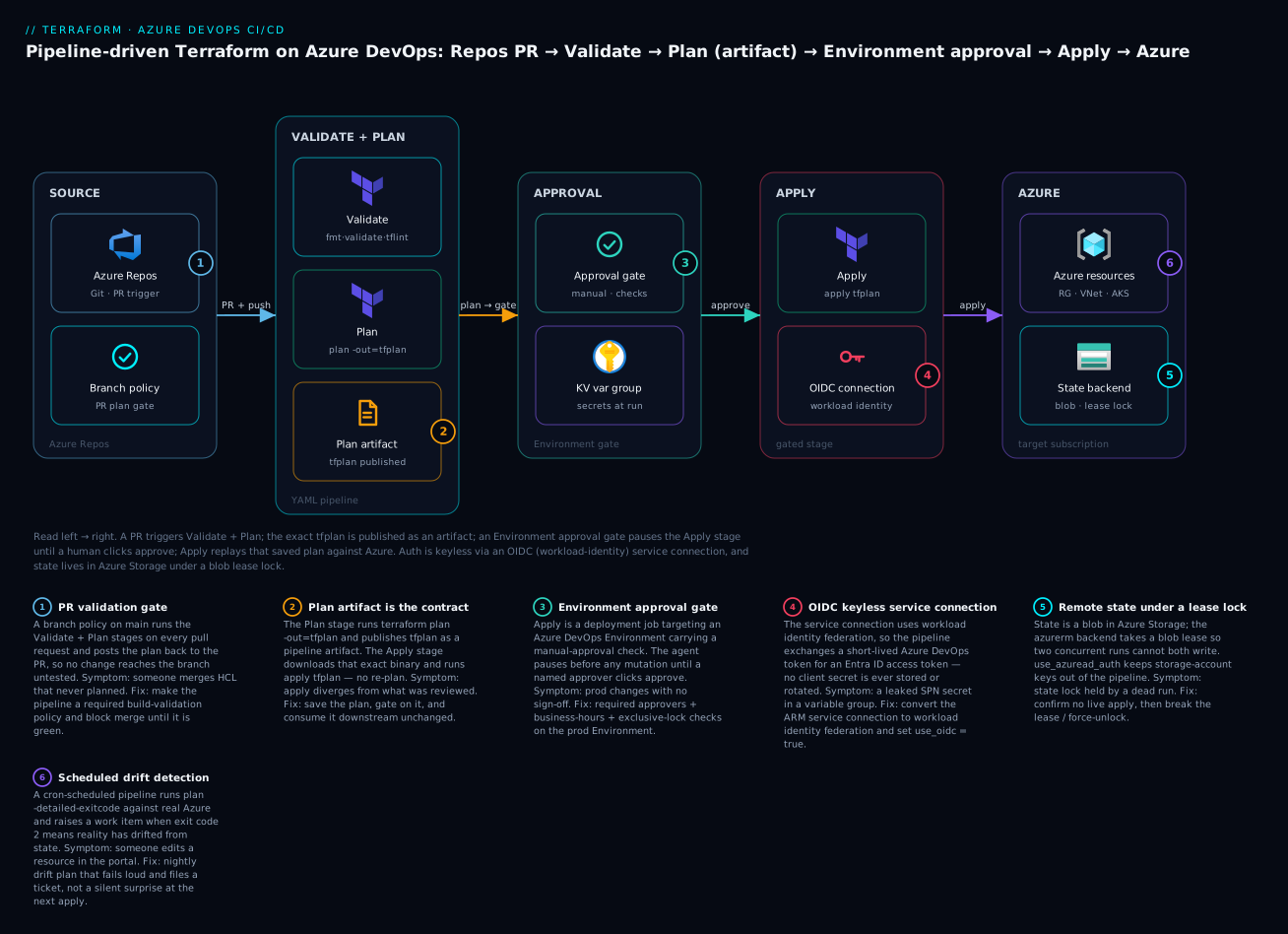
The six numbered decisions on the diagram are the spine of this lesson: PR validation, the plan artifact as an immutable contract, the Environment approval gate, keyless OIDC auth, remote state under a lease lock, and scheduled drift detection. We will build each one with real YAML and HCL, then run the whole thing and tear it down.
Why Terraform through a pipeline rather than the portal, the CLI, or ARM/Bicep? Because the pipeline is the only place all four of these hold at once: a reviewed plan, a keyless identity, an enforced approval, and an immutable audit trail. The portal has no plan and no code review. A laptop CLI apply has no gate and usually a long-lived secret. ARM/Bicep can be pipelined too, but Terraform’s saved binary plan gives you a guarantee those tools cannot: the apply is provably the artifact a human reviewed, or it errors. This lesson assumes you already know core Terraform — HCL, providers, state, modules — and the azurerm provider basics (provider authentication and the Azure Storage remote backend are the getting-started foundation this builds on). Here we wrap that knowledge in a delivery system.
Why pipeline-driven Terraform (and never apply from a laptop)
Before the YAML, be clear on what problem the pipeline solves, because every design choice below traces back to one of these failure modes. A laptop apply and a pipeline apply are not two styles of the same thing; they have different risk profiles on every axis that an auditor, a security team, or a 3 a.m. incident cares about.
| Concern | Laptop terraform apply |
Pipeline-driven apply | What the pipeline gives you |
|---|---|---|---|
| Who can change prod | Anyone with the state + creds | Only an approved run of a protected branch | Enforced least-privilege via Environment approvals |
| Credentials | Long-lived SPN secret in ~/.azure or env |
Short-lived OIDC token, no stored secret | Nothing to leak, nothing to rotate |
| Was the plan reviewed | Rarely; apply re-plans silently | Saved tfplan reviewed on the PR, replayed on apply |
Plan/apply integrity |
| Audit trail | Shell history, if that | Run record: who, what, when, which commit, who approved | Compliant, queryable history |
| State locking | Optional; easy to skip | Backend lease acquired every run | No concurrent-write corruption |
| Drift | Discovered at the next apply, painfully | Caught nightly by a scheduled plan | Early, loud, ticketed |
| Blast radius of a mistake | Immediate | Gated behind validate → plan → approve | Multiple humans/machines between edit and mutation |
| Reproducibility | “Works on my machine” tfenv/version | Pinned agent image + pinned Terraform version | Deterministic runs |
The through-line: a pipeline converts trust in a person into trust in a process. That is exactly what audits, change-advisory boards, and SOC 2 controls require, and it is why every serious platform team runs Terraform this way.
Azure DevOps building blocks for Terraform
Azure DevOps (ADO) is a suite; you will use five of its services to run Terraform. If you have used GitHub Actions, the mapping is close but the names differ — the biggest conceptual difference is that ADO makes service connections and Environments first-class, governed objects rather than repository settings.
| ADO building block | What it is | Its role in the Terraform pipeline |
|---|---|---|
| Azure Repos | Git repository | Holds the .tf code and azure-pipelines.yml; PRs trigger the pipeline |
| Azure Pipelines (YAML) | CI/CD engine defined in azure-pipelines.yml |
Runs stages: Validate, Plan, Apply; orchestrates the whole flow |
| Service connection | A stored, governed identity to Azure (SPN or workload identity) | Authenticates terraform and the backend to the target subscription |
| Variable groups | Named sets of pipeline variables, optionally Key Vault-linked | Supplies non-secret config and (via Key Vault) secrets at run time |
| Environments | A deployment target with approvals & checks | The prod gate: a deployment job pauses here until approved |
| Agents / pools | The compute that runs the jobs (Microsoft-hosted or self-hosted) | Where terraform actually executes; determines network reach & tools |
| Branch policies | Rules on a branch (e.g., required build validation) | Runs plan on PRs and blocks merge until the pipeline passes |
| Pipeline artifacts | Files published by one stage, consumed by another | Carries tfplan from Plan to Apply, unchanged |
Two of these — the service connection and the Environment — are where the security of the whole system lives, so they get their own sections. Everything else is plumbing you configure once.
The YAML pipeline is structured as stages → jobs → steps. A stage is a major phase (Validate, Plan, Apply). A job runs on one agent; a special deployment job targets an Environment and is what unlocks approvals. A step is a single task (AzureCLI@2, PublishPipelineArtifact@1) or an inline script. Keep that hierarchy in mind — the approval gate is a property of a deployment job’s Environment, not of a step.
Service connections & authentication: SPN secret vs workload identity federation (OIDC)
A service connection of type Azure Resource Manager (ARM) is how the pipeline proves who it is to Azure. There are two authentication schemes, and choosing the modern one is the single highest-leverage security decision in this lesson.
The legacy scheme is a service principal with a client secret (or certificate): you register an Entra ID app, generate a secret, and the service connection stores it. It works, but the secret is a long-lived bearer credential that must be rotated, can be exfiltrated from logs, and is exactly the kind of thing that ends up in an incident report.
The modern scheme is workload identity federation (WIF), Azure DevOps’s implementation of OIDC. The service connection has no secret at all. At run time, the pipeline presents a short-lived token issued by Azure DevOps; Entra ID trusts that issuer for a specific federation subject and hands back an access token. Nothing is stored, nothing is rotated, and there is no secret to leak.
| Dimension | SPN + client secret | Workload identity federation (OIDC) |
|---|---|---|
| Stored credential | Yes — a client secret/cert | None |
| Rotation | Manual/scheduled; expiry outages common | Not applicable |
| Leak blast radius | Full SPN validity window | A single short-lived token, useless after minutes |
| Setup | App registration + secret + role assignment | App registration + federated credential + role assignment |
| Terraform provider flag | use_oidc off; ARM_CLIENT_SECRET set |
use_oidc = true; ARM_OIDC_TOKEN set |
| Trust boundary | “Whoever holds the secret” | “This exact org/project/service-connection” (the subject) |
| Recommendation | Legacy only; migrate away | Default — use this |
WIF works by pinning a federation subject to your exact service connection. When you create the connection with the automatic workflow, ADO registers the app and the federated credential for you. If you configure it manually, you create the federated credential yourself with these three values:
| Federated-credential field | Value for Azure DevOps WIF | Notes |
|---|---|---|
| Issuer | https://vstoken.dev.azure.com/<organizationId> |
The ADO token service for your org |
| Subject | sc://<org>/<project>/<serviceConnectionName> |
Pins trust to one service connection |
| Audience | api://AzureADTokenExchange |
Fixed audience for the token exchange |
Here is the manual path with the CLI, for when you want the app registration in code or need to reuse an existing app. Create the app, assign it least-privilege RBAC scoped to the resource group it manages (not the whole subscription), then add the federated credential:
# 1. App registration (the identity the pipeline will assume)
appId=$(az ad app create --display-name "sp-tf-prod" --query appId -o tsv)
az ad sp create --id "$appId"

# 2. Least-privilege RBAC — Contributor on the target RG only, plus
#    Storage Blob Data Contributor on the state account (for use_azuread_auth).
subId=$(az account show --query id -o tsv)
az role assignment create --assignee "$appId" --role "Contributor" \
  --scope "/subscriptions/$subId/resourceGroups/rg-app-prod"
az role assignment create --assignee "$appId" --role "Storage Blob Data Contributor" \
  --scope "/subscriptions/$subId/resourceGroups/rg-tfstate-prod/providers/Microsoft.Storage/storageAccounts/sttfstateprod01"

# 3. Federated credential — the keyless trust to this one service connection.
az ad app federated-credential create --id "$appId" --parameters '{
  "name": "ado-sc-tf-prod",
  "issuer": "https://vstoken.dev.azure.com/00000000-org-guid",
  "subject": "sc://my-org/platform-infra/sc-tf-prod",
  "audiences": ["api://AzureADTokenExchange"]
}'
Then, in Project settings → Service connections → New service connection → Azure Resource Manager → Workload Identity federation (manual), paste the appId, tenant, subscription, and the same subject. (The automatic option skips steps 1 and 3 — ADO creates the app and federated credential — but manual is what you want when RBAC and app lifecycle must be governed in Terraform/scripts.)
| Service-connection creation method | When to use | Trade-off |
|---|---|---|
| ARM → WIF automatic | Fastest; you own the subscription | ADO auto-creates the app registration; less control over its lifecycle |
| ARM → WIF manual | App reg + RBAC governed in code/IaC | You create the app + federated credential yourself (shown above) |
ARM → secret (az devops CLI) |
Legacy, or platforms without WIF | Stores a secret; must rotate; avoid for new work |
| Per-environment connections | Always, for isolation | sc-tf-dev, sc-tf-prod — a dev run can never touch prod |
Create one service connection per environment, each with its own app registration scoped to that environment’s resource groups. That way the dev pipeline physically cannot authenticate to prod, and the WIF subject (sc://.../sc-tf-prod) is the security boundary.
Remote state in Azure Storage (the backend the pipeline shares)
Every pipeline run must read and write the same state, safely. On Azure that means the azurerm backend: a blob in a storage-account container, locked by a blob lease for the duration of each plan/apply. The lease is what stops two concurrent runs from corrupting state — the equivalent of DynamoDB locking on the AWS S3 backend.
Provision the state account once, out-of-band (it must exist before any terraform init). A dedicated resource group keeps it separate from the workloads it tracks:
az group create -n rg-tfstate-prod -l centralindia
az storage account create -n sttfstateprod01 -g rg-tfstate-prod \
  -l centralindia --sku Standard_LRS --kind StorageV2 \
  --min-tls-version TLS1_2 --allow-blob-public-access false
az storage container create -n tfstate --account-name sttfstateprod01 \
  --auth-mode login
# Optional but recommended: enable blob versioning + soft delete for state recovery.
az storage account blob-service-properties update -n sttfstateprod01 \
  -g rg-tfstate-prod --enable-versioning true --enable-delete-retention true \
  --delete-retention-days 30
The backend block in your Terraform names where state lives. The two flags that matter for a pipeline are use_oidc (authenticate the backend keylessly, matching the service connection) and use_azuread_auth (use Entra ID RBAC on the blob instead of storage-account keys — so no account key is ever needed in CI):
# backend.tf
terraform {
  required_version = ">= 1.6"
  required_providers {
    azurerm = {
      source  = "hashicorp/azurerm"
      version = "~> 4.0"
    }
  }
  backend "azurerm" {
    resource_group_name  = "rg-tfstate-prod"
    storage_account_name = "sttfstateprod01"
    container_name       = "tfstate"
    key                  = "prod/network.tfstate"
    use_oidc             = true
    use_azuread_auth     = true
  }
}
| Backend auth mode | Backend flags / env | Security posture |
|---|---|---|
| OIDC + Azure AD (best) | use_oidc = true, use_azuread_auth = true |
Keyless; RBAC on the blob; no account key anywhere |
| SPN secret + Azure AD | ARM_CLIENT_SECRET, use_azuread_auth = true |
RBAC on blob, but a stored secret |
| Storage account key | ARM_ACCESS_KEY / access_key |
A god-mode key to all blobs; avoid in CI |
| SAS token | sas_token |
Time-boxed but fiddly; rarely worth it over OIDC |
| MSI (self-hosted agent) | use_msi = true |
Great on a self-hosted agent with a managed identity |
Keep use_azuread_auth = true and grant the pipeline’s identity Storage Blob Data Contributor on the state account (done in the RBAC step above). That removes storage-account keys from the entire system — one fewer secret to protect.
The pipeline: a real multi-stage azure-pipelines.yml
Now the centerpiece. This is a complete, working pipeline with three stages — Validate, Plan, Apply — where Apply is a deployment job gated on the prod Environment and consumes the exact plan the Plan stage produced. Read it once top to bottom; the sections after it dissect each decision.
# azure-pipelines.yml
trigger:
  branches:
    include: [ main ]          # CI: run on merge to main
pr:
  branches:
    include: [ main ]          # PR: run on pull requests targeting main

pool:
  vmImage: ubuntu-latest       # Microsoft-hosted agent

variables:
  - group: tf-prod             # variable group (Key Vault-linked; see below)
  - name: TF_VERSION
    value: '1.9.8'
  - name: workingDir
    value: '$(System.DefaultWorkingDirectory)/infra'
  - name: azureServiceConnection
    value: 'sc-tf-prod'        # the WIF service connection
  - name: TF_IN_AUTOMATION
    value: 'true'              # quiets interactive-only hints

stages:
# ---------------------------------------------------------------- VALIDATE
- stage: Validate
  displayName: 'Validate'
  jobs:
  - job: validate
    steps:
    - task: TerraformInstaller@1
      inputs: { terraformVersion: '$(TF_VERSION)' }
    - script: terraform fmt -check -recursive
      displayName: 'fmt -check'
      workingDirectory: $(workingDir)
    - task: AzureCLI@2
      displayName: 'init + validate'
      inputs:
        azureSubscription: $(azureServiceConnection)
        scriptType: bash
        scriptLocation: inlineScript
        addSpnToEnvironment: true          # exposes $idToken / $servicePrincipalId
        workingDirectory: $(workingDir)
        inlineScript: |
          export ARM_CLIENT_ID=$servicePrincipalId
          export ARM_OIDC_TOKEN=$idToken
          export ARM_TENANT_ID=$tenantId
          export ARM_SUBSCRIPTION_ID=$(az account show --query id -o tsv)
          export ARM_USE_OIDC=true
          terraform init -input=false
          terraform validate -no-color
    - script: |
        curl -sSL https://raw.githubusercontent.com/terraform-linters/tflint/master/install_linux.sh | bash
        tflint --init && tflint -f compact
      displayName: 'tflint'
      workingDirectory: $(workingDir)
      continueOnError: true                 # advisory gate; flip to false to enforce

# ---------------------------------------------------------------- PLAN
- stage: Plan
  displayName: 'Plan'
  dependsOn: Validate
  jobs:
  - job: plan
    steps:
    - task: TerraformInstaller@1
      inputs: { terraformVersion: '$(TF_VERSION)' }
    - task: AzureCLI@2
      displayName: 'terraform plan -out=tfplan'
      inputs:
        azureSubscription: $(azureServiceConnection)
        scriptType: bash
        scriptLocation: inlineScript
        addSpnToEnvironment: true
        workingDirectory: $(workingDir)
        inlineScript: |
          export ARM_CLIENT_ID=$servicePrincipalId
          export ARM_OIDC_TOKEN=$idToken
          export ARM_TENANT_ID=$tenantId
          export ARM_SUBSCRIPTION_ID=$(az account show --query id -o tsv)
          export ARM_USE_OIDC=true
          terraform init -input=false
          terraform plan -input=false -lock-timeout=300s \
            -out=tfplan -detailed-exitcode | tee plan.txt
    - publish: $(workingDir)/tfplan
      artifact: tfplan-prod                 # the immutable plan artifact
      displayName: 'Publish plan artifact'

# ---------------------------------------------------------------- APPLY
- stage: Apply
  displayName: 'Apply (gated)'
  dependsOn: Plan
  condition: and(succeeded(), eq(variables['Build.SourceBranch'], 'refs/heads/main'))
  jobs:
  - deployment: apply
    displayName: 'terraform apply tfplan'
    environment: prod                       # <-- approval gate lives here
    strategy:
      runOnce:
        deploy:
          steps:
          - download: current
            artifact: tfplan-prod            # bring the exact plan back
          - task: TerraformInstaller@1
            inputs: { terraformVersion: '$(TF_VERSION)' }
          - task: AzureCLI@2
            displayName: 'apply the saved plan'
            inputs:
              azureSubscription: $(azureServiceConnection)
              scriptType: bash
              scriptLocation: inlineScript
              addSpnToEnvironment: true
              workingDirectory: $(workingDir)
              inlineScript: |
                export ARM_CLIENT_ID=$servicePrincipalId
                export ARM_OIDC_TOKEN=$idToken
                export ARM_TENANT_ID=$tenantId
                export ARM_SUBSCRIPTION_ID=$(az account show --query id -o tsv)
                export ARM_USE_OIDC=true
                terraform init -input=false
                terraform apply -input=false -lock-timeout=300s \
                  $(Pipeline.Workspace)/tfplan-prod/tfplan
Three details in that file are doing the heavy lifting, and each corresponds to a badge on the diagram.
Auth happens inside the AzureCLI@2 task, keylessly. With addSpnToEnvironment: true, the task exposes $servicePrincipalId, $tenantId, and — because the service connection is WIF — $idToken (the federated token) into the inline script. We map those to the ARM_* variables Terraform reads and set ARM_USE_OIDC=true. Because the exports live only inside that one script step, we run terraform init and the plan/apply in the same step, so the token is in scope. This is why every Terraform command sits inside an AzureCLI@2 inline script rather than a bare script: step.
The plan is saved and replayed, never re-planned. Plan runs terraform plan -out=tfplan and publishes tfplan as a pipeline artifact. Apply does download: current / artifact: tfplan-prod and runs terraform apply <path>/tfplan. There are no -var flags on apply — a saved plan already has every value baked in, and passing variables to apply <planfile> is an error. If state drifted since the plan was made, apply tfplan refuses with a “saved plan is stale” error. That is the guarantee: the apply is the reviewed plan, or it fails.
Apply is a deployment job targeting environment: prod. That single line is what makes the approval gate possible — Azure DevOps evaluates the Environment’s checks before the agent runs the deploy steps, freezing the job until an approver acts. A normal job cannot carry an approval; only a deployment job bound to an Environment can.
| Stage | Runs on | Key tasks | Gate | Output |
|---|---|---|---|---|
| Validate | PR + CI | fmt -check, init, validate, tflint |
Branch policy (on PR) | Pass/fail |
| Plan | PR + CI | init, plan -out=tfplan -detailed-exitcode |
dependsOn: Validate |
tfplan artifact + plan.txt |
| Apply | CI (main only) | download, init, apply tfplan |
Environment approval | Applied infra |
AzureCLI@2 input |
Value | Why |
|---|---|---|
azureSubscription |
sc-tf-prod |
The WIF service connection to assume |
scriptType |
bash |
Linux agent; use pscore on Windows |
scriptLocation |
inlineScript |
Keeps auth exports + terraform in one scope |
addSpnToEnvironment |
true |
Exposes $idToken/$servicePrincipalId/$tenantId |
workingDirectory |
$(workingDir) |
Where the .tf files live |
| Variable / env | Set from | Purpose |
|---|---|---|
ARM_CLIENT_ID |
$servicePrincipalId |
The SPN/app the connection represents |
ARM_OIDC_TOKEN |
$idToken |
The federated token exchanged for an access token |
ARM_TENANT_ID |
$tenantId |
Entra tenant |
ARM_SUBSCRIPTION_ID |
az account show |
Target subscription |
ARM_USE_OIDC |
true |
Tell azurerm to use the OIDC token, not a secret |
TF_IN_AUTOMATION |
pipeline var | Quiets interactive hints in output |
If you prefer not to hand-wire the ARM_* exports, the community TerraformTaskV4@4 task (Microsoft DevLabs “Terraform” extension) accepts backendServiceArm / environmentServiceNameAzureRM and handles WIF auth for you — TerraformTaskV4@4 with command: plan and command: apply. It is less transparent but shorter. The AzureCLI@2 approach shown here is preferred because you can see exactly how auth flows, which matters when you are debugging a 401.
Hands-on: wire it end to end
Now build it. Each step is a real action with what you should see. ⚠️ The apply creates real Azure resources; the storage account and VNet cost pennies, but destroy them at the end.
Step 1 — Lay out the repo. A minimal but real structure:
infra/
  backend.tf        # azurerm backend (shown above)
  providers.tf      # provider "azurerm" { features {}  use_oidc = true }
  main.tf           # the resources
  variables.tf
  outputs.tf
azure-pipelines.yml
providers.tf and main.tf:
# providers.tf
provider "azurerm" {
  features {}
  use_oidc = true            # matches the WIF service connection
}

# main.tf
resource "azurerm_resource_group" "app" {
  name     = "rg-app-prod"
  location = var.location
  tags     = { env = "prod", managed_by = "terraform", pipeline = "azure-devops" }
}

resource "azurerm_virtual_network" "app" {
  name                = "vnet-app-prod"
  resource_group_name = azurerm_resource_group.app.name
  location            = azurerm_resource_group.app.location
  address_space       = ["10.40.0.0/16"]
  tags                = azurerm_resource_group.app.tags
}

resource "azurerm_subnet" "app" {
  name                 = "snet-app"
  resource_group_name  = azurerm_resource_group.app.name
  virtual_network_name = azurerm_virtual_network.app.name
  address_prefixes     = ["10.40.1.0/24"]
}
# variables.tf
variable "location" {
  type    = string
  default = "centralindia"
}

# outputs.tf
output "vnet_id"  { value = azurerm_virtual_network.app.id }
output "subnet_id" { value = azurerm_subnet.app.id }
Step 2 — Create the state backend. Run the az storage commands from the remote-state section. Verify:
az storage container show -n tfstate --account-name sttfstateprod01 --auth-mode login
# EXPECT: JSON describing the 'tfstate' container.
Step 3 — Create the WIF service connection. In Project settings → Service connections → New → Azure Resource Manager → Workload Identity federation (automatic), pick the subscription and resource group scope, name it sc-tf-prod, and save. (Or use the manual CLI path from earlier.) Then grant the pipeline permission to use it: on the connection, Security → allow this pipeline (or make it available to all pipelines in the project if that fits your governance).
Step 4 — Create the Key Vault-linked variable group. In Pipelines → Library → + Variable group, name it tf-prod, toggle Link secrets from an Azure Key Vault as variables, choose the service connection and the vault, and select the secrets to expose (e.g., a DB admin password your Terraform consumes as TF_VAR_db_password). Non-secret values (like TF_VAR_location) can be plain variables in the same group.
| Variable-group source | Example | Exposed to Terraform as |
|---|---|---|
| Plain variable | TF_VAR_location = centralindia |
var.location (via TF_VAR_ convention) |
| Secret variable (marked secret) | db_password |
Masked in logs; reference explicitly |
| Key Vault-linked | kv-prod → sql-admin-password |
Pulled at run time; never stored in ADO |
Linking to Key Vault means the secret never lives in Azure DevOps at all — the agent fetches it from the vault at run time using the same service connection, and rotation happens in one place.
Step 5 — Create the prod Environment with an approval. In Pipelines → Environments → New environment, name it prod (resource: None). Open it, go to ⋯ → Approvals and checks → + → Approvals, add yourself (or a group) as a required approver, optionally set a timeout and “approver cannot be the requester”. Save. This is the gate; the environment: prod line in the YAML binds to it.
Step 6 — Commit azure-pipelines.yml and create the pipeline. Push the repo, then Pipelines → New pipeline → Azure Repos Git → your repo → Existing YAML file → /azure-pipelines.yml. Run it.
Step 7 — Watch the run. Validate and Plan run on the hosted agent. In the Plan stage log you should see the plan summary:
Plan: 3 to add, 0 to change, 0 to destroy.
Saved the plan to: tfplan
Then the Apply stage shows “Waiting for approval” — the deployment job is frozen. No agent is mutating anything.
Step 8 — Approve. Open the run, click Review → Approve on the pending prod deployment. The Apply job resumes, downloads tfplan-prod, and runs apply tfplan:
Apply complete! Resources: 3 added, 0 changed, 0 destroyed.
Outputs:
vnet_id = "/subscriptions/.../vnet-app-prod"
Step 9 — Verify in Azure. Confirm the resources and the state blob:
az network vnet show -g rg-app-prod -n vnet-app-prod --query "addressSpace.addressPrefixes"
# EXPECT: [ "10.40.0.0/16" ]
az storage blob show -c tfstate -n prod/network.tfstate \
  --account-name sttfstateprod01 --auth-mode login --query "properties.lease.state"
# EXPECT: "available"  (the lease was released after apply; "leased" would mean a stuck run)
Step 10 — ⚠️ Destroy and clean up. Real spend, however small, should not linger. The cleanest teardown is a manual destroy pipeline run (or a parameterized apply stage with -destroy); for the lab you can run it locally against the same backend so state stays consistent:
cd infra
# Auth locally the same way the pipeline does (az login as a user with the roles),
# or run a destroy stage in the pipeline.
terraform init -input=false
terraform plan -destroy -out=tfdestroy
terraform apply tfdestroy      # EXPECT: Resources: 3 destroyed.
# Then remove the state backend + service connection you created for the lab:
az group delete -n rg-app-prod --yes --no-wait
az group delete -n rg-tfstate-prod --yes --no-wait
Never run destroy unreviewed against prod — in a real pipeline, a destroy is itself a gated, approved stage, exactly like apply.
PR validation: branch policies that run plan on pull requests
The pipeline above already has a pr: trigger, so it runs on pull requests. But a trigger alone does not block a bad merge — for that you attach the pipeline as a required build validation policy on main.
The trigger vs pr keywords control when the pipeline runs:
| Keyword | Fires on | Typical use |
|---|---|---|
trigger: |
Commits pushed to the listed branches | CI: run on merge to main |
pr: |
Pull requests targeting the listed branches | Validate + Plan on the PR |
trigger: none |
Never on push (manual/PR only) | Apply-only or scheduled pipelines |
schedules: |
Cron | Drift detection (below) |
To enforce the gate: Project settings → Repositories → your repo → Policies → Branch policies → main → Build Validation → + Add. Point it at the pipeline, set it Required, and optionally scope the trigger to paths (/infra/*) so a docs-only PR does not run a plan.
| Branch-policy setting | Recommended | Effect |
|---|---|---|
| Build expiration | 12 hours or “immediately when main changes” | Re-run stale validations |
| Policy requirement | Required | Merge blocked until the build passes |
| Path filter | /infra/* |
Only Terraform changes trigger the plan |
| Minimum reviewers | 1–2 | Human review on top of the automated plan |
To see the plan on the PR, publish it as a comment. The clean options are (a) the community tfcmt or ado-terraform-plan-comment style step that calls the Azure DevOps REST API to post a PR thread, or (b) publishing plan.txt as an artifact and letting reviewers open it. A minimal REST-API comment step:
- script: |
    SUMMARY=$(grep -E "Plan:|No changes" plan.txt | tail -1)
    BODY=$(jq -n --arg c "### Terraform Plan\n\`\`\`\n$SUMMARY\n\`\`\`" '{comments:[{parentCommentId:0,content:$c,commentType:1}],status:1}')
    curl -sS -X POST \
      -H "Authorization: Bearer $(System.AccessToken)" \
      -H "Content-Type: application/json" \
      -d "$BODY" \
      "$(System.CollectionUri)$(System.TeamProject)/_apis/git/repositories/$(Build.Repository.ID)/pullRequests/$(System.PullRequest.PullRequestId)/threads?api-version=7.1"
  condition: eq(variables['Build.Reason'], 'PullRequest')
  displayName: 'Post plan to PR'
That uses the built-in $(System.AccessToken) (the pipeline’s own OAuth token); enable “Allow scripts to access the OAuth token” on the job, and grant the build service Contribute to pull requests on the repo. One safety note that mirrors the GitHub lesson: for PRs from forks, Azure DevOps by default does not expose secrets or the service connection to the fork’s build, which is correct — never loosen that to make a fork’s plan authenticate with prod credentials.
Approvals & checks on Environments
The approval you added in Step 5 is one of several checks an Environment can carry. Checks are evaluated before the deployment job’s agent runs, and all configured checks must pass. This is where you encode “prod changes need a human, during business hours, one run at a time.”
| Check | What it enforces | Use for Terraform apply |
|---|---|---|
| Approvals | Named users/groups must approve | The core apply gate — required reviewers |
| Business hours | Only proceed within a time window | Avoid Friday-night prod applies |
| Exclusive lock | Only one run to this Environment at a time | Serialize applies; prevents overlapping state writes |
| Invoke REST API | Call an external system (change ticket, CMDB) | Verify a change request is approved |
| Invoke Azure Function | Custom gate logic | Policy checks, security scans |
| Required template | Pipeline must extend an approved YAML template | Enforce the org’s hardened pipeline shape |
| Evaluate artifact | Policy (e.g., checkov) on the artifact | Fail the gate on a policy violation |
| Branch control | Only listed branches may deploy | main-only deploys to prod |
| Approval option | Recommended for prod |
Why |
|---|---|---|
| Approvers | A team, not one person | Bus-factor; someone is always available |
| Requester cannot approve | On | Separation of duties — you cannot rubber-stamp your own change |
| Timeout | 1–3 days | Stale approvals auto-reject instead of lingering |
| Instructions | “Confirm the plan summary matches the PR” | Tells the approver what to check |
Two checks deserve emphasis for Terraform. Exclusive lock is your defense against two applies racing to the same Environment — it queues the second run instead of letting both mutate state (the backend lease is the last line of defense, but the exclusive lock stops the race earlier and more gracefully). Branch control combined with the YAML condition pinning apply to refs/heads/main gives defense in depth: even a pipeline edit on a feature branch cannot reach the prod Environment.
Agents: Microsoft-hosted vs self-hosted
The pipeline runs on an agent. Microsoft-hosted agents (vmImage: ubuntu-latest) are ephemeral VMs Microsoft manages — zero maintenance, fresh every run, but on the public internet. Self-hosted agents are machines you run, which matters the moment your state account or target resources sit behind private endpoints or a firewall the hosted agent cannot reach.
| Dimension | Microsoft-hosted | Self-hosted |
|---|---|---|
| Maintenance | None | You patch, scale, secure it |
| Network reach | Public internet only | Your VNet — reaches private endpoints |
| Tools preinstalled | Terraform, az, common CLIs | Only what you install (declare capabilities) |
| Clean environment | Fresh VM every run | Persists unless you reset it |
| Cost model | Free tier: 1 parallel job / 1800 min-mo (grant-gated) | 1 free self-hosted parallel job; you pay for the VM |
| Managed identity | No | Yes — attach an MSI, use use_msi = true |
| Best for | Public Azure resources, simplicity | Private networking, custom tooling, MSI auth |
Choose self-hosted when: the storage account or resources are behind private endpoints; you need a managed identity instead of a service connection (ARM_USE_MSI=true); you must pin an exact Terraform/tooling version or a hardened OS image; or compliance forbids build workloads on shared infrastructure. Otherwise the hosted agent is simpler and safer (nothing to keep patched).
| Agent capability issue | Symptom | Fix |
|---|---|---|
| Terraform not installed (self-hosted) | terraform: command not found |
Add TerraformInstaller@1, or install + register a capability |
| Wrong TF version | Provider needs newer core | Pin TF_VERSION; TerraformInstaller@1 fetches it |
| Demands not met | “No agent found that satisfies demands” | Add the demanded capability to the agent, or fix the demands: |
| No private-endpoint reach | Backend init times out to storage |
Move to a self-hosted agent inside the VNet |
Drift detection on a schedule
State drifts — someone clicks in the portal, a policy remediation retags a resource, a sister pipeline edits something shared. Catch it on a cadence with a scheduled pipeline that plans and asserts “no changes,” raising a work item when it finds drift. -detailed-exitcode is the mechanism: 0 = no changes, 2 = drift, 1 = error.
# drift.yml — a separate pipeline
schedules:
  - cron: "0 2 * * *"          # 02:00 UTC nightly
    displayName: Nightly drift
    branches: { include: [ main ] }
    always: true               # run even with no new commits
trigger: none
pool: { vmImage: ubuntu-latest }
variables:
  - group: tf-prod
steps:
  - task: AzureCLI@2
    displayName: 'drift plan'
    inputs:
      azureSubscription: 'sc-tf-prod'
      scriptType: bash
      scriptLocation: inlineScript
      addSpnToEnvironment: true
      workingDirectory: $(System.DefaultWorkingDirectory)/infra
      inlineScript: |
        export ARM_CLIENT_ID=$servicePrincipalId ARM_OIDC_TOKEN=$idToken
        export ARM_TENANT_ID=$tenantId ARM_USE_OIDC=true
        export ARM_SUBSCRIPTION_ID=$(az account show --query id -o tsv)
        terraform init -input=false
        set +e
        terraform plan -input=false -detailed-exitcode -lock-timeout=120s
        code=$?
        if [ $code -eq 2 ]; then echo "##vso[task.logissue type=warning]Drift detected"; exit 1; fi
        exit $code
| Exit code | Meaning | Pipeline action |
|---|---|---|
0 |
No changes — state matches reality | Pass silently |
2 |
Drift — plan has changes | Fail loud; raise a work item / notification |
1 |
The run itself errored | Fail; investigate the pipeline |
Wire the failure to a notification (an ADO service hook to Teams/Slack, or a Create work item step) so drift lands in someone’s queue by morning rather than surprising the next apply. Use always: true so the schedule runs even on quiet days.
Terragrunt in Azure DevOps
If your repository is Terragrunt-based (per-environment terragrunt.hcl over a shared module library), the pipeline shape is the same — Validate → Plan → gated Apply — with three adjustments. First, install Terragrunt on the agent (a script step that curls the binary, or a self-hosted image that bundles it). Second, use terragrunt run-all plan / run-all apply to walk the dependency graph, and pass --terragrunt-non-interactive so it never blocks on a prompt. Third — the tricky one — run-all fans out across many units, so the “one saved tfplan artifact” pattern becomes “one plan file per unit”; publish the whole .terragrunt-cache plan set or plan-and-apply per unit with --terragrunt-include-dir.
| Terragrunt-in-ADO concern | Handling |
|---|---|
| Auth | Same WIF service connection + ARM_* exports; Terragrunt inherits them |
| Backend generation | remote_state {} block generates the azurerm backend per unit |
| Multi-unit plan | run-all plan --terragrunt-non-interactive; artifact per unit |
| Ordering | dependency blocks drive apply order; run-all respects the graph |
| Approval | Still an Environment gate on the run-all apply deployment job |
The full multi-environment Terragrunt promotion model — dev auto-apply, uat/staging manual, prod required-reviewers, with the exact terragrunt.hcl layout — is the subject of Multi-Environment 3-Tier Infrastructure with Terragrunt & CI/CD Approval Gates; that lesson shows the AWS and Azure DevOps equivalents of the graduated gate model in depth.
Variables, outputs & making it reusable
Copy-pasting the same 90-line pipeline into every repo is how pipelines rot. Azure DevOps has YAML templates for exactly this: extract the stages into a reusable template with parameters, and each repo extends it with a few values. This also lets platform teams enforce a hardened shape via the Environment’s “Required template” check.
A reusable templates/terraform-stages.yml:
# templates/terraform-stages.yml
parameters:
  - name: environmentName          # 'dev' | 'prod'
    type: string
  - name: serviceConnection
    type: string
  - name: workingDir
    type: string
    default: '$(System.DefaultWorkingDirectory)/infra'
  - name: applyBranch
    type: string
    default: 'refs/heads/main'

stages:
  - stage: Plan_${{ parameters.environmentName }}
    jobs:
      - job: plan
        steps:
          - task: AzureCLI@2
            inputs:
              azureSubscription: ${{ parameters.serviceConnection }}
              scriptType: bash
              scriptLocation: inlineScript
              addSpnToEnvironment: true
              workingDirectory: ${{ parameters.workingDir }}
              inlineScript: |
                export ARM_CLIENT_ID=$servicePrincipalId ARM_OIDC_TOKEN=$idToken
                export ARM_TENANT_ID=$tenantId ARM_USE_OIDC=true
                export ARM_SUBSCRIPTION_ID=$(az account show --query id -o tsv)
                terraform init -input=false
                terraform plan -input=false -out=tfplan -lock-timeout=300s
          - publish: ${{ parameters.workingDir }}/tfplan
            artifact: tfplan-${{ parameters.environmentName }}

  - stage: Apply_${{ parameters.environmentName }}
    dependsOn: Plan_${{ parameters.environmentName }}
    condition: and(succeeded(), eq(variables['Build.SourceBranch'], '${{ parameters.applyBranch }}'))
    jobs:
      - deployment: apply
        environment: ${{ parameters.environmentName }}
        strategy:
          runOnce:
            deploy:
              steps:
                - download: current
                  artifact: tfplan-${{ parameters.environmentName }}
                - task: AzureCLI@2
                  inputs:
                    azureSubscription: ${{ parameters.serviceConnection }}
                    scriptType: bash
                    scriptLocation: inlineScript
                    addSpnToEnvironment: true
                    workingDirectory: ${{ parameters.workingDir }}
                    inlineScript: |
                      export ARM_CLIENT_ID=$servicePrincipalId ARM_OIDC_TOKEN=$idToken
                      export ARM_TENANT_ID=$tenantId ARM_USE_OIDC=true
                      export ARM_SUBSCRIPTION_ID=$(az account show --query id -o tsv)
                      terraform init -input=false
                      terraform apply -input=false -lock-timeout=300s \
                        $(Pipeline.Workspace)/tfplan-${{ parameters.environmentName }}/tfplan
The consuming pipeline shrinks to a few lines per environment:
# azure-pipelines.yml (consumer)
trigger: { branches: { include: [ main ] } }
pr: { branches: { include: [ main ] } }
extends:
  template: templates/terraform-stages.yml
  parameters:
    environmentName: prod
    serviceConnection: sc-tf-prod
| Template parameter | Type | Why it varies per repo/env |
|---|---|---|
environmentName |
string | Selects the prod/dev Environment + artifact name |
serviceConnection |
string | Per-environment WIF connection |
workingDir |
string | Where the .tf lives in that repo |
applyBranch |
string | Which branch may apply (default main) |
| Reuse pattern | When | Note |
|---|---|---|
extends template |
Org-wide hardened pipeline | Enforceable via “Required template” check |
- template: include |
Share steps/stages within a repo | Simpler; no governance guarantee |
| Matrix over envs | Fan out dev/staging/prod | Each still needs its own Environment + connection |
Module registry (Azure/*/azurerm) |
Reuse the resources, not the pipeline | Pair with your pipeline template |
For the Terraform resources themselves, prefer published modules where they fit — the verified Azure/*/azurerm registry modules (e.g., Azure/naming/azurerm, Azure/avm-res-network-virtualnetwork/azurerm) — and reserve roll-your-own for the glue. The pipeline template and the module registry are orthogonal: one makes the delivery reusable, the other the infrastructure.
Common mistakes and troubleshooting
The failures below are the ones that actually cost hours in Azure DevOps Terraform pipelines. Symptom → cause → fix:
| Symptom | Cause | Fix |
|---|---|---|
AADSTS700213 / AADSTS70021 no matching federated credential |
WIF subject mismatch — sc://org/project/name wrong or connection renamed |
Recreate the federated credential with the exact sc:// subject; names are case-sensitive |
Error building AzureRM Client: obtaining subscription |
ARM_USE_OIDC/ARM_OIDC_TOKEN not set, or exports in a different step than terraform |
Run init/plan/apply inside the AzureCLI@2 inline script with addSpnToEnvironment: true |
Backend init → 403 AuthorizationPermissionMismatch |
Identity lacks Storage Blob Data Contributor on the state account | Grant the RBAC role at the storage-account scope; use_azuread_auth = true |
Backend init → AuthenticationFailed on the blob |
use_azuread_auth off but no account key provided |
Set use_azuread_auth = true and grant RBAC (drop account keys entirely) |
Error acquiring the state lock (blob lease) |
A previous run died holding the lease | Confirm no live apply, then terraform force-unlock <ID> / break the blob lease |
Saved plan is stale on apply |
State changed between Plan and Apply stages | Re-run Plan; never regenerate/patch state to force it. This is the guarantee working |
| Apply re-plans / does something the PR didn’t show | Apply ran plan again instead of apply tfplan |
Apply must consume the artifact: terraform apply <path>/tfplan, no -var |
| Secret printed in logs | echoing a variable, or a secret not marked secret |
Mark it secret / link from Key Vault; never echo; ADO masks known secrets only |
| “No agent found that satisfies demands” | Self-hosted agent missing a capability | Install the tool + register capability, or use a hosted agent |
| Variable group values are empty | Group not authorized for the pipeline | Library → variable group → Pipeline permissions → add the pipeline |
| Apply stage runs on a PR | Missing branch condition on the Apply stage | condition: eq(variables['Build.SourceBranch'],'refs/heads/main') |
| Approval never appears | Apply is a plain job, not a deployment job |
Use deployment + environment:; approvals are an Environment property |
terraform init re-downloads providers every run |
No plugin cache | Set TF_PLUGIN_CACHE_DIR + cache it with Cache@2 keyed on the lock file |
| Two applies corrupt/race state | No exclusive lock; concurrent runs | Add the Exclusive lock check to the Environment; keep -lock-timeout |
Three of these deserve a longer word. The stale-plan error is not a bug — it is the feature. When someone applies out-of-band between your Plan and Apply, the saved tfplan no longer matches the state serial, and Terraform refuses to apply it. The correct response is to re-plan (regenerate the artifact), never to force it. The 403 on backend init is the single most common first-run failure: the pipeline identity can create resources (Contributor on the RG) but you forgot the separate Storage Blob Data Contributor role on the state account — the backend and the provider need different grants. Secret exposure is subtler than it looks: Azure DevOps masks values it knows are secret (marked secret variables, Key Vault-linked), but a secret you compute at run time or receive from a data source is not automatically masked, so never echo Terraform outputs that might contain secrets, and mark sensitive outputs sensitive = true.
Common beginner mistakes
The troubleshooting table above is symptom-driven — you land there after a red build. This section is the other half: the misconceptions that produce those builds in the first place. Each one is a plausible mental model that happens to be wrong.
| Misconception | Why it’s wrong | The right mental model |
|---|---|---|
| “Saving the plan is just a speed optimisation — apply would re-plan to the same thing anyway” | A re-plan re-reads reality and the variables at apply time. If anything moved in between, it happily does something the reviewer never saw | The saved tfplan is a contract, not a cache. Apply either replays that exact contract or refuses. Review integrity is the point; speed is a side effect |
| “OIDC is just a nicer place to keep the secret” | There is no secret to keep. Nothing is stored in Azure DevOps at all — a token is minted per run and expires in minutes | Trust is pinned to an identity claim (sc://org/project/connection), not to possession of a string. You can’t leak what doesn’t exist |
“I’ll add a condition: to the apply job so it waits for approval” |
Conditions gate on data (branch, variables, previous results). They cannot pause for a human | Approvals are a property of an Environment, and only a deployment job can target one. No environment:, no gate — the pipeline will apply unattended |
| “The pipeline has Contributor on the resource group, so it can obviously read and write state” | Contributor is a control-plane role. Reading a blob’s contents is a data-plane action governed by a separate role | Control plane (manage the storage account) and data plane (read/write the blob) are different permission systems. use_azuread_auth = true needs Storage Blob Data Contributor as well |
| “The blob lease already prevents concurrent applies, so the Exclusive lock check is redundant” | The lease only engages once two runs are already executing; the loser fails mid-run, sometimes after partial work | They guard different layers. Exclusive lock queues the second run before an agent starts; the lease is the last-resort guard. Defence in depth, not duplication |
| “Marking a variable as secret means nothing sensitive can reach the logs” | Azure DevOps masks values it knows are secret. A value computed at run time, or read from a data source, is unknown to the masker | Masking is a safety net for declared secrets. Treat logs as public: mark outputs sensitive = true, link secrets from Key Vault, and never echo a value you haven’t reasoned about |
| “Fork PRs should get credentials too, otherwise contributors can’t see a plan” | That hands your production identity to code an untrusted person just wrote | Withholding the service connection from fork builds is a feature. A fork gets fmt/validate; a plan against prod requires a trusted branch |
Cost, cleanup & production notes
What it costs. Azure DevOps itself: the free tier includes 1 Microsoft-hosted parallel job with 1800 minutes/month (subject to a grant request for new orgs) or 1 self-hosted parallel job free (you pay for the VM). The lab’s Azure resources are trivial — an empty VNet is free, the state storage account is a few rupees a month for a tiny blob with versioning. The real cost is whatever infrastructure you manage through the pipeline, which is unchanged by how you deliver it.
| Item | Cost driver | Note |
|---|---|---|
| ADO Microsoft-hosted agent | Free 1800 min/mo, then per-parallel-job | Grant-gated for brand-new orgs |
| ADO self-hosted agent | 1 free parallel job + your VM cost | Needed for private-endpoint reach |
| State storage account | Per-GB + transactions (pennies) | Enable versioning + soft delete for recovery |
| Key Vault | Per-operation (negligible) | Secrets fetched per run |
| Managed resources | Whatever you deploy | The pipeline doesn’t add to this |
Cleanup. Run the destroy from Step 10, then delete the two resource groups and remove the service connection and Environment if they were lab-only.
Production hardening — five things that separate a demo from a system:
| Hardening | Do this | Why |
|---|---|---|
| Keyless auth | WIF service connection, use_oidc = true, no stored secret |
Removes the top credential-leak vector |
| Least-privilege identity | One SPN per env, Contributor scoped to the RG, Blob Data Contributor on state only | A dev run can’t touch prod; blast radius bounded |
| Protected state | Separate RG + storage for state; versioning + soft delete; RBAC not keys | State is the crown jewel; make it recoverable and keyless |
| Enforced gates | Required approvers + exclusive lock + branch control on prod |
Separation of duties; serialized applies; main-only |
| Plan integrity + retention | Apply the saved tfplan; short artifact retention; restrict artifact download |
Reviewed == shipped; short-lived plan artifacts |
| Drift + audit | Nightly drift pipeline; keep run history | Reality tracked; every change attributable |
Going deeper
Everything so far builds a correct pipeline. This section is about the details that separate a pipeline that works from one that keeps working under a real team, a supply-chain audit, and a few hundred runs a month.
Pin the supply chain: .terraform.lock.hcl and -lockfile=readonly
terraform init writes a dependency lock file, .terraform.lock.hcl, recording the exact provider versions selected and their checksums. Commit it. Without it, version = "~> 4.0" means a provider minor release can land in production on a Tuesday because someone re-ran the pipeline — the code did not change, but the binary did.
In CI, go one step further and make an unexpected provider change a hard failure rather than a silent upgrade:
terraform init -input=false -lockfile=readonly
With -lockfile=readonly, init refuses to modify the lock file: if the configuration would select a version or hash the lock file does not already record, the run fails. That turns both an accidental version drift and a tampered registry response into a red build.
There is a platform trap here that bites almost everyone once. The lock file only stores checksums for the platforms it was generated on. Generate it on an Apple-silicon laptop (darwin_arm64), run CI on a Microsoft-hosted Linux agent (linux_amd64), and init on the agent needs to add the missing Linux hash — which -lockfile=readonly forbids. Pre-populate every platform your team and your agents use, once, and commit the result:
terraform providers lock \
  -platform=linux_amd64 \
  -platform=darwin_arm64 \
  -platform=windows_amd64
| Lock-file practice | Effect | When it matters |
|---|---|---|
| Not committed | Every run may resolve a different provider build | Never do this with a shared backend |
Committed, plain init |
Versions pinned, but init will quietly update the file |
Fine locally; too loose for a prod pipeline |
Committed + -lockfile=readonly |
Any unrecorded version/hash fails the build | The CI default for anything gated |
providers lock -platform=… for all platforms |
Same lock file valid on laptops and agents | The moment CI and laptops differ (almost always) |
The three expression syntaxes, and why condition: can’t use $(var)
Azure Pipelines evaluates variables at three different times. Mixing them up is the root cause of “my condition is always false” and “my ${{ }} didn’t see the value” — and it explains why the template earlier uses one syntax and the stage conditions another.
| Syntax | Name | Evaluated | Use it for |
|---|---|---|---|
${{ expr }} |
Template expression | Compile time, before the run is scheduled | parameters, conditionally including stages/steps, extends templates |
$[ expr ] |
Runtime expression | Runtime, when the stage or job is scheduled | variables: values and conditions that depend on data produced during the run |
$( var ) |
Macro | Just before an individual step executes | Substituting a variable into a task input or a script line |
The reusable templates/terraform-stages.yml uses ${{ parameters.environmentName }} because parameters are known before anything runs — which is also why the expansion can create stage names. A stage condition: reading another stage’s result must use runtime data, which is why you reach for dependencies.<Stage>.outputs[…] rather than a $(macro): at condition-evaluation time a macro for a run-time-produced variable is simply empty, and eq('', 'true') is false forever.
Skip the gate when the plan is empty (cross-stage output variables)
A refinement your approvers will thank you for: only enter the gated Apply stage when the plan actually contains changes, so a no-op run doesn’t page a human at 2 a.m. Emit a job output variable from the plan step using -detailed-exitcode, then gate the Apply stage on it.
- stage: Plan
  jobs:
  - job: plan
    steps:
    - task: AzureCLI@2
      name: planStep                      # ref name — required to read outputs
      inputs:
        scriptLocation: inlineScript
        workingDirectory: $(workingDir)
        inlineScript: |
          # …ARM_* exports exactly as in the pipeline above
          terraform init -input=false
          set +e
          terraform plan -input=false -detailed-exitcode -out=tfplan
          code=$?
          if [ "$code" = "1" ]; then exit 1; fi
          if [ "$code" = "2" ]; then
            echo "##vso[task.setvariable variable=hasChanges;isOutput=true]true"
          fi
    - publish: $(workingDir)/tfplan
      artifact: tfplan-prod

- stage: Apply
  dependsOn: Plan
  condition: >-
    and(succeeded(),
        eq(dependencies.Plan.outputs['plan.planStep.hasChanges'], 'true'),
        eq(variables['Build.SourceBranch'], 'refs/heads/main'))
  jobs:
  - deployment: apply
    environment: prod                     # the deploy steps are unchanged
    strategy:
      runOnce:
        deploy:
          steps:
          - download: current
            artifact: tfplan-prod
Read the reference path as dependencies.<stage>.outputs['<job>.<step>.<variable>']. Three rules make or break it: the step needs a name: (its ref name, distinct from displayName), the consuming stage needs dependsOn on the producing stage, and the variable must be set with isOutput=true. Because hasChanges is only emitted when the exit code was 2, a clean plan leaves the Apply stage skipped rather than pending — the approval request never appears.
| Consuming context | Reference form |
|---|---|
Stage-level condition:, different stage |
dependencies.Plan.outputs['plan.planStep.hasChanges'] |
Job-level condition:, different stage |
stageDependencies.Plan.plan.outputs['planStep.hasChanges'] |
Job-level condition:, same stage |
dependencies.plan.outputs['planStep.hasChanges'] |
Stop re-downloading providers on every run
Every Microsoft-hosted agent is a fresh VM, so terraform init re-downloads every provider — tens of megabytes and a chunk of your wall-clock time, on every stage of every run. Point TF_PLUGIN_CACHE_DIR at a cached directory and key the cache on the lock file:
variables:
  - name: TF_PLUGIN_CACHE_DIR
    value: $(Pipeline.Workspace)/.terraform.d/plugin-cache
steps:
  - script: mkdir -p $(TF_PLUGIN_CACHE_DIR)
    displayName: 'ensure plugin cache dir'
  - task: Cache@2
    inputs:
      key: 'tfplugins | "$(Agent.OS)" | infra/.terraform.lock.hcl'
      path: $(TF_PLUGIN_CACHE_DIR)
    displayName: 'restore/save provider cache'
The cache key is the lock file, which is exactly the right invalidation rule: bump a provider and you get one cold run, change anything else and every run is a hit. Note that the cache directory must exist before init runs, and that this pairs with -lockfile=readonly — the cache serves the same checksummed artifacts the lock file already vouches for.
A machine gate, not just a human one
An approver skimming “Plan: 3 to add” is a weak check for organisation-wide rules — no storage account with public network access, every resource carries cost_center. Humans miss those at 6 p.m. on a Friday; a policy engine never does. Render the plan to JSON in the Plan stage and evaluate it before the artifact is ever published:
- task: AzureCLI@2
  displayName: 'policy gate on the plan'
  inputs:
    azureSubscription: $(azureServiceConnection)
    scriptType: bash
    scriptLocation: inlineScript
    addSpnToEnvironment: true
    workingDirectory: $(workingDir)
    inlineScript: |
      terraform show -json tfplan > plan.json
      conftest test --policy ../policy plan.json
A non-zero exit fails the Plan stage, so the artifact never reaches the gate. The alternative placement is the Environment’s Evaluate artifact check, which runs the policy at the gate itself — useful when the platform team owns the policy and the app team owns the pipeline, because the check cannot be edited away by changing the YAML. The policy languages themselves are the subject of Policy Gates on the Terraform Plan with OPA & conftest; the pipeline mechanics are just “a step that reads plan.json and returns non-zero.”
| Gate placement | Owned by | Bypassable by editing the YAML? |
|---|---|---|
| Step in the Plan stage | The repo/app team | Yes — it is a line in the pipeline file |
| Environment Evaluate artifact check | The platform/security team | No — it lives on the Environment |
| Environment Required template check | The platform team | No — rejects any pipeline not extending the approved template |
Practice challenges
Work these in order; each one builds on the pipeline you already have. Try it before opening the solution.
1. (Beginner) Reviewers can’t read a binary plan. The Plan stage publishes tfplan, which is not human-readable, but it also produces plan.txt. Publish that too, so a reviewer can read the plan from the run summary without any access to the agent.
<details> <summary>Solution</summary>
- publish: $(workingDir)/plan.txt
  artifact: planlog-prod
Why: the binary tfplan exists for the machine to replay; the text rendering exists for the human to review. Keeping them as two artifacts means neither job has to compromise — and you can set a shorter retention on the binary.
</details>
2. (Beginner) Stop wasting runs on documentation. A pull request that only edits README.md currently triggers a full Validate + Plan. Make the pipeline ignore changes outside infra/.
<details> <summary>Solution</summary>
pr:
  branches:
    include: [ main ]
  paths:
    include: [ infra/* ]
Set the same path filter on the Build Validation branch policy, or the policy will still demand a build that never runs.
Why: path filters exist in two independent places — the YAML trigger decides whether the pipeline runs, the branch policy decides whether a run is required to merge. Change one and forget the other and your docs PR blocks forever, waiting on a build nobody will start. </details>
3. (Intermediate) A dev run must not be able to reach prod. Today one service connection does everything. Split it so the dev pipeline is incapable of authenticating to production, not merely discouraged.
<details> <summary>Solution</summary>
Create a second app registration and service connection, sc-tf-dev, with Contributor scoped only to rg-app-dev and a federated credential whose subject is sc://<org>/<project>/sc-tf-dev. Point the dev pipeline’s azureServiceConnection variable at it, and restrict each connection’s Security → pipeline permissions to its own pipeline.
Why: with WIF, the federation subject is the security boundary. Entra ID will only mint a token for the exact service connection named in the subject, so a dev run presenting a dev token cannot obtain prod access even if someone edits the YAML — the identity, not the pipeline file, is what’s enforced. </details>
4. (Intermediate) Serialise applies properly. Two engineers merge within a minute of each other. Add the check that queues the second apply before an agent starts, and be ready to say what it protects that -lock-timeout does not.
<details> <summary>Solution</summary>
On the prod Environment: ⋯ → Approvals and checks → + → Exclusive lock.
Why: the exclusive lock is an Azure DevOps-level queue — the second run waits without ever acquiring an agent. -lock-timeout and the blob lease operate later and lower: they stop two already-running applies from corrupting state, but the loser fails mid-run. One prevents the race, the other survives it.
</details>
5. (Advanced) Make a surprise provider upgrade a red build. A minor azurerm release changed a default and nobody noticed until apply. Configure the pipeline so any provider version or checksum not already recorded fails init.
<details> <summary>Solution</summary>
Commit .terraform.lock.hcl, generated for every platform in use:
terraform providers lock -platform=linux_amd64 -platform=darwin_arm64
Then in every stage: terraform init -input=false -lockfile=readonly.
Why: -lockfile=readonly converts “silently resolve something new” into “fail loudly.” Locking for linux_amd64 as well as your laptop’s platform is the step people skip — without it the agent must add a missing hash, which readonly mode forbids, and the build fails for a reason that looks nothing like the real cause.
</details>
6. (Advanced) Don’t page a human for nothing. The nightly and post-merge runs frequently produce empty plans, yet the Apply stage still sits pending an approval. Make an empty plan skip the gate entirely, while a plan with changes still requires it.
<details> <summary>Solution</summary>
In the plan step (which needs name: planStep), emit an output variable when -detailed-exitcode returns 2:
echo "##vso[task.setvariable variable=hasChanges;isOutput=true]true"
and gate the Apply stage on it:
condition: >-
  and(succeeded(),
      eq(dependencies.Plan.outputs['plan.planStep.hasChanges'], 'true'))
Why: approval fatigue is a real security risk — an approver who dismisses ten empty gates a week will wave through the eleventh without reading it. Skipping no-op applies keeps the gate meaningful, and -detailed-exitcode is what makes “did anything change?” a value the pipeline can branch on.
</details>
Cheat-sheet
Dense quick-reference for building and operating an Azure DevOps Terraform pipeline.
az / az devops command |
Purpose |
|---|---|
az storage account create ... --allow-blob-public-access false |
Create the state account |
az storage container create -n tfstate --auth-mode login |
Create the state container |
az ad app create --display-name sp-tf-prod |
App registration for the pipeline identity |
az ad app federated-credential create --id <appId> --parameters ... |
Add the WIF federated credential |
az role assignment create --role Contributor --scope <rg> |
Least-priv RBAC for resources |
az role assignment create --role "Storage Blob Data Contributor" --scope <sa> |
RBAC for the backend |
az pipelines variable-group create --name tf-prod ... |
Create a variable group |
az devops service-endpoint list |
Inspect service connections |
| Pipeline YAML keyword | Meaning |
|---|---|
trigger: / pr: |
Run on push / on pull request |
stages: → jobs: → steps: |
The pipeline hierarchy |
deployment: + environment: |
A gated job bound to an Environment (approvals) |
strategy: runOnce: deploy: |
The deployment execution strategy |
- publish: <path> / artifact: |
Publish a pipeline artifact |
- download: current / artifact: |
Consume an artifact in a later stage |
- group: under variables |
Attach a variable group |
condition: |
Gate a stage/job (e.g., branch-only apply) |
schedules: cron: |
Scheduled (drift) runs |
| Terraform command (in CI) | Purpose |
|---|---|
terraform init -input=false |
Init backend + providers non-interactively |
terraform fmt -check -recursive |
Fail on unformatted HCL |
terraform validate -no-color |
Static config validation |
terraform plan -out=tfplan -detailed-exitcode |
Save the plan; exit 2 = changes |
terraform apply <path>/tfplan |
Apply the exact saved plan (no -var) |
terraform force-unlock <ID> |
Break a stuck backend lease (carefully) |
| Auth env var | Set from (WIF) |
|---|---|
ARM_CLIENT_ID |
$servicePrincipalId |
ARM_OIDC_TOKEN |
$idToken |
ARM_TENANT_ID |
$tenantId |
ARM_SUBSCRIPTION_ID |
az account show --query id -o tsv |
ARM_USE_OIDC |
true |
Glossary
| Term | Plain-language meaning |
|---|---|
| Azure Pipelines | The CI/CD engine in Azure DevOps. Your pipeline is defined by azure-pipelines.yml in the repo |
| Stage / job / step | The three levels of a pipeline. A stage is a phase (Validate, Plan, Apply); a job runs on one agent; a step is one task or script |
deployment job |
A special job that targets an Environment. Only this kind of job can pause for approvals |
| Environment | An Azure DevOps deployment target that carries approvals and checks. The apply gate lives here, not in the YAML |
| Check | A rule evaluated before a deployment job’s agent starts — approval, business hours, exclusive lock, branch control, artifact policy |
| Exclusive lock | A check that lets only one run at a time into an Environment, queueing the rest |
| Service connection | A stored, governed identity Azure DevOps uses to authenticate to Azure |
| Service principal (SPN) | An identity in Entra ID representing an application rather than a person |
| Workload identity federation (WIF) | Azure DevOps’s OIDC implementation: no stored secret, just a short-lived token minted per run and exchanged for an Azure access token |
| Federated credential | The trust record in Entra ID that says “accept tokens from this issuer, for this subject, with this audience” |
| Federation subject | The sc://<org>/<project>/<connection> string that pins trust to one exact service connection. This is the security boundary |
| Variable group | A named, reusable set of pipeline variables, optionally linked to Azure Key Vault so secrets are fetched at run time |
| Pipeline artifact | Files published by one stage and downloaded by another. Here it carries tfplan from Plan to Apply |
tfplan (saved plan) |
The binary plan file from terraform plan -out=tfplan. Apply replays it exactly, or refuses if state moved |
| Stale-plan error | Terraform’s refusal to apply a saved plan after state changed underneath it. A feature, not a bug |
-detailed-exitcode |
Makes terraform plan exit 0 (no changes), 1 (error) or 2 (changes), so a script can branch on the result |
-input=false |
Forbids interactive prompts. In CI a prompt is not a question, it is a hang until timeout |
-lockfile=readonly |
Makes terraform init fail rather than modify .terraform.lock.hcl — an unrecorded provider version becomes a red build |
.terraform.lock.hcl |
The dependency lock file recording exact provider versions and their checksums. Commit it |
Backend (azurerm) |
Where Terraform keeps state. Here, a blob in an Azure Storage container |
| Blob lease (state lock) | The lock the azurerm backend takes on the state blob so two runs cannot write it at once |
use_azuread_auth |
Backend flag that authenticates to the state blob with Entra ID RBAC instead of a storage account key |
| Control plane vs data plane | Managing a storage account (control plane, e.g. Contributor) is a different permission system from reading a blob’s contents (data plane, e.g. Storage Blob Data Contributor) |
| Agent / pool | The machine that runs a job. Microsoft-hosted agents are fresh, disposable VMs; self-hosted agents are yours, and can sit inside your VNet |
| Branch policy / build validation | A rule on main requiring a pipeline to pass before a pull request can merge |
| Drift | When real infrastructure no longer matches state, usually from a portal click or an out-of-band change |
YAML template / extends |
A reusable pipeline definition consumed with parameters; enforceable org-wide through the “Required template” check |
| Template vs runtime vs macro expression | ${{ }} is resolved before the run, $[ ] while the run is scheduled, $( ) just before a step executes |
| Output variable | A value one step exports with isOutput=true so a later job or stage can read it via dependencies.<stage>.outputs[…] |
Interview and exam questions
Q1. Why publish a binary tfplan as an artifact and apply that, instead of re-running plan in the apply stage? Because it guarantees the apply is exactly what was reviewed. A re-plan can pick up drift or changed variables and do something the reviewer never saw. The saved plan also refuses to apply if state moved (stale-plan error), so plan/apply integrity is enforced, not hoped for.
Q2. What is the difference between a service connection using an SPN secret and one using workload identity federation? The secret variant stores a long-lived client secret that must be rotated and can leak; WIF stores nothing and exchanges a short-lived Azure DevOps token for an Entra ID access token at run time, trusted via a federated credential pinned to the sc://org/project/connection subject.
Q3. Why must the Apply job be a deployment job rather than a regular job? Approvals and checks are properties of an Environment, and only a deployment job can target an Environment (environment: prod). A plain job cannot carry an approval gate, so the pipeline would apply without pausing.
Q4. Your backend init fails with 403 AuthorizationPermissionMismatch. The apply itself would have worked. Why? The pipeline identity has Contributor on the workload RG (so it can create resources) but lacks Storage Blob Data Contributor on the state storage account, which use_azuread_auth = true requires. Backend and provider need separate RBAC grants.
Q5. Where does the OIDC token come from and how does Terraform use it? AzureCLI@2 with addSpnToEnvironment: true exposes $idToken (a federated token from Azure DevOps) into the script; you export it as ARM_OIDC_TOKEN, set ARM_USE_OIDC=true, and the azurerm provider/backend exchange it with Entra ID for an access token — no secret involved.
Q6. How do you stop two applies from racing to the same environment? Add the Exclusive lock check to the Environment (queues the second run) and keep -lock-timeout on plan/apply so the backend blob lease is the last-resort guard. The exclusive lock stops the race earlier and more gracefully than the lease alone.
Q7. (Terraform Associate style) What does terraform plan -detailed-exitcode return, and how does a drift pipeline use it? 0 = no changes, 1 = error, 2 = changes present. A scheduled drift pipeline treats 2 as “reality drifted from state” and fails/notifies, treats 0 as clean, and 1 as a broken run to investigate.
Q8. (Associate style) You pass -var flags to terraform apply tfplan. What happens? It errors. A saved plan already has all variable values baked in; you cannot (and must not) pass variables when applying a plan file. This is deliberate — it removes the “plan used one value, apply used another” class of bug.
Q9. Why link a variable group to Azure Key Vault instead of storing secrets as ADO secret variables? Key Vault-linked secrets never live in Azure DevOps at all — the agent fetches them at run time via the service connection — so rotation happens in one place, access is auditable in the vault, and there is no secret to leak from the pipeline definition.
Q10. When do you need a self-hosted agent for Terraform on Azure? When the state account or target resources are behind private endpoints the hosted agent can’t reach, when you need a managed identity (ARM_USE_MSI=true) instead of a service connection, or when you must pin an exact toolchain/hardened image. Otherwise the Microsoft-hosted agent is simpler and needs no patching.
Q11. How do branch policies and the YAML pr: trigger differ in enforcing PR validation? The pr: trigger runs the pipeline on pull requests; a Build Validation branch policy requires that run to pass before merge is allowed. You need both: the trigger to run it, the policy to block a bad merge.
Q12. How would you share one hardened pipeline across many repos and enforce it? Extract the stages into a YAML template with parameters, have each repo extends: it, and add the “Required template” check on the prod Environment so a deployment is rejected unless it came through the approved template.
Key takeaways
- The pipeline exists to convert trust-in-a-person into trust-in-a-process: reviewed plan, keyless identity, enforced approval, immutable audit trail — none of which a laptop apply gives you.
- Use workload identity federation (OIDC) service connections, not stored secrets.
use_oidc = true, map$idToken → ARM_OIDC_TOKENinside anAzureCLI@2task, and there is nothing to rotate or leak. - Save the plan and apply that.
terraform plan -out=tfplan→ publish artifact →terraform apply tfplan. The stale-plan error is the guarantee that the apply is the review. - Approvals live on Environments, reached only by
deploymentjobs. Layer required approvers, exclusive lock, and branch control for separation of duties, serialized applies, andmain-only deploys. - Remote state in Azure Storage with
use_azuread_authkeeps storage keys out of CI entirely; the blob lease is your concurrency guard, and versioning + soft delete make state recoverable. - Gate PRs with a build-validation branch policy, post the plan to the PR, and never expose the service connection to fork builds.
- Detect drift on a schedule with
plan -detailed-exitcode, and reach for a self-hosted agent the moment private endpoints or managed identities enter the picture. - Make it reusable with YAML templates, so the delivery machine — not just the infrastructure — is DRY and enforceable across every repo.