Ask ten Terraform users what a “workspace” is and you will get two completely different answers, and both groups will be convinced the other is wrong. One group means the thing you create with terraform workspace new on the command line — a lightweight trick for keeping several state files behind a single backend and configuration. The other means the thing you create in the HCP Terraform (formerly Terraform Cloud) web UI — a heavyweight, fully isolated unit with its own state, its own variables, its own run history, and its own access controls. These are not the same feature. They are not even the same kind of feature. They merely share a name, and that shared name is responsible for more confusion — and more bad production architectures — than almost anything else in the tool.
This lesson exists to end that confusion permanently. We will dissect CLI workspaces completely: every subcommand, the special default workspace, exactly how and where state is keyed per workspace on each backend, the terraform.workspace interpolation and the safe and dangerous ways to use it, and the iron constraint that every CLI workspace shares the same backend and the same configuration. Then we will pivot to HCP/Terraform Cloud workspaces and show why they are a different concept altogether — closer to a separate root module with its own state than to a CLI workspace. With both clearly in view we will settle the long-running directories-versus-workspaces debate: why HashiCorp’s own guidance steers you towards separate directories (root modules) for production environment isolation, what the blast-radius argument actually is, the precise situations where CLI workspaces are the right tool, and the anti-patterns — chiefly “one CLI workspace per environment in production” — that look clever and bite hard. Everything applies identically to OpenTofu: tofu workspace mirrors terraform workspace command for command, and the terraform.workspace value is named the same in both.
In a nutshell
Level: Intermediate · Time: ~37 min
Here is the whole lesson in one picture. Think of a video game. A CLI workspace is like having several save-slots in the same game: one game installed (one configuration), one save folder on the disk (one backend), and you simply choose which save file to load. Slot 1, Slot 2, Slot 3 — same game, same controls, same rules, just a different saved world. That is exactly what terraform workspace new gives you: several state files behind one backend and one set of .tf files.
An HCP workspace (in HCP Terraform, formerly Terraform Cloud) is not a save-slot at all — it is a separate project on a shared platform. Its own files, its own settings, its own team permissions, its own history. Two HCP workspaces are as independent as two different games on the same console. They share only the word “workspace” with the CLI kind; underneath they are completely different things — and mixing them up is the single most common Terraform misconception there is.
So whenever anyone says “workspace”, your first reflex should be to ask: which kind? Save-slot (CLI) or separate project (HCP)? Building that reflex is ninety per cent of this lesson. The rest is knowing exactly how each one keeps its state — and, the part that actually matters in production, when a save-slot is too flimsy a boundary and you need a genuinely separate project instead.
Before you start you need the core workflow (init/plan/apply), basic HCL reading, and — most of all — a working idea of state and backends (a backend is where state lives; a CLI workspace is a feature of that backend). After this lesson you will be able to name which “workspace” someone means in a heartbeat, drive every terraform workspace subcommand, point at exactly where each workspace’s state file sits, use terraform.workspace for labels without abusing it for topology, and decide — with the blast-radius argument in hand — between CLI workspaces, separate directories, Terragrunt, and HCP workspaces for any given situation.
Learning objectives
After working through this lesson you will be able to:
- Define a CLI workspace precisely — multiple named states behind one backend and one configuration — and list every
terraform workspacesubcommand with its flags. - Explain the
defaultworkspace, why it is special, and why it can never be deleted. - Describe exactly how state is keyed per workspace on the local backend (
terraform.tfstate.d/<name>) and on remote backends (theenv:/<name>/or workspace-prefix scheme), and read those paths. - Use
terraform.workspacecorrectly for naming and tagging, and recognise the dangerous pattern of switching real account or sizing decisions on it. - State the same-backend, same-configuration constraint and explain why it is the core limitation of CLI workspaces.
- Explain why an HCP/Terraform Cloud workspace is a fundamentally different thing — a self-contained state + variables + runs + RBAC unit — and map CLI workspaces onto it (they do not translate).
- Argue both sides of the directories-vs-workspaces debate and apply HashiCorp’s blast-radius reasoning to decide, per situation, between CLI workspaces, separate directories, and Terragrunt.
- Recognise and avoid the workspace anti-patterns, above all “one workspace per environment in prod”.
Prerequisites
You should already understand the core workflow (init, plan, apply, destroy), be able to read basic HCL, and — crucially for this lesson — understand what state and a backend are. If state is fuzzy, do Terraform State, In Depth first; if backends are fuzzy, do Terraform Backends, In Depth — this lesson assumes you know that a backend is where state lives and how operations run, because CLI workspaces are entirely a property of the backend. This sits in the State module of the Terraform Zero-to-Hero ladder, immediately after the backends deep dive and immediately before the import/brownfield lesson. The hands-on lab needs no cloud account — it uses the local backend and the random/local providers, so you can run every command on your laptop with nothing to clean up and zero spend.
The core confusion, named and framed
Before any detail, fix the two meanings in your head with one sentence each. You will re-read this box more than once, and that is fine — getting these two definitions cleanly separated is ninety per cent of the battle.
- A CLI workspace (sometimes called a “named state” or, historically, a Terraform “environment”) is one extra state file behind the same backend and the same configuration directory. Switching workspace switches which state file Terraform reads and writes. Nothing else changes: same code, same backend, same variables (unless you change them yourself), same provider credentials.
- An HCP/Terraform Cloud workspace is a complete, isolated management unit — its own state, its own set of variables and variable sets, its own run queue and history, its own VCS connection, and its own RBAC. It is much closer to “a separate root module deployment” than to a CLI workspace.
The trap is that the same word names a lightweight state selector in one world and a heavyweight deployment boundary in the other. HashiCorp themselves acknowledge the collision in the documentation. Throughout this lesson I will always say CLI workspace or HCP workspace — never a bare “workspace” — and you should adopt the same discipline whenever the audience could be unsure.
| CLI workspace | HCP / Terraform Cloud workspace | |
|---|---|---|
| What it is | One extra named state behind the same backend + same config | A full isolated deployment unit (state + vars + runs + RBAC) |
| Created with | terraform workspace new <name> |
HCP UI, API, the tfe/hcp provider, or cloud {} tags |
| How many configs | One shared .tf directory for all workspaces |
One per workspace (each maps to a root module) |
| Backend | One shared backend for all workspaces | Each workspace is its own HCP-hosted state |
| Variables | Shared (unless you branch on terraform.workspace) |
Per-workspace + variable sets; first-class, sensitive-aware |
| Credentials / identity | Shared (whatever the CLI session has) | Per-workspace (env vars, dynamic provider credentials) |
| Run history / audit | None (it is just a state file) | Full run history, logs, RBAC, policy checks |
| Isolation strength | Weak (shared code + creds = shared blast radius) | Strong (separate everything) |
| Right for | Ephemeral/throwaway copies of one config | Long-lived environments, teams, governance |
Hold that table. Everything below fills in the why behind every row.
CLI workspaces: what they actually are
When you run terraform init with no workspaces in play, you are silently already in a workspace — the one called default. The default workspace always exists, is selected automatically, and cannot be deleted. With the local backend its state is the familiar terraform.tfstate in your working directory. The moment you create a second CLI workspace, Terraform stops using that single file and starts keeping a separate state per workspace, isolating them so that an apply in one cannot see or touch the resources of another.
That is the whole idea in one line: CLI workspaces give you multiple, isolated state files behind a single backend and a single configuration. They were introduced (under the old name “environments”) precisely so you could spin up a parallel copy of the same infrastructure — a second, third, or tenth instance of one design — without duplicating the .tf files or standing up a second backend.
Two consequences fall straight out of that definition, and they are the source of every later “should I use these?” decision:
- Same configuration. Every CLI workspace runs the same
.tffiles. There is no per-workspace code. Ifprodneeds a resource thatdevdoes not, CLI workspaces cannot express that cleanly — you would have to litter the config withcount = terraform.workspace == "prod" ? 1 : 0conditionals, which gets ugly fast. - Same backend (and usually same credentials). Every CLI workspace stores its state in the same backend, under a per-workspace key. And whatever cloud credentials your shell or CI session holds when you run
terraform applyare the credentials every workspace uses. There is no built-in way fordevandprodworkspaces to authenticate to different accounts.
Those two facts are not bugs — they are the design. CLI workspaces are deliberately lightweight. The art is knowing when “lightweight, same code, same creds” is exactly what you want (often, for ephemeral copies) and when it is a loaded gun (production environment isolation).
The terraform workspace command family, exhaustively
There are exactly five subcommands. Here is the complete surface; tofu workspace is identical.
| Command | What it does | Notes & flags |
|---|---|---|
terraform workspace list |
Lists all workspaces in the current backend; marks the active one with * |
Read-only. The active workspace is also shown in some prompts. Reads the backend, so it works against remote backends too. |
terraform workspace show |
Prints the name of the currently selected workspace | Read-only; handy in scripts (ws=$(terraform workspace show)). Equivalent to reading terraform.workspace. |
terraform workspace new <name> |
Creates a new workspace and switches to it | -state=<path> seeds the new workspace from an existing state file (a migration trick). -lock/-lock-timeout apply if seeding. Fails if the name already exists. |
terraform workspace select <name> |
Switches the active workspace to an existing one | -or-create (Terraform 1.4+) creates it if it does not exist — useful in CI so you do not have to branch on “new vs select”. Fails without -or-create if the name is unknown. |
terraform workspace delete <name> |
Deletes a workspace (its state object), if that state is empty | Refuses if the workspace still tracks resources, unless you pass -force (dangerous — it orphans the real resources). Cannot delete the currently selected workspace; select away first. Cannot delete default. |
A few sharp edges worth committing to memory:
newswitches you;selectswitches you; neither runs a plan. Creating or selecting a workspace only changes which state subsequent commands use. You still have toapplyto build anything.- You cannot delete the workspace you are standing in. Select another (commonly
default) first. deletedoes not destroy infrastructure. It deletes the state object. If that state still tracks live resources,deleterefuses;-forcewill delete the state anyway and orphan the real resources (Terraform forgets them, they keep running and billing). The safe order is alwaysterraform destroyin the workspace first, thenterraform workspace select default, thenterraform workspace delete <name>.select -or-createis the idiom that makes CI clean: one command that lands you in the right workspace whether or not it existed.- Valid names are restricted to letters, digits,
_, and-. Backends impose this because the name becomes part of a path or key.
Where state actually lives, per workspace
This is the part people guess at — so let us be exact. The keying scheme depends on the backend.
Local backend. The default workspace keeps the classic terraform.tfstate in your working directory. Every non-default workspace gets its own file under a hidden directory:
.
├── terraform.tfstate                     # the "default" workspace
└── terraform.tfstate.d/
    ├── dev/
    │   └── terraform.tfstate             # the "dev" workspace
    └── feature-checkout/
        └── terraform.tfstate             # the "feature-checkout" workspace
So terraform.tfstate.d/<workspace-name>/terraform.tfstate is the rule for the local backend. (Note the asymmetry: default does not live under terraform.tfstate.d/; only the others do. This trips people who go looking for terraform.tfstate.d/default/ and find nothing.)
Remote backends (s3, gcs, azurerm, etc.). Here the workspace name is woven into the object key or path. The exact scheme differs slightly per backend, but the canonical pattern most backends use is an env:/ prefix:
| Backend | default workspace state path |
Non-default workspace state path |
|---|---|---|
s3 |
<key> (e.g. prod/terraform.tfstate) |
<workspace_key_prefix>/<name>/<key> — default prefix is env:, so env:/dev/prod/terraform.tfstate |
gcs |
<prefix>/default.tfstate |
<prefix>/<name>.tfstate |
azurerm |
<key> (the blob name) |
<key>env:<name> (the workspace name is appended to the blob name) |
kubernetes |
one secret per workspace, suffixed with the workspace name | same scheme, name in the secret suffix |
local |
terraform.tfstate |
terraform.tfstate.d/<name>/terraform.tfstate |
The s3 backend exposes workspace_key_prefix (default env:) so you can control that segment. The headline point is structural, not cosmetic: on a remote backend, all workspaces of one configuration share the same bucket/container and the same locking mechanism; only the key/path differs. That is precisely why “same backend” is a hard constraint — the isolation is logical (different keys), not physical (different buckets, accounts, or credentials).
Why this matters for isolation. Because every CLI workspace lives in the same bucket under the same credentials, anyone or anything that can write
prod/terraform.tfstatecan almost always also writeenv:/dev/.../terraform.tfstate. You cannot grant “write dev state but not prod state” with bucket-level IAM when both states sit in one bucket behind one config. Separate backends (separate buckets/accounts), which means separate directories, are what give you that boundary. Park this thought; it is the crux of the directories-vs-workspaces debate below.
terraform.workspace: the interpolation, used well and badly
Inside your configuration the active workspace name is available as the string terraform.workspace. (In OpenTofu it is spelled identically.) It is one of the few values usable in a backend block context-free situations and anywhere a string is allowed. The legitimate, idiomatic uses are naming and tagging — making the resources of each workspace distinguishable:
resource "aws_instance" "app" {
  ami           = var.ami_id
  instance_type = "t3.small"

  tags = {
    Name        = "app-${terraform.workspace}"   # app-dev, app-feature-checkout
    Environment = terraform.workspace
  }
}

# A globally-unique bucket name per workspace
resource "aws_s3_bucket" "uploads" {
  bucket = "acme-uploads-${terraform.workspace}"
}
That is the good pattern: the workspace name decorates names and tags so two parallel copies of the same design do not collide. It is exactly what CLI workspaces are for.
The dangerous pattern — and a genuine anti-pattern in production — is switching substantive decisions on terraform.workspace: instance sizes, replica counts, which account or region to deploy into, or whether a resource exists at all.
# ANTI-PATTERN: real architecture decided by a string in a hidden state path
locals {
  instance_type = terraform.workspace == "prod" ? "m5.4xlarge" : "t3.micro"
  replicas      = terraform.workspace == "prod" ? 6 : 1
}

provider "aws" {
  # WORSE: trying to switch accounts on the workspace name
  assume_role {
    role_arn = "arn:aws:iam::${terraform.workspace == "prod" ? "111111111111" : "222222222222"}:role/tf"
  }
}
Why is this bad? Three reasons an interviewer will want you to articulate:
- The blast radius is shared. It is the same code and the same credentials; one careless
terraform applyin the wrong workspace, or a single bug in that ternary, reaches production. There is no structural barrier — only your attention to which workspace is selected. - It is invisible. Which workspace you are in is not in the
.tffiles, the PR diff, or usually the terminal prompt — it is hidden state on your machine or in CI. Reviewers cannot see it. “I thought I was in dev” is the canonical root cause of a workspace-driven prod incident. - It does not scale to real per-environment difference. The moment
prodneeds a resourcedevdoes not (a WAF, a read replica, a different network), the config fills with conditionals and becomes unreadable — you are simulating “different code per environment” inside one file, badly.
Use terraform.workspace for labels, never for identity or topology. If environments genuinely differ in code, credentials, or blast-radius requirements, that is the signal to reach for separate directories or Terragrunt, not a ternary.
The same-backend, same-configuration constraint (the crux)
Everything about CLI workspaces reduces to one constraint, and it is worth stating on its own:
All CLI workspaces of a configuration share exactly one backend and exactly one set of
.tffiles. The only thing that differs between them is the state.
From that single fact, every strength and every weakness follows:
- Because the code is shared, CLI workspaces are perfect for N identical copies of one design (a sandbox per developer, a preview per pull request) and poor for environments that must diverge (prod needs things dev does not).
- Because the backend and credentials are shared, CLI workspaces give you logical isolation (separate state files) but not physical isolation (separate accounts, separate IAM boundaries, separate blast radius). That is fine for throwaway copies and dangerous for prod.
- Because everything is one command away, the protection between “I am in dev” and “I am in prod” is a single
terraform workspace selectyou must remember to run — not a different directory, repo, pipeline, or credential.
Internalise this and the rest of the lesson — including when not to use CLI workspaces — becomes obvious rather than memorised.
HCP / Terraform Cloud workspaces: a different concept entirely
Now the pivot. In HCP Terraform (the rebranded Terraform Cloud) and Terraform Enterprise, a “workspace” is not a named state behind a shared config. It is a full, self-contained deployment unit. The HCP object hierarchy is organization → project → workspace, and a single HCP workspace bundles:
- Its own state — HCP hosts and versions the state for that workspace, with locking, a full version history, and the ability to roll back. There is no separate backend to configure; the workspace is the state store.
- Its own variables and variable sets — Terraform input variables and shell environment variables, each markable sensitive, plus reusable variable sets shared across many workspaces. This is where per-environment credentials and inputs live, first-class.
- Its own runs — a queue and full history of plan/apply runs, with logs, the speculative plan on pull requests, cost estimation, policy checks (Sentinel/OPA), and run tasks. Nothing like this exists for a CLI workspace.
- Its own VCS connection and execution mode — a workspace can be VCS-driven (a push triggers a run), CLI-driven, or API-driven, and can run remotely on HCP infrastructure or via an agent.
- Its own RBAC — teams get explicit read/plan/write/admin permissions per workspace (and per project). You really can grant “this team can apply to dev but only read prod” — because they are different workspaces with different access controls.
That last point is the cleanest way to feel the difference. The thing CLI workspaces cannot do — give dev and prod different credentials, different access control, and different blast radius — is exactly what HCP workspaces are built to do, because each HCP workspace is its own world. (All of this is covered in depth in HCP Terraform, In Depth; here we care only about the contrast with CLI workspaces.)
How the two relate when you use the cloud {} block
Here is where the name clash becomes genuinely operational and people get burned. When you connect a configuration to HCP using the modern cloud {} block, CLI workspaces map onto HCP workspaces — but the mapping is not “they are the same thing”, it is “the CLI verb now drives HCP objects”.
terraform {
  cloud {
    organization = "acme"

    workspaces {
      # Option A: bind this config to exactly ONE HCP workspace
      name = "networking-prod"
    }
  }
}
With a single name, the configuration is pinned to one HCP workspace; terraform workspace commands are essentially inert (there is one workspace and you are in it). This is the common, recommended shape: one root module ↔ one HCP workspace.
terraform {
  cloud {
    organization = "acme"

    workspaces {
      # Option B: a TAG selects a SET of HCP workspaces this config can target,
      # and the local CLI workspace name picks WHICH one.
      tags = ["networking"]
    }
  }
}
With tags, the CLI workspace name (terraform workspace select networking-dev) chooses which tagged HCP workspace this run targets. So the CLI verb you already know now selects an HCP workspace by name rather than selecting a local state file. The mental model to keep: with the cloud block, terraform workspace stops meaning “pick a local state file” and starts meaning “pick an HCP workspace”. That is the single most common source of “wait, which workspace is this?” confusion on teams adopting HCP. (You can also set the TF_WORKSPACE environment variable to fix the selection non-interactively in CI, with either the cloud block or a normal backend.)
A useful summary of the three situations:
| Situation | What terraform workspace select X does |
|---|---|
| Local or remote backend (s3/gcs/azurerm/…) | Switches which state file/key in that backend you use (env:/X/…) |
cloud {} block with workspaces { name = "…" } |
Effectively nothing — the config is pinned to one HCP workspace |
cloud {} block with workspaces { tags = […] } |
Selects which HCP workspace (by name X) among the tagged set |
The directories-vs-workspaces debate, settled
This is the question every team eventually argues about: to manage dev/staging/prod, do we use CLI workspaces (one config, three workspaces) or separate directories (one root module per environment), or Terragrunt (DRY directories)? HashiCorp’s own documentation gives a clear steer, and once you understand why, you can apply it confidently.
What “separate directories” means
The directory approach gives each environment its own root module — its own folder, its own backend configuration (usually its own bucket/container or at least its own state key), and its own variable values. A common shape:
infra/
├── modules/                 # shared, reusable modules (the actual resources)
│   ├── network/
│   └── app/
└── environments/
    ├── dev/
    │   ├── main.tf          # calls ../../modules/* with dev inputs
    │   ├── backend.tf       # dev's OWN backend (own bucket/key/account)
    │   └── terraform.tfvars
    ├── staging/
    │   ├── main.tf
    │   ├── backend.tf       # staging's OWN backend
    │   └── terraform.tfvars
    └── prod/
        ├── main.tf
        ├── backend.tf       # prod's OWN backend
        └── terraform.tfvars
The resources live once, in modules/. Each environment is a thin root module that instantiates those modules with its own inputs and — critically — its own backend and own credentials. This is the pattern the multi-environment lesson builds on in full.
Why HashiCorp recommends directories for prod isolation
The argument is blast radius, and it has three concrete prongs:
-
Separate state in a separate backend = a real security boundary. With separate directories you can put prod state in a different bucket, different account, even different cloud subscription, and grant IAM so that the dev pipeline literally cannot reach prod state. CLI workspaces cannot do this — all workspaces share one backend, so you cannot draw an IAM line between dev-state and prod-state when they live in the same bucket behind the same config.
-
Separate credentials per environment. Each directory runs with its own provider configuration and its own credentials (dev keys for dev, a tightly-scoped prod role for prod). CLI workspaces all use whatever the current session holds, so a session authenticated to prod will happily apply any workspace against prod.
-
The mistake surface is visible and structural. To touch prod with directories you must
cd environments/prod(a visible, reviewable, auditable act) and have prod credentials. To touch prod with CLI workspaces you must merely remember you ranterraform workspace select prod— an invisible bit of local state. HashiCorp’s documentation is explicit that workspaces “are not a suitable tool for system decomposition or organising deployments by environment” precisely because the isolation is too weak for production: the same backend, same credentials, and same code mean a single slip crosses the environment boundary.
There is also a softer prong: directories let environments diverge in code naturally (prod’s root module can call an extra waf module, request more replicas, or pin a different module version) without the terraform.workspace ternary mess. CLI workspaces force one shared config.
Where Terragrunt fits
Separate directories have one real downside: duplication of the backend and provider boilerplate across dev/staging/prod. Terragrunt exists to keep the directory model (and its strong isolation) while removing that duplication — it generates each environment’s backend and provider blocks from one definition, so you get the blast-radius benefits of separate directories without copy-pasting the plumbing. If the directory approach feels right but the repetition grates, that is the signal to adopt Terragrunt — see Terragrunt for DRY Multi-Account Environments. The key insight: Terragrunt is on the directories side of this debate, not the workspaces side. It makes directories DRY; it does not make CLI workspaces safe.
When CLI workspaces are the right tool
CLI workspaces are not bad — they are narrow. They shine wherever you want multiple identical, short-lived copies of one configuration that genuinely can share a backend and credentials:
- Ephemeral / preview environments per pull request or per developer. A workspace per feature branch (
pr-1421) or per engineer (dev-priya) spins up a throwaway copy of the same stack, thendestroy+workspace deletetears it down. Same code, same dev account, short-lived — a perfect fit. - Quick parallel experiments. Trying two variants of the same config side by side without standing up a second backend.
- Module testing. Spinning up isolated copies of a module’s example for automated tests (e.g. with Terratest), each in its own workspace so they do not collide.
- Small, low-stakes, single-account setups where the operational simplicity of “one directory, switch with a command” outweighs the weak isolation, and where dev/prod are in the same account anyway.
The common thread: the environments are disposable and homogeneous and share a trust boundary. The moment any of “long-lived”, “must diverge”, or “different account/credentials/blast-radius” enters the picture, move to directories (optionally Terragrunt) or HCP workspaces.
A decision table
| You have… | Use | Why |
|---|---|---|
| Throwaway preview env per PR/dev, same account | CLI workspaces | Identical short-lived copies; shared backend/creds is fine |
Long-lived dev/staging/prod, may diverge, want strong isolation |
Separate directories | Per-env backend + credentials = real blast-radius boundary |
| Same as above but the boilerplate duplication hurts | Terragrunt (directories, DRY) | Keeps isolation, removes backend/provider repetition |
| Teams, governance, per-env RBAC, run history, policy | HCP workspaces | Each workspace is its own state + vars + runs + access control |
| Decomposing a big system into independently-applied components | Separate states/directories (not workspaces) | Workspaces share one config; components need different code |
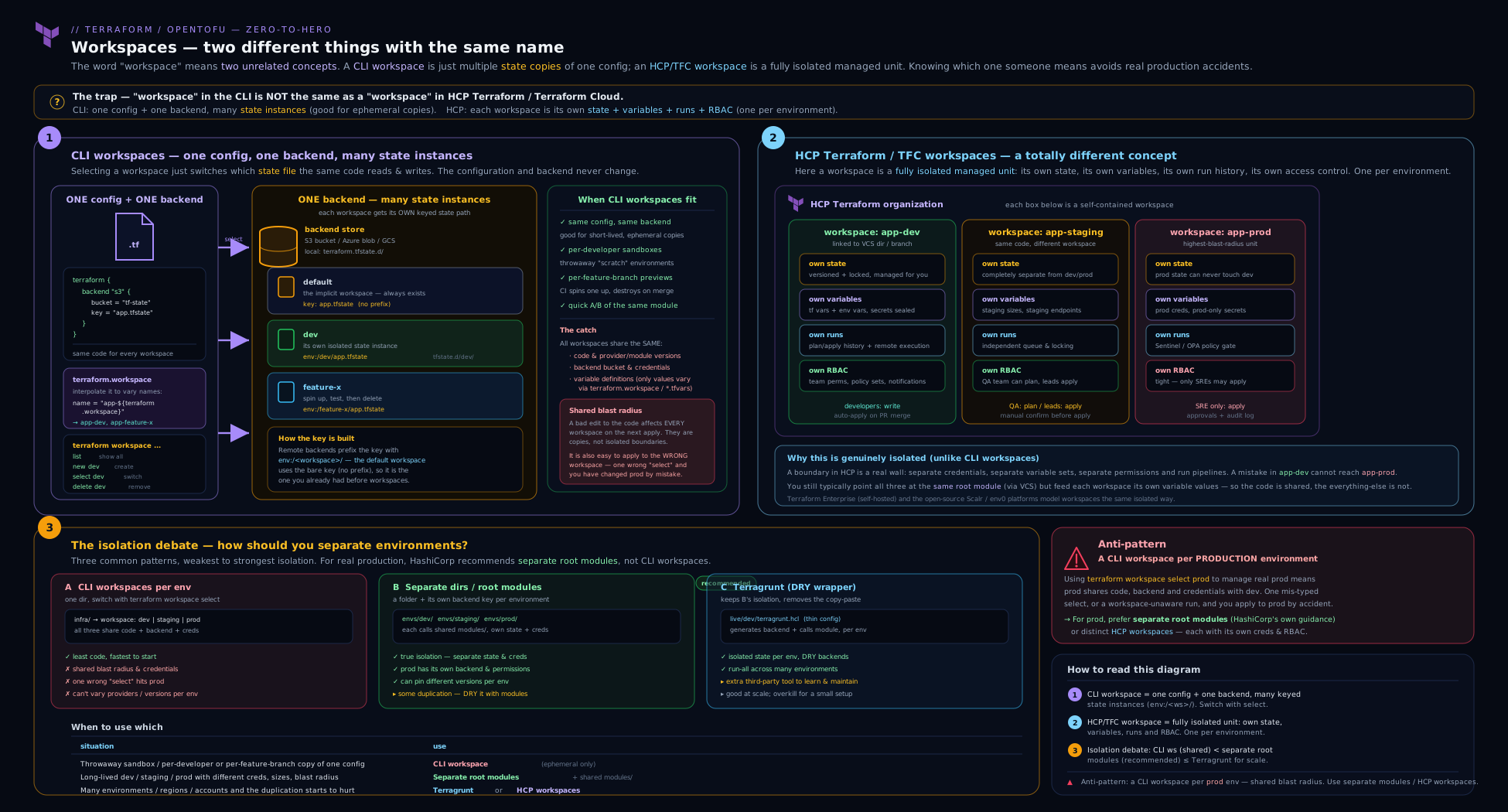
The diagram makes the structural difference visible at a glance: CLI workspaces fan multiple state keys out of a single backend behind a single configuration, whereas HCP workspaces and the directory pattern give each environment its own state store, its own inputs, and — crucially — its own credentials and blast radius.
Hands-on lab: feel the keying with your own eyes
This lab uses the local backend and the random/local providers, so it runs anywhere with no cloud account and nothing to clean up in the cloud. Goal: create CLI workspaces, watch where their state files appear, prove the isolation, and see the safe deletion order. Works identically with tofu — substitute the binary.
1. Scaffold
Create a directory and a tiny configuration whose resource names embed terraform.workspace:
# main.tf
terraform {
  required_providers {
    random = { source = "hashicorp/random", version = "~> 3.6" }
    local  = { source = "hashicorp/local",  version = "~> 2.5" }
  }
}

resource "random_pet" "name" {
  prefix = terraform.workspace          # the workspace name decorates the resource
}

resource "local_file" "marker" {
  filename = "${path.module}/out/${terraform.workspace}.txt"
  content  = "I belong to workspace: ${terraform.workspace}\n"
}

output "pet"       { value = random_pet.name.id }
output "workspace" { value = terraform.workspace }
terraform init
terraform workspace show     # => default   (you are already in a workspace)
terraform workspace list     # => * default
Expected: you are in default, and it is the only workspace.
2. Apply in default, then look at state
terraform apply -auto-approve
ls -1                         # note: terraform.tfstate exists (the default workspace)
ls -1 out/                    # default.txt
Expected: a terraform.tfstate in the working directory and out/default.txt. The default workspace state is the plain top-level file.
3. Create two more workspaces and watch the directory appear
terraform workspace new dev
terraform workspace show     # => dev
terraform apply -auto-approve

terraform workspace new feature-checkout
terraform apply -auto-approve

# Now inspect the keying:
find . -name terraform.tfstate
Expected output (the load-bearing moment of the lab):
./terraform.tfstate                                       # default
./terraform.tfstate.d/dev/terraform.tfstate               # dev
./terraform.tfstate.d/feature-checkout/terraform.tfstate  # feature-checkout
There it is: default at the top level, every other workspace under terraform.tfstate.d/<name>/. This is the local-backend keying rule, proven.
4. Prove the isolation
terraform workspace select dev
terraform output pet         # a dev-prefixed pet name, e.g. "dev-cunning-mongoose"

terraform workspace select feature-checkout
terraform output pet         # a DIFFERENT, feature-checkout-prefixed pet name
Expected: each workspace has its own resources and outputs. The dev apply never saw feature-checkout’s resources — separate state, full isolation, same code.
5. The -or-create CI idiom
terraform workspace select -or-create staging   # creates it because it didn't exist
terraform workspace list
Expected: staging now exists and is selected, in one command — no need to branch on “does it exist?”.
6. Safe deletion (and the trap)
# Try to delete a workspace that still has resources — Terraform refuses:
terraform workspace select dev
terraform workspace select default        # you cannot delete the one you are in
terraform workspace delete dev            # => Error: workspace "dev" is not empty
The refusal is the safety net. Do it the safe way — destroy first, then delete:
terraform workspace select dev
terraform destroy -auto-approve           # tear down dev's real resources
terraform workspace select default        # leave the workspace before deleting it
terraform workspace delete dev            # now it deletes cleanly (state is empty)
Never reach for
-force.terraform workspace delete -force devdeletes the state even though it still tracks resources — orphaning them (they keep running, Terraform forgets them). In the cloud that is a silent bill and a security loose end. The destroy-then-delete order above is the only safe one.
Validation
You have validated the lesson if you can point at terraform.tfstate.d/feature-checkout/terraform.tfstate, explain why default is not under that directory, show two workspaces with different outputs from the same code, and recite why delete refused before destroy.
Cleanup
for ws in feature-checkout staging; do
  terraform workspace select "$ws" && terraform destroy -auto-approve
done
terraform workspace select default && terraform destroy -auto-approve
# delete the non-default workspaces (now empty)
for ws in dev feature-checkout staging; do
  terraform workspace select default
  terraform workspace delete "$ws" 2>/dev/null || true
done
rm -rf .terraform .terraform.lock.hcl out terraform.tfstate*
Cost note
Zero. Everything used the local backend and the random/local providers — no cloud resources were created, so there is nothing to bill and nothing to leave running. This is the cheapest lab in the course.
Going deeper
Everything above is enough for the Associate exam and for day-to-day work. This section is for the reader who runs Terraform at scale and wants the mechanics underneath the two concepts — how you move from one to the other, how HCP workspaces wire together, and the sharp edges that only surface in production.
Where the CLI records the selected workspace
The “which workspace am I in?” selection is not magic and it is not global — it is a tiny file. After terraform init, the currently selected CLI workspace name is written to .terraform/environment (a single line, e.g. dev). terraform workspace select rewrites that file; terraform workspace show essentially reads it. Two facts fall out of this:
.terraform/is git-ignored and machine-local, which is precisely why the selection is invisible in code review — it lives in an untracked file on whoever’s machine or CI runner raninit. That is the concrete reason the “I thought I was in dev” incident keeps happening.- A fresh CI checkout has no
.terraform/environment, so it defaults todefaultunless you set the selection explicitly. This is whyTF_WORKSPACE(or an explicitworkspace select -or-create) is mandatory in automation — never assume CI inherits your laptop’s selection.
Migrating a CLI/backend configuration into HCP workspaces
Moving from a normal backend (with CLI workspaces) to HCP is a first-class, one-time operation, not a copy-paste. You replace the backend {} block with a cloud {} block, authenticate, and let init migrate the state:
terraform {
  # was: backend "s3" { ... }
  cloud {
    organization = "acme"
    workspaces {
      tags = ["networking"]     # migrate MANY local workspaces at once
    }
  }
}
terraform login          # stores an app.terraform.io API token locally
terraform init           # detects backend -> cloud and offers to migrate state
What actually happens on init depends on the workspaces block:
- With
workspaces { name = "networking-prod" }, your current local state (usuallydefault) is copied into the single HCP workspacenetworking-prod. - With
workspaces { tags = [...] }, Terraform migrates each local CLI workspace into an HCP workspace of the same name (dev→ HCPdev,staging→ HCPstaging, …), tagging each so this config can target them. - HCP has no special
defaultworkspace. If yourdefaultstate is non-empty, the migration prompts you to give it a real name (HCP will not accept the literal namedefaultas the migrated target the way the CLI does).
After migration the old state objects in S3/GCS are left in place (Terraform does not delete them); treat them as a backup, then remove them once you have confirmed a clean plan against HCP.
Run triggers: one HCP workspace applying after another
CLI workspaces have no concept of “run this one after that one” — they are just state files, and Terraform never chains them. HCP adds exactly that as a run trigger: a workspace can list one or more source workspaces, and a successful apply in a source automatically queues a run in the dependent workspace. The classic use is a dependency chain — a networking workspace publishes VPC/subnet outputs, and the app workspace is triggered to re-plan whenever networking changes. You configure it in the UI or with the tfe provider:
resource "tfe_run_trigger" "app_after_network" {
  workspace_id  = tfe_workspace.app.id         # the workspace that gets triggered
  sourceable_id = tfe_workspace.networking.id  # its successful apply fires the trigger
}
There is no CLI-workspace equivalent; orchestration across state files with a plain backend is something you build yourself (pipelines, depends_on across modules, or a tool like Terragrunt’s dependency blocks).
Sharing outputs between HCP workspaces
Because each HCP workspace is its own state, they need an explicit channel to read each other’s outputs. Two idioms, and an access-control gate you must not miss:
| Mechanism | How it reads | Notes |
|---|---|---|
terraform_remote_state data source |
Reads another workspace’s outputs via the remote backend config |
Works for any remote state; on HCP the target workspace must allow the reader (see below). Only outputs are exposed, not the whole state. |
tfe_outputs data source (tfe provider) |
Reads an HCP workspace’s outputs directly by org + workspace name | HCP-native; avoids configuring a remote backend data source, and integrates with HCP RBAC. |
data "terraform_remote_state" "network" {
  backend = "remote"
  config = {
    organization = "acme"
    workspaces   = { name = "networking-prod" }
  }
}

# consume an output the networking workspace published
# subnet_ids = data.terraform_remote_state.network.outputs.private_subnet_ids
The gate: HCP workspaces do not expose their state to the whole organisation by default. Each workspace has a remote state sharing setting — share with all workspaces in the org, or an explicit allow-list of consumer workspaces. If a terraform_remote_state read returns “access denied”, it is almost always this setting, not credentials.
Execution modes: remote, local, and agent
A subtlety people miss when adopting HCP: connecting a config with the cloud {} block does not force your plan/apply to run on HashiCorp’s servers. That is a per-workspace execution mode:
| Execution mode | Where plan/apply runs | State stored | Use it when |
|---|---|---|---|
| Remote (default) | On HCP-managed workers | HCP | You want the full HCP experience: remote runs, cost estimation, policy checks, RBAC on runs. |
| Local | On your machine / your CI runner | HCP | You want HCP only as a state + variables store, but must run ops locally (e.g. providers needing local tooling or files). |
| Agent | On a self-hosted HCP agent inside your network | HCP | The target infrastructure is on a private network HCP’s public workers cannot reach. |
In every mode the state lives in HCP; only the compute location for runs changes.
The precedence rules that bite in CI
TF_WORKSPACEselects the workspace non-interactively and overrides the.terraform/environmentfile. If it names a workspace that does not exist, Terraform will create it on init for a normal backend — convenient, but it means a typo silently makes a new empty workspace rather than erroring.- If
.terraform/environmentandTF_WORKSPACEdisagree, Terraform surfaces the conflict rather than guessing — treat a fresh checkout plus an explicitTF_WORKSPACEas the deterministic CI recipe. - With the
cloud {}block andworkspaces { tags = [...] },TF_WORKSPACEis the standard way to pick which tagged HCP workspace a pipeline targets; withworkspaces { name = "…" }it is redundant (there is only one).
OpenTofu divergence
tofu workspace is command-for-command identical to terraform workspace, and terraform.workspace is spelled the same, so everything about CLI workspaces transfers unchanged. Two differences worth knowing: OpenTofu ships native state encryption (1.7+), which encrypts each workspace’s state at rest — the local terraform.tfstate.d/<name>/terraform.tfstate files and the remote keys alike — a capability Terraform leaves to the backend. And while OpenTofu also supports a cloud {} block for TFE-compatible backends, HCP Terraform itself is HashiCorp’s hosted service; when a lesson says “HCP workspace”, that is the HashiCorp platform, and the concept (a fully isolated deployment unit) is what transfers, not a guarantee of identical hosted features.
Common beginner mistakes
These are misconceptions, not error messages — the wrong mental model that leads to the errors. Each pairs the belief with why it is wrong and the model to hold instead.
- “CLI workspaces safely isolate prod from dev.” They isolate state files, not blast radius. All CLI workspaces of a config share one backend, one set of
.tffiles, and one set of credentials — the only thing standing between a dev apply and prod is remembering which workspace is selected. Right model: for real production isolation you need a separate backend/account, which means a separate directory (or a separate HCP workspace), not a save-slot. - “A CLI workspace and an HCP workspace are the same feature, just local versus cloud.” They are structurally different — a save-slot behind one backend versus a self-contained project with its own state, variables, runs, and RBAC. Right model: same word, different thing; always say which workspace you mean.
- “
terraform workspace deletewill tear down that environment’s infrastructure.” It deletes the state object, not the resources. If the state still tracks resources it refuses;-forcedeletes the state anyway and orphans the real infrastructure (it keeps running and billing). Right model:destroyremoves infrastructure,deleteonly forgets state — always destroy first. - “The
defaultworkspace lives underterraform.tfstate.d/default/.” It does not —defaultis the top-levelterraform.tfstate; only non-default workspaces get aterraform.tfstate.d/<name>/directory. Right model: default is the asymmetric one; stop hunting for a folder that never gets created. - “I’ll just branch on
terraform.workspaceto size prod versus dev.” That hides real topology behind a string in a machine-local file, with a shared blast radius and code that becomes unreadable the moment environments truly diverge. Right model:terraform.workspaceis for labels (names, tags) only; if identity, sizing, account, or topology differ, that is the signal to split directories. - “After I add the
cloud {}block,terraform workspace selectstill picks a local state file.” With thecloudblock it selects an HCP workspace instead — inert when pinned byname, and choosing among the tagged set when usingtags. Right model: adopting HCP silently changes what the familiar verb means; setTF_WORKSPACEin CI so the target is explicit.
Common mistakes & troubleshooting
| Symptom | Likely cause | Fix |
|---|---|---|
| Applied to the wrong environment (“I was sure I was in dev”) | CLI workspace is hidden state; you forgot which one was selected | Run terraform workspace show before every apply; better, move prod to its own directory so it needs a cd and prod creds, not just a select. |
prod needs a resource dev does not, config full of count = terraform.workspace == "prod" ? 1 : 0 |
Using CLI workspaces for environments that must diverge | Switch to separate directories (root module per env), optionally Terragrunt; stop expressing topology with terraform.workspace. |
terraform workspace delete errors: “workspace is not empty” |
The workspace still tracks live resources | terraform destroy in that workspace first, select default, then delete. Do not use -force (it orphans resources). |
Error: workspace "X" doesn't exist in CI |
Used select (not new) for a workspace that may not exist yet |
Use terraform workspace select -or-create X (1.4+) so it creates-or-selects in one step. |
Can’t find terraform.tfstate.d/default/ |
Looking for the default workspace under the hidden dir | The default workspace is the top-level terraform.tfstate; only non-default workspaces live under terraform.tfstate.d/<name>/. |
Adopted the cloud {} block; terraform workspace now behaves “weirdly” |
With cloud, the CLI workspace selects an HCP workspace, not a local state file |
Expect that: with workspaces { name } it is pinned to one; with workspaces { tags } the name selects which HCP workspace. Use TF_WORKSPACE to fix it in CI. |
| Dev pipeline can read/write prod state | All CLI workspaces share one backend/bucket; you can’t IAM-separate keys cleanly | Put prod state in its own backend/bucket/account via separate directories; that is the only real boundary. |
terraform.workspace is default in CI when you expected prod |
The environment variable / selection step did not run | Set TF_WORKSPACE=prod or add an explicit workspace select -or-create step before plan/apply. |
Best practices
- Always know which workspace you are in before a mutating command.
terraform workspace showis one keystroke; a wrong-workspace apply is an incident. - Use CLI workspaces only for ephemeral, homogeneous, same-trust-boundary copies — preview-per-PR, sandbox-per-dev, module tests. Tear them down (
destroythendelete). - Do not model long-lived
dev/staging/prodwith CLI workspaces. Use separate directories (root module per environment), each with its own backend and credentials; reach for Terragrunt to keep that DRY. - Use
terraform.workspacefor naming and tagging, never for identity, sizing, account, or topology. If environments must diverge in code or credentials, that is the signal to split directories. - Prefer
select -or-createin CI so pipelines do not branch on “new vs select”. - Never
workspace delete -forcea non-empty workspace —destroyfirst, thendelete.-forceorphans real resources. - With the
cloud {}block, be explicit about whether you are pinning to one HCP workspace (name) or selecting among many (tags), and pin CI selection withTF_WORKSPACE. - Name workspaces meaningfully and within
[A-Za-z0-9_-]— the name becomes part of a state path/key, so keep it path-safe and self-describing (pr-1421,dev-priya).
Security notes
- CLI workspaces are not a security boundary. All workspaces of a config share one backend and one set of credentials; do not rely on them to isolate prod from dev. The only real boundary is a separate backend (separate bucket/account) reached from a separate directory — or a separate HCP workspace with its own RBAC and credentials.
- Shared credentials are the core risk. Because every CLI workspace uses the current session’s credentials, a session authenticated to production can apply any workspace against production. Keep prod credentials out of the same session/pipeline that touches dev — which, again, points to separate directories.
- State of every workspace is as sensitive as the most sensitive workspace. They sit in the same bucket; if
prod’s state holds secrets (it does — state is plaintext, see the state lesson), then the bucket holding all workspaces inherits that sensitivity. Encrypt and lock down the backend accordingly. - HCP workspaces let you do this properly: per-workspace sensitive variables, dynamic provider credentials (short-lived, no static keys), and per-workspace/team RBAC so “apply to dev, read-only on prod” is enforceable. Prefer that model for governed multi-team estates.
- Audit the selection. In CI, log
terraform workspace show(or the resolvedTF_WORKSPACE) at the start of every run so which environment an apply touched is attributable after the fact.
Practice challenges
Six graded exercises building on the hands-on lab (local backend, random/local providers). Try each before opening the solution. They escalate from “prove you can drive the commands” to “reason about remote keying and HCP”.
1. (Beginner) Report the current workspace two different ways. From the lab project, print the active workspace using a CLI command and a value from your configuration.
<details><summary>Solution</summary>
terraform workspace show      # prints the selected workspace name
terraform output workspace    # the output that echoes terraform.workspace
Why: workspace show reads the CLI selection (.terraform/environment); the workspace output proves the same value is available inside the config as terraform.workspace.
</details>
2. (Beginner) Predict, then verify, a new workspace’s local state path.
Create a workspace named qa, state where its state file will live before you look, then confirm.
<details><summary>Solution</summary>
terraform workspace new qa
find . -name terraform.tfstate     # => ./terraform.tfstate.d/qa/terraform.tfstate
Why: every non-default workspace on the local backend is keyed at terraform.tfstate.d/<name>/terraform.tfstate; only default uses the top-level file.
</details>
3. (Intermediate) Land in a workspace in one CI-safe command.
Write the single command that selects pr-1421, creating it first if it does not exist — no branching on “does it exist?”.
<details><summary>Solution</summary>
terraform workspace select -or-create pr-1421
Why: -or-create (Terraform/OpenTofu 1.4+) collapses “new vs select” into one idempotent step, which is exactly what a preview-per-PR pipeline needs.
</details>
4. (Intermediate) Delete a non-empty workspace safely.
You are in qa, which still tracks live resources. Remove the workspace without orphaning anything.
<details><summary>Solution</summary>
terraform workspace select qa
terraform destroy -auto-approve        # tear down qa's real resources first
terraform workspace select default     # you cannot delete the workspace you are in
terraform workspace delete qa          # now the state is empty, so it deletes cleanly
Why: delete refuses a non-empty workspace and -force would orphan the resources; destroy-then-select-default-then-delete is the only safe order.
</details>
5. (Advanced) Compute the exact S3 object key for a workspace.
An s3 backend is configured with key = "app/terraform.tfstate" and the default workspace_key_prefix. What is the full object key for the staging workspace, and for default?
<details><summary>Solution</summary>
staging -> env:/staging/app/terraform.tfstate
default -> app/terraform.tfstate
Why: the default workspace_key_prefix is env:, so non-default workspaces are keyed at <prefix>/<name>/<key>; default uses the bare key. All of them share the same bucket — logical isolation, not physical.
</details>
6. (Advanced) Pin a config to one HCP workspace and predict the verb’s behaviour.
Convert a config that uses an s3 backend to instead target the single HCP workspace payments-prod in org acme, and state what terraform workspace select will then do.
<details><summary>Solution</summary>
terraform {
  cloud {
    organization = "acme"
    workspaces {
      name = "payments-prod"
    }
  }
}
Why: with workspaces { name = "…" } the config is pinned to exactly one HCP workspace, so terraform workspace commands are effectively inert (there is one workspace and you are in it) — the CLI verb now names an HCP object, not a local state file.
</details>
Interview & exam questions
1. What is a Terraform CLI workspace, in one sentence? A named, isolated state file behind the same backend and the same configuration — switching workspaces switches which state Terraform reads/writes, and nothing else (same code, same backend, same credentials unless you change them).
2. How is a CLI workspace different from an HCP/Terraform Cloud workspace? A CLI workspace is just an extra state file behind one shared config and backend. An HCP workspace is a full isolated unit — its own state, variables/variable sets, run history, VCS connection, and RBAC — closer to a separate root-module deployment than to a CLI workspace. They merely share a name.
3. Where does Terraform store state for a non-default workspace on the local backend?
Under terraform.tfstate.d/<workspace-name>/terraform.tfstate. The default workspace is the exception — it uses the top-level terraform.tfstate, not a subdirectory.
4. And on a remote backend like S3?
All workspaces share the bucket and locking; the workspace name is woven into the key, by default under an env:/<name>/ prefix (configurable via workspace_key_prefix). The isolation is logical (different keys), not physical (same bucket, same credentials).
5. List the terraform workspace subcommands and what each does.
list (show all, mark active), show (print current name), new <name> (create and switch), select <name> (switch to existing; -or-create to create-or-switch), delete <name> (delete an empty workspace’s state; refuses if it tracks resources, -force overrides and orphans them).
6. Why does HashiCorp recommend separate directories over CLI workspaces for production environments?
Blast radius. Separate directories give each environment its own backend (separate bucket/account = real IAM boundary) and its own credentials, and touching prod requires a visible cd plus prod creds. CLI workspaces share one backend, one credential set, and one code base, so the only barrier between dev and prod is remembering which workspace is selected — too weak for production.
7. When are CLI workspaces the right choice? For multiple identical, short-lived copies of one configuration that can share a backend and credentials: preview environments per pull request, a sandbox per developer, parallel experiments, and module testing. The environments must be disposable, homogeneous, and inside one trust boundary.
8. What is the danger of switching real decisions (sizing, account, region) on terraform.workspace?
It puts production topology behind a hidden string with a shared blast radius: a wrong select or a bug in the ternary reaches prod, the choice is invisible in code review, and it does not scale once environments must truly diverge. Use terraform.workspace for naming/tagging only.
9. You run terraform workspace delete staging and it errors that the workspace is not empty. What is happening and what is the correct sequence?
The workspace still tracks live resources, so Terraform refuses to delete its state. The safe order is: terraform destroy in staging, then terraform workspace select default (you cannot delete the workspace you are in), then terraform workspace delete staging. Never use -force, which deletes the state and orphans the real resources.
10. With a cloud {} block, what does terraform workspace select X do?
It depends on the workspaces setting. With workspaces { name = "..." } the config is pinned to one HCP workspace and the command is effectively inert. With workspaces { tags = [...] } the name X selects which tagged HCP workspace this run targets — so the familiar CLI verb now picks an HCP workspace, not a local state file.
11. Does deleting a CLI workspace destroy its infrastructure?
No. workspace delete removes the state object; if that state still tracks resources it refuses (unless -force, which orphans them). To remove the infrastructure you must terraform destroy first — delete only forgets the state.
12. How does Terragrunt relate to this debate — is it a workspaces alternative?
Terragrunt sits on the directories side, not the workspaces side. It keeps the separate-directory model (and its strong per-environment isolation) while removing the duplicated backend/provider boilerplate by generating it from one definition. It makes directories DRY; it does not make CLI workspaces safe for prod.
Quick check
- True or false: all CLI workspaces of a configuration share the same backend and the same
.tffiles. - On the local backend, where does the state for a workspace called
qalive? - Which single
terraform workspacecommand both creates a workspace (if missing) and selects it? - Why is “one CLI workspace per environment in production” considered an anti-pattern?
- With a
cloud {}block usingworkspaces { tags = ["app"] }, what does selecting CLI workspaceapp-proddo?
Answers
- True. That is the defining constraint — only the state differs between CLI workspaces; the backend, the configuration, and (by default) the credentials are shared.
terraform.tfstate.d/qa/terraform.tfstate. Only non-default workspaces live underterraform.tfstate.d/<name>/;defaultuses the top-levelterraform.tfstate.terraform workspace select -or-create <name>(Terraform/OpenTofu 1.4+). It selects the workspace, creating it first if it does not exist.- Because all workspaces share one backend and one credential set and one code base, so there is no real isolation between dev and prod — a wrong
select, a shared-credential slip, or aterraform.workspaceternary bug reaches production, and the selection is invisible in code review. Production wants separate directories/backends (or separate HCP workspaces). - It selects which HCP workspace (the one named
app-prodamong those taggedapp) the run targets — with thecloudblock, the CLI workspace name picks an HCP workspace, not a local state file.
Exercise
Starting from the lab project (local backend, random/local providers):
- Create three workspaces —
dev,qa, andprod— and apply in each. Then runfind . -name terraform.tfstateand annotate each path, explaining in one line whydefault’s path differs from the others. - Edit
main.tfto add a bad pattern deliberately: alocalthat setsreplicas = terraform.workspace == "prod" ? 5 : 1, and arandom_integerwhosemaxuses it. Apply indevandprod, then write two or three sentences on exactly why this is dangerous in a real estate (think: shared credentials, invisible selection, divergence) and what you would do instead. - Refactor on paper (no need to build it): sketch a
modules/ + environments/{dev,qa,prod}/directory layout that would replace those three workspaces, and write one sentence per environment on what itsbackend.tfwould isolate that the workspace version could not. - Demonstrate the safe deletion order:
destroythenselect defaultthendeleteforqa; then trydelete -forcesemantics in your head and write one sentence on what would be orphaned and why you would never do it in the cloud. - If you have an HCP free account, create one organisation, one project, and two HCP workspaces (
app-dev,app-prod), and write two or three sentences contrasting what each HCP workspace isolates (state, variables, runs, RBAC) against what your CLI workspaces isolated (only state). Otherwise, write that contrast from the comparison table in this lesson.
Certification mapping
This lesson maps to the HashiCorp Certified: Terraform Associate (003) exam, principally the objective “Implement and maintain state” — specifically the use of workspaces to manage multiple distinct states from a single configuration, the difference between CLI workspaces and HCP/Terraform Cloud workspaces, and how state is isolated per workspace. It also supports “Understand HCP Terraform capabilities” (HCP workspaces as the unit of state, variables, runs, and RBAC; the cloud {} block) and “Read, generate, and modify configuration” (the terraform.workspace expression and its idiomatic, naming-only use). Expect a question or two that hinge on the two facts this lesson hammers: CLI workspaces share one backend/config (so they are weak environment isolation), and HCP workspaces are a different, fully-isolated concept. The companion Terraform Associate Prep Kit drills these as practice questions.
Glossary
- CLI workspace — A named, isolated state file behind the same backend and the same configuration; switching it switches which state is used.
defaultworkspace — The always-present CLI workspace that is selected automatically and cannot be deleted; its state is the top-levelterraform.tfstate.- HCP / Terraform Cloud workspace — A self-contained deployment unit in HCP Terraform with its own state, variables, runs, VCS connection, and RBAC; a different concept that merely shares the name.
terraform.workspace— The interpolation that yields the current CLI workspace’s name; idiomatic for naming/tagging only.terraform.tfstate.d/— The hidden directory under which the local backend stores each non-default workspace’s state (terraform.tfstate.d/<name>/terraform.tfstate).env:/prefix — The default key prefix remote backends weave the workspace name into (e.g. S3’sworkspace_key_prefix).- Blast radius — The set of resources a single mistaken operation can affect; the central argument for isolating environments by directory/backend rather than by CLI workspace.
- Root module — The top-level configuration Terraform runs in a directory; the “directories” model gives each environment its own root module.
cloud {}block — The modern configuration block binding a config to HCP Terraform; with it, CLI workspace selection maps onto HCP workspaces (bynameortags).TF_WORKSPACE— Environment variable that fixes the selected workspace non-interactively, used in CI.-or-create— A flag onworkspace selectthat creates the workspace if it does not exist, then selects it.- Orphaned resource — A real resource left running after its state entry is removed (e.g.
workspace delete -forceon a non-empty workspace); Terraform no longer manages it. .terraform/environment— The machine-local, git-ignored file that records which CLI workspace is currently selected; its untracked nature is why the selection is invisible in code review.- State migration — The copy of existing state into a new backend (or into HCP) that
terraform initoffers the first time thebackend/cloud {}block changes. - Run trigger — An HCP feature where a source workspace’s successful apply automatically queues a run in a dependent workspace; CLI workspaces have no equivalent.
- Execution mode — The per-workspace HCP setting for where runs execute: remote (HCP workers), local (your machine/CI), or agent (a self-hosted agent inside your network).
- Remote state sharing — The HCP workspace setting controlling which other workspaces may read its outputs (all workspaces in the org, or an explicit allow-list) via
terraform_remote_state/tfe_outputs. - Variable set — A reusable, named group of HCP variables (Terraform input and/or shell environment) shared across many workspaces; the first-class home for per-environment inputs and credentials.
Next steps
You can now tell a CLI workspace from an HCP workspace without hesitating, read exactly where each workspace’s state lives, use terraform.workspace safely, and decide — per situation — between CLI workspaces, separate directories, Terragrunt, and HCP workspaces using the blast-radius argument. The natural next move is to bring existing, click-ops infrastructure under Terraform’s control. Continue with Importing Existing Infrastructure into Terraform, In Depth, which covers the import {} block, config generation, and brownfield adoption end to end. To go deeper on the foundations this lesson leaned on, revisit Terraform Backends, In Depth (where state lives and how operations run — the thing CLI workspaces are a property of) and, for the DRY directory model that is the production-grade alternative to environment-per-workspace, Terragrunt for DRY Multi-Account Environments.