In a nutshell
Every pod that talks to AWS needs credentials, and the tempting shortcuts are the dangerous ones: hand the pod the node’s keys (now every pod on that node shares them) or bake a static access key into a Secret (now you own a long-lived credential that leaks and never rotates). IRSA — IAM Roles for Service Accounts — gives each pod its own passport instead. The cluster issues the pod a short-lived, signed token that says exactly who it is (“the s3-reader ServiceAccount in default”), AWS’s STS checks that token against a role’s trust rules, and hands back temporary credentials scoped to just that workload. No shared node keys, no static secret, no key to leak — least privilege, per pod.
The mental model is airport travel. The node’s IMDS credentials are a shared staff keycard clipped by the door — anyone who walks up can grab it and go wherever it opens. IRSA gives each traveller a passport (a projected JWT the kubelet mints and rotates) plus a visa rule at the border (the IAM role’s trust policy): the border officer (STS) checks the passport’s name (sub = system:serviceaccount:ns:sa) and its destination stamp (aud = sts.amazonaws.com), and only then waves that one traveller through — into exactly the rooms their visa allows (the role’s permissions policy). Every EKS add-on you will ever install — the Load Balancer Controller, External DNS, the EBS/EFS CSI drivers, Karpenter, cert-manager — carries this same passport.
This lesson builds the whole chain in Terraform, one link at a time, then proves it from inside a running pod with aws sts get-caller-identity. You will also meet EKS Pod Identity, the newer alternative AWS shipped in late 2023, and learn when each one wins.
Level: Advanced · Time: ~60 min
Prerequisites — core Terraform (HCL, providers, resources, variables, for_each, state, the plan/apply loop); IAM roles, policies, trust policies and aws_iam_policy_document from Terraform on AWS: IAM roles, policies & S3 buckets; and a running cluster from Terraform on AWS: EKS cluster provisioning. To run the hands-on you need a reachable EKS cluster (kubectl get nodes works) and the aws CLI authenticated with rights to create IAM roles and OIDC providers.
After this lesson you can:
- Explain why the node role and static keys are anti-patterns, and win that design-review argument with the comparison table.
- Register an IAM OIDC provider for a cluster’s issuer from a
data.tls_certificatethumbprint, correctly, once per cluster. - Write an IRSA trust policy that binds exactly one
system:serviceaccount:ns:savia aStringEquals:subcondition — and spot the wildcard footgun on sight. - Annotate a ServiceAccount with
eks.amazonaws.com/role-arnand confirm the webhook wired the pod with a singleenv | grep AWS. - Decode every
AccessDenied/Not authorizedIRSA can throw to the exact link in the chain that broke. - Choose between IRSA and EKS Pod Identity for a given cluster, and convert one to the other.
A pod on EKS is just a process on an EC2 node, and sooner or later that process needs to talk to AWS — read a config object from S3, publish a metric to CloudWatch, pull a secret, write to DynamoDB. The question of how it gets the credentials to do that is the single most important security decision on the cluster, because the easy answers are all wrong: giving the node’s instance role the permission means every pod on that node inherits it, and baking a static access key into a Kubernetes Secret means a long-lived credential that never rotates, leaks in a kubectl describe, and outlives the pod that used it. The right answer is IRSA — IAM Roles for Service Accounts — and it is the pattern that essentially every EKS component you will ever install is built on. Learn it once, deeply, and the AWS Load Balancer Controller, External DNS, the EBS and EFS CSI drivers, Cluster Autoscaler, Karpenter, cert-manager, and your own workloads all stop being mysterious: they are all the same five links in a chain.
This lesson teaches that chain end to end and builds every link with Terraform. You already know core Terraform — HCL, providers, resources, variables, for_each, state, the plan/apply loop — and you have met IAM policies, roles, trust policies and the aws_iam_policy_document data source in the Terraform on AWS: IAM roles, policies & S3 buckets lesson, which is the prerequisite for the identity half of this one. Here we assume a running EKS cluster already exists — provisioned in the Terraform on AWS: EKS cluster provisioning — VPC, node groups & add-ons lesson — and we bolt onto it the identity mechanism that makes pods first-class AWS principals. We will also meet EKS Pod Identity, the newer, simpler alternative AWS shipped in late 2023, and be honest about when each wins.
What you’ll build
The scenario is the one every team hits the moment an app on EKS needs AWS: a pod in the default namespace, running under a ServiceAccount called s3-reader, must read objects from one specific S3 bucket — and only read, only that bucket, with credentials that are short-lived, automatically rotated, and impossible to exfiltrate as a reusable key. No access keys in a Secret. No AmazonS3ReadOnlyAccess slapped on the node role so that the whole node — including the metrics agent, the log shipper, and every other team’s pods — can read every bucket in the account. Just this pod, this permission, this bucket.
By the end you will have a small root module — versions.tf, providers.tf, variables.tf, main.tf, outputs.tf — that reads your existing cluster with data.aws_eks_cluster, creates an IAM OIDC provider for the cluster’s issuer (built from a data.tls_certificate thumbprint), an IAM role whose trust policy federates that provider and — via a StringEquals condition on the :sub claim — allows only system:serviceaccount:default:s3-reader to assume it, a least-privilege S3-read policy attached to that role, and a Kubernetes ServiceAccount annotated with eks.amazonaws.com/role-arn. Then you will init, plan, apply, launch a throwaway pod with the amazon/aws-cli image running under that ServiceAccount, watch aws sts get-caller-identity come back as the assumed IRSA role (not the node role), prove aws s3 ls works against the one bucket, and destroy cleanly.
Why Terraform for this rather than eksctl, a shell script, or clicking in the console? Because IRSA is four coupled resources across two APIs (IAM and Kubernetes) whose correctness depends on strings matching exactly — the issuer URL in the OIDC provider, the provider ARN in the trust policy, the system:serviceaccount:ns:sa in the :sub condition, the role ARN in the SA annotation. Get one character wrong and you get an opaque AccessDenied at runtime, not at apply. Terraform interpolates every one of those strings from real resource attributes so they cannot drift apart, plans the whole chain before it touches anything, and lets you stamp the same pattern out for the next twenty add-ons as a module. Here is the honest comparison for this task:
| Approach | Cross-API wiring | Plan preview | Drift detection | Reusable per add-on | Best for |
|---|---|---|---|---|---|
| Console + kubectl | Copy-paste strings by hand | No | None | No | One-off learning, inspection |
eksctl create iamserviceaccount |
Yes (opinionated) | No | None | Somewhat (flags/config) | Quick clusters, demos |
Shell + aws/kubectl |
Manual, brittle | No | None | No | Bootstrap glue only |
Terraform (aws + kubernetes) |
Interpolated, typed | terraform plan |
plan/refresh |
Yes — a module | Repeatable, reviewed IaC |
The chain you are wiring has five stages left to right — the cluster’s OIDC issuer, an IAM OIDC provider, an IAM role with a :sub-bound trust policy, an annotated ServiceAccount, and the pod that swaps a projected token for role credentials at STS. Keep this diagram open for the rest of the lesson:
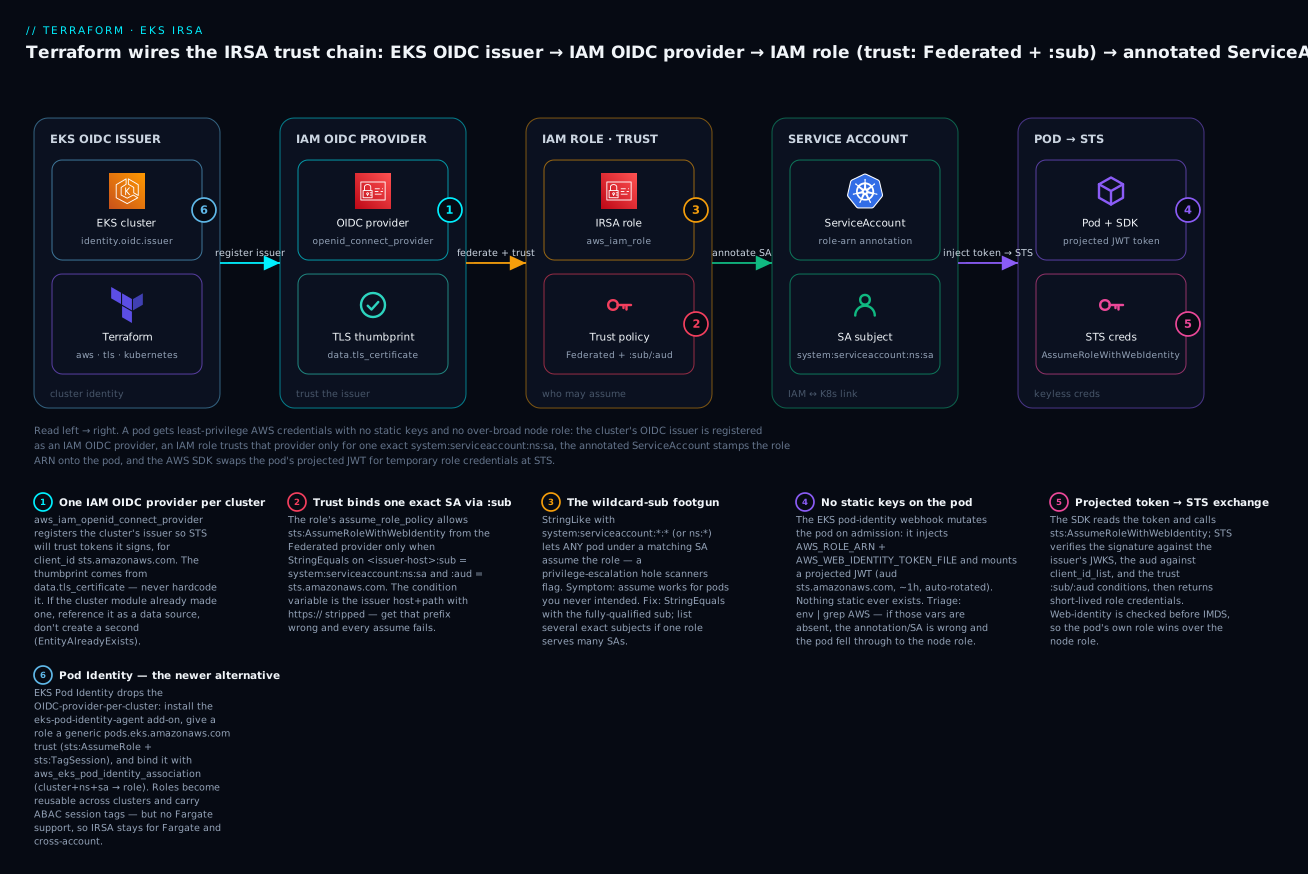
Reading it left to right: the EKS cluster publishes an OIDC issuer (a discovery endpoint plus signing keys); Terraform registers that issuer as an IAM OIDC provider so STS will trust tokens it signs; an IAM role carries a trust policy that federates the provider and pins the exact ServiceAccount via the :sub condition; the ServiceAccount is annotated with the role ARN; and the pod — after the admission webhook injects a projected token — exchanges that token at STS for temporary role credentials. The six badges mark the load-bearing decisions: the OIDC provider (one per cluster), the trust condition that binds one exact SA, the ⚠️ wildcard-sub footgun, the “no static keys” property, the projected-token-via-STS exchange, and the Pod Identity alternative. Each is a section below.
The problem: how a pod gets AWS credentials
Before IRSA, there were exactly two ways to give a pod AWS permissions, and both are anti-patterns you must be able to argue against in a design review. Understanding why they are bad is what makes IRSA click.
Option A — the node instance role. Every EKS worker node is an EC2 instance with an instance profile and an IAM role (the “node role”), which needs a baseline of permissions just to join the cluster (AmazonEKSWorkerNodePolicy, AmazonEC2ContainerRegistryReadOnly, the CNI policy). The lazy move is to attach application permissions — s3:GetObject, dynamodb:*, whatever — to that node role. It works instantly, which is exactly the trap. Now every pod scheduled on that node can reach those permissions by hitting the instance metadata service (IMDS) at 169.254.169.254 and reading the node role’s credentials. Your logging DaemonSet, another team’s batch job, and a compromised sidecar all share one over-broad identity. There is no per-pod scoping, no per-pod audit trail (CloudTrail sees the node role, not the pod), and the blast radius of any single container escape is “everything the busiest node can do.”
Option B — static access keys in a Secret. Create an IAM user, generate an access key, drop it into a Kubernetes Secret, and mount it as AWS_ACCESS_KEY_ID/AWS_SECRET_ACCESS_KEY. This scopes permissions per-app (each app gets its own user), but the cure is worse: you now own a long-lived static credential. It doesn’t rotate unless you build rotation. It sits base64-encoded (not encrypted) in etcd and prints in plain text to anyone with get secret RBAC. It survives the pod, the deployment, and often the employee who created it. Leaked keys are the number-one cause of AWS account compromise, and a key in a Git-committed manifest or a kubectl describe secret is a breach waiting to be indexed. This is precisely the class of credential that the Secrets in IaC: Vault dynamic credentials in pipelines lesson exists to eliminate.
IRSA is the answer to both. It gives each ServiceAccount its own IAM role — so scoping is per-workload, not per-node — and the credentials are short-lived STS tokens minted on demand from a projected, auto-rotating JWT, so there is no static secret to leak and nothing that outlives the pod. Here is the comparison to keep in your head; this is the table that ends the design-review argument:
| Dimension | Node instance role | Static keys in Secret | IRSA |
|---|---|---|---|
| Credential type | Node role (shared) | Long-lived access key | Short-lived STS token |
| Scoping granularity | Per node (all pods) | Per app (per user) | Per ServiceAccount / pod |
| Rotation | Auto (IMDS), but shared | Manual — you build it | Automatic, ~hourly |
| Secret to leak? | No key, but over-broad | Yes — the key | None |
| Survives the pod? | N/A (node-level) | Yes (key persists) | No — dies with the token |
| CloudTrail attribution | Node role for all pods | The IAM user | The role, per workload |
| Blast radius of escape | Everything the node can do | That app’s key everywhere | Just that role’s permissions |
| Revocation | Edit node role (affects all) | Delete/rotate key | Detach policy / delete role |
| Cross-account | Awkward | Key sharing (bad) | Native (OIDC federation) |
| Verdict | ❌ Over-permissioned | ❌ Long-lived secret | ✅ Least-privilege, keyless |
The mechanism that makes “short-lived, keyless, per-pod” possible is OpenID Connect federation, and that is what the next section unpacks.
How IRSA works, end to end
IRSA is OIDC federation applied to Kubernetes ServiceAccounts. STS already knows how to trade a signed OIDC token from a trusted identity provider for temporary role credentials — that is AssumeRoleWithWebIdentity, the same API behind “log in with Google.” IRSA makes the EKS cluster itself the OIDC identity provider: the cluster signs a token that says “I am the ServiceAccount s3-reader in namespace default,” STS validates that signature and the role’s trust conditions, and hands back credentials. Nothing static ever changes hands.
Walk the chain link by link. Every one of these is a thing you can inspect, and every IRSA bug lives in exactly one of them:
| # | Stage | Who does it | What happens | Key artifact |
|---|---|---|---|---|
| 1 | OIDC issuer | EKS control plane | Cluster publishes an OIDC discovery doc + JWKS signing keys at a stable HTTPS URL | identity[0].oidc[0].issuer |
| 2 | IAM OIDC provider | You (Terraform) | Register the issuer in IAM so STS will trust tokens it signs, for audience sts.amazonaws.com |
aws_iam_openid_connect_provider |
| 3 | Role + trust policy | You (Terraform) | An IAM role allows sts:AssumeRoleWithWebIdentity from that provider only when :sub = the exact SA and :aud = STS |
assume_role_policy |
| 4 | Permissions policy | You (Terraform) | Attach what the role may actually do (e.g. s3:GetObject on one bucket) |
aws_iam_role_policy_attachment |
| 5 | Annotated ServiceAccount | You (Terraform) | Stamp the role ARN onto the SA so pods using it get wired up | eks.amazonaws.com/role-arn |
| 6 | Pod admission | EKS webhook | The mutating webhook sees the SA annotation and rewrites the pod spec | amazon-eks-pod-identity-webhook |
| 7 | Token projection | kubelet | A short-lived JWT (aud sts.amazonaws.com, ~1h TTL, auto-rotated) is mounted into the pod |
projected token file |
| 8 | Env injection | EKS webhook | AWS_ROLE_ARN + AWS_WEB_IDENTITY_TOKEN_FILE are set in every container |
env vars |
| 9 | STS exchange | AWS SDK in the pod | SDK reads the token, calls AssumeRoleWithWebIdentity; STS checks signature (JWKS), aud vs client_id_list, and the trust :sub/:aud |
STS request |
| 10 | Temp credentials | STS | Short-lived AccessKeyId/SecretAccessKey/SessionToken for the role are returned and cached |
assumed-role creds |
A few of the terms carry the whole design; pin them down because the trust-policy conditions are written in exactly this vocabulary:
| Term | What it is | In IRSA it equals |
|---|---|---|
Issuer (iss) |
The OIDC provider’s identity URL | https://oidc.eks.<region>.amazonaws.com/id/<cluster-id> |
Subject (sub) |
Who the token represents | system:serviceaccount:<namespace>:<serviceaccount> |
Audience (aud) |
Who the token is meant for | sts.amazonaws.com |
| JWKS | The issuer’s public signing keys | Served at <issuer>/keys; STS fetches it to verify signatures |
| Thumbprint | SHA-1 of the issuer’s TLS CA cert | Registered on the OIDC provider (see the thumbprint note below) |
| Projected token | A kubelet-minted, expiring JWT for the SA | Mounted at /var/run/secrets/eks.amazonaws.com/serviceaccount/token |
The crucial insight is step 9. The AWS SDK’s default credential provider chain checks the web-identity token before it ever falls back to the node’s IMDS instance profile. So a pod with an IRSA-annotated SA uses its own role, and a pod without one falls through to the node role. That ordering is why IRSA “just works” without any app code change — any reasonably recent SDK does the right thing automatically:
| Order | Provider | Source | Used by |
|---|---|---|---|
| 1 | Static env creds | AWS_ACCESS_KEY_ID/SECRET |
Explicit keys (avoid) |
| 2 | Web identity | AWS_WEB_IDENTITY_TOKEN_FILE + AWS_ROLE_ARN |
IRSA |
| 3 | Shared config/SSO | ~/.aws/config, SSO cache |
Laptops, CI |
| 4 | Container creds | AWS_CONTAINER_CREDENTIALS_FULL_URI |
EKS Pod Identity, ECS |
| 5 | EC2 IMDS | 169.254.169.254 |
Node instance role (last resort) |
The exact ordering varies slightly between SDKs, but the teaching point is invariant: web-identity (IRSA) and container-credentials (Pod Identity) are both consulted before IMDS, so a pod’s own identity always wins over the node role.
Now build each link in Terraform.
Terraform: the IAM OIDC provider
The cluster already has an OIDC issuer — EKS creates it for every cluster. You can see it in the API and in Terraform as identity[0].oidc[0].issuer. What does not exist yet is an IAM OIDC provider: the object in your account that tells IAM/STS “trust tokens signed by this issuer.” You create exactly one per cluster, and every IRSA role in that cluster references it.
First, read the cluster (assuming it lives in another stack; if the cluster is in the same config, reference aws_eks_cluster.this directly instead of the data source):
data "aws_eks_cluster" "this" {
  name = var.cluster_name
}

locals {
  oidc_issuer = data.aws_eks_cluster.this.identity[0].oidc[0].issuer
  # Strip the scheme; the trust-policy condition keys are prefixed with host+path, no https://
  oidc_host = replace(local.oidc_issuer, "https://", "")
}
The IAM OIDC provider needs a thumbprint — the SHA-1 fingerprint of the CA certificate that fronts the issuer’s HTTPS endpoint. Never hardcode it; fetch it dynamically with the tls provider so it can never rot:
data "tls_certificate" "eks" {
  url = local.oidc_issuer
}

resource "aws_iam_openid_connect_provider" "eks" {
  url             = local.oidc_issuer
  client_id_list  = ["sts.amazonaws.com"]
  thumbprint_list = [data.tls_certificate.eks.certificates[0].sha1_fingerprint]

  tags = { Name = "${var.cluster_name}-irsa" }
}
Its three arguments are all load-bearing:
| Argument | Required | Value | Notes |
|---|---|---|---|
url |
Yes | The cluster’s issuer URL | Must match identity[0].oidc[0].issuer exactly (scheme, no trailing slash) |
client_id_list |
Yes | ["sts.amazonaws.com"] |
The audience STS expects; this is the aud the projected token carries |
thumbprint_list |
Yes | [sha1_fingerprint] |
CA cert fingerprint from data.tls_certificate; see the note below |
The thumbprint note (an exam favourite). Historically the thumbprint was security-critical: STS used it to verify the issuer’s TLS chain. Since 2023, for EKS-managed OIDC endpoints (which AWS hosts and fronts with a trusted public CA), STS no longer relies on the thumbprint at all — it validates the endpoint against Amazon’s own trust store. But the
aws_iam_openid_connect_providerresource still requires thethumbprint_listargument, so you must supply something. Computing it fromdata.tls_certificategives a correct value with zero maintenance; hardcoding the old9e99a48a99...root-CA string is the classic footgun that breaks when the chain changes. Thecertificateslist is the presented chain (leaf → root);[0]is what the canonical AWS example uses and it works because AWS ignores the value for managed OIDC.
Reusing an existing provider. If your cluster module (for example the community terraform-aws-eks module with enable_irsa = true) already created the OIDC provider, creating a second one fails with EntityAlreadyExists. In that case don’t create it — read it, or take the ARN the cluster module outputs:
# Option 1: the cluster module already outputs it
#   provider_arn = module.eks.oidc_provider_arn

# Option 2: look it up by URL
data "aws_iam_openid_connect_provider" "eks" {
  url = data.aws_eks_cluster.this.identity[0].oidc[0].issuer
}
Whichever way you get it, the provider ARN — arn:aws:iam::<account>:oidc-provider/oidc.eks.<region>.amazonaws.com/id/<cluster-id> — is the value the role’s trust policy federates. That is the next link.
Terraform: the IRSA role and its trust policy
This is the heart of IRSA and the place every subtle bug lives. An IAM role has two policies that people constantly conflate: the trust policy (assume_role_policy) says who may assume the role, and the permissions policies (attached separately) say what the role may do once assumed. Keep them straight and most IRSA confusion evaporates:
Trust policy (assume_role_policy) |
Permissions policies (attached) | |
|---|---|---|
| Answers | Who may assume the role | What the role may do once assumed |
| Where it lives | Inline on the role | Separate managed/inline policies |
| For IRSA it contains | sts:AssumeRoleWithWebIdentity, Federated principal, :sub/:aud conditions |
e.g. s3:GetObject, s3:ListBucket on ARNs |
Has a Resource? |
No — principals + conditions only | Yes — the ARNs it acts on |
| Get it wrong → | Not authorized ... sts:AssumeRoleWithWebIdentity |
AccessDenied on the action (assume already worked) |
For IRSA, the trust policy must say three things precisely: the principal is the OIDC provider (federated), the action is sts:AssumeRoleWithWebIdentity, and a condition binds the exact ServiceAccount via :sub and the STS audience via :aud.
Build it with aws_iam_policy_document so every ARN and condition key is interpolated, not hand-typed:
data "aws_iam_policy_document" "irsa_assume" {
  statement {
    sid     = "AllowOidcAssumeRole"
    effect  = "Allow"
    actions = ["sts:AssumeRoleWithWebIdentity"]

    principals {
      type        = "Federated"
      identifiers = [aws_iam_openid_connect_provider.eks.arn]
    }

    # Bind EXACTLY one ServiceAccount — StringEquals, never StringLike/wildcard
    condition {
      test     = "StringEquals"
      variable = "${local.oidc_host}:sub"
      values   = ["system:serviceaccount:${var.namespace}:${var.service_account}"]
    }

    # Pin the audience so a token minted for anything else is rejected
    condition {
      test     = "StringEquals"
      variable = "${local.oidc_host}:aud"
      values   = ["sts.amazonaws.com"]
    }
  }
}

resource "aws_iam_role" "irsa" {
  name               = "${var.cluster_name}-${var.service_account}-irsa"
  assume_role_policy = data.aws_iam_policy_document.irsa_assume.json
}
Read the trust policy as STS reads it — this is the condition table to memorise, because these two lines are what stop any other pod from stealing this role:
| Condition key | Operator | Value | What it enforces |
|---|---|---|---|
<oidc-host>:aud |
StringEquals |
sts.amazonaws.com |
Token was minted for STS, not some other relying party |
<oidc-host>:sub |
StringEquals |
system:serviceaccount:<ns>:<sa> |
Exactly one SA in one namespace may assume the role |
<oidc-host>:sub |
StringLike |
system:serviceaccount:team-a:* |
⚠️ Any SA in team-a may assume it — a wildcard footgun |
<oidc-host>:sub |
StringEquals |
["...:sa-a", "...:sa-b"] |
Bind several exact SAs safely (a JSON list, not a wildcard) |
Notice the condition variable is not a fixed key like aws:PrincipalTag — it is <issuer-host-and-path>:sub, e.g. oidc.eks.ap-south-1.amazonaws.com/id/EXAMPLED539...:sub. That is why we built local.oidc_host by stripping https://. Get that prefix wrong and STS silently never matches the condition, and every assume fails with Not authorized to perform sts:AssumeRoleWithWebIdentity.
When the SDK calls AssumeRoleWithWebIdentity, STS runs three checks in order — and the trust policy you just wrote is checks 2 and 3. Knowing which check produced which error is how you triage in seconds:
| # | STS validates | Against | Fails with |
|---|---|---|---|
| 1 | The token signature | The issuer’s JWKS at <issuer>/keys (fetched via the OIDC provider) |
InvalidIdentityToken |
| 2 | The token aud claim |
The provider’s client_id_list and the trust :aud condition |
Incorrect token audience |
| 3 | The token sub claim |
The trust policy’s :sub condition |
Not authorized to perform sts:AssumeRoleWithWebIdentity |
⚠️ The wildcard-sub footgun. The most dangerous mistake in all of IRSA is writing the
:subcondition withStringLikeand a wildcard —system:serviceaccount:*:*(any SA in the cluster) or evensystem:serviceaccount:default:*(any SA in a namespace). It looks convenient and it is a privilege-escalation hole: any pod that can run under any matching ServiceAccount can now assume a role that might grant far more than that pod should have. A malicious or compromised workload just needs to create a Deployment with the right SA name. Always useStringEqualswith the fully-qualifiedsystem:serviceaccount:<ns>:<sa>. When one role legitimately serves multiple ServiceAccounts (common for shared add-ons), list every exact subject in aStringEqualsarray — never collapse them to a*. Security scanners (CheckovCKV_AWS_..., and custom OPA/Conftest rules) flag wildcard IRSA trust conditions for exactly this reason.
With the trust settled, attach what the role may actually do. For the demo that is read-only access to one bucket — note the two S3 actions split across the bucket ARN (ListBucket) and the object ARN (GetObject), the least-privilege pattern from the IAM lesson:
data "aws_iam_policy_document" "s3_read" {
  statement {
    sid       = "ListTheBucket"
    effect    = "Allow"
    actions   = ["s3:ListBucket"]
    resources = ["arn:aws:s3:::${var.bucket_name}"]
  }
  statement {
    sid       = "ReadObjects"
    effect    = "Allow"
    actions   = ["s3:GetObject"]
    resources = ["arn:aws:s3:::${var.bucket_name}/*"]
  }
}

resource "aws_iam_policy" "s3_read" {
  name   = "${var.cluster_name}-${var.service_account}-s3-read"
  policy = data.aws_iam_policy_document.s3_read.json
}

resource "aws_iam_role_policy_attachment" "s3_read" {
  role       = aws_iam_role.irsa.name
  policy_arn = aws_iam_policy.s3_read.arn
}
The role is now complete: it trusts one exact ServiceAccount via the OIDC provider, and it grants exactly one read on one bucket. What is still missing is the Kubernetes side — the ServiceAccount that carries the role ARN.
Terraform: the annotated ServiceAccount
The link between the Kubernetes world and the IAM world is a single annotation on the ServiceAccount: eks.amazonaws.com/role-arn: <role ARN>. When a pod runs under that SA, the EKS pod-identity mutating webhook (a component EKS runs on the control plane, amazon-eks-pod-identity-webhook) sees the annotation and rewrites the pod so the SDK can find the role. You manage the SA with the kubernetes provider.
The kubernetes provider needs to authenticate to the cluster’s API server. The robust, credential-free way is the exec plugin calling aws eks get-token, so the provider borrows your AWS identity dynamically rather than storing a kubeconfig token that expires:
provider "kubernetes" {
  host                   = data.aws_eks_cluster.this.endpoint
  cluster_ca_certificate = base64decode(data.aws_eks_cluster.this.certificate_authority[0].data)

  exec {
    api_version = "client.authentication.k8s.io/v1beta1"
    command     = "aws"
    args        = ["eks", "get-token", "--cluster-name", var.cluster_name]
  }
}
| Provider argument | Source | Why |
|---|---|---|
host |
data.aws_eks_cluster.this.endpoint |
The API server URL |
cluster_ca_certificate |
base64decode(...certificate_authority[0].data) |
Trust the API server’s TLS |
exec (aws eks get-token) |
The aws CLI on the runner |
Short-lived token, no static kubeconfig secret in state |
Now the ServiceAccount. Use the _v1 resource (the current, GA variant) and set the annotation from the role ARN so the two can never disagree:
resource "kubernetes_service_account_v1" "app" {
  metadata {
    name      = var.service_account   # "s3-reader"
    namespace = var.namespace         # "default"
    annotations = {
      "eks.amazonaws.com/role-arn" = aws_iam_role.irsa.arn
    }
  }
}
That is the whole binding. When a pod mounts this SA, the webhook injects the following — you never write any of it, but you will debug it, so know exactly what “wired up” looks like:
| What the webhook injects | Value | Purpose |
|---|---|---|
AWS_ROLE_ARN (env) |
The role ARN from the annotation | Tells the SDK which role to assume |
AWS_WEB_IDENTITY_TOKEN_FILE (env) |
/var/run/secrets/eks.amazonaws.com/serviceaccount/token |
Path to the projected JWT |
AWS_STS_REGIONAL_ENDPOINTS (env) |
regional |
Use the in-region STS endpoint (faster, resilient) |
| Projected volume | A serviceAccountToken projection, aud: sts.amazonaws.com, ~1h expiry |
The auto-rotated token STS validates |
Annotation vs the SDK version. The webhook fires on pod admission, so a pod that was already running when you added the annotation does not get patched — you must recreate the pod (roll the Deployment). Also, extremely old SDKs (pre-2019) don’t understand
AWS_WEB_IDENTITY_TOKEN_FILE; every current SDK does. And you can tune the token TTL and the projected path with extra annotations (eks.amazonaws.com/token-expiration) when a workload holds credentials for long-running jobs.
You can, of course, manage the ServiceAccount with a raw manifest or Helm instead — the annotation is identical whichever tool sets it. Pick by who owns the SA:
| Method | How the annotation is set | When to use it |
|---|---|---|
kubernetes_service_account_v1 |
metadata.annotations in Terraform |
SA and role managed together in Terraform (this demo) |
kubernetes_manifest / raw YAML |
metadata.annotations in the manifest |
GitOps-owned ServiceAccounts (Argo CD/Flux apply the YAML) |
| Helm chart values | serviceAccount.annotations |
Add-ons installed by Helm — you pass the role ARN as a value |
eksctl create iamserviceaccount |
eksctl creates the role and the annotated SA | Non-Terraform clusters, quick demos |
The reusable module: iam-role-for-service-accounts-eks
You just wrote four resources and a data source to grant one pod one permission. For the tenth add-on you will not want to hand-write the trust policy again — and you especially do not want a junior engineer hand-writing the :sub condition and reaching for a wildcard. The community terraform-aws-modules/iam collection ships a submodule that does exactly this chain, correctly, with the trust conditions built for you:
module "irsa_s3_reader" {
  source  = "terraform-aws-modules/iam/aws//modules/iam-role-for-service-accounts-eks"
  version = "~> 5.44"

  role_name = "s3-reader-irsa"

  # Attach your own policy (or use the module's built-in toggles below)
  role_policy_arns = {
    s3 = aws_iam_policy.s3_read.arn
  }

  oidc_providers = {
    main = {
      provider_arn               = aws_iam_openid_connect_provider.eks.arn
      namespace_service_accounts = ["default:s3-reader"]   # ns:sa — exact, no wildcard
    }
  }
}
The module’s inputs map one-to-one to the concepts you now understand:
| Module input | What it sets | Notes |
|---|---|---|
role_name / role_name_prefix |
The IAM role name | Or let it generate one |
oidc_providers |
provider_arn + namespace_service_accounts |
Builds the StringEquals :sub condition per exact ns:sa — no wildcard |
role_policy_arns |
Map of policies to attach | Your custom least-privilege policies |
attach_*_policy toggles |
Curated AWS-managed policies for common add-ons | attach_ebs_csi_policy, attach_load_balancer_controller_policy, attach_external_dns_policy, attach_cluster_autoscaler_policy, … |
assume_role_condition_test |
The condition operator | Defaults to StringEquals — the safe default |
allow_self_assume_role |
Permit the role to assume itself | For SDKs that re-assume |
The reason this module is worth reaching for is the second row: instead of you finding and pasting the sprawling IAM policy the AWS Load Balancer Controller needs, you set attach_load_balancer_controller_policy = true and the module attaches AWS’s maintained policy. Wiring that controller end to end — its IRSA role, the Helm release, and the Ingress/Service objects it reconciles into ALBs and NLBs — is exactly the pattern the Terraform on AWS EKS: the AWS Load Balancer Controller lesson builds on top of everything here. Those built-in toggles are the ninety-percent case for add-ons:
| Add-on | Module toggle | What it grants |
|---|---|---|
| AWS Load Balancer Controller | attach_load_balancer_controller_policy |
Manage ALB/NLB, target groups, listeners |
| EBS CSI driver | attach_ebs_csi_policy |
Create/attach/delete EBS volumes |
| EFS CSI driver | attach_efs_csi_policy |
EFS access points |
| External DNS | attach_external_dns_policy |
Route 53 record changes |
| Cluster Autoscaler | attach_cluster_autoscaler_policy |
Describe/scale ASGs |
| Karpenter | (dedicated karpenter submodule) |
EC2 fleet, pricing, instance profile |
| cert-manager | attach_cert_manager_policy |
Route 53 DNS-01 challenges |
Use the module for anything shared or add-on-shaped; roll your own (as in the demo) when you want a small, obvious, auditable policy for one bespoke workload and don’t want a module dependency. Either way the trust chain is identical — the module just refuses to let you fat-finger it.
EKS Pod Identity: the newer alternative
In November 2023 AWS shipped EKS Pod Identity, a second way to give pods IAM roles that removes IRSA’s two biggest operational annoyances: the OIDC-provider-per-cluster and the role-that’s-welded-to-one-cluster’s-issuer. It is worth knowing well, because for greenfield clusters it is often the better default — and because interviewers now ask about both.
Pod Identity replaces the OIDC-federation trust with a plain service-principal trust and moves the “which SA maps to which role” binding out of the role’s trust policy and into a first-class association resource managed by the EKS API. There is no OIDC provider to create, and the role’s trust policy is generic enough to reuse across many clusters. It has three moving parts:
| Component | Terraform | Role |
|---|---|---|
| Pod Identity Agent add-on | aws_eks_addon (eks-pod-identity-agent) |
A DaemonSet that vends creds to pods via a local endpoint (169.254.170.23) |
| Role with a Pod-Identity trust | aws_iam_role (principal pods.eks.amazonaws.com) |
What the pod may do; trust is generic, not cluster-specific |
| Association | aws_eks_pod_identity_association |
Binds cluster + namespace + SA → role ARN |
The trust policy is dramatically simpler than IRSA’s — a service principal with two actions (sts:AssumeRole and sts:TagSession, because Pod Identity attaches session tags for the cluster, namespace, and SA):
# 1) Install the agent add-on (once per cluster)
resource "aws_eks_addon" "pod_identity" {
  cluster_name = var.cluster_name
  addon_name   = "eks-pod-identity-agent"
}

# 2) A role trusting the EKS Pod Identity service principal — note: no OIDC, no :sub condition here
data "aws_iam_policy_document" "pod_identity_trust" {
  statement {
    effect  = "Allow"
    actions = ["sts:AssumeRole", "sts:TagSession"]
    principals {
      type        = "Service"
      identifiers = ["pods.eks.amazonaws.com"]
    }
  }
}

resource "aws_iam_role" "pod_identity" {
  name               = "s3-reader-pod-identity"
  assume_role_policy = data.aws_iam_policy_document.pod_identity_trust.json
}

resource "aws_iam_role_policy_attachment" "pi_s3" {
  role       = aws_iam_role.pod_identity.name
  policy_arn = aws_iam_policy.s3_read.arn
}

# 3) Bind cluster + namespace + SA → role. This is the mapping (replaces the annotation)
resource "aws_eks_pod_identity_association" "s3_reader" {
  cluster_name    = var.cluster_name
  namespace       = var.namespace
  service_account = var.service_account
  role_arn        = aws_iam_role.pod_identity.arn
  depends_on      = [aws_eks_addon.pod_identity]
}
Two things to notice. The SA needs no role-arn annotation — the association is the binding, done through the EKS API, so a plain ServiceAccount is enough. And the role’s trust policy has no cluster-specific :sub condition, which is what lets one role be reused across many clusters: the cluster/namespace/SA scoping lives in the association, not the role. Here is the head-to-head — the table interviewers want and the one that should drive your default:
| Dimension | IRSA | EKS Pod Identity |
|---|---|---|
| Trust mechanism | OIDC federation (AssumeRoleWithWebIdentity) |
Service principal pods.eks.amazonaws.com (AssumeRole) |
| OIDC provider per cluster | Required (1 per cluster; ~100/account cap) | None |
| SA → role binding | Annotation on the SA | aws_eks_pod_identity_association (EKS API) |
| Role reusable across clusters | No — trust pins one issuer + :sub |
Yes — trust is generic |
| Cluster prerequisite | Nothing extra (built-in webhook) | Install the eks-pod-identity-agent add-on |
| Session tags for ABAC | Not automatic | Yes (cluster/ns/sa/pod as tags) |
| Cross-account | Native via OIDC provider | Supported (later addition) |
| Fargate support | Yes | No (as of GA) |
| Scale ceiling | OIDC-provider & trust-policy sprawl | Simpler at many-clusters scale |
| Ecosystem maturity | Universal — every add-on documents it | Newer; growing add-on support |
| Best for | Existing clusters, Fargate, cross-account, add-ons that only document IRSA | New clusters, many clusters, ABAC via session tags |
The honest guidance: for a brand-new cluster where you control the add-ons, prefer Pod Identity — no OIDC provider to manage, reusable roles, ABAC-ready session tags. Stay on IRSA when you run Fargate (Pod Identity doesn’t support it), when an add-on’s docs/Helm chart only wire up IRSA, or when you already have a fleet standardised on it. Many teams run both during a migration, and that is fine — they are independent mechanisms. The rest of this lesson’s hands-on uses IRSA because it is what you will meet in 90% of existing clusters and every add-on tutorial; swapping to Pod Identity is the three resources above.
Hands-on: build it with Terraform
Time to build the whole IRSA chain and prove it from inside a pod. ⚠️ This assumes a running EKS cluster and provisions real IAM resources (IAM itself is free; the throwaway test pod runs for seconds on your existing nodes). You need: an EKS cluster you can reach (kubectl get nodes works), the aws CLI authenticated as a principal that can create IAM roles and OIDC providers, and an S3 bucket to read (any bucket in the account — put one object in it).
Create a directory and these five files. Here is what each owns:
| File | Contents |
|---|---|
versions.tf |
Terraform + aws, tls, kubernetes provider pins |
providers.tf |
aws provider; kubernetes provider via aws eks get-token |
variables.tf |
Region, cluster name, namespace, SA name, bucket name |
main.tf |
Cluster data source, OIDC provider, IRSA role + trust + S3 policy, annotated SA |
outputs.tf |
Role ARN, OIDC provider ARN, SA name, the verify command |
versions.tf
terraform {
  required_version = ">= 1.6"

  required_providers {
    aws        = { source = "hashicorp/aws", version = "~> 5.60" }
    tls        = { source = "hashicorp/tls", version = "~> 4.0" }
    kubernetes = { source = "hashicorp/kubernetes", version = "~> 2.30" }
  }

  # In production, state lives in S3 + DynamoDB lock (see the getting-started lesson):
  # backend "s3" {
  #   bucket         = "kloudvin-tfstate"
  #   key            = "eks/irsa/terraform.tfstate"
  #   region         = "ap-south-1"
  #   dynamodb_table = "kloudvin-tflock"
  #   encrypt        = true
  # }
}
providers.tf
provider "aws" {
  region = var.region
  default_tags {
    tags = { Project = "kloudvin", ManagedBy = "terraform", Lesson = "eks-irsa" }
  }
}

provider "kubernetes" {
  host                   = data.aws_eks_cluster.this.endpoint
  cluster_ca_certificate = base64decode(data.aws_eks_cluster.this.certificate_authority[0].data)
  exec {
    api_version = "client.authentication.k8s.io/v1beta1"
    command     = "aws"
    args        = ["eks", "get-token", "--cluster-name", var.cluster_name]
  }
}
variables.tf
variable "region" {
  type    = string
  default = "ap-south-1"
}

variable "cluster_name" {
  type        = string
  description = "Name of the existing EKS cluster."
}

variable "namespace" {
  type    = string
  default = "default"
}

variable "service_account" {
  type    = string
  default = "s3-reader"
}

variable "bucket_name" {
  type        = string
  description = "An existing S3 bucket the pod may read (put one object in it)."
}
main.tf
# ── Read the existing cluster ───────────────────────────────────────────────
data "aws_eks_cluster" "this" {
  name = var.cluster_name
}

locals {
  oidc_issuer = data.aws_eks_cluster.this.identity[0].oidc[0].issuer
  oidc_host   = replace(local.oidc_issuer, "https://", "")
}

# ── 1) IAM OIDC provider (one per cluster) ──────────────────────────────────
data "tls_certificate" "eks" {
  url = local.oidc_issuer
}

resource "aws_iam_openid_connect_provider" "eks" {
  url             = local.oidc_issuer
  client_id_list  = ["sts.amazonaws.com"]
  thumbprint_list = [data.tls_certificate.eks.certificates[0].sha1_fingerprint]
  tags            = { Name = "${var.cluster_name}-irsa" }
}

# ── 2) IRSA role: trust the provider, bind EXACTLY one ServiceAccount ────────
data "aws_iam_policy_document" "irsa_assume" {
  statement {
    sid     = "AllowOidcAssumeRole"
    effect  = "Allow"
    actions = ["sts:AssumeRoleWithWebIdentity"]
    principals {
      type        = "Federated"
      identifiers = [aws_iam_openid_connect_provider.eks.arn]
    }
    condition {
      test     = "StringEquals"
      variable = "${local.oidc_host}:sub"
      values   = ["system:serviceaccount:${var.namespace}:${var.service_account}"]
    }
    condition {
      test     = "StringEquals"
      variable = "${local.oidc_host}:aud"
      values   = ["sts.amazonaws.com"]
    }
  }
}

resource "aws_iam_role" "irsa" {
  name               = "${var.cluster_name}-${var.service_account}-irsa"
  assume_role_policy = data.aws_iam_policy_document.irsa_assume.json
}

# ── 3) Least-privilege S3 read, attached to the role ────────────────────────
data "aws_iam_policy_document" "s3_read" {
  statement {
    sid       = "ListTheBucket"
    effect    = "Allow"
    actions   = ["s3:ListBucket"]
    resources = ["arn:aws:s3:::${var.bucket_name}"]
  }
  statement {
    sid       = "ReadObjects"
    effect    = "Allow"
    actions   = ["s3:GetObject"]
    resources = ["arn:aws:s3:::${var.bucket_name}/*"]
  }
}

resource "aws_iam_policy" "s3_read" {
  name   = "${var.cluster_name}-${var.service_account}-s3-read"
  policy = data.aws_iam_policy_document.s3_read.json
}

resource "aws_iam_role_policy_attachment" "s3_read" {
  role       = aws_iam_role.irsa.name
  policy_arn = aws_iam_policy.s3_read.arn
}

# ── 4) The annotated ServiceAccount (the IAM↔K8s link) ──────────────────────
resource "kubernetes_service_account_v1" "app" {
  metadata {
    name      = var.service_account
    namespace = var.namespace
    annotations = {
      "eks.amazonaws.com/role-arn" = aws_iam_role.irsa.arn
    }
  }
}
outputs.tf
output "irsa_role_arn" {
  value = aws_iam_role.irsa.arn
}

output "oidc_provider_arn" {
  value = aws_iam_openid_connect_provider.eks.arn
}

output "service_account" {
  value = "${var.namespace}/${var.service_account}"
}

output "verify_cmd" {
  description = "Run a throwaway pod under the SA and print who it is."
  value       = "kubectl run irsa-test --rm -it --image=amazon/aws-cli --namespace=${var.namespace} --overrides='{\"spec\":{\"serviceAccountName\":\"${var.service_account}\"}}' -- sts get-caller-identity"
}
Step 1 — terraform init
terraform init
You should see the aws, tls, and kubernetes providers download and Terraform has been successfully initialized!
Step 2 — terraform plan
terraform plan -var="cluster_name=kloudvin-dev" -var="bucket_name=kloudvin-irsa-demo-123456789012"
Terraform reads the cluster, computes the issuer and thumbprint, and shows 5 resources to add — the OIDC provider, the role, the policy, the attachment, and the ServiceAccount:
Plan: 5 to add, 0 to change, 0 to destroy.

Changes to Outputs:
  + irsa_role_arn     = (known after apply)
  + oidc_provider_arn = (known after apply)
  + service_account   = "default/s3-reader"
  + verify_cmd        = "kubectl run irsa-test --rm -it ..."
Those five resources are the whole chain — keep this mapping handy when you read the plan:
| Resource | Link in the IRSA chain |
|---|---|
aws_iam_openid_connect_provider.eks |
Registers the cluster’s OIDC issuer in IAM |
aws_iam_role.irsa |
The role + its :sub-bound trust policy |
aws_iam_policy.s3_read |
The least-privilege permission (S3 read) |
aws_iam_role_policy_attachment.s3_read |
Binds the policy to the role |
kubernetes_service_account_v1.app |
The annotated ServiceAccount (IAM↔K8s link) |
Read the planned aws_iam_role.irsa and confirm the trust policy shows sts:AssumeRoleWithWebIdentity, the Federated principal, and — critically — the StringEquals condition on ...:sub equal to system:serviceaccount:default:s3-reader. If that condition is StringLike or has a *, stop and fix it.
Step 3 — terraform apply
terraform apply -var="cluster_name=kloudvin-dev" -var="bucket_name=kloudvin-irsa-demo-123456789012" # review, then: yes
On success:
Apply complete! Resources: 5 added, 0 changed, 0 destroyed.

Outputs:
irsa_role_arn     = "arn:aws:iam::123456789012:role/kloudvin-dev-s3-reader-irsa"
oidc_provider_arn = "arn:aws:iam::123456789012:oidc-provider/oidc.eks.ap-south-1.amazonaws.com/id/EXAMPLED539D4633E53DE1B71EXAMPLE"
service_account   = "default/s3-reader"
verify_cmd        = "kubectl run irsa-test --rm -it ..."
Step 4 — verify from inside a pod
First confirm the ServiceAccount carries the annotation:
kubectl get sa s3-reader -n default -o jsonpath='{.metadata.annotations.eks\.amazonaws\.com/role-arn}{"\n"}'
# → arn:aws:iam::123456789012:role/kloudvin-dev-s3-reader-irsa
Now the proof — launch a throwaway pod under that ServiceAccount and ask AWS who it is. The amazon/aws-cli image’s entrypoint is aws, so -- sts get-caller-identity runs the command:
kubectl run irsa-test --rm -it \
  --image=amazon/aws-cli \
  --namespace=default \
  --overrides='{"spec":{"serviceAccountName":"s3-reader"}}' \
  -- sts get-caller-identity
{
    "UserId": "AROA...:botocore-session-1720512000",
    "Account": "123456789012",
    "Arn": "arn:aws:sts::123456789012:assumed-role/kloudvin-dev-s3-reader-irsa/botocore-session-1720512000"
}
That assumed-role/kloudvin-dev-s3-reader-irsa ARN is the entire lesson in one line: the pod is authenticated as the IRSA role, not the node role, with credentials it obtained by exchanging a projected token at STS — no key anywhere. Prove the permission actually works, and prove least privilege at the same time (the list/read succeed, a write is denied):
kubectl run irsa-test --rm -it --image=amazon/aws-cli --namespace=default \
  --overrides='{"spec":{"serviceAccountName":"s3-reader"}}' \
  --command -- sh -c '
    aws s3 ls s3://kloudvin-irsa-demo-123456789012/ &&
    echo hi | aws s3 cp - s3://kloudvin-irsa-demo-123456789012/should-fail.txt'
# → lists the objects (GetObject/ListBucket allowed) ...
# → upload fails: An error occurred (AccessDenied) ... s3:PutObject  ← least privilege holds
Finally, peek at what the webhook injected, so you recognise a correctly wired pod when you are debugging a broken one:
kubectl run irsa-test --rm -it --image=amazon/aws-cli --namespace=default \
  --overrides='{"spec":{"serviceAccountName":"s3-reader"}}' \
  --command -- env | grep AWS
# → AWS_ROLE_ARN=arn:aws:iam::123456789012:role/kloudvin-dev-s3-reader-irsa
#   AWS_WEB_IDENTITY_TOKEN_FILE=/var/run/secrets/eks.amazonaws.com/serviceaccount/token
#   AWS_STS_REGIONAL_ENDPOINTS=regional
#   AWS_DEFAULT_REGION=ap-south-1
If those env vars are absent, the webhook did not fire — the SA annotation is missing, misspelled, or the pod was created under the wrong ServiceAccount. That single env | grep AWS is the fastest IRSA triage there is.
Step 5 — terraform destroy
terraform destroy -var="cluster_name=kloudvin-dev" -var="bucket_name=kloudvin-irsa-demo-123456789012" # review, then: yes
This removes the ServiceAccount, the role, the policy, the attachment, and the OIDC provider — five resources, all free, gone in seconds. ⚠️ Do not destroy the OIDC provider if other IRSA roles on the cluster still reference it — it is shared cluster-wide. If you built the provider here but other stacks depend on it, either move it to the cluster stack or protect it with lifecycle { prevent_destroy = true }. The throwaway test pods were created by kubectl run --rm and already cleaned themselves up.
Variables, outputs and making it reusable
The demo is parameterised by cluster, namespace, SA and bucket, which is enough to reuse it by -var. The real leverage comes from turning “one IRSA role” into a map of roles so a single config grants several ServiceAccounts their own least-privilege roles from one place. Drive the role, its policy attachments, and the SA with for_each over a map:
variable "irsa" {
  description = "Map of ServiceAccount → its policy ARNs."
  type = map(object({
    namespace   = string
    policy_arns = list(string)
  }))
  default = {
    s3-reader = { namespace = "default", policy_arns = [] }   # fill with real ARNs
  }
}

resource "aws_iam_role" "irsa" {
  for_each = var.irsa
  name     = "${var.cluster_name}-${each.key}-irsa"
  assume_role_policy = data.aws_iam_policy_document.assume[each.key].json
}

data "aws_iam_policy_document" "assume" {
  for_each = var.irsa
  statement {
    effect  = "Allow"
    actions = ["sts:AssumeRoleWithWebIdentity"]
    principals {
      type        = "Federated"
      identifiers = [aws_iam_openid_connect_provider.eks.arn]
    }
    condition {
      test     = "StringEquals"
      variable = "${local.oidc_host}:sub"
      values   = ["system:serviceaccount:${each.value.namespace}:${each.key}"]
    }
    condition {
      test     = "StringEquals"
      variable = "${local.oidc_host}:aud"
      values   = ["sts.amazonaws.com"]
    }
  }
}

resource "kubernetes_service_account_v1" "app" {
  for_each = var.irsa
  metadata {
    name        = each.key
    namespace   = each.value.namespace
    annotations = { "eks.amazonaws.com/role-arn" = aws_iam_role.irsa[each.key].arn }
  }
}
Note the safety property this preserves: because the :sub is built from each.value.namespace and each.key, every generated role is still bound to exactly one SA — the for_each scales the pattern without ever introducing a wildcard. Beyond a handful of roles, graduate to the terraform-aws-modules/iam//modules/iam-role-for-service-accounts-eks module shown earlier and pass a map to it; use the built-in attach_*_policy toggles for standard add-ons and role_policy_arns for your own. Roll-your-own wins when the policy is small, bespoke and you want it visible in the plan; the module wins the moment you are wiring the fifth add-on or want AWS’s maintained policies for the Load Balancer Controller, EBS CSI, or External DNS.
Going deeper
You have built the chain and proved it works. This section is for when you own IRSA in production — the internals that turn an opaque error into a five-second diagnosis, and the sharp edges the happy path hides.
What is actually inside the projected token
The “projected token” is a signed JWT the kubelet writes into the pod and refreshes before it expires. It is worth decoding one, because its claims are precisely the values the trust policy checks — the whole security model reduces to “STS compares these claims to your conditions.” Base64-decode the payload of the file at /var/run/secrets/eks.amazonaws.com/serviceaccount/token and you get (representative):
{
  "aud": ["sts.amazonaws.com"],
  "exp": 1720515600,
  "iat": 1720512000,
  "iss": "https://oidc.eks.ap-south-1.amazonaws.com/id/EXAMPLED539D4633E53DE1B71EXAMPLE",
  "kubernetes.io": {
    "namespace": "default",
    "pod": { "name": "irsa-test", "uid": "..." },
    "serviceaccount": { "name": "s3-reader", "uid": "..." }
  },
  "nbf": 1720512000,
  "sub": "system:serviceaccount:default:s3-reader"
}
Line those claims up against the trust policy and the design stops being magic: iss must be a registered IAM OIDC provider; aud must satisfy the :aud condition and the provider’s client_id_list; sub must satisfy the :sub condition. STS fetches the issuer’s public keys from <issuer>/keys (the JWKS) to verify the signature, so the token cannot be forged without the cluster’s private signing key — which never leaves the control plane.
The STS exchange and credential lifecycle
AssumeRoleWithWebIdentity returns credentials that are separate from the token, on their own clock. Two TTLs are in play, and confusing them causes phantom bugs:
| Thing | Default TTL | Who controls it | Refreshed by |
|---|---|---|---|
| Projected token (the JWT) | ~1 hour (min 3600s) | kubelet; eks.amazonaws.com/token-expiration annotation |
kubelet rewrites the file (~80% of TTL) |
| Assumed-role credentials | 1 hour | DurationSeconds (≤ the role’s max_session_duration) |
SDK re-reads the token file and re-assumes |
The SDK caches the STS credentials and, shortly before they expire, silently re-reads the (freshly rotated) token file and calls STS again — which is why a pod that lives for days never sees an expiry. A long-running job that holds one call open for hours is the classic edge case: if it grabbed credentials once and never gave the SDK a chance to refresh, it can hit ExpiredToken. The fix is almost always “use a current SDK and let it manage refresh,” not a longer TTL — but you can raise the token TTL with eks.amazonaws.com/token-expiration: "43200" and the credential duration by setting the role’s max_session_duration together with the SDK’s DurationSeconds.
The Terraform ordering trap: cluster → OIDC provider → role → SA
The chain has a strict dependency order, and Terraform enforces most of it for free through implicit references — data.tls_certificate.eks reads local.oidc_issuer (the cluster), the role’s trust reads the provider ARN, the SA annotation reads the role ARN. Follow those references and the graph is correct with no depends_on. The trap is subtler, and it bites hard when the cluster and IRSA live in the same configuration:
Error: Invalid provider configuration
  The "kubernetes" provider configuration depends on values that cannot be
  determined until apply. ...
The kubernetes provider’s host, cluster_ca_certificate, and exec all read data.aws_eks_cluster.this — but on the first apply the cluster does not exist yet, so the provider cannot be configured during plan, and any kubernetes_* resource (or a for_each over cluster-derived data) fails. This is the single most common “it worked in the demo, exploded in the real repo” IRSA problem:
| Situation | What breaks | Fix |
|---|---|---|
| Cluster and IRSA in one root module, first apply | kubernetes provider config references a not-yet-created cluster |
Split into two stacks (cluster, then IRSA), or a first terraform apply -target=module.eks |
for_each over data.aws_eks_cluster / other computed values |
Invalid for_each argument … cannot be determined until apply |
Key for_each off static vars (the SA map), never off computed ARNs |
| OIDC provider read before the cluster exists | data.tls_certificate can’t reach the issuer URL |
Let it depend on data.aws_eks_cluster output; never hardcode the issuer |
The clean production layout is the one the production-notes section below argues for: the cluster stack owns the cluster and the OIDC provider and outputs their ARNs; each app stack consumes those outputs and owns only its role + SA. That also sidesteps the shared-OIDC-provider destroy footgun entirely.
Cross-account IRSA
Because IRSA is OIDC federation, a pod in a cluster in account A can assume a role in account B — the pattern behind central “data” or “logging” accounts. The mechanics: register the OIDC provider in account B (the account that owns the role), pointing url at account A’s cluster issuer, and federate that provider in the role’s trust; the :sub condition is identical.
# In ACCOUNT B (owns the role), via an aliased provider aws.account_b:
resource "aws_iam_openid_connect_provider" "cluster_a" {
  provider        = aws.account_b
  url             = var.cluster_a_oidc_issuer                 # account A's issuer URL
  client_id_list  = ["sts.amazonaws.com"]
  thumbprint_list = [var.cluster_a_thumbprint]
}
# The role (also in B) trusts B's copy of the provider, still pinning the exact :sub.
# The SA (in A) is annotated with the ARN of B's role — the pod assumes cross-account.
Nothing else changes: the SA annotation in account A simply carries account B’s role ARN. EKS Pod Identity also supports cross-account (a later addition) via the association’s role_arn pointing at the other account — often simpler, because there is no second OIDC provider to register.
Defense in depth: session tags, ABAC, and closing the IMDS door
Two production hardening moves worth knowing. First, EKS Pod Identity attaches session tags — eks-cluster-arn, kubernetes-namespace, kubernetes-service-account — to the assumed session automatically, so you can write ABAC policies keyed on aws:PrincipalTag/kubernetes-namespace: grant a whole namespace access to resources tagged for it, without a role per SA. IRSA can approximate this only by passing an inline session policy at assume time.
Second, IRSA’s most confusing failure — a pod silently using the node role — is possible only because the pod can still reach IMDS at 169.254.169.254. Set the node launch template’s IMDS hop limit to 1 so a pod (one network hop away) simply cannot read the node’s credentials, turning a silent fall-through into a clean failure:
metadata_options {
  http_endpoint               = "enabled"
  http_tokens                 = "required"   # IMDSv2 only
  http_put_response_hop_limit = 1            # pods can't reach the node role via IMDS
}
With that in place, a mis-annotated pod gets an outright “unable to locate credentials” error instead of quietly inheriting the node’s permissions — exactly the loud signal you want during a rollout.
Common mistakes and troubleshooting
IRSA fails in a small, recognisable set of ways, and almost every one is a string mismatch somewhere in the chain. This is the table to keep open mid-incident:
| Symptom | Likely cause | Fix |
|---|---|---|
Pod uses the node role (sts get-caller-identity shows .../eks-node-...) |
SA not annotated, or pod not using that SA | Add eks.amazonaws.com/role-arn; set serviceAccountName on the pod |
AWS_ROLE_ARN / token env vars absent in the pod |
Webhook didn’t fire — annotation missing/typo, or pod pre-dated it | Fix the annotation; recreate the pod (webhook runs on admission only) |
Not authorized to perform sts:AssumeRoleWithWebIdentity |
Trust :sub doesn’t match the SA, or issuer-host prefix wrong |
Make :sub exactly system:serviceaccount:<ns>:<sa>; strip https:// from the host |
AssumeRoleWithWebIdentity ... Incorrect token audience |
:aud condition or client_id_list isn’t sts.amazonaws.com |
Set both to sts.amazonaws.com |
AccessDenied on the AWS action (assume succeeded) |
Role has the trust but not the permission | Attach the permissions policy (e.g. s3:GetObject + kms:Decrypt for SSE-KMS) |
| Assume works for any pod, not just yours | ⚠️ Wildcard :sub (StringLike ...:*) |
Change to StringEquals with the exact SA(s) |
EntityAlreadyExists creating the OIDC provider |
The cluster module already made one | Use data.aws_iam_openid_connect_provider, not a new resource |
No OpenIDConnect provider found |
Provider not created, or URL mismatch | Create it; the url must equal identity[0].oidc[0].issuer exactly |
InvalidIdentityToken / signature invalid |
Stale/rotated token, clock skew, or wrong issuer | Recreate the pod; ensure node time is synced; verify the issuer URL |
| Token file present but SDK ignores it | Very old AWS SDK without web-identity support | Upgrade the SDK (any current version supports IRSA) |
Kubernetes provider Unauthorized at apply |
aws eks get-token identity lacks RBAC |
Grant your principal cluster access (aws-auth / access entry) |
Three of these deserve prose because they burn the most hours. The node-role fall-through is the most confusing symptom: everything seems fine — the pod runs, the SDK works — but get-caller-identity shows the node role and you get permissions you didn’t grant (or denials you don’t expect). It means the credential chain never found a web-identity token and fell through to IMDS. The cause is always upstream: no annotation, a typo’d annotation, or the pod running under default when your SA is s3-reader. Confirm with env | grep AWS — if AWS_WEB_IDENTITY_TOKEN_FILE is missing, the webhook didn’t fire, full stop. The :sub prefix mismatch is the classic “I copied a tutorial” bug: the trust condition variable must be <issuer-host-and-path>:sub, not oidc.eks...:sub with the wrong region, and definitely not with https:// still attached — that is why we compute local.oidc_host = replace(issuer, "https://", "") instead of typing it. The wildcard trust is the one that passes every test and fails the audit: StringLike with system:serviceaccount:*:* makes the role assumable by anything, so it “works” in the demo and quietly grants half the cluster access to your permissions; scanners and reviewers exist to catch it, but the real fix is to never write it — bind exact subjects, list several if you must.
Common beginner mistakes
These are misconceptions, not typos — each one looks reasonable, which is why beginners fall for it. The fix is a corrected mental model, not a config tweak.
“IRSA logs the pod into the Kubernetes API.” No — IRSA is entirely about the AWS API. Whether a pod can call the Kubernetes API is governed by RBAC and the SA’s Kubernetes permissions; whether it can call AWS is governed by IRSA. They are two independent auth planes that happen to meet on the same ServiceAccount object. Confusing them sends you editing aws-auth / access entries (cluster auth) when your problem is a trust policy (AWS auth), or the reverse.
“The trust policy grants the permissions.” The trust policy (assume_role_policy) only answers who may assume the role. What the role can actually do comes from separately attached permissions policies. If get-caller-identity shows the right assumed role but you still get AccessDenied, the assume already worked and you are missing a permissions policy — stop editing the trust.
“I added the annotation, why is my running pod still using the node role?” The pod-identity webhook mutates pods only at admission. A pod that was already running when you annotated its SA was never patched. Roll the Deployment (or delete the pod) so a fresh one is admitted with the env vars and projected token injected.
“A * in the :sub is fine — it’s scoped to my namespace.” system:serviceaccount:team-a:* lets any ServiceAccount in team-a, including one an attacker creates, assume the role. Namespace scoping is not workload scoping. Bind the exact ns:sa, and list several exact subjects if one role legitimately serves more than one.
“I need to mount AWS keys in a Secret so the SDK can find them.” You do not — and doing so re-introduces the static-key anti-pattern IRSA exists to kill. The webhook sets AWS_ROLE_ARN and AWS_WEB_IDENTITY_TOKEN_FILE, and every current SDK reads them automatically, ahead of IMDS. Ship zero keys.
“Each role needs its own OIDC provider.” There is one IAM OIDC provider per cluster, shared by every IRSA role on it. Creating a second throws EntityAlreadyExists. Own the provider in the cluster stack; every role just references its ARN.
Cost, cleanup and production notes
IRSA itself is free — IAM roles, policies, and OIDC providers carry no charge, and STS AssumeRoleWithWebIdentity calls are free. The only costs are indirect and worth knowing:
| Resource | Charge | Rough cost | Notes |
|---|---|---|---|
| IAM role / policy / OIDC provider | Free | ₹0 | Never billed |
STS AssumeRoleWithWebIdentity |
Free | ₹0 | Called on SDK init + on token refresh |
| The permissions the role grants | Per that service | Varies | An IRSA role that reads S3 incurs S3 request costs |
| Pod Identity Agent add-on | Free (runs on your nodes) | ₹0 | Uses a little node CPU/memory |
| The test pod | Node seconds | ~₹0 | --rm cleans it up |
To clean up: terraform destroy removes all five resources in seconds. The one caution is the shared OIDC provider — if multiple stacks or teams reference the same provider, destroying it from one stack breaks every other IRSA role on the cluster (they all fail AssumeRoleWithWebIdentity with “no provider found”). Own the OIDC provider in the cluster stack, not in each app stack, and reference it by ARN elsewhere.
Five production notes to carry forward:
| Area | Do this | Why |
|---|---|---|
| OIDC provider ownership | Create it once in the cluster stack; consume the ARN downstream | Avoids EntityAlreadyExists and destroy footguns |
| Exact subjects only | StringEquals on system:serviceaccount:ns:sa; never * |
Stops any-pod privilege escalation; passes Checkov/OPA |
| Least privilege per SA | One role per ServiceAccount, scoped to its resources | Per-workload blast radius; clean CloudTrail attribution |
| State hygiene | Remote S3 backend + lock; encrypt = true |
State holds role ARNs and the SA→role map |
| Consider Pod Identity | New clusters: eks-pod-identity-agent + associations |
No OIDC provider to manage; reusable roles; ABAC session tags |
Practice challenges
Work these in order — they climb from reading the chain to rebuilding it a different way. Try each before opening the solution.
1 (Beginner) — Find the anchor of the whole chain. Print your cluster’s OIDC issuer URL with one AWS CLI command.
<details> <summary>Solution</summary>
aws eks describe-cluster --name <cluster> \
  --query cluster.identity.oidc.issuer --output text
# → https://oidc.eks.ap-south-1.amazonaws.com/id/EXAMPLED539D4633E53DE1B71EXAMPLE
Why: every downstream link — the provider url, the token’s iss, and the :sub condition prefix — derives from this one string, which is why Terraform reads it from data.aws_eks_cluster rather than hardcoding it.
</details>
2 (Beginner) — Write the subject. A ServiceAccount named metrics lives in namespace monitoring. Write the exact value the trust policy’s :sub condition must equal.
<details> <summary>Solution</summary>
system:serviceaccount:monitoring:metrics
Why: the subject is always system:serviceaccount:<namespace>:<serviceaccount> — namespace first, then the SA name, both exact, no wildcard.
</details>
3 (Intermediate) — Kill the wildcard. You inherit a role whose trust uses test = "StringLike" with system:serviceaccount:default:*. Rewrite the condition to be safe for the single SA s3-reader.
<details> <summary>Solution</summary>
condition {
  test     = "StringEquals"
  variable = "${local.oidc_host}:sub"
  values   = ["system:serviceaccount:default:s3-reader"]
}
Why: StringLike ...:* lets any SA in default assume the role — a privilege-escalation hole. StringEquals on the exact subject closes it.
</details>
4 (Intermediate) — One-command triage. A pod’s aws sts get-caller-identity returns the node role, not the IRSA role. Diagnose the cause with a single command from inside the pod.
<details> <summary>Solution</summary>
kubectl run t --rm -it --image=amazon/aws-cli --namespace=default \
  --overrides='{"spec":{"serviceAccountName":"s3-reader"}}' \
  --command -- env | grep AWS
Why: if AWS_WEB_IDENTITY_TOKEN_FILE and AWS_ROLE_ARN are absent, the webhook never fired — the SA annotation is missing/typo’d or the pod is on the wrong SA. Fix the annotation and recreate the pod.
</details>
5 (Advanced) — Two SAs, one role, no wildcard. Extend one IRSA role to be assumable by both app-a and app-b in default, without ever using a *.
<details> <summary>Solution</summary>
condition {
  test     = "StringEquals"
  variable = "${local.oidc_host}:sub"
  values = [
    "system:serviceaccount:default:app-a",
    "system:serviceaccount:default:app-b",
  ]
}
Why: a StringEquals list matches several exact subjects safely, whereas a wildcard would also match unknown future SAs.
</details>
6 (Advanced) — Convert IRSA → Pod Identity. Re-grant the same S3 read using EKS Pod Identity instead of IRSA. List the resources you add, change, and remove.
<details> <summary>Solution</summary>
resource "aws_eks_addon" "pi" {
  cluster_name = var.cluster_name
  addon_name   = "eks-pod-identity-agent"
}
# The role trusts pods.eks.amazonaws.com with sts:AssumeRole + sts:TagSession (no OIDC, no :sub).
resource "aws_eks_pod_identity_association" "s3" {
  cluster_name    = var.cluster_name
  namespace       = var.namespace
  service_account = var.service_account
  role_arn        = aws_iam_role.pod_identity.arn
  depends_on      = [aws_eks_addon.pi]
}
Add: the agent add-on + the association. Change: the role’s trust to the service principal. Remove: the aws_iam_openid_connect_provider and the SA’s eks.amazonaws.com/role-arn annotation — the association is the binding.
Why: Pod Identity moves the SA→role mapping out of the role’s trust policy into a first-class EKS resource, so roles carry no cluster-specific :sub and become reusable across clusters.
</details>
Cheat-sheet
The resources and data sources for IRSA, at a glance:
| Resource / data source | Purpose |
|---|---|
data.aws_eks_cluster |
Read the cluster: endpoint, certificate_authority, identity[0].oidc[0].issuer |
data.tls_certificate |
Fetch the issuer’s CA fingerprint for the thumbprint |
aws_iam_openid_connect_provider |
Register the cluster’s OIDC issuer in IAM (one per cluster) |
data.aws_iam_policy_document (assume) |
Build the trust policy: Federated principal + :sub/:aud conditions |
aws_iam_role (assume_role_policy) |
The IRSA role and its trust |
aws_iam_policy + aws_iam_role_policy_attachment |
The least-privilege permissions the role grants |
kubernetes_service_account_v1 |
The SA annotated with eks.amazonaws.com/role-arn |
aws_eks_addon (eks-pod-identity-agent) |
(Pod Identity) install the agent |
aws_eks_pod_identity_association |
(Pod Identity) bind cluster+ns+sa → role, no OIDC/annotation |
terraform-aws-modules/iam//modules/iam-role-for-service-accounts-eks |
Module that builds the whole chain + curated add-on policies |
The strings and commands you’ll live in:
| Item | Value / command |
|---|---|
| Trust action | sts:AssumeRoleWithWebIdentity |
| Trust principal | Federated = the OIDC provider ARN |
:sub condition |
StringEquals system:serviceaccount:<ns>:<sa> |
:aud condition |
StringEquals sts.amazonaws.com |
| SA annotation | eks.amazonaws.com/role-arn: <role ARN> |
| Injected env | AWS_ROLE_ARN, AWS_WEB_IDENTITY_TOKEN_FILE |
| Token path | /var/run/secrets/eks.amazonaws.com/serviceaccount/token |
| Verify identity | kubectl run x --rm -it --image=amazon/aws-cli --overrides=... -- sts get-caller-identity |
| Triage a pod | ... --command -- env | grep AWS |
| Read the issuer | aws eks describe-cluster --name <c> --query cluster.identity.oidc.issuer |
Interview and exam questions
1. What problem does IRSA solve, and why not just use the node role? Pods need AWS permissions. The node instance role is shared by every pod on the node (no per-pod scoping, no per-pod audit, huge blast radius), and static keys are long-lived secrets that leak and never rotate. IRSA gives each ServiceAccount its own IAM role with short-lived, auto-rotated STS credentials and no static secret.
2. Walk the IRSA trust chain end to end. The EKS cluster publishes an OIDC issuer; you register it as an IAM OIDC provider; an IAM role’s trust policy federates that provider and conditions on the :sub (the exact system:serviceaccount:ns:sa) and :aud (sts.amazonaws.com); the SA is annotated with the role ARN; the admission webhook injects AWS_ROLE_ARN + a projected token; the SDK calls sts:AssumeRoleWithWebIdentity; STS validates the token against the provider’s JWKS and the trust conditions and returns temporary role credentials.
3. What exactly is in the trust policy’s condition, and why? Two StringEquals conditions: <issuer-host>:sub = system:serviceaccount:<ns>:<sa> binds one exact ServiceAccount, and <issuer-host>:aud = sts.amazonaws.com ensures the token was minted for STS. The variable is prefixed with the issuer host+path (no https://), which is why you strip the scheme.
4. Why is a wildcard :sub dangerous? StringLike with system:serviceaccount:*:* (or ns:*) lets any matching ServiceAccount assume the role, so any pod that can run under such an SA gains the role’s permissions — a privilege-escalation hole. Always StringEquals an exact subject; list several exact subjects if one role serves multiple SAs.
5. Where does the pod’s token come from and what’s in it? The kubelet mints a projected ServiceAccount token (a signed JWT) with aud: sts.amazonaws.com, a ~1h expiry, and auto-rotation, mounted at /var/run/secrets/eks.amazonaws.com/serviceaccount/token. Its sub is system:serviceaccount:<ns>:<sa> — exactly what the trust policy checks.
6. Why does IRSA “just work” with no app code change? The AWS SDK’s default credential provider chain checks the web-identity token (AWS_WEB_IDENTITY_TOKEN_FILE + AWS_ROLE_ARN) before falling back to EC2 IMDS. The webhook sets those env vars, so the SDK assumes the IRSA role automatically; a pod without the annotation falls through to the node role.
7. What’s the role of data.tls_certificate and the thumbprint? aws_iam_openid_connect_provider requires a thumbprint_list (SHA-1 of the issuer’s CA cert). data.tls_certificate fetches it dynamically so you never hardcode a value that rots. For AWS-managed EKS OIDC endpoints, STS no longer relies on the thumbprint, but the argument is still required.
8. Compare IRSA and EKS Pod Identity. IRSA uses OIDC federation and needs one IAM OIDC provider per cluster, with the role’s trust pinned to that issuer and :sub. Pod Identity uses a generic pods.eks.amazonaws.com service-principal trust plus an aws_eks_pod_identity_association for the cluster/ns/sa binding — no OIDC provider, reusable roles across clusters, session tags for ABAC, but no Fargate support. Prefer Pod Identity for new clusters; keep IRSA for Fargate, cross-account, and add-ons that only document IRSA.
9. A pod gets AccessDenied even though get-caller-identity shows the right assumed role. What’s wrong? The trust worked (it assumed the role) but the role lacks the permission for the action — attach the permissions policy. For an SSE-KMS object you also need kms:Decrypt, the most-forgotten permission.
10. How do you grant one IRSA role to several ServiceAccounts safely? List each exact system:serviceaccount:ns:sa in a StringEquals array in the trust condition — never collapse to a wildcard. The iam-role-for-service-accounts-eks module’s namespace_service_accounts does this for you.
11. (Practical) terraform plan wants to create a second OIDC provider and errors with EntityAlreadyExists. Why and what do you do? The cluster (or its module) already created the provider — it’s one per cluster. Switch from resource "aws_iam_openid_connect_provider" to data.aws_iam_openid_connect_provider (or consume the cluster module’s oidc_provider_arn output) and reference that ARN in the trust policy.
12. Why annotate the ServiceAccount rather than the pod, and what happens to an already-running pod? The annotation lives on the SA so every pod using it inherits the wiring, and RBAC governs who can use the SA. The mutating webhook fires on pod admission, so a pod already running when you add the annotation is not patched — roll the Deployment to recreate its pods.
Glossary
- IRSA (IAM Roles for Service Accounts) — the pattern that gives each Kubernetes ServiceAccount its own IAM role via OIDC federation, so pods get short-lived, per-workload AWS credentials with no static key.
- OIDC (OpenID Connect) — an identity layer over OAuth 2.0; the standard STS uses to trust tokens signed by an external issuer.
- OIDC issuer — the HTTPS URL where the EKS cluster publishes its OIDC discovery document and signing keys; in Terraform,
identity[0].oidc[0].issuer. - IAM OIDC provider (
aws_iam_openid_connect_provider) — the object in your account that tells IAM/STS to trust tokens from a given issuer; one per cluster. - Trust policy (
assume_role_policy) — the policy on a role that says who may assume it. For IRSA: aFederatedprincipal plus:sub/:audconditions. - Permissions policy — the separately attached policy that says what the role may do once assumed (e.g.
s3:GetObject). sub(subject) claim — who a token represents; for IRSA,system:serviceaccount:<namespace>:<serviceaccount>.aud(audience) claim — who a token is meant for; for IRSA,sts.amazonaws.com.iss(issuer) claim — which OIDC issuer signed the token; must match a registered provider.- JWKS (JSON Web Key Set) — the issuer’s public signing keys, served at
<issuer>/keys; STS fetches them to verify a token’s signature. - Thumbprint — the SHA-1 fingerprint of the issuer’s CA certificate, required on the OIDC provider; fetched via
data.tls_certificateso it never rots. - Projected ServiceAccount token — a short-lived, auto-rotated JWT the kubelet mounts into the pod at
/var/run/secrets/eks.amazonaws.com/serviceaccount/token. AssumeRoleWithWebIdentity— the STS API that trades a signed OIDC token for temporary role credentials; the mechanism behind IRSA.- STS (Security Token Service) — the AWS service that issues temporary, expiring credentials.
- Pod-identity webhook — the EKS mutating admission webhook that, on seeing the SA annotation, injects
AWS_ROLE_ARN,AWS_WEB_IDENTITY_TOKEN_FILE, and the projected-token volume. - ServiceAccount annotation —
eks.amazonaws.com/role-arn: <role ARN>, the single link between the Kubernetes SA and the IAM role. - EKS Pod Identity — the newer alternative: a
pods.eks.amazonaws.comservice-principal trust plus anaws_eks_pod_identity_association; no OIDC provider, reusable roles. - Pod Identity Association (
aws_eks_pod_identity_association) — the EKS resource that binds cluster + namespace + SA → role ARN, replacing the annotation. - Session tags / ABAC — key-value tags attached to an assumed session (automatic under Pod Identity) that policies can match on
aws:PrincipalTag/...for attribute-based access control. - IMDS (Instance Metadata Service) — the node-local
169.254.169.254endpoint that serves the node instance role’s credentials; the last resort in the SDK chain and the source of the “node-role fall-through.” - Least privilege — granting exactly the permissions a workload needs and no more; IRSA’s core purpose.
Key takeaways
- IRSA is the core EKS security pattern — every add-on (Load Balancer Controller, External DNS, EBS CSI, Karpenter) and your own workloads use it to get scoped AWS permissions without a static key or an over-broad node role.
- The chain is five links: cluster OIDC issuer → IAM OIDC provider (one per cluster) → IAM role whose trust federates the provider and pins
:sub/:aud→ annotated ServiceAccount → pod swaps a projected token for STS credentials. - The trust policy is the whole security boundary:
StringEqualson<issuer-host>:sub=system:serviceaccount:ns:saand:aud=sts.amazonaws.com. Interpolate every string with Terraform so they can’t drift. - Never use a wildcard
:sub.StringLike ...:*lets any pod assume the role — a privilege-escalation hole; bind exact subjects (list several if needed). - No static keys, ever: credentials are short-lived STS tokens the SDK obtains automatically because web-identity is checked before IMDS; a pod without the annotation quietly falls through to the node role.
- Reach for the
iam-role-for-service-accounts-eksmodule for add-ons — it builds the trust correctly and ships curated policies viaattach_*_policytoggles. - Know Pod Identity: the newer
pods.eks.amazonaws.com+aws_eks_pod_identity_associationmodel drops the per-cluster OIDC provider and makes roles reusable across clusters — prefer it on new clusters, but stay on IRSA for Fargate and cross-account. - Verify, don’t trust:
aws sts get-caller-identityfrom inside the pod must show the assumed IRSA role, andenv | grep AWSis the fastest triage when it shows the node role instead.