If you have run Terraform at scale, you know the shape of the pain. You write a module once, then you copy a thin root module per environment, wire up a workspace for each, and glue the whole thing together with a CI pipeline that knows the dependency order in its head. Adding a region means another workspace. Promoting a change means babysitting terraform apply across dev, staging, and prod in the right sequence, hoping nobody skips a step.
Terraform Stacks is HashiCorp’s answer to that sprawl. A Stack lets you declare your infrastructure as a set of components once, then declare the deployments (the environments) that instantiate those components, and HCP Terraform orchestrates plans and applies across all of them with a dependency graph it computes for you. This guide is a practitioner’s walk-through: the file structure, the wiring, the orchestration rules, and the migration path off workspaces and Terragrunt.
Stacks runs on HCP Terraform (and Terraform Enterprise builds that support it). The authoring language and
tfstack.hcl/tfdeploy.hclfiles are stable enough to build against, but treat specific knobs as version-sensitive and checkterraform stacksCLI help on your installed version.
In a nutshell
Picture a factory production line. You design the line once — the stations, the order they run in, the parts each one needs — and then you press a button to stamp out the same product in different finishes: a red one, a blue one, a heavy-duty one. You do not rebuild the line for each variant; you feed it a different settings card and it runs the same stations in the same order.
A Terraform Stack is that production line for infrastructure. You declare your infra once as a set of components (network, data, app), then you list the deployments — dev, staging, prod, another region — that the line should stamp out. Each deployment feeds in its own settings card (region, account, instance count) and gets its own independent copy of every component. HCP Terraform is the machine that runs the line: it works out the order the stations must run in, presses the button for every environment, and keeps each stamped-out copy’s state separate.
The payoff is the end of copy-paste environments. In the old world, “add a region” meant a new root module, a new workspace, a new backend, and new pipeline wiring. With Stacks it means adding one deployment block. You maintain one definition of what your platform is, plus a short list of where it runs.
Level: Advanced · Time: ~27 min
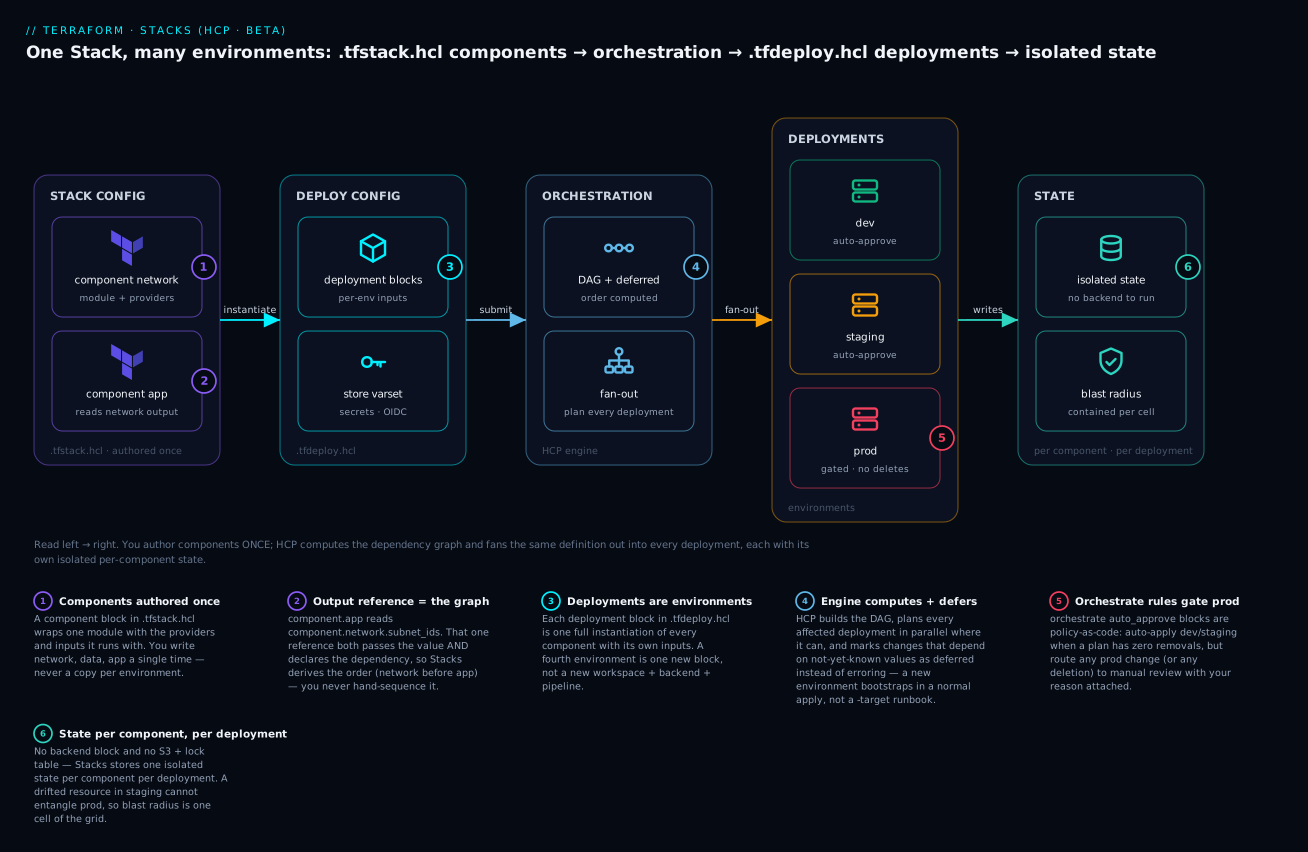
Read it left to right: you author component blocks once in .tfstack.hcl, list environments as deployment blocks in .tfdeploy.hcl, and HCP’s engine computes the dependency graph and fans that one definition out into dev/staging/prod — each a first-class deployment with its own isolated, per-component state.
Before this lesson, be comfortable with Terraform modules and their input/output interfaces, remote state, and how workspaces isolate environments. It helps to have felt the pain this lesson solves — the multi-environment workspace and Terragrunt patterns:
- Workspaces deep dive: CLI vs HCP state isolation
- Terragrunt monorepo: dependency graph and run-all
- HCP Terraform fundamentals: workspaces, VCS, runs, registry
After this lesson you will be able to split a platform into a .tfstack.hcl component definition and a .tfdeploy.hcl deployment list; wire providers once and pass them into components; pass outputs between components so the dependency graph is derived, not hand-ordered; bootstrap a brand-new environment with deferred changes instead of -target; encode promotion safety as orchestrate rules; and plan a staged migration off workspaces or Terragrunt.
Maturity note. Stacks is an HCP Terraform capability in public beta at the time of writing; the
.tfstack.hcl/.tfdeploy.hcllanguage is stable enough to design against, but treat specific attributes andcontextfields as version-sensitive, and remember none of it runs on the open-source CLI alone. Going deeper covers exactly what runs where — and where that leaves OpenTofu.
1. Stacks vs the workspace-per-environment pattern: what changes
The mental model is the biggest shift, so anchor it before touching syntax.
In the classic pattern, the unit of work is a workspace: one state file, one set of variables, one terraform apply. An “environment” is a workspace (or a folder of workspaces), and you replicate configuration to replicate environments. Orchestration across them lives outside Terraform.
With Stacks, there are two new units:
| Concept | Classic workspaces | Terraform Stacks |
|---|---|---|
| Reusable infra definition | Root module per env | component block (authored once) |
| Environment instance | A workspace | A deployment block |
| State boundary | One state per workspace | One state per component, per deployment |
| Cross-env orchestration | External CI / scripts | Built-in, graph-driven |
| Provider config | Per root module | Declared once, passed to components |
| Change promotion | Manual run ordering | orchestrate rules + auto-approve |
The practical consequence: you define network, data, and app once as components, then say “I want these in dev, staging, and prod, with these inputs each.” Stacks expands that into per-deployment, per-component states and plans them together. You stop maintaining N copies of the same root module.
A Stack is a directory containing two kinds of HCL:
- Stack configuration (
*.tfstack.hclortfstack.hcl) declares components, providers, and the variables/outputs of the Stack itself. - Deployment configuration (
*.tfdeploy.hclortfdeploy.hcl) declares deployments, supplies their inputs, and defines orchestration rules.
stacks/platform/
  components.tfstack.hcl     # what the Stack is made of
  providers.tfstack.hcl      # provider wiring (can be one file)
  variables.tfstack.hcl      # Stack-level inputs
  deployments.tfdeploy.hcl   # which environments, and their values
  modules/
    network/
    app/
2. Authoring tfstack.hcl components and wiring providers
A component is a Terraform module plus the providers it should run with and the inputs it needs. Crucially, providers are configured at the Stack level and passed into components, rather than configured inside each module. This is what lets one component definition serve many deployments with different credentials or regions.
Start with provider requirements and the Stack’s own variables.
# variables.tfstack.hcl
variable "region" {
  type = string
}

variable "aws_role_arn" {
  type = string
}

variable "instance_count" {
  type    = number
  default = 2
}

# identity_token issues an OIDC token the AWS provider exchanges for creds.
# No long-lived secrets in the Stack.
identity_token "aws" {
  audience = ["aws.workload.identity"]
}
Now declare and configure providers. required_providers lives in the Stack, and each provider block names an instance you can hand to components. Note the use of for_each to fan a provider across deployments is handled by deployment inputs, not here; here you wire one logical provider.
# providers.tfstack.hcl
required_providers {
  aws = {
    source  = "hashicorp/aws"
    version = "~> 5.60"
  }
  random = {
    source  = "hashicorp/random"
    version = "~> 3.6"
  }
}

provider "aws" "this" {
  config {
    region = var.region

    assume_role_with_web_identity {
      role_arn           = var.aws_role_arn
      web_identity_token = identity_token.aws.jwt
    }
  }
}

provider "random" "this" {}
Then the components themselves. Each component points at a source module, passes typed inputs, and is granted a set of providers.
# components.tfstack.hcl
component "network" {
  source = "./modules/network"

  inputs = {
    region = var.region
  }

  providers = {
    aws = provider.aws.this
  }
}

component "app" {
  source = "./modules/app"

  inputs = {
    subnet_ids     = component.network.subnet_ids
    instance_count = var.instance_count
  }

  providers = {
    aws    = provider.aws.this
    random = provider.random.this
  }
}
The referenced modules are ordinary Terraform modules with one rule: their provider requirements must be satisfied by what the component passes in. Inside ./modules/network you write variable, resource, and output blocks exactly as you would in any module. There is no terraform { backend ... } block; Stacks manages state.
3. Declaring deployments and varsets in tfdeploy.hcl
The Stack configuration is environment-agnostic. The deployment configuration is where environments come to life. Each deployment block produces a full, independent instantiation of every component, with its own inputs and its own state.
# deployments.tfdeploy.hcl
deployment "dev" {
  inputs = {
    region         = "us-east-1"
    aws_role_arn   = "arn:aws:iam::111111111111:role/stacks-dev"
    instance_count = 1
  }
}

deployment "staging" {
  inputs = {
    region         = "us-east-1"
    aws_role_arn   = "arn:aws:iam::222222222222:role/stacks-staging"
    instance_count = 2
  }
}

deployment "prod" {
  inputs = {
    region         = "us-west-2"
    aws_role_arn   = "arn:aws:iam::333333333333:role/stacks-prod"
    instance_count = 6
  }
}
Every key in a deployment’s inputs maps to a Stack-level variable. Adding a fourth environment is now a copy-paste of one block, not a new workspace, new backend, and new pipeline wiring.
To avoid repeating shared values, factor them into a locals block and reference it. A common pattern is a baseline map merged per environment:
# deployments.tfdeploy.hcl
locals {
  common = {
    instance_count = 2
  }
}

deployment "staging" {
  inputs = merge(local.common, {
    region       = "us-east-1"
    aws_role_arn = "arn:aws:iam::222222222222:role/stacks-staging"
  })
}
For secrets and reusable variable bundles, bind a variable set (varset) from HCP Terraform with a store. This keeps credentials and shared config out of the repo and lets platform teams manage them centrally.
# deployments.tfdeploy.hcl
store "varset" "shared" {
  id       = "varset-AbC123XyZ"
  category = "terraform"
}

deployment "prod" {
  inputs = {
    region         = "us-west-2"
    aws_role_arn   = store.varset.shared.aws_role_arn
    instance_count = 6
  }
}
4. Passing outputs between components and cross-component dependencies
You already saw the key move in section 2: component.network.subnet_ids is referenced in the app component’s inputs. This single reference does two things. It passes the value from one component’s outputs to another’s inputs, and it declares the dependency — Stacks knows app must plan and apply after network, and it builds the DAG accordingly. You never hand-order them.
For an output of the network module to be referenceable, the module must expose it:
# modules/network/outputs.tf
output "subnet_ids" {
  value = aws_subnet.private[*].id
}
To surface values out of the Stack as a whole (for consumers, dashboards, or downstream Stacks), declare output blocks in the Stack configuration. Mark sensitive values so they are not printed in plans.
# outputs.tfstack.hcl
output "app_endpoint" {
  type        = string
  value       = component.app.endpoint
  description = "Public endpoint for the app tier"
}

output "db_password" {
  type      = string
  value     = component.app.db_password
  sensitive = true
}
The dependency graph is per deployment. dev’s app depends on dev’s network; it has no relationship to prod’s network. That isolation is automatic and is what makes blast radius predictable.
5. Deferred changes and planning against not-yet-created infrastructure
Here is the capability that is hard to replicate with workspaces. In a fresh deployment, a downstream component frequently needs values from an upstream component that does not exist yet. A classic example: the app component wants for_each over subnets, but on the very first apply the subnets are unknown.
In ordinary Terraform, for_each over an unknown value is a hard error — you are forced into multi-step applies and -target gymnastics. Stacks introduces deferred changes. When a plan depends on values that are not yet known, Stacks marks those changes as deferred instead of failing. It applies what it can now, learns the real values, and completes the deferred work on a subsequent plan/apply — all tracked as part of the same change, no manual targeting.
# modules/app/main.tf
# subnet_ids may be unknown on first apply; Stacks defers the
# dependent resources rather than erroring on unknown for_each keys.
resource "aws_instance" "web" {
  for_each = toset(var.subnet_ids)

  ami           = var.ami_id
  instance_type = "t3.small"
  subnet_id     = each.value
}
In the plan output you will see resources reported as deferred, with a clear note that they cannot be planned until upstream values resolve. The first apply provisions the network and any instances it can; once subnet IDs are concrete, the next run plans and applies the remaining instances. The operational win is that bootstrapping an entirely new environment becomes a normal apply, not a runbook.
6. Orchestration rules, auto-approve conditions, and rollout ordering
Stacks plans every affected deployment, but you decide which plans apply automatically and which wait for a human. That policy lives in orchestrate blocks in the deployment configuration. The most common rule type is auto_approve, which evaluates conditions against a plan and approves it when they hold.
# deployments.tfdeploy.hcl
# Auto-approve plans that contain no resource removals.
orchestrate "auto_approve" "no_deletes" {
  check {
    condition = context.plan.changes.remove == 0
    reason    = "Plan removes ${context.plan.changes.remove} resources; require manual review."
  }
}
The context object exposes facts about the deployment and its plan — change counts, the deployment name, and metadata you can branch on. Every check must pass for the plan to auto-approve; any failing check sends the plan to manual approval with the reason attached.
You can gate environments differently and encode promotion order. A frequent pattern: let non-prod apply automatically when safe, but make prod depend on staging having converged, and never auto-approve destructive prod changes.
orchestrate "auto_approve" "safe_nonprod" {
  check {
    # Only auto-approve dev and staging.
    condition = contains(["dev", "staging"], context.deployment.name)
    reason    = "Manual approval required for ${context.deployment.name}."
  }

  check {
    condition = context.plan.changes.remove == 0
    reason    = "Refusing to auto-approve deletes in ${context.deployment.name}."
  }
}
Because the dependency comes from real output references, rollout ordering between components is inherent — network before app, always. Ordering between deployments (promote dev, then staging, then prod) is something you express by gating prod behind manual approval, or by referencing upstream-deployment state through your own conventions, then driving the wave through the run queue. The key idea: orchestration policy is code in the Stack, reviewed like everything else, not tribal knowledge in a pipeline.
7. Operational concerns: state, drift, and observability per deployment
State. You do not manage backends. Stacks stores state per component, per deployment, inside HCP Terraform. There is no terraform.tfstate to lose, no S3 bucket plus DynamoDB lock table to provision before you can begin. The flip side is that terraform state surgery does not apply the same way; you work through Stack runs and the platform’s state handling rather than poking files.
Drift. Each deployment is reconciled against its own state, so drift is reported and corrected at the deployment-component granularity. A drifted security group in staging does not entangle prod. Because every deployment is a first-class object, you get a clear per-environment view of what changed and what is pending.
Observability. Treat each deployment as the unit you watch. Plans, applies, deferred changes, and approval status are all per deployment in the HCP Terraform UI and API. Stack outputs (section 4) are the contract you export to humans and downstream systems; keep sensitive ones flagged. When something looks off, the question is always “which deployment, which component,” and the model answers it directly.
Going deeper
Beta status, and exactly what runs where
Terraform Stacks is an HCP Terraform / Terraform Enterprise feature, in public beta at the time of writing. That word “beta” is not a disclaimer to gloss over — it has three concrete consequences for how you design and how much you should hard-code:
- The orchestration is server-side. You author locally and can run
terraform stacks init/terraform stacks validateon your machine, but the graph computation, the per-deployment plans and applies, deferred-change tracking, and all state live inside HCP Terraform. There is no localterraform applyfor a Stack the way there is for a root module — the closest local action is validate, and the real runs happen on the platform. - The language is additive but moving. New block types and new
contextfields have appeared across beta releases. Every snippet in this lesson is current-and-representative, but the honest instruction is: confirm attribute names againstterraform stacks --helpand the docs for your CLI build before you depend on them in CI. Pin the CLI version you validate against. - OpenTofu has no Stacks. The
.tfstack.hcl/.tfdeploy.hcllanguage and thestackssubcommand are not part of the open-source Terraform CLI or of OpenTofu — they are an HCP orchestration layer (see below).
Where OpenTofu stands
OpenTofu (the community fork of Terraform) has no Stacks feature and no .tfstack.hcl / .tfdeploy.hcl support. Stacks is server-orchestrated on HCP Terraform, and the authoring language is coupled to that engine, so there is nothing for a standalone CLI to execute. If you are on OpenTofu or on the open-source terraform CLI without HCP, the multi-environment story remains the familiar toolkit: for_each/workspaces at the root, or a wrapper such as Terragrunt (or Terramate) to keep environments DRY and to walk a cross-unit dependency graph. The concepts in this lesson — components, deployments, deferred changes, orchestration policy — are worth learning regardless, because they are the vocabulary the whole ecosystem is converging on, but the implementation here is HCP-only. Plan your tool choice with that lock-in in mind.
The unit of work is a cell, not a workspace
The single most useful reframing: with Stacks the atomic unit is not a workspace and not a deployment — it is a cell in a grid, one component intersected with one deployment. Three components across three deployments is a 3×3 grid of nine cells, each with its own state and its own place in the plan.
That grid is why the properties you care about compose so cleanly:
- State is isolated per cell.
staging × networkcannot corrupt or lockprod × app. - Blast radius is one cell. A bad change to the
appcomponent instagingtouches exactly that cell’s resources;networkinstagingand everything inprodare untouched. - The DAG runs per deployment. Edges (
component.app→component.network) exist within a deployment column, never across columns, unless you deliberately wire two Stacks together (next).
Wiring outputs between deployments and Stacks: publish_output and upstream_input
Inside one Stack, component.network.subnet_ids is all you need — it passes the value and creates the edge. But real platforms split into multiple Stacks (a networking Stack owned by one team, an app Stack owned by another), and you need one Stack’s deployment output to feed another Stack’s deployment input. That is what publish_output and upstream_input are for — they are the cross-Stack replacement for terraform_remote_state, and unlike a remote-state read they establish an explicit, platform-tracked dependency between the two Stacks.
The producer Stack exposes a Stack-level output, then publishes a specific deployment’s value:
# network.tfstack.hcl — the producer Stack exposes a Stack-level output.
output "vpc_id" {
  type        = string
  value       = component.network.vpc_id
  description = "VPC created for this deployment"
}
# network.tfdeploy.hcl — publish one deployment's output for other Stacks.
deployment "production" {
  inputs = { region = "us-west-2" /* ... */ }
}

publish_output "vpc_id" {
  value = deployment.production.vpc_id
}
The consumer Stack references the upstream Stack by address, then reads the published value like any other input:
# app.tfdeploy.hcl — consume the upstream Stack's published output.
# `source` addresses a specific deployment of the producer Stack; the exact
# address format is beta and version-sensitive — confirm with `terraform stacks`.
upstream_input "network" {
  type   = "stack"
  source = "app.terraform.io/ORG/network-stack/production"
}

deployment "production" {
  inputs = {
    vpc_id = upstream_input.network.vpc_id
  }
}
Two things to internalise. First, this is a deployment-to-deployment contract: the app Stack’s production deployment consumes the network Stack’s production deployment, so you keep cross-Stack wiring explicit per environment rather than accidentally coupling prod to staging. Second, because the dependency is tracked, a change to the upstream Stack’s published output can flag the downstream Stack for a re-plan — the coupling is visible, not a silent read that breaks at the next apply the way a stale terraform_remote_state can.
Deferred changes, and auto-completing a bootstrap
Section 5 showed the what of deferred changes; here is the why it is safe. Ordinary Terraform treats an unknown for_each/count key as a hard error because it cannot compute the resource address set, so it refuses to produce a plan it might not be able to apply. Stacks changes the contract: instead of failing the whole plan, it partitions it into changes it can make now and changes whose keys are still unknown, applies the first partition, re-reads the now-concrete values, and produces the next plan. The unknowns become known across runs rather than being forced known up front. That is precisely the multi-phase apply you used to script by hand with -target, except the tool owns the phasing and records it as one logical change.
You can auto-drive the follow-up so a fresh environment converges without a human re-triggering: a companion orchestrate "replan" rule tells the engine to queue the next plan while deferred work remains. Its exact context condition semantics are beta and version-sensitive, so confirm the field names for your CLI before relying on the auto-replan rather than a manual re-run — but the shape is the same policy-as-code as auto_approve. The operational headline stands: bootstrapping an entirely new environment is a normal (possibly two-phase) apply, and that phasing is a Stacks capability with no equivalent in the open-source CLI.
Stacks vs workspaces vs Terragrunt run-all vs for_each at the root
Four different ways to get N environments, compared on the axes that actually bite in production:
| Dimension | Workspace-per-env | for_each at the root |
Terragrunt run-all |
Terraform Stacks |
|---|---|---|---|---|
| One environment is… | a workspace + its own root | one key in a map, all envs in one config | a terragrunt.hcl unit, per env |
a deployment block |
| Reusable definition | a copied root module | one root module | a module referenced by many units | a component (authored once) |
| Cross-unit dependency | terraform_remote_state |
same-state references | dependency / dependencies blocks |
component.x.output (in-Stack) · upstream_input (cross-Stack) |
| Who orders the runs | your CI / humans | single apply (all at once) | Terragrunt walks its DAG | HCP computes the DAG |
| State model | one state per workspace | one state for all envs | one state per unit | one state per component, per deployment |
First apply of unknown for_each |
-target runbook |
hard error | multi-step applies | deferred changes |
| Promotion policy lives in | pipeline YAML | n/a (all-or-nothing) | pipeline + run-all flags |
orchestrate rules (in the Stack) |
| Runs on OSS CLI / OpenTofu | yes | yes | yes | no — HCP only |
Read the table as a ladder of blast radius. for_each at the root is the worst: one giant state, all environments in a single apply, and a single typo can plan a change to prod while you meant dev. Workspaces cut that to one env per state but push all ordering and promotion into external CI. Terragrunt gives you per-unit state and a real DAG (run-all apply walks it) but you still run and gate it yourself. Stacks pushes the whole thing — per-cell state, the DAG, the fan-out, and promotion policy — into one declarative model the platform executes.
Naming-collision alert. Terragrunt also ships a feature called Stacks (
terragrunt.stack.hcl, units and values) — a completely different thing from HCP Terraform Stacks. Terragrunt Stacks is a client-side generator that stamps out units; Terraform Stacks is a server-orchestrated component/deployment engine. Do not mix their syntax. See Terragrunt Stacks: units, values deep dive if you use that tool.
Parallelism and blast radius at scale
Because the graph is explicit, the engine can be aggressive about parallelism safely. Independent components within a deployment plan and apply concurrently; independent deployments fan out concurrently. The only serialisation is where a real dependency edge exists — app waits for network in the same deployment, and a upstream_input consumer waits for its producer. This is the opposite trade-off from the root-for_each pattern, where you get one big serial apply and a blast radius the size of the whole config.
The practical scaling guidance: keep components coarse enough that the graph is legible (network, data, app — not one component per resource) but fine enough that a routine change touches one component’s state, not the platform’s. When something goes wrong the diagnostic question is always the same two coordinates — which deployment, which component — and the isolated per-cell state means the answer is bounded. That boundedness is the whole reason Stacks exists: configuration sprawl folded into components, orchestration logic folded into deployments and orchestrate rules, and a blast radius you can point at on a grid.
Verify
Author locally, validate, then push to HCP Terraform to plan against real deployments.
- Initialize and validate the Stack with the Stacks CLI.
initresolves providers and modules;validatetype-checks components, providers, and deployment inputs.
terraform stacks init
terraform stacks validate
-
Confirm provider wiring —
validatefails if a component requests a provider the Stack does not pass in, or ifrequired_providersis missing an entry. A clean validate means everyproviders = { ... }mapping is satisfied. -
Inspect a plan and look for deferred changes. Trigger a plan (via VCS-connected Stack or CLI) and read the summary. On a brand-new deployment you should see resources marked deferred where they depend on not-yet-known upstream outputs — that is correct behavior, not an error.
-
Check orchestration decisions. In the run for each deployment, confirm
dev/stagingauto-approve under yourorchestraterules while any plan containing removals routes to manual approval with yourreasonstring shown. -
Verify per-deployment isolation. Make a no-op change scoped to one deployment’s inputs and confirm only that deployment re-plans; the others report no changes.
-
Read back Stack outputs and confirm sensitive values are redacted in plan output and surfaced only through the proper API/UI channels.
# List Stacks CLI subcommands available on your installed version.
terraform stacks --help
Checklist
Migration path from existing workspaces and Terragrunt
You do not rewrite everything at once. The realistic sequence:
-
Identify the component boundaries. Your existing root modules or Terragrunt units usually are your components —
network,data,app. Promote each to a module under the Stack with cleanvariable/outputinterfaces. If a module currently reaches into another’s remote state withterraform_remote_state, that becomes a directcomponent.x.outputreference, which is strictly better. -
Replace per-environment roots with deployments. Every Terragrunt
terragrunt.hclthat sets environment inputs, and every per-env workspace, collapses into onedeploymentblock. The DRY that Terragrunt gives you throughincludeanddependencyis native in Stacks: shared structure lives in components, per-env values in deployments, and cross-unit dependencies are output references. -
Move provider and backend config up. Delete
backendblocks (Stacks owns state) and per-rootproviderconfiguration; declare providers once at the Stack level and pass them in. Terragrunt’s generated provider/backend files are no longer needed. -
Import live infrastructure. For resources you must adopt rather than recreate, bring them under the Stack’s management deliberately, deployment by deployment, and verify a no-op plan before trusting it. Do not delete the old workspace until the corresponding deployment shows no drift.
-
Cut over one environment at a time. Bootstrap
devas a Stack, validate the orchestration and deferred-change behavior, then promote the pattern tostagingandprod. Keep the legacy pipeline read-only during the overlap so nothing double-applies.
The destination is a single declaration of what your platform is, plus a short list of where it runs, with HCP Terraform computing the graph and driving the rollout. That is the configuration sprawl of workspace-per-environment and the orchestration logic of Terragrunt, both folded into the tool — which is exactly where they belong.
Practice challenges
Work these on paper or in an editor — they are authoring and design exercises, not live runs (Stacks executes on HCP, and its language is beta). Each has a worked solution and a one-line reason.
1. (Beginner) File placement. Which file — .tfstack.hcl or .tfdeploy.hcl — does each block belong in: component, deployment, provider, orchestrate, output, store "varset", required_providers, publish_output?
<details><summary>Show solution</summary>
.tfstack.hcl: required_providers, provider, component, output.
.tfdeploy.hcl: deployment, orchestrate, store "varset", publish_output.
Why: the Stack config is environment-agnostic (what the platform is); the deploy config is where environments, their inputs, secrets, and rollout policy live (where it runs). </details>
2. (Beginner) Add a fourth environment. Given the dev/staging/prod deployments from section 3, add a qa deployment in us-east-1 with instance_count = 1 and a placeholder role ARN.
<details><summary>Show solution</summary>
deployment "qa" {
  inputs = {
    region         = "us-east-1"
    aws_role_arn   = "arn:aws:iam::444444444444:role/stacks-qa"
    instance_count = 1
  }
}
Why: a new environment is one block — no new workspace, backend, or pipeline. That copy-one-block property is the entire point of the deployment/component split. </details>
3. (Intermediate) Insert a dependent component. Add a data component (./modules/data) that needs subnet_ids from network, and make app depend on data’s endpoint instead of on network directly. Show the references and provider passing.
<details><summary>Show solution</summary>
component "data" {
  source = "./modules/data"
  inputs = {
    subnet_ids = component.network.subnet_ids
  }
  providers = {
    aws = provider.aws.this
  }
}

component "app" {
  source = "./modules/app"
  inputs = {
    db_endpoint    = component.data.endpoint
    instance_count = var.instance_count
  }
  providers = {
    aws    = provider.aws.this
    random = provider.random.this
  }
}
Why: each component.x.output reference both passes a value and adds a DAG edge, so the engine derives network → data → app with zero manual ordering.
</details>
4. (Intermediate) A two-guardrail auto-approve rule. Write an orchestrate "auto_approve" rule that auto-approves a plan only when it removes nothing and the deployment is not prod.
<details><summary>Show solution</summary>
orchestrate "auto_approve" "safe_nonprod" {
  check {
    condition = context.plan.changes.remove == 0
    reason    = "Refusing to auto-approve ${context.plan.changes.remove} removals."
  }
  check {
    condition = context.deployment.name != "prod"
    reason    = "prod always requires manual approval."
  }
}
Why: every check must pass to auto-approve; a single failing check routes the plan to a human with its reason shown. Two checks = two independent guardrails.
</details>
5. (Advanced) Cross-Stack wiring. A separate network-stack owns the VPC. Publish its production deployment’s vpc_id and consume it in this app-stack’s production deployment. Show both sides.
<details><summary>Show solution</summary>
Producer (network-stack):
# network.tfstack.hcl
output "vpc_id" {
  type  = string
  value = component.network.vpc_id
}

# network.tfdeploy.hcl
publish_output "vpc_id" {
  value = deployment.production.vpc_id
}
Consumer (app-stack):
# app.tfdeploy.hcl
upstream_input "network" {
  type   = "stack"
  source = "app.terraform.io/ORG/network-stack/production"
}

deployment "production" {
  inputs = {
    vpc_id = upstream_input.network.vpc_id
  }
}
Why: publish_output + upstream_input are the cross-Stack replacement for terraform_remote_state — an explicit, tracked, deployment-to-deployment dependency. (The exact source address is beta and version-sensitive.)
</details>
6. (Advanced) Design a deferred bootstrap. Your app component does for_each = toset(var.subnet_ids), and subnet_ids come from network, which does not exist on the first apply. Describe what the first apply does, how the run completes, and why this beats the classic approach.
<details><summary>Show solution</summary>
On the first apply the subnet IDs are unknown, so Stacks marks the for_each instances as deferred rather than erroring, applies network (and anything else it can), learns the concrete subnet IDs, and a follow-up plan/apply provisions the deferred instances — optionally auto-queued by an orchestrate "replan" rule. Classic Terraform hard-errors on for_each over an unknown value, forcing a -target runbook or a hand-scripted two-phase apply.
Why: deferred changes turn “bootstrap a brand-new environment” from a documented multi-step ritual into a normal apply — a capability that does not exist in the open-source CLI or OpenTofu. </details>
Common beginner mistakes
- “A Stack is just a fancy workspace.” No — the unit of work is a cell in a grid: one component × one deployment, each with its own state. A workspace is a single flat state. Stacks add a graph across components and a fan-out across deployments; thinking “workspace” makes you miss both dimensions.
- “I still need a
backendblock / an S3 bucket + lock table.” Delete them. Stacks owns state per component per deployment inside HCP. A leftoverbackendblock in a module is a migration bug, not configuration. - “Providers are configured inside each module.” In a Stack,
required_providersandproviderblocks live at the Stack level and you pass instances into components viaproviders = { ... }. A module that configures its own provider fights the model — modules should only require providers, never configure them. - “Deferred changes in the plan mean something failed.” On a fresh deployment, deferred is the expected, correct state — Stacks is planning around values that cannot exist yet. Do not “fix” it; let the follow-up run converge.
- “
for_eachover an unknown works now, so I can drop two-step applies everywhere.” Only inside Stacks, via deferral. Plainterraform/tofustill hard-errors on unknownfor_each/countkeys. Don’t carry the assumption back to root-module land. - “
appdepends onnetworkbecause they’re near each other / because I named them in order.” Ordering comes only from real references. Ifappnever reads anetworkoutput, the engine is free to run them in parallel. Thecomponent.network.subnet_idsreference is what creates the edge — remove it and you remove the guarantee. - “I can run this on OpenTofu or the OSS CLI.” No. Stacks orchestration and state are HCP Terraform (beta) features; the open-source CLI and OpenTofu have no Stacks. For those, the multi-env story is
for_each/workspaces + Terragrunt/Terramate. - “Terragrunt Stacks and Terraform Stacks are the same thing.” Different tools, colliding name. Terragrunt’s
stack/units/values is a client-side generator; HCP Terraform Stacks is a server-orchestrated component/deployment engine. Don’t mix their syntax.
Glossary
- Stack — A directory of
.tfstack.hcl+.tfdeploy.hclthat defines infrastructure components once and the deployments (environments) that instantiate them. The production line, not the product. - Component — A
componentblock in.tfstack.hcl: one Terraform module plus the providers and typedinputsit runs with. Authored once, instantiated per deployment. - Deployment — A
deploymentblock in.tfdeploy.hcl: one full, independent instantiation of every component (an environment or region), with its own inputs and its own per-component state. .tfstack.hcl— Stack configuration:required_providers,provider,variable,component,output. Environment-agnostic (“what the platform is”)..tfdeploy.hcl— Deployment configuration:deployment,store,orchestrate,publish_output,upstream_input. Environment-specific (“where it runs”).- Provider block (Stacks) —
provider "aws" "this" { config { ... } }declared at Stack level and handed to components viaproviders = { ... }, so one definition serves many deployments with different creds/regions. identity_token— A block that issues an OIDC token a provider exchanges for short-lived credentials — the no-long-lived-secrets auth path for Stacks.store/ varset — Astore "varset"block binds an HCP Terraform variable set (secrets, shared config) into deployments by ID, keeping credentials out of the repo.- Deployment inputs — The
inputs = { ... }map on adeployment; each key maps to a Stack-levelvariable. - Stack output — An
outputblock in.tfstack.hcl; evaluated per deployment and the contract the Stack exports (mark secretssensitive). publish_output— In a producer Stack’s.tfdeploy.hcl, exposes a specific deployment’s output for other Stacks to consume.upstream_input— In a consumer Stack’s.tfdeploy.hcl, references another Stack’s published output (type = "stack", asourceaddress) — the cross-Stack replacement forterraform_remote_state.- Deferred change — A planned change that depends on a not-yet-known value; Stacks marks it deferred and completes it on a later run instead of erroring, enabling one-apply bootstrap.
orchestrate— A block in.tfdeploy.hclencoding rollout policy as code;auto_approverules approve plans whosecheckconditions hold,replanrules auto-queue follow-up plans.context— The object exposed insideorchestratechecks (e.g.,context.plan.changes.remove,context.deployment.name) that you branch approval decisions on. Fields are beta/version-sensitive.- DAG (dependency graph) — The plan/apply order Stacks derives from
component.x.outputreferences;network → app, with no hand-sequencing. - Blast radius — What a single change can affect. In Stacks it is one cell (one component in one deployment), because state is isolated per component per deployment.
- Cell — Informal term for one component × one deployment intersection: the true unit of state and blast radius in a Stack.