A fintech’s platform team gets a finding from their auditor that lands like a brick: every production backup — the RDS Aurora clusters holding ledger data, the EBS volumes under the matching-engine hosts — lives in the same AWS account as the workloads it protects. If that account is compromised, ransomwared, or a privileged operator fat-fingers a DeleteBackupVault, the backups die with the primary. The mandate that comes down is specific: copies of every production database and volume snapshot must land, encrypted, in a separate “recovery” account that production has no write path into, on a schedule, with proof. This guide builds exactly that — an automated cross-account snapshot copy pipeline using AWS Backup as the copy engine, a dedicated KMS key for re-encryption, Vault Lock in compliance mode to make the copies immutable, and EventBridge to catch the moments AWS Backup does not surface on its own (failed copies, vault-lock drift) and turn them into tickets and pages.
The reason this is hard is not the wiring — it is the quiet failure modes. AWS Backup will happily run for weeks with a failing copy job while the source-snapshot dashboard stays green. A copy will land in the recovery account and then refuse to restore because one line is missing from a KMS key policy. A snapshot encrypted with the AWS-managed aws/ebs key will silently skip the cross-account copy with an opaque error. Compliance-mode Vault Lock is irreversible after a cooling-off window, so a learning exercise pointed at a seven-year retention becomes a vault you cannot delete for seven years. This article treats those as first-class: every setting gets its values, default, trade-off and limit; every copy-job and KMS error gets a confirm-command and a fix; and the whole operational surface is a symptom → root cause → confirm → fix playbook you keep open during an incident. It is the kind of control a SOC 2 / DORA audit actually wants to see, not a cron job someone wrote on a Friday.
By the end you will be able to stand this up in Terraform, prove a copy is restorable (not merely present), wire the silent failures to your pager, and explain to an auditor — with a single describe-backup-vault line returning Locked: true — why a full compromise of production cannot reach the copies.
What problem this solves
The pain is concrete and it shows up at the worst possible time: during a real recovery. A team that backs up in place — RDS automated backups, EBS snapshots, even a same-account AWS Backup plan — has protected itself against hardware failure and accidental deletion of a row. It has not protected itself against the failure modes that actually destroy companies: a compromised account whose attacker enumerates and deletes every recovery point, a ransomware operator who encrypts the snapshots alongside the volumes, or an insider with backup:Delete* who removes the evidence. In all three the backups and the thing they protect share a blast radius, so they die together.
What breaks without this control is the recovery itself. You discover, mid-incident, that the snapshots you were counting on are gone, or encrypted, or in the same account the attacker still controls. The secondary failure is subtler and more common: you have off-account copies, but nobody verified they restore, so the quarterly DR drill becomes the first time anyone learns the KMS key policy has a gap and the copies are undecryptable. The third failure is silent drift — a copy job that has been failing for three weeks while the source dashboard is green, because the source backup and the cross-account copy are two separate jobs and only one of them was being watched.
Who hits this: any team running regulated or revenue-critical data on AWS — fintech, health, anyone under SOC 2, PCI-DSS, DORA, ISO 27001 — where “is every production resource being copied off-account, immutably, and is that copy restorable” must be a continuously answered question, not an annual scramble. The fix is architectural, not procedural: the recovery account is built so production holds no principal that can write to or delete from it, and the only path data travels is AWS Backup’s own copy mechanism, which the recovery KMS key policy explicitly grants and nothing else.
To frame the whole field before the build, here is every failure class this control defends against, why in-place backup does not, and the mechanism that does:
| Threat class | What in-place backup does | Why it fails | What this control adds |
|---|---|---|---|
| Account compromise | Backups in the same account | Attacker deletes recovery points alongside data | Copies live in an account production cannot write to |
| Ransomware | Snapshots encrypted with data | Operator encrypts snapshots too | Re-encrypted with a recovery-owned CMK; locked |
| Malicious insider | backup:Delete* removes evidence |
Privileged delete with no immutability | Vault Lock compliance mode — even root cannot delete early |
| Accidental deletion | DeleteBackupVault fat-finger |
One command destroys both | Copies are separate, in a separate account, locked |
| Silent copy drift | Source job green, nothing copied | Copy job fails unwatched | EventBridge on Copy Job State Change → page |
| Undecryptable copy | N/A (single account) | Cross-account KMS policy gap | Key policy grants source role; quarterly restore drill |
| Region loss | Same-region only | AZ/region outage takes both | Optional cross-region copy on the long-retention rule |
Learning objectives
By the end of this article you can:
- Enable the two AWS Organizations features (
isCrossAccountBackupEnabled, cross-account monitoring) that cross-account copy depends on, and explain why every copyAccess Denieds without them. - Stand up the recovery account’s destination vault and customer-managed KMS key with a key policy that grants the source account’s Backup role exactly the actions needed to write and decrypt a copy — and name the single line everyone forgets.
- Apply Vault Lock in compliance mode with an honest cooling-off window, and reason about
changeable_for_days,min_retention_daysandmax_retention_daysso you never lock a test account into seven years of retention. - Build the source backup plan with a cross-account
copy_action, separate local and remote lifecycles, cold-storage tiering, and a tag-based selection that protects resources nobody has provisioned yet. - Wire EventBridge rules in both accounts to the
aws.backupevent stream so a failed copy job or a vault-lock change becomes an SNS fan-out to Datadog/Dynatrace and a ServiceNow incident within minutes. - Drive the whole thing from CI with Vault-issued short-lived AWS credentials, gate the IaC with Wiz Code, and prove a copy is restorable with a scheduled restore drill — not merely present.
- Read the copy-job and KMS error reference, run the matching confirm command, and apply the fix — turning the opaque failures (default-key snapshots, key-policy gaps, Org-feature drift) into a two-minute diagnosis.
Prerequisites & where this fits
You should already have, or be ready to create:
- Two AWS accounts under the same AWS Organization: a source/production account and an isolated recovery account (this guide uses
111111111111for source and222222222222for recovery). AWS Organizations is required — cross-account AWS Backup copy only works inside an Org. - AWS Organizations management access to enable the two Backup org features, plus permission to assume an admin role in both member accounts.
- AWS CLI v2 with two named profiles,
prodandrecovery, and Terraform >= 1.6 for the durable infrastructure. - Production resources to protect: at least one RDS/Aurora instance or cluster and one EBS volume, each encrypted with a customer-managed KMS key (AWS Backup will not copy default-
aws/ebs/aws/rds-key snapshots across accounts). - HashiCorp Vault reachable from your CI runner — it brokers short-lived AWS credentials (via the Vault AWS secrets engine) for the Terraform apply, so no static access keys live in the pipeline.
- An IdP — Okta federated to AWS IAM Identity Center (or Entra ID if that is your workforce directory) — so every human who touches the recovery account does so through SSO with an audit trail, never a long-lived key.
This control sits in the resilience and governance layer, downstream of your account structure and upstream of your DR runbooks. It assumes the multi-account foundations from AWS Organizations and IAM Foundations: Accounts, OUs and Roles and the guardrails of AWS Control Tower Guardrails: Building a Secure Multi-Account Foundation. It complements — does not replace — the strategy in AWS Backup and Disaster Recovery: Protect Workloads Across Regions, which covers the why and the RTO/RPO maths; this article is the how for the cross-account, immutable-copy slice. The audit trail it produces feeds AWS CloudTrail and Config: Audit and Compliance at Scale.
A quick map of who owns which layer during a build or an incident, so you call the right person fast:
| Layer | What lives here | Who usually owns it | Failure classes it can cause |
|---|---|---|---|
| Org management account | The two cross-account Backup features | Cloud platform / landing-zone team | Every copy Access Denied if features are off |
| Source account IAM/KMS | Backup role, source CMK on resources | App + platform | Default-key snapshots skip copy; role can’t assume |
| Recovery account KMS | Destination CMK + its key policy | Recovery/security team | Copy lands but won’t restore (policy gap) |
| Recovery vault + lock | Destination vault, Vault Lock config | Recovery/security team | Lock too rigid (stuck) or absent (deletable) |
| Backup plan + selection | Schedule, lifecycle, tag selection | Platform team | Untagged resource silently unprotected |
| EventBridge + SNS | Copy/lock event rules, alert fan-out | Platform + SRE | Silent copy failure (no rule) |
| CI / Terraform | Apply pipeline, Vault creds, Wiz gate | DevOps | Drift, over-broad policy shipped unreviewed |
Core concepts
Five mental models make every later step obvious.
The copy is a second, independent job — not a property of the backup. AWS Backup takes a snapshot (a BACKUP_JOB) and writes it to a source vault; a copy_action on the plan then runs a separate COPY_JOB that re-encrypts and writes the recovery point into the destination vault. The two have separate states, separate lifecycles, and separate failure surfaces. A green source snapshot tells you nothing about whether the copy landed — you must watch Copy Job State Change, not just Backup Job State Change. This single fact is behind most “we thought we had backups” incidents.
The recovery account owns the encryption, and its key policy is the contract. The destination vault is encrypted with a customer-managed KMS key in the recovery account. For the copy to land and be restorable, that key’s policy must grant the source account’s Backup role the actions to use it (kms:Encrypt, kms:Decrypt, kms:ReEncrypt*, kms:GenerateDataKey*, kms:DescribeKey, kms:CreateGrant). Miss that and the copy writes fine but the restore fails with a KMS error — the single most-missed line in the whole build.
Immutability comes from Vault Lock, and compliance mode is one-way. A copy an attacker can delete is a delay, not a backup. Vault Lock in compliance mode makes retention immutable — once the lock’s cooling-off period (changeable_for_days) elapses, nobody, including the recovery account root, can delete a recovery point early or weaken the policy. Governance mode is the softer cousin: a principal with backup:DeleteBackupVaultLockConfiguration can remove it, so it deters mistakes but not a determined insider. Choose compliance for the copies that matter, and rehearse in throwaway accounts because there is no undo after the window.
Selection by tag, not by ARN, is what keeps the control honest over time. Hard-coding resource ARNs into a backup selection guarantees that the database someone provisions next month is silently unprotected. Select by tag (backup=daily) and enforce the tag with an SCP or a Terraform module default, so protection follows the standard rather than a human remembering to add an ARN.
The architecture is the primary control; everything else is defence in depth. Production holds no IAM principal that can write to or delete from the recovery vault. The only path data travels is AWS Backup’s copy mechanism, which the recovery KMS policy explicitly allows. Vault Lock defends against the insider who does get into the recovery account; re-encryption with a recovery-owned CMK makes the source account’s key material irrelevant to the copies; EventBridge makes silent failure loud. Each layer assumes the one before it might fail.
The vocabulary in one table
Before the deep sections, pin down every moving part. The glossary at the end repeats these for lookup; this table is the mental model side by side:
| Concept | One-line definition | Where it lives | Why it matters |
|---|---|---|---|
| Backup plan | Schedule + rules + lifecycles + copy actions | Source account | Defines when/what/where to copy |
| Backup rule | One schedule + retention + copy action | Inside the plan | Daily vs weekly long-term tiers |
| Backup selection | Which resources a plan protects (by tag/ARN) | Inside the plan | Tag-based = future-proof |
| Source vault | Local store for primary recovery points | Source account | First write; local retention |
| Destination vault | Off-account store for copies | Recovery account | The immutable, isolated copy |
COPY_JOB |
The cross-account copy operation | Source-initiated | Separate state from the backup |
| Recovery CMK | KMS key encrypting the destination vault | Recovery account | Key policy must grant source role |
| Vault Lock | Immutable retention on a vault | Recovery vault | Compliance mode = no early delete |
changeable_for_days |
Cooling-off before lock is permanent | Lock config | Your only window to back out |
| Backup role | IAM role AWS Backup assumes | Source account | Needs KMS + backup/restore perms |
| Org features | Cross-account backup + monitoring flags | Management account | Off → every copy Access Denied |
| EventBridge rule | Matches aws.backup events → target |
Both accounts | Turns silent failure into a page |
Step 1 — Enable the AWS Backup organization features
Cross-account copy and cross-account monitoring are Org-level features, off by default. Run these once from the Organizations management account. The first call turns AWS Backup into a trusted service so it can act across accounts; the next two flip the actual features.
# From the Organizations management account
aws organizations enable-aws-service-access \
  --service-principal backup.amazonaws.com

# Allow recovery points to be copied between accounts in the Org
aws backup update-global-settings \
  --global-settings isCrossAccountBackupEnabled=true \
  --profile mgmt

# (Optional but recommended) aggregate backup/copy job status Org-wide
aws backup update-global-settings \
  --global-settings isCrossAccountMonitoringEnabled=true \
  --profile mgmt

# Confirm both are "true"
aws backup describe-global-settings --profile mgmt
If isCrossAccountBackupEnabled is not true, every copy job you create later fails with Access Denied no matter how perfect your KMS and IAM are — so verify this first. The two settings, what they do, and what breaks without each:
| Org setting | What it enables | Default | Where set | Symptom if off |
|---|---|---|---|---|
isCrossAccountBackupEnabled |
Recovery points may be copied between Org accounts | false |
Management account | Every COPY_JOB → Access Denied |
isCrossAccountMonitoringEnabled |
Org-wide aggregation of backup/copy job status | false |
Management account | No central job dashboard; per-account only |
enable-aws-service-access (trusted access) |
Backup may act across the Org | off | Management account | Features can’t be enabled; copy unsupported |
The prerequisites that must all be true before a single cross-account copy can succeed — a checklist you confirm in order:
| # | Prerequisite | Confirm command / path | If missing |
|---|---|---|---|
| 1 | Both accounts in the same Organization | aws organizations list-accounts |
Move/invite account into the Org |
| 2 | Trusted service access for Backup | aws organizations list-aws-service-access-for-organization |
enable-aws-service-access |
| 3 | isCrossAccountBackupEnabled=true |
aws backup describe-global-settings |
update-global-settings |
| 4 | Source resource encrypted with a CMK | aws ec2 describe-volumes / describe-db-instances |
Re-encrypt with a customer-managed key |
| 5 | Recovery CMK grants the source Backup role | KMS key policy | Add AllowSourceBackupRoleUse (Step 2) |
| 6 | Destination vault exists in recovery account | aws backup describe-backup-vault --profile recovery |
Create it (Step 2) |
| 7 | Source Backup role can use the recovery CMK | source IAM role inline policy | Add the cross-account KMS statement (Step 4) |
Step 2 — Create the destination vault and KMS key in the recovery account
The recovery account owns the encryption key and the destination vault. Critically, the KMS key policy must grant the source account’s AWS Backup service role permission to use the key — without that grant, the copy lands but cannot be decrypted on restore. Define this in Terraform under a recovery provider alias.
# providers.tf
provider "aws" {
  alias   = "recovery"
  region  = "ap-south-1"
  profile = "recovery"   # creds injected by Vault AWS secrets engine in CI
}

# recovery_account.tf
data "aws_caller_identity" "recovery" {
  provider = aws.recovery
}

resource "aws_kms_key" "backup_copy" {
  provider                = aws.recovery
  description             = "CMK for cross-account AWS Backup copies (RDS/EBS)"
  enable_key_rotation     = true
  deletion_window_in_days = 30

  policy = jsonencode({
    Version = "2012-10-17"
    Statement = [
      {
        Sid       = "RecoveryAccountAdmin"
        Effect    = "Allow"
        Principal = { AWS = "arn:aws:iam::222222222222:root" }
        Action    = "kms:*"
        Resource  = "*"
      },
      {
        # The SOURCE account's Backup role must be able to use this key
        # to write the re-encrypted copy and to decrypt it on restore.
        Sid    = "AllowSourceBackupRoleUse"
        Effect = "Allow"
        Principal = {
          AWS = "arn:aws:iam::111111111111:role/AWSBackupCrossAccountRole"
        }
        Action = [
          "kms:Encrypt", "kms:Decrypt", "kms:ReEncrypt*",
          "kms:GenerateDataKey*", "kms:DescribeKey", "kms:CreateGrant"
        ]
        Resource = "*"
      }
    ]
  })
}

resource "aws_kms_alias" "backup_copy" {
  provider      = aws.recovery
  name          = "alias/backup-cross-account"
  target_key_id = aws_kms_key.backup_copy.key_id
}

resource "aws_backup_vault" "destination" {
  provider    = aws.recovery
  name        = "recovery-destination-vault"
  kms_key_arn = aws_kms_key.backup_copy.arn
}
Every KMS action the copy needs, and why
This is the table to keep open when a restore fails with a KMS error — each action maps to a moment in the copy/restore lifecycle, so a missing one tells you exactly which moment breaks:
| KMS action | Used when | Granted to | Symptom if missing |
|---|---|---|---|
kms:GenerateDataKey* |
Encrypting the copy’s data | Source Backup role | COPY_JOB fails at write |
kms:Encrypt |
Encrypting metadata/keys | Source Backup role | Copy fails / partial |
kms:Decrypt |
Restoring the copied recovery point | Restoring role (recovery acct) | Restore fails: AccessDenied on key |
kms:ReEncrypt* |
Re-encrypting source → recovery key | Source Backup role | Cross-account copy fails |
kms:DescribeKey |
Resolving key metadata | Both roles | Copy/restore can’t find key |
kms:CreateGrant |
Backup creates a grant for async ops | Source Backup role | Intermittent copy failures |
kms:RetireGrant |
Cleaning up grants | Backup service | Grant leak (rarely fatal) |
KMS key policy vs IAM policy — which controls what
Cross-account KMS access needs grants on both sides; getting only one is the classic half-fix. Where each permission must live:
| Permission location | Lives in | Grants | Without it |
|---|---|---|---|
| Recovery CMK key policy | Recovery account | Source role may be allowed to use the key | Source role is never trusted by the key |
| Source role IAM policy | Source account | Source role is allowed to call KMS on that ARN | Role’s own identity blocks the call |
| Recovery restore role IAM | Recovery account | Restoring principal may call kms:Decrypt |
Restore in recovery account fails |
| KMS grant (auto) | Created at runtime | Async copy operations | Copy fails mid-flight |
The rule: cross-account KMS requires the action be allowed in both the key policy (recovery side) and the caller’s IAM policy (source side). Allowing only one is the most common reason a copy “should work” but doesn’t.
Step 3 — Lock the destination vault (compliance mode)
A copy that an attacker can delete is not a backup, it is a delay. Vault Lock in compliance mode makes retention immutable — once the lock’s cooling-off period (changeable_for_days) elapses, nobody, including the recovery account root, can delete a recovery point early or weaken the policy. Set the cooling-off window honestly: during it you can still back out, after it the lock is permanent.
resource "aws_backup_vault_lock_configuration" "destination" {
  provider            = aws.recovery
  backup_vault_name   = aws_backup_vault.destination.name
  changeable_for_days = 3      # cooling-off: lock becomes immutable after this
  min_retention_days  = 30     # nothing can be deleted before 30 days
  max_retention_days  = 2555   # ~7 years cap to satisfy financial retention
}
Test the entire pipeline end to end in a throwaway pair of accounts before you let
changeable_for_daysexpire in production. Compliance-mode lock is intentionally unforgiving — there is no override, not even from the recovery root.
Governance vs compliance mode
The mode is the most consequential single choice in this build. Side by side:
| Property | Governance mode | Compliance mode |
|---|---|---|
| Can an admin remove the lock? | Yes, with backup:DeleteBackupVaultLockConfiguration |
No — after cooling-off, never |
| Can retention be shortened? | Yes, by an authorised principal | No |
Cooling-off (changeable_for_days) |
Optional | Mandatory, then permanent |
| Protects against accident | Yes | Yes |
| Protects against malicious insider | No (they can delete the lock) | Yes |
| Satisfies WORM / SEC 17a-4-style needs | No | Yes |
| Reversible | Fully | Only inside cooling-off window |
| Use it for | Soft guardrail on dev/test vaults | The copies that actually matter |
The three lock parameters
Each parameter has a distinct failure mode if set wrong — this is where a learning exercise turns into a seven-year mistake:
| Parameter | What it does | Typical value | Set too low | Set too high |
|---|---|---|---|---|
changeable_for_days |
Cooling-off before lock is permanent | 3 (prod) / 0 omit (test) | No time to back out of a mistake | Long window where insider can still delete lock |
min_retention_days |
Floor below which nothing can be deleted | 30 | Copies expire before useful | Test vault stuck for the duration |
max_retention_days |
Ceiling on any recovery point’s retention | 2555 (~7y) | Long-term rule can’t reach its target | Cost compounds; nothing forces it down |
The state machine of a lock
Understanding the lock lifecycle keeps you from doing something irreversible. The transitions:
| State | How you got here | What you can do | What you cannot do |
|---|---|---|---|
| No lock | Vault created, no lock config | Add a lock (governance or compliance) | Nothing immutable yet |
| Locked (cooling-off) | Compliance lock set, within changeable_for_days |
Delete the lock config; change params | Restore is blocked? No — restore works; delete early no |
| Locked (permanent) | Cooling-off elapsed | Add recovery points; let them expire | Delete lock; shorten retention; delete RP early |
| Governance locked | Governance lock set | Delete lock with permission; expire RPs | (compliance-grade immutability) |
Step 4 — Create the source backup vault and AWS Backup service role
Back in the production account, create a local vault to hold the primary recovery points and the IAM role AWS Backup assumes. Attach the two AWS-managed policies plus an inline statement granting use of the recovery account’s KMS key.
# providers.tf (source)
provider "aws" {
  alias   = "prod"
  region  = "ap-south-1"
  profile = "prod"
}

# source_account.tf
resource "aws_backup_vault" "source" {
  provider = aws.prod
  name     = "prod-source-vault"
}

resource "aws_iam_role" "backup" {
  provider = aws.prod
  name     = "AWSBackupCrossAccountRole"
  assume_role_policy = jsonencode({
    Version = "2012-10-17"
    Statement = [{
      Effect    = "Allow"
      Principal = { Service = "backup.amazonaws.com" }
      Action    = "sts:AssumeRole"
    }]
  })
}

# Managed policies for backup + restore of RDS/EBS
resource "aws_iam_role_policy_attachment" "backup" {
  provider   = aws.prod
  role       = aws_iam_role.backup.name
  policy_arn = "arn:aws:iam::aws:policy/service-role/AWSBackupServiceRolePolicyForBackup"
}

resource "aws_iam_role_policy_attachment" "restore" {
  provider   = aws.prod
  role       = aws_iam_role.backup.name
  policy_arn = "arn:aws:iam::aws:policy/service-role/AWSBackupServiceRolePolicyForRestores"
}

# Use the recovery account's CMK for the copy
resource "aws_iam_role_policy" "kms_copy" {
  provider = aws.prod
  name     = "use-recovery-cmk"
  role     = aws_iam_role.backup.id
  policy = jsonencode({
    Version = "2012-10-17"
    Statement = [{
      Effect = "Allow"
      Action = [
        "kms:Encrypt", "kms:Decrypt", "kms:ReEncrypt*",
        "kms:GenerateDataKey*", "kms:DescribeKey", "kms:CreateGrant"
      ]
      Resource = aws_kms_key.backup_copy.arn   # cross-account ARN, account 222...
    }]
  })
}
The IAM policies on the Backup role
What each attachment grants and why you need it — drop the wrong one and a whole resource type silently fails to back up:
| Policy | Grants | Needed for | Omit it and… |
|---|---|---|---|
AWSBackupServiceRolePolicyForBackup |
Create snapshots of supported resources | The BACKUP_JOB itself |
No snapshots taken at all |
AWSBackupServiceRolePolicyForRestores |
Restore recovery points | DR drills + real restores | Can back up but never restore |
Inline use-recovery-cmk (KMS) |
Use the recovery CMK on its ARN | The cross-account COPY_JOB |
Copy Access Denied from source side |
AWSBackupServiceRolePolicyForS3Backup |
Back up S3 buckets | Only if protecting S3 | (not needed for RDS/EBS) |
AWSBackupServiceRolePolicyForS3Restore |
Restore S3 | Only if protecting S3 | (not needed for RDS/EBS) |
Source vs recovery — what each account holds
The asymmetry is the security model. A glance at what lives where makes the one-way property obvious:
| Resource | Source account (111…) | Recovery account (222…) |
|---|---|---|
| Protected resources (RDS/EBS) | Yes | No (copies only) |
| Source vault | Yes (prod-source-vault) |
No |
| Destination vault | No | Yes (recovery-destination-vault) |
| Backup plan + selection | Yes | No |
| Backup role (assumed by Backup) | Yes | A separate restore role |
| KMS CMK | Per-resource source key | Copy CMK (owns the copies’ encryption) |
| Vault Lock | Optional on source | Compliance lock on destination |
| Write path into recovery vault | None | Backup copy mechanism only |
Step 5 — Define the backup plan with a cross-account copy action
The plan is the schedule plus the rules. Each rule here takes a snapshot on a cron schedule, keeps it locally for a window, and — through copy_action — pushes a re-encrypted copy to the recovery vault with its own retention. The lifecycle blocks are what actually expire recovery points; AWS Backup, not you, deletes them on time.
resource "aws_backup_plan" "cross_account" {
  provider = aws.prod
  name     = "prod-cross-account-copy"

  rule {
    rule_name         = "daily-rds-ebs"
    target_vault_name = aws_backup_vault.source.name
    schedule          = "cron(0 3 * * ? *)"   # 03:00 UTC daily
    start_window      = 60                      # minutes to start
    completion_window = 300                     # minutes to finish

    lifecycle {
      delete_after = 35                         # local copy retention (days)
    }

    copy_action {
      destination_vault_arn = aws_backup_vault.destination.arn  # in 222...
      lifecycle {
        delete_after = 90                       # recovery-account retention
      }
    }
  }

  # Weekly long-retention rule, copied with cold-storage tiering for cost
  rule {
    rule_name         = "weekly-longterm"
    target_vault_name = aws_backup_vault.source.name
    schedule          = "cron(0 4 ? * SUN *)"  # Sundays 04:00 UTC

    lifecycle {
      cold_storage_after = 30
      delete_after       = 365
    }

    copy_action {
      destination_vault_arn = aws_backup_vault.destination.arn
      lifecycle {
        cold_storage_after = 30
        delete_after       = 2555              # ~7 years
      }
    }
  }
}
Every backup-rule setting
The plan rule is where most operational tuning happens. Each setting, its values, default and the trade-off:
| Setting | What it controls | Default | When to change | Trade-off / limit |
|---|---|---|---|---|
schedule |
Cron for when the backup runs | none (required) | Match RPO; stagger to spread load | Sub-hour cadence increases cost/jobs |
start_window (min) |
How long a job may wait to start | 60 | Tight windows for time-critical | Too tight → EXPIRED if capacity busy |
completion_window (min) |
Max time to finish before abort | 100 | Large datasets need more | Too short → ABORTED on big snapshots |
lifecycle.delete_after (days) |
Local retention | none (keep forever) | Always set; control cost | Must be ≥ cold_storage_after + 90 |
lifecycle.cold_storage_after (days) |
Move to cold tier | none | Long-retention data | Min 90 days in cold before delete |
enable_continuous_backup |
PITR for supported resources | false | RDS/Aurora PITR needs | Higher cost; not all resource types |
recovery_point_tags |
Tags on the recovery point | none | Cost allocation, search | — |
copy_action |
Cross-account/region copy | none | This entire control | Each copy is a separate COPY_JOB |
Daily vs weekly long-term rules
Why two rules, and how their economics differ — the split is a cost and compliance decision, not an accident:
| Aspect | daily-rds-ebs |
weekly-longterm |
|---|---|---|
| Cadence | Daily 03:00 UTC | Sundays 04:00 UTC |
| Purpose | Operational recovery (recent state) | Compliance / long retention |
| Local retention | 35 days | 365 days |
| Remote retention | 90 days | 2555 days (~7y) |
| Cold storage | No (warm only) | After 30 days |
| Cost driver | Warm storage, frequent | Cold storage, sparse |
| Restore speed | Fast (warm) | Slower (cold thaw) |
The lifecycle constraints that bite
AWS Backup enforces relationships between lifecycle values; violating them makes terraform apply fail or a recovery point behave unexpectedly. The rules:
| Rule | Constraint | If violated |
|---|---|---|
| Cold + delete spacing | delete_after ≥ cold_storage_after + 90 |
API rejects the plan |
| Minimum cold duration | A recovery point stays ≥ 90 days in cold | Early delete blocked / billed minimum |
| Lock floor vs lifecycle | delete_after ≥ vault min_retention_days |
Copy rejected by locked vault |
| Lock ceiling vs lifecycle | delete_after ≤ vault max_retention_days |
Copy rejected by locked vault |
| Cold-eligible resources | Only some types support cold storage | cold_storage_after ignored/errors |
Cross-region as well as cross-account
For a regional-isolation requirement, the same copy_action can target a vault in a different region of the recovery account. Same-region vs cross-region copy, weighed:
| Dimension | Same-region copy | Cross-region copy |
|---|---|---|
| Protects against | Account compromise, ransomware | + region/AZ-wide outage |
| Data-transfer cost | None | Inter-region egress per GB |
| Restore locality | Same region as source | Other region (failover-ready) |
| Latency of copy | Lower | Higher |
| Compliance fit | Most SOC 2 / DORA | Data-residency-sensitive cases |
| Recommended for | Default | Tier-0 workloads needing geo-DR |
Step 6 — Select resources by tag, not by ARN
Hard-coding ARNs into a selection guarantees that the database someone provisions next month is silently unprotected. Select by tag instead and make backup=daily part of your standard resource tagging (enforce it with an SCP or a Terraform module default). The selection also needs the Backup role’s ARN.
resource "aws_backup_selection" "tagged" {
  provider     = aws.prod
  name         = "rds-and-ebs-tagged"
  plan_id      = aws_backup_plan.cross_account.id
  iam_role_arn = aws_iam_role.backup.arn

  selection_tag {
    type  = "STRINGEQUALS"
    key   = "backup"
    value = "daily"
  }
}
Then tag the actual resources (or, better, set these tags in the modules that create them):
# Tag an RDS/Aurora cluster and an EBS volume for inclusion
aws rds add-tags-to-resource \
  --resource-name arn:aws:rds:ap-south-1:111111111111:cluster:ledger-prod \
  --tags Key=backup,Value=daily --profile prod

aws ec2 create-tags \
  --resources vol-0a1b2c3d4e5f6a7b8 \
  --tags Key=backup,Value=daily --profile prod
Selection methods compared
How AWS Backup can decide what to protect, and why tag-based wins for a control that must stay correct as the estate grows:
| Selection method | How it matches | Pro | Con / gotcha |
|---|---|---|---|
Tag (STRINGEQUALS) |
Resources with the tag key=value | New resources auto-included | Needs tag enforcement (SCP) |
Tag (STRINGLIKE) |
Wildcard tag value | Flexible grouping | Over-broad if pattern loose |
| Explicit ARN list | Named resources only | Precise | New resources silently skipped |
not_resources exclusion |
Everything except listed | Broad coverage | Easy to over-protect / cost |
| Resource type (via type filter) | All of a type (e.g. all RDS) | Whole-class coverage | May sweep in unintended resources |
Resource types and their cross-account copy support
Not every supported resource copies the same way; the per-type caveats are where surprises live:
| Resource type | Cross-account copy | Key gotcha |
|---|---|---|
| EBS volume | Yes | Must use a CMK, not aws/ebs |
| RDS instance | Yes | Each snapshot is full (not incremental); CMK required |
| Aurora cluster | Yes | Cluster-level snapshot; CMK required |
| EC2 instance (AMI) | Yes | Copies the backing snapshots; CMK on volumes |
| EFS | Yes | Warm/cold; check region support |
| DynamoDB | Yes | Via AWS Backup, not native; CMK |
| FSx | Varies by flavour | Some flavours limited |
| S3 | Cross-Region/account via Backup | Needs the S3 backup/restore policies |
Enforcing the tag so coverage can’t silently lapse
A selection is only as honest as your tagging. The mechanisms that keep backup=daily from being optional:
| Mechanism | Where it runs | What it guarantees | Limit |
|---|---|---|---|
| SCP requiring the tag on create | Org / OU | New resources must carry it | Coverage depends on resource-type support |
| Terraform module default | IaC | Every module-made resource tagged | Console-made resources escape it |
AWS Config rule (required-tags) |
Account | Flags untagged resources | Detective, not preventive |
| Backup Audit Manager framework | Backup | Reports resources not in a plan | Reporting; needs a follow-up action |
| Tag Policy | Org | Standardises tag keys/values | Doesn’t force presence alone |
Step 7 — Catch the silent failures with EventBridge
AWS Backup will happily run for weeks with a failing copy job and never page anyone — the dashboard goes green on the source snapshot while the cross-account copy quietly errors. EventBridge is how you close that gap. Create a rule on the aws.backup source that matches failed copy jobs and vault-lock changes, and route it to SNS. This rule lives in the source account; mirror a copy-job rule in the recovery account too.
resource "aws_cloudwatch_event_rule" "backup_failures" {
  provider    = aws.prod
  name        = "backup-copy-and-lock-alerts"
  description = "Alert on failed copy jobs and vault-lock drift"
  event_pattern = jsonencode({
    source      = ["aws.backup"]
    detail-type = ["Copy Job State Change", "Backup Vault State Change"]
    detail = {
      state = ["FAILED", "ABORTED"]
    }
  })
}

resource "aws_sns_topic" "backup_alerts" {
  provider = aws.prod
  name     = "backup-alerts"
}

resource "aws_cloudwatch_event_target" "to_sns" {
  provider  = aws.prod
  rule      = aws_cloudwatch_event_rule.backup_failures.name
  target_id = "sns"
  arn       = aws_sns_topic.backup_alerts.arn
}
Wire the SNS topic to the tools that already run your on-call: a subscription to the Datadog (or Dynatrace) AWS integration endpoint so a failed copy raises a monitor and shows on the reliability dashboard, and a subscription that hits a ServiceNow inbound webhook to auto-open a P2 incident with the failed job’s ARN. That way a broken backup is a ticket and a page within minutes, not a discovery during an actual restore.
The AWS Backup events worth wiring
The aws.backup source emits several detail-types; which to alert on and why:
detail-type |
Fires when | Alert on which states | Why it matters |
|---|---|---|---|
| Copy Job State Change | A COPY_JOB changes state |
FAILED, ABORTED |
The silent cross-account failure |
| Backup Job State Change | A BACKUP_JOB changes state |
FAILED, EXPIRED, ABORTED |
Source snapshot didn’t happen |
| Restore Job State Change | A restore changes state | FAILED |
DR drill / real restore broke |
| Backup Vault State Change | Vault config (incl. lock) changes | any | Lock drift / tampering |
| Recovery Point State Change | RP becomes COMPLETED/PARTIAL |
PARTIAL, EXPIRED |
Incomplete or aged-out copy |
Where each alert should route
Not every event deserves a page; the routing matrix keeps signal high:
| Event | Severity | Route to | Page on-call? |
|---|---|---|---|
Copy job FAILED |
High | ServiceNow P2 + Datadog | Yes |
Backup job FAILED |
High | ServiceNow P2 | Yes |
Restore job FAILED (drill) |
High | ServiceNow + Slack | Yes |
| Vault-lock config changed | Critical | Security channel + SIEM | Yes (tamper) |
Recovery point PARTIAL |
Medium | Datadog monitor | Business hours |
Backup job EXPIRED (window) |
Medium | Datadog + capacity review | Business hours |
SNS subscription targets
How the fan-out reaches each tool, and the auth model for each:
| SNS subscription | Protocol | Auth / setup | Result |
|---|---|---|---|
| Datadog AWS integration | HTTPS endpoint | Datadog-provided URL + external ID | Monitor + dashboard event |
| Dynatrace | HTTPS / webhook | API token | Problem + Davis correlation |
| ServiceNow | HTTPS webhook | Inbound integration user | Auto-opened P2 incident |
| PagerDuty | HTTPS / email integration | Integration key | Direct page |
| Email (fallback) | Confirm subscription | Human notification | |
| Lambda (enrichment) | lambda | Resource policy | Add ARN/context before routing |
Step 8 — Drive it all from CI with Vault-issued credentials
Run the Terraform from GitHub Actions (Jenkins works identically). The job asks HashiCorp Vault for short-lived AWS credentials via the AWS secrets engine — one lease scoped to the source account, one to the recovery account — so the pipeline never holds a static key. For app-consistent EBS snapshots on the matching-engine hosts, an Ansible play lays down the fsfreeze pre/post scripts that AWS Backup’s Windows VSS equivalent does for you on Linux.
# In the CI runner, before terraform: lease creds from Vault
export VAULT_ADDR="https://vault.internal:8200"
vault login -method=jwt role=backup-ci jwt="$CI_OIDC_TOKEN" >/dev/null

# Source-account lease
eval "$(vault read -format=json aws/creds/prod-backup-admin \
  | jq -r '.data | "export AWS_ACCESS_KEY_ID=\(.access_key)\nexport AWS_SECRET_ACCESS_KEY=\(.secret_key)"')"

terraform init
terraform plan  -out=tfplan
terraform apply -auto-approve tfplan
Gate the apply behind a pull-request review and let Wiz Code scan the Terraform in the PR — it will flag a vault with no lock, a KMS key with an over-broad policy, or public exposure before the plan is ever applied. At runtime, CrowdStrike Falcon sensors on the CI runners and the production hosts watch for tampering with the snapshot/backup agents themselves. If you already run External Secrets, the same Vault path can feed it — see Set Up External Secrets Operator to Sync Vault and AWS Secrets into Kubernetes.
How credentials reach the pipeline (and how they don’t)
The credential model is itself a control surface; the comparison shows why Vault-leased beats static keys:
| Approach | Lifetime | Where the secret lives | Blast radius if leaked |
|---|---|---|---|
| Vault AWS secrets engine (used here) | Minutes (lease TTL) | Nowhere persistent; minted per run | Tiny — expires fast, scoped role |
| GitHub OIDC → IAM role | Per-job token | No static key; trust policy | Small — scoped, short |
| Static IAM access key in CI secret | Until rotated | CI secret store | Large — long-lived, often over-scoped |
| Hard-coded in repo | Forever | Git history | Catastrophic — never do this |
| EC2 instance profile (self-hosted runner) | Rotated by AWS | Instance metadata | Medium — scoped to instance role |
The tools in the pipeline and what each guards
The supporting cast, mapped to the specific risk each removes:
| Tool | Stage | Guards against | Replaces |
|---|---|---|---|
| Terraform | Build | Drift, undocumented change | Click-ops in the console |
| HashiCorp Vault | Pre-apply | Static long-lived keys | Stored access keys |
| Wiz Code | PR gate | Misconfigured IaC shipped | Post-hoc CSPM findings |
| GitHub Actions / Jenkins | Orchestration | Manual, unaudited applies | Laptop terraform apply |
| Ansible | Host config | Crash-inconsistent snapshots | Manual fsfreeze |
| CrowdStrike Falcon | Runtime | Agent/host tampering | Trust without verification |
| Datadog / Dynatrace | Runtime | Unnoticed failures | Annual audit discovery |
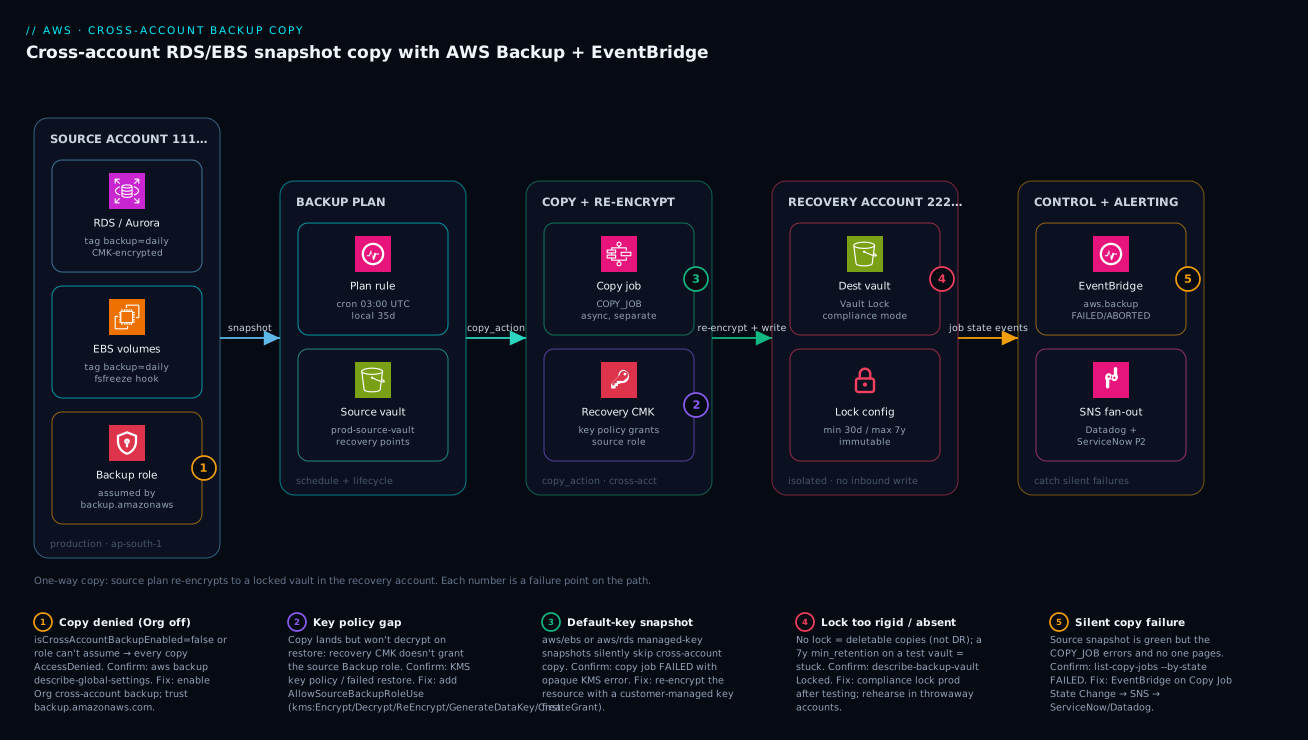
Architecture at a glance
The flow is deliberately one-directional, and that direction is the whole point. Read the diagram left to right. In the source account (111…) the protected resources — RDS/Aurora clusters and EBS volumes, each tagged backup=daily and encrypted with a customer-managed key — are snapshotted on a schedule by a backup plan rule (cron 03:00 UTC), which writes the primary recovery point to the local source vault. A copy_action on that rule then triggers a separate COPY_JOB that re-encrypts the recovery point with the recovery account’s CMK and writes it into the destination vault in the recovery account (222…) — a vault carrying Vault Lock in compliance mode (min 30 days, max ~7 years) so even its own root cannot delete a copy early. The arrows only ever point into the recovery account; production holds no principal that can write to or delete from that vault.
The control plane runs alongside the data path. EventBridge rules in both accounts watch the aws.backup stream; a COPY_JOB that goes FAILED/ABORTED, or a Backup Vault State Change that signals lock drift, fans out through SNS to Datadog/Dynatrace (a monitor and a page) and to ServiceNow (an auto-opened P2 incident with the failed job’s ARN). The five numbered badges mark the failure points that actually bite in production: the Org features being off (every copy Access Denied), the recovery key policy missing the source-role grant (copy lands but won’t restore), a default-key snapshot silently skipping the copy, a lock that is either too rigid or absent, and the silent copy failure that no one pages on. The legend narrates each as symptom · confirm · fix — the same playbook the operational sections expand below.
Real-world scenario
Meridian Pay, a payments startup, runs its ledger on Aurora PostgreSQL and its matching engine on EC2 with EBS gp3 volumes, all in ap-south-1, all in one production account (111111111111). Two engineers, a tight INR budget, SOC 2 Type II in progress. Their backups were RDS automated backups (35-day window) plus a same-account AWS Backup plan for EBS — both in the production account. The Type II auditor’s finding was blunt: “Backups share a fate boundary with the workloads. No demonstrated off-account, immutable copy. No evidence copies are restorable.” They had ninety days to remediate.
The team spun up a dedicated recovery account (222222222222) in the same Org, and built this exact pipeline in Terraform. Week one went smoothly — Org features on, destination vault and CMK created, source role and plan applied, daily copies of the Aurora cluster and three EBS volumes flowing to the recovery vault. The dashboards were green. They almost signed it off.
The first thing that went wrong surfaced only because they ran the restore drill the brief insists on. The aws backup list-recovery-points-by-backup-vault --profile recovery call showed the copies present — but start-restore-job for the Aurora recovery point failed with a KMS AccessDenied. The recovery CMK’s key policy granted the source Backup role kms:Decrypt, but the recovery account’s restore role — a different principal — had no IAM permission to call kms:Decrypt on that key, and the key policy didn’t name it either. Cross-account KMS needs the grant on both sides; they had only the source side. Ten minutes to add a key-policy statement for the recovery restore role and an IAM allow on it, and the restore completed into a throwaway cluster ledger-restore-test, which they then dropped.
The second thing went wrong a week later and was the reason the whole EventBridge layer exists. They added a fourth EBS volume to the matching-engine fleet — and forgot it was encrypted with the default aws/ebs key, not their CMK. The daily backup job snapshotted it fine (source dashboard green), but the COPY_JOB silently failed because AWS Backup cannot copy a default-key snapshot across accounts. Nobody would have noticed for weeks — except the EventBridge rule on Copy Job State Change → FAILED fired within minutes, SNS opened a ServiceNow P2 with the failed job’s ARN, and Datadog paged. The fix was to re-encrypt the volume with their CMK (snapshot → copy with CMK → swap), after which the copy landed. That single page, on a control they’d built the week before, was what convinced the auditor the monitoring was real.
Before locking, they rehearsed the entire pipeline in a throwaway pair of accounts with changeable_for_days = 0 and min_retention_days = 1, deliberately because they’d read that compliance-mode lock is irreversible. Only once a restore from a locked test vault succeeded did they apply the production lock: changeable_for_days = 3, min_retention_days = 30, max_retention_days = 2555. The auditor screenshotted aws backup describe-backup-vault --query Locked returning true. Steady-state cost landed around ₹14,500/month — dominated by warm copy storage, with the weekly long-retention rule tiered to cold after 30 days to keep the seven-year obligation cheap. The lesson on the wall: “A copy you haven’t restored is a rumour. Drill it, watch it, then lock it — in that order.”
The remediation as a timeline, because the order of moves is the lesson:
| Time | Milestone | What they did | What it caught / cost |
|---|---|---|---|
| Week 1 | Pipeline live | Org features, CMK, vault, plan, daily copies | Copies present, dashboards green |
| Week 1 | First restore drill | start-restore-job from recovery vault |
KMS gap — restore role had no kms:Decrypt |
| Week 1 | Fix the gap | Key-policy + IAM allow for recovery restore role | Restore succeeds into throwaway cluster |
| Week 2 | New volume added | Forgot it used the default aws/ebs key |
COPY_JOB silently failed |
| Week 2 | EventBridge fires | Rule → SNS → ServiceNow P2 + Datadog page | Caught in minutes, not weeks |
| Week 2 | Re-encrypt + retry | Snapshot → copy with CMK → swap volume | Copy lands |
| Week 3 | Lock rehearsal | Throwaway accounts, changeable_for_days=0 |
Proved restore-from-locked works |
| Week 3 | Production lock | 3 / 30 / 2555 compliance lock |
Locked: true — audit evidence |
Advantages and disadvantages
The cross-account, AWS-Backup-native, locked-copy model is the right control for regulated data — but it has sharp edges you should weigh openly:
| Advantages (why this model helps you) | Disadvantages (why it bites) |
|---|---|
| Copies live in an account production cannot write to — a full source compromise can’t reach them | The asymmetry means a misconfigured KMS policy fails silently at restore, not at copy — you must drill to find it |
| Vault Lock compliance mode makes copies immutable to everyone, including recovery root | Compliance lock is irreversible after cooling-off; a test pointed at long retention is stuck for that retention |
| AWS Backup is native — no agents on RDS, one mechanism for RDS+EBS+more | The copy is a separate job; a green source snapshot hides a failing copy unless you wire EventBridge |
| Re-encryption with a recovery-owned CMK makes source key material irrelevant to copy confidentiality | Default-aws/ebs/aws/rds-key snapshots silently skip cross-account copy — easy to miss on new resources |
| Tag-based selection auto-protects resources nobody has provisioned yet | Only if tagging is enforced; an untagged resource is invisibly unprotected |
| Incremental EBS copies keep daily cost far below full size | RDS copies are full per snapshot; daily long-retention RDS gets expensive fast |
| Same-region copy avoids inter-region transfer charges | Same-region doesn’t survive a region outage; geo-DR needs cross-region and its egress cost |
| Whole thing is Terraform + EventBridge — auditable, reproducible, paged | Operational nuance (lock state, KMS, Org features) means it’s not “set and forget” |
The model is right whenever data is regulated or revenue-critical and “is every production resource being copied off-account, immutably, restorably” must be continuously true. It is overkill for a stateless app whose data lives entirely in a managed service with its own cross-region replication, and it is the wrong first move for a team that hasn’t yet got a single-account backup working. The disadvantages are all manageable — but only if you know they exist, which is the entire point of the operational sections.
Hands-on lab
Stand up the pipeline against a single EBS volume, force a copy, prove it landed, and tear down — all in a throwaway pair of accounts so the lock can’t trap you. We use the AWS CLI with prod and recovery profiles; keep changeable_for_days unset in the lab.
Step 1 — Confirm the Org features (management account).
aws backup describe-global-settings --profile mgmt
# Expect: "isCrossAccountBackupEnabled": "true"
# If not: aws backup update-global-settings --global-settings isCrossAccountBackupEnabled=true --profile mgmt
Step 2 — Create the recovery CMK and destination vault (recovery account).
KEY_ID=$(aws kms create-key --profile recovery \
  --description "lab cross-account backup CMK" \
  --query KeyMetadata.KeyId -o tsv)
aws kms create-alias --alias-name alias/lab-backup-xacct \
  --target-key-id "$KEY_ID" --profile recovery
# Attach a key policy granting the SOURCE backup role kms:Decrypt/Encrypt/ReEncrypt*/GenerateDataKey*/CreateGrant
aws backup create-backup-vault --backup-vault-name lab-dest-vault \
  --encryption-key-arn "arn:aws:kms:ap-south-1:222222222222:key/$KEY_ID" \
  --profile recovery
Expected: a vault ARN in account 222…. Confirm with aws backup describe-backup-vault --backup-vault-name lab-dest-vault --profile recovery.
Step 3 — Create the source vault + Backup role (source account).
aws backup create-backup-vault --backup-vault-name lab-source-vault --profile prod
# Role AWSBackupCrossAccountRole assumable by backup.amazonaws.com,
# with the two managed backup/restore policies + inline KMS allow on the recovery CMK ARN.
Step 4 — Tag a test EBS volume and create a plan with a copy action.
aws ec2 create-tags --resources vol-0labtestvolume00 \
  --tags Key=backup,Value=daily --profile prod
# Create a plan whose daily rule has copy_action → arn:aws:backup:ap-south-1:222222222222:backup-vault:lab-dest-vault
# and a selection matching tag backup=daily with the role ARN.
Step 5 — Force an on-demand backup (don’t wait for the schedule).
aws backup start-backup-job \
  --backup-vault-name lab-source-vault \
  --resource-arn arn:aws:ec2:ap-south-1:111111111111:volume/vol-0labtestvolume00 \
  --iam-role-arn arn:aws:iam::111111111111:role/AWSBackupCrossAccountRole \
  --profile prod
Step 6 — Watch the copy job to COMPLETED.
aws backup list-copy-jobs --by-state RUNNING --profile prod \
  --query 'CopyJobs[].{Id:CopyJobId,State:State,Dest:DestinationBackupVaultArn}'
# Then by COMPLETED. A FAILED here on a default-key volume is the expected lesson — re-encrypt with the CMK.
Step 7 — Confirm the recovery point exists in the recovery account.
aws backup list-recovery-points-by-backup-vault \
  --backup-vault-name lab-dest-vault --profile recovery \
  --query 'RecoveryPoints[].{Arn:RecoveryPointArn,Status:Status,Created:CreationDate}'
# Expect at least one COMPLETED recovery point.
Step 8 — Prove it’s restorable.
aws backup start-restore-job \
  --recovery-point-arn <ARN-from-step-7> \
  --iam-role-arn arn:aws:iam::222222222222:role/LabRestoreRole \
  --metadata '{"volumeType":"gp3","availabilityZone":"ap-south-1a"}' \
  --resource-type EBS --profile recovery
# A COMPLETED restore here is the win. A KMS AccessDenied = the recovery restore role lacks kms:Decrypt.
Step 9 — Teardown (works because we never locked).
# Delete recovery points, then the vaults, then the plan/selection, then the CMK alias/key.
aws backup delete-recovery-point --backup-vault-name lab-dest-vault \
  --recovery-point-arn <ARN> --profile recovery
aws backup delete-backup-vault --backup-vault-name lab-dest-vault --profile recovery
aws backup delete-backup-vault --backup-vault-name lab-source-vault --profile prod
aws kms schedule-key-deletion --key-id "$KEY_ID" --pending-window-in-days 7 --profile recovery
The lab’s deliberate teaching moment is Step 6 on a default-key volume: the backup succeeds, the copy fails. That is the production trap, reproduced safely.
Common mistakes & troubleshooting
This is the differentiator. Each failure mode below is real, with the symptom, the root cause, the exact command or path to confirm it, and the fix. Scan the playbook table first, then read the detail for whichever row matches.
| # | Symptom | Root cause | Confirm (exact command / path) | Fix |
|---|---|---|---|---|
| 1 | Every COPY_JOB → Access Denied |
Org cross-account backup not enabled | aws backup describe-global-settings shows false |
update-global-settings isCrossAccountBackupEnabled=true (mgmt) |
| 2 | Copy lands but restore fails KMS | Recovery CMK doesn’t grant restoring role kms:Decrypt |
start-restore-job → AccessDenied; read key policy |
Add key-policy + IAM allow for the restore role |
| 3 | New resource’s copy silently fails | Snapshot uses default aws/ebs/aws/rds key |
COPY_JOB FAILED with opaque KMS error |
Re-encrypt resource with a CMK, then re-copy |
| 4 | Source dashboard green, no copies | Watching Backup Job, not Copy Job |
list-copy-jobs --by-state FAILED |
Add EventBridge on Copy Job State Change |
| 5 | Copy rejected by destination vault | Lifecycle delete_after < vault min_retention_days |
Vault lock config vs plan lifecycle | Raise delete_after ≥ lock floor |
| 6 | Can’t delete a test vault | Compliance lock past cooling-off | describe-backup-vault → Locked: true |
Wait out retention; never lock test long |
| 7 | New database unprotected | Selected by ARN, not tag | list-backup-selections; resource has no backup tag |
Switch to tag selection; enforce tag via SCP |
| 8 | Job EXPIRED before starting |
start_window too tight under load |
describe-backup-job state EXPIRED |
Increase start_window; stagger schedules |
| 9 | Job ABORTED mid-run |
completion_window shorter than dataset needs |
describe-backup-job state ABORTED |
Increase completion_window |
| 10 | Source role can’t be assumed | Trust policy missing backup.amazonaws.com |
get-role assume-role-policy |
Add the service principal to the trust policy |
| 11 | EBS snapshot crash-inconsistent | No fsfreeze pre/post hook on Linux host | Restored FS needs fsck / DB recovery |
Ansible fsfreeze hooks; quiesce the app |
| 12 | Cold-tier copy won’t delete on time | <90 days min in cold storage | RP still present after delete_after |
Respect the 90-day cold minimum in lifecycle |
Mistake 1 — Org cross-account backup left off
Everything else is perfect — KMS, IAM, the plan — and every copy still Access Denieds. The feature is Org-level and off by default.
Confirm. aws backup describe-global-settings --profile mgmt and look for isCrossAccountBackupEnabled. Fix. aws backup update-global-settings --global-settings isCrossAccountBackupEnabled=true --profile mgmt. Step 1, always, before you debug anything else.
Mistake 2 — The KMS key-policy gap (the famous one)
The copy lands in the recovery vault and you congratulate yourself — until the restore fails with AccessDenied on the key. The recovery CMK granted the source Backup role decrypt, but the recovery account’s restore role (a different principal) was never granted, in either the key policy or its own IAM. Cross-account KMS needs both sides.
Confirm. aws backup start-restore-job ... returns a KMS AccessDenied; aws kms get-key-policy --key-id <id> --policy-name default --profile recovery shows no statement for the restore role. Fix. Add a key-policy statement granting the restore role kms:Decrypt/kms:DescribeKey, and an IAM allow on the restore role for the same. This is the single most-missed line in the whole build.
Mistake 3 — Default-key snapshots silently skip the copy
AWS Backup cannot copy a snapshot encrypted with the AWS-managed aws/ebs or aws/rds key across accounts. The backup job succeeds (green), the copy job fails with an opaque KMS error, and on a new resource nobody notices.
Confirm. aws backup list-copy-jobs --by-state FAILED --profile prod; cross-reference the resource’s key with aws ec2 describe-volumes --query 'Volumes[].KmsKeyId'. Fix. Re-encrypt the resource with a customer-managed key (snapshot → copy snapshot with the CMK → create volume → swap), then let the copy run.
Mistake 4 — Treating a green source snapshot as success
The source backup and the cross-account copy are two jobs. The console’s snapshot view can be entirely green while every copy fails.
Confirm. aws backup list-copy-jobs --by-state FAILED --profile prod. Fix. Wire the EventBridge rule on Copy Job State Change → FAILED/ABORTED (Step 7) so the copy, not just the backup, is monitored and paged.
Mistake 5 — Lifecycle vs lock-floor conflict
A copy is rejected by the locked destination vault because the rule’s delete_after is below the vault’s min_retention_days. The lock won’t accept anything it would have to delete early.
Confirm. Compare the plan rule’s copy_action.lifecycle.delete_after against aws backup describe-backup-vault --query MinRetentionDays. Fix. Raise delete_after to ≥ the lock floor (and ≤ the ceiling). The lock’s min/max bound every copy that lands.
Mistake 6 — Locking a test vault into long retention
You point a learning exercise at min_retention_days = 30 (or worse, 2555), the cooling-off window passes, and now you cannot delete the vault or its recovery points for the full retention. Compliance mode has no override.
Confirm. aws backup describe-backup-vault --query Locked returns true and you’re past changeable_for_days. Fix. There isn’t a fast one — wait out min_retention_days. Prevent it: in any non-prod vault, omit changeable_for_days (stay in cooling-off) or use min_retention_days = 1, and never point a lab at a production retention.
Mistake 7 — Selecting by ARN
A selection that lists ARNs protects exactly those resources and silently ignores everything provisioned afterwards.
Confirm. aws backup list-backup-selections --backup-plan-id <id> shows explicit ARNs; the new resource lacks a backup tag. Fix. Switch to a selection_tag (Step 6) and enforce the tag with an SCP or a Terraform module default so coverage can’t lapse.
Mistakes 8–9 — EXPIRED and ABORTED jobs
EXPIRED means the job never started within start_window (capacity was busy, window too tight). ABORTED means it started but couldn’t finish within completion_window (dataset too large).
Confirm. aws backup describe-backup-job --backup-job-id <id> --query State. Fix. Increase start_window (and stagger schedules to spread load) for EXPIRED; increase completion_window for ABORTED.
Mistake 10 — Trust policy missing the service principal
The Backup role can’t be assumed because its trust policy doesn’t list backup.amazonaws.com.
Confirm. aws iam get-role --role-name AWSBackupCrossAccountRole --query 'Role.AssumeRolePolicyDocument'. Fix. Add Principal.Service = backup.amazonaws.com with sts:AssumeRole.
Mistake 11 — Crash-inconsistent EBS snapshots
A snapshot taken while the app is mid-write captures torn state; the restored filesystem needs fsck and the database may need crash recovery. On Windows, AWS Backup uses VSS; on Linux you must quiesce yourself.
Confirm. A restored volume’s filesystem reports inconsistencies; DB starts in recovery. Fix. An Ansible play installs fsfreeze pre/post scripts (or app-level quiesce) so the snapshot is application-consistent.
Mistake 12 — Cold-tier copies that won’t expire
A recovery point tiered to cold storage has a 90-day minimum in cold before it can be deleted; a delete_after that ignores this leaves the copy lingering (and billed for the minimum).
Confirm. The recovery point is still present after its nominal delete_after. Fix. Ensure delete_after ≥ cold_storage_after + 90; AWS Backup enforces this on the plan, but a mismatch on an imported plan can surface here.
Best practices
- Enable the Org features first, verify them, then build.
isCrossAccountBackupEnabled=trueis the prerequisite every other piece silently depends on. Confirm withdescribe-global-settingsbefore debugging anything downstream. - Grant the recovery CMK to both the source Backup role and the recovery restore role. Cross-account KMS needs the action allowed in the key policy and the caller’s IAM. The restore-side grant is the one everyone forgets.
- Encrypt every protected resource with a customer-managed key. Default-key snapshots silently skip cross-account copy. Enforce CMK encryption at provisioning so new resources can’t slip through.
- Select by tag, enforce the tag. Tag-based selection plus an SCP requiring the tag means a new database is protected the moment it exists, not the next time a human edits a selection.
- Monitor the copy job, not just the backup. Wire EventBridge on
Copy Job State Change → FAILED/ABORTEDand route it to a page. A green source snapshot proves nothing about the copy. - Drill the restore on a schedule — quarterly at minimum. A copy you haven’t restored is a rumour. Restore into the recovery account, validate, drop. Make it a recurring job, not a manual annual scramble.
- Lock in compliance mode — but only after you’ve tested end to end. Rehearse the entire pipeline, including a restore from a locked vault, in throwaway accounts with short retention before you let
changeable_for_daysexpire in production. - Set lifecycle values that respect the lock floor and ceiling. Every copy’s
delete_aftermust sit between the vault’smin_retention_daysandmax_retention_days, or the locked vault rejects it. - Tier long-retention copies to cold storage. For anything kept beyond a few months,
cold_storage_after = 30cuts cost dramatically; respect the 90-day cold minimum. - Keep the recovery account same-region by default; add cross-region only for tier-0. Same-region avoids transfer charges and covers account-compromise/ransomware; cross-region adds geo-DR at an egress cost.
- Drive everything from Terraform with Vault-leased credentials and a Wiz Code gate. No static keys, no click-ops, no unreviewed policy. The IaC is itself audit evidence.
- Push Backup Audit Manager findings and EventBridge alerts into your SIEM. “Is every production resource being copied off-account, immutably, restorably” becomes a continuously answered question.
Security notes
The architecture is its own primary control: production holds no IAM principal able to write to or delete from the recovery vault, so a full compromise of the source account cannot reach the copies. The only data path into the recovery vault is AWS Backup’s copy mechanism, which the recovery KMS key policy explicitly grants to one named role and nothing else.
Immutability against the insider and the ransomware operator. Vault Lock compliance mode means that even a principal who gets into the recovery account — including its root — cannot delete a recovery point before min_retention_days or weaken the lock once the cooling-off window has passed. Governance mode would let a privileged principal remove the lock; compliance mode does not. This is what makes the copies ransomware-resistant rather than merely off-box.
Encryption and key isolation. Re-encryption with a recovery-owned CMK means the source account’s key material is irrelevant to the copies’ confidentiality — compromising the source’s keys does not expose the copies. The recovery CMK’s policy is least-privilege: the source Backup role gets exactly the actions needed to write and (for source-side restore) decrypt, and the recovery restore role gets decrypt for DR drills. Nothing else is named.
Human and machine identity. Every human entry point goes through Okta → IAM Identity Center (or Entra ID) SSO with no standing keys and a full audit trail. The CI pipeline uses Vault-leased, short-lived credentials scoped per account, so no static access key exists to leak. Wiz Code gates the IaC for misconfiguration in the PR — a vault with no lock, an over-broad KMS policy, a public exposure — before the plan is ever applied, and CrowdStrike Falcon watches the hosts and CI runners at runtime for tampering with the backup/snapshot agents. The least-privilege and identity controls, at a glance:
| Control | Mechanism | Protects against |
|---|---|---|
| One-way write path | No source principal can write/delete recovery vault | Source compromise reaching copies |
| Immutable retention | Vault Lock compliance mode | Insider / ransomware deleting copies |
| Key isolation | Recovery-owned CMK; least-privilege policy | Source key compromise exposing copies |
| Federated human access | Okta → IAM Identity Center SSO | Long-lived keys, untraceable access |
| Short-lived CI creds | Vault AWS secrets engine | Static key leak in the pipeline |
| Pre-apply IaC scan | Wiz Code in the PR | Misconfigured policy/lock shipped |
| Runtime host integrity | CrowdStrike Falcon | Agent/host tampering |
| Continuous evidence | Backup Audit Manager + SIEM | “Are we actually covered?” drift |
Cost & sizing
Cross-account copy cost is dominated by two things: storage of the copies in the recovery account (warm tier) and, for the long-retention rule, the much cheaper cold-storage tier that cold_storage_after moves recovery points into after 30 days. Snapshot storage is incremental for EBS, so daily copies of slowly-changing volumes cost far less than their full size suggests; RDS copies are full per snapshot, so right-size the daily-vs-weekly split. Cross-account, same-region copy avoids inter-region data-transfer charges — keep the recovery account in the same region unless a regional-isolation requirement forces otherwise, in which case budget the transfer. Watch the long-retention delete_after: a 7-year cap you never actually need quietly compounds.
What drives the bill, and the lever for each:
| Cost driver | Roughly what it costs | Lever to reduce | Gotcha |
|---|---|---|---|
| Warm copy storage (recovery vault) | Per-GB-month, warm tier | Shorter delete_after; incremental EBS |
RDS copies are full, not incremental |
| Cold copy storage | Much lower per-GB-month | cold_storage_after for long-retention |
90-day minimum; thaw cost on restore |
| Cross-region transfer | Per-GB egress | Stay same-region unless geo-DR needed | Applies to every cross-region copy |
| Restore (DR drill) | Restore + thaw (if cold) | Drill quarterly, drop fast | Cold thaw adds latency + cost |
| KMS | Per key + per-request | Reuse one CMK per purpose | Rotation is free; key count adds up |
| EventBridge + SNS | Negligible at this volume | — | Don’t over-fan-out to email noise |
Rough sizing for a small estate (one Aurora cluster + a handful of gp3 volumes, ap-south-1):
| Scenario | Approx monthly | Notes |
|---|---|---|
| Daily copies, 90-day warm retention, same-region | ₹12,000–16,000 | Dominated by warm storage of copies |
| + Weekly long-retention, cold after 30d, 7y | +₹2,000–3,500 | Cold tier keeps the 7-year obligation cheap |
| + Cross-region copy on tier-0 only | +egress per GB | Budget transfer for the geo-DR slice |
| Quarterly restore drills | negligible run, low thaw | The cost of proving it works |
There is no AWS Backup free tier for this, but the lab above — one volume, no lock, torn down in an hour — costs almost nothing. Tag the recovery vault’s spend and surface it on the same Datadog/Dynatrace cost dashboard the rest of the platform reports to, so backup storage is a line the team owns rather than a surprise on the bill.
Interview & exam questions
1. Why does cross-account AWS Backup copy require AWS Organizations, and what happens if the Org feature is off?
Cross-account copy is an Org-level capability; AWS Backup must have trusted service access and isCrossAccountBackupEnabled=true set in the management account. Without it, every COPY_JOB fails with Access Denied regardless of how correct the KMS and IAM are. Maps to the Resilient Architectures domain of the AWS Solutions Architect certs.
2. The copy lands in the recovery vault but the restore fails with a KMS error. What’s the most likely cause?
The recovery CMK’s policy (and/or the restoring role’s IAM) doesn’t grant the principal performing the restore kms:Decrypt on the key. Cross-account KMS needs the action allowed on both sides — key policy and caller IAM. The source Backup role is commonly granted; the recovery restore role is the one forgotten.
3. Why can a snapshot back up successfully but fail to copy across accounts?
If the resource is encrypted with the AWS-managed aws/ebs or aws/rds key, AWS Backup cannot copy it across accounts. The backup job succeeds locally; the copy job fails with an opaque KMS error. The fix is to re-encrypt the resource with a customer-managed key.
4. Compare Vault Lock governance mode and compliance mode.
Governance mode can be removed by a principal holding backup:DeleteBackupVaultLockConfiguration — it deters mistakes but not a determined insider. Compliance mode becomes permanent after the changeable_for_days cooling-off window: nobody, including root, can delete a recovery point early or weaken the lock. Use compliance for copies that must be WORM-immutable.
5. What is changeable_for_days, and why is getting it wrong dangerous?
It’s the cooling-off window during which a compliance-mode lock can still be removed. After it elapses the lock is permanent. Setting a long min_retention_days and letting the window pass on a test vault traps it for the full retention with no override — so rehearse in throwaway accounts with short retention.
6. Why select backup resources by tag rather than ARN?
A tag-based selection (backup=daily) automatically includes any resource carrying the tag, so resources provisioned later are protected the moment they exist. An ARN list silently omits everything created afterwards. Pair it with an SCP enforcing the tag so coverage can’t lapse.
7. The source-snapshot dashboard is green but no copies exist in the recovery account. What went wrong and how do you prevent recurrence?
The source backup and the cross-account copy are separate jobs; the copy job has been failing while the backup job succeeds. Prevent it by wiring an EventBridge rule on Copy Job State Change → FAILED/ABORTED to SNS, so the copy is monitored and paged independently.
8. How do start_window and completion_window differ, and what states do their violations produce?
start_window is how long a job may wait to start; exceeding it yields EXPIRED. completion_window is the max time to finish; exceeding it yields ABORTED. Tight start windows under capacity pressure cause EXPIRED; large datasets against a short completion window cause ABORTED.
9. Why isn’t scaling the recovery account’s storage the answer to a failing copy, and what is?
The copy failure is almost always a permission or encryption problem — Org feature off, KMS policy gap, or a default-key snapshot — not capacity. The fix is the matching configuration change (enable the feature, grant the key, re-encrypt), confirmed via list-copy-jobs and describe-global-settings.
10. How does this architecture defend against ransomware specifically? Copies live in an account production cannot write to, and Vault Lock compliance mode makes them immutable even to the recovery account’s root. A ransomware operator who encrypts or deletes everything in the source account — and even one who breaches the recovery account — cannot delete the recovery points before their retention. Maps to the Security and Resilience pillars of the Well-Architected Framework.
11. What does AWS Backup do for application consistency on EBS, and what must you do on Linux?
On Windows, AWS Backup integrates with VSS for application-consistent snapshots. On Linux there is no equivalent, so you must quiesce the application yourself — typically fsfreeze pre/post hooks (via Ansible) — or accept crash-consistent snapshots that may need recovery on restore.
12. Why tier long-retention copies to cold storage, and what constraint applies?
Cold storage is far cheaper per GB-month, making a 7-year retention economical. The constraint is a 90-day minimum in cold storage before a recovery point can be deleted, so delete_after must be at least cold_storage_after + 90.
Quick check
- Which single Org setting, if
false, causes every cross-account copy job toAccess Deniedno matter how correct your KMS and IAM are? - A copy lands in the recovery vault but the restore fails with a KMS
AccessDenied. Name the most-missed grant. - Why does a snapshot encrypted with the
aws/ebskey fail to copy across accounts? - After the
changeable_for_dayswindow elapses on a compliance-mode lock, who can delete a recovery point early? - Which EventBridge
detail-typemust you alert on to catch a silent cross-account copy failure?
Answers
isCrossAccountBackupEnabled(set in the Organizations management account viaupdate-global-settings). Confirm withaws backup describe-global-settings.- The recovery account’s restore role needs
kms:Decrypton the recovery CMK — granted in both the key policy and the role’s IAM. The source Backup role is usually granted; the restore role is the one forgotten. - AWS Backup cannot copy default-AWS-managed-key (
aws/ebs/aws/rds) snapshots across accounts. Re-encrypt the resource with a customer-managed key first. - Nobody — not even the recovery account root. Compliance mode is permanent after cooling-off; there is no override.
Copy Job State Change(matchingFAILED/ABORTED). Watching onlyBackup Job State Changeleaves the copy failure invisible.
Glossary
- AWS Backup — Managed, policy-driven backup service that snapshots supported resources (RDS, EBS, EFS, DynamoDB, more) and can copy recovery points across accounts and regions.
- Backup plan — The schedule, rules, lifecycles and copy actions that define when, what and where AWS Backup protects resources.
- Backup selection — The set of resources a plan protects, chosen by tag (preferred) or explicit ARN, paired with the IAM role AWS Backup assumes.
COPY_JOB— The separate, asynchronous operation that re-encrypts and writes a recovery point into a destination (cross-account/region) vault. Distinct state from theBACKUP_JOB.- Source vault / destination vault — The local store for primary recovery points (source account) and the off-account store for copies (recovery account).
- Vault Lock — Immutable retention on a backup vault. Compliance mode is irreversible after a cooling-off window; governance mode can be removed by an authorised principal.
changeable_for_days— The cooling-off window during which a compliance-mode lock can still be removed; after it, the lock is permanent.min_retention_days/max_retention_days— The floor and ceiling the locked vault enforces on every recovery point that lands in it.- Customer-managed key (CMK) — A KMS key you own and control the policy of; required for cross-account snapshot copy (default AWS-managed keys can’t be copied across accounts).
- Key policy — The resource policy on a KMS key; for cross-account use it must name the foreign principal, in addition to that principal’s own IAM allowing the action.
- Cold storage — A cheaper AWS Backup storage tier for long-retention recovery points, with a 90-day minimum before deletion.
- EventBridge — The event bus that matches
aws.backupevents (e.g.Copy Job State Change) and routes them to targets like SNS — the mechanism that turns silent failures into pages. - Cross-account monitoring — The Org feature that aggregates backup/copy job status across member accounts for a central view.
- fsfreeze — A Linux mechanism to quiesce a filesystem so an EBS snapshot is application-consistent; the manual counterpart to Windows VSS.
Next steps
- Read AWS Backup and Disaster Recovery: Protect Workloads Across Regions for the RTO/RPO maths and the broader DR strategy this control plugs into.
- Set the multi-account groundwork with AWS Organizations and IAM Foundations: Accounts, OUs and Roles and AWS Control Tower Guardrails: Building a Secure Multi-Account Foundation.
- Feed the audit trail and coverage evidence into AWS CloudTrail and Config: Audit and Compliance at Scale.
- For object-storage immutability beyond AWS Backup, compare Configure Kasten K10 Ransomware Protection with Immutable Backups and S3 Object Lock and Deploy MinIO with Object Locking and Site Replication for Immutable Backup Targets.
- Keep CI credentials short-lived with Set Up External Secrets Operator to Sync Vault and AWS Secrets into Kubernetes.