Quick take: a backup is not a DR strategy. AWS Backup gives you centralized, policy-driven copies; disaster recovery is the separate discipline of deciding how fast you must recover (RTO), how much data you can lose (RPO), and how traffic cuts over when a Region burns. Most “DR plans” are a nightly job and a hope — they fail the first time they are actually needed.
A healthcare SaaS backed its RDS database up nightly, copied the dumps to S3, and told its board it had “DR covered.” When us-east-1 had a multi-hour control-plane event, the team discovered four things in the worst possible order: the restore took four hours because it rehydrated a 900 GB snapshot cold; there were no AMIs for the app tier in any other Region, so compute had to be rebuilt by hand; the security groups and IAM roles the app needed did not exist in the failover Region; and DNS failover was manual, gated on a person waking up to flip a record with a 3,600-second TTL that then pinned resolvers for an hour. Their measured recovery was nine hours. Rebuilt properly — AWS Backup with cross-Region copy actions, an RDS cross-Region read replica, pre-staged launch templates, and Route 53 health-check failover — the same outage became a 22-minute event with under a minute of data loss.
This article is the blueprint to get there. We treat backup and DR as two coupled but distinct problems. Backup answers “can I get this specific data back?” — and AWS Backup is the centralized service that schedules, encrypts, copies, retains and (critically) locks recovery points for EC2/EBS, RDS, Aurora, DynamoDB, EFS, FSx, S3 and more from one policy plane. DR answers “can I keep the business running when an entire Region or account is gone?” — and that is a spectrum of patterns (Backup & Restore → Pilot Light → Warm Standby → Active/Active) each trading cost against recovery speed. You will learn to set an RTO/RPO target with the business, pick the cheapest pattern that meets it, build the AWS Backup plan and copy chain that feeds it, harden the destination against ransomware with Vault Lock, and wire the Route 53 cutover that actually flips traffic. Every mechanism gets both an aws CLI snippet and a Terraform snippet, the real limits and error codes, and — because you will read this mid-incident — the playbook itself is a table.
By the end you will stop confusing “we have backups” with “we can recover.” You will know whether your workload needs continuous PITR or a nightly snapshot, whether it needs a warm standby or can tolerate a four-hour rebuild, exactly which KMS grant a cross-Region restore needs, and how to prove all of it with a restore test before the outage proves it for you.
What problem this solves
Backups protect against data loss — a dropped table, a ransomware encrypt, a bad migration, an rm -rf against the wrong bucket. Disaster recovery protects against prolonged loss of service — an Availability Zone power event, a Region-wide control-plane degradation, an account compromise, or a fat-fingered Terraform destroy that takes the whole stack. They are different failure domains and they need different controls, and the classic production mistake is using one word (“backup”) to claim coverage of both.
What breaks without this discipline: a team backs up the database religiously and forgets the application is stateless-but-undeployable in a second Region (no AMIs, no launch templates, no IaC parameters for the new Region’s subnets). Or they keep all recovery points in the same account and Region as production, so a compromised root credential or a Region outage takes the backups with the primary. Or they never test a restore, so the four-hour rehydration time of a cold S3-Glacier snapshot is discovered live, blowing a one-hour RTO promise by 300%. Or in-flight transactions are lost on database promotion because the RPO was never actually measured against the replication lag. Each of these is a real incident pattern, and each is preventable with a deliberate design.
Who hits this hardest: regulated workloads (healthcare, finance, public sector) with contractual RTO/RPO and immutability mandates; cost-sensitive teams who over-build Active/Active for an internal tool that could tolerate a day of downtime, or under-build Backup & Restore for a revenue-critical checkout that cannot; and anyone who has never run a DR game day, because runbooks that are never rehearsed fail under pressure exactly when they are needed. The fix is never “buy more backup storage.” It is “decide the target, pick the matching pattern, automate the cutover, and prove it on a schedule.”
To frame the whole field before the deep dive, here is the spectrum of DR patterns, what each costs, and the recovery it buys:
| DR pattern | What runs in the second Region | Typical RTO | Typical RPO | Relative steady-state cost | Use when |
|---|---|---|---|---|---|
| Backup & Restore | Nothing — only recovery points in a vault | Hours (rehydrate + provision) | Hours (last backup) | Lowest (storage only) | Non-critical workloads; a day of downtime is tolerable |
| Pilot Light | Data replicating (DB replica, S3 CRR); compute off | Tens of minutes | Seconds–minutes | Low (data + minimal infra) | Core data must survive; compute can be scaled from zero |
| Warm Standby | Scaled-down but running full stack | Minutes | Seconds | Medium (always-on small stack) | Revenue-affecting; a few minutes’ downtime is the cap |
| Active/Active (multi-Region) | Full stack serving live traffic | Seconds (near-zero) | Near-zero | Highest (two live stacks + data sync) | Zero-downtime mandate; global low-latency |
Learning objectives
By the end of this article you can:
- Set RTO and RPO targets with the business and translate them directly into a DR pattern (Backup & Restore / Pilot Light / Warm Standby / Active-Active) and an AWS Backup schedule.
- Build an AWS Backup plan end to end: backup rules, schedule, lifecycle to cold storage, retention, cross-Region copy actions, and cross-account copy to an isolated account.
- Choose the right per-service backup mechanism — EBS/RDS snapshots, RDS/Aurora continuous backups (PITR), DynamoDB PITR + on-demand, S3 versioning + replication + Object Lock, EFS/FSx — and know each one’s RPO floor and restore behaviour.
- Harden recovery points against ransomware and accident with AWS Backup Vault Lock (governance vs compliance mode), vault access policies, and KMS key policies — and avoid the lock pitfalls that bill forever.
- Get a cross-Region restore to actually complete by configuring the destination KMS grant (
kms:CreateGrantforbackup.amazonaws.com) and using multi-Region keys so ARNs line up. - Orchestrate failover with Route 53 health checks and failover routing, RDS replica promotion, Auto Scaling scale-out, and an automated DR runbook (Step Functions / SSM).
- Run a DR game day and a scheduled restore test, and read the metrics/CLI that confirm an outage class and drive the recovery playbook.
Prerequisites & where this fits
You should already understand AWS account and Region structure — that a Region is an isolated geography of Availability Zones, and that most failures you design for are AZ-level (handled by Multi-AZ) while the rare catastrophic one is Region-level (handled by cross-Region DR). You should be comfortable running the aws CLI with named profiles, reading JSON output, and reasoning about IAM roles, KMS keys, and VPC subnets/security groups. Familiarity with CloudFormation/Terraform matters, because the single biggest DR failure — “the data was safe but there was nothing to restore it onto” — is solved by infrastructure-as-code, not by the backup service.
This sits in the Resiliency track. It assumes the Region/AZ fundamentals from AWS Regions and Availability Zones Explained and the storage-class mechanics from AWS S3 Storage Classes and Lifecycle, since lifecycle-to-cold-storage governs both backup cost and restore time. It pairs tightly with AWS RDS, DynamoDB and Aurora Compared (the database you protect dictates your RPO floor) and Aurora High Availability and Global Database (the lowest-RPO database DR option). For the centralized, org-wide version of everything here — delegated admin, StackSet vault bootstrap, air-gapped accounts — go to Org-wide AWS Backup with Vault Lock and Cross-Account Recovery. For the lift-and-shift, near-zero-RPO server DR alternative, see AWS Elastic Disaster Recovery (DRS) Cross-Region Failover.
A quick map of who owns each layer of a recovery, so you escalate to the right person fast during an incident:
| Layer | What lives here | Who usually owns it | Failure class it causes |
|---|---|---|---|
| Backup policy / schedule | AWS Backup plans, rules, copy actions | Platform / SRE | RPO miss (schedule too loose), copy never lands |
| Recovery points / vaults | Snapshots, PITR windows, Vault Lock | Platform / security | Deleted/ransomed backups; lock billing forever |
| Encryption (KMS) | Source + destination CMKs, grants | Security | Restore aborts “KMS key cannot be accessed” |
| Compute templates | AMIs, launch templates, ASGs, IaC | App / platform | RTO blowout — nothing to restore onto |
| Database failover | Replica promotion, PITR restore | DBA / platform | Lost in-flight transactions; long rehydrate |
| Traffic cutover | Route 53, health checks, TTL | Network / SRE | DNS won’t flip; resolvers pinned to dead Region |
| Orchestration | Step Functions / SSM runbook | SRE | Manual steps fail under pressure |
Core concepts
Six mental models make every later decision obvious.
RTO and RPO are business numbers, set first, that bound everything else. RTO (Recovery Time Objective) is the maximum tolerable time to restore service. RPO (Recovery Point Objective) is the maximum tolerable data loss, measured in time (e.g. “we can lose 5 minutes of writes”). You do not pick a backup frequency and discover your RPO; you agree the RPO with the business and derive the backup frequency from it. A 5-minute RPO forbids nightly snapshots — it demands continuous backups (PITR) or synchronous replication. A 1-hour RTO forbids a cold 900 GB rehydrate — it demands a warm replica or a pre-provisioned stack.
Backup ≠ replication ≠ DR. A backup is a point-in-time copy retained for restore (recoverable from corruption you only notice later). Replication continuously mirrors current state to another location (great RPO, but it faithfully replicates corruption too — a dropped table replicates instantly). DR is the orchestration that uses backups and/or replicas to restore service, including compute, network, identity and DNS. You need backups for corruption, replication for low RPO, and DR orchestration to tie them into an actual recovery. Confusing them is the root of most “we had backups but couldn’t recover” stories.
AWS Backup is a control plane, not the storage. AWS Backup orchestrates native snapshot/backup mechanisms across services from one place: a backup plan (schedule + lifecycle + retention + copy), a backup vault (the container where recovery points land, encrypted by a KMS key), resource assignments (tag- or ARN-based selection of what to protect), and copy actions (push a recovery point to another vault, Region, or account). The actual bytes are EBS snapshots, RDS snapshots, DynamoDB backups, etc. — AWS Backup schedules and governs them; it does not invent a new storage format.
The destination must exist before the disaster. Cross-Region copy writes to a vault that you must pre-create in the destination Region, encrypted by a key whose policy allows the copy. Restoring compute needs AMIs and launch templates present in the destination Region, plus the VPC, subnets, security groups and IAM roles the workload expects. None of this is created for you at failover time. The recurring catastrophic failure is a perfectly safe recovery point with nowhere to land — data without a target is not recoverable in your RTO.
Immutability is the ransomware control. A recovery point an attacker (or a careless admin) can delete is not a safe backup. AWS Backup Vault Lock makes recovery points immutable for a retention period — in compliance mode, no one, including the AWS account root and AWS itself, can delete them or shorten retention until they expire. Pair that with a separate account (so a compromise of production cannot reach the backups) and a separate Region (so a Region event cannot), and you have a true air gap. Without it, your “backups” are deletable by whoever pops your account.
You don’t have a DR plan until you’ve tested a restore. A backup you have never restored is a hypothesis. AWS Backup’s restore testing runs scheduled restores into an isolated environment and validates them; a game day rehearses the full human runbook. The metrics that matter are measured RTO/RPO from a real restore, not the theoretical ones in a slide. Untested DR is the single most common reason recoveries fail.
The vocabulary in one table
Before the deep sections, pin down every moving part. The glossary at the end repeats these for lookup; this table is the mental model side by side:
| Concept | One-line definition | Where it lives | Why it matters to DR |
|---|---|---|---|
| RTO | Max tolerable time to restore service | Business agreement | Caps your provisioning + rehydrate time |
| RPO | Max tolerable data loss (in time) | Business agreement | Sets backup frequency / replication mode |
| AWS Backup plan | Schedule + lifecycle + retention + copy | AWS Backup | The policy that drives every backup |
| Backup vault | KMS-encrypted container for recovery points | A Region + account | Where copies land; what you lock |
| Recovery point | One point-in-time backup of a resource | In a vault | The thing you restore from |
| Copy action | Push a recovery point to another vault/Region/account | Backup rule | Cross-Region / cross-account DR |
| Continuous backup (PITR) | Restore to any second in a window | RDS/Aurora/DynamoDB/S3 | Sub-5-min RPO |
| Vault Lock | Immutability (governance / compliance) | A vault | Ransomware / accidental-delete protection |
| Cross-Region read replica | A live DB replica in another Region | RDS/Aurora | Pilot-light / warm-standby data tier |
| Route 53 failover | DNS routing to a healthy endpoint | Global | The actual traffic cutover |
| Pilot Light / Warm Standby | DR patterns (data warm, compute off / small) | Architecture | The RTO/cost trade-off you pick |
| Restore testing | Scheduled, validated restores | AWS Backup | Proves RTO/RPO before the outage |
RTO, RPO, and choosing a DR pattern
Everything starts here. Pick the wrong target and you either over-spend on Active/Active for a back-office tool or under-build Backup & Restore for revenue-critical checkout. The four patterns are a cost-versus-speed spectrum; you choose the cheapest one that meets the agreed RTO/RPO, per workload, not per company.
The four patterns, option by option
The detailed trade-off — what each pattern actually provisions, what drives its cost, and where it breaks:
| Pattern | Data tier | Compute tier | Network/DNS | RTO driver | RPO driver | Where it bites |
|---|---|---|---|---|---|---|
| Backup & Restore | Recovery points in a DR vault | None until failover | Create/flip at failover | Provision + rehydrate time | Backup interval | Cold rehydrate is slow; IaC must exist |
| Pilot Light | Live DB replica + S3 CRR | Off (AMIs/templates staged) | Pre-created, weights flipped | Scale-from-zero + promote | Replica lag (seconds) | Scale-out cold start; capacity in DR AZ |
| Warm Standby | Live replica | Small but running | Pre-wired, low TTL | Scale-up + promote | Replica lag | Pay for idle stack; drift vs primary |
| Active/Active | Multi-Region writes (Global DB / global tables) | Full, serving traffic | Latency/geo routing | Near-zero | Near-zero | Cost; write-conflict + data consistency |
A decision table — read your constraint, get your pattern:
| If the business says… | RTO/RPO it implies | Pattern that fits | Don’t over/under-build with |
|---|---|---|---|
| “Internal tool, a day down is fine” | RTO hours, RPO hours | Backup & Restore | Warm Standby (wasted idle cost) |
| “Customer-facing, recover within ~30 min” | RTO ~30 min, RPO minutes | Pilot Light | Backup & Restore (rehydrate too slow) |
| “Revenue site, only minutes of downtime” | RTO minutes, RPO seconds | Warm Standby | Backup & Restore (misses RTO) |
| “Zero downtime, global users” | RTO ~0, RPO ~0 | Active/Active | Warm Standby (single-Region writes) |
| “We must never lose a committed write” | RPO ~0 | Synchronous (Aurora Global / Multi-AZ) | Snapshot-only (loses in-flight) |
| “Ransomware/compliance immutability” | + immutable copy | Any + Vault Lock + isolated account | Same-account vault (no air gap) |
The same patterns mapped to a realistic cost multiple and the AWS building blocks that implement them:
| Pattern | Steady-state cost (relative) | Primary building blocks | Failover human steps |
|---|---|---|---|
| Backup & Restore | 1× (storage only) | AWS Backup plan + cross-Region copy; IaC | Provision stack → restore → flip DNS |
| Pilot Light | ~2–3× | + cross-Region replica; staged AMIs/LTs | Promote replica → scale ASG → flip DNS |
| Warm Standby | ~4–6× | + always-on small ASG + ALB in DR | Scale up → promote → flip DNS |
| Active/Active | ~8–12× | + Aurora Global / DynamoDB global tables | (Automatic) shift weights |
Translating RPO into a backup frequency
The mechanical link people miss: your backup/replication mechanism sets a floor on achievable RPO. You cannot promise a tighter RPO than your mechanism allows:
| Mechanism | RPO floor (best achievable) | How RPO is set | Cost note |
|---|---|---|---|
| Nightly snapshot (cron 1×/day) | ~24 h | Schedule interval | Cheapest; loosest |
| Hourly snapshot | ~1 h | Schedule interval | More storage, more API calls |
| RDS/Aurora continuous backup (PITR) | ~5 min (typically) | Transaction-log shipping | Included; bounded by log frequency |
| DynamoDB PITR | ~5 min | Continuous log | Per-GB charge for PITR |
| S3 versioning + CRR | Seconds–minutes | Async replication lag | Replication + storage cost |
| Aurora Global Database | Typically ~1 s | Storage-level async replication | Cross-Region replica cost |
| RDS Multi-AZ (sync, same Region) | 0 (no loss) — but not cross-Region DR | Synchronous standby | Standby instance cost |
Read this twice: Multi-AZ gives RPO 0 but is not DR — it survives an AZ, not a Region. Cross-Region DR trades a small RPO (replica lag) for surviving the Region. Combine them: Multi-AZ for the common AZ failure, cross-Region replica/copy for the rare Region failure.
Building AWS Backup plans
A backup plan is the policy engine: one or more backup rules, each with a schedule, a target vault, lifecycle (transition to cold + expiration), and optional copy actions to other vaults/Regions/accounts. Resource assignments select what the plan protects — by tag (the scalable way) or by ARN. AWS Backup then runs the native snapshot for each resource on schedule.
The plan, rule by rule
Create a plan with a daily rule that copies cross-Region, transitions to cold storage, and retains for a year:
# 1) A backup vault in the PRIMARY region (encrypted by a customer-managed KMS key)
aws backup create-backup-vault \
  --backup-vault-name prod-local-vault \
  --encryption-key-arn arn:aws:kms:us-east-1:111122223333:key/abcd-1234 \
  --region us-east-1

# 2) A plan with a daily rule: 5am UTC, cold after 30 days, expire after 365,
#    plus a cross-Region copy to us-west-2
aws backup create-backup-plan --backup-plan '{
  "BackupPlanName": "prod-daily-dr",
  "Rules": [{
    "RuleName": "daily-5am-crossregion",
    "TargetBackupVaultName": "prod-local-vault",
    "ScheduleExpression": "cron(0 5 * * ? *)",
    "StartWindowMinutes": 60,
    "CompletionWindowMinutes": 180,
    "Lifecycle": { "MoveToColdStorageAfterDays": 30, "DeleteAfterDays": 365 },
    "CopyActions": [{
      "DestinationBackupVaultArn": "arn:aws:backup:us-west-2:111122223333:backup-vault:dr-vault",
      "Lifecycle": { "MoveToColdStorageAfterDays": 30, "DeleteAfterDays": 365 }
    }]
  }]
}'
# Terraform: vault + plan + tag-based selection
resource "aws_backup_vault" "local" {
  name        = "prod-local-vault"
  kms_key_arn = aws_kms_key.backup.arn
}

resource "aws_backup_plan" "prod" {
  name = "prod-daily-dr"
  rule {
    rule_name         = "daily-5am-crossregion"
    target_vault_name = aws_backup_vault.local.name
    schedule          = "cron(0 5 * * ? *)"
    start_window      = 60
    completion_window = 180
    lifecycle {
      cold_storage_after = 30
      delete_after       = 365
    }
    copy_action {
      destination_vault_arn = aws_backup_vault.dr.arn # vault in us-west-2 provider alias
      lifecycle {
        cold_storage_after = 30
        delete_after       = 365
      }
    }
  }
}

resource "aws_backup_selection" "by_tag" {
  name         = "dr-tier-resources"
  plan_id      = aws_backup_plan.prod.id
  iam_role_arn = aws_iam_role.backup.arn
  selection_tag {
    type  = "STRINGEQUALS"
    key   = "dr-tier"
    value = "critical"
  }
}
Every field on a backup rule, what it controls, its default/limit, and when to change it:
| Rule field | What it controls | Default / limit | When to change | Gotcha |
|---|---|---|---|---|
ScheduleExpression |
When the backup runs | cron/rate; min ~1 h between runs | Tighten for lower RPO | Sub-hour RPO needs PITR, not more crons |
StartWindowMinutes |
How long AWS Backup waits to start | 60 (min 60) | Widen for busy schedules | Job is canceled if not started in window |
CompletionWindowMinutes |
Max time the job may run | Must exceed start window | Large datasets | Job fails if it overruns |
Lifecycle.MoveToColdStorageAfterDays |
Transition to cold storage | Optional; min 1 | Cut storage cost | Min 90-day retention once cold (warm+cold) |
Lifecycle.DeleteAfterDays |
Retention / expiry | Optional | Compliance retention | Must be ≥ cold + 90 days |
CopyActions[].DestinationBackupVaultArn |
Cross-Region/account copy target | None | Any real DR | Destination vault must pre-exist |
RecoveryPointTags |
Tags on the recovery point | None | Cost allocation, automation | Useful for restore-testing selection |
EnableContinuousBackup |
PITR for supported resources | false | Sub-5-min RPO (RDS/S3) | Only some resource types support it |
The backup-vault knobs (separate from the plan), and what each is for:
| Vault setting | What it does | When to set | Limit / note |
|---|---|---|---|
EncryptionKeyArn |
KMS key encrypting recovery points | Always (use a CMK, not AWS-managed) | Cross-account/Region copy needs key-policy grants |
| Access policy (resource policy) | Who/what can use the vault | Restrict deletes; allow CopyIntoBackupVault |
Required to receive cross-account copies |
| Vault Lock | Immutability | Compliance/ransomware needs | Compliance mode is irreversible |
| Notifications (SNS) | Job state events | Always (alert on failures) | Wire BACKUP_JOB_FAILED, COPY_JOB_FAILED |
| Vault type (Backup vault vs Logically air-gapped vault) | Standard vs shareable, isolated, always-immutable | High-assurance recovery | LAG vault is immutable by design, shareable via RAM |
Selecting what to protect (tags beat ARNs)
Tag-based selection scales — tag a resource dr-tier=critical and it is automatically in the plan, no plan edit on each new resource:
aws backup create-backup-selection \
  --backup-plan-id <plan-id> \
  --backup-selection '{
    "SelectionName": "dr-tier-critical",
    "IamRoleArn": "arn:aws:iam::111122223333:role/AWSBackupDefaultServiceRole",
    "ListOfTags": [
      { "ConditionType": "STRINGEQUALS", "ConditionKey": "dr-tier", "ConditionValue": "critical" }
    ]
  }'
Selection strategies compared:
| Selection method | How it scales | Best for | Risk |
|---|---|---|---|
By tag (ListOfTags) |
Automatic — new tagged resources join | Fleets, dynamic infra | A missing tag = silently unprotected |
| By ARN (explicit list) | Manual — edit on every new resource | A few critical, named resources | Drift; forgotten resources |
| By resource type + condition | Type-wide with tag filter | “All RDS tagged prod” | Broad blast radius if mis-scoped |
| Combined (type AND tag) | Precise | Compliance-scoped protection | More complex policy |
A guardrail: tag-based protection is only as good as your tagging discipline. Use an AWS Config rule or SCP to flag resources missing dr-tier, or untagged critical resources silently fall out of every backup plan.
Backup job states and the error reference
Every backup, copy and restore job moves through a state machine; knowing the terminal states tells you instantly whether you have a recovery point. The job lifecycle:
| Job state | Meaning | What to do |
|---|---|---|
CREATED |
Job accepted, not yet started | Wait; within the start window |
PENDING |
Queued, waiting on dependencies/throttle | Wait; check service quotas if stuck |
RUNNING |
Snapshot/copy/restore in progress | Watch PercentDone |
COMPLETED |
Recovery point created/copied/restored | Verify it landed where expected |
ABORTED |
Canceled (often start window expired) | Widen the start/completion window |
EXPIRED |
Didn’t start before the window closed | Widen StartWindowMinutes |
FAILED |
Job errored | Read StatusMessage; fix per error table |
PARTIAL |
Some resources in a selection failed | Inspect per-resource job detail |
The error/status reference — the messages you actually see, what they mean, how to confirm, and the fix. This is the table you scan first when a job is FAILED:
| Error / message fragment | Job type | Likely cause | How to confirm | Fix |
|---|---|---|---|---|
| “KMS key cannot be accessed” | Copy / Restore | Destination key policy lacks CreateGrant for the service |
Job StatusMessage/AbortReason cites KMS |
Add Decrypt+GenerateDataKey+CreateGrant (GrantIsForAWSResource) for backup.amazonaws.com; use an MRK |
| “Access Denied” on copy | Copy | Destination vault access policy missing source/org | list-recovery-points-by-backup-vault (dest) empty |
put-backup-vault-access-policy allowing CopyIntoBackupVault |
| “vault not found” | Copy | Destination vault not pre-created | describe-backup-vault (dest) 404 |
Pre-create vault via StackSet/Terraform |
| “role/insufficient permissions” | Backup / Restore | AWS Backup role lacks required policy | IAM simulate on the role | Attach AWSBackupServiceRolePolicyForBackup/...ForRestores |
| “window expired” / ABORTED | Backup | Start/completion window too short | Job state EXPIRED/ABORTED |
Widen StartWindowMinutes/CompletionWindowMinutes |
| “resource is in an invalid state” | Backup | Resource modifying (e.g. RDS mid-change) | describe-db-instances Status not available |
Retry when the resource is stable |
| “ThrottlingException” | Any | API rate / concurrent job limits | CloudTrail throttle events | Stagger schedules; request quota increase |
| “Lock in place — cannot delete” | Delete RP | Vault Lock (governance/compliance) blocks deletion | describe-backup-vault shows Locked |
Expected for compliance; for governance use a privileged principal |
| “ValidationException: lifecycle” | Plan create | Cold transition + delete violate the 90-day rule | Plan create rejected | Ensure DeleteAfterDays ≥ cold + 90 |
| “continuous backup not supported” | Backup | EnableContinuousBackup on an unsupported type |
Job rejected | Use snapshot for that type; PITR only where supported |
A quick note on concurrency and quotas: AWS Backup runs jobs against per-account, per-service limits (concurrent backup/copy jobs, snapshot counts). A wall of jobs all scheduled at cron(0 5 * * ? *) throttles itself — stagger schedules across the window, and treat ThrottlingException as a signal to spread load, not to retry harder.
Per-service backup mechanisms
AWS Backup orchestrates native mechanisms, but each service’s RPO floor, restore behaviour, and quirks differ. Pick the mechanism that meets the RPO, then let AWS Backup schedule and copy it.
The cross-service matrix — what each supports, its RPO floor, and how a restore behaves:
| Service | Backup mechanism | Continuous (PITR)? | RPO floor | Restore behaviour | DR copy method |
|---|---|---|---|---|---|
| EBS | Snapshot (incremental) | No | Schedule interval | New volume from snapshot | AWS Backup copy / snapshot copy |
| EC2 | AMI + EBS snapshots | No | Schedule interval | Launch from AMI | Copy AMI / AWS Backup |
| RDS | Snapshot + automated backups | Yes (PITR) | ~5 min (PITR) | New instance; PITR to a second | Cross-Region read replica / snapshot copy |
| Aurora | Snapshot + continuous | Yes | ~5 min; ~1 s with Global DB | Clone/restore; Global DB failover | Aurora Global Database |
| DynamoDB | On-demand + PITR | Yes | ~5 min | New table; PITR to a second | Global tables (multi-Region, active-active) |
| S3 | Versioning + replication + Object Lock | n/a (continuous CRR) | Seconds–minutes | Object versions; replicate | CRR / SRR; S3 backup in AWS Backup |
| EFS | AWS Backup | No | Schedule interval | New/in-place file system | AWS Backup copy |
| FSx | Snapshot / AWS Backup | No (varies) | Schedule interval | New file system | AWS Backup copy |
RDS and Aurora — the database is your RPO floor
For RDS, automated backups enable PITR within a retention window (1–35 days); a manual snapshot is a point-in-time copy you keep indefinitely. For cross-Region DR you have two levers: a cross-Region read replica (live, low-lag, promotable — Pilot Light / Warm Standby) or cross-Region snapshot copy (cheaper, slower — Backup & Restore).
# Cross-Region read replica (live DR data tier, promotable on failover)
aws rds create-db-instance-read-replica \
  --db-instance-identifier app-db-dr \
  --source-db-instance-identifier arn:aws:rds:us-east-1:111122223333:db:app-db-primary \
  --region us-west-2 \
  --kms-key-id arn:aws:kms:us-west-2:111122223333:key/dr-key

# Restore to a point in time (PITR) — to any second in the retention window
aws rds restore-db-instance-to-point-in-time \
  --source-db-instance-identifier app-db-primary \
  --target-db-instance-identifier app-db-restored \
  --restore-time 2026-06-22T14:30:00Z
RDS/Aurora DR options compared:
| Option | RPO | RTO | Cost | Survives Region? | Best pattern |
|---|---|---|---|---|---|
| Automated backups (PITR, same Region) | ~5 min | Minutes–hours | Included | No (same Region) | In-Region recovery |
| Manual snapshot + cross-Region copy | Schedule interval | Hours (rehydrate) | Storage | Yes | Backup & Restore |
| Cross-Region read replica | Seconds (lag) | Minutes (promote) | Replica instance | Yes | Pilot Light / Warm Standby |
| Aurora Global Database | Typically ~1 s | <1 min (managed failover) | Replica + storage | Yes | Warm Standby / Active-Active |
| Multi-AZ (sync standby) | 0 | ~1–2 min (AZ failover) | Standby | No (AZ only) | HA, not DR |
The promotion gotcha: promoting a read replica breaks replication and makes it a standalone writable primary — irreversible. In a real failover that is what you want; in a test, promote a copy or you cannot re-attach it.
DynamoDB, S3, EFS — the rest of the data estate
| Resource | Recommended DR setup | Why |
|---|---|---|
| DynamoDB | PITR on + global tables for active-active multi-Region | Global tables give near-zero RPO and a live second-Region copy |
| S3 (critical data) | Versioning + CRR to DR Region + Object Lock (WORM) | CRR is continuous; Object Lock makes objects ransomware-proof |
| S3 (backups themselves) | Object Lock in compliance mode, separate account | Immutable backup target |
| EFS | AWS Backup with cross-Region copy | Native EFS replication or Backup copy for file shares |
| FSx | AWS Backup or FSx replication | Per-file-system DR copy |
S3 replication has a critical subtlety for backups: enable Replication Time Control (RTC) if you need an SLA on replication lag (15-minute objects-replicated SLA), and turn on delete-marker replication carefully — you usually do not want deletes to propagate to a backup target.
The DynamoDB protection options, side by side, because PITR and on-demand/global tables solve different problems:
| DynamoDB option | What it protects | RPO | Cross-Region? | Cost model | Use when |
|---|---|---|---|---|---|
| PITR (continuous) | Restore to any second in last 35 days | ~5 min | No (same Region) | Per-GB | Recover from a bad write/delete |
| On-demand backup | A kept point-in-time snapshot | At backup time | Via AWS Backup copy | Per-GB | Long-retention / compliance |
| Global tables | Live multi-Region replicas (active-active) | Near-zero | Yes | Replicated write/storage | Multi-Region serving + DR |
| AWS Backup (managed) | Centralized policy + cross-Region copy | At backup time | Yes | Per-GB | Org-wide policy uniformity |
The S3 backup-and-DR settings that matter, and what each is for:
| S3 setting | What it does | DR relevance | Gotcha |
|---|---|---|---|
| Versioning | Keeps every object version | Recover from overwrite/delete | Must be on before the bad event; costs per version |
| CRR (Cross-Region Replication) | Async copy to a DR-Region bucket | Region-failure survival | Replicates new writes only unless backfilled |
| Replication Time Control (RTC) | 15-min replication SLA + metrics | Bounded RPO on replication | Extra cost; needs versioning |
| Object Lock (governance) | WORM, removable by privileged | Accidental-delete protection | Bucket must be created with lock enabled |
| Object Lock (compliance) | WORM, irreversible until retention ends | Ransomware-proof backups | Cannot shorten/delete until expiry |
| Delete-marker replication | Propagate deletes to the replica | Usually off for backups | On = a source delete removes the DR copy |
| MFA Delete | Require MFA to delete versions/disable versioning | Extra delete guard | Root-only to configure; operational friction |
And the EBS/EC2 snapshot specifics, since the most common AWS Backup target is block storage:
| EBS/EC2 fact | Detail | DR implication |
|---|---|---|
| Snapshots are incremental | Only changed blocks since the last snapshot | Cheap to snapshot often; first/full is largest |
| Restore is lazy-loaded | Volume is usable immediately, blocks fetch on demand | First-touch I/O is slow; pre-warm hot volumes |
| Fast Snapshot Restore (FSR) | Pre-initializes a snapshot in an AZ | Eliminates lazy-load latency; per-AZ-hour cost |
| AMI = snapshots + metadata | An AMI references EBS snapshots | Copy the AMI (not just the snapshot) to DR for compute |
| Cross-Region copy re-encrypts | With the destination Region’s key | Destination key must permit the copy |
| Snapshot copy is async | Completes independently of the source | Confirm it landed before relying on it |
Vaults, encryption, and Vault Lock (the immutability layer)
A recovery point an attacker can delete is not protection. The hardening stack is three layers: a vault access policy (who can touch the vault), a KMS key policy (who can decrypt and copy), and Vault Lock (immutability for a retention period).
Vault Lock — governance vs compliance
Governance mode prevents deletes/changes except by principals with explicit backup:DeleteRecoveryPoint-class permissions — a guardrail against accident and most misuse, but a sufficiently privileged admin can remove it. Compliance mode is absolute: once the cooling-off period ends, no one — not root, not AWS — can delete recovery points or shorten retention until they expire. It is irreversible.
# Governance lock (reversible by privileged principals)
aws backup put-backup-vault-lock-configuration \
  --backup-vault-name dr-vault \
  --min-retention-days 35 \
  --max-retention-days 365

# Compliance lock (IRREVERSIBLE after the changeable window) — note --changeable-for-days
aws backup put-backup-vault-lock-configuration \
  --backup-vault-name dr-compliance-vault \
  --min-retention-days 35 \
  --max-retention-days 2555 \
  --changeable-for-days 3
The two modes side by side — read this before you lock anything in compliance mode:
| Aspect | Governance mode | Compliance mode |
|---|---|---|
| Who can remove the lock | Privileged IAM principals | No one (including root, AWS) |
| Reversible? | Yes | No (after cooling-off) |
Cooling-off (--changeable-for-days) |
n/a (omit) | Required; 3–N days to undo a mistake |
| Deletes before expiry | Allowed for privileged principals | Blocked for everyone |
| Use when | Operational guardrail | Regulatory WORM, ransomware air gap |
| Risk | A rogue admin can still delete | A bad retention value bills forever |
The compliance-mode pitfalls that have cost teams real money:
| Pitfall | What happens | How to avoid |
|---|---|---|
| No cooling-off testing | You lock a typo’d config permanently | Always use a multi-day --changeable-for-days; verify in that window |
| “Always”/indefinite retention + compliance lock | Recovery points bill forever, undeletable | Never combine indefinite retention with a compliance lock |
min-retention-days too high |
Even short-lived backups pinned for years | Match retention to the actual policy, not “max safe” |
| Wrong vault locked | Production churn locked at 7 years | Lock only the dedicated DR/compliance vault |
KMS and cross-Region copy — the #1 restore failure
A cross-Region or cross-account restore fails with “KMS key cannot be accessed” when the destination key policy does not let AWS Backup create a grant. The fix is to allow kms:CreateGrant (with GrantIsForAWSResource) plus Decrypt/GenerateDataKey for backup.amazonaws.com, and ideally use a multi-Region key (MRK) so the key ARN is consistent across Regions.
{
  "Sid": "AllowAWSBackupCrossRegionRestore",
  "Effect": "Allow",
  "Principal": { "Service": "backup.amazonaws.com" },
  "Action": ["kms:Decrypt", "kms:GenerateDataKey", "kms:CreateGrant", "kms:DescribeKey"],
  "Resource": "*",
  "Condition": { "Bool": { "kms:GrantIsForAWSResource": "true" } }
}
The encryption decisions and their consequences:
| Decision | Option A | Option B | Recommendation |
|---|---|---|---|
| Key type | AWS-managed (aws/backup) |
Customer-managed (CMK) | CMK — required for cross-account/Region control |
| Cross-Region key | Re-encrypt with a regional CMK | Multi-Region key (MRK) | MRK — ARNs line up, fewer grant headaches |
| Grant for restore | Manual per-restore | Key policy allows CreateGrant for service |
Policy grant — restores just work |
| Key deletion window | 7 days | 30 days | Longer for DR keys — never orphan a recovery point |
| Cross-account | Source key only | Share/replicate key to DR account | DR account must decrypt to restore |
Cross-Region and cross-account architecture
Geographic and account separation are different defenses. Cross-Region survives a Region-wide event. Cross-account survives an account compromise (a popped root credential cannot reach a vault in an account it has no access to). Real DR uses both: copy recovery points from the production account/Region to an isolated DR account in a different Region, into a Vault-Locked vault.
The separation matrix — what each axis protects against:
| Separation | Protects against | Does NOT protect against | Cost |
|---|---|---|---|
| Same account, same Region | Resource deletion (with versioning) | Region outage; account compromise | Lowest |
| Same account, cross-Region | Region outage | Account compromise; rogue admin | + transfer + storage |
| Cross-account, same Region | Account compromise | Region outage | + cross-account copy |
| Cross-account, cross-Region | Both — true air gap | (covered) | Highest, and worth it |
To receive a cross-account copy, the destination vault needs an access policy allowing the source to copy in:
aws backup put-backup-vault-access-policy \
  --backup-vault-name dr-airgap-vault \
  --policy '{
    "Version": "2012-10-17",
    "Statement": [{
      "Sid": "AllowOrgCopyIn",
      "Effect": "Allow",
      "Principal": "*",
      "Action": "backup:CopyIntoBackupVault",
      "Resource": "*",
      "Condition": { "StringEquals": { "aws:PrincipalOrgID": "o-abcd1234" } }
    }]
  }'
The cross-account/Region copy checklist — every prerequisite that, if missing, fails the copy:
| Prerequisite | Where | Symptom if missing | Fix |
|---|---|---|---|
| Destination vault exists | DR Region/account | Copy job fails “vault not found” | Pre-create via StackSet/Terraform |
Vault access policy allows CopyIntoBackupVault |
Destination vault | Copy denied | Add org/account-scoped policy |
| Destination KMS key grants the service | Destination key | “KMS cannot be accessed” | Add CreateGrant/Decrypt for backup.amazonaws.com |
| Copy action references the right ARN | Backup rule | Copy lands nowhere / errors | Fix DestinationBackupVaultArn |
| IAM role can copy | AWS Backup role | Job role error | AWSBackupServiceRolePolicyForBackup + copy perms |
| (Org) trusted access enabled | Organizations | Org-wide policy won’t apply | Enable AWS Backup trusted access |
For the full org-scale build of this — delegated admin, service-managed StackSets to bootstrap vaults/roles in every account, and a logically air-gapped vault shared via RAM — see Org-wide AWS Backup with Vault Lock and Cross-Account Recovery.
Orchestrating failover with Route 53
Backups and replicas get the data to the DR Region. Failover is the orchestration that turns a recovered stack into the live one: promote the database, scale the compute, and — the step most often botched — cut traffic over with DNS. Route 53 health checks + failover routing automate the traffic flip; a too-high TTL or a health check probing the wrong path defeats it.
Route 53 failover, configured
A primary/secondary failover record set, where Route 53 serves the secondary when the primary health check fails:
# Health check on the primary origin's real health path
aws route53 create-health-check --caller-reference dr-$(date +%s) \
  --health-check-config '{
    "Type": "HTTPS", "FullyQualifiedDomainName": "app.example.com",
    "Port": 443, "ResourcePath": "/healthz",
    "RequestInterval": 30, "FailureThreshold": 3
  }'

# Primary record (failover=PRIMARY) with a LOW TTL so resolvers don't pin the dead Region
aws route53 change-resource-record-sets --hosted-zone-id Z123 \
  --change-batch '{
    "Changes": [{
      "Action": "UPSERT",
      "ResourceRecordSet": {
        "Name": "app.example.com", "Type": "A", "TTL": 60,
        "SetIdentifier": "primary", "Failover": "PRIMARY",
        "HealthCheckId": "<hc-id>",
        "AliasTarget": { "HostedZoneId": "<alb-zone>", "DNSName": "primary-alb...", "EvaluateTargetHealth": true }
      }
    }]
  }'
The Route 53 knobs that decide whether failover actually works:
| Setting | What it controls | Recommended | Failure if wrong |
|---|---|---|---|
| Record TTL | How long resolvers cache the record | 60 s | High TTL pins users to the dead Region for the TTL |
| Health check Type | TCP / HTTP / HTTPS / CloudWatch alarm | HTTPS to /healthz |
TCP-only check passes on a broken app |
ResourcePath |
What the health check probes | A real readiness path | Probing / can pass while the app is down |
RequestInterval |
Probe frequency (10 s / 30 s) | 30 s (10 s = faster, costs more) | Slow detection delays failover |
FailureThreshold |
Consecutive fails before unhealthy | 3 | Too high = slow failover; too low = flapping |
| Routing policy | Failover / latency / weighted / geolocation | Failover for DR | Wrong policy won’t cut over on health |
EvaluateTargetHealth |
Alias follows target health | true | Stale routing to an unhealthy ALB |
The routing policies you can use for cross-Region traffic, and which DR pattern each suits:
| Routing policy | Behaviour | Best DR pattern | Watch-out |
|---|---|---|---|
| Failover | Serve secondary only when primary HC fails | Pilot Light / Warm Standby | Needs a working health check + low TTL |
| Weighted | Split traffic by weight (e.g. 100/0 → flip) | Controlled cutover / canary failback | Manual weight flip unless automated |
| Latency | Route to the lowest-latency healthy Region | Active/Active | Both Regions must serve correctly |
| Geolocation / Geoproximity | Route by user location | Active/Active (data residency) | A Region loss needs a fallback record |
| Multivalue answer | Return multiple healthy IPs | Simple resilience | Not a true failover; client picks |
The health-check types and what each can (and can’t) tell you:
| HC type | Probes | Good for | Limitation |
|---|---|---|---|
| TCP | Port reachability | “Is something listening?” | Passes even if the app is broken |
| HTTP/HTTPS | A path returns 2xx/3xx | App-level readiness | Only as good as the path you choose |
| HTTPS + string match | Response body contains a string | Deep readiness signal | Slightly more setup |
| CloudWatch alarm | An alarm’s state | Composite/derived health | Indirect; alarm config must be right |
| Calculated | Combine child health checks | Multi-component health | Logic must reflect real dependency |
The DR runbook (automate the human steps)
Manual runbooks fail under pressure. Codify promotion + scale-out + DNS in Step Functions or SSM Automation, triggered by a CloudWatch alarm or a human “break glass.” The canonical failover sequence:
| Step | Action | Tool / API | Confirm |
|---|---|---|---|
| 1 | Detect outage | CloudWatch alarm / Route 53 HC | Alarm in ALARM; HC unhealthy |
| 2 | Promote DB replica → primary | rds promote-read-replica / Aurora failover |
New writer endpoint available |
| 3 | Restore/scale compute | ASG set-desired-capacity; restore from AMI |
Instances InService behind ALB |
| 4 | Re-point app config | SSM Parameter Store / Secrets Manager (DR values) | App reads DR endpoints |
| 5 | Flip DNS | Route 53 failover (automatic on HC) or manual UPSERT | dig resolves to DR ALB |
| 6 | Validate | Synthetic checks; smoke tests | Real requests succeed in DR |
| 7 | Communicate | SNS / status page | Stakeholders notified |
# Promote the cross-Region replica to a standalone writable primary (irreversible)
aws rds promote-read-replica \
  --db-instance-identifier app-db-dr --region us-west-2

# Scale the pre-staged DR Auto Scaling group out from its warm/pilot size
aws autoscaling set-desired-capacity \
  --auto-scaling-group-name app-dr-asg --desired-capacity 6 --region us-west-2
Architecture at a glance
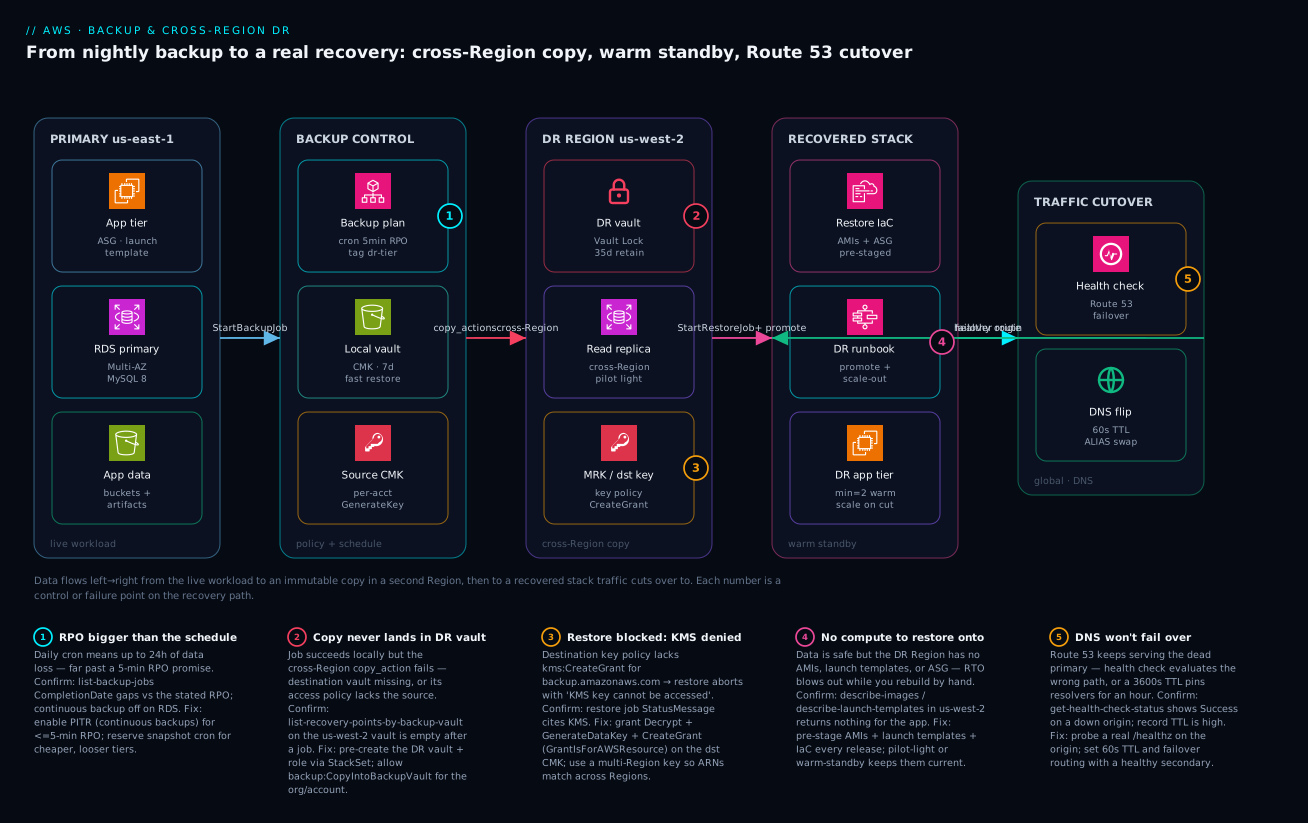
Read the diagram left to right; it traces a single recovery point from the live workload to an immutable copy in a second Region and then to a recovered stack that traffic cuts over to. On the far left, the PRIMARY (us-east-1) zone holds the live workload — an EC2 app tier behind an Auto Scaling group, an RDS Multi-AZ primary, and the S3 buckets and artifacts. The BACKUP CONTROL zone is the AWS Backup policy plane: a backup plan (cron schedule, tag-targeted to dr-tier), the local vault encrypted by a source CMK, and that customer-managed key. From there a copy_action ships the recovery point cross-Region into the DR REGION (us-west-2) zone, where it lands in a Vault-Locked DR vault, alongside a cross-Region RDS read replica (the warm data tier) and the destination multi-Region key. When disaster strikes, the RECOVERED STACK zone takes over: restore-IaC stands up pre-staged AMIs and launch templates, a Step Functions DR runbook promotes the replica and scales out, and the DR app tier comes up warm. Finally the TRAFFIC CUTOVER zone flips the world: a Route 53 health check on the primary origin fails, and DNS flips (60-second TTL, ALIAS swap) to the healthy DR stack.
The numbered badges mark the five places this path most often breaks, and the legend narrates each as symptom · how to confirm · fix: an RPO promise bigger than the actual schedule (badge 1), a cross-Region copy that never lands because the destination vault or its access policy is missing (badge 2), a restore blocked because the destination KMS key denies the grant (badge 3), a recovery that has data but no compute to land on (badge 4), and a DNS layer that won’t fail over because the health check probes the wrong path or a high TTL pins resolvers to the dead Region (badge 5). The lesson the diagram encodes: data safely copied is necessary but not sufficient — the target (compute, keys, DNS) has to exist and be correct before the disaster, or your RTO blows out exactly when it matters.
Real-world scenario
MediCloud runs a patient-portal SaaS: a stateless app tier on EC2 (Auto Scaling, behind an ALB) in us-east-1, an RDS for PostgreSQL Multi-AZ database (900 GB), patient documents in S3, and session state in DynamoDB. They are HIPAA-regulated, with a contractual RTO of 1 hour and RPO of 15 minutes, and a board mandate for ransomware-immutable backups. Their pre-incident “DR plan”: a nightly pg_dump to S3 and a belief that S3’s durability equalled disaster recovery. Monthly AWS spend was about ₹6,80,000.
The incident was a multi-hour control-plane degradation in us-east-1 — the database was reachable intermittently, new EC2 launches failed, and the console was flaky. The on-call engineer’s first move was to “restore the latest backup” — which surfaced three compounding failures. First, the latest usable backup was the nightly dump from 02:00; it was now 14:30, so they faced 12.5 hours of data loss against a 15-minute RPO. Second, restoring a 900 GB Postgres dump into a fresh instance took ~4 hours — four times the 1-hour RTO — because it was a logical restore, not a snapshot. Third, even with data, the app tier could not come up in another Region: there were no AMIs, no launch template, and no security-group/IAM definitions for us-west-2. The “DR plan” was, in practice, nonexistent. The incident ran nine hours; the regulator was notified.
The rebuild took the patterns in this article. The team set the agreed target explicitly — RTO 1 h, RPO 15 min — and derived a Warm Standby pattern. They turned on RDS automated backups (PITR, 5-min RPO floor) and stood up a cross-Region read replica in us-west-2 (seconds of lag). They built an AWS Backup plan, tag-targeted to dr-tier=critical, with a cross-Region copy action into a DR vault in us-west-2 in a separate, isolated DR account, and locked that vault in compliance mode (35-day minimum, 3-day cooling-off) for ransomware immutability. Crucially they put the whole app tier in Terraform, pre-staging AMIs and launch templates in us-west-2 and running a small warm ASG (min=2). They wrote a Step Functions runbook to promote the replica, scale the ASG, and re-point config, and configured Route 53 failover with a 60-second TTL and a health check on /healthz.
Two failures showed up during the first game day — which is the entire point of testing. The first cross-Region restore test failed with “KMS key cannot be accessed”: the destination key policy lacked kms:CreateGrant for backup.amazonaws.com. They switched to a multi-Region key and added the grant. The second: the Route 53 health check was probing / (which returned 200 from a static page even when the API was down), so DNS would not have failed over on a real API outage — they re-pointed it at /healthz, which checks the database connection. After fixes, a full game day measured RTO 22 minutes (replica promote ~90 s, ASG scale-out ~6 min, DNS propagation ~60 s, validation buffer) and RPO under 1 minute. Steady-state DR cost rose to about ₹9,40,000/month (the warm replica, the small DR ASG, cross-Region transfer, the locked vault) — roughly 1.4× — which the board approved instantly against the prior nine-hour, regulator-notifying outage. The lesson on the wall: “A backup is a hypothesis until you’ve restored it. Test the restore, or the outage tests it for you.”
The incident as a timeline, because the order of discovery is the lesson:
| Time | Symptom | Action taken | Effect | What it should have been |
|---|---|---|---|---|
| 14:30 | us-east-1 degraded; launches failing | “Restore the latest backup” | Latest = 02:00 dump | PITR replica ready to promote |
| 14:45 | 12.5 h data loss realized | Accept the nightly dump | RPO blown 50× | 5-min PITR / replica lag |
| 15:00 | Restore started | Logical 900 GB restore | ~4 h ETA, RTO blown 4× | Promote replica in ~90 s |
| 16:30 | Need app tier in DR | No AMIs/LTs/SGs exist | Rebuild by hand | Pre-staged IaC + warm ASG |
| +rebuild | Game day #1 | Cross-Region restore test | “KMS cannot be accessed” | MRK + CreateGrant grant |
| +rebuild | Game day #1 | DNS failover test | HC on / wouldn’t flip |
HC on /healthz |
| +rebuild | Game day #2 | Full failover rehearsal | RTO 22 min, RPO <1 min | The actual, proven DR |
Advantages and disadvantages
AWS Backup plus cross-Region/account DR is the right model for most regulated, multi-service estates — but it has real costs and sharp edges. Weigh it honestly:
| Advantages (why this model helps you) | Disadvantages (why it bites) |
|---|---|
| One policy plane across EC2/EBS/RDS/Aurora/DynamoDB/EFS/FSx/S3 — no per-service backup glue | The control plane abstracts native quirks; you still must know each service’s RPO floor and restore behaviour |
| Cross-Region and cross-account copy gives a true air gap against Region outage and account compromise | Cross-Region copy adds storage and data-transfer cost; it is not free insurance |
| Vault Lock (compliance) makes recovery points genuinely immutable — real ransomware protection | A bad retention value under a compliance lock is irreversible and bills forever |
| Tag-based selection auto-protects new resources — no plan edit per resource | A missing tag silently drops a critical resource from every plan |
| Restore testing + game days turn theoretical RTO/RPO into measured numbers | DR testing is operationally heavy and chronically neglected — most teams never do it |
| Continuous backups (PITR) deliver ~5-min RPO without bespoke replication | Snapshot-only/nightly patterns lose in-flight transactions; replica promotion still loses lag-window writes |
| Native Route 53 failover automates the traffic cutover | A high TTL or a health check on the wrong path silently defeats failover |
| Centralized monitoring shows backup/copy job state org-wide | Without alerting on COPY_JOB_FAILED, a silently failing copy leaves you with no DR copy |
The model fits revenue-critical and regulated workloads that need provable recovery and immutability. It is over-built for an internal tool that can tolerate a day down (use simple Backup & Restore, skip the warm standby) and under-built if you stop at “we have backups” and never stage compute or test a restore. The disadvantages are all manageable — but only if you know they exist, which is the point of this article.
Hands-on lab
Stand up a minimal but real cross-Region backup: create a KMS key, two vaults (primary + DR Region), a backup plan with a cross-Region copy action, back up an EBS volume, watch the copy land in the DR Region, then restore it. Free-tier-friendly where possible (a tiny EBS volume + a few snapshots cost a few rupees); we delete everything at the end. Run in CloudShell or any shell with the CLI configured.
Step 1 — Variables.
PRIMARY=us-east-1
DR=us-west-2
ACCT=$(aws sts get-caller-identity --query Account --output text)
Step 2 — A customer-managed KMS key in the primary Region.
KEY_ID=$(aws kms create-key --region $PRIMARY \
  --description "lab-backup-key" --query KeyMetadata.KeyId --output text)
echo "Key: $KEY_ID"
Expected: a key UUID printed.
Step 3 — A vault in each Region. (The DR vault must exist before any copy.)
aws backup create-backup-vault --region $PRIMARY \
  --backup-vault-name lab-local-vault \
  --encryption-key-arn arn:aws:kms:$PRIMARY:$ACCT:key/$KEY_ID

# DR vault — use an AWS-managed key here for lab simplicity
aws backup create-backup-vault --region $DR \
  --backup-vault-name lab-dr-vault
Step 4 — A tiny EBS volume to protect, tagged for selection.
AZ=${PRIMARY}a
VOL=$(aws ec2 create-volume --region $PRIMARY --availability-zone $AZ \
  --size 1 --volume-type gp3 \
  --tag-specifications 'ResourceType=volume,Tags=[{Key=dr-tier,Value=lab}]' \
  --query VolumeId --output text)
echo "Volume: $VOL"
Step 5 — A backup plan with a cross-Region copy action.
PLAN_ID=$(aws backup create-backup-plan --region $PRIMARY --backup-plan '{
  "BackupPlanName": "lab-dr-plan",
  "Rules": [{
    "RuleName": "hourly-copy",
    "TargetBackupVaultName": "lab-local-vault",
    "ScheduleExpression": "cron(0 * * * ? *)",
    "StartWindowMinutes": 60,
    "CompletionWindowMinutes": 120,
    "Lifecycle": { "DeleteAfterDays": 7 },
    "CopyActions": [{
      "DestinationBackupVaultArn": "arn:aws:backup:'$DR':'$ACCT':backup-vault:lab-dr-vault",
      "Lifecycle": { "DeleteAfterDays": 7 }
    }]
  }]
}' --query BackupPlanId --output text)
echo "Plan: $PLAN_ID"
Step 6 — Don’t wait for the cron; trigger an on-demand backup now (it honors the rule’s copy).
aws backup start-backup-job --region $PRIMARY \
  --backup-vault-name lab-local-vault \
  --resource-arn arn:aws:ec2:$PRIMARY:$ACCT:volume/$VOL \
  --iam-role-arn arn:aws:iam::$ACCT:role/service-role/AWSBackupDefaultServiceRole
(If that role doesn’t exist, create the default service role via the AWS Backup console once, or attach AWSBackupServiceRolePolicyForBackup to a role.)
Step 7 — Watch the backup, then the copy job.
# Backup job state (COMPLETED expected in a few minutes)
aws backup list-backup-jobs --region $PRIMARY \
  --query "BackupJobs[?contains(ResourceArn, '$VOL')].{state:State, pct:PercentDone}" --output table

# Copy job into the DR Region
aws backup list-copy-jobs --region $PRIMARY \
  --query "CopyJobs[].{state:State, dest:DestinationBackupVaultArn}" --output table
Step 8 — Confirm the recovery point landed in the DR Region.
aws backup list-recovery-points-by-backup-vault --region $DR \
  --backup-vault-name lab-dr-vault \
  --query "RecoveryPoints[].{arn:RecoveryPointArn, status:Status}" --output table
Expected: at least one recovery point with Status=COMPLETED — that is your cross-Region DR copy.
Step 9 — Restore it in the DR Region (creates a new EBS volume there).
RP_ARN=$(aws backup list-recovery-points-by-backup-vault --region $DR \
  --backup-vault-name lab-dr-vault --query "RecoveryPoints[0].RecoveryPointArn" --output text)

aws backup start-restore-job --region $DR \
  --recovery-point-arn "$RP_ARN" \
  --iam-role-arn arn:aws:iam::$ACCT:role/service-role/AWSBackupDefaultServiceRole \
  --metadata '{"availabilityZone":"'${DR}a'","volumeType":"gp3"}' \
  --resource-type EBS
What each lab step proves:
| Step | What you did | What it proves | Real-world analogue |
|---|---|---|---|
| 3 | DR vault before any copy | The destination must pre-exist | The #1 cross-Region prerequisite |
| 5 | Plan with CopyActions |
Copy is a property of the rule | Production DR plan |
| 7–8 | Watched copy land in DR | A copy job is separate and can fail alone | Why you alert on COPY_JOB_FAILED |
| 9 | Restored in the DR Region | The copy is actually usable | The restore test you must run |
Cleanup (avoid lingering charges).
aws backup delete-backup-plan --region $PRIMARY --backup-plan-id $PLAN_ID
aws ec2 delete-volume --region $PRIMARY --volume-id $VOL
# Delete recovery points before deleting vaults (omit if Vault Lock is on)
aws kms schedule-key-deletion --region $PRIMARY --key-id $KEY_ID --pending-window-in-days 7
# Then delete both vaults once empty, and any restored DR volume
Cost note. A 1 GB gp3 volume plus a couple of snapshots and a cross-Region copy is well under ₹100 for the hour; deleting the resources stops everything. The KMS key has a tiny monthly charge until its scheduled deletion completes.
Common mistakes & troubleshooting
This is the playbook — the part you bookmark. First as a scannable table for 02:14, then the high-bite entries expanded with the exact confirm command and fix.
| # | Symptom | Root cause | Confirm (exact cmd / console path) | Fix |
|---|---|---|---|---|
| 1 | Promised 5-min RPO, but recovery is hours old | Nightly snapshot schedule, no PITR | describe-db-instances shows BackupRetentionPeriod/no continuous; backup-job gaps |
Enable RDS automated backups (PITR) / EnableContinuousBackup; reserve cron for loose tiers |
| 2 | Cross-Region copy never appears in DR vault | DR vault missing, or access policy/role lacks copy perms | list-copy-jobs shows FAILED; list-recovery-points-by-backup-vault (DR) empty |
Pre-create DR vault; allow backup:CopyIntoBackupVault; fix copy IAM role |
| 3 | Restore aborts “KMS key cannot be accessed” | Destination key policy lacks kms:CreateGrant for the service |
Restore job StatusMessage cites KMS |
Add Decrypt+GenerateDataKey+CreateGrant (GrantIsForAWSResource) for backup.amazonaws.com; use an MRK |
| 4 | Data recovered, but nothing to run it on | No AMIs/launch templates/SGs/IAM in DR Region | describe-images/describe-launch-templates in DR empty |
Pre-stage AMIs + LTs + IaC every release (Pilot Light / Warm Standby) |
| 5 | DNS keeps serving the dead Region | High TTL, or health check on wrong path | get-health-check-status Success on a down origin; record TTL high |
TTL 60 s; failover routing; probe /healthz, not / |
| 6 | Restore much slower than expected | Recovery point in cold storage (rehydrate) | Recovery point StorageClass=COLD/Glacier; restore time long |
Keep DR-tier points warm; only archive long-retention/compliance copies |
| 7 | Backup job canceled, never ran | Start window too short for the schedule | list-backup-jobs State=ABORTED/EXPIRED; reason “window” |
Widen StartWindowMinutes/CompletionWindowMinutes |
| 8 | Promoted replica then couldn’t undo it | Promotion is irreversible (breaks replication) | Replica now a standalone writer | In tests promote a copy; in real DR it’s intended |
| 9 | Compliance-locked vault billing forever | Indefinite retention + compliance lock | describe-backup-vault Locked, no expiry on RPs |
Never combine “Always” retention with a compliance lock; set finite retention |
| 10 | Critical resource silently not backed up | Missing dr-tier tag; selection by tag |
list-protected-resources doesn’t include it |
Config rule to flag untagged criticals; add the tag |
| 11 | Cross-account copy denied | Destination vault access policy missing PrincipalOrgID/account |
Copy job FAILED “access denied”; DR vault RPs empty | put-backup-vault-access-policy allowing the source org/account |
| 12 | Lost in-flight transactions on failover | Async replication lag at the moment of failure | Replica ReplicaLag > 0 at cutover |
Aurora Global (sync-ish) for tighter RPO; accept lag-window loss otherwise |
| 13 | Failover “worked” but app errored | DR config still points at primary endpoints | App logs show primary DB/endpoint; SSM params stale | Maintain DR-Region SSM/Secrets values; re-point in the runbook |
| 14 | Game day passes, real outage fails | Tested restore but not the full failover path | Only restore tested; DNS/compute/identity untested | Rehearse the whole runbook end to end, not just the restore |
The expanded form for the entries that bite hardest:
1. The RPO promise is bigger than the schedule.
Root cause: a nightly (or hourly) snapshot cron can never beat its own interval — promising 5-minute RPO on a daily schedule is a contradiction.
Confirm: aws backup list-backup-jobs shows ~24 h between completions; aws rds describe-db-instances --query "DBInstances[].BackupRetentionPeriod" is the PITR window (0 means automated backups off).
Fix: enable RDS/Aurora automated backups (continuous, ~5-min RPO) or DynamoDB PITR; reserve scheduled snapshots for cheaper, looser-RPO tiers. Match the mechanism to the RPO floor table above.
2. The cross-Region copy never lands.
Root cause: the backup succeeds locally but the copy_action fails — the destination vault doesn’t exist, its access policy doesn’t allow the copy, or the copy IAM role lacks permission. A backup job COMPLETED is not proof a DR copy exists.
Confirm: aws backup list-copy-jobs --query "CopyJobs[?State=='FAILED']"; aws backup list-recovery-points-by-backup-vault --backup-vault-name <dr-vault> --region <dr> returns empty after a run.
Fix: pre-create the DR vault (StackSet/Terraform); put-backup-vault-access-policy allowing backup:CopyIntoBackupVault; ensure the role has copy permissions. Alert on COPY_JOB_FAILED via SNS — a silent copy failure leaves you with no DR copy at all.
3. Restore aborts “KMS key cannot be accessed.”
Root cause: the destination key policy doesn’t let AWS Backup create the grant it needs to decrypt/re-encrypt during a cross-Region/account restore.
Confirm: the restore job’s StatusMessage/AbortReason cites KMS.
Fix: on the destination CMK, allow kms:Decrypt, kms:GenerateDataKey, and kms:CreateGrant (with kms:GrantIsForAWSResource=true) for backup.amazonaws.com; prefer a multi-Region key so the ARN is consistent and you avoid re-encrypt mismatches.
4. Data recovered, nothing to run it on.
Root cause: the recovery point is fine, but the DR Region has no AMIs, launch templates, security groups, or IAM roles for the workload — so RTO blows out while you rebuild compute by hand.
Confirm: aws ec2 describe-images --owners self --region <dr> and aws ec2 describe-launch-templates --region <dr> return nothing for the app.
Fix: pre-stage AMIs + launch templates + the full IaC (VPC/subnets/SGs/roles) on every release — this is the difference between Backup & Restore (slow) and Pilot Light/Warm Standby (fast). Data without a target is not recoverable in your RTO.
5. DNS won’t fail over.
Root cause: Route 53 keeps serving the dead primary — the health check passes against the wrong path (/ returns 200 from a static page even when the API is down), or a high record TTL pins resolvers to the dead Region for the TTL window.
Confirm: aws route53 get-health-check-status shows Success on a down origin; the record TTL is large (e.g. 3,600).
Fix: set a 60-second TTL, use failover routing, and probe a real readiness path (/healthz that checks the DB), so an unhealthy origin actually flips traffic.
Proving recovery: restore testing and game days
An untested restore is a hypothesis. AWS Backup restore testing runs scheduled restores from a selection of recovery points into an isolated environment and (optionally) runs a validation; a game day rehearses the full human runbook. Configure restore testing so it picks recent points, restores them, and reports pass/fail:
aws backup create-restore-testing-plan --restore-testing-plan '{
  "RestoreTestingPlanName": "weekly-dr-validation",
  "ScheduleExpression": "cron(0 6 ? * MON *)",
  "RecoveryPointSelection": {
    "Algorithm": "LATEST_WITHIN_WINDOW",
    "RecoveryPointTypes": ["CONTINUOUS", "SNAPSHOT"],
    "SelectionWindowDays": 7,
    "IncludeVaults": ["arn:aws:backup:us-west-2:111122223333:backup-vault:dr-vault"]
  }
}' --region us-west-2
What restore testing covers — and, crucially, what it does not, so you don’t mistake a green restore test for proven DR:
| Validates | Restore testing | Full game day |
|---|---|---|
| Recovery point is restorable | Yes | Yes |
| KMS/grant path works | Yes (restore runs) | Yes |
| Measured restore time (data RTO) | Yes | Yes |
| Compute provisioning in DR | No | Yes |
| Replica promotion / DB failover | No | Yes |
| Route 53 DNS cutover | No | Yes |
| App config re-pointing (SSM/Secrets) | No | Yes |
| End-to-end synthetic user success | No | Yes |
| Human runbook under time pressure | No | Yes |
The cadence and ownership that keep DR honest:
| Activity | Frequency | Owner | Output |
|---|---|---|---|
| Restore testing (automated) | Weekly | Platform | Pass/fail + measured restore time |
| Backup/copy job alert review | Continuous | SRE | No silent backup/copy failures |
| DR game day (full failover) | Twice a year | SRE + app | Measured RTO/RPO + gap list |
| Runbook review/update | After each game day | SRE | Current, accurate runbook |
| RTO/RPO target review | Annually / on workload change | Business + platform | Re-validated targets |
Best practices
- Set RTO/RPO with the business first, per workload. Derive the pattern and schedule from the target; never pick a backup frequency and back into an RPO. Document the agreed numbers where the on-call can see them.
- Store backups in a separate account and Region from production. Cross-Region survives a Region event; cross-account survives a compromise. Real DR needs both — a vault in an isolated DR account in a different Region.
- Lock the DR vault with Vault Lock (compliance) for ransomware/regulatory immutability — with a multi-day cooling-off window, and never combine indefinite retention with a compliance lock.
- Match the mechanism to the RPO floor. Sub-5-minute RPO means continuous backups (PITR) or replication, not more frequent snapshots. Multi-AZ is HA, not DR — add cross-Region for the Region failure.
- Pre-stage the compute target every release. AMIs, launch templates, VPC/subnets/SGs/IAM roles in the DR Region, managed by IaC. “Data was safe but there was nothing to restore onto” is the most common DR failure.
- Automate the failover runbook (Step Functions / SSM): promote, scale, re-point config, flip DNS, validate, communicate. Manual DNS cutovers fail under pressure.
- Use Route 53 failover with a 60-second TTL and a real health-check path. Probe readiness (
/healthzchecking the DB), not/. - Test restores, not just backups. Schedule AWS Backup restore testing and run DR game days at least twice a year — measure RTO/RPO from a real restore, not a slide.
- Alert on the leading indicators, not just “site down”:
BACKUP_JOB_FAILED,COPY_JOB_FAILED,RESTORE_JOB_FAILED, replicaReplicaLag, and Route 53 health-check status. A silent copy failure is invisible until the disaster. - Manage backup policy and DR infra as code (Terraform/CloudFormation), reviewed in PRs — a hand-edited plan or a forgotten tag is a silent gap.
- Keep DR-tier recovery points warm; archive only long-retention/compliance copies to cold. Cold-storage rehydrate time can blow your RTO; cold storage also carries a 90-day minimum retention.
- Tag-target backup selection and enforce the tag. Use a Config rule/SCP so a missing
dr-tiertag can’t silently drop a critical resource from every plan.
The alerts worth wiring before the next incident — leading indicators, not the lagging “site down”:
| Alert on | Signal / event | Threshold (starting point) | Why it’s leading |
|---|---|---|---|
| Backup failed | BACKUP_JOB_FAILED (SNS) |
Any | No new recovery point this cycle |
| Copy failed | COPY_JOB_FAILED (SNS) |
Any | No DR copy — invisible until disaster |
| Restore-test failed | RESTORE_JOB_FAILED (SNS) |
Any | Your recovery is unproven/broken |
| Replica lag | RDS/Aurora ReplicaLag |
> your RPO seconds | Predicts data loss at failover |
| Health-check status | Route 53 HC | Unhealthy 3 intervals | Failover trigger; catch a flapping origin |
| PITR window shrank | BackupRetentionPeriod |
< target days | RPO/restore window quietly reduced |
Security notes
- Least-privilege backup and restore roles. The AWS Backup service role should have only the managed backup/restore policies it needs; restore is a powerful action (it can recreate data and resources) — scope who can call
start-restore-job. - Air-gap the backups. Cross-account + cross-Region + Vault Lock (compliance) is the ransomware control: a compromised production credential cannot reach, encrypt, or delete recovery points in an isolated DR account, and compliance mode blocks deletion even by root.
- Encrypt with customer-managed KMS keys, not the AWS-managed
aws/backupkey — CMKs let you control key policy for cross-account/Region access and audit usage; use multi-Region keys for clean cross-Region restores. - Lock down vault access policies. Allow only
backup:CopyIntoBackupVaultfrom your org/account on a receiving vault; denyDelete*broadly; never leave a vault policy that lets arbitrary principals remove recovery points. - Protect the DR account itself with strong root protections (hardware MFA, no standing access), SCPs denying
backup:DeleteRecoveryPoint/backup:DeleteBackupVault, and break-glass-only human access. - Don’t replicate deletes blindly. For S3 backup targets, be deliberate about delete-marker replication — you usually want the backup to retain objects the source deletes, not propagate the deletion.
- Secure the failover path. The Route 53 health-check endpoint should not leak internal topology; the DR runbook (Step Functions/SSM) should run under a tightly scoped role; SSM/Secrets values for the DR Region must be encrypted and access-controlled.
The security controls that also improve recovery — secure and resilient pull the same direction here:
| Control | Mechanism | Secures against | Also prevents |
|---|---|---|---|
| Vault Lock (compliance) | put-backup-vault-lock-configuration |
Ransomware/accidental backup deletion | A rushed admin deleting the only copy |
| Cross-account DR vault | Separate AWS account + RAM/policy | Account compromise reaching backups | Blast-radius of a bad root credential |
| CMK + key policy | Customer-managed KMS + grants | Unauthorized decrypt of recovery points | Cross-Region restore “KMS denied” (if granted right) |
| Vault access policy | CopyIntoBackupVault only, deny Delete* |
Rogue principals removing recovery points | Misconfigured copies landing nowhere |
| Least-priv restore role | Scoped IAM for start-restore-job |
Unauthorized data recreation | Accidental restores overwriting prod |
| SCP on DR account | Deny Delete* backup/vault APIs |
Insider/compromise deleting DR | Fat-finger vault deletion |
Cost & sizing
The bill drivers and how they interact with the pattern you chose:
- DR pattern dominates steady-state cost. Backup & Restore is ~1× (storage only); Pilot Light ~2–3×; Warm Standby ~4–6×; Active/Active ~8–12×. The cheapest correct choice is the least pattern that meets the agreed RTO/RPO — over-building a warm standby for a back-office tool is pure waste.
- Backup storage is per-GB-month, split warm vs cold: warm is pricier but instantly restorable; cold (after the lifecycle transition) is cheap but carries a 90-day minimum retention and a rehydrate delay. Put DR-tier points in warm; archive only long-retention/compliance copies to cold.
- Cross-Region data transfer is per-GB on every copy — for a large, frequently-changing dataset this is a real line item; incremental snapshots keep it bounded, but a chatty change rate inflates it.
- A cross-Region read replica / warm ASG is an always-on instance cost — the price of a low RTO. Size the warm tier to the minimum that meets RTO after scale-out, not to production scale.
- KMS adds a small per-key monthly charge plus per-request costs (multi-Region keys count per Region); negligible next to storage/transfer but real at scale.
- Restore testing runs real restores on a schedule — small recurring storage/compute, far cheaper than discovering a broken restore during an outage.
A rough monthly picture for the MediCloud-style workload (900 GB DB + documents): Backup & Restore might be ₹40,000–80,000 (storage + transfer), Warm Standby ₹2,00,000–4,00,000 (replica + small DR ASG + transfer + locked vault) on top of production. MediCloud landed at ~1.4× production after choosing the least pattern that met a 1-hour RTO — proof the lever is the pattern, not raw backup spend. The cost drivers and what each buys:
| Cost driver | What you pay for | Rough INR / month | What it buys | Watch-out |
|---|---|---|---|---|
| Warm backup storage | Per-GB instantly-restorable | Scales with data × retention | Fast RTO from warm points | Don’t keep everything warm |
| Cold backup storage | Per-GB archived | ~⅕ of warm | Cheap long retention | 90-day min; rehydrate delay |
| Cross-Region transfer | Per-GB on each copy | Scales with change rate | Region-failure survival | Chatty data inflates it |
| Cross-Region read replica | Always-on DR DB instance | Instance price | Seconds RPO, minutes RTO | Idle cost; size for post-scale |
| Warm DR ASG (Warm Standby) | Small always-on compute | Min-size instance cost | Minutes RTO | Drift vs primary |
| KMS (CMK / MRK) | Per-key + per-request | Small | Cross-acct/Region control | MRK counts per Region |
| Restore testing | Scheduled restores | Small recurring | Proven recovery | Worth every paisa |
Interview & exam questions
1. What’s the difference between RTO and RPO, and why set them before designing DR? RTO is the maximum tolerable time to restore service; RPO is the maximum tolerable data loss, in time. You set them with the business first because they bound everything downstream — RPO dictates backup frequency/replication mode (5-min RPO forbids nightly snapshots), and RTO dictates the DR pattern (a 1-hour RTO forbids a 4-hour cold rehydrate). Designing backups first and discovering your RTO/RPO is backwards.
2. A team backs up RDS nightly to S3 and calls it DR. What’s wrong? Several things: nightly backups give a ~24-hour RPO (not DR-grade for most workloads); a logical restore of a large DB is slow (RTO blowout); and a backup is only the data — DR also needs compute (AMIs/launch templates), network/identity, and DNS failover in the recovery Region, none of which a nightly dump provides. Backups protect against data loss; DR protects against loss of service.
3. Compare the four DR patterns by RTO/RPO and cost. Backup & Restore — nothing running in DR, RTO hours, RPO hours, lowest cost. Pilot Light — data replicating, compute off, RTO tens of minutes, RPO seconds-minutes, low cost. Warm Standby — scaled-down full stack running, RTO minutes, RPO seconds, medium cost. Active/Active — full stack serving traffic in both Regions, RTO/RPO near-zero, highest cost. Choose the cheapest that meets the agreed targets.
4. What does an AWS Backup copy action do, and what must exist for a cross-Region copy to succeed? A copy action pushes a recovery point to another vault, Region, or account. For cross-Region it needs: the destination vault pre-created; the destination KMS key policy allowing AWS Backup to create a grant (kms:CreateGrant for backup.amazonaws.com); and for cross-account, the destination vault access policy allowing backup:CopyIntoBackupVault from the source. A backup completing locally does not mean the copy landed — alert on COPY_JOB_FAILED.
5. Difference between AWS Backup Vault Lock governance and compliance mode? Governance prevents deletes/changes except by sufficiently privileged IAM principals — a guardrail, but removable. Compliance is absolute and irreversible after a mandatory cooling-off period: no one, including the account root and AWS, can delete recovery points or shorten retention until they expire. Use compliance for regulatory WORM and ransomware air gaps — but never with indefinite retention, or recovery points bill forever.
6. A cross-Region restore fails with “KMS key cannot be accessed.” Cause and fix? The destination KMS key policy doesn’t permit AWS Backup to create the grant it needs to decrypt/re-encrypt during restore. Fix by adding kms:Decrypt, kms:GenerateDataKey, and kms:CreateGrant (with kms:GrantIsForAWSResource=true) for backup.amazonaws.com on the destination key — and prefer a multi-Region key so the ARN is consistent across Regions.
7. How do you achieve a sub-5-minute RPO for an RDS database in a DR Region? Enable continuous backups (PITR) for in-Region point-in-time recovery, and stand up a cross-Region read replica for the DR data tier — replica lag is typically seconds, and you promote it on failover. For the tightest RPO (~1 second) and managed cross-Region failover, use Aurora Global Database. Nightly snapshots cannot meet a 5-minute RPO regardless of how you schedule them.
8. Why is Multi-AZ not a DR solution? Multi-AZ provides synchronous replication to a standby in another Availability Zone within the same Region — it survives an AZ failure with RPO 0, but a Region-wide event takes both the primary and the standby. DR requires a copy/replica in a different Region. Use Multi-AZ for the common AZ failure and cross-Region replication/copy for the rare Region failure; they are complementary, not alternatives.
9. You promote a cross-Region read replica during a DR test and can’t undo it. Why, and what should you do in tests? Promotion makes the replica a standalone writable primary and breaks replication — it’s irreversible. In a real failover that’s exactly what you want. In a test, promote a copy (or restore a snapshot to a throwaway instance) so you don’t sever your live replication chain.
10. Route 53 is configured for failover but DNS keeps serving the dead Region. What are the two most likely causes? Either the record TTL is too high, so resolvers cache the dead endpoint for the TTL window; or the health check probes the wrong path (e.g. / returns 200 from a static page even when the API is down), so Route 53 never marks the primary unhealthy. Fix with a 60-second TTL and a health check on a real readiness path (/healthz) that fails when the app truly can’t serve.
11. What’s the danger of combining indefinite retention with a compliance-mode Vault Lock? Compliance mode makes recovery points undeletable until they expire — and indefinite retention means they never expire. The result is recovery points that bill forever and that no one, including root, can delete. Always use finite retention under a compliance lock, and verify the configuration during the mandatory cooling-off window.
12. How do you prove your DR works, and how often? Run AWS Backup restore testing (scheduled, validated restores into an isolated environment) plus DR game days that rehearse the full human runbook — promote, scale, re-point, flip DNS, validate. Do it at least twice a year, and treat the measured RTO/RPO as the real numbers. An untested restore is a hypothesis; the most common reason recoveries fail is that they were never tested.
These map to AWS Certified Solutions Architect – Associate (SAA-C03) — design resilient architectures (backup/restore, multi-Region, RTO/RPO) — and Solutions Architect – Professional (SAP-C02) — design for business continuity and DR (the four patterns, cross-account/Region, failover orchestration). The data-durability and immutability angle touches AWS Certified Security – Specialty. A compact cert-mapping for revision:
| Question theme | Primary cert | Exam domain |
|---|---|---|
| RTO/RPO, DR patterns | SAA-C03 / SAP-C02 | Design resilient / BC-DR architectures |
| AWS Backup plans, copy actions | SAA-C03 | Resilient, decoupled, backup architectures |
| Vault Lock, immutability, KMS | Security Specialty | Data protection; key management |
| Cross-Region replica / Aurora Global | SAP-C02 | Continuity; advanced data strategies |
| Route 53 failover, runbook automation | SAP-C02 | Failover orchestration; resilience |
| Cross-account air gap | Security Specialty / SAP-C02 | Account isolation; data protection |
Quick check
- Your contract says RPO 15 minutes, but your only backup is a nightly snapshot. What’s the gap, and what mechanism actually meets the target?
- An AWS Backup job shows COMPLETED, but the DR Region’s vault is empty. What single thing should you check, and what alert prevents this surprising you?
- True or false: AWS Backup Vault Lock in compliance mode can be removed by the account root in an emergency.
- A cross-Region restore aborts with “KMS key cannot be accessed.” Name the specific permission to add and on which key.
- Route 53 failover is configured but traffic never leaves the dead Region. Name the two most likely misconfigurations.
Answers
- A nightly snapshot has a ~24-hour RPO — it misses a 15-minute target by ~96×. The mechanism that meets it is continuous backups (PITR) for RDS/Aurora/DynamoDB and/or a cross-Region read replica (seconds of lag, promoted on failover); for ~1-second RPO use Aurora Global Database. No snapshot schedule can meet 15 minutes.
- Check the copy job —
aws backup list-copy-jobsfor aFAILEDstate — because a backup completing locally does not mean the copy landed; the destination vault may be missing or its access policy/KMS grant may be wrong. Wire an SNS alert onCOPY_JOB_FAILEDso a silent copy failure (which leaves you with no DR copy) pages you instead of surprising you during a disaster. - False. In compliance mode, after the cooling-off period no one — including the account root and AWS — can delete recovery points or shorten retention until they expire. That irreversibility is the point (ransomware/regulatory WORM), and it’s why you must verify the config during the cooling-off window.
- Add
kms:CreateGrant(withkms:GrantIsForAWSResource=true), along withkms:Decryptandkms:GenerateDataKey, for thebackup.amazonaws.comservice principal on the destination KMS key’s policy. Prefer a multi-Region key so the ARN lines up across Regions. - Either the record TTL is too high (resolvers cache the dead endpoint for the TTL window) or the health check probes the wrong path (e.g.
/, which can return 200 while the API is down). Fix with a 60-second TTL, failover routing, and a health check on a real readiness path (/healthz).
Glossary
- RTO (Recovery Time Objective) — the maximum tolerable time to restore service after a disaster; bounds your provisioning + rehydrate time and dictates the DR pattern.
- RPO (Recovery Point Objective) — the maximum tolerable data loss, expressed in time; dictates backup frequency / replication mode.
- AWS Backup — the centralized service that schedules, encrypts, copies, retains and locks recovery points across EC2/EBS/RDS/Aurora/DynamoDB/EFS/FSx/S3 from one policy plane.
- Backup plan — the policy object: backup rules with schedules, lifecycle (cold-storage transition + expiry), retention, and copy actions.
- Backup vault — a KMS-encrypted container, in one Region and account, where recovery points land; the unit you apply Vault Lock to.
- Recovery point — a single point-in-time backup of one resource, stored in a vault, that you restore from.
- Copy action — a backup-rule property that pushes a recovery point to another vault, Region, or account (the cross-Region/account DR mechanism).
- Continuous backup / PITR (Point-In-Time Recovery) — restore to any second within a window (RDS/Aurora/DynamoDB/S3); the mechanism for sub-5-minute RPO.
- Vault Lock — immutability for a vault’s recovery points; governance mode is a removable guardrail, compliance mode is irreversible (no deletes, even by root) until expiry.
- Cross-Region read replica — a live, low-lag, promotable database replica in another Region; the data tier for Pilot Light / Warm Standby.
- Aurora Global Database — Aurora’s cross-Region replication with ~1-second RPO and managed failover; the lowest-RPO relational DR option.
- Backup & Restore / Pilot Light / Warm Standby / Active-Active — the four DR patterns, from cheapest/slowest to costliest/fastest.
- Multi-AZ — synchronous standby in another AZ of the same Region; high availability (RPO 0 for an AZ failure), not DR (does not survive a Region).
- Route 53 failover routing — DNS routing that serves a healthy endpoint based on health checks; the traffic-cutover mechanism in a failover.
- Multi-Region key (MRK) — a KMS key replicated across Regions with a consistent ARN, simplifying cross-Region restore grants.
- Restore testing — AWS Backup’s scheduled, validated restores into an isolated environment; how you prove RTO/RPO before an outage.
- DR game day — a rehearsal of the full failover runbook (promote, scale, re-point, flip DNS, validate) to measure real recovery and find gaps.
Next steps
You can now choose a DR pattern to a real RTO/RPO, build the AWS Backup plan and cross-Region/account copy chain, lock the destination, and orchestrate failover. Build outward:
- Next: Org-wide AWS Backup with Vault Lock and Cross-Account Recovery — the centralized, multi-account version: delegated admin, StackSet-bootstrapped vaults, and logically air-gapped recovery.
- Related: AWS Elastic Disaster Recovery (DRS) Cross-Region Failover — block-level, near-zero-RPO server DR for lift-and-shift workloads, an alternative to snapshot-based DR.
- Related: Aurora High Availability and Global Database — the lowest-RPO relational DR option, with managed cross-Region failover.
- Related: Automate Cross-Account RDS and EBS Snapshot Copy with AWS Backup — the snapshot-copy automation that feeds Backup & Restore and Pilot Light.
- Related: AWS S3 Storage Classes and Lifecycle — the lifecycle-to-cold-storage and Object-Lock mechanics that govern backup cost and immutability.
- Related: AWS Regions and Availability Zones Explained — the failure-domain fundamentals (AZ vs Region) that decide what Multi-AZ versus cross-Region DR each protect against.